What's inside
- Key Takeaways
- Quick Picks
- How Did We Choose These Conference Room Systems?
- Which Room System Fits Your Table? The Six Picks
- How Do the Six Room Systems Compare?
- Why Is a Room System Not Just a Bigger Webcam?
- How Should a Conference Room System Be Installed and Run?
- What Mistakes Do Conference Room Buyers Keep Making?
- How Does One Room Host Three Different Meetings?
- How Do Light and the Room’s Screen Affect the Picture?
- Final Recommendation
- How Should the Room’s Audio Be Designed Around the Camera?
- What Does a Good Hybrid Meeting Actually Require From the Camera?
- How Do You Choose by Room Size, Concretely?
- What Does Owning a Room System Involve Over Five Years?
- What Should IT and Procurement Check Before Signing?
- How Do Room Systems Serve Accessibility?
- Frequently Asked Questions
- Related Guides
As an Amazon Associate I earn from qualifying purchases. This post may contain affiliate links at no extra cost to you.
widgetverdict.com is reader-supported. When you buy through links on our site, we may earn an affiliate commission.
Where to buy: the six room systems below are sold through Amazon, each linked from the quick picks table to the listing we verified — and because these are organisational purchases, we would urge whoever signs for one to read the listing’s connection and zoom details personally before the order goes in.
A necessary correction before anything is recommended: the best webcams for video conferencing conference room use are not webcams in the sense the rest of our guides use the word. A desktop webcam is a personal appliance — it clips to one person’s monitor, frames one face at arm’s length, and its ambitions end at the edge of that desk. The six products in this guide are room systems: pan-tilt-zoom cameras built to stand at the end of a conference table and take responsibility for a dozen faces at once, with optical zoom lenses that reach the far end of the room without dissolving, remote controls and presets that let a chairperson reframe the shot without leaving their seat, motors that pan and tilt to whoever is speaking, and in some cases AI tracking and built-in speakerphones that turn the camera into the room’s entire meeting appliance. Shopping for one with a desktop webcam’s instincts — cheapest, smallest, simplest — produces a room where the far half of the table is a rumour. This guide therefore judges a different discipline: coverage, reach, control and room audio, in rooms of stated sizes.
The field divides by ambition. Logitech’s PTZ Pro 2 is the established boardroom instrument: HD 1080p, professional PTZ mechanics, and the behaviour of a product that has survived a decade of enterprise meeting rooms. NexiGo fields two challengers — the Zoom Certified N990 with its 4K sensor and Sony Starvis imaging, and a 10X optical zoom system aimed squarely at larger rooms. TONGVEO’s pair pursue the all-in-one idea: AI auto-tracking systems that follow a presenter, one at 1080p60 with optical zoom and HDMI, one at 4K with gesture control and a speakerphone in the same body. And Vunvooker’s 20X optical zoom flagship is a different species again — a broadcast-flavoured PTZ with IP streaming and RS232/RS485 control, built for halls, houses of worship and lecture spaces as much as for boardrooms. Six systems, three room sizes, one rule: match the optics to the farthest chair.
Key Takeaways
- These are room systems, not desktop webcams: PTZ mechanics, optical zoom and remote control are the defining features.
- Optical zoom is the specification that matters most — it reaches the far end of the table without the detail loss of digital zoom.
- The PTZ Pro 2 is the proven enterprise choice at HD 1080p; the NexiGo N990 adds 4K and Zoom certification.
- TONGVEO’s systems automate the camera operator with AI auto-tracking; one adds a built-in speakerphone.
- The Vunvooker’s 20X optical zoom and IP/RS232 connections target large venues and installed AV, not ordinary boardrooms.
- Room audio is half the purchase: only some of these systems speak for the room, so plan the microphone story explicitly.
Quick Picks
| Pick | Badge | Why it earns its place |
|---|---|---|
| Logitech PTZ Pro 2 Conference Camera | The boardroom standard | USB HD 1080p PTZ from the most established name in conference-room video. |
| NexiGo N990 4K PTZ Conference Camera | The certified 4K challenger | Zoom Certified 4K PTZ with 5X digital zoom and a Sony Starvis sensor. |
| NexiGo PTZ 10X Conference Camera | The long-room reach | A conference-room PTZ system with 10X optical zoom, remote control and USB output. |
| TONGVEO All-in-One Conference Camera | The self-operating room | AI auto-tracking, HD 1080P at 60fps and 3X optical zoom over USB3.0 and HDMI. |
| TONGVEO 4K Conference Camera | The gesture-controlled hub | 4K AI auto-tracking PTZ with gesture control, 5X digital zoom and a speakerphone built in. |
| Vunvooker 4K Conference Room Camera | The venue flagship | 20X optical zoom with IP, USB3.0, HDMI and RS232/RS485 control for large spaces. |
How Did We Choose These Conference Room Systems?
We started where a facilities manager starts: with the room. Every judgement in this guide is indexed to room size and table length, because a PTZ camera’s virtues are geometric before they are electronic. Optical zoom was weighted first — the honest way to make a face at the far end of a table large and legible — and digital zoom was treated as the lesser tool it is, useful for trimming a frame rather than reaching across a room. PTZ mechanics were weighted second: the range and smoothness of pan and tilt, the availability of presets and a remote, because a room system is operated by whoever is chairing, mid-sentence, and any friction in that operation is paid in meeting time.
Third came the automation question, which splits this field philosophically. Logitech and the NexiGo 10X trust a human operator with a remote; the TONGVEO systems and, in its domain, the Vunvooker’s installed setups trust tracking software and preset scenes. Neither philosophy is superior in the abstract — a chaired board meeting and a roaming lecturer are different productions — so we scored each system inside its philosophy rather than against the other’s. Fourth came connections, the unglamorous determinant of whether a system survives installation: USB for the laptop-driven room, HDMI for direct display and capture, IP and serial control for installed AV. A camera that cannot plug into the room as built is a sculpture, however fine its lens.
We also visited, in imagination, the second meeting rather than the first. Almost any system can be made to shine in a demonstration; the questions that predict ownership are about repetition — whether the presets still make sense in month six, whether the remote’s batteries and the operating card have survived contact with the organisation, whether the tracking system has learned the room’s habits or kept interrupting them. Where a pick’s design suggested a good second year — mechanical simplicity, documented behaviour, connections the building already speaks — we scored it as the asset it is, because a room system is bought for a half-decade of Tuesdays, not for its unboxing.
Audio was assessed as a system question rather than assumed. Some of these units incorporate speakerphone functions; others are cameras pure and simple, expecting the room’s audio to be handled by a separate speakerphone or microphone array. We flag which is which in every pick, because the commonest conference-room disappointment is not a soft picture — it is a beautiful picture of people the far end cannot hear.
Which Room System Fits Your Table? The Six Picks

Logitech PTZ Pro 2 Conference Camera — The boardroom standard
The PTZ Pro 2 is the reference against which this category is measured, and its listing is correspondingly plain: a USB HD 1080p video camera for conference rooms. No 4K, no AI theatre, no gesture vocabulary — just professional pan, tilt and zoom mechanics from the company whose meeting-room equipment defined the expectations every other pick here is judged against. That plainness is a position. In enterprise rooms, the camera’s job is to be operated by whoever is chairing, framed by presets set up once by IT, and forgotten by everyone else, and the Pro 2’s entire design serves that social contract.
Its 1080p resolution deserves a defence, because in room systems the arithmetic differs from the desktop. A conference camera’s picture is divided among a table of faces and then transmitted through a meeting platform; the perceived quality of the far end’s experience is governed more by framing, zoom discipline and light than by the sensor’s headline count. The Pro 2’s optics and mechanics deliver composed, legible shots of speakers and groups, and its USB connection keeps it inside the laptop-driven workflow most rooms actually use — plug the room PC or the presenter’s laptop in, and the system behaves like a very serious webcam, which is operationally a compliment.
What it will not do is think. There is no auto-tracking to follow a presenter to the whiteboard, no 4K headroom for aggressive cropping, and the room’s audio is a separate purchase to plan. Organisations buy the Pro 2 for the opposite of novelty: known behaviour, deep documentation, and a support story measured in years. For a boardroom with a chairperson, a room PC and a premium on nothing ever being surprising, it remains the default against which the cleverer systems below must argue their case.
- Capture (per listing): USB HD 1080p
- Type: PTZ conference-room camera
- Operation: remote-controlled pan, tilt and zoom with presets
- Audio: camera only — plan room audio separately
Strengths
- The most proven, documented behaviour in the category.
- Professional PTZ mechanics with preset-driven operation.
- Simple USB workflow suits laptop-driven rooms.
Trade-offs
- HD 1080p only — no 4K headroom for cropping.
- No AI tracking; a human operates the framing.
- Room audio must be bought and planned separately.
Best for: boardrooms and enterprise rooms with a chairperson, a room PC and a premium on reliability.
Not suited for: presenter-led spaces where nobody can operate a remote — the tracking systems below exist for you.

NexiGo N990 4K PTZ Conference Camera — The certified 4K challenger
The N990’s listing opens with its credential — Zoom Certified — and continues with the specification of a challenger that intends to be taken seriously in procurement meetings: a 4K PTZ video conference camera system, second generation, with 5X digital zoom and a Sony Starvis sensor. Starvis is Sony’s low-light imaging family, and its presence signals the N990’s intended hunting ground: real conference rooms with real lighting compromises, where a 4K sensor without low-light pedigree would produce detailed gloom. Certification, meanwhile, is the challenger’s passport — the assurance that the system has been tested against the platform the organisation runs its meetings on.
The 4K sensor earns its place the room-system way: not because the platform will transmit 4K, but because a PTZ camera lives by reframing. Presets that punch from a wide table shot to a single speaker are, mechanically, a pan and a zoom; where the zoom is digital, the sensor’s headroom is what keeps the punched-in shot detailed rather than dissolved. The N990’s 5X digital zoom on a 4K base is therefore a coherent design rather than a contradiction — the resolution exists to be spent by the framing. In a mid-sized room, that combination covers the wide establishing shot and the speaker close-up from one mounted position.
Buyers should note the boundaries the listing implies. Digital zoom, however good the sensor, is not optical reach: a genuinely long room, where the far chair is many metres away, belongs to the 10X optical system below or the Vunvooker. And certification covers the platform experience, not the room’s acoustics, which remain a separate plan. Inside its intended territory — the mid-sized, Zoom-run meeting room that wants 4K headroom without enterprise-brand pricing logic — the N990 is the most credentialed argument in this guide.
- Capture (per listing): 4K PTZ
- Certification (per listing): Zoom Certified
- Zoom: 5X digital zoom
- Sensor (per listing): Sony Starvis sensor
Strengths
- Zoom certification de-risks the platform experience.
- 4K headroom keeps digital-zoom presets detailed.
- Starvis sensor suits imperfectly lit rooms.
Trade-offs
- Digital zoom cannot match optical reach in long rooms.
- Room audio remains a separate consideration.
- Challenger brand’s enterprise support story is younger.
Best for: mid-sized Zoom-centric meeting rooms wanting 4K reframing headroom.
Not suited for: long rooms needing true optical reach to the far chair.

NexiGo PTZ 10X Conference Camera — The long-room reach
This is the system in the guide whose headline is a lens. NexiGo’s listing describes a conference room PTZ camera system with 10X optical zoom, remote control, USB output and autofocus, intended for live streaming as well as conferencing — and optical zoom is the phrase to weigh, because it describes light being magnified by glass before it reaches the sensor, preserving detail at distances where digital zoom merely enlarges pixels. In a long boardroom, a training room or a small lecture space, that distinction is the difference between a far-end face that is legible and one that is impressionistic.
The rest of the specification supports the lens like a tripod supports a camera. Remote control is the operator’s hand, letting a chairperson or AV volunteer drive pan, tilt and zoom from their seat; autofocus keeps the reached-for subject sharp without manual focus craft; USB output keeps the system inside the familiar laptop-and-platform workflow, so the room’s existing meeting habits survive the upgrade. The live-streaming mention in the listing is honest positioning — a 10X PTZ with USB output is equally at home carrying a town hall, a service or a hybrid class to an online audience, and rooms that buy it often discover the second job after installing it for the first.
The judgement it asks for is geometric honesty. Measure the room: if the farthest regular seat is within a modest table’s length, 10X optical is capability you will admire and rarely use, and the N990’s certification and sensor may serve better. If the room is genuinely long — a training suite, a council chamber, a classroom — optical reach stops being a specification and becomes the product, and this system is the point in the guide where that product becomes attainable without broadcast-industry pricing. Buy the lens your room’s dimensions demand, no more and no less.
- Zoom (per listing): 10X optical zoom
- Operation: remote control included
- Output (per listing): USB output
- Focus (per listing): autofocus; also positioned for live streaming
Strengths
- True optical reach keeps far-end faces detailed.
- Remote operation suits chaired and taught rooms.
- USB output preserves the laptop-driven workflow.
Trade-offs
- Reach is wasted in small huddle rooms.
- No platform certification headline like its sibling’s.
- Audio for the room is a separate plan.
Best for: long boardrooms, training rooms and hybrid classes with distant seats.
Not suited for: small huddle spaces, where its lens is a solution shopping for a problem.

TONGVEO All-in-One Conference Camera — The self-operating room
TONGVEO’s all-in-one takes the operator out of the equation. Its listing describes an AI auto-tracking HD 1080P camera system running at 60fps, with 3X optical zoom and both USB3.0 and HDMI connections in a PTZ body — a specification aimed at the enormous class of rooms where meetings are led by a presenter rather than chaired by an operator: the training room, the classroom, the demo space, the town hall where one person stands, moves and talks while everyone else, local and remote, watches. Auto-tracking is the headline because it is the labour: the camera follows the presenter, reframing as they walk to the board and back, and nobody’s nephew has to be volunteered as cameraman.
The supporting specifications are chosen for that life. The 1080P output at 60fps suits presenters in motion — at room scale, fluid movement reads as presence for the remote audience — and 3X optical zoom gives the tracking system real reach to work with across a modest room, magnifying by glass rather than by hope. USB3.0 carries the system into the laptop workflow, while HDMI opens the direct route to room displays and capture hardware, which is how these cameras end up serving hybrid events as readily as internal meetings. It is, in the best sense, an appliance for presenter-led spaces: mount it, power it, and the room operates itself.
The philosophy’s limits should be bought knowingly. AI tracking follows a subject; it does not direct a meeting, and in a discussion among twelve seated people the chaired, preset-driven systems above will frame the conversation more intelligently than any tracking algorithm. Tracking can also be wrong-footed by busy rooms and second presenters. Judge this system by its native scene — one moving presenter, an audience in two places at once — and within that scene it is arguably the most liberating purchase in the guide.
- Capture (per listing): HD 1080P at 60fps
- Tracking: AI auto-tracking PTZ
- Zoom (per listing): 3X optical zoom
- Connections (per listing): USB3.0 and HDMI
Strengths
- AI tracking frees presenter-led rooms from needing an operator.
- 60fps output flatters moving presenters for remote audiences.
- USB3.0 plus HDMI covers laptop and display workflows.
Trade-offs
- Tracking directs a presenter, not a twelve-person discussion.
- 3X optical reach suits modest rooms, not halls.
- Busy scenes can confuse subject selection.
Best for: training rooms, classrooms and presenter-led hybrid spaces.
Not suited for: chaired board discussions, where preset-driven framing serves the conversation better.
TONGVEO 4K Conference Camera — The gesture-controlled hub
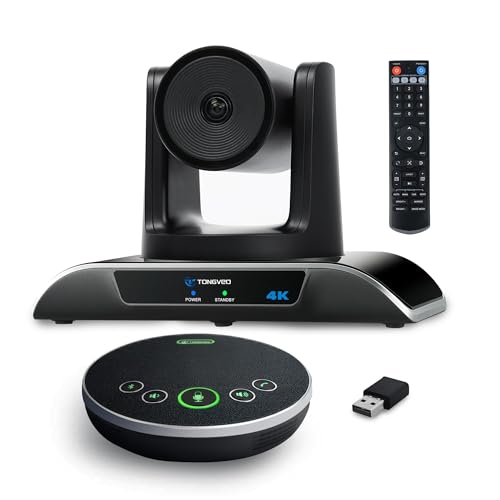
The second TONGVEO is the more ambitious appliance: a 4K conference room camera system with gesture control, AI auto-tracking PTZ, 5X digital zoom and — the item that changes its category — a speakerphone in the system. That last inclusion answers the question this guide keeps asking on the other picks’ behalf. A room system with a speakerphone is a room system complete: the remote participants are seen by the tracking 4K camera and heard through a microphone-and-speaker unit designed for the table, and the organisation’s purchase order has one line where the other systems need two. For small and mid-sized organisations equipping a room from nothing, that completeness is the product.
Gesture control extends the self-operating philosophy to its logical end: the presenter directs the camera with their hands, mid-flow, without returning to a remote or a laptop. Combined with AI auto-tracking, the room’s direction becomes something the presenter does with their body while presenting, which is either delightful or distracting depending on the presenter’s temperament and the meeting’s formality — a board of directors will prefer presets, a trainer will prefer gestures, and the honest buyer knows which room they are furnishing. The 4K sensor feeds the 5X digital zoom the same headroom logic as the N990’s: reframing spent from abundance.
Its cautions mirror its sibling’s, with the speakerphone’s scope added: an integrated unit serves a table of modest size admirably, while a long room will still want distributed audio. Digital zoom likewise caps the room size this system can honestly cover. Within those bounds — the self-contained, presenter-led, mid-sized room — the TONGVEO 4K is the most complete single purchase in this guide, and its completeness will read, to the organisation that buys it, as the difference between a room that was equipped and a room that was merely supplied with a camera.
- Capture (per listing): 4K
- Tracking and control: AI auto-tracking PTZ with gesture control
- Zoom: 5X digital zoom
- Audio: speakerphone included in the system
Strengths
- Speakerphone included — a complete room in one purchase.
- Gesture control lets presenters direct mid-flow.
- 4K headroom feeds the digital zoom’s reframing.
Trade-offs
- Integrated audio suits modest tables, not long rooms.
- Digital zoom limits honest room size.
- Gestures suit informal rooms better than formal boards.
Best for: organisations equipping a presenter-led room from scratch in one order.
Not suited for: long rooms needing optical reach and distributed microphones.

Vunvooker 4K Conference Room Camera — The venue flagship
The Vunvooker should be introduced honestly: it is a professional PTZ camera that conference rooms may borrow, rather than a conference camera in the laptop sense. Its listing specifies a 4K PTZ camera with 20X optical zoom and a connection panel that reads like an AV rack’s — IP, USB3.0, HDMI, RS232 and RS485 — intended for IP live streaming and video conferencing in large spaces. Twenty-power optical zoom is broadcast territory: it can read a speaker’s expression from the back of a hall without moving a pixel digitally. Serial control over RS232 and RS485 is installed-AV territory: the camera takes orders from a room control system alongside the lights and the screen. IP streaming is production territory: the camera joins a network workflow rather than a laptop.
None of that is overkill if the room is a venue. Houses of worship streaming services, lecture halls capturing talks, council chambers and large training centres all live at distances where 3X and 10X zooms give up, and all of them run installed control systems that speak exactly the protocols this camera lists. In those rooms the Vunvooker is not the extravagant option; it is the correctly scaled one, and its USB3.0 output still lets it serve a laptop-driven call when the venue hosts a simpler occasion. The 4K sensor completes the production logic, feeding both the zoom’s reframing and the archive’s future.
The warning writes itself, and this guide will write it anyway: in an ordinary eight-person boardroom, this camera is a broadcast instrument pointed at a meeting, with a control vocabulary nobody in the building speaks and a lens that can count the far chair’s eyelashes. Organisations should buy it with an installer or an AV-literate owner in the picture, because its value lives in integration. Bought at the right scale, it is the most capable system in this guide by a wide margin; bought at the wrong one, it is the most expensive way to learn that room systems are sized like suits, not like smartphones.
- Capture (per listing): 4K PTZ
- Zoom (per listing): 20X optical zoom
- Connections (per listing): IP, USB3.0, HDMI, RS232 and RS485
- Intended uses (per listing): IP live streaming and video conferencing
Strengths
- 20X optical zoom covers halls and large venues honestly.
- Serial and IP control integrate with installed AV systems.
- USB3.0 keeps a laptop workflow available alongside production use.
Trade-offs
- Far beyond an ordinary boardroom’s needs and skills.
- Value depends on integration with room control.
- Audio remains a venue-scale separate design.
Best for: lecture halls, houses of worship, council chambers and large training venues.
Not suited for: ordinary meeting rooms, where every other pick here is the saner instrument.
How Do the Six Room Systems Compare?
| Pick | Capture (per listing) | Zoom | Room it fits |
|---|---|---|---|
| Logitech PTZ Pro 2 | HD 1080p | PTZ with presets | Chaired boardroom |
| NexiGo N990 | 4K | 5X digital | Mid-sized Zoom room |
| NexiGo PTZ 10X | Conference HD class | 10X optical | Long room, training suite |
| TONGVEO All-in-One | HD 1080P 60fps | 3X optical | Presenter-led room |
| TONGVEO 4K | 4K | 5X digital | Self-contained mid room |
| Vunvooker 4K | 4K | 20X optical | Hall and venue |
Why Is a Room System Not Just a Bigger Webcam?
Because the geometry inverts. A desktop webcam’s subject sits at a fixed, near distance and cooperates; a room camera’s subjects sit at every distance the table offers and do not. That single fact generates the entire category: optical zoom exists because the far chair is metres away, PTZ mechanics exist because the speaker changes, presets exist because framing decisions must be made in advance by IT rather than improvised by the chair, and remote controls exist because the operator is a participant with a meeting to run. It also generates the category’s price logic — these are instruments with lenses, motors and mounts, bought per room rather than per person, and amortised across every meeting the room hosts for years.
The buyer’s mindset must invert with the geometry. Desktop shopping asks “how do I look?”; room shopping asks “how does everyone look, from the far end’s screen, in the worst seat’s light, when the intern is presenting?” Organisations that make that mental switch buy once and equip a room; organisations that shop for a room with a desktop mindset buy twice — once cheaply, once correctly — and the second purchase is usually one of the six systems on this page.
How Should a Conference Room System Be Installed and Run?
Position is the first decision and the least reversible, so make it with the table set and the screen on. The camera belongs at the far end from the main display’s viewers — typically mounted at seated eye height near the screen, so local participants look toward the camera when they look at the far end’s faces, and eye contact survives the geometry. Set the presets on installation day with real people in real chairs: the wide room shot, the chair’s position, the presenter at the board, the far-end pair. A preset nobody set is a feature nobody owns, and rooms whose presets were configured in the first week use them for years; rooms that postponed the task use the wide shot forever and wonder why the camera was expensive.
Then rehearse the room once, as a room. Run a call with a colleague remote, walk every seat, speak from the worst chair, present from the board, and listen to the recording from the far end’s perspective, because that recording — not the in-room impression — is the product the system was bought to produce. Fix audio first if it fails, framing second, and write the one-page operating card that lives on the table: how to join, which preset is which, who to call. Room systems fail socially far more often than they fail electronically, and the operating card is the cheapest reliability upgrade in this entire guide.
What Mistakes Do Conference Room Buyers Keep Making?
The category error is the first: furnishing a room with a desktop webcam and discovering, at the first hybrid board meeting, that the far half of the table cannot be seen or heard. The second is buying digital zoom for a long room, enlarging pixels and calling it reach. The third is the opposite vanity — installing a 20X venue flagship in a six-person room, where its control vocabulary will outlive everyone’s patience. The fourth is forgetting audio until the first call, then bolting a random speakerphone onto a carefully chosen camera and blaming the pair for each other’s sins. The fifth is never setting the presets, which converts a PTZ system into a very expensive fixed camera.
There is also the mistake of buying for the room you wish you had — the glass-walled showcase in the brochure — rather than the room with the humming air conditioner, the immovable table and the window that blinds the camera every afternoon from October to February. The systems above were each described against real rooms of that kind, and the buyer who inventories their own room’s flaws honestly, before falling for any lens, will find the correct choice considerably easier than the buyer who shops from the brochure.
The sixth mistake is organisational rather than optical: buying the camera as an IT purchase without the room’s actual users in the decision, so the system answers questions nobody in that room asks — tracking where the meetings are chaired, certification for a platform the company does not run, connections for an AV rack the building does not have. Walk the room, name its meetings, measure its farthest chair, and the correct system usually identifies itself from the six above with embarrassing clarity.
How Does One Room Host Three Different Meetings?
Picture the same ten-seat room across a single day, because a room system earns its money in the transitions. At nine, the leadership team meets hybrid: the chair runs presets — wide for the opening, speaker for the argument, board for the numbers — and the remote director is a participant rather than an audience, which is the PTZ Pro 2 and N990’s native production. At eleven, the room becomes a classroom: a trainer works the length of the table and the whiteboard, nobody can spare a hand for a remote, and the tracking TONGVEOs stop being a novelty and become the only reason the remote trainees can follow the session at all. At three, the room hosts a client presentation in which the organisation itself is the product, and the correct framing, the working audio and the one-page operating card are indistinguishable from competence in the client’s eyes. A system chosen for the room’s actual repertoire — rather than for its most impressive meeting or its most common one alone — is the thread connecting all three hours, and it is why this guide insists on naming your meetings before naming your camera: the repertoire is the specification, and everything in the pick sections above is commentary on it.
How Do Light and the Room’s Screen Affect the Picture?
Conference rooms conspire against cameras in ways desks never do. The glass wall that impresses clients backlights half the table; the projector washes the presenter in its own beam; the downlights that flatter the furniture carve shadows into every face at noon. A room system cannot repeal any of this, but its zoom and presets can route around it — framing speakers away from the worst window, keeping the presenter’s preset out of the projector’s throw — and the low-light pedigrees in this guide, the N990’s Starvis sensor above all, buy grace where the architecture refuses it. The permanent fixes are architectural and worth their small money: blinds that actually close, a presenter position lit from the front, a screen bright enough that the room’s lights can stay at a level where faces exist. Organisations routinely spend the camera’s price twice over on the table it sits above while leaving the room’s light undesigned; the far end notices the light, not the table.
The display deserves a sentence of its own, because the camera and the screen are in a relationship: participants look at the screen, the camera lives beside it, and the nearer the camera sits to the faces on that screen, the more honest the eye contact feels at both ends. Mount with that relationship in mind, test it with a remote colleague who will tell you the truth, and resist the installerly temptation to centre the camera on the room rather than on the conversation — the conversation is the room’s purpose, and every system in this guide is, in the end, a machine for holding it up to the light.
Final Recommendation
Match the system to the room’s honest dimensions and its meeting style: the PTZ Pro 2 for the chaired boardroom that prizes the known, the N990 for the mid-sized Zoom room that wants 4K headroom with a certificate, the NexiGo 10X for the long room where reach is the whole question, the TONGVEO pair for presenter-led spaces that must operate themselves — the 4K if the room also needs its voice supplied — and the Vunvooker when the room is really a venue wearing a meeting room’s name. And let the closing advice be the sentence every facilities manager learns exactly once, the expensive way: nobody at the far end of a call has ever praised a conference room’s camera — they praise being able to see and hear everyone, so buy the system that makes your whole table present, and measure the room before you measure the specifications.
How Should the Room’s Audio Be Designed Around the Camera?
Begin with the confession every AV installer will make: remote participants forgive a mediocre picture within minutes and a mediocre microphone never. The far end’s experience of your room is mostly audio — the chair’s voice, the far chair’s question, the presenter’s aside at the board — and the camera purchase should trigger an audio design rather than trail behind one. For rooms served by the camera-only systems here, the standard answers are a table speakerphone sized to the room for small and mid spaces, and distributed ceiling or table microphones for long ones, placed where people actually sit rather than where the furniture looks symmetrical. The TONGVEO 4K’s built-in speakerphone collapses that design into the purchase for its intended room size, which is precisely its appeal to organisations without AV staff.
Echo is the room audio failure with a hundred fathers: hard walls, a glass table, a speakerphone too far from the talkers and too close to the speakers it feeds. Treat the room before blaming the equipment — soft furnishings, a rug, curtains over the glass wall — because acoustic kindness improves every microphone ever installed, while a louder speakerphone in an echoing room merely gives the far end a clearer recording of the echo. Test from the far end’s chair, with a colleague remote and honest, speaking from the worst seat at natural volume. If they can follow the worst seat, the room is designed; if they can only follow the best seat, the design is a hope, and hopes do not survive board meetings.
What Does a Good Hybrid Meeting Actually Require From the Camera?
Equity. The remote participant’s standing in a hybrid meeting is set by whether they can see who is speaking, read the board, and interrupt at a human moment — and the camera system is responsible for the first two. Presets are equity instruments: a room that can cut from the wide shot to the speaker to the whiteboard in one button press includes its remote members in the meeting’s visual grammar, while a room frozen on a wide shot renders them spectators at a play performed for the people present. Tracking systems pursue the same equity automatically for presenter-led formats. Either way, the test is not the specification but the remote colleague’s debrief: did they follow the argument, or did they follow a rumour of it?
The second requirement is reliability at the speed of meetings. A room system is used by everyone, including the colleague who regards technology as a personal insult, in the four minutes between the previous meeting’s overrun and this one’s start. Systems that wake, connect and frame predictably — the USB simplicity of the Logitech and NexiGo units, the self-operation of the TONGVEOs — protect the meeting’s first minutes, which is where hybrid goodwill is won or lost. Organisations should therefore rehearse the room with its least technical regular user, not its most: if that person can start a meeting alone, the system is finished; if they cannot, no specification on this page will save it.
How Do You Choose by Room Size, Concretely?
Walk the decision in order. In a huddle room for two to four people, stop: a desktop camera from our other guides, or the smallest of these systems at most, covers the geometry, and the money saved belongs to audio. In a standard meeting room seating six to ten around one table, the contest is between the PTZ Pro 2’s chaired presets, the N990’s certified 4K reframing and the TONGVEO 4K’s self-contained completeness, decided by who runs your meetings and whether the room already owns a voice. In a long room — training suite, classroom, boardroom with a far chair that needs binoculars — optical zoom becomes the gatekeeper, and the NexiGo 10X is the honest starting point, with the tracking TONGVEO all-in-one serving the presenter-led version of the same space at its 1080p60, 3X specification. In a venue — hall, sanctuary, chamber — the Vunvooker’s connections and 20X lens stop being extravagance and become the entry ticket.
Two measurements discipline the whole walk: the distance from the camera’s intended position to the farthest regular seat, and the width of the widest shot the room needs. Write both down before opening any listing. Buyers who arrive with those two numbers find that the six systems sort themselves almost without argument; buyers who arrive with only a budget find that every system looks plausible and the wrong one often wins. Rooms are measured in metres, not in money, and this category — uniquely among our webcam guides — punishes anyone who forgets it.
What Does Owning a Room System Involve Over Five Years?
Less than feared, provided the installation was honest. The recurring tasks are humble: firmware and platform updates applied by whoever owns the room’s technology, presets revisited when the furniture moves, a lens cleaned by someone who knows not to use a sleeve, and an operating card on the table kept true as habits change. PTZ mechanics are the only moving parts in the building’s AV, and the established systems here are built for institutional duty cycles; the tracking models add software that improves — and occasionally changes its mind — through updates, which is an argument for assigning the room an owner rather than a crowd. Budget holders should also expect the system’s neighbours to age faster than the system: the room PC, the display and the platform’s requirements will all turn over while the camera, correctly sized at purchase, keeps its post. That longevity is the economic soul of the category — a per-room instrument amortised across thousands of meetings — and it rewards the organisation that bought its room’s actual dimensions over the one that bought a bargain and a sequel.
What Should IT and Procurement Check Before Signing?
Compatibility first, in writing: the platform the organisation standardises on, the room PC’s ports and operating system, and whether the system expects USB, HDMI or network connections the room can actually provide — the Vunvooker’s serial and IP vocabulary is an asset only where a control system exists to speak it. Certification second, where it exists: the N990’s Zoom credential and the Logitech name’s long enterprise history are both, in procurement language, risk reductions, and rooms multiplied across a building multiply whatever risk the first room accepted. Third, the support horizon: who answers in year three, how firmware arrives, and whether a failed unit can be swapped by a non-specialist with a ladder and ten minutes.
Fourth, the unglamorous physicalities that decide installations: mount options for the wall or ceiling the room actually has, cable lengths between the camera position and the room PC, power at the mounting point, and a sightline that does not cross a projector’s beam or a window’s glare. Fifth, privacy and policy: a camera in a shared room should have an obvious idle state, the room’s booking system should say when it is in use, and visitors should never have to wonder. Procurement processes exist to catch exactly these questions while they are still cheap, and a camera chosen with all five answered tends to disappear into the building’s life — which, for a room system, is the definition of a successful purchase.
How Do Room Systems Serve Accessibility?
A well-run room camera is an accessibility instrument, and the point deserves more than a sentence. Remote participants who lip-read or who follow a meeting through captions fed by clear audio depend on the speaker being framed and lit, which is what presets and tracking exist to do; a frozen wide shot of a table is, for those participants, a meeting held behind glass. Sign language interpreters joining remotely need the camera to find and hold them at a size where the language is legible — a framing task that PTZ presets perform deliberately and tracking performs automatically in presenter formats. Even the humble operating card plays a part, because a room that any colleague can start unaided is a room that does not make its disabled users wait for technical rescue before they may participate. Organisations specifying a system should write these needs into the room’s preset list at installation — the interpreter’s framing, the speaker’s close-up, the board’s legibility — rather than discovering them at the first meeting where they matter, which is the pattern this guide exists to break.
One final consideration belongs to the people who will never read a guide like this: the room’s occasional users. Every organisation has them — the visiting client, the new starter, the board member who arrives twice a year — and a room system succeeds socially when those users can join a meeting without instruction, embarrassment or a call to IT. That is an argument, depending on the room, for the preset systems’ big obvious remote, for the tracking systems’ absence of any operation at all, or for the TONGVEO 4K’s completeness that leaves nothing else in the room to misunderstand. Whichever philosophy you install, test it on the occasional user before the meeting that matters, because they are the room’s true acceptance test, and they will deliver their verdict in the first ninety seconds, silently, in front of exactly the audience you were hoping to impress.
Frequently Asked Questions
Can I just use a good desktop webcam in a conference room?
For a huddle of two or three people around one end of a small table, honestly, yes — and our other guides cover those cameras. Beyond that scale the geometry defeats it: no optical reach, no presets, no framing for a table of faces. That threshold is exactly where this guide’s systems begin.
Optical or digital zoom — why does the distinction matter so much here?
Optical zoom magnifies with glass before the sensor, preserving detail at distance; digital zoom crops and enlarges, spending resolution. In a room, where the subject may be metres away, optical reach — 3X, 10X or 20X among these picks — is the difference between a legible face and an enlarged blur, though digital zoom on a 4K sensor, as the N990 and TONGVEO 4K use it, remains a legitimate reframing tool at modest ranges.
Do these systems include microphones and speakers for the room?
One of them builds the answer in: the TONGVEO 4K system includes a speakerphone. The others are cameras whose rooms need a separate speakerphone or microphone plan — the PTZ Pro 2 most explicitly. Decide the audio design before ordering, not during the first call.
What does Zoom Certified actually guarantee on the N990?
That the system has been tested against Zoom’s requirements for a consistent meeting experience — device behaviour, controls and compatibility — which matters most in organisations standardised on that platform and supporting many rooms.
Who operates the camera during a meeting?
That depends on the philosophy you buy. Preset-and-remote systems — the Logitech and the NexiGo 10X — are driven by the chair or a designated participant. The TONGVEO systems’ AI tracking operates itself for presenter-led sessions, and installed systems like the Vunvooker are typically driven by room control or an AV operator.
How large a room can these systems cover?
Scale follows the zoom. The 3X and digital-zoom systems suit small-to-mid rooms; the 10X optical NexiGo covers long rooms and training suites; the Vunvooker’s 20X optical zoom is built for halls. Measure from the camera position to the farthest regular seat and choose the lens that reaches it with room to spare.
How many presets does a room actually need?
Three covers most rooms honestly: the whole table, the usual presenter’s position, and the board or screen area. A fourth for the far-end pair of chairs earns its place in long rooms. Beyond that, presets become a menu nobody navigates mid-meeting — configure the shots the room repeats weekly, and let the remote handle the exceptions.
Can one of these systems also record or stream our events?
Several are positioned for exactly that dual life: the NexiGo 10X and TONGVEO all-in-one name live streaming in their listings, the TONGVEO connects over HDMI as well as USB, and the Vunvooker is built around IP streaming. A room system that covers the Tuesday board call and the quarterly town hall is a common and sensible pattern, provided the lens was sized for the larger occasion.
Where should the camera be mounted — wall, ceiling or table?
At seated eye height near the main display is the default that serves eye contact, usually wall-mounted beneath or beside the screen. Ceiling mounts suit lecture spaces with raked seating and installed control — the Vunvooker’s world. Table placement is the compromise of last resort: it wobbles, it looks up at the room, and it migrates. Decide the mount before ordering, because cable and power follow the decision.
Related Guides
For the rooms and people around the system: Best Headsets equips the individual callers who join from elsewhere, Best USB Headsets covers the wired desk standard, and Best Call Center Headsets handles the highest-volume speaking jobs of all.


