What's inside
- Key Takeaways
- Quick Picks
- How We Chose These Picks
- Comparison
- What Should an Affordable TV Never Skimp On?
- How Does the Total Room Budget Change the Right Answer?
- When Is a Mature Model Smarter Than a New One?
- How Do You Set Up an Affordable 65-Inch TV to Look Its Best?
- What Separates the Three TCL Sets From One Another?
- How Do the Two Hisense A6 and U6H Really Differ?
- What Does a 65-Inch Affordable Set Ask of the Room?
- How Should Families Split Viewing Between One Big Affordable Screen?
- What Happens When an Affordable Set Becomes the Gaming Screen?
- Why Has 65 Inches Become the Value Size?
- How Do You Judge an Affordable TV in Store Without the Demo Reel’s Help?
- What Ownership Habits Keep a Sensible Set Delightful?
- When Should You Stretch to the Top of This Guide?
- How Does an Affordable Big Screen Change a Household’s Evenings?
- What Should You Do in the First Week After It Arrives?
- Common Mistakes
- Final Recommendation
- Frequently Asked Questions
- Related Guides
As an Amazon Associate I earn from qualifying purchases. This post may contain affiliate links at no extra cost to you.
widgetverdict.com is reader-supported. When you buy through links on our site, we may earn an affiliate commission.
“Affordable” is the most abused word in television retail, so this guide begins by defining it the way a household should: the best 4k tvs affordable enough to buy without a financing conversation are the ones that spend their budget on the picture you actually watch, and decline to spend it on specifications your room cannot use. Every pick here is a 65-inch 4K set with a verified listing, because 65 inches is where affordable television currently delivers its most startling value — a genuinely large, genuinely modern screen at the size the average living room wants. Affordable in this guide is a theme, not a price tag: no set below is assigned a cost, because offers move weekly and a printed number would be a lie by the time you read it. Check price on Amazon for each finalist, and judge the gaps between them against the differences this guide actually documents.
The six divide into three honest tiers. At the foundation sit the Hisense A6 and U6H, sets that cover the essentials — 4K, HDR formats, real smart platforms — with the discipline of models that know their job. In the middle, the Hisense QD6 brings quantum-dot colour and a Game Mode Plus listing into the affordable conversation. At the top of the theme, TCL’s QM6K, T7, and F7D carry specifications — stated 144Hz panels, Dolby Vision, gaming accelerators — that flagship guides discuss, at positions in their ranges that affordable buyers can reach. The through-line is refusal: none of these sets wastes money on a bigger badge, a curved gimmick, or a brightness war the room will never witness.
Key Takeaways
- All six picks are 65-inch 4K sets — the size where affordable television currently buys the most screen and the most modern specification per purchase.
- Affordable here means disciplined, not stripped: every pick carries a full smart platform and HDR support named in its listing.
- TCL’s T7 states a Native 144Hz refresh rate and the QM6K states 144Hz — gaming ceilings that affordable guides could not offer a few years ago.
- Dolby Vision appears across the price theme, from the Hisense A6’s listing to the TCL trio, so format quality is not a flagship tax.
- Platforms split between Google TV, Fire TV, and Hisense’s VIDAA — choose by the ecosystem your household already speaks.
- The Hisense U6H, a 2022 model, remains here deliberately: mature models are where affordable value hides, provided the platform still serves.
Quick Picks
| Pick | Badge | Why it is here |
|---|---|---|
| Hisense A6 65 | The essential 65-inch | Dolby Vision HDR, Google TV, and Chromecast built in — the fundamentals done properly. |
| TCL QM6K 65 | Mini-LED within reach | A stated 144Hz, QLED Mini LED, Dolby Vision, and IMAX Enhanced below TCL’s flagship. |
| Hisense QD6 65 | Quantum-dot value | QLED colour, Dolby Vision, HDR10+, Game Mode Plus, and Dolby Atmos on VIDAA. |
| TCL T7 65 | The affordable gaming ceiling | Native 144Hz as listed, Game Accelerator 288 and VRR, Dolby Vision and Atmos. |
| TCL F7D 65 | Fire TV’s affordable QLED | QLED, Dolby Vision and Atmos, Auto Game Mode, and Alexa+ on Fire TV, 2026. |
| Hisense U6H 65 | The mature-model bargain | ULED quantum-dot QLED with Dolby Vision and Atmos from an established 2022 line. |
How We Chose These Picks
The affordable filter was applied as an editor, not an accountant. Listings were verified first — each set below is a real, current 65-inch 4K listing checked directly — and then judged on where their money visibly goes. A set qualified if its listing showed the modern essentials without padding: an HDR story with named formats, a smart platform a household can live on, and a panel technology appropriate to the position, whether that is a disciplined LED, a quantum-dot layer, or — in the QM6K’s case — a Mini-LED backlight with a stated 144Hz. Sets whose listings leaned on vague superlatives instead of named features did not survive, because vagueness is how affordable televisions hide their compromises.
Model years were allowed to range, deliberately. The U6H is a 2022 set and the F7D a 2026 one, and both belong, because affordable buying is precisely the art of knowing when last cycle’s panel at a mature position beats this cycle’s stripped newcomer — and when it does not. The guide flags age wherever it appears and explains what it costs and what it saves, so the arithmetic stays honest. What no pick here does is apologise: each is a television a household can buy, set up, and enjoy for years without a narrated list of what it is not.

Hisense A6 65 — The essential 65-inch
The A6 is the foundation of this guide, and foundations should be judged on whether anything important is missing. Hisense’s listing describes a 65-inch Class A6 Series 4K UHD Smart Google TV (65A6H) with Alexa compatibility, Dolby Vision HDR, DTS Virtual X, Sports and Game Modes, a voice remote, and Chromecast built in. Read that as a completeness audit: the premium HDR format — Dolby Vision — is present rather than reserved for pricier siblings; the platform is Google TV with its full app catalogue; casting is built in rather than dongled; and named modes for sport and games acknowledge how a family television actually spends its weekends. At 65 inches, that completeness is the story — a big screen that covers the modern checklist without charging for a specification war.
Daily life on the A6 is unglamorous in the best way. Series stream in Dolby Vision where the service offers it, football gets its Sports Mode, the console gets a Game Mode, and the voice remote handles the household’s laziest moments. The panel is a mainstream LED-backlit design, and its character follows: bright and composed for the content family rooms watch, without the local-dimming depth that dark-room film devotees chase in flagship guides. DTS Virtual:X works to widen the built-in sound, and for most rooms at most volumes it carries dialogue respectably; the soundbar upgrade path remains open whenever films move in permanently.
The A6’s proposition is sequencing. A household furnishing a room from nothing — screen, seating, sound, all competing for one budget — gets more total evening from this set plus a soundbar than from a flagship panel alone, and the guide’s final sections make that arithmetic explicit. As the single purchase that starts a room, the A6 is the affordable theme at its most rational.
- Panel: LED-backlit LCD, 65-inch class
- Formats named in listing: Dolby Vision HDR; Audio: DTS Virtual X
- Modes named in listing: Sports Mode, Game Mode
- Platform: Smart Google TV; Chromecast built-in; voice remote; Alexa compatible
- Model: 65A6H
Strengths
- Dolby Vision and Google TV at the foundation of the range — the essentials are genuinely complete.
- Chromecast built in and a voice remote make daily use friction-free for mixed households.
- Lets a furnishing budget stretch to sound and seating, where evenings are also made.
Trade-offs
- Mainstream panel without local-dimming depth for the darkest HDR scenes.
- Brightness serves ordinary rooms rather than conquering sunlit ones.
- Gaming support is a named mode rather than the high-refresh hardware of the TCL picks.
Best for: first big-screen purchases and family rooms built around streaming, sport, and series.
Not suited for: dark-room film devotees measuring a set by its shadow detail.

TCL QM6K 65 — Mini-LED within reach
The QM6K is the pick that embarrasses the word “affordable” — in the buyer’s favour. TCL’s listing describes a 65-inch QM6K Series QLED Mini LED 4K HDR Smart Google TV (65QM6K) at 144Hz, with high brightness, IMAX Enhanced, HDR10, Dolby Vision, Dolby Atmos audio, a voice remote, and premium gaming positioning. A Mini-LED backlight — thousands of small diodes in dimming zones, the technology explained in our QLED guide — at this position in a range changes what affordable means: dark scenes gain structure, highlights gain conviction, and HDR stops being a badge and becomes a picture. The stated 144Hz does the same work for gaming, putting a refresh ceiling in reach that flagship guides treat as a headline.
In our gaming guide the QM6K appears as the value rung of TCL’s gaming ladder; in this guide the same set is the ceiling of the affordable theme, and both descriptions are true, which is precisely why it anchors the list’s upper half. Google TV supplies the platform with the app depth the A6 offers, and Dolby Vision plus IMAX Enhanced cover the film formats. The compromises relative to TCL’s QM8L flagship are real but located at the extremes — peak brightness and dimming refinement — where ordinary viewing rarely visits.
For a household that can stretch within the affordable theme, the QM6K is where the stretch lands. It is the set for the buyer who reads the flagship guides wistfully and wants the substance — dimming, refresh, formats — without the ceremony. Verify its VRR details on the product page if a gaming PC is planned, since the listing headlines the refresh figure, and then enjoy the rare feeling of having bought the smart rung of a ladder rather than the bottom or the top.
- Panel: QLED Mini LED, 65-inch class
- Refresh: 144Hz per listing
- Formats named in listing: HDR10, Dolby Vision, Dolby Atmos, IMAX Enhanced
- Platform: Smart Google TV; voice remote
- Model: 65QM6K
Strengths
- Mini-LED dimming brings flagship picture structure into the affordable theme.
- Stated 144Hz serves gaming PCs and gives motion permanent headroom.
- Dolby Vision and IMAX Enhanced keep the film brief fully honoured.
Trade-offs
- Sits at the top of this guide’s theme — the stretch must be a conscious one.
- Peak brightness and dimming finesse remain a rung below the QM8L flagship.
- VRR specifics need a product-page check for exacting gaming builds.
Best for: a deliberate stretch within the theme, for Mini-LED picture and a real gaming ceiling.
Not suited for: the strictest budgets, where the A6’s discipline is the wiser allocation.

Hisense QD6 65 — Quantum-dot value
The QD6 makes the colour argument for affordable television. Hisense’s listing describes a 65-inch Class QD6 Series 4K QLED UHD Smart VIDAA TV (65QD6QV) with Dolby Vision, HDR10+, Game Mode Plus, Dolby Atmos, Wi-Fi 5, and Bluetooth. The QLED designation is the headline: a quantum-dot layer over the LCD panel, producing the purer, more saturated colour that our QLED guide explains — and at affordable positions, colour is often the first casualty, which makes its presence here the set’s whole case. Animated films, nature documentaries, football kits, game worlds: the QD6’s colour conviction shows in the content a family room actually plays.
The format list is unusually ecumenical for the theme — Dolby Vision and HDR10+ both named, covering the two premium HDR ecosystems — and Game Mode Plus signals console awareness beyond a badge, while Dolby Atmos support readies the set for a soundbar future. VIDAA, Hisense’s own platform, is the one genuine decision the set asks: it is quick and covers the major services, and households should confirm their specific apps on the product page, since VIDAA’s catalogue, while broad, is curated differently from Google TV’s. Wi-Fi 5 and Bluetooth are listed plainly, the kind of specification honesty this guide rewards.
As the middle pick of the guide, the QD6 suits the household whose viewing leans colourful and whose platform needs are mainstream: the big services, a console, a phone’s worth of casting habits covered by Bluetooth-era conveniences. It lacks the TCL pair’s stated high-refresh hardware, and its platform asks one verification the Google TV sets do not — small prices for the colour it brings to the theme.
- Panel: QLED (quantum-dot LCD), 65-inch class
- Formats named in listing: Dolby Vision, HDR10+; Audio: Dolby Atmos support
- Gaming: Game Mode Plus per listing
- Platform: Smart VIDAA TV; Wi-Fi 5 and Bluetooth per listing
- Model: 65QD6QV
Strengths
- Quantum-dot colour lifts the content family rooms watch most.
- Both premium HDR formats named — rare ecumenism at an affordable position.
- Game Mode Plus and Atmos support keep console and soundbar futures open.
Trade-offs
- VIDAA’s app catalogue needs a household-specific check on the product page.
- No high-refresh figure is stated — gaming ceilings belong to the TCL picks.
- Panel brightness is theme-typical rather than flagship-grade.
Best for: colour-loving family rooms with mainstream apps and a console in the mix.
Not suited for: households dependent on a niche app that VIDAA may not carry.

TCL T7 65 — The affordable gaming ceiling
The T7 is where the affordable theme stops sounding like a compromise to gamers. TCL’s listing describes a 65-inch T7 Series 4K 144Hz QLED Smart Google TV (65T7) with Dolby Vision HDR and Atmos, HDR10+, Game Accelerator 288 and VRR for sports and gaming, Alexa+, and a Native 144Hz refresh rate stated outright. Parse the gaming language as listed: the panel’s native refresh is 144Hz — a figure flagship guides headline — and TCL’s Game Accelerator 288 with VRR describes its gaming support as the brand presents it, which this guide quotes in the listing’s own terms rather than translating. For a PC player shopping the affordable theme, the T7 is the set that ends the search: high native refresh, VRR named, quantum-dot colour, and Google TV, in one 65-inch panel.
The film side is not an afterthought pasted onto a gaming set. Dolby Vision and HDR10+ both appear — the ecumenical pairing — with Dolby Atmos for the audio path, so the same screen that runs a tournament on Saturday runs a premiere on Friday without format regrets. Google TV with Alexa+ covers the platform and voice layers. As with the QM6K, the honest location of the T7’s savings is the panel’s extremes: it is a QLED set without the Mini-LED dimming architecture the QM6K carries, so the darkest HDR scenes rely more on native contrast, and buyers choosing between the two TCLs are really choosing between dimming depth and gaming-forward specification at similar positions in the theme.
That is a genuinely difficult choice, and a luxurious one for an affordable guide to offer. Console players should note that their machines will use the panel’s range generously without reaching its native ceiling; PC players with capable cards are the ones who will live at 144Hz. Either way, the T7 demonstrates the theme’s thesis better than any other pick: in the current market, affordable no longer means slow.
- Panel: QLED, 65-inch class
- Refresh: Native 144Hz per listing
- Gaming: Game Accelerator 288 and VRR, as listed
- Formats named in listing: Dolby Vision HDR, HDR10+, Dolby Atmos
- Platform: Smart Google TV; Alexa+
- Model: 65T7
Strengths
- Native 144Hz stated in the listing — a flagship gaming figure at an affordable position.
- Both Dolby Vision and HDR10+ named, ending format choosing for mixed libraries.
- QLED colour and Google TV keep films and family viewing fully served.
Trade-offs
- No Mini-LED dimming — dark HDR scenes lean on native panel contrast.
- Consoles cannot feed its native ceiling; the headroom is a PC player’s prize.
- Game Accelerator figures are the brand’s own language — verify details on the product page.
Best for: gaming households, especially PC players, buying one 65-inch screen for everything.
Not suited for: dark-room film viewers who would trade refresh for the QM6K’s dimming depth.
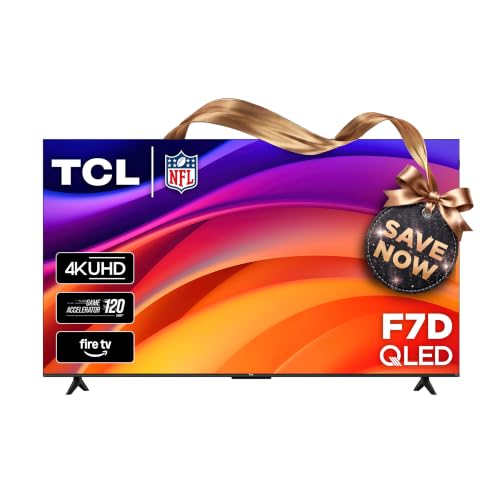
TCL F7D 65 — Fire TV’s affordable QLED
The F7D completes TCL’s trio by changing the platform rather than the ambition. Its listing describes a 65-inch F7D Series QLED 4K UHD HDR Smart Fire TV (65F7D, 2026) with Dolby Vision and Atmos, HDR10+, DTS audio, a voice remote with Alexa+, Motion Rate 240, Game Accelerator 120, and Auto Game Mode. For Fire TV households — the ecosystem our 43-inch guide also serves through Insignia and Toshiba — this is the affordable 65-inch with quantum-dot colour and a gaming-aware specification, arriving as a current 2026 model with the platform support runway that implies. Auto Game Mode deserves its plain translation: the set recognises a console and switches its picture behaviour accordingly, the convenience feature that ensures the household’s least technical gamer still gets the low-lag picture.
The motion and gaming figures are TCL’s own vocabulary, quoted as listed: Motion Rate 240 is the brand’s motion-processing figure rather than a native refresh claim — the T7 above is the pick whose listing states a native rate — and Game Accelerator 120 describes its gaming support in the same house style. Read honestly, the F7D’s gaming case is console-shaped: Auto Game Mode, a responsive panel for console ceilings, and QLED brightness for daytime sessions. Its film case is complete for the theme, with Dolby Vision and HDR10+ both named and DTS alongside Atmos in the audio column.
Choosing the F7D is therefore a platform decision executed well: the household that lives in Fire TV — Prime-first, Alexa throughout the home — gets its 65-inch QLED without emigrating to Google TV, at a current model year, with the gaming conveniences consoles actually use. Households without that allegiance should compare the T7’s stated native refresh and the QM6K’s dimming before deciding, since TCL has unusually given this theme three distinct answers.
- Panel: QLED, 65-inch class
- Motion and gaming: Motion Rate 240, Game Accelerator 120, Auto Game Mode — all as listed
- Formats named in listing: Dolby Vision, HDR10+, Dolby Atmos, DTS
- Platform: Smart Fire TV; voice remote with Alexa+
- Model: 65F7D, 2026
Strengths
- Fire TV’s strongest affordable expression here — QLED colour at 65 inches.
- Auto Game Mode gives console players the right picture without menu work.
- A 2026 model with both premium HDR formats named in its listing.
Trade-offs
- Motion figures are brand language, not a native refresh claim like the T7’s.
- Fire TV’s promotional home screen remains part of the platform bargain.
- PC players chasing stated high-refresh ceilings belong on the T7 or QM6K.
Best for: Fire TV and Alexa households wanting a current, gaming-aware 65-inch QLED.
Not suited for: Google TV loyalists or PC players buying by native refresh figures.

Hisense U6H 65 — The mature-model bargain
The U6H closes the guide with the affordable theme’s oldest trick, honestly labelled: yesterday’s premium line at today’s sensible position. Hisense’s listing describes a ULED 4K Premium 65U6H Quantum Dot QLED Series 65-inch Smart Google TV with Dolby Vision and Atmos, a voice remote, and Alexa compatibility — and it is a 2022 model, stated here as plainly as in the listing. ULED is Hisense’s premium picture umbrella, and the U6H brought quantum-dot colour and a fuller feature set than its A-series sibling at launch; the years since have moved its price position without moving its panel, which is the entire economics of the mature-model bargain.
What the buyer gains is substance: quantum-dot colour, both Dolby formats for picture and sound, Google TV’s platform, and a set with years of owner history behind it — firmware matured, quirks documented, behaviour known. What the buyer should verify is the platform’s current app support on the product page, since a 2022 television’s software runway is the honest cost of the bargain, and the remedy if an app ever retires is the same streaming-stick workaround this site’s guides recommend for any ageing platform. The panel will not age at the same speed as the software, and it is the panel that fills the room.
Placed beside the A6, the U6H frames the affordable buyer’s real choice within one brand: the newer essential set with its long support runway, or the older premium set with its richer panel heritage. Households that stream through a console or stick anyway can take the U6H’s substance with a clear conscience. Households that live entirely on the TV’s own platform should weigh the runway more heavily. Either way, the U6H’s presence in this guide is the theme’s proof that affordable is a strategy, not a shelf.
- Panel: ULED Quantum Dot QLED, 65-inch class
- Formats named in listing: Dolby Vision, Dolby Atmos
- Platform: Smart Google TV; voice remote; Alexa compatible
- Model: 65U6H, 2022 model — verify current app support on the product page
Strengths
- Premium-line panel heritage — quantum-dot ULED — at a mature position in the range.
- Dolby Vision and Atmos together, with Google TV’s app depth.
- Years of owner history make its behaviour the best-documented in this guide.
Trade-offs
- A 2022 model: platform support runway is shorter than the 2026 picks’.
- Buyers should confirm their essential apps’ current support before ordering.
- Newer siblings offer fresher processors and longer update horizons.
Best for: substance-first streaming via console or stick, with panel valued over vintage.
Not suited for: households relying solely on the TV’s own apps for the next many years.
Comparison
| Model | Panel | Refresh (per listing) | Platform | Formats named | Theme position |
|---|---|---|---|---|---|
| Hisense A6 | LED | Not stated in listing title | Google TV | Dolby Vision | The essential foundation |
| TCL QM6K | QLED Mini LED | 144Hz | Google TV | Dolby Vision, HDR10, IMAX Enhanced | Mini-LED stretch |
| Hisense QD6 | QLED | Not stated in listing title | VIDAA | Dolby Vision, HDR10+ | Quantum-dot value |
| TCL T7 | QLED | Native 144Hz | Google TV | Dolby Vision, HDR10+ | Gaming ceiling |
| TCL F7D | QLED | Motion Rate 240 (brand figure) | Fire TV | Dolby Vision, HDR10+ | Fire TV QLED, 2026 |
| Hisense U6H | ULED Quantum Dot QLED | Not stated in listing title | Google TV | Dolby Vision, Atmos | Mature-model bargain, 2022 |
What Should an Affordable TV Never Skimp On?
Three things, and this guide’s picks were filtered by them. First, the HDR format your library uses — Dolby Vision appears in every listing here for a reason, because a set that cannot speak your streams’ language wastes the subscription you already pay for. Second, a platform with your household’s apps today and a plausible tomorrow; the U6H’s entry explains the verification, and the streaming-stick remedy caps the risk, but starting with the right ecosystem is still cheaper than remedying the wrong one. Third, panel honesty: a named technology — LED, QLED, Mini-LED — with behaviour you can predict, rather than a trademarked glow-word hiding an ordinary screen. Brightness for your room’s worst hour is the honourable fourth, and it is a room question, not a price question.
What an affordable set may safely skimp on is equally definite: the highest refresh ceilings if no gaming PC lives in the house, flagship brightness if the room dims, designer metalwork, and audio heroics that a soundbar will replace anyway. Affordable buying is not buying less television. It is declining, politely and in writing, to pay for the specifications your life will never switch on.
How Does the Total Room Budget Change the Right Answer?
Dramatically, and in the affordable buyer’s favour. A television is one line in a room’s budget that also contains seating, light control, and sound — and sound is where the affordable strategy proves itself, because the difference between this guide’s foundation and its ceiling would fund a soundbar that improves every programme more than the panel gap improves any. The A6 plus a soundbar is, for a film-watching family room, a better total purchase than the QM6K alone; the QM6K alone is the better purchase for the gaming household whose audio already lives in a headset. Neither answer is a compromise — they are different rooms being furnished honestly.
Light control is the other line worth funding before panel upgrades: curtains or a blind for the striking window cost little and flatter every set in this guide equally. Seating distance, finally, is free — moving a sofa half a metre closer does more for perceived size than a model tier does. The affordable theme, taken seriously, is a furnishing philosophy: spend where evenings are actually improved, in the order they are improved, and let the television be one excellent decision among several.
When Is a Mature Model Smarter Than a New One?
When its panel generation outranks the newcomer’s and its platform still serves your apps — the U6H’s exact situation in this guide. Television panels improve slowly and platforms quickly, so a premium set from a few cycles ago frequently carries better colour, better processing, and better build than a current set built to a price, while its software is the only genuinely ageing component. The verification is a five-minute discipline: list the apps your household opens weekly, confirm each on the product page or the platform’s current catalogue, and decide whether a streaming stick — a trivial addition — would cover any gap for the set’s whole life in your home. If yes, the mature model’s substance is nearly free of downside.
The counter-case is the household that treats the television’s own platform as the whole interface and expects a decade of it. There, the current model year’s runway — the F7D’s 2026 vintage, the QM6K’s and T7’s current lines — is a real feature worth paying for, and this guide’s spread exists so both kinds of household can see their answer priced in features rather than in folklore.
How Do You Set Up an Affordable 65-Inch TV to Look Its Best?
The same disciplines as any flagship, because picture modes matter more than price tiers. Begin in the film or cinema mode for streaming, with motion smoothing off for films and gentle for sport, and give your eyes two days to adjust before concluding the accurate mode looks dull — it is the showroom default that was lying. Run the platform’s update check, sign into the household’s services once, and set the privacy preferences the wizard hurried past. Gamers should connect the console to the input the product page recommends, engage the set’s game features — Game Mode Plus on the QD6, Auto Game Mode on the F7D, the game modes named across these listings — and run the console’s own HDR calibration rather than assuming the panel’s defaults match.
Placement closes the gap further: seated eye level, the striking window managed, a wired network connection if the room allows, and the sound decision made after a fortnight’s listening rather than at the checkout. An affordable set given flagship setup manners will embarrass a flagship given none, which is the most encouraging sentence in this entire guide for the buyer it was written for.
What Separates the Three TCL Sets From One Another?
Architecture, platform, and gaming language — in that order. The QM6K is the picture purist’s TCL: a Mini-LED backlight with dimming zones, a stated 144Hz, and Google TV, aimed at the buyer who watches dark films and games on the same screen. The T7 is the frame-rate TCL: a stated Native 144Hz without the Mini-LED layer, both premium HDR formats, and Google TV, aimed at the player who feels dimming matters less than motion. The F7D is the ecosystem TCL: QLED colour on Fire TV, a 2026 model year, Auto Game Mode for consoles, and motion figures in the brand’s own vocabulary rather than a native claim. A household can therefore choose its TCL by answering one question — what does this screen do most? — and each answer is fully honoured by one of the three.
The existence of three credible answers from one brand in one guide is itself the affordable market’s biography: competition inside a single catalogue now does the work that flagship discounts used to. Buyers should exploit it by refusing to pay for two virtues when their room uses one — dimming or refresh, Google or Fire — and the savings compound across a room’s whole furnishing budget.
How Do the Two Hisense A6 and U6H Really Differ?
By generation and by panel ambition, in opposite directions. The A6 is the newer essential: a current line’s discipline, Dolby Vision present, Google TV, Chromecast built in, named sports and game modes — a set designed recently to cover the modern checklist at the foundation of the range. The U6H is the older premium: a ULED quantum-dot panel from a higher line, Dolby Vision and Atmos together, and the accumulated maturity of a model whose behaviour owners have documented for years. Newer-and-essential against older-and-richer is a real fork, and the deciding factors are the household’s habits: platform-led households that live on the TV’s own apps should weight the A6’s runway; substance-led households streaming through other devices should weight the U6H’s panel.
The QD6 complicates the family portrait helpfully by adding the current quantum-dot option on VIDAA, so Hisense alone offers this guide’s buyer three distinct strategies. That breadth is why brand-level loyalty is a poor substitute for the pick-level reading this guide insists on: the right Hisense depends entirely on which of the three strategies matches the room.
What Does a 65-Inch Affordable Set Ask of the Room?
The same geometry as any 65-inch set, which affordable buyers sometimes skip because the purchase felt casual. Viewing distance around two and a half to three metres lets the size resolve as immersion rather than presence; a stand or mount genuinely wide enough for the set’s feet; a delivery route measured before the van arrives; and light management for the window that strikes the screen. None of this costs flagship money — a blind, a tape measure, an hour — and all of it decides whether the set looks like the showroom’s promise or like a large grey rectangle negotiating with a sunbeam.
Network and power complete the list. A wired connection or a mesh node in the room keeps 4K streams honest at the evening peak, and a surge protector guards the one appliance the household will stare at for a decade. Affordable refers to the purchase, not to the care, and the rooms that honour these basics get flagship evenings out of sensible sets.
How Should Families Split Viewing Between One Big Affordable Screen?
By making the platform do the diplomacy. Household profiles — a strength of the Google TV sets here — keep recommendations and watchlists separate, so the children’s animation habit stops colonising the adults’ home screen and the sports fan’s row stops lecturing the film viewer. Voice remotes, present across these listings in various ecosystems, lower the barrier for the household’s least technical member, which in family rooms is a genuine feature rather than a garnish. Casting — Chromecast built into the A6, Bluetooth-era conveniences on the QD6 — lets a phone hand a video to the big screen without a tutorial.
The scheduling layer remains human, and one big screen in a family room is an argument for a shared calendar of big nights rather than a queue of grievances. What the television can guarantee — and every pick here does — is that when the family gathers, the picture, the formats, and the apps will not be the reason the evening argues with itself.
What Happens When an Affordable Set Becomes the Gaming Screen?
It gets judged by a stricter jury, and this guide’s upper picks were chosen to survive the trial. The console’s HDR calibration should be run properly, the game mode engaged on the right input — named modes appear across these listings, from the A6’s Game Mode to the QD6’s Game Mode Plus and the F7D’s automatic switching — and expectations set by source: consoles will look superb on all six sets, while a gaming PC separates the stated-refresh TCLs from the field. Brightness in daytime sessions favours the QLED sets; dark-room play flatters the QM6K’s dimming most.
Households should also expect the gaming role to extend the set’s hours dramatically, which circles back to the affordable theme’s hidden strength: these are mainstream panels built for long, ordinary service, without exotic care regimes. A set that games every evening and streams every night is earning its purchase price at a rate flagship owners in formal cinema rooms rarely match — the final, quiet argument for buying the sensible screen and using it completely.
Why Has 65 Inches Become the Value Size?
Manufacturing gravity. Panel production long ago standardised around large mother glass that cuts most efficiently into big televisions, and the 65-inch size now sits at the crossing point where scale economies are strongest and retail competition fiercest. The result, visible across this guide, is that a 65-inch set frequently carries more modern specification — quantum dots, Mini-LED, stated high refresh — than smaller sets positioned as premium, because the volume lives here and volume funds features. Buyers whose rooms fit the size should accept the gift without suspicion: the panel is not cheaper because it is worse, but because the industry makes so many of them.
The corollary is that stepping down in size no longer guarantees stepping down in cost, and stepping up to 75 inches still commands a genuine premium in panel and logistics. Sixty-five is the plateau where the arithmetic pauses — which is why an affordable guide can be written entirely at one size without feeling like a constraint.
How Do You Judge an Affordable TV in Store Without the Demo Reel’s Help?
Ask for the remote, choose the film mode, and request ordinary content — a broadcast channel or a streamed series episode with faces, shadows, and a room interior. Demo reels are engineered around the strengths of every set on the wall; ordinary content reveals processing, colour judgement, and motion manners, the qualities your evenings will actually consist of. Watch skin first, because memory knows its colour exactly, then a dark scene for shadow handling, then a fast pan for motion composure. Stand at your home distance, not the shop’s tape mark, and glance from your household’s worst seat angle as well.
Then read the listing rather than the shelf card. The named features — formats, platform, panel technology, stated refresh — are the contract; everything else is theatre. This guide’s method is available to any buyer in any shop: believe the listing, verify the app list, judge on familiar content, and let the room at home have the final vote through a sensible returns window.
What Ownership Habits Keep a Sensible Set Delightful?
Small ones, consistently applied. Keep the software updated and the home screen pruned to the household’s real services, so the set wakes to your life rather than its manufacturer’s promotions. Revisit the picture mode once a season — rooms change with daylight, and the film mode that suited December may want company in June. Dust the screen with a dry cloth, keep the vents clear, and let the set’s standby housekeeping happen rather than switching it off at the wall. If a soundbar joins later, connect it through the audio-return input so one remote rules the evening, and re-run the console’s HDR calibration whenever the gaming hardware changes.
None of this is maintenance in the burdensome sense; it is the ordinary stewardship of the household’s most-watched object. Affordable sets reward it identically to flagships, which is the last symmetry this guide will point out: care, like picture quality, does not check the receipt.
When Should You Stretch to the Top of This Guide?
When the stretch buys a virtue your room uses weekly. The QM6K’s Mini-LED dimming earns its position for the household that watches films in a dimmed room several nights a week — the dark scenes will thank it hundreds of times a year. The T7’s stated native refresh earns its position for the household with a gaming PC already under the desk, where the ceiling converts directly into frames. Stretching for a virtue used monthly is how affordable budgets quietly become flagship budgets; stretching for one used nightly is the theme working exactly as intended. The honest test is a calendar, not a showroom: count the evenings, and let the count decide.
The reverse discipline matters equally. A household whose viewing is series, news, and weekend sport gains little from either stretch, and the A6’s discipline — with the difference spent on sound or seating — will produce better evenings than a panel tier nobody’s content can reveal. Affordable buying fails in both directions: underbuying for the room’s real life is as much an error as overbuying for an imagined one.
How Does an Affordable Big Screen Change a Household’s Evenings?
It gathers them. A 65-inch screen at a sensible position in the range removes the last practical excuse for fragmented viewing — the film is no longer better on a laptop’s convenience, the match no longer exiled to a phone — and family rooms tend to re-centralise around a screen that asks nothing of anyone. Sport becomes an event again at this size, films regain their scale, and games played on the big screen in company displace games played alone in corners more often than households expect. The affordable theme’s deepest value may be exactly this: it puts the gathering size within reach of the gathering household, without a flagship’s ceremony.
There is a responsibility folded into that gift — the shared screen deserves shared manners, profiles set up, big nights agreed — but it is the happiest responsibility in this entire guide, and every pick above is fully capable of carrying it.
What Should You Do in the First Week After It Arrives?
Inspect, test, and keep the evidence. Photograph the box on arrival, power the set on before helpers leave, and run the three revealing pictures — a dark scene, a bright scene, a uniform mid-grey — while the return window is wide open, because panel irregularities and transit damage announce themselves there and almost nowhere else. Register the warranty with the receipt still findable, note the model and serial somewhere the household keeps such things, and keep the packaging until the panel has survived a week of real evenings. None of this is pessimism; it is the standard diligence that flagship buyers perform instinctively and affordable buyers are sometimes encouraged to skip, as if the money’s size changed the logic. It does not.
Then set the household up properly while motivation lasts: profiles created, apps signed in once, privacy preferences chosen deliberately, the console calibrated, the sound judged. A television commissioned this way in week one tends to stay commissioned for years, and the affordable buyer who does it owns, in every way that matters, exactly the same evening as the flagship buyer down the street.
Common Mistakes
Reading “affordable” as a fixed price is the foundational error — the theme is a discipline, not a number, and offers move too fast for any printed figure to stay honest. The second error is buying the specification your neighbour’s room needs: flagship brightness for a curtained den, a gaming ceiling for a household without a gaming PC, a platform your apps do not live on. Third is ignoring the mature models entirely, or — the mirror error — buying one without the five-minute app verification the U6H’s entry describes. Fourth is spending the whole room budget on the panel and leaving the sound to a thin cabinet and hope, when the budget section above shows the better allocation.
Finally, do not let a showroom make the decision under lights your home does not have, with a demo reel your library does not contain. Judge finalists by your own content — a streamed film’s dark scene, a match, a game — at your own distance, and the affordable set that wins that test will keep winning it nightly.
Final Recommendation
Start from the room’s job. A family room built from nothing should start with the Hisense A6 and put its savings into sound. A colour-led household belongs on the QD6; a gaming household on the TCL T7, or the QM6K if dark-scene depth matters as much as frame rates; a Fire TV home on the F7D; and a substance-first buyer comfortable verifying apps will find the U6H the shrewdest panel-per-purchase in the guide. Every one of those is a complete answer, and the differences between them are differences of emphasis that this guide has tried to state in plain sight.
Affordable, done this way, is not the art of settling. It is the art of knowing exactly what you are paying for — and, just as exactly, what you are not. Keep that discipline for one purchase and it tends to spread: to the soundbar chosen against a diagnosed lack, the seating bought for the distance that actually exists, the console calibrated instead of merely connected. A room furnished on evidence rather than on anxiety is recognisable the moment the lights go down — everything in it was chosen, nothing in it is apologising, and the big, sensible screen at its centre is simply doing the job it was bought for, beautifully and without ceremony, night after night. That is the destination every page of this guide has been driving toward — not the cheapest television, not the most impressive one, but the one whose virtues your household will actually spend, evening by evening, until the set is simply part of the furniture of your life together, as unremarkable and as essential as the sofa facing it. Choose it once, choose it on the evidence of your own room and your own library, set it up with the care usually reserved for sets costing far more, and the affordable television will repay the compliment in the only currency that matters — years of evenings that felt, in every way the household could name, like anything but a compromise — the match watched together instead of alone, the film that filled the wall and the room’s attention with it, the game that ran at the speed the player always wanted, all of it delivered by a screen chosen with open eyes and a clear head, in a room that finally matches the life lived in it, evening after ordinary, extraordinary evening, starting with tonight’s first film, watched from the good seat, at the right distance, in a room that asked for exactly this screen and finally, sensibly, has it on the wall where it belongs.
Frequently Asked Questions
How much should an affordable 4K TV cost?
This guide deliberately prints no prices, because offers in this category move weekly and a stale figure misleads more than silence. Affordable is treated as a theme — disciplined specification at sensible positions in each range — and the practical method is to check price on Amazon for your two finalists on the day you buy, then weigh the gap against the documented differences above.
Is 65 inches too big for an affordable panel to look good?
No. At ordinary living-room distances, a 65-inch 4K panel resolves fully, and the size is where this category’s value concentrates. Soft broadcast sources are the only content that suffers at scale, and the processing in these sets handles them respectably; sit at the distance the room intends and the size is a virtue, not a strain.
Which pick is best for gaming on a budget-conscious brief?
The TCL T7, whose listing states a Native 144Hz refresh rate with Game Accelerator 288 and VRR in the brand’s terms. The TCL QM6K counters with a stated 144Hz plus Mini-LED dimming for players who also watch dark films, and the F7D serves console players in Fire TV homes with Auto Game Mode.
Should I worry that the Hisense U6H is a 2022 model?
Worry precisely five minutes’ worth: verify your household’s essential apps against its current platform support on the product page. Its panel — quantum-dot ULED with Dolby Vision and Atmos — remains the substance of the purchase, and a streaming device can refresh the interface at any point in its life with you.
What is VIDAA, and does it have the main streaming apps?
VIDAA is Hisense’s own smart platform, carried by the QD6 in this guide. It is fast and covers the major streaming services; because its catalogue is curated differently from Google TV’s, households with specific or niche app requirements should check the listing first to confirm them.
Do any of these sets need a soundbar right away?
None requires one on day one. Live with the built-in audio for a fortnight — the QD6 and U6H carry Dolby Atmos support for when a bar arrives, and the A6’s DTS Virtual:X works to widen its own speakers — then upgrade against the specific lack you have noticed, which is usually dialogue clarity in films.
Is it worth waiting for a sale season to buy one of these?
Television pricing in this category is promotional by nature, and the major sale seasons do move these sets — but so do ordinary weeks, model transitions, and retailer-specific events, which is why this guide argues from features rather than figures. If the room is ready and a finalist’s current offer sits comfortably in the budget you set, the evenings gained by buying now are worth more than a speculative future saving. If the purchase is planned months ahead anyway, aligning it with a sale season is simply good housekeeping.
Related Guides
The rest of an affordable setup lives on the wrist and in the gym bag too, so continue to the battery-life smartwatch picks, the GPS smartwatch selection, and the high-end smartwatch roundup for the premium counterpoint.



[…] the budget leads, continue to the affordable 4K television picks; for the gear that shares a desk with a small screen, see the longest-lasting smartwatches and the […]