What's inside
- Key Takeaways
- Quick Picks
- How did we choose these picks?
- Comparison table
- What should you check before paying for 200Hz at 1080p?
- How do you set up a 200Hz monitor so the speed actually arrives?
- What are the most common mistakes buyers make here?
- Final Recommendation
- What does 200Hz actually change inside a game, mechanic by mechanic?
- How should different players choose inside this category?
- How do you keep a 200Hz setup honest as games and drivers change?
- What separates a good 200Hz panel from a merely fast one after a year?
- How does a 200Hz panel change genres beyond shooters?
- What should you check in the first week before the return window closes?
- How do you pair a 200Hz monitor with the right graphics settings?
- What about eye strain, brightness and long sessions at high refresh?
- A closing word on what fast actually buys: the best 1080 200hz monitors in perspective
- One final distinction: buying speed versus buying a system
- Frequently Asked Questions
- Related Guides
As an Amazon Associate I earn from qualifying purchases. This post may contain affiliate links at no extra cost to you.
widgetverdict.com is reader-supported. When you buy through links on our site, we may earn an affiliate commission.
Where to buy: linked models below go straight to their Amazon listings; the two prose-only entries are regional alternatives to check with local retailers, and they are labelled as such wherever they appear.
The best 1080 200hz monitors exist for one reason: frame rate is a competitive input, not a luxury. At 200 frames per second, a fast shooter renders a new image every five milliseconds, and the gap between that and a 60Hz screen is not subtle polish, it is information arriving sooner and motion staying readable while you turn. This roundup compares four verified 200Hz-class screens, one 240Hz step-up for rigs that can feed it, and two prose-only regional alternatives, judged on motion clarity, adaptive-sync behaviour and everyday usability.
Why stay at 1080p when sharper panels exist? Because resolution costs frames. A mid-range graphics card that holds 200 frames at 1080p will fall far short at 1440p in the same title, and in competitive play the lost frames cost more performance than the extra pixels return. The screens here embrace that trade deliberately, at sizes where 1080p still looks respectable, for players who would rather win the exchange than admire the scenery during it.
Key Takeaways
- 200Hz at 1080p rewards mid-range GPUs that cannot sustain high frames at 1440p.
- Panel sizes around 24 to 25 inches keep 1080p sharp enough for desktop use.
- Adaptive sync matters as much as the headline refresh rate in real matches.
- The ASUS pick runs 240Hz natively and only makes sense for very strong rigs.
- Stand quality is where budget 200Hz models save money; plan a VESA arm.
- Two regional alternatives are covered in prose because listings were unverified.
Quick Picks
| Pick | Badge | Why it earns its place |
|---|---|---|
| Acer Nitro KG251Q X3 | 200Hz value anchor | Real 200Hz speed at the competitive 24.5-inch size. |
| AOC 24G42HE | Straightforward alternative | Clean overdrive and calm, versatile everyday manners. |
| Samsung Odyssey G3 200Hz | Big-brand option | IPS versatility for gaming, film and family use. |
| ASUS TUF VG259QM5A | 240Hz step-up | Headroom for rigs already living above 200 frames. |
| MSI 200Hz-class rival | Regional alternative | Local pricing can undercut the global names sharply. |
| ViewSonic VX fast rival | Office-gaming crossover | Professional manners with strong warranty support. |
How did we choose these picks?
Motion behaviour came first, because a 200Hz badge on a slow panel is marketing, not performance. We favoured fast IPS-type panels whose pixel response can plausibly keep pace with a five-millisecond frame interval, and whose overdrive settings avoid the bright inverse-ghosting trails that betray aggressive tuning. A screen that smears at speed delivers the frame count without the clarity that makes the frame count valuable.
Adaptive sync came second, judged by range and certification rather than logo presence. Real gameplay lives between 90 and 200 frames, not pinned at the ceiling, so the sync implementation has to stay smooth across that whole span for both graphics camps represented here. Models carrying FreeSync Premium or G-SYNC compatible validation earned their places on that basis.
Everyday usability broke the remaining ties: stand design, menu sanity, brightness for lit rooms and styling that survives contact with a shared living space. Availability checks left two respected regional alternatives without verified listings, so they appear as prose guidance instead of links, and the 240Hz ASUS is included transparently as a step-up rather than disguised as a 200Hz model.

Acer Nitro KG251Q X3 — The 200Hz value anchor
Acer’s Nitro KG251Q X3 is the monitor that makes this entire category make sense, because it delivers a genuine 200Hz refresh at 1080p on a 24.5-inch screen without asking buyers to step into premium pricing territory. That panel size deserves attention: at twenty-four and a half inches, 1080p pixels stay tight enough for desktop work, while the screen remains small enough that your eyes track the whole frame in a shooter without head movement. It is the competitive sweet spot, and Acer clearly designed around it.
FreeSync Premium support means the 200Hz ceiling is usable rather than theoretical for AMD owners, and the panel holds its motion clarity well as frame rates wander below the maximum, which they always do in real matches. Older Nitro models sometimes traded brightness for speed; this generation feels more balanced, usable in a lit room for coursework or office hours between gaming sessions. The stand is the obvious cost-saving measure, so budget-minded buyers should plan on a VESA arm eventually.
For a first high-refresh purchase, this is the pick that minimises regret. It does not demand a flagship graphics card to justify itself, because even a system delivering a fluctuating 140 to 180 frames per second feels dramatically smoother here than on a 60Hz screen. Buyers stepping up from a console-era display will notice the difference in the first minute of a familiar game, in mouse movement on the desktop before any game even launches.
- Size: 24.5 inches
- Resolution: 1920 x 1080
- Refresh rate: 200Hz
- Adaptive sync: FreeSync Premium
- Panel class: fast IPS-type gaming panel
Strengths
- True 200Hz at a size that suits competitive play
- FreeSync Premium keeps variable frame rates smooth
- Balanced brightness for mixed gaming and desk work
Trade-offs
- Basic stand lacks the adjustment range of pricier rivals
- 1080p still shows pixel structure in fine text at close range
- HDR presentation is an afterthought at this level
Best for: competitive players wanting a real 200Hz experience without overspending or upsizing their desk
Not suited for: productivity-first users who read dense text all day and would prefer a higher resolution panel
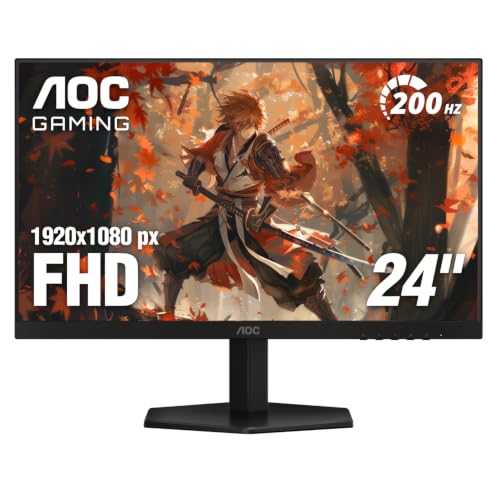
AOC 24G42HE — The straightforward 200Hz alternative
AOC has built its gaming reputation on giving players the panel they asked for and skipping the theatre around it, and the 24G42HE follows that script faithfully. You get a 24-inch 1080p screen running at 200Hz with G-SYNC compatible behaviour for NVIDIA owners, wrapped in a design that will not embarrass itself in a shared flat or a home office. The on-screen menu system is sensibly organised, which sounds trivial until you have fought a joystick-free rival at midnight.
In play, the AOC’s character is consistency. It does not chase the absolute lowest response figures in the category, yet its overdrive tuning avoids the inverse ghosting that plagues aggressively tuned budget panels, so fast pans stay clean rather than crowned with bright halos. That restraint makes it a forgiving partner for mixed libraries: esports titles at full speed, older games capped lower, and the occasional strategy title where you sit back and appreciate that the same screen handles slow evenings gracefully.
Consider this the cross-check pick. If the Acer above is unavailable or its stand arrangement clashes with your desk, the AOC covers the same brief with a slightly different balance of compromises. Either way, the essential experience, a 200Hz 1080p panel at a desk-friendly size, survives intact, and that experience is what this category is actually selling.
- Size: 24 inches
- Resolution: 1920 x 1080
- Refresh rate: 200Hz
- Adaptive sync: G-SYNC compatible behaviour
- Design: understated, office-tolerant styling
Strengths
- Clean overdrive tuning avoids bright trailing artefacts
- Menu system is easy to live with daily
- Styling suits shared spaces and work desks
Trade-offs
- Peak motion figures trail the fastest esports panels
- Stand adjustment is functional rather than generous
- Built-in speakers, if used, are for calls only
Best for: players who want 200Hz speed with a calmer, more versatile everyday character
Not suited for: hardcore esports specialists chasing every last fraction of motion clarity

Samsung Odyssey G3 24-inch 200Hz — The big-brand 200Hz option
Samsung’s Odyssey G3 brings the category’s speed to buyers who simply trust a familiar badge on the box, and this 200Hz generation is a considerably more serious gaming tool than the G3 models of a few years ago. The IPS panel is the important upgrade: viewing angles and colour behaviour now suit a screen that will also show films, coursework and photo libraries, not just ranked matches. Samsung’s gaming interface polish shows in small ways, from sensible preset organisation to a stand design that looks deliberate rather than borrowed.
The G3’s appeal widens because of that versatility. A household screen often serves three masters, and a panel that only excels inside one game genre eventually irritates everyone else who uses it. Here, the 200Hz headroom transforms competitive sessions while the everyday image stays composed, and console owners connecting a second machine get a far better experience than the family’s ageing television panel offers, even if the console itself cannot feed the full refresh rate.
Shoppers comparing this Samsung against the Acer should focus on the ownership details rather than headline numbers, since both deliver the core 200Hz promise. Warranty handling, local availability and stand ergonomics will separate them in real life. On panel merit alone, the G3 justifies its place as the mainstream face of the best 1080 200hz monitors conversation.
- Size: 24 inches
- Resolution: 1920 x 1080
- Refresh rate: 200Hz
- Panel: IPS for wider viewing angles
- Series: Odyssey gaming line
Strengths
- IPS panel suits gaming, film and family use alike
- Polished menus and deliberate industrial design
- Big-brand support network reassures cautious buyers
Trade-offs
- Price can drift above lesser-known 200Hz rivals
- Console play cannot exploit the full refresh ceiling
- Preset colour modes need taming for accurate work
Best for: households wanting one fast screen that behaves well for every kind of content and every user
Not suited for: pure esports players who will never use the versatility they are paying for

ASUS TUF VG259QM5A — The 240Hz step-up in disguise
The VG259QM5A technically breaks this roundup’s brief, because its native refresh is 240Hz rather than 200Hz, and that is precisely why it belongs here as the considered step-up. Everything else about it matches the category: a fast 1080p panel at a competitive twenty-five-inch size, G-SYNC and FreeSync Premium support, and TUF-series build that tolerates being hauled to LAN events and student accommodation moves. If your graphics card already pushes past 200 frames in your main titles, this screen simply refuses to waste them.
Headroom is an underrated virtue in a monitor purchase. Games get heavier, engines change, and a screen bought exactly at today’s frame rates becomes the bottleneck the moment a lighter title or a GPU upgrade arrives. The ASUS also carries the motion-processing extras of a higher tier, and its panel uniformity in our category experience tends to be a notch above the cheapest 200Hz entrants. None of that makes it the value pick; it makes it the longevity pick.
Buy it with eyes open about the rest of the chain. A 240Hz display fed by a system that averages 120 frames is an ornament, not an upgrade, and the money difference would serve better in graphics hardware. But for players whose rigs genuinely live above 200 frames in shooters, this is the natural ceiling of sensible 1080p spending, and it still costs less than the regret of buying twice.
- Size: 25 inches
- Resolution: 1920 x 1080
- Refresh rate: 240Hz native
- Adaptive sync: G-SYNC and FreeSync Premium
- Series: TUF Gaming, built for transport and heavy use
Strengths
- 240Hz headroom future-proofs a strong gaming PC
- Dual adaptive-sync support covers both GPU camps
- Sturdy build suits LAN trips and shared housing
Trade-offs
- Wasted on systems that cannot feed it frames
- Premium over true 200Hz models buys speed only
- 1080p at twenty-five inches softens fine text slightly
Best for: high-frame-rate PC owners whose systems already exceed 200 frames in their main games
Not suited for: anyone whose graphics card averages well below 200 frames per second in what they play
MSI Optix G2412F-class 200Hz rival — The regional-availability alternative (prose-only)
Every market has a locally stocked 200Hz model that undercuts the global names for a season, and MSI’s fast 24-inch gaming panels fill that role in many regions. We are covering this class in prose because a verified pool listing was not available when this roundup was checked, so there is no purchase link attached. The buying logic, however, is identical: confirm the panel is a genuine fast IPS type, confirm adaptive sync covers your graphics card, and treat brand-tier pricing differences as a warranty-and-returns decision.
Shoppers who find such a model on a local shelf should apply the tests in the buying guide below rather than trusting shelf cards. Regional models occasionally share names with different panels elsewhere in the world, which is exactly why this entry stays unlinked. Judge the specific unit in front of you, its stated refresh, its sync range and its return terms, and a regional bargain can serve just as well as the headline names above.
- Size class: 24 inches
- Resolution: 1920 x 1080
- Refresh class: around 200Hz depending on region
- Adaptive sync: verify range on the specific unit
- Availability note: no verified pool listing at checking time
Strengths
- Local pricing can undercut the global brands sharply
- Same core specification as the linked picks
- Easy in-person returns where stocked by big retailers
Trade-offs
- No purchase link because availability was unverified
- Regional panel variations make research essential
- Long-term firmware support varies by market
Best for: shoppers outside the main markets who buy locally and can verify the exact unit in store
Not suited for: online buyers who need a verified listing and predictable specifications
ViewSonic VX-series fast 1080p rival — The office-gaming crossover (prose-only)
ViewSonic’s fast VX gaming models deserve a prose mention for buyers whose desks belong to an employer by day. The company’s gaming panels tend to keep colour behaviour closer to its office lines than most gaming brands bother to, and its warranty reputation in several markets is a genuine differentiator for a screen that will run ten hours daily. As with the MSI entry above, no verified pool listing was available at checking time, so this recommendation travels without a link.
The practical advice is to shortlist a ViewSonic fast model if it is stocked by your preferred retailer at a fair price, then compare its sync range and stand against the Acer and AOC directly. In a category this commoditised, after-sales experience is a legitimate reason to choose one near-identical panel over another, and buyers in shared or professional settings often value exactly that.
- Size class: 24 to 25 inches
- Resolution: 1920 x 1080
- Refresh class: high-refresh gaming range
- Character: colour behaviour closer to office panels
- Availability note: no verified pool listing at checking time
Strengths
- Everyday colour behaviour suits long work hours
- Warranty reputation is strong in several markets
- Designs rarely look out of place professionally
Trade-offs
- No purchase link because availability was unverified
- Model line-up changes names frequently by region
- Peak gaming features trail dedicated esports lines
Best for: work-from-home players who want speed without giving up a professional-looking, well-supported screen
Not suited for: buyers who want the absolute fastest panel regardless of everyday manners
Comparison table
Headline refresh rates tie across most of this table, so choose on sync support, size and ownership details rather than chasing a number they all share.
| Pick | Format | Standout trait | Watch out for |
|---|---|---|---|
| Acer Nitro KG251Q X3 | 24.5-inch, 200Hz | FreeSync Premium, value | Basic stand |
| AOC 24G42HE | 24-inch, 200Hz | Clean overdrive tuning | Mid-pack motion figures |
| Samsung Odyssey G3 | 24-inch, 200Hz | IPS versatility, design | Price drifts upward |
| ASUS VG259QM5A | 25-inch, 240Hz | Headroom and build | Needs a strong GPU |
| MSI 200Hz-class rival | 24-inch class | Regional pricing | Verify exact unit |
| ViewSonic VX rival | 24-25-inch class | Warranty and manners | Unverified listing |
What should you check before paying for 200Hz at 1080p?
Start with your own frame rates, honestly measured. Load your main titles, note the average and the dips during busy scenes, and compare those numbers with the screen’s ceiling. A system averaging 160 frames uses a 200Hz panel beautifully. A system averaging 90 frames in the games you actually play will feel a real improvement over 60Hz, yet much of the panel’s headroom sits idle, and a cheaper 144Hz or 165Hz screen might serve the same rig while freeing budget for the graphics card that changes everything.
Check the cable and port story before the panel story. Sustaining 200Hz at 1080p requires the right connection, typically DisplayPort or a sufficiently specified HDMI link, and some monitors only reach their headline rate on one input. Console owners should note that current consoles cap their output well below 200Hz, so a console-first buyer is purchasing PC headroom and responsiveness, not frames the console cannot send.
Pixel density deserves a clear-eyed look. At twenty-four inches, 1080p yields a respectable desktop image. At twenty-seven inches, the same resolution spreads visibly thinner, text edges soften, and the competitive argument weakens because your eyes travel farther across a bigger frame. That is why this category clusters at twenty-four to twenty-five inches, and why oversize 1080p bargains should be treated with suspicion rather than gratitude.
Adaptive-sync range is the specification sheet’s quiet trap. Confirm the range extends low enough to cover your frame-rate dips, and confirm your graphics card’s camp is properly supported, not merely tolerated. A screen that drops sync below 75 frames will judder exactly when a busy team fight needs smoothness most, which is the worst possible moment for the technology to clock off.
Finally, interrogate the stand and the warranty with the same seriousness as the panel. Budget high-refresh screens routinely ship with tilt-only stands that sit too low for healthy posture, and a monitor arm is a predictable extra cost. Dead-pixel policies and return windows matter because panel lottery is real at this price; buy where returning a disappointing unit is painless.
How do you set up a 200Hz monitor so the speed actually arrives?
Begin at the connection: use the cable in the box or a certified equivalent, plug into the input the manual associates with full refresh, and then verify the operating system is actually running at 200Hz in the display settings. A remarkable share of disappointed owners are running a fast panel at a default 60Hz because nobody told the operating system otherwise. The desktop mouse test takes two seconds: at 200Hz, cursor movement across a dark background looks dramatically smoother.
Enable adaptive sync in both places it lives, the monitor’s own menu and the graphics driver panel, then cap frame rates a few frames below the panel ceiling inside games or via the driver. That cap keeps the system inside the sync range permanently, avoiding the tearing that returns the instant frames exceed the refresh rate. Competitive players sometimes disable sync for absolute latency in specific titles; experiment, but make it a deliberate per-game choice rather than an accident of defaults.
Tune overdrive on a moving test pattern or a familiar fast scene, increasing the setting until faint bright trails appear behind moving objects, then stepping back one notch. That procedure finds your panel’s personal sweet spot far more reliably than copying a stranger’s menu settings, because panel behaviour varies between units and firmware revisions. Brightness for a dim gaming room usually sits lower than showroom defaults suggest, and lowering it reduces eye strain across long sessions.
Revisit the setup after a graphics driver update or a game engine patch, since both occasionally reset refresh or sync behaviour silently. A thirty-second verification ritual after updates protects the entire investment: confirm the rate, confirm the sync indicator, play one familiar map, and only then blame your aim for what follows.
What are the most common mistakes buyers make here?
The classic mistake is buying the monitor before the rig. A 200Hz screen attached to a system that delivers seventy frames in your favourite title is a promise the rest of the chain cannot keep, and the disappointment gets blamed on the panel. Sequence purchases so the frames exist, or accept the screen as a deliberate future-proofing step with modest present returns.
Paying for size instead of speed is the second trap. A twenty-seven-inch 1080p panel looks like more monitor in the shop and plays like less, spreading the same pixels wider while pushing the frame edges into peripheral territory you track more slowly. In this category, smaller really is sharper.
Neglecting the cable is the most embarrassing error, because it costs nothing to avoid. An old HDMI lead from a drawer can silently cap the whole setup, and weeks of settings archaeology will not reveal what a two-minute cable swap does. Use the supplied cable first, always.
Lastly, buyers chase response-time numbers printed on boxes as if they were comparable measurements. They are not standardised across brands, and an aggressive overdrive figure often describes a mode nobody should use. Trust panel type, sync certification and return policies over a heroic millisecond claim.
Final Recommendation
For most competitive players, the Acer Nitro KG251Q X3 is the centre of this category: honest 200Hz speed, sensible size, sync support that covers real-world frame rates. The AOC is the calm alternative, the Samsung the household-friendly big-brand route, and the ASUS the deliberate step-up for systems that already live beyond 200 frames. The two prose alternatives remind you that local markets sometimes beat global listings, provided you verify the exact unit.
Whichever screen you take home, do the unglamorous setup work on day one, because a 200Hz panel misconfigured at 60Hz is just expensive furniture. Set the rate, enable the sync, tune the overdrive once, and the best 1080 200hz monitors stop being a specification debate and become what they were bought for: an advantage you can feel in your hands.
What does 200Hz actually change inside a game, mechanic by mechanic?
Start with target tracking, the core skill of every shooter. When you swing your view across a scene, a 60Hz display redraws the world in coarse steps, so a moving opponent appears at a series of discrete positions with gaps your brain must interpolate. At 200Hz those steps shrink to a third of their former size, the opponent’s path becomes a continuous ribbon rather than a dotted line, and the micro-corrections your hand makes while tracking land on fresher information. Players describe the result as the game feeling more connected to their hand, which sounds mystical and is actually just latency and sampling describing themselves in plain language.
Input latency shrinks alongside the visual sampling. Each frame interval is a queue your inputs wait in, and shortening the interval from roughly sixteen milliseconds to five shortens every queue in the chain, display-side at least. The total saving is not enormous on paper, yet it applies to every single action, thousands of times per session, and it compounds with the clearer motion: you see the target sooner, your correction starts sooner, and the correction itself is rendered sooner. Competitive advantages in mature games are rarely one large thing; they are stacks of small things, and this stack is available to anyone who buys the panel.
Peeking and counter-strafing show the difference in a second way. When you clear an angle with a quick lateral movement, the scene sweeps fast enough that a slow display smears the very doorway you are trying to read. A 200Hz panel keeps edges and silhouettes legible through that sweep, so information gathered mid-movement survives to be acted on. This is why experienced players say high refresh helps defence as much as aim: the screen stops withholding what your movement was designed to discover.
Racing and flight titles translate the same physics into a different sensation. At speed, the roadside and terrain stream past continuously, and a higher refresh rate smooths that stream into something your peripheral vision accepts as motion rather than as a rapid slideshow. The practical gain is judgement: braking points and closing speeds become easier to estimate because the world updates more often between your decision and its consequence. Even single-player drivers report the change as confidence, which is what better information feels like from inside.
None of this requires the frame rate to sit pinned at the ceiling. A system fluctuating between 140 and 190 frames on a 200Hz panel with adaptive sync still delivers most of the benefit, because the sampling remains dense and the presentation remains even. That is why the buying guide weights sync behaviour so heavily: the ceiling is a headline, but the lived experience is the average behaviour across a messy real frame-rate graph, and panels that handle the mess gracefully are the ones owners praise a year later.
There is also a ceiling to the benefit, and honesty requires naming it. Beyond this class of refresh rate, each further step buys less, and the player’s own hardware, network conditions and skill dominate the outcome entirely. A 200Hz screen will not rescue a player from bad positioning or a forty-millisecond connection. It removes the display as an excuse and as a bottleneck, which is a genuine and purchasable thing, but it is the beginning of competitive equipment logic, not the end of it.
How should different players choose inside this category?
The ranked shooter specialist should optimise for the panel’s behaviour at the frame rates their system truly sustains, and for size discipline. Twenty-four to twenty-five inches keeps the whole tactical picture inside sharp central vision, and a fast IPS panel with well-tuned overdrive keeps targets readable through fast turns. For this player the Acer and the AOC are the honest shortlist, with the ASUS step-up justified only when the frame-rate logs prove the system lives beyond 200 frames in the titles that matter. Buying ceiling you cannot feed is the one error this archetype cannot afford, because the money was needed for the graphics card.
The mixed-library player, whose week includes shooters, a racing title, an RPG and films, should weight everyday image quality higher than the specialist does. The Samsung’s IPS versatility earns its premium here, because the screen’s non-competitive hours outnumber its ranked hours and a panel that only shines inside one genre becomes a daily irritation. This player also benefits most from adaptive sync’s quiet work in heavy single-player games, where frame rates wander and tearing would otherwise decorate every slow pan across a landscape.
The console-plus-PC household has a split brief and should admit it. The console will never feed these panels beyond its own output limits, so the purchase is really a PC decision with a console bonus: lower latency and a better panel than the television, plus headroom if a PC arrives or improves. That household should prioritise inputs, two machines must connect without cable swapping, and should not pay the 240Hz premium for a ceiling neither device may reach for years. The mainstream picks serve this desk best.
The student or shared-house player adds durability and discretion to the brief. Screens get moved, knocked and borrowed in that life, so build quality, a sane warranty route and styling that does not announce a gaming den to every visitor carry real weight. The AOC’s calm design and the ASUS TUF’s sturdiness speak to this buyer, while the absolute cheapest panel with a fragile stand is a false economy measured in one term of accommodation moves.
The upgrader coming from a 144Hz screen faces the subtlest decision, because the improvement to 200Hz is real but incremental. This buyer should demand a second reason to switch: a size change, a panel upgrade from TN to fast IPS, a sync certification their current screen lacks. Refresh alone rarely justifies the swap, and the honest advice is to wait until one of those other reasons matures, then make the jump decisively rather than sideways.
Every archetype shares one final instruction: verify the purchase against your own games in the first week, while returns remain painless. Play your main title, run the desktop test, check a dark scene and a bright one, and confirm the stand fits your posture. A category this commoditised rewards buyers who validate quickly and decisively, because the differences between these screens reveal themselves in your room and your library, not in anyone’s laboratory.
How do you keep a 200Hz setup honest as games and drivers change?
A high-refresh setup is not a purchase but a small system, and systems drift. Game engines patch their frame limiters, drivers reorganise their control panels, operating systems add their own display opinions, and a configuration that delivered 200 synced frames in January can be quietly running a lesser experience by June. The defence is a short verification ritual performed after any significant update: confirm the desktop refresh figure, confirm the sync indicator in the driver, load your main title and watch its frame behaviour for two minutes with an overlay you trust. That ritual takes less time than a coffee and protects the entire investment from silent demotion.
Frame pacing deserves as much attention as frame rate once the panel is fast. A game delivering an average of 180 frames with wild swings between 90 and 220 can feel less smooth than a locked, even 160, because the presentation rhythm stutters even while the average impresses. Adaptive sync smooths much of this, yet the cleanest results come from settings that trade a little spectacle for stability: capping the rate deliberately, choosing the graphics preset your system holds rather than the one it visits, and preferring consistent frame times in competitive titles. At 200Hz the panel is rarely the weak link; the discipline of the settings menu usually is.
Thermals and power plans join the story on smaller systems. A laptop or compact PC that boosts gloriously for ten minutes and then throttles will sawtooth its frame rate across a long session, and the monitor will faithfully display every wobble. Adequate cooling, a sensible power profile and vents that are not inhaling a desk’s dust layer are unglamorous parts of a high-refresh setup, but they decide whether the panel’s ceiling is a place your system lives or a place it visited during a benchmark in the shop.
Keep the panel itself in the maintenance loop. Firmware updates for gaming monitors occasionally improve overdrive behaviour or sync ranges, and checking the manufacturer’s page twice a year costs nothing. Dust the vents, keep the supplied cable rather than a drawer-found substitute, and re-run the overdrive check after any firmware change, since tuning can shift beneath settings you chose months earlier. Treated this way, a 200Hz screen stays the screen you bought, which is the entire point of buying a good one.
What separates a good 200Hz panel from a merely fast one after a year?
Uniformity is the quality that reveals itself slowly. A panel can dazzle with speed on day one while hiding backlight variation, a dim corner or a patch of glow that only announces itself during a dark game on a winter evening. Owners discover these things across months, which is why the return window matters and why the first week should include deliberate dark-scene and bright-scene checks rather than only ranked matches. The brands in this roundup are not immune to panel lottery, but their quality control and warranty handling historically waste less of an owner’s life when a unit disappoints.
Ergonomics write the second year of the story. A screen that sits two centimetres too low does not injure anyone in a week; it taxes a neck across a season, until the owner either buys the arm they should have budgeted or starts resenting a monitor that performs flawlessly. When two panels tie on speed, the one whose stand fits your body, or whose VESA mount welcomes the arm you already own, is the better panel in the only timeframe that matters, which is the whole of its working life.
Software and menus form the third slow variable. Firmware support, a sane on-screen display and presets that stay where you left them sound like trivia until you have fought a joystick that selects the wrong submenu for the four hundredth time. The mainstream brands here invest in that layer unevenly, and it is a legitimate reason the Samsung and ASUS can justify prices above a spec-identical rival: you will interact with their polish daily, long after the refresh rate has become invisible through familiarity.
Resale and reuse close the argument. A 200Hz 1080p panel from a known maker holds a second life as a second screen, a sibling’s first gaming monitor or a sale that funds the next upgrade, while an unknown bargain panel is worth roughly its weight in e-waste. Buying inside this roundup’s shortlist is partly buying that future flexibility, and in a category where the headline specification is identical everywhere, the ownership tail is often the real product being purchased.
How does a 200Hz panel change genres beyond shooters?
Fighting games live on reaction windows measured in single frames, and while their engines often run at fixed logic rates, the display still governs how early a player sees an opponent’s startup animation and how confidently they can react to it. A faster panel shaves the display’s share of that chain and, just as importantly, keeps fast lateral movement in side-view stages crisp rather than smeared. Players who main these titles describe the change as the game feeling honest, which is another way of saying the screen stopped adding its own delay to an already strict examination. For a genre where tournaments still gather around consistent setups, owning a fast home panel also means practice conditions finally resemble event conditions.
Real-time strategy and MOBA titles seem like unlikely beneficiaries, since their action is slower, yet the constant camera panning across a map is precisely the motion that exposes a slow display. At 200Hz the map stays legible while it moves, unit details survive the scroll, and the thousand small camera adjustments of a match stop feeling like dragging the world through syrup. The advantage is comfort as much as performance, and across a long session comfort compounds into attention, which is the resource those games actually tax.
Platformers and rhythm titles translate refresh into timing confidence. Inputs in these genres are judged against visual beats, and a display that presents motion densely and evenly tightens the relationship between what the player sees and when they press. Speedrunners were early adopters of high refresh for exactly this reason: consistent, readable motion makes frame-sensitive techniques reproducible, and reproducibility is the whole discipline. None of these genres needs 200Hz the way a shooter rewards it, but all of them feel the upgrade in the hands within minutes.
Even the desktop between games participates. Dragging windows, scrolling documents and moving a cursor at 200Hz is visibly, almost absurdly smoother than at sixty, and once a person has worked on such a panel for a week, ordinary screens feel faintly broken in a way that is hard to un-feel. That everyday dividend is part of why this category keeps growing: the purchase performs during every hour the computer is on, not only during ranked matches, and buyers should count those hours honestly when deciding whether the premium over a 144Hz screen is justified for their desk.
What should you check in the first week before the return window closes?
Treat the first week as an audition with a checklist, because panel lottery is real and the return window is the only laboratory that matters. Begin with uniformity: display a full-screen mid-grey, then a dark scene from a game or film in a dim room, and look for corners that glow, patches that bloom or a side that runs visibly brighter. Some variation is normal at this price; a defect that draws your eye during ordinary play is not, and it will not improve with age. Photograph what you find, since describing backlight behaviour to a support line goes better with evidence than with adjectives.
Run the motion checks next, on your own games rather than on synthetic tests alone. Play the fastest title you own, watch a hard camera pan for trailing or bright coronas, and toggle the overdrive settings to learn where your unit’s clean range sits. Check adaptive sync with an overlay confirming the panel’s rate is following the game’s output rather than sitting fixed, because a sync failure can hide behind a generally smooth impression until a demanding scene exposes it. These checks take twenty minutes and they validate the entire reason the monitor was bought.
Inspect the ergonomics with the same seriousness. Sit in your real chair, at your real desk, for a full session, and notice whether the stand’s height and the panel’s distance let your shoulders stay down. A screen that wins every technical test and loses this one will be replaced within a year, usually at a loss. If an arm would fix it, price the arm now and decide whether the total still beats the rival whose stand fitted from the start.
Finish with the boring inventory: every input working, the speakers if you will ever use them, the menu joystick behaving, no dead pixels inside the area your eyes inhabit. Keep the box until the window closes. A 200Hz panel that passes this week cleanly is very likely to serve for years, and the discipline of checking is what separates buyers who got the category’s promise from buyers who got its brochure.
How do you pair a 200Hz monitor with the right graphics settings?
The monitor sets the ceiling; the settings menu decides how often you visit it. Competitive players have converged on a philosophy worth borrowing even by casual owners: protect frame rate stability first, then spend whatever performance remains on image quality. That means resolution fixed at the panel’s native 1080p, since rendering above it and downscaling buys little at this size, dynamic resolution features treated with suspicion because they smear exactly the motion clarity the panel exists to reveal, and the heaviest cosmetic effects, the ones whose cost arrives in frame-time spikes rather than in averages, turned down before the settings that merely lower the average.
Texture and shadow settings deserve separate handling because they tax different parts of the system. Textures mostly consume memory and, once they fit, cost little per frame, so they can often stay high on a 200Hz setup without disturbing the rate. Shadows and volumetric effects, by contrast, are computed continuously and tend to produce the dips that break sync’s composure in busy scenes. Lowering those two categories first is the closest thing this hobby has to a free lunch, and it preserves the visual identity of a game far better than a blanket low preset that flattens everything equally.
Latency settings inside games and drivers interact with the panel in ways worth one careful experiment. Low-latency modes reduce the queue of prepared frames, which pairs naturally with a fast display’s short intervals, while reflex-style technologies in supported titles attack the same problem from the engine side. Enable them one at a time and play a familiar map after each change, because stacking every latency feature blindly can introduce stutter that feels worse than the milliseconds it saved. The goal is a chain that feels direct, not a settings page that looks aggressive.
Finally, measure with an overlay for one session after any major change, then turn the overlay off and play. The numbers exist to verify that the system behaves as intended, not to colonise your attention during matches. A 200Hz setup is finished when you stop thinking about it, when the panel, the sync and the settings disappear and only the game remains, arriving five milliseconds at a time. That disappearance is the product. Everything in this guide, from panel choice to cable discipline, is plumbing in its service.
What about eye strain, brightness and long sessions at high refresh?
High refresh carries an unexpected comfort benefit that rarely appears in marketing: smoother motion asks less of your visual system. Text scrolling without judder, a cursor that glides instead of hopping, and game camera movement that stays continuous all reduce the micro-corrections your eyes perform thousands of times an hour. Many owners report that a fast panel feels restful in a way they did not anticipate, and while that is no medical promise, it aligns with the basic mechanics of how the eye tracks moving objects. The panel cannot fix a bad setup, though, and the same buyers often sabotage the benefit with showroom brightness in a dark room.
Set brightness for the room rather than for the spec sheet. In a dim gaming space, a moderate setting preserves dark detail and spares your eyes across a long evening; in a bright office, the panel needs more output to hold contrast against ambient light, which is where the mainstream picks here earn their keep. Bias lighting behind the screen softens the contrast between a bright panel and a dark wall, and a twenty-minute break rhythm does more for comfort than any single feature a manufacturer can print on a box. Flicker behaviour also belongs in the comfort audit: modern gaming panels generally manage their backlights well at working brightness, but very low brightness settings are where weaknesses hide, so test your actual evening setting during the return window rather than the default.
Viewing distance completes the comfort picture at these sizes. Twenty-four to twenty-five inches at 1080p wants roughly an arm’s length, close enough for competitive awareness and far enough that individual pixels stop announcing themselves during desktop work. Sit much closer and the resolution’s limits become a daily irritation that owners misattribute to the panel’s quality; sit at the intended distance and the same screen feels sharp, calm and fast. Geometry, brightness and breaks: unglamorous, free, and worth more than the difference between any two panels in this roundup.
A closing word on what fast actually buys: the best 1080 200hz monitors in perspective
Strip the category to its essence and a 200Hz monitor buys time: time rendered as information, delivered five milliseconds at a time, in the exact moments when a game is decided. It does not buy skill, positioning or judgement, and it flatters none of those things. What it removes is the screen’s contribution to your mistakes, the smeared target, the late frame, the sweep that withheld what you turned to see. Players who understand that purchase it without illusion and enjoy it without superstition. Players who expect it to substitute for practice will be disappointed at any refresh rate ever manufactured. Buy the panel for the bottleneck it genuinely removes, set it up with the care this guide describes, and the rest of the improvement, as always in this hobby, is yours to earn in the hours that follow.
One final distinction: buying speed versus buying a system
The shoppers who stay happiest with this category are the ones who understood they were buying a system, panel, cable, settings and hardware in balance, rather than a number in isolation. Their screens run at the rate on the box because they verified it, their sync works because they enabled it in both of its homes, and their frame rates live near the ceiling because their settings respect their graphics card’s real strength. None of that required genius or extra money, only the hour of attention this guide has spent describing. Spend that hour and the number on the box becomes the number in your hands, which is the entire transaction this category offers and the only one worth paying for.
Frequently Asked Questions
Can my mid-range graphics card actually use a 200Hz monitor?
In competitive titles with sensible settings, usually yes. Esports engines are built to scale, and 1080p keeps the load modest. In heavy single-player games you will sit below the ceiling, where adaptive sync keeps the experience smooth anyway.
Is 200Hz noticeably better than 144Hz?
The jump is real but smaller than the leap from 60Hz. Players feel it most in tracking fast targets and in general desktop fluidity. If your system averages near 144 frames, the practical difference shrinks further.
Do consoles benefit from these monitors?
Partially. Consoles cannot output 200 frames, but they gain a responsive, low-latency panel and a better image than an old television. Buy one for console use only if a PC shares the desk or may join it later.
Which cable do I need for 200Hz at 1080p?
DisplayPort is the safest route on PC, or the specific HDMI input and cable specification the manual names. When in doubt, use the cable supplied in the box and verify the active refresh rate in your display settings.
Is 1080p too blurry at twenty-five inches?
For gaming, no; the size keeps density acceptable and frames high. For all-day text work it is softer than 1440p, which is why mixed-use buyers should weigh the productivity sections of each review above.
Should I choose 200Hz or a larger 1440p screen?
Choose by the games you play most. Competitive shooters reward the frames; slow, scenic titles reward the pixels. Your graphics card’s realistic output at each resolution should make the decision for you.
Related Guides
Keep exploring with these companion guides: best 1080p 144hz monitors best 1080p freesync 144hz monitors how to enable high refresh rates on a gaming PC.


