What's inside
- Key Takeaways
- Quick Picks
- How We Chose These Picks
- Side-by-Side Comparison
- Why Does a Paper-Like Screen Feel Calmer Than a Glossy One?
- How Should You Set Up Any Tablet for Long Reading Sessions?
- What Size Page Do Comics, Magazines and PDFs Really Need?
- How Do You Build a Reading Library Across Apps Without Chaos?
- Can a Tablet Replace Both Your Books and Your E-Reader?
- What About Audiobooks and Reading With Your Ears?
- How Long Should a Reading Tablet Last Between Charges?
- How Do You Protect Your Eyes Across Years of Tablet Reading?
- Should You Read on the Same Tablet You Use for Everything Else?
- What Should Students and Researchers Look for in a Reading Tablet?
- What Goes Wrong When People Buy a Tablet for Reading
- Final Recommendation
- Frequently Asked Questions
- Related Guides
As an Amazon Associate I earn from qualifying purchases. This post may contain affiliate links at no extra cost to you.
widgetverdict.com is reader-supported. When you buy through links on our site, we may earn an affiliate commission.
Where to buy: the linked tablets in this guide are sold through Amazon, and each product name takes you to its listing, where you can check price on Amazon before ordering. Readers hunting for the best android tablets for reading books want something a phone cannot give them: a page that holds still, text that stays comfortable at midnight, and a screen that does not punish an hour of attention with glare and gritty eyes. The best android tablets for reading books solve that problem in two different ways, and this guide is built around the honest tension between them. Two TCL NXTPAPER models use paper-like display technology on full Android tablets — the closest a backlit screen has come to the calm of a printed page — while three conventional tablets from Lenovo and Samsung offer sharper prices of entry, smaller sizes and familiar panels. A sixth presence haunts the whole list: the Kindle Paperwhite, covered without a link, because it is the e-ink benchmark every reading tablet is judged against, and because it is not an Android tablet at all.
That last point shapes everything below. If your reading life is novels and nothing else, a dedicated e-reader may serve you better than anything here, and we will say so plainly in its section. But readers whose books live alongside library apps, web articles, PDFs, comics, magazines and the occasional video need Android’s openness, and for them the question is which Android screen treats reading as the main event rather than a bullet point. The two NXTPAPER picks are the heart of the answer; the Lenovo and Samsung picks are for readers who prioritise size, simplicity or an existing ecosystem; and the Paperwhite section exists so you can make the e-ink comparison with your eyes open.
Key Takeaways
- TCL’s NXTPAPER models are the axis of this guide: paper-like displays on full Android tablets, in a 14.3-inch model with a 10000mAh battery and an 11-inch model with quad speakers.
- The Kindle Paperwhite, covered as a prose-only pick, is an e-ink reader and not an Android tablet — it is here as the comfort benchmark, not as a disguised recommendation.
- Lenovo’s Tab M11 brings a 1920×1200 screen and an ambient light sensor that suits long sessions, while the Tab One trades sharpness for a book-sized 8.7-inch body.
- Samsung’s Galaxy Tab A9 8.7 is the compact, familiar option for readers already inside Samsung’s world.
- Reading comfort is a system, not a spec: matte or paper-like surfaces, sensible brightness habits, font settings and a case that props the tablet all matter as much as resolution.
- Battery figures are quoted only where listings state them — the Tab M11’s 10 hours, the Tab One’s 12.5 hours of streaming, the NXTPAPER battery capacities — and nowhere else.
Quick Picks
| Pick | Badge | Why it earns a place |
|---|---|---|
| TCL NXTPAPER 14 | The paper-like flagship | A 14.3-inch 2.4K paper-like display, 8+256GB, a 4096-level stylus and case, and a 10000mAh battery. |
| TCL TAB A1 NXTPAPER | Paper-like, portable | An 11-inch 2.1K 90Hz paper-like screen with the T-Pen 2 and case included, 8000mAh battery and quad speakers. |
| Lenovo Tab M11 | Conventional screen, reader’s spec | An 11-inch 1920×1200 display, ambient light sensor, 10-hour battery and a folio case in the box. |
| Lenovo Tab One | The paperback-sized one | An 8.7-inch lightweight tablet with folio case, sized and weighted like the books it replaces. |
| Samsung Galaxy Tab A9 8.7 | Compact Samsung | Samsung’s 8.7-inch tablet with 64GB of storage for readers in that ecosystem. |
| Kindle Paperwhite | The e-ink benchmark | A dedicated e-reader covered without a link — not an Android tablet, and honest about it. |
How We Chose These Picks
Reading is a different workload from watching, and we selected for it specifically. Surface came first: a screen read for an hour at close range should not behave like a mirror, which is why TCL’s paper-like NXTPAPER displays anchor the guide — their listings promise a paper-like panel outright, in two sizes, both with large batteries and included pens for readers who annotate. Resolution came second, because letterforms drawn cleanly stay comfortable longer; the NXTPAPER pair carry 2.4K and 2.1K panels, and the Lenovo Tab M11’s 1920×1200 screen is the strongest conventional panel here. Battery claims were handled strictly: where a listing prints a figure we quote it, where it prints a capacity we call it a capacity, and where it prints neither we say nothing numerical at all.
Size diversity was deliberate. Reading happens in armchairs, beds, trains and gardens, and no single diagonal serves all of those; the guide therefore spans 8.7 inches for one-handed paperback-style reading to 14.3 inches for readers who want a broadsheet page, PDFs and comics at something close to printed scale. The two small picks — Lenovo’s Tab One and Samsung’s Tab A9 — are present because a light tablet that actually gets carried to the garden will host more reading than a magnificent one left indoors. The Tab M11 holds the middle: a conventional glossy screen, yes, but with an ambient light sensor in its listing, a stated 10-hour battery and a folio case, the kit of a tablet meant to be lived with.
The Paperwhite’s inclusion needs its own defence, since it fails the category’s basic test — it does not run Android. It is here because every conversation about reading tablets eventually asks “or should I just get an e-reader?”, and a guide that dodges that question serves nobody. It is covered without a link, described as what it is, and compared honestly: unbeatable at the single job of reading text, incapable of the app breadth that brings most readers to Android in the first place. Judge the five Android picks against it, and judge it against them.

TCL NXTPAPER 14 — A Broadsheet-Sized Page That Feels Like Paper
The NXTPAPER 14 is the most distinctive reading device in this guide, and its listing explains why in one phrase: a 14.3-inch 2.4K paper-like display, running NXTPAPER 3.0. Paper-like is the operative idea. Instead of the glossy, reflective surface of a conventional tablet, this class of screen is built to scatter light the way paper does, so a page read by a window or under a lamp stays a page rather than becoming a dark mirror with text floating in your own reflection. For readers whose sessions run to hours — a novel on a Sunday, a stack of articles saved all week — that surface behaviour is the difference between finishing a chapter and finishing with a headache.
Then there is the sheer scale of it. At 14.3 inches, this is a tablet that shows a book page at something near hardback size, a magazine spread without zooming, a PDF or sheet of music at working scale. TCL’s listing indeed names drawing, note-taking and musicians among its audiences, and readers of comics and graphic novels will understand immediately: artwork drawn for a printed page finally gets a printed page’s dimensions. Storage and memory are 8+256GB, generous enough for a large offline library of books, comics and documents, and the battery is a 10000mAh cell — a capacity figure we report as such, in a class where big screens earn their keep only if the battery behind them is equally serious.
The included accessories change how the tablet gets used for reading-adjacent work. A 4096-level stylus and a case are named in the listing: the stylus turns margin notes, highlighting and underlining into pen-like acts rather than fingertip approximations, and students or professionals who read to work — annotating papers, marking scores, sketching over texts — will feel the difference daily. AI tools are also listed, and readers may find summarising features handy for long documents, though the core purchase remains the screen. Nobody buys this tablet for its software garnish; they buy it because the page feels calm.
The costs of the concept are size and commitment. A 14.3-inch tablet is a lap-and-table device, not a one-handed paperback; it belongs at home, at a desk, on a music stand, in a tote bag carried deliberately. Readers whose books happen in bed with the tablet held overhead should look at the 11-inch NXTPAPER below, which keeps the paper-like surface in a body that forgives tired arms. But for the reader who has always wanted their digital library to feel like paper at full size — and who reads enough PDFs, comics or scores to justify the canvas — this is the most complete reading tablet in the guide, and the one the others are measured against.
- Display: 14.3-inch 2.4K paper-like, NXTPAPER 3.0
- Memory and storage: 8GB + 256GB
- Battery: 10000mAh, per listing
- Included: 4096-level stylus and case
- Extras in listing: AI tools
- Audiences named in listing: students and creators; drawing, note-taking, musicians
Strengths
- Paper-like 2.4K surface is the calmest long-session screen here.
- Near-print scale transforms comics, magazines, PDFs and scores.
- Stylus and case included, turning reading into annotating.
Trade-offs
- Fourteen inches is a lap device; one-handed bed reading need not apply.
- The largest, most specialised pick is also the least casual to carry.
- Readers who only read novels may never use the canvas they paid for.
Best for: heavy readers of mixed material — books plus PDFs, comics, magazines or sheet music — who read at a table or in a chair and want paper’s calm at paper’s scale.
Not suited for: a paperback-only reader who reads in bed and wants the lightest possible thing above the pillow.

TCL TAB A1 NXTPAPER — The Paper-Like Screen at a Sensible Size
If the NXTPAPER 14 is the concept at full stretch, the TAB A1 NXTPAPER is the concept at the size most readers will actually live with: an 11-inch 2.1K display at 90Hz, paper-like, in a sleek metal unibody. Eleven inches is the classic reading-tablet diagonal — a page bigger than any paperback, two-page spreads that remain legible, and a body that can still be held in two hands on a train or propped in bed without engineering. The 90Hz refresh will not change how a novel reads, but page turns, scrolling through articles and browsing a library all feel smoother for it, and smoothness is part of comfort over a long evening.
The bundle is unusually complete for a reader who also writes. The listing names the T-Pen 2 and a case as included, so the annotation kit that costs extra elsewhere arrives in the box: highlight a passage, scribble in a margin, sign a document, all with a pen made for the screen. Memory and storage are 6+128GB, the battery is 8000mAh — again, a capacity we report plainly — and quad speakers give audiobooks and spoken-word content a fuller voice than most reading tablets manage. That last point matters more than it looks: many heavy readers split their books between eyes and ears, and a reading tablet that doubles as a good audiobook speaker earns its place on the kitchen counter between chapters.
Against its bigger sibling, the A1 trades canvas for versatility. Comics shrink from print scale to comfortable scale; PDFs ask for the occasional zoom; sheet music wants a stand and a forgiving layout. In exchange, the tablet travels, fits in ordinary bags, and can be read one-handed for stretches that would defeat the 14. For most readers — novels, articles, library books, the odd document to annotate — this is the balanced form of the NXTPAPER idea, and the pick we would recommend first to anyone curious about paper-like screens but unsure about committing to a giant.
One honest boundary: paper-like is not e-ink. The screen remains a backlit LCD at heart, with the battery appetite that implies; the 8000mAh cell is sized for days of mixed use, not the weeks a Paperwhite measures in. What the surface buys is comfort and calm under real room light, plus full Android underneath — every library app, every bookshop, every reading subscription. Readers who want that combination, in a size their hands approve of, will find this the sweet spot of the entire guide.
- Display: 11-inch 2.1K paper-like, 90Hz
- Memory and storage: 6GB + 128GB
- Battery: 8000mAh, per listing
- Included: T-Pen 2 stylus and case
- Sound: quad speakers
- Body: sleek metal unibody; octa-core CPU and AI tools in listing
Strengths
- Paper-like comfort in the most liveable size in this guide.
- Pen and case included — annotation ready out of the box.
- Quad speakers make it a strong audiobook companion too.
Trade-offs
- Comics and scores lose the print-scale magic of the 14.3-inch model.
- Still a backlit screen: battery life is measured in days, not e-ink weeks.
- Metal unibody deserves care; the included case should stay on.
Best for: the all-round reader — novels, articles, library apps, some annotating — seeking paper-like comfort in a tablet that still travels.
Not suited for: a reader set on print-scale pages for comics or music, or a purist for e-ink’s week-long battery above all else.

Lenovo Tab M11 — The Conventional Screen Done Properly
Not every reader wants a new display technology; some want a normal tablet that takes reading seriously, and the Lenovo Tab M11 is exactly that. Its listing specifies an 11-inch display at 1920×1200 — the sharpest conventional panel in this guide — driven by a MediaTek Helio G88 octa-core processor, with 4GB of memory and 128GB of storage. Two details in the listing are aimed at readers specifically. An ambient light sensor lets the tablet adjust its brightness to the room, which sounds minor until you have read the same book across a bright afternoon and a dim evening without once touching a slider. And the stated battery figure is 10 hours — quoted here as the listing prints it — which covers a long day of reading with room to spare.
The folio case included with this version matters to the reading experience more than its bullet point suggests. A folio props the tablet at reading angles on a table or tray, protects the glossy screen in a bag, and gives the whole object a book-like feel in the hand that a naked slab never achieves. Glossy is the honest caveat of this pick: unlike the NXTPAPER pair, the M11’s screen will reflect a window or a lamp, and readers sensitive to glare will find themselves angling it or moving chairs. Indoors, away from direct light, the panel’s sharpness tells — text is crisp, illustrations are rich, and the experience is thoroughly pleasant.
Value is the M11’s second argument. Check price on Amazon and it typically sits well below the paper-like flagships, which reframes the decision: a reader can own a sharp, capacious, case-included reading tablet now, or save toward the NXTPAPER experiment. Readers who already know glare bothers them should not gamble; readers who mostly read indoors in the evening may never encounter the M11’s one weakness. Storage of 128GB swallows a serious library plus downloaded issues and documents, and the conventional screen flatters comics and magazines with full, glossy colour in a way matte panels mute slightly.
Parents reading with children find a second use for this one: the big, bright page makes shared storybooks vivid, and the folio case survives the journey from shelf to sofa better than a naked premium tablet would. It will not replace a dedicated children’s tablet with proper controls — our kids’ guide covers that territory — but as the family book that adults own and children borrow under supervision, the M11 is comfortably built for the role.
As a household’s shared reading tablet — library books for one member, comics for another, articles for a third — the M11 is the recommendation nobody at the table argues with. It asks nobody to learn a new display philosophy, costs the least commitment, and still respects the fundamentals: resolution, brightness that adapts, a battery figure in writing, and a case in the box. Readers who later fall for paper-like screens will upgrade with knowledge; readers who do not will simply keep reading.
- Display: 11-inch, 1920×1200
- Processor: MediaTek Helio G88 octa-core
- Memory and storage: 4GB, 128GB
- Battery figure in listing: 10 hours
- Sensor: ambient light sensor, per listing
- Included: folio case; colour Luna Grey
Strengths
- Sharpest conventional screen here, with brightness that adapts to the room.
- A stated 10-hour battery and a folio case included.
- 128GB holds a household-sized library of books and comics.
Trade-offs
- Glossy panel reflects windows and lamps where the NXTPAPER screens stay calm.
- No stylus is bundled with this version, unlike the pen variant sold elsewhere.
- Colour reproduction flatters media but the surface is less kind in bright rooms.
Best for: indoor and evening readers after a sharp, honest, case-included tablet for books, comics and articles, minus the paper-like technology bill.
Not suited for: readers who read by bright windows or outdoors and know glare ruins their sessions.

Lenovo Tab One — The Paperback of the Group
Every reading guide needs the pick that behaves like the object it replaces, and the Tab One is sized like a paperback that learned new tricks: an 8.7-inch HD display in a lightweight body, 4GB of memory, 64GB of storage, a MediaTek Helio G85 inside, and a folio case included. Its listing’s one endurance claim — up to 12.5 hours of YouTube streaming — is a video figure, and we cite it as such; for reading, which sips power compared with streaming, owners can expect the tablet to disappear from their charging routine for days at a time, though we will not put a number on that the listing does not.
An HD panel at this size renders text more softly than the M11 or the NXTPAPER pair, and there is no honest way to dress that up. What the Tab One offers instead is proportion. Held in one hand on a train, in bed, in a garden chair, it asks nothing of the reader’s wrists, and at the generous font sizes most long-form readers actually choose, its text is perfectly serviceable — large, clear and unthreatening. There is a reason the dedicated e-reader world settled near this size: books are this shape because hands are.
The folio case completes the paperback impersonation, wrapping the tablet in something that feels like a book cover and folds into a stand when the reading moves to a table. For commuters, this is the pick: light in the bag, quick to open, cheap enough in spirit — check price on Amazon — that it can be the dedicated reading device while a bigger tablet stays home. Readers of text-heavy material — novels, long articles, library books — lose the least by choosing it; readers of comics and illustrated magazines lose the most, and should look up the list.
There is a small ritual this tablet suits better than any other pick: the downloaded Sunday paper. A week’s worth of long articles, saved offline into a reading app, turns the Tab One into a personal magazine that works in a garden with no signal and on a train with worse. Readers who build that habit report it changes their week — the articles actually get read, in order, without the browser’s hundred open doors competing beside them.
Consider it the reading tablet for people who read in fragments and journeys rather than in armchair marathons. Fifteen minutes on a bus, a chapter before sleep, a Sunday article in the garden: the Tab One is always the nearest screen, already charged, already in its cover. Reading habits are built from exactly those small, frictionless moments, and a device that removes every excuse serves them better than a superior screen that lives in another room.
- Screen: 8.7-inch HD panel
- RAM and storage: 4GB and 64GB
- Chip: MediaTek Helio G85
- Stated endurance: up to 12.5 hours of YouTube streaming
- In the box: folio case
- Design brief in listing: lightweight
Strengths
- Paperback proportions suit one-handed reading anywhere.
- Folio case included, doubling as cover and stand.
- Lightweight build encourages carrying it, which encourages reading.
Trade-offs
- HD resolution is the softest text in this guide.
- Small page for comics, magazines and PDFs.
- 64GB asks streamers and hoarders to tidy occasionally.
Best for: commuters and bedtime readers after a light, book-shaped tablet for novels and articles, always charged and always nearby.
Not suited for: readers of visual material — comics, art books, magazines — where page size and fine detail are the whole point.
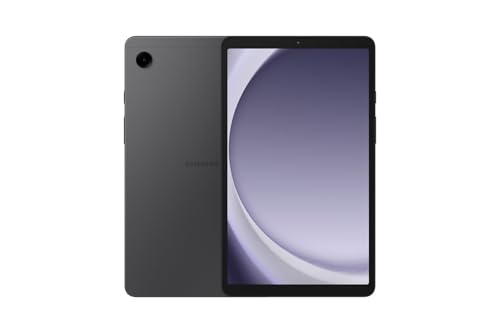
Samsung Galaxy Tab A9 8.7 — The Familiar Small Samsung
The Tab A9’s case in a reading guide rests on ecosystem and size. The listing describes an 8.7-inch (22.1 cm) tablet with 64GB of storage, 4GB of memory and Wi-Fi 5 (802.11ac) in Graphite — modest, ordinary figures that conceal its real argument: a reader whose books, notes and photographs already live in Samsung’s world, or whose phone is a Samsung, gets a reading tablet that behaves exactly as expected from the first evening. Reading apps are reading apps on any Android tablet, but continuity of accounts, syncing and settings layout removes the small frictions that quietly reduce reading time.
At 8.7 inches it shares the Tab One’s paperback logic — one hand, any chair, every bag — with the same honest limitation: this is a text screen, not a canvas. Novels, news and long-form articles sit happily on it; comics and PDFs will ask for zooming and patience. The listing states no battery figure and no included case, so we claim neither: endurance will follow the class pattern of a small tablet charged every few days under reading use, and a folio case is a separate, worthwhile purchase that turns it into a proper book-shaped object.
Where the A9 quietly wins is as the second screen in a Samsung household. Highlights and libraries sync with the phone’s reading apps where the services support it, the same account carries purchases across, and a reader can start a chapter on the phone in a queue and finish it on the tablet at home without thinking about the join. Families buying one tablet to be shared among readers will find the Lenovo M11’s bigger page more democratic; a single reader embedded in Samsung’s ecosystem will find this smaller tablet more personal.
Judge it, finally, by the standard of the carried device. A reading tablet’s value is the reading that actually happens on it, and a compact, familiar tablet that lives in a coat pocket or handbag accumulates chapters the way a grand piano in another room accumulates dust. If your reading is textual, your ecosystem is Samsung and your sessions happen everywhere, the A9 is a coherent, unpretentious answer — and its limits are printed plainly in its own listing, which this guide respects.
- Panel: 8.7 inches (22.1 cm)
- Capacity: 64GB of storage
- Memory: 4GB RAM
- Radio: Wi-Fi 5 (802.11ac)
- Finish: Graphite
- Battery figure and case: the listing title states neither
Strengths
- Samsung familiarity and account continuity for existing owners.
- Paperback size that genuinely gets carried and used.
- Plain, honest specification with no inflated claims.
Trade-offs
- No battery figure or case is promised in the listing.
- Small screen limits comics, PDFs and shared reading.
- Text sharpness sits below the M11 and NXTPAPER picks.
Best for: a Samsung-ecosystem reader after a compact, familiar tablet for novels and articles in every spare ten minutes of the day.
Not suited for: visual readers, or a cautious buyer insisting on a stated battery figure and a case in the box before committing.
Kindle Paperwhite — The E-Ink Benchmark, and Not an Android Tablet (Prose-Only)
Let us be exact about what the Paperwhite is, because this guide’s honesty depends on it: the Kindle Paperwhite is a dedicated e-reader with an e-ink screen. It does not run Android, it does not install Android apps, and it is covered here without a purchase link, as a benchmark rather than a pick. E-ink works by physically arranging pigment rather than shining light through a panel, which is why a Paperwhite page looks like paper in direct sunlight, why its battery is measured in weeks, and why generations of readers swear nothing else reads as restfully. Any Android tablet claiming the reading crown should be compared against that experience, and none of them — NXTPAPER included — fully reproduces it.
What e-ink gives up is everything around the text. A Paperwhite reads books from its own store and library channels beautifully and does almost nothing else: web articles are a chore, PDFs are cramped, comics lose their colour and their scale, magazines are an afterthought, and the rich ecosystem of Android reading apps — multiple bookshops, library services, read-it-later tools, RSS readers — is simply not available. The modern reader’s diet is rarely novels alone, and the moment a reading life includes saved articles, documents, comics or study materials, the e-reader becomes one device among several rather than the answer.
So the Paperwhite’s role in this guide is disciplinary. If, having read this far, you realise your reading is ninety percent novels from one store, buy the benchmark and enjoy the best tool for that single job; this guide will not pretend an Android tablet beats it there. If your reading is mixed — and for most people searching for an Android reading tablet, it is — then the comparison runs the other way: the NXTPAPER models borrow as much of e-ink’s calm as a backlit screen can, while keeping every app you need. The Paperwhite sets the standard for comfort; it does not disqualify the field.
Price framing belongs in this section too, stated carefully: an e-reader and an Android tablet are not rivals at the same till point so much as tools of different widths, and comparing them by cost alone misleads in both directions. The e-reader is cheaper because it does one thing; the tablet costs what breadth costs. Readers should compare each against the job list in their own week — the device that covers the most of your actual reading hours per pound or dollar is the value pick, whichever technology it uses.
One more practical note for households: the two technologies coexist happily. Many committed readers own an e-reader for novels and an Android tablet for everything else, and buy each more cheaply for knowing its role. If you are choosing one device only, choose by the majority of your reading hours, not by the purity of any single page — and let the sections above, not brand loyalty, make the call.
- Platform: dedicated e-reader; e-ink display — not an Android tablet
- Reading scope: books from its own store and library channels
- Battery character: measured in weeks, typical of e-ink
- App breadth: no Android apps; limited for web, PDFs and comics
- Role in this guide: comfort benchmark, covered without a link
- Listing status: prose-only
Strengths
- E-ink remains the most restful surface for pure text reading.
- Weeks of battery remove charging from the reading habit entirely.
- Superb in bright sunlight, where backlit screens struggle.
Trade-offs
- Not Android: no reading apps beyond its own ecosystem.
- Comics, magazines, PDFs and web reading are all compromised.
- A single-purpose device in a mixed-media reading life.
Best for: the novel-only reader, content with the benchmark e-ink experience and nothing else from the device.
Not suited for: anyone whose reading spans apps, articles, comics and documents — that reader needs Android, and should choose from the five picks above.
Side-by-Side Comparison
| Pick | Screen | Memory / storage | Battery as listed | Reading character |
|---|---|---|---|---|
| TCL NXTPAPER 14 | 14.3-inch 2.4K paper-like | 8GB / 256GB | 10000mAh capacity | Print-scale pages; stylus and case included |
| TCL TAB A1 NXTPAPER | 11-inch 2.1K paper-like, 90Hz | 6GB / 128GB | 8000mAh capacity | Balanced reader with pen, case, quad speakers |
| Lenovo Tab M11 | 11-inch 1920×1200 glossy | 4GB / 128GB | 10 hours stated | Sharp conventional screen; folio case included |
| Lenovo Tab One | 8.7-inch HD | 4GB / 64GB | Up to 12.5 hours of YouTube streaming stated | Paperback-sized; folio case included |
| Samsung Galaxy Tab A9 | 8.7-inch | 4GB / 64GB | Not stated in listing title | Compact Samsung familiarity |
| Kindle Paperwhite | E-ink (not Android) | Not applicable here | Weeks, typical of e-ink | Benchmark for novels only |
Why Does a Paper-Like Screen Feel Calmer Than a Glossy One?
Glossy screens reflect the room back at you. Reading on one is a negotiation between the text and everything bright behind your shoulder — a window, a lamp, your own face — and your eyes perform that negotiation continuously, refocusing between the page and its reflections. A paper-like surface breaks reflections up, scattering light the way a printed page does, so the eyes settle on the text and stay there. Over ten minutes the difference is a preference; over two hours it is the difference between a finished novella and a headache behind the eyes. That is the entire NXTPAPER proposition, stated without decoration.
Honesty demands the other side: matte and paper-like surfaces slightly soften the finest detail and mute colour saturation compared with a glossy panel. Photographs and comics lose a little gloss-born punch, and purists comparing side by side will see it. Readers of text gain calm and give up almost nothing; readers of art books should weigh the trade with their own eyes where possible. Comfort technology is always a bargain struck between qualities, and this one favours the novel-reader’s priorities.
How Should You Set Up Any Tablet for Long Reading Sessions?
Start with the type. Choose a bookish serif font where the app allows it, set a size you can read at your natural holding distance without leaning in, and give the lines room — line spacing and margins are not decoration, they are what let your eyes find the next line without effort. Turn on the warm or night colour mode for evening sessions so the page’s tone matches the room’s light. Set brightness to the room rather than to maximum: a page slightly dimmer than the surroundings is restful, while a page blazing in a dark room is a torch pointed at your face.
Then remove interruption. Download the book so connectivity cannot stall it, silence notifications for the session, and let the ambient light sensor — the Tab M11 lists one explicitly — handle brightness drift as daylight changes, or adjust manually when you move rooms. Finally, prop the tablet. Reading held at a fixed angle by a folio case or stand keeps your neck and wrists out of the story, and a session that ends because the chapter ended, rather than because your arm did, is the whole point of buying a reading tablet.
What Size Page Do Comics, Magazines and PDFs Really Need?
Print set the expectations here, and print was not small. A comic page drawn for a 10-inch printed format shrinks awkwardly onto an 8.7-inch screen: speech balloons demand zooming, double-page spreads become two cramped singles, and the art’s breathing room disappears. At 11 inches the same page becomes readable without constant pinching, and at the NXTPAPER 14’s 14.3 inches it approaches the dimensions the artist intended. Magazines follow the same curve — designed for large pages, tolerable at 11 inches, frustrating below it. PDFs are the strictest of all, because they refuse to reflow: a PDF page is a photograph of a page, and the screen must be big enough to show the photograph legibly or the reader scrolls forever.
Novels sit at the opposite pole: text reflows to any size, so a paperback-format screen loses nothing. The practical rule is to size the tablet to the least flexible material you read regularly. Text-only readers can buy small and light with a clear conscience. Anyone whose week includes PDFs for work or study, or comics for love, should treat 11 inches as the floor and the 14 as the luxury that finally stops the zooming.
How Do You Build a Reading Library Across Apps Without Chaos?
Android’s openness is the advantage and the mess. A typical reader’s library ends up scattered: purchases in one bookshop app, library loans in another, saved articles in a third, PDFs in a downloads folder. The discipline that saves it is a home screen arranged by act rather than by brand — one row for “reading now”, whatever app each book lives in — and a single read-it-later inbox through which every article must pass. Books in progress belong on the home screen; everything else can live one tap deeper, because a library you must excavate is a library you abandon.
Storage planning helps quietly. The NXTPAPER 14’s 256GB and the 128GB models will hold more books than a lifetime of reading requires; the constraint is never text, it is downloaded comics, magazines and documents, which are the heavy items. Download the current month’s material, let the rest live in the cloud of whichever app sold it, and the 64GB picks stay comfortable too. A reading tablet should feel like a well-kept shelf, not a warehouse: what you are reading, what is next, and everything else one search away.
Can a Tablet Replace Both Your Books and Your E-Reader?
For mixed readers, yes — that is the premise of this entire guide — but the replacement succeeds only when the tablet is chosen for reading rather than adapted to it afterwards. A paper-like screen, a case that props, fonts set generously, notifications silenced: assembled deliberately, the combination covers novels at ninety percent of e-ink’s comfort and everything else at a hundred percent of Android’s breadth. Readers who buy a general tablet and merely install a book app usually drift back to their e-reader for novels, because the default tablet experience — glossy, bright, interruptive — is engineered for video, not for chapters.
The honest exception remains the sunlight test. E-ink improves in bright sun; backlit screens, paper-like ones included, merely cope. A reader whose paradise is a garden chair at noon should keep the Paperwhite in the picture, or plan the tablet reading for shade. Indoors and in the evening — where most reading hours actually happen — a well-chosen Android tablet, and especially the NXTPAPER pair, can absolutely be the only reading device in the house.
What About Audiobooks and Reading With Your Ears?
A growing share of “reading” happens through speakers, and a reading tablet should be judged partly as an audiobook machine. Here the TAB A1 NXTPAPER’s quad speakers are a genuine differentiator: spoken word needs clarity more than bass, and four speakers place a narrator’s voice in the room more naturally than a single driver at a tablet’s edge. The other picks will play audiobooks perfectly well through headphones or a Bluetooth speaker, which is how most listeners actually listen; the tablet’s own speakers matter for the kitchen-counter hours, when a book continues while hands are busy.
Syncing is the feature to verify in your chosen apps: the ability to stop a book on the tablet and resume on a phone, at the same sentence, turns dead time across the whole day into reading time. That capability lives in the apps rather than the hardware, which is another quiet argument for Android’s breadth — every major audiobook service is present, and the tablet you choose will not lock your library to one shop.
How Long Should a Reading Tablet Last Between Charges?
Judge by the figures the listings actually give, and by class where they do not. The Tab M11 states 10 hours, the Tab One states up to 12.5 hours of YouTube streaming — video being hungrier work than reading — and the NXTPAPER pair state capacities of 10000mAh and 8000mAh rather than hours. Reading is among the lightest tasks a tablet performs: a mostly static page, modest brightness, radios idle. Any pick in this guide will cover several long reading sessions between charges, and the practical difference between them is whether you charge weekly out of habit or every few days out of need.
What actually drains a reading tablet early is everything around the reading: video at full brightness, games, a screen left awake on a table. Readers who charge on a rhythm — the same evening each week, beside the bed or the kettle — stop thinking about battery entirely, which is the correct relationship with it. E-ink’s weeks remain the benchmark for forgetfulness, and the Paperwhite section says so; the Android picks ask only for a small, regular habit in exchange for doing everything else.
How Do You Protect Your Eyes Across Years of Tablet Reading?
No tablet setting substitutes for the oldest advice in reading: vary the distance, take breaks, and let your eyes look at the far end of the room regularly. What the hardware can do is remove the aggravations that compound fatigue. A paper-like surface removes reflection-hunting. A correctly set brightness removes squinting against a torch or straining at a dim page. Generous font sizes remove the slow lean inward that ends with a sore neck. Readers who set up all three on the first evening rarely think about eye comfort again, which is the sign the setup worked.
Light in the room deserves equal billing with light from the screen. Reading a bright tablet in a dark room forces your eyes to manage two worlds at once; a low lamp beside the chair softens the contrast and makes evening sessions noticeably easier on any pick in this guide. Warm colour modes help at the margins, and scheduled night modes that warm the page automatically after sunset are worth enabling once and forgetting. Comfort in reading is mostly environment wearing a technological disguise.
Should You Read on the Same Tablet You Use for Everything Else?
There are two schools, and both graduate happy readers. The single-device school keeps books on the main tablet, arranged on the home screen, one tap from everywhere; its risk is interruption, because the same screen carries messages, news alerts and every other summons. The dedicated-device school keeps a reading tablet — often the lightest pick, like the Tab One — stripped of everything but books, and finds that a device that can only read produces reading the way a piano in the corner produces practice. Neither is morally superior; they suit different temperaments.
If you go the single-device route, borrow the dedicated school’s discipline: a reading mode or focus profile that silences the world while a book is open, and a home screen where the current book sits ahead of every app competing with it. If you go dedicated, choose the pick you will carry without thinking — in this guide, the 8.7-inch models exist for exactly that vow. The worst arrangement is the accidental one: a general tablet, bought for video, on which reading was an afterthought and feels like one.
What Should Students and Researchers Look for in a Reading Tablet?
Study reading is reading with a pencil in hand, and it reorders this guide’s priorities. Annotation moves from garnish to core: the NXTPAPER pair, with their included pens, let a student highlight a journal article, sketch a diagram in the margin and export the marked document without changing devices. Screen size matters differently too — a research PDF is a fixed page, so the 14.3-inch model shows it whole while smaller screens turn every figure reference into a scroll expedition. Storage tilts toward the 256GB and 128GB models, because a semester of course PDFs and scanned chapters is heavier than a year of novels.
The workflow around the tablet matters as much as the tablet. Notes should live somewhere searchable and backed up, not stranded in one app; highlights should export; the same library should appear on the laptop where essays get written. Android’s openness serves this well, since the major note and document services all run on these picks. A student who builds that system in the first week owns a reading machine that compounds in value every term; a student who treats the tablet as a paper substitute with batteries will sell it by spring.
What Goes Wrong When People Buy a Tablet for Reading
The commonest mistake is buying a glossy entertainment tablet and discovering, a month later, that reading on it feels like reading on a television — bright, reflective and faintly exhausting — when a paper-like screen was the actual requirement. The second is sizing by novelty: the huge tablet bought for comics that then never leaves the house, or the tiny one bought for travel that makes every PDF a punishment. A third is ignoring the case; an unpropped tablet is held, a held tablet tires arms, and tired arms shorten sessions more reliably than any battery.
Two quieter errors deserve naming. Readers buy storage for books as if books were films, overpaying for capacity that text will never use, while under-buying for the comics and documents that actually consume space. And readers forget to test their main app on the new device in the first days — library apps, bookshops and sync behaviour differ in small ways, and the time to discover that your loans live elsewhere is the first week, not the first holiday.
Final Recommendation
For most readers, start with the TCL TAB A1 NXTPAPER: paper-like comfort at the size hands prefer, a pen and case in the box, quad speakers for audiobooks, and full Android underneath. Step up to the NXTPAPER 14 if your reading includes comics, magazines, PDFs or sheet music at anything like print scale, or if annotation is part of your working life. Choose the Lenovo Tab M11 if you read indoors, prefer a conventional glossy screen’s colour, and want the sharpest value in the guide; choose the Tab One or the Galaxy Tab A9 if your books happen in transit and in one hand. And if your reading is novels alone, let the Paperwhite benchmark win honestly. Check price on Amazon for the linked picks, and set the fonts generously on the first evening.
Frequently Asked Questions
Is a paper-like screen the same as e-ink?
No. E-ink forms text from physical pigment and uses almost no power to hold a page; NXTPAPER is a backlit LCD engineered with a paper-like, reflection-scattering surface. It borrows much of e-ink’s calm under room light while keeping full colour, video and Android apps — but its battery is measured in days, not the weeks an e-reader delivers.
Why is the Kindle Paperwhite in an Android tablet guide at all?
Because it is the benchmark every reading device is compared with, and readers deserve the comparison made openly. It is covered without a link and labelled plainly as not an Android tablet. If your reading is novels alone, it may be your best purchase; if your reading spans apps, articles, comics and documents, Android’s breadth wins.
Which pick is best for reading in bed?
The lighter ones. The 11-inch TAB A1 NXTPAPER is the largest we would hold overhead comfortably, and the 8.7-inch Tab One and Tab A9 are easier still. The 14.3-inch NXTPAPER is a chair-and-table device. Whichever you choose, a folio case that props the tablet on a pillow or bedside table extends sessions more than any specification.
Do I need a stylus for reading?
Only if you annotate. Highlighting with a finger works; marginal notes, underlining and marking up documents are transformed by a pen. That is why the two NXTPAPER picks, which include their pens, suit students and professionals who read to work. Pleasure readers can ignore the stylus entirely and lose nothing.
How much storage do books actually need?
Very little — a novel is a few megabytes, so even the 64GB picks hold thousands of books. Storage fills with the heavy neighbours of reading: downloaded comics, magazine issues, PDFs and offline video. If your library is text, buy by screen; if it is visual, the 128GB and 256GB picks earn their capacity.
Is a bigger screen always better for reading?
Only for fixed-layout material. Comics, magazines, PDFs and sheet music all reward inches, and the NXTPAPER 14 exists for them. Novels and articles reflow to fit any screen, so their readers gain nothing from size except weight; a paperback-format tablet read daily beats a broadsheet-format one admired weekly. Size your purchase to the least flexible thing you read often, and let everything else adapt.
Can I borrow library books on these tablets?
Yes — that is one of Android’s core advantages for readers. Library lending apps run on all five Android picks, alongside multiple bookshops and reading subscriptions, so your loans, purchases and saved articles can share one device. The Paperwhite, by contrast, reads library books only through its own ecosystem’s channels.
Related Guides
Readers working to a fixed spend will want to see how these screens compare with the strongest tablets under a $200 budget before committing, since several fine reading panels live in that tier. Those who prefer their pages as large as possible can continue to the roundup of tablets at ten inches and over, and annotators — students, editors, musicians — should read the guide to tablets that ship with a stylus, where the two NXTPAPER picks reappear with their pens under the microscope.


