What's inside
- Key Takeaways
- Quick Picks
- How We Chose These Picks
- Comparison
- Does Your Business Actually Need Windows on a Tablet?
- How Should a Small Fleet Order Be Planned?
- What Separates the Budget Tier From the Branded Core?
- How Do Detachables Behave in Meetings and on Site?
- What Should the Accessory Budget Include?
- Intel or Snapdragon: Which Surface Processor Suits Your Software?
- How Long Should a Business Tablet Stay in Service?
- What Does Security and Management Add to the Decision?
- Should the Whole Firm Use One Model?
- Common Mistakes
- Final Recommendation
- Frequently Asked Questions
- Related Guides
As an Amazon Associate I earn from qualifying purchases. This post may contain affiliate links at no extra cost to you.
widgetverdict.com is reader-supported. When you buy through links on our site, we may earn an affiliate commission.
The best business tablets are not simply tablets bought by businesses. They are machines chosen against a different checklist from the one a family uses: Will it run the software the work actually depends on? Can it survive the bag, the site visit, the counter, the warehouse aisle? Does it arrive with the ports, the warranty, and the operating system edition that the job assumes? The six picks below were assembled against that checklist, and they split into clear tiers. Three Microsoft Surface Pro models form the branded core — detachable Windows machines that behave like laptops when the keyboard is on and like slates when it is off. A rugged Fusion5 covers field work. Two 10.1-inch Windows 2-in-1s close the list as an openly labelled budget tier, useful machines with limits this guide states rather than softens.
A note on how to read the tiers that follow. Nothing in the budget tier is a failed flagship, and nothing in the flagship tier is an overpriced necessity; they are answers to different purchase questions, and the guide keeps them in one list because real firms buy across tiers in a single order — Surfaces for the consultants, a rugged slate for the inspector, a budget detachable for the stockroom. Reading the tiers against each other, rather than within one budget line, is how the order gets built.
Every pick here runs Windows, and that is deliberate. Business software — the full Office applications, line-of-business tools, VPN clients, and management consoles — still assumes Windows more often than any other platform, and a tablet that runs the real thing removes the compatibility conversation entirely. Android and iPadOS have their own business cases, covered in the college and note-taking guides linked at the end, but the detachable Windows slate is the form this category is built around.
Screen sizes here cluster at two poles, and the clustering is the market telling the truth about business work. The 12- and 13-inch Surfaces are desk machines that travel; the 10.1-inch trio are carry machines that occasionally dock. Nobody in this category seriously sells an 11-inch compromise, because business buyers, unlike consumers, tend to know which side of that line their work sits on before they shop.
One name is missing on purpose. Lenovo’s ThinkPad X12 Detachable is exactly the kind of machine this guide would normally include, but the only listing available for it at the time of writing is a renewed unit, and this guide does not build recommendations on renewed stock. It is mentioned here so its absence reads as a decision, not an oversight: if a new-unit listing appears, it belongs in this company.
Key Takeaways
- Microsoft’s Surface Pro line is the branded core of this category: three picks, spanning a 12-inch Snapdragon model, a 13-inch Intel Core Ultra 7 model with 1TB of storage, and the 2024 Snapdragon edition.
- The Fusion5 rugged tablet is the field-work pick — Windows 11 Professional, 12GB of memory, 512GB of storage, and a two-year warranty that explicitly includes accidental damage.
- CHUWI’s 2-in-1 and the unbranded 10.1-inch 2-in-1 form a budget tier: both include magnetic keyboards and run Windows 11 on Intel 6500Y processors, and both ask for modest expectations.
- Every pick runs Windows 11 in some edition; two listings name Windows 11 Pro or Professional explicitly, which matters for business management features.
- None of the six listings states battery capacity or weight, so endurance and portability claims in this guide stay qualitative — check the full listing before a fleet order.
Quick Picks
| Pick | Badge | Why it earns a place |
|---|---|---|
| Microsoft Surface Pro for Business, 13-inch, Intel Core Ultra 7 | Top specification | Windows 11 Pro, a Core Ultra 7 (Series 2), 16GB of memory, and 1TB of storage — the fleet flagship of this list. |
| Microsoft Surface Pro for Business, 12-inch, Snapdragon X Plus | Compact detachable | The smaller Surface Pro for Business on Snapdragon X Plus, with 16GB and 256GB, for staff who travel light. |
| Microsoft Surface Pro, 2024, 13-inch | Previous-generation flagship | The 2024 Copilot+ PC edition with a 10-core Snapdragon X Plus, 16GB, and 256GB — the same formula a generation earlier. |
| Fusion5 10.1-inch Windows 11 Professional Rugged Tablet | Field-work pick | A rugged build, 12GB of memory, 512GB of storage, HDMI and USB-C, and accidental-damage cover in the warranty. |
| CHUWI 2-in-1 Laptop Tablet with Magnetic Keyboard | Budget tier, branded | A 10.1-inch Windows 11 detachable with keyboard included, WiFi 6, and an Intel 6500Y — the named brand of the budget tier. |
| 2-in-1 Laptop/Tablet, 10.1-inch FHD IPS | Budget tier, sharper screen | An unbranded Windows 11 detachable whose FHD IPS panel out-resolves the CHUWI’s HD screen, with the same 6500Y class of processor. |
How We Chose These Picks
Business tablets fail in predictable ways: the software will not run, the battery dies before the shift does, the case cracks, the warranty turns out to exclude the damage that actually happened. The selection here was built to answer those failures in order. Software first — all six run Windows 11, and the two picks aimed at managed environments state Pro or Professional editions in their listings. Hardware second — memory and storage figures are quoted only where the listing states them, because a fleet buyer planning around 16GB needs to know which machines actually promise it. Support third — warranty terms appear in this guide only where a listing states them, which is why the Fusion5’s accidental-damage cover gets the attention it does.
Tiers are labelled, not blended. The three Surface Pro models are the branded core, sold through Microsoft’s business channel in the two “for Business” cases. The Fusion5 is a specialist: a rugged Windows tablet from a smaller maker, bought for environments that would kill a Surface. The CHUWI and the unbranded 2-in-1 are the budget tier, included because small firms, schools, and home offices buy exactly this class of machine — a Windows detachable with a keyboard in the box — and deserve an honest account of what the class can and cannot do.
The guide also weighted stated facts over marketing shape. Several listings in this category dress modest hardware in the vocabulary of flagships, so each pick’s section separates what its listing actually states — processor, memory, storage, edition, warranty — from the adjectives around those facts. Where a listing is silent, the silence is reported as a fact in itself, because for a business buyer an unstated warranty or an unspecified Windows edition is actionable information, not a gap to be politely skipped.
Two exclusions deserve stating. Renewed and refurbished listings were barred throughout, which is why the ThinkPad X12 Detachable appears in this guide only as this prose mention. And no pick was admitted on brand alone: each listing had to state its processor, memory, and storage plainly enough for a buyer to compare without guesswork. Prices are not printed; check price on Amazon for the configuration you are actually ordering, because Surface models in particular are sold in many variants under similar names.

Microsoft Surface Pro for Business, 13-inch, Intel Core Ultra 7 — Top specification
When a business wants one detachable to standardise on, this is the configuration the argument usually ends at. The listing states the full flagship sentence: a 13-inch touchscreen, an Intel Core Ultra 7 from Series 2, 16GB of memory, 1TB of storage, Windows 11 Pro, and Copilot+ PC status. Each element answers a fleet question. The terabyte removes storage from the list of things staff can fill. Windows 11 Pro brings the management and security feature set that business IT departments assume. The Intel processor keeps the door open to the widest possible range of Windows software, including older x86 applications that any long-lived company still depends on somewhere.
Storage deserves its own sentence in a business context, because a terabyte changes behaviour. Staff stop deleting archives, stop mailing files to themselves, and stop treating the local drive as a scarce resource to be negotiated with. For roles that accumulate — legal, design, surveying, anyone whose projects have history — that behavioural change is worth more than the benchmark difference between processors, and it is the quiet reason this configuration, rather than a 256GB twin, is the standardisation candidate.
The detachable form is the other half of the case. With its keyboard attached, the Surface Pro is the laptop a manager writes reports on; detached, it is the slate a consultant carries into a meeting to present from and annotate. Businesses buy that duality because it replaces two devices in roles where both get used — site inspections, sales visits, boardrooms — and because a single device is simpler to secure, insure, and replace than a pair.
Copilot+ PC status, named in the listing, signals the neural processing hardware Microsoft requires for its current AI feature set. Whether your organisation uses those features today is a policy question; the hardware point is simpler — this machine will not be excluded from them by specification, which matters for a device a business expects to keep in service for years.
Picture the working week this specification is bought for. Monday is spreadsheets and a video call with the camera on and twelve tabs open; the Core Ultra 7 does not notice. Wednesday is a client site, the tablet detached and carried room to room, notes taken on the slate and synced before the lift arrives. Friday is a presentation driven from the same machine that wrote it. The point of the flagship configuration is not any single one of those moments — it is that none of them requires a second device, a borrowed laptop, or an apology.
The cautions are the standard Surface cautions, and they are real. The listing describes the tablet itself; confirm what the specific offer includes before assuming a keyboard or pen is in the box, because Surface accessories are famously sold separately and a fleet order that forgets them discovers the omission sixty times at once. And 16GB of memory, while right for office work, is the ceiling stated here — a team running heavy local workloads should verify the configuration options rather than assume an upgrade path exists inside a sealed detachable.
- Display: 13-inch touchscreen
- Processor: Intel Core Ultra 7 (Series 2)
- Memory and storage: 16GB RAM, 1TB SSD
- System: Windows 11 Pro, Copilot+ PC
- Colour: Platinum
Strengths
- The most complete specification in this guide — Pro edition, terabyte storage, current Intel silicon
- Detachable form covers both laptop and slate roles in one managed device
- Copilot+ PC hardware keeps current AI features available to policy, not blocked by spec
Trade-offs
- Keyboard and pen inclusion must be confirmed on the specific offer; Surface accessories often sell separately
- 16GB is the stated memory — heavy local workloads should check configuration options first
- Flagship of the list, so it carries the flagship commitment for a fleet order
Best for: organisations standardising on one detachable for office and meeting-room work.
Not suited for: orders counting on a keyboard guaranteed in the box at the lowest possible outlay.
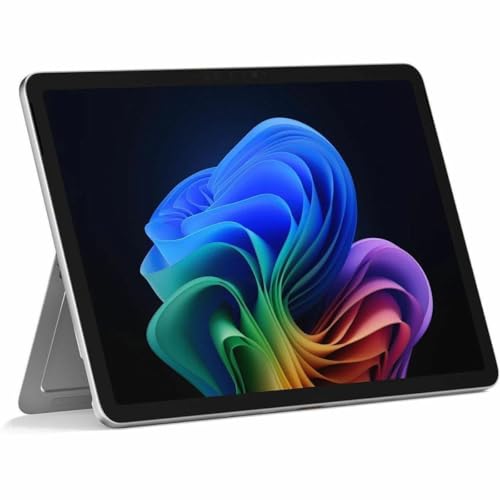
Microsoft Surface Pro for Business, 12-inch, Snapdragon X Plus — Compact detachable
The 12-inch Surface Pro for Business trades screen area for portability, and it makes that trade with its eyes open. The listing pairs the smaller touchscreen with a Qualcomm Snapdragon X Plus, 16GB of memory, and 256GB of storage, under Windows 11 as a Copilot+ PC. For the travelling half of a workforce — account managers, auditors, regional staff who live in other people’s offices — a smaller, lighter detachable that still runs the full business stack is worth more than a larger screen that stays behind because it is a nuisance to carry.
The Snapdragon processor is the decision inside this pick, and it deserves a plain explanation. Snapdragon-based Windows machines run the Windows interface and the great majority of current business applications, and they are built around efficiency. The residual question is legacy software: an old, specialised x86 application that a business has carried for a decade may run through emulation or may misbehave, and the only reliable test is the application itself. A firm standardising on this model should pilot it against its oldest software before ordering in volume — advice that applies to every Snapdragon pick in this guide, including the 2024 Surface below.
Storage is the other figure to plan around. At 256GB, this model assumes a cloud-centred working life: documents in the company drive, mail on the server, the tablet as a window rather than a warehouse. Staff who hoard local files — surveyors with photo archives, engineers with model libraries — belong on the 1TB Intel model above, and a thoughtful fleet will run both, matched to roles.
There is also a human factor in the 12-inch size that fleet planners underrate. A smaller detachable gets taken to the meeting, the site, and the train table, where a 13-inch machine is one size too deliberate and gets left on the desk it was meant to liberate its owner from. The best business tablet is frequently the one that is present, and presence is a specification no benchmark prints.
Note what the listing does not say: unlike its 13-inch sibling, this offer’s title does not specify the Pro edition of Windows 11, stating the operating system and Copilot+ status without the edition. For a business whose management tools require Pro, that single word is worth verifying on the full listing before the order goes in.
- Display: 12-inch touchscreen
- Processor: Qualcomm Snapdragon X Plus
- Memory and storage: 16GB RAM, 256GB SSD
- System: Windows 11, Copilot+ PC (edition not specified in listing title)
- Colour: Platinum
Strengths
- Smallest, most portable route into the Surface Pro for Business line
- 16GB of memory matches the flagship’s stated figure
- Copilot+ PC status on an efficiency-focused platform
Trade-offs
- Legacy x86 applications should be pilot-tested on Snapdragon before a fleet order
- 256GB assumes cloud-centred work; local-file hoarders need the larger model
- Windows edition is not specified as Pro in the listing title
Best for: travelling staff who carry their office between sites and meetings.
Not suited for: roles built on old specialised software that has never been tested on Snapdragon.

Microsoft Surface Pro, 2024, 13-inch — Previous-generation flagship
The 2024 Surface Pro is the machine that established the current formula: a 13-inch touchscreen detachable, a 10-core Snapdragon X Plus, 16GB of memory, 256GB of storage, and Windows 11 with Copilot+ PC status. A generation on, nothing about that specification has become inadequate for business work — documents, mail, browsers, video calls, and presentation duty sit comfortably inside it — which is precisely why it remains a rational purchase while the newer models headline the range.
Its role in a fleet is worth thinking about clearly. Businesses rarely replace every device at once; they refresh in waves, and a wave bought on the 2024 model keeps the fleet’s accessories, docks, and staff training consistent with the Copilot+ generation rather than stranding anyone on the older Intel-era platform. The shared 13-inch size with the current Intel flagship also means cases and stands interchange, a small logistical mercy that compounds across dozens of desks.
The Snapdragon caveat from the 12-inch pick applies here in full: pilot your oldest applications before committing a department. The counterweight is that this model has the longest track record of the three Surfaces in this guide — its behaviour with business software is the best-documented of the trio simply because it has been in service longest, and an IT manager can find real answers about it rather than launch-day promises.
Consistency has a training dividend too. Staff moving between a 2024 unit at a hot desk and a newer unit in a meeting room meet the same size, the same port layout, and the same Copilot+ generation behaviour, so the fleet feels like one fleet. Mixed-generation fleets are where support calls breed; a refresh strategy that keeps generations adjacent, as this pick allows, quietly deletes a category of help-desk ticket.
Storage, again, is 256GB, and the same cloud-centred assumption applies. Where the 2024 model asks a harder question is longevity: a business buying it should count its expected service years from a 2024 design, and weigh that honestly against the newer models if the fleet’s refresh cycle is long. For a three-to-four-year working life, the arithmetic is comfortable. For a device expected to serve six, buy the current generation instead.
- Display: 13-inch touchscreen
- Processor: Snapdragon X Plus, 10 cores
- Memory and storage: 16GB RAM, 256GB storage
- System: Windows 11, Copilot+ PC
- Colour: Platinum
Strengths
- The established Copilot+ generation, with the longest service track record of the three Surfaces here
- Full 13-inch working size shared with the current flagship, so accessories interchange
- 16GB memory and Snapdragon efficiency cover standard business workloads
Trade-offs
- A 2024 design shortens the sensible service horizon compared with the newer models
- 256GB storage assumes cloud-centred file habits
- Same Snapdragon legacy-software caveat as the 12-inch model
Best for: fleet refresh waves that value a proven, consistent platform.
Not suited for: buyers planning the longest possible service life from a single purchase.
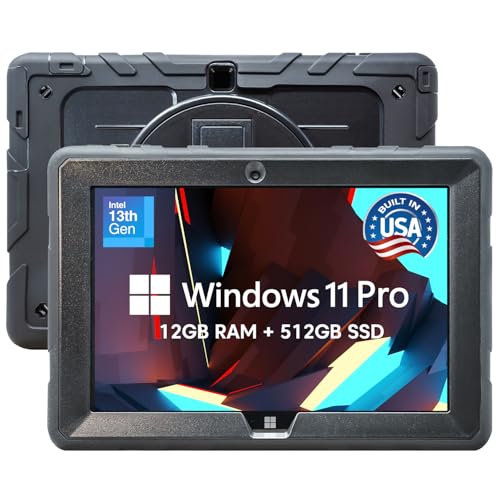
Fusion5 10.1-inch Windows 11 Professional Rugged Tablet — Field-work pick
Indoor life — desks, meeting rooms, carpeted offices — is the unspoken assumption behind the guide’s other choices. The Fusion5 assumes the opposite, and its listing reads like it was written by someone who has watched tablets die outdoors. It is a rugged 10.1-inch Windows tablet — Windows 11 Professional, in the full edition name — with 12GB of memory, 512GB of storage, an Intel 13th-generation processor, a Full HD screen, HDMI and USB-C ports, and a two-year warranty that the listing explicitly says includes accidental damage cover. That last clause is the headline. Warranties that cover the drop, the splash, and the cracked corner are the difference between a field device and a field liability.
Size is the Fusion5’s other deliberate choice. At 10.1 inches it is a one-hand-carry, clipboard-class device — the size of the forms and checklists it replaces — rather than a small laptop. Inspection and survey work is done standing, walking, and reaching, and a screen that fits that posture gets used for the whole round instead of being set down at the first opportunity. The trade is obvious and accepted: nobody should buy this tablet to write reports on, and the listing’s own framing never asks them to.
The port selection tells the same story. HDMI lets the tablet drive a site-office monitor or a projector without a dongle hunt; USB-C handles charging and modern peripherals; and a Full HD panel keeps drawings, forms, and inspection photos legible in the small 10.1-inch format. Memory and storage are both a step above the budget tier below — 12GB and 512GB are figures a working application load respects, where 8GB and 256GB merely tolerate it.
Fusion5 also states “Built in USA” in its listing, which will matter to some procurement policies and not at all to others; it is recorded here because the listing claims it, and buyers with domestic-assembly requirements can verify the details with the maker. What no buyer should skip is the fit check between “rugged” and their actual environment: rugged is a direction, not a certification, and the listing title does not name a specific ingress or military standard, so a buyer deploying into genuinely harsh conditions — dust-filled plants, wet outdoor work — should confirm the exact ratings on the full listing before relying on them.
Think about the total cost the warranty changes. A field tablet’s purchase price is the small number; the large number is the day a cracked screen idles an inspector, plus the replacement bought in a hurry at whatever the local shop charges. A two-year accidental-damage warranty converts that unplanned cost into a known process, and for a fleet of field units it can matter more to the budget than any difference in processor generation.
For the right user, none of that dilutes the pick. A surveyor, inspector, warehouse lead, or site manager who needs real Windows, real ports, and a warranty that survives contact with the job has exactly one candidate in this guide, and this is it.
- Display: 10.1-inch Full HD
- Processor: Intel 13th generation (as stated in listing)
- Memory and storage: 12GB RAM, 512GB SSD
- System: Windows 11 Professional
- Ports and cover: HDMI, USB-C; two-year warranty including accidental damage, per listing
Strengths
- Accidental-damage cover written into the stated warranty — rare at any tier
- 12GB of memory and 512GB of storage outgun the budget tier below
- HDMI and USB-C suit site offices, inspections, and presentations without adapters
Trade-offs
- Specific ruggedness ratings are not named in the listing title; verify before harsh deployments
- 10.1-inch screen is small for document-heavy desk work
- A specialist maker, so support runs through Fusion5 rather than a global brand’s network
Best for: inspectors, surveyors, and site staff whose tablet works where it might get dropped.
Not suited for: desk-based staff who would rather have a 13-inch screen than a rugged shell.

CHUWI 2-in-1 Laptop Tablet with Magnetic Keyboard — Budget tier, branded
Now the tier changes, and the language of this guide changes with it. CHUWI is a budget brand, and its 2-in-1 is a budget machine: a 10.1-inch HD touchscreen, an Intel 6500Y processor with a stated maximum of 3.4GHz, 8GB of memory, 256GB of storage, Windows 11, and a magnetic keyboard included in the box. Nothing in that sentence competes with a Surface. Everything in it answers a different question — what is the least a small business can spend and still hand someone a real Windows detachable with a keyboard?
Judged on that question, the specification is coherent. The keyboard being included matters more than any single component, because it makes the device complete at purchase: forms, email, invoices, and web-based business tools are all genuinely usable from day one. WiFi 6 and Bluetooth 5.3 are current-generation radios, a 5MP camera covers video calls and document snaps, and 256GB is honest storage for a machine whose work lives in browsers and cloud drives.
The limits are equally concrete. The 6500Y is an older, low-power processor; it handles office applications and browser work, and it will make you wait if you ask it to juggle many heavy tabs, large spreadsheets, and a video call simultaneously. The HD resolution on a 10.1-inch screen is serviceable rather than sharp — text is readable, fine detail is not luxurious. And 8GB of memory is the floor for comfortable Windows use, not a margin above it.
One more consideration belongs to this tier specifically: manage your update expectations. A budget Windows machine still receives Windows updates, but the maker’s own driver and firmware attention will be thinner than Microsoft’s, and a small firm without IT support should keep the machine’s job simple enough that a factory reset is an acceptable remedy. Simplicity is not a consolation prize at this tier; it is the operating strategy that makes the tier work.
None of this makes the CHUWI a bad purchase. It makes it a scoped one: a reception desk, a stockroom, a student’s first business machine, a spare that keeps a small firm running when the main laptop is in for repair. Buy it for a defined, modest job and it will do that job. Buy it as a Surface substitute and the saving will feel expensive within a month.
- Display: 10.1-inch HD touchscreen
- Processor: Intel 6500Y, up to 3.4GHz as stated
- Memory and storage: 8GB RAM, 256GB SSD
- System: Windows 11, magnetic keyboard included
- Connectivity and camera: WiFi 6, Bluetooth 5.3, 5MP camera
Strengths
- Keyboard included, so the device is complete at purchase
- Current radios — WiFi 6 and Bluetooth 5.3 — in a budget machine
- A named brand within the budget tier, with a stated specification a buyer can check
Trade-offs
- The 6500Y processor is an older low-power chip; heavy multitasking will test it
- HD resolution is readable, not sharp
- 8GB of memory is the comfortable floor for Windows, with no headroom to spare
Best for: small firms equipping a defined, modest job — a desk, a counter, a stockroom.
Not suited for: Surface-class speed or screen quality at this tier — neither is on offer.

2-in-1 Laptop/Tablet, 10.1-inch FHD IPS — Budget tier, sharper screen
The sixth pick has no brand name at all, and this guide will not invent one for it. The listing describes a 10.1-inch Windows 11 detachable with a Full HD IPS touchscreen, 8GB of memory, 256GB of storage, a 6500Y processor, a magnetic keyboard, USB-C, and two stereo speakers. Set beside the CHUWI directly above, the trade between the two budget machines is unusually clean: this one wins the screen, decisively — FHD IPS against HD — while the CHUWI wins on stated radios and brand accountability, naming WiFi 6 and Bluetooth 5.3 where this listing names neither a WiFi standard nor a Bluetooth version.
That screen advantage is not trivial for the work these machines actually do. On a 10.1-inch panel, the jump from HD to Full HD is the jump from text you can read to text you can read comfortably for an hour — invoices, order lists, timetables, and web dashboards all live at small sizes on a small screen. A buyer whose budget-tier job is reading-dense should weight this pick’s panel heavily.
The unbranded nature cuts the other way in every support scenario. There is no maker’s reputation behind the listing, no stated warranty terms in the title, and no model name to search when a driver misbehaves. The practical defences are boring and effective: buy through the listing as stated, test the touchscreen, keyboard connection, Wi-Fi, and speakers thoroughly in the first days, keep the packaging until those tests pass, and treat the purchase as a device whose support is the retailer’s return process rather than a manufacturer’s network.
The stereo speakers, named in the listing, are a small tell about intended use: this machine expects to play training videos, join calls, and present to a small group without external audio. Two speakers will not fill a hall, but they lift the detachable above the silent-spec rivals for the huddle-around-a-screen moments that small-business work is full of.
Within the budget tier, then, the choice is temperament. The CHUWI is the cautious purchase — a named maker, fully stated radios, a softer screen. This unbranded detachable is the gambler’s purchase — a visibly better panel in exchange for accountability that ends at the listing page. Both run the same class of processor under the same memory ceiling, so neither escapes the tier’s real limit; they simply spend the tier’s money on different things.
- Display: 10.1-inch FHD IPS touchscreen
- Processor: 6500Y (as stated in listing)
- Memory and storage: 8GB RAM, 256GB SSD
- System: Windows 11, magnetic keyboard included
- Extras named in listing: USB-C, two stereo speakers; WiFi standard not stated in listing title
Strengths
- Full HD IPS panel — the sharpest screen in the budget tier
- Keyboard included and USB-C present, matching the tier’s completeness standard
- Same storage and memory figures as the branded CHUWI
Trade-offs
- Unbranded: no maker’s warranty or support network named in the listing
- WiFi and Bluetooth standards are not stated in the listing title
- Same 6500Y performance ceiling as the rest of the budget tier
Best for: budget buyers whose work is reading-dense and who test new hardware promptly.
Not suited for: firms that need a manufacturer’s support contract behind every device.
Comparison
| Pick | Screen | Processor | Memory / storage | Defining trait |
|---|---|---|---|---|
| Surface Pro for Business 13, Intel | 13-inch touch | Core Ultra 7 (Series 2) | 16GB / 1TB | Windows 11 Pro flagship |
| Surface Pro for Business 12 | 12-inch touch | Snapdragon X Plus | 16GB / 256GB | Compact traveller |
| Surface Pro 2024 | 13-inch touch | Snapdragon X Plus, 10-core | 16GB / 256GB | Proven Copilot+ generation |
| Fusion5 Rugged | 10.1-inch FHD | Intel 13th gen | 12GB / 512GB | Accidental-damage warranty |
| CHUWI 2-in-1 | 10.1-inch HD touch | Intel 6500Y | 8GB / 256GB | Budget tier, keyboard included |
| Unbranded 2-in-1 | 10.1-inch FHD IPS touch | 6500Y | 8GB / 256GB | Budget tier, sharper screen |
Does Your Business Actually Need Windows on a Tablet?
Start with the software inventory, not the hardware catalogue. If the work depends on the full desktop Office applications with their complete feature sets, on a line-of-business program distributed as a Windows installer, on a VPN or management console that assumes Windows, or on peripherals — label printers, scanners, diagnostic dongles — whose drivers exist only for Windows, then the answer is yes and this entire guide is your shortlist. The detachable form then decides itself: staff who type buy the keyboard-equipped models, staff who carry and tap can live with a slate and a stand.
If, instead, the work lives entirely in a browser and a handful of major apps, the honest answer may be no — an Android tablet or an iPad could serve, and the college and note-taking guides linked below cover that territory. Businesses overspend when they buy Windows out of habit for work that never touches it, and underspend when they buy a browser-class tablet for work that secretly depends on one old Windows program. The inventory settles which mistake you are at risk of making.
How Should a Small Fleet Order Be Planned?
Pilot before volume, in three specific ways. First, software: install the firm’s oldest and most specialised application on one unit of the exact model — this step is non-negotiable for the Snapdragon Surfaces, where emulation handles most legacy programs but “most” is not a deployment plan. Second, accessories: order the keyboards, pens, docks, and cases in the same breath as the tablets, and confirm from the listing what is actually in the box, because the Surface line’s à-la-carte tradition has ambushed more fleet orders than any hardware fault. Third, people: put the pilot unit with the staff member whose work is most representative, not the most technical, and let their week of complaints write your configuration standard.
Budget the spares while you are at it. A small fleet should hold at least one spare unit per role, configured identically, because the cost of a spare is trivial beside the cost of a staff member idle for a week awaiting a replacement. Spares also absorb the pilot’s second job: when a unit fails in year two, the spare’s behaviour tells you whether the failure is the model or the individual machine.
Then standardise ruthlessly. One model per role, one accessory set per model, spare units bought in the same order while the exact configuration is current. The budget tier complicates this discipline — an unbranded listing can change under the same title — which is another reason the unbranded pick suits single purchases better than fleets.
What Separates the Budget Tier From the Branded Core?
Three things, and only the first is speed. The 6500Y in both budget picks is an older low-power chip that will pace your multitasking; the Surfaces’ current processors will not. The second separation is specification certainty: the branded listings state editions, generations, and core counts, while the budget listings leave radios, warranties, and sometimes the maker’s own name unstated — every unstated item is a question you must answer yourself before relying on it. The third is the support horizon: Microsoft and, within its scale, CHUWI and Fusion5 stand behind their machines as ongoing products, while an unbranded listing’s support is effectively the retailer’s returns process.
None of that makes the budget tier a mistake. It makes it a tool with a defined envelope — browser work, forms, email, light documents, a keyboard in the box — inside which it performs honestly. The mistake is only ever a mismatch: budget hardware assigned to flagship work, or flagship money spent on a counter tablet that checks in deliveries.
How Do Detachables Behave in Meetings and on Site?
The detachable earns its premium in transitional moments. In a meeting, the keyboard comes off and the slate passes hand to hand or lies flat for annotation, which changes the social geometry of the room: people mark up the document instead of describing changes to it. On site, the same machine that was a laptop in the office becomes the form you fill in standing up, the drawing you zoom with gloves half off, the camera you document with. A conventional laptop does the office half of that day well and the site half badly; a pure slate reverses the problem. The Surface formula, and in their smaller way the budget 2-in-1s, exist because so many business days are split exactly down that middle.
The Fusion5’s presence in this guide is the reminder that the split has a third branch: days that are all site. When the tablet never sees a desk, the detachable keyboard matters less than the shell, the ports, and the warranty — which is why the field pick is a fixed slate with a rugged brief rather than another detachable.
What Should the Accessory Budget Include?
Plan on four lines beyond the tablets themselves. Keyboards, for every Surface role that involves typing — priced as part of the device, not as an afterthought. Pens, for the roles that annotate: inspections, design review, signatures. Protection, scaled to environment — a sleeve for the office detachable, a serious case for anything leaving the building, though the Fusion5’s warranty argues it needs less armour than most. And power: a spare charger per shared space, because detachables wander and their chargers wander faster.
Businesses that skip this planning discover the pattern quickly — the tablet programme looks cheap in the proposal and expensive in the first quarter’s accessory orders. Fold the accessories into the per-seat figure from the start and the tiers in this guide compare honestly: the budget 2-in-1s, keyboards included, close some of their gap to the Surfaces once the Surfaces are honestly equipped.
Intel or Snapdragon: Which Surface Processor Suits Your Software?
The three Surfaces split by processor, and the split is the most consequential choice in this guide. Intel, in the 13-inch flagship, is the conservative answer: the widest software compatibility, the least to pilot, the platform every business application was built for first. Snapdragon, in the 12-inch and 2024 models, is the efficiency answer: a platform designed around battery-conscious performance, running current applications natively and older ones through emulation that is good and improving — and still emulation.
The decision procedure is empirical, not tribal. List the applications a role cannot lose. Test the top three on a Snapdragon unit. If all three behave, the Snapdragon models’ portability and efficiency are free gains. If one misbehaves — a printer driver, a dongle licence, a decade-old database front-end — the Intel flagship is not a luxury but the cost of that application, and the honest comparison is against replacing the software, which is sometimes the better spend and sometimes an absurd one. Businesses get this choice wrong by deciding it in the abstract; the pilot unit exists to decide it in fact.
How Long Should a Business Tablet Stay in Service?
Plan the service life at purchase, because it changes which tier is rational. A three-year horizon forgives a great deal: the 2024 Surface covers it easily, the budget tier survives it in a light role, and even the unbranded pick’s thin support matters less when replacement is already scheduled. A five-to-six-year horizon reverses the ranking — the current Intel flagship’s headroom and Microsoft’s support depth become the cheapest option per year, while budget machines bought for six years tend to be replaced at three and bought twice.
Role matters as much as years. A counter tablet running one browser application ages slowly in any tier, because its software world barely changes. A consultant’s detachable, accumulating applications and expectations, ages at full speed. Match the horizon to the role, write both numbers into the purchase note, and the fleet reviews itself at refresh time: you will know exactly which machines kept their promise.
What Does Security and Management Add to the Decision?
Business tablets hold business data, so the management story belongs in a buying guide even though no listing prints it as a headline. The edition question comes first: Windows 11 Pro and Professional — stated in the Intel flagship’s and the Fusion5’s listings respectively — carry the device-management, encryption-policy, and domain features that let an organisation enrol, configure, and if necessary wipe a machine centrally. Where a listing does not state the edition, as with the 12-inch Surface, a managed deployment should verify it before ordering rather than discover a Home-edition fleet at enrolment time.
Beyond the edition, the detachable form itself is a security consideration. A slate that leaves the building daily will eventually be left somewhere; the defences are procedural — encryption on, sign-in enforced, remote wipe rehearsed — and they cost nothing but the decision to set them up on day one. Budget-tier machines deserve the same discipline: the CHUWI on a reception desk holds the same mailbox as the flagship in the boardroom, and data does not care what the device cost.
Should the Whole Firm Use One Model?
One model for everyone is the tidy answer, and tidiness has real value: one accessory ecosystem, one support script, one spare pool. But this guide’s six picks exist because business work is not one job. The consultant and the inspector differ more from each other than either differs from their own tier-mates, and forcing the inspector onto a glass detachable — or the consultant onto a 10.1-inch rugged slate — spends the standardisation saving on daily friction. The workable pattern is one model per role, with roles kept few: a flagship detachable, a field slate, a budget unit for fixed stations. Three standards, honestly maintained, beat one standard that half the firm routes around.
Whatever the pattern, write it down as a standard with a review date. A standard with a date gets revisited deliberately; a standard without one gets revisited accidentally, in a corridor, the week something breaks. The review is also where the budget tier earns a second look, because a role that outgrew its CHUWI will say so clearly in a year’s tickets. Fleets drift — a manager orders a one-off, a listing changes, a role evolves — and the standard is what lets you notice the drift while it is still a choice rather than a condition.
Common Mistakes
Ordering the tablets and forgetting the keyboards. Surface Pro listings describe the tablet; the keyboard that turns it into a laptop is frequently a separate line item. A fleet order that misses this discovers the gap at deployment, sixty keyboards too late.
Skipping the legacy-software pilot on Snapdragon. Most older Windows programs run on Snapdragon machines, and the ones that do not will be exactly the ones a department cannot live without. One pilot unit and one afternoon is the cheapest insurance in this entire category.
Assuming “rugged” is a rating. The Fusion5’s listing says rugged and backs it with accidental-damage cover, but names no specific ingress standard in its title. Deployments into dust, water, or drop-prone environments need the exact ratings confirmed on the full listing first.
Buying the budget tier for flagship work. The 6500Y machines are honest tools for browser and forms work. Assign one to a heavy multitasker and the saving evaporates into waiting time within a month.
Ignoring the Windows edition. Pro and Professional editions carry the management features business IT assumes. Two listings here state the edition plainly; where a title does not, verify it before the order, not at enrolment.
Treating the pilot as a formality. A pilot that consists of an enthusiastic volunteer unboxing a shiny tablet proves nothing. The pilot that protects a fleet is boring by design: the oldest application, the heaviest spreadsheet, the least technical user, the longest day. If the machine survives that week, it will survive the rollout; if the pilot is staged to succeed, the rollout becomes the real test, conducted at fleet prices.
Final Recommendation
One last discipline ties the tiers together: buy the pilot, run the software test, count the accessories, and only then sign the fleet order — in that sequence, for a Surface flagship exactly as for an unbranded detachable. The price difference between the tiers is large; the cost of skipping the sequence is the same at every tier, and it is always larger than the pilot.
Standardise on the 13-inch Intel Surface Pro for Business if the budget allows one flagship: Windows 11 Pro, a terabyte of storage, and current Intel silicon make it the machine nobody in the firm outgrows first. Add the 12-inch Snapdragon model for the staff who travel, pilot-tested against your oldest software, and keep the 2024 Surface in mind for refresh waves where a proven platform beats a new one. Send the Fusion5 anywhere the work is physical — its warranty is written for the real world. And let the CHUWI and the unbranded detachable do what budget tiers are for: defined, modest jobs, bought with open eyes. The closing thought for business buyers is procedural rather than technical: the right tablet is the one your software inventory, your accessory order, and your pilot week all agree on — decide those three, and the model chooses itself.
Frequently Asked Questions
Is a keyboard included with the Surface Pro models?
The listings in this guide describe the tablets themselves and do not promise a keyboard in the box. Surface keyboards are commonly sold separately, so confirm the exact offer’s contents before ordering — and for the budget tier, note the contrast: both the CHUWI and the unbranded 2-in-1 state a magnetic keyboard as included.
Will our old Windows programs run on the Snapdragon Surface models?
Most will, through Windows’ built-in emulation, and current business applications are generally fine. The exceptions hide among old, specialised, or driver-dependent programs. There is no substitute for installing your single most critical legacy application on a pilot unit before a fleet commitment.
What does the Fusion5’s warranty actually add?
According to its listing, two years of cover that includes accidental damage. Standard warranties typically exclude drops and spills — the failures field devices actually die from — so this clause is the Fusion5’s strongest business argument. Confirm the claim process and any exclusions on the full listing before deploying at scale.
Can the budget 2-in-1s handle video calls and Office work?
Yes, within their envelope: the CHUWI names a 5MP camera, both run Windows 11 with 8GB of memory, and browser-based Office work, email, and forms are exactly their design load. What they will not do gracefully is heavy simultaneous multitasking — many large documents, big spreadsheets, and a call all at once will make the 6500Y processor’s limits felt. Keep a budget unit’s open applications to what the current task needs and it will feel adequate; treat it like a flagship and it will correct you within the hour.
Why is there no ThinkPad in the main picks?
Because the ThinkPad X12 Detachable was available only as a renewed listing when this guide was assembled, and renewed stock is excluded from the recommendations here. It is a genuinely suitable business detachable; if a new-unit listing appears, it deserves a place beside the Surfaces.
Which pick suits a warehouse or inspection round?
The Fusion5, and it is not close: the rugged build, HDMI and USB-C ports, 512GB of storage for photo-heavy inspection work, and accidental-damage cover all point the same way. The Surfaces are better machines indoors; the Fusion5 is the one designed to come back from the round. If the round also involves barcode-heavy inventory software, pilot that application on the unit first — the same legacy-software discipline as the Snapdragon question, applied to a scanner peripheral.
How many should a small firm buy at once?
One pilot unit per model under consideration, then the fleet order once the pilot week passes. The exception is the unbranded budget pick: because an unbranded listing can change its contents under the same title, a firm that pilots it successfully should complete its whole order in one purchase rather than assume the same machine can be reordered next quarter.
Related Guides
Business hardware decisions rarely stop at one category. Students and trainees face a cousin of the same problem, and the guide to Android tablets for college students works through note-taking value with the same insistence on stated specifications. If your staff’s real need is typing rather than touching, the survey of Android tablets with keyboard docks separates branded detachables from generic bundles honestly. And for the meetings where the tablet’s job is capturing ideas rather than running software, the roundup of digital tablets for note taking covers stylus slates and e-ink notebooks side by side.

[…] screens earn their keep in more settings than the sofa. Our guide to the best business tablets looks at Windows detachables and rugged slates built for working days, while the roundup of Android […]