What's inside
- Where to Buy These External USB Sound Cards
- Key Takeaways
- Quick Picks
- How Did We Choose These External USB Sound Cards?
- What Does an External USB Sound Card Actually Do?
- Which Specs Matter on a USB Sound Card, and Which Are Decoration?
- What Makes the Best External USB Sound Cards Worth Buying?
- How Do You Set Up a USB Sound Card Without Driver Drama?
- When Is a Dongle Enough, and When Should You Buy a Real DAC or Interface?
- Can a USB Sound Card Improve Streaming and Online Classes?
- How Should You Care for Adapters and Dongles?
- How Do the Six Picks Compare Side by Side?
- What Mistakes Do Buyers Make With USB Sound Cards?
- Final Recommendation
- Frequently Asked Questions
- Related Guides
As an Amazon Associate I earn from qualifying purchases. This post may contain affiliate links at no extra cost to you.
[widgetverdict.com] is reader-supported. When you buy through links on our site, we may earn an affiliate commission.
Where to Buy These External USB Sound Cards
A dead headphone jack, a laptop whose onboard audio hisses every time the fan spins up, a desktop with no front-panel mic input that actually works — these are the ordinary problems that send people shopping for the best external usb sound cards in the first place. The category looks simple from the outside: plug a small box or dongle into a USB port, plug your headphones into the box, and get on with your day. In practice the shelf splits into three very different tiers that share almost nothing except the connector, and buying across those tiers by accident is how people end up disappointed.
At the bottom sit plain stereo adapters, thumb-sized dongles whose entire job is to give a computer a working headphone output and microphone input. In the middle are surround-capable boxes with optical output and proper volume controls, aimed at people building a small home-theater or console corner around a PC. At the top are genuine external DAC and headphone-amp combinations that happen to speak USB, products bought for sound quality first and convenience second. This guide keeps those tiers separate, explains what each one can honestly do, and names six products that earn their place inside their own tier rather than pretending one ranking fits every desk.
One boundary is worth drawing before anything else. None of these devices records instruments or studio microphones well, and none of them replaces a proper audio interface for anyone making music. They are playback-and-chat tools, plus in a couple of cases respectable two-channel listening tools. Judged on that honest brief — clean output, a mic input that behaves, drivers that do not fight you, and build quality that survives a laptop bag — the six picks below are the ones worth your money.
A word on how to read the prices you will see when you follow the links: this category spans from the cost of a coffee to the cost of a decent pair of headphones, and the spread is honest. You are not being upsold when a desktop DAC costs twenty times a dongle; you are looking at a different product that happens to share a connector. The reviews below therefore judge each pick against its own tier’s expectations first, and only then against the field.
Key Takeaways
- Plain stereo dongles from Sabrent and UGREEN fix broken jacks and add mic inputs for very little money, and for calls and casual listening that is genuinely all most people need.
- The Creative Sound Blaster Play! 3 is the sweet spot for laptop owners who want cleaner playback than onboard audio without carrying a separate box.
- True 7.1 output over USB needs a box like the StarTech adapter or the Cubilux, and even then the surround effect depends heavily on the software doing the mixing.
- The Sound Blaster X4 sits in a different league: it is an external DAC and headphone amplifier that also handles chat mixing and console connections.
- Optical SPDIF output matters if your receiver or soundbar lacks USB audio, because it hands the digital signal over untouched.
- Every pick here is driver-light or driver-free on modern Windows and macOS, which is exactly what you want from a device bought to remove friction.
- Keep the adapter you replaced your onboard audio with even after upgrading computers; a known-good USB audio device is the fastest diagnostic tool there is when a new machine’s sound misbehaves.
Quick Picks
| Pick | Badge | Why it made the list |
|---|---|---|
| Creative Sound Blaster Play! 3 | Best laptop upgrade dongle | A pocketable DAC dongle that lifts laptop playback to 24-bit/96kHz and adds a proper mic input in one move. |
| SABRENT USB Sound Card Adapter AU-MMSA | Best bare-bones rescue adapter | The cheapest honest fix on this page: separate headphone and microphone jacks, no drivers, nothing to configure. |
| UGREEN USB Sound Card Adapter | Best basic adapter for headsets | A sturdier take on the basic adapter idea, with a braided lead and combined headset support for single-jack headsets. |
| StarTech 7.1 USB Audio Adapter | Best for receiver and speaker hookups | The pick for anyone feeding a receiver, thanks to optical output alongside its analog surround connections. |
| Cubilux 7.1 USB Sound Card | Best surround adapter for tinkerers | An aluminum-bodied surround adapter with an unusually wide sample-rate range for headphone listeners who tinker. |
| Creative Sound Blaster X4 | Best desktop DAC and amp combo | A desktop DAC and amp with chat mixing, optical connections and enough headphone drive for demanding cans. |
How Did We Choose These External USB Sound Cards?
We started from the jobs people actually hire these devices to do, then checked each candidate against the manufacturer specifications and the verified Amazon listing for that exact model. Job one is rescue duty: a computer whose audio has failed or become unusable. Job two is the everyday upgrade, where the onboard output works but sounds thin, noisy or quiet. Job three is connection duty, where the point is not fidelity but getting sound into a receiver, a soundbar or a set of powered speakers that the computer cannot reach on its own. A product only stayed on the list if it was clearly good at one of those jobs and honest about the others.
Electrical honesty mattered more than feature lists. We favored devices that publish their conversion resolution and sample rates, that keep the microphone path separate from the headphone path where headsets are concerned, and that do not promise surround miracles from a single stereo jack. Where a maker claims 7.1, we looked at whether the hardware offers real multichannel outputs or an optical feed, or whether the claim rests entirely on virtual processing — virtual surround can be enjoyable, but it should be labeled as what it is, and in the detailed reviews below we say which is which for every pick.
We also weighed the boring virtues heavily, because this category lives or dies on them. A dongle that needs a driver download from a forgotten support page is a worse rescue tool than a slightly plainer one that works the second it is plugged in. Cable strain relief, metal versus plastic shells, and whether the volume control is a physical wheel or a software slider all shaped the ranking. Finally, we excluded no-name adapters with unverifiable specifications, renewed units, and anything whose listing could not confirm the exact model being sold.
Availability shaped the final list as much as merit did. This category is flooded with adapters that appear under a new brand name every few months, built around the same anonymous chips, sold with specifications copied from each other. We deliberately favored products from makers with a support page, a warranty process and a listing history long enough to trust — Creative, Sabrent, UGREEN, StarTech and Cubilux all answer to their names in a way that transient sellers do not. When a five-dollar saving buys an orphan product, it is not a saving.
What Does an External USB Sound Card Actually Do?
An external USB sound card takes over the two conversions your computer normally handles internally. On playback, it receives a digital stream over USB and converts it into the analog signal your headphones or speakers use; on recording, it converts the analog signal from a microphone back into digital form for calls and voice notes. Moving those conversions outside the computer case is the whole point. Inside a laptop, the audio circuitry shares space with processors, voltage regulators and fans, and that neighborhood is electrically noisy. A converter sitting at the end of a USB cable works in a quieter environment, which is why even an inexpensive dongle can remove the hiss and buzz that onboard audio picks up.
The USB side of the bargain is standardized, and that standardization is your friend. Devices that follow the USB Audio Class specification work with the drivers already built into Windows, macOS and Linux, so the operating system recognizes them as a sound device the moment they are connected. Higher sample rates and surround features sometimes lean on vendor software for full control, but basic playback and microphone use should never require a download. When you shop, treat class-compliant operation as the floor, not a bonus feature.
What these devices cannot do is equally important. The microphone inputs on stereo dongles are designed for headset microphones and cheap lavaliers, not for studio condensers, and they supply no phantom power. The headphone outputs on the smaller adapters are tuned for earbuds and portable headphones; a demanding high-impedance studio headphone will play quietly through them. Knowing those ceilings upfront is what separates a satisfying five-minute fix from a return label.
That outside-the-case advantage also explains why the same adapter can sound different from the machine it rescues: it is not improving the computer’s audio so much as replacing it wholesale. The operating system sees two sound devices and routes your applications to whichever you select, which means an external card can be auditioned risk-free alongside the onboard output. Switch back and forth on a quiet passage of music and the interference that onboard audio adds — the faint whine that follows mouse movement, the buzz when a drive spins up — identifies itself immediately. Most people need to hear that comparison only once to understand what they have been listening around for years.
Which Specs Matter on a USB Sound Card, and Which Are Decoration?
Bit depth and sample rate get the biggest type on the box, so start there and stay calm about them. A 24-bit/96kHz converter, like the one in the Play! 3, comfortably exceeds what human hearing and ordinary music files can use; the practical gain over a noisy onboard 16-bit path is real, but it comes from cleaner implementation rather than the numbers themselves. Chasing 384kHz support buys you compatibility with a small library of audiophile files and nothing audible in games or films. If two adapters differ only in their top sample rate, choose on build and features instead.
Output connections decide what the device can join. A single combined 3.5mm jack suits modern headsets with one plug; separate headphone and microphone jacks suit older two-plug headsets and standalone microphones. Optical SPDIF output is the one to hunt for when a receiver or soundbar enters the picture, because it carries multichannel audio digitally and leaves the decoding to equipment that does it better. A handful of adapters add line-level outputs for powered speakers, which keeps volume control on the speaker side where it belongs.
The microphone path deserves more scrutiny than it usually gets. Ask whether the input is mono or stereo, whether it expects a headset microphone’s plug wiring, and whether any noise suppression lives in hardware or in bundled software you may never install. For call-heavy work, a mediocre output paired with a clean, full-level microphone input beats a hi-fi output whose mic channel whispers. That trade shapes several rankings in this guide.
What Makes the Best External USB Sound Cards Worth Buying?
The six reviews below run from the simplest rescue dongle to a desktop DAC and amplifier, in roughly ascending order of ambition. Read the badge on each one as the job it is best hired for, and pay attention to the trade-off lists: in this category the reason not to buy something is usually more informative than the reason to buy it.

Creative Sound Blaster Play! 3 — Best laptop upgrade dongle
The Play! 3 is what happens when a company that has made sound cards for decades shrinks the idea down to a cable with a converter in the middle. One end takes USB-A, the other offers a combined 3.5mm jack for a headset plus a separate microphone input, and the conversion in between runs at 24-bit/96kHz — comfortably beyond the noisy onboard paths it usually replaces. On a laptop with audible fan whine bleeding into the headphone output, the improvement is not subtle: the noise floor drops away and dialogue in films stops swimming in hiss.
Creative’s software adds equalization and voice effects for anyone who wants them, but the dongle earns its keep with the software ignored entirely. It is light enough to leave attached to a headset cable permanently, it draws little power, and it behaves identically across Windows and Mac machines, which makes it a quiet favorite for people who hot-desk between computers. Its ceiling is headphone drive: efficient portable headphones and gaming headsets sound full and loud, while a thirsty pair of studio cans will remind you that this is still a dongle, not an amplifier.
Ownership reveals the Play! 3’s real talent: consistency. It sounds the same on a five-year-old work laptop as it does on a new personal machine, because the conversion no longer depends on whatever audio codec the laptop maker chose to save money. People who present, teach or take calls from several different computers stop re-learning their audio setup every time they sit down somewhere new. The headset simply carries its own sound device with it, and the microphone level you tuned on Monday is still correct on Thursday in a different building.
There is a small discipline to using it well. Leave the operating system volume near the top and control listening level from the application or the headset, so the converter works with a healthy signal rather than a starved one. If you record voice notes, keep the microphone input gain moderate; the little preamp in a dongle sounds best below its ceiling, and shouting into a maxed-out input is the one reliable way to make this polite device sound harsh. Treated that way, it disappears into the routine, which is the highest compliment a utility product can earn.
- Connection: USB-A plug on a short cable
- Conversion: 24-bit/96kHz playback and recording
- Outputs: combined 3.5mm headset jack
- Input: separate 3.5mm microphone jack
- Extras: Creative software with EQ and voice effects
Strengths
- Noticeably cleaner output than typical laptop onboard audio
- Works the moment it is plugged in, on both major platforms
- Small enough to live on a headset cable full time
Trade-offs
- Limited drive for high-impedance studio headphones
- USB-A connector needs an adapter on USB-C-only laptops
- No physical volume control on the dongle itself
Best for: laptop owners whose onboard audio hisses, buzzes or sounds thin, who want a one-piece fix that also restores a microphone input.
Not suited for: owners of demanding planar or high-impedance headphones who need real amplification behind the conversion.
If your laptop audio is the weak link in every call and film, the Play! 3 is the tidy way to replace it — check the current listing on Amazon to confirm the connector suits your ports.

SABRENT USB Sound Card Adapter AU-MMSA — Best bare-bones rescue adapter
The AU-MMSA makes no attempt to be an audiophile product, and that restraint is precisely its appeal. It is a short USB-A adapter with two clearly marked 3.5mm sockets — green for headphones or speakers, pink for a microphone — and it asks nothing of you beyond plugging it in. No drivers, no software, no settings rabbit hole. When a desktop’s front audio header dies, when a work laptop arrives with a faulty jack, when a Raspberry Pi or an older machine needs a voice input it never had, this is the part you reach for.
Sound quality is honest mid-tier: clean enough for calls, podcasts and casual music, free of the worst onboard interference because the conversion happens outside the case, but not a device you buy to rediscover your record collection. The aluminum shell shrugs off the abuse that adapters collect in laptop bags, and the short flexible lead means it does not lever against the USB port the way rigid stick-style adapters do. Buy it as infrastructure, the way you would buy a spare cable, and it will quietly justify itself the first time something else fails.
Spend a week with the AU-MMSA in a support role and its virtues compound. Because it presents itself as a completely standard audio device, it works in BIOS-era recovery environments, in Linux live sessions, and on machines so locked down that even a printer driver needs a ticket. Technicians keep adapters like this in the same mental drawer as bootable USB sticks: unglamorous tools whose value appears exactly when the normal path has failed. The color-coded jacks, old-fashioned as they look, prevent the fumbled plug swaps that waste the first minute of every troubleshooting call.
Its limits are equally predictable, and predictable limits are a feature in a rescue tool. The output stage is modest, so efficient earbuds and headsets are its natural partners; plug in something demanding and the volume simply runs out of road. There is no sidetone, no equalizer, and no mute button to stab when a call goes sideways. None of that matters at 3 a.m. when a desktop’s audio dies before a deadline. What matters is that the Sabrent works instantly, everywhere, and asks for nothing — and judged by that standard it is close to perfect.
- Connection: USB-A on a short flexible lead
- Outputs: 3.5mm stereo headphone/speaker jack
- Input: 3.5mm microphone jack, separately wired
- Drivers: none required on Windows or Mac
- Shell: aluminum housing
Strengths
- Separate headphone and microphone sockets suit two-plug headsets
- Completely driver-free, ideal for locked-down work machines
- Aluminum shell and flexible lead survive daily travel
Trade-offs
- Playback quality is functional rather than refined
- No volume control or mute on the adapter
- Stereo only — no surround or optical options
Best for: anyone reviving a broken audio jack or adding a microphone input to a machine that lacks one, especially on work computers where installing software is not an option.
Not suited for: listeners shopping for a fidelity upgrade over already-decent onboard audio.
Treat the AU-MMSA as the spare tire of computer audio: inexpensive, unglamorous and exactly right in an emergency — see it on Amazon and keep one in the drawer.
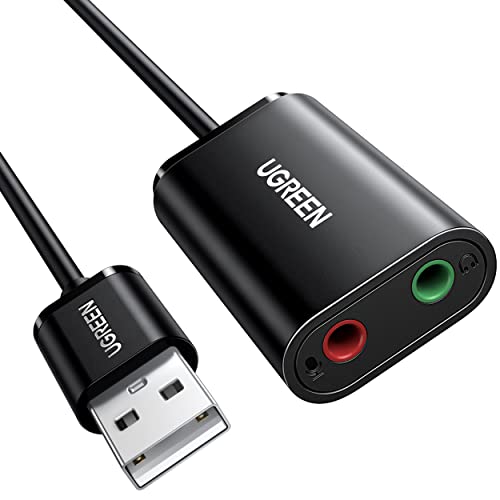
UGREEN USB Sound Card Adapter — Best basic adapter for headsets
UGREEN’s adapter covers the same rescue-and-everyday ground as the Sabrent, but it is built and finished a notch more carefully, and it pays closer attention to how modern headsets actually connect. Alongside the conventional arrangement it handles the combined single-plug wiring used by current gaming and phone headsets, so one adapter serves both the old two-plug headset in the cupboard and the newer one on your desk. The braided cable and metal housing give it a noticeably more substantial feel than the price tier usually delivers.
In daily use the differences are small but real: connectors seat with a firmer click, the cable tolerates being wound around a laptop charger, and callers report a clean, adequately loud microphone channel. Playback is again honest rather than luxurious — this is a converter for speech, video and everyday music, and within that brief it performs without drama on Windows, Mac and Linux alike. Choose it over the plainest adapters when the adapter will be handled daily rather than installed once and forgotten, because the hardware rewards handling.
The UGREEN earns repeat purchases in offices for a mundane reason: it reduces the number of adapters a team needs to stock. One unit covers the trainee with an old two-plug headset, the manager with a single-plug model, and the shared hot-desk machine whose front jack crackles. Purchasing people appreciate that consolidation, and users appreciate that the answer to ‘which adapter do I grab’ is simply ‘the UGREEN’. Fewer variants in the drawer means fewer wrong connections in the five minutes before a meeting starts.
It also travels better than its rivals at this tier. The braided jacket resists the fraying that kills rubber cables at the connector, and the housing does not creak or flex when you pull a tight headset plug free. Small things, but an adapter is handled more roughly than almost any other audio product — it is yanked, sat on, wound around chargers and dropped into bags full of keys. UGREEN seems to have designed for that reality rather than for a product photograph, and the adapter’s following among frequent travelers reflects it.
- Connection: USB-A with braided cable
- Outputs: 3.5mm stereo audio jack
- Input: 3.5mm microphone jack; combined headset wiring supported
- Drivers: none required across Windows, Mac and Linux
- Housing: metal shell with braided lead
Strengths
- Handles both single-plug and two-plug headset styles
- Braided cable and metal body feel built for daily handling
- Clean microphone channel for calls and classes
Trade-offs
- Still a speech-and-casual-listening tier converter
- No hardware volume wheel or mute switch
- Short cable keeps it close to the computer
Best for: students and remote workers whose headset is a daily tool and who want one adapter that accepts whatever plug their headset happens to use.
Not suited for: surround-sound shoppers or anyone feeding a home-theater receiver.
For a headset adapter that feels like equipment rather than a disposable, look at the UGREEN on Amazon and match its jack layout against your headset plug.
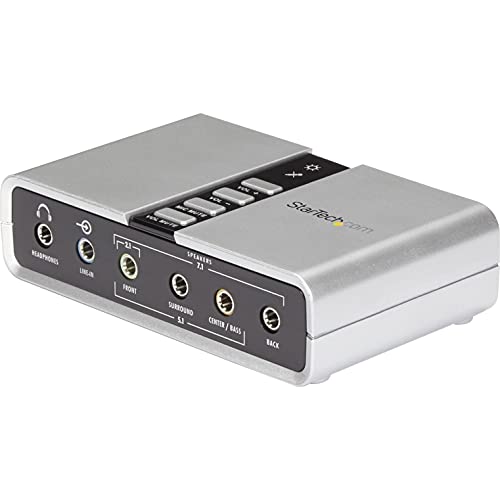
StarTech 7.1 USB Audio Adapter — Best for receiver and speaker hookups
StarTech’s adapter is the utilitarian outlier here: a small box with a cluster of analog jacks and, crucially, an optical SPDIF output that lets a computer talk digitally to a receiver or soundbar. That single port changes the product’s purpose. Instead of merely improving headphone sound, it becomes the bridge between a PC and a living-room audio system, carrying multichannel audio to equipment with proper decoders. The analog side offers the connections for powered surround speaker sets, plus microphone and line inputs that make it useful on a workbench as well.
It has been sold for years with minimal changes, which cuts both ways. The design is proven and the drivers are mature, but the styling and software belong to an earlier era of PC audio, and the surround experience depends on your source material and receiver rather than any magic inside the box. Set expectations correctly — a connection hub with honest multichannel plumbing — and it does a job that none of the dongles in this guide can do at all. For a media PC tucked behind a television, that job is often the whole point.
Living with the StarTech clarifies who it is really for: the person assembling a small entertainment system around a computer, on a budget, with equipment accumulated over years. The receiver from a decade ago has optical input but no USB. The powered speakers have analog inputs only. The PC has neither a free PCIe slot nor an optical port. This box is the diplomatic solution that lets all three generations of hardware cooperate, and in that role its age becomes irrelevant — standards like SPDIF do not expire.
The trade is tidiness. A box with this many jacks invites a small thicket of cables, and the analog surround outputs only make sense if your speakers are close enough to reach them. Plan the installation once, route the cables properly, and then leave it alone; this is furniture-grade infrastructure, not a gadget to reconfigure weekly. Owners who treat it that way tend to keep it for a very long time, which may be the most honest endorsement available in a category built on disposable dongles.
- Connection: USB with desktop adapter box
- Outputs: analog multichannel jacks for powered speakers
- Digital: optical SPDIF output for receivers
- Inputs: microphone and line-level inputs
- Channels: up to 7.1 surround support
Strengths
- Optical output connects PCs to receivers and soundbars digitally
- Analog jacks serve powered 5.1 and 7.1 speaker sets
- Long track record with mature, stable drivers
Trade-offs
- Box and cabling are bulkier than dongle-style rivals
- Software and styling feel dated beside newer rivals
- Surround quality depends on your receiver and source
Best for: media-PC owners who need their computer to feed a receiver, soundbar or powered surround speakers with a proper multichannel signal.
Not suited for: laptop travelers who want the smallest possible bag-friendly adapter.
If an optical cable is the missing link between your PC and your receiver, the StarTech is built for exactly that gap — review its port layout on Amazon before ordering.

Cubilux 7.1 USB Sound Card — Best surround adapter for tinkerers
Cubilux machines its adapter from aluminum and then does something unusual for this tier: it publishes a sample-rate range stretching from 48kHz up to 384kHz, signaling that it expects to be bought by listeners who actually look at such things. The unit presents itself as a 7.1 surround device for headphones and desktop setups, works across Windows, Mac and Linux without a driver hunt, and feels in the hand like a small piece of audio equipment rather than a giveaway accessory.
The honest reading of its surround claim is that the processing is virtual when you are listening on ordinary stereo headphones — there is one headphone output, so the spaciousness is created in the digital domain. Done well, as it is here, that processing can make films and games feel wider without wrecking music. Listeners who split their time between a laptop at a desk and the same laptop on a train will appreciate that the Cubilux keeps its personality in both places: solid conversion, a sturdy shell, and no software obligation. It is the adapter for people who enjoy adjusting things and want hardware that rewards the attention.
The Cubilux rewards a particular kind of owner: the listener who keeps a folder of high-resolution albums and enjoys knowing the playback chain can actually address them. Its wide sample-rate support means those files play at their native rates rather than being quietly resampled, and the aluminum body gives the whole arrangement a feeling of intent. Whether the difference is audible on a given recording is a debate the device wisely stays out of; it simply removes the bottleneck and lets you decide for yourself.
For gaming and film nights, the surround processing is the party trick, widening the presentation enough that explosions stop sounding like they happen inside your skull. Music listeners will likely bypass it, and the unit makes that painless. The one audience this adapter does not serve is the speaker owner: with no optical or discrete multichannel outputs, a living-room system gains nothing here. As a personal, headphone-first device that crosses operating systems without complaint, though, it occupies its niche with unusual confidence.
- Connection: USB-A external adapter
- Body: full aluminum alloy housing
- Sample rates: 48kHz to 384kHz supported
- Channels: 7.1 surround presentation for headphones
- Compatibility: Windows, Mac and Linux without added drivers
Strengths
- Aluminum body feels a class above plastic adapters
- Very wide sample-rate support for high-resolution files
- Driver-free across all three desktop platforms
Trade-offs
- Headphone surround is virtual processing, not discrete channels
- Fewer connection options than box-style adapters
- No optical output for receiver owners
Best for: headphone listeners who move between operating systems and want a solid, adjustable surround presentation from a single sturdy adapter.
Not suited for: buyers who need genuine discrete multichannel outputs for a speaker system.
Listeners who like their hardware machined rather than molded should examine the Cubilux listing on Amazon, paying attention to its stated sample-rate range.
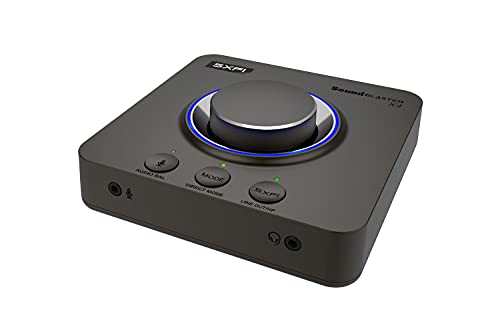
Creative Sound Blaster X4 — Best desktop DAC and amp combo
The X4 is where this category stops being about adapters and starts being about audio equipment. It is a desktop external DAC and headphone amplifier with 7.1 surround capability, Dolby Audio support, optical connections for consoles and televisions, and a large volume knob that becomes the natural center of a desk setup. Creative’s Super X-Fi processing and the Scout Mode game features ride along, but the fundamentals come first: clean conversion, enough amplification for headphones that dongles leave sounding thin, and inputs and outputs enough to anchor a mixed PC-and-console desk.
Its signature trick for streamers and long gaming sessions is balance control between game audio and voice chat, adjustable on the unit so you can ride the mix without alt-tabbing into software. Microphone input quality is a clear step beyond dongle grade, and the unit switches among connected sources with a button press. The price of all this is size and cost — the X4 is a permanent desk resident that costs many times a basic adapter. Buy it when your headphones and your desk both deserve a proper hub, not when a jack has merely failed.
A month with the X4 on a desk reorganizes habits around it. The big knob replaces the keyboard volume keys because it is faster and more precise; the chat-balance control ends the ritual of pausing a game to fix voice levels; the optical input means the console comes through the same good headphones as everything else. This is the quiet luxury of a hub: not better sound in the abstract, but every sound arriving through one well-made path that you control with your hand instead of a settings menu.
It also future-proofs a desk better than any dongle can. Buy better headphones next year and the amplification is already waiting. Add a streaming microphone setup and the input side is respectable. The software suite will not suit minimalists, and the unit demands permanent desk space, but those are the known terms of the deal. Among the six products in this guide, the X4 is the only one that can plausibly be the last USB audio purchase a desk-bound listener makes for years.
- Connection: USB-C to computer; optical in and out
- Role: external DAC plus headphone amplifier
- Channels: 7.1 surround with Dolby Audio support
- Controls: large volume dial with game/chat balance
- Extras: Super X-Fi headphone processing, console support
Strengths
- Amplification drives demanding headphones properly
- Game and chat balance adjustable on the hardware
- Optical connections welcome consoles into the setup
Trade-offs
- Desk-sized unit, not a travel accessory
- Costs far more than adapter-class alternatives
- Full feature set leans on Creative software
Best for: desk-bound gamers and listeners running good headphones who want one hub for PC, console and chat duties.
Not suited for: anyone whose actual problem is just a broken laptop jack.
When the goal is a permanent audio hub rather than a patch, the X4 is the serious candidate — check its console and optical compatibility on Amazon against your setup.
How Do You Set Up a USB Sound Card Without Driver Drama?
Setup begins before the device arrives: decide which of your existing audio paths it replaces. When the adapter goes in, the operating system will usually select it automatically as the default output and input, which is what you want for a rescue scenario. If you are keeping onboard audio for speakers and using the USB device for a headset, set those roles deliberately inside the sound settings panel rather than letting each application guess, because applications guess inconsistently and the result is the classic meeting opener of talking into the wrong microphone.
Next, match the sample rate to your content rather than maxing every slider. Setting a dongle to its highest rate forces the operating system to resample ordinary 44.1kHz and 48kHz material, which gains nothing audible and occasionally introduces glitches in games with older audio engines. The standard rates your films, calls and games already use are the right default; raise the rate only when playing genuinely high-resolution music files through software that handles them natively.
Finally, test the microphone path with a local recording before trusting it in a meeting. Record thirty seconds of speech at your normal distance, then listen back for level, hiss and the hollow sound of a headset microphone wired for the wrong jack standard. If the recording is quiet, check whether the application or the operating system is applying its own gain, and raise the input level at the system layer first. Five minutes of this now prevents the particular misery of discovering a bad mic channel in front of an audience.
When Is a Dongle Enough, and When Should You Buy a Real DAC or Interface?
A dongle is enough when the problem is binary: sound is broken, noisy or missing a microphone input, and the headphones involved are ordinary portable or gaming models. In that territory, money spent beyond a good dongle buys features you will not hear. The Play! 3 and its rivals exist precisely because this territory contains most buyers, and there is no shame in the inexpensive answer being the correct one.
Step up to a desktop DAC and amplifier when the headphones themselves step up. Headphones with high impedance or low sensitivity are designed assuming a real amplifier behind them; fed from a dongle they play quietly and lose their low-end authority. If you have invested in serious headphones, or plan to, the X4 class of device is not an extravagance but the missing half of the purchase you already made.
Step sideways to an audio interface — a different product family entirely — when recording becomes the point. Interfaces offer proper microphone preamps with phantom power, balanced connections, instrument inputs and low-latency monitoring. USB sound cards, even good ones, treat recording as a convenience for calls. Buyers who blur that line end up owning both eventually, having paid for the lesson; the short version is playback problems get sound cards, recording ambitions get interfaces.
Can a USB Sound Card Improve Streaming and Online Classes?
For streamers and teachers, the microphone direction matters more than playback, and here modest adapters punch above their weight. A headset microphone fed through a clean external input, positioned consistently, and kept at a sensible level will sound more professional than an expensive microphone carelessly routed through a noisy onboard input. The dongle removes the electrical interference that makes onboard recordings sound cheap, and consistency of placement does the rest. Several picks in this guide, the Play! 3 and the UGREEN especially, have quietly become standard issue for online tutors for exactly this reason.
What adapters cannot give a streamer is control: no hardware mute on most models, no live monitoring of your own voice without software workarounds, and no gain knob within reach. Creators who stream daily eventually graduate to an interface or a desktop unit like the X4 for those controls. But the order of operations matters — start with the clean input, learn your levels and your room, and upgrade for features when you can name the specific control you are missing. Buying control hardware before you know which control you need is how desks accumulate expensive ornaments.
How Should You Care for Adapters and Dongles?
These are small devices with two enemies: cable strain and pocket lint. The strain problem is solved by geometry — choose adapters on short flexible leads rather than rigid sticks, because a rigid adapter turns every accidental knock into leverage against your laptop’s USB port, and ports are far more expensive to repair than adapters are to replace. If a dongle lives permanently on a headset, a small piece of heat-shrink or a cable sleeve at the junction extends its life by years.
Lint is the sneakier killer. Headphone jacks carried loose in bags collect fibers that pack into the socket until plugs stop seating fully, producing the crackle and one-sided audio that owners often blame on the converter chip. A wooden toothpick — never metal — lifts the compacted lint out in seconds. Store loose adapters in a small pouch rather than loose in the bag, and the category’s most common failure mode mostly disappears. None of this is glamorous advice, but adapters die of housekeeping, not of electronics.
How Do the Six Picks Compare Side by Side?
The table below compresses the reviews into the four questions that separate these products: how they connect, what they do best, and whose desk they belong on.
| Pick | Connection | Standout trait | Suits best |
|---|---|---|---|
| Creative Sound Blaster Play! 3 | USB-A dongle | 24-bit/96kHz conversion in a cable-sized body | Laptop owners upgrading onboard audio |
| SABRENT USB Sound Card Adapter AU-MMSA | USB-A adapter | Separate headphone and mic jacks, zero drivers | Emergency repairs and locked-down work PCs |
| UGREEN USB Sound Card Adapter | USB-A adapter | Braided cable, headset-plug flexibility | Daily headset users on any platform |
| StarTech 7.1 USB Audio Adapter | USB box | Optical SPDIF plus analog surround jacks | Media PCs feeding receivers |
| Cubilux 7.1 USB Sound Card | USB-A adapter | Aluminum shell, 48–384kHz range | Headphone listeners who tinker |
| Creative Sound Blaster X4 | USB-C desktop unit | DAC, amplifier and chat mixing in one hub | Serious desk setups with consoles |
What Mistakes Do Buyers Make With USB Sound Cards?
Expecting studio recording from a headset input
The microphone jack on a stereo adapter is wired and gained for headset microphones. Plugging a studio microphone into it with an adapter cable produces a faint, noisy recording, and no software setting repairs a signal that was captured badly at the source. Buyers who need real recording quality need a preamp with proper gain and phantom power, which is interface territory. Judge these products on call clarity, where they can genuinely excel, and the disappointment never happens.
Paying for the highest sample rate on the box
A 384kHz badge does not make games sound better, because game audio is not produced at that rate and your hearing would not resolve the difference if it were. The number that predicts satisfaction is how cleanly the device converts ordinary material, which is a matter of circuit design rather than headline specifications. Spend the difference on build quality, the right connections, or a tier jump to a real amplifier instead.
Assuming 7.1 on the label means seven channels in your headphones
Headphones have two drivers, so any surround they present is synthesized from a stereo signal — sometimes skillfully, sometimes not. Discrete 7.1 only exists when separate speakers or a receiver do the work, which is why the StarTech box with its optical and analog outputs plays a different game from the headphone adapters. Read surround claims as a description of processing, not of physics, and choose according to whether you listen on headphones or speakers.
Forgetting the connector your computer actually has
Most of the affordable adapters in this category still terminate in USB-A, while many current laptops offer only USB-C. A small USB-C to USB-A adapter solves it, but discovering the mismatch at unboxing time is an avoidable annoyance. Check your ports before ordering, and if every port is USB-C, either budget for the extra adapter or start your search with USB-C-native models like the desktop X4.
Final Recommendation
Start by naming your problem honestly. If a jack has died or a work laptop refuses to hear you, the Sabrent and UGREEN adapters solve it today for very little, and the UGREEN’s sturdier build makes it the better daily companion. If your audio works but disappoints, the Play! 3 is the upgrade that respects both your wallet and your laptop bag. Receiver owners should skip straight to the StarTech and its optical output, while headphone enthusiasts who enjoy tuning their sound will get the most from the Cubilux. The X4 stands apart as the one purchase here that is not a fix but a foundation — the hub a serious desk grows around.
One practical note before you order: check which USB connector the shortlist item in front of you actually uses, and picture where it will live. A dongle that dangles from a laptop in a café has a different life from a box that sits behind a monitor for five years, and the right choice follows from that picture more than from any specification table. Buy for the desk or the bag you actually have, and the device will still be earning its place long after the novelty of new audio hardware has worn off.
Every device on this page was chosen because it does its stated job without requiring faith in exaggerated claims, and that is the standard worth holding this whole category to. Pick the tier that matches your actual listening, and the best external usb sound cards stop being a gamble and become what they should be: the smallest, cheapest part of your setup that you never think about again, because it simply works every single day.
Frequently Asked Questions
Do external USB sound cards work on both Windows and Mac?
Yes, in almost every case that matters. Devices built to the USB Audio Class standard — which includes all six picks in this guide — are recognized by Windows, macOS and Linux using drivers already inside the operating system. Vendor software from Creative and others adds equalization, surround tuning and voice effects on supported platforms, but plain playback and microphone use never depend on installing it. That is why these adapters are a standard rescue tool for IT departments.
Will a USB sound card make my cheap headphones sound better?
It will make them sound cleaner, which is not quite the same promise. If your current output adds hiss, crackle or interference from the computer’s internals, an external converter removes those flaws and your headphones present the music as it actually is. What it cannot do is add bass extension or detail that the headphones themselves cannot reproduce. Expect the removal of annoyances rather than a transformation, and you will be pleased rather than let down.
There is one more scenario where the improvement is dramatic: older desktops and budget laptops whose onboard audio was an afterthought. On those machines the gap between the internal path and even a modest external converter is wide enough that most listeners hear it within seconds — the background hash behind quiet passages simply vanishes. On a recent, well-built laptop the same adapter may sound nearly identical, which is a compliment to the laptop rather than a criticism of the adapter.
Can I use a USB sound card with a gaming console?
Sometimes, and the details matter. Consoles are stricter about USB audio than computers are; some adapters work for stereo playback on a PlayStation but not on an Xbox, which restricts USB audio accessories tightly. Desktop units with optical input, such as the Sound Blaster X4, sidestep the issue by taking the console’s optical or HDMI-extracted audio instead. Check the specific console support on the product listing before assuming any USB device will cooperate.
Why does my microphone sound quiet through a USB adapter?
Usually the gain staging is split across too many layers: the operating system input level, the application’s own microphone setting, and sometimes automatic gain inside a meeting app are all attenuating or boosting at once. Set the system input level first while watching its meter, aim for peaks comfortably below the maximum, then turn off competing automatic adjustments in the app. If the result is still faint, the microphone itself may expect the other headset wiring standard, which a combined-jack adapter like the UGREEN handles more gracefully.
Is 7.1 surround from a USB adapter worth using for movies?
It can be, with the right expectations. Virtual surround processing widens the soundstage and places effects more convincingly than plain stereo for many listeners, particularly in films mixed for multichannel systems. The effect varies with the processing quality and with your headphones, and it usually flatters films and games more than music, which most people prefer unprocessed. Treat it as a mode to audition rather than a specification to chase, and leave it off for critical music listening.
How long do these adapters typically last?
The electronics rarely fail; the cable and the jack are what wear out. Adapters with flexible leads and strain relief, and bodies made from metal rather than thin plastic, survive years of laptop-bag duty. The most common failure is a headphone socket loosened by thousands of insertions, which argues for leaving a headset permanently attached to a dongle like the Play! 3 rather than plugging and unplugging daily. Buy the build quality once and the category becomes boring in the best way.
Related Guides
Round out your desk audio picture with our companion buying guides.
- Best sound cards for gaming setups
- Best internal PCIe sound cards
- Best hi-fi sound cards for music listening


