What's inside
- Where to Buy These ASIO Sound Cards
- Key Takeaways
- Quick Picks
- How Did We Choose These ASIO-Capable Picks?
- What Is ASIO, and Why Does Latency Decide Who Needs It?
- ASIO on a Gaming Card Versus ASIO on an Interface: What Is the Real Difference?
- Which Are the Best ASIO Sound Cards for Your Kind of Work?
- How Do You Configure ASIO for the Lowest Usable Latency?
- When Should You Monitor Directly Instead of Through Software?
- Does ASIO Matter for Playback-Only Listening?
- How Does Sample Rate Choice Interact With ASIO Latency?
- How Do the Six ASIO Picks Compare Across the Divide?
- What Mistakes Do ASIO Buyers Make Most Often?
- Final Recommendation
- Frequently Asked Questions
- Related Guides
As an Amazon Associate I earn from qualifying purchases. This post may contain affiliate links at no extra cost to you.
[widgetverdict.com] is reader-supported. When you buy through links on our site, we may earn an affiliate commission.
Where to Buy These ASIO Sound Cards
ASIO is a driver technology, not a kind of hardware, and understanding that single fact reorganizes this entire category. The best asio sound cards are really two different families of product that share a protocol: gaming sound cards whose drivers include ASIO support as one feature among many, and recording interfaces whose entire reason for existing is the low-latency ASIO connection between an instrument or microphone and the software that records it. This guide covers both families and keeps them clearly separated, because a card that ticks the ASIO box for a media player and an interface built to let you play a virtual instrument in real time are solving different problems that happen to share an acronym.
What ASIO itself does is simple to state. Standard Windows audio routes sound through layers of the operating system that add delay and resampling; ASIO, developed by Steinberg for music production, lets an application talk to the hardware almost directly, cutting latency to a few milliseconds and delivering the audio stream untouched. For recording and virtual instruments, that directness is the difference between playing music and leaving messages for it. For playback-only uses, ASIO’s appeal is purity — a bit-perfect path from a music player to a converter — which matters to a smaller, fussier audience.
The six products below were chosen across that divide with their purposes labeled. One is a genuine internal gaming card with ASIO in its driver set. The rest are USB recording interfaces whose ASIO drivers are their livelihood, spanning four-channel flexibility, budget two-input workhorses and streaming-ready designs. Read the badge on each as the family it belongs to, and the latency sections as the numbers that actually decide satisfaction.
A promise about the numbers in this guide: where latency is discussed, we speak in the ranges real systems achieve and in the settings that produce them, not in laboratory minima measured on empty projects. Your figures will differ with your computer and your session, and any guide that pretends otherwise is selling you a benchmark instead of a tool.
Key Takeaways
- ASIO is a low-latency driver protocol; the hardware matters mainly through the quality of the ASIO driver its maker ships.
- The Sound Blaster Z SE is the true sound card here — a PCIe gaming card whose driver set includes ASIO for media and light production work.
- The recording interfaces — Kmise, BlueAVS, MAONO, Focusrite and M-Audio — use ASIO for its original purpose: playing and recording through software without perceptible delay.
- Focusrite’s Scarlett Solo 4th Gen pairs the class’s most trusted driver tradition with 120dB dynamic range conversion.
- The Kmise 4-channel interface is the flexibility pick, with four channels and phantom power for small recording setups.
- Buffer size is yours to command: smaller buffers mean lower latency and more crackle risk, and every setup has a sweet spot worth finding once.
- Keep a written note of your working driver settings with each project; the setup that took an evening to tune should never have to be rediscovered.
Quick Picks
| Pick | Badge | Why it made the list |
|---|---|---|
| Creative Sound Blaster Z SE | Best true sound card with ASIO | A real PCIe gaming card with ASIO support, 116dB SNR and discrete 5.1 outputs for the all-purpose PC. |
| Kmise 4-Channel USB Audio Interface | Best four-channel flexibility | Four channels, phantom power and ASIO support for small bands and multi-source home studios. |
| BlueAVS 2-In/4-Out USB Audio Interface | Best output flexibility for producers | A 2-in/4-out layout with zero-latency monitoring for producers who route audio creatively. |
| MAONO P1 USB Audio Interface | Best ASIO interface for streamers | Seventy decibels of mic gain plus ASIO drivers in a streaming-friendly interface. |
| Focusrite Scarlett Solo 4th Gen | Best driver pedigree, single input | The benchmark single-input interface, with drivers refined over four generations. |
| M-Audio M-Track Duo | Best budget two-input ASIO workhorse | Two combo inputs and dependable ASIO performance for singer-instrumentalists on a budget. |
How Did We Choose These ASIO-Capable Picks?
The first test was whether ASIO support was real, current and documented — not a checkbox inherited from a chipset’s reference driver a decade ago. For the recording interfaces, that meant a vendor-supplied ASIO driver maintained for current Windows versions, with a control panel that exposes buffer settings, because a driver you cannot configure is a driver you cannot optimize. For the Z SE, it meant verifying that Creative’s driver package genuinely includes ASIO alongside its gaming features, and being honest in the review about what that ASIO is for — playback purity and light production — versus what a dedicated interface driver is tuned to do.
The second test was latency behavior in principle: how small a buffer the driver class is known to sustain, and whether the hardware offers direct monitoring as a fallback for the moments when software monitoring is impractical. An interface with excellent drivers and no direct monitoring can still strand a vocalist whose computer is busy; one with mediocre drivers and good direct monitoring at least guarantees a usable session. The strongest picks offer both, and the reviews note the balance for each.
We also weighed the recording chain around the driver — preamp quality, input types, conversion — because ASIO moves audio faithfully but cannot improve what the inputs captured. A four-channel interface earns its channels only if its preamps are worth recording through, and a budget interface earns its place by being honest about its tier. Every pick was verified against its Amazon listing for the exact model, and products whose ASIO claims could not be substantiated in the listing or the maker’s documentation were excluded regardless of price.
One family boundary was policed throughout: no product is described here as a low-latency recording tool unless its design supports that claim. The Z SE’s review states plainly where its ASIO sits in the gaming-card tradition. Honesty about that divide is the guide’s founding promise, made in the introduction and kept in every review.
We also asked a question buyers rarely ask until too late: what happens when something goes wrong at 11 p.m. before a deadline? Driver downloads that are easy to find, control panels that expose a reset to sane defaults, and a user community large enough to have met your exact error message are worth real latency in the other direction. The legacy names in this guide carry that insurance as standard; the newer names are building it, and their reviews price the difference honestly.
What Is ASIO, and Why Does Latency Decide Who Needs It?
Every sound your computer makes takes a journey, and the journey takes time. In the standard Windows audio path, the signal passes through the application’s output, the operating system’s mixer — which may resample it to match other sounds — and a buffering arrangement designed for reliability rather than speed. The total delay can reach tens of milliseconds, which nobody notices while watching a film, because the picture waits politely. A musician cannot wait politely: press a piano key and hear the note a thirtieth of a second later, and the instrument feels broken in a way that destroys timing and joy together.
ASIO shortens the journey to something close to a straight line. The application and the hardware exchange audio in small, fixed blocks called buffers, with the operating system’s mixer bypassed entirely. Shrink the buffer and latency falls — at 64 samples and a 48kHz rate, the buffer itself represents barely over a millisecond — while the computer’s workload rises, because it must refill those small buffers relentlessly. The art of ASIO setup is choosing the smallest buffer your computer sustains without crackling, and a good driver makes that art easy by remaining stable at settings where a poor driver falls apart.
This is why ASIO quality lives in the driver rather than the box. Two interfaces with identical converters can feel completely different to play through, because one maker’s driver team spent years optimizing the unglamorous code that shuttles buffers, and the other’s did not. When this guide praises Focusrite’s or M-Audio’s driver traditions, it is praising that invisible work — the part of the product you cannot photograph and the part a recording musician touches with every note.
ASIO on a Gaming Card Versus ASIO on an Interface: What Is the Real Difference?
Start with purpose. A gaming card like the Sound Blaster Z SE includes ASIO so that media software and light production tools can reach its excellent converter through a clean, direct path. Its inputs, however, are a gaming card’s inputs — a microphone jack for a headset, line inputs — and its software universe is built around games, films and chat. ASIO there is a playback virtue and a convenience for the occasional recording experiment, delivered by a card whose heart is elsewhere.
An interface’s ASIO exists to serve a recording session. Its inputs are microphone preamps with phantom power and instrument inputs with proper impedance; its outputs include a headphone stage meant for tracking; its driver panel is designed around buffer management for a DAW. The latency figures its users chase — playing a virtual piano, monitoring a voice with effects — are the design center, not a side feature. When a guitarist in our guitar guide or a vocalist in our voice-over guide needs ASIO, this is the family they are shopping in, whatever the search term said.
Neither family is fraudulent; they are simply honest about different jobs, and this guide’s job is to keep the labeling straight. If your ASIO need is a bit-perfect path from a music library to a good converter inside a gaming PC, the Z SE answers it inside a card you may want for other reasons. If your ASIO need is to perform through software, only the interfaces answer it, and choosing between them becomes a matter of inputs, preamps and driver pedigree — the subjects of the reviews below.
Which Are the Best ASIO Sound Cards for Your Kind of Work?
One internal card and five interfaces follow. The divide between them is stated in each review’s first paragraph, because in this category the family a product belongs to predicts your satisfaction better than any single specification.

Creative Sound Blaster Z SE — Best true sound card with ASIO
The Z SE earns its place as this guide’s one genuine sound card: a PCIe card with 24-bit/192kHz conversion at a published 116dB signal-to-noise ratio, a headphone amplifier rated to 600 ohms, discrete 5.1 outputs, and a driver package that includes ASIO. In the gaming-card world that combination is the complete article — games get their processing, films get their surround, and music software gets a direct, clean path to a converter far better than a motherboard’s. For a PC that plays everything and records occasionally, it is a rational center of the audio universe.
The honesty paragraph: its ASIO is a gaming card’s ASIO. It will serve a media player’s bit-perfect output beautifully and let a curious owner experiment with a DAW, but its inputs are not recording preamps, and its driver priorities are set by a gaming software suite. A musician whose sessions matter should buy an interface from the five below and let the Z SE be what it is — the best ASIO-equipped card for a PC whose first job is playing things. Judged on that job, it has no rival in this guide, because it is the only contestant entered in the event.
There is a real audience for exactly this compromise, and it is larger than purists admit: the PC owner who listens to a serious music library, games nightly, and records a podcast or a guitar idea a few times a year. For that owner, an interface would sit idle most days while the Z SE works every hour the machine is on, and its ASIO support covers the occasional session adequately through its line and microphone inputs. Buying for your actual calendar rather than your aspirational one is the most reliable rule in all of audio shopping.
Set expectations for the recording side accordingly. A dynamic microphone will want a preamp this card does not have; an electric guitar will want a Hi-Z input it does not offer. What it offers instead — conversion quality, amplification, surround, and a direct driver path — it offers at a standard the interfaces below do not attempt, because their budgets went to preamps instead. The two families are complements disguised as competitors, and the Z SE is the gaming family’s champion by default and by merit.
- Connection: PCIe x1 slot
- Conversion: 24-bit/192kHz, 116dB SNR
- Amplifier: headphone amp rated up to 600 ohms
- Drivers: ASIO included in Sound Blaster driver package
- Outputs: discrete 5.1 analog plus optical
Strengths
- Real ASIO support inside a full-featured gaming card
- Excellent conversion and headphone drive for playback
- Discrete surround outputs for speaker systems
Trade-offs
- Inputs are not recording-grade preamps
- Driver priorities follow gaming, not studio work
- No phantom power or instrument input
Best for: gaming PC owners who want ASIO playback purity and occasional light recording from one internal card.
Not suited for: musicians whose recording sessions are the main event.
If your PC plays far more than it records, the Z SE is the ASIO answer that fits your life — check its slot and output layout on Amazon against your build.

Kmise 4-Channel USB Audio Interface — Best four-channel flexibility
The Kmise interface competes on a simple proposition: four channels of recording with ASIO driver support, 24-bit/192kHz conversion and 48V phantom power, at a price where the established brands sell you two channels. For a small band recording a rehearsal, a drummer’s electronic kit plus a vocal, a podcaster with guests, or a keyboard player with stereo instruments and a microphone, those extra channels are not a luxury — they are the difference between capturing the session and documenting it in mono. Kmise, a maker known for affordable instruments and accessories, prices the proposition for the home studios that need it most.
The ASIO support is the feature that makes the channels usable for performance rather than merely for capture. Playing virtual instruments or monitoring with effects through four channels demands a driver that stays composed at working buffer sizes, and Kmise’s stated ASIO support is what lifts this box from a multitrack dictaphone into an instrument. Set against the class leaders, the preamps and conversion are honest mid-tier work — clean enough for demos, releases and streams, without the refinement a Scarlett-class front end brings to a quiet microphone.
Four channels change what a home recordist attempts. A guitar amp microphone and a DI at once, with two channels left for a room microphone and a vocal. A full electronic drum kit in stereo plus a bass DI plus a guide vocal. Sessions that would require overdub choreography on a two-input box happen live, with the interplay intact, and for many genres the interplay is the recording. The Kmise’s buyer is purchasing that possibility, and at its price the possibility is remarkably cheap.
The trade is pedigree. Kmise’s driver history is shorter than the legacy brands’, and buyers should expect to spend a little more time dialing in buffer settings and should keep the driver installer archived with their projects. Support and longevity are the currencies budget brands spend to reach their prices. For a project studio whose sessions are real but whose budget is too, the exchange is often worth it — four working channels today beat two prestigious channels that cannot record the band.
- Channels: 4-channel recording interface
- Conversion: 24-bit/192kHz
- Drivers: ASIO driver support for low latency
- Phantom power: 48V for condenser microphones
- Role: multi-source home studio interface
Strengths
- Four channels at a two-channel price
- ASIO support keeps multi-source monitoring usable
- Phantom power covers condenser microphones
Trade-offs
- Preamp refinement below the legacy brands
- Shorter driver track record to rely on
- Build is functional rather than premium
Best for: small bands, drummers and multi-source home studios that need four simultaneous channels on a budget.
Not suited for: solo recordists who would rather have two refined channels than four plain ones.
Count your simultaneous sources honestly — if the answer is three or four, the Kmise on Amazon is the budget way to capture them all at once.

BlueAVS 2-In/4-Out USB Audio Interface — Best output flexibility for producers
Most budget interfaces are symmetrical in the dullest way — two in, two out — but the BlueAVS rearranges the arithmetic: two inputs with XLR/TRS combo sockets, and four outputs. That asymmetry serves a specific and common producer workflow. Four outputs let you run a main monitor pair plus a second pair of speakers or a headphone cue mix, route a signal out to hardware effects and back, or send a click to the drummer that the audience never hears. Paired with 24-bit/192kHz conversion, 48V phantom power and zero-latency direct monitoring, it is a routing tool disguised as a starter interface.
The zero-latency monitoring deserves its billing in an ASIO guide, because it reframes what the driver must achieve. When performers monitor directly through the hardware, the ASIO buffer can be set generously for stability while mixing and editing, and tightened only for virtual-instrument playing. Interfaces that force all monitoring through software make the buffer setting a daily negotiation; the BlueAVS makes it an occasional one. For a producer whose computer is mid-powered, that freedom is worth more than a specification with more zeros.
Think about who accumulates outputs. A beginner buys monitors; a year later a second pair or a subwoofer arrangement appears; a hardware compressor or a re-amp box enters the picture; a collaborator needs a separate headphone feed with a different mix. Each step is an output problem, and interfaces with only two outputs answer each step with a repatching session. The BlueAVS anticipates the growth and prices the anticipation modestly, which is why producers who read routing diagrams before spec sheets tend to find it first.
Its inputs remain a two-channel affair, so the band-recording ambitions served by the Kmise above are not its game, and the brand carries the usual budget-tier caveat about long-term driver stewardship. Within its chosen shape, though, the design is genuinely thoughtful — the rare budget interface that seems to have been specified by someone who has run sessions rather than merely sold boxes. Producers building a small but real studio should weigh it heavily.
- Inputs: 2 XLR/TRS combo inputs
- Outputs: 4 line outputs for flexible routing
- Conversion: 24-bit/192kHz
- Phantom power: 48V available
- Monitoring: zero-latency direct monitoring
Strengths
- Four outputs enable cue mixes and hardware routing
- Direct monitoring frees buffer settings from tracking duty
- Combo inputs accept mics, lines and instruments
Trade-offs
- Only two simultaneous inputs
- Budget-tier brand longevity questions
- Output riches matter little to simple setups
Best for: producers whose monitor, cue and hardware routing needs outgrow a basic two-output interface.
Not suited for: bands needing to capture many sources at once.
If your sessions keep running out of outputs rather than inputs, the BlueAVS layout was drawn for you — study its rear panel on Amazon before ordering.
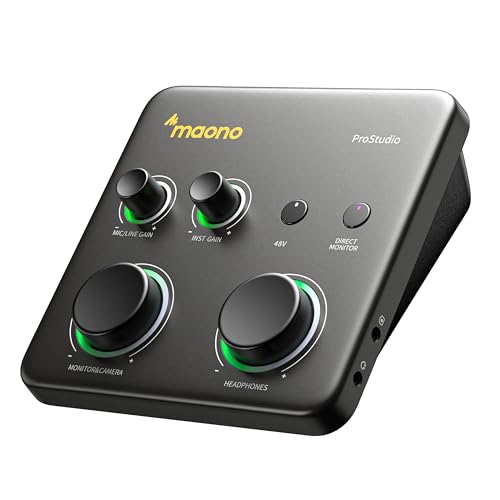
MAONO P1 USB Audio Interface — Best ASIO interface for streamers
In an ASIO guide, the MAONO P1’s presence rests on a modern truth: the largest group of new low-latency users is not recording albums but performing live to audiences, and their latency problem is a voice, a guitar and a software chain that must all arrive together. The P1 answers with ASIO drivers for the recording side, a preamp publishing 70dB of gain for the dynamic microphones streamers favor, auto-gain for performers who cannot ride levels mid-show, and loopback routing that folds the computer’s audio into the broadcast without virtual-cable gymnastics. It is an interface designed from the streamer’s chair, and its ASIO support is one load-bearing wall of that design.
Judged as a pure recording interface, it stands respectably among the budget class: the gain figure exceeds most rivals, the routing software is genuinely useful, and compatibility stretches to phones and tablets for creators whose studio is wherever they are. Its driver story is younger than Focusrite’s or M-Audio’s, which matters to buyers planning a decade of sessions; its feature story is stronger than theirs at this price, which matters to buyers planning Friday’s stream. The guide’s job is to name both truths and let the calendar decide.
The loopback and ASIO combination deserves a concrete illustration. A guitarist-streamer plays through an amp sim: the guitar enters the P1, the ASIO driver keeps the sim’s response tight enough to play in time, and the loopback carries the processed result — plus voice, plus game audio — to the streaming application as one arranged source. Without ASIO the playing feels detached; without loopback the routing requires extra software that adds its own delay and failure modes. The P1’s design removes both problems in one box, which is why it appears in this guide rather than only in streaming roundups.
Pure studio buyers should still pause. If no audience is involved and no amp sim is played live, the P1’s signature features idle while its shorter track record remains. The Scarlett below is the safer decade-long bet for that reader. But the overlap between recording and broadcasting grows every year, and an interface bought for both lives is not a compromise — it is an accurate reading of how music is now made in public.
- Gain: 70dB preamp gain, per manufacturer specification
- Drivers: ASIO support for low-latency work
- Features: auto-gain, loopback, mute control
- Routing: bundled routing software
- Compatibility: PC, phone and iPad
Strengths
- ASIO plus loopback serves live performance workflows
- 70dB gain drives popular dynamic microphones
- Auto-gain protects live levels
Trade-offs
- Younger driver pedigree than legacy brands
- Streaming features idle in pure studio use
- Auto-gain needs disabling for dynamic studio material
Best for: performers who record and broadcast through the same interface and play through software in real time.
Not suited for: studio-only recordists who prize long driver history above features.
Streamers who play instruments should examine the P1 on Amazon closely — its ASIO and loopback pairing addresses the two delays that plague live performance setups.

Focusrite Scarlett Solo 4th Gen — Best driver pedigree, single input
If ASIO quality is driver quality, the Scarlett Solo 4th Gen is this guide’s reference point. Focusrite has refined its drivers across four generations of the best-selling interface line in its class, and the result is the setup experience every rival is measured against: install, select a modest buffer, and play virtual instruments or monitor through effects at latencies that disappear beneath the performance. The hardware around the driver justifies the journey — one microphone preamp, one instrument/line input, conversion with a published 120dB of dynamic range — so the signal being shuttled so efficiently is worth shuttling.
For the ASIO buyer specifically, the Solo’s single-input layout is a feature when the work is single-source: the solo producer building tracks layer by layer, the pianist whose studio is a laptop and a controller, the guitarist recording DI tracks for later re-amping. Each layer is captured through the same quiet conversion and the same trustworthy driver, and the session never negotiates with unused hardware. It is the interface as a precision instrument for one voice at a time.
Driver maturity shows in the moments other interfaces fumble: waking from sleep mid-project, switching sample rates between applications, surviving an operating system update without a reinstall ritual. Those moments are unglamorous and decisive, because a recording setup that occasionally fails to appear is a setup you stop trusting with irreplaceable performances. Focusrite’s installed base means its drivers are tested against a wider reality than any rival’s, and that testing is, in effect, part of what the price buys.
The boundary is the one input. The moment a second simultaneous source matters — a vocal with the piano, a guest with a guitar — the Solo’s elegance becomes its limit, and the M-Track Duo below or a larger Scarlett answers instead. Buy the Solo for the layered, solo workflow it perfects, and its driver will repay you every session by being the part of the studio you never think about. In an ASIO guide, there is no higher praise available than that.
- Inputs: 1 XLR mic preamp; 1 line/instrument input
- Conversion: 24-bit/192kHz, 120dB dynamic range
- Drivers: Focusrite ASIO drivers, four generations refined
- Monitoring: direct monitoring plus strong headphone output
- Connection: USB-C, bus powered
Strengths
- Most trusted ASIO driver tradition in its class
- Superb conversion dynamic range
- Effortless setup and long support horizon
Trade-offs
- Single input limits simultaneous sources
- Premium over budget two-input rivals
- Best suited to layered solo workflows
Best for: solo producers and virtual-instrument players who want the most dependable low-latency experience available at this tier.
Not suited for: anyone recording two sources at the same time.
When driver trust is the deciding factor, the Scarlett Solo 4th Gen is the conservative and correct choice — verify the generation on Amazon, as older Solos share its name.
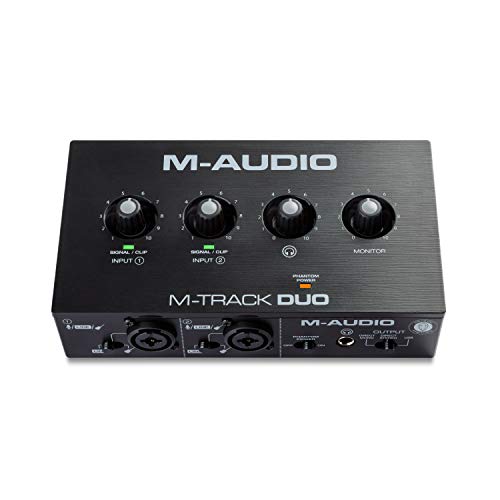
M-Audio M-Track Duo — Best budget two-input ASIO workhorse
The M-Track Duo is where ASIO recording becomes affordable without becoming flaky. Two combo inputs — each ready for a microphone, a line source or an instrument — feed M-Audio’s Crystal preamps, and the company’s long history with music-production drivers means the ASIO experience is a known quantity rather than a hope: stable buffers at working latencies, a control setup a beginner can master, and a bundled software suite that turns the box into a studio the day it arrives. For the singer-instrumentalist, it is the complete sentence: voice and guitar, together, in time.
Its ASIO story is workhorse rather than thoroughbred. The Scarlett’s drivers are the refinement benchmark, and at the smallest buffer sizes on a busy project the difference can appear as an occasional crackle that asks for one step up in buffer. At the latencies most home sessions actually use, the Duo simply works, and it works while capturing two sources the Solo cannot. Budget buyers should read that trade clearly, because it is the correct trade for most of them: capability first, ultimate polish second.
The Duo’s two inputs quietly change a musician’s writing life. Songs arrive as performances — voice and guitar intertwined — and an interface that captures them as performances preserves the thing that made the song worth recording. Overdubbing the same song in layers is a different, colder artifact. Teachers, duos and collaborators feel the same truth from their side. An ASIO interface’s latency figures matter, but the number of stories it can capture whole may matter more, and the Duo doubles the Solo’s count at a lower price.
Longevity planning is straightforward: the Duo serves until a session needs a third source or a noticeably finer preamp, and by then its owner will know exactly which and why. M-Audio’s presence in education and home studios means help, drivers and accessories are easy to find. As the budget foundation of an ASIO recording life, it is difficult to argue with — which is why it closes this guide as the recommendation for the largest number of real readers.
- Inputs: 2 combo XLR/line/instrument inputs
- Preamps: Crystal preamp design on both channels
- Drivers: M-Audio ASIO drivers for music production
- Software: bundled DAW and instrument suite
- Monitoring: direct monitoring for tracking
Strengths
- Two instrument-ready inputs at a budget price
- Dependable ASIO performance for home sessions
- Complete starter software included
Trade-offs
- Driver polish a step behind Focusrite at tiny buffers
- Conversion refinement is honest mid-tier
- Build is functional rather than luxurious
Best for: singer-instrumentalists and home producers who need two sources and solid ASIO without premium pricing.
Not suited for: virtual-instrument virtuosos chasing the absolute lowest stable latency.
Two sources, one budget, no drama: the M-Track Duo on Amazon is the working musician’s starting point for ASIO recording.
How Do You Configure ASIO for the Lowest Usable Latency?
Open your recording software’s audio settings, select the interface’s own ASIO driver — never a generic wrapper when a native driver exists — and set the sample rate to 48kHz as a working standard. Then begin the buffer experiment: start at 128 samples, play your most demanding virtual instrument or your guitar through an amp sim, and listen. If the playing feels immediate and the audio is clean, try 64. The moment crackles, pops or dropouts appear, step back up one notch and lock the setting in. That notch is your machine’s honest working latency, and it will serve every session until the computer or the project size changes materially.
A few habits protect the setting. Close browsers and background applications while tracking, because a single greedy process can steal the moment a small buffer cannot spare. Keep the interface on a direct USB port rather than a hub shared with drives. When a project grows heavy with tracks and effects, raise the buffer for mixing without guilt — latency only matters while performing, and a large buffer at mixdown is not a compromise but the correct tool for that phase. Professionals switch buffer sizes by session phase as naturally as guitarists change strings.
Finally, know when to stop optimizing. The difference between six and nine milliseconds is smaller than the difference between a good take and a great one, and hours spent chasing the last buffer step are hours not spent playing. Set the system up once, verify it with a real performance, and then let the technology disappear — which was, from the beginning, the entire point of ASIO’s existence.
Write your working settings down — driver version, sample rate, buffer size, monitoring choice — in the project notes of your first good session. Future-you, returning to a project after an update or a hardware change, will otherwise spend the first hour reconstructing a configuration that once simply worked. Studios have kept such logs for a century for a reason: the setup is part of the sound, and memory is the least reliable component in any recording chain.
When Should You Monitor Directly Instead of Through Software?
Direct monitoring routes your input to your headphones inside the interface, before the computer touches it, so the delay is effectively zero and the buffer setting becomes irrelevant to the performer. Its cost is that you hear the raw source — the dry guitar, the unprocessed voice — rather than the software’s finished sound. For laying down vocals against a backing track, or any performance where timing is the fragile element, that trade is usually correct: a perfectly timed dry performance can be processed forever afterward, while a sluggish monitored performance is sluggish in the recording itself.
Software monitoring earns its delay when the processing is part of the performance. A guitarist whose phrasing answers the amp sim’s distortion, a keyboardist playing a virtual piano whose touch response is the music, a vocalist who sings differently into reverb — these performers are playing the software as an instrument, and they need the ASIO path tight enough to forget. That need is precisely what separates the driver pedigrees in this guide, and why performers in this category should weight driver reputation above almost every other line in a review.
Most interfaces here offer both paths, and the mature workflow uses each where it belongs, sometimes within one song: software monitoring for the lead guitar that lives inside its effects, direct monitoring for the rhythm parts and vocals that live inside their timing. Configure both during setup, learn the switch or blend control by touch, and the monitoring question stops interrupting sessions altogether.
Does ASIO Matter for Playback-Only Listening?
A smaller audience uses ASIO without recording anything: listeners who want a music player to hand audio to a converter without the operating system resampling or mixing it along the way. For them ASIO — or its sibling exclusive modes — is a purity feature, guaranteeing that a 44.1kHz file reaches the DAC as a 44.1kHz file. The audible difference over a well-configured standard path is subtle and debated, but the certainty is real, and for owners of a fine converter like the Z SE’s, certainty has value.
If that is your use, the buying logic inverts: inputs and preamps become irrelevant, and the converter, the amplifier and the driver’s exclusive-mode stability decide everything. That is the Z SE’s home ground in this guide, and it is a legitimate one. Just do not let a seller convince you that playback ASIO and recording ASIO are the same purchase — the overlap is a protocol, not a product.
How Does Sample Rate Choice Interact With ASIO Latency?
Buffer size is only half the latency equation; the other half is the sample rate, because a buffer of 128 samples lasts half as long at 96kHz as it does at 48kHz. Raising the sample rate is therefore a legitimate latency strategy, and some performers track at 96kHz for exactly that reason. The costs are real: every track and plugin works twice as hard per second, files double in size, and the computer’s stable buffer floor may rise in response, returning part of the gain. Whether the exchange profits you depends on your machine, and the only honest test is your own most demanding project at both rates.
For most home sessions, 48kHz with a well-chosen buffer remains the sweet spot this guide recommends as a starting point — it matches video work, keeps projects light, and reaches single-digit latency on the driver pedigrees represented here. Treat higher rates as a tuning lever for a specific problem, such as a virtual instrument that still feels reluctant at your stable buffer, rather than as a default. ASIO rewards musicians who tune deliberately and punishes, with crackles, those who simply maximize every number in sight.
How Do the Six ASIO Picks Compare Across the Divide?
The family column is the honest core of this table: one card built to play, five interfaces built to record, all speaking ASIO for their own reasons.
| Pick | Connection | Standout trait | Suits best |
|---|---|---|---|
| Creative Sound Blaster Z SE | PCIe internal card | ASIO playback path, 116dB conversion, 5.1 outputs | Gaming PCs that play everything |
| Kmise 4-Channel USB Audio Interface | USB, 4 channels | Four inputs with phantom power and ASIO | Small bands and multi-source studios |
| BlueAVS 2-In/4-Out USB Audio Interface | USB, 2-in/4-out | Four outputs, zero-latency monitoring | Producers with routing ambitions |
| MAONO P1 USB Audio Interface | USB, single main input | 70dB gain, ASIO plus loopback | Streamers performing through software |
| Focusrite Scarlett Solo 4th Gen | USB-C, 1 mic + 1 instrument | Benchmark drivers, 120dB dynamic range | Solo producers and virtual instrumentalists |
| M-Audio M-Track Duo | USB, 2 combo inputs | Two sources with dependable ASIO | Singer-instrumentalists on a budget |
What Mistakes Do ASIO Buyers Make Most Often?
Assuming any product labeled ASIO is a recording interface
The label describes a driver protocol, and it appears on gaming cards, media devices and interfaces alike. A buyer who purchases a gaming card for its ASIO badge and then discovers it has no microphone preamp or instrument input has been misled by an acronym, not by a lie. Decide which family’s ASIO you need — playback purity or recording latency — and shop inside that family, using this guide’s badges as the border signs.
Using a generic ASIO wrapper instead of the native driver
Wrapper drivers exist to give ASIO-less hardware a compatibility path, and they do it with extra latency and fragility. Every interface in this guide ships a native driver built for its hardware, and using anything else discards the main thing you paid for. After installing, verify inside your software’s settings that the selected driver carries the interface maker’s name. It is a thirty-second check that quietly determines whether your latency figures are real.
Setting the smallest buffer and blaming the interface for crackles
A 32-sample buffer asks the computer to refill the audio stream thousands of times per second while also running your project; many honest computers decline. Crackling at extreme settings is arithmetic, not defect. Step the buffer up until the audio is clean and the feel remains immediate — that setting, not the minimum the menu offers, is your system’s true specification, and it will still be far faster than any non-ASIO path.
Recording everything through software monitoring by default
New recordists often monitor through the DAW because it is the default, then conclude their interface has disappointing latency when the real culprit is a mixing-phase buffer size. Learn the direct monitoring path on your interface for vocals and rhythm work, and reserve software monitoring for performances that genuinely need live effects. Matching the monitoring path to the part is a skill, and it makes modest hardware feel like a tier upgrade.
Buying channels you cannot feed and starving the ones you use
A four-channel interface recording through two indifferent cables into an untreated room produces four channels of mediocrity, while the same money in a two-channel setup with a better microphone produces recordings people want to hear. ASIO performance is identical in both cases; the music is not. Count your genuine simultaneous sources, buy exactly that many good channels, and let the savings flow to the transducers at both ends of the chain.
Final Recommendation
Name your ASIO job and the shortlist writes itself. Playback purity inside a gaming PC belongs to the Z SE, the one true sound card here, whose ASIO serves its converter honestly. Recording belongs to the interfaces: the Scarlett Solo 4th Gen for the solo producer who values driver trust above all, the M-Track Duo for two-source work on a budget, the Kmise when four channels must happen cheaply, the BlueAVS when outputs and routing lead the session, and the MAONO P1 when the session is also a broadcast.
One last calibration for the shopper comparing numbers across listings: latency is a system property, not a product property. The same interface will post different figures on different computers, under different projects, at different sample rates, and any advertisement that promises a single millisecond figure without those conditions is selling weather as climate. Buy the driver pedigree and the input set that fit your work; the milliseconds will follow from your machine, as they always have.
Whichever family you choose, spend one evening on configuration — native driver selected, buffer tuned to your machine, monitoring paths learned — and then stop thinking about latency entirely. The best asio sound cards and interfaces share that final virtue: configured once, they remove themselves from the music, and the delay you once measured in milliseconds is replaced by the only timing that ever mattered, yours.
Frequently Asked Questions
What latency figure should I aim for when recording?
Most performers stop perceiving delay as a problem somewhere below roughly ten milliseconds of total round-trip latency, and many work happily a little above it for less rhythm-critical parts. Your interface’s driver panel and your recording software usually report the figure for the current buffer setting. Treat the number as a guide rather than a contest: the right setting is the smallest one that stays crackle-free through your most demanding playing, found by experiment in a single session and then left alone.
Your own tolerance is the final authority here. Some drummers and pianists — players whose instruments are pure attack — notice delays that guitarists happily ignore, because a struck note exposes timing mercilessly. If your instrument is percussive, weight driver pedigree even more heavily than this guide already does, and test any new setup with your fastest material before trusting it with a session.
Does ASIO work on Mac as well as Windows?
ASIO itself is a Windows technology; macOS handles low-latency audio through its own Core Audio system, which is built into the operating system and achieves comparable results without a separate protocol. The interfaces in this guide work on Macs through Core Audio and on Windows through their ASIO drivers, which is why their listings promise low latency on both platforms by different machinery. The Z SE, as an internal Windows PC card, belongs to the Windows world entirely.
Can I use ASIO with two applications at once?
Traditionally, an ASIO driver serves one application at a time, because exclusivity is part of how it achieves its directness. Recording software therefore becomes the hub: other sounds are routed through it, or released when you switch tasks. Streaming setups solve the puzzle with loopback features like the MAONO P1’s, which present the arranged mix to the broadcast application as a single source. Plan your routing around the one-application rule and it stops being a limitation and becomes simply the architecture.
Why does my ASIO setup crackle when I add more tracks?
Because the computer’s side of the bargain scales with the project. Each track, effect and virtual instrument consumes processing that must complete within the buffer’s time window; a setting that was stable for a solo guitar can buckle under a full arrangement. The professional habit is phase-based settings — small buffers while tracking, large buffers while mixing — changed deliberately as the session’s work changes. Crackles are information about that balance, not a verdict on your interface.
There is a second, quieter cause worth checking before you blame the project size: power management. Laptops that throttle their processors to save battery can starve an audio stream that a plugged-in session handled easily. If crackles arrive away from the desk, test the same session on mains power before changing any audio setting at all.
Is a gaming card’s ASIO good enough for recording a podcast?
For a single voice through a headset or a simple microphone, the Z SE’s clean conversion and ASIO path will produce a perfectly respectable podcast recording, and its software adds voice processing a podcaster can use. The limits appear with studio microphones: no phantom power for condensers, no high-gain preamp for quiet dynamics, no instrument input. A podcaster planning to grow into proper microphones is buying an interface eventually; the card serves the present tense well and the future tense partially.
Do I need ASIO if I only record vocals against backing tracks?
You need low latency while performing, and there are two roads to it. Direct monitoring — offered by the interfaces here — gives you your voice with effectively no delay while the backing track plays from the computer, and for straightforward vocal recording that road is complete without ASIO heroics. ASIO becomes essential when you must hear software processing on your voice as you sing, or when your instrument is a virtual one. Many vocalists record entire careers on the direct road; know which road your workflow travels before paying for the other.
Related Guides
Low-latency recording connects to several neighboring guides in our audio coverage.
- Best sound cards for recording guitar
- Best sound cards for voice over
- Best internal PCIe sound cards



[…] Best external USB sound cards […]