What's inside
- Key Takeaways
- Quick Picks
- How We Chose These Picks
- Comparison Table
- What does INKvestment Tank actually mean, in plain terms?
- How should you read Brother’s ink-duration and warranty claims?
- Which Brother tank printer fits which kind of paperwork?
- How do you set up a Brother all-in-one for a whole household?
- What mistakes do Brother buyers most often make?
- How does the INKvestment approach change daily printing habits?
- Final Recommendation
- Frequently Asked Questions
- Related Guides
As an Amazon Associate I earn from qualifying purchases. This post may contain affiliate links at no extra cost to you.
widgetverdict.com is reader-supported. When you buy through links on our site, we may earn an affiliate commission.
Brother’s tank printers travel under a name of their own, and getting the name right is the first honest step in shopping for them: the line is called INKvestment Tank. A buyer searching for the best brother tank printers is therefore not looking for bottle-fed tanks of the kind Canon and Epson popularised, but for Brother’s hybrid answer to the same problem, in which cartridges feed internal ink tanks that hold a far larger working supply. The problem being solved is identical, the dread of the low-ink warning and the per-page arithmetic that made households ration printing, but the mechanism wears Brother’s own engineering accent, and this guide keeps the branding straight so that comparisons with rival systems stay fair.
The second honesty concerns the numbers Brother prints largest. Across this shortlist, titles announce up to three years of ink in-box, a three-year limited warranty, and similar duration claims, each carrying the little footnote markers that signal conditions apply. Those figures are manufacturer claims, and this guide attributes them every time: Brother rates the in-box supply at up to three years, under Brother’s own assumptions about how much a household prints. Your mileage will be set by your own pages, and a family running a home business will drain any bundle faster than a family printing homework. Attribution is not scepticism for its own sake; it is how a buyer keeps a marketing horizon from hardening into a personal guarantee.
What remains, once the name and the numbers are handled properly, is a genuinely interesting family of six wireless colour inkjet all-in-ones that differ in the details a household actually feels: duplex printing on some, a multipurpose tray on the flagship, Ethernet beside wireless on one model, an automatic two-sided copy and scan claim on another, displays of different sizes, and one older INKvestment Tank design whose title promises up to a year of ink in-box alongside Alexa compatibility and cloud printing. Brother sells temperament as much as hardware, a reputation for machines that stay on desks for years, and the shortlist below is organised to show which expression of that temperament suits which kind of home.
Read the picks in order but choose by your own paperwork. If two-sided copying of original documents is your weekly reality, exactly one title below claims it outright. If a spare tray for envelopes and card stock matters, exactly one title names a multipurpose tray. If your printer must join a wired network, exactly one title says Ethernet. The discipline of this guide is to let those title-level facts, rather than series numbers or assumptions about newer being better, carry the argument from pick to pick.
Key Takeaways
- Brother’s tank line is branded INKvestment Tank; the name is used throughout this guide, as Brother itself uses it.
- Every duration figure here is a manufacturer claim: Brother rates the 780, 580 and 980 in-box supplies at up to three years of ink.
- The INKvestment 5010 is the only pick whose title claims automatic two-sided copy and scan.
- The INKvestment Tank 980 is the only pick whose title adds Ethernet and a multipurpose tray.
- The MFC-J4335DW is the elder design here, rated by Brother at up to one year of ink in-box, with Alexa and cloud print in its title.
- Display sizes are title facts on two picks: a 2.7-inch colour touchscreen on the 5010 and a 1.8-inch colour display on the 1365.
- Ranking this range by model number fails on its own titles: the flagship omits claims that cheaper siblings make outright, so paperwork shape, not series position, should drive the choice.
Quick Picks
| Pick | Badge | Why it earns its place |
|---|---|---|
| Brother INKvestment Tank 780 | The balanced INKvestment choice | Duplex printing, plus Brother’s rating of up to three years of in-box ink and a three-year limited warranty. |
| Brother INKvestment Tank 580 | The quieter three-year option | The same three-year ink and warranty framing as Brother rates it, in a plainer all-in-one title. |
| Brother INKvestment Tank 980 | Multipurpose tray and Ethernet flagship | The range-topper: wireless and Ethernet, a multipurpose tray, and Brother’s three-year ink framing. |
| Brother MFC-J4335DW INKvestment Tank | The elder design with Alexa | An earlier INKvestment Tank generation: duplex, mobile and cloud print, Alexa, and up to a year of ink in-box. |
| Brother INKvestment 5010 | Two-sided copy and scan claim | The only title here claiming automatic two-sided copy and scan, plus a 2.7-inch colour touchscreen. |
| Brother INKvestment 1365 | Compact display, subscription trial | Automatic duplex printing and a 1.8-inch colour display, with a Refresh subscription trial in the title. |
How We Chose These Picks
Assembling a single-brand shortlist creates a particular temptation, which is to rank by model number and call the result analysis. This guide resisted it by treating each title as a separate contract and asking what the contract actually promises. The six machines were kept because each promises something the others do not, whether that is a multipurpose tray, a wired network port, a two-sided copying claim, a larger touchscreen, or simply the lower-commitment charm of an older design whose in-box ink Brother rates at a year rather than three. A Brother buyer is choosing among emphases inside one philosophy, and the choosing only works if the emphases are stated accurately.
Claims discipline formed the second filter. Duration and warranty language appears in these titles with footnote markers, a typographic confession that conditions exist, and any pick whose appeal rested entirely on an unexamined duration claim would have been a weak pick. Each machine below therefore also stands on a hardware fact from its own title: duplex printing, a tray, a port, a display, a feeder-adjacent copying claim. The ink horizons are reported, attributed to Brother, and then set in their proper place as supporting evidence rather than as the argument itself.
The third filter was household fit across a realistic spread of Brother buyers. Brother’s audience includes the keeper who buys once a decade, the home worker whose printer shares a desk with a business, the parent whose copying involves double-sided school documents, and the Alexa household that prints by voice and cloud. A shortlist serving only one of those buyers would have been a disservice to a brand whose entire identity is breadth within dependability, so the six were checked against that spread, and each pick below names the Brother buyer it serves best and the one it would serve poorly.
A last preliminary concerned the elder in the range, because age inside a printer family cuts two ways. An older design has a shorter attributed ink horizon and lacks the newest titles’ three-year framing, yet it also carries connectivity language, Alexa and cloud print, that the newer titles leave unspoken, and its duplex claim is as plain as any in the guide. It was kept on merit rather than nostalgia, and buyers equipping a lighter-duty desk should read its section with the same seriousness as the flagship’s.
Brother INKvestment Tank 780 — The balanced INKvestment choice
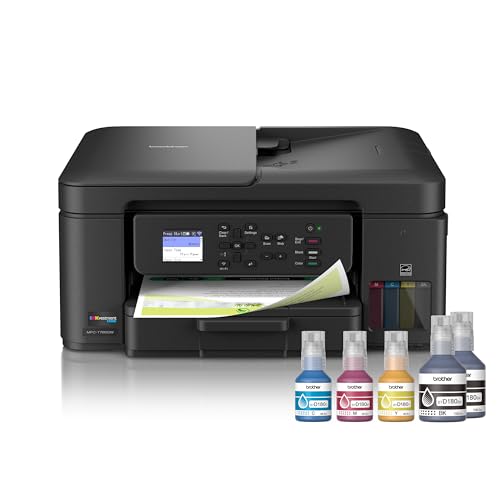
The 780 sits at the centre of this shortlist because its title makes the centre’s argument: a wireless colour inkjet all-in-one with duplex printing, an in-box supply Brother rates at up to three years of ink, and a three-year limited warranty. Notice how the claims pair up. The ink horizon and the warranty horizon are the same length, which reads like a deliberate promise about the ownership experience: for the first substantial chapter of this machine’s life, Brother expects you neither to buy ink nor to face a fault without cover. Whether your household prints enough to test the ink claim early is your own arithmetic, but the symmetry of the offer tells you exactly which buyer Brother had in mind.
Duplex printing is the hardware fact anchoring the 780’s case, and in a Brother household it will be used the way Brother owners use everything, routinely and without ceremony. Two-sided output suits the documents this brand’s buyers print: statements, school packs, contracts, knitting patterns, board minutes. Automating the flip removes the one step in home printing most likely to produce a quietly ruined stack, the hand-refed pile whose second sides arrive in the wrong order. A machine aimed at keepers must be trustworthy at boring tasks, and duplex printing is the boring task par excellence.
What the title withholds is worth the same attention. No fax is claimed, no Ethernet is named, no display size is quoted, and no feeder is mentioned, so the 780 presents itself as a wireless, flatbed-centred all-in-one whose strengths are output and endurance rather than document intake. A buyer whose scanning arrives in stacks should keep reading, because a sibling below speaks directly to two-sided copying, and a buyer who needs a wired port will find one named further down the list. The 780 does not pretend to be those machines, and its clarity about its own shape is part of its appeal.
For the household that prints steadily, copies occasionally, and keeps equipment until it genuinely dies, the 780 is the Brother-shaped answer. Its promises are long rather than flashy, its duplex printing covers the most common two-sided need, and its warranty, as Brother states it, matches the ink story beat for beat. Plenty of buyers should choose a sibling for a specific feature, and this guide will help them do it, but the buyer with no single exotic requirement and a preference for balance will find the centre of the range exactly where Brother placed it.
- Design: INKvestment Tank wireless colour inkjet all-in-one, MFC-T780DW
- Duplex: duplex printing stated in the title
- Ink claim: up to 3 years of ink in-box, as rated by Brother
- Warranty: 3-year limited warranty, per the title
- Ethernet and fax: neither is claimed in the title
Strengths
- Duplex printing at the centre of the range
- Ink and warranty horizons match at three years
- Wireless colour all-in-one for shared homes
Trade-offs
- No Ethernet is named in the title
- No document feeder is mentioned
- Duration figures are Brother’s own ratings
Best for: a steady household that prints on both sides, keeps machines for years, and wants ink and warranty horizons aligned.
A wired Ethernet run is beyond this model: the title names wireless only, leaving cable networking to the 980’s Ethernet claim below.

Brother INKvestment Tank 580 — The quieter three-year option
The 580’s title is shorter than its sibling’s, and the difference between the two titles is the most instructive comparison in this entire guide. Brother presents the INKvestment Tank 580 as a wireless colour inkjet all-in-one including up to three years of ink in-box and a three-year limited warranty, and stops there. No duplex printing is claimed. A buyer who lines the 580 and 780 titles up side by side learns the range’s structure in ten seconds: the ink story and the warranty story stay constant while the hardware story changes, and the step between the models is paid for in features rather than in consumables. That is an honest way to build a range, and it makes the buyer’s job unusually clear.
Who, then, is the 580 for? It is for the household whose printing is overwhelmingly one-sided, which describes more homes than duplex advocates admit. Photographs, colouring pages, worksheets, labels, boarding passes, recipes and the majority of school output all live on one side of the sheet. A family whose two-sided need amounts to a long document twice a year can flip pages by hand twice a year and keep the simpler machine. Brother’s framing suggests the company knows this buyer well: same long ink runway as Brother rates it, same warranty shelter, fewer moving expectations.
The absence of a duplex claim should still be read as a fact rather than a gap in the paperwork. Titles in this range are precise documents, and where Brother claims duplex printing for the 780, the 980-generation siblings and others, the 580’s silence is information. Treat it the way this guide treats every silence: as unconfirmed, leaning absent, and therefore as a genuine decision point rather than a detail to wave through. A buyer who later discovers a weekly duplex habit will feel the omission every week, while a buyer who never had the habit will never think of it again.
Judged on its own terms, the 580 is the value-shaped expression of the INKvestment idea: the tank system, the long attributed ink horizon, the long warranty, and the wireless all-in-one basics, without paying for the two-sided mechanism a one-sided household will not use. Brother buyers tend to be people who keep receipts and read warranties, and this is the model in the range that rewards exactly that temperament. Buy the features your paperwork uses, bank the difference, and let the three-year framings, Brother’s own, do their quiet work in the background.
- Design: INKvestment Tank wireless colour inkjet all-in-one, MFC-T580DW
- Ink claim: up to 3 years of ink in-box, as rated by Brother
- Warranty: 3-year limited warranty, per the title
- Duplex: no duplex claim appears in this title
- Display and Ethernet: neither is specified in the title
Strengths
- Same attributed three-year ink framing as the flagship picks
- Three-year limited warranty stated in the title
- Simpler hardware for one-sided households
Trade-offs
- No duplex printing is claimed in the title
- No display size is quoted
- No Ethernet or feeder is mentioned
Best for: a one-sided printing household that wants the INKvestment ink and warranty story without paying for duplex hardware.
Not suited for: weekly two-sided printing of long documents, because the title claims no duplex printing to automate those pages.
Brother INKvestment Tank 980 — Multipurpose tray and Ethernet flagship
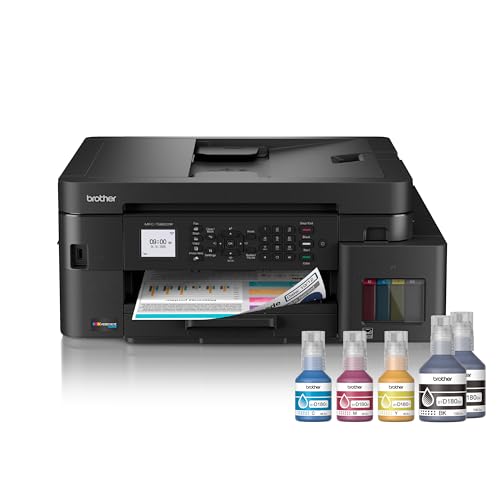
The 980 carries the range’s most complete title, and its two headline additions solve two different kinds of household problem. Wireless and Ethernet together mean the machine joins a network whichever way the room demands: by air in the family space, by cable beside the router or in the office where wireless is crowded and tempers are short. The multipurpose tray addresses media rather than networking, giving envelopes, card stock, labels and photo paper a straighter, kinder path than the main cassette offers. A household that prints invitations, mailings or craft stock will understand the tray instantly; it is the feature that separates a printer that tolerates special media from one that welcomes it.
Brother’s duration language rides along, attributed as always: the title includes up to three years of ink in-box, as Brother rates the supply, and a limited warranty whose duration this particular title does not spell out in the words provided, a small asymmetry worth noticing for buyers comparing warranty horizons across the range. The 780 and 580 state three-year limited warranties outright. A flagship buyer who cares about the warranty term should confirm it on the listing rather than assume the range-topper inherits the longest cover, because this guide claims only what titles state, and this title, unusually, leaves the number unspoken.
Duplex printing, notably, is also unclaimed in the words of the 980’s title as given, which makes the flagship a study in how ranges actually work: the top model is not automatically the union of every feature below it. The 980’s identity is connectivity plus media handling. A buyer whose week is envelopes, card and a wired desk will find it the most capable machine here. A buyer whose week is long two-sided documents should notice that the humbler 780 claims duplex outright while the flagship’s title spends its words elsewhere, and choose by the week rather than by the number on the front.
None of that diminishes the 980 for its intended owner, who is easy to picture: the household that runs a small enterprise from home, prints mailings and materials on varied stock, keeps the printer beside the router, and wants one machine that treats odd media as routine. For that owner the multipurpose tray alone justifies the flagship, because feeding envelopes through a main cassette is the kind of recurring annoyance that quietly makes people hate a perfectly good printer. Brother built the top of this range around intake and connection rather than output tricks, and buyers whose pain lives at intake will recognise the design as aimed at them.
- Design: INKvestment Tank colour inkjet all-in-one, MFC-T980DW
- Networking: wireless and Ethernet, both stated
- Tray: multipurpose tray named in the title
- Ink claim: up to 3 years of ink in-box, as rated by Brother
- Warranty: limited warranty stated; term not numbered in title
Strengths
- Ethernet joins wireless for a stable wired option
- Multipurpose tray welcomes envelopes and card
- Flagship media handling for home enterprises
Trade-offs
- Warranty term is not numbered in this title
- Duplex printing is not claimed in the title words
- No display size is quoted
Best for: a home enterprise printing envelopes and varied stock, with the printer parked beside a router for wired duty.
Automatic two-sided printing is the missing line: the 780 claims duplex outright, while this flagship title spends its words on Ethernet and its multipurpose tray.

Brother MFC-J4335DW INKvestment Tank — The elder design with Alexa
Every range has an elder, and the MFC-J4335DW wears the role openly. Its title belongs to an earlier INKvestment Tank generation and says so in its numbers: up to one year of ink in-box, against the three-year framings of the newer machines above. Read that difference with the attribution discipline applied throughout this guide: Brother rated this model’s bundled supply at up to a year, under the assumptions of its day. A shorter rated runway is not a defect; it is a different offer, typically attached to a lower entry point, and for a lighter-printing household a year of ink, as the maker frames it, may cover the same real calendar span that a heavier household burns through in months.
The elder’s title compensates with connectivity language the newer titles leave implicit. Mobile and cloud print are named outright, and the machine works with Alexa, which places it in the voice-and-phone ecosystem many households now treat as the front door to their devices. Printing a shopping list by voice sounds like a parlour trick until a parent with flour on both hands does it weekly. Cloud print matters to the household whose documents live in drives rather than on one computer, because the printer stops caring which device, or whose device, a file started on.
Duplex printing is claimed plainly, which keeps the elder competitive on the hardware fact that matters most to document households. Set against the 580 above, the comparison is almost elegant: the newer machine offers the longer attributed ink horizon without a duplex claim, while the elder offers duplex printing and the richer connectivity wording with the shorter horizon. Neither is simply better. They are different distributions of value across time, one spending on ink runway, the other on features, and a buyer who understands that trade has understood the Brother range better than most sales pages explain it.
Choose the J4335DW if your household prints from phones, clouds and voice, prints on both sides, and prints lightly enough that a year of in-box ink, as Brother framed it for this generation, is a realistic runway rather than a down payment. It is also the natural pick for a second location, a student flat, a holiday home, a grandparent’s desk, where the full three-year flagship apparatus would be more commitment than the site requires. Elders in a range earn their keep by being sufficient, connected and honest about their horizon, and this one is all three.
- Design: INKvestment Tank wireless all-in-one colour inkjet
- Duplex: duplex printing stated in the title
- Connectivity wording: mobile and cloud print; works with Alexa
- Ink claim: up to 1-year of ink in-box, per Brother’s title
- Generation: earlier INKvestment Tank design
Strengths
- Duplex printing included despite elder status
- Alexa and cloud print named in the title
- Lower-commitment ink horizon suits light use
Trade-offs
- In-box ink rated at up to one year, not three
- An earlier design than the numbered picks above
- No Ethernet or tray is claimed in the title
Best for: a connected, lighter-printing household that values Alexa, cloud print and duplex over a long ink runway.
High-volume printing outruns the bundled supply quickly: Brother rates the in-box ink at up to one year, well short of the three-year framing above.

Brother INKvestment 5010 — Two-sided copy and scan claim
One sentence in the 5010’s title does what no other title in this guide attempts: it claims automatic two-sided copy and scan. The distinction behind that sentence is the most important technical idea in this entire category, so it deserves plain words. Two-sided printing concerns output the machine creates. Two-sided copying and scanning concern originals the household hands to the machine, the double-sided contract, the stapled statement, the worksheet printed on both sides by a school. A printer can automate the first and leave the second entirely manual, which is the case for most machines in most guides. The 5010’s title claims automation for the originals themselves, and that claim, if your paperwork is double-sided, outweighs almost everything else on this page.
Picture the job it serves. A parent must copy a four-page, double-sided school agreement and return it signed. On a flatbed-only machine that job is eight lid lifts, with the constant risk of a skipped side or a page copied in the wrong order. A machine that copies and scans two-sided documents automatically turns the same job into loading the originals and pressing a button, and the error rate falls to the error rate of counting to one. Households discover whether they need this feature the first time a double-sided original arrives, and from that day the feature is either present or permanently missed.
The 2.7-inch colour touchscreen named in the title is the natural partner to that capability, because multi-step copy jobs are exactly where a panel earns its size. Choosing two-sided copying, collating, and sending a scan to its destination are decisions a touchscreen can present as readable choices rather than as a code of button presses. A household whose least technical member handles the school and insurance paperwork will feel the panel’s value in the questions that stop being asked across the house. Brother does not quote a display size for most picks in this guide; that this title does is itself a signal about who the machine is for.
Notice what the 5010’s title does not spend words on: no ink-duration claim appears in it, and no warranty term either. Buyers comparing runways should register that silence and check the listing for the bundled supply rather than assuming the range’s three-year framing applies here. The 5010 spends its title on a capability and a screen, and it should be bought for exactly those things: automatic two-sided handling of originals, directed from a proper colour touchscreen, in a wireless colour inkjet all-in-one. For the double-sided-paperwork household, it is not merely the best pick in this guide; it is the only pick whose title is even speaking the right language.
- Design: INKvestment wireless colour inkjet all-in-one, listed as MCF-J5010DW
- Copy and scan: automatic 2-sided copy & scan, per the title
- Display: 2.7-inch colour touchscreen
- Ink claim: no duration claim appears in this title
- Warranty: no term is stated in this title
Strengths
- Automatic two-sided copy and scan, unique here
- Colour touchscreen sized and stated in the title
- Wireless all-in-one for shared paperwork
Trade-offs
- No in-box ink duration is claimed in the title
- No warranty term is stated in the title
- No Ethernet is named in the title
Best for: a household drowning in double-sided originals, school agreements, statements and contracts that must be copied whole.
Not suited for: judging a purchase by bundled-ink years, because this title states no in-box duration figure to set against its siblings.

Brother INKvestment 1365 — Compact display, subscription trial
The 1365 is the range’s pragmatist, and its title is a study in modest, specific promises. Automatic duplex printing is claimed in full words, not assumed. A 1.8-inch colour display is quoted, smaller than the 5010’s touchscreen but still a colour panel on a machine at the accessible end of the range. And the bundled extra is not a multi-year ink horizon but a Refresh Subscription Trial, named with its own footnote marker, which tells a buyer that Brother positions this model partly inside its subscription ecosystem. Each of those facts will matter differently to different households, and the title’s honesty about all three makes the machine easy to place.
The duplex claim deserves emphasis because of where this model sits. Two-sided printing is the feature budget buyers are most often told to step up for, and here it is, stated outright, on the pick whose other numbers are the range’s most modest. A student printing essays and reading packs, a home worker printing drafts, a family printing long documents on a budget of attention rather than money, all get the paper-saving, shelf-saving automation without climbing to the flagship tier. If your household’s two-sided need is about output rather than originals, the 1365 covers it and the 5010’s two-sided copying machinery may be more than your paperwork requires.
The Refresh trial needs the same calm reading as the duration claims elsewhere. A trial is an introduction, not a supply; it will suit households that like the idea of ink arriving on a schedule and want to test the rhythm before committing, and it will be irrelevant, or mildly annoying, to households that prefer to buy bottles or cartridges when windows look low. Brother’s inclusion of the trial in the title, footnoted like the bigger claims, at least puts the relationship on the label where a buyer can see it before the machine arrives, which is more transparency than subscription offers usually volunteer.
Taken as a whole, the 1365 suits the buyer who wants Brother’s tank philosophy, real duplex printing and a colour display, in the range’s most straightforward package, and who is untroubled by managing ink the ordinary way once any trial ends. It lacks the flagship’s tray and Ethernet, the 5010’s two-sided original handling, and the long attributed ink horizons of the 780 and 580. What it never lacks is a clear account of itself, and in a category where titles often blur, a machine whose title reads like a plain inventory of its actual virtues is a respectable place for a range to rest its accessible end.
- Design: INKvestment wireless colour inkjet all-in-one, MFC-J1365DW
- Duplex: automatic duplex printing stated in the title
- Display: 1.8-inch colour display
- Bundle: Refresh Subscription Trial included, per the title
- Ethernet and feeder: neither is claimed in the title
Strengths
- Automatic duplex printing at the accessible end
- Colour display, sized honestly in the title
- Subscription trial for households who like scheduled ink
Trade-offs
- Display is smaller than the 5010’s touchscreen
- No long in-box ink horizon is claimed
- No Ethernet or multipurpose tray is named
Best for: a student or home worker wanting genuine duplex printing and a colour panel without climbing the range.
Multi-year bundled ink is not part of this package: in place of a duration claim, the title offers a Refresh Subscription Trial instead.
Comparison Table
| Pick | Print, copy, scan | Headline fact from its listing title |
|---|---|---|
| Brother INKvestment Tank 780 | All-in-one with duplex printing | Up to 3 years of ink in-box per Brother; 3-year limited warranty per title |
| Brother INKvestment Tank 580 | All-in-one, wireless colour inkjet | Up to 3 years of ink in-box per Brother; 3-year limited warranty per title |
| Brother INKvestment Tank 980 | All-in-one, wireless and Ethernet | Multipurpose tray; up to 3 years of ink in-box per Brother |
| Brother MFC-J4335DW INKvestment Tank | All-in-one with duplex printing | Up to 1-year of ink in-box; mobile and cloud print; works with Alexa |
| Brother INKvestment 5010 | All-in-one with automatic 2-sided copy and scan | Automatic 2-sided copy & scan per title; 2.7″ colour touchscreen |
| Brother INKvestment 1365 | All-in-one with automatic duplex printing | 1.8″ colour display; Refresh Subscription Trial included per title |
What does INKvestment Tank actually mean, in plain terms?
The name is a portmanteau with a point: ink, plus investment, plus tank. Brother’s system stores a large working supply of ink inside the machine, held in internal tanks, and those tanks are replenished from cartridges rather than from poured bottles. The practical consequences divide into what you feel weekly and what you feel yearly. Weekly, you feel nothing at all, which is the design’s ambition: the internal supply is large enough that replenishment stops being a recurring event in the household calendar. Yearly, you feel the arithmetic, because a large supply bought in Brother’s format costs less per page than the small cartridges of the previous era taught everyone to expect.
Comparing that mechanism with bottle-fed rivals is fairer than brand loyalists on either side admit. Bottles ask for a pour, occasionally, with a steady hand, and reward the household with the simplest supply format in the category. Brother’s approach asks for no pouring ever, at the price of staying inside Brother’s cartridge format for replenishment. Households with small children, unsteady hands, or a printer kept on good carpet may rationally prefer the sealed route. Households that enjoy the bottle ritual and its visible windows may rationally prefer the pour. The technology argument ends in a temperament argument, and temperament arguments are settled by knowing yourself rather than by reading more reviews.
What should not survive the comparison is any claim that one system is a real tank and the other is not. The shopper’s underlying need, a large onboard ink supply that ends per-page anxiety, is met by both architectures, and Brother’s titles use the word Tank in the line’s own name. Judge the six machines in this guide by their stated functions, their attributed ink horizons and their warranties, and let the replenishment ritual be a preference you honour rather than a doctrine you obey.
How should you read Brother’s ink-duration and warranty claims?
Duration claims are estimates wearing the clothes of facts, and the footnote markers in Brother’s titles are the tell. When a title says a model includes up to three years of ink in-box, the words up to are doing heavy work: they convert the sentence from a promise about your household into a statement about a usage pattern the manufacturer has assumed. Brother rates the supply against that pattern. A household printing a fraction of the assumed volume will still be sipping the in-box supply long after the headline horizon, while a household printing several times the assumed volume will be replenishing within the first year and may feel misled by a number that was never about them.
The honest way to use such claims is comparatively rather than absolutely. Within this range, the three-year framings on the 780, 580 and 980 tell you those models ship with Brother’s generous supply tier, the one-year framing on the elder J4335DW tells you its bundle is smaller, and the absence of a duration claim on the 5010 and 1365 tells you to check those listings directly before assuming anything. Used that way, as a map of which bundle tier each machine belongs to, the claims are genuinely informative. Used as a diary prediction, they will disappoint somebody in every household that prints unusually much or unusually little.
Warranty language deserves the same two-level reading. A three-year limited warranty, stated in the 780 and 580 titles, is a concrete commitment with conditions, and its value is real: faults in home printers usually announce themselves early in a machine’s working life, and a long cover window catches them. The 980’s title states a limited warranty without numbering its term in the words provided, so a warranty-focused buyer should confirm that term on the listing itself. Reading warranties at that level of care is very much a Brother-buyer trait, and the range rewards it, because the differences are printed plainly for anyone willing to look.
Which Brother tank printer fits which kind of paperwork?
Paperwork has shapes, and the six titles map onto them more neatly than model numbers suggest. Output-shaped paperwork, long documents that must be printed on both sides, is served by the duplex claims on the 780, the J4335DW and the 1365. Original-shaped paperwork, double-sided documents that must be copied or scanned whole, is served by exactly one claim in the guide, the 5010’s automatic two-sided copy and scan. Media-shaped paperwork, envelopes and card and labels, is served by the 980’s multipurpose tray. A buyer who names their paperwork’s shape first will find the range sorts itself, because Brother distributed these capabilities deliberately rather than stacking them all on one flagship.
There is a fifth shape worth naming: network-shaped paperwork, the kind that fails not at the paper but at the connection. The household whose printer keeps vanishing from the network, whose router sits in a cupboard of interference, whose small office cannot afford a printer that needs reintroducing to the Wi-Fi every month, is served by the 980’s Ethernet, the only wired claim in these titles. It is an unglamorous capability that produces an outsized amount of daily peace, and buyers who have suffered connection flakiness should weight it as heavily as any printing feature, because a printer that cannot be reached cannot print, copy or scan anything at all.
The final shape is time. Some households want the decision to stay made for as long as possible, and they are served by the attributed three-year ink horizons and three-year warranties of the 780 and 580. Others are equipping a temporary situation, a degree course, a rental year, a grandparent’s first printer, and are served better by the elder’s one-year framing or the 1365’s straightforward package. Brother’s range, read honestly, is a set of answers to the question of how long and how hard a machine will be used, and the buyer’s own answer to that question is the truest specification in the whole comparison.
How do you set up a Brother all-in-one for a whole household?
Setup day decides whether a shared printer becomes a shared success or one person’s permanent side job. Place the machine where its display can be read standing up and its paper path can be reached without moving furniture, then join it to the network the household’s devices actually use, which is not always the network with the strongest signal on a phone’s list. Print one page from each device that will ever ask, including the school laptop and the visiting grandparent’s phone if visits are regular, because introductions made calmly are never repeated in a panic.
Next, teach the two jobs the household will actually perform at the panel itself: a single copy, and a scan sent to its usual destination. Walk the least confident user through both, slowly, and let them do the second attempt unaided. Brother machines reward this small ceremony disproportionately, because their panels and menus are built for people who return after long gaps; a user who has succeeded once, unaided, will succeed again in three months without summoning help. The household that skips the ceremony will rediscover the same two questions at every deadline for the life of the machine.
Finally, agree the ink habit out loud. Somebody owns the glance: the person who passes the printer most often is the person who reports a low supply, and the replenishment, whether cartridge-fed for the internal tanks or arranged through a subscription rhythm, is ordered when the report is made rather than when the machine stops. Keep the printer on its normal power rhythm instead of switching it off at the wall for weeks, since idle maintenance keeps the first page after a quiet spell clean. An INKvestment machine is bought for years; a half hour of household choreography at the start is what makes those years feel as calm as the brochure promised.
What mistakes do Brother buyers most often make?
The commonest mistake is ranking by number, assuming the largest model number gathers every virtue beneath it. This range refutes that assumption in its own titles: the flagship spends its words on a tray and Ethernet, the mid-range 780 claims duplex outright, and the 5010 claims a two-sided copying capability nothing above it mentions. The second mistake is treating the ink-duration figures as diary entries rather than as Brother’s ratings under assumed usage, which manufactures disappointment in heavy households and complacency in light ones. Both mistakes come from reading the range the way marketing hopes you will, as a ladder, instead of the way it is built, as a set of different answers.
A third mistake is buying for a paperwork shape you do not have. The two-sided copying claim is genuinely valuable and genuinely useless, depending entirely on whether double-sided originals cross your desk. The multipurpose tray is a daily blessing to a household that prints envelopes and a silent extra to one that never does. Fourth comes the network oversight: buyers in flaky-wireless homes who ignore the one Ethernet title in the range and then blame the printer for a connection problem the cable would have ended on day one. Fifth is neglecting the panel, forgetting that the household’s least confident copier, not its most confident one, will set the machine’s reputation.
The last mistake is subtler and very Brother-specific: failing to register the warranty differences that the titles print in plain sight. Two models here state a three-year limited warranty outright; the flagship states a limited warranty without a number in its title words; others are silent. A keeper household that chooses without noticing which warranty it actually bought has skipped the one comparison this brand’s buyers usually pride themselves on making. Read the titles as contracts, match them to your paperwork’s shape and your household’s horizon, and the INKvestment decision tends to stay satisfying for exactly as long as Brother designed it to.
How does the INKvestment approach change daily printing habits?
The first change is the disappearance of the rationing instinct. Households raised on small cartridges develop a flinch: colour is questioned, drafts are proofread on screen until eyes ache, and a child’s request to print a second copy meets an involuntary calculation. A large onboard supply dissolves the flinch within a month, because there is never a visible consequence to printing the page. The second copy gets printed. The map gets printed in colour. The recipe gets printed at a size a cook can read from across the kitchen. None of these pages matters individually; together they are the difference between a printer that serves a household and a printer a household serves.
The second change is temporal. Cartridge ownership had a rhythm of interruption, the warning, the search for the right model code, the trip or the delivery wait, the installation at the worst moment. Tank ownership replaces interruption with inspection: a glance, a note, a replenishment ordered in calm. Brother’s version of that rhythm, feeding internal tanks from cartridges, keeps the inspection habit while removing the pour, and households that chose Brother for that reason describe the same calm as bottle households, reached by a different door. The brand argument matters far less than the shared destination, which is a printer whose ink is a background utility rather than a recurring plot twist.
A third change arrives quietly in the second year, when the machine is simply still there, unwarranted worries behind it and its supply still legible at a glance. Brother buyers tend to measure satisfaction in that currency, years of unremarkable service, and the range’s long attributed horizons and warranties are written in the same currency. Choosing well inside this range is therefore less about winning a specification contest than about matching a machine’s stated shape to a household’s stated habits, so that year two arrives with nothing to report. For an appliance, nothing to report is the finest review there is.
Final Recommendation
Name one machine for the typical Brother buyer and the INKvestment Tank 780 earns it: duplex printing claimed outright, an in-box supply Brother rates at up to three years, and a three-year limited warranty stated in the same breath, a combination aimed at the household that buys once and keeps. The 580 is its shadow recommendation for the one-sided household that wants the same attributed horizons without duplex hardware. Step sideways rather than up for specific paperwork: the 5010 for double-sided originals that must be copied and scanned automatically, the 980 for envelopes, card stock and a wired connection, the 1365 for straightforward duplex printing with a colour display, and the elder J4335DW for the Alexa-and-cloud household printing lightly enough to live happily inside its one-year framing.
Every one of those recommendations rests on title facts and attributed claims, which is as it should be for a brand whose buyers read the fine print for pleasure. Brother’s range does not hide its structure; it prints the structure on the boxes, in durations, trays, ports and panel sizes, for anyone willing to compare contracts instead of climbing numbers. Do that comparison against your own paperwork, and the INKvestment you choose will repay the attention in the only coin this brand has ever really traded in: years during which the printer simply works, and nobody in the house has to think about it at all.
Frequently Asked Questions
Is INKvestment Tank a real tank system or just branding?
It is Brother’s own tank architecture, and the name is the brand for it. Internal tanks inside the machine hold a large working supply of ink and are replenished from cartridges, rather than being poured from bottles as Canon and Epson systems are. The practical goal is the same one every tank system pursues: a large onboard supply that ends the small-cartridge cycle of warnings and expensive interruptions. Judge it by the function list and the attributed ink horizon in each title rather than by loyalty to one replenishment ritual.
What does up to three years of ink in-box actually mean?
It means Brother rates the bundled supply as lasting up to three years under the usage assumptions behind its claim, which is why the titles carry footnote markers. It is a manufacturer rating, not a measurement of your household. A light-printing home may exceed the horizon comfortably; a home running a business from the kitchen table will replenish far sooner. Use the figures comparatively: they mark which models ship with Brother’s generous supply tier, against the elder model rated at up to one year.
Which Brother pick copies double-sided originals automatically?
Only the INKvestment 5010, whose title claims automatic two-sided copy and scan. That is a different capability from duplex printing, which concerns output and is claimed by the 780, the J4335DW and the 1365. If your paperwork arrives printed on both sides and must be copied or scanned whole, the 5010 is the pick whose title speaks to your problem. If your originals are single-sided and only your output needs two sides, the duplex models cover you.
Does any of these printers connect by cable as well as wirelessly?
Yes: the INKvestment Tank 980’s title states wireless and Ethernet, making it the wired option in this shortlist. A cable connection suits a printer that lives beside the router, a small office with crowded airwaves, or any household tired of reintroducing a printer to its network. The other five titles claim wireless only, so a buyer who needs the cable should treat the 980’s port as a headline feature rather than a footnote.
What is the Refresh Subscription Trial on the 1365?
Brother’s title for the INKvestment 1365 includes a Refresh Subscription Trial, footnoted like the range’s other claims. A trial is an introduction to Brother’s subscription ink service rather than a bundled multi-year supply, and it will suit households curious about ink arriving on a schedule. Households that prefer to replenish when a supply runs low can treat the trial as optional background. Either way, the trial’s presence in the title, rather than its discovery after purchase, is the honest way to offer it.
How long is the warranty on these machines?
Two titles state it outright: the INKvestment Tank 780 and 580 each carry a three-year limited warranty in their title wording. The 980’s title states a limited warranty without numbering the term in the words provided, and the remaining titles are silent on warranty, so a buyer for whom cover is decisive should confirm the exact term on the listing of the specific model. Warranty differences are printed plainly across this range, and noticing them is part of shopping it well.
Related Guides
Brother is one branch of the refillable story: best epson ecotank printers covers the EcoTank range in the same title-by-title depth, best large ink tank printers follows the high-volume end of the category, and best eco tank printers wide format explores refillable printing at 13×19 inches.



[…] printing branches into brand-specific and size-specific questions from here: best brother tank printers for a deeper look at the INKvestment Tank line, best epson ecotank printers for the full EcoTank […]