What's inside
- Key Takeaways
- Quick Picks
- How Did These Six Cases Earn Their Places?
- Side by Side: What Actually Separates the Six?
- How Do You Choose a Mini-ITX Case Without Regretting It?
- Why Does Riser Cable Generation Matter So Much?
- What Mistakes Do First-Time Small-Form-Factor Builders Make?
- Final Recommendation
- What Does a Build Day Actually Look Like in Each Layout?
- How Should You Think About Airflow When There Is Barely Any “Inside”?
- Which Supporting Parts Should Be Chosen Around the Case?
- Three Worked Examples: Matching a Parts List to a Pick
- How Do These Cases Age Across Upgrades?
- Where Should a Small PC Actually Sit?
- Should You Go Mini-ITX at All, or Stop at Micro-ATX?
- A Short Note on Panels, Finishes and Living With Them
- Frequently Asked Questions
- Related Guides
As an Amazon Associate I earn from qualifying purchases. This post may contain affiliate links at no extra cost to you.
widgetverdict.com is reader-supported. When you buy through links on our site, we may earn an affiliate commission.
Where to buy: All six cases in this guide are sold through Amazon, and each product name in the Quick Picks table links straight to that case’s own listing page, where you can confirm the panel finish, riser generation and included accessories for the exact variant before ordering.
Choosing among the best mini ITX cases pc builders actually finish is really a negotiation with physics. A Mini-ITX board is a fixed 170 by 170 millimetre square, so every litre the case gives up has to come out of the graphics card’s length, the cooler’s height, the power supply’s format or the radiator’s ambitions. The six cases below sit at deliberately different points on that trade: an 8.5-litre mesh shoebox that travels in a backpack, a wood-fronted aluminium shell built to sit beside a television, a sandwich-layout case that swallows a 240mm radiator, and an 18.9-litre small tower that barely asks you to compromise at all. None of them is the right answer for everyone, and that is precisely the point of the category.
What unites the shortlist is that each case was designed around the Mini-ITX format rather than shrunk from a larger tower. That shows up in the details that decide whether a small build is a pleasure or an afternoon of grazed knuckles: riser cables routed before the board goes in, panels that come off without a screwdriver hunt, and internal layouts where the graphics card gets its own air supply instead of recycling the processor’s exhaust. Read the per-pick notes with your own parts list open, because in this category the case is chosen last but constrains everything else.
Key Takeaways
- Volume is the master variable: the picks run from 8.5 litres to 18.9 litres, and every extra litre buys cooler height, card length or radiator room.
- Five of the six cases use a riser cable to mount the graphics card; only the JONSBO C6-ITX keeps the card in the board’s own slot in the classic orientation.
- SFX power supplies are the default in this class — the C6-ITX is the exception, accepting a short ATX unit up to 140mm long.
- The Cooler Master NR200P V3 is the compatibility ceiling here, clearing a 361.5mm graphics card and a 280mm radiator in a Mini-ITX footprint.
- The Fractal Terra and the Shiny Snake L300 pull in opposite directions: furniture-grade looks at a desk-friendly size versus the smallest travel-ready mesh box on the list.
- Measure your graphics card’s thickness in slots, not just its length — triple-slot clearance is the spec that silently kills small builds.
Quick Picks
| Pick | Badge | Why it earns its place |
|---|---|---|
| Fractal Design Terra Silver | Best looking on a desk | Anodised aluminium panels and a solid walnut front make it the one case here a living room will welcome, with an adjustable spine that trades CPU cooler height against graphics card thickness. |
| Cooler Master NR200P V3 | Most hardware headroom | A 361.5mm graphics card limit and 280mm radiator support give it mid-tower ambitions in a Mini-ITX shell, with a PCIe 5.0 riser and a vertical mount option included. |
| Lian Li A4-H2OA5 | Best sandwich layout | The DAN Cases collaboration refines the classic A4 formula with a PCIe 5.0 riser, triple-slot card room and a 240mm radiator up top, wrapped in aluminium over a steel frame. |
| JONSBO C6-ITX Black | Best for a carried build | A mesh case with an actual handle, room for a 170mm tower cooler and support for a short ATX power supply, so a portable machine need not mean a parts-bin compromise. |
| Thermaltake TR100 | Friendliest first SFF build | At 18.9 litres it forgives the cable runs and cooler choices that punish beginners in tighter cases, and the Mint Strawberry finish refuses to look like office equipment. |
| Shiny Snake L300 | Smallest on the list | Just 8.5 litres of mesh with a Gen3 riser, a 325mm card limit and console-like proportions for builders downsizing a full system into something that fits a carry-on shelf. |
How Did These Six Cases Earn Their Places?
The first filter was honesty of format: every case here is a genuine Mini-ITX design, not a micro-ATX box wearing a small-case label. That distinction sounds pedantic until a buyer discovers their “ITX” shortlist case is thirty litres and no smaller on the desk than the tower they were replacing. Volume figures quoted in each review come from the manufacturer’s own listing, and where a maker does not state a volume, the review says what is known instead of estimating.
The second filter was graphics card reality. Modern mid-range and high-end cards are long, thick and hungry for fresh air, so each pick was checked for card length, slot thickness and intake path. A case that fits a flagship card only by suffocating it did not make the cut. Riser generation mattered too: PCIe 4.0 and 5.0 risers are specified where the listing states them, because a Gen3 riser on a current board can force a manual BIOS setting before the machine will display anything — a rite of passage the Shiny Snake review discusses openly rather than hiding.
Cooling breadth was the third test. Between them the six cover tall air coolers, 240mm and 280mm radiators, and mesh-everywhere passive breathing, so that a reader’s existing cooler or noise preference can drive the choice. Finally, each case had to offer something the other five do not: a handle, a walnut front, a sandwich spine, a colour nobody else sells. A shortlist of six near-identical boxes would be easier to write and useless to read.

Fractal Design Terra Silver — the case that behaves like furniture
The Terra starts from a question most case designers never ask: what should a computer look like next to a sofa? Fractal’s answer is anodised aluminium panels in silver, a front panel milled from solid walnut, and proportions closer to a hi-fi component than a gaming tower. Inside, the engineering is just as considered. The motherboard tray — the spine — slides along a track so you can donate millimetres to whichever side of the build needs them: shift it one way for a thicker graphics card, the other way for a taller CPU cooler. That single moving part is the Terra’s whole personality, flexibility through one elegant adjustment rather than a thicket of brackets.
The included PCIe 4.0 riser cable folds the graphics card behind the motherboard, which keeps the footprint narrow and lets both components draw air through their own panels. The front carries USB Type-C alongside the power button, and the panels unclip for access in a way that makes the first build far less intimidating than the dimensions suggest. Thermally this is a case for sensible parts: a mid-range card and a low-profile air cooler will run quietly, while a flagship card at full tilt will make the aluminium sing with fan noise. Buy it as a design object that also games, not as a thermal record attempt.
- Form factor: Mini-ITX, small form factor desktop
- Front panel: solid walnut wood on the Silver variant
- Graphics mounting: PCIe 4.0 riser cable included, card behind the spine
- Spine: adjustable position to balance GPU thickness against cooler height
- Front I/O: USB Type-C included
- Panels: anodised aluminium
Strengths
- The walnut front and aluminium shell look intentional in a living room in a way no mesh box manages.
- The sliding spine solves the cooler-versus-card argument with one adjustment instead of a parts swap.
- Tool-less panel access makes a small build noticeably less fiddly than rivals of similar volume.
Trade-offs
- No radiator support worth planning around — this is an air-cooling case at heart.
- Thick triple-slot cards squeeze the cooler side hard when the spine moves over.
- The wood front is a finish you commit to; it will not match a blacked-out desk setup.
Choose the Terra when the PC lives in shared space and its appearance is part of the purchase; pass it by if your build plan starts with a 280mm radiator or a card that occupies three full slots and runs hot.
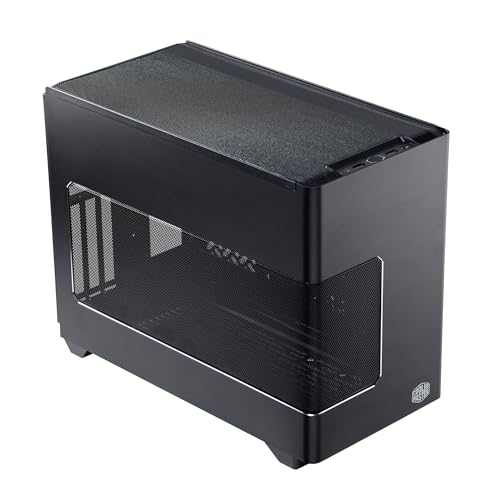
Cooler Master NR200P V3 — mid-tower appetite, Mini-ITX footprint
The NR200 line earned its following by refusing to treat small as a synonym for compromised, and the V3 pushes that argument further than any other case in this guide. The headline numbers from Cooler Master’s own listing are a 361.5mm graphics card limit and support for a 280mm AIO radiator — figures that belong to cases twice its size. Around those numbers sits a mesh-panel design aimed squarely at airflow, an SFX power supply mount, and a PCIe 5.0 riser that enables the included vertical GPU mount for builders who want the card displayed rather than tucked away.
That combination makes the V3 the natural home for a downsized high-end system: a flagship card, a 280mm liquid cooler on the processor, and no conversation about what has to be left behind. The mesh panels do the acoustic no favours compared with solid ones, but they keep component temperatures honest, which in a small case is the trade that matters — heat you cannot extract becomes noise anyway when fans chase it. Cable management in a case this dense rewards patience and short custom-length leads, though the layout is a known quantity with years of community build logs to copy from.
- Form factor: Mini-ITX
- Graphics support: cards up to 361.5mm long
- Radiator support: up to 280mm AIO
- Power supply: SFX format
- Graphics mounting: vertical mount option with PCIe 5.0 riser
- Panels: mesh, airflow-focused
Strengths
- The longest card clearance and largest radiator support in this guide, in a true Mini-ITX case.
- A PCIe 5.0 riser keeps the vertical mount current with the latest boards and cards.
- Mesh panels give the components direct access to room air instead of a shared internal soup.
Trade-offs
- SFX power supplies cost more per watt than the ATX units many builders already own.
- Mesh on every side means component noise escapes freely; quiet builds need careful fan curves.
- At the top of this list for internal density, it is not the fastest case to build in tidily.
The V3 is the pick when the parts list came first and the case must not veto any of it; builders with a modest card and a low-profile cooler are paying for headroom they will never open.

Lian Li A4-H2OA5 — the sandwich, refined
The A4-H2O comes out of Lian Li’s collaboration with DAN Cases, the small studio whose A4 layout — motherboard on one side of a central spine, graphics card on the other, both fed by their own panels — essentially defined the modern sandwich case. This A5 revision in silver pairs an aluminium exterior with an SPCC steel interior, updates the riser to PCIe 5.0, and keeps the feature that separates it from the Terra: a 240mm AIO radiator mounted up top, so liquid cooling enters a case that still reads as genuinely small on the desk.
Triple-slot graphics mounting is the other headline, because slot thickness is where compact builds quietly die. A card that is two and a half slots thick in a case designed for two leaves the fans pressed against the panel, starved and loud; the A4-H2O’s three-slot room lets a serious card breathe through the side panel it faces. The SFX power supply tucks into the front of the spine in the usual sandwich fashion. Assembly is a deliberate, sequential process — riser first, board, then card — and builders who enjoy a build that feels engineered rather than assembled will like it here. Those who swap parts weekly may find the layers tiresome.
- Form factor: Mini-ITX, sandwich layout
- Graphics support: triple-slot mounting
- Radiator support: 240mm AIO at the top
- Riser: PCIe 5.0 included
- Power supply: SFX format
- Construction: aluminium exterior, SPCC steel interior
Strengths
- A 240mm radiator in a sandwich case this compact remains a genuinely rare combination.
- Triple-slot card room protects buyers from the thickness trap that catches out most SFF builds.
- The aluminium-over-steel build feels a class above the all-steel boxes at similar money.
Trade-offs
- Air cooling the CPU is limited by the layout; the design really wants the radiator fitted.
- The layered assembly makes quick part swaps slower than in a conventional layout.
- SFX supply and a quality AIO add up — the case is the start of the spending, not the end.
Pick the A4-H2O if liquid cooling a compact, powerful build is the whole project; a builder planning a simple air-cooled machine is buying sophistication the parts will never use.

JONSBO C6-ITX Black — the one with a handle and a plan
Most small cases are portable in the way a houseplant is portable: technically movable, practically staying put. The C6-ITX was drawn for motion, with a carry handle on top and mesh on effectively every face so the machine can breathe wherever it lands. Its layout is the contrarian one in this guide — no riser cable, no sandwich spine. The graphics card plugs straight into the board in the classic orientation, the processor can wear a tower cooler up to 170mm tall, and the power supply can be an ATX unit up to 140mm long, which quietly rescues the spare supply sitting in many builders’ cupboards.
That orthodoxy is the C6-ITX’s charm. There is no riser to set in the BIOS, no folded cable to route, and the tool-free panels open the case like a lunchbox for quick changes. The board support stretches to Mini-DTX as well as Mini-ITX, a small mercy for owners of those slightly deeper boards. The honest limits are graphics card length and the cooling ceiling set by the mesh-and-air approach — there is no radiator story here. For a LAN-party machine, a workshop PC that follows its owner, or a student’s one-box system that travels home at term’s end, it is the most honest tool in the guide.
- Form factor: Mini-ITX and Mini-DTX
- Carry: integrated handle, mesh panels throughout
- CPU cooler clearance: tower coolers up to 170mm
- Power supply: ATX units up to 140mm long
- Graphics mounting: direct into the board, no riser required
- Access: tool-free opening panels
Strengths
- A real handle and all-mesh skin make it the only pick here designed to be carried weekly.
- Accepting a short ATX power supply can save the entire cost of an SFX unit on a rebuild.
- Tower cooler support up to 170mm opens the whole mainstream air-cooling catalogue.
Trade-offs
- Long flagship graphics cards are not its game; check card length before falling for the handle.
- No liquid-cooling path, so hot processors rely on air and fan discipline.
- Mesh everywhere means dust arrives everywhere; it needs a blow-out on a schedule.
Take the C6-ITX when the machine genuinely moves — desks, terms, events — and when a spare ATX supply is part of the budget maths; a static desk build can spend the same money on radiator room instead.

Thermaltake TR100 — the gentle on-ramp to small form factor
Every category needs the option that does not punish a first attempt, and at 18.9 litres the TR100 is this guide’s. Thermaltake shaped it as a compact tower rather than a folded sandwich, which means the build proceeds in an order a newcomer already understands, with room around the components for hands that are still learning where cables hide. The included PCIe 4.0 riser enables the vertical card presentation the design is built around, and the clearances are generous for the class: graphics cards up to 360mm and radiator support up to 280mm, numbers that sit beside the NR200P V3 at the top of this list.
Then there is the colour. The listing’s Mint Strawberry finish — a soft pink-green pastel treatment — is a deliberate refusal of the black-box consensus, and for a bedroom or studio desk it changes the machine from appliance to object. Under the paint the removable PCIe bracket simplifies card installation, a small thing that first-time builders will appreciate the first time they fit a heavy card. It gives up the travel-friendly compactness of the smaller picks, and SFF purists will call 18.9 litres merely small-ish; judged as a first small build or a colourful desk centrepiece, it is exactly calibrated.
- Form factor: Mini-ITX small form factor chassis
- Volume: 18.9 litres
- Graphics support: cards up to 360mm, PCIe 4.0 riser included
- Radiator support: up to 280mm
- Finish: Mint Strawberry on this listing
- Assembly: removable PCIe bracket for easier card fitting
Strengths
- The most forgiving build experience here, with conventional order and working room.
- Card and radiator clearances match the guide’s compatibility leader despite the friendlier layout.
- The pastel finish is unique in this shortlist and photographs as well as it desks.
Trade-offs
- At 18.9 litres it will not slip into the bags and cubbies the smallest picks disappear into.
- The distinctive colour is a commitment; resale and room changes should be considered.
- Purists chasing the densest possible build will find the layout conservative.
The TR100 suits a builder downsizing for the first time, or anyone whose desk is also a backdrop; if your volume target starts with a single digit, look at the Shiny Snake below instead.
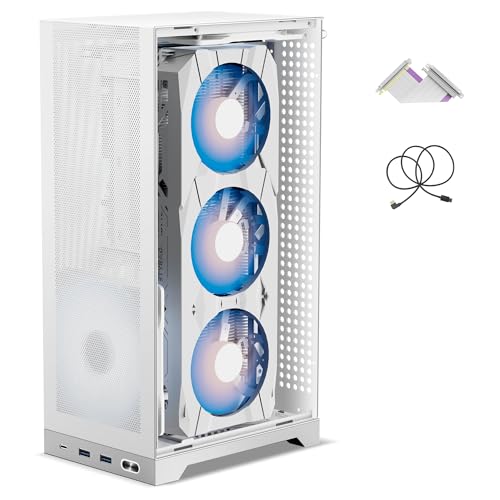
Shiny Snake L300 — 8.5 litres, no apologies
The L300 is the downsizing enthusiast’s case: 8.5 litres of mesh in white, shaped like a games console that grew up and took a job. Shiny Snake still finds room for a graphics card up to 325mm long — longer than some mid-towers of a decade ago managed — mounted on the included Gen3 riser cable, with the processor under a cooler up to 60mm tall, two fan slots to move air, and front Type-C plus USB 3.0 on the panel. The whole machine is a study in what the format can shed: no optical bay nostalgia, no radiator dreams, just board, card, SFX-class power and air.
Two honest warnings belong in this review. First, the riser is Gen3: on a modern PCIe 4.0 or 5.0 board, you may need to set the slot to Gen3 in the BIOS before the card displays, ideally done with the card plugged directly into the board during setup. It is a ten-minute task that surprises a first-time SFF builder exactly once. Second, a 60mm cooler ceiling means low-profile air cooling only, so processor choice should favour efficient chips over flagship TDP figures. Accept those terms and the reward is a full-strength PC that occupies less desk than a shoebox and travels like one too.
- Form factor: Mini-ITX SFF, console-like proportions
- Volume: 8.5 litres
- Graphics support: cards up to 325mm on included Gen3 riser
- CPU cooler clearance: up to 60mm — low-profile coolers only
- Cooling: two fan slots, full mesh skin
- Front I/O: USB Type-C and USB 3.0
Strengths
- The smallest footprint in the guide while still accepting a genuinely long graphics card.
- Mesh on all sides gives the compact internals the best chance of quiet, cool running.
- Console proportions suit a TV stand shelf where a tower of any size looks wrong.
Trade-offs
- The Gen3 riser can demand a manual BIOS setting on current boards before first display.
- A 60mm cooler cap rules out hot flagship processors run at full power.
- Every millimetre is allocated; cable tidiness is a requirement, not a virtue.
Choose the L300 when shrinking the machine is itself the project and the parts are chosen to fit the box; builders who buy the case last, around an existing hot processor, will fight its limits daily.
Side by Side: What Actually Separates the Six?
| Case | Layout | Card limit | Cooling headline | Power supply |
|---|---|---|---|---|
| Fractal Design Terra Silver | Sandwich, adjustable spine | Set by spine position | Low-profile air cooling | SFX format |
| Cooler Master NR200P V3 | Compact tower with riser option | 361.5mm | 280mm AIO radiator | SFX format |
| Lian Li A4-H2OA5 | Sandwich, triple-slot side | Triple-slot thickness | 240mm AIO at the top | SFX format |
| JONSBO C6-ITX | Classic direct-mount, handled | Compact cards only | Tower coolers to 170mm | ATX up to 140mm |
| Thermaltake TR100 | Compact tower, vertical card | 360mm | 280mm radiator | SFX format |
| Shiny Snake L300 | Console-style sandwich | 325mm | Low-profile air, 60mm cap | SFX format |
One row of that table deserves a second glance: the power supply column, where five SFX entries and a single ATX exception quietly divide the shortlist into two budget universes. A builder with an SFX unit already on the shelf should read the table top-down by cooling and card room, since the supply question is settled. A builder starting from an empty parts bin should read the C6-ITX row first and ask whether its handle, tower-cooler support and cupboard-supply compatibility outweigh the radiator futures the SFX cases offer — for a machine that will be upgraded in place for years, they may not, but for a machine built once and carried often, they very likely do.
Read the table by constraint, not by preference. If your card is already bought, its length and slot count eliminate half the table before taste gets a vote. If the processor is the fixed point, the cooling column decides. Only when two cases survive both filters does the desk-appeal question — walnut, pastel, mesh cube — become the real tiebreaker, and by then either answer is a good one.
How Do You Choose a Mini-ITX Case Without Regretting It?
Start with the graphics card, because it is the least flexible component you own. Measure three dimensions, not one: length from bracket to tail, thickness in slots including the backplate, and the height above the slot line, which tall cards with proud power connectors turn into a hidden fourth problem. Then check the case’s figures for exactly those three numbers. A card that fits on length but chokes on thickness will run loud for its entire life, and no fan curve fully rescues a cooler pressed against a panel.
Next, decide how the processor gets cooled and let that set the case family. A 240mm or 280mm radiator points at the A4-H2O, NR200P V3 or TR100. A big tower cooler points at exactly one pick here, the C6-ITX. A low-profile cooler under 60mm unlocks the L300’s tiny footprint. Builders who start with the case and shop for cooling afterwards routinely end up owning a cooler that lives in a drawer.
Power supply format is the third decision, and it is a budget line in disguise. SFX units are excellent and compact, but if a short ATX supply already sits in your parts cupboard, the C6-ITX turns it into found money. Otherwise, price the SFX unit into the build from the start rather than discovering it at checkout. Finally, think about where the machine will live for the next three years — carried, shelved under a television, or enthroned on a desk — because a case chosen for a life it never leads is the commonest quiet regret in this category.
Why Does Riser Cable Generation Matter So Much?
A riser cable is a flexible extension of the PCIe slot, and like any extension it must speak the same signalling language as the board and card at either end. A PCIe 5.0 riser, as fitted to the NR200P V3 and the A4-H2O, is transparent to current hardware. A Gen3 riser, as fitted to the L300, works perfectly once the motherboard is told to run that slot at Gen3 speeds — but many boards default to Auto, negotiate at a speed the cable cannot carry, and present the builder with a black screen on first boot. The fix is methodical: assemble with the card directly in the slot or on integrated graphics, set the slot generation manually, then rebuild with the riser. None of this is a defect in the case; it is the standing tax on the oldest riser standard still in service, and it is worth paying only when the case’s size earns it, as the L300’s does.
What Mistakes Do First-Time Small-Form-Factor Builders Make?
- Buying the case before the card. In ATX building the case is the forgiving part; in Mini-ITX it is the strictest. Parts first, case second, always.
- Checking card length and ignoring thickness. Slot count and backplate depth kill more SFF builds than length ever has. Count the slots your card truly occupies.
- Leaving the motherboard on Auto with a Gen3 riser. The black-screen first boot is almost a tradition. Set the slot speed during setup and skip the panic.
- Ordering an ATX power supply for an SFX case. Five of these six cases cannot physically accept one. Read the PSU line of the spec box before the PSU goes in the basket.
- Sealing a mesh case inside a closed cabinet. Mesh cases breathe from every face; a shut TV-unit door turns that design into an oven with good intentions.
- Skipping the fan-curve hour. Small cases concentrate heat and noise alike. Thirty minutes of curve tuning is the cheapest acoustic upgrade in the whole build.
Final Recommendation
For most readers, the Cooler Master NR200P V3 is the safest pair of hands in this guide: it accepts the longest cards, the largest radiator and the current riser standard, so the build you plan today and the upgrade you imagine in two years both fit. The Lian Li A4-H2OA5 is the connoisseur’s version of the same ambition, smaller and liquid-cooled by design. The Fractal Terra wins any room where the machine is seen more than it is benchmarked, and the TR100 is where a nervous first-time builder should start. The C6-ITX and L300 are specialists — one for machines that travel, one for machines that vanish — and specialists chosen for the right life are never the wrong buy. A small case is a promise you make to your parts list, so measure twice, buy once, and let the desk stay gloriously empty.
What Does a Build Day Actually Look Like in Each Layout?
The three layout families in this guide ask for three different kinds of patience. A sandwich build — Terra, A4-H2O, L300 — begins with the riser cable, because the spine goes into the case first and everything else layers against it. You route the riser, seat the motherboard, connect the front-panel leads while your fingers can still reach them, and only then fold the graphics card into its compartment. The pleasure of the format is how deliberate it feels; the cost is that a forgotten cable discovered at the end means unlayering the machine in reverse. Builders who enjoy model-making patience tend to love a sandwich build exactly once per parts generation, which is how often it asks for that patience.
A compact tower build — NR200P V3 in its standard orientation, TR100, and the C6-ITX in its own direct-mount way — follows the order your hands already know from ATX machines: board, cooler, card, supply, cables. The difference from a full tower is purely one of slack. There is less room to hide a cable bundle, less forgiveness for a cooler fitted before its fan header was connected, and no spare corner where an unused lead can be stuffed and forgotten. None of that makes the build harder in kind, only less tolerant of improvisation. Lay the parts out, work in order, and a compact tower is an honest afternoon.
The practical advice that transfers across all six is to dry-fit the graphics card before connecting anything else. In every one of these cases, the card is the component most likely to reveal a clearance surprise — a connector shroud against a spine, a tail against a front-mounted supply — and discovering that with the machine otherwise bare costs five minutes, while discovering it fully cabled costs an hour. Second, photograph your cable routing before the panels go on. Six months later, when a fan needs replacing, that photograph is the difference between a ten-minute job and an archaeological dig.
How Should You Think About Airflow When There Is Barely Any “Inside”?
Large towers manage air as a river: in at the front, out at the back, everything downstream of everything else. Mini-ITX cases mostly abandon the river. In a mesh sandwich case, each component drinks directly from the room through its own panel and exhales the same way, so the design question is not ducting but separation — keeping the graphics card’s exhaust from becoming the processor’s intake. The A4-H2O and Terra both arrange their compartments so the two heat sources face opposite panels for exactly this reason, and it is why their temperatures stay civilised despite volumes that look impossible on paper.
Radiator cases rearrange the problem rather than solving it. A 240mm or 280mm radiator in the NR200P V3, A4-H2O or TR100 moves the processor’s heat to the case boundary and dumps it outside in one step, which leaves the internal air for the card and the board’s voltage regulation. The discipline required is directional: decide whether the radiator breathes in or out and make every other fan agree, because two fans arguing across a small volume produce noise and heat in equal measure. Builders who treat fan direction as an afterthought in a small case are the ones posting puzzled temperature threads a week later.
The C6-ITX and L300 take the third road: total mesh and short paths. With perforated panels on nearly every face, hot air has no corridor to get trapped in, and the fans’ job shrinks to nudging rather than pumping. The trade is dust and audibility, both already noted in their reviews, and one more subtlety — a mesh case placed hard against a wall or inside a shelving unit loses the very faces it breathes through. Give a mesh case a hand’s width of clearance on its main panels and it will repay you in degrees.
Which Supporting Parts Should Be Chosen Around the Case?
The power supply decision deserves more care than its single spec line suggests. Beyond format — SFX for five of these six, short ATX for the C6-ITX — the modular cable set matters enormously in a small volume. Fully modular units let you fit only the leads the build uses, and the difference between three cables and seven inside an 8.5-litre L300 is the difference between airflow and stuffing. Where the budget allows, shorter aftermarket cable sets made for SFF builds are the single upgrade owners praise most a year later, because every subsequent part swap goes through those cables.
Storage is the second supporting choice the case quietly makes for you. Every pick in this guide assumes M.2 drives on the motherboard as the primary storage, and that assumption is now safe for gaming and general builds alike. Builders who still carry 2.5-inch SATA drives should count the mounts in the specific listing before ordering, because compact cases have been shedding them generation by generation, and a drive with nowhere to live becomes an external drive by default. The NAS-minded reader, in particular, should not try to bend any of these six into a storage server; that is a different category with its own guide linked below.
Finally, the cooler purchase should be made with the case’s exact clearance figure open on the screen, not from memory of a review of a different revision. Low-profile coolers vary by a few millimetres between near-identical model names, tower coolers quote heights with and without their fan clips, and radiator thickness is quoted without the fans that must sit on it. The spec boxes in the reviews above give the case side of each equation; the discipline of checking the part side belongs to the buyer, and it is the cheapest discipline in the entire hobby.
Three Worked Examples: Matching a Parts List to a Pick
Consider first a living-room gaming machine: a mid-range graphics card of moderate length, an efficient six or eight-core processor, and a household that will tolerate a computer near the television only if it does not look like one. That brief lands on the Terra almost by elimination — the walnut front disarms the room, a low-profile cooler keeps the spine balanced toward the card, and the machine plays at television distances where its fans are simply not part of the experience. The same parts in the L300 would be smaller but visually louder in the way mesh and white paint always are on a media shelf.
Second, the downsizer with a flagship card already on the desk and no intention of selling it. The card’s length and the wish for liquid cooling leave exactly two names standing: the NR200P V3, with its 361.5mm clearance and 280mm radiator support, and the A4-H2O for a builder who wants the smaller footprint and accepts the 240mm ceiling. This is the scenario the shortlist was built around, and it is why those two cases carry the guide’s longest spec boxes. Either build keeps the card, keeps the frames, and gives back a desk.
Third, the student or itinerant worker whose PC is luggage. The parts are mid-range, the budget has no room for an SFX supply because a short ATX unit already exists, and the machine must survive a term of weekly movement. That is the C6-ITX’s home ground — handle on top, tower cooler inside, cupboard supply fitted, panels off in seconds when a drive needs swapping at a kitchen table. Notice that in all three examples the case was chosen last and decided most; that inversion is the whole skill this category teaches.
How Do These Cases Age Across Upgrades?
A case is the longest-lived component in any build, and small cases age differently from towers. The generous ones in this guide — the NR200P V3 and TR100, with their long card clearances and 280mm radiator support — have headroom for the next card generation whatever direction it takes, because length and radiator room are the two dimensions new hardware keeps spending. A builder who buys either is really buying insurance against the upgrade they cannot yet describe, and in a category where the case constrains everything, that insurance is the rational purchase when the budget reaches it.
The tight specialists age by a different logic. The L300’s 8.5 litres will never accept a hot flagship processor, but it was never meant to; its bet is that efficient mid-range parts keep improving, which a decade of hardware history supports. The Terra’s bet is aesthetic — walnut and aluminium do not date the way RGB fashions do — and the C6-ITX bets on utility, since a handled case with a tower cooler inside fits whatever mid-range parts the next five years produce. None of these bets is foolish. What dates a small case fastest is a fixed internal gimmick tied to one generation of hardware, and notably, none of the six picks here has one: no proprietary supply, no captive cooler mount, no connector that exists only on one board family.
Upgrading inside a small case also has its own etiquette. Work with the panels fully removed and laid somewhere they cannot slide off, keep the case’s screws in a dish rather than a pocket, and expect the graphics card — not the board — to be the part that comes out first for almost any job. Owners of sandwich cases should keep the riser cable’s spare length in mind when swapping cards: a longer card may need the riser re-folded rather than forced, and a riser treated gently outlives several cards. Treat the case as the permanent furniture of the build and it behaves that way.
Where Should a Small PC Actually Sit?
Placement is a cooling decision disguised as a decorating one. On the desk, a small case earns back the space it saved and breathes freely on all sides; under the desk, it gains invisibility and loses some of that air, particularly the mesh designs. The Terra is the one pick here designed to be looked at, and putting it in a footwell wastes its best feature. The L300 and C6-ITX, by contrast, are indifferent to being seen and happier than most in the tight spots — a shelf, a locker, the end of a bench — provided their panels keep that hand’s width of breathing room discussed earlier.
Cable runs deserve a thought before the case’s home is final. A machine that travels, like a C6-ITX build, wants its leads bundled to a single quick-disconnect habit: power, display, one USB hub. A machine that lives under a television, as many Terra and L300 builds will, wants the opposite discipline — leads long enough to slide the case out for cleaning without unplugging the receiver across the room. None of this appears in any spec box, and all of it decides whether the small PC feels like a triumph or a tangle by its second month.
Should You Go Mini-ITX at All, or Stop at Micro-ATX?
It is worth pausing on the honest alternative, because Mini-ITX is a choice with real costs. A Mini-ITX motherboard carries one expansion slot, usually two memory slots, and a price premium over its micro-ATX equivalent; the SFX power supply this guide keeps mentioning costs more per watt than the ATX unit in a tower. A micro-ATX build in a compact case dodges most of those costs and still shrinks a desk footprint considerably. Readers whose goal is simply “smaller than the tower I have” should price both routes before committing, because the micro-ATX version of the same machine is frequently the rational buy.
Mini-ITX earns its premium in three situations. The first is genuine size pressure: a shelf, a television stand, a carry bag, a desk measured in centimetres — the places where the difference between 8.5 or 11 litres and 25 is the difference between fitting and not fitting. The second is portability as a habit rather than an event, where the C6-ITX’s handle or the L300’s console shape turns the PC into something that moves rooms the way a laptop does, but with a real graphics card inside. The third is aesthetic intent: the Terra exists because some buyers want the computer to be a designed object, and no micro-ATX case at any price offers walnut and anodised aluminium composed quite that way.
There is also a fourth, quieter reason that owners mention after the fact: constraint is satisfying. A Mini-ITX build is a finished puzzle in a way a tower with six empty bays never feels, and every pick in this guide delivers that completeness at a different size and price of admission. If none of the four reasons sounds like your life, buy the micro-ATX case and spend the difference on the graphics card. If one of them does, the six cases above are where the search ends.
A Short Note on Panels, Finishes and Living With Them
Panel choice follows a small case home and stays for years, so it deserves thirty seconds of foresight. Mesh, as on the NR200P V3, C6-ITX and L300, is the performance finish: it breathes from every face, shows dust as a grey film that wipes or blows away, and never fingerprints. Anodised aluminium, as on the Terra and the A4-H2O’s exterior, is the furniture finish: it resists scratches better than paint, warms a room visually, and asks only to be kept out of the path of sliding metal objects. Painted pastel steel, the TR100’s party trick, sits between the two — tougher than it looks, but a finish whose resale audience is narrower simply because taste is personal. None of the six is fragile; the differences are about the room the machine will live in and the owner it will live with, which is exactly the level at which small-case decisions should be made.
Frequently Asked Questions
Can a Mini-ITX case really handle a high-end graphics card?
Yes, provided the specific case clears the card on length and slot thickness. The NR200P V3 accepts cards up to 361.5mm, and the A4-H2O offers triple-slot room, so flagship cards fit; the constraint is usually cooling and power delivery, not the board. Choose an efficient card, an SFX supply with headroom, and a case whose panels feed the card fresh air.
Do I need an SFX power supply for every Mini-ITX build?
Almost every one in this guide, yes — five of the six are SFX-only designs. The exception is the JONSBO C6-ITX, which accepts ATX units up to 140mm long. If you already own a suitable short ATX supply, that single spec can steer the whole build; otherwise budget for an SFX unit as part of going small.
Why did my new build show a black screen with a riser cable fitted?
The usual cause is a speed negotiation failure: the board tries to run the slot faster than an older riser can carry. Boot with the card seated directly in the slot or using integrated graphics, set the PCIe slot to the riser’s generation in the BIOS, save, and refit the riser. The L300’s Gen3 riser is the pick here most likely to need that step on a current board.
Is a sandwich-layout case harder to build in than a small tower?
It is more sequential rather than truly harder. The riser and spine go in first, components layer in a set order, and access for later changes means partially unbuilding. A compact tower like the TR100 follows the order most builders already know. If you swap parts often, the tower layout saves real time; if the build is set-and-forget, the sandwich’s size saving is worth the ceremony.
Can I reuse my existing ATX tower’s parts in a Mini-ITX case?
The graphics card and storage usually transfer; the motherboard never does, since Mini-ITX is its own board size, and the power supply transfers only into the C6-ITX among these picks, if it is no longer than 140mm. Tall tower coolers fit that same JONSBO and nothing else here. Price the new board and, where needed, the SFX supply into the downsizing budget from the start, and the project holds no financial surprises.
Does a smaller case always mean a hotter, louder PC?
No — it means a less forgiving one. A small case with parts chosen inside its cooling envelope, like an efficient processor under the L300’s 60mm cap or a radiator build in the A4-H2O, runs as cool and quiet as a tower doing the same work. Heat problems arrive when flagship power figures are poured into a volume budgeted for efficiency. Match the parts to the litres and the physics behaves.
How loud will a mesh Mini-ITX case be under load?
Mesh trades acoustic containment for airflow, so fan and coil noise escape more freely than from a solid-panel case, while components run cooler and fans can spin slower for the same temperatures. In practice a well-tuned mesh build is a soft whoosh rather than a whine. Keep the case in open air, not a closed cabinet, and spend time on fan curves before blaming the panels.
Related Guides
Once the small build is planned, the neighbouring shapes are worth a look before the basket closes: builders torn between compact and showy should read our guide to the best cube style gaming pc cases, where dual-chamber glass designs make the opposite trade. If the finished machine is headed for a media shelf rather than a desk, the best horizontal pc cases roundup covers cases shaped to lie flat under a television. And when the small PC’s job is storing the household’s files rather than playing its games, the best nas pc cases guide picks chassis built around banks of hard drives instead of graphics cards.


