What's inside
- Key Takeaways
- Quick Picks
- How We Chose These Picks
- What Actually Makes a Graphics Card Professional?
- How Should a Small Practice Split Its Budget Between Pro and Consumer Seats?
- The Six Cards Compared for Design Work
- Which Mistakes Do CAD Buyers Make at This Tier?
- How Do You Set Up a Workstation Around the Card You Chose?
- How Do CAD and CAM Differ in What They Ask of a Card?
- What Role Do Displays Play in Design Productivity?
- Buying Professional Hardware From Earlier Generations: a Field Guide
- How Should a Practice Think About Replacing These Cards Later?
- A Word for the One-Person Shop, Where Every Seat Is the Same Person
- Final Recommendation
- Frequently Asked Questions
- Related Guides
As an Amazon Associate I earn from qualifying purchases. This post may contain affiliate links at no extra cost to you.
[widgetverdict.com] is reader-supported. When you buy through links on our site, we may earn an affiliate commission.
Where to buy: the six cards below link to checked Amazon listings, and this guide separates genuine professional hardware from consumer cards pressed into design service, because in CAD work that distinction decides whether a card helps or merely displays.
Shopping for the best cad cam graphics cards requires a confession at the outset, and this guide makes it plainly: there is no current-generation NVIDIA professional flagship in this shortlist, no Quadro RTX or RTX A-series card, because the clean new listings available for this roundup did not include one. What the market actually offered was one modern AMD professional card, the Radeon Pro W7500, two professional cards from earlier NVIDIA generations, the Quadro P4000 and Quadro K4200, and three consumer cards whose value to a CAD or CAM user lies in their display outputs rather than in any professional pedigree. That is the honest shape of this buying tier, and the guide is organised around it.
That shape is not a failure of the category; it is the category, for the large population of designers, machinists, students and small workshops whose work is real but whose budgets are not corporate. A one-person CAM shop programming toolpaths, a student learning parametric modelling, a drafter running several screens of drawings — these readers need cards matched to their actual software and model sizes. The professional cards here serve the first group, the multi-display consumer cards serve the last, and the sections below keep the boundary between those services visible at all times.
Key Takeaways
- The AMD Radeon Pro W7500 is the only current professional card in this guide and the default choice for serious CAD work.
- The Quadro P4000 is a previous-generation professional card whose single-slot design still suits dense workstations.
- The Quadro K4200 belongs to an older professional generation still, and should be bought only at a matching expectation.
- No Quadro RTX or RTX A-series card appears here, because no clean new listing for one entered this roundup.
- The SOYO GT 730 with four HDMI outputs serves multi-screen drafting and monitoring, not heavy modelling.
- Consumer cards in this guide carry no professional certification claims; their role is displays and light work.
Quick Picks
| Pick | Badge | Why it earns its place |
|---|---|---|
| AMD Radeon Pro W7500 | The modern professional | 8GB GDDR6 professional card with DisplayPort output for current CAD workstations. |
| PNY NVIDIA Quadro P4000 | Previous-gen pro, single slot | Professional Quadro hardware in a single-slot card for compact workstations. |
| NVIDIA Quadro K4200 | Older pro for legacy work | An earlier Quadro generation for established software and modest models. |
| SOYO GeForce GT 730 4xHDMI | Four-screen drafting desk | Four HDMI outputs for drawing walls, monitoring and light design work. |
| SOYO GT 740 4GB Low Profile | Small-case triple output | Half-height card with three outputs for slim design-office desktops. |
| MAXSUN GeForce GT 730 4GB ITX | Compact multi-screen helper | ITX-shaped card with three legacy-friendly outputs for light CAD viewing. |
How We Chose These Picks
Professional lineage was the first sort, and it was applied strictly: a card was called professional only when its own product line is a professional one. The Radeon Pro W7500 and the two Quadros meet that test; the three consumer cards do not, and this guide never blurs the difference in their reviews, their badges or the comparison table. Readers deserve to know which kind of hardware they are buying, because the two kinds are engineered, supported and priced on different assumptions.
Generation was the second sort, stated openly rather than smoothed over. The W7500 is current professional hardware. The P4000 is a Pascal-era professional card, capable and well understood, but designed in an earlier period of CAD software. The K4200 is older again, from the Kepler generation of Quadro. Software requirements, driver branches and display standards all follow from those dates, and each review below discusses its card’s generation as a fact of the purchase rather than an embarrassment to be hidden.
Display capacity decided the consumer places. CAD and CAM work is unusually screen-hungry — a model on one display, drawings on a second, a toolpath simulation or a reference library on a third — so consumer cards offering three or four outputs earned their inclusion on that practical ground. Their reviews are explicit that driving screens and accelerating professional geometry are different jobs, and that these cards are hired for the first.

AMD Radeon Pro W7500 — The modern professional
The Radeon Pro W7500 is the anchor of this guide because it is the one card here that a professional buyer would specify today without qualification. Its listing describes a full-height desktop professional graphics card with 8GB of GDDR6 memory and DisplayPort output, and the Radeon Pro line exists for exactly the workload in this guide’s title: sustained CAD modelling, large assemblies and professional applications that punish consumer hardware in ways games never attempt.
Eight gigabytes of GDDR6 is the working heart of the proposition. CAD models fail differently from games when memory runs short: not with prettier-or-uglier textures but with assemblies that stutter during rotation, drawings that lag behind the cursor and viewports that turn a working day into a negotiation. The W7500’s capacity and bandwidth are sized for professional geometry at the scale small and mid-sized practices actually produce, and its professional driver programme is maintained for the applications those practices run.
It is equally important to say what this card is not. It is not the top of AMD’s professional stack, and firms working on enormous assemblies, heavy simulation or GPU rendering farms will already know the names above it. Within this guide’s tier, though, it stands alone as current professional hardware, and every other entry is either an earlier generation of the same idea or a consumer card serving a narrower purpose.
Buy it when the workstation earns money with CAD software and the cost of viewport hesitation is measured in billable hours. The premium over the older Quadros below buys currency: current drivers, current display support and a card whose professional life is beginning rather than being extended. For a practice equipping a seat for the next several years, that currency is the entire argument.
- Memory: 8GB GDDR6
- Form: full-height desktop professional card
- Output interface: DisplayPort
- Line: AMD Radeon Pro workstation
Strengths
- Only current-generation professional card in this guide
- Memory sized for serious assemblies and viewports
- Professional line built for CAD applications
Trade-offs
- Costs more than the older professional options
- DisplayPort focus may need adapters for older screens
- Firms with huge assemblies will shop above this tier
Best for: professional CAD seats in small and mid-sized practices
Skip it if: your work is light drafting across several screens rather than modelling

PNY NVIDIA Quadro P4000 — Previous-gen pro, single slot
PNY’s Quadro P4000 arrives with the boldest title in this guide, calling itself the world’s most powerful single-slot professional graphics card, and that claim belongs to its launch era rather than to today’s market. Read correctly, it still describes something valuable: a genuine Quadro professional card, from NVIDIA’s Pascal generation, engineered into a single slot. Workstations with crowded interiors or several cards’ worth of expansion plans have always valued that shape, and they still do.
As working hardware, the P4000 earned its professional reputation honestly. It was specified into CAD seats for years, its drivers are a known quantity across a wide range of established design software, and its performance in the modelling workloads of its period remains respectable for the medium assemblies and part files that dominate small-practice work. A buyer whose software stack is settled and whose models are moderate is not buying a museum piece; they are buying the card their workflow was arguably tuned around.
The generation gap shows in the places generations always show. Display standards, driver futures and raw efficiency belong to its era, and current professional software increasingly optimises for newer architectures. The honest purchase case is therefore specific: a workstation that needs genuine Quadro hardware in one slot, running established applications, at a tier below the W7500’s current-generation price of entry.
It should not be bought as a disguised bargain flagship. The title’s superlative is history, and readers who need today’s professional performance should buy today’s professional card above. Readers who need a single-slot Quadro for a known workload, however, will find this guide’s respect for the P4000 entirely practical.
- Line: NVIDIA Quadro professional
- Form: single slot
- Maker: PNY Technologies
- Model: VCQP4000-BLK
Strengths
- Genuine professional Quadro hardware
- Single-slot shape suits dense workstations
- Long track record in established CAD software
Trade-offs
- Pascal generation, with its era’s limits
- Launch-era claims no longer describe the market
- Newer software increasingly favours newer cards
Best for: workstations needing single-slot Quadro hardware for established CAD work
Skip it if: you need current-generation professional performance or the newest display standards

NVIDIA Quadro K4200 — Older pro for legacy work
The Quadro K4200 is the elder of this guide, a professional card from NVIDIA’s Kepler-era Quadro line, and its review must begin with its age because everything sensible about buying it follows from there. Professional hardware ages more gracefully than gaming hardware — its duties are defined by software that changes slowly — but it does age, and the K4200 should be purchased as legacy equipment for legacy-shaped work, not as a shortcut into professional performance at a consumer price.
That legacy work is real. Established CAD installations, older CAM packages whose toolpath workflows were built and validated years ago, training rooms running period software, and backup workstations that must mirror a primary seat’s environment all have legitimate reasons to specify a card of this generation. In those settings, compatibility with the known is worth more than the speed of the new, and a Quadro of the correct vintage can be the difference between a workflow that runs and one that must be rebuilt.
Outside those settings, the cautions multiply. Driver support for this generation sits in its late chapters, current software versions may not be validated against it, and its display standards predate the monitors a new workstation would be paired with. A student or new practice choosing hardware today should read this entry as a history lesson with a narrow practical exception, and spend their budget on the W7500 or, for display-led work, the consumer cards below.
The K4200 therefore closes the professional section of this guide as a specialist purchase: right for maintaining established professional environments, wrong as a foundation for new ones. Its presence here is a service to the readers who maintain those environments, who are rarely addressed by guides written only for buyers starting fresh.
- Line: NVIDIA Quadro professional, Kepler era
- Model: VCQK4200-PB
- Role: legacy professional workstation
- Generation: earlier than the P4000 above
Strengths
- Correct-vintage Quadro for established software
- Professional lineage for legacy workflows
- Useful for training and backup seats mirroring old installs
Trade-offs
- Oldest card in this guide by a clear margin
- Late-chapter driver support
- Display standards predate current monitors
Best for: maintainers of established CAD or CAM installations using period software
Skip it if: you are equipping a new workstation or learning current software

SOYO GeForce GT 730 4xHDMI — Four-screen drafting desk
SOYO’s GT 730 with four HDMI outputs is a consumer card, and this review will not pretend otherwise — but it answers a question that professional cards answer expensively, which is how to put four screens on one design-office desk. Its listing aims the card at quad-monitor setups, video walls and monitoring work, with 4GB of DDR3 memory and a single fan, and a drafting station whose screens hold drawings, parts libraries, email and a model viewer is precisely the workload that description fits.
The division of labour matters. In a small practice, not every seat manipulates heavy geometry; some seats review, annotate, quote, schedule and display. A card that drives four calm screens reliably serves those seats completely, and asking it to also accelerate a large assembly would be a misunderstanding of both the card and the seat. Light CAD viewing and 2D drafting sit within its abilities; modelling work belongs to the professional cards above.
Its four identical HDMI ports simplify a multi-screen desk in a way mixed port panels never quite do: one cable type, no adapter drawer, and screens that can be rearranged without a port audit. For a wall of drawing displays in a workshop or a monitoring corner in a CAM room, that uniformity is the feature, and it is why this consumer card earns a place in a professional-themed guide without borrowing professional clothes.
Set expectations at purchase and it will meet them for years. The DDR3 memory that disqualifies it from heavy work is irrelevant to static and slowly changing displays, its single fan has little to do, and its job description — many screens, modest content — is one of the most durable in computing.
- Memory: 4GB DDR3, 64-bit
- Outputs: 4x HDMI 2.0B
- Form: single fan, PCI-E x8 2.0
- Stated role: quad monitors and multiple displays
Strengths
- Four matched HDMI outputs from one card
- Ideal for drawing walls and review desks
- Simple cabling for multi-screen setups
Trade-offs
- Consumer card with no professional pedigree
- DDR3 memory rules out heavy modelling
- Serves display-led seats only
Best for: review, drafting and monitoring seats needing four screens
Skip it if: the seat’s work is 3D modelling or simulation

SOYO GT 740 4GB Low Profile — Small-case triple output
The second SOYO card in this guide takes the multi-display idea into the slim desktops that design offices often inherit rather than choose. It is a low-profile GT 740 with 4GB of DDR3 memory, a 128-bit interface and three outputs — HDMI, VGA and DVI-D — in a half-height shape for slim PCs. That port trio reads like a history of office monitors, which is exactly its value: the mixed-age screens on a real drafting desk can nearly all be connected without adapters.
Its CAD relevance is the same honest category as its sibling’s. Two-dimensional drafting, drawing review, CAM supervision screens and light model viewing are its territory; the card’s consumer architecture and DDR3 memory place heavy modelling outside it. A small workshop whose design PC also runs the office — quotations on one screen, drawings on another, the machine’s status display on a third — is the natural home for a card shaped and priced like this.
The low-profile form deserves emphasis because it decides which machines can be upgraded at all. Slim office desktops with half-height bays reject the full-height consumer cards that roundups usually recommend, and they are disproportionately the machines found in small practices and training rooms. A card that fits them, from a current listing, with Windows support across several versions stated plainly, solves a real procurement problem.
Buy it as the small-case display card it is, and judge it against display cards. Against the GT 730 above it trades the fourth HDMI for a slimmer shape and a legacy-friendly port mix; against the professional cards it makes no claim at all, and its honesty about that is part of its usefulness in this guide.
- Memory: 4GB DDR3, 128-bit
- Form: low profile, half-height SFF
- Outputs: HDMI, VGA, DVI-D
- Support stated: Windows 11/10/8/7
Strengths
- Half-height shape fits slim office desktops
- Three legacy-spanning outputs
- Sensible for drafting and supervision screens
Trade-offs
- No professional acceleration claims apply
- DDR3 memory limits it to light work
- One fewer screen than the four-HDMI sibling
Best for: slim design-office desktops driving several mixed-age screens
Skip it if: the machine’s main work is 3D modelling rather than drafting and review

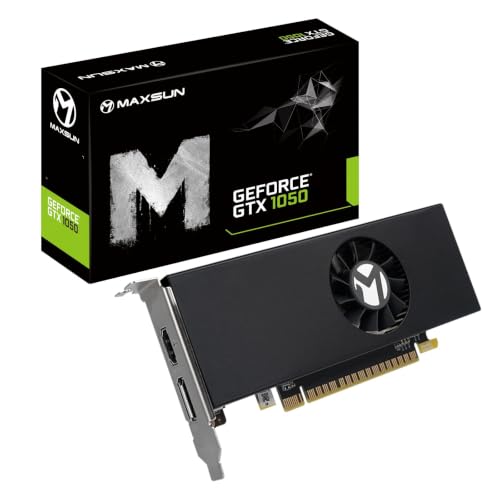
MAXSUN GeForce GT 730 4GB ITX — Compact multi-screen helper
MAXSUN’s GT 730 closes the guide in an ITX-shaped form, offering DVI-I, HDMI and VGA outputs and multi-screen support aimed at compact PCs. Like the two SOYO cards, it is consumer hardware in a professional-themed guide, and its justification is the same: the seats in a CAD or CAM environment that need screens and light viewing more than they need geometry acceleration are numerous, underserved by professional roundups, and exactly matched to cards of this class.
Its three outputs span the connector eras a small workshop accumulates — a modern HDMI screen, a DVI monitor from the previous desk, a VGA projector or elderly display — and its compact shape fits the small systems that serve as viewing stations, sign-in PCs and machine-side terminals. In a CAM room, a compact PC beside the machine showing setup sheets and toolpath previews is a recognisable citizen, and this card is sized and priced for that citizenship.
Performance language must stay modest. The GT 730’s DDR3 memory and entry architecture handle desktops, documents, drawings and video at ordinary resolutions; they do not handle assemblies, rendering or simulation, and no buyer should let the phrase multi-screen inflate into a promise about modelling. The professional cards at the top of this guide exist because that work is different in kind, not merely in degree.
As the final entry, this card also marks the guide’s lower boundary deliberately. Below this tier, a CAD or CAM buyer is no longer buying anything the guide can recommend even for display duties in a working environment. At this tier, bought for screens and light viewing in a compact machine, the purchase is sound and the expectations are fair.
- Memory: 4GB DDR3
- Form: ITX design, compact
- Outputs: DVI-I, HDMI, VGA
- Role: multi-screen desktop and light viewing
Strengths
- Compact shape suits machine-side and viewing PCs
- Three outputs span several monitor generations
- Appropriate cost for display-led seats
Trade-offs
- Entry architecture with DDR3 memory
- No modelling or rendering role
- Viewing and drafting are its ceiling
Best for: compact viewing stations and machine-side PCs in design workshops
Skip it if: any seat whose software manipulates 3D models daily
What Actually Makes a Graphics Card Professional?
The word professional describes an engineering and support programme, not a speed figure. Professional cards like the Radeon Pro and Quadro lines are built around drivers developed and validated against professional applications, hardware selected for sustained viewport work, and product lifecycles measured to suit firms that standardise a workstation for years. A consumer card may post a fine benchmark in a game and still stutter through a large assembly, because the workload that matters in CAD — many small draw calls, precise viewport behaviour, large geometry held in memory — is simply a different shape of work.
This guide deliberately makes no certification claims for any card beyond what its listing states, and readers should treat that restraint as the correct model for their own shopping. Certification is specific: a card, a driver version and an application version, tested together. A listing that does not state it has not promised it, and a buyer whose employer or client requires certified configurations should verify their exact software against the card maker’s current documentation before purchasing any card in this guide, including the professional ones.
Memory and outputs form the practical half of the distinction. Professional geometry consumes graphics memory as working space rather than as texture storage, which is why the W7500’s 8GB of GDDR6 matters to a modeller in a way its specifications never suggest to a gamer. And professional desks run many displays, which is the one professional need the consumer cards here genuinely share. Judge each card in this guide against the half of the professional definition its hardware actually addresses.
How Should a Small Practice Split Its Budget Between Pro and Consumer Seats?
Most small practices are not one workstation but several roles sharing a roof, and the smart purchase treats them separately. The seat that models — the designer whose viewport is the business — deserves the professional card, because hesitation there is paid for hourly. Seats that review, draft in 2D, supervise machines, handle quotations or display drawings for the workshop can be served completely by multi-output consumer cards, and the savings fund the professional seat’s card without pain.
Students and learners sit in a third category that deserves honest treatment. Learning CAD is viewport work at modest model sizes, and either a previous-generation professional card or a capable consumer setup can carry it; what matters more is the software licence, the monitor and the hours. A learner who buys the W7500 owns a card that will still be appropriate when their models grow; a learner who buys a P4000 owns the card a generation of professionals learned on. Both are defensible, and this guide’s generational honesty exists so that choice can be made knowingly.
CAM adds one more consideration: the machine-side computer. The PC that stands beside a mill or router, displaying setup information and running the control interface, needs reliability and the right outputs far more than acceleration, and it often needs them in a compact or slim case. That is the consumer cards’ home ground in this guide, and equipping those seats from this tier is not economising. It is correct specification.
The Six Cards Compared for Design Work
| Card | Class | Memory | Design-work role |
|---|---|---|---|
| AMD Radeon Pro W7500 | Professional, current | 8GB GDDR6 | Primary modelling workstations |
| PNY Quadro P4000 | Professional, Pascal era | Single-slot Quadro | Established CAD seats, one slot |
| NVIDIA Quadro K4200 | Professional, Kepler era | Legacy Quadro | Period software and backup seats |
| SOYO GT 730 4xHDMI | Consumer | 4GB DDR3 | Four-screen drafting and review |
| SOYO GT 740 Low Profile | Consumer | 4GB DDR3 | Slim-case triple-display desks |
| MAXSUN GT 730 ITX | Consumer | 4GB DDR3 | Compact viewing and machine-side PCs |
The class column is the one to read first, because it predicts more about a card’s working life than any other fact in the table. Professional cards bring professional drivers and intent; consumer cards bring outputs and economy. A practice that buys one of each kind, for the seats each kind suits, has understood this guide completely.
Which Mistakes Do CAD Buyers Make at This Tier?
The most expensive mistake is buying a consumer card for modelling work because its gaming benchmarks looked strong. Games and CAD load a GPU differently, and a card can be admirable at one and disappointing at the other; the professional lines exist because the difference is real. The second mistake is its mirror: buying an elderly professional card for new software because the Quadro name felt safer than a current consumer or AMD professional alternative, without checking that the current application version still supports that generation.
Certification assumptions form the third mistake. Buyers assume a professional card is certified for their application, in their version, by default; in reality certification is a matrix that changes with every driver and software release. The fourth mistake is starving the professional card around its edges — pairing it with too little system memory, a single small monitor, or a processor that cannot feed it geometry — and then blaming the card for a workstation that was unbalanced from the start.
The final mistake is buying displays last. CAD work is read as much as it is computed, and a practice that funds a professional card while keeping a small, dim, low-resolution monitor has optimised the wrong half of the desk. Several cards in this guide drive three or four screens precisely because, at this tier, an additional honest monitor often improves a designer’s day more than a faster card would.
How Do You Set Up a Workstation Around the Card You Chose?
Install the card before the software decisions, and let the machine’s ordinary behaviour confirm the hardware first: clean installation, the maker’s current professional or consumer driver as appropriate, and each display running at its native resolution. Then open the CAD application and set its graphics options deliberately rather than accepting defaults — hardware acceleration on, viewport quality matched to the card’s tier, and large-assembly modes enabled on professional hardware when the models justify them.
Arrange the screens as a workflow rather than as a row. The primary modelling display belongs directly ahead at native resolution; drawings, libraries and references belong on the secondary screens where they can be read without window-shuffling. Multi-output consumer cards earn their keep at exactly this moment, because the reference material that used to hide behind the model is suddenly simply beside it, and the working day reorganises itself around that fact within a week.
Finally, record the configuration: card, driver version, application version and the settings chosen. Professional environments live or die by reproducibility, and the practice that can state its exact stack can also diagnose it when an update changes behaviour. That record is worth more, across a workstation’s life, than any single component decision in this guide.
How Do CAD and CAM Differ in What They Ask of a Card?
Buyers often speak of CAD and CAM as one workload because the same person frequently performs both, but the two halves of the day load a graphics card differently enough to matter. CAD is viewport work: a model is rotated, zoomed, sectioned and edited interactively, and the card’s job is to keep that manipulation fluid while holding the whole assembly in memory. The frustration of inadequate CAD hardware is tactile — a model that lags a quarter-second behind the mouse makes precise work exhausting, and designers unconsciously simplify their ambitions to what the viewport tolerates.
CAM begins where CAD ends, and its graphical demands are spikier. Toolpath generation is largely processor work, but verifying that toolpath — simulating material removal, checking for collisions, watching the virtual stock take shape — is graphical, and it is the moment a machinist decides whether a programme is safe to run on real metal. A card that displays that simulation clearly and lets it be scrubbed back and forth without hesitation is doing safety-relevant work, even when its raw specifications look modest on a gaming scale.
This is why the seats in a small shop divide the way this guide divides them. The designer’s seat lives in the CAD half and deserves the professional card. The programmer’s seat straddles both halves and is the second candidate for professional hardware when simulation is heavy. The machine-side seat lives almost entirely in display and monitoring, and the consumer multi-output cards serve it completely. A buyer who maps their own day onto those three seats will find the shortlist above sorts itself.
What Role Do Displays Play in Design Productivity?
Ask experienced designers what upgrade changed their working day most and a surprising number name a monitor rather than a computer. Design work is read work: drawings, tolerances, revision tables, supplier catalogues and the model itself compete for the same pixels, and every window shuffle is a small tax paid hundreds of times a day. The multi-screen desk is not an indulgence in this trade; it is the removal of that tax, and it is why a guide about graphics cards spends so much of its length discussing outputs.
The economics are equally plain. A second or third honest monitor, driven by an inexpensive multi-output card, routinely returns more working comfort than the same money spent moving one tier up the professional card range, for every seat except the primary modelling seat. That is the arithmetic behind this guide’s structure: professional money concentrated where geometry is made, display money spread everywhere geometry is read. Practices that reverse that allocation — modest card, single screen, everywhere — feel the mistake in their shoulders by Friday.
Resolution deserves a word within that discussion. A 4K desktop gives drawings a crispness that genuinely aids review work, and several cards here advertise 4K output for exactly that purpose; but desktop resolution and modelling load are different things, and a display-tier card driving a large calm desktop is working well within itself. The error is only in expecting the same card to rotate a heavy assembly on that large screen with professional fluidity. Keep the duties separate and both the card and the screen will seem better than their prices.
Buying Professional Hardware From Earlier Generations: a Field Guide
Previous-generation professional cards occupy a market with its own customs, and buyers new to it benefit from knowing them. Professional hardware was bought by firms, maintained in workstations and retired on schedules, so the population of older Quadros in circulation ranges from gently used office cards to units that spent a decade in a rendering-adjacent role. The listing cannot tell you which you are getting, which is why this guide’s generational honesty matters: buy the P4000 or K4200 for a defined job in a known software environment, and the uncertainty is bounded by the job’s modesty.
Inspect what arrives with the seriousness the tier deserves. Fans should spin freely and quietly, the card’s bracket should be the one the workstation needs, and the first hour of use should include the actual application and a real model rather than a desktop idle. Professional cards announce most of their problems early, under exactly the load they were bought for, and a buyer who tests promptly can act on what they learn while options remain open.
There is also a documentation habit that separates professional ownership from hopeful ownership: record the driver version that works with your application version, and keep that installer. Professional software ecosystems reward stability over novelty, and the firm that can restore yesterday’s exact stack after an unwelcome update owns its workflow in a way the firm chasing the newest driver never quite does. The older cards in this guide thrive under that philosophy, because it is the philosophy of the era that built them.
How Should a Practice Think About Replacing These Cards Later?
Every card in this guide will one day be replaced, and the practices that replace hardware well think about that day at purchase time. Professional seats should be replaced on the software’s schedule rather than the hardware’s: when a new application version’s requirements or a growing assembly size begins to tax the viewport, the card has delivered its service regardless of its age in years. Display seats invert the logic entirely, because their duties do not escalate; a multi-output consumer card should be replaced when it fails or when its ports no longer match the desk’s screens, and not a season sooner.
Standardisation is the quiet multiplier. A practice running the same card in several seats can hold one spare, one driver package and one body of hard-won configuration knowledge, and every seat benefits from every other seat’s troubleshooting. This is an argument for buying two of a tier at once — the W7500 for both modelling seats, the same SOYO card for every review desk — that rarely appears in reviews written for individual buyers, and it is one of the strongest reasons small firms should purchase from a guide’s structure rather than from a scatter of unrelated bargains.
Finally, keep the retired cards. A previous professional card is the finest diagnostic tool a small practice can own, because swapping it into a misbehaving workstation separates card faults from software faults in minutes. The K4200’s late career in many firms is exactly this: no longer the fastest seat in the building, but the known-good reference against which every newer problem is measured. Hardware bought honestly for a defined role tends to keep finding roles; hardware bought on a flattering misunderstanding tends to be resented at every stage of its life.
A Word for the One-Person Shop, Where Every Seat Is the Same Person
The solo practitioner deserves a direct answer, because the seat-by-seat logic of this guide collapses into a single desk in their workshop. One person models in the morning, programmes toolpaths after lunch, quotes in the evening and supervises the machine throughout, and their one workstation must be all four seats in sequence. For that reader, the professional card is not one option among several but the centre of the business, and the W7500 is this guide’s clear answer: current professional hardware whose viewport behaviour will not be the thing that slows a one-person firm down.
The consumer cards still matter to that reader, but as the second machine rather than the second seat. A retired desktop fitted with a four-output SOYO card becomes the workshop’s display wall and machine-side terminal, freeing the professional workstation from babysitting duties it was overqualified for. Solo shops run on exactly this kind of asymmetry — one serious tool, several adequate ones — and a graphics budget arranged that way mirrors how the work itself is arranged across the day.
What the solo reader should not do is split the difference into a single mid-tier compromise that serves every role adequately and none well. A gaming card asked to model, supervise and display will be forgiven its modelling manners daily and thanked for its displays rarely. Buy the professional card for the desk, buy the display card for the wall, and the one-person shop owns the same structure as the ten-person practice this guide keeps describing, at the scale its roof actually covers.
There is one more constituency this guide should name before it closes: the teacher. Training rooms and classrooms run design software on budgets that would make a small practice wince, across machines that must all behave identically for a lesson to survive contact with thirty students. For those rooms, the previous-generation professional cards and the multi-output consumer cards in this guide are not compromises but the standard solution, chosen because uniformity and adequacy beat brilliance in a room where the lesson, not the workstation, is the point. A teacher speccing a room from this page should buy the same card many times, image the machines once, and spend the savings on the monitors the students will actually look at all year.
And the hobbyist machinist, whose CAD work serves a lathe in a garage rather than a client list, should feel equally addressed. Their models are real, their toolpaths cut real material, and their budget competes with tooling. The structure above scales down to them without changing shape: the best card they can justify for the modelling desk, an honest display card everywhere else, and no apology owed to anyone for the arrangement.
Underlying every recommendation in this guide is a single piece of arithmetic that buyers can apply to any future card, in any future roundup: divide the purchase by the hours it will be used, and compare that figure honestly against the cost of the hesitation it removes. A professional card used eight hours a day is inexpensive per hour even at a professional price; a display card asked to model is expensive at any price, because its cost is paid in the currency of a working day rather than in money. Practices that learn to price their tools in hours stop arguing about tiers, because the tiers price themselves.
The same arithmetic explains why this guide refuses to dress consumer cards in professional language even when doing so would make the roundup sound more impressive. A GT 730 bought for displays returns its cost within weeks in a busy review office. The same card bought under a professional misunderstanding returns nothing but a lesson, and the lesson costs more than the card. Honest categories are not a courtesy in a buying guide; they are the mechanism by which the arithmetic works at all.
Before ordering, run one final check that this guide recommends for every professional purchase: open the largest model or drawing set the seat actually handles, note how the current machine behaves with it, and keep that observation as the baseline the new card will be judged against. Upgrades evaluated against a remembered frustration are always satisfying; upgrades evaluated against the worst file in the archive are measured fairly. The distinction sounds small and decides, months later, whether the practice believes its own purchasing was wise.
If the new card transforms that baseline file, the tier was chosen correctly, and the remaining seats can be furnished from this guide with confidence in the same structure. If it does not, the bottleneck lives elsewhere in the workstation — in system memory, in storage, in the processor — and the honest next purchase is there, not in a still faster card. Either way, the practice has learned something worth more than the card.
That discipline — baseline first, purchase second, verdict third — is the professional habit this entire category rewards, and it is available to a buyer at every tier in this guide. The student can apply it to a training workstation, the solo machinist to a garage desk, the ten-seat practice to a fleet. Tools bought this way accumulate into a workshop that makes sense as a whole, where each card’s role can be explained in one sentence and defended with one observation. Tools bought any other way accumulate into a drawer.
So let the drawer stay empty. Choose the card whose role you can state, whose generation you understand, and whose limits you have already forgiven, and the purchase will still look wise when the next software version arrives to test it.
One practical footnote remains for buyers of the older professional cards: confirm the workstation’s power and slot arrangements before the card arrives, because professional cards of earlier generations were designed for tower workstations with conventional supplies and full-length slots, and the slim office machines that the consumer cards in this guide serve so well may offer neither. The P4000’s single-slot shape helps with width, not with length or power, and a thirty-second measurement of the destination machine prevents the particular frustration of a correct card in an impossible case.
Likewise, buyers of the consumer cards should confirm that their design application’s display expectations are the modest ones this guide describes, ideally by opening a representative drawing on the current machine and asking whether the pain is in the screens or in the geometry. Screens point down this guide’s list; geometry points up it. The question takes a minute and has saved more misdirected purchases than any benchmark.
With those checks made, the decision this guide has been building toward is genuinely simple, and its simplicity is earned rather than glib. Professional work that manipulates geometry belongs on professional hardware, and the current example of that hardware here is the W7500. Everything else in a design building — the reviewing, the drafting, the supervising, the displaying — is honourable work that honourable display cards perform at a fraction of the cost, and a practice flourishes when it stops paying professional prices for it or expecting professional behaviour from it.
Buy accordingly, seat by seat, and write the configuration down. Years from now, when a successor wonders why the building’s workstations are arranged exactly as they are, that record will read like what it is: evidence that a small practice understood its own work well enough to equip it precisely, which is the closest thing to a professional certification a buying decision can earn on its own.
The record should include one line buyers often omit and always regret omitting: why the card was chosen, in the plain language of the seat it serves. Future purchasing then starts from reasons rather than from archaeology, and the next round of decisions inherits this round’s thinking instead of repeating its research.
Reasons recorded, baselines noted and roles assigned, the six cards above stop being a shopping list and become a small equipment policy — and a practice with a policy buys less often, regrets less publicly, and spends its hardware money where its clients’ work can actually feel the difference.
That is the standard this guide asks to be judged by as well: not whether its six cards are the six fastest objects their categories contain, but whether each one’s stated role survives a year of ordinary work in the seat it was bought for. On that standard, honestly labelled hardware almost always passes.
Equip the seats, then get back to the drawings.
Final Recommendation
Equip the modelling seat with the Radeon Pro W7500, because it is the one current professional card this market offered and it will still be appropriate when the practice’s models grow. Keep the P4000 in mind for single-slot Quadro needs on established software, treat the K4200 as legacy maintenance, and furnish the review, drafting and machine-side seats from the three consumer cards without a moment’s embarrassment. A small practice that matches each seat to its actual work spends less than one that buys uniformly, and works faster for it — which is, in the end, the only certification a buying guide can honestly offer.
Frequently Asked Questions
Why is there no Quadro RTX or RTX A-series card in this guide?
Because no clean new listing for one was available to this roundup, and this guide recommends only what it could verify. The professional need such a card would serve is real, and buyers who require one should shop that specific tier deliberately rather than accepting a substitute described as equivalent.
Are the Quadro P4000 and K4200 still worth buying?
For established software environments that were built around their generations, yes, with the P4000 the stronger and more generally useful of the two. For new workstations and current software versions, their age in drivers and display standards makes the current W7500 the sounder foundation.
Can a consumer card like the GT 730 run CAD software?
It can open it, display models and handle 2D drafting and light viewing, which is why the multi-output consumer cards here serve review and drafting seats. Sustained modelling of substantial assemblies is professional-card work, and this guide does not claim otherwise for any consumer entry.
Does this guide claim ISV certification for any pick?
No. No listing behind these picks states a certification this guide can repeat, so none is claimed. Buyers whose work requires certified configurations should check their exact application and version against the card maker’s current certification documentation before ordering.
How much graphics memory does CAD work need?
It scales with assembly size and viewport ambition rather than with the software’s name. The W7500’s 8GB of GDDR6 suits the substantial models of small and mid-sized practices; the consumer cards’ DDR3 capacities serve displays, where memory speed matters far less than the number of outputs.
Which pick suits a student learning CAD?
A learner’s models are modest and their budget matters, so the P4000’s professional lineage at a previous-generation tier is a reasonable school, while the W7500 is the choice if the card must remain appropriate into professional work. Either teaches on genuine professional hardware rather than on a gaming card’s approximation of it.
Related Guides
Design workstations often live in small cases, and best low profile graphics cards under 60 covers the slimmest end of that world along with its memory trap. A CAD seat driving a very wide display raises the stakes considerably, as best graphics cards for ultrawide monitors explains in pixel counts. And because AMD professional hardware pairs naturally with adaptive-sync displays, best freesync graphics cards closes the loop for readers speccing the whole desk at once.