What's inside
- Key Takeaways
- Quick Picks
- How We Chose These Picks
- Comparison
- What Makes a Stencil Survive a Whole Session?
- How Should You Test a Stencil Printer Before Client Work?
- How Much Does Stencil Paper Itself Change the Result?
- What Belongs in a Travelling Artist’s Stencil Kit?
- How Should an Apprentice Learn Stencil Printing?
- What Does Stencil Work Look Like Across a Busy Studio Day?
- Why Do So Many Studios Keep a Copier Beside the Bluetooth Machines?
- How Do You Keep a Thermal Stencil Printer Printing Cleanly?
- What Are the Common Mistakes When Choosing a Tattoo Printer?
- Final Recommendation
- Frequently Asked Questions
- Related Guides
As an Amazon Associate I earn from qualifying purchases. This post may contain affiliate links at no extra cost to you.
widgetverdict.com is reader-supported. When you buy through links on our site, we may earn an affiliate commission.
Every artist remembers a stencil that failed at the worst moment: the transfer that ghosted halfway across a forearm, the line that blurred when the client moved, the design that had to be redrawn by hand while the chair sat empty and the appointment clock ran. The best tattoo printers exist to make that morning rarer. Understand what they are before anything else in this guide: a tattoo stencil printer prints a transfer — a reversed design on stencil paper that is applied to skin as a guide for the actual tattooing. It is not a tattoo machine, it puts no ink in skin, and nothing about it makes a design skin-safe by itself; skin safety lives in the artist’s hygiene, inks and judgement, entirely downstream of the printer.
Within that honest frame, the modern stencil printer is a genuinely useful tool. Thermal technology carries the design onto stencil paper without ink cartridges, Bluetooth models take the artwork straight from the phone or tablet where it was drawn, and a good transfer holds its lines through a long session instead of dissolving under the first wipe. The six machines below cover the current shape of the market: two Phomemo models at different levels of ambition, a dual-purpose YIRIGUI, an unbranded-letter-size Bluetooth unit, a mains-fed Sacnahe copier that pointedly is not wireless, and — as the sixth pick, covered in prose — the Brother PocketJet series that professional studios have leaned on for years.
Five of the six carry Amazon listings verified for this guide; each linked name leads to that listing, where the current terms can be checked before ordering. The Brother is discussed without a link for a stated reason, in its own section. Judge every single machine here by the quality of the transfer it lays down and the reliability of its connection to the device holding your artwork — everything else, however attractive, is decoration.
Key Takeaways
- A stencil printer makes transfers only, nothing more; the tattoo itself, and everything about skin safety, belongs to the artist and the tattoo machine.
- The Phomemo M08F is the beginner-friendly Bluetooth pick with a smart app, large image cutting and ten sheets of tattoo paper in the box.
- The M08F Plus adds a touchscreen and precision line detail aimed at advanced artists, plus an AR tattoo review feature.
- The Sacnahe is the deliberate counterpoint: a copier-style transfer machine with twenty sheets of stencil paper that is explicitly not wireless.
- The Brother PocketJet series, the long-standing studio standard, is covered prose-only because no clean Amazon listing for it was verified for this guide.
- Paper size quietly divides the field more than any headline feature — the unbranded Bluetooth pick states 8.5 x 11 Letter, A4 and A5 support in its title.
Quick Picks
| Pick | Badge | Why it is here |
|---|---|---|
| Phomemo M08F Tattoo Stencil Printer | Starter Studio Pick | Bluetooth thermal printing with a smart app, large image cutting and starter paper included, aimed at beginners. |
| Phomemo M08F Plus Touchscreen Tattoo Printer | Advanced Artist Pick | A touchscreen model with precision line detail printing and an AR tattoo review feature for experienced artists. |
| YIRIGUI 2-in-1 Tattoo Stencil Printer | Dual-Purpose Pick | A 2026 wireless thermal unit that doubles as a document printer for shops, travel, home and office. |
| Bluetooth Thermal Tattoo Stencil Printer | Letter-Size Pick | A portable Bluetooth transfer machine sized for 8.5 x 11 Letter, A4 and A5 paper across phone, PC and laptop. |
| Sacnahe Tattoo Transfer Stencil Machine | Copier-Style Pick | A traditional thermal copier with twenty sheets of transfer paper — and, stated plainly, no wireless at all. |
| Brother PocketJet PJ-883 / PJ-800 Series | Studio Standard (Prose) | The thermal printer line studios have used for stencils for years, covered without a link because no clean Amazon listing was verified. |
How We Chose These Picks
Transfer quality governed everything. A stencil lives or dies on line fidelity: fine linework, script lettering and dotwork shading all punish a printer that softens edges or drops faint lines, so models whose titles speak to line detail, image cutting or high-definition transfer earned attention first. Connection came second, because the modern design workflow lives on phones and tablets; Bluetooth models that accept artwork from the device where it was drawn remove the scan-print shuffle that older copier workflows imposed. Paper handling followed — the sizes a machine accepts decide whether a large back piece prints in one sheet or becomes a tiling exercise.
We also kept a place, deliberately, for the older way. The copier-style machine in this guide represents a workflow many artists still trust: place the printed design in the copier, run the stencil, done. It trades wireless convenience for mechanical simplicity, and in a studio where the design already exists on paper it can be the fastest route to a transfer. The prose-only Brother closes the list because any honest survey of stencil printing that omitted the PocketJet would be leaving out the machine against which the newcomers are measured.
One boundary was absolute: nothing marketed as a toy belongs in a professional workflow guide, and no children’s novelty printer appears anywhere in these six. Every pick below is a tool intended for working artists, apprentices under supervision, or studios equipping a station, and each one is assessed against the unglamorous daily test of a transfer that prints cleanly, applies honestly and stays readable until the final line of the session is done.

Phomemo M08F Tattoo Stencil Printer — Starter Studio Pick
The M08F is where most artists now meet thermal stencil printing, and its title explains the welcome: Bluetooth, wireless, thermal, portable, with a smart app, large image cutting, and ten pieces of tattoo paper in the box. Compatibility spans phone, tablet and PC, which matters because stencil artwork is born in drawing apps far more often than on paper these days. The machine’s pitch to beginners — stated in the title itself — is that the whole chain, from a design on your phone to a transfer in your hand, happens without cables, cartridges or a computer desk.
Large image cutting deserves translation, because it is the feature beginners feel first. Big designs that exceed a single sheet can be divided by the app into sections that are printed and reassembled, turning a back piece or a full sleeve layout from a copier-room project into an afternoon task. Done carelessly the seams wander; done with registration marks and patience the joins disappear under the artist’s line work. The included ten sheets are a starter supply in the truest sense — enough to learn the machine’s habits and ruin a few transfers privately before a client’s design is at stake.
Thermal printing carries no ink cost, since the image is developed by heat on the stencil paper itself, and that shifts the running cost entirely onto paper quality. Cheap stencil paper ghosts and smears regardless of the printer pushing it, so judge your early results with decent paper in the feed before blaming the machine. The M08F’s limits are the limits of its class: it is a portable unit built around convenience, and artists whose days are wall-to-wall fine linework should read the Plus model’s section below before deciding the standard M08F is enough.
- Print method: Thermal stencil printing, no ink cartridges
- Connectivity: Bluetooth, wireless; phone, tablet and PC compatible
- App features: Smart app with large image cutting stated
- Included: 10 pieces of tattoo paper
- Colour options: Black & Green per the listing title
- Print resolution: Not stated in the listing title — verify with the manufacturer documentation
Strengths
- Complete phone-to-transfer workflow with no cables or ink.
- Large image cutting opens designs bigger than one sheet.
- Starter paper included, so the first transfers happen on day one.
Trade-offs
- Ten sheets vanish quickly once real client work begins.
- Portable thermal units reward good paper; poor paper undermines them.
- Advanced line-detail work is the Plus model’s stated territory, not this one’s.
Best for: apprentices and newer artists printing stencils from phone or tablet artwork. Not suited for: high-volume studios running stencils all day — the PocketJet’s workhorse brief, discussed in prose below, fits that load.
Artists considering the M08F can open its Amazon listing to confirm the current bundle and the paper count shipping with it this season.
Learning this machine well takes about a week of ordinary work. Print the same design at a few sizes and watch where fine lines merge; small script that reads beautifully on a tablet screen can close up on a stencil, and discovering your personal minimum line weight is the single most useful calibration a stencil printer owner performs. Keep the print head’s glass clean per the maker’s instructions, feed paper straight, and let each transfer rest a moment before application so the image sets. Habits that small sound beneath a professional’s attention, yet they are exactly what separates a stencil that survives a six-hour session from one the artist is redrawing from memory by hour three.

Phomemo M08F Plus Touchscreen Tattoo Printer — Advanced Artist Pick
The Plus takes the M08F formula and aims it at the experienced end of the studio. The additions named in its title are a touchscreen, precision line detail printing, and an AR tattoo review feature, with the audience stated outright: advanced tattoo artists. The touchscreen changes the machine’s posture in the studio — settings and previews handled on the unit itself rather than through a phone passed around with inky gloves, a small ergonomic point that artists who have tried to operate a phone mid-setup will appreciate immediately.
Precision line detail is the claim that matters, and it should be read as a claim about the work advanced artists actually book: fine-line florals, single-needle script, geometric patterns where a softened corner reads as a mistake. A stencil for that work is not a rough guide; it is the drawing, transferred, and any loss between screen and skin is the artist’s problem for the life of the tattoo. Whether the Plus’s line handling earns its premium in your hands depends on your style — realism and bold traditional artists may never stress the difference, while a fine-line specialist will know within one sheet.
The AR tattoo review feature addresses the conversation before the session: previewing how a design sits on the body, at scale, before the transfer is committed. Used honestly it is a consultation tool that catches placement regrets while they are still free to fix. It does not judge the design, guarantee the outcome, or replace the artist’s eye — it shows a picture on a body, and the professional interpretation remains yours. Bluetooth and thermal printing carry over from the standard model, as does compatibility across phone, tablet and PC.
- Print method: Thermal stencil printing
- Interface: Touchscreen, per the listing title
- Stated focus: Precision line detail printing
- Extra feature: AR tattoo review stated in the title
- Connectivity: Bluetooth; phone, tablet and PC compatible
- Included paper count: Not stated in the listing title — verify with the manufacturer documentation
Strengths
- Line detail is the stated priority, matching fine-line and script work.
- Touchscreen keeps control on the machine during gloved setup.
- AR preview strengthens the consultation before any transfer is made.
Trade-offs
- Premium positioning buys features bold-style artists may never use.
- Paper inclusion is not stated, so budget for stencil paper from the start.
- The AR feature previews placement; it cannot assess design quality.
Best for: experienced fine-line, script and detail artists who consult closely with clients. Not suited for: a first stencil printer on a tight budget — the standard M08F teaches the same workflow for less commitment.
If your book is heavy on fine linework, it is worth pulling up the M08F Plus listing and reading its current description of the line-detail system before choosing between the two Phomemo models.
A word about how to evaluate the Plus fairly: test it with your hardest stencil, not your easiest. Choose the design with the tightest parallel lines and the smallest lettering you actually tattoo, print it, apply it to a willing forearm, and inspect it after an hour of simulated session wiping. That single experiment tells you more than any specification, because it reproduces the exact failure you are paying to avoid. Artists who run that test before committing tend to keep the machine for years; the Plus is built for a buyer who knows precisely which problem they are solving.

YIRIGUI 2-in-1 Tattoo Stencil Printer — Dual-Purpose Pick
The YIRIGUI’s title tells a double story: a 2026 2-in-1 tattoo stencil and document printer, wireless over Bluetooth, promising HD fast transfer, and addressed to tattoo artists and shops as well as travel, home and office. That second identity is either this machine’s charm or its distraction, depending on your studio. A guest artist who travels with one bag, prints stencils at the convention and consent forms at the hotel, gets real value from a single thermal unit doing both jobs. A settled studio with a document printer already humming may find the dual pitch irrelevant.
Thermal printing is what makes the double life possible: no ink to leak in a travel bag, no cartridges to source in a strange city, and output that runs from stencil paper to ordinary documents by swapping the feed. The stencil side promises high-definition fast transfer, and speed is a genuine studio variable — a transfer printed while the client settles is a different service from one that keeps them waiting. As with every thermal unit here, the ceiling on quality is set jointly by the machine and the paper, and the title’s HD language should be tested against your own linework rather than adopted as a verdict.
Portability threads through the whole proposition: easy-to-use, portable, aimed at travel. Convention and guest-spot artists are the natural owners, and for them the questions are practical — how the unit packs, how it pairs with the tablet holding the portfolio, how it behaves on the third day of a convention when the Wi-Fi is chaos and Bluetooth pairing is the only road in. The title’s confidence on those fronts is stated; the proof, as ever, is a week of your own work.
- Print method: Thermal, for stencils and documents
- Connectivity: Wireless Bluetooth
- Stated performance: HD fast transfer
- Audience per title: Tattoo artists and shops, travel, home and office
- Battery or power arrangement: Not stated in the listing title — verify with the manufacturer documentation
Strengths
- One machine covers stencils and the paperwork around them.
- Travel-friendly thermal design with no ink to transport.
- Fast transfer emphasis suits guest spots and conventions.
Trade-offs
- A settled studio may never use the document half of the pitch.
- Power arrangements are unstated, so travel planning needs the documentation.
- HD claims deserve testing against your finest linework before reliance.
Best for: travelling and guest artists who want stencils and documents from one bag-friendly unit. Not suited for: a fixed studio station where a dedicated, larger stencil workflow already runs all day.
Travelling artists can check the YIRIGUI’s listing page for the current rundown of what the 2-in-1 package contains.
Dual-purpose tools live or die on switching costs, and here the switch is mercifully small: a paper change and a different file. Build the habit of printing a tiny test strip whenever you swap between document and stencil stock, because the two papers feed and heat differently, and a test strip costs a scrap while a ruined full-sheet stencil costs a client’s patience. Artists who travel for guest spots might also keep a dedicated folder of designs pre-sized for the machine, so the convention-day workflow is print, apply, tattoo — with the fiddling done at home where time is cheap.

Bluetooth Thermal Tattoo Stencil Printer — Letter-Size Pick
Some listings earn their place by stating the practical thing plainly, and this one’s title does: a portable Bluetooth thermal transfer machine for 8.5 x 11 Letter, A4 and A5 paper, built for tattooists, travel and home office, connecting to smartphone, PC and laptop. Paper size is the unglamorous specification that decides real stencil work. Letter and A4 cover the overwhelming majority of designs without tiling; A5 handles the small pieces — wrist script, ankle motifs, behind-ear work — without wasting a full sheet. A machine that states its sizes up front saves its buyer a documentation hunt.
The listing carries no famous brand name, and this guide presents it exactly as it is: an unbranded-style listing competing on stated function and portability. That cuts both ways. The specification it does state is precisely the one that matters most for fit, and the Bluetooth-to-everything connectivity matches the branded field. Against that, long-term support, app quality and paper-path durability are unknowns that a brand’s track record would normally answer, so the sensible purchase treats the first weeks as an evaluation: print heavily, test the app’s sizing honesty, and confirm the transfer quality on your own linework while returns remain simple.
For a home studio or a second station, the proposition is coherent. Not every station in a shop needs the flagship; a spare thermal unit that takes Letter and A4, pairs with any device an apprentice brings, and travels to a guest spot without anxiety has a clear job description. Buy it for that job, verify it does that job, and it can serve for years — the stencil printer market’s worst outcomes come from expecting flagship behaviour at spare-unit prices, not from honest tools bought for honest work.
- Print method: Thermal transfer
- Paper sizes: 8.5 x 11 Letter, A4 and A5, per the listing title
- Connectivity: Bluetooth; smartphone, PC and laptop
- Positioning: Tattooists, travel and home office
- Brand: No brand name stated in the listing title
- App features: Not stated in the listing title — verify with the manufacturer documentation
Strengths
- Paper sizes stated outright, including the Letter size studios actually use.
- Connects across phone, PC and laptop without fuss.
- Sensible as a second station or travel spare.
Trade-offs
- Unbranded listing means support depth is unproven.
- App capabilities are unstated, so large-design tiling is uncertain.
- Fine-line ceiling needs personal testing before client reliance.
Best for: home studios and spare stations printing standard Letter and A4 stencils. Not suited for: a flagship role in a fine-line studio until its line quality is proven on your own work.
Anyone shortlisting this unit should read its full listing carefully, paying attention to the paper sizes and connection details it confirms.
A practical routine suits this machine: dedicate it to the standard sizes and keep a small stock of each by the station, Letter for the day’s main pieces and A5 offcuts for the little walk-in designs that otherwise consume full sheets. Label printed stencils with the client’s name and session date as they come off the machine — a habit that sounds clerical until two similar floral pieces are waiting on the same afternoon. Simple tools reward simple systems, and a spare station that never causes a story is doing its job perfectly.
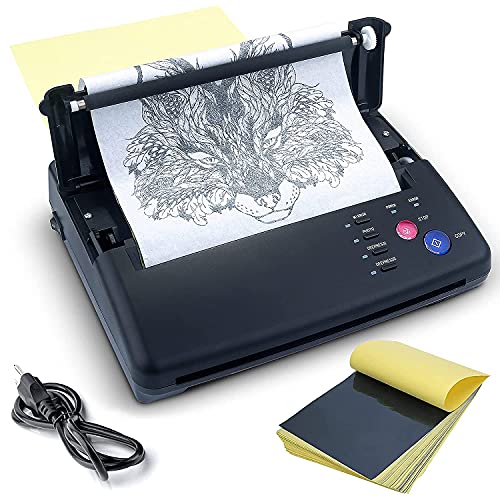
Sacnahe Tattoo Transfer Stencil Machine — Copier-Style Pick
The Sacnahe’s title contains the most honest parenthesis in this guide: “(Not Wireless)”. This is a copier-style thermal transfer machine in the traditional mould — feed the printed or drawn design in, run the stencil paper through, receive the transfer — bundled as a kit with twenty pieces of tattoo stencil transfer paper. In a market drunk on Bluetooth, a machine that announces what it refuses to do deserves respect, and for a certain kind of studio it is not a compromise at all. It is the workflow, unchanged, that produced decades of tattoos.
The copier route has real virtues. It asks nothing of phones, apps, pairing or updates; it works when the Wi-Fi is down and the tablet is flat; it takes a design that exists on paper — a flash sheet, a hand drawing, a client’s printed reference — and turns it into a stencil without an intermediate scan. Studios that draw on paper, or that keep physical flash archives, will find the Sacnahe speaks their language natively. The doubled paper bundle against the M08F’s ten sheets also reflects its working brief: this machine is expected to be used, steadily, from the day it lands.
Its constraints are the mirror of its virtues. Digital artwork must be printed before it can be copied, adding a step the Bluetooth machines skip. Sizing and mirroring are handled at the design stage rather than in an app, so the artist’s preparation carries more of the load. And a copier occupies a fixed station; nobody is taking it to a convention in a tote bag. None of that is a flaw — it is a definition. The Sacnahe is the station machine for paper-first workflows, and it should be bought by artists who recognise their own habits in that sentence.
- Print method: Thermal copier transfer
- Connectivity: Not wireless, stated in the title
- Included: 20 pieces of tattoo stencil transfer paper
- Workflow: Paper original to stencil, no app required
- Colour: Black, per the listing title
- Supported digital file formats: Not stated in the listing title — verify with the manufacturer documentation
Strengths
- Zero dependence on apps, pairing or network conditions.
- Paper-first workflow suits flash sheets and hand drawings directly.
- Twenty included sheets, the most generous starter bundle here.
Trade-offs
- Digital designs need printing before they can be copied.
- Fixed-station machine; travel work is not its brief.
- No app means sizing and tiling are the artist’s manual work.
Best for: paper-first studios and artists with flash archives to convert. Not suited for: a phone-based digital workflow — the machine’s lack of wireless is stated in its own title.
Studios weighing the copier route can review the Sacnahe kit listing to see the full contents of the bundle on offer.
Copier craft has its own small disciplines. Keep the original artwork flat and clean, because every crease and speck is faithfully transferred; run a test pass on a scrap of stencil paper whenever the machine has sat idle, since thermal heads wake up unevenly; and store finished stencils flat and separated, as copier transfers can offset onto each other in a warm drawer. Artists raised on this workflow move through it without thinking, and the machine’s simplicity is precisely what lets the thinking go where it belongs — into the tattoo itself.
Brother PocketJet PJ-883 / PJ-800 Series — Studio Standard (Prose)
The sixth pick carries no link, and the reason belongs in the open: when this guide was assembled, no clean Amazon listing for the Brother PocketJet series was verified, so the series is covered in prose rather than pointed to a listing this guide cannot stand behind. That absence should not be mistaken for a verdict on the machine. The PocketJet line — the PJ-883 and the wider PJ-800 series — is the long-standing studio standard for stencil printing, the thermal printer that professional shops adopted years before phone-paired stencil printers existed, and the yardstick against which each newcomer reviewed here is quietly measured.
Its reputation rests on unglamorous virtues. Brother built the PocketJet family as mobile document printers for field work, and tattoo studios adopted them because thermal printing, a compact body and dependable mechanics translated perfectly to stencil duty. A PocketJet prints a full page from a computer or mobile device, holds its registration across long sessions, and keeps doing so for years of daily use — the kind of reliability that turns a purchase into infrastructure. Artists who learned on one often describe every later machine by its distance from the Brother.
Why, then, is the standard not simply the recommendation? Partly the listing problem stated above: this guide links only what it has verified. Partly the workflow shift: the PocketJet was designed as a general printer pressed into stencil service, so it arrives without a tattoo-specific app, without image-cutting helpers, and with setup that assumes a document printer’s mindset. Studios buy it through their usual suppliers, configure it once, and lean on it for a decade. If your studio values that horizon and sources equipment beyond a single marketplace, the PocketJet remains the machine to beat — and the five linked picks above should be judged by how close they come to its working record.
- Print method: Thermal full-page printing
- Role: Long-standing studio standard for stencil work
- Series: PJ-883 and PJ-800 family
- Tattoo-specific app: None — a general printer adopted by studios
- Amazon listing: No clean listing verified for this guide; covered prose-only
Strengths
- A working record across professional studios measured in years.
- Full-page thermal output with dependable registration.
- Built as mobile work equipment, not as a novelty.
Trade-offs
- No verified Amazon listing to link from this guide.
- No tattoo-specific app or stencil helpers in the box.
- Setup speaks document-printer, so stencil use is the owner’s adaptation.
Best for: established studios equipping a station for a decade of daily stencils. Not suited for: a buyer who needs an orderable listing with stencil paper and an app included on day one.
The PocketJet’s role in this guide is context as much as candidacy. When you evaluate any of the five linked machines, the useful question is the Brother question: will this still be printing clean stencils, without drama, in three years? Newer features — touchscreens, AR previews, image cutting — are genuine conveniences, and for many artists they are worth more than a pedigree. But the standard exists for a reason, and a studio that already owns a PocketJet in good health should think carefully before replacing it with anything in this guide; adding a Bluetooth unit for travel or a second station is the more common professional move.
Comparison
| Pick | Connection | Workflow | Defining trait |
|---|---|---|---|
| Phomemo M08F | Bluetooth | App-driven stencil printing | Large image cutting; 10 sheets included |
| Phomemo M08F Plus | Bluetooth | Touchscreen stencil printing | Precision line detail; AR tattoo review |
| YIRIGUI 2-in-1 | Bluetooth | Stencils and documents | Dual-purpose thermal for travel |
| Bluetooth Thermal Stencil Printer | Bluetooth | Letter/A4/A5 stencil printing | Paper sizes stated in the title |
| Sacnahe Transfer Machine | None — not wireless | Copier transfer from paper | 20 sheets included; app-free |
| Brother PocketJet Series | Prose-only pick | Full-page thermal printing | Long-standing studio standard |
Read the table as a map of workflows rather than a league ladder. The two Phomemo models differ in ambition, not in kind; the YIRIGUI and the letter-size unit trade on flexibility; the Sacnahe and the Brother represent the two ends of the profession’s memory — the copier that asks for paper and the workhorse that asks for nothing but power and a file. A studio’s honest answer usually names a primary machine and a supporting one, and the pairing matters more than either machine’s individual virtues, because appointments fail at the seams between tools far more often than inside them.
What Makes a Stencil Survive a Whole Session?
A transfer has one job — stay legible from the first line to the last — and it fails that job in predictable ways. The print itself is the foundation: lines laid down too faintly, because the design’s greys were delicate or the paper was poor, wipe away under the first passes of a gloved hand. Line weight is the artist’s first defence, and every stencil printer owner eventually learns their machine’s minimum: the thinnest line that still reads on skin after an hour. Designs drawn below that weight need strengthening before printing, not optimism during the session.
Application is the second half of survival. Skin preparation, the stencil medium used to transfer, and drying time before the first line all decide whether the print is a guide or a rumour, and no printer — however precise — can rescue a hurried application. This is where the guide repeats its opening honesty: the printer makes a transfer, and everything after the transfer, from adhesion to the finished tattoo, is craft. The machines above differ in how faithfully they render your lines; what you do with a faithful stencil remains, properly, your profession.
How Should You Test a Stencil Printer Before Client Work?
Print your hardest design, not a sample pattern. Choose the piece with the finest lines, the tightest lettering and the most delicate shading in your portfolio, and run it at the size you would actually tattoo. Apply the transfer to your own forearm or a volunteer’s, then simulate the session: wipe it the way you wipe, lean on it the way you lean, and check at intervals what survives. A machine that holds your hardest stencil through that rehearsal will hold anything in your book; a machine that loses the fine work has told you its ceiling cheaply.
Test the workflow as well as the print. Time the path from opening the design on your device to holding the finished transfer, including pairing, sizing and any reprints. In a studio, that elapsed time is part of the appointment, and a printer that saves five minutes a stencil reshapes a working day. Finally, test the boring failures: the low-battery warning, the paper jam mid-sheet, the Bluetooth drop. Knowing each recovery before a client is in the chair converts emergencies into pauses.
How Much Does Stencil Paper Itself Change the Result?
More than most artists expect when they buy their first machine. Thermal stencil paper is a layered material: the design is developed through a carbon-style layer onto the sheet that meets the skin, and the quality of that layer decides how dark, sharp and durable the transfer will be. Paper from a reputable maker lays down a dense, even image that survives wiping; bargain paper can produce transfers that look acceptable on the sheet and then ghost on skin within the first pass of the session. Since every printer in this guide works by heating that paper, the paper is not an accessory to the system — it is half of the system.
This has a practical consequence for how you judge a new printer. A machine tested only on the small bundle of sheets in its box has barely been tested at all. Run the same design on two or three papers you might actually buy in quantity, apply each to skin, and put them through the same simulated wiping. Artists are routinely surprised to find the printer they were about to return was innocent, and the paper they trusted was the culprit — or the reverse, where a modest machine on excellent paper out-transfers a flagship fed with rubbish. The combination is the product; buy and judge them together.
Storage matters too. Stencil paper dislikes heat and humidity, and a box stored above a radiator or in a damp stockroom will print its displeasure onto every sheet. Keep it flat, sealed and in the studio’s ordinary climate, and rotate stock so the oldest box is used first. None of this is glamorous, and all of it shows up in the chair, which is the recurring lesson of stencil work: the unglamorous inputs decide the visible output.
What Belongs in a Travelling Artist’s Stencil Kit?
The guest-spot artist’s kit is an exercise in subtraction: everything in it must earn its weight across airports, borrowed stations and unfamiliar rooms. The printer itself argues for the portable thermal units in this guide — no ink to leak, no glass to protect, a footprint that shares a bag with machines and power supplies. The YIRIGUI’s document sideline can delete a second device from the bag entirely, while the Phomemo models delete the laptop from the workflow, since the portfolio already lives on the tablet the artist carries.
Paper travels worse than printers. Sheets crease in soft bags, and a creased stencil prints its crease, so a rigid document sleeve is the cheapest insurance a travelling artist buys. Carry more paper than the booking list suggests: consultations produce extra designs, walk-ins produce surprises, and the host studio’s spare box — if it exists — will be a brand you have never tested. A small stock of your own trusted paper is worth more than any spare cable.
Finally, rehearse the unfamiliar. Pair the printer with your devices before the trip, not in the host studio with a client watching; confirm the power arrangement for the destination; and keep one complete design printed and ready as a fallback if every wireless protocol in the building decides to sulk on the same morning. Travel rewards the artist whose stencil workflow has already survived their own sabotage drills, because the road will eventually run the real version of every drill.
How Should an Apprentice Learn Stencil Printing?
Deliberately, and on anything except clients. The apprentice’s first hundred stencils should go onto practice surfaces and volunteers from the studio’s inner circle, because the skills being built — sizing honestly, strengthening weak lines, applying evenly, judging when a transfer is too faint to trust — are judgement skills, and judgement is trained by consequences that do not matter. A mentor who reviews those practice transfers teaches more in an afternoon than a month of solo trial.
The machine’s conveniences should be learned in the right order. Manual judgement first: can you size a design correctly and spot a line that will not survive? Then the app helpers, image cutting and previews, which amplify judgement rather than replace it. An apprentice who starts with every automation switched on learns to operate a printer; an apprentice who starts with the fundamentals learns to make stencils, and can then operate any printer in this guide — including the app-free copier, whose demands are nothing but fundamentals.
There is also a professional habit worth forming early: the stencil is a promise. The client approves a placement and a size based on that transfer, and the finished tattoo is judged against it, so accuracy at the printing stage is a form of honesty. Apprentices who internalise that — who reprint rather than fudge a distorted transfer — become the artists whose healed work matches their photographs. The printer is a small machine. The standard it serves is not.
What Does Stencil Work Look Like Across a Busy Studio Day?
Picture the day the way a studio manager does. The morning’s first appointment is a returning client with a half-sleeve in progress; the design lives in a tablet folder, sized weeks ago, and the stencil needs to match the existing work exactly — registration against healed lines is the whole job. A Bluetooth printer earns its place here, pulling the file at the size it was saved, because any rescaling introduces a mismatch the artist will fight for hours. The midday slot is a consultation that converts: the client approves a design at the desk, wants it on skin within the hour to judge placement, and the AR preview on the Plus or a quick transfer from the M08F turns approval into evidence while enthusiasm is warm.
Afternoon brings the walk-in and the paper problem. A flash design, chosen off the wall, exists as ink on a printed sheet — the copier’s home turf, no file to find, no device to pair, just the sheet, the machine and a stencil in a minute. Late in the day comes the apprentice’s practice piece on a volunteer, where the stencil is a teaching instrument and a reprint costs nothing but a sheet. Four different stencil jobs, four different strengths, one working day: this is why busy studios so often end up owning two machines from this guide rather than one, and why the question is rarely which printer is best in the abstract.
The day also exposes the costs nobody lists. Every failed transfer is a client watching a delay; every pairing hiccup is dead air in a room where confidence is the product. Studios that run smoothly treat stencil printing as part of the appointment choreography — designs prepared before the client arrives, paper stocked at the station, a fallback route rehearsed — and the printer, whichever it is, disappears into the routine. A machine that demands attention during the appointment has failed at its real job even when its specifications gleam.
Why Do So Many Studios Keep a Copier Beside the Bluetooth Machines?
Because the two tools fail differently, and a studio is a business that cannot pause for a pairing menu. The Bluetooth printer’s failure modes are digital: a dropped connection, an app update that rearranges the controls, a tablet battery at four percent. The copier’s failure modes are physical and visible: paper, heat, a sheet fed crooked. When one route sulks, the other usually works, and the appointment proceeds — redundancy, not nostalgia, is what keeps the Sacnahe’s descendants on studio shelves beside their wireless grandchildren.
There is also the archive argument. Studios accumulate paper: flash books, reference printouts, a client’s grandmother’s handwriting brought in to be memorialised in script. Every one of those is a copier original waiting to happen, and digitising them all, in advance, on the chance they are needed, is work nobody does. The copier converts paper to stencil at the moment of need. Digital artists find the reverse gap in their own workflow — a design that lives only in an app is invisible to the copier until printed — which is precisely why the two machines coexist rather than compete. Each covers the other’s blind spot, and the studio that understands that stops asking which one wins.
How Do You Keep a Thermal Stencil Printer Printing Cleanly?
Thermal machines have no ink to manage, which tempts owners to manage nothing at all — a mistake the print head eventually corrects. The heating elements and the glass or roller path accumulate residue from paper coatings, dust from the studio and the occasional adhesive smear, and the symptom is always the same: streaks, faded bands and lines that drop out in one lane of the sheet. The maker’s cleaning routine, run on the maker’s schedule with the recommended method, is the entire defence. Studios that add it to the weekly station checklist rarely meet the problem; studios that wait for visible streaks are already printing compromised stencils.
Paper discipline is the second half of maintenance. Feed sheets straight and singly, keep the paper path free of offcuts, and never force a jammed sheet backwards through a thermal head — the small violence of a yanked sheet can score the surface that every later stencil depends on. Store the machine closed in a room where tattooing happens, because a studio’s air carries more than conversation: spray, dust and fibres settle on open equipment, and a cover or a drawer is a legitimate part of the printer’s care.
Finally, keep a known-good test design. A small file or sheet with fine lines, bold blocks and lettering at your typical sizes, printed monthly and compared against the last one, turns slow degradation into visible evidence while it is still cheap to fix. The test takes two minutes and one sheet. Artists who run it can say when their machine changed; artists who do not discover the change on a client’s forearm, which is the most expensive place in the building to learn anything. Maintenance in this category is not a hobby for the meticulous — it is how a modest machine keeps a professional promise.
What Are the Common Mistakes When Choosing a Tattoo Printer?
The deepest mistake is a category error: expecting a stencil printer to be part of the tattooing itself. It prints a guide. Artists who buy one hoping it improves their line work in skin are shopping in the wrong aisle — that improvement lives in machines, needles, inks and practice, none of which appear in this guide. A second mistake is judging by the first print on the included paper and never experimenting further; paper quality moves transfer quality as much as hardware does, and several disappointed owners were one paper upgrade away from satisfaction.
Ignoring paper size runs third. A machine that cannot take the sheet your designs need turns every large piece into a tiling project, and tiling mid-appointment is nobody’s craft. Fourth comes connection romanticism: Bluetooth is wonderful until a studio’s third device pairing turns temperamental, which is why the honest copier and the wired-capable workhorse keep their defenders. Finally, artists buy for the studio they wish they had — the flagship for daily fine-line epics — while their actual book is bold work that a simpler machine would serve perfectly. Buy for your real appointments.
Final Recommendation
Choose by workflow and the answer clarifies quickly. Newer artists drawing on phones and tablets should start with the M08F and its app-driven cutting; fine-line specialists should test the M08F Plus against their hardest stencil and let that experiment decide; travelling artists get the YIRIGUI’s double duty; a home studio or second station is honestly served by the letter-size Bluetooth unit; paper-first studios should keep faith with the Sacnahe copier; and an established shop equipping for the long term should weigh the PocketJet standard through its usual suppliers. Whichever route you take, spend the first week printing your own portfolio’s hardest pieces and applying them in rehearsal, because confidence in a stencil should be earned before a client is paying for the chair it guides. The right stencil printer is the one whose transfer you forget about by the second hour of the session — still there, still legible, under the steady rhythm of the work itself.
Frequently Asked Questions
Does a tattoo printer actually tattoo?
No. Every machine in this guide prints a stencil — a transfer of the design that is applied to skin as a temporary guide. The tattoo is made afterwards, by the artist, with a tattoo machine. A stencil printer cannot make a design safe, sterile or permanent; it makes it visible, in the right place, at the right size.
Why do these printers use thermal printing?
Thermal printing develops the image with heat on special stencil paper, so there are no ink cartridges to buy, leak or run dry mid-appointment. The trade is that output quality depends heavily on the stencil paper itself, which is why experienced artists treat paper as a chosen supply rather than an afterthought.
Can I print a design larger than one sheet?
The Phomemo M08F’s app offers large image cutting, which divides an oversized design into sections that are printed separately and joined at application. The technique works well with registration marks and patience. Copier-style machines have no such helper, so large work on the Sacnahe is planned and joined manually, as it has been for decades.
What paper size do I need?
Letter and A4 cover most designs, and one pick in this guide states 8.5 x 11 Letter, A4 and A5 support outright. Check your largest typical design against the machine’s stated sizes before buying; sleeves and back pieces will exceed any single sheet here and need the tiling approach described above.
Is the Brother PocketJet worth it over the app-based printers?
For a busy studio, its long working record is the argument: dependable full-page thermal printing, session after session, for years. The app-based machines answer with convenience — phone workflows, image cutting, touchscreens, previews. Neither answer is wrong; they suit different studios, which is why this guide presents the Brother honestly in prose rather than pretending a listing exists.
Can one printer serve a whole multi-artist studio?
It can, until the day two artists need stencils in the same ten minutes before parallel appointments — which, in a thriving studio, is most days. A single shared machine also concentrates risk: one failure idles every station. This is why the comparison above treats the letter-size Bluetooth unit and the copier as natural second machines rather than leftovers. A flagship at the main station, a simpler unit floating between chairs, and a copier for paper originals is a common end-state for studios that grew into their equipment instead of buying it all on day one, and it costs less than the two-flagship arrangement it outperforms.
How long does a printed stencil last on skin?
That depends on application technique, skin preparation and how the artist works over it — not on the printer alone. A well-applied transfer from a clean, faithful print is expected to guide a full session; a faint print or hurried application can fade within the first hour. Test your own combination before relying on it for a long piece.
Related Guides
Studios rounding out their equipment shelf may find the neighbouring guides useful in this order: the mailing workhorse question is answered in the best envelope printers, the film side of print work is covered by the best printers for printing transparencies for screen printing, and the front-desk computer question is handled in the best chromebook compatible printers.


