What's inside
- Key Takeaways
- Quick Picks
- How We Chose These Picks
- Side-by-Side Comparison
- What Actually Makes HDR Look Good on a Monitor?
- How Can You Test a New Monitor’s HDR in the First Evening?
- Does HDR Matter for Work, or Only for Play?
- Why Do Console and PC HDR Behave Differently on the Same Screen?
- What Is the Difference Between a VESA Tier and a Manufacturer’s HDR Label?
- How Should You Set Brightness and Local Dimming for Mixed Use?
- Does Local Dimming Help or Hurt Competitive Gaming?
- How Do You Read an HDR Monitor’s Colour Claims Without Being Misled?
- What Should You Budget Around an HDR Monitor Purchase?
- Is Blooming a Defect or a Property?
- How Does HDR Change What You Should Look for in a Stand and Panel Size?
- What Content Should You Queue to Judge HDR Fairly?
- Common Mistakes
- Final Recommendation
- Frequently Asked Questions
- Related Guides
As an Amazon Associate I earn from qualifying purchases. This post may contain affiliate links at no extra cost to you.
widgetverdict.com is reader-supported. When you buy through links on our site, we may earn an affiliate commission.
A logo is doing heavy lifting in this category. Shoppers hunting the best hdr monitors will find the HDR badge printed on nearly every screen above a certain price, yet two monitors wearing the same badge can produce pictures that share almost nothing: one dims its backlight in hundreds of independent zones so a candle flame sits in genuine darkness, the other accepts an HDR signal and stretches it across a single edge-lit panel whose blacks were grey before the badge arrived. The badge certifies that a monitor can receive and roughly map HDR content. It does not certify that the monitor can perform it. This guide exists in the gap between those two sentences.
The dividing technology is local dimming, and in this list it arrives as Mini-LED. Four of the six picks use Mini-LED backlights with zone-based dimming and carry HDR1000-class claims in their titles; one is a giant Mini-LED flagship wearing Samsung’s own Quantum HDR2000 label; and one — the ASUS ProArt — is a colour-accuracy instrument for creators whose title claims HDR with no tier attached, a pick included deliberately and labelled honestly, because a buyer who grades photos needs accuracy more than fireworks. Read each review with one question in mind: can this panel make part of the screen dark while another part is bright? Everything else is commentary.
A note on figures before the picks. Zone counts and peak brightness numbers appear in this guide only where a listing title states them, which turns out to be less often than marketing suggests. Where a title names a certification — DisplayHDR 1000, HDR1000 — the review uses that certification as the claim, because certifications at least reference a test. Where a title invents a house label, the review says that too. And where a title is silent, the spec list records the silence rather than filling it.
Every linked pick below leads to its listing, where the full specification and today’s price can be read first-hand; HDR is a feature whose value collapses or compounds with the exact model variant, so the listing check matters here more than in most categories this site covers.
Key Takeaways
- An HDR badge certifies signal handling, not picture performance; local dimming is what turns HDR into contrast.
- Four picks here are Mini-LED designs with HDR1000-class title claims — the AOC, the KTC, the Acer and the 57-inch Samsung.
- The ASUS ProArt PA279CRV claims HDR without a tier in its title and is a creator-accuracy pick, not a dimming showcase; no tier is assigned to it anywhere in this guide.
- Samsung’s Quantum HDR2000 on the Neo G7 is a house label, not a VESA tier — read it as the manufacturer’s own claim.
- The AOC’s title is internally inconsistent (it prints both HDR1000 and HDR400, and a resolution line at odds with its own model name), and its review flags that openly.
Quick Picks
| Pick | Badge | Why it is here |
|---|---|---|
| AOC Q27G3XMN Mini-LED HDR1000 Monitor | Mini-LED Value | A 27-inch Mini-LED gaming panel with HDR1000 in its headline — and a title whose contradictions the review unpacks. |
| Samsung 32-inch Odyssey Neo G7 4K Gaming Monitor | Curved Showcase | 4K, 165Hz and Quantum HDR2000 on a 1000R curve — Samsung’s HDR theatre in 32 inches. |
| ASUS ProArt PA279CRV 27″ 4K Monitor | Creator Accuracy | Calman Verified, Delta E<2, 99% DCI-P3 and 99% Adobe RGB — the accuracy pick, with HDR claimed but untiered. |
| KTC M27T6S Mini LED HDR1000 Monitor | Speed Meets Dimming | 1440p Mini-LED with HDR 1000 and refresh figures that run past 200Hz in its title. |
| Acer Nitro MG275U QD-MiniLED Monitor | QD-MiniLED Contender | QD-MiniLED, HDR1000 and up to 210Hz from a major brand’s gaming line. |
| Samsung 57″ Odyssey Neo G9 | Theatre Flagship | Dual 4K width, Quantum Mini-LED and DisplayHDR 1000 at 240Hz — the largest HDR stage here. |
How We Chose These Picks
Selection began by sorting the HDR shelf into three honest piles: panels with local dimming, panels with a certification but no dimming worth the name, and panels with a badge and nothing else. Only the first pile qualifies as HDR performance, so five of the six picks come from it. The sixth slot was reserved deliberately for the ProArt, because a meaningful share of HDR-monitor shoppers are creators whose actual requirement is a trustworthy picture — colour accuracy, verified calibration, wide gamut — and who would be actively mis-served by a guide that ranked only by dimming drama. Its section states plainly what it is and what it is not.
Titles were audited line by line, and the audit changed the guide. One pick’s title contradicts itself on both HDR tier and resolution; rather than silently resolving the contradiction in the manufacturer’s favour, the review prints the conflict and tells the buyer how to settle it on the full listing. Another pick’s headline figure is a house label rather than a certification, and it is described as such. These are not pedantic reservations. In a category where the badge is the marketing, the wording of the claim is the product information.
Refresh and resolution were treated as the supporting cast. HDR gaming at 4K, HDR speed at 1440p, HDR width at 57 inches — the six picks spread across those shapes so that a reader can choose the geometry first and the dimming second, which is the order real desks impose anyway.
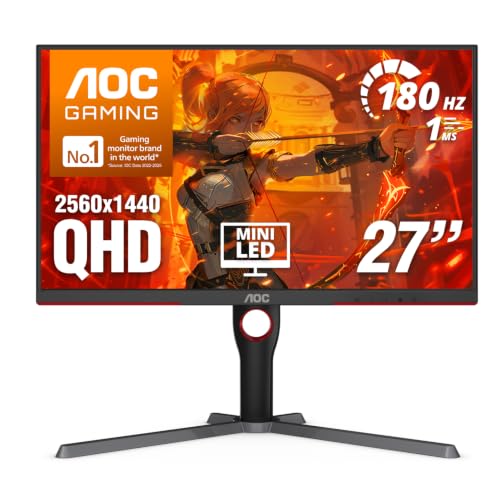
AOC Q27G3XMN Mini-LED HDR1000 Monitor — Mini-LED Value
AOC’s Q27G3XMN is the monitor that made Mini-LED HDR a mainstream purchase rather than a flagship indulgence, and its appeal is easy to state: a 27-inch gaming panel whose backlight is divided into dimming zones, so HDR scenes gain the one thing edge-lit panels cannot fake — a dark region that stays dark while a highlight burns beside it. The headline figure in its title is HDR1000, and the panel’s 180Hz refresh keeps fast games in the same conversation as the picture quality. For players who have watched HDR wash out on a badge-only monitor, this class of backlight is the correction.
Now the part this guide will not skip. The listing title contradicts itself twice. It prints “HDR1000” in the headline and “HDR400” later in the same title, and it prints a resolution of “3440×1440” for a 27-inch monitor whose model name and class indicate a 2560×1440 panel — 3440×1440 is a 34-inch ultrawide resolution. These are almost certainly listing-editing errors rather than product facts, but “almost certainly” is not a basis for a purchase. The correct reading: the monitor’s Mini-LED HDR1000 positioning is its documented identity, and the stray figures are noise to be settled on the full listing and the manufacturer’s page before ordering. A guide that quoted either figure without flagging the conflict would be laundering a typo into a specification.
What is not in dispute is the shape of the offer: Mini-LED dimming at 27 inches, a high refresh rate, DisplayPort 1.4 and HDMI 2.1 among its inputs per the title, a height-adjustable stand and VESA mounting. That combination — real dimming, real speed, real ergonomics — at the accessible end of Mini-LED pricing is why the Q27G3XMN anchors this guide despite its messy title. Buy it for the backlight architecture, verify the listing’s specification block line by line, and treat the two contradictory figures as a reminder of why this site reads titles forensically in the first place.
- Size: 27-inch
- Backlight: Mini-LED with local dimming
- HDR: HDR1000 in headline; title also prints HDR400 — verify on the full listing
- Resolution: Title prints 3440×1440, inconsistent with the model class — verify on the full listing
- Refresh and response: 180Hz, 0.3ms per listing title
- Inputs: DisplayPort 1.4, HDMI 2.1, USB 3.2 per listing title
- Stand: Height adjustable; VESA mount
Strengths
- Mini-LED local dimming delivers genuine HDR contrast at an accessible tier.
- 180Hz keeps fast gaming fully in frame alongside the picture quality.
- Height adjustment and VESA mounting are both present.
Trade-offs
- The listing title contradicts itself on HDR tier and resolution — verification is mandatory.
- Zone count is not stated in the title, so dimming granularity must be checked in the full specification.
- AOC’s support network is thinner than Samsung’s or ASUS’s in some regions.
Best for: the player who wants true local-dimming HDR without flagship money and is willing to verify a messy listing. Not suited for: a buyer who orders on headline trust alone — this model’s title punishes exactly that habit.
On AOC’s listing, go straight to the specification table and settle the two contested figures — HDR tier and native resolution — against the model code Q27G3XMN; only then does the price on that page mean what it appears to mean.
Living with a dimming panel teaches one more lesson the spec sheet omits: blooming. When a small bright object — a subtitle, a cursor, a star — sits on a black field, the zone behind it lights up and a soft halo appears around the object. Every Mini-LED monitor blooms to some degree; the engineering contest is over how tightly the halo is contained, and it is the first thing to examine in any hands-on footage of the Q27G3XMN or its rivals. Subtitles over dark film scenes are the everyday case, which is why film lovers notice blooming that gamers, whose screens are bright everywhere, rarely do. Knowing the artefact’s name and shape before purchase turns a potential week-one disappointment into an informed acceptance: this is the physics of zoned backlights, priced honestly against OLED’s perfection at several times the cost.

Samsung 32-inch Odyssey Neo G7 4K Gaming Monitor — Curved Showcase
The Neo G7 wraps Samsung’s Quantum Mini-LED technology around a 1000R curve at 32 inches and 4K, and the result is the most theatrical HDR presentation in this guide at a desk-friendly size. Quantum HDR2000 is Samsung’s own label for the panel’s HDR capability — a house claim, not a VESA certification tier, and this review records it as such — but the underlying architecture is the right one: a Mini-LED backlight with local dimming behind a high-resolution panel, which is what HDR theatre is physically made of. House label or not, the dimming is real, and dimming is the ingredient the badge-only monitors lack.
The supporting specification reads like a flagship checklist because it is one: 165Hz refresh, 1ms response, G-Sync compatibility and AMD FreeSync Premium Pro both named, DisplayPort and HDMI, a height-adjustable stand. At 4K and 32 inches, pixel density is high enough that text stays crisp for the work hours, and the 1000R curve — the tightest radius in mainstream monitors — pulls the panel’s edges into your peripheral field for games and films. That curve is also the commitment: spreadsheets tolerate it, design work on straight lines argues with it, and a second viewer at an angle gets a distorted seat.
Who is it for? The single-viewer desk where evenings are cinematic — HDR films, atmospheric games, the kind of content where a lightning strike should light the room’s wall, not just the screen’s centre. The Neo G7’s combination of resolution, curve and dimming has no exact rival among the other five picks: the 57-inch Samsung below is wider, the 27-inch models are faster or cheaper, the ProArt is truer. This one is the showpiece, and its price on the listing should be judged against home-theatre components, not against office monitors.
- Size and resolution: 32-inch, 4K UHD, 1000R curved
- Backlight: Quantum Mini-LED with local dimming
- HDR: Quantum HDR2000 (manufacturer’s label, per listing title)
- Refresh and response: 165Hz, 1ms
- Sync: G-Sync compatible, AMD FreeSync Premium Pro
- Inputs: DisplayPort, HDMI
- Stand: Height adjustable
Strengths
- Mini-LED dimming at 4K gives HDR scenes genuine depth and black levels.
- 165Hz and both sync ecosystems cover serious gaming alongside the theatre.
- The 1000R curve maximises single-viewer immersion at this size.
Trade-offs
- Quantum HDR2000 is a house label, not a VESA tier — compare it as a claim, not a certification.
- The deep curve penalises off-axis viewers and straight-line design work.
- 4K at 165Hz demands a strong graphics card to feed in games.
Best for: the solo desk where HDR films and atmospheric games are the main event. Not suited for: a shared screen or a designer’s straightedge work, where the 1000R curve becomes the story.
Samsung’s listing for the Neo G7 rewards a look at its HDR section in full — read how the manufacturer phrases its own Quantum HDR2000 claim, then weigh the asking figure against the dimming architecture rather than the label.
Consider also what the Neo G7 asks of the room around it. A 1000R curve at 32 inches is a wide object — wider, in presence, than its diagonal suggests — and its reflective behaviour in a bright room deserves respect: position it so windows sit beside rather than behind your seat, or the curve will gather their light into the picture. In the evening room it was designed for, the same curvature turns the panel into something closer to a private cinema booth, and the Mini-LED backlight’s highlights carry across a dark space with a physicality flat office panels never attempt. Buyers furnishing a multipurpose room should weigh that split personality honestly, because the Neo G7 is magnificent in one of those rooms and merely expensive in the other.

ASUS ProArt PA279CRV 27″ 4K Monitor — Creator Accuracy
Every guide needs one pick that refuses the category’s premise, and here it is. The ProArt PA279CRV’s title claims “HDR” with no tier attached, and this guide will not promote it: it is not an HDR1000 monitor, it is not presented as a local-dimming showcase, and its place in a list of HDR monitors rests on a different definition of picture quality altogether — accuracy. Calman Verified. Delta E<2. 99% DCI-P3 and 99% Adobe RGB. An IPS panel at 4K with USB-C power delivery at 96W and daisy chaining. Those are the credentials of an instrument, and for the photographer or editor reading this guide, they outweigh every dimming zone on the page.
Why does an accuracy instrument belong in an HDR roundup at all? Because creators increasingly deliver HDR content — graded video, HDR photo workflows — and grading HDR on a panel you cannot trust in SDR is building on sand. The ProArt’s verified colour behaviour is the foundation; its untiered HDR support lets it display HDR material for reference while its calibrated SDR performance does the daily work. ASUS positions the ProArt line for Mac users explicitly in this title, and the 96W USB-C delivery suits a MacBook-class laptop as a one-cable desk: video, data and charging through a single port, with daisy chaining for a second screen.
The trade is explicit and should be chosen with open eyes. Games will run — it is a 4K IPS panel — but nothing in its title promises gaming refresh or sync, and HDR entertainment will look correct rather than spectacular: highlights rendered faithfully, not theatrically. Buyers whose evenings are films should take the Samsung or Mini-LED picks. Buyers whose days are billable colour work should take this one and never apologise for it.
- Size and resolution: 27-inch, 4K UHD
- Panel: IPS
- Colour: 99% DCI-P3, 99% Adobe RGB; Calman Verified; Delta E<2
- HDR: Claimed in title without a tier — no tier is assigned in this guide
- USB-C: Power delivery 96W; daisy chain support
- Stand: Height adjustable
Strengths
- Verified colour accuracy (Calman, Delta E<2) that no gaming pick here matches.
- Dual wide gamuts — 99% DCI-P3 and 99% Adobe RGB — cover photo and video work.
- 96W USB-C with daisy chaining builds a clean creator desk.
Trade-offs
- HDR is untiered in the title and this is not a local-dimming showcase.
- No gaming refresh or sync claims appear in the title.
- Its premium buys calibration, not theatre — the wrong spend for a film-first desk.
Best for: photographers, editors and designers who need a trustworthy 4K canvas that can also display HDR material. Not suited for: a buyer chasing HDR spectacle for games and films, who should take any Mini-LED pick here instead.
The ProArt’s listing is where its calibration story is told in full — read the colour section before the price, because with this monitor the accuracy figures are the product and the figure on the buy button is simply what they cost.
The ProArt also quietly solves a problem creators meet when a single desk must serve two machines or a machine and a second display: its daisy chaining lets one cable run from the laptop to this monitor and onward to another screen, so a two-panel grading setup does not consume every port the laptop owns. Height adjustment keeps the panel aligned with a second display’s top edge, a small ergonomic detail that matters across an eight-hour edit. None of this appears in HDR discussions, which is precisely the point of this pick’s inclusion — the qualities that decide a working monitor’s value are mostly not the qualities its category badge advertises, and a creator who buys the badge instead of the instrument has been marketed to, not served.

KTC M27T6S Mini LED HDR1000 Monitor — Speed Meets Dimming
KTC is the name readers meet when they research Mini-LED panels at prices the big brands decline to match, and the M27T6S shows why the research keeps leading there: a 27-inch 1440p Mini-LED panel with HDR 1000 in the title, refresh figures quoted at 210Hz with a 200Hz vertical figure also printed, 157% sRGB volume, 1ms MPRT, adaptive sync, and a stand that tilts, swivels, pivots and adjusts for height. On paper — on title, to be precise — that is the full gaming wishlist: dimming for the picture, speed for the play, ergonomics for the day.
Two of the title’s numbers deserve the same forensic calm applied elsewhere in this guide. The refresh is printed as both 210Hz and 200Hz in different phrases, which typically reflects different connection or orientation modes rather than a contradiction about the panel’s ceiling — but “typically” is doing work there, and the full listing’s specification is where a buyer confirms which figure applies over which input. The 157% sRGB figure is a volume measure, not a coverage guarantee; wide volume flatters games and needs a colour-managed workflow to avoid oversaturating ordinary content. Neither point disqualifies the monitor. Both reward the reader who verifies.
KTC’s standing caveat is the one applied to smaller brands throughout this site’s guides: the panel value is real, and the support infrastructure behind it is younger and thinner than the majors’. Firmware updates, warranty handling and dead-pixel policies are the unglamorous paragraphs to read before purchase. For the buyer comfortable with that exchange — flagship backlight architecture and speed, in return for doing their own diligence — the M27T6S is the sharpest value proposition in this guide.
- Size and resolution: 27-inch, 1440p
- Backlight: Mini LED
- HDR: HDR 1000 per listing title
- Refresh: 210Hz headline; 200Hz also printed — verify modes on the full listing
- Colour: 157% sRGB volume per listing title
- Sync: Adaptive Sync
- Stand: Tilt, swivel, pivot and height adjustment; VESA mount
Strengths
- Mini-LED dimming plus HDR 1000 plus 200Hz-class speed in one 27-inch panel.
- Full ergonomic stand — pivot included — where rivals often stop at height.
- The value route into this guide’s dimming tier.
Trade-offs
- Refresh figures are printed two ways; confirm the mode you will use on the full listing.
- 157% sRGB is volume, not accuracy — colour-managed work needs care.
- Smaller-brand support and firmware cadence trail the majors.
Best for: the value-hunting gamer who wants dimming and speed together and reads specifications before buying. Not suited for: a buyer who wants the majors’ support network standing behind a panel of this sophistication.
KTC’s listing should be read in its connectivity section first — that is where the refresh-by-input question gets answered — and its price only becomes impressive once you know the mode you play in is the fast one.
A word about who KTC is, since the name lacks the others’ familiarity. The company built its following by manufacturing panels and monitors that appear, in various badges, across the industry, and its own-brand models compete by spending the budget on the panel and backlight rather than on distribution. That strategy produces exactly the pattern this review describes: specifications that embarrass pricier rivals, documentation that requires a careful reader, and a support experience that depends more on the seller than on a global network. Buyers who have owned enthusiast brands before will find the exchange familiar and acceptable. Buyers for whom a monitor is an appliance — unboxed, used, and expected to be serviced by someone else — should pay the majors’ premium without resentment, because that premium is buying a real thing.

Acer Nitro MG275U QD-MiniLED Monitor — QD-MiniLED Contender
Acer’s Nitro line is where a major brand goes value-hunting, and the MG275U brings a twist the other 27-inch picks do not: QD-MiniLED, a Mini-LED backlight working with a quantum-dot layer, behind a 2560×1440 IPS panel. The title’s claims stack up confidently — HDR1000, up to 210Hz refresh, up to 0.5ms response, 95% AdobeRGB coverage, AMD FreeSync Premium, DisplayPort 1.4 and two HDMI 2.1 inputs. That is a specification aimed squarely at the buyer who cross-shops the AOC and the KTC above and wants a global brand’s badge on the same architecture.
The AdobeRGB figure is the interesting line. Gaming monitors usually quote DCI-P3 or sRGB; a 95% AdobeRGB claim signals that Acer expects this panel to be looked at by people who also edit photos, and quantum-dot colour volume supports the ambition. Treat it as a gaming panel with a wider gamut than its class rather than as a creator instrument — the ProArt’s verified Delta E is a different kind of promise — but for the hybrid desk that games at night and retouches on weekends, the breadth is genuinely useful.
“Up to” does quiet work in this title, twice: up to 210Hz, up to 0.5ms. Those ceilings typically depend on input and mode, so the full listing’s detail is where a buyer confirms the figures for the connection they will actually use. With that verification done, the MG275U’s proposition is clean: QD-MiniLED dimming, HDR1000, high refresh and a major brand’s channel, in the size and resolution that graphics cards handle most gracefully.
- Size and resolution: 27-inch, 2560×1440
- Panel and backlight: IPS, QD-MiniLED
- HDR: HDR1000 per listing title
- Refresh and response: Up to 210Hz; up to 0.5ms
- Colour: AdobeRGB 95% per listing title
- Sync: AMD FreeSync Premium
- Inputs: 1× DisplayPort 1.4, 2× HDMI 2.1
Strengths
- QD-MiniLED combines local dimming with quantum-dot colour breadth.
- Two HDMI 2.1 inputs suit a PC-plus-console desk.
- A major brand’s channel behind Mini-LED value pricing.
Trade-offs
- “Up to” figures need the full listing to pin down by input and mode.
- AdobeRGB breadth is not calibrated accuracy — creators should still look at the ProArt.
- Stand details are not stated in the title; check the listing before assuming height travel.
Best for: the hybrid gamer-editor who wants QD-MiniLED dimming from a household-name brand. Not suited for: colour-critical professional work, where verified calibration outranks gamut breadth.
Acer’s listing for the MG275U is best approached through its port-and-mode table, since the headline speeds live there in their qualified form; the price beside it can then be compared honestly with the AOC and KTC.
The Nitro’s dual HDMI 2.1 provision deserves emphasis because it solves the console problem elegantly: a PlayStation-class and an Xbox-class machine can both live on the monitor at their best modes without a switch box or a cable ritual, while DisplayPort takes the PC. Desks accumulate consoles the way they accumulate chargers, and a monitor that welcomes all three sources at full capability removes a small daily friction that owners otherwise tolerate for years. Pair that with the QD layer’s colour breadth and the MG275U reads as the most sociable pick in this guide — the panel a household shares, where one person’s game, another’s console and a third’s photo library all pass across the same glass in a single evening.

Samsung 57″ Odyssey Neo G9 — Theatre Flagship
Scale changes the HDR question. On the 57-inch Neo G9, the backlight is Quantum Mini-LED, the certification in the title is DisplayHDR 1000, the resolution is Dual 4K — two 4K panels’ width in one 1000R curve — and the refresh runs to 240Hz over DisplayPort 2.1. This is less a monitor than a wall that happens to sit on a desk, and its HDR presentation benefits from sheer area: a dimmed zone on a 57-inch canvas reads as a shadowed corner of a real space, and a highlight has room to bloom the way light blooms in a cinema.
The practicalities scale with the spectacle. Dual 4K at 240Hz is a workload only the strongest current graphics hardware feeds at full song, and DisplayPort 2.1 — named in the title — is the connection that makes the top mode possible at all; check your card’s port before assuming the flagship mode is available to you. Desk depth, stand footprint and sheer width all follow the logic of the 49-inch class and then exceed it. Buyers should measure with the same tape discipline this site preaches for 49-inch panels, only more so.
Why include a halo product in a buyer’s guide? Because it defines the ceiling honestly. Every other pick here can be located against it: the Neo G7 is its theatre at half the width, the 27-inch Mini-LEDs are its dimming at a quarter of the price class, and the ProArt is its philosophical opposite. If your room, desk and GPU can host it, the 57-inch Neo G9 is the most complete HDR object in this guide. If they cannot, it still earns its paragraph by showing you exactly what the money buys at the top — and what, precisely, you are not missing at the sizes below.
- Size and resolution: 57-inch, Dual 4K UHD, 1000R curved
- Backlight: Quantum Mini-LED
- HDR: DisplayHDR 1000 per listing title
- Refresh and response: 240Hz, 1ms
- Inputs: DisplayPort 2.1 named in listing title
- Sync: AMD FreeSync Premium Pro
Strengths
- The largest HDR stage in this guide, with certified DisplayHDR 1000.
- Quantum Mini-LED dimming across a Dual 4K canvas.
- 240Hz over DisplayPort 2.1 — a flagship mode with the connection to support it.
Trade-offs
- Demands a top-tier graphics card and a DisplayPort 2.1 source for its best mode.
- Desk depth and width requirements exceed even the 49-inch class.
- Flagship pricing — the listing figure belongs in a home-theatre budget conversation.
Best for: the no-compromise theatre desk with the GPU, the room and the budget to match. Not suited for: an ordinary desk or a mid-range graphics card, both of which would strand its headline modes.
Samsung’s listing for the 57-inch is where the DisplayPort 2.1 requirement meets your own hardware list — confirm your card speaks it before the price on that page tempts you into a flagship your PC cannot fully drive.
There is a final, unfashionable consideration the flagship earns honestly: permanence. A 57-inch panel is not a purchase you casually upgrade in two years, because removing it is a project and replacing it is a budget event. Buyers should therefore read its specification as a five-to-eight-year commitment — DisplayPort 2.1 and DisplayHDR 1000 are the right kind of future-proofing for that horizon, since connections and certifications are what date a monitor, not its size. If the commitment sounds daunting, that reaction is itself useful information: drop to the Neo G7, keep the theatre, and let the flagship remain what it is for most readers — the reference point that makes every other pick’s compromises legible.
Side-by-Side Comparison
| Pick | Size / Resolution | Dimming | HDR claim in title | Refresh |
|---|---|---|---|---|
| AOC Q27G3XMN | 27-inch | Mini-LED | HDR1000 headline; HDR400 also printed | 180Hz |
| Samsung Neo G7 | 32-inch 4K | Quantum Mini-LED | Quantum HDR2000 (house label) | 165Hz |
| ASUS ProArt PA279CRV | 27-inch 4K | Not claimed in title | HDR, no tier stated | Not stated in the listing title |
| KTC M27T6S | 27-inch 1440p | Mini LED | HDR 1000 | 210Hz headline |
| Acer Nitro MG275U | 27-inch 1440p | QD-MiniLED | HDR1000 | Up to 210Hz |
| Samsung 57″ Neo G9 | 57-inch Dual 4K | Quantum Mini-LED | DisplayHDR 1000 | 240Hz |
What Actually Makes HDR Look Good on a Monitor?
Three ingredients, in order of importance. First, contrast delivered locally: the ability to dim one region while another shines, which is a property of the backlight’s zones or of OLED’s per-pixel light. Second, peak brightness in small highlights — a certification like DisplayHDR 1000 speaks to this — because HDR’s signature moments are small bright things in dark scenes: a flame, a reflection, a break of sun. Third, tone mapping that respects the content rather than stretching everything toward maximum brightness, which is firmware judgement and the hardest ingredient to read from a specification. A monitor with the first two and poor mapping looks garish; a monitor with only brightness and no dimming looks washed. The picks in this guide were chosen for the first ingredient above all, because without it the other two have nothing to stand on.
How Can You Test a New Monitor’s HDR in the First Evening?
Use scenes you already know. A night sequence from a favourite film, a cave or night level in a game you have played in SDR, and a bright outdoor scene with sky detail — three tests that expose the three classic failures: grey blacks, crushed highlights and banding in gradients. Watch the night scene in a darkened room and look at the letterbox bars and the shadows within the frame; on a dimming panel they separate into genuinely different darknesses. Watch the bright scene for skies that hold their gradient instead of stepping. Then toggle the same scenes back to SDR and compare honestly: good HDR is not brighter-everything, it is wider-everything, and if the HDR version merely looks louder, the mapping — or the panel — is not doing the job you paid for.
Does HDR Matter for Work, or Only for Play?
For most office work, no — documents and browsers live in SDR, and the ProArt’s presence in this guide is the proof that a different virtue, accuracy, governs the working day. HDR matters at a work desk in exactly two situations: when the work itself is HDR content, as for video editors and photographers in HDR workflows, and when the desk doubles as the home’s cinema after hours. Everyone else should buy their work monitor for brightness, ergonomics and text quality, and treat any HDR badge on it as a bonus rather than a reason. The honest hierarchy for a mixed desk is: panel quality first, dimming second, badge last — which is, not coincidentally, the order this guide applied.
Why Do Console and PC HDR Behave Differently on the Same Screen?
Because the two ecosystems hand the monitor different instructions. Consoles offer system-level HDR calibration that the games then respect; PCs leave tone mapping to a patchwork of game engines, operating-system settings and per-title sliders, so the same panel can look reference-grade on a console title and overblown on a PC port an hour later. The practical lesson for buyers of the picks above — several of which court both machines with HDMI 2.1 — is to calibrate per source rather than per screen: run the console’s HDR setup on its input, set the PC’s HDR options per game, and save the monitor’s picture modes separately for each. Ten minutes of that housekeeping closes most of the gap people blame on panels.
What Is the Difference Between a VESA Tier and a Manufacturer’s HDR Label?
A VESA DisplayHDR tier is a certification: the manufacturer submits the panel to a published test specification covering peak brightness, black levels, colour gamut and bit depth, and the tier number corresponds to defined thresholds a buyer can look up. A manufacturer’s own label — Samsung’s Quantum HDR2000 in this guide — is a claim made in the manufacturer’s own vocabulary, with no public threshold a buyer can check it against. That does not make the claim false; Samsung’s Mini-LED panels are serious hardware. It makes the claim non-comparable: you cannot line Quantum HDR2000 up against DisplayHDR 1000 and conclude anything from the numbers, because only one of them is a measurement system. The discipline this guide applies is to report each claim in its own terms — certification as certification, label as label — and to rank panels by their backlight architecture, which no vocabulary can inflate.
How Should You Set Brightness and Local Dimming for Mixed Use?
Most owners of these panels settle into two picture modes and stop fiddling, which is the correct outcome. For the working day: local dimming on its gentler setting or off entirely, brightness matched to the room, HDR off at the operating-system level so documents render exactly as their authors saw them. For the evening: HDR enabled at the source, local dimming at its strongest, and the room’s lights low, because ambient light is the silent tax on every HDR panel’s blacks. The mistake is seeking one universal setting; HDR and SDR are different formats with different ideals, and a monitor that serves both is really two monitors sharing a chassis. Save the two modes, label them honestly, and let the clock decide which one you are using.
Does Local Dimming Help or Hurt Competitive Gaming?
Both, depending on the title and the player. In atmospheric games, dimming is pure gain: night maps gain real darkness, and muzzle flashes and headlights acquire physical punch. In competitive play, some players disable dimming for three practical reasons — the processing can add a whisper of latency on some implementations, the brightness pumping as zones react can distract a trained eye mid-fight, and a uniform backlight makes enemy-spotting in dark corners more predictable. Neither camp is wrong; they are optimising for different experiences on the same hardware. The practical advice for buyers of the fast picks in this guide — the AOC, KTC and Acer — is to treat dimming as a per-game setting rather than a global identity: on for the campaign, off for the ranked queue, and judged by your own results rather than by forum dogma in either direction.
How Do You Read an HDR Monitor’s Colour Claims Without Being Misled?
Separate three ideas that marketing blends into one number. Coverage asks how much of a colour space the panel can display — 99% of DCI-P3, in the ProArt’s case, is a strong, checkable claim. Volume asks how much colour the panel can produce in total, which is how figures above 100% arise, as with the KTC’s 157% sRGB: a bigger balloon, not necessarily a more accurate one. Accuracy asks whether the colour shown is the colour requested, which is what Delta E measures and what Calman verification certifies. A film lover wants coverage and brightness; a photo editor wants accuracy first and coverage second; a gamer wants volume and punch. When a title prints one figure, ask which of the three ideas it belongs to before letting it impress you — the same discipline, applied to colour, that this guide applies to HDR tiers.
What Should You Budget Around an HDR Monitor Purchase?
The panel is the headline cost, but HDR done properly has a supporting cast. A graphics card that can drive your chosen resolution in HDR at playable rates is the largest item — several picks here assume hardware a generation beyond what their SDR equivalents would need. A suitable cable matters more than it should: the full-bandwidth modes these panels advertise want certified cables of the right generation, and the one in a drawer from 2016 is a common culprit when a new monitor refuses its top mode. Console owners should confirm their HDMI cable matches the console’s best output. None of these companions is glamorous, and together they can add a meaningful fraction to the panel’s figure — which is why this guide keeps directing you to the listing’s total picture rather than to any single number, and why the honest comparison between two picks includes the hardware each one demands of you.
Is Blooming a Defect or a Property?
A property — and learning to see it accurately will save you a return. Blooming is the halo a bright object casts when its backlight zone is larger than the object itself: subtitles, stars, a cursor on a black desktop. It shrinks as zone counts rise and zone sizes fall, which is why the industry races toward ever more zones, and it vanishes entirely only on per-pixel technologies like OLED. Judge a new panel by whether blooming intrudes on your content: film subtitles at normal viewing distance are the fair test, not a cursor waved on a black screen in a dark room, which exaggerates the effect beyond any real use. If subtitles glow softly and the film’s shadows stay deep, the panel is doing its job. If faces in night scenes wear halos, the dimming implementation — or its setting — is failing, and that is worth a support conversation rather than silent endurance.
How Does HDR Change What You Should Look for in a Stand and Panel Size?
HDR content pulls viewers closer and keeps them seated longer, which quietly promotes ergonomics from a footnote to a feature. A height-adjustable stand — present on most picks here — matters because a two-hour HDR film exposes a wrong viewing angle that a twenty-minute video call forgives. Size interacts with dimming too: on a small panel, highlights and shadows share zones more often, while a larger canvas gives the backlight room to separate a bright window from the dark room around it, which is part of why the 57-inch flagship’s HDR feels different in kind and not just in scale. Buyers choosing between the 27-inch dimming picks should therefore weigh stand travel as an HDR feature in its own right — the best backlight in this guide cannot perform for a viewer seated at the wrong height.
What Content Should You Queue to Judge HDR Fairly?
Bring material that stresses the three ingredients separately. For local contrast, a night scene with practical lights — candles, streetlamps, a car’s headlights on a wet road — reveals whether darkness and brightness can coexist in one frame. For peak brightness, a sunlit scene with specular detail, water or snow or chrome, shows whether highlights hold texture or blow to white. For tone mapping, a scene you know intimately in SDR is the control: faces should keep their colour, skies their gradient, and nothing should look as though a saturation slider escaped. Streaming services label their HDR titles clearly, and most games with HDR offer a calibration screen worth the two minutes it asks for. Judge with the room dark, the panel warmed up, and the same scene in SDR fresh in your memory — the comparison, not any single viewing, is the test.
Common Mistakes
Trusting the badge is the founding error of this category: an HDR logo on an edge-lit panel buys a signal path, not a picture. Second comes ranking by peak-brightness slogans while ignoring dimming, when the zones do more for perceived HDR than the nits. Third, buyers enable HDR in the operating system and then judge it on SDR content — a desktop of spreadsheets — concluding the feature is broken when it was never addressed. Fourth, creators buy a dimming showcase for grading work and discover that blooming around highlights is a worse enemy than modest brightness; the ProArt exists for them. Fifth, shoppers quote a title’s most flattering figure without reading the same title’s contradictions, as the AOC’s listing demonstrates in print. The antidote to all five is the habit this guide has practised on every pick: identify the backlight architecture first, and let every other number queue behind it.
Final Recommendation
One scene can settle the decision if you let it. Picture your favourite film’s darkest sequence — the one you have watched go grey on lesser screens — and ask which of these panels you trust to render it. The answer usually arrives as a specific model rather than as a specification, because HDR is finally an experience rather than a table of numbers, and the picks above were ordered so that each reader’s honest answer points at a different one of them. Trust that instinct, then verify it against the review’s caveats, and you will have used this guide the way it was built to be used.
Choose by the light your room and your content actually contain. Gamers at 1440p should take the AOC for value, the KTC for speed, or the Acer for a major brand’s QD-MiniLED — verifying each title’s fine print as its review instructs. Cinema-leaning desks take the Neo G7 at 32 inches or, with the room and GPU for it, the 57-inch Neo G9. Creators take the ProArt and ignore the tier race entirely. And every buyer should repeat the guide’s one-sentence summary at the moment of purchase: dimming is HDR, the badge is just the envelope it arrives in.
Frequently Asked Questions
Is HDR400 worthless?
Not worthless — limited. HDR400-class panels accept and display HDR signals, and some content looks mildly richer, but without local dimming and with modest brightness they cannot produce HDR’s defining contrast. Treat the tier as compatibility, and buy it knowingly or not at all. The distinction matters most at the moment of comparison: an HDR400 monitor priced near a Mini-LED model is asking theatre money for a signal path, while one priced as an ordinary office panel with a bonus feature is honestly sold. Read the tier alongside the backlight and the figure together, never the tier alone, and the category’s marketing loses its power to confuse you.
How many dimming zones do I need?
More zones generally mean finer control and less blooming, but zone counts are only comparable within similar panel sizes, and several titles in this guide do not state them. Where the figure matters to you, take it from the manufacturer’s full specification for the exact model rather than from roundup articles, and be wary of any comparison that lines up a 27-inch panel’s zone count against a 57-inch panel’s as though the numbers were playing the same sport on the same field.
Can OLED compete with these Mini-LED picks for HDR?
Yes — per-pixel dimming is the theoretical ideal, and OLED’s blacks are perfect by construction. OLED brings its own considerations around peak brightness in large bright scenes and around static content displayed unchanged for long periods. This guide’s list is Mini-LED-led because the verified listings curated for it were; the technology contest itself has no permanent winner, and a buyer cross-shopping both should judge OLED and Mini-LED on the same night scene, in the same dark room, before letting either camp’s advocates decide the question for them.
Why is the ProArt in an HDR guide if it has no tier?
Because its title claims HDR, its buyers are often HDR-content creators, and its verified accuracy is the quality those buyers actually need most. The guide labels its HDR as untiered everywhere the model appears and assigns it no tier whatsoever — the distinction is the entire point of including it honestly here.
Do I need HDMI 2.1 for HDR?
HDR itself travels over older connections; HDMI 2.1 matters for combining HDR with high refresh at high resolution, particularly from current consoles. Several picks here carry it for exactly that reason. Match the port to the source you own today and to the one you plausibly buy next, because a monitor outlives the machine connected to it more often than not.
Will HDR make my SDR games look better if I force it on?
Forced HDR on SDR content usually flattens or oversaturates the picture noticeably. Leave SDR games in SDR, reserve HDR for titles mastered in it, and let each format do the job it was originally graded for by its creators.
Related Guides
Players who want HDR’s contrast married to high frame rates at high resolution should continue to our guide to the best 4k 120hz monitors, where every pick clears a 120Hz floor at 4K. For desks where the screen earns its keep in documents, the best ultrawide monitors for office work roundup applies an office-first filter to wide panels. And if long sessions leave your eyes tired regardless of picture quality, the comfort-focused selection in the best eye care low blue light monitors guide approaches the desk from the viewer’s side of the glass, where comfort rather than contrast is the specification that decides a long day.


