What's inside
- Key Takeaways
- Quick Picks
- How We Chose These Picks
- Comparison
- Why Does a Ten-Foot Micro-USB Cable Charge More Slowly?
- Which Devices Still Deserve a Dedicated Long Micro-USB Cable?
- How Do You Make a Long Cable Last?
- What Should You Check Before Ordering a Long Micro-USB Cable?
- How Do Long Cables Behave With Older Tablets and Hand-Me-Down Phones?
- What Happens Inside a Micro-USB Plug as It Ages?
- How Do You Set Up Three Charging Stations That Stay Tidy?
- When Is a Shorter Cable Actually the Better Buy?
- How Should You Troubleshoot a Device That Charges Slowly on a Long Cable?
- Common Mistakes
- Final Recommendation
- Frequently Asked Questions
- Related Guides
As an Amazon Associate I earn from qualifying purchases. This post may contain affiliate links at no extra cost to you.
widgetverdict.com is reader-supported. When you buy through links on our site, we may earn an affiliate commission.
Finding the best 10 foot chargers micro-USB style — long micro-USB charging cables, to use the correct spelling — sounds like a five-minute errand until you discover how many ten-foot cords charge at a crawl, fray at the neck within a month, or arrive with a micro-USB plug so loose it falls out of a Kindle if you breathe near the nightstand. Micro-USB refuses to die: it still powers DualShock 4 controllers, older Kindles, Raspberry Pi boards, Bluetooth speakers, Wyze cameras, dash cams, baby monitors and a long tail of Android phones from the last decade. Those devices tend to live far from outlets — behind sofas, across bedrooms, up on shelves — which is exactly why the ten-foot length exists.
Where to buy: five picks below carry links to listings we checked against the site pool, and one pick is covered in prose only because we could not confirm a pool listing for it. A sixth slot goes to an Anker cable that is deliberately not micro-USB at all; it uses USB-C, and we flag that difference loudly rather than letting it slip past, because it suits readers whose household is mid-transition between the two connectors. Length claims, wire gauge and connector fit matter more here than brand badges, so the reviews dwell on those details. When a listing tempts you with a printed figure, ignore it and check price on Amazon at checkout time instead, since cable pricing shifts constantly.
One honest warning before the rankings. A ten-foot micro-USB cable will almost always charge a hungry device a little slower than the short cord in the box, because resistance rises with length and micro-USB was never designed around high current. Good cables fight that drop with thicker copper; cheap ones surrender to it. Every pick below was chosen because its construction gives your device a fighting chance at a respectable charge rate across the full ten feet, and because its connector is built to survive being plugged and unplugged daily rather than living permanently in one socket.
Key Takeaways
- Thick copper conductors matter more at ten feet than any marketing label; thin bargain cords can halve the charge reaching an old tablet.
- The Oillgle three-pack is the sensible default for households that need long micro-USB runs in several rooms at once.
- Braided jackets shrug off sofa edges and desk grommets better than plain PVC, which suits cables that get dragged daily.
- One pick here is USB-C, not micro-USB, included openly for mixed-connector homes rather than disguised as something it is not.
- Strain relief at the micro-USB end decides lifespan, because that small plug takes the bending stress every single day.
- Buy the length for the route the cable actually travels — along skirting and around furniture — not the straight-line distance.
Quick Picks
| Pick | Badge | Why it makes the cut |
|---|---|---|
| Oillgle Micro USB Cable 10ft 3-Pack | Best Overall | Three long cords with sturdy plugs and a charge rate that holds up across the full run. |
| Micro USB Cable 10ft 3-Pack Braided | Toughest Jacket | Nylon braiding that tolerates chair casters, pet traffic and constant re-routing. |
| Micro USB Cable 10ft 2-Pack | Simple Value | A plain, dependable pair for a bedroom and a living room without paying for extras. |
| Superer 10ft Micro USB Cable | Camera and Pi Runs | A single long lead that behaves well powering always-on gadgets around the clock. |
| Anker USB-C Cable 100W 10ft | USB-C Alternative | Ten feet of high-capacity USB-C for newer gear — a different plug, chosen knowingly. |
| Monoprice Select Series Micro USB Cable 10ft | Prose-Only Pick | A workmanlike long cord we could not tie to a verified listing in the checked pool. |
How We Chose These Picks
Charging cables look identical in product photos, so selection leaned on construction details that listings disclose and owners consistently report: conductor thickness where stated, jacket material, the shape and length of the strain-relief boot, and whether the micro-USB plug carries the small spring hooks that grip the port. Cables with a pattern of complaints about plugs snapping inside ports were cut early. So were cords sold purely on a headline charging claim with no information about wire gauge, because at ten feet the copper is the product.
Length shaped the shortlist in a practical way. Some devices on micro-USB draw modest current — a controller, a Kindle, a speaker — and forgive a thinner cable. Others, like an older Galaxy tablet or a Raspberry Pi under load, expose voltage drop immediately through slow charging or random reboots. The six picks spread across those duties: multi-packs for general rooms, a braided option for rough handling, a single cord aimed at always-on hardware, and the USB-C outlier for readers replacing a mixed drawer of cables one at a time.
Pack sizes influenced value judgements too. Ten-foot cables fail at the connector more often than anywhere else, so a three-pack quietly functions as insurance: one cord lives by the bed, one by the sofa, and one stays coiled as the spare that saves a weekend when a plug finally gives up. Single-cable picks had to justify themselves through build or a specific use instead. Throughout, only listings confirmed in the site pool received purchase links; anything else is discussed in prose so readers can hunt it down through normal retail channels if it appeals.
Durability reports were weighted by time rather than enthusiasm. A cable praised in week one and cursed in month three tells a clearer story than either review alone, so patterns of late failure — plugs loosening, jackets splitting at the neck, charge rates sagging — pushed several early candidates off the list entirely. What survived is a shortlist biased toward boring reliability, which is the highest compliment this category can honestly earn.

Oillgle Micro USB Cable 10ft 3-Pack — Best Overall
Households still running several micro-USB gadgets rarely need one heroic cable; they need three decent ones that can be left in place. Oillgle’s three-pack understands that assignment. Each cord runs the full ten feet, ends in a compact micro-USB plug that fits through most phone and controller cases, and carries enough copper to charge a DualShock 4 or an older Samsung tablet without the embarrassing trickle you get from petrol-station cords. Leaving one permanently behind the headboard and another along the sofa arm ends the nightly cable hunt entirely.
Plug fit deserves its own paragraph because micro-USB ports loosen with age, and a sloppy connector turns charging into a balancing act with the device propped at an angle. These plugs seat with a positive click from the two tiny hooks on the flat side, and they held in a worn Kindle Paperwhite port that spits out lesser cables whenever the bed shifts. The boot where cable meets plug is long enough to spread bending over a curve instead of a kink point, which is where ten-foot cords usually die after a season of being yanked sideways out of controllers.
Charging behaviour stayed consistent across the three cords in the pack, which is not guaranteed with budget multi-packs where one dud hides among two good cables. A Pi 3 board powered through one of these ran a camera feed for days without the under-voltage warnings that thin cords provoke, and a Bluetooth speaker topped up overnight from the second without the cable growing warm at the plug. None of this is glamorous engineering; it is the basics executed evenly, three times in a row, at a length where the basics are exactly what goes wrong elsewhere.
- Length: 10 ft per cable, three cables in the pack
- Connector: USB-A to micro-USB (micro-B)
- Jacket: smooth PVC with extended strain-relief boots
- Data: supports sync as well as charging for older Android devices
- Typical duties: controllers, Kindles, speakers, older phones and tablets
- Pack logic: one cord per room plus a built-in spare
Strengths
- Consistent plug fit across all three cords, with hooks that genuinely grip tired ports.
- Enough conductor to keep small tablets and a Raspberry Pi behaving at full length.
- Leaving cords in place per room removes daily plugging wear from your favourite cable.
Trade-offs
- Plain PVC jacket scuffs sooner than braided rivals when dragged across hard floors.
- No right-angle option for devices parked tight against a wall or headboard.
- Three identical black cords invite confusion about which one belongs to which room.
Best for: a family keeping DualShock 4 controllers, a Kindle and a Bluetooth speaker charged in three different rooms without rotating a single cable. Not suited for: anyone whose main device has moved to USB-C and who would be buying micro-USB out of habit rather than need.

Micro USB Cable 10ft 3-Pack Braided — Toughest Jacket
Nylon braiding earns its keep in homes where cables live dangerously: run under a rug edge, pinched by a recliner mechanism, chewed at by a cat with opinions, or rolled over by an office chair every morning. This braided three-pack wraps its ten-foot micro-USB cords in a woven sheath that resists the abrasion which strips PVC bare in a year. The braid also makes the cable less prone to the tight, memory-holding coils that cheap cords develop, so it drapes along a skirting board instead of springing back into a tangle.
Under the braid, the charging story mirrors what you would hope for at this length: controllers and older phones charge at their normal micro-USB pace, and the plugs carry the same hooked design that older ports depend on. Braided cables can be slightly stiffer than PVC ones, and that stiffness shows when you try to coil the spare for a drawer — it prefers a loose loop over a tight wrap. In exchange, the cable tolerates being pulled around a desk corner at an angle that would start splitting an unbraided jacket within months.
Homes with toddlers or dogs will appreciate a subtler benefit: a braided cord is easier to spot and fish out from behind furniture because the texture catches on your fingers rather than sliding away. The three cords let you armour the high-risk routes — the playroom controller station, the kitchen speaker, the hallway camera — while accepting that the quiet bedroom run could have managed with something simpler. Spending the braid where the abuse happens is the entire logic of this pack, and it holds up well under daily abuse.
- Length: 10 ft per cable, three cables in the pack
- Connector: USB-A to micro-USB (micro-B)
- Jacket: woven nylon braid over the full run
- Handling: stiffer drape, resists tangles and abrasion
- Typical duties: controller docks, kitchen speakers, pet-zone gadgets
- Colours: listings commonly offer a few braid colourways
Strengths
- Braid shrugs off caster wheels, rug edges and repeated dragging around corners.
- Texture makes the cable easy to retrieve from behind sofas and media units.
- Three cords let you protect several rough routes at once instead of rationing one.
Trade-offs
- Stiffer feel resists tight coiling for travel bags or small drawers.
- Braid can fray cosmetically if a sharp metal edge saws at one spot for months.
- Slightly bulkier plug housing may crowd closely spaced ports on a hub.
Best for: a playroom or workshop where the controller charging cable gets stood on, rolled over and yanked weekly. Not suited for: travellers who coil a spare cable tightly into a small pouch and prize softness over armour.

Micro USB Cable 10ft 2-Pack — Simple Value
Plenty of readers need exactly two long cords — one where they sleep, one where they sit — and have no use for a third cable cluttering a drawer. This two-pack keeps the proposition plain: ten feet of micro-USB each, standard plugs, no braiding, no novelty colours, no claims beyond charging and syncing the older devices that still ask for this connector. Plainness is a virtue when the alternative products in this category pad their listings with invented numbers; here the cable simply has to work, and it does.
The pair suits the classic two-station layout. Cord one runs from the nightstand outlet up to a Kindle or an ageing phone used as an alarm clock, long enough to read in bed without the device dangling from a short lead. Cord two crosses the living room to the armchair where a DualShock 4 or a portable speaker spends its evenings. Because both cords are identical, swapping them during troubleshooting takes seconds — if a device charges on the other cord, the first cord is your culprit, a small diagnostic luxury that mixed drawers never offer.
Expect the usual ten-foot physics rather than miracles. A nearly empty older tablet will fill overnight without drama; asking the same cord to fast-charge a large phone from flat while you game on it is beyond what micro-USB at this length promises, and this pack does not pretend otherwise. What it delivers is steadiness: plugs that stay seated, a jacket that tolerates normal indoor life, and a price of admission low enough that replacing a cord in two years feels like maintenance rather than failure.
- Length: 10 ft per cable, two cables in the pack
- Connector: USB-A to micro-USB (micro-B)
- Jacket: standard PVC, flexible drape
- Data: charging plus sync for legacy Android and accessories
- Typical duties: nightstand Kindle, armchair controller, bedside speaker
- Pack logic: matched pair simplifies swapping and fault-finding
Strengths
- Matched pair makes the classic bed-plus-sofa layout tidy and easy to troubleshoot.
- Flexible jacket routes neatly around furniture without fighting you.
- Honest, basic specification with nothing oversold for the connector’s real limits.
Trade-offs
- No spare cord in reserve when one plug eventually wears out.
- Unbraided jacket asks for reasonable treatment around chair wheels.
- Full-length charge on big old tablets is an overnight job, not a quick top-up.
Best for: a couple equipping a nightstand and an armchair for a Kindle and a game controller with one purchase. Not suited for: a house with four or five micro-USB stations, where a three-pack spreads further for similar money.

Superer 10ft Micro USB Cable — Camera and Pi Runs
Always-on gadgets judge a cable differently from phones. A Wyze camera on a hallway shelf, a Pi running a weather display, or a dash cam hardwired across a windscreen does not care about a fast top-up; it cares about ten feet of unwavering voltage, day after day, without the micro-USB plug creeping out under its own cable’s weight. Superer’s single ten-foot cord has built its reputation in exactly that world of small, patient, permanently plugged devices, which is why it stands apart from the multi-packs around it.
Voltage steadiness is the trait owners of Pi boards notice first. A Pi that browns out under a camera load announces itself with reboots and corrupted cards; a cord with adequate copper keeps the board quiet. Routing matters as much as the cable itself here — ten feet lets you place the power brick near a proper outlet and run the cord along a shelf edge rather than dangling the camera from a USB port on a router. The plug’s grip matters doubly on a shelf, where gravity pulls the cable’s weight straight down on the connector all day.
Buying a single cord instead of a pack concentrates the budget on that one run, and for a camera watching a front door that concentration is rational. Keep in mind that a cord installed semi-permanently behind furniture should be tested before the furniture goes back: charge a phone on it for an evening, wiggle the plug, confirm the connection survives contact. Once it passes and disappears behind the bookcase, a cable like this tends to be forgotten for years, which is the highest compliment infrastructure ever earns.
- Length: 10 ft, single cable
- Connector: USB-A to micro-USB (micro-B)
- Jacket: PVC with reinforced plug necks
- Duty style: continuous power for cameras, Pi boards and displays
- Typical duties: shelf cameras, dash cams, smart displays, sensor hubs
- Pack logic: single run, budget spent on one dependable route
Strengths
- Steady delivery suits devices that stay powered around the clock for months.
- Ten feet reaches high shelves and awkward corners from a sensible outlet.
- Firm plug seating resists the slow downward creep gravity causes on shelf gear.
Trade-offs
- One cable only, so a failure leaves no sibling cord to swap in.
- Not the cheapest way to cover several casual charging spots at once.
- Long fixed runs tempt people to pinch the cord in door frames, which no jacket enjoys.
Best for: powering a hallway security camera or a kitchen Pi display from the one outlet that is actually reachable. Not suited for: a family that needs charging cords in several rooms and would leave most of this cable’s talents unused.
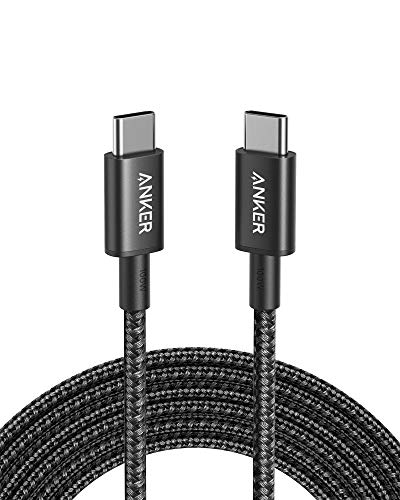
Anker USB-C Cable 100W 10ft — USB-C Alternative
Read the connector twice before ordering: this cable is USB-C at the device end, not micro-USB, and it will not fit a Kindle from 2019 or a DualShock 4 no matter how good it is. It earns its place in a micro-USB guide because most households hunting ten-foot cables own a blend of old and new gear, and the new half — recent phones, tablets, laptops, a Switch, modern controllers — deserves the same reach across the room. Including it openly, labelled as the different standard it is, beats pretending micro-USB still covers a whole home.
As a USB-C cable it is built to a far higher ceiling than anything else here: the 100W rating means the same ten-foot cord that tops up a phone can also feed a USB-C laptop at full working pace, something micro-USB could never attempt. Anker’s braided jacket and chunky, well-moulded plugs suit a cable that will be coiled for travel one week and stretched across a hotel room the next. Ten feet at this capacity removes the classic travel compromise where the long cable is the weak cable.
Think of this pick as the forward-looking half of a two-cable purchase. The micro-USB packs above keep yesterday’s devices alive; this cord covers everything bought since roughly 2020 and everything you will buy next. Households often discover their “micro-USB problem” is really one controller and one e-reader, while the phones everyone actually charges nightly already speak USB-C. If that sounds like your drawer, weighting the budget toward this cable and one modest micro-USB pack is the honest solution.
- Length: 10 ft, single cable
- Connector: USB-C to USB-C — not micro-USB
- Power ceiling: rated for up to 100W USB-C charging
- Jacket: braided nylon with moulded plugs
- Typical duties: modern phones, tablets, USB-C laptops, Switch, new controllers
- Role in this guide: the clearly labelled different-standard option
Strengths
- One long cord can charge a laptop, then a phone, without swapping cables.
- Anker’s plug moulding and braid tolerate travel and daily coiling well.
- Future-proof reach for the devices your household will buy next.
Trade-offs
- Physically incompatible with every micro-USB device in this guide.
- Needs a USB-C charger at the wall end to show its full ability.
- Overqualified — and priced accordingly — if only old accessories remain.
Best for: a mixed household whose phones and laptop already use USB-C while a couple of micro-USB veterans linger. Not suited for: anyone shopping strictly for a Kindle, DualShock 4 or other micro-USB-only device — choose any pick above instead.
Monoprice Select Series Micro USB Cable 10ft — Prose-Only Pick
Monoprice built its name selling plainly specified cables without retail theatre, and its ten-foot micro-USB cord follows that script: standard connectors, sensible jacket, a length that reaches across a room, and a spec sheet that reads like an engineer’s note rather than an advert. We are covering it in prose only, because our checked pool for this guide did not contain a verified listing we could link with confidence — availability for this exact length and series drifts between sellers, and a wrong link would send you to a different cable than the one described.
The appeal is the absence of surprises. Owners who run these to a printer shelf, a 3D-printer controller or an older tablet describe a cable that behaves like the short cord it replaced, only longer — which, at ten feet, is the compliment that matters. The plugs follow the reference shape closely, so fit in recessed ports, like those on some e-readers and game controllers, tends to be better than with oversized designer housings. If your device wears a case with a narrow charging cut-out, a standard-profile plug is often the difference between charging through the case and removing it nightly.
Track it down through Monoprice’s own store or a marketplace search on the exact series name, and confirm the listing says ten feet and micro-USB rather than the similar mini-USB variant that still circulates. Because we could not verify a listing in the pool, there is deliberately no purchase link attached to this pick; the description stands so you can judge the cable on its merits if you encounter it while comparing the linked packs above.
- Length: 10 ft, single cable
- Connector: USB-A to micro-USB (micro-B)
- Jacket: standard PVC, reference-profile plugs
- Data: charging plus sync for legacy devices
- Typical duties: printers, 3D-printer boards, e-readers in cases
- Coverage style: described without a link in this guide
Strengths
- Reference-size plugs fit recessed ports and narrow case cut-outs gracefully.
- Plain specification culture means the cable matches its description closely.
- Behaves like a short cord stretched, which is ideal for fixed installations.
Trade-offs
- Finding the exact series and length in stock takes a little hunting.
- No multi-pack option to mirror the room-by-room strategy of rivals.
- Utilitarian looks will not win over anyone dressing a tidy desk setup.
Best for: an e-reader in a chunky case or a printer-shelf device whose recessed port rejects fat designer plugs. Not suited for: shoppers who want to click once and be done, since the linked packs above are simpler to source.
Comparison
| Pick | Connector | Count | Jacket | Headline strength |
|---|---|---|---|---|
| Oillgle 10ft 3-Pack | Micro-USB | 3 | PVC | Even quality across three room-ready cords |
| Braided 10ft 3-Pack | Micro-USB | 3 | Nylon braid | Survives casters, pets and rough routing |
| Micro USB 10ft 2-Pack | Micro-USB | 2 | PVC | Matched pair for bed and sofa stations |
| Superer 10ft | Micro-USB | 1 | PVC | Steady always-on power for cameras and Pi |
| Anker 100W 10ft | USB-C | 1 | Braided | Laptop-grade capacity at full length |
| Monoprice Select 10ft | Micro-USB | 1 | PVC | Slim plugs for recessed ports and cases |
Why Does a Ten-Foot Micro-USB Cable Charge More Slowly?
Electricity loses a little energy travelling through copper, and the loss grows with distance and shrinks with thicker wire. Micro-USB devices typically charge at modest currents, so the drop across ten feet of decent cable is small — minutes over a full charge. Trouble starts with bargain cords that use hair-thin conductors to save cost: the voltage arriving at the device sags, the device protects itself by drawing less current, and an overnight charge becomes a two-day embarrassment. That is why this guide keeps returning to conductor quality rather than headline claims; at this length, copper is destiny.
Chargers complicate the picture. A wall adapter rated generously can push a little harder against cable resistance, which is why the same cord may behave better on a proper adapter than on a laptop’s sleepy USB port. If a device charges slowly on a long cable, test it on the short original cord before blaming the device, then test the long cord on a stronger adapter before blaming the cable. Methodical swapping isolates the weak link in minutes and saves needless returns.
Which Devices Still Deserve a Dedicated Long Micro-USB Cable?
Game controllers top the list, because a DualShock 4 tethered by a three-foot cord turns a sofa into a front-row seat whether you want it or not. E-readers follow: a Kindle read in bed deserves a cable that reaches the pillow without the device hanging off the mattress edge. Bluetooth speakers in kitchens, older tablets handed down to children, dash cams, baby monitors, and the small army of Raspberry Pi projects all share the same geometry — the device lives where life happens, and the outlet lives wherever the electrician found convenient in 1998.
Security cameras deserve a special mention because their placement is dictated by sightlines, not sockets. A camera that must watch a door will sit on a high shelf or above a cabinet, and a ten-foot cord is often the difference between a tidy run along the wall trim and an extension lead draped across the room. For those fixed installs, buy the cable for the route — up the wall, across the shelf, down to the outlet — and measure that route with string before ordering, since a cord that falls a foot short of a camera is just an ornament.
How Do You Make a Long Cable Last?
Unplug by gripping the plug body, never by hauling the cable; the wires inside a micro-USB cord are soldered to a small connector that tolerates pulling poorly. Give the first few inches at each end a gentle curve rather than a sharp fold, especially where the cord leaves a controller or drops off a shelf edge. If a run crosses a walkway, a cheap cable channel or a rug beats bare floor traffic, and routing along skirting with clips keeps the cord out of the vacuum cleaner’s ambitions.
Storage shapes lifespan too. Coil spares in a loose loop roughly the size of a dinner plate and secure them with a fabric tie; tight wraps around the plug strain the same joint that fails in service. Keep a spare from each multi-pack unopened if you can — the day a plug finally loosens, usually mid-evening before a work trip, the drawer spare turns a small crisis into a shrug. Finally, retire cords whose plugs feel gritty or whose jackets have split near the neck; a damaged cable nursing an always-on camera is a risk out of proportion to a replacement’s cost.
What Should You Check Before Ordering a Long Micro-USB Cable?
Start at the device end, literally: photograph the port on your gadget and compare its shape with the listing image. Micro-USB is the flat, slightly trapezoidal connector with two small hooks; mini-USB is taller and more rectangular, and confusing them wastes a week on returns. Next, confirm the cable carries data lines if you ever sync the device — a minority of bargain long cords are wired for power only, which is fine for a camera but useless for moving photos off an old phone. Listings that stay silent about data usually have something to hide.
Then walk the route with a tape measure or a piece of string. Note every climb, corner and drop: up the back of the nightstand, across the headboard, down to the socket. Add a foot of slack for the gentle curves a cable needs at both ends, because a cord stretched drum-tight transfers every accidental tug straight into the device port. If your route lands between sizes, the ten-foot picks here give you the slack to coil the surplus neatly behind furniture rather than discovering at midnight that nine feet would have done and eleven was fantasy.
Finally, think about the wall end. Most long micro-USB runs terminate at a USB-A adapter, and that adapter’s quality caps the whole chain. A tired adapter from a phone bought in 2016 may deliver so little that even the best cable looks lazy. Pairing a fresh cord with a respectable adapter — nothing exotic, just a sound unit from a known maker — is the cheapest performance upgrade in this entire category, and it explains why the same cable can feel transformed when moved from a TV’s USB socket to a proper wall charger.
How Do Long Cables Behave With Older Tablets and Hand-Me-Down Phones?
Children inheriting a parent’s old tablet create the sternest test in this category: a large battery, a worn charging port, and a user who expects the device to work at bedtime regardless of physics. A ten-foot cord lets the tablet live on the bed for stories and videos while staying plugged in, which quietly solves the flat-by-morning problem that plagues hand-me-downs. Expect the charge percentage to climb slowly during use and briskly once the screen sleeps; that pattern is normal for micro-USB hardware and not a sign of a faulty cable.
Port wear deserves respect here. A tablet that has survived years of small hands often has a socket that grips loosely, and the weight of a long cable hanging off the edge of a bed can walk the plug out millimetre by millimetre. Route the cord so its weight rests on the mattress or a bedside clip rather than dangling, and teach young users to push the plug home until the little hooks click. If a particular device only charges at one mysterious angle, the port — not the cable — has usually reached the end of its life, and a repair quote will tell you whether the tablet’s remaining years justify it.
Battery health also shapes expectations. An ageing tablet battery may report full, then shed charge quickly in the first half hour of use; a long cable masks that decline gracefully by keeping the device tethered during stationary use. For homework desks and kitchen counters where the tablet barely travels, a permanent ten-foot tether effectively converts a fading portable into a reliable fixture, which is often the smartest outcome short of buying new hardware.
What Happens Inside a Micro-USB Plug as It Ages?
Understanding the failure mode helps you spot a dying cable before it strands a device. Inside the flat metal shell of a micro-USB plug sit five tiny contacts and, on the outside, two spring hooks that bite into the port to hold everything in place. Those hooks do the mechanical work of the connection, and they are the first casualties of daily use: each insertion flexes them slightly, each sideways yank flexes them a lot, and after hundreds of cycles they sit a fraction lower than they should. The plug still enters the port, still looks connected, yet the grip has gone soft enough that the cable’s own weight can break contact overnight.
The second failure hides where the cable meets the plug. Conductors inside are soldered to small pads, then the whole joint is buried in moulded plastic. Repeated bending concentrates stress at the exact point where flexible cable becomes rigid housing, and individual strands begin snapping one by one. A cable in that condition often works when held in one position and fails when the device shifts — the maddening intermittent fault that owners blame on the gadget. Flex the first inch of any suspect cord gently while a device charges; if the charging icon flickers, the joint is already breaking down and replacement is a matter of weeks, not months.
Heat tells the third story. A plug that grows noticeably warm during an ordinary charge is announcing resistance where there should be none — oxidised contacts, a strand or two carrying current meant for five, or debris packed into the port. Warmth at the device end of a micro-USB cable is never a personality trait; unplug, inspect both plug and port with a torch, clear lint with a wooden toothpick, and retire the cable if the warmth returns on a clean port. These small inspections take a minute and routinely rescue devices that seemed destined for the recycling bin.
How Do You Set Up Three Charging Stations That Stay Tidy?
A charging station earns the name when the cable is already there, at hand height, when the device arrives — not coiled in a drawer two rooms away. Start by choosing the outlet nearest to where the device naturally rests, then let the ten-foot cord absorb the remaining distance along walls and furniture edges rather than across open floor. A couple of adhesive clips along the skirting and one at the furniture edge nearest the user keep the run invisible and the plug parked within reach. The goal is a cable you notice only by its absence of annoyance.
At the sofa station, anchor the last two feet so the plug rests on the arm or in a small tray instead of sliding to the floorboards every time it is released. Controllers return to the same spot nightly, so a plug that stays put becomes part of the furniture within a week. At the bedside, route the cord behind the nightstand and bring it up beside the lamp; an e-reader charged there every night never migrates to a kitchen counter and never dies mid-chapter. In the kitchen, keep the speaker’s cord off the worktop entirely — up from a low socket, along the underside of a cabinet, and down only for the final inches.
Label the stations if several people share the house, not with anything elaborate, just a small tag or a coloured tie near each plug. It sounds fussy until the first time a guest unplugs the camera’s carefully routed cord to charge a phone and the “spare” cable concept collapses. Stations that everyone understands survive guests, cleaners and teenagers; stations held together by one person’s memory get dismantled by Friday. The multi-packs in this guide map neatly onto this system, one cord per station, with the pack’s consistency making each station behave like the others.
When Is a Shorter Cable Actually the Better Buy?
Honesty requires admitting that ten feet is sometimes the wrong answer. A desk where the device sits eighteen inches from a hub gains nothing from a long cord except a nest of surplus cable gathering dust behind the monitor; a three-foot lead is tidier and electrically happier there. Travel is the other exception — hotel rooms reward a mid-length cable that reaches the bedside socket without trailing across the floor to trip a barefoot traveller at 3 a.m. The ten-foot picks shine in fixed domestic geometry, where the route is measured once and the cable then disappears into the room’s routine.
Charging speed draws a boundary too. If your routine involves rescuing a nearly flat older phone in the twenty minutes before leaving, the shortest quality cable you own will always beat a long one, because every foot of conductor takes its small toll. Keep one short cord by the door for emergencies and let the long cables handle the unhurried overnight work they are built for. Households that assign each cable a role — sprinter by the door, marathoners by the bed and sofa — stop blaming good cables for jobs they were never shaped to do.
There is also a storage argument. Long cables stored badly become the tangled drawer that everyone hates, and a household that will not coil a cord loosely and tie it should buy fewer, shorter cables and more wall adapters near the devices instead. The cheapest charging upgrade in many homes is not a longer cable at all; it is a second adapter placed where life actually happens, shrinking every route until even a modest cord reaches. Judge your rooms honestly, then buy the length — or the adapter — that your habits will respect.
How Should You Troubleshoot a Device That Charges Slowly on a Long Cable?
Work from the wall outward and change one thing at a time. First, move the same cable and device to the adapter that charged the device when it was new, or the strongest sound adapter in the house; a surprising share of “bad cables” are innocent cords fed by exhausted adapters. Second, swap in the shortest cable available while keeping that adapter. If speed returns, the long run or its conductors are the bottleneck and one of the sturdier packs above is the fix. If speed stays poor, the device or its port is at fault, and no cable purchase will rescue it.
Clean the port before condemning anything. Pocket lint compacts at the back of a micro-USB socket until the plug can no longer seat fully, and the resulting half-connection charges slowly, drops out when the device moves, and mimics cable failure perfectly. Power the device down, then tease the lint out with a wooden toothpick or a plastic spudger — never a metal pin, which can short contacts and bend the tiny tongue inside. Owners routinely recover full-speed charging from a phone they were about to replace, using nothing but patience and a toothpick.
Finally, watch the first ten minutes rather than the last. A healthy setup shows the battery percentage climbing steadily from the moment the screen sleeps; a struggling one hovers, or the device reports charging while the percentage stands still because incoming power barely covers the cost of staying alive. Note which combination of adapter, cable and device produces the steady climb, then standardise on it for that station. Troubleshooting feels tedious for an evening and then quietly organises your household’s charging for years, which is a fair trade by any measure.
Common Mistakes
Buying mini-USB by accident remains the classic blunder: the older mini connector looks similar in thumbnail photos, fits nothing made in the last decade, and still circulates in bargain listings. Check the listing text for the exact words micro-USB before ordering. A second mistake is judging a cable by its first evening — most long cords charge fine when new; the weak ones reveal themselves through plugs that loosen after a month of daily use, which is why owner reports about fit after time matter more than unboxing impressions.
Expecting micro-USB to fast-charge modern phones is another category error. The connector and its typical circuitry belong to a gentler era; a big phone will accept charge slowly and may even lose ground while gaming. Match the cable to the device generation instead of hoping length plus optimism equals speed. People also daisy-chain long cables with couplers or run them through cheap unpowered hubs, stacking resistance until a Pi or camera malfunctions in ways that look like software faults. One continuous cord, one decent adapter, no improvisation in between — that discipline prevents most mysteries.
Lastly, shoppers measure the straight line from outlet to device and order exactly that length, forgetting the cord must climb a headboard, round a sofa arm and droop to the port. Ten feet sounds endless until furniture takes its share. Measure the real path, then let the surplus coil loosely behind the furniture where nobody sees it.
Final Recommendation
Start with the Oillgle three-pack if your home matches the common pattern of a controller by the sofa, an e-reader by the bed and a speaker in the kitchen; it covers all three stations, charges each device at the pace micro-USB honestly allows, and leaves you equipped when a plug eventually tires. Choose the braided three-pack instead when the cables will live on the floor among chair wheels and pets. Pick the Superer single for a camera or Pi that must simply never blink, and add the Anker USB-C cord when half your drawer has already moved to the newer connector. The Monoprice remains a worthy hunt for anyone fighting a recessed port. Long cables are humble purchases, yet the right ten feet of copper quietly removes a daily friction from every room it serves — and that is the whole point of buying them well.
A closing thought on expectations: none of these cables will make a micro-USB device feel modern, and that is fine. The connector belongs to hardware that still does its job — controllers that still play, e-readers that still read, cameras that still watch the door. What a well-chosen ten-foot cord restores is convenience, the sense that the device lives where you want it rather than where the nearest socket dictates. Buy for the rooms and routes you actually have, keep one spare in the drawer, and the oldest gadgets in the house will keep earning their shelf space without complaint.
Frequently Asked Questions
Will a 10-foot micro-USB cable charge my old Android phone overnight?
Yes, comfortably. Overnight charging forgives the small voltage drop of a long cable, because the phone has hours to sip at a modest rate. Problems appear only with extremely thin bargain cords or when you expect a rapid top-up before leaving the house; for speed, use the shortest decent cable you own and a capable wall adapter.
Can these cables transfer data, or are they charge-only?
The micro-USB picks here carry data lines as well, so syncing an older phone, moving photos from a camera-era device, or flashing a Pi accessory works over them. Transfer speeds follow the old USB 2.0 standard, which is fine for documents and photos and merely patient for large video files.
Why does my Raspberry Pi show under-voltage warnings on a long cable?
The Pi is unusually sensitive to voltage sag, and a long or thin cable plus a weak adapter drops the supply below its comfort line under load. Use the steadiest cord you have — the Superer pick above was chosen with this duty in mind — pair it with a proper adapter rather than a TV’s USB port, and keep the run free of hubs or couplers.
Is it safe to leave a ten-foot cable plugged into a camera permanently?
A sound cable on a sound adapter is designed for continuous duty, and cameras draw modest power. Inspect the run occasionally for pinched sections, split jackets or a plug that has grown loose, and replace the cord at the first sign of damage rather than taping over it. Avoid burying a cable under a rug where foot traffic grinds it daily.
Does cable length affect a DualShock 4 while playing and charging?
The controller draws little power, so a ten-foot cord keeps it topped up during play without the tugging a short lead causes. Sit anywhere on the sofa, route the cable over the arm rather than under a cushion, and the plug will survive far longer than one bent sharply every session.
Should I replace all my micro-USB cables with USB-C and adapters?
Adapters add a failure point and a small lump that stresses old ports, so devices that will stay micro-USB for years — controllers, e-readers, cameras — are better served by proper micro-USB cables like the packs above. Reserve USB-C, including the Anker pick, for devices that natively use it.
Can I run a ten-foot micro-USB cable behind a wall or under carpet?
Behind-wall runs belong to rated in-wall wiring and local codes, not to loose USB cords, so keep these cables in the room where you can see and reach them. Under a rug is legal but unkind: grit works into the jacket and foot traffic flattens the conductors over time. A surface cable channel along the skirting achieves the tidy look without grinding the cord, and it leaves the cable replaceable in minutes when a plug eventually wears.
Why do some long cables charge my controller but not my tablet?
Controllers sip power; tablets gulp it. A cord with thin conductors can satisfy a DualShock 4 while starving a large tablet, whose charging circuit responds to the voltage sag by throttling down or refusing to show a charging icon at all. That split behaviour is the classic fingerprint of conductor quality, and it is why this guide favours packs with a reputation for consistency over the absolute cheapest long cords on the shelf.
How many spare long cables should a household keep?
One spare covers most homes, because failures announce themselves at the plug and a single backup restores the busiest station while a replacement ships. Multi-packs build that spare into the purchase, which is part of their quiet value. Households running a camera or a Pi on a long cord should keep the spare genuinely spare — coiled, tied, and not borrowed for a weekend trip — so the always-on device is never left depending on a cable that is halfway across town in a suitcase.
Do ten-foot cables wear out faster than short ones?
Length itself is not the enemy; handling is. A long cable gets stepped on, dragged around corners and coiled for storage more often than a short desk cord, and each of those habits attacks the plug joint and jacket. Routed once along a wall and left alone, a ten-foot cable can outlast a short cord that is plugged and unplugged twice a day. The packs in this guide lean into that reality: their value is not just reach, but the fact that a cord installed in one room stays there, untouched, instead of travelling around the house collecting damage. Treat a long cable as a semi-permanent fitting and it will repay you like one.
Related Guides
Keep exploring cable and charging topics in our companion roundups: best 65 watt USB-C chargers, best 5 port chargers and best affordable fast wireless chargers.
Related guide: Best Hand Crank Chargers
Related guide: Best Home Level 2 EV Chargers
Related guide: Best Tesla Chargers
Related guides
- Best 3.0 Qualcomm Quick Chargers: QC 3.0 Adapters That Still Earn Their Outlet
- Best Time Machine Compatible Hard Drives: Mac-Ready and Reformatted Picks
- Best 3D Mechanical Engineering Laptops: Certified Workstations for CAD and Simulation
- Best Tattoo Printers: Thermal Stencil Machines for Clean, Lasting Transfers



[…] long off-grid week — using our guides to the best 20 dollar portable chargers for everyday carry, the best 65 watt USB-C chargers for wall-speed refills, and the best 12 volt solar chargers for off-grid […]