What's inside
- Key Takeaways
- Quick Picks
- How We Chose These Picks
- Comparison
- What Is LCoS, and Why Do Only Two Brand Names Appear Here?
- Why Is There No Budget LCoS Projector?
- How Should You Choose Between D-ILA and SXRD?
- What Room Does an LCoS Projector Require?
- How Do Lamp and Laser Ownership Differ Across a Decade?
- How Does Calibration Change an LCoS Picture?
- What Screen Pairs Honestly With LCoS Contrast?
- How Long Does an LCoS Installation Stay Current?
- Should a First Cinema Room Start With LCoS or Grow Toward It?
- What Should a Buyer Verify on the Listing at This Tier?
- Common Mistakes
- Final Recommendation
- Frequently Asked Questions
- Related Guides
As an Amazon Associate I earn from qualifying purchases. This post may contain affiliate links at no extra cost to you.
widgetverdict.com is reader-supported. When you buy through links on our site, we may earn an affiliate commission.
Two brand names guard the door to the best lcos projectors, and neither of them is the technology’s own name. JVC calls its version D-ILA and Sony calls its version SXRD, but both are implementations of LCoS — liquid crystal on silicon — a reflective panel technology prized in home cinema for deep contrast and film-like images. Shoppers who search only for the acronym miss half the shelf, so this guide gathers all six verified machines under the family name and teaches the aliases as it goes.
A second truth belongs in the opening paragraphs, stated without softening: this class has no budget tier. LCoS lives exclusively in the premium end of home projection, in dedicated rooms with treated walls, proper screens and owners who measure their seating distances. Anyone hoping this guide will eventually reveal an affordable LCoS projector should stop hoping now and finish this page as an education instead — the six machines below, three from JVC and three from Sony, are what the technology costs when it is done properly.
What the premium buys is contrast behaviour. Reflective LCoS panels are celebrated for native contrast — the depth of black a projector achieves without assistance — and for images that film lovers describe as organic rather than digital. The titles below support that reputation unevenly: one JVC prints a native contrast figure outright, others lean on HDR systems and processing names, and this guide credits each machine only with what its own title claims, because at this tier a buyer deserves the same precision the engineers applied.
Light divides the six into a lamp of one and a laser majority. The JVC NP5 is the lamp-lit model; the NZ7, the NZ500 and all three Sonys carry laser in their titles. That division shapes ownership more than any other in the guide — lamp changes and gradual dimming on one side, long steady output on the other — and the reviews keep it visible beside the contrast story rather than underneath it.
Key Takeaways
- D-ILA and SXRD are both LCoS: JVC’s three picks use D-ILA panels and Sony’s three use SXRD panels, one technology under two badges.
- There is no affordable LCoS tier — all six picks are premium dedicated-room machines, and this guide says so rather than hunting for a bargain that does not exist.
- The JVC DLA-NZ500 prints the guide’s only native contrast figure in its title: 40,000 to one, beside 2,000 lumens of laser light.
- The JVC DLA-NP5 is the sole lamp-lit pick; the NZ7, NZ500 and all three Sonys are laser models per their titles.
- The NZ7 adds 8K e-Shift processing to a native 4K panel and is marked discontinued in its own title — a fact buyers must weigh.
- Sony’s line runs from the XW5000ES through the BRAVIA Projector 7 to the XW6000ES, all native 4K SXRD laser machines.
Quick Picks
| Pick | Badge | Why it earns its place |
|---|---|---|
| JVC DLA-NP5 D-ILA Projector | The lamp-lit D-ILA entry to LCoS | A 4K HDR D-ILA projector at a stated 1,900 lumens with a 65mm all-glass lens, low latency mode and HDR10+. |
| JVC DLA-NZ7 D-ILA Laser Projector | Laser D-ILA with 8K e-Shift | A 2,200-lumen laser D-ILA machine with native 4K, 8K e-Shift, Frame Adapt HDR and 8K60/4K120 support — marked discontinued. |
| JVC DLA-NZ500 Native 4K Laser Projector | The native contrast statement | A native 4K laser projector stating 2,000 lumens and a 40,000 to one native contrast figure in its title. |
| Sony VPL-XW6000ES 4K Laser (Black) | The upper Sony SXRD statement | A 4K HDR laser home theatre projector with a native 4K SXRD panel, positioned above its XW5000ES sibling. |
| Sony VPL-XW5000ES | The Sony LCoS starting point | A 4K HDR laser projector with a native 4K SXRD panel — the entry to Sony’s LCoS line in this guide. |
| Sony BRAVIA Projector 7 | The BRAVIA-named SXRD model | A 4K HDR laser projector with a native 4K SXRD panel, carrying Sony’s BRAVIA name as the VPL-XW5100ES. |
How We Chose These Picks
Panel technology was the entry ticket, verified by name. A candidate had to carry D-ILA or SXRD in its title — the two living dialects of LCoS — because a guide to this technology that admitted other panel types would be lying in its headline. That single rule produced a shelf of exactly two makers, and the guide presents that duopoly as a fact of the technology’s economics rather than as a failure of searching: LCoS panels are costly to make, and only JVC and Sony currently make projectors from them at this level.
Within the family, light source drew the next line. Laser models were credited with the ownership pattern laser provides — steady output across long service without lamp purchases — while the NP5’s lamp was treated neither as a disqualification nor as a detail to hide. Dedicated-room buyers often accept a lamp in exchange for the NP5’s position as the family’s most accessible machine, and the review argues that trade openly.
Stated figures were honoured exactly where titles print them. The NZ500’s native contrast figure and the JVC brightness figures — 1,900, 2,200 and 2,000 lumens across the trio — appear in the reviews as title claims. Sony’s three titles print no brightness or contrast figures at all, so none are claimed for the Sonys anywhere in this guide; their reviews argue from panel, light source and line position instead, and their spec lists record the silence in the guide’s standard wording.
Gaming and HDR systems were read literally from the titles that name them. The NP5 claims a low latency mode, 4K/120P-compatible inputs and HDR10+; the NZ7 claims Frame Adapt HDR, HDR10+ and 8K60/4K120 support. The Sonys claim 4K HDR without narrower format names in these titles, and the guide leaves their HDR credit at exactly that width rather than borrowing format lists from sibling models or other regions.
Finally, the NZ7’s discontinued marking was treated as information, not as an exclusion. A discontinued flagship can be a rational purchase for a buyer who understands parts, support and resale implications, and an irrational one for a buyer who does not. The review states the marking plainly and lets the reader’s circumstances decide, which is the only honest way to handle a fact printed in a product’s own name.

JVC DLA-NP5 D-ILA Projector — The lamp-lit D-ILA entry to LCoS
Every premium family needs a door, and in LCoS the NP5 is it: the most accessible way into D-ILA ownership, lamp-lit where its siblings burn laser, and specified with a seriousness that keeps it in the family conversation rather than beneath it. Its title states 1,900 lumens of high brightness, a 65mm all-glass lens, HDR10+, two HDMI inputs with HDCP 2.3 that accept 4K at 120P, and a low latency mode aimed at gaming — a specification that reads as a cinema projector which has also been introduced to a console.
The all-glass lens deserves the emphasis JVC gives it. At this tier, optics are not plumbing; the lens decides how much of the panel’s contrast and detail survives the journey to the screen, and a 65mm all-glass element signals that JVC spent money where film lovers would tell them to spend it. Owners of dedicated rooms, who will marry this machine to a good screen for a decade, benefit from that priority every single evening.
Lamp ownership is the trade to weigh with open eyes. A lamp dims gradually across its life and eventually asks for replacement, which inserts a recurring cost and a recurring ritual into ownership that the laser picks below abolish. In exchange, the NP5’s buyer enters LCoS at the family’s ground floor and gains a machine whose brightness in its early years fully serves a treated room. Households that project a few evenings a week often find the lamp’s calendar stretches comfortably across years.
Gaming’s presence in this title surprises buyers who file LCoS under cinema only, and it is genuinely useful breadth. A low latency mode and inputs that accept 4K at 120P mean the dedicated room’s projector can host a console without apology, even though the room was built for films. The NP5 will not be bought by competitive players — nothing in this guide will — but a household whose cinema room doubles as its gaming room gains a single-machine answer.
HDR10+ support completes a title aimed at film collectors with modern libraries. Dynamic metadata formats reward exactly the dark, contrast-led scenes where D-ILA panels justify their reputation, so the pairing of panel and format is more than a checklist coincidence. Feed the NP5 the best sources available, in a room dark enough to honour its blacks, and it demonstrates within one film why LCoS has no budget tier: the technology’s virtues are inseparable from its costs.
Buy the NP5 as a deliberate first step into the family, not as a compromise to apologise for. Its lamp is a known quantity with a known ritual, its lens and inputs are thoroughly modern, and its panel is the same D-ILA technology the flagships above it are built around. Rooms that later graduate to laser will do so having learned, on this machine, exactly what LCoS contrast does to a favourite film.
- Panel: D-ILA (JVC’s LCoS implementation)
- Brightness: 1900 lumens stated in title
- Light source: lamp — the only lamp pick here
- Lens: 65mm all-glass lens stated
- Inputs: 2 HDMI, HDCP 2.3, 4K/120P compatible
- HDR: HDR10+ named; low latency mode stated
Strengths
- Most accessible door into D-ILA ownership
- All-glass 65mm lens honours the panel
- Low latency mode and 4K/120P inputs
Trade-offs
- Lamp dims and eventually needs replacing
- Lowest stated brightness in the JVC trio
- Premium tier despite its entry position
Best for: a treated cinema room taking its first step into LCoS with films and some gaming.
Not suited for: a buyer who wants laser’s lamp-free decade and will resent the first lamp change.
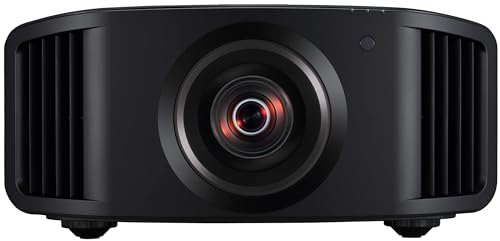
JVC DLA-NZ7 D-ILA Laser Projector — Laser D-ILA with 8K e-Shift
The NZ7’s title contains the guide’s most consequential parenthesis: discontinued. Hold that fact in one hand while weighing everything else the title offers — D-ILA laser light at 2,200 lumens, a native 4K panel with 8K e-Shift technology, Frame Adapt HDR, HDR10+, and inputs supporting 8K at 60P and 4K at 120P — because this machine is simultaneously one of the most capable projectors in the guide and a product its maker has retired. Both facts are true, and the right buyer for it is the one who can hold both without flinching.
8K e-Shift needs its customary precise reading. The panel is native 4K, per the same title, and e-Shift processing shifts that image to present detail toward an 8K-class presentation, accepting 8K signals at 60P in the process. Buyers should not mistake the phrase for a native 8K panel, and this guide never does. What e-Shift genuinely offers is refinement headroom: the most detailed sources available, handled by a pipeline built to honour them, on a screen large enough to reveal the work.
Frame Adapt HDR is JVC’s frame-by-frame tone mapping system, named in the title, and it addresses the projector HDR problem at its root. Projectors cannot reach television peak brightness, so how intelligently each frame’s brightness range is mapped decides whether HDR content looks majestic or merely bright. A system that adapts frame by frame, on a panel with LCoS native contrast underneath it, is the enthusiast’s argument for this machine in a single phrase.
Laser light at a stated 2,200 lumens — the brightest JVC figure in this guide — suits the dedicated rooms these machines inhabit, where darkness is a design feature and contrast outranks raw output. Long, steady laser service also suits the buyer of a discontinued model in one specific way: the light source most likely to need attention across a decade is the one engineered to need the least, which softens the support question the parenthesis raises.
That question still deserves direct treatment. A discontinued flagship asks its buyer to think about parts availability, service familiarity and resale with more care than a current model does, and to confirm the listing’s warranty position before ordering rather than after. Buyers who do that homework gain a machine whose capabilities remain formidable by any current standard. Buyers who skip it are purchasing a parenthesis they have not read.
Positioned honestly, the NZ7 is the connoisseur’s gamble in this guide: yesterday’s flagship specification, complete with the family’s most ambitious processing, offered to buyers grown-up enough to price its retirement into the decision. The NP5 below it in spirit is the cautious door; the NZ500 beside it is the current, contrast-stated alternative; the NZ7 is the machine for the reader who has compared all three and chosen capability with open eyes.
- Panel: D-ILA (JVC’s LCoS implementation)
- Brightness: 2200 lumens stated in title
- Light source: laser stated
- Picture: native 4K with 8K e-Shift technology
- HDR: Frame Adapt HDR and HDR10+ named
- Status: discontinued, per its own title
Strengths
- Brightest stated figure among the JVC trio
- Frame Adapt HDR works frame by frame
- 8K60 and 4K120 input support stated
Trade-offs
- Discontinued — support homework is essential
- e-Shift is processing, not a native 8K panel
- Flagship commitment for a retired model
Best for: a connoisseur who prices the discontinued status honestly and wants Frame Adapt HDR with laser light.
Not suited for: a buyer who needs a current model’s uncomplicated support and resale story.

JVC DLA-NZ500 Native 4K Laser Projector — The native contrast statement
Brevity can be a form of confidence, and the NZ500’s title is the shortest in this guide: native 4K laser projector, 2,000 lumens, and a native contrast figure of forty thousand to one. That last number is the guide’s only stated native contrast, and its presence in the title tells a buyer exactly which conversation JVC wants to have. Not dynamic contrast, not processing-assisted contrast — native, the panel’s own depth, printed where a sceptical enthusiast can hold the maker to it.
Native contrast is the specification LCoS exists to win. It describes the distance between the darkest black and the brightest white the panel itself can hold, and it governs the scenes film lovers use as evidence: a candlelit face, a night street, a spaceship’s hull against space that is actually black rather than charcoal. A maker printing a native figure in a product name is inviting measurement, and in a class where rivals print no contrast figure at all — the three Sonys below are silent on it — the invitation itself is information.
Laser light at a stated 2,000 lumens completes a specification aimed squarely at the treated room. In darkness, two thousand lumens across a cinema-sized screen is ample working light, and the laser’s steadiness means the picture calibrated in the first month is the picture still being shown years later, with no lamp’s slow dimming quietly rewriting the room’s blacks in the meantime. For owners who calibrate carefully and then simply watch, that stability is the luxury they actually bought.
The title’s restraint cuts both ways, and the review should say so. No HDR format is named, no gaming figure is printed, no lens is described — so this guide credits the NZ500 with none of those specifics, and buyers whose libraries or consoles depend on a named format should confirm the details on the listing. What the title does claim, it claims in the currency this class respects most: panel, light, output and native contrast.
Against its JVC siblings the positioning is clean. The NP5 is the lamp-lit door with gaming breadth; the NZ7 is the discontinued processing flagship; the NZ500 is the current, purist’s machine, arguing that contrast stated honestly outranks features listed exhaustively. Dedicated-room buyers who nod at that argument will find this the easiest JVC to choose, precisely because its title refuses to sell them anything else.
Rooms considering the NZ500 should be honest about their darkness. Native contrast is a gift that ambient light spends ruthlessly: a grey room with white walls and a window will tax this machine’s blacks back toward ordinary, wasting the one figure its buyer paid to obtain. Treat the room — dark surfaces near the screen, controlled light, a proper surface — and the NZ500’s printed promise becomes the picture on the wall.
- Panel: D-ILA (JVC’s LCoS implementation)
- Contrast: 40,000 to one native, stated in title
- Brightness: 2000 lumens stated (2000lm)
- Light source: laser stated
- Picture: native 4K stated
- HDR format: Not stated in the listing title — verify with the manufacturer documentation
Strengths
- Only stated native contrast figure here
- Laser steadiness protects calibrated blacks
- Purist specification without checklist padding
Trade-offs
- No HDR format named in its title
- No gaming figures printed in its title
- Demands a treated room to honour its contrast
Best for: a dark, treated cinema room whose owner shops by native contrast before all else.
Not suited for: a bright multi-purpose room where ambient light would spend its contrast advantage nightly.

Sony VPL-XW6000ES 4K Laser (Black) — The upper Sony SXRD statement
Sony’s corner of the LCoS world speaks SXRD, and the XW6000ES is its upper statement in this guide: a 4K HDR laser home theatre projector built on a native 4K SXRD panel, finished in black. Its title is as restrained as the NZ500’s, printing no brightness figure and no contrast number, so this review claims neither and argues instead from the three facts Sony does print — panel, laser, and position within a line whose naming tells an informed buyer where the machine sits.
Line position is real information at this tier. The XW6000ES stands above the XW5000ES reviewed below, in a family where each step purchases refinement in the systems around the panel — processing, optics and light — even when a compressed title declines to itemise them. Buyers comparing the two Sonys should read the listings side by side for the itemised differences, because the titles alone establish the order without enumerating its contents, and this guide will not invent an enumeration.
Native 4K SXRD is the shared foundation, and it deserves the same respect given to D-ILA across the page. Sony’s LCoS implementation has its own long cinema lineage, and its character — like JVC’s — is contrast-led and film-first. Households choosing between the houses are choosing between two mature interpretations of one technology, a decision that demonstration rooms and personal loyalty have settled for years and that no honest guide settles by slogan.
Laser light places the XW6000ES in the ownership pattern this guide has described throughout: steady output, no lamp ledger, calibration that holds. In a dedicated room expected to serve a decade, that pattern is not a convenience but a financial structure, converting the projector from a consumable-fed appliance into a fixture. The black finish suits the same rooms, disappearing above the seating while the picture does the opposite.
HDR is claimed at the width the title claims it — 4K HDR — and no narrower format is credited here. Film collectors with format-specific libraries should confirm handling on the listing, as with the NZ500. What can be said from the title is that Sony positions this machine for the premium HDR era of home cinema, inside a line whose entire reputation rests on exactly that duty.
Choose the XW6000ES when the decision has already narrowed to Sony’s house and the budget reaches for its upper room: the buyer who has auditioned SXRD, prefers its interpretation, and wants the line’s higher statement above the entry model. That buyer is not purchasing a specification list — the title refuses to provide one — but a position in a lineage, and at this tier that is a rational thing to buy, provided the listing’s fuller details confirm the expectation.
- Panel: native 4K SXRD (Sony’s LCoS implementation)
- Light source: laser stated in title
- Picture language: 4K HDR stated
- Finish: black, per title
- Brightness figure: Not stated in the listing title — verify with the manufacturer documentation
- Contrast figure: Not stated in the listing title — verify with the manufacturer documentation
Strengths
- Upper statement in Sony’s SXRD line here
- Native 4K panel with laser light
- Cinema-first lineage behind the badge
Trade-offs
- No brightness figure printed in its title
- No contrast figure printed in its title
- Line-step contents need listing confirmation
Best for: a Sony-household cinema room reaching for the upper SXRD statement in this guide.
Not suited for: a buyer who must compare printed brightness and contrast figures before shortlisting anything.

Sony VPL-XW5000ES — The Sony LCoS starting point
If the NP5 is JVC’s door, the XW5000ES is Sony’s: the starting point of the SXRD line in this guide, carrying the same essential title as its upper sibling — 4K HDR laser home theatre projector with a native 4K SXRD panel, in black — at the family’s entry position. That shared wording is itself the review’s first lesson. Sony’s LCoS story begins with the full technology present: native 4K panel, laser light, HDR positioning. The steps above it refine; they do not introduce.
An entry model with nothing essential missing is a particular kind of value, and dedicated-room buyers recognise it. The panel technology that defines the class is here entire, the light source that defines modern ownership is here entire, and the room requirements — darkness, a proper screen, measured seating — are identical to those of every machine in this guide. A household whose room is ready and whose loyalty runs Sony can enter LCoS here without the sense of having bought a demonstration version of the real thing.
As with its sibling, the title prints no brightness or contrast figures, and none are claimed. Buyers cross-shopping the NZ500’s stated native contrast should register the asymmetry honestly: JVC prints a number for its purist model and Sony, in these titles, prints none for either of its ES models, leaving the listing and the demonstration room to carry that argument. Neither approach is dishonest; they simply place the burden of proof in different rooms.
Laser ownership repeats its by-now familiar virtues — steadiness across years, no lamp purchases, a calibrated picture that stays calibrated — and at the entry position those virtues matter proportionally more, because the buyer stretching to enter the class benefits most from a machine whose running costs refuse to surprise. The XW5000ES asks for its commitment once, at purchase, and then behaves like furniture.
The natural comparison is across the aisle to the NP5, the other door. JVC’s entry offers a printed brightness figure, an all-glass lens story, gaming breadth and a lamp’s recurring ritual; Sony’s offers laser permanence and SXRD’s interpretation from the first rung. Households will divide by house loyalty, by whether gaming matters, and by how they feel about lamps — all legitimate axes, and this guide’s role is to name them rather than to crown one door universally.
For the Sony-committed cinema room on its first LCoS step, the XW5000ES is the rational purchase: the technology entire, the light source modern, the position honest. Rooms that later climb to the XW6000ES will do so for refinements, not for rescue, which is exactly how a healthy product line is supposed to feel from its first rung.
- Panel: native 4K SXRD (Sony’s LCoS implementation)
- Light source: laser stated in title
- Picture language: 4K HDR stated
- Finish: black, per title
- Brightness figure: Not stated in the listing title — verify with the manufacturer documentation
- Contrast figure: Not stated in the listing title — verify with the manufacturer documentation
Strengths
- Full SXRD technology at the line’s entry
- Laser light from the first rung
- Nothing essential withheld for higher models
Trade-offs
- No brightness figure printed in its title
- No contrast figure printed in its title
- No gaming language in its title
Best for: a Sony-loyal cinema room entering LCoS with laser light from day one.
Not suited for: a cross-shopping buyer who needs a stated native contrast figure to decide between houses.

Sony BRAVIA Projector 7 — The BRAVIA-named SXRD model
Sony lends this machine its most famous television name. The BRAVIA Projector 7 — model VPL-XW5100ES, as the title itself discloses — is a 4K HDR laser home theatre projector with a native 4K SXRD panel, and the BRAVIA badge is a deliberate act of translation: it tells the enormous audience that trusts Sony’s televisions that the same house, the same panel philosophy and the same cinema ambitions now come in projector form, sized for rooms where a television simply runs out of inches.
The model number’s disclosure in the title is a small honesty worth praising. Renamed products often hide their lineage to escape comparison; this one prints its ES identity beside its BRAVIA name, letting a buyer place it precisely in the line — between the XW5000ES and the XW6000ES in spirit — and read the listings accordingly. Guides exist to reward that kind of transparency, and this one does, explicitly.
Panel, light and picture language repeat the family’s foundation: native 4K SXRD, laser, 4K HDR. As with both siblings, no brightness or contrast figure is printed in the title and none is claimed in this review. The BRAVIA name will tempt some buyers to import expectations from Sony’s television specifications; resist the temptation, because a projector’s figures live in a different physical world, and the listing for this model — not a television’s brochure — is where its numbers belong.
Where the BRAVIA framing genuinely helps is the household conversation. A family that already trusts a BRAVIA television, knows its menus and believes its picture philosophy understands this projector’s pitch in one sentence, and shared interfaces across a house’s screens reduce the friction of every movie night that follows. Ecosystem comfort is a soft specification, but at this tier, where the hardware foundations are this close, soft specifications legitimately decide purchases.
Position the Projector 7 as the line’s middle voice: the entry model’s completeness, presented under the name mainstream buyers already trust, for rooms graduating from a large television to a real cinema scale. Households arriving from BRAVIA televisions will find the transition narrated in their own language, while the SXRD panel underneath delivers the LCoS contrast that brought them to this guide in the first place.
Between the three Sonys, then, the choice is one of position and framing rather than of technology: the XW5000ES to enter, the Projector 7 to enter under the familiar flag, the XW6000ES to climb. All three demand the same treated room and the same serious screen, and all three repay it with the same family’s interpretation of the technology this entire guide exists to explain.
- Panel: native 4K SXRD (Sony’s LCoS implementation)
- Model: VPL-XW5100ES, stated in title
- Light source: laser stated in title
- Picture language: 4K HDR stated
- Brightness figure: Not stated in the listing title — verify with the manufacturer documentation
- Contrast figure: Not stated in the listing title — verify with the manufacturer documentation
Strengths
- BRAVIA name translates the pitch for TV buyers
- Model identity disclosed honestly in title
- Native 4K SXRD with laser light
Trade-offs
- No brightness figure printed in its title
- No contrast figure printed in its title
- TV expectations must not be imported blindly
Best for: a BRAVIA television household graduating to projector scale inside a familiar ecosystem.
Not suited for: a figures-first buyer who wants brightness and contrast printed before any audition.
Comparison
| Pick | Headline facts from its listing title | Room it suits first |
|---|---|---|
| JVC DLA-NP5 D-ILA Projector | D-ILA, lamp, 1900 lumens, 65mm all-glass lens, HDR10+, low latency | A first LCoS cinema room with gaming |
| JVC DLA-NZ7 D-ILA Laser Projector | D-ILA laser, 2200 lumens, native 4K, 8K e-Shift, Frame Adapt HDR, discontinued | A connoisseur’s treated theatre |
| JVC DLA-NZ500 Native 4K Laser Projector | D-ILA laser, native 4K, 2000 lumens, 40,000 to one native contrast | A dark purist cinema room |
| Sony VPL-XW6000ES 4K Laser (Black) | Native 4K SXRD laser, 4K HDR, figures not stated in title | An upper-tier Sony cinema room |
| Sony VPL-XW5000ES | Native 4K SXRD laser, 4K HDR, figures not stated in title | A first Sony LCoS room |
| Sony BRAVIA Projector 7 | Native 4K SXRD laser, VPL-XW5100ES, 4K HDR, figures not stated | A BRAVIA household going big |
What Is LCoS, and Why Do Only Two Brand Names Appear Here?
LCoS — liquid crystal on silicon — builds its image on reflective panels, bouncing light off a silicon-backed liquid crystal layer rather than shining it through a panel or bouncing it off mirrors alone. The architecture is associated with deep native contrast and smooth, film-like images, which is why it colonised the premium end of home cinema and never descended into the budget classes where its manufacturing costs cannot follow.
JVC’s implementation is D-ILA and Sony’s is SXRD. Both names describe the same underlying technology refined by two houses with decades of cinema heritage, and both appear in this guide under the family name because shoppers deserve the whole shelf in one view. A buyer comparing a D-ILA title against an SXRD title is comparing cousins, not strangers, and the differences that matter — light source, stated figures, processing systems, line position — are the ones the reviews above isolate.
Why Is There No Budget LCoS Projector?
Because the panels are expensive to manufacture and the market that values their virtues — native contrast, filmic rendering — is the market that also buys treated rooms, serious screens and calibration. A budget LCoS machine would be a contradiction the industry has never resolved: the panel would consume the entire price before a lens, a light source or a cabinet received a single coin. Every technology has a floor, and LCoS’s floor is simply higher than most.
Shoppers whose budget sits below this class are not exiled from good cinema; they are directed to other panel families whose economics differ, several of which appear elsewhere in this site’s projector guides. What they should not do is buy a machine whose marketing borrows LCoS vocabulary without LCoS panels. If a title does not say D-ILA or SXRD, the projector is not LCoS, whatever the surrounding prose implies.
How Should You Choose Between D-ILA and SXRD?
Start with the evidence each house prints. In this guide, JVC prints brightness figures for all three of its machines and a native contrast figure for the NZ500, while Sony prints neither figure for any of its three. A figures-led buyer therefore finds JVC’s shelf easier to shortlist from paper, while Sony’s case is traditionally made in demonstration rooms, where its interpretation of the shared technology can be seen rather than read.
Then weigh the axes the titles do expose: lamp against laser at the entry doors, Frame Adapt HDR and e-Shift ambition in the NZ7, BRAVIA ecosystem comfort in the Projector 7, gaming language that appears only on the NP5. Houses divide households along exactly these lines in practice. Audition both interpretations with the same dark scene if the opportunity exists, because LCoS loyalty, once formed at this tier, tends to last as long as the room does.
What Room Does an LCoS Projector Require?
A dark one, honestly treated. Native contrast — the NZ500 prints forty thousand to one — is spent by ambient light and pale walls with ruthless efficiency, so the room is not an accessory to an LCoS purchase but half of it: controlled light, darker surfaces near the screen, seating at a measured distance, and a screen chosen for contrast rather than for brightness heroics. Buyers unwilling to treat the room should spend less on the projector, because the room will confiscate the difference nightly.
Installation permanence follows. These are mount-once machines with long service lives, and their calibration deserves the same permanence: set up carefully, calibrate in the finished room with the finished screen, and then leave the geometry alone. A household that treats its LCoS projector as furniture — present, maintained, unquestioned — extracts the decade of evenings the price actually purchased.
How Do Lamp and Laser Ownership Differ Across a Decade?
The NP5’s lamp writes a schedule into ownership: gradual dimming across its life, then a replacement that restores the machine’s youth for the price of the part and an hour of care. Spread across years of moderate use, that schedule is manageable and predictable, and it is the honest price of the family’s lowest entry step. Heavy users feel the schedule sooner; occasional film households may stretch a lamp across a remarkably long calendar.
The five laser picks abolish the schedule and replace it with steadiness. Output holds, calibration holds, and the tenth year’s picture resembles the first year’s closely enough that owners stop thinking about light entirely. That is why laser dominates this guide’s upper half and why the entry-door comparison between the lamp NP5 and the laser XW5000ES is, at heart, a comparison between a lower first step with a recurring ritual and a higher first step with none.
How Does Calibration Change an LCoS Picture?
Premium panels leave the factory capable rather than finished, because the final picture depends on the screen, the room and the light in ways no factory can foresee. A careful calibration — even a disciplined evening with test patterns and the projector’s own controls — aligns the machine’s contrast and colour to the specific wall it serves, and on LCoS panels the improvement is unusually visible precisely because the underlying blacks and gradients give calibration something fine-grained to work with.
Owners at this tier often treat professional calibration as part of the purchase rather than as an accessory, and the logic is sound: a small fraction of the machine’s cost, spent once, governs every evening that follows. Laser models repay the investment longest, since their steady output holds the calibrated state across years, while the NP5’s lamp will ask for a lighter touch-up after each lamp change restores the machine’s brightness to its youth.
The habit to avoid is endless adjustment. A calibrated LCoS room should reach a state where the controls are forgotten for months, because the picture simply looks like the film. Owners who keep chasing settings are usually compensating for the room — a new light leak, a changed screen, a moved seat — and the honest fix is to find the change rather than to keep repainting the picture around it.
What Screen Pairs Honestly With LCoS Contrast?
The screen is an accessory purchase throughout this site’s guides, and nowhere does that discipline matter more than here. A contrast-led panel deserves a surface that protects blacks: a screen specified for dark rooms, with a finish that resists washing the image toward grey, sized so the projector’s stated brightness covers it without strain. The wrong screen spends the panel’s native contrast before the first frame appears, and no setting inside the projector can buy it back.
Size restraint flatters this class. LCoS machines state cinema-scale brightness rather than hall-scale output — the JVC figures here run from 1,900 to 2,200 lumens — and a screen sized to the seating, rather than to the wall’s maximum ambition, keeps that light dense and the blacks believable. Owners graduating from brighter, cheaper technologies often choose a slightly smaller screen for their LCoS room and report, puzzled, that the picture grew. It did; it grew denser, which at cinema distances is the same thing.
Finally, keep the screen’s surroundings as dark as the room allows. A black frame and dark wall treatment around the image deepen perceived contrast beyond anything the panel alone achieves, because the eye judges black relative to what surrounds it. The cheapest contrast upgrade in the entire LCoS hobby is a tin of dark paint, and veterans of the class mention it before they mention any cable.
How Long Does an LCoS Installation Stay Current?
Longer than almost any other screen in the house, because films change slowly and panels this capable absorb format evolution gracefully. The NP5 and NZ7 already accept 4K at 120P signals in their titles, the NZ7 accepts 8K sources, and the whole family’s HDR positioning covers the current era of home cinema with room to spare. A household that installs any of these six into a treated room is buying a decade-shaped horizon, across which sources, seating and screens may rotate while the projector remains.
Software is the honest caveat, and it is a mild one here: none of these titles builds its case on a smart platform, so there is no app ecosystem inside the projector to age out of relevance. The sources — players, consoles, streamers — carry the software burden and can be replaced cheaply as formats move, while the expensive panel and lens at the room’s heart keep doing the one job they were bought for. That division of labour is a quiet structural advantage of the entire premium projector class.
Should a First Cinema Room Start With LCoS or Grow Toward It?
Both paths are respectable, and the honest answer depends on the household’s certainty. A family certain it loves big-screen cinema — certain about the dark room, the weekly film nights, the decade of use — saves money by entering LCoS directly, because the cheaper projector it skips would have been replaced within a few years anyway, at a total cost approaching the machine it actually wanted. The NP5 and the XW5000ES exist as doors precisely for that family.
A family still discovering its habits should grow toward the class instead. A season or two with a more forgiving technology teaches a household its real screen size, its real tolerance for room treatment and its real viewing calendar, and that knowledge makes the eventual LCoS purchase precise rather than aspirational. Projectors bought for imagined habits are the premium class’s commonest second-hand listings, and patience is cheaper than resale.
Either way, the room should lead the projector by one step. Treat the walls, hang the screen and settle the seating before the panel arrives, and whichever door the household enters — lamp or laser, D-ILA or SXRD — the first film will show the technology as it was designed to be seen, which is the only fair test of a purchase at this level.
What Should a Buyer Verify on the Listing at This Tier?
Verify the figures the titles withhold. For the three Sonys, that means the brightness and contrast numbers their listings carry, read in their stated dialects and compared like for like. For the NZ500, it means the HDR and input details its concise title omits. For the NZ7, it means the warranty and support position attached to a discontinued model, confirmed in writing before money moves rather than assumed from the badge’s prestige.
Verify also the mundane: throw and lens details against the room’s measured mount position, since at this tier a projector and a room must agree geometrically for a decade. A machine that cannot fill the chosen screen from the lawful mount position is the wrong machine however beautiful its blacks, and the listing’s fuller specification — not the title — is where that agreement is checked.
Common Mistakes
Searching for a budget LCoS projector
is the mistake this guide most wants to retire. The class does not contain one, has never contained one, and a shopper who persists will eventually be sold a machine borrowing the vocabulary without the panels. Let the absence be information: either the budget grows to meet the technology, or the technology changes to meet the budget, and both are respectable outcomes compared with a mislabelled compromise.
Mistaking brand dialects for different technologies follows. D-ILA and SXRD are LCoS, both of them, and a buyer who treats them as unrelated inventions cannot comparison-shop the shelf coherently. Learn the family name, learn its two dialects, and the entire premium projector market suddenly reads as a small, legible room rather than as a crowd of acronyms shouting past one another.
Reading e-Shift as native resolution is the third error, and the NZ7’s title invites the careful reading this guide gave it: native 4K panel, 8K-class presentation through shifting, 8K signals accepted. The distinction costs the machine nothing with informed buyers and protects uninformed ones from paying for a panel that was never claimed. Precision about processing is a habit that pays across every projector class, not only this one.
Ignoring the NZ7’s discontinued marking — in either direction — distorts a real decision. Dismissing the machine outright wastes a formidable specification; buying it without support homework wastes money. The marking is a fact to price, like a lamp’s schedule or a room’s brightness, and adults at this tier are expected to price facts rather than obey them reflexively.
Finally, installing an LCoS projector in an untreated room and blaming the panel. White walls, open windows and a glossy ceiling will tax any of these six machines back toward ordinariness, and the owner will conclude the technology was oversold when in fact the room was underbuilt. Treat the room first, or buy a brighter, cheaper technology whose virtues survive daylight — the honest fork this entire class stands on.
Final Recommendation
Choose your house first, because the technology is shared and the interpretations are the choice. JVC households should enter through the NP5 when a lamp’s schedule is acceptable and gaming breadth appeals, take the NZ500 when native contrast is the argument that matters, and consider the NZ7 only with its discontinued status priced in and its Frame Adapt HDR genuinely wanted. Each step is coherent; none needs the others to justify it.
Sony households should enter through the XW5000ES, whose laser SXRD completeness makes it the line’s rational first rung, graduate to the BRAVIA Projector 7 when the familiar name and middle position suit the household’s story, and reach for the XW6000ES when the upper statement is the point. All three demand the same treated room, so the room’s readiness — not the badge — should time the purchase.
For a single cross-house recommendation, the NZ500 is the easiest to defend on paper, because it is the only machine here that prints its native contrast, and native contrast is the virtue this entire technology exists to deliver. Verify its unstated details on the listing, treat the room it deserves, and it will demonstrate nightly why LCoS never needed a budget tier to matter.
LCoS rewards the households that prepare for it — dark room, honest screen, measured seats, sources worthy of the panel — and repays that preparation with the most film-like pictures home projection currently makes, whichever of the two great dialects, D-ILA or SXRD, ends up speaking in your room.
Frequently Asked Questions
Are D-ILA and SXRD really the same technology?
Yes. Both are implementations of LCoS, liquid crystal on silicon. JVC’s implementation is branded D-ILA and Sony’s is branded SXRD. The houses refine the shared architecture differently, which is why this guide compares light sources, stated figures and processing rather than pretending the panels are unrelated.
Why are all six picks premium models?
Because LCoS panels are costly to manufacture and the class has no budget tier. All six verified picks come from JVC and Sony’s premium home cinema lines, and any projector claiming LCoS virtues at a bargain price should be read with suspicion until its title names D-ILA or SXRD.
Which pick states a native contrast figure?
Only the JVC DLA-NZ500, at forty thousand to one native, printed in its title. The other JVC titles and all three Sony titles print no contrast figure, so this guide claims none for them and directs buyers to the listings.
What does 8K e-Shift on the NZ7 mean?
The NZ7’s panel is native 4K, per its title, and e-Shift processing presents detail toward an 8K-class image while accepting 8K signals at 60P. It is sophisticated processing, not a native 8K panel, and the guide describes it in exactly those terms.
Is the discontinued NZ7 a mistake to buy?
Not automatically. Its specification remains formidable, but a discontinued model asks for homework on warranty, parts and support before ordering. Buyers who do that homework can rationally choose it; buyers who skip it should choose a current model such as the NZ500 instead.
Which LCoS pick suits gaming?
Only the NP5 makes gaming claims in its title: a low latency mode and inputs compatible with 4K at 120P. The other five titles are silent on gaming, so this guide credits them with no gaming figures and treats them as cinema machines.
Related Guides
Premium projection connects back to teaching technology in the guide to interactive projectors for classrooms and meeting rooms, outward to property presentation in the round-up of real estate cameras under a mid-range budget, and sideways to field photography in the survey of street photography cameras with a big sensor.


