What's inside
- Key Takeaways
- Quick Picks
- How did we choose these picks?
- What should you check before a 43-inch set replaces your old 42?
- How do Fire TV, Roku and Tizen actually differ on a screen this size?
- What does 4K change at 43 inches, and when does 1080p still make sense?
- Which of these six televisions fits your room?
- What should you expect from sound and everyday connectivity at this size?
- How do the six compare side by side?
- How should you set up a small smart TV so it stays pleasant to use?
- What mistakes do buyers make in this size class?
- Final Recommendation
- Frequently Asked Questions
- Related Guides
As an Amazon Associate I earn from qualifying purchases. This post may contain affiliate links at no extra cost to you.
widgetverdict.com is reader-supported. When you buy through links on our site, we may earn an affiliate commission.
Where to buy: start with Amazon, because that is where all six sets below carry the verified listings this guide is built on; each name in the quick picks table, each detailed heading and each row of the comparison table links straight to its listing.
Honesty first, because the search for the best 42 smart TVs runs into a fact the industry rarely advertises: there is effectively no 42.0-inch panel class in the current Amazon catalogue. What shoppers actually find, and what this guide reviews, is five televisions from the 43-inch class that has absorbed the old 42-inch slot, plus one Samsung set at 40 inches for rooms where even 43 feels like a stretch. Every 43-inch model here is a 4K panel. The 40-inch Samsung is not: it is a 1080p Full HD screen, and it earns its place on size and polish rather than resolution. If a listing anywhere promises you a true 42-inch diagonal in this group, read its fine print twice.
That quirk aside, the size itself is easy to defend. A 43-inch screen suits the rooms that a 55 cannot enter gracefully: the bedroom where the foot of the bed sits close to the wall, the kitchen-diner that needs a screen readable from a table, the student room, the home office that doubles as a gaming corner after hours. At typical distances for those spaces, 4K detail is genuinely visible, streaming apps do the heavy lifting, and the set still moves easily when the room gets rearranged. The six below divide by platform more than by brand: Fire TV appears three times, Roku twice, and Samsung’s Tizen-based system once, and that software choice will shape your daily experience far more than the badge on the bezel.
Key Takeaways
- The 42-inch label is a legacy size: the live market offers 43-inch 4K panels and one 40-inch Full HD Samsung, and this guide says so rather than pretending otherwise.
- Five of the six picks are 4K UHD; the Samsung F6000 is 1080p, chosen for its smaller footprint and refined software, not for sharpness.
- Fire TV, Roku and Samsung’s One UI Tizen are the three platforms on offer, and picking a platform first narrows the field honestly.
- QLED colour appears on the Toshiba M450 and the Hisense E6SR, while the Insignia and Ember sets compete on straightforward LED value.
- Gamers should look hardest at the Hisense E6SR, the only pick whose listing names Game Mode Plus and variable refresh rate.
- Every set here includes a voice remote, which matters in kitchens and bedrooms where typing searches on a directional pad gets old quickly.
Quick Picks
| Pick | Badge | Why it earns its place |
|---|---|---|
| Insignia 43 F50 4K Fire TV | The uncomplicated value pick | Straight LED 4K with Fire TV and an Alexa voice remote, for households that want streaming sorted without ceremony. |
| Roku 43 Select 4K TV | The simplest interface pick | Roku’s calm home screen on a 2026 4K HDR panel, with a voice remote and Wi-Fi built in. |
| Toshiba 43 M450 QLED Fire TV | The colour upgrade pick | A QLED panel inside the Fire TV ecosystem, for viewers who notice washed-out colour on plain LED sets. |
| Amazon Ember 43 4-Series Fire TV | The house-brand pick | Amazon’s own newest-model 4-Series with HDR10+ support and a faster processor behind the Fire TV menus. |
| Samsung 40 F6000 FHD Smart TV | The smaller-room pick | A 40-inch Full HD set with HDR, Object Tracking Sound Lite and Knox Security for tight spaces. |
| Hisense 43 E6SR Roku TV | The gaming-leaning pick | Hi-QLED colour, Dolby Vision, Game Mode Plus and VRR on Roku’s platform, the most feature-dense listing here. |
How did we choose these picks?
The first decision was to respect the size shoppers asked for without inventing a product that does not exist. The verified pool for this class contains 43-inch models and one 40-inch model, so the guide covers exactly those, labels the substitution openly, and treats the 40-inch Samsung as a deliberate smaller alternative rather than a rounding error. Any set whose listing could not confirm its size class, resolution and platform in its own title was left out, however familiar its brand name might be.
Platform balance came next. Fire TV dominates this corner of the market, and pretending otherwise would distort the guide, but Roku’s two entries and Samsung’s Tizen set give readers a genuine three-way software choice. Within Fire TV, the three picks separate by panel ambition: plain LED value from Insignia, Amazon’s own 4-Series hardware, and Toshiba’s QLED step up. That spread lets the detailed reviews isolate what the extra panel technology actually changes, instead of comparing six near-identical boxes.
A fourth consideration ran quietly underneath the others: what life looks like after the first month. Small televisions migrate between rooms and owners more than main sets do, so the guide favoured models whose appeal does not depend on a single household’s habits. A set that only delights inside one assistant ecosystem, or only while a particular streaming promotion lasts, ages worse than a set whose virtues are a clear picture, a calm interface and a remote that explains itself. That is why the final six read as a spectrum of temperaments rather than a ladder of better and worse, and why the recommendations below are written by room and routine instead of by rank.
Gaming and film features formed the third filter. Only the Hisense names variable refresh rate and a dedicated game mode in its listing, and only the Ember names HDR10+, while the Hisense counters with Dolby Vision. Those format differences are real decision points for buyers who watch a lot of streamed film or connect a console, so the guide weights them explicitly rather than burying them in specification tables. Sound, by contrast, is thinly documented across this class, and the reviews say so where it matters instead of filling the gap with guesses.
What should you check before a 43-inch set replaces your old 42?
Measure the furniture, not the memory. Screens are sold by diagonal, but what decides whether a set fits a stand or a alcove is its width, and a 43-inch class television is wider than the 42-inch set it replaces by enough to matter on a narrow cabinet. Check the width of your stand against the set’s footprint once it arrives in your plans, leave breathing room at the sides, and remember that feet near the edges of the panel need a wider surface than a central pedestal would. Wall mounting sidesteps most of this, yet the mount still has to suit the wall and the viewing height of the room.
Viewing distance is the second check, and it cuts in favour of this size. In a bedroom, the screen often sits two to three metres from the pillow; at that range a 43-inch 4K panel shows clean text in menus, fine detail in nature footage and no visible pixel structure during films. Sit much closer at a desk and the same screen becomes a workable large monitor substitute for streaming and casual console play, though dedicated monitor features are outside what these listings claim. The 40-inch Samsung at 1080p asks for a little more distance before its pixels disappear, which is why the review below frames it as a bedside and spare-room set rather than a desk screen.
Finally, audit your sources. If everything you watch arrives through streaming apps, any of the three platforms here covers the major services, and the choice becomes about menu taste and voice assistant allegiance. If a cable box, an aerial or an older games console joins the set, count the inputs you need on the listing before ordering, and plan which device gets the most convenient port. Buyers replacing a much older television are often surprised that the new set’s speakers fire differently and that the old soundbar’s remote arrangement needs revisiting; neither is a flaw, both are Saturday-morning adjustments worth expecting.
How do Fire TV, Roku and Tizen actually differ on a screen this size?
Platform differences shrink on paper and grow in person. Fire TV organises its home screen around content rather than apps: rows of suggested series, films and live channels sit in front, with the services themselves a layer behind. Households that like being handed something to watch tend to settle into it quickly, and Alexa ties the television into the same voice routines that run lights and timers elsewhere in the home. The trade is a home screen that never quite sits still, rearranging itself around habits and promotions, which some viewers find helpful and others find presumptuous.
Roku takes the opposite editorial position. Its home screen is a stable grid of service tiles in an order you choose, and its search reports results across services without visibly favouring one storefront. Nothing about it learns, and for many households that is precisely the appeal: the television behaves the same on day three hundred as on day three. Roku’s own voice remote covers searching and launching, but the platform does not pretend to be the centre of a smart home, so buyers building everything around a voice assistant should notice the boundary.
Samsung’s One UI Tizen sits between those temperaments. It has the finish of a company that designs software as a product in itself, with tidy menus and a curated feel, and Knox Security gives it a story about protecting accounts and data that neither rival tells at this size. Its app catalogue covers the major streaming names comfortably. The consideration is ecosystem gravity: Samsung’s interface is at its best when the household already likes Samsung’s way of doing things, from phones to soundbars, and it integrates less eagerly with Amazon’s assistant-led routines than a Fire TV set naturally does.
None of the three lacks the mainstream streaming services, so the honest way to choose is by temperament and by household. Pick Fire TV if suggestions and Alexa are welcome, Roku if stability and neutrality matter most, and Tizen if polish and Samsung’s security posture appeal. Then let the panel arguments in the reviews below rank the sets inside your chosen platform, because that two-step order prevents the common regret of owning the right panel wrapped in menus you dislike.
What does 4K change at 43 inches, and when does 1080p still make sense?
At 43 inches, 4K earns its keep in the details viewers actually sit close enough to see: menu text stays crisp, subtitles render cleanly, nature documentaries hold feather and foliage texture, and streamed sport keeps grass looking like grass rather than green noise. The benefit fades with distance, which is why this size sits at an interesting border. From a sofa three metres away, a good 1080p picture and a 4K picture of the same scene can look surprisingly close; from a bed or desk at half that distance, the 4K panel’s fineness is plain.
Source quality mediates everything. Broadcast television still delivers much of its content at resolutions the Samsung’s 1080p panel handles natively, and a well-made Full HD set showing a clean broadcast can look better than a 4K set showing a heavily compressed stream. Conversely, the growing 4K catalogues on the major streaming services, plus current games consoles, feed the five 4K picks material the Samsung simply cannot display at full detail. The mature way to read this guide is therefore not 4K good, 1080p bad, but rather: match the panel to the sources and the seating the room really has, and let the Samsung win exactly the rooms where its smaller size and software polish matter more than pixels.
Which of these six televisions fits your room?

Insignia 43 F50 4K Fire TV — The uncomplicated value pick
The F50 is the set this guide would hand to a relative who wants streaming to simply work. Its listing is refreshingly plain: a 43-inch LED panel at 4K UHD resolution, Fire TV as the operating system, a voice remote with Alexa, and the ability to stream live TV without a cable subscription. Nothing in that sentence reaches for spectacle, and that restraint is the product’s character. Insignia’s F50 line exists to put a competent modern picture into bedrooms, rental flats and spare rooms where the television is a utility rather than a shrine.
Fire TV is the daily reality here, and it suits households already speaking to Alexa elsewhere in the home. The home screen leans toward content suggestions, the voice remote handles searches faster than any on-screen keyboard, and live channels fold into the same interface as the streaming apps, which keeps channel-surfing relatives and app-native teenagers inside one menu system. Picture expectations should be set honestly: an LED panel at this level delivers clean, bright 4K images for news, sport and streamed drama, while deep-shadow film scenes will show the limits of straightforward backlighting sooner than they would on the QLED models below.
Where the F50 quietly wins is friction. Setup is a familiar Amazon-account sign-in, the remote is uncluttered, and the set asks nothing of its owner beyond a Wi-Fi password. For a guest room that hosts three different families a year, or a kitchen-diner where the screen mostly carries morning news and evening cooking shows, that absence of fuss outweighs the colour and gaming extras it does not claim. It is also the natural replacement set: same class of size as the old 42, modern resolution, no new platform for the household to learn if Fire TV already runs elsewhere in the house.
One more scenario suits it well: the household second screen that migrates. Because the F50 asks for nothing exotic in setup or daily use, it tolerates being the television that starts in a bedroom, moves to a teenager’s room, and ends up in a workshop or a first flat without any of those transitions feeling like a downgrade. Its picture will not be the one the family gathers around for a premiere, yet its combination of modern resolution, familiar software and a remote anyone can drive makes it the set nobody complains about, which is a rarer achievement in this class than spec sheets suggest.
- Panel: 43-inch class LED
- Resolution: 4K UHD
- Platform: Smart Fire TV
- Remote: Voice Remote with Alexa
- Noted in listing: stream live TV without cable
Strengths
- Fire TV plus an Alexa voice remote makes searching and launching apps painless for mixed-ability households.
- Live TV streaming sits inside the same interface as the apps, so one menu serves both habits.
- The plain LED specification keeps the proposition simple: modern 4K streaming without paying for panel extras.
Trade-offs
- No QLED colour layer, so saturated scenes look less rich than on the Toshiba or Hisense below.
- The listing names no gaming features such as variable refresh rate, which console players will miss.
- Fire TV’s suggestion-heavy home screen will not please viewers who prefer a neutral app grid.
Best for: a bedroom, guest room or rental where Fire TV and Alexa already feel like home and the screen’s job is easy daily streaming.
Not suited for: a film corner built around dark-room contrast, or a console setup that needs the gaming features named on the Hisense listing.

Roku 43 Select 4K TV — The simplest interface pick
Roku sells calm. The Select Series set in this guide is a 2026 model with a 43-inch flat LED panel at 4K resolution, HDR support, a voice remote and Wi-Fi, and its appeal has almost nothing to do with those specifications. It is about the home screen: a grid of apps, a search that treats services even-handedly, and menus a first-time visitor can drive within a minute. In a size class bought heavily for parents, spare rooms and holiday lets, that legibility is a feature with real weight.
The picture story is mainstream in the best sense. A 4K LED panel with HDR handling gives streamed series and weekend sport a clean, bright look at bedroom distances, and Roku’s platform adds little processing drama of its own. The voice remote covers the essential trick, speaking a title instead of pecking at letters, and the set’s Wi-Fi connection keeps it free of dependence on a wired network point that most bedrooms lack. Households fleeing an older, sluggish smart interface will feel the upgrade most in navigation speed and in how rarely the television argues back.
Choose this Roku if the people using the set value predictability over personalisation. It will not rearrange its home screen around viewing habits the way Fire TV does, and it carries no house voice assistant agenda beyond its own remote. The compromise sits with enthusiasts: the listing is silent on advanced gaming features and on premium HDR formats, so the set asks to be judged as an excellent everyday screen rather than a small home-cinema project. Judged that way, it is arguably the easiest recommendation in this entire guide to live with.
There is also a handover argument for the Select that rarely appears in specifications. A television bought for an ageing parent, a rental property or a child’s first room will change hands and users over its life, and every change punishes complicated interfaces. Roku’s grid survives those transitions intact: no previous owner’s recommendations haunt the home screen, no unfamiliar assistant routines need unpicking, and a new viewer is oriented within minutes. When the set’s second or third home matters to the purchase, that neutrality becomes a long-term virtue rather than a missing feature.
- Panel: 43-inch class flat LED
- Resolution: 4K (2160p) with HDR
- Platform: Roku TV
- Remote: voice remote
- Connectivity named in listing: Wi-Fi
- Model year in listing: 2026
Strengths
- Roku’s interface is the most immediately understandable of the three platforms in this guide.
- A 2026 model year means the software starts life current rather than inherited.
- The voice remote removes the worst chore of smart TV ownership, letter-by-letter searching.
Trade-offs
- The listing names no variable refresh rate or dedicated game mode for console players.
- Plain LED colour cannot match the QLED picks when footage gets vivid.
- Roku’s restraint means fewer of the ambient and art-display flourishes found on rival platforms.
Best for: parents’ bedrooms, holiday lets and guest spaces where every visitor should master the remote without a briefing.
Not suited for: a dedicated gaming nook, or a viewer chasing the richest colour this size class can offer.
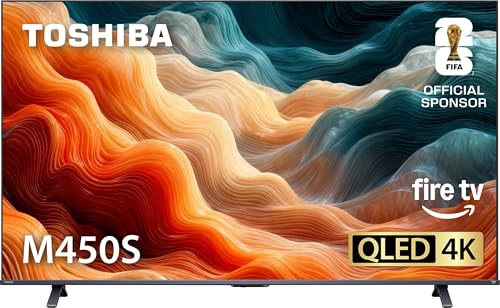
Toshiba 43 M450 QLED Fire TV — The colour upgrade pick
The M450 takes the same Fire TV foundation as the Insignia and spends its extra ambition on the panel. Toshiba’s listing leads with QLED, and at 43 inches that choice is about colour volume: animated films hold their saturation, football pitches stay green rather than grey-green, and streamed travel footage keeps the difference between teal water and blue water. For viewers who have walked past a QLED set in a showroom and wondered whether the gap survives at home sizes, this is the guide’s test case.
Daily life remains Fire TV life, with the Alexa voice remote and live TV streaming folded into one interface, so the M450 suits an Alexa household that found the plain LED picks a touch flat. The 4K UHD resolution matches the rest of the 43-inch group, which keeps the comparison honest: what changes here is the colour layer and the brand’s panel tuning, not the pixel count. In a bright kitchen-diner, where sunlight flattens lesser panels by midday, a colour-forward set earns its keep in a way that a dark bedroom might never reveal.
Restraint is still required in expectations. The listing does not claim Mini LED backlighting, local dimming heroics or gaming refresh features, so the M450 is a colour upgrade, not a contrast revolution; black bars in films will still glow faintly in a dark room. Think of it as the pick for the viewer who watches bright content in a bright room and notices colour before anything else. Within this six, that is a distinct and defensible identity, and it is why the Toshiba sits between the value LED sets and the feature-stacked Hisense rather than duplicating either.
Consider who notices the M450 most. It is the cook who glances at afternoon sport from across a bright kitchen, the family whose living room has windows on two walls, the viewer of animated films and travel series where colour is half the content. In those rooms, midday washout is the enemy, and a panel that holds saturation under ambient light changes the experience every single day, not just during showcase scenes. Toshiba’s set is therefore best understood as a daylight television, bought for the hours when the room is at its brightest and lesser panels quietly give up.
- Panel: 43-inch class QLED
- Resolution: 4K UHD
- Platform: Smart Fire TV
- Remote: Voice Remote with Alexa
- Noted in listing: stream live TV without cable
Strengths
- QLED colour gives bright-room viewing a richness the plain LED picks cannot reach.
- Fire TV and Alexa keep it native to households already using Amazon’s assistant.
- It upgrades the picture without changing the platform a Fire TV home already knows.
Trade-offs
- No gaming features are named in the listing, so console players should look at the Hisense first.
- Contrast in dark rooms remains LED-class rather than OLED-class.
- Colour is the headline; buyers indifferent to it will find the Insignia covers their needs.
Best for: a bright living space or kitchen-diner where colour carries the picture and Fire TV already runs the household’s streaming.
Not suited for: dark-room film nights as the main event, or a setup built around a modern console’s display features.

Amazon Ember 43 4-Series Fire TV — The house-brand pick
Amazon’s own television carries a particular kind of confidence: the company that runs the platform also built the set, and the 4-Series listing reflects that integration. It is billed as the newest model, a 43-inch 4K Ultra HD screen with Fire TV, an Alexa remote, HDR10+ support and a faster processor. That last phrase matters more than it sounds. On small televisions, sluggish menus are the complaint owners repeat for years, and processor speed is the difference between a set that feels responsive in year three and one that gets replaced out of irritation.
HDR10+ is the 4-Series’ format flag, the dynamic HDR standard that adjusts brightness scene by scene on supported streams. Amazon’s own streaming catalogue leans toward that format, so the pairing is coherent: the house set flatters the house service. Viewers whose libraries sit mostly elsewhere should weigh the Hisense below, whose listing names Dolby Vision instead; the two sets effectively ask you which HDR ecosystem your favourite content lives in. The picture base remains LED-class 4K, bright and clean for series, sport and daytime viewing in the rooms this size serves.
The ownership experience is where the Ember makes its quieter case. Fire TV updates, Alexa routines and Amazon account integration arrive without translation layers, and the set slots into a Prime-centred household with the least configuration of any pick here. Its limits mirror the class: no gaming features are named, and the panel technology is a step behind the QLED pair on colour. Buy it as the most integrated version of Fire TV at this size, and it delivers exactly that promise without pretending to be a cinema panel.
Longevity of feel is the Ember’s understated pitch. Televisions in this class are rarely replaced because their panels fail; they are replaced because their menus slow to a crawl and every interaction starts to grate. A listing that bothers to advertise a faster processor is speaking to exactly that failure mode, and buyers planning to keep a set for many years should weight responsiveness accordingly. The 4-Series will not out-picture the QLED pair, but it may well out-patience the field, and patience is what a television is actually used with.
- Panel: 43-inch class
- Resolution: 4K Ultra HD
- Platform: Fire TV (newest model)
- HDR named in listing: HDR10+
- Remote: Alexa Remote
- Noted in listing: fast processor
Strengths
- The fastest-feeling Fire TV experience here, thanks to the processor the listing calls out.
- HDR10+ support matches the format Amazon’s own streaming catalogue favours.
- Platform and hardware from one maker means updates and features arrive in step.
Trade-offs
- Dolby Vision is not the format this listing advertises, which matters to some film libraries.
- Colour depth trails the QLED models when footage turns vivid.
- The experience is most rewarding inside Amazon’s ecosystem and least distinctive outside it.
Best for: a Prime-centred household that wants Fire TV at its smoothest and watches plenty of Amazon-streamed film and series.
Not suited for: a Dolby Vision film collection, or a buyer deliberately keeping Amazon’s platform at arm’s length.

Samsung 40 F6000 FHD Smart TV — The smaller-room pick
Read the resolution line before anything else: this is a 40-inch Full HD television, not a 4K set, and this guide will not blur that distinction. The F6000’s case rests on fit and finish. At 40 inches it enters rooms where 43 inches crowds the wall, and Samsung wraps it in the most polished software-and-security story of the six: HDR support, Object Tracking Sound Lite, Knox Security and the One UI Tizen interface, in a 2025 model. For a small bedroom, a caravan or a study, those qualities can outweigh a pixel count the viewing distance barely reveals.
One UI Tizen is the grown-up in this group. Its menus feel deliberate, its app selection covers the major streaming services, and Samsung’s Knox platform gives the set a security posture the budget brands rarely discuss, which matters on a device that sits on your home network holding your streaming logins. Object Tracking Sound Lite aims to place audio effects closer to their on-screen source; it will not replace a soundbar, but dialogue and everyday programme sound on Samsung’s small sets tend to be a strength owners notice. HDR on a 1080p panel improves tone handling rather than detail, and the set is honest company for broadcast television, which still arrives largely at this resolution.
The F6000 is also the pick that tests a buyer’s self-knowledge. If your viewing is news, soaps, sport and streamed series from a bed three metres away, its 1080p ceiling will rarely announce itself, and the smaller cabinet-friendly size plus Samsung’s interface polish will please daily. If you sit close, play a current console, or have started collecting 4K streams, the ceiling is real and the 43-inch models above are the honest answer. This guide keeps the Samsung in the six precisely because the 42-inch search includes small rooms, and for those rooms it may be the most liveable set here.
Renters meet a particular version of this decision. A 40-inch set fits the smaller wall of a studio flat, moves house without drama, and leaves no argument with a landlord about oversized mounts. The F6000’s combination of modest footprint, respectable sound processing and an interface that feels considered rather than cut down makes it the pick in this guide most likely to be described by its owner as pleasant rather than merely adequate. Pleasant, across years of breakfast news and late-night series, is a legitimate specification in its own right.
- Panel: 40-inch class
- Resolution: Full HD 1080p (not 4K)
- Platform: One UI Tizen
- Audio named in listing: Object Tracking Sound Lite
- Security named in listing: Knox Security
- Model year in listing: 2025
Strengths
- The only pick that truly fits spaces where a 43-inch set overwhelms the wall or stand.
- Samsung’s One UI Tizen and Knox Security give it the most considered software story here.
- Broadcast and everyday streamed content at bedroom distances plays directly to its strengths.
Trade-offs
- 1080p resolution is a genuine ceiling for close seating and 4K sources.
- Console players get no named gaming features and no 4K canvas.
- Buyers measuring purely by specification per size will find the 43-inch 4K sets hard to refuse.
Best for: the smallest bedrooms, caravans and studies, where 40 inches fits, viewing is broadcast-led, and Samsung’s polish counts daily.
Not suited for: a desk-distance setup, a 4K games console, or a main living-room screen expected to serve for a decade.
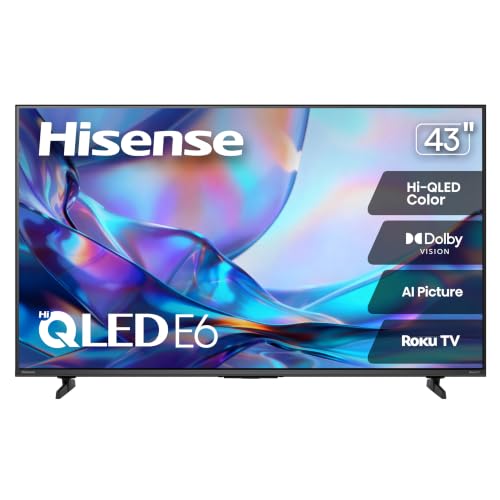
Hisense 43 E6SR Roku TV — The gaming-leaning pick
The E6SR’s listing reads like a checklist written by someone who games and streams film in the same evening. Hisense calls the panel Hi-QLED, the resolution 4K UHD, the platform Roku, and then adds the phrases none of its five rivals here can match: Dolby Vision, Game Mode Plus and VRR. Variable refresh rate smooths the judder that consoles produce when frame rates wander, and a dedicated game mode is the traditional route to keeping input lag down. On paper, and unusually for this class, the paper is specific.
Roku as the platform keeps the set honest for mixed households. The same television that takes a console seriously at night can run a grandparent-proof app grid in the morning, and Dolby Vision gives streamed films the dynamic HDR format that much of the premium catalogue is mastered in. Colour from the Hi-QLED layer puts it alongside the Toshiba as the vivid pair of the six, with the Hisense adding the gaming and format extras on top. For a teenager’s room that is equal parts console den and cinema, or a home office that moonlights as both, the E6SR covers more scenarios than any other pick in this guide.
Discernment still applies. The listing’s gaming vocabulary is promising without being a full specification sheet, and serious players should treat Game Mode Plus and VRR as strong signals rather than measured results. Roku also lacks the smart-home voice ecosystem depth of an Alexa-centred set, though its own voice remote handles searches. None of that dents the conclusion much: among six televisions sold under a 42-inch search, this 43-inch Hisense is the one with the broadest feature reach, and buyers who cannot decide whether they are shopping for film or games can stop compromising here.
The E6SR also reframes what a second television can be. Households often buy this size as an afterthought and then discover the teenager, the lodger or the work-from-home partner uses it more hours per week than the main screen. A set bought as an afterthought but specified like this one absorbs that promotion gracefully: the console moves in, film nights migrate, and the panel’s colour and format support stop the smaller screen feeling like exile. If there is any chance the 43-inch set becomes somebody’s primary screen, the Hisense is the safest pair of hands in the six.
- Panel: 43-inch class Hi-QLED
- Resolution: 4K UHD
- Platform: Smart Roku TV
- HDR named in listing: Dolby Vision
- Gaming named in listing: Game Mode Plus, VRR
- Model: 43E6SR, 2026
Strengths
- Dolby Vision plus Hi-QLED colour gives streamed film the richest treatment in this group.
- Game Mode Plus and VRR make it the only pick speaking directly to console players.
- Roku’s interface keeps all that capability accessible to every member of the household.
Trade-offs
- Roku’s voice ecosystem is narrower than an Alexa-first home might want.
- The feature list invites scrutiny the listing alone cannot fully satisfy for competitive players.
- Buyers who never game pay for vocabulary they will never use.
Best for: a dual-purpose room where a console and film nights share one screen, and where Dolby Vision titles anchor the streaming diet.
Not suited for: an Alexa-routine household wanting the television inside that ecosystem, or a screen bought purely for broadcast television.
What should you expect from sound and everyday connectivity at this size?
Small televisions live in acoustically awkward places: kitchens full of hard surfaces, bedrooms where volume must fall after ten at night, studies where the screen shares a desk with a laptop. Built-in speakers on sets of this class are tuned for clarity at modest volumes rather than for room-filling weight, and owners are happiest when they judge them by that standard. Dialogue in news and drama should be intelligible without effort; film scores and stadium atmospheres will sound thinner than the picture deserves, and no setting fully changes that physics.
Only Samsung’s listing in this guide names an audio technology, Object Tracking Sound Lite, which attempts to steer effects toward their place in the scene. Treat that as a refinement of everyday sound rather than a substitute for external speakers. For the other five, the listings are quiet about audio, and the sensible plan is to listen first and upgrade only if the room demands it. A television that sits two metres from a pillow rarely needs help; one that competes with an extractor fan and a boiling kettle often does, and a small soundbar solves that contest more completely than any television upgrade at this size would.
Connectivity expectations should be similarly grounded. Every pick here is a Wi-Fi smart television, which covers the streaming life these sets are bought for, and the voice remotes remove most of the friction of searching across services. What varies, and what listings in this class often leave vague, is the exact count of wired inputs. Households connecting a console, a broadcast box and a soundbar simultaneously should confirm the port count on the chosen listing before ordering, because that single detail decides whether a switcher box joins the shopping list. Planning the cables at purchase time, rather than discovering the shortage on installation day, is the least glamorous and most useful advice in this entire guide.
How do the six compare side by side?
| Model | Size class | Resolution | Panel | Platform | Headline extra |
|---|---|---|---|---|---|
| Insignia 43 F50 | 43-inch | 4K UHD | LED | Fire TV | Live TV streaming without cable |
| Roku 43 Select | 43-inch | 4K (2160p) | LED | Roku | HDR support, 2026 model |
| Toshiba 43 M450 | 43-inch | 4K UHD | QLED | Fire TV | QLED colour layer |
| Amazon Ember 43 4-Series | 43-inch | 4K Ultra HD | LED | Fire TV | HDR10+, fast processor |
| Samsung 40 F6000 | 40-inch | Full HD 1080p | LED class | One UI Tizen | Knox Security, Object Tracking Sound Lite |
| Hisense 43 E6SR | 43-inch | 4K UHD | Hi-QLED | Roku | Dolby Vision, Game Mode Plus, VRR |
Read the table by columns in the order your household feels them. Platform decides the daily texture, panel decides the picture character, and resolution only separates the Samsung from the field. Notice how the Fire TV trio splits cleanly once panel and processor are compared: the Insignia is the straightforward set, the Ember is the integrated and HDR10+ one, and the Toshiba is the colour one. The Roku pair splits on ambition, with the Select offering the platform in its purest form and the Hisense stacking film and gaming features onto it.
How should you set up a small smart TV so it stays pleasant to use?
Begin with placement before accounts. A 43-inch screen in a bedroom wants its centre near eye level from the pillow, not perched on top of a tall dresser where necks crane and the panel’s viewing angles work against you. In a kitchen-diner, mount or stand it where cooking steam and direct window glare do not own the screen at the hours you actually watch. Small sets are light enough to reposition, so treat the first arrangement as a draft: live with it for a weekend of real viewing before drilling anything permanent.
During setup, resist the urge to sign into everything at once. Connect the Wi-Fi, update the software, then install only the three or four services the room genuinely uses; a lean home screen stays fast and findable. Set the voice remote up early, because households that learn voice search in week one never go back to typing. If the set serves a guest room, add a simple printed card with the Wi-Fi name and the two steps to reach live television; that small kindness prevents most holiday-weekend tech support calls.
Picture settings deserve ten unhurried minutes. Choose the picture mode named for film or cinema when watching series in the evening, turn the brightness down from the showroom-style default if the room is dim, and disable any motion smoothing that makes dramas look like daytime soap operas. Gamers connecting a console to the Hisense should enable its game mode for that input and confirm the console recognises the variable refresh support. Finally, decide the sound plan honestly: these are slim televisions with modest speakers, and if dialogue regularly competes with a kettle or a washing machine, a compact soundbar is a more satisfying upgrade than a bigger screen.
One last habit separates satisfied owners from restless ones: revisit the setup after a fortnight. By then the household knows which service gets opened nightly, which picture mode survives both news and film, and whether the voice remote has actually replaced typing. Move the favourite apps to the front row, delete the services nobody opened, and set the sleep timer where bedroom viewers can reach it without spelunking through menus. A television tuned to real habits after two weeks feels noticeably smarter than the same television left on its first-day configuration, and the work takes less time than brewing coffee.
What mistakes do buyers make in this size class?
The first mistake is shopping the label instead of the diagonal. Anyone who orders expecting a literal 42.0-inch panel will spend the first evening annoyed at a number that the modern market simply does not build at scale; the 43-inch class is the successor size, and the sooner that is accepted, the better the decision that follows. Closely related is assuming every set in the results shares a resolution. The Samsung in this very guide is 1080p among 4K rivals, and a buyer skimming thumbnails could miss that entirely.
The second mistake is choosing by brand nostalgia. A familiar nameplate on a 43-inch set tells you little about the platform you will wrestle with daily, and households routinely keep a television for years while disliking its menus every single day. Decide the software first, then let panel features rank the survivors. The third mistake is ignoring the room’s light. Bright kitchens punish dim, washed-out panels and reward the QLED pair here, while dark bedrooms expose backlight glow that showroom conditions hide.
There is a quieter mistake in how these sets get installed. Owners often place a small television wherever the old one stood, at the old height, angled for a chair that left the room years ago. A 43-inch screen is light enough to experiment with, and a weekend of viewing from the actual pillow, sofa or table will reveal more about the right position than any measurement guide. Height in particular is habitually set too high in bedrooms, and the neck strain that follows gets blamed on the television rather than on the bracket.
Fourth, buyers forget the second screen problem: this size is often a household’s additional television, bought while the main set keeps the good soundbar, the console and the comfortable sofa. Judge it against its actual job. A guest-room screen needs a simple remote and forgiving interface more than it needs dynamic HDR formats, and a bedroom set needs a sleep timer and a dim, calm night mode more than gaming vocabulary. Matching the purchase to the room’s real routine is the difference between a set that feels chosen and one that feels merely bought.
Final Recommendation
Step back from the individual models for a moment and notice what this class rewards. It rewards buyers who know the room, the distance and the platform they want, and it punishes buyers who shop by diagonal nostalgia or by whichever thumbnail loads first. The six sets here are all legitimate answers; they simply answer different questions. The Insignia answers the call for simplicity, the Roku Select for calm, the Toshiba for daylight colour, the Ember for integration and pace, the Samsung for a smaller and more polished fit, and the Hisense for the household that refuses to choose between film night and game night.
For most people who arrived searching this size, the Hisense 43 E6SR is the set to beat: it pairs Roku’s friendly platform with the richest colour and the only gaming vocabulary in the group, so it covers the widest range of evenings without asking the household to specialise. Fire TV households should choose between the Toshiba M450 for colour and the Ember 4-Series for HDR10+ and menu speed, with the Insignia F50 standing by as the honest, simple option. The Roku Select is the gift-able, guest-proof choice, and the Samsung F6000 earns its place wherever 40 inches and 1080p genuinely fit the room better than 43 inches of 4K. A size class that no longer exists on paper turns out, in the metal and glass you can actually buy, to be one of the most sensible screens in the house.
Frequently Asked Questions
Does a true 42-inch smart TV exist anymore?
In the current verified catalogue behind this guide, no. The class has consolidated around 43-inch panels, with smaller alternatives at 40 inches. Treat any 42-inch claim as a prompt to read the exact diagonal in the listing’s own title before buying.
Is the 40-inch Samsung a 4K television?
No. The F6000 is a Full HD 1080p set, and this guide lists it as such. It suits broadcast-led viewing and smaller rooms; buyers who need 4K should choose among the five 43-inch models instead.
Which pick suits a games console best?
The Hisense E6SR, because its listing names Game Mode Plus and VRR alongside its 4K Hi-QLED panel. The other five listings do not advertise gaming features, so console players should weight that difference seriously.
Fire TV or Roku at this size: which is easier for guests?
Roku, in most households. Its app grid and even-handed search are easy for a visitor to drive unaided, while Fire TV rewards households already invested in Alexa and Amazon services with deeper integration.
How long should a television in this class reasonably last?
Panels of this type routinely serve for many years, and the practical lifespan is usually set by software and habits rather than by the screen itself. Choosing a current model year, a platform your household likes and a processor that feels responsive today is the best available insurance that the set still feels willing in five years, whichever room it has migrated to by then.
Will a 43-inch set work in a kitchen?
Yes, provided the wall or counter space takes its width and the screen sits clear of steam and splashes. The QLED models hold colour better in bright kitchens, and a voice remote earns its keep when hands are covered in flour.
Can a 43-inch TV double as a work-from-home screen?
For streaming, video calls on a connected device and casual console breaks, yes, and many home offices now use exactly this arrangement. For all-day text work, a dedicated monitor remains kinder to the eyes, and none of these listings markets itself as a monitor. Treat the television as the room’s entertainment screen that can moonlight, not the other way round.
Which platform receives the least complicated updates?
All three platforms update automatically in normal use, and the practical difference is how visibly they change. Roku’s interface tends to stay visually stable across updates, Fire TV’s home screen evolves more noticeably, and Samsung’s sits between. Households that dislike relearning menus usually settle happiest with the most stable option.
Do I need a soundbar with a television this size?
Only your room can answer. Slim sets have modest speakers; if dialogue competes with kitchen noise or the screen serves a large room, a compact soundbar helps more than any picture setting. In a quiet bedroom, the built-in sound usually suffices.