What's inside
- Key Takeaways
- Quick Picks
- How We Chose These Picks
- What Jobs Is an Adapter Like This Actually For?
- Separate Jacks or One Combined Jack?
- Why Does the Adapter Sometimes Sound Cleaner Than the Laptop?
- What Should You Expect From the Microphone Input?
- How Much Volume and Headphone Drive Do You Get?
- Why Do Adapters Die, and How Do You Pick a Survivor?
- When Should You Stop Adapting and Buy the Real Thing?
- How Do the Six Budget Adapters Compare Side by Side?
- How Should You Set Up a USB Adapter Correctly?
- What Mistakes Do Buyers Make in This Bracket?
- Final Recommendation
- Frequently Asked Questions
- Related Guides
As an Amazon Associate I earn from qualifying purchases. This post may contain affiliate links at no extra cost to you.
widgetverdict.com is reader-supported. When you buy through links on our site, we may earn an affiliate commission.
Where to buy: Amazon carries all six adapters in this guide, and at this end of the market the buying decision is mostly about plugs, platforms and cable style rather than brands.
The best sound cards under 20 are not really sound cards in the hi-fi sense, and this guide will not insult you by pretending otherwise. They are USB audio adapters — small dongles and short cables that give a computer a headphone jack, a microphone jack, or both, by moving the conversion into a tiny chip on a USB plug. Nobody buys one to transform their music collection. People buy them because a laptop’s audio jack has died, because a desktop’s front panel crackles, because a headset needs separate microphone and headphone plugs the machine does not offer, or because a console controller setup needs a second audio doorway. Judged on that brief — rescue and utility — the six adapters below are genuinely good tools. Judged as audiophile upgrades, they would all fail, and so would anything else in this bracket.
Setting expectations correctly is the whole service a guide can perform here. What a decent USB adapter buys you is a clean-enough stereo output, a working microphone input, and freedom from a broken or noisy internal jack. What it does not buy is the low noise floor, the headphone drive or the conversion pedigree of the interfaces and DACs in our other guides. If your problem is a dead port, read on with confidence. If your problem is that your music sounds dull through excellent headphones, your money belongs in a different guide entirely.
All six picks are stereo adapters for headphone output, which matters more than it sounds: some ultra-cheap adapters cut corners on the microphone side or the output side, and a buyer adding a headset for calls needs both directions honest. The differences that remain are practical — separate jacks versus a combined TRRS jack, a rigid dongle versus a short cable, the platforms named in each listing, and whether the maker publishes anything at all about what is inside.
Key Takeaways
- These are rescue-and-utility adapters: they replace broken jacks and add microphone ports, and no hi-fi transformation is promised or possible at this level.
- The SABRENT AU-MMSA is the reference design of the class — plug and play, no drivers, separate headphone and microphone jacks.
- The MOSWAG suits combined-jack headsets with its TRRS microphone support and a braided short cable.
- The ENVEL and UGREEN serve gamers across PC and consoles, with platform lists stated in their listings.
- The Plugable adapter is pitched at laptops that lack an audio jack entirely.
- The QAJOPFN is the simple spare-drawer option for headphone, speaker and microphone duties.
Quick Picks
| Pick | Badge | Why it is here |
|---|---|---|
| SABRENT USB External Stereo Sound Adapter (AU-MMSA) | Best all-round rescue adapter | Plug and play with no drivers needed, separate 3.5mm headphone and mic jacks for Windows and Mac. |
| MOSWAG USB to 3.5mm Audio Adapter | Best for TRRS headsets | Mic TRRS support, no driver required, nylon braided cable, across Windows, Mac, Linux and PS4. |
| ENVEL USB to 3.5mm Audio Adapter | Best dual-jack console option | Dual TRS 3-pole headphone and microphone jacks with a built-in chip, for PS4, PS5, PC and laptop. |
| UGREEN USB Sound Card Adapter | Best platform spread | TRS headphone and mic connections for Windows, Mac, Linux, PC, laptops, desktops, PS5 and Switch 2. |
| Plugable USB Audio Adapter | Best for jackless laptops | Adds 3.5mm speaker and mic ports to laptops lacking an audio jack, plug-and-play for Win, Mac and Linux. |
| QAJOPFN USB Audio Adapter | Best spare-drawer simple | An external sound card for PC and laptop covering headphone, speaker and microphone jacks, plug and play. |
How We Chose These Picks
At this level the choosing is about honesty and fit rather than performance ceilings. We favoured adapters whose listings state their connection scheme plainly — separate jacks or combined, which platforms, whether drivers are needed — because the entire purchase succeeds or fails on matching the plug to the headset and the machine. Established accessory makers anchor the list where possible, since a dongle that dies in a month is no bargain at any price. We also kept the set deliberately uniform in kind: every pick is a stereo USB adapter with microphone provision, so the comparison stays about the practical variables instead of mixing in mono or output-only curiosities that would strand a headset buyer.
What Jobs Is an Adapter Like This Actually For?
Four jobs recur. The dead jack: a laptop whose 3.5mm socket has loosened into crackle, or a desktop front panel that buzzes with every mouse movement — the adapter bypasses the wounded hardware entirely by taking audio out through USB. The missing microphone input: many modern laptops offer a single combined jack or none at all, and a headset with separate plugs, or a standalone microphone, needs the split an adapter provides. The console doorway: a PC headset that must also serve a PlayStation or Switch session. And the sacrificial port: presenters, teachers and hot-desk workers plug and unplug daily, and wearing out a replaceable adapter beats wearing out the laptop’s own socket.
Notice what is absent from that list: improving sound quality for its own sake. An adapter can sound cleaner than a damaged or badly shielded internal jack — that is the bypass effect, and it is real — but that is restoration to normal, not elevation above it. Buyers who understand that distinction are almost always satisfied with this class of product; buyers who expect a transformation are almost always disappointed, through no fault of the dongle.
Separate Jacks or One Combined Jack?
This is the decision that decides the purchase, so make it with your headset in hand. Headsets come in two plug dialects. Older and PC-style headsets carry two 3.5mm plugs — one for the headphones, one for the microphone — and they want an adapter with two sockets, like the SABRENT, ENVEL, UGREEN and Plugable in this guide. Phone-style and console headsets carry one combined TRRS plug that holds both channels in a single jack, and they want an adapter that accepts it, which is the MOSWAG’s stated trick. Mismatch the two and you get the classic symptom: sound in the ears, silence from the microphone, and an evening lost to settings menus that were never the problem.
Adapters and splitters exist to cross between the dialects, but each added link is a added failure point in a chain bought for simplicity. Choose the adapter whose native sockets match your headset’s native plugs, and let other people’s headsets be their own shopping problem. If your household has both dialects in daily use, the honest answer is one adapter of each kind — at this bracket, that is still a modest total, and it ends the nightly plug negotiation.
Why Does the Adapter Sometimes Sound Cleaner Than the Laptop?
Because of where the conversion happens. A laptop’s internal jack is fed by circuitry sharing a board with processors, radios and power regulation, and the analogue signal then travels through the chassis to a socket that has survived years of plugs. An adapter performs the conversion inside its own plug, at the end of a digital USB connection that carries no analogue noise to begin with, and hands the headphones a signal born centimetres away. The improvement people report — the hum that vanished, the crackle that stopped — is the sound of a shorter, quieter analogue path, not of superior conversion. It is a genuine effect with a humble explanation, and it is why the rescue use-case leads this guide.

SABRENT USB External Stereo Sound Adapter (AU-MMSA) — Best all-round rescue adapter
If the USB audio adapter has a reference design, this is close to it. The AU-MMSA’s listing states the essentials without decoration: an external stereo sound card adapter, plug and play, no drivers needed, for Windows and Mac, with 3.5mm headphone and microphone jacks. That is the complete job description of the class in one sentence, from a maker whose name has been on small computer accessories for years. When a laptop’s jack dies the week of a deadline, this is the object people mean when they say “just get one of those USB sound things.”
The separate-jacks layout is its defining trait. A PC headset with twin plugs connects natively, a standalone microphone gets its own socket, and a pair of speakers can take the headphone output when the room needs sound. Nothing about the arrangement is clever, and that is the recommendation: a rescue device should present the fewest possible puzzles at the moment of rescue. The operating systems named — Windows and Mac — cover the mainstream laptop world, and driverless operation means it works on the locked-down work machine whose admin rights you do not have.
Longevity of the model itself counts as evidence here. Adapters are anonymous products, most vanishing within a season; a named model that persists in a maker’s catalogue accumulates the quiet credibility of returns not made and complaints not filed. SABRENT also sells a USB-C sibling that appears in our white-noise guide with a mono microphone caveat — this AU-MMSA is the stereo, twin-jack original, and the distinction is exactly the kind this guide exists to keep straight.
Set the expectation where it belongs: this restores a machine to normal audio service. It will not drive demanding headphones with authority, it publishes no conversion figures to admire, and it does not pretend to either. As the default answer to a broken jack or a missing microphone port, it has earned its ubiquity.
Keep one in the laptop bag even after the emergency passes. Adapters this small become the household’s universal donor — the school laptop’s dead jack, the borrowed desktop’s buzz, the headset that must work on a machine it was never bought for — and the day it saves is never the day you planned.
- Connections: USB to separate 3.5mm headphone and microphone jacks, per the listing
- Drivers: none needed, stated in the listing title
- Platforms named in the listing: Windows and Mac
- Output: stereo, per the listing title
- Conversion specification: the listing title publishes no figures — this class is bought on fit, and the product page carries any detail
- Form: rigid USB adapter dongle
Strengths
- The class’s reference recipe: twin jacks, no drivers, mainstream platforms.
- Works on locked-down machines where installing drivers is not an option.
- A persistent named model from an established accessories maker.
Trade-offs
- Combined TRRS headset plugs need an adapter or splitter to use both channels.
- No published conversion figures — normal service is the promise, not hi-fi.
- A rigid dongle can crowd neighbouring USB ports on tight laptops.
Best for: a broken or buzzing laptop jack and a twin-plug PC headset, on Windows or Mac.
Not suited for: a single-plug TRRS headset used without a splitter, or demanding headphones wanting real drive.
Check the AU-MMSA on Amazon when the jack has died and the work has not stopped.

MOSWAG USB to 3.5mm Audio Adapter — Best for TRRS headsets
The MOSWAG adapter exists for the other plug dialect. Its listing leads with Mic TRRS support — the combined four-contact plug used by phone headsets, console headsets and most earbuds with a microphone — and adds no driver required, a nylon braided cable, a stated length of 7.84 inches, and compatibility spanning Windows PC, laptop, Mac, Linux, speakers and PS4. Where the SABRENT splits the headset world into two sockets, the MOSWAG accepts the modern single plug as it comes.
The short braided cable is a design decision worth more than it looks. A rigid dongle transfers every knock and cable tug directly into the USB port’s leverage; a few inches of flexible, abrasion-resistant cable moves the jacks to where the desk wants them and absorbs the daily abuse that kills adapters. For a laptop that travels, or a desktop whose ports hide at the back, the cable format is the difference between a tool that lives plugged in and one that lives in a drawer.
Platform breadth in the listing — Linux named outright, PS4 included — widens its household usefulness beyond the Windows-and-Mac duopoly most adapters claim. A headset that follows its owner between a work laptop, a Linux machine and a console session is a common modern pattern, and an adapter whose listing blesses all three removes the guesswork from the second and third stops.
Be clear about what TRRS support implies for twin-plug headsets: a two-plug PC headset cannot use both its channels through a single combined socket without a merging splitter. The MOSWAG is the right answer for the single-plug world and the wrong one, alone, for the twin-plug world. That is not a flaw; it is the dialect system working as designed, and this guide’s job is to route you to your own dialect the first time.
As with the whole class, no conversion figures are published in the title, and none should be expected. The purchase case is plug match, cable format and platform list — three facts the listing states plainly, which is all an adapter in this bracket owes you.
- Microphone connection: TRRS combined jack support, per the listing title
- Cable: nylon braided, 7.84 inches, as stated in the listing
- Drivers: none required, per the listing
- Platforms named in the listing: Windows PC and laptop, Mac, Linux, PS4, speakers
- Output: external stereo sound card, per the listing title
- Twin-plug headsets: a merging splitter would be needed — the listing describes a single combined socket arrangement
Strengths
- Native support for the single-plug TRRS headsets most people now own.
- The braided short cable survives bags and reaches awkward ports.
- Linux and PS4 are named in the listing, beyond the usual pair.
Trade-offs
- Twin-plug PC headsets need a splitter to use microphone and headphones together.
- No conversion specification is published in the listing title.
- The cable format adds a small object dangling where a rigid dongle would sit flush.
Best for: a single-plug headset moving between a laptop, a Linux machine and a PS4.
Not suited for: a twin-plug PC headset bought without a splitter, or a purely desktop setup wanting a flush fit.
Look at the MOSWAG on Amazon if your headset speaks in one plug and your machines speak in several systems.

ENVEL USB to 3.5mm Audio Adapter — Best dual-jack console option
The ENVEL adapter’s listing is a small lesson in saying the useful thing: an external stereo sound card with dual TRS 3-pole 3.5mm headphone and microphone jacks, mic supported, a built-in chip, for PS4, PS5, PC and laptop. The TRS detail separates it from the MOSWAG above — these are two discrete sockets, headphone in one, microphone in the other — and the console names separate it from most of the class. A twin-plug gaming headset that must serve a PC all week and a PlayStation all weekend is this adapter’s exact brief.
Console support deserves a careful reading, because console audio is a gated garden. A listing that names PS4 and PS5 is making a compatibility claim the buyer can hold it to, unlike the vague “works with everything” language of lesser listings. For the player whose headset predates the controller-jack era or whose setup routes audio through the console’s USB, that named support converts a gamble into a specification.
The built-in chip phrase, modest as it is, at least confirms the architecture: conversion lives in the adapter, so the audio path bypasses the machine’s internal jack entirely — the rescue effect described earlier in this guide. Beyond that, the listing publishes no figures, and the adapter asks to be judged as its class should be: on sockets, platforms and the maker’s plainness about both.
ENVEL is a smaller name than SABRENT or UGREEN, and the honest weighting is that you trade a measure of brand track record for a listing that matches a specific need — dual TRS sockets plus named PlayStation support — more precisely than the bigger catalogues bother to. For the console-and-PC headset owner, that precision is the product.
One practical note for the dual-jack arrangement generally: label which socket is which the day it arrives, with a dot of tape if needed. In dim rooms under desks, twin identical sockets invite the swapped-plug error whose symptom — hearing everything, saying nothing — has ended more game nights than any dead battery.
- Sockets: dual TRS 3-pole 3.5mm headphone and microphone jacks, per the listing
- Microphone: supported, stated in the listing title
- Chip: built-in, per the listing — conversion happens in the adapter
- Platforms named in the listing: PS4, PS5, PC and laptop
- Output: external stereo sound card, per the listing title
- Conversion figures: none are published in the listing title — check the product page if detail matters to you
Strengths
- Dual discrete sockets suit twin-plug gaming headsets natively.
- PS4 and PS5 support is claimed by name in the listing.
- The listing states its connection scheme with unusual precision for the class.
Trade-offs
- A smaller maker’s track record than the catalogue brands in this guide.
- Single-plug TRRS headsets will use only part of its arrangement without a splitter.
- No published conversion figures in the listing title.
Best for: a twin-plug gaming headset shared between a PC and a PlayStation 4 or 5.
Not suited for: a single-plug headset household, or a buyer who ranks brand longevity above socket fit.
Check the ENVEL adapter on Amazon when one headset must clock in on both a tower and a console.
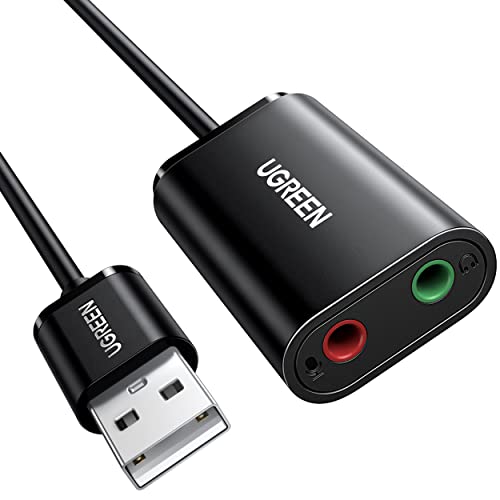
UGREEN USB Sound Card Adapter — Best platform spread
UGREEN’s adapter makes its case with a guest list. Its listing names TRS 3.5mm headphone and microphone connections and then enumerates the hosts: Windows, Mac, Linux, PC, laptops, desktops, PS5 and Switch 2. That last name is the eyebrow-raiser — Nintendo’s current console generation is explicitly included — and it signals an adapter aimed at the genuinely multi-platform household, where one headset migrates between a work laptop, a desktop and whichever console currently owns the television.
The TRS arrangement places it in the twin-socket family alongside the SABRENT and ENVEL: separate headphone and microphone plugs, each with its own home. Combined with the platform list, the proposition becomes the household adapter — the one kept in the drawer by the television that has, at some point, rescued every machine in the building. UGREEN’s standing as a large accessories maker supports that role; this is a catalogue product from a company that will still exist when you need the second one.
There is a subtlety worth surfacing for console buyers: named support in a listing is a claim about the adapter, and console audio routing also depends on the console’s own settings and the game or chat configuration in use. The listing’s breadth is a strong start, and the buyer’s remaining homework is a settings menu, not a different product. That division of labour — hardware compatibility from the maker, configuration from the owner — is the honest shape of console audio generally.
As ever in this bracket, the listing publishes no conversion figures, and the adapter should be bought as infrastructure: sockets that match, platforms that are named, a maker that persists. Judged that way, the UGREEN is the most complete infrastructure in the guide.
It is also the natural gift and the natural spare — the object an IT-fluent relative hands over with the words “keep this in the drawer.” Products earn that role by working everywhere without instructions, and the platform list in this listing is precisely a promise to that effect.
- Connections: TRS 3.5mm headphone and microphone, per the listing
- Platforms named in the listing: Windows, Mac, Linux, PC, laptops, desktops, PS5 and Switch 2
- Function described in the listing: USB to aux 3.5mm external audio converter
- Output: stereo external sound card arrangement
- Driver claims: the listing title does not dwell on drivers — mainstream USB audio class operation is the class norm, and the product page confirms specifics
- Conversion figures: not published in the listing title, consistent with this entire category
Strengths
- The widest platform list in the guide, Switch 2 included by name.
- Twin TRS sockets cover the classic PC headset arrangement.
- A major accessories maker’s catalogue permanence behind it.
Trade-offs
- Console use still depends on the console’s own audio settings.
- Single-plug TRRS headsets need help to use both channels.
- No conversion figures are published in the listing title.
Best for: a multi-platform household where one adapter must be plausible on every machine, consoles included.
Not suited for: a single-plug headset without a splitter, or a hi-fi listening ambition of any kind.
See the UGREEN adapter on Amazon if your drawers serve several platforms and one spare must fit them all.

Plugable USB Audio Adapter — Best for jackless laptops
Plugable wrote its brief into the listing title: an adapter that adds 3.5mm speaker and microphone ports for laptops lacking an audio jack, compact, external, plug-and-play for Windows, Mac and Linux. That first clause names a growing class of machine — the ultra-thin laptop that deleted its headphone socket in the name of thinness — and positions the adapter not as a repair but as the restoration of a missing organ. If your laptop simply has nowhere to plug a headset, this listing is speaking directly to you.
The wording matters in a second way: it says speaker port, not only headphone port. A set of small desktop speakers, a classroom projector’s audio lead, a presentation-room cable — line-level destinations that a headphone-only mindset forgets — are part of this adapter’s intended world. Teachers, trainers and presenters, whose professional lives are a tour of other people’s rooms and projectors, are the quiet constituency for exactly this object.
Plugable’s identity adds a consideration the no-name end of the market cannot offer: the company is known in the docking and adapter world for documentation and support, and an adapter bought for a work machine benefits from a maker that publishes compatibility notes like a grown-up. The listing’s platform trio — Win, Mac, Linux all named — is consistent with that character.
Its limits are the class limits, unhidden: no conversion figures in the title, no hi-fi ambitions, twin-socket logic that asks TRRS headset owners to bring a splitter. Within its stated brief — ports for the portless — it is the most deliberately aimed pick in the guide.
There is also a future-proofing footnote. Machines are deleting analogue jacks faster than headsets are deleting analogue plugs, so the population of laptops this adapter serves grows every year. Buying the documented version of the bridge, rather than the anonymous one, is a small investment in the decade of dongles ahead.
- Purpose stated in the listing: adds 3.5mm speaker and mic ports to laptops lacking an audio jack
- Platforms named in the listing: Windows, Mac and Linux
- Operation: plug-and-play, per the listing title
- Form: compact external sound card
- Outputs: speaker/headphone port and microphone port, per the listing
- Conversion specification: the listing title states none — this purchase is about ports, and any figures live on the product page
Strengths
- Aimed precisely at laptops that shipped without an audio jack.
- Speaker-out framing suits presenters and classroom audio leads.
- A documentation-minded maker behind a work-machine accessory.
Trade-offs
- Twin-socket layout — TRRS headsets need a splitter for full use.
- No conversion figures are published in the listing title.
- Its brief is ports, not performance — music-first buyers belong elsewhere.
Best for: an ultra-thin laptop with no headphone socket, and a headset or speaker lead that needs somewhere to land.
Not suited for: a single-plug headset used alone, or any listening upgrade ambition.
Check the Plugable adapter on Amazon if your laptop’s spec sheet lists everything except the jack you need.

QAJOPFN USB Audio Adapter — Best spare-drawer simple
The QAJOPFN adapter is the guide’s representative of the vast, plain-spoken end of the market: an external sound card for PC and laptop, a USB microphone adapter to 3.5mm, covering headphone, speaker and microphone jacks, plug and play. Its listing promises the complete utility set — ears, voice and speakers all served — with no platform poetry and no figures. Read it as the generic done completely: every socket the class offers, in one inexpensive object.
There is a legitimate philosophy in buying exactly this. Adapters get lost, lent, left in conference rooms and eaten by sofa cushions; a household that treats them as consumables rationally stocks the simple version in multiples — one in the laptop bag, one in the desk drawer, one in the child’s school kit. The QAJOPFN’s listing, with its full socket set, supports that stocking strategy better than a specialised adapter would, because the spare’s job is to be plausible for whatever emergency arrives.
The counterweight is information. The listing names PC and laptop without enumerating operating systems, publishes nothing about its chip or conversion, and comes from a maker without the catalogue presence of SABRENT, UGREEN or Plugable. A buyer whose machine is exotic — a locked-down corporate build, an unusual Linux configuration — gets less reassurance here than from the documented brands, and should weigh that against the spare-drawer logic.
Microphone expectations deserve the same calibration as everywhere in this guide: the mic input will carry calls, classes and game chat perfectly well, because those are undemanding jobs. It is not a recording input for anyone’s album, and it does not claim to be. Utility honestly described is this guide’s favourite kind of product, and on its listing’s own terms, that is what this is.
Buy it knowingly — as coverage, in the plural if your household eats adapters — and it will do the quiet work of the class without ever being thanked, which is the highest praise infrastructure gets.
- Connections: USB to 3.5mm for headphone, speaker and microphone, per the listing
- Hosts named in the listing: PC and laptop
- Operation: plug and play, stated in the listing title
- Operating systems: the listing title does not enumerate them — mainstream USB audio is the expectation, and the product page is the confirmation
- Chip and conversion detail: nothing is published in the listing title — the product page holds whatever detail exists
- Form: external USB sound card adapter
Strengths
- The full socket set — headphone, speaker and microphone — in one plain adapter.
- Suits the stock-the-drawer strategy for households that lose adapters.
- Plug and play, with the whole class brief covered.
Trade-offs
- Operating systems are not enumerated in the listing title.
- A maker without the documented track record of the guide’s brand names.
- No chip or conversion information is published in the listing.
Best for: a household or office drawer that needs a complete, simple spare for PC and laptop audio emergencies.
Not suited for: an exotic or locked-down machine where documented compatibility matters more than coverage.
Look at the QAJOPFN on Amazon when the goal is a working spare, not a researched centrepiece.
What Should You Expect From the Microphone Input?
Calibrate by job. For video calls, online classes, game chat and voice notes, a USB adapter’s microphone input is entirely sufficient — those channels are compressed by the platforms themselves long before the adapter’s limits are approached, and intelligibility is decided by the microphone and its distance from your mouth. Keep the mic close, keep the room’s television off, and the adapter disappears from the equation. For anything resembling recording — a podcast you intend to keep, a voice reel, music of any kind — the adapter is the wrong tool, not because it is cheap but because it was never given a preamp worth the name, gain control worth adjusting, or a specification worth publishing. Our making-music and video-editing guides exist for that reader.
One behaviour surprises new owners: the adapter’s microphone input often sounds clearer than the laptop’s built-in microphone even with a modest headset, simply because the headset’s mic sits near the mouth while the laptop’s sits across the desk beside a fan. That improvement is geometry, not electronics, and it is the main reason a cheap adapter plus an ordinary headset transforms a work call. The person on the other end hears the difference immediately, even though nothing in the chain is remotely hi-fi.
How Much Volume and Headphone Drive Do You Get?
Enough for the headphones this class is bought for, and honesty requires the boundary to be drawn. Earbuds, phone headsets, mainstream gaming headsets and ordinary consumer headphones are designed to run from feeble outputs, and every adapter here will drive them to comfortable levels. Demanding headphones — high-impedance studio models, planar designs — ask for more than a dongle’s small output stage holds, and will sound underpowered and thin for reasons that have nothing to do with their quality. If your headphones have a reputation for hunger, the adapter is a rescue device for calls, not a listening station, and a DAC with a real amplifier is the listening purchase.
Volume behaviour also differs subtly between adapters and internal jacks: the adapter becomes its own device with its own volume scale in the operating system, so the first connection often arrives louder or quieter than expected. Set the system volume for the adapter once, check the microphone level in the same panel, and the device will remember its manners on that machine thereafter. It is a two-minute ritual that prevents the blown-eardrums first call which gives the whole class an undeserved reputation.
Why Do Adapters Die, and How Do You Pick a Survivor?
The electronics almost never fail first; the mechanics do. The USB plug’s solder joints fatigue where a rigid dongle levers against the port, cable jackets split where they bend at the same angle ten thousand times, and 3.5mm sockets loosen until a plug crackles at a touch. Reading listings with that autopsy in mind changes what looks like a feature: a braided jacket and a short strain-relieved cable, as on the MOSWAG, address the bending failure; a compact rigid body, as on the Plugable, suits a port that will not be knocked; a major maker’s build consistency, as with SABRENT and UGREEN, lowers the odds of a loose socket from new.
Your own habits complete the picture. An adapter that lives permanently in a desktop’s rear port may serve a decade. The same adapter riding in a laptop bag, plugged and unplugged twice daily, lives a harder life measured in months-to-years — which is precisely why this guide treats spares as strategy rather than pessimism. Buy the good one for the main machine and the plain one for the bag, and the class’s mortality stops being your problem.
When Should You Stop Adapting and Buy the Real Thing?
Three signals say the dongle era of your setup should end. The first is repetition: if the adapter is in use every day for hours — a full-time remote worker living on calls — a proper headset with a native USB connection, or an interface and a real microphone, will repay its cost in comfort and voice quality within the season. The second is creation: the moment recordings start being kept, published or paid for, the input chain deserves a preamp with a published specification. The third is multiplication: when the desk accumulates an adapter, a splitter, a second adapter for the console and a hub to hold them all, the tangle itself has become the problem, and one device designed for the whole job is the cheaper sanity.
None of that diminishes the adapters in this guide. They are the right tool for the rescue, the spare, the borrowed machine and the jackless laptop, and they will go on being bought for those jobs long after any individual reader graduates to grander gear. Knowing which side of the line your need sits on is the entire skill of shopping in this bracket — and it is a skill, because the listings themselves will never tell you. They will happily sell a dongle to a podcaster and a studio interface to a person whose only problem is a loose socket. This guide’s loyalty is to the match, not to the merchandise.
A final household note: label the adapters you own with their dialect — a tiny sticker marked with the plug type saves the next borrower the silent-microphone evening entirely. Infrastructure works best when it explains itself, and at this size and price, a sticker is a reasonable substitute for a manual nobody would read.
How Do the Six Budget Adapters Compare Side by Side?
| Pick | Sockets | Platforms named | Stands out for |
|---|---|---|---|
| SABRENT AU-MMSA | Separate headphone + mic | Windows, Mac | No drivers needed |
| MOSWAG | Combined TRRS | Windows, Mac, Linux, PS4 | Braided 7.84-inch cable |
| ENVEL | Dual TRS sockets | PS4, PS5, PC, laptop | Console support by name |
| UGREEN | TRS headphone + mic | Windows, Mac, Linux, PS5, Switch 2 | Widest platform list |
| Plugable | Speaker + mic ports | Win, Mac, Linux | Made for jackless laptops |
| QAJOPFN | Headphone, speaker, mic | PC, laptop | The complete spare |
Two questions sort the table. First, what plug does your headset carry — twin plugs point to the SABRENT, ENVEL, UGREEN or Plugable rows; a single combined plug points to the MOSWAG. Second, which machines must it serve — the platform column then breaks the remaining tie. Everything else in this guide is commentary on those two answers.
How Should You Set Up a USB Adapter Correctly?
Plug it in before opening the program you intend to use; audio software often enumerates devices at launch and will not notice a late arrival. Then set the adapter as both the output and the input in the operating system’s sound settings — the classic half-failure is headphones working through the adapter while the microphone still points at the laptop’s built-in array. Repeat the selection inside the call or game itself, because many programs keep their own device choice and override the system’s. Make one test call or recording and listen to it back; thirty seconds of verification now is worth an hour of “can you hear me” later.
A few physical habits extend an adapter’s life. Plug and unplug by the body, never by the cable. If a rigid dongle blocks a neighbouring port, a short USB extension lead moves it gracefully — and converts it, in effect, into the cable style. Keep the adapter out of the laptop bag’s crush zone, and if the microphone ever sounds distant or thin, check first that the plug is fully seated: the last millimetre of a TRRS plug carries the microphone contact, and a case lip or a pocket-lint plug can hold it just short of home.
What Mistakes Do Buyers Make in This Bracket?
The dialect error leads: buying twin sockets for a single-plug headset, or the reverse, then blaming the adapter for a silent microphone. Second, expecting transformation — ordering an adapter to fix dull music through good headphones, a job for a DAC with a real amplifier. Third, forgetting the input setting: the adapter is blamed for a dead mic that was simply never selected in the call software. Fourth, treating platform lists as decoration and discovering at the console that an unlisted machine is an unblessed one. And fifth, buying exactly one adapter for a household of machines and headsets, guaranteeing it is never in the room where the emergency happens.
Final Recommendation
Start with the plug in your hand. Twin plugs and a mainstream laptop point to the SABRENT AU-MMSA, the class’s reference rescue. A single combined plug points to the MOSWAG and its forgiving braided cable. Console households should read the ENVEL and UGREEN rows first, jackless-laptop owners the Plugable, and every household should consider the QAJOPFN as the drawer spare that makes the others’ absences painless. None of these will change how your music sounds, and all of them, matched correctly, will change whether you can be heard on tomorrow’s call — which, in this bracket, is the entire point of the purchase.
Troubleshooting deserves a short protocol, because adapter problems are almost always one of four things and the order of checking matters. First, seating: push every plug the final millimetre, and try the headset in a phone to prove the headset itself. Second, selection: confirm the adapter is the chosen input and output in both the system and the program. Third, substitution: another USB port rules out a wounded socket on the machine, and another machine rules out the adapter itself. Fourth, the dialect question from earlier in this guide — the silent microphone that has survived every setting is very often a TRRS plug in a TRS world or the reverse. Work the list in order and nearly every adapter emergency resolves inside five minutes, which is as it should be: these are simple devices, and their failures are simple too.
Keep the receipt habits of a grown-up even here. Register nothing, install nothing, but keep the order confirmation until the adapter has survived its first month — the mortality that exists in this class is infant mortality, and a unit alive at week five will usually outlast the laptop. Small money deserves the same calm process as large money, only faster.
One more use case hides in plain sight and rescues a surprising number of readers: the handed-down machine. A child inherits a laptop for school, a parent inherits a desktop for video calls with grandchildren, a spare PC becomes the household’s homework station — and in each case the audio arrangements of the previous owner do not survive the handover. An adapter resets the situation for the price of a sandwich: known sockets, known behaviour, a headset of the new owner’s own. Guides love flagship purchases, but a great deal of real computing life is this — making an adequate machine adequate for its next person — and the six small objects above are exactly its instruments.
And if you are buying for someone else, buy the dialect right by asking one question — “does your headset have one plug or two?” — and, if the answer is a shrug, look at the headset together before ordering. Thirty seconds of inspection outperforms any amount of specification reading in this bracket, because the specifications were never where these purchases succeed or fail.
Classrooms deserve the final practical word, because they stress this class of product harder than any home. A cart of shared laptops, headsets pooled between lessons, sockets worn by a hundred small hands — the adapter that survives there is the one treated as a consumable and stocked accordingly, with the dialect standardised across the whole cart so no lesson begins with plug archaeology. Teachers who standardise on one headset plug and keep a labelled box of matching adapters have solved, permanently, a problem that otherwise consumes the first five minutes of every lesson. The same logic scales down to a family: one dialect per household, spares in the drawer, and audio stops being a recurring household incident.
To close the loop on expectations: read any adapter listing the way this guide has read these six. Sockets first, platforms second, cable or dongle format third, and any sentence about sound quality last and with a smile — the conversion inside a dongle is a commodity, and the makers who state their plugs plainly are telling you the truth about where their product’s value lives. A listing that leads with audio adjectives and hides its socket arrangement is asking you to buy the wrong thing confidently. The six here were chosen because their listings answer the practical questions in the practical order.
Store the winner properly and it will be there when the next jack dies: in a small labelled pouch, with its dialect noted, away from the cable tangle that eats small objects. The household that can produce the right adapter in one minute, at the moment of need, has understood this entire category better than the household with a flagship DAC and a silent microphone.
One last scenario repays a mention: the work-issued laptop whose owner has no admin rights and no say in its hardware. A driverless adapter is often the only audio upgrade such a machine can legally receive, and it can be the difference between enduring a dying jack for a contract’s whole length and fixing it unilaterally in an afternoon. If that is your situation, the no-driver claims in the SABRENT and MOSWAG listings are not fine print — they are the entire purchase case, and they are why those two picks lead their respective dialect families in this guide.
And when the adapter works — when the call connects, the class hears the teacher, the headset lives on the console it was never bought for — resist the urge to keep shopping the category. A solved utility problem is solved. The money and attention freed by a five-minute fix belong to the parts of your setup where quality is actually audible, several of which have guides of their own in this series.
Small, cheap and correctly matched beats grand and wrong, in this bracket, every single time.
That is the whole philosophy of this bracket in one line: the adapter disappears into the task, the call happens, the lesson proceeds, the game night survives — and nobody thinks about sound cards again until the next jack gives up, years from now, in another room.
Frequently Asked Questions
Will one of these improve my music sound quality?
Only if your current jack is damaged or noisy, by bypassing it. Against a healthy internal jack, expect equivalent everyday quality — these are utility adapters, and the honest upgrade path for music is a DAC or interface from our other guides.
My microphone is silent but the headphones work. What is wrong?
Usually the input selection: the program or system is still listening to the built-in microphone, or the headset’s plug dialect does not match the adapter’s sockets. Check the input device setting first, then the plug match.
Do these adapters need drivers?
The SABRENT and MOSWAG listings state none are required, and USB audio class support is built into modern operating systems. On a locked-down work machine, that driverless character is often the deciding virtue.
Can I use one with a games console?
Where the listing names the console: the ENVEL names PS4 and PS5, the UGREEN names PS5 and Switch 2, the MOSWAG names PS4. Treat unlisted consoles as unverified and check the console’s own audio settings either way.
What is the difference between TRS and TRRS here?
TRS sockets here are the separate headphone and microphone jacks for twin-plug headsets. TRRS is the single combined plug carrying both. Matching your headset’s dialect to the adapter’s sockets is the purchase’s main decision.
Should I buy one or several?
Several, if your household has several machines. Adapters are small, losable and suddenly essential; a drawer spare such as the QAJOPFN costs little and ends the emergency entirely.
Related Guides
- Best Sound Cards for Electronic Drums
- Best Sound Cards to Get Rid of White Noise
- Best Sound Cards for Gaming and Music


