What's inside
- Key Takeaways
- Quick Picks
- How did we choose these picks?
- What does twenty-two inches do that its neighbours cannot?
- How does a pair of 22-inch screens change a desk?
- What does evening viewing really ask of this size?
- How does fast gaming feel at exactly this size?
- How do the six picks compare side by side?
- How do workplaces use this size differently from homes?
- How should you choose among the flavours?
- How do you set up a 22-inch screen properly?
- How do students and first-jobbers fare in this class?
- What mistakes do buyers make at this size?
- Who should step up to the next class instead?
- What does the first month teach an owner of this size?
- Final Recommendation
- What is the short checklist for the best 22 inch monitors?
- How do you keep a 22-inch screen serving for years?
- Frequently Asked Questions
- Why does this size keep winning its quiet corner of the market?
- Related Guides
As an Amazon Associate I earn from qualifying purchases. This post may contain affiliate links at no extra cost to you.
widgetverdict.com is reader-supported. When you buy through links on our site, we may earn an affiliate commission.
Where to buy: five screens below carry verified Amazon links and one is described without a link. Each is a true 22-inch panel, because this size, unusually, means what it says.
After the rounding games of its smaller neighbours, the best 22 inch monitors arrive as a relief: a class whose label and whose glass agree. Twenty-two inches, full HD, and a spread of personalities wide enough to furnish a classroom, a living room, a trading corner and a teenager’s gaming desk from a single shelf. This is the largest size that still behaves like a small monitor, compact in the cabinet, modest in its demands, and complete in its capabilities.
The class’s character comes from its position. One step above it, the 23.8-inch panels begin the world of the standard desk monitor, with its docks and its ergonomic arms and its higher tiers. One step below, the 21.5-inch workhorses trade presence for economy. At twenty-two, a buyer gets the full HD picture at a size that fills a small desk’s view without filling the desk, and the market has responded by offering the size in almost every flavour it knows how to make.
This guide reviews five verified flavours and one role the pool does not stock: ViewSonic’s institutional frameless panel, Samsung’s polished all-rounder, Philips’s fast and warranty-backed wall candidate, ASUS’s frameless eye-care screen, Sceptre’s out-and-out gaming machine, and a prose-only description of the deep-contrast evening panel that video-first buyers should hunt for. By the end, the only question left should be which flavour your room has been waiting for.
Key Takeaways
- Twenty-two inches here means a true 22-inch panel, full HD throughout.
- IPS dominates the class and serves angled, shared seating best.
- Refresh spans from classroom calm to a genuine 144Hz gaming ceiling.
- Only one pick brings its own speakers; plan sound for the other five.
- Frameless designs make this the natural size for matched pairs.
- Stand adjustment remains the class’s economised corner; budget a riser.
Quick Picks
| Pick | Badge | Why it earns its place |
|---|---|---|
| ViewSonic VA2256-MHD | Institutional standard | Frameless IPS with DisplayPort, proven in classrooms and offices alike. |
| Samsung S30GD | Household all-rounder | Polished design, 100Hz and a game mode for desks in lived-in rooms. |
| Philips 22E2N1100 | Mounted reassurance | Fast IPS, VESA in its name and a long advance replacement warranty. |
| ASUS VP227HF | Frameless comfort | Thin bezels and eye-care tuning for long sessions and clean pairs. |
| Sceptre 22-inch gaming monitor | Compact speed | Up to 144Hz with built-in speakers, the class’s gaming specialist. |
| The deep-contrast evening panel | Film-first role | The VA-flavoured hunt for buyers whose screen is a television after dark. |
How did we choose these picks?
True size came first, as it has throughout this batch, and at twenty-two inches the filter is a pleasure to apply because the pool’s candidates state their diagonal plainly and match it. Five verified panels passed, each with full HD and each with a distinct temperament, and the guide’s structure follows those temperaments rather than forcing a league table onto screens that serve different rooms.
Coverage came second. A class this broad deserves its corners represented: the institutional buyer, the household, the mounted installation, the long-session worker, the gamer. Any five office panels would have been easier to review and useless to read, so the shortlist deliberately includes the class’s extremes, the ViewSonic’s classroom discipline at one end and the Sceptre’s 144Hz enthusiasm at the other, with the all-rounders arranged between.
The sixth place went to a role rather than a link because one genuine corner of the 22-inch market, the deep-contrast VA panel bought for evening viewing, is not represented in the verified pool at this size. Describing that role honestly, with its checks, serves the film-first buyer better than a sixth IPS link wearing a false moustache.
Ownership details closed the selection: mount patterns, input lists that include the legacy where the role demands it, warranty postures, and the stands whose limits every review states without varnish. At this size the panels are uniformly capable; the ownership is where they differ, and ownership is what a buyer lives with.
What does twenty-two inches do that its neighbours cannot?
It fills the view of a small desk completely. At a typical sitting distance, a 22-inch full HD panel occupies the comfortable centre of vision with a picture large enough for a film to feel like an event and a document to show its whole page, while the cabinet still leaves the desk’s edges for speakers, books and the human being. The size is a negotiation between immersion and furniture, and it settles the negotiation more gracefully than any size around it.
It also carries the market’s full menu. Because the size sells to everyone, everyone builds for it: the business divisions, the gaming brands, the value labels, the design-led lines. A buyer at twenty-two inches is choosing among philosophies, not among compromises, and can weight a single priority, ports, speed, warranty, looks, and still land on a complete monitor rather than a partial one.
Finally, it pairs and cascades beautifully. Two of them form a serious workstation under a metre and a quarter wide; one of them, retired, becomes the household’s spare, the teenager’s upgrade, the workshop’s display, because every room has a place where twenty-two inches fits. A size that is welcome everywhere ages like a good tool, passing from desk to desk instead of from desk to cupboard.

ViewSonic VA2256-MHD — Institutional standard
ViewSonic built this screen for the two hardest audiences in computing: classrooms and offices that buy in rows. The VA2256-MHD is a frameless 22-inch IPS panel whose own listing names the home office and the classroom as its habitats, and whose specification keeps faith with both, flicker-free viewing for long days, a blue light filter for young and old eyes alike, and a VESA mount for the brackets that institutional desks increasingly are.
DisplayPort is its professional signature. Beside the HDMI that every rival carries, the extra input lets this panel join dock-driven, standardised desks without adapters or exceptions, which is why IT managers specify it and why a home buyer with a modern dock should notice it too. In a class where input lists are usually a formality, this one is a genuine differentiator.
The frameless cabinet earns its keep in the arrangements institutions love: pairs and rows. Two of these present a nearly continuous surface for a teacher’s desk or a monitoring post, and a row of them in a training room reads as one designed installation rather than a collection of purchases. Consistency is an aesthetic in institutional life, and this screen is fluent in it.
Its compromises are calm ones. Refresh sits at the class’s steady end, gaming is a pastime it tolerates rather than courts, and the design, while tidy, will not be the object a living room admires. Buy it where monitors are infrastructure, and it will behave like infrastructure: present, identical, uncomplaining, and available again when the next room needs furnishing.
- Size: 22 inches
- Resolution: 1920 by 1080
- Panel: IPS, frameless
- Inputs: HDMI and DisplayPort
- Mounting: VESA mount ready
- Comfort: flicker-free, blue light filter
Strengths
- DisplayPort joins professional desk standards.
- Frameless pairs and rows look designed.
- An institutional pedigree that stays available.
Trade-offs
- Refresh is steady rather than swift.
- No VGA for the oldest machines.
- Character is tidy, not warm.
Best for: classrooms, training rooms and dock-driven offices. Not suited for: fast gaming or legacy fleets.

Samsung S30GD — Household all-rounder
The S30GD is what happens when a television company builds a small monitor: it assumes the screen will be looked at by a room, not only by a user. Samsung’s 22-inch Essential panel is IPS, full HD and 100Hz, finished with the tidy restraint of a household appliance, and tuned with an eye-care package and a game mode that acknowledge its double life on a desk that is also furniture.
The 100Hz refresh does quiet, broad work here. It smooths the family’s scrolling and browsing, steadies the casual games the household computer hosts, and lifts the whole experience a perceptible step above the older generation of 60Hz panels that this size replaces in most homes. Nobody will write home about it, and everybody who sits down will feel vaguely that the new screen is nicer, which is the correct outcome for an all-rounder.
Game mode deserves its honest sentence. It sharpens the panel’s posture for play, and for the relaxed, social gaming a family desk sees, sports titles, adventures, the children’s favourites, it is genuinely pleasant. It does not convert the S30GD into the Sceptre reviewed below, and a household with a serious player should buy that screen instead and let this one serve the rest of the family in peace.
The tilt-only stand is the familiar economy, felt least in this pick’s natural habitat, where the screen is positioned for the room once and adjusted rarely. Set its height with a riser if the main user’s chair demands it, angle it away from the window’s worst hour, and the Samsung becomes the household’s quiet second television and first monitor, in whichever order the evening decides.
- Size: 22 inches
- Resolution: 1920 by 1080
- Panel: IPS
- Refresh rate: 100Hz
- Extras: game mode, eye-care tuning
- Stand: tilt only
Strengths
- Design the whole household can live with.
- Everyday smoothness above the old standard.
- Evening viewing is treated seriously.
Trade-offs
- Game mode is seasoning, not speed.
- Height is fixed without a riser.
- Ports favour the modern machine.
Best for: family desks, bedroom workstations and shared rooms. Not suited for: competitive players or VGA-dependent setups.
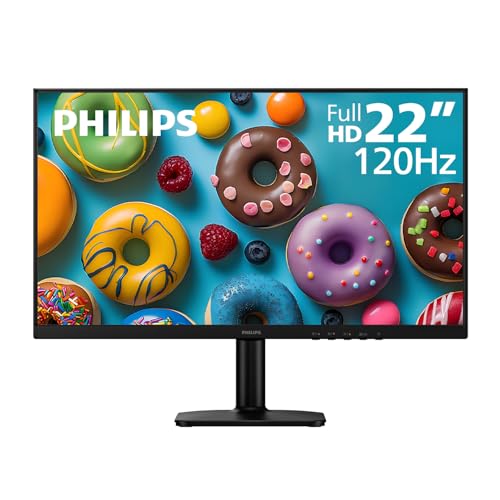
Philips 22E2N1100 — Mounted reassurance
Philips advertises this monitor’s mounting in its very name and backs it with the class’s most reassuring failure plan: a long advance replacement warranty, under which the new screen travels before the old one returns. Mount the 22E2N1100 above a counter, in a rental, at a relative’s house, and that promise converts the worst day of ownership from a project into a parcel, which is why it leads the class for awkward installations.
The panel itself is a lively IPS: full HD, a refresh rated up to 120Hz in overclocked operation, a fast motion figure and Adaptive Sync to keep modest graphics honest. On a wall its viewing angles do the social work, holding the picture for a queue, a waiting room or a family spread across a kitchen, and its flicker-free, low-blue tuning suits the long mixed days of a home office that shares the same wall.
Inputs cover HDMI and VGA, the modern and the inherited, and the cabinet’s weight sits comfortably within honest brackets when the wall fixings are honest too. Installation advice for this pick is the advice of the whole mounting craft: rehearse the height with tape, find the structure, leave the cables their slack, and set the position for the people who will read it most, not for the installer on the ladder.
Its caveats are an overclock to enable and a width to measure. The headline refresh asks for a deliberate trip into the settings, and at 22 inches the cabinet is the class’s full measure, unwelcome in enclosures built for smaller glass. Neither touches the central proposition, a mountable, lively panel from a maker who has thought about the day it breaks and decided to be decent about it.
- Size: 22 inches
- Resolution: 1920 by 1080
- Panel: IPS with Adaptive Sync
- Refresh rate: up to 120Hz overclocked
- Inputs: HDMI and VGA
- Warranty: long advance replacement cover
Strengths
- The class’s best answer to a failure in an awkward place.
- Wide angles serve rooms, queues and families.
- Mount-ready with the legacy input retained.
Trade-offs
- Top refresh must be enabled deliberately.
- Full class width; measure fitted spaces.
- More capability than a simple post needs.
Best for: wall mounting, rentals and supported relatives. Not suited for: tight enclosures or minimal single-job posts.

ASUS VP227HF — Frameless comfort
ASUS builds the VP227HF around a single, civilised idea: a screen should be easy to look at, in both senses. The cabinet is frameless, so the 22-inch full HD picture arrives with almost no border to announce it, and the panel behind it runs at 100Hz with Adaptive-Sync, a fast quoted response and the company’s eye-care package of low blue light and flicker-free operation for the long sessions this screen is plainly designed to host.
Colour coverage quoted at 99 percent of sRGB gives documents, photographs and web work a presentable honesty, while the frameless edges make this the class’s natural pair candidate. Two VP227HFs on a desk or a dual arm present a single calm horizon of glass, their seam reduced to a hairline, and a writer or analyst working across them feels the difference in the first hour and stops noticing it, gratefully, by the second day.
VESA wall-mount readiness extends the same cleanliness to single installations, where the thin profile hugs a wall above a shallow desk and returns the surface entire. Inputs are HDMI and VGA, covering the new laptop and the household’s elder tower, and the whole package has the air of a screen designed by people who expected it to be lived with closely, at reading distance, for years.
The omissions are the class’s usual ones, stated plainly: no DisplayPort for dock chains, no speakers for the call-heavy, no stand gymnastics beyond the basics. Within its brief, comfort, cleanliness and calm, the ASUS is arguably the most complete expression of what a 22-inch monitor is for, and buyers whose desks are for working and reading should put it at the top of their shortlist.
- Size: 22 inches
- Resolution: 1920 by 1080
- Refresh rate: 100Hz with Adaptive-Sync
- Inputs: HDMI and VGA
- Mounting: VESA wall mount ready
- Colour: 99 percent sRGB quoted
Strengths
- Frameless calm for singles and pairs alike.
- Eye-care depth matched to long reading.
- Clean wall profile above shallow desks.
Trade-offs
- No DisplayPort for professional docks.
- Silent; calls need a sound plan.
- Stand remains a simple affair.
Best for: writers, analysts and dual-screen desks. Not suited for: dock-driven offices or buyers needing speakers.

Sceptre 22-inch gaming monitor — Compact speed
Sceptre’s entry is the class’s adrenaline, a 22-inch gaming monitor running full HD at up to 144Hz through HDMI and DisplayPort, with built-in speakers completing a specification that belongs, on paper, to a larger and more expensive shelf. On a compact desk, in a bedroom, in a shared house where the gaming station must also be the homework station, it is not the compromise candidate. It is the point.
The speed is real and it changes the catalogue of playable evenings. Fast shooters hold their frames together, racing games keep their edges, and the panel’s compactness becomes a competitive asset, the whole scene inside one glance, no head travel, no peripheral fog. Players arriving from larger, slower screens often report the same surprise: smaller felt faster, because for this kind of play, it is.
Built-in speakers, the specification reviewers love to dismiss, are here a desk-space argument. A compact gaming setup has no spare surface for separate speakers and no patience for their cables, and Sceptre’s integrated sound, modest as it is, removes both problems at a stroke. Headphones remain the serious player’s choice for voice and detail; the speakers serve everyone else, and serve them adequately, which is the correct ambition.
The trade is the office layer. Colour, support channels and legacy inputs are not this screen’s ministry, and a desk that works all day and plays an hour should weigh the ASUS or the Samsung first. But a desk whose evenings are the main event, whose owner plays fast and lives small, will find in the Sceptre the only pick in this guide that was built for them specifically, and it shows.
- Size: 22 inches
- Resolution: 1920 by 1080
- Refresh rate: up to 144Hz
- Inputs: HDMI and DisplayPort
- Sound: built-in speakers
- Role: compact serious gaming
Strengths
- True gaming speed in a compact cabinet.
- Speakers clear a small desk of clutter.
- Single-glance visibility suits fast play.
Trade-offs
- Office polish is not its priority.
- No VGA for older work machines.
- Speaker quality is convenience grade.
Best for: bedroom gamers and small gaming desks. Not suited for: institutions, colour work or quiet office fleets.
The deep-contrast evening panel — Film-first role
The final pick is a hunt rather than a link. Five IPS panels, however good, share their family’s one softness: blacks that render as dark grey in a dark room. The buyer whose 22-inch screen is a workstation by day and the household’s film screen by night should hunt the class’s VA-panel corner, where contrast runs deeper, night scenes hold their shadows, and a small screen in a dark room punches far above its diagonal. Our verified pool stocks no such panel at this size, so the role is described with its checks instead of a link.
What to verify on any listing you find: that the panel type is stated as VA in the specification table, not implied by marketing words about contrast; that the viewing angles, VA’s traditional weakness, suit your room’s seating, since a sofa spread wide will find the edges of a VA panel’s comfort where a single chair will not; and that at least one HDMI input is present for the streaming stick or console that evening viewing assumes.
The trade is honest in both directions. A VA panel at this size gives the night its depth and takes a little of the day’s angle stability and motion clarity as payment, which is why this role is a hunt for film-first buyers rather than a general recommendation. A desk that reads all day and watches an hour should stay with the IPS five; a desk that watches all evening and reads an hour should take the hunt seriously.
Whichever listing you land on, run the dark-room test in the first week: a night scene, the room’s lights as they will actually be, viewed from every seat that matters. That test, passed, settles the purchase more completely than any specification, and failed, it returns the screen while returning is still easy. Evening panels are bought by their evenings; judge them there.
- Size: 22 inches
- Resolution: 1920 by 1080 typical
- Panel: VA, verify in the specification table
- Inputs: HDMI essential for streaming sources
- Key checks: panel type, viewing angles, dark-room test
- Role: film and television after dark
Strengths
- Night scenes gain real depth and shadow.
- A small screen feels cinematic in the dark.
- The day’s work remains perfectly serviceable.
Trade-offs
- Angles narrow compared with the IPS five.
- Motion clarity sits a step behind.
- Listings require careful panel verification.
Best for: film-first households and bedroom television duty. Not suited for: wide shared seating or fast competitive play.
How does a pair of 22-inch screens change a desk?
Two panels at this size create the workstation that a generation of home workers actually wanted: a metre and a quarter of glass, two full workspaces, each angled to the chair, at a combined cost that undercuts the fashionable ultrawide while out-pixelling it. The main screen holds the work being made; the companion holds the meeting, the reference, the inbox and the music, and the owner’s attention stops paying the window-management tax that single-screen life levies hourly.
The pairing craft is specific to the size. At twenty-two inches each, the two cabinets together demand a desk with genuine width and a chair position centred on the main panel, not on the seam, because the seam is where necks go to complain. The frameless picks exist for the seam itself, reducing it to a hairline, and matched units bought together keep the colour continuous across it, so a photograph or a spreadsheet can span both screens without changing its mind halfway.
Height alignment is the detail that separates a designed pair from an accumulated one. The top edges must agree to the millimetre, the tilt must match, and the brightness must be set on both panels in the same session against the same room, because a pair adjusted on different days in different light will never quite agree again. An hour spent on this alignment in the first week is repaid every day the pair is used, in the currency of not noticing.
Owners considering the pair should also count the cables and the driving machine before the screens arrive. Two signal leads, two power leads, a laptop or dock that truly drives two external displays at their full refresh, and a power arrangement that does not drape across the desk’s rear: these are the pair’s real prerequisites, and every one of them is cheaper to confirm on paper than to discover on the floor behind the furniture.
What does evening viewing really ask of this size?
Evening is where the class’s personalities separate most honestly. The IPS five give the night a bright, even, social picture, readable from every seat in the room, kind to a film watched with the lamps low rather than off. Their blacks lighten in true darkness, a fact their owners mostly forgive because their rooms are lamplit and their viewing is shared, and forgiveness, in a household appliance, is a kind of specification.
The VA role exists for the other kind of evening: one viewer, lights off, a film chosen for its shadows. There the deeper contrast is not a statistic but the difference between a night scene and a grey one, and the panel’s narrower angles cost nothing because the audience is a single chair placed where the owner put it. Knowing which evening is yours, the lamplit social one or the dark solitary one, is the single most useful self-knowledge a buyer can bring to this class.
Sound completes the evening audit. A streaming stick and the Sceptre’s speakers make a complete bedroom cinema of surprising charm; the silent five need the room’s own audio, a soundbar, a speaker, headphones for the late shows in a house with sleeping children. Plan the voice with the picture, because a film night that begins with a cable hunt behind the television has already lost its first ten minutes and its mood.
Distance deserves the final word. At twenty-two inches, the comfortable film distance is the desk chair’s distance, a metre or so, which makes this size a personal cinema rather than a family one. A household wanting a screen for a sofa three metres away should buy a television and stop asking a monitor to be one; a viewer at a desk or in a bed will find this size, honestly, close to perfect.
How does fast gaming feel at exactly this size?
There is a reason the compact gaming desk converges on this diagonal. The whole frame of a fast game fits inside a single, stationary glance, so information arrives without head movement; the mouse travels a familiar map; the keyboard and the player sit at the distance the desk was built for. Larger screens add spectacle and subtract that immediacy, and the players who prize immediacy, the competitive, the ranked, the ones who play the same title for years, keep rediscovering twenty-two inches as if it were a secret.
The Sceptre’s 144Hz is the enabler, but the size is the philosophy. At this diagonal a high refresh does not need an expensive graphics card to sustain it, because full HD at 144 frames is a far kinder load than the denser classes impose, so a modest gaming PC or a current console reaches the screen’s ceiling instead of apologising below it. Compact size, attainable speed, honest hardware: the combination is the pick’s real specification.
Casual gaming, the household’s other kind, is served by the whole class. The Samsung’s game mode, the Philips’s headroom, the ASUS’s sync all lend their evenings a fluency that surprises owners who bought them for documents. A family that plays together, sports titles, adventures, the children’s catalogue, will never feel underserved by the 100Hz picks, and should not let the Sceptre’s ceiling talk them out of a screen that suits their days better.
The boundary is spectacle again, and it should be respected in both directions. A cinematic game on a 22-inch panel is complete and enjoyable and aware of its frame; a competitive game on a large, slow panel is compromised in the opposite way. Buy for the catalogue you actually play, measured in evenings per month, and this size will either be exactly right or honestly excused, with no middle state of vague dissatisfaction.
How do the six picks compare side by side?
| Pick | Panel | Refresh | Defining trait |
|---|---|---|---|
| ViewSonic VA2256-MHD | IPS | Class standard | DisplayPort, institutions |
| Samsung S30GD | IPS | 100Hz | Household polish |
| Philips 22E2N1100 | IPS | Up to 120Hz | Warranty, mounting |
| ASUS VP227HF | Frameless | 100Hz | Comfort, pairs |
| Sceptre gaming | Gaming | Up to 144Hz | Speed, speakers |
| Deep-contrast evening panel | VA | Varies | Film after dark |
Read the refresh column as a map of evenings rather than a ranking of worth. The classroom’s steady figure, the household’s hundred, the gamer’s ceiling each fit the life their screen will lead, and the buyer who shops by their own evenings, rather than by the largest number, is the buyer this class rewards.
How do workplaces use this size differently from homes?
A workplace buys this size for its rows: the training suite, the support floor, the classroom, where identical 22-inch panels at identical heights create a room that teaches itself. Consistency is the workplace’s picture quality, because a worker who changes desks should find the same image, the same menu and the same cable waiting, and the ViewSonic’s institutional design exists to deliver exactly that sameness at scale.
A home buys this size for its evenings, and judges it by criteria no facilities manager would list: how it looks from the sofa, whether its light is kind at midnight, whether a film feels like an occasion on it, whether the teenager’s game and the parent’s spreadsheet can share it without a treaty. The same diagonal serves both worlds because the panel is only half the product; the other half is the room’s intention, and this class, uniquely, stocks a flavour for each intention on the same shelf.
Buyers furnishing both, the small business in a converted house, the professional whose office is also the spare room, should choose by the room’s stricter master. A screen that must satisfy a workplace’s consistency should be the institutional pick even if its evenings are plain; a screen that must satisfy a household’s jury should be the polished pick even if its workdays are ordinary. The size forgives the compromise either way, which is, one last time, the entire argument for twenty-two inches.
How should you choose among the flavours?
Begin with the room’s second use, because at this size every screen has one. A desk in a classroom or an office with a dock belongs to the ViewSonic. A desk in a room with a sofa belongs to the Samsung, or to the evening panel if the sofa outranks the desk. A desk on a wall belongs to the Philips. A desk built for reading belongs to the ASUS. A desk built for play belongs to the Sceptre, and a desk that cannot decide belongs to the Samsung, whose all-round temper was designed for indecision.
Then check the machines. DisplayPort narrows the field to two, VGA narrows it to two different ones, speakers narrow it to one, and a buyer who lists their sources honestly may find the class has made the decision for them, which is not a failure of choice but its successful conclusion. The monitor market’s abundance is only overwhelming to shoppers who have not yet written down what they own.
Finish with the stand, the class’s universal footnote. Every pick here tilts and few do more, so the height question must be answered by the desk, the chair, a riser or an arm, priced into the comparison from the start. A screen chosen for its flavour and installed at the wrong height will be remembered for its height, which is a waste of a good flavour.
How do you set up a 22-inch screen properly?
Place it at arm’s length, centred on the chair’s true position rather than the desk’s decorative centre, and raise it until the upper third of the panel meets your eyes. At twenty-two inches the screen is large enough to punish a casual placement, a twist in the neck by evening, a reflection that owns the afternoon, so the ten minutes of adjustment on day one are the highest-value minutes of the purchase.
Set the refresh in the operating system, because the faster picks in this class do not always arrive running at their celebrated figures, and set the brightness against the room’s ordinary light rather than its brightest moment. Enable the low-blue mode for the last hour of the day if your evenings run long, connect every source you own while the cables are still being routed, and save the settings that please you before the household’s other users begin their own experiments.
Dress the cables as the final act: signal and power routed together behind the desk, slack where the tilt needs it, nothing draped across the keyboard’s territory. A 22-inch screen properly placed, properly set and properly cabled becomes the room’s calm centre within a week, and the setup liturgy that achieves that calm is short enough to be worth doing in full, once.
How do students and first-jobbers fare in this class?
Students in halls and first-jobbers in small flats are this size’s quiet majority, and the class treats them well for reasons beyond price. A 22-inch panel fits the desk that fits the room, hosts the essay and the video call and the evening’s entertainment without asking the furniture to change, and travels between addresses in a car that is already carrying everything else the owner possesses. It is the largest screen that remains a piece of luggage, and in mobile years that is a specification no laboratory measures.
The pick for those years depends on the life around the study. The ASUS flatters the reader, the Sceptre the player, the Samsung the room that must also be a living room, and each leaves budget for the chair, the lamp and the headphones that will matter more to a young back and young eyes than any further specification. Buy the flavour that matches the evenings, keep the box for the moves, and the screen will graduate when its owner does, cascading to the first flat’s desk with its dignity and its stand intact.
What mistakes do buyers make at this size?
The first is assuming the next size up must be better and buying a 23.8-inch panel for a desk that measured for twenty-two, because the larger class was on promotion. The promotion ends; the overhang is forever. Measure the furniture, respect the measurement, and let the neighbouring class keep its bargains.
The second is buying speed for a desk that reads, or calm for a desk that plays. The class’s spread of refresh figures is its honesty about the different lives screens lead, and a mismatch in either direction is a daily tax: the reader paid for motion they never see, the player settles for motion they always miss. Shop from your evenings, as this guide keeps advising, because evenings are where the difference lives.
The third is forgetting sound until the first call. Five of these six picks are silent, and the call-heavy desk needs its answer ready: headphones, a small speaker, or the laptop’s output chosen deliberately. The sixth pick’s speakers solve the problem by including it, which is part of its gaming brief and a convenience its buyers should not underrate.
The fourth is discarding the stand after mounting, or the box before the first month turns. This class cascades through households and workplaces for years, and its future usefulness is stored, literally, in the parts its owner kept. A labelled bag of stand, screws and spare lead is the cheapest longevity this guide can sell you, and it is not even selling it.
Who should step up to the next class instead?
Three buyers should take this guide’s thanks and shop a size higher. The colour professional, whose work is judged by clients and printers, needs a gamut and a calibration story this class does not pretend to tell. The analyst of genuinely wide models needs columns this class can only visit in sections. And the cinematic viewer with a sofa and a dark room needs a television’s scale, not a monitor’s intimacy, however deep its contrast runs.
Everyone else should notice how completely this size covers them. The step up buys width and density at the price of the desk’s edges, the room’s proportions and a larger share of the budget, and for documents, calls, study, family use and all but the most spectacular play, those purchases are expenditure without a corresponding gain. Staying at twenty-two, deliberately, with the flavour chosen well, is not the budget decision. It is the fitted one.
There is a future-proofing argument for staying, too, and it is unfashionable enough to be worth making plainly. A 22-inch full HD screen asks little of the computer driving it, so the modest laptop, the elderly tower and the mini PC all drive it at its best, today and in five years, while denser classes tax each generation of hardware in turn. A screen that every machine can flatter is a screen that never becomes the bottleneck of a household’s upgrades.
What does the first month teach an owner of this size?
It teaches the height lesson, if the setup skipped it: a screen this size at the wrong height announces itself in the neck by the second week, and the riser or arm that arrives in month one is remembered as part of the purchase, while the one that arrives in month six is remembered as a correction. It teaches the refresh lesson, when the owner finds the operating system’s setting and discovers the smoothness that was in the box all along. And it teaches the sound lesson, at the first call, in whichever direction the desk’s plan, or lack of one, dictates.
It also teaches the room’s verdict. A 22-inch screen is large enough to be a presence, and the household will have an opinion about its looks, its light at night and its occupation of the desk, opinions that smaller screens escape. The Samsung and the ASUS were reviewed with that jury in mind; the institutional and gaming picks were reviewed for rooms where the jury is a facilities manager or the player alone. Choose for the jury you actually face.
Keep the packaging until the month turns, test every input in the first week, and photograph the installation before the desk returns to the wall. Screens in this class pass calm first months into long service with unusual reliability, and the owners who inspect early are the ones who get to be bored by that reliability for a decade.
Final Recommendation
Let the room decide, and it will decide well. Institutions and docks take the ViewSonic; households take the Samsung; walls and awkward addresses take the Philips and its promise; readers and pairs take the ASUS; players take the Sceptre at full speed; and the film-first hunt the VA corner with its checks in hand. Twenty-two inches is the small monitor grown complete, large enough for every ordinary ambition and compact enough for every ordinary room, and whichever flavour you choose, choose it at its true size, set it at its true height, and it will repay you in the class’s own currency: years of evenings and workdays that never once argued with the screen.
What is the short checklist for the best 22 inch monitors?
Confirm the true diagonal and the full HD resolution in the specification table. Choose the flavour by the room’s second use, sofa, wall, classroom, library or arena. List every source machine and match the inputs, remembering the console and the elder tower. Decide the sound plan before the first call, and the height plan before the first week. Set the refresh in the operating system on day one, keep the stand if you mount and the box until the month turns, and judge a film-first candidate by a dark room and a night scene, not by a bright afternoon. Buyers who run those lines in this class almost never exchange the screen, because the class’s disappointments all live inside one of them, waiting to be caught.
How do you keep a 22-inch screen serving for years?
Match its brightness to its room instead of its maximum, clean it with the soft cloth kept for the purpose, and let it sleep when the computer sleeps rather than glow at empty chairs. Recheck its height whenever the chair changes, because chairs compress, cushions are replaced and people, over years, imperceptibly change their posture, while the screen, obediently, changes nothing. Once a season, reseat the cables and glance at the mount or the stand with a maintainer’s eye. None of this is labour; it is the small rent a good tool charges for a decade of service, and this class, treated at that rent, pays the decade in full with remarkable consistency.
The checklist’s last line deserves expansion because it is the one buyers skip. A film-first screen judged in a bright shop or a bright afternoon has not been judged at all; its blacks, its reflections and its angles all change their testimony after dark. Borrow the evening before you commit to it, lights as they will be, seats as they will be filled, and let the panel audition in the only theatre it will ever actually perform in.
And keep the maintainer’s habit for the mount and the cables even when the screen sits on its own stand, because stands loosen, cables migrate toward chair castors, and a thirty-second glance during the seasonal clean prevents the slow faults that owners otherwise meet all at once, on a deadline, in the rain. Small attentions, widely spaced, are the whole maintenance philosophy of this class, and they are priced accordingly.
Frequently Asked Questions
Is 22 inches big enough as a main monitor?
For the broad middle of computing, documents, browsing, calls, study and ordinary play, yes, entirely. It is the largest of the compact sizes and the smallest of the complete ones, which is exactly its appeal. Work that sprawls across very wide canvases is the honest exception and belongs a class up.
Which pick is best for a small gaming desk?
The Sceptre, without a serious contest. Its refresh ceiling, its DisplayPort and its built-in speakers were specified for precisely that desk, and its compact cabinet leaves room for the keyboard and mouse that fast play actually needs.
Do I need DisplayPort on a 22-inch monitor?
Only if your machines ask for it: a dock-driven office desk, a gaming PC with the port to spare, a daisy-chain ambition. HDMI serves the majority completely, and the ViewSonic and Sceptre cover the DisplayPort cases between them.
Can two 22-inch monitors work as a pair?
Beautifully, and the frameless ASUS and ViewSonic were reviewed with that arrangement in mind. Buy the pair together for matched panels, confirm the desk’s width honestly, and align the top edges with patience; the result is a workstation that feels designed rather than accumulated.
What refresh rate should a non-gamer pick?
The 100Hz screens are the class’s sweet spot for work, visibly smoother than the older generation in scrolling and window movement. The Philips’s extra headroom is a pleasant luxury, and the Sceptre’s ceiling is a gaming instrument that ordinary work cannot use.
Why is one pick not linked?
The deep-contrast VA role is real in this class but absent from our verified pool at this size, so it is described with its verification checks rather than linked to a substitute that would misrepresent it. A role honestly mapped is worth more than a link honestly regretted.
Why does this size keep winning its quiet corner of the market?
Because it is the size of enough, stated in glass. Enough picture for the film, enough density for the document, enough presence for the game, enough compactness for the room, enough modesty for the budget, and enough market behind it that every flavour, every spare and every bracket is a stock item rather than a search. Markets reward enough with volume, and volume rewards the buyer with choice, support and longevity, in a flywheel this class has been spinning for a decade.
The guide’s six are that flywheel’s current best spokes. Choose among them by room and by evening, set the winner up with the small ceremonies this page has described, and the screen will do what the class has always done: disappear into the work and the play alike, and be remembered, years later, as the monitor that was simply right.
One final reassurance for the buyer hovering between this class and the larger one while a promotion breathes down their neck: a screen’s size is the one decision that cannot be revised in settings, and rooms, unlike promotions, do not expire. Buy for the room you have, at the size it measured for, and let the promotion find a bigger desk elsewhere.
Think, finally, of the desk a year from now: the chair a little worn, the work a little different, the screen exactly where you placed it, its settings forgotten because they were right. That is the destination every pick in this guide is driving toward, each by its own road, and the buyer’s only real task is to choose the road that passes through their own room. The roads are all short, the signposts are all in this page, and the size, for once in the monitor market, means precisely what it says.
Choose the flavour, set the height, enable the speed you paid for, and then do the hardest thing in consumer electronics: leave it alone. A 22-inch screen properly chosen rewards restraint for a decade, asking only to be read, watched and played on, in a room it fits, by people it suits.
There is a photograph worth taking before the desk returns to the wall: the rear of the finished installation, cables dressed, stand or bracket visible, settings noted on the back of the manual that lives in the drawer below. Future you, meeting a flicker or a move of rooms in two years, will bless present you for that photograph more warmly than for any other sentence in this guide, and it costs ninety seconds.
Related Guides
Buyers measuring down should compare our 21.5-inch monitor guide, those spanning the whole middle can browse the 21 to 23-inch range roundup, and anyone mounting their choice will find our VESA small monitor guide a practical companion.


