What's inside
- Key Takeaways
- Quick Picks
- How We Chose These Picks
- Comparison
- Is 4K or Brightness Worth More at This Budget?
- What Does Laser Light Change About Owning a Projector?
- How Should a Gaming Buyer Read This Tier?
- What Installation Decisions Matter Most at This Level?
- How Does Screen Size Interact With the Fork?
- What Does a Decade of Ownership Look Like at This Tier?
- How Should Sport and Broadcast Viewing Change the Choice?
- When Does It Make Sense to Buy the Display Now and Upgrade Around It?
- Common Mistakes
- Final Recommendation
- Frequently Asked Questions
- Related Guides
As an Amazon Associate I earn from qualifying purchases. This post may contain affiliate links at no extra cost to you.
widgetverdict.com is reader-supported. When you buy through links on our site, we may earn an affiliate commission.
A four-figure budget changes what a projector buyer is allowed to expect, and the best projectors under 2000 dollars should be held to the higher standard the tier implies. The figure in the keyword is a budget ceiling for the set, not a price tag on any machine in it — no individual prices are printed in this guide — but shopping beneath that ceiling buys entry to a class with a shared foundation the cheaper shelves cannot offer: laser light sources stated across most of the set, brightness figures in the thousands of lumens printed in titles, 4K resolution on two models, and gaming specifications quantified in milliseconds. This is the tier where a projector stops being an appliance of compromise and becomes the room’s principal display, and the six picks below were chosen to map the genuine decision the tier presents.
That decision is a fork, and it runs through the whole guide. Down one path sit the 4K laser machines — the ViewSonic LX700-4K and the BenQ TK710 — which spend the budget on resolution and gaming speed, with stated brightness in the low-to-mid three thousands. Down the other sit the high-brightness 1080p laser machines — the ViewSonic LS740HD at a stated 5500 lumens, the Optoma HZ41 at 4600, the Optoma GT2400HDR at 4200 — which spend the same money on light, throwing a Full HD picture bright enough for rooms that never fully darken, for simulator bays, classrooms and auditoriums. Neither path is the correct one in the abstract. Resolution rewards the dark room and the close seat; brightness rewards the real room and the shared screen. The guide’s job is to make a buyer choose consciously, with the stated figures in front of them, rather than drift into one path because its marketing reached them first.
Two further picks complicate the fork usefully. The Epson Home Cinema 980 brings 3-chip 3LCD architecture into a laser-dominated set, a reminder that light source is not the only picture technology worth a buyer’s attention, though its title is the sparsest here and leaves brightness and audio unstated. And the gaming thread runs through four of the six titles in quantified form — 4ms here, 4.2ms there, 240Hz refresh claims — making this as much a gaming guide at a serious tier as a cinema one. Every figure below comes from a listing title; where a title is silent, the spec box says so in the standard sentence, because at this level of spending, silence about a specification is itself information a buyer has paid enough to deserve stated plainly.
Key Takeaways
- The tier’s real decision is 4K laser detail versus 1080p laser brightness: the two 4K picks state 3200 and 3500 lumens, the three bright 1080p picks state 4200, 4600 and 5500.
- Five of the six picks are laser machines by their titles; the Epson Home Cinema 980 is the 3LCD exception, with the sparsest title in the set.
- Stated input lag figures appear on the two 4K models — 4ms on the BenQ TK710, 4.2ms on the ViewSonic LX700-4K — while the bright 1080p trio compete on lumens and installation range.
- The ViewSonic LS740HD states the highest brightness here, 5500 lumens, with 360-degree projection and auditorium use named in its title.
- No prices are attached to individual picks; the figure in the keyword is the budget ceiling for the tier, and current listings should be checked on Amazon.
Quick Picks
| Pick | Badge | Why it earns its place |
|---|---|---|
| ViewSonic LX700-4K Laser Gaming Projector | 4K laser, Xbox-tuned | A 4K UHD laser stating 3500 lumens, 240Hz Xbox support and 4.2ms input lag — the resolution path at its most game-ready. |
| BenQ TK710 4K Laser | 4K laser with lens shift | The other 4K path: a stated 4ms lag, 240Hz refresh, 3200 lumens, lens shift and a three-year warranty printed in the title. |
| ViewSonic LS740HD Laser Projector | Brightness path flagship, 5500 lumens | The fork answered the other way: Full HD 1080p laser at a stated 5500 lumens, with 360-degree projection and auditorium use named. |
| Optoma HZ41 1080p Laser | Compact bright all-rounder | A compact Full HD laser stating 4600 lumens for home entertainment and gaming — the brightness path in a smaller, simpler shape. |
| Epson Home Cinema 980 1080p | 3LCD alternative in a laser set | The architectural dissent: 3-chip 3LCD at 1080p among five laser machines, with the sparsest title in the guide. |
| Optoma GT2400HDR Short Throw Gaming Laser | Short throw brightness for play | The geometry specialist of the bright path: Full HD, a stated 4,200 lumens, short throw, laser, low-lag gaming and golf simulation. |
How We Chose These Picks
The gate for the tier was stated substance. At this level, a title that prints its brightness, its resolution and its light source is making a claim a buyer can verify and compare, and five of the six picks clear that bar in full. Laser light was weighted heavily — not as a fashion, but because at this budget it delivers the combination households actually use for a decade: high brightness without lamp replacements, instant switching for short sessions, and colour that does not dim on a lamp’s schedule. Gaming figures were weighted where titles state them, because a quantified 4ms is a different class of promise from the word gaming printed alone, and this tier’s buyers include players upgrading specifically for those numbers.
Variety across the fork was protected deliberately. A guide that filled all six places with 4K gaming lasers would be a worse guide, however strong each machine, because it would hide the brightness path that serves the majority of real rooms — the living room with lamps, the classroom, the hall, the simulator bay in a lit garage. So the set holds two 4K machines, three bright 1080p machines in different shapes — a long-throw installation model, a compact all-rounder, a short throw specialist — and one 3LCD cinema model whose architecture argues a different picture philosophy altogether. The comparison table lays the fork out in figures, and the sections below it argue each path in turn.
One exclusion principle deserves stating: nothing here was chosen on a specification its title does not print. Where a famous model in this tier is absent, or a present model has an unstated line in its spec box, the reason is the same discipline that governs the whole site — the analysis stands on listing titles, and the manufacturer documentation is named as the next step wherever a buyer’s deciding figure lives there instead.

ViewSonic LX700-4K Laser Gaming Projector — 4K laser, Xbox-tuned
In this tier’s terms, the LX700-4K is the resolution path wearing gaming colours. Its title states the full hand: 4K UHD, laser light, 3500 lumens, 240Hz with Xbox named, dual HDMI, 4.2ms input lag, SuperColor, HDR, optical zoom, keystone, large screen and streaming. At a budget where buyers cross-shop projectors against large televisions, that combination answers the television’s strongest argument — sharpness — while adding the scale only projection offers. A 4K picture at wall size, in a dimmed room, is the experience this tier exists to sell, and the ViewSonic’s stated figures put it at the front of that particular queue.
The gaming specification is not decoration. A stated 4.2ms lag with 240Hz support describes a machine built to keep pace with the fastest feeds current consoles and PCs produce, and the Xbox naming signals where the tuning was aimed. For the player whose projector is also their monitor — the single screen for films, sport and ranked sessions alike — those numbers convert the projector from a cinema accessory into the room’s competitive display, a role no television in a normal room can contest on size. Brightness at a stated 3500 lumens supports the double life: not a blackout-only instrument, but a living-room screen for the evening hours when most households actually watch and play.
The honest boundaries are the ones its title draws. Lens shift is not claimed, so installation alignment leans on the stated optical zoom and keystone — workable, and a step below the mechanical elegance its BenQ rival offers. The laser light source is a strength this guide has argued openly, and buyers specifically seeking LED technology will not find it here or, indeed, anywhere in this set; the tier has largely standardised on laser, and this machine shows why. Judged within the fork, it is the 4K path’s most broadly stated case: resolution, speed and brightness in one title, with no column left blank that a buyer at this level would think to ask about.
- Light source stated: Laser
- Resolution stated: 4K UHD
- Brightness stated: 3500 lumens
- Input lag stated: 4.2ms
- Refresh stated: 240Hz, Xbox named
- Inputs stated: Dual HDMI
- Optics stated: Optical zoom, keystone
- Colour stated: SuperColor, HDR
Strengths
- The fullest title in the set — every major figure a tier buyer asks for is stated.
- A stated 4.2ms lag with 240Hz support suits the projector-as-monitor household.
- At 3500 stated lumens it serves dimmed living rooms, not only blacked-out dens.
Trade-offs
- Lens shift is not claimed, so off-centre mounting works harder through zoom and keystone.
- Its brightness is the 4K path price — the 1080p trio all state higher lumens.
- Streaming is mentioned without a named platform, leaving app questions to the listing.
Best for: households wanting one screen for 4K films and fast console play in a room that dims rather than blacks out. Not suited for: a significantly off-axis ceiling mount, where the absent lens shift claim makes alignment a longer evening.
Study the LX700-4K listing on Amazon as the benchmark of the 4K path: check price on Amazon.

BenQ TK710 4K Laser — 4K laser with lens shift
The TK710 and the LX700-4K will be cross-shopped by nearly every buyer in this tier, and their titles make the comparison unusually clean. BenQ’s hand: 4K HDR laser, 3200 lumens, 4ms input lag, 240Hz refresh, HDR10, eARC, lens shift, 1.3x zoom and a three-year warranty. Against the ViewSonic, it trades a little stated brightness and a little stated lag — 4ms against 4.2ms is a rounding difference no player will feel — for two things installation-minded buyers prize: lens shift, the mechanical alignment tool that moves the image without tilting the machine or rescaling the picture, and a warranty stated in the title itself, an unusually concrete promise to find in a listing and a fair proxy for how the maker expects the machine to be owned: for years, in a fixed place, as the room’s display.
That fixed-place character is the TK710’s real identity in this guide. Lens shift and zoom describe a projector that will be mounted once, aligned optically, and left to be a cinema — the antithesis of the portable minis elsewhere on this site. eARC deepens the permanence: one HDMI cable carries the high-quality audio return to a soundbar or receiver, so the projector can sit at the back of the room while the sound lives at the front with the picture, the arrangement every real cinema uses. HDR10 support, stated plainly, serves the film half of its life; the 240Hz and 4ms figures serve the gaming half; and the 3200 stated lumens place it, like its rival, in dimmed-room rather than daylight territory.
The fork’s logic applies to it exactly: a buyer choosing the TK710 is choosing resolution and installation quality over raw brightness, and should make that choice with their room’s light in mind rather than discover it afterward. In a room that can be darkened, its picture proposition is the strongest in the guide alongside its rival’s. In a room that cannot, the LS740HD’s 5500 stated lumens further down this page will serve the same money better. That is not a weakness in the BenQ; it is the tier’s central trade, and this machine is its clearest statement on the resolution side.
- Light source stated: Laser
- Resolution stated: 4K with HDR10
- Brightness stated: 3200 lumens
- Input lag stated: 4ms
- Refresh stated: 240Hz
- Optics stated: Lens shift, 1.3x zoom
- Audio stated: eARC support
- Warranty stated: 3 year warranty
Strengths
- Lens shift allows a mounted, optically aligned installation few rivals here can match.
- The stated three-year warranty is a rare, concrete ownership promise in a listing title.
- A 4ms stated lag keeps its gaming credentials equal to the best in the set.
Trade-offs
- At 3200 stated lumens it concedes the bright-room argument to the 1080p trio.
- No built-in speaker or streaming is described, so the setup budget includes sound and a source.
- Its talents assume a fixed installation; portable use wastes its best features.
Best for: buyers building a fixed, darkened cinema room who also play fast games on the same screen. Not suited for: a multi-purpose hall with lights up, where its brightness path was never the design brief.
Read the TK710 listing on Amazon with your mount position and room light in mind: check price on Amazon.

ViewSonic LS740HD Laser Projector — Brightness path flagship, 5500 lumens
Here is the brightness path at full strength. The LS740HD’s title leads with its resolution — 1080p — and then spends everything else on light and installation range: a laser source, a stated 5500 lumens that tops this guide by a wide margin, optical zoom, keystone, corner adjustment, and a use list that runs from golf simulation through classroom and auditorium to ceiling mount and 360-degree projection. Read that list as a portrait of the machine’s intended life: not a darkened den but the lit, shared, awkward spaces where most large-screen viewing in the world actually happens — teaching rooms, halls, places of worship, simulator bays, function rooms — plus the home whose living room simply refuses to go dark.
The resolution trade deserves its honest paragraph, because it is the whole decision. At 1080p, fine detail is capped below the 4K pair’s; viewed closely on a very large screen, text and texture will show it. But brightness is not a vanity figure in the rooms this machine serves — it is the difference between a picture and a suggestion of one. A 5500-lumen image in a lit room holds contrast, colour and legibility that a dimmer 4K image in the same room cannot, whatever its pixel count, because ambient light attacks the picture’s foundation rather than its detail. Buyers whose screens must perform with lights up are not settling when they choose this path; they are matching the specification to the physics of their room.
Corner adjustment and 360-degree projection widen the installation story beyond the standard mount: images squared onto imperfect walls, projectors tilted or rotated for floors, ceilings and creative displays, quick setup as a stated virtue for rooms that host different events on different days. No gaming figures are stated — no lag number appears in the title — so players choosing on milliseconds should look at the 4K pair, while players of the social and simulation kinds will find the brightness and geometry here more relevant than a millisecond figure. In the fork’s terms, this is the light path’s flagship, and its title is admirably clear about the flag it sails under.
- Light source stated: Laser
- Resolution stated: 1080p Full HD
- Brightness stated: 5500 lumens
- Optics stated: Optical zoom, keystone, corner adjustment
- Installation stated: Ceiling mount, 360-degree projection, quick setup
- Use stated: Golf simulation, classroom, auditorium, home theater
- Input lag: Not stated in the listing title — verify with the manufacturer documentation
- Speakers: Not stated in the listing title — verify with the manufacturer documentation
Strengths
- The stated 5500 lumens is the highest brightness in the guide by a clear margin.
- Corner adjustment and 360-degree projection cover installations the other picks cannot attempt.
- Its title names its venues honestly — shared, lit, large rooms are its parish.
Trade-offs
- 1080p resolution caps fine detail below the 4K pair on large screens viewed closely.
- No input lag figure is stated, so competitive players have nothing to shop by here.
- Its installation talents are wasted on a simple dark-room shelf setup.
Best for: classrooms, halls, simulator bays and bright living rooms needing a large picture with the lights up. Not suited for: a close-seated 4K cinema corner, where its resolution ceiling is the first thing the viewer will notice.
Check the LS740HD listing on Amazon if brightness is your deciding figure: check price on Amazon.

Optoma HZ41 1080p Laser — Compact bright all-rounder
Between the LS740HD’s installation flagship and the GT2400HDR’s short throw specialist sits the HZ41, the brightness path’s all-rounder: a compact Full HD 1080p laser stating 4600 lumens, positioned for home entertainment and gaming. Compact is the operative word in its title, and in this tier it signals a machine meant to live in a home rather than a venue — sized for a shelf or a discreet mount, bright enough for the living room’s evening light, and simple in its stated ambitions. Its title is short, and unlike the barest titles elsewhere in this guide, its brevity still contains the three figures a buyer needs most: resolution, light source and brightness, all stated, all comparable.
The 4600-lumen figure places it precisely in the fork. It concedes the top brightness step to the LS740HD and the resolution argument to the 4K pair, and in exchange it offers the balance point many households actually need: enough light for a family room that dims imperfectly, Full HD detail that at living-room distances and screen sizes satisfies all but the closest scrutiny, and a laser source with its long, lamp-free service life. Gaming is named in its positioning without a lag figure, so the honest reading mirrors the LS740HD’s: social, sports and simulation play will thrive on the brightness, while the millisecond shopper is directed, by this guide and by the title’s own silence, toward the stated figures of the 4K models.
What the title does not describe — throw type, zoom, speakers, streaming — is recorded in the spec box as unstated, and a buyer with a specific mount position or an all-in-one expectation should settle those from the manufacturer documentation before purchase. That is a smaller caveat than it sounds, because the machine’s core proposition needs no footnotes: compact laser brightness for the home, at the tier’s middle. In a guide of specialists, the HZ41 is the generalist, and generalists win more real households than specialists do. Its review is the shortest on drama in this set precisely because its title makes the fewest exotic promises — and keeps all of them in plain sight.
- Light source stated: Laser
- Resolution stated: Full HD 1080p
- Brightness stated: 4,600 lumens
- Design stated: Compact
- Positioning stated: Home entertainment and gaming
- Input lag: Not stated in the listing title — verify with the manufacturer documentation
- Throw type: Not stated in the listing title — verify with the manufacturer documentation
- Speakers: Not stated in the listing title — verify with the manufacturer documentation
Strengths
- A stated 4600 lumens gives real bright-room headroom in a compact body.
- Its title states the three core figures — resolution, source, brightness — without clutter.
- Laser light suits a family machine expected to serve for years without lamp changes.
Trade-offs
- No lag figure is stated despite the gaming positioning, leaving fast play unquantified.
- Throw and zoom go undescribed, so placement must be confirmed from the documentation.
- No speaker or streaming is stated, so the all-in-one buyer must plan the rest of the chain.
Best for: family rooms wanting compact laser brightness for films, sport and social gaming. Not suited for: a ranked-play setup chosen on published milliseconds, which this title does not offer.
Look at the HZ41 listing on Amazon for its placement and connection details: check price on Amazon.

Epson Home Cinema 980 1080p — 3LCD alternative in a laser set
Five laser machines and one dissent. The Home Cinema 980’s title states its technology — 3-chip 3LCD — and its 1080p movie positioning, then, famously within these guides, repeats itself and stops. No brightness figure, no light source claim beyond the architecture, no speaker, no streaming. In a tier where rivals print lumens in the thousands and lags in single milliseconds, that sparseness costs the machine attention it may not deserve to lose, because the one claim it does make is substantive: three-chip 3LCD produces the colour image simultaneously through three chips, an architecture with a devoted following among film viewers for its colour behaviour, and Epson’s Home Cinema line is a known quantity in dedicated rooms.
The buyer’s question is whether to research past the title. This guide’s discipline is to analyse titles and name the documentation as the next step, and for this pick that next step carries more weight than for any other: brightness, the figure that decides the room, lives there and only there. A buyer whose room is a controlled, darkened cinema — where the brightness race matters least and colour architecture matters most — has a rational reason to take that step for this machine over the laser set. A buyer whose room is bright, or whose patience for specification archaeology is short, has five fully stated alternatives in this very guide, and the honest counsel is to take one of them.
Its place in the fork is therefore as the reminder that the fork is not the whole map. Resolution versus brightness is the tier’s loud argument; imaging architecture is its quiet one, and some film households choose on it deliberately, having compared the technologies with their own eyes over years. For those households, the 980’s title says the one thing they came to confirm. For everyone else, it says too little, and this review’s restraint in praising it is the discipline working as intended: at this budget, a buyer should not have to excavate the deciding figures of a purchase this size.
- Technology stated: 3-chip 3LCD
- Resolution stated: 1080p
- Positioning stated: Movie projector
- Brightness: Not stated in the listing title — verify with the manufacturer documentation
- Light source: Not stated in the listing title — verify with the manufacturer documentation
- Speaker stated: Not stated in the listing title — verify with the manufacturer documentation
- Streaming: Not stated in the listing title — verify with the manufacturer documentation
Strengths
- The 3-chip 3LCD architecture is a genuine alternative picture philosophy in a laser set.
- Its movie positioning is unambiguous — this is a film machine, not a gaming one.
- Buyers loyal to the technology will find their deciding claim stated and sufficient.
Trade-offs
- Brightness is unstated, the largest gap a tier buyer can face in a title.
- No gaming, speaker or streaming claims are made at all.
- Every comparison figure a shopper needs must be excavated from the documentation.
Best for: film households committed to 3LCD colour, viewing in a darkened room, who research beyond titles. Not suited for: a bright-room purchase decided on stated figures, where five rivals print theirs openly.
Open the Home Cinema 980 listing on Amazon and its documentation side by side: check price on Amazon.
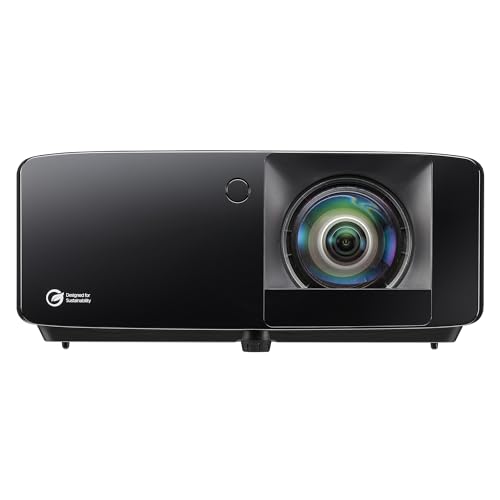
Optoma GT2400HDR Short Throw Gaming Laser — Short throw brightness for play
The GT2400HDR closes the guide because it fuses the fork’s two paths more than any other pick: it is a brightness-path machine — Full HD 1080p laser at a stated 4,200 lumens — wearing a gaming and simulation brief, in a short throw body. That geometry is its signature. Placed close to the screen, it fills a large picture across a short distance, which in a golf simulator keeps the projector out of the swing’s arc, in a living room keeps it on a low cabinet instead of a rear mount, and in a games room keeps players’ shadows out of the picture when the action gets physical. Short throw at this brightness is a rare combination in the set — the other bright machines assume conventional placement — and it gives the Optoma a parish the others cannot serve as neatly.
Its gaming claim needs the guide’s usual precision. The title states low input lag gaming without a figure, in a guide where the 4K pair print 4ms and 4.2ms. The claim is therefore a direction, not a measurement, and the spec box records it that way. For golf simulation, sports titles, racers and the broad social middle of gaming — the uses its title actually names — the combination of brightness, geometry and a low-lag design intent is coherent and compelling. For the player ranking machines by published milliseconds, the 4K pair remain the stated-figure choice, and this review will not blur that line to flatter its final pick.
Against its bright-path siblings, the choice is geometric. The LS740HD outshines it and outreaches it in venues; the HZ41 is the simpler compact all-rounder; the GT2400HDR owns the close perch. A household whose screen wall has a cabinet beneath it and three feet of floor to spare is its natural buyer, as is the simulator builder measuring a bay. At the tier’s money, that specificity is a virtue: the machine knows its room, states its light, and leaves the millisecond argument to the pair at the top of the page.
- Light source stated: Laser
- Resolution stated: Full HD 1080p
- Brightness stated: 4,200 lumens
- Throw stated: Short throw
- Input lag: Stated as low input lag in the title, with no figure given
- Use stated: Gaming, golf simulation ready
- HDR: Named in the model designation
- Speakers: Not stated in the listing title — verify with the manufacturer documentation
Strengths
- Short throw placement at 4,200 stated lumens is a combination only this pick offers.
- Golf simulation readiness names a real, growing use with exacting geometry.
- Its brightness serves lit rooms where the 4K pair would strain.
Trade-offs
- Low input lag is claimed without a figure, so it cannot be ranked against 4ms and 4.2ms.
- 1080p resolution concedes the detail argument to the 4K pair.
- Short throw placement demands a suitable low perch close to the screen.
Best for: simulator builders and close-perch living rooms wanting bright, large, social play. Not suited for: a rear-mounted cinema build, where its short throw geometry is simply the wrong tool.
Review the GT2400HDR listing on Amazon against your room measurements: check price on Amazon.
Comparison
| Projector | Resolution | Stated brightness | Stated lag | Defining trait |
|---|---|---|---|---|
| ViewSonic LX700-4K | 4K UHD | 3500 lumens | 4.2ms | 4K gaming all-rounder |
| BenQ TK710 | 4K HDR | 3200 lumens | 4ms | Lens shift installation pick |
| ViewSonic LS740HD | 1080p | 5500 lumens | Not stated in title | Bright-room and venue flagship |
| Optoma HZ41 | 1080p | 4,600 lumens | Not stated in title | Compact bright all-rounder |
| Epson Home Cinema 980 | 1080p | Not stated in title | Not stated in title | 3LCD cinema alternative |
| Optoma GT2400HDR | 1080p | 4,200 lumens | Low lag claimed, no figure | Short throw gaming and simulation |
The table is the fork drawn in figures. The top two rows win the resolution and lag columns and lose the brightness column; the next three rows invert that pattern; the last row trades on geometry instead. The Epson’s row of unstated cells is printed deliberately — a buyer comparing on paper should see the excavation its purchase requires. No row dominates, which is the signature of a healthy tier: the money buys real choices, and the room — its light, its size, its mount, its games — is the only honest arbiter among them.
Is 4K or Brightness Worth More at This Budget?
Frame the question in the room’s terms and it answers itself. Resolution is a property of the image; brightness is a property of the image in a place. A 4K picture’s extra detail survives only when the room lets the viewer see the picture at full contrast — darkened walls, controlled light, a seat close enough for the eye to resolve the fineness it paid for. Add ambient light and the picture’s blacks rise, its contrast compresses, and the detail the budget bought drowns in the wash, while the brighter 1080p machine beside it, throwing more light at the same wall, keeps its image legible and vivid. This is why the fork in this guide is not a ranking: it is a diagnosis, and the patient’s symptoms are measured in the buyer’s own room at the hour they actually watch.
The seating distance test sharpens the diagnosis. On a very large screen viewed from a cinema distance, 4K’s advantage is real and visible in texture, faces and fine game detail. From a sofa across a family room, at the screen sizes furniture allows, the same advantage shrinks toward the theoretical, while brightness’s advantage — a picture that survives the lamps — remains entirely practical. Households should therefore interrogate their room before their preferences: Can it darken? How far is the seat? How large is the wall? Three honest answers usually point down one path of the fork without further debate, and the buyer who asks them in that order rarely returns a projector.
What Does Laser Light Change About Owning a Projector?
Five of the six titles here state a laser source, and the tier’s convergence on the technology is itself a finding. The ownership differences against the lamp projectors of earlier generations are practical rather than pictorial: no lamp to replace on a schedule of thousands of hours, no gradual dimming arc that makes a three-year-old projector visibly sadder than a new one, and instant on-and-off behaviour that suits the short, frequent sessions of real households — a half-hour of gaming, a single episode — where a lamp machine’s warm-up and cool-down rituals once discouraged exactly that use. For a machine expected to serve as the room’s main display for years, those are the qualities that compound.
Laser also underwrites the brightness figures this tier trades in; sustained high output is the technology’s home ground, which is why the guide’s lumen ladder is entirely laser-built. The cautions are modest and worth one sentence each: laser machines concentrate their cost in the initial purchase rather than in consumables, so the budget decision is made once, up front; and a small number of viewers notice a speckle texture on some screen materials, which argues for matte, projector-appropriate surfaces rather than glossy walls. Neither caution reverses the tier’s verdict. At this money, laser is not the exotic option; it is the default the market has chosen, and the one non-laser pick here argues a different case — imaging architecture — rather than disputing laser’s ownership logic.
How Should a Gaming Buyer Read This Tier?
Start with the two printed numbers, because they are the tier’s gaming headline: 4ms on the TK710, 4.2ms on the LX700-4K, both beside 240Hz refresh support. Those figures describe projectors that keep pace with high-refresh feeds rather than trailing them, and for the player consolidating films and competitive play onto one large screen, they close the argument that once separated projectors from gaming monitors on speed. The remaining gaming claims in the set are directional — low input lag without a figure on the GT2400HDR, gaming positioning without a figure on the HZ41 — and should be weighted as such: suitable evidence for social and simulation play, insufficient evidence for a purchase made on milliseconds.
The second gaming question is geometry, and it is underrated. A short throw machine like the GT2400HDR changes what games are practical in a room: motion games, golf and sports simulations, and any title played standing, all benefit from a projector that sits by the screen and leaves the floor to the players. A mounted 4K machine changes a different set: seated, fast, precise play at a huge scale. The gaming buyer in this tier is therefore choosing a room arrangement as much as a specification, and the honest sequence is to decide how the household plays — standing or seated, social or ranked, lit or dark — and let that decision read the table, rather than letting a single lag figure read it for them.
What Installation Decisions Matter Most at This Level?
At this tier the projector becomes furniture, and furniture decisions outlive specification ones. The mount or perch comes first: ceiling mounting suits the long-throw models and rewards the TK710’s stated lens shift, which aligns the image mechanically from an imperfect position; shelf and cabinet placement suits the compact HZ41 and the short throw GT2400HDR, each with its own geometry to respect. Throw distance must be measured against the specific machine’s stated type before purchase, not estimated from the room’s diagonal and a hope — the documentation holds the throw ratios, and ten minutes with a tape measure is the cheapest insurance in the whole setup.
Audio routing comes second, because few titles here describe speakers and none should be assumed to carry a room. Plan the sound path — receiver, soundbar, or the eARC route the TK710 states — as part of the installation, with the cable runs decided before the mount is fixed. Light control comes third and remains the highest-value spending in the room after the projector itself: curtains, a matte screen surface, and lamps placed outside the picture’s reflections will improve any of these six more than the price difference between adjacent models would. The tier rewards the buyer who budgets attention for the room, not only money for the machine.
How Does Screen Size Interact With the Fork?
Screen size is the variable that can flip the fork’s answer inside a single room. Brightness divides across area: the same lumens spread over a picture twice as large deliver a quarter of the light per unit area, so a machine that looks commanding at one size can look merely adequate at the size the wall invites. Resolution scales the opposite way — the larger the picture, the more the eye can use 4K’s extra detail, and the more 1080p’s ceiling shows in texture and text. A buyer planning a truly large screen in a dark room is therefore pushed toward the 4K pair twice over, by detail and by the darkness that protects contrast; a buyer planning a moderate screen in a lit room is pushed toward brightness twice over, because the size does not need the pixels and the light cannot spare the lumens.
The practical method is to decide the screen size from the seat, not from the wall. Sit where the audience sits, hold the viewing angle a cinema would use as your guide, and let that geometry set the diagonal; then ask which path serves that diagonal in your light. Households routinely discover their true size is smaller than the wall’s maximum — and with it, that the brighter 1080p machine they nearly apologised for is in fact the correctly specified one, or that the 4K machine’s detail, at their real size and distance, is worth every lumen it cost. Either discovery is cheaper made with a tape measure and a borrowed bedsheet for a screen than with a delivered projector.
What Does a Decade of Ownership Look Like at This Tier?
A projector at this level should be planned the way a household plans a major appliance: installed once, serviced rarely, and judged over years rather than seasons. The laser convergence across this set serves that horizon directly — no lamp replacements interrupting the story, no slow dimming rewriting the picture’s character, and instant switching that tolerates the short sessions of ordinary weeks without the warm-up etiquette lamp machines once demanded. The one stated warranty in the guide, the TK710’s three years printed in its title, is worth pausing on for what it signals about this ownership class: manufacturers at this tier expect to be held to multi-year promises, and buyers should read every model’s documentation with that expectation in hand.
The habits that protect the decade are installation habits. A fixed mount or a stable perch, aligned once with the optical tools the machine provides; vents that stay clear and filters, where fitted, that get their occasional cleaning; a surge-protected power feed; and a room whose light control was finished rather than promised. Projectors rarely die dramatically in this class — they fade in households where the setup was always provisional. The buyer who installs properly in the first weekend is, in effect, purchasing the second half of the machine’s life at no extra charge, which is why this guide keeps returning installation from a footnote to a headline.
How Should Sport and Broadcast Viewing Change the Choice?
Sport is the viewing that most households actually share, and it stresses a projector differently from film. Broadcast sport arrives in bright, high-key pictures — sunlit pitches, white ice, studio lighting — where brightness and colour saturation carry the day and fine resolution matters less, because the image is motion, crowd and score graphic rather than texture. It is also social viewing, with lamps up, people moving, and the screen competing with the room. Those conditions read like a specification of the brightness path: the LS740HD’s stated lumens and venue billing, the HZ41’s compact family version, the GT2400HDR’s close-perch geometry for the room arranged around a match. A household whose projector will show more football than film should weight those rows of the table accordingly.
Film reverses the weighting. Cinema is mastered dark, graded for contrast, and watched — even by casual households — with the lights lowered and attention forward. There the 4K pair’s detail and the Epson’s colour architecture argue their cases, and brightness beyond the room’s need buys little. Most real households live between the two poles, sport on Saturday and film on Sunday, and for them the tier’s middle is genuinely habitable: the LX700-4K’s stated 3500 lumens is a workable bridge figure, bright enough for lamps-low sport and resolved enough for Saturday-night cinema. Naming your household’s true ratio — honestly, from the last month of viewing rather than from aspiration — is the last and most useful measurement this guide can ask for.
When Does It Make Sense to Buy the Display Now and Upgrade Around It?
A projector at this tier outlasts most of the equipment around it, and wise buyers plan the purchase as the fixed point of a system that will evolve. The streaming device will be replaced; the soundbar may grow into a receiver; the console will give way to its successor. The projector — mounted, aligned, wired through walls or neatly along them — is the element nobody wants to redo, which argues for buying the display half generously and the peripherals patiently. A household can live happily for a season with the projector fed by an existing stick and a modest speaker, while the room’s light control and sound are finished in stages; it cannot as happily discover, a year in, that the projector itself was the compromise.
That sequence also disciplines the fork decision. Because the display is the decade-long commitment, its match to the room — dark or bright, close or distant, mounted or perched — deserves the household’s most honest measurement, made before any money moves. Peripherals forgive; geometry does not. The buyers who report the deepest satisfaction with this tier, in pattern if not in survey, are the ones who treated the projector as the room’s long-term display decision and everything else as replaceable scenery — and who chose, between resolution and brightness, by standing in the room at viewing hour with the lights as they truly are.
Common Mistakes
Choosing 4K for a room that cannot darken, then blaming the projector for a washed-out picture. The fork exists precisely for that room; the brightness path was built for it, and its 1080p badge is a match, not a compromise.
Comparing brightness figures without checking what sits behind them. All five stated figures here are laser machines’ title claims, useful for ranking within the set — and no substitute for judging the picture in your own room’s light.
Treating a low-lag claim as a lag figure. One pick states the words; two picks state the numbers. Ranked players should buy numbers, and this guide’s spec boxes keep the two kinds of promise visibly separate.
Skipping the throw measurement. A projector whose geometry does not fit the room cannot be corrected into fitting it, and at this tier the return-or-replace conversation is a painful way to learn a distance a tape measure teaches free.
Assuming speakers because the tier feels like it should include them. No title here states a speaker wattage and several state no speaker at all; the sound system is a separate line in this budget, and planning it late makes it an emergency purchase.
Final Recommendation
Take the fork by the handle that fits your room. The darkened cinema that also hosts fast play belongs to the 4K pair — the LX700-4K for the fullest stated specification, the TK710 for the mounted installation with lens shift and a stated warranty. The lit, shared, large room belongs to the brightness path — the LS740HD where venues and lights-up viewing rule, the HZ41 for the compact family version of the same idea, the GT2400HDR where the perch is close and the games are played standing. The Home Cinema 980 waits for the 3LCD loyalist willing to research past its title. What the tier guarantees, whichever path is chosen, is a machine built to be a room’s main display for years — and what it asks in return is the one thing money cannot shortcut: an honest measurement of the room it will serve.
A final calibration for the buyer standing between the two paths with a hand on each: project one evening honestly in your mind. If the scene is a dark room, a film or a fast game, faces close to a large picture, the resolution path will repay you nightly. If the scene is a bright room, a match on the wall, family drifting through with the lamps on, the brightness path will repay you just as often. The tier is generous enough that either answer, chosen from the real evening rather than the imagined one, ends in a machine the household keeps.
And if the evening you pictured contains both scenes in a single week, take comfort in the tier’s depth: the middle machines here were specified by their makers for exactly that mixed life, and a compromise chosen knowingly, with figures in hand, is not a lesser purchase — it is the definition of a well-bought one.
Measure the room, name the evening, and the shortlist will usually narrow itself to a single row of the comparison table without further argument from anyone.
Frequently Asked Questions
Is the figure in the keyword the price of these projectors?
No. It is the budget ceiling defining the tier this guide shops in, not a price attached to any individual pick, and no product prices are printed here. Check the current listing on Amazon for each model you are weighing, since tier membership and street price are different facts.
Which pick is best for a bright living room?
On stated figures, the LS740HD, whose title claims 5500 lumens and names auditorium and classroom use — the lit-room parish. The HZ41 at a stated 4,600 lumens is the compact home version of the same answer, and the GT2400HDR adds short throw geometry at 4,200.
Which pick is best for competitive gaming?
The two with printed figures: the TK710 at a stated 4ms and the LX700-4K at a stated 4.2ms, both with 240Hz support in their titles. The other gaming claims in the set are unquantified, and this guide does not rank unquantified claims against measured ones.
Does 1080p look poor at this budget?
Not in the rooms the bright path serves. At family-room distances, a bright, high-contrast Full HD picture is deeply satisfying, and in lit rooms it will outperform a dimmer 4K picture whose detail the ambient light erases. In a dark room viewed closely, the 4K pair’s advantage becomes real — the room decides.
Why is there only one non-laser pick?
Because the tier has converged on laser light for the reasons the ownership section describes, and the set reflects the shelf as it is. The Epson Home Cinema 980 represents the alternative argument — 3LCD imaging architecture — for buyers who choose on that axis deliberately.
What else should the budget include?
A mount or stand suited to the machine’s throw, the sound system the titles mostly leave to you, light control for the room, and cables rated for the resolution and refresh rate you intend to run. At this tier, those supporting purchases protect the main one.
Related Guides
Rooms that defeat even this tier’s brightness are the subject of our guide to projectors for high bright rooms, the natural next read. For the presenting side of a shared space, our guide to classroom document cameras covers the document half of the room, and our roundup of document cameras for science teachers goes deeper for teaching spaces.


