What's inside
- Key Takeaways
- Quick Picks
- How We Chose These Picks
- Comparison
- Why Do Lumens and ANSI Lumens Refuse to Share a Ladder?
- What Else Besides Brightness Saves a Bright-Room Picture?
- How Should a Classroom or Office Choose From This Set?
- Can a Bright-Room Projector Still Do Cinema at Night?
- How Does Throw Distance Change Brightness in Practice?
- What Should a Buyer Check on the Screen Wall Itself?
- How Do These Machines Handle a Decade of Bright-Room Service?
- When Is a Television Still the Better Bright-Room Answer?
- Common Mistakes
- Final Recommendation
- Frequently Asked Questions
- Related Guides
As an Amazon Associate I earn from qualifying purchases. This post may contain affiliate links at no extra cost to you.
widgetverdict.com is reader-supported. When you buy through links on our site, we may earn an affiliate commission.
Most projector advice quietly assumes a cave, and most homes are not caves. The best projectors for high bright rooms are bought for the rooms people actually have: the living room with a wall of glass, the classroom with its lights up, the office where the blinds have not worked since spring, the hall where a presentation competes with a sunny afternoon. In those rooms, brightness is not one specification among many — it is the specification, the difference between a picture the room can read and a pale rectangle everyone politely ignores. This guide therefore ranks its six picks by stated light and by the honesty of their brightness claims, and it begins with the two cautions that govern everything after this paragraph.
The first caution is about units, because this set contains both and they are not interchangeable. Five titles state brightness in lumens — 5500, 4600, 4200, 4000 and 3400 in descending order. One title, the MOVIN daylight projector, states 2700 ANSI lumens. ANSI lumens are measured by a standardised method; a plain lumens figure in a title may or may not share that method, and converting or ranking between the two systems as if they were one scale produces numbers that look precise and mean little. This guide therefore keeps the two families in separate columns of its comparison table and never declares the ANSI pick brighter or dimmer than a lumens pick on arithmetic alone. Buyers comparing across the divide should judge in the room, or not at all.
The second caution is about the promise itself. No projector in this guide — no projector at any sane size — defeats direct sunlight falling on the screen. Bright-room projection means a picture that stays legible and enjoyable with lamps on, curtains open against ordinary daylight, and screens large enough to share. It does not mean a sunbeam across the wall at noon, and any guide implying otherwise is selling weather as well as hardware. Within that honest frame, the six picks divide by venue and geometry: a 5500-lumen installation flagship, a WXGA classroom veteran whose lower resolution is its stated trade, two bright laser all-rounders, a 3LCD living-room machine whose colour brightness is its argument, and an ANSI-rated daylight specialist with streaming built in. The room chooses among them; the figures merely let it choose knowingly.
Key Takeaways
- Stated brightness in lumens runs from the LS740HD’s 5500 down to the Epson Home Cinema 1100’s 3400 — the ladder this guide is built on.
- The MOVIN pick states 2700 ANSI lumens, a standardised measure that is not directly comparable with the plain lumens figures of the other five.
- The ViewSonic PA503W is a WXGA projector by its title — its 4000 lumens are bought with a resolution below 1080p, a trade this guide states openly.
- Three picks are laser machines; the PA503W is a DLP design and the Epson a 3-chip 3LCD, so the bright-room argument is not owned by one technology.
- No pick here promises a picture in direct sunlight on the screen; bright-room means lights on and curtains open, not a sunbeam at noon.
Quick Picks
| Pick | Badge | Why it earns its place |
|---|---|---|
| ViewSonic LS740HD Laser Projector | Brightest stated lumens in the guide | A 1080p laser stating 5500 lumens with corner adjustment and 360-degree projection — the venue and bright-room flagship. |
| ViewSonic PA503W | WXGA classroom veteran at 4000 lumens | A high-brightness DLP stating 4000 lumens and 120Hz with low latency — bought with a WXGA resolution trade the buyer should make knowingly. |
| Optoma HZ41 1080p Laser | Compact 4600-lumen all-rounder | A compact Full HD laser stating 4,600 lumens for home entertainment and gaming — the bright-room ladder’s middle rung, in a home-sized body. |
| Optoma GT2400HDR Short Throw Gaming Laser | Short throw brightness, 4,200 lumens | Brightness with geometry: a Full HD laser stating 4,200 lumens in a short throw body built for gaming and golf simulation. |
| Epson Home Cinema 1100 1080p Projector | 3LCD colour brightness pick | The colour argument: 3400 lumens stated as both colour and white brightness, with a built-in speaker, AirPlay and Miracast for the family room. |
| MOVIN OS 4K Daylight Projector 2700 ANSI | ANSI-rated daylight specialist | The standardised-measure pick: 2700 ANSI lumens, a named streaming platform, 76W Dolby DSP audio and ToF auto focus in a daylight-branded machine. |
How We Chose These Picks
Brightness, stated and sourced, was the gate — every pick prints a figure in its title, in one of the two unit families, and no pick was admitted on a brightness reputation its title does not carry. Beyond the gate, the set was built to cover the bright room’s actual varieties. There is the venue room — classroom, hall, boardroom — where the picture must survive full lighting and a long throw. There is the family living room, bright by day and shared by everyone, where the projector is entertainment rather than equipment. And there is the awkward room: the simulator bay, the garden at dusk, the space whose geometry is as hostile as its light. Each pick answers one of those rooms first and the others as a bonus.
Resolution was treated as the honest counterweight rather than ignored. A bright-room buyer is usually trading something for their lumens, and the trade should be visible: the PA503W’s WXGA resolution is the clearest example, named in its review’s first paragraph rather than buried, while the 1080p machines state their Full HD plainly and the MOVIN’s title-level 4K naming is handled with the care its wording requires. Installation range was the third axis — zoom, keystone, corner adjustment, ceiling mounting, short throw — because bright rooms are rarely purpose-built, and the projector that cannot be aimed in the room as found will not be saved by its lumens.
Finally, the guide refused two easy dishonesties. It does not convert ANSI lumens into lumens to manufacture a single ranking, however much a single ranking would flatter a roundup. And it does not describe any pick as daylight-proof without qualification; where a title itself uses the word daylight, as the MOVIN’s does, the review reports the claim as the maker’s framing and tests it against the same physics as every other pick.

ViewSonic LS740HD Laser Projector — Brightest stated lumens in the guide
The LS740HD leads this guide for the simplest stated reason: 5500 lumens, the largest plain-lumens figure among the six, attached to a laser source and a 1080p Full HD picture. Its title’s venue list — golf simulation, classroom, auditorium, home theater — reads like a census of bright rooms, and its installation vocabulary matches them: optical zoom, keystone, corner adjustment, ceiling mount, 360-degree projection, quick setup. This is a projector designed to be installed in rooms that were never designed for projectors, and to hold a legible, colourful picture there while the lights stay up and the audience stays awake. For the buyer whose room defeats lesser machines by lunchtime, it is the guide’s first answer.
Corner adjustment deserves its sentence, because bright rooms are usually old rooms, and old rooms have imperfect walls and mounts that cannot go where geometry wants them. Correcting each corner of the image independently turns a skewed, keystoned picture into a rectangle on walls and screens that offer the projector no perfect perch. The 360-degree projection claim widens the same freedom — tilts and orientations for floors, ceilings and event displays that a conventional mount forbids. None of this is home-cinema romance; it is the practical machinery of making a big picture behave in a real building, and it is why this model, rather than a dimmer and sharper one, earns the flagship place in a guide about light.
The trade is resolution, stated plainly in its title and in this review: Full HD 1080p, not 4K. In a lit room, that trade is usually invisible, because ambient light erases fine detail long before the pixel count does — the eye is reading contrast and colour, both of which the brightness defends. In a darkened cinema the same trade would show, and buyers whose rooms do darken should weigh the 4K machines in this site’s other guides. Here, in the bright room, the LS740HD’s bargain is the correct shape: maximum stated light, installation range to deploy it anywhere, and a resolution matched to what lit-room eyes can actually use.
- Light source stated: Laser
- Resolution stated: 1080p Full HD
- Brightness stated: 5500 lumens
- Optics stated: Optical zoom, keystone, corner adjustment
- Installation stated: Ceiling mount, 360-degree projection, quick setup
- Use stated: Golf simulation, classroom, auditorium, home theater
- Input lag: Not stated in the listing title — verify with the manufacturer documentation
Strengths
- The stated 5500 lumens tops the guide, with the headroom bright venues demand.
- Corner adjustment and 360-degree projection solve real rooms, not ideal ones.
- Laser light sustains that brightness without a lamp replacement schedule.
Trade-offs
- 1080p resolution caps detail that only a dark room would reveal anyway.
- No gaming lag figure is stated, so players must judge it as a brightness purchase.
- Its installation talents exceed what a simple living-room shelf will ever ask of it.
Best for: classrooms, halls, places of worship, simulator bays and very bright living rooms. Not suited for: a blacked-out cinema corner, where its brightness is surplus and its resolution ceiling is visible.
Check the LS740HD listing on Amazon if your room is the brightest defendant: check price on Amazon.

ViewSonic PA503W — WXGA classroom veteran at 4000 lumens
The PA503W is the elder statesman of this set, and its title is a small masterpiece of venue honesty: 4000 lumens, WXGA, DLP, high brightness, HDMI — and then the words that must lead its review, because they define its bargain. WXGA is a resolution of 1280 by 800, below Full HD, and everything about this pick should be decided with that fact in the open. What the lower resolution buys is the rest of the title: a bright, established, presentation-bred machine with optical zoom, vertical keystone, a stated 120Hz and low latency, VGA and USB alongside HDMI, ceiling mounting, and a use list of classroom, business, presentation and large screen. Generations of teachers and presenters have run exactly this specification because in a lit room, at a presentation’s distance, legibility is resolution enough — and the picture’s job is to be read, not admired.
Translate that to the home before dismissing it. A bright family room showing sport, broadcast television, presentations for a home business, schoolwork and big shared viewing is closer to the PA503W’s parish than a cinema is. Sport at WXGA on a large wall, in a lit room, loses remarkably little that the audience came for; the score graphic is legible, the pitch is green and wide, the crowd is a crowd. Films with fine texture, and desktop text at close range, are where the trade shows its edges — small type softens, and the viewer who sits close will see the grid of the picture sooner than on the 1080p picks. The machine does not hide this; its title prints WXGA in the second breath, and this guide simply insists the buyer read it there.
The 120Hz and low latency claims add an unexpected string: fast, responsive display behaviour is presentation-bred here — smooth motion for video and a responsive feel for interactive use — and casual gaming in a bright room inherits the benefit, though no millisecond figure is stated and none is invented in the spec box. Against the laser picks, its DLP architecture and lamp-era lineage are the counterweights a buyer should weigh with the documentation open. But as the guide’s value-shaped answer to the bright room — stated lumens, stated resolution, stated venues — the PA503W remains the pick that proves brightness per se was never the expensive part; brightness with resolution is.
- Technology stated: DLP
- Resolution stated: WXGA
- Brightness stated: 4000 lumens
- Refresh stated: 120Hz, low latency
- Optics stated: Vertical keystone, optical zoom
- Inputs stated: HDMI, VGA, USB
- Installation stated: Ceiling mount
- Use stated: Classroom, business, presentation, large screen
Strengths
- Its title states brightness, resolution and venues with unusual completeness.
- A stated 120Hz with low latency suits motion and interactive use in lit rooms.
- VGA alongside HDMI keeps older laptops and venue systems welcome.
Trade-offs
- WXGA resolution is below 1080p — small text and close viewing will show it.
- No numeric input lag figure is stated despite the low latency wording.
- Its presentation tuning favours legibility over cinema colour subtlety.
Best for: classrooms, offices, bright family rooms for sport and shared viewing where legibility rules. Not suited for: a close-seated film setup, where its WXGA grid becomes the picture rather than carrying it.
Read the PA503W listing on Amazon with its resolution trade in plain view: check price on Amazon.

Optoma HZ41 1080p Laser — Compact 4600-lumen all-rounder
The HZ41 occupies the ladder’s most habitable rung: a stated 4,600 lumens, second only to the flagship, in a compact Full HD 1080p laser body positioned for home entertainment and gaming. Compact matters in bright rooms more than in dark ones, because the bright room is usually a living room — a space with opinions about furniture, where a venue-sized projector is an imposition and a discreet one is a guest. The HZ41’s proposition is that a household need not choose between a room that looks like a home and a picture that survives its light; the lumens are venue-grade while the body is domestic.
Full HD resolution distinguishes it from the PA503W below it on the price-shaped ladder a buyer might imagine: at 4,600 stated lumens with 1080p, the HZ41 concedes nothing on either axis that a bright living room can perceive. Text stays crisp at family distances, sport holds its detail, and films keep their texture in the evening light that defeats dimmer machines. Laser light underwrites the whole arrangement with the ownership pattern this site has described before — instant switching for the short sessions of family life, no lamp arc of gradual dimming, brightness that is the same in year three as in week one, which in a bright room is not a luxury but the entire premise maintained over time.
The title’s silences are the familiar ones and the spec box keeps them visible: no lag figure despite the gaming word, no throw or zoom description, no speaker or streaming claim. A buyer with a fixed mount position should confirm throw from the documentation; a buyer expecting an all-in-one should plan the source and sound as separate pieces. Neither caveat touches the core case. Among the six, the HZ41 is the bright-room pick for the household that wants the ladder’s upper brightness without the flagship’s venue scale — the living room’s answer, stated in three figures and a form factor.
- Light source stated: Laser
- Resolution stated: Full HD 1080p
- Brightness stated: 4,600 lumens
- Design stated: Compact
- Positioning stated: Home entertainment and gaming
- Input lag: Not stated in the listing title — verify with the manufacturer documentation
- Throw type: Not stated in the listing title — verify with the manufacturer documentation
- Speakers: Not stated in the listing title — verify with the manufacturer documentation
Strengths
- A stated 4,600 lumens is near-flagship brightness in a compact, home-sized body.
- Full HD resolution avoids the WXGA trade entirely.
- Laser light keeps the bright-room premise true across years of family use.
Trade-offs
- Gaming is positioned without a lag figure, leaving fast play unquantified.
- Placement details are unstated, so the mount plan needs the documentation.
- No built-in sound or streaming is claimed in the title.
Best for: bright family living rooms wanting near-flagship light in a discreet body. Not suited for: a tournament gaming corner, where the missing lag figure is the whole conversation.
Look over the HZ41 listing on Amazon as the ladder’s middle rung: check price on Amazon.
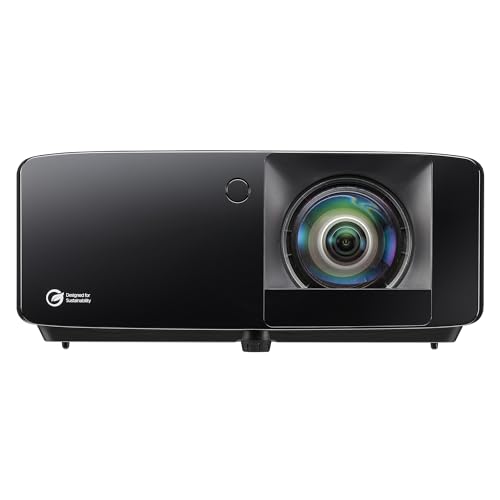
Optoma GT2400HDR Short Throw Gaming Laser — Short throw brightness, 4,200 lumens
Brightness solves the bright room’s first problem; geometry solves its second, which is that bright rooms are busy rooms. The GT2400HDR pairs a stated 4,200 lumens with short throw placement, and the pairing is more than the sum of its parts. A conventional projector in a lit living room throws its beam across the room’s traffic — every person who crosses to the kitchen becomes a shadow and a glare — while a short throw machine sits by the screen wall, its beam short and steep, the room’s life flowing behind it undisturbed. Add the stated brightness, and the result is the guide’s most liveable bright-room arrangement for rooms that are used, not dedicated: the picture stays up, and so does the household.
Golf simulation, named in the title, is the geometry’s proof case. A simulator bay combines everything hostile at once — ambient light, a player swinging in the space between a normal projector and its screen, a large image that must stay legible for ball-flight data. Short throw removes the swing from the beam; 4,200 lumens keep the picture readable in a garage or garden room that will never be a cave. The same virtues translate directly to family gaming, sports viewing and any bright room where the audience moves. Full HD 1080p resolution, stated plainly, matches the class of picture those uses reward.
The gaming wording needs its standing precision: low input lag is claimed in the title without a figure, and in a guide that elsewhere insists on printed numbers, the claim is recorded as a claim. Social, sports and simulation play — the title’s own named uses — are well served by the design’s intent; ranked play should shop the stated-figure machines in this site’s gaming guides. Speakers and streaming are unstated here, so the sound and source plan belongs to the buyer. None of that dims the pick’s identity: of the six, it is the one that answers the bright room’s light and its traffic in a single specification, and for simulator builders it is not merely an option but the shape the whole category takes.
- Light source stated: Laser
- Resolution stated: Full HD 1080p
- Brightness stated: 4,200 lumens
- Throw stated: Short throw
- Input lag: Stated as low input lag in the title, with no figure given
- Use stated: Gaming, golf simulation ready
- HDR: Named in the model designation
- Speakers: Not stated in the listing title — verify with the manufacturer documentation
Strengths
- Short throw geometry keeps the beam out of the room’s traffic and the golfer’s swing.
- A stated 4,200 lumens holds the picture in lit rooms and simulator bays.
- Full HD resolution suits the sports, data and social pictures its venues show.
Trade-offs
- Low input lag is a claim without a figure, unrankable against stated milliseconds.
- Its perch must be low and close to the screen, which not every room offers.
- Sound and streaming are unstated, so the setup includes both as separate plans.
Best for: golf simulator bays and busy bright living rooms where people cross the room during viewing. Not suited for: a rear-shelf installation, where short throw geometry cannot be used as designed.
Examine the GT2400HDR listing on Amazon against your room’s floor plan: check price on Amazon.

Epson Home Cinema 1100 1080p Projector — 3LCD colour brightness pick
The Home Cinema 1100 makes the bright-room case on a different axis from the laser ladder: not the largest lumens figure, but the most carefully specified one. Its title states 3400 lumens as colour brightness and white brightness alike, on a 3-chip 3LCD architecture — and in a bright room, colour brightness is not a refinement. Ambient light does not merely dim a picture; it desaturates it, washing colour toward grey while edges survive. A projector whose colour output matches its white output defends the part of the picture the room attacks hardest, which is why Epson’s titles repeat the pairing like a creed. At 3400 stated lumens the 1100 sits at the ladder’s lower end, and its review should be read as the guide’s colour-first answer rather than its brightness champion.
The rest of the title equips it for the family bright room specifically: wireless streaming with Apple AirPlay and Miracast named, a built-in speaker stated, two HDMI ports, 1080p resolution. That is a living-room appliance’s specification — cast the phone’s video, play the console, let the projector voice the sound — in a room where a dedicated cinema’s separates would never be tolerated. The built-in speaker’s wattage is unstated, as this guide has noted in the machine’s other appearance, and the realistic assignment is the small-to-medium room at conversational distances, with external sound as the growth path. In the bright-room context, its sound matters for a simple reason: rooms with the lights up are rooms with people talking, and dialogue that stays clear over a living room’s life is a feature on par with lumens.
Where does it concede? On raw stated light, to every laser pick here — a buyer in a genuinely glaring room, a conservatory light-trap or a hall, should climb the ladder to the 4600 and 5500 figures. Where the room is bright in the ordinary domestic sense — lamps, a window with daylight rather than a sunbeam — the 1100’s colour-specified 3400, its streaming and its sound make it the most complete household appliance in the set. The bright-room category contains multitudes, and this pick serves the multitude that lives in homes rather than venues.
- Technology stated: 3-chip 3LCD
- Resolution stated: 1080p
- Brightness stated: 3400 lumens colour and white brightness
- Speaker stated: Built-in speaker, wattage not stated in title
- Streaming stated: Wireless, Apple AirPlay, Miracast
- Inputs stated: 2x HDMI ports
- Light source: Not stated in the listing title — verify with the manufacturer documentation
Strengths
- Colour brightness equal to white brightness defends saturation where ambient light attacks it.
- AirPlay and Miracast casting suits the family room’s phone-first habits.
- A stated built-in speaker and two HDMI ports complete the appliance shape.
Trade-offs
- At 3400 stated lumens it is the ladder’s lowest rung — glaring rooms should climb higher.
- Speaker wattage is unstated, leaving its sound ceiling to the documentation.
- Its light source is not described in the title beyond the 3LCD architecture.
Best for: bright family living rooms where colour, casting and convenience matter alongside light. Not suited for: a sun-trap conservatory or a hall, where its stated lumens are simply outnumbered.
Compare the Home Cinema 1100 listing on Amazon if colour is your bright-room worry: check price on Amazon.

MOVIN OS 4K Daylight Projector 2700 ANSI — ANSI-rated daylight specialist
The MOVIN closes the guide because it argues the bright-room case in the other unit, and in several other ways besides. Its title states 2700 ANSI lumens — the standardised measure this guide refuses to convert into the plain lumens of the other five — alongside a daylight billing in its very name, an official streaming platform with Netflix named, 64GB of storage, a 76W Dolby DSP audio claim, HDMI 2.1 with eARC, ToF auto focus and MEMC, aimed at home theater, outdoor movies and gaming. That is the specification of a self-contained entertainment device rather than a venue projector: the streaming lives inside, the storage lives inside, the sound is a headline, and the setup is automated by a time-of-flight sensor that measures the wall so the owner does not have to.
Handle its two headline numbers with the guide’s two disciplines. The ANSI figure first: because it is standardised, it is in one sense the most trustworthy brightness claim here — and because the others are not stated in ANSI, it cannot be placed on their ladder by arithmetic. A buyer choosing between the MOVIN and, say, the 4,600-lumen HZ41 is choosing between measurement systems as well as machines, and the honest resolution is the room test or a careful read of each maker’s documentation, not a conversion performed in a review. The audio figure second: 76W with Dolby DSP is stated in the title, a power claim even larger than the 60W that headlined this site’s speakers guide, and it should be read the same way — as stated power and processing, with quality to be judged by listening, and with the eARC port standing ready for the household that prefers its own sound system regardless.
The 4K in its name receives the guide’s standing care: the title presents the machine as a 4K projector without the word native, so the displayed resolution is recorded as unstated rather than assumed, in a set where that distinction has been enforced throughout. Its parish is the bright room as a lifestyle rather than a venue — the daylight living room, the outdoor evening, the household that wants one device to carry picture, platform and sound into rooms the laser ladder serves with separates. Judged as that device, its title is the most complete here; judged as a lumens entry, it competes in a column of its own, which the comparison table prints without apology.
- Brightness stated: 2700 ANSI lumens — a standardised measure, not directly comparable with plain lumens
- Resolution: 4K in the product name; native resolution Not stated in the listing title — verify with the manufacturer documentation
- Audio stated: 76W Dolby DSP
- Platform stated: Official streaming, Netflix named
- Storage stated: 64GB
- Inputs stated: HDMI 2.1, eARC
- Setup stated: ToF auto focus, MEMC
Strengths
- Its ANSI brightness is the only standardised brightness claim in the set.
- A stated 76W Dolby DSP audio system makes it a genuine one-box device.
- ToF auto focus automates setup in rooms where the projector moves often.
Trade-offs
- Its ANSI figure cannot be ranked against the others’ lumens by simple arithmetic.
- Native resolution is not stated, despite the 4K naming.
- Daylight in its name is the maker’s framing — direct sun on the screen defeats it as surely as the rest.
Best for: households wanting one streaming, self-voiced device for bright rooms and outdoor evenings. Not suited for: a purchase that needs every machine ranked on one brightness scale — this one honestly refuses the conversion.
Study the MOVIN listing on Amazon, ANSI figure and all, before comparing: check price on Amazon.
Comparison
| Projector | Resolution | Brightness stated | Unit family | Defining trait |
|---|---|---|---|---|
| ViewSonic LS740HD | 1080p | 5500 | Lumens | Venue brightness flagship |
| Optoma HZ41 | 1080p | 4,600 | Lumens | Compact bright all-rounder |
| Optoma GT2400HDR | 1080p | 4,200 | Lumens | Short throw for busy rooms |
| ViewSonic PA503W | WXGA | 4000 | Lumens | Presentation veteran, resolution trade |
| Epson Home Cinema 1100 | 1080p | 3400 colour and white | Lumens | Colour brightness and casting |
| MOVIN OS Daylight | 4K in name, native not stated | 2700 | ANSI lumens | Self-contained daylight device |
The unit family column is the table’s conscience. Five rows share the lumens family and can be ranked among themselves with reasonable confidence; the sixth row is printed in ANSI lumens and stands apart, neither promoted nor demoted by a conversion this guide will not perform. Read the resolution column with equal care — the WXGA row is a trade made in daylight, literally, and the MOVIN row’s wording is preserved exactly as its title gives it. A buyer who reads those two columns honestly knows more about this purchase than a buyer who memorises the brightness ladder alone.
Why Do Lumens and ANSI Lumens Refuse to Share a Ladder?
A lumen is a unit of light output; the arguments begin with how the output is measured. The ANSI method standardises the test — the picture’s brightness sampled at multiple points on a defined image, averaged under specified conditions — so that two ANSI figures from different makers describe the same experiment. A plain lumens figure in a listing title carries no such guarantee: it may come from the same method, from a peak measurement, from a single brightest point, or from a mode no viewer would tolerate for a film. None of that makes plain figures useless — within this guide’s set of five, they are the makers’ own stated claims and rank the machines in the order the market itself presents — but it forbids the false precision of converting an ANSI figure into that ranking by arithmetic.
The buyer’s practical defence is threefold. First, treat cross-family comparisons as approximate at best, and let other stated virtues — platform, sound, geometry, installation — carry more weight when the finalists sit in different unit families. Second, weight the room over the number: a difference of a few hundred lumens within a family is smaller than the difference between a matte screen and a glossy wall, or between curtains open and curtains drawn against the worst window. Third, where a purchase truly hinges on which of two cross-family machines is brighter in your room, the only honest instrument is the room itself — a test viewing, or a purchase arrangement that permits one. Guides that print a single merged ladder are not being more helpful; they are being less careful, with your money.
What Else Besides Brightness Saves a Bright-Room Picture?
Contrast begins at the screen surface, and the surface is the cheapest place to win it back. A matte, light-grey or dedicated ambient-light screen returns the projector’s image while absorbing some of the room’s stray light, where a glossy white wall reflects both with equal enthusiasm. Placement of light matters as much as quantity: lamps and windows behind the audience harm the picture far less than the same light falling on the screen wall, and a room can often be rearranged — a lamp moved, a blind angled, seating turned — more easily than it can be darkened. Projector position helps too; a shorter throw concentrates the same lumens on a smaller, brighter picture, which is one reason the short throw pick punches at the level it does.
Picture settings are the third lever, and they should be pulled honestly. Bright rooms favour the projector’s vivid or presentation-leaning modes, higher colour saturation and a gamma that lifts shadow detail into visibility; the cinema-purist settings that flatter a dark room will look funereal at noon. Viewers should also manage the sun’s schedule rather than fight it: the bright-room projector earns its keep from morning to late afternoon and again under evening lamps, while the day’s one impossible hour — direct sun on the screen wall — is better spent with the blinds drawn for that hour alone. Bright-room ownership is a set of small cooperations with physics, and households that make them find the stated lumens go considerably further than the sceptics predict.
How Should a Classroom or Office Choose From This Set?
Institutional rooms choose by legibility and logistics before all else. The picture must be readable from the back row under the room’s working light, which privileges the ladder’s top — the LS740HD’s stated 5500 with its venue billing, or the PA503W’s presentation-bred 4000 with its resolution trade honestly weighed: for slides, documents and diagrams, WXGA at a large size under bright light is a specification generations of classrooms have validated, while fine spreadsheet text at small sizes argues for the 1080p machines. Inputs matter in rooms where visitors bring their own laptops — the PA503W’s VGA beside its HDMI is a small, telling inclusion — and ceiling mounting with keystone and zoom decides whether the installation survives the room’s actual ceiling.
The second institutional axis is maintenance across years. Laser picks remove the lamp-replacement rota and the slow dimming that once made third-year projectors the department’s apology; a stated brightness that persists is worth real money to a school or a business. The third axis is sound and control: a room that presents video needs the picture’s voice to reach the back, which none of these titles guarantees in watts, so the institutional buyer should plan the room’s audio as its own line — the one pick stating a serious audio figure, the MOVIN with its 76W claim, belongs to a different, device-led philosophy that suits smaller meeting spaces better than halls. Choose the projector for the room’s light and size first; the institution that does will not revisit the decision for years.
Can a Bright-Room Projector Still Do Cinema at Night?
Yes — and the question matters, because most bright-room projectors will spend their evenings as cinema machines in rooms that finally darken. The good news is that brightness is adjustable in a way resolution is not: every pick here can be dimmed by mode, by an eco setting, or by a larger picture, while a dim projector can never be brightened past its figure. The bright machine in a dark room is therefore a superset device, provided its black levels and colour tuning behave when the output is turned down — a quality titles cannot state and auditions reveal. The LS740HD’s venue tuning and the PA503W’s presentation tuning are the two to audition most carefully for night work; their brightness-first designs may keep a presenter’s contrast curve after dark.
The practical ritual is a two-preset life: a bright, vivid setting for the room’s daylight hours and a softer, cinema-leaning setting saved for the evening, switched as the room changes. Households that build that habit stop experiencing the bright-room purchase as a compromise and start experiencing it as range — one machine, two rooms’ worth of service, the second room being the same one after sunset. It is the strongest argument for buying brightness even slightly beyond the room’s strict need: light in reserve is flexibility, and flexibility, in a device expected to serve a decade, is the quality that survives every change of furniture, house and habit.
How Does Throw Distance Change Brightness in Practice?
Brightness is quoted at the projector, but it is experienced at the screen, and distance taxes it twice. A longer throw usually means a larger picture, and a larger picture spreads the same lumens across more area, dimming every part of it; the room that needs a long throw to fill its wall therefore needs more stated light than the same room would at a shorter distance and a smaller image. This is the quiet reason the short throw pick in this guide performs above its figure in real rooms — its picture is concentrated — and why venue installations, throwing across halls to genuinely large screens, live at the top of the ladder where the LS740HD states its 5500. Buyers should size the picture first, from the seats, and only then ask which rung of the ladder that size, in that light, requires.
Zoom range is the practical companion to throw. A stated optical zoom, which several titles here claim, lets the installer place the projector where the room allows and adjust the picture size optically, rather than moving the mount to chase the size. In bright rooms, where the mount often must dodge lights, fans and beams, that flexibility can be worth more than a few hundred lumens, because a projector that can be placed well throws a better picture than a brighter one placed badly. The measurement ritual is unglamorous and decisive: tape on the floor for the seats, a measurement to the screen wall, the documentation’s throw figures open beside them, and the ladder read only after those three numbers exist.
What Should a Buyer Check on the Screen Wall Itself?
The wall is half the display, and in a bright room it is the half most often neglected. Colour first: a wall painted in a strong colour lends that colour to every picture, and no projector setting fully repays the loan; pale, neutral surfaces are the bright room’s friend, and a wall that cannot be repainted can be covered by a screen or a hung matte panel for less than the price difference between ladder rungs. Texture second: heavy texture sparkles under a bright beam and breaks fine detail, which matters for the presentation rooms several of these picks serve. A smooth surface, or a screen that provides one, returns the resolution the buyer paid for.
Light geography third, and most actionable: stand at the screen wall at the brightest hour and look at where the light actually falls. A window to the side may flood the room while barely touching the wall, in which case the room is kinder than its reputation; a skylight or a glass door opposite the wall may pour light directly onto the picture, in which case no rung of any ladder will save the noon hour and the room’s answer is a blind, a different wall, or a viewing schedule that respects the sun. Projector buying in bright rooms is half architecture, and the buyers who walk the room at its worst hour with their eyes open make the purchase once, correctly.
How Do These Machines Handle a Decade of Bright-Room Service?
Bright-room duty is hard duty: high output, long hours, rooms full of dust and people. The laser majority in this set suits that service pattern, holding stated brightness across years without the lamp changes and gradual dimming that once made institutional projectors a maintenance rota of their own. For a school, a business or a family whose projector runs daily, that persistence is the difference between a specification that stays true and one that was true in the first term. The ownership habits are the institutional basics — filters and vents kept clear, cooling allowed to finish, mounts checked rather than assumed — applied with the regularity that shared equipment rarely receives and always rewards.
The two non-laser picks ask for a more deliberate read of their documentation on this axis, and the guide leaves that read where it belongs, with the buyer and the maker. What can be said from the titles is that both come from lines built for exactly these rooms — a presentation veteran and a home cinema family — and that bright-room buyers have run their predecessors for years in classrooms and living rooms alike. Longevity at this level is rarely about a single component; it is about whether the machine’s stated promise — brightness, in this guide — is still being kept in year five, and the technologies and titles in this set were chosen because their promises are the kind that can be.
When Is a Television Still the Better Bright-Room Answer?
Honesty about the category’s edge serves the buyer better than loyalty to it. A television panel manufactures its own light at intensities projection cannot match pound for pound, and in the most hostile room of all — floor-to-ceiling glass, sun through the viewing hours, a screen of modest size — a large television will simply win, and keep winning at noon. Projection’s counter-claims are scale and flexibility: pictures far beyond any sane television’s diagonal, a screen that can be a wall and vanish when switched off, and installations in rooms — halls, classrooms, simulator bays — where a panel of the required size is impractical or impossible. The bright-room projector buyer should therefore begin with size. If the picture the room wants is within a television’s reach and the light is truly savage, buy the television and enjoy it without a twinge.
Where the wanted picture is large, shared or architectural — the classroom wall, the hall, the living room that becomes a stadium on match days — projection remains the only practical route, and this guide’s ladder is the way up it. The deciding habit is to compare like with like at the actual size: not the television’s showroom noon against the projector’s midnight, but both technologies imagined honestly in your room at your worst hour. Buyers who run that comparison fairly usually find the boundary is clearer than the marketing of either camp suggests, and that on their side of it, a bright projector is not a compromise at all — it is simply the right instrument, finally specified in the units its room demanded.
Common Mistakes
Converting ANSI lumens into lumens to build a single ranking. The MOVIN’s 2700 ANSI and the ladder’s plain figures describe different measurements; a merged table would be arithmetic theatre, and purchases deserve better.
Expecting any projector to fight direct sunlight on the screen. Bright-room means lights on and daylight around, not a sunbeam on the wall. The buyer who needs that hour needs blinds, not more lumens.
Overlooking the PA503W’s WXGA resolution because its lumens caught the eye. The trade is printed in its title and in this guide’s table; it is a fair trade for presentations and a poor one for close film viewing, and it must be chosen knowingly.
Placing lamps where their light falls on the screen wall, then shopping for a brighter projector to compensate. Rearranging the room’s light is free brightness; the ladder should be climbed after the room has done its part.
Judging a bright-room machine only at night, or only at noon. It will live in both rooms. Audition both, save a preset for each, and let the purchase be the range it actually is.
Final Recommendation
Climb the ladder as high as your room’s light honestly requires, and no higher. The venue and the glaring living room belong to the LS740HD’s stated 5500 lumens and installation range. The ordinary bright family room is served a rung down, by the HZ41’s compact 4,600 — or sideways, by the GT2400HDR where the room’s traffic demands short throw geometry at 4,200. The classroom and the presentation wall may take the PA503W’s 4000 with its WXGA trade made knowingly, as generations have. The colour-sensitive household takes the Home Cinema 1100’s colour-and-white 3400 with its casting and its speaker, and the one-box household takes the MOVIN’s ANSI-rated, self-voiced daylight device in its own column, unconverted. What none of them asks is for the room to become a cave — only for its light to be met with stated figures, honest units, and a picture sized to win.
One last piece of method, offered because bright-room purchases fail on method more often than on hardware: visit your own room at its brightest hour before ordering, and write down what you see — which wall takes the sun, where the lamps stand, how far the back seat sits. That single page of notes will choose among these six more reliably than any further week of reading, this guide included, because it converts the purchase from a comparison of figures into a match between a machine and a place.
Bring those notes to the comparison table, and the ladder stops being an abstraction: it becomes a set of stated figures waiting to be matched against a measured room, which is all any honest projector guide can arrange.
Frequently Asked Questions
Can any of these be watched with the curtains open?
Yes, within the guide’s standing limit: ordinary daylight and lamps are the conditions these machines are built for, with the higher stated figures serving the brighter rooms. Direct sunlight falling on the screen itself defeats any projector, and that hour belongs to the blinds.
Is 2700 ANSI lumens brighter than 3400 lumens?
The figures cannot be ranked by arithmetic alone, because ANSI lumens follow a standardised measurement and a plain lumens title claim may not. Treat the MOVIN as competing in its own column, and let its platform, audio and automation — or a room test — decide cross-family contests.
Is WXGA good enough for a home?
For sport, broadcast viewing, presentations and shared family use in a bright room, the PA503W’s WXGA has a long, validated history. For films watched closely and for fine text, the 1080p picks are the better tool, and the guide states the trade wherever the model appears.
How many lumens does a bright living room need?
Within this set’s stated family, the guide’s ladder is the practical answer: the 3400 colour-and-white figure serves the ordinarily bright room, the 4,200 to 4,600 figures serve the stubbornly bright one, and 5500 serves venues and halls. Room size and screen size move the requirement as much as the windows do.
Which pick suits a garden at dusk?
The MOVIN names outdoor movies in its title and carries its own streaming and stated audio power, making it the self-contained garden option. The GT2400HDR’s brightness and short throw also suit a dusk setup where a low perch near the screen exists. Both obey the dusk rule: start when the light falls, not before.
Do bright projectors waste their brightness at night?
No — output can be lowered by mode and picture size, giving the bright machine a second, softer life after dark. Saving a night preset beside the day preset turns the purchase from a compromise into a range.
Related Guides
For the rooms at the other end of the light scale, our guide to classroom document cameras equips the presenting side of the space, our roundup of document cameras for science teachers goes deeper for teaching, and our guide to inexpensive document cameras for teachers covers the same rooms at the gentlest level of spending.


