What's inside
- Key Takeaways
- Quick Picks
- How We Chose These Picks
- Comparison
- How to Choose a Dedicated Photo Printer
- Dye-Sublimation or Inkjet at 4×6: Which Print Actually Feels Better?
- Does a Six-Colour System Change Everyday Photographs, or Only Big Ones?
- What Does Borderless Printing Demand From the Person Setting It Up?
- How Much Desk Does a Dedicated Photo Printer Really Claim?
- What Should the First Ten Prints Be?
- Tank, Cartridge or Dye Pack: What Will Your Supply Cupboard Look Like?
- Scanning the Shoebox: Why Half of Photo Printing Starts With Old Paper
- Common Mistakes
- Final Recommendation
- Frequently Asked Questions
- Related Guides
As an Amazon Associate I earn from qualifying purchases. This post may contain affiliate links at no extra cost to you.
widgetverdict.com is reader-supported. When you buy through links on our site, we may earn an affiliate commission.
A printer earns the word dedicated in front of photo by giving up something. The best dedicated photo printers on this page have traded away the office agenda — the fax heritage, the fifty-sheet document feeder, the monochrome workhorse mindset — in favour of one job done with unusual care: turning image files into prints that hold colour the way the photographer meant it. Yet dedication comes in more than one shape, and the six machines below prove it. At one end sits a six-colour tank flagship that prints to 13 by 19 inches and scans and copies besides. At the other end sit compact 4×6 specialists that do almost nothing except photographs, and do that one thing at the press of a phone button. Between those poles lie a MegaTank all-in-one and a home inkjet wearing the Photo name in its title.
So the real question of this guide is not which printer prints photographs — all six do — but which shape of dedication matches the photographs you actually make. A creator printing portfolio sheets for a studio wall needs width, a deep colour system and ink economics that survive large paper. A parent printing birthday pictures for grandparents needs a machine that wakes fast, connects to a phone without ceremony and produces a finished 4×6 before the moment cools. A scrapbooker needs borderless output in two small sizes and nothing else. Each of those buyers is shopping for dedication; each needs a different machine.
Measure the six reviews against your own print pile: its sizes, its frequency, its audience. The comparison table then lines the machines up by the facts their listing titles actually state — colour system, maximum size, bundled media, functions — and the sections after it take up the judgement calls a table cannot make: how dye-sublimation differs from inkjet at 4×6, why a tank changes a photographer’s behaviour, and what borderless really costs in setup attention. Nothing here is ranked by a laboratory we did not run; everything is ranked by fit, argued pick by pick.
Key Takeaways
- Dedication splits two ways in this guide: wide-format colour depth for creators, and single-size simplicity for phone photographers.
- The Epson EcoTank Photo ET-8550 is the only pick whose title states six colours, tank ink and 13 by 19 inch output together.
- Two picks — the Liene M100 and the KODAK Dock Plus — print by thermal dye-sublimation or 4PASS transfer rather than inkjet, which changes how their prints feel and age.
- Bundled media counts in the titles (100 sheets, 50 sheets) tell you how soon a small-format machine needs its first consumable order.
- Only three of the six scan and copy; a household replacing its sole printer should weigh that before choosing a pure photo machine.
- Where a title is silent about a specification, the spec box says so in fixed wording instead of guessing.
Quick Picks
| Pick | Badge | Why it earns its place |
|---|---|---|
| Epson EcoTank Photo ET-8550 | Six-colour tank flagship | Cartridge-free six-colour printing to 13 by 19 inches, with scan and copy, for creators and home studios. |
| Epson PictureMate PM-400 | Compact snapshot specialist | Borderless 4×6 and 5×7 wireless printing in a small body built for home and travel. |
| Liene M100 4×6 Photo Printer | Dye-sub with a deep bundle | Thermal dye-sublimation 4×6 prints over Wi-Fi, arriving with 100 sheets and 3 cartridges. |
| KODAK Dock Plus 4×6 Photo Printer | Dock-and-charge design | The phone rests on the printer and charges while 4PASS prints emerge; 50 sheets included. |
| Canon PIXMA G620 MegaTank Photo | Tank all-in-one | Refillable-tank photo printing with copy and scan, plus Alexa compatibility, in black. |
| HP Envy Photo 7975 | Home photo all-rounder | Colour inkjet photo printing with scan, copy, mobile printing and an Instant Ink trial. |
How We Chose These Picks
The shelf for this search term mixes three technologies and at least four sizes of ambition, so the first act of selection was taxonomic. Every candidate had to be a machine whose listing title centres photography — a Photo name, a stated photo format, a photo ink system — rather than a general office printer that merely tolerates pictures. That filter kept the guide honest to its keyword: a buyer typing this search wants a machine bought for images first.
The second act was spread. A guide containing six near-identical desktop inkjets would answer a question nobody asked, so the six places were allocated across the real shapes of the category: one wide-format tank flagship, one compact borderless specialist, two dye-transfer 4×6 machines with different ergonomics, one refillable-tank all-in-one and one mainstream home photo inkjet. A reader whose needs match any corner of the category should find their corner represented and argued, not just listed.
The third act was literal reading. Each review below builds its spec box only from words present in that pick’s listing title, and where a buyer would reasonably ask about a detail the title never mentions — paper handling beyond the stated size, ink configuration beyond the stated colour count — the box records the silence in the guide’s fixed wording. Judgement fills the space around those facts: how a machine fits a desk, a habit, a family. Facts themselves are never filled in from habit or hope.

Epson EcoTank Photo ET-8550 — Six-colour tank flagship
Start with the number six. Most home printers mix photographs from four inks and accept the visible compromises in skies, shadowed faces and the long gradient of a sunset. The ET-8550’s title states a 6-colour system, and those extra channels exist precisely for the tonal territory where four-colour engines show their seams. Pair that engine with output up to 13 by 19 inches and the machine stops being a snapshot printer entirely: it becomes the device on which a creator prints the version of a photograph that goes on a wall, into a portfolio, or across a studio table for a client to judge.
The EcoTank half of the name changes the economics of reaching that standard. Cartridge-free tank ink means the cost anxiety that makes photographers print small and rarely — one more proof, one more large sheet, each silently priced in the head — largely evaporates. Creators iterate: print the portrait at full size, live with it for a day, adjust, print again. A tank flagship is bought for that loop as much as for any single print, and its stated audience, creators and home studios, describes exactly the households that run the loop weekly.
Nor is it a one-trick engine. The title states print, scan and copy, so the same desk machine that produces a 13 by 19 portfolio sheet also digitises the shoebox photograph the portfolio grew from, and copies the release form that goes with the job. A stated speed of up to 16 ppm keeps its document manners respectable. Wireless design means the studio’s laptops and phones all reach it without a cable hierarchy. As an ownership proposition it asks for desk width, flat storage for large paper, and the discipline of keeping tanks topped up before a big session rather than during one.
For whom is this the wrong printer? The buyer whose photographs live at 4×6 and whose printing happens in bursts at birthdays. That buyer would be paying for width and colour depth their prints never use, and housing a wide-format body their room resents. Dedication cuts both ways: this machine is dedicated to ambitious printing, and it rewards owners whose ambition is real.
- Type: Wireless wide-format all-in-one tank printer
- Ink system stated: Cartridge-free, 6-colour
- Functions stated: Print, scan, copy
- Speed stated: Up to 16 ppm
- Maximum size stated: 13 x 19 in.
- Audience stated: Creators and home studios
- Further specifications: Not stated in the listing title — verify with the manufacturer documentation
Strengths
- Six stated colours address the gradients and skin tones where four-colour photo printing shows banding.
- Output to 13 by 19 inches covers portfolio, poster and wall work on one machine.
- Tank ink supports the proof-adjust-reprint loop that serious home printing runs on.
Trade-offs
- Wide-format hardware needs wide-format desk space and large-paper storage.
- Its talents are wasted on a household that prints only occasional 4×6 snapshots.
- Tank value depends on regular use; a rarely run tank printer is an expensive ornament.
Best for: creators and home studios printing large colour work often enough to feel tank economics. Not suited for: a buyer whose entire print life is phone snapshots at 4×6 — the width and colour system would sit idle.
For the studio desk, the ET-8550’s listing carries the full picture: check price on Amazon.

Epson PictureMate PM-400 — Compact snapshot specialist
The PictureMate PM-400 is what dedication looks like when it shrinks. Its title promises compact wireless photo printing at borderless 4×6 and 5×7 inches, with mobile support, for home and travel — and nothing else. No document ambitions, no wide format, no feeder. That narrowness is a design decision a certain buyer will recognise as a gift: every part of the machine, from its footprint to its interface, serves the single act of turning a phone or camera photograph into a finished print you can hand to someone.
Borderless deserves its sentence. A bordered snapshot looks like a printout; a borderless one looks like a photograph, the way the lab prints of the film era looked. At 4×6 and 5×7 — the two sizes that fill frames, albums and envelopes — borderless output means the print leaves the machine finished, with no trimming ritual between the button and the mantelpiece. For the grandparent economy of family photography, where prints are mailed, framed and stuck to fridges, that finish is the entire product.
Compactness and wireless complete the thought. A machine this size travels: to the holiday house, to the family gathering where the group photograph should exist as an object before everyone drives home, to the craft table for a weekend project. Mobile support means the photograph’s natural home, the phone, is also its print source, with no computer intermediary slowing the gesture down. The PM-400’s ideal owner prints in social bursts — events, visits, holidays — and values immediacy over scale.
Its limits trace the same outline as its focus. Paper sizes stop at 5×7, so the wall-sized ambitions belong to the ET-8550’s class. A household needing one machine for photographs, homework and scanned forms will find the PictureMate a delightful second printer and an impossible only printer. Buy it as a specialist, and it is superb at its speciality.
- Type: Wireless compact photo printer
- Sizes stated: Borderless 4 x 6 and 5 x 7 in.
- Connectivity stated: Wireless, with mobile support
- Audience stated: Home and travel
- Further specifications: Not stated in the listing title — verify with the manufacturer documentation
Strengths
- Borderless output at the two classic snapshot sizes leaves the machine print-ready for frames and albums.
- Compact body genuinely travels, suiting event and holiday printing.
- Mobile support matches the phone-first way families now photograph.
Trade-offs
- Nothing larger than 5×7 can come out of it; wall prints need another machine.
- No scan or copy function is stated, so it cannot serve as a household’s only printer.
- Its single purpose means long idle stretches between photo occasions for some homes.
Best for: families printing borderless snapshots at home and on trips, straight from phones. Not suited for: anyone needing prints larger than 5×7 or an all-in-one for documents and scanning.
Snapshot specialists are a rare breed; the PM-400’s own page shows its current terms: check price on Amazon.

Liene M100 4×6 Photo Printer — Dye-sub with a deep bundle
The Liene M100 prints by thermal dye-sublimation, and the technology deserves explanation because it produces a different object from an inkjet print. Instead of droplets laid on paper, dye is transferred in passes and sealed beneath a protective finish, so the photograph emerges dry, smooth and continuous in tone — no dot pattern for the eye to find. At 4×6, the size this machine exists for, dye-sublimation prints carry the waxy, lab-like surface that many people picture when they picture a photograph at all.
Its bundle is the second half of its argument: 100 sheets and 3 cartridges in the box, per the title. Consumable arithmetic is where small photo printers ambush their owners — the machine is cheap, the first refill arrives in a fortnight — and a hundred-sheet starting bundle postpones that ambush through a whole season of family printing. A buyer can give this machine, or buy it for a holiday, and know the first hundred photographs are already paid for in paper and dye.
Connection runs over Wi-Fi to iPhone and Android, which places the M100 in the same phone-first world as the PictureMate, but with a different print character: where the Epson is an inkjet specialist, the Liene is a dye-sub specialist, and side by side their 4×6 prints differ in surface and feel more than in colour. Households printing for albums and gifts often prefer the sealed dye-sub finish; households already invested in inkjet papers and workflows may prefer to stay. The title also calls it portable and an instant photo printer — instant in the social sense, a print in hand within the minute, rather than the instant-film sense.
One thing it will never do is grow. The format is 4×6, full stop; documents, enlargements and scanning live elsewhere. Its cartridges and paper are a matched system, so running costs follow the bundle’s ecosystem rather than the open ink market. Within its format, though, the M100 is a complete thought: technology, bundle and connectivity all pointed at the same photograph.
- Type: Portable photo printer for iPhone and Android
- Technology stated: Thermal dye sublimation
- Size stated: 4×6 in.
- Bundle stated: 100 sheets and 3 cartridges
- Connectivity stated: Wi-Fi
- Further specifications: Not stated in the listing title — verify with the manufacturer documentation
Strengths
- Dye-sublimation produces sealed, continuous-tone prints with a lab-like surface.
- A 100-sheet, 3-cartridge bundle covers a long first season of printing.
- Wi-Fi phone printing suits the way its target photographs are taken.
Trade-offs
- 4×6 is the ceiling; no enlargement path exists inside this machine.
- Its matched paper-and-cartridge system ties running costs to one ecosystem.
- No document or scanning role is stated for it at all.
Best for: phone photographers who print 4×6 constantly and want a sealed, giftable finish. Not suited for: buyers who need any size above 4×6 or a printer that also handles household documents.
The hundred-sheet bundle is the headline here; confirm its current form at the M100 listing: check price on Amazon.
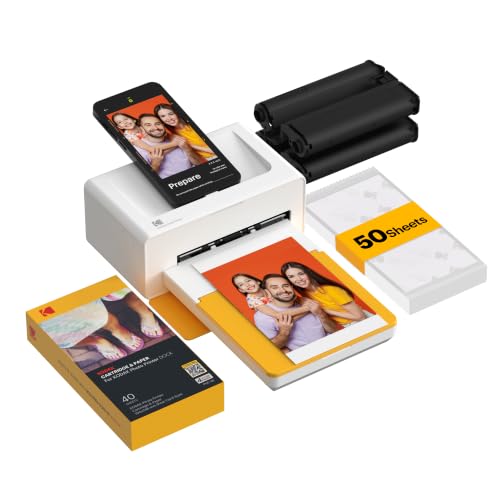
KODAK Dock Plus 4×6 Photo Printer — Dock-and-charge design
Kodak’s contribution to the 4×6 contest is ergonomic before it is technical. The Dock Plus invites the phone to sit on the printer — docking, in the title’s own word — and to charge while printing. That single gesture dissolves the two small frictions that kill casual printing: the flat battery discovered mid-session, and the cable hunt. The phone lands, the print emerges, the phone leaves charged. As a piece of household choreography it is the most considered design in this guide, aimed at printing that happens in kitchens and living rooms rather than at desks.
The print technology is 4PASS, Kodak’s four-pass dye-transfer process, and the title adds a durability trio that deserves a closer look: water, fingerprint and fade resistant. Snapshot prints live hard lives — fridge doors, wallets, gloveboxes, the front of a school folder — and resistance to fingerprints in particular addresses the way 4×6 prints are actually handled, passed hand to hand the moment they appear. A print that shrugs off the handling it will certainly receive is a print designed for its real habitat.
Fifty sheets ride in the bundle, half the Liene’s count, and Bluetooth joins the connection options alongside the dock, with both iPhone and Android stated as compatible. The buyer choosing between the two dye-transfer machines is really choosing a ritual: the Liene prints from anywhere in Wi-Fi range with a deeper media bundle; the Kodak prints from the dock, charging the phone, with durability claims the Liene’s title does not make. Neither ritual is wrong; they suit different rooms and different habits.
As with every 4×6 specialist here, the ceiling is absolute — no larger print, no document role — and the consumable system is the manufacturer’s own. The Dock Plus also asks for a permanent parking spot, since a dock earns its keep by being where phones habitually land. Given that spot, it turns printing into a by-product of charging, which may be the most sustainable printing habit of all.
- Type: 4×6 photo printer with smartphone docking
- Technology stated: 4PASS
- Bundle stated: 50 sheets
- Connectivity stated: Bluetooth; iPhone and Android compatible
- Durability stated: Water, fingerprint and fade resistant
- Charging stated: Charge while printing
- Further specifications: Not stated in the listing title — verify with the manufacturer documentation
Strengths
- Docking plus charging removes the two frictions that most often postpone a print.
- Stated resistance to water, fingerprints and fading suits prints that get handled daily.
- Bluetooth and dual phone-platform support keep connection simple.
Trade-offs
- The 50-sheet bundle runs out sooner than the Liene’s hundred.
- A dock design needs a permanent landing spot to deliver its convenience.
- Format stops at 4×6 with no document or scanning role stated.
Best for: households that would print more if printing lived where phones charge. Not suited for: buyers wanting a deep starter bundle of media, or any output above 4×6.
If the dock-and-charge ritual sounds like your kitchen counter, the Dock Plus listing is the place to verify it: check price on Amazon.

Canon PIXMA G620 MegaTank Photo — Tank all-in-one
Canon’s G620 applies the tank idea to the photo all-in-one without the wide-format escalation of the ET-8550. Its title states a Wireless MegaTank Photo All-in-One — print, copy, scan — in black, working with Alexa. Read plainly, that is a household proposition: one machine, refillable ink, photographic intent, and the everyday functions a family actually calls on, in a finish that sits quietly in a living space.
The MegaTank system is the ownership story. Refillable tanks reward the household that prints photographs in batches — the holiday backlog cleared in an evening, the school project illustrated properly, the album brought up to date — because the per-print ink anxiety that rations such sessions is removed. Tank machines also change the shopping rhythm from emergency cartridges to planned bottles, a calmer pattern that suits families who print in waves rather than daily.
Alexa compatibility, stated in the title, marks the G620’s generation: voice-initiated printing for the household’s quick jobs, a feature whose value is real precisely for the small prints — a child’s drawing scanned and reprinted, a photograph for a card — that otherwise wait for someone to sit down at a computer. Combined with wireless access for phones and laptops, the machine positions itself as shared family infrastructure rather than one person’s peripheral.
Against the ET-8550 it concedes the stated extremes: no 13 by 19 output, no six-colour claim appears in its title, and this guide will not invent either. What it offers instead is proportion — photo-first tank printing at household scale, with scan and copy aboard. Buyers whose largest print is a framed 8×10-class photograph and whose real enemy is cartridge cost will find the G620’s balance pointed at them. Buyers chasing gallery width should look up the page to the Epson flagship and accept its footprint as the price of that width.
- Type: Wireless MegaTank photo all-in-one printer
- Functions stated: Print, copy, scan
- Ink system stated: MegaTank (refillable tank)
- Colour stated: Black
- Smart feature stated: Works with Alexa
- Further specifications: Not stated in the listing title — verify with the manufacturer documentation
Strengths
- Refillable tanks suit batch photo printing without per-print cartridge anxiety.
- Print, copy and scan in one body lets it serve as the household’s main machine.
- Alexa compatibility and wireless access make it shared family infrastructure.
Trade-offs
- No wide-format output is stated; large wall prints belong to another class.
- No colour count is stated in the title, so gradient claims cannot be made for it here.
- Tank economics need regular printing to justify themselves.
Best for: families printing photographs in batches who want tank ink plus scan and copy in one black box. Not suited for: creators needing stated wide-format output or a stated six-colour system.
Family-scale tank printing has its own arithmetic; run it against the G620’s current listing: check price on Amazon.

HP Envy Photo 7975 — Home photo all-rounder
The Envy Photo 7975 is the mainstream answer: a wireless colour inkjet photo printer that also scans and copies, sets up easily according to its title, prints from mobile devices, declares itself best for home, and arrives with a three-month Instant Ink trial and AI-enabled features. Where the specialists in this guide narrow, the Envy broadens — it is the photo printer for the household that wants photographs to be one strong talent among several, on a machine nobody in the family finds intimidating.
Easy setup, stated plainly in the title, is a more serious feature than enthusiasts admit. The graveyard of home printing is full of capable machines defeated by a hostile first hour. A printer that reaches the Wi-Fi, enrols its app and prints a first photograph while enthusiasm is still warm will print more photographs in its first year than a superior machine that began with an argument. HP’s Envy line is engineered around that first hour, and for the family buyer it may be the deciding specification of all.
The Instant Ink trial introduces the subscription model of ink: three months included, per the title, after which the household decides whether ink arriving by post on a plan suits its rhythm better than cartridges bought in shops. Households with steady, predictable printing often find the subscription calming; sporadic printers should do the arithmetic honestly at the trial’s end. The AI-enabled label signals the current generation’s software assistance in setup and print handling; its practical weight is best judged by whether the household’s phones and laptops connect and print without friction in daily use.
Measured against the dedicated extremes, the Envy concedes depth: no tank, no stated colour count beyond its colour inkjet nature, no wide format. What it returns is completeness at home scale — photo printing, scanning, copying, mobile access — in the least specialised, most approachable package here. For the household replacing a dead all-in-one and wanting its photographs to come out noticeably better than before, that is a coherent and honest brief.
- Type: Wireless colour inkjet photo printer
- Functions stated: Print, scan, copy
- Setup stated: Easy setup
- Mobile stated: Mobile printing; best-for-home positioning
- Ink offer stated: 3 month Instant Ink trial included
- Software stated: AI-enabled
- Further specifications: Not stated in the listing title — verify with the manufacturer documentation
Strengths
- Photo printing plus scan and copy covers the full home brief in one approachable machine.
- Stated easy setup protects the first hour, where home printers live or die.
- An included Instant Ink trial lets a household test subscription ink before committing.
Trade-offs
- No tank system is stated, so heavy photo volume follows cartridge or subscription economics.
- No wide format or colour count is stated for gallery-scale ambitions.
- Subscription ink suits steady printers better than sporadic ones.
Best for: households wanting better photographs from a friendly all-in-one that also scans and copies. Not suited for: high-volume photo printing, where a tank machine’s economics pull ahead.
The all-rounder’s case rests on daily ease; its listing lays out the current offer: check price on Amazon.
Comparison
| Printer | Print technology | Largest size stated | Scan / copy | Bundle or ink note |
|---|---|---|---|---|
| Epson EcoTank Photo ET-8550 | 6-colour tank inkjet | 13 x 19 in. | Yes, both stated | Cartridge-free tanks |
| Epson PictureMate PM-400 | Inkjet, compact | 5 x 7 in. borderless | Not stated in title | Built for home and travel |
| Liene M100 | Thermal dye-sublimation | 4×6 in. | Not stated in title | 100 sheets, 3 cartridges |
| KODAK Dock Plus | 4PASS dye transfer | 4×6 in. | Not stated in title | 50 sheets; charges the phone |
| Canon PIXMA G620 | MegaTank inkjet | Not stated in title | Yes, both stated | Refillable tanks; Alexa |
| HP Envy Photo 7975 | Colour inkjet | Not stated in title | Yes, both stated | 3-month Instant Ink trial |
Read the table by columns and the category sorts itself. The size column divides the six into one wide machine, two snapshot sizes and three titles that decline to state a maximum — a silence the buyer should resolve in documentation before assuming anything. The technology column divides them by print character: droplet inkjet in four machines, sealed dye transfer in two. The scan-and-copy column divides them by household role: three can plausibly be a home’s only printer; three are second machines by design, and proud of it.
How to Choose a Dedicated Photo Printer
Begin with the largest print you will make this year — not the largest you can imagine, the largest already sitting in your files with a wall or a frame waiting for it. If that print is a portfolio sheet or a poster, the wide-format row of the table is your whole shortlist. If it is a framed photograph at ordinary sizes, the all-in-ones compete. If it is a 4×6 for an album, the specialists compete, and paying for width you will never feed is the one clear waste in this category.
Next, count your printing rhythm honestly. Tanks — the ET-8550 and the G620 — repay owners who print in volume or in batches, because their economics improve with use and their ink sits ready between sessions. Cartridge and subscription machines suit steadier, lighter rhythms. Dye-transfer machines price each print through their matched paper-and-ribbon or cartridge systems, which makes their cost per photograph predictable to the sheet — a budgeting virtue for gift and album projects with a fixed count.
Then decide the household-role question. A dedicated photo printer that cannot scan or copy is a second machine, and second machines need a home: a shelf, a socket, a reason to be reached for. If the household’s existing printer already scans and copies happily, a specialist adds pure photographic joy. If this purchase replaces the household’s only printer, the all-in-one rows are the responsible shortlist, and photographic dedication must be balanced against Tuesday’s homework form.
Finally, match the connection to the camera you actually use. Every pick here is wireless and phone-friendly in its title, but their rituals differ — docked, app-driven, voice-assisted. The printer that meets your phone where it already lives will be used; the one demanding a new ritual will be admired and bypassed. Choose the ritual you will still be performing in month six.
One more filter deserves applying before any of the others, because it silently eliminates half the shelf for many buyers: who else will use this machine? A printer bought for one photographer’s studio can be as temperamental as its owner tolerates. A printer bought for a household must survive being used by people who will never read its manual — partners printing a boarding pass at midnight, children printing a project at dawn, grandparents pressing whichever button looks friendly. Rate each candidate by its forgiveness: how it behaves when the wrong paper setting is chosen, how clearly it announces an empty colour, how gracefully it rejoins the network after the router restarts. The specialists score well here by having almost nothing to forgive; the all-in-ones score well by maturity. The unforgiving machine, however gifted, becomes one person’s chore — and chores, unlike hobbies, do not get defended at replacement time.
Dye-Sublimation or Inkjet at 4×6: Which Print Actually Feels Better?
Hold one of each and the difference is tactile before it is visual. A dye-sublimation print, from the Liene or the Kodak, carries its image inside a sealed surface: run a thumb across it and the print feels like one continuous object, closer to a lab photograph than to a page. An inkjet 4×6 from the PictureMate carries its image in dried droplets on coated paper — capable of beautiful colour and fine detail, with a surface that reads slightly more like a print and slightly less like a photograph from a chemist’s envelope.
Durability follows the construction. The Kodak’s title claims resistance to water, fingerprints and fading outright, which is dye-transfer’s natural advantage made explicit: the image is protected by the very process that formed it. Inkjet snapshots ask for a little more care in their first minutes and their storage. For prints destined for wallets, fridges and children’s hands, that difference is practical, not academic.
Colour character differs more subtly. Dye transfer blends tones continuously, which flatters faces and skies at snapshot size. Inkjet at 4×6 can hold crisper fine detail in textured subjects — fur, foliage, architecture — where droplet precision tells. Neither wins the size outright; they win different photographs. A household printing mostly people will lean dye-sub; a household printing mostly places may lean inkjet, and either leaning is defensible.
Does a Six-Colour System Change Everyday Photographs, or Only Big Ones?
The extra colours in a system like the ET-8550’s earn their keep where tones change slowly: the blush across a cheek, dusk moving down a sky, shadow opening into detail. At 4×6 those transitions occupy few millimetres and the eye forgives a four-colour engine most of its shortcuts. Enlarge the same file to 13 by 19 and the shortcuts become geography — visible bands in the sky, steps in the shadow — and the six-colour system’s smoother stepping turns into the difference between a print that decorates a wall and one that survives being looked at on it.
That scaling law explains the shape of this whole guide. Colour depth and print width are not two separate luxuries; they are one luxury, because width is what exposes depth. It is also why the guide refuses to mourn the absence of a stated colour count in the G620’s or the Envy’s titles: at household sizes, a well-driven mainstream engine produces photographs families love, and the six-colour premium only becomes compulsory when the prints grow.
The practical test is your own archive. Take the photograph you most want to print, and picture it at the largest size you are considering. If its beauty lives in a gradient — a face, a sky, water at evening — depth matters at that size. If its beauty lives in detail and contrast, width alone may satisfy you, and the money saved on colour channels can go toward paper worth printing on.
What Does Borderless Printing Demand From the Person Setting It Up?
Borderless sounds like a pure gift — the print emerges finished, edge to edge — but it asks for two small competences. The first is paper discipline: borderless modes expect the right paper type selected and the sheet loaded squarely, because the printer prints slightly past the edges by design and forgives neither skew nor the wrong surface setting. The second is composition awareness: an image cropped by a screen’s aspect ratio may lose its edges when expanded to fill a 4×6 or 5×7 sheet, so the thoughtful printer checks the preview rather than discovering a decapitated landmark afterward.
Neither demand is heavy, and the PictureMate’s entire design assumes a non-technical owner will meet them happily. But they explain why some households prefer the bordered default for everyday snapshots and reserve borderless for prints destined for frames. The white edge is not a failure; it is a margin that forgives. Choose per print, not per ideology.
How Much Desk Does a Dedicated Photo Printer Really Claim?
Footprint is the specification photographs of printers always lie about, because a printer’s true territory includes the space its paper travels through, not just the rectangle it stands on. A wide-format machine like the ET-8550 needs room in front for a 13 by 19 sheet to emerge without curling against a wall, room behind or above for loading, and flat storage nearby for paper that must never be bent. Measured honestly, it claims a workstation, not a corner. Buyers who grant it that workstation get a studio tool; buyers who perch it on a crowded shelf get a daily irritation and, eventually, a printer exiled to a cupboard, which is where dedicated machines go to stop being used.
The specialists invert the problem. The PictureMate, the Liene and the Kodak can live on a kitchen counter, a hall table, the top of a bookshelf — anywhere a phone already lands. Their territory is measured in centimetres and their setup in minutes, which is precisely why they get used at the frequency their category promises. The G620 and the Envy sit between: ordinary all-in-one footprints that any home office absorbs without redesign. Before choosing on image quality, walk the room with a tape measure and decide which territory you are genuinely offering. The printer that fits the room’s real geography will out-print the superior machine that does not, because use is the multiplier on every other specification.
Storage belongs in the same audit. Photo paper, spare cartridges or dye-sub packs, and the finished prints awaiting albums all need a drawer or a box near the machine. Households that solve storage keep printing; households that scatter supplies across three rooms develop a setup ritual long enough to postpone small jobs indefinitely. Dedication, in the end, is a property of the household as much as of the printer.
What Should the First Ten Prints Be?
A new photo printer teaches its owner through its first session, and a deliberate first ten prints teach faster than a month of accidents. Begin with one familiar face in ordinary light — the photograph whose colours you know by heart — because skin is the test every viewer reads instinctively. Follow with one sky or water gradient, one dark and moody image, one bright and busy one, and one black-and-white conversion if your files include them. Across those five, a machine reveals its colour temperament, its shadow behaviour and its gradient manners more honestly than any sample pack printed at a factory.
Use the second five to learn the workflow rather than the engine: one print ordered from a phone in another room, one reprint of the first image after a small adjustment, one print at a different size if the machine offers sizes, one copy or scan if it is an all-in-one, and one print made purely for giving away. Note what each cost you in minutes and friction, not just in media. The machine’s place in your household is decided by those minutes: a printer whose tenth print felt easier than its first has integrated; one whose tenth felt like a chore will be avoided by October, whatever its output quality.
Keep those first ten prints. Taped inside a cupboard door or slipped into the front of the album, they become the household reference set — the baseline against which a later faded cartridge, a changed paper stock or a drifting setting announces itself. Photographers call this a control strip; families can call it the fridge-door standard. Either way, it turns future troubleshooting from guesswork into comparison.
Tank, Cartridge or Dye Pack: What Will Your Supply Cupboard Look Like?
Every printer in this guide feeds from a different kind of cupboard, and the cupboard shapes the habit. The tank machines — the ET-8550 and the G620 — ask for bottles, bought occasionally and stored upright, and for an owner who glances at ink levels the way a cook glances at flour: before the big session, not during it. Their psychological signature is abundance. Printing a second proof or a full-size test feels free, and that freedom quietly raises the quality of everything the household prints, because nobody is rationing the attempt that would have got the colour right.
Cartridge machines, represented here by the Envy’s ecosystem and its subscription trial, ask for either foresight or a plan. The subscription variant moves the cupboard into the post: ink arrives when the machine says it is needed, and the household’s job shrinks to not being surprised. The dye-transfer pair run the most predictable cupboard of all — paper and ribbon or cartridge consumed together, print by print, in matched packs. A pack is a countable thing: this box holds this many photographs. Project printers, album makers and gift givers often prefer exactly that countability, because a project with forty prints needs two packs, not an estimate.
None of these cupboards is cheapest in the abstract; each is cheapest for a rhythm. High and bursty volume flatters tanks. Steady moderate use flatters subscriptions. Fixed-count projects flatter dye packs. The buyer’s task is to name their rhythm before choosing, in writing if necessary: how many prints in a normal month, how many in the biggest month, and how much warning the household gets before a printing occasion arrives. Three honest numbers will sort this entire guide faster than any review score.
One last cupboard truth applies to all six: media ages better than plans. Buy paper and ink for the prints you have already decided to make, in quantities the next season will consume, rather than stockpiling for a hypothetical archive project. The freshest supply cupboard is a small one that turns over.
Scanning the Shoebox: Why Half of Photo Printing Starts With Old Paper
Three of the six machines here scan, and their owners tend to discover that the scanner, bought as an afterthought, becomes the front door of the whole photographic household. The reason is the shoebox: every family owns one, literal or digital-era equivalent, full of prints from decades when cameras were borrowed and film was finished at a chemist. Those prints are fading on a schedule nobody controls. A photo all-in-one turns their rescue into an evening’s pleasant work — scan the print, let the file inherit the image, then reprint it on modern paper with modern inks for the relatives who never received a copy the first time.
The workflow teaches a gentle archival discipline. Scan at the machine’s offered quality rather than its fastest, name files by person and year while the knowledge is still in the room, and keep the originals afterward in the dark and dry they prefer. The reprints that result are not restorations in the professional sense; they are something more useful, which is distribution. A photograph that exists in six cousins’ homes cannot be lost by one house fire, one flood or one cleared attic. Distribution is the family’s real backup system, and a scanning photo printer is its engine.
This is also where the specialists clarify their role by absence. The PictureMate, the Liene and the Kodak print the digital present beautifully, but the shoebox needs a scanner before it needs a printer, which is why households with deep paper archives so often end up owning one machine from each half of this guide: an all-in-one to rescue the past, a specialist to celebrate the present. Bought in that order, each purchase makes the other more valuable.
And there is a quieter dividend. Scanning the shoebox together — grandparents naming faces, children hearing the stories while the glass is busy — turns an archival chore into the kind of evening families remember. The printer that prompts such an evening has justified itself in a currency no cost-per-print column can record.
Keep the same scepticism for your own files. A phone photograph printed at 4×6 forgives almost everything; the same file enlarged exposes focus, noise and compression that the small screen hid. Before blaming any machine in this guide for a disappointing large print, view the file at full size on the biggest screen in the house. Printers report the truth about files, sometimes rudely — which is, in the end, another argument for owning one.
Common Mistakes
Buying width for photographs that never grow. A wide-format machine printing only 4×6 snapshots is an expensive way to feel under-equipped everywhere else; size the machine to the archive, not the fantasy.
Ignoring the bundle arithmetic on small printers. The machine’s price is the deposit; paper and cartridges are the rent. A 100-sheet bundle and a 50-sheet bundle are different ownership experiences wearing similar boxes.
Expecting a specialist to be a household printer. When the only machine in the home cannot scan a form or copy a document, the photograph printer gets blamed for a job it never claimed.
Judging a first print under bad light and blaming the printer. Photographs are viewed under household light, judged under more of it; check colour beside a window before adjusting anything.
Letting any inkjet sit idle for months. Ink systems like regular work; a small print every week or two keeps a photo printer ready for the session that matters.
Final Recommendation
For the creator, the ET-8550 stands alone here: six stated colours, tank ink and 13 by 19 output make it the one machine in the guide built for photographs that will be examined. For the family album, the dye-transfer pair divide the honours — the Liene M100 for its hundred-sheet runway and sealed finish, the KODAK Dock Plus for the dock-and-charge ritual and its stated resistance to the handling snapshots endure. The G620 is the tank all-in-one for households printing photographs in batches alongside daily scanning, and the Envy Photo 7975 is the friendliest full stop for a home that wants better photographs without adopting a speciality. The PictureMate PM-400, though, may be the purest expression of the category: a small machine that does one beloved thing, borderless snapshots, wherever the family happens to be — and in a guide about dedication, purity of purpose deserves the last word it has earned here.
Frequently Asked Questions
What makes a photo printer “dedicated”?
Design priority. A dedicated photo printer subordinates document speed, feeders and office features to image quality, photo media handling and colour depth. In this guide the specialists go furthest — the PictureMate and the two dye-transfer machines do essentially nothing else — while the all-in-ones dedicate their ink systems and photo positioning to images within a broader household role.
Is dye-sublimation better than inkjet for photographs?
At 4×6 the dye-transfer prints feel more like lab photographs and carry a sealed, handling-resistant surface. Inkjet scales: it reaches larger sizes, wider colour systems and tank economics that dye-sub does not attempt. Better depends on the size of your prints and the life they will live.
Do I need six colours for good home photo prints?
Not at snapshot and ordinary frame sizes, where mainstream engines satisfy most families. Six colours repay their cost as prints enlarge, because wide prints expose the banding in skies, faces and shadows that extra channels smooth away.
Which of these can be a household’s only printer?
The three all-in-ones — the ET-8550, the PIXMA G620 and the Envy Photo 7975 — state print, scan and copy in their titles. The PictureMate, Liene M100 and KODAK Dock Plus are photo specialists and assume documents are handled elsewhere, or not at all.
How should I compare the Liene M100 and the KODAK Dock Plus?
By ritual and bundle. The Liene arrives with 100 sheets and 3 cartridges and prints over Wi-Fi from anywhere in range. The Kodak arrives with 50 sheets, docks and charges the phone while printing, and states water, fingerprint and fade resistance. Both print 4×6 by dye transfer; choose the daily gesture you prefer.
What paper should a beginner buy first?
The paper the manufacturer pairs with the machine, in the size you will print most. Matched paper removes one variable while you learn the printer’s colour behaviour; experiment with other surfaces only after the matched stock has taught you the baseline.
Related Guides
Phone-first printing gets its own treatment in our guide to portable photo printers, where the pocketable end of this category is compared on its own terms. Readers whose ambitions have outgrown the desktop entirely should continue to our survey of large format professional photo printers, where fine-art machines and plotters are carefully separated. And brand-loyal buyers can narrow the field with our roundup of Canon photo printers, from tank all-in-ones to the Ivy mini line.
Related guides
- Best 3.0 Qualcomm Quick Chargers: QC 3.0 Adapters That Still Earn Their Outlet
- Best Time Machine Compatible Hard Drives: Mac-Ready and Reformatted Picks
- Best 3D Mechanical Engineering Laptops: Certified Workstations for CAD and Simulation
- Best Portable Photo Printers: 4×6 Prints From Phones, Bags and Kitchen Counters


