What's inside
- Key Takeaways
- Quick Picks
- How We Chose These Picks
- Comparison
- How to Choose a Portable Photo Printer
- What Actually Makes a Photo Printer Travel Well?
- Wi-Fi, Hotspot or Bluetooth: Which Connection Survives a Real Venue?
- How Many Sheets Does a Real Occasion Consume?
- The Print-as-Gift Economy: Why 4×6 Survives Every Prediction of Its Death
- The Rehearsal Print: Why Every Portable Printer Deserves a Dry Run
- Printing for Strangers: The Market Stall and the Wedding Corner
- After the Occasion: Storing a Portable Printer So It Works at the Next One
- Colour Away From Home: Judging Prints Under Strange Light
- One Printer, Many Houses: The Etiquette of the Travelling Print
- Common Mistakes
- Final Recommendation
- Frequently Asked Questions
- Related Guides
As an Amazon Associate I earn from qualifying purchases. This post may contain affiliate links at no extra cost to you.
widgetverdict.com is reader-supported. When you buy through links on our site, we may earn an affiliate commission.
Portable is a word that photo printers wear loosely, so this guide begins by tightening it. The best portable photo printers are machines a person can carry to the occasion — in a tote, a glovebox, the side pocket of a weekender — and run where the photographs are happening, without a desk, a computer or a ceremony. All six picks below print 4×6 photographs, the size a hand passes to another hand. Five of them print by dye-sublimation in one of its dialects; one docks the phone and charges it. Their bundles range from 20 sheets to 118, their connections from Wi-Fi hotspots of their own to plain Bluetooth, and those two variables — how much media arrives in the box, and how the phone reaches the printer — decide more real purchases in this category than any question of colour science.
Notice what portable does not mean here. None of these is a pocket mini printing 2×3 stickers; that smaller tribe gets its own guide elsewhere on the site. This page is about the portable end of full-size snapshot printing: machines that travel, yet produce the same 4×6 object a home photo printer produces, with the same claim on a frame or an album page. The buyer is typically furnishing an event — a wedding’s informal second album, a holiday house, a craft weekend, a market stall offering prints on the spot — or furnishing a small home where a printer must earn its shelf by being movable.
Because the machines cluster tightly in format, the reviews below lean on the differences that survive the clustering: bundle depth, connection ritual, extra tricks like the Yoton’s AR video printing or the Liene Amber’s sticker sheets, and the ergonomics of printing away from home. The sections after the comparison table then step back to the portable questions themselves — what actually travels well, how Wi-Fi behaves in a rented hall, and why the humble matter of spare media decides whether a portable printer is a delight or a paperweight by day three of a trip.
Key Takeaways
- Every pick prints 4×6; portability here means carrying full-size snapshot printing to the occasion, not shrinking the print.
- Starter bundles span 20 sheets (Liene M100) to 118 sheets plus 3 cartridges (HP Sprocket Studio Plus) — the widest practical gap in the guide.
- The HPRT carries its own Wi-Fi hotspot, which matters in venues and holiday homes where the local network is unknown or absent.
- The Liene Amber M110 is the only pick mixing formats: 60 sheets of 4×6 plus 20 three-inch square sticker sheets.
- The Yoton adds AR video printing, linking a printed photograph back to a moving clip through its app.
- The KODAK Dock Plus trades deep bundles for a ritual: dock the phone, charge it, print.
Quick Picks
| Pick | Badge | Why it earns its place |
|---|---|---|
| Liene M100 4×6 Photo Printer | Wi-Fi dye-sub, light bundle | Thermal dye-sublimation over Wi-Fi in the 20-sheet starter configuration for home use. |
| Yoton Photo Printer 4×6 | AR video printing | 4PASS dye-sublimation with 54 sheets and a ribbon, plus prints that replay video in AR. |
| HPRT Photo Printer 4×6 | Own hotspot, deep bundle | 108 sheets and 2 ribbons, dye-sublimation, and a built-in Wi-Fi hotspot for network-free venues. |
| HP Sprocket Studio Plus | Deepest bundle in the guide | 118 sheets and 3 cartridges of premium dye-sublimation, with an editing app for fun photos. |
| Liene Amber M110 | Prints plus stickers | Bluetooth dye-sublimation with 80 sheets split between 4×6 prints and 3-inch square stickers. |
| KODAK Dock Plus 4×6 Photo Printer | Dock and charge | 4PASS prints from a docked phone that charges during the session; 50 sheets included. |
How We Chose These Picks
The first filter was format discipline: a portable photo printer in this guide must produce a true 4×6 photograph, because the buyer comparing these machines is furnishing events and albums, not pockets. That single rule separates this page from the mini-printer guides and keeps every comparison honest — same output size, six different ownership propositions.
The second filter was travel reality. Each candidate had to make its case as a machine that leaves the house: connection methods that survive unfamiliar networks, bundles that survive a weekend, a form meant to be carried rather than installed. Two machines here also live happily at home — portability is an ability, not an exile — but none is a desk printer wearing a handle as a costume.
The third filter was, as always in this cluster, the literal title. Spec boxes below contain only what each listing title states: bundle counts, sheet sizes, connection words, process names. Where a title omits a detail a traveller would want — battery arrangements are the obvious example across this whole category — the box records the omission in the guide’s fixed wording, and the prose treats power as a question to settle in documentation before any trip depends on the answer.

Liene M100 4×6 Photo Printer — Wi-Fi dye-sub, light bundle
This configuration of the Liene M100 is the lean traveller’s version: the same thermal dye-sublimation engine and Wi-Fi phone printing as its bigger-bundle sibling, arriving with 20 sheets rather than a hundred. Twenty sheets is a deliberate proposition. It suits the buyer who prints at occasions — a dinner, a day trip, a grandchild’s visit — and wants the machine’s cost of entry low and its cupboard shallow, with media bought in small lots as occasions arise rather than warehoused in advance.
The print character is dye-sublimation’s familiar one: full-colour photographs with a sealed, continuous-tone surface, made for iPhone and Android phones over Wi-Fi. In a home with healthy Wi-Fi, setup is a matter of joining the printer to the network once and printing from the sofa thereafter. The title positions this bundle for home use, and that positioning is honest — a 20-sheet starter is a home toe in the water, after which the household learns its real consumption rate and orders media in the rhythm it actually lives.
Portability, for this pick, means room-to-room and house-to-house rather than venue-to-venue. It will travel to the holiday home and the family gathering happily, provided the destination’s Wi-Fi is joinable or the trip is short enough that 20 sheets — plus whatever spare pack the wise owner packs — cover the occasion. Event professionals printing for strangers all day should read further down the page, where the bundles deepen dramatically.
Choose this configuration when the M100’s engine appeals but your printing is occasional and your storage is tight. Choose its 100-sheet sibling configuration when the same engine must feed a season. The machine is identical in spirit; only the runway differs, and runway, in portable printing, is a genuine feature.
- Type: Wi-Fi picture printer for iPhone, Android and smartphones
- Technology stated: Thermal dye sublimation
- Size stated: 4×6 in.
- Bundle stated: 20 sheets
- Positioning stated: Portable photo printer for home use
- Further specifications: Not stated in the listing title — verify with the manufacturer documentation
Strengths
- Dye-sublimation output gives snapshots a sealed, lab-like finish.
- A small starter bundle keeps the cost and cupboard commitment low for occasional printers.
- Wi-Fi printing from both phone platforms fits ordinary home networks.
Trade-offs
- Twenty sheets disappear inside one good family gathering.
- No hotspot of its own is stated, so unfamiliar networks need joining first.
- Frequent printers will outgrow the bundle and should price the larger configuration.
Best for: occasional home snapshot printing with minimal commitment. Not suited for: event work or holidays where a weekend’s printing runs well past twenty frames.
Occasional printers should start lean; see how this M100 configuration is currently offered: check price on Amazon.

Yoton Photo Printer 4×6 — AR video printing
The Yoton brings a parlour trick that turns out, on reflection, to be a thesis about why people print at all. Its title states AR video printing: a printed 4×6 that, viewed through the app, replays the living moment the still was taken from. The grandmother who receives the birthday photograph also receives, one phone-scan later, the singing. Whether that delights or bewilders depends on the family, but as a reason to choose one dye-sub machine over another it is at least a reason about meaning rather than machinery — the print as a door back into motion.
Beneath the trick sits a conventional and sensible specification: 4PASS dye-sublimation, the four-pass process whose sealed finish this guide has praised elsewhere, with 54 sheets and 1 ink ribbon in the box, printing over Wi-Fi from iPhone, Android and PC. Fifty-four sheets is a considered middle bundle — a full event’s worth for most families, several weekends for lighter users — and the single ribbon matches the paper, so the starter kit is internally complete: nothing else to buy before the first print.
The green finish, stated in the title, signals the intended habitat: this is a giftable object, marketed in the title’s own words as a gift for travel and memories. Giftability imposes its own engineering — the machine must set up in a stranger’s house, on a stranger’s Wi-Fi, driven by a recipient who did not choose it. Wi-Fi printing from phone or PC, and a bundle that needs no immediate accessories, serve that brief well.
The questions a careful buyer asks are the portable usuals, sharpened: the title is silent on battery arrangements and on any hotspot of its own, so a recipient printing in a park or a rented hall should settle power and connection from the documentation before the occasion depends on them. Within a home or a connected venue, the Yoton’s proposition is complete and unusually charming.
- Type: 4×6 picture printer for iPhone, Android and PC
- Technology stated: 4PASS dye-sublimation
- Bundle stated: 54 sheets and 1 ink ribbon
- Feature stated: AR video printing
- Connectivity stated: Wi-Fi
- Colour stated: Green
- Further specifications: Not stated in the listing title — verify with the manufacturer documentation
Strengths
- AR video printing gives a still photograph a second, moving life for the recipient.
- A 54-sheet bundle with its matched ribbon covers a full family event.
- PC joins the phone platforms, widening who can print at a gathering.
Trade-offs
- The AR feature lives inside an app, so recipients need that app to unlock it.
- No own hotspot or battery arrangement is stated for off-network occasions.
- One ribbon means the second fifty prints need a media order planned ahead.
Best for: gift-givers and families who love the idea of prints that replay the moment. Not suited for: off-grid event printing, where its unstated power and hotspot arrangements leave questions.
A print that plays the video back is worth seeing described in full at the Yoton listing: check price on Amazon.

HPRT Photo Printer 4×6 — Own hotspot, deep bundle
Every portable printer meets the same enemy eventually: a network it cannot join. The venue Wi-Fi needs a password nobody knows; the holiday home’s router is a locked box in a cupboard; the hall’s captive portal wants an email address. The HPRT’s title answers that enemy directly — Wi-Fi with a built-in hotspot — meaning the printer can host the connection itself, and phones print to it in places where infrastructure has failed, vanished or never existed. For event and travel printing, that single phrase may outweigh everything else promised in this guide.
The bundle backs the promise: 108 sheets of photo paper and 2 ribbons, the second-deepest runway on this page. A hotspot plus a hundred-sheet bundle is a coherent philosophy — independence. The photographer running a print corner at a wedding, a reunion or a school fair can arrive with this box and a power source and be genuinely self-sufficient, printing dye-sublimation 4×6 photographs for iPhone and Android guests without negotiating with the building.
Dye-sublimation, again, is the right technology for the habitat: prints emerge dry and sealed, ready to be handed over, framed by guests or pinned to a board immediately, with no drying interval in which a queue of well-wishers can smudge the merchandise. The title’s positioning — portable, home use — undersells slightly what the specification assembles; this is the most venue-ready machine in the six.
Its homework is the traveller’s homework: the title does not state a battery, so mains or another power arrangement must be planned per venue, and documentation should confirm the details before a paying occasion rides on them. Nor does a hotspot help a buyer whose printing all happens at home on a healthy network — that buyer is paying for independence they will never spend. Spend it where networks are strangers, and the HPRT is the guide’s quiet professional.
- Type: Instant picture printer for iPhone and Android
- Technology stated: Dye sublimation
- Bundle stated: 108 sheets of photo paper and 2 ribbons
- Connectivity stated: Wi-Fi with built-in hotspot
- Positioning stated: Portable, home use
- Further specifications: Not stated in the listing title — verify with the manufacturer documentation
Strengths
- A built-in hotspot frees printing from venue networks entirely.
- 108 sheets and 2 ribbons give a full event’s worth of self-sufficiency.
- Dye-sub prints emerge dry and sealed, ready for immediate hand-over.
Trade-offs
- Power arrangements are not stated; a venue plan must settle them from documentation.
- Home-only printers pay for independence they will never use.
- Two ribbons still end; a second event needs media ordered in advance.
Best for: event corners, reunions and travel where the network cannot be trusted. Not suited for: a purely domestic buyer whose own Wi-Fi already does the hotspot’s job.
Self-sufficient printing starts with the hotspot; verify the current bundle at the HPRT listing: check price on Amazon.

HP Sprocket Studio Plus — Deepest bundle in the guide
Count the box: 118 sheets and 3 cartridges. The Sprocket Studio Plus arrives with the deepest starter supply in this guide, and that depth is a statement about who HP thinks buys it — a household or small studio that intends to print photographs as a continuing practice, not as a novelty fortnight. A hundred and eighteen prints is a year of birthdays, a whole album project, a classroom’s worth of projects, before the first consumable decision must be made.
The technology is premium dye-sublimation, in the title’s own adjective, printing over Wi-Fi in a compact body positioned for home use. The Sprocket name carries the line’s app heritage: an editing app for fun photos is stated, which in practice means the household’s prints get their captions, borders and small jokes added in the same flow that sends them to the printer. For family printing — the birthday banner crop, the caption under the dog — that integration is not decoration; it is the difference between prints that get made and prints that stay files.
Compact home use, the title’s positioning, deserves a precise reading. This is the least expeditionary machine here: no hotspot is stated, no docking ritual, no sticker sideline. Its portability is the household kind — kitchen to craft room to garden table — plus the occasional trip to a relative’s house on the strength of joining their Wi-Fi. Within that honest compass it is arguably the most complete proposition on the page: deepest bundle, established app, premium process.
The buyer it does not suit is the venue warrior of the previous review, who needs network independence, or the sticker-maker of the next, who needs format variety. The buyer it suits perfectly is the family that has decided, as a household policy, that photographs get printed in this home — and wants the supply cupboard to stop being a topic of conversation for a long while.
- Type: Wireless instant photo printer, compact
- Technology stated: Premium dye sublimation
- Size stated: 4×6 in.
- Bundle stated: 118 sheets and 3 cartridges
- Connectivity stated: Wi-Fi
- Software stated: Editing app for fun photos
- Further specifications: Not stated in the listing title — verify with the manufacturer documentation
Strengths
- 118 sheets and 3 cartridges postpone the first media order for a very long season.
- An editing app folds captions and playful edits into the printing flow.
- Premium dye-sublimation in a compact body suits a permanent home printing corner.
Trade-offs
- No hotspot is stated, so strange networks must be joined the ordinary way.
- Its compass is the home; expedition and venue printing belong to other picks.
- A deep bundle is wasted money if the household’s printing enthusiasm fades early.
Best for: households adopting printing as a standing family practice. Not suited for: network-independent event work, or buyers unsure they will print a hundred photographs.
A hundred and eighteen sheets is a commitment in the best sense; inspect the Studio Plus offer at its listing: check price on Amazon.

Liene Amber M110 — Prints plus stickers
The Amber M110 is the only machine here that refuses to choose between the album and the laptop lid. Its bundle of 80 sheets divides by design: 60 sheets of 4×6 for photographs proper, and 20 three-inch square sticker sheets for the other economy — the journal page, the water bottle, the gift wrap, the child’s chart on the fridge. Two cartridges serve both. A buyer whose printing life already straddles keepsakes and decoration will recognise this split as a description of their actual week.
Connection is Bluetooth, the only Bluetooth-led machine among the six, and the choice fits the format: Bluetooth pairs a phone to a printer in the same room without any network at all, which makes the Amber the most casually portable ritual here — take it to the craft table, the café meetup, the friend’s floor, pair, print. No passwords, no portals, no router diplomacy. For sticker printing especially, which happens in bursts wherever the journal is, that frictionlessness is the feature.
The technology remains thermal dye-sublimation, so the 4×6 output carries the family resemblance of the other Liene: sealed, continuous-tone photographs. The sticker sheets extend the same process onto adhesive stock, which means the household’s decorative printing inherits photographic quality rather than settling for the grainier output of novelty sticker gadgets. Two formats, one engine, one cartridge system — the integration is tidy.
What the Amber asks in return is acceptance of its split loyalties. Sixty 4×6 sheets is a mid-depth runway, thinner than the HPRT’s or the Sprocket’s for pure photograph volume, and the sticker stock is a pleasure only households that actually stick things will value. Pure album printers should buy depth elsewhere; households whose walls, bottles and journals are already a gallery will find the Amber the only machine on this page that speaks their whole language.
- Type: Bluetooth portable photo printer for iPhone
- Technology stated: Thermal dye sublimation
- Bundle stated: 80 sheets — 60 sheets of 4×6 in. and 20 sheets of 3 in. square stickers
- Cartridges stated: 2 included
- Further specifications: Not stated in the listing title — verify with the manufacturer documentation
Strengths
- Two formats in one bundle serve both the album and the sticker economy.
- Bluetooth pairing needs no network, suiting cafés, craft tables and visits.
- Dye-sublimation gives the stickers photographic quality rather than novelty quality.
Trade-offs
- Sixty full-size sheets is a shallower runway than the event-focused picks carry.
- Households that never stick prints pay for twenty sheets of someone else’s hobby.
- Bluetooth’s room-scale range suits gatherings, not whole-house printing.
Best for: journal-keepers, crafters and families whose prints end up stuck as often as framed. Not suited for: pure 4×6 volume printing, where deeper single-format bundles win.
Two formats, one small machine — the Amber’s current bundle is detailed at its listing: check price on Amazon.
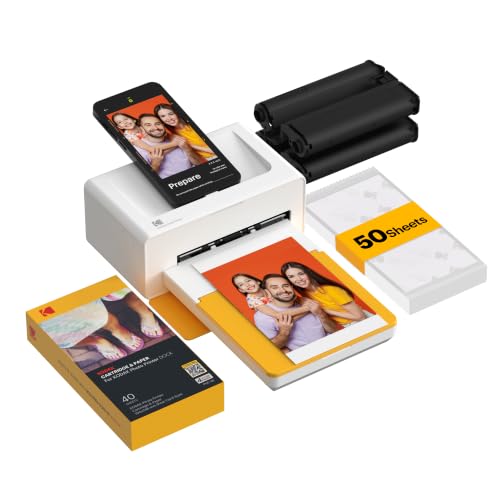
KODAK Dock Plus 4×6 Photo Printer — Dock and charge
In a portable guide, the Dock Plus is the homebody — and its inclusion is deliberate, because its portability is of the relocation kind: a machine light enough to move between houses and rooms, whose party trick works wherever it lands. The phone docks, charges while printing, and produces 4PASS photographs resistant, per the title, to water, fingerprints and fading. At a family gathering the dock becomes a small ritual station: relatives queue their phones, leave with a print and a fuller battery, and the host has manufactured souvenirs without leaving the conversation.
Fifty sheets ride along, a mid-depth bundle well matched to that gathering rhythm. Bluetooth handles the undocked printing for both iPhone and Android, so the machine is not hostage to its own dock when a guest’s phone does not fit the ritual. The 4PASS sealed finish, discussed elsewhere in this cluster, is the right output for prints that will be handled at a party the moment they exist.
Judged purely as luggage, rivals beat it: the HPRT brings its own network, the Amber pairs anywhere over Bluetooth with stickers aboard. Judged as the machine most likely to be used at the destination, the dock argues back — printing that piggybacks on charging inherits charging’s inevitability. Phones must charge at every gathering; a printer attached to that necessity gets used at every gathering.
Give it a landing spot at the destination — a hall table near a socket is the classic — and the Dock Plus converts any house into a place where photographs become objects. Buyers needing true venue independence should still look to the hotspot machine; buyers furnishing family occasions will find the dock’s ritual the most repeatable one in the guide.
- Type: 4×6 photo printer with smartphone docking
- Technology stated: 4PASS
- Bundle stated: 50 sheets
- Connectivity stated: Bluetooth; iPhone and Android compatible
- Durability stated: Water, fingerprint and fade resistant
- Charging stated: Charge while printing
- Further specifications: Not stated in the listing title — verify with the manufacturer documentation
Strengths
- Charging while printing attaches printing to a ritual nobody skips.
- Stated resistance to water, fingerprints and fading suits party handling.
- Bluetooth covers guests whose phones stay off the dock.
Trade-offs
- No hotspot is stated, so it borrows the destination’s arrangements like any guest.
- Fifty sheets is a gathering, not a season.
- The dock ritual needs a fixed landing spot near power at each destination.
Best for: family gatherings where a print-and-charge station becomes the souvenir factory. Not suited for: off-network venues needing the printer to supply its own connection.
The gathering machine’s current terms sit at the Dock Plus listing: check price on Amazon.
Comparison
| Printer | Process | Starter media | Connection stated | Signature extra |
|---|---|---|---|---|
| Liene M100 (20-sheet) | Thermal dye-sublimation | 20 sheets | Wi-Fi | Lean starter configuration |
| Yoton 4×6 | 4PASS dye-sublimation | 54 sheets, 1 ribbon | Wi-Fi | AR video printing |
| HPRT 4×6 | Dye-sublimation | 108 sheets, 2 ribbons | Wi-Fi, built-in hotspot | Network independence |
| HP Sprocket Studio Plus | Premium dye-sublimation | 118 sheets, 3 cartridges | Wi-Fi | Editing app |
| Liene Amber M110 | Thermal dye-sublimation | 80 sheets (60 photo, 20 sticker) | Bluetooth | 3-inch square stickers |
| KODAK Dock Plus | 4PASS | 50 sheets | Bluetooth | Docks and charges the phone |
The table’s loudest column is the third. Six machines making the same size of print differ by nearly a hundred sheets of starting media, which means they differ by months of ownership experience. The second loudest is the fourth: three connection philosophies — join a network, bring a network, skip networks with Bluetooth — map directly onto the three habitats of portable printing: homes, venues and everywhere else.
How to Choose a Portable Photo Printer
Name the occasion first, in concrete terms: whose house, which hall, what journey. A printer for your own home’s craft table needs no hotspot and no heroics; a printer for a rented venue needs the HPRT’s independence or the Amber’s Bluetooth indifference to infrastructure; a printer for family gatherings needs the Kodak’s ritual or the Yoton’s charm. Occasion-first thinking prevents the classic error of buying specifications for a habitat the machine will never visit.
Then do the bundle arithmetic against that occasion. Count the prints a single occasion will realistically consume — gatherings are greedier than estimates, because a working printer attracts a queue — and multiply by the occasions before you want to think about media again. Compare that number with the third column of the table. Buyers who do this arithmetic once rarely join the ranks of owners whose portable printer sits idle for want of a ribbon.
Power is the third question, and in this category it must be asked of documentation rather than titles, because the titles here are uniformly quiet about batteries. Settle, for your chosen machine, how it is powered away from home and what a full occasion demands, before the occasion does. A portable printer with a perfect connection and no power plan is a centrepiece, not a tool.
Finally, rehearse the guest test. At any real occasion, other people will print: the technophobe uncle, the teenager with a different phone, the friend who arrived with three percent battery. The machine whose ritual a stranger can perform — dock, pair, tap — will serve the occasion; the machine only its owner can operate will serve its owner, alone, in a corner, while the party happens elsewhere.
What Actually Makes a Photo Printer Travel Well?
Weight matters less than shape and less than either matters than the count of separate things. A portable printing kit is the machine, its power arrangement, its media and its spare media; every separate item is a chance to arrive incomplete. The machines here travel well in proportion as their kits collapse toward one box: bundles that include paper and ribbons or cartridges together, connections that need no extra hardware, processes whose prints need no drying rack or finishing step. Judge any candidate by packing it mentally into the bag you actually own.
Fragility is the second test. Travel punishes loose trays, protruding docks and media that must stay flat and dry. Dye-sublimation machines earn their portability partly here: their consumables are compact cartridges and paper packs rather than liquid ink systems, and their prints exit finished rather than delicate. The careful traveller still packs media in the middle of the bag, between clothes, where the journey is gentlest.
The third test is restart behaviour. A travelled printer gets unplugged, moved, and asked to perform in front of an audience within minutes. Machines that rejoin a phone quickly — by a remembered Bluetooth pairing, a standing hotspot, a dock that needs no negotiation — pass the test that matters. The audience for a portable printer is never patient, because the audience is a party.
Wi-Fi, Hotspot or Bluetooth: Which Connection Survives a Real Venue?
Ordinary Wi-Fi, carried by the Liene M100, the Yoton and the Sprocket Studio Plus, is the best connection in the place it was designed for: a home whose password you know. It offers range across rooms and easy multi-phone access. Its failure mode is administrative, not technical — the unknown password, the captive portal, the router in a locked office — and administrative failures are the kind no specification can outrun.
A built-in hotspot, the HPRT’s distinguishing line, abolishes the administrator. The printer becomes the network; phones join it directly; the venue’s infrastructure becomes irrelevant. The trade is range and simultaneity: a hotspot serves the room it is in, which is, for event printing, precisely the room that matters. Buyers whose occasions happen in other people’s buildings should weight this feature as heavily as any in the guide.
Bluetooth, the Amber’s and the Kodak’s route, abolishes even the network concept: one phone, one printer, one room, paired directly. It is the connection of cafés, craft tables and kitchen counters — intimate, immediate, unbothered by infrastructure of any kind. Its limit is scale; a queue of twelve guests is a Wi-Fi-shaped problem. Match the connection to the crowd: Bluetooth for the circle of friends, hotspot for the hall, household Wi-Fi for the home that hosts its own occasions.
How Many Sheets Does a Real Occasion Consume?
More than the host predicts, every time, because printing is contagious. The first print creates the audience; the audience creates the queue; the queue discovers the photograph on a cousin’s phone that simply must exist on paper. A modest family gathering burns through a 20-sheet starter before dessert. A wedding print corner with a hundred guests can make serious inroads into a 108-sheet bundle. Hosts should budget media the way they budget ice: by the cheerful assumption that running out is the only true failure.
The arithmetic cuts the other way at home. A household printing a handful of photographs a week will take a season to cross a hundred sheets, and for that household the deep bundles are a convenience rather than a necessity — insurance against the empty-cupboard evening, bought once. The Sprocket Studio Plus’s 118 sheets and the HPRT’s 108 are priced as that insurance plus event capacity combined.
Whatever the bundle, pack or order the spare before the occasion, not after the first empty-tray moment. Portable printing’s saddest sentence is spoken at every festival and wedding: the printer is here, the paper is at home. The machines in this guide differ in many ways, but they are identical in their dependence on the media somebody remembered to bring.
The Print-as-Gift Economy: Why 4×6 Survives Every Prediction of Its Death
Digital photographs are infinite, weightless and, in practice, rarely looked at twice. A 4×6 print is the opposite in every respect, which is exactly its power at an occasion: it is scarce, physical, and given. The portable printer manufactures that scarcity on the spot. A host who hands a guest a warm print of the two of them, taken an hour earlier, has given something no link can replicate — an object that will live on a fridge for years, long after the shared album has sunk beneath a thousand newer photographs.
The features in this guide that look like garnish — the Yoton’s video-replaying prints, the Amber’s stickers, the Kodak’s hand-friendly durability — are all attempts to enrich that gift: to make the object carry more of the moment than a rectangle of colour normally can. Judge them by the recipient, not the spec sheet. A grandmother may treasure the AR replay; a teenager may treasure the sticker; a colleague may treasure the plain, handsome print that survives a wallet.
This economy also explains the category’s bundle obsession. A gift machine that runs out of media mid-occasion has not merely stopped printing; it has stopped giving, in public, at the moment of maximum goodwill. Depth of bundle is generosity insurance. Buy accordingly.
The Rehearsal Print: Why Every Portable Printer Deserves a Dry Run
A portable printer’s first public performance should never be its first performance. The rehearsal is a small ceremony with large returns: set the machine up in a room that is not its home, join a phone it has never met, print three photographs, change nothing, then deliberately run the media down or simulate the change to the spare pack. Every awkwardness discovered in rehearsal — the pairing that needed a second attempt, the setting buried two menus deep, the pack that opens from the end you did not expect — is an awkwardness subtracted from the wedding, the market stall or the birthday, where an audience converts small delays into stories.
Rehearsal also calibrates expectations about pace. Dye-sublimation prints arrive pass by pass; a queue of guests experiences that pace socially, as anticipation, provided the host knows it in advance and can keep the conversation fed while the machine works. The host who has never watched their own printer finish a print will misjudge the rhythm of the whole corner — when to invite the next guest forward, when the finished pile needs sorting, when to start the session so the last print lands before the carriages. Fifteen minutes of rehearsal buys the timing of the entire event.
Finally, rehearsal produces the reference prints. Carry two or three known-good prints from the rehearsal to the occasion itself. If colour at the venue looks wrong under strange light, the reference prints separate the machine’s behaviour from the room’s lighting — a distinction that has saved many hosts from adjusting a healthy printer into sickness. The rehearsal is, in short, the cheapest insurance in portable printing, and the only premium is an afternoon.
Printing for Strangers: The Market Stall and the Wedding Corner
Two habitats test portable printing hardest, and they test different virtues. The wedding corner is a gift economy with a queue: guests print for love, the machine’s charm matters, and the operator is usually the host’s delegated teenager. Success there is measured in laughter and in prints that survive the dance floor — the habitat where the Kodak’s stated resistance to fingerprints and water, and the Yoton’s replayable moments, earn their keep. Simplicity of ritual is the governing specification, because the operator changes every hour and the guests have had champagne.
The market stall is a business with a queue: customers print for money, the machine’s pace and media depth matter, and the operator is a professional who has rehearsed. Success there is measured in prints per hour without a failure in public, which elevates the unglamorous virtues — the HPRT’s hotspot independence from the hall’s network, bundles deep enough that a media change is a planned pause rather than an emergency, and prints that emerge dry enough to be bagged and sold in the same motion. A stall printer also lives or dies by its spare discipline: the second ribbon is not an accessory, it is the afternoon’s takings.
Both habitats share one law: the machine must never be the reason the queue stops believing. A portable printer that falters socially — hunting for a network, sulking over a pairing, announcing an empty tray to a crowd — spends trust that even perfect subsequent prints cannot fully refund. Choose for the habitat, rehearse for the habitat, and pack the spares the habitat demands.
After the Occasion: Storing a Portable Printer So It Works at the Next One
Portable printers die in cupboards more often than at parties. The killers are mundane: media left loaded through a damp season, a machine stored in a hot attic or a freezing garage, a cable separated from its charger and adopted by another device, a half-used pack whose remaining sheets nobody can count when the next occasion calls. The storage ritual that prevents all four takes ten minutes: unload or note the media state on a card kept with the machine, store the printer in the room-temperature interior of the house, keep its power arrangement coiled in the same bag, and write the date and the remaining media estimate on that same card.
The card deserves emphasis because memory is the least reliable component in any occasional-use system. Six months after a wedding, nobody remembers whether the HPRT’s second ribbon is untouched or half spent, whether the Amber’s sticker sheets ran out at the christening, whether the Kodak’s fifty were forty-one. The card remembers. Occasional equipment lives on such small bureaucracies; the households that keep them are the ones whose printers work at the next occasion, to general astonishment.
Once a season, whether an occasion looms or not, wake the machine and print one photograph. The ritual confirms the pairing, exercises the mechanism, and — not incidentally — puts one more print on the fridge. A portable printer that prints monthly at home will never embarrass its owner abroad; a printer that sleeps for a year between weddings is a gamble wearing a handle.
Colour Away From Home: Judging Prints Under Strange Light
Every portable printing session happens under light the printer’s owner did not choose: the tungsten gloom of a village hall, the greenish fluorescence of a school gym, the mixed daylight of a garden marquee. Prints judged under such light will be misjudged — declared too warm, too dark, too strange — and the inexperienced operator’s response, adjusting settings mid-occasion, converts a lighting problem into a printer problem that follows the machine home. The disciplined response is to carry the rehearsal prints, hold the new print beside one under the same light, and trust the comparison rather than the eye’s solo verdict.
There is a second, kinder truth inside this one: the recipients at an occasion do not carry reference prints in their heads. A guest judges the print of her daughter against the daughter, who is standing beside her laughing, and against that standard every machine in this guide passes gloriously. Colour perfectionism is a studio virtue; at an occasion, the photograph’s job is recognition and delight, and it performs that job under any light a party can produce. Save the calibration anxiety for the album prints made later, at home, under the lamp you trust.
One practical habit bridges the two truths. Print the occasion’s most important photograph twice — once early, judged against the rehearsal reference, and once at the end — and keep the pair together. Months later, the pair documents the day twice over: the moment itself, and the honest conditions under which its souvenirs were made. Albums are richer for such honesty, and future hosts learn more from it than from any review.
One Printer, Many Houses: The Etiquette of the Travelling Print
A portable printer is a guest in other people’s homes, and it thrives under guest manners. Ask where it may sit — near a socket, out of the drinks traffic, within reach of the people whose photographs matter. Bring everything it consumes, including the unglamorous spares, because a guest who borrows the host’s evening to hunt for a cable has misunderstood the assignment. And print for the host first: the household’s own photograph, made early and handed over while the session is young, converts the machine from a visitor’s toy into the evening’s benefactor.
The leaving ritual matters as much as the arriving one. Prints made at someone else’s occasion belong, in the first instance, to the people in them; the travelling printer’s owner should leave the originals behind and keep, at most, the duplicates the subjects happily wave away. A small stack of prints left on the host’s table the next morning — found beside the kettle, still warm in memory — is the portable printer’s finest product, and no specification in any title on this page can claim credit for it. That part is manners, and manners travel free.
Consider, too, the second occasion, the one nobody planned when the machine was bought. Portable printers have a way of being volunteered: the school fair hears about the wedding corner, the sports club hears about the school fair, and within a season the household owns not a gadget but a small public service. Owners who enjoy that trajectory should choose depth and independence — the deep bundles, the hotspot — before the trajectory chooses for them. Owners who dread it should choose the lean, domestic machines and learn the gentle sentence with which all such services are declined: it is a lovely little printer, but it only really works at home.
And when the occasion is over and the bag is packed, resist the urge to judge the machine by its busiest hour. Judge it by the prints still visible a month later — on fridges, in wallets, taped inside locker doors by teenagers who affect to care about nothing. A portable printer’s true output is not the pile counted on the night; it is the scattering of small, durable rectangles that keep turning up in the geography of other people’s lives, each one still doing the quiet work of the evening it came from.
One last piece of arithmetic belongs to the gift-givers, because this category is bought as presents more often than any other on the site. A portable photo printer given without media is a promise; given with a deep bundle, it is a season. If the machine is destined for a recipient who will not shop for consumables until forced, choose the configuration whose box already contains the forcing’s postponement — the hundred-sheet class — and write the media’s name on the card, so that when the day finally comes, the recipient reorders the right pack in one search rather than rediscovering the ecosystem from scratch.
Small, and worth saying plainly: label the bag. A strip of tape inside the lid naming the media pack, the pairing steps and the date of the last rehearsal turns the next occasion’s first ten minutes from archaeology into routine — and routine, repeated kindly, is what separates the printer a family loves from the printer a family merely owns.
Common Mistakes
Confusing portable with pocketable. These are 4×6 machines for bags and counters; buyers wanting coat-pocket 2×3 printing should be reading the mini-printer guides instead.
Testing at home and debuting at the venue. Every portable printer deserves one full rehearsal — connection, power, media change — in the house where failure is free.
Forgetting that guests’ phones are also cameras. The queue will print from devices you do not own; a machine limited to one phone platform would thin the queue unhappily. All six here serve both major platforms as titled.
Packing the printer and not the spare media. The bundle in the machine is the occasion’s first hour. The spare pack in the bag is its second.
Judging dye-sub prints wet. They emerge dry and sealed — but judge colour under the light the print will live in, not the venue’s disco or the kitchen’s one warm bulb.
Final Recommendation
For venues and their unreliable networks, the HPRT is this guide’s professional answer: its own hotspot, 108 sheets and sealed dye-sub output make a one-box print corner. For the home that prints as a standing habit, the HP Sprocket Studio Plus pairs the deepest bundle with an app the whole family can drive. The Liene Amber M110 owns the creative corner with its sticker sheets and network-free Bluetooth, the Yoton owns the gift table with prints that replay the moment, and the KODAK Dock Plus owns the family gathering, where charging and printing turn out to be the same ritual wearing two names. The lean Liene M100 configuration is where the undecided should start — twenty sheets is enough to learn whether portable printing is your household’s joy, and if it is, this page will still be here, with the deeper bundles waiting, when the twenty-first photograph asks to exist.
Frequently Asked Questions
Are these printers battery powered?
Their listing titles do not say, and this guide does not guess. Power arrangements are the first thing to verify in the manufacturer’s documentation for the specific model before planning an occasion away from a socket.
What is the difference between the two Liene M100 listings?
The bundle. This guide’s dedicated-printers page covers the configuration with 100 sheets and 3 cartridges; the configuration here arrives with 20 sheets. The engine — Wi-Fi thermal dye-sublimation at 4×6 — is the same proposition at a different runway length.
Which connection is best for a wedding venue?
A built-in hotspot, as on the HPRT, because it removes the venue’s network from the equation entirely. Bluetooth serves smaller gatherings well; ordinary Wi-Fi is best reserved for homes whose password the host controls.
Can these printers print from a computer as well as a phone?
The Yoton’s title explicitly includes PC alongside iPhone and Android. For the others, titles speak of phones and smartphones; verify computer support in documentation if a laptop is part of your occasion kit.
Why do all six use dye-sublimation or 4PASS rather than inkjet?
At 4×6, dye transfer produces dry, sealed, continuous-tone prints that can be handed over immediately — the exact virtues travel and events demand. Inkjet’s advantages of size range and tank economics belong to the desktop category covered in the dedicated-printers guide.
How should I pack a photo printer for a trip?
Machine in the middle of soft luggage, media kept flat and dry in its own pack, power arrangement coiled with the machine rather than in another bag, and a spare media pack separated from the loaded one so a single loss cannot end the printing.
Related Guides
Buyers who decide the occasion actually happens at home should step up a class to our guide to large format professional photo printers for the wide end of the craft, or browse the brand view in our roundup of Canon photo printers. The monochrome question — what prints black and white well, and what the search results really are — is taken apart honestly in our guide to b and w photo printers.


