What's inside
- Buying for a Wall, Not a Desk
- Key Takeaways
- Quick Picks
- How We Chose These Picks
- Comparison
- How to Choose a Projector for a Wall Mural
- How Do You Register a Mural Across Several Sessions?
- Does a Mural Projector Need to Be Bright, or the Room Dark?
- What Size Should a First Mural Be?
- How Do You Work Safely From a Ladder While Tracing?
- What Wall Surfaces Take a Projected Outline Best?
- Can You Project a Mural Outdoors on a Building?
- Common Mistakes
- Final Recommendation
- Frequently Asked Questions
- Related Guides
As an Amazon Associate I earn from qualifying purchases. This post may contain affiliate links at no extra cost to you.
[SITE_DOMAIN] is reader-supported. When you buy through links on our site, we may earn an affiliate commission.
A mural changes the projector question completely. The best mural wall painting projectors are not judged at a desk, in inches, over an evening — they are judged across a room, in feet, over a season, by whether a composition holds together when its smallest line is a forearm’s length long. Six machines are gathered here for that work, and they arrive by three different roads: digital art projectors with tracing software, opaque projectors that enlarge a physical cartoon or sketch, and one high-brightness movie projector whose sheer throw makes it a mural tool despite having no art features at all. Each road has honest advantages, and this guide keeps them distinct.
Scale rewrites every priority a smaller guide teaches. At mural size, the governing facts are the stated projection range, the distance the room allows, the darkness the wall demands and the steadiness of the setup across hours — because a mural outline is traced in sessions, on ladders, by an artist whose registration marks are the only memory the wall has. Software still matters, and two picks here carry built-in tracing apps, but software that cannot reach the wall’s far corner is a footnote.
The two opaque picks deserve their mechanism stated early. The Caydo S1 and the Artograph EZ Tracer project physical artwork — a sketch or cartoon laid on a copy area — enlarged onto the wall. Muralists have worked this way for a century: draw small and well, then let optics do the scaling. Their limits are printed in their titles and honoured in their reviews: a copy size of 5 by 5 inches on the S1, 4 by 4 inches on the EZ Tracer, and on the EZ Tracer a further fact every buyer must read twice — the bulb is not included.
Brightness language needs the standing caution of this series, sharpened for walls. Titles in this class print brightness in marketing dialects — one movie projector here leads its title with a large figure of its own coinage — and those dialects do not convert into one another or into any shared measurement. This guide quotes such figures only as printed claims, never ranks by them, and judges mural brightness the way muralists do: by room, by hour, by wall, in the return window.
Where a title is silent about a fact a muralist needs — a range, a stand, a resolution — the spec boxes say so plainly. A mural is too large a commitment to build on an assumed specification, and the listing page, linked at every pick’s name, is where unprinted figures must be confirmed before paint or projector is ordered.
Buying for a Wall, Not a Desk
Each linked name leads to its model’s own Amazon listing, where the current figure and the complete description live. Mural buyers should read a listing the way they read a wall: from a distance first, for the shape of the whole — family, range, mechanism — and then closely, for the details that decide sessions, like what is and is not in the box. The EZ Tracer’s absent bulb is the standing lesson of this guide: the most important line in a listing is sometimes the one that says what you still need to buy.
Key Takeaways
- Three roads lead to a mural here: digital art projectors with tracing apps, opaque projectors enlarging a physical sketch, and one high-bright movie projector with no art software at all.
- The Caydo P3 is the digital muralist’s anchor — Native 1080P stated, a built-in drawing app, auto focus and keystone, a 360-degree stand and a 40 to 120 inch range.
- The 1280 by 720 art projector states the widest wall range in the set, 9.5 to 150 inches, with a stand included and 2.4G WiFi.
- The Native 1280P pick carries a built-in tracing app with 8 tools, aimed at canvas, wall murals, sketching and cake decorating.
- Both opaque picks enlarge paper originals only: the S1 from a 5 by 5 inch copy size to a 20 to 80 inch projection, the EZ Tracer from 4 by 4 inches at 2X to 10X — and its bulb is not included.
- The movie projector trades every tracing feature for brightness-led scale and native 1080P cinema hardware — read its review for the honest terms of that trade.
Quick Picks
| Pick | Badge | Why it earns its place |
|---|---|---|
| Caydo P3 Art Projector | The digital mural anchor | A native 1080P drawing projector with a built-in exclusive drawing app, auto focus and keystone, a 360-degree rotatable stand and a 40 to 120 inch projection range. |
| Caydo S1 Opaque Art Projector | Paper cartoon, wall size | An opaque projector for physical artwork with a 5 by 5 inch copy size and a 20 to 80 inch projection range, in a low-noise portable design. |
| Art Projector 1280×720 with Stand | The widest stated wall range | A 1280 by 720 HD art projector projecting 9.5 to 150 inches with a stand and 2.4G WiFi, for canvas, wall art and decorating work. |
| Art Projector Native 1280P with Tracing App | Tools built for the transfer | A native 1280P HD drawing projector with a built-in tracing app and 8 tools, for canvas, wall murals, sketching and cake decorating. |
| Artograph EZ Tracer | The optical classic, in a 2-pack | An opaque projector enlarging 2X to 10X from a 4 by 4 inch copy size, with silent operation and an optical glass lens — bulb not included, sold as a 2-pack. |
| High Bright Native 1080P Projector | Brightness-led scale, no art tools | A high-bright native 1080P movie projector with auto focus and 6D keystone, WiFi and Bluetooth, in a thin portable body — a cinema machine borrowed for mural scale. |
How We Chose These Picks
Mural fitness was judged on reach before refinement. A pick had to address wall scale in its own title — by a stated range reaching toward or beyond a hundred inches, by an enlargement span suited to a sketch-to-wall transfer, or by a brightness-led design meant for large rooms. Desktop specialists were excluded however charming, because a mural exposes a small machine’s limits across twelve feet of wall with nowhere to hide.
Both mural traditions were required to be present. The digital tradition — reference on a phone, app conducting, image sized by software — is the modern default and fills three places. The opaque tradition — cartoon on paper, optics conducting — remains how many working muralists actually scale a drawing, and it fills two. The sixth place went to the crossover: a movie projector whose brightness and native resolution make it a legitimate mural instrument for artists whose references are digital and whose walls are large, included with its lack of art features stated as plainly as its strengths.
Session mechanics were weighed as muralists weigh them. Rotating stands and keystone correction matter at ladder height; copy sizes matter because they cap the sketch; included and excluded hardware matters because a mural begun without a bulb is a mural postponed. Lifespan and brightness figures in titles were recorded as makers’ claims and given no ranking weight, for the reasons this guide’s introduction gives.
Value at mural scale was read in seasons rather than specifications. A projector that serves one mural and is then exiled has cost its owner a wall’s worth of money; a projector that serves the nursery, then the hallway, then the community hall has amortised itself into furniture. Titles suggesting a second and third life — decorating, cinema, classroom — were credited for it, because muralists’ walls multiply once the first one succeeds.
Finally, every pick had to survive the same imagined commission: a composition of real ambition, on a real wall, in a real room with ordinary light leaks, traced across several sessions by an artist working partly from a ladder. Machines whose titles described that commission convincingly earned their places; the reviews now argue each case in turn.

Caydo P3 Art Projector — The digital mural anchor
The P3 is the machine this guide would hand to a digital muralist first, and its title assembles the reasons in order: Native 1080P, a built-in exclusive drawing app, auto focus and keystone, a 360-degree rotatable stand, and a projection range of 40 to 120 inches. Each item answers a mural problem. Native resolution keeps lettering and facial lines honest at ten feet; the resident app means the reference workflow lives in the projector rather than in a phone that keeps ringing; the rotating stand aims the machine at walls, ceilings and floor-laid canvases from whatever perch the room offers.
Range deserves a muralist’s reading. Forty inches at the floor of the range means the P3 composes a serious canvas as readily as a wall section, while 120 inches covers the dominant wall of most rooms in a single throw. A composition larger than that is not beyond the machine — muralists work in sections, repositioning and re-registering — but the stated range describes the single-throw territory honestly, and artists should plan their grid around it.
Auto focus and auto keystone earn their keep at mural scale in a specific way: the projector often sits far from the artist, across the room or atop a ladder’s platform, and every manual adjustment is a journey. A machine that sharpens and squares itself after each repositioning returns those journeys to painting. Across a multi-session mural, that saved labour is measured in evenings.
The 30,000-hour lifespan printed in the title is the maker’s claim for the light source, reported as a claim. Its practical meaning for a muralist is simpler than the number: the light engine is not a consumable to budget around mid-commission, which is the LED premise this entire category now stands on.
Lettering deserves a specific mention in the P3’s case, because murals so often carry words — a shop’s name, a nursery rhyme, a kitchen’s commandment — and lettering is where resolution and stability are audited by every passer-by. A stated native picture on a stand that does not creep gives the muralist letterforms worth painting; a soft or drifting one gives letterforms worth apologising for. If your wall will speak, let it speak in the sharpest stated voice in this guide.
Against the wider-ranging 1280 by 720 pick below, the P3 trades raw span for stated native sharpness, the built-in app and the rotating stand. Muralists whose compositions are bold and architectural may prefer the span; muralists whose walls carry faces, lettering and detail will feel the P3’s allocation as money spent where their own work lives. It is the most completely specified art projector in this guide, and murals are where complete specification pays.
- Resolution: Native 1080P stated in title
- Software: built-in exclusive drawing app stated
- Automation: auto focus and keystone stated
- Stand: 360-degree rotatable stand stated
- Projection size: 40 to 120 inches stated
- Lifespan: 30,000 hours claimed in title for the light source
Strengths
- Stated native resolution holds detail at wall scale
- Rotating stand aims anywhere the room allows
- Built-in app keeps the workflow inside the machine
Trade-offs
- 120-inch ceiling means the largest walls work in sections
- 40-inch floor is large for small canvas studies
- App ecosystem is the maker’s own, by design
Best for: digital muralists whose walls carry detail, faces and lettering.
Not suited for: murals planned as a single throw beyond 120 inches.
Caydo S1 Opaque Art Projector — Paper cartoon, wall size
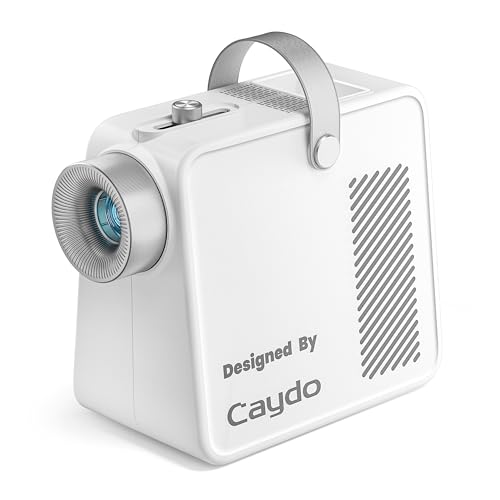
The S1 represents the mural’s older and still honourable road: draw the composition small, on paper, and let an optical projector carry it to the wall. Its title is precise about the geometry — a copy size of 5 by 5 inches for the physical artwork, a projection size of 20 to 80 inches on the wall — and that precision lets a muralist plan the cartoon the way muralists have always planned it: the sketch is composed at hand scale, in full knowledge of the wall it will become.
Eighty inches is a substantial mural — a dominant feature wall’s centre, a shop’s signage field, a child’s bedroom scene — though it is not the whole-wall scale the digital picks reach. The S1’s muralist accepts that ceiling in exchange for the opaque route’s directness: no file preparation, no app, no casting, and an enlargement of the actual drawn line, with its pressure and character intact, rather than of a photograph of it.
The title prints a brightness figure of 5000 lumens, which this guide records as the listing’s own marketing claim in its own dialect — not converted, not compared, and not a substitute for the muralist’s real test, which is the wall at the working hour. A lifespan of 20,000 hours is likewise the maker’s claim. The verifiable character points are the stated low noise and portable design, and low noise matters on a mural: the machine sits near the artist for hours of quiet, close work, often in a home where others are sleeping beyond the door.
Darkness is the opaque route’s standing requirement, and murals intensify it: the larger the projected paper image, the more the room’s light discipline decides its clarity. An S1 mural is an evening project or a blackout project, and artists should schedule it as such rather than discover it at noon on the first day.
There is a compositional discipline the opaque route teaches that digital muralists often skip: the cartoon must be finished before the wall begins. Because the S1 enlarges what is drawn, the drawing itself has to be resolved — every contour decided at hand scale, where decisions are cheap. Digital workflows invite endless revision at the wall; the paper route front-loads the thinking, and many muralists find their walls better for the constraint. A machine that makes you finish the drawing is not limiting the mural; it is authoring it.
Choose the S1 if your mural begins — as perhaps it should — with a drawing you love at sketch scale, and if 80 inches contains your wall’s ambition. Within that frame it offers the most contemplative workflow in this guide: paper, light, wall, and nothing digital arguing in between.
- Type: opaque optical projector for physical artwork
- Copy size: 5 by 5 inches stated
- Projection size: 20 to 80 inches stated
- Brightness: a 5000-lumen figure is claimed in the title, in the listing’s own marketing terms
- Lifespan: 20,000 hours claimed in title
- Character: low noise and portable design stated
Strengths
- Enlarges the artist’s actual drawn line, not a photo of it
- Finished-size range is easy to plan a cartoon around
- Low noise suits long evening mural sessions
Trade-offs
- 80-inch ceiling stops short of whole-wall scale
- Originals are capped at the 5 by 5 inch copy size
- Needs a dark room more insistently than digital picks
Best for: muralists whose compositions begin as paper sketches.
Not suited for: murals larger than an 80-inch projected image.

Art Projector 1280×720 with Stand — The widest stated wall range
Span is this machine’s whole argument, and at mural scale span is a serious argument: a stated projection from 9.5 to 150 inches, in 1280 by 720 HD, with a stand included and 2.4G WiFi. One hundred and fifty inches is twelve and a half feet — the full dominant wall of most rooms, thrown in a single image — and the same machine composes a near-ten-inch trace on a table when the mural’s details need studying at hand scale. No other pick in this guide states both ends of that journey.
The included stand should not be skimmed past. Mural projectors live on ladders, shelves and improvised platforms, and a stand supplied by the maker, designed for the machine’s own weight and aim, removes the wobbliest variable in the setup. Artists working alone — most muralists, most of the time — will feel that inclusion every session, because a mural setup that one person can raise, aim and trust is a different practice from one that needs a second pair of hands.
Its stated work spans canvas and wall art alongside cookie and cake decorating, which tells you the machine’s centre of gravity: a general art projector comfortable at both ends of its range, rather than a mural-only instrument. The decorating end is not a distraction for muralists; it is evidence the machine composes small images cleanly, which is where mural details — a face in the corner, lettering along a border — are often prepared before the big throw.
The resolution is the honest counterweight: 1280 by 720 is the class’s working HD, stated plainly in the title, and at 150 inches its lines are bold-work lines. Architectural compositions, landscapes, lettering at scale and graphic murals trace beautifully; a photoreal face at twelve feet will show the ceiling of the format. The P3 above spends its budget on stated native sharpness instead; this machine spends it on reach, and muralists should choose by which currency their own composition spends.
Community and commercial walls are this machine’s plausible destiny. A café’s graphic wall, a school corridor’s timeline, a gym’s motto in letters a foot tall — commissions where the composition is confident, the surface is large and the budget for equipment must leave room for paint. A stated 150-inch throw with an included stand is a specification that reads like it was written for exactly those rooms, and the artist who serves them will recognise the priorities instantly.
WiFi is the 2.4G band, the long-reach generation that joins every router and travels through walls — a sensible choice for a machine that may sit across a large room from its source. For the muralist whose wall is the largest in the house and whose composition is drawn in confident shapes, this is the range pick, and range, on a wall, is destiny.
- Resolution: 1280 by 720 HD stated in title
- Projection size: 9.5 to 150 inches stated
- Stand: stand included, per title
- Wireless: 2.4G WiFi stated
- Stated work: canvas, wall art, cookie and cake decorating, DIY artists
Strengths
- Widest stated range in this guide, both ends usable
- Included stand suits solo mural setups
- Full-wall single throws up to 150 inches
Trade-offs
- 720-class resolution softens fine detail at full size
- WiFi is the older 2.4G band only
- No tracing app or auto focus is claimed in its title
Best for: bold, architectural murals across a whole domestic wall.
Not suited for: fine photoreal detail traced at the largest sizes.
Art Projector Native 1280P with Tracing App — Tools built for the transfer
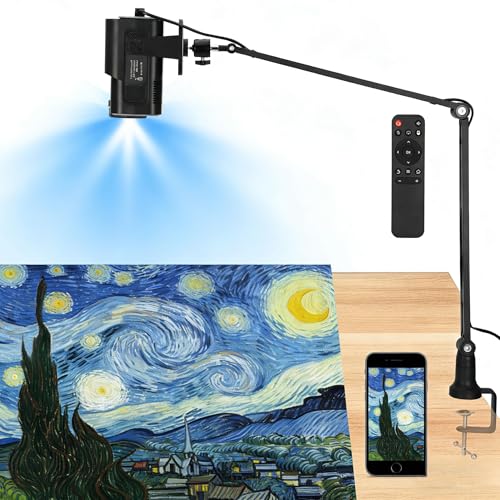
Software is this pick’s headline: a built-in tracing app with 8 tools, inside a drawing projector whose title claims Native 1280P HD, aimed at canvas, wall murals, sketching and cake decorating. The resolution wording deserves a careful reading, given exactly as printed: the maker claims a native figure in the 1280 class, and this guide reports the claim in the maker’s own terms without translating it into other models’ dialects. What matters practically is the pairing — a stated native claim plus software written for the transfer itself, rather than a generic casting screen.
Eight tools in a tracing app is a number worth pausing on, even without a list of their names in the title. Tracing software earns tools the way a workshop earns benches: for the grid that checks proportion, the outline that simplifies a photograph into followable lines, the adjustments that make a reference survivable at wall scale. A muralist choosing this machine is buying that bench of tools as much as the projector beneath them, and should explore the app’s full list on the listing before ordering.
Built-in is the other operative word. An app resident in the projector means the mural workflow does not depend on a phone’s battery, a casting handshake or a second device’s mood at ladder height. The artist works the wall; the machine holds the reference and the tools; the phone stays in a pocket for photographs of progress. Across a long commission, that division of labour is worth more than any single tool in the set of eight.
The title does not state a projection range or a stand, and for a mural machine those are planning facts, so the listing visit is obligatory rather than optional for this pick. Cake decorating’s presence in the framing suggests competence at close range as well as at the wall, but suggestion is not specification, and this guide leaves the geometry to be confirmed where the maker publishes it.
For the muralist whose workflow is software-led — who prepares references digitally, simplifies them into traceable form, and wants the preparation tools living inside the projector — this is the guide’s most purpose-built digital pick after the P3, differing mainly in emphasis: the P3 leads with stated resolution and posture, this one with the app and its tools. Choose by which half of the workflow you perform more often.
- Resolution claim: Native 1280P HD, as printed in the title
- Software: built-in tracing app with 8 tools stated
- Stated work: canvas, wall murals, sketching, cake decorating
- Projection range: not given in the title — confirm on the listing
- Stand: not described in the title
Strengths
- Tracing app with 8 tools lives inside the projector
- Native resolution claimed in the title’s own terms
- Framed for murals and canvas as primary work
Trade-offs
- Range and stand must be confirmed on the listing
- The 8 tools are counted, not named, in the title
- App dependence is total by design
Best for: software-led muralists who prepare references digitally.
Not suited for: buyers who need a stated projection range before planning.

Artograph EZ Tracer — The optical classic, in a 2-pack
The EZ Tracer is the opaque tradition in its most elemental form, and its title contains the single most important sentence in this guide: bulb not included. Read it twice. This projector arrives needing a bulb the buyer supplies, and a muralist who misses that line will begin their commission with a dark machine and a delayed week. This review puts the fact early, as the listing does, because honest sequencing is a form of respect — everything else about the EZ Tracer can now be weighed on its merits.
Those merits are genuine and traditional. Enlargement from 2X to 10X, from a copy size of 4 by 4 inches, projected onto wall or canvas, through an optical glass lens, with silent operation. Silent is not a small word for an opaque machine: there is no fan in the description because the design’s simplicity needs none, and a mural session conducted in true quiet, with only the artist and the wall, has a quality digital sessions rarely match. The optical glass lens is the other professional note — the element the image passes through is specified as glass, in a class where that cannot be assumed.
The copy size is the tightest in this guide at 4 by 4 inches, so the muralist’s cartoon must be composed smaller, or worked in more sections, than the S1’s five-inch tray demands. In exchange, the enlargement discipline is the purest here: a small, well-drawn original, multiplied up to ten times, becomes the wall. Generations of sign painters and illustrators built careers inside exactly these numbers.
The listing is a 2-pack, which changes the purchase’s meaning: two machines, perhaps for a studio and its classroom, a partnership of artists, or a working spare for a professional whose commissions cannot wait for a repair. Buyers should confirm on the listing what the pack contains beyond the pair itself — and, again, should source the correct bulb before the first session is scheduled, treating it as part of the machine’s true cost and setup.
Teachers should pause longest over this pick, because the 2-pack and the silence compose a classroom instrument. Two machines let two groups enlarge their own drawings simultaneously, and a fan-free room lets thirty students hear the lesson while it happens. The bulb errand is a department’s minor logistics; the pedagogy — small drawing, large wall, nothing digital in between — is the durable part, and it is why opaque projectors have survived every software revolution in the art room’s cupboard.
Portable is the final stated trait, and it suits the EZ Tracer’s likely life: carried to the wall that needs it, from schools to shopfronts to nurseries, enlarging small drawings into public ones. For the muralist who draws beautifully at hand scale and wants the least possible machinery between the drawing and the wall, this remains the classic instrument — provided the bulb is in the basket beside it.
- Type: opaque art projector, per title
- Enlargement: 2X to 10X stated
- Copy size: 4 by 4 inches stated
- Lens: optical glass lens stated
- Operation: silent operation stated
- In the box: sold as a 2-pack; bulb not included — stated in title
Strengths
- Silent, fan-free operation for contemplative sessions
- Optical glass lens is specified, not assumed
- 2-pack suits studios, classes and working spares
Trade-offs
- Bulb is not included and must be sourced separately
- 4 by 4 inch copy size is the tightest here
- 10X ceiling limits the largest single enlargements
Best for: traditional muralists and teachers enlarging small drawings.
Not suited for: buyers expecting a complete, ready-to-run box on arrival.

High Bright Native 1080P Projector — Brightness-led scale, no art tools
This pick enters a mural guide by a side door, and the door should be labelled clearly: it is a movie projector. Its title leads with a high-bright claim in the maker’s own coined figure — 5000LL — and announces Netflix among its wares, native 1080P, auto focus, 6D keystone, WiFi and Bluetooth, in a body 1.81 inches thin. Nothing in that sentence mentions tracing, drawing or art, because the machine was built for cinema. Its mural case rests entirely on what cinema hardware happens to give a wall: a bright, large, natively sharp image of whatever file you show it.
That case is real. A muralist whose reference is a digital image, whose wall is large, and whose room refuses to darken completely will feel this machine’s brightness-led design as a practical advantage no art-app can substitute for. The stated native 1080P keeps the projected reference honest, auto focus and 6D keystone compose it from the awkward perches big rooms impose, and the thin portable body travels between the mural site and the living room it was actually bought for.
The trade must be stated with equal clarity: there is no tracing app, no drawing tools, no art software of any kind in this title. The muralist supplies the entire workflow — the reference preparation, the gridding, the session discipline — from their own devices and habits, and the projector contributes light and geometry only. Artists who lean on built-in tools should choose the P3 or the 1280P app pick above; artists whose workflow already lives on their own laptop may find this machine’s honesty refreshing.
The brightness figure itself is handled here as everywhere in this guide: 5000LL is the listing’s own marketing unit, quoted as printed, converted into nothing, and compared against no other pick’s numbers. Judge this machine’s mural brightness in your room, at your size, during the return window — which is, not coincidentally, exactly how you would judge its cinema performance, since for this pick the two judgements are the same.
Renters and multi-use rooms make the crossover case in practical terms. A household that cannot dedicate a wall permanently can still lay out a mural design for a landlord-approved panel, a backdrop or a removable hanging — and a thin, portable cinema projector that throws the reference for an evening, then returns to film duty, fits a life where no single room is a studio. The mural workflow being entirely the artist’s own is less a burden in that setting than a description of how the household already works.
There is a household logic to the crossover worth respecting. A projector bought for film nights that also lays out the nursery’s mural and the hallway’s lettering earns its shelf three ways, and families rationally prefer one bright machine to two dimmer specialists. Buy it as a cinema projector that moonlights on walls, with the mural workflow supplied by you, and it will not disappoint; buy it expecting an art instrument, and the missing tools will be the whole story.
- Type: movie projector — no tracing or drawing app in its title
- Resolution: Native 1080P stated in title
- Brightness: a high-bright claim printed as 5000LL in the title, in the listing’s own unit
- Automation: auto focus and 6D keystone stated
- Wireless: WiFi and Bluetooth stated
- Body: 1.81 inches thin, portable, per title
- Platform: Netflix named among its features in title
Strengths
- Brightness-led design serves large, imperfectly dark walls
- Native 1080P stated for the projected reference
- One machine covers cinema nights and mural layouts
Trade-offs
- No art or tracing software of any kind
- Brightness unit is the maker’s own marketing coinage
- The entire mural workflow must be supplied by the artist
Best for: households wanting one bright projector for films and mural layout.
Not suited for: muralists who rely on built-in tracing apps and tools.
Comparison
| Pick | Headline facts from its listing title | Mural it suits first |
|---|---|---|
| Caydo P3 Art Projector | Digital, Native 1080P, built-in app, auto focus/keystone, 360° stand, 40–120 inch | Detailed digital murals with faces and lettering |
| Caydo S1 Opaque Art Projector | Opaque, 5×5 copy, 20–80 inch projection, low noise, portable | Paper-cartoon murals at feature-wall scale |
| Art Projector 1280×720 with Stand | Digital, 1280×720 HD, 9.5–150 inch, stand included, 2.4G WiFi | Bold whole-wall compositions in one throw |
| Art Projector Native 1280P with Tracing App | Digital, Native 1280P claim, built-in tracing app with 8 tools | Software-prepared mural transfers |
| Artograph EZ Tracer | Opaque, 2X–10X, 4×4 copy, glass lens, silent, 2-pack, bulb excluded | Small drawings enlarged the traditional way |
| High Bright Native 1080P Projector | Movie projector, Native 1080P, auto focus, 6D keystone, thin body | Large walls in rooms that resist darkness |
How to Choose a Projector for a Wall Mural
Begin with the wall itself: measure it, photograph it at the hours you will work, and note where furniture, ladders and the projector can stand. That survey decides the range you need, the darkness you can achieve and the perch the machine must work from — the three facts every later comparison depends on. A projector chosen before the wall is measured is a guess wearing a specification.
Next, choose the road by where the composition lives. A digital file with app-led preparation points to the P3 or the 1280P tracing-app pick; a bold architectural design at maximum span points to the 150-inch machine; a paper cartoon points to the S1 or the EZ Tracer, with their copy sizes read as composition constraints; a digital file on a bright, large wall, in a household that also watches films, points to the movie projector with its trade understood.
Bring the household into the decision early, because a mural projector’s sessions reorganise a room for days at a time. The family that has agreed the wall, the schedule and the ladder’s residence will tolerate the process cheerfully; the family surprised by it will not, and no specification in any title can repair a domestic negotiation that never happened. Murals are social objects from their first traced line, and the social planning is part of the equipment.
Finally, audit the box and the session before ordering. What is included, what is excluded — the EZ Tracer’s bulb stands as the permanent reminder — how the machine will be aimed at ladder height, and how registration will be marked for session two. Murals are finished by artists who plan the second session during the first, and the right projector is the one whose title described that whole arc most honestly.
How Do You Register a Mural Across Several Sessions?
With marks, not memory. Before the first line is traced, fix the composition’s anchors on the wall itself: corner ticks at the image’s edges, a horizon line carried in pencil beyond the frame, registration crosses at intervals the next setup can be aligned to. Photograph the aligned projection with the marks visible, note the projector’s position and distance on tape on the floor, and the second session becomes an act of matching rather than of hope.
Equipment choices support the ritual in specific ways. A built-in app that holds the same file at the same settings, a stand that returns to a marked position, a range with headroom so the machine is not working at its strained extreme — each reduces the drift a returning artist must correct. The muralists who finish large work are not those with perfect memories; they are those whose walls remember for them.
Does a Mural Projector Need to Be Bright, or the Room Dark?
The room, mostly — and the honesty of that answer is why this guide refuses to rank printed brightness figures. A mural’s clarity is a ratio between the projected light and everything else falling on the wall, and the denominator is yours to control: curtains, hour of day, the hallway door. Artists who darken the room properly find even modest machines eloquent at wall scale; artists who fight a sunlit wall find every machine wanting, including expensive ones.
Brightness-led machines like the movie projector in this guide shift the ratio from the numerator’s side, which is genuinely useful in rooms that cannot be darkened — rented halls, shops, classrooms with tall windows. That is a situational virtue, not a universal ranking, and it is why the pick is framed as a crossover rather than a champion. Judge the ratio in your own room, during the return window, at your working hour.
What Size Should a First Mural Be?
Smaller than the wall, larger than your comfort — a feature panel, a doorway surround, the field above a bed — because a first mural teaches registration, ladder work and session discipline at a scale where mistakes stay instructive rather than architectural. The ranges in this guide all cover that apprenticeship size, including the opaque pair, whose ceilings suit a first wall exactly.
Sequence matters more than size. A composition traced completely in one or two sessions teaches the full arc — setup, anchors, transfer, stepping back — while a wall begun at maximum ambition often becomes a long lesson in re-registration alone. Finish one honest mural at a modest scale and the second, larger one will be planned by an artist who has already made every mistake at a size that forgave them.
How Do You Work Safely From a Ladder While Tracing?
A mural projector places the artist on a ladder with a pencil, at distance from the machine, often alone — so safety is a specification too, even though no title prints it. Choose the projector position before the ladder position: the machine should stand where it will not be kicked, cable-crossed or vibrated by the ladder’s feet, and its cable should be routed where no boot will find it in the dark. Machines that focus and square themselves, like the P3 and the movie projector here, reduce the trips down the ladder that fatigue turns into falls.
Work in reaches, not stretches. Trace what the ladder’s honest position offers, move the ladder, trace the next field — muralists who lean for the far line eventually lean too far, and a composition is not improved by the artist’s absence from it. Registration marks earn their keep here as well, because a wall worked in safe sections must still read as one drawing when the ladder is folded away.
What Wall Surfaces Take a Projected Outline Best?
Smooth, pale, matte walls are the projector’s friends: the line sits on the surface rather than in its texture, and the pencil follows without skating. Textured plaster, brick and dark paint all tax the image — brick most honestly, since its own grid argues with the composition’s — and muralists working on them should expect to trace in sections at closer range, or to prepare the field with a pale ground coat where the commission allows it.
Test the actual wall during the return window, at the actual size, because surface behaviour cannot be read off a specification. A wall that swallows a fine line at twelve feet may carry a bold one beautifully, and that discovery — made in rehearsal, with the projector returnable — is worth more than any figure printed in any title in this guide.
Can You Project a Mural Outdoors on a Building?
Artists do, at dusk, on pale exterior walls — and the requirements rearrange themselves. The room’s darkness becomes the evening’s, the ladder becomes a scaffold’s discipline, and the projector’s placement must survive weather and distance. Among these picks, the movie projector’s brightness-led, portable design is the natural candidate for such experiments, while the opaque machines’ paper workflow belongs indoors where the original can be kept flat, dry and still.
Treat an outdoor wall as a rehearsal-first commission squared: permissions, power, weather windows and the image’s legibility from the street all outrank the projector choice. The machine is the easiest part of an exterior mural, which is exactly why this guide insists the wall — any wall — be surveyed before the equipment is chosen.
Common Mistakes
Missing the words “bulb not included” is the most concrete mistake available in this guide, and it is made by skimming. The EZ Tracer’s title states the exclusion plainly; the failure belongs entirely to the reader who stopped at the enlargement figures. Let it stand as the type specimen of mural shopping errors: at wall scale, the unglamorous lines of a listing — contents, copy sizes, floors of ranges — decide commissions, while the glamorous lines merely decorate them.
Planning a mural at the very edge of a stated range is the second classic. A machine at its maximum throw, in a room at its brightest, on a wall at its largest, has no reserve for the day reality differs from the plan. Choose a pick whose range holds your wall in its comfortable middle, and let the extremes remain what they should be: headroom, not habitat.
Tracing the whole composition in one heroic session is the third. Murals are session work — the arm tires, the eye accommodates, the light changes — and an outline rushed to completion in a day carries its fatigue in every line. Mark anchors, trace architecture first, and let the wall wait overnight; it is very good at waiting, and the second session’s freshness will repay the patience in accuracy.
Finally, muralists neglect the view from the door. A composition is judged from across the room, at reading distance, in ordinary light — never from the ladder where it was traced. Step down and back constantly, photograph the wall from the doorway, and let those distant checks govern the work. The projector’s job is to place the lines; the room’s job is to judge them, and confusing the two viewpoints is how murals go quietly wrong at full scale.
Final Recommendation
For most digital muralists, the Caydo P3 is this guide’s anchor: stated native resolution, a resident app, self-managing focus and keystone, and a stand that aims anywhere, across a range that covers serious walls. The 150-inch art projector answers when span outranks fineness; the 1280P app pick answers when the tracing software itself is the workflow. Paper muralists should choose their copy size — the S1’s five inches and finished-size range, or the EZ Tracer’s four inches, glass lens and silence, with a bulb ordered beside it. And the household that wants one bright machine for films and walls alike has the movie projector, its trade stated plainly and its brightness to be proven in the room.
Whichever name arrives, rehearse the mural before committing it: project the composition at full size, mark the anchors, trace one passage, and view it from the door in daylight. A wall forgives a rehearsal completely and a commitment barely at all, and the projector that survives the rehearsal has earned the wall.
Sign the work when it is done, in the corner, at reading size — muralists forget, in the scale of the thing, that the wall will outlast the sessions and speak to people who never saw the projector. The machine’s contribution ends with the outline; everything the room remembers afterwards is the painting, and that is exactly as it should be.
A mural is the most public thing a projector ever helps make, and the most permanent. Choose the machine whose title told you the truth about the work — its reach, its limits, its missing bulb — and the wall will repay the honesty at the scale of a room, for years, in front of everyone who enters it. When visitors ask how the drawing got onto the wall so surely, you will tell them about a small machine and a darkened room, and the story will sound simpler than the season of evenings it actually took.
Frequently Asked Questions
Which pick covers the largest wall in one throw?
The 1280 by 720 art projector, whose title states a range up to 150 inches with a stand included. The Caydo P3 reaches 120 inches with a stated Native 1080P, and larger compositions on any machine are normally worked in registered sections.
Can an opaque projector really paint a mural?
Yes — that is its historical purpose. The Caydo S1 enlarges a paper original from a 5 by 5 inch copy size to a 20 to 80 inch projection, and the Artograph EZ Tracer enlarges a 4 by 4 inch original 2X to 10X onto wall or canvas. The original must be physical; neither accepts files.
What do I need to buy besides the EZ Tracer?
A bulb. Its title states the bulb is not included, and the listing is a 2-pack of projectors. Confirm the correct bulb specification on the listing and order it with the machines so the first session is not postponed.
Why is a movie projector in a mural guide?
Because brightness and scale are mural virtues: the high-bright native 1080P pick can throw a large, sharp reference onto a wall in a room that resists darkening. The trade is total — it has no tracing app or art tools, so the artist supplies the entire workflow from their own devices.
How long does tracing a mural outline usually take?
Longer than the painting’s admirers guess and shorter than the painter fears: a room-scale composition typically transfers across two to four sessions of one to two hours each, once the setup is rehearsed. The first session is mostly anchors and architecture; later sessions fill regions. Artists who mark registration carefully find each return visit shorter, because the wall and the machine resume a conversation instead of starting one.
Should I paint a ground coat before tracing?
On dark, stained or heavily textured walls, a pale matte ground coat is the cheapest image upgrade available to any pick in this guide — it gives the projected line a fair surface and the finished mural a luminous base. On sound, pale walls it is unnecessary. Decide from the doorway test in rehearsal: if the traced passage reads clearly at distance, the wall was ready as it stood.
Which pick has a built-in tracing app?
Two digital picks: the Caydo P3, with its built-in exclusive drawing app, and the Native 1280P model, whose built-in tracing app is stated to carry 8 tools for canvas, murals, sketching and decorating.
Related Guides
The scale ladder climbs to the projectors chosen for large murals, and the studio’s other patience-based pursuit waits in the backyard bird cameras and the trail cameras for bird watching guides.


