What's inside
- Where to Buy Headsets Whose Microphones Cancel the Room
- Key Takeaways
- Quick Picks
- How Did We Choose the Best Noise Canceling Mic Headsets?
- How Does a Noise-Cancelling Microphone Actually Work?
- The Six Picks in Detail
- How Do You Test a Microphone Before You Trust It?
- Which Rooms Defeat Noise-Cancelling Microphones?
- Mic Check: Six Noise-Cancelling Microphone Headsets Ranked by Job
- How Do You Keep a Cancelling Microphone Performing for Years?
- What Should Call Centers Listen for When Piloting Mic Headsets?
- Can One Headset Serve Calls, Classes and Content at Once?
- How Does the Microphone Question Change for Hybrid and Home Workers?
- What Is the Honest Ceiling of a Headset Microphone?
- How Should a Buyer Read Noise Claims on Any Headset Listing?
- What Mistakes Do Buyers Make With Noise-Cancelling Mic Headsets?
- Final Recommendation
- Frequently Asked Questions
- Related Guides
As an Amazon Associate I earn from qualifying purchases. This post may contain affiliate links at no extra cost to you.
[widgetverdict.com] is reader-supported. When you buy through links on our site, we may earn an affiliate commission.
Where to Buy Headsets Whose Microphones Cancel the Room
The six picks below in this best noise canceling mic headsets guide are listed on Amazon, with the product names in the Quick Picks table and the detailed reviews linking to their listings. One caution specific to this category: listings love the phrase noise cancelling, and it can describe the microphone, the earcups, or vague marketing weather. Every pick here was chosen because its title ties the cancelling to the microphone — check that detail on any model you consider beyond this guide. Readers whose main need is hearing speech clearly for long listening sessions, rather than being heard, should also open Best Noise-Cancelling Headsets for Transcribing.
The hunt for the best noise canceling mic headsets begins with a misunderstanding worth clearing up. Most buyers shop for what a headset does for their ears. This category is about what a headset does for everyone else’s. A noise-cancelling microphone decides whether your caller hears your voice in front of your life — the colleague, the kettle, the traffic, the dog — or your life in front of your voice. Six headsets make the cut here: the standard-issue Logitech H390, Lenovo’s app-enhanced wired design, a dual-connection JIAMQISHI for homes and classrooms, EKSA’s gaming crossover, AOC’s dual-USB pragmatist, and a charging-base wireless model for people who talk while moving.
They differ in almost everything — price tier, connection, styling, intended room — except the one thing that matters: each puts a cancelling microphone between your voice and your surroundings, and aims it at the people listening to you.
Key Takeaways
- In this category the cancelling belongs to the microphone: it cleans what callers hear, which is a different promise from earcup noise cancelling.
- Boom placement is half the technology — a mic near the mouth starts with an advantage no processing can fully imitate.
- Lenovo’s pick adds app-based AI cancelling and a stated 140g weight; Logitech’s H390 counters with the deepest proven record in the business.
- Connection variety is wide: USB-A, dual USB, USB plus 3.5mm, and one Bluetooth model with a charging base.
- Match the pick to the room: the louder and less predictable your surroundings, the more the microphone technology matters.
- Verify everything with a thirty-second recording in your own space before the return window closes; your callers’ experience is measurable, so measure it.
Quick Picks
| Headset | Badge | Why it made the list |
|---|---|---|
| Logitech H390 | The default USB headset the world already knows | The standard-issue wired USB headset, with a speech-tuned cancelling mic and zero setup. |
| Lenovo USB-A Wired Stereo Headset | App-driven AI mic cancelling in a featherweight frame | App-driven AI mic cancelling, a double-sided boom and replaceable earcups at 140 grams. |
| JIAMQISHI USB Headset | Dual-connection value for home office and online class | USB and 3.5mm in one on-ear headset for homes, classes and mixed devices. |
| EKSA E1000 USB Gaming Headset | Surround-sound gaming headset that moonlights on calls | Gaming-grade cancelling mic and surround sound for desks that work and play. |
| AOC USB Headset (USB-C/USB-A) | Over-ear wired AOC with dual USB and boom mute | Dual USB-C/USB-A wired design with boom mute and honestly stated drivers. |
| Wireless Headset with Charging Base | Charging-base wireless freedom for phone-heavy desks | Wireless with a charging base, dongle and a physical mute for mobile talkers. |
How Did We Choose the Best Noise Canceling Mic Headsets?
The filter was literal: the listing title had to attach noise cancelling to the microphone. Models cancelling only at the earcup — pleasant for the wearer, irrelevant to the caller — were excluded, however good. Beyond that gate, picks were chosen to span the realistic ways people buy such headsets: a corporate standard, a software-enhanced modern design, a household value model, a gaming crossover, a fleet pragmatist, and a wireless option with a charging base. Connection types were deliberately varied, because the microphone question and the cable question are independent decisions and buyers deserve to see them separated.
Each review discusses only what its model’s title supports. Where a title states a number — 140 grams, 40mm drivers — the review uses it. Where a title is silent — talk time on the wireless model, for instance — the review says so. In a category infested with vague noise claims, that discipline is the guide’s main service.
How Does a Noise-Cancelling Microphone Actually Work?
In three broad ways, and this guide contains all three philosophies. Physical design comes first: a boom places the capsule close to the mouth, where the voice is loud and the room is comparatively quiet, and directional pickup favours sound arriving from the wearer’s direction. Signal processing comes second: many headsets compare the voice against the surrounding wash and suppress steady background sound. Software intelligence comes third: app-based systems, like the Lenovo’s AI cancelling, learn to distinguish speech from irregular noises — a chair scrape, a laugh next door — and demote them in real time. Fleet buyers who want the queue-focused version of this discussion will find it in Best Wireless Call Center Headsets; the principles are identical and the stakes are higher.
None of the three can perform miracles. A cancelling mic in a genuinely loud room produces a clearer voice, not a studio voice, and it cannot rescue a microphone left dangling at chest height. Placement and processing multiply each other; either one alone is half a solution.
The Six Picks in Detail

Logitech H390 — The default USB headset the world already knows
Some products become the answer before the question is even finished, and the Logitech H390 is exactly that product for wired USB headsets in offices everywhere. Its title is almost austere: wired USB-A headset with noise cancelling microphone, for PC video meetings and music. No certification badges, no range figures, no battery poetry — because a corded headset has no battery to poeticise. What the H390 offers instead is the deepest bench in the business: it has been the standard-issue answer for offices, schools and home workers for so long that its behaviour is a known quantity on every operating system and meeting platform a buyer will ever meet.
The noise cancelling microphone is the reason it belongs in this guide rather than a general one. Logitech tunes this mic for speech in real rooms, and the boom places it where speech actually happens. In the classic H390 scenario — a worker at a kitchen table, a household continuing around them, a client on the other end — the microphone’s job is to deliver the worker and withhold the household. Generations of buyers have kept this model in production by discovering that it does that job dependably, day after day, without software, drivers or drama.
Wired USB-A is the second half of the dependability. The headset draws power from the port, identifies itself as a standard audio device, and works identically on the first day and the five-hundredth. There is no battery aging curve and no pairing state to corrupt. For IT issuing headsets to people they will never meet, that sameness is worth more than features.
The H390’s limits are the category’s limits, stated honestly. USB-A needs an adapter on the newest laptops. The cable sets the wearer’s radius. And a design this established makes no attempt at the active wearer-side cancelling or app-based processing found elsewhere in this guide. Buyers who need those should read on — the Lenovo below exists precisely for them.
But as the enduring baseline against which all noise-cancelling mic headsets are judged — the one in the drawer, the one in the training room, the one nobody regrets buying — the H390 has no rival here. It is the recommendation for anyone who wants the proven thing above all else.
There is a final, underappreciated H390 virtue: it is the headset other headsets get tested against inside companies. When a new model is piloted, the question in the room is always some version of ‘is it better than the Logitechs we already issue?’ A product that becomes the unit of measurement has earned a kind of trust no launch can buy, and buyers who simply match the standard are rarely criticised for it — which, in organisational life, is very much its own feature.
Mini spec box
- Connection: Wired USB-A
- Microphone: Noise cancelling microphone
- Colour in title: Black
- Uses in title: PC video meetings and music
Strengths
- Enormous installed base means predictable behaviour on every platform
- Speech-tuned noise cancelling mic with a properly placed boom
- Corded USB-A sameness: no battery, no pairing, no surprises
Trade-offs
- USB-A only, so current slim laptops need an adapter
- No app-based or active noise features beyond the mic itself
- Cable defines the wearer’s working radius
Best for: anyone wanting the proven, standard-issue wired headset for meetings and calls.
Not suited for: USB-C-only laptop owners unwilling to use an adapter.

Lenovo USB-A Wired Stereo Headset — App-driven AI mic cancelling in a featherweight frame
Lenovo’s wired stereo headset is what the H390’s proven formula looks like after a full generation of software thinking and fleet feedback. The title states a 140g weight, AI noise canceling delivered via an app, a double-sided boom microphone, in-line controls with mute, replaceable earcups, and compatibility with Teams and Zoom. Every phrase answers a complaint somebody once filed about an ordinary wired headset, which makes this the most deliberately engineered corded pick in the guide.
Start with the microphone, since this guide exists because of microphones. AI noise canceling via an app means the cancellation is computational: software analyses the incoming sound and subtracts the parts that are not your voice, and it can be updated and tuned in ways a fixed hardware circuit cannot. The double-sided boom is the physical partner to that software — a boom that can be worn on either side, so the wearer positions the mic by preference rather than by the manufacturer’s handedness. Software plus placement is the strongest one-two punch a wired headset can throw at a noisy room.
The 140g weight is the second headline. Corded headsets carry no battery, so a determined designer can chase lightness hard, and 140 grams is light enough that the headset’s presence fades during long meeting days. Replaceable earcups protect that comfort investment: when the cushions tire, the headset renews rather than retires. In-line controls with a dedicated mute keep the physical virtues of the corded category intact — the mute is a button under your thumb, not a menu in an app window.
Teams and Zoom are named as working platforms, which, paired with the app-based processing, positions this Lenovo as the choice for organisations that want a managed, modern wired standard rather than the old faithful one. The honest caveat runs the other way: app-dependent features assume the app can be installed, which locked-down corporate machines sometimes forbid. Where installation is blocked, the headset remains a light, well-controlled wired unit — but buyers should confirm the software situation before counting on the AI layer.
Against the H390, this is new school against old school: software-defined cancelling and replaceable parts against ubiquity and simplicity. Both are entirely defensible standards; they suit different IT cultures.
The app layer invites one more reflection. Microphone processing used to be frozen at the factory; a headset sounded as it sounded forever. Software-defined cancelling breaks that rule — the headset a fleet buys this year can, in principle, cancel noticeably better next year. Buyers should not purchase promises, but they may reasonably prefer an architecture where improvement is possible over one where it is not, provided the present-day performance already justifies the price. On its stated weight, controls and boom design, this Lenovo clears that bar before the app is even opened.
Mini spec box
- Weight stated in title: 140g lightweight
- Microphone: AI noise canceling via app; double-sided boom mic
- Controls: In-line controls with mute
- Earcups: Replaceable earcups
- Platforms in title: Works with Teams/Zoom
Strengths
- AI noise canceling via app can improve and adapt beyond fixed hardware circuits
- 140g stated weight plus replaceable earcups suits long, shared-fleet service
- Double-sided boom lets each wearer choose their microphone side
Trade-offs
- AI features depend on the companion app being installable on your machines
- USB-A connection still needs an adapter for USB-C-only laptops
- App layer adds a small management burden the H390 never asks for
Best for: Teams and Zoom organisations wanting a modern, software-enhanced wired standard.
Not suited for: locked-down environments where companion apps cannot be installed.
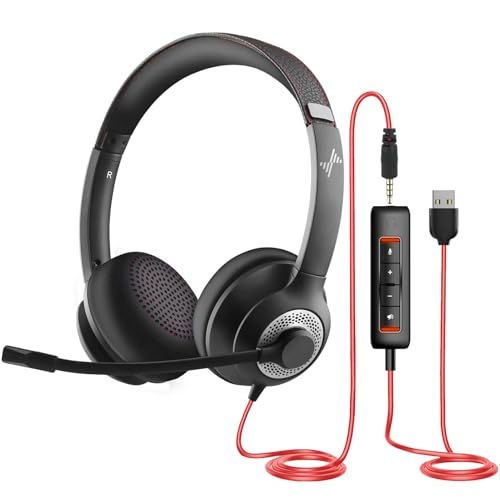
JIAMQISHI USB Headset — Dual-connection value for home office and online class
The JIAMQISHI headset’s title contains a quietly brilliant detail that most buyers will skim past: USB plus 3.5mm. Two connection standards in one headset means the same unit plugs into the computer for the working day and into anything with a headphone jack — a phone, a tablet, a handheld recorder, an older laptop — when the situation changes. For the home office and online class audience the title names, that flexibility covers the real, untidy sprawl of devices a household actually owns and uses.
The on-ear design fits the brief. On-ear cushions keep the headset compact, light and cooler than enclosing cups, and they leave the wearer slightly connected to the room — a parent supervising homework during a class call, a home worker who must hear the doorbell. The noise cancelling microphone handles the outbound direction, keeping the speaker’s voice presentable for Skype and Zoom, the two platforms the title names.
In-line control keeps volume and mute on the cable, where a student or a new remote worker can find them without a tutorial. This matters in the online-class setting more than anywhere: a teacher cannot reach through the screen to fix a student’s audio settings, so hardware that explains itself is a genuine educational feature. The headset’s value positioning serves the same world — classes and households buy in multiples, and a model that equips a whole family or a whole classroom without drama has done its job.
Expectations should match the tier. The title promises connection flexibility and a cancelling microphone, not certification, software processing or premium build. Buyers needing platform-tested call controls should step up to the Lenovo above; buyers needing maximum isolation for a loud house should note that on-ear designs, by construction, let the room stay faintly present.
Within its stated world — home office, online class, everyday calls on whatever device happens to be nearest — the JIAMQISHI is the flexible friend of this roundup, and its dual connection is a feature the expensive models mostly forgot to offer at all.
Teachers make an unexpected but entirely deserved appearance in this headset’s story, because online classes exposed a truth about audio: the student with the worst microphone learns least, not because their ideas are worse but because participating costs them more effort. An affordable headset with a cancelling mic and controls a child can operate quietly raises the floor of the whole class. The JIAMQISHI’s dual connection helps there too — the same headset follows the student from the family PC to a tablet without a purchasing decision in between.
Mini spec box
- Connection in title: USB plus 3.5mm
- Design: On-ear computer laptop headphones
- Microphone: Noise cancelling microphone, in-line control
- Uses in title: Home office, online class, Skype, Zoom
- Colour in title: Black
Strengths
- USB plus 3.5mm in one headset covers computers and jack-equipped devices alike
- On-ear design stays compact and cool for classes and home work
- Self-explanatory in-line controls suit students and new remote workers
Trade-offs
- On-ear cushions isolate less than over-ear designs in loud homes
- No platform certification or software processing is claimed
- Value-tier build favours function over finish and longevity theatre
Best for: households and classrooms equipping several people across mixed devices.
Not suited for: buyers needing certified in-app call controls for a corporate platform.

EKSA E1000 USB Gaming Headset — Surround-sound gaming headset that moonlights on calls
The EKSA E1000 arrives in this guide from the gaming aisle, and its presence asks a fair question: what is a 7.1 surround sound gaming headset with RGB lighting doing in a roundup about noise-cancelling microphones? The answer is in its own title, which lists the call center among its destinations alongside PS4, PS5 and laptop. Gaming headsets live or die by their microphones in long evening sessions — team communication is the genre’s core mechanic — and the E1000’s noise cancelling mic is built to keep a player’s voice clear over a loud room and a louder game. That is the same job, wearing different clothes.
The surround sound deserves translation for non-gamers. Virtual 7.1 processing widens the soundstage, which games use for direction and which a call user experiences as spacious, present voices. For the worker whose evenings are games and whose days are calls, one headset serving both with genuine competence in each is an economical desk. The USB connection keeps it in computer territory: plug into the laptop or PC, and both the meeting app and the game see the same standard device.
RGB lighting is the honest dividing line. In a gaming room it is furniture; on a client video call it is a costume. Buyers should picture their own calendar. A streamer, a gaming-content creator or a young professional whose calls are internal will carry the look easily. A consultant facing conservative clients may prefer the H390’s invisibility. Neither judgement is about quality — the microphone does its cancelling work regardless of what the earcups are glowing about.
Console compatibility in the title — PS4 and PS5 — underlines the dual-life design. This is a headset bought for play that refuses to be useless for work, rather than a work headset pretending to play. Judged on the microphone criterion of this guide, it qualifies on merit: noise cancelling, boom-positioned, proven in the most mic-demanding hobby on earth.
Choose it if your desk is genuinely two desks — calls by day, games by night — and one single headset must hold both territories without apology.
Streamers deserve a specific note of their own, because their microphone problem is the call center’s problem at higher stakes: an audience hears every keyboard clack and room echo, and judges silently. A noise cancelling boom that keeps a streamer’s voice forward while a game explodes around it is performing the same isolation this guide asks for on behalf of customers and clients. The E1000’s call-center mention in its title suggests EKSA knows the two audiences share a microphone standard, even if their lighting preferences differ.
Mini spec box
- Connection: USB wired
- Audio in title: 7.1 surround sound
- Microphone: Noise cancelling microphone
- Extras in title: RGB light
- Platforms in title: PS4, PS5 console, laptop, call center
Strengths
- Gaming-grade noise cancelling mic, proven where voice chat is relentless
- 7.1 surround processing gives calls and media an unusually spacious sound
- Console and PC compatibility in the title serves a true dual-life desk
Trade-offs
- RGB styling will not suit conservative client-facing video calls
- Gaming build prioritises immersion features over office minimalism
- USB connection keeps it computer-and-console bound, not phone bound
Best for: gamers and streamers whose work calls and play share one desk.
Not suited for: professionals whose video presence must stay strictly corporate.

AOC USB Headset (USB-C/USB-A) — Over-ear wired AOC with dual USB and boom mute
AOC appears in this guide for the second time as a brand — its wireless model sits in our call center roundup — and its wired USB headset shows the same title-writing honesty: USB-C and USB-A both named, 40mm drivers stated, a noise cancelling mic with boom mute control, over-ear wired design, aimed at office, call centers and online meetings. A buyer can reconstruct the entire product from the title alone, which is rarer than it should be in this category and worth rewarding with attention.
The dual USB connection is the headline for real desks. Offices in transition own both port generations, sometimes on the same desk between a desktop and a laptop. A headset that speaks both natively ends the adapter drawer and the small daily friction of the wrong plug. Against the H390 and the Lenovo — both USB-A designs — that flexibility is the AOC’s clearest claim on a fleet buyer’s shortlist during the long USB-C migration.
Boom mute control is the second considered detail. Muting at the boom or its control point, as a deliberate physical act, suits the rhythm of meetings and call work better than any software toggle. The over-ear design serves the listening side: enclosing cups soften the room for the wearer in the office and call center settings the title names, while the stated 40mm drivers give voices a full, easy presence at moderate volumes.
Where does it concede ground? It offers no app-based AI processing like the Lenovo, no certification story, and AOC’s headset lineage is younger than Logitech’s. What it offers instead is specification transparency and connection diplomacy at the wired tier. For an IT buyer standardising headsets across a mixed-generation fleet, those two virtues may outweigh pedigree.
The AOC is the pragmatist’s wired pick: every claim checkable, every port covered, the mute exactly where your hand expects it.
Specification transparency, the AOC’s habit, has a fleet consequence worth naming: it makes the pilot honest. When a title states the drivers, the ports and the mute design, the buyer’s test can verify claims one by one, and the purchase order can repeat them. Vague titles produce vague pilots and vaguer regrets. Organisations that have been burned by the gap between a listing’s poetry and a product’s reality will recognise why this review keeps returning to what the AOC title is willing to say out loud.
Mini spec box
- Connection in title: USB-C/USB-A
- Drivers stated in title: 40mm drivers
- Microphone: Noise cancelling mic with boom mute control
- Design: Over-ear wired headphones
- Uses in title: Office, call centers and online meetings
Strengths
- USB-C and USB-A in one title ends adapter friction across mixed fleets
- Boom mute control matches the physical rhythm of meetings and queue work
- Over-ear design with stated 40mm drivers favours long listening comfort
Trade-offs
- No app-based noise processing of the kind the Lenovo offers
- Shorter headset track record than the category’s founding brands
- Wired radius applies, as with every corded pick here
Best for: offices mid-migration between USB generations that want one wired standard.
Not suited for: shoppers who want software-updatable AI microphone processing.

Wireless Headset with Charging Base — Charging-base wireless freedom for phone-heavy desks
Every wireless headset guide eventually meets the dreaded dead-battery morning, and this particular model is designed around preventing it entirely. The title’s defining words are charging base: the headset lives on its base between calls, so charging is not a cable someone must remember but a home the headset returns to by habit. Pair that with Bluetooth and a USB dongle for the computer, a noise cancelling mic, and a dedicated mute button, and you have the wireless entry in this roundup — built for computer, office, call center, phone and remote work, with truckers named in the title as well.
The base changes behaviour more than technology. A headset that is always on its base is always charged, always findable and always in the same place when the phone rings — three small certainties that phone-heavy roles, from dispatch to sales to the home-office parent, value beyond any specification. The dongle covers the PC connection with the usual plug-and-go reliability, while Bluetooth reaches the phone, which is how a single headset can honestly claim both computer and phone in one title.
The noise cancelling microphone is the qualifying feature for this guide, and its context here is mobility: the wearer may be across the room from the computer, in a kitchen, or in a cab. A boom mic travels with the voice in all those places, keeping the speaker close and the surroundings demoted. The mute button, physical and dedicated, matters most exactly when the wearer is away from the screen and cannot click anything.
The trucker mention in the title is worth taking seriously rather than as decoration. Long hours, high ambient noise, phone-based work and a premium on one-button simplicity describe that job precisely, and they also describe more office workers than offices admit. A headset specified for the road tends to be forgiving absolutely everywhere else it is asked to work.
Against the wired five reviewed above, this pick trades the cable’s absolute simplicity for genuine freedom of movement, accepting a battery as the price. The charging base is its argument that the price can be made painless — and for phone-heavy desks, it is a convincing one.
The base also solves a domestic problem offices forget: the headset that vanishes. Wireless headsets without a home migrate — to bags, to sofas, to the other desk — and the call that finds them missing is always the important one. A charging base is a parking place with a purpose, visible from the doorway. Households and small offices that adopt the base habit report the same discovery as call centers: half of wireless reliability was never radio engineering at all. It was furniture.
Mini spec box
- Connection: Bluetooth with USB dongle
- Microphone: Noise cancelling mic
- Base in title: Charging base included
- Controls: Mute button
- Uses in title: Computer, office, call center, phone, remote work, trucker
Strengths
- Charging base turns battery management into a habit instead of a chore
- Dongle plus Bluetooth covers computer and phone from one headset
- Physical mute button serves wearers who are away from the screen
Trade-offs
- Battery still exists — a neglected base routine revives the dead-morning risk
- No talk-time figure is stated in the listing title
- Base occupies desk space that minimal setups may begrudge
Best for: phone-heavy remote workers, dispatchers and drivers who move while talking.
Not suited for: callers who want a stated talk-time figure before purchasing.
There is a professional courtesy argument for this entire category that deserves its own moment. Every call has two parties, and only one of them chose your headset. When you wear a cancelling-mic headset, you are spending a little money to improve a stranger’s experience — the client, the patient, the customer, the interviewer — at no cost to them. People register that clarity unconsciously as competence. Organisations spend fortunes on branding that achieves less than the simple fact of being easy to hear. If this guide has a thesis beyond its six picks, it is that the microphone is the most undervalued brand asset in the building.
The courtesy extends to colleagues within earshot of your calls, oddly enough. A wearer who hears callers clearly speaks more quietly, and a floor of quieter speakers is a floor where every microphone’s job gets easier. Noise-cancelling microphones, adopted widely, lower the noise they exist to fight — one of the few virtuous circles in office equipment, and a genuine argument for fleet-wide rather than individual purchase.
How Do You Test a Microphone Before You Trust It?
Record, do not guess. Every operating system and meeting app can capture a short test, and thirty seconds is enough: speak at your normal level, then stay silent while the room does its worst — a colleague talking, a kettle boiling, a door closing. Listen back on decent headphones. What you hear is what your callers have been hearing, possibly for years. Most people who run this test for the first time change something within the week: the boom position, the headset, or their faith in a laptop microphone.
Then make one real call to a person who will tell you the truth, at the noisiest hour your workplace produces. Ask them to compare, if they can, with your previous setup. A microphone purchase justified by that pair of tests will not be regretted; a microphone purchased from a feature list alone is a lottery ticket. Meeting-heavy readers can run the same test protocol against the models in Best Corded Headsets for Online Meetings, where several picks share this guide’s microphone-first philosophy.
Which Rooms Defeat Noise-Cancelling Microphones?
Reverberant rooms defeat them first: bare walls, hard floors and high ceilings bounce the voice itself around until the microphone cannot tell the direct sound from its echoes, and cancellation tuned for steady noise gives up on echoes. Crowded rooms with many similar voices come second, because a neighbour’s speech is acoustically almost identical to yours — only placement and directionality help there, which is why boom position matters more as rooms fill. Wind and fans blowing directly across the capsule come third. The fixes are boring and effective: soften the room, close the mic distance, and put a door between you and the crowd when the call truly matters.
Mic Check: Six Noise-Cancelling Microphone Headsets Ranked by Job
| Headset | Connection | Microphone approach | Defining trait | Battery |
|---|---|---|---|---|
| Logitech H390 | Wired USB-A | Noise cancelling mic | Standard-issue wired | None — corded |
| Lenovo USB-A Wired Stereo | Wired USB-A | AI cancelling via app | Double-sided boom, 140g | None — corded |
| JIAMQISHI USB Headset | Wired USB + 3.5mm | Noise cancelling mic | On-ear, dual connection | None — corded |
| EKSA E1000 | Wired USB | Noise cancelling mic | 7.1 surround, RGB | None — corded |
| AOC USB Headset | Wired USB-C/USB-A | Noise cancelling mic | Boom mute, 40mm drivers | None — corded |
| Wireless Headset with Charging Base | Bluetooth + dongle | Noise cancelling mic | Charging base, mute button | Not stated in title |
Read the microphone column as a ladder of philosophies rather than a ranking. The H390 represents proven hardware tuning; the Lenovo adds a software layer that can evolve; the JIAMQISHI and AOC deliver the classic boom-and-processing formula at their tiers; the EKSA proves the formula inside a gaming shell; and the wireless model carries it away from the desk entirely. The right rung depends on your room, your devices and your IT culture — not on a universal score.
How Do You Keep a Cancelling Microphone Performing for Years?
Microphones rarely die; they are neglected to death. The boom’s hinge loosens until the capsule drifts from its trained position, the foam windscreen compresses and tears, and cable strain at the earcup slowly introduces crackle that callers hear as unprofessional static. A quarterly minute of maintenance prevents most of it: re-seat the boom at its correct position, inspect the windscreen, flex the cable gently along its length while listening for noise, and confirm the in-line mute still clicks with intent. Fleets should keep windscreens and cushions in the spares drawer, because those two soft parts decide how old a headset sounds and feels.
Software-side headsets add one more habit: keep the companion app and any firmware current, since the cancelling itself can improve between versions. The Lenovo’s app-based design makes that advice concrete. A wired headset with no software asks nothing; a software-defined one repays a small amount of attention with a microphone that can genuinely get better during its service life.
What Should Call Centers Listen for When Piloting Mic Headsets?
Recordings, reviewed blind. When a center pilots cancelling-mic headsets, the honest method is to capture the same scripted call on the current headset and on each candidate, in the real floor noise, then have reviewers score the recordings without knowing which is which. Brand loyalty and price expectations evaporate under blind listening, and the microphone that wins is the one the customers would choose. Score three things separately: how forward the agent’s voice sits, how much floor noise survives around it, and whether numbers and names — the information calls exist to exchange — survive intact.
Pilot the wearing experience in parallel, because a microphone triumph that agents refuse to wear is a purchasing failure wearing a lab coat. Track comfort complaints, mute errors and any headset found parked on desks instead of heads during the pilot week. The model that wins the recordings and stays on heads is the fleet answer, and the pilot that establishes both costs a handful of units.
Students and jobseekers form one more audience this category quietly serves. An interview taken on a cancelling-mic headset presents a candidate whose voice arrives cleanly while their flatmates, family and street stay out of the conversation. Interviewers form impressions in the first minute, and a disproportionate share of that minute is audio. Borrowing or buying one of the value picks here for an interview season is among the cheapest career investments available anywhere in this catalogue.
Can One Headset Serve Calls, Classes and Content at Once?
For a growing number of people, the working week now mixes all three: client calls in the morning, a class or training session at midday, a recorded video or stream in the evening. The temptation is to buy three specialised headsets; the reality is that one well-chosen cancelling-mic headset covers the overlap gracefully, because all three activities reward the same thing — a clear voice, isolated from its room. The picks here divide the territory by emphasis: the EKSA leans toward the content desk, the JIAMQISHI toward the classroom, the H390 and Lenovo toward the call. A hybrid worker should buy their majority activity’s pick and let it moonlight at the others, which it will do competently.
The exception is dedicated recording. If the evening activity becomes paid voice work rather than streaming, the microphone bar rises beyond any headset’s boom, and the separate-microphone architecture of our voice-acting guide takes over. Until that day, one good cancelling-mic headset is a rational centre for a mixed desk.
How Does the Microphone Question Change for Hybrid and Home Workers?
The office at least fails predictably; the home fails creatively. A cancelling microphone in a home office must handle the doorbell mid-sentence, the washing machine’s spin cycle through a wall, a partner’s own meeting in the next room and a pet with opinions about the postman. None of these are steady noises, which is why irregular-sound handling — the software end of the cancelling spectrum — has become the home worker’s most valuable microphone trait, and why the record test must be run at the household’s busiest hour rather than in its Sunday quiet.
Home workers should also think about the second audience: the household itself. A headset that lets you take a call from another room, like the charging-base wireless pick, changes domestic diplomacy as much as call quality. And a boom that makes your voice clear at lower speaking volume means you stop broadcasting your work through the walls — a courtesy partners and flatmates notice within a day. The microphone, in a home, is a household appliance as much as a work tool, and it should be bought with both constituencies in mind.
What Is the Honest Ceiling of a Headset Microphone?
Every technology in this guide shares a ceiling worth stating plainly: a headset microphone, however cleverly cancelled, is a small capsule near your face operating in your actual room. It will make you clear, professional and easy to understand. It will not make you sound like a broadcast studio, because that sound comes from large microphones, treated rooms and distance discipline of a different order. Buyers who understand the ceiling buy once and stay satisfied; buyers who expect the ceiling to be a floor chase upgrades forever.
The practical consequence is a buying order. First fix the room’s worst offence — the echo, the fan, the open door to the corridor. Then fix placement. Then buy the cancelling microphone whose philosophy matches your noise: steady noise yields to classic processing, irregular household and office noise rewards the software approaches, and mobility rewards the boom that travels with you. In that order, each step makes the next one cheaper.
How Should a Buyer Read Noise Claims on Any Headset Listing?
Listings reward a sceptical reading, and three questions expose most of the fog. First: cancelling for whom? If the claim never says whether the quiet is for the wearer or the caller, assume the marketing prefers the ambiguity and look for the word microphone attached to the claim, as every title in this guide does. Second: cancelling by what means? A boom and directionality are physics; named processing is engineering; an unexplained adjective is weather. Third: what is conspicuously unstated? A title that prints weights, driver sizes and port types — the AOC habit — earns trust for its noise claim by the company it keeps, while a title that states nothing checkable asks you to fund its vagueness.
Apply the same reading beyond this guide and the category becomes navigable. Manufacturers who commit to specifics in public can be held to them in the pilot; manufacturers who traffic in adjectives cannot. The record test remains the final court, but a well-read title tells you which models deserve to reach it.
One more literacy point: noise cancelling describes a direction of effort, not a quantity of silence. No honest title in this category promises that callers will hear nothing of your room. The good ones promise — and deliver — a voice that stays in front. Judge every claim, including the ones in this guide, against that standard and you will not be disappointed by physics.
What Mistakes Do Buyers Make With Noise-Cancelling Mic Headsets?
The founding mistake is buying earcup cancelling when the problem was the microphone — the wearer enjoys silence while the caller still hears the office. The second is ignoring boom position after purchase: a cancelling mic worn too low or swung away performs like an ordinary one. The third is expecting cancellation to fix a reverberant room, when soft furnishings would have done more for less. The fourth is choosing by the wearer’s listening experience — music sparkle, surround effects — when the product’s job is the caller’s experience. And the fifth is skipping the thirty-second record test, the cheapest quality assurance in all of audio.
Final Recommendation
Default to the Logitech H390 if you want the decision over with and right. Choose the Lenovo if your organisation lives in Teams and Zoom and can install its app, because software-defined cancelling is where this category is heading. Take the JIAMQISHI for households and classrooms, the EKSA for the desk that games after hours, the AOC for fleets straddling two USB generations, and the charging-base wireless model when the talking happens away from the chair. In every case, run the record test in your real room, at your real busiest hour, before the return window closes — your callers will hear the difference on every single call, even if they never know why.
A closing practical note on sharing: cancelling-mic headsets are personal in a way laptops are not, because the boom is adjusted to one face and the cushions to one head. Households and hot-desks that share them should expect a ten-second readjustment ritual per user — boom re-aimed, headband re-sized — and should teach it as part of the handover. Fleets that ignore the ritual conclude, wrongly, that the microphone is inconsistent, when in fact the faces are. The technology is steady; the geometry is personal.
And a word for the person shopping alone, without a fleet or a pilot programme: your record test is your pilot programme. Buy one headset, test it against your real room and your real callers for a week, and let evidence — not the listing, not this guide — make the final call. Every pick above was chosen to survive that scrutiny, which is the only kind that matters.
One last scenario ties the category together: the call that goes wrong for reasons nobody can name. A client ends a call vaguely dissatisfied, a patient asks for everything twice, a candidate is remembered as ‘hard work’. Post-mortems blame chemistry or content, but a remarkable share of those calls were simply hard to hear — the listener spent the call decoding instead of thinking, and left tired without knowing why. A cancelling microphone is, in the end, a device for preventing that unnamed failure, one call at a time.
Frequently Asked Questions
Is microphone noise cancelling the same as active noise cancelling?
No, and confusing them is the category’s most expensive misunderstanding. Active noise cancelling usually describes the earcups quieting the room for the wearer. A noise-cancelling microphone cleans the wearer’s voice for the caller. Some headsets do both; this guide selects for the microphone, because that is the side your callers experience.
How much difference does boom position really make?
More than any processing feature. A boom near the corner of the mouth captures the voice at its loudest and clearest, giving the cancellation a strong signal to protect. The same microphone at chin or chest level captures a weaker voice and more room, and no algorithm fully recovers the difference. Adjust the boom first; shop second.
Can a noise-cancelling mic make a loud office sound silent to callers?
It can make your voice clear and the office subdued, which in practice is what callers need. It cannot produce studio silence from a bullpen, and it struggles most with echoes and with other voices near yours. Pair the headset with the softest, most enclosed spot you can find and the combination will impress people who take your calls.
Wired or wireless for microphone quality?
Either can be excellent, because microphone quality lives in the capsule, its placement and its processing — not in the cable. Wired models offer absolute consistency and no battery; the wireless pick here offers freedom with a charging base to manage the battery honestly. Choose by how you work, then verify with the record test.
Do I need the Lenovo’s app for its microphone to cancel noise?
The AI layer described in its title is delivered via the app, so the advanced processing assumes the app is installed. The headset itself remains a wired USB unit with a boom and in-line controls. Organisations that cannot install companion software should weigh the H390 or AOC instead, whose cancelling needs no software at all.
Can I use a cancelling-mic headset for recording videos or a podcast?
For spoken content where convenience matters — tutorials, internal videos, a starter podcast — yes, and the EKSA in this guide is aimed at exactly that crossover life. The microphone will keep your voice clear and your room subdued. If the recording becomes the product itself, the dedicated-microphone route explored in our voice-acting coverage is the step up, because a headset boom has a quality ceiling that standalone microphones pass.
What if my computer only has USB-C ports?
Then start from the connection column of the comparison table: the AOC names USB-C alongside USB-A, and the wireless pick sidesteps ports with its dongle and Bluetooth. USB-A headsets can work through an adapter, but a native connection is the tidier answer for a machine you will use for years.
Does a more expensive headset always cancel better?
No. Cancellation quality depends on the microphone’s design brief, and some expensive headsets spend their budget on the wearer’s listening experience instead. The record test in your own room outranks price as evidence. Several picks in this guide cancel admirably at modest tiers because their entire design budget went to the microphone and its placement.
Why do my callers still hear my keyboard?
Because keyboards are close to the microphone’s world and mechanically loud. Cancellation suppresses steady sound best; sharp clicks near the boom survive more easily. Move the keyboard further from the boom’s line, type more gently during your own speaking turns, and check that the boom has not drifted downward toward the keys. A foam windscreen in good condition also softens the clicks’ edges.
Are on-ear or over-ear designs better for callers?
Callers cannot hear your earcups; they hear your microphone. Ear design affects the wearer’s comfort and isolation, which indirectly helps callers by keeping your volume natural and your attention on the conversation. Choose the ear design your head prefers, and judge the microphone by the record test.
Will these headsets help on game consoles and phones too?
Where the connection fits, yes. The EKSA names PS4 and PS5 in its title; the JIAMQISHI’s 3.5mm connection suits jack-equipped devices; the wireless model pairs with phones by Bluetooth. The USB computer headsets are computer headsets first — check your device’s ports before assuming a second life for any of them.
Related Guides
Keep reading around the microphone: Best Noise-Cancelling Headsets for Transcribing for listening-side clarity, Best Wireless Call Center Headsets for queue fleets, and Best Corded Headsets for Online Meetings for plug-in meeting gear.


