What's inside
- Key Takeaways
- Quick Picks
- How Did We Assemble a Server Shortlist Without Renewed Drives?
- What Separates an Enterprise Drive From a NAS Drive in a Small Server?
- Why Does the Workload Rating Outweigh the Capacity Figure?
- Does SAS Matter at This Level, or Is SATA the Honest Default?
- How Should a Small Server’s Drives Be Arranged?
- What Does a Server Ask of Its Power and Cooling?
- Six Drives for a First Server, Examined Closely
- What Should the Backup Arrangement Be Before the Server Earns Trust?
- Head-to-Head: the Six First-Server Drives Compared
- How Do You Commission a First Server’s Drives?
- Which First-Server Drive Decisions Come Back to Haunt?
- Final Recommendation
- Frequently Asked Questions
- Related Guides
As an Amazon Associate I earn from qualifying purchases. This post may contain affiliate links at no extra cost to you.
widgetverdict.com is reader-supported. When you buy through links on our site, we may earn an affiliate commission.
Where to buy: Amazon is where this class gets confusing, so begin with the warning the listings will not give you: a large share of the drives sold for small servers on the marketplace are renewed units wearing enterprise names. Every drive in this guide was chosen from the new listings, and the reviews note exactly which enterprise claims each title does and does not make.
The first server a small business or a serious home lab buys is usually a modest machine — a tower in a cupboard, a refurbished workstation, a NAS-adjacent box that outgrew its name — and the drives inside it are asked to do something no desktop drive is asked to do: run continuously, serve several users at once, and be trusted with data that other people depend on. The best hard drives for entry level server duty therefore sit in a specific tier. They are not desktop drives, and they are not the flagship enterprise mechanisms of the data centre either; they are the SATA drives built and rated for round-the-clock work at small scale, and the six below divide between true enterprise lines and the NAS drives that small servers most often actually run.
The division is the guide’s spine. Toshiba’s MG04 and Seagate’s Exos 7E2 are enterprise drives by birth, sold for servers and 24/7 operation in their own titles. The two IronWolf models and the WD Red Plus are NAS drives — built for RAID enclosures that never sleep, and honest candidates for a small server’s bays provided the buyer understands what NAS tuning does and does not promise. A white-label enterprise-grade drive closes the set as the budget route, with its own caveats stated plainly. Readers arriving from adjacent problems may also want Best Hard Drives to Use for a Media Server, Best 3TB External Hard Drives and Best Hard Drives for Samsung NVR and DVR Systems, where continuous duty wears three other costumes.
Key Takeaways
- Every pick here is a new drive; the renewed listings that dominate this corner of the marketplace were excluded deliberately, and the intro explains why.
- All six are 3.5-inch SATA drives — no SAS appears in this set, and a server with SAS-only backplanes is a different shopping trip.
- Two picks are enterprise-born (Toshiba MG04, Seagate Exos), three are NAS-born (two IronWolf, one WD Red Plus), and one is a white-label enterprise-grade drive.
- Only one title prints a workload rating: the IronWolf 8TB’s 180TB per year, a figure buyers should weigh more than any other in its class.
- CMR recording is stated in three titles; where a title is silent on the subject, the review says so instead of assuming.
- Entry-level server duty means 24/7 operation with several simultaneous users — the rating and tuning for that life matter more than raw capacity.
Quick Picks
| Pick | Badge | Why it earns its place |
|---|---|---|
| Toshiba MG04 4TB Enterprise | The enterprise native | MG Series drive sold for server, storage and 24/7 hyperscale work in its own title. |
| Seagate Exos 7E2 2TB | The data-centre bloodline | Exos enterprise drive with a 128MB cache at a starter capacity. |
| Seagate IronWolf 4TB | The NAS workhorse | CMR, RAID-oriented NAS drive with Rescue Services at the common 4TB tier. |
| Seagate IronWolf 8TB | The rated and warranted one | 180TB-per-year workload rating with a three-year warranty and Rescue in the title. |
| WD Red Plus 10TB | The big-bay option | 7200 RPM, CMR and a 512MB cache at the largest capacity in the guide. |
| White Label WL 4TB Enterprise Grade | The budget enterprise claim | 7200RPM enterprise-grade drive naming servers and RAID among its targets. |
How Did We Assemble a Server Shortlist Without Renewed Drives?
Start with the marketplace reality, because it shapes everything. Search for server drives and the results fill with renewed enterprise units — data-centre drives pulled after years of service, tested, relabelled and sold cheap. They have their defenders and their uses, but a first-time server builder cannot easily verify hours, condition or handling history from a listing, and a guide that recommends them as the default would be building its advice on unknowns. The pool for this guide was therefore restricted to drives sold as new, and the six picks carry that restriction openly: the buyer pays for a known starting point, a full service life ahead and a warranty relationship with a maker rather than with a refurbisher.
Within the new-drive pool, the filters were duty and evidence. Duty meant the title had to place the drive in server, enterprise, NAS or 24/7 service — no desktop drives promoted by optimism. Evidence meant every specification in the reviews traces to the title itself: interface, cache, spindle where printed, CMR where claimed, workload rating where stated, warranty where given. The set that survived divides naturally into enterprise-born and NAS-born drives, and the guide keeps that division visible throughout, because conflating the two is the most common analytical error in this category.
What Separates an Enterprise Drive From a NAS Drive in a Small Server?
Intent, expressed in tuning. An enterprise drive is built for a rack of strangers: many simultaneous workloads, error recovery that assumes a RAID controller is supervising, and a service model in which the drive is one replaceable unit among hundreds. A NAS drive is built for a small enclosure of friends: a handful of bays, owners who are also the administrators, firmware tuned to cooperate with sibling drives in a home or small-office array, and features — Seagate’s AgileArray and RV sensors, named in the IronWolf 8TB’s title — aimed at vibration and power behaviour inside compact multi-bay boxes.
In an entry-level server, the practical distance between the two is smaller than the marketing distance. A small tower server with SATA bays and a software RAID will run either family honourably, and the choice turns on secondary evidence: the workload rating where one is printed, the warranty term where one is given, the cache and spindle figures, and whether the buyer’s array software prefers CMR drives — which, for the RAID levels small servers actually use, it generally does, making the three explicit CMR claims in this guide worth more than their modest phrasing suggests. What neither family is, is a desktop drive; the line that matters most is the one between continuous-duty designs and everything else.
Why Does the Workload Rating Outweigh the Capacity Figure?
Because servers do not fill drives the way desktops do; they work them. A workload rating, expressed in terabytes written and read per year, is the maker’s statement of how much annual labour the mechanism is designed to absorb. The IronWolf 8TB’s title prints 180TB per year — the only such figure in this guide — and that number tells a small-business buyer more about the drive’s intended life than its 8TB capacity does. A file server for a dozen people, a backup target receiving nightly images, a virtualisation host with chatty guests: each consumes workload budget at a rate the owner can estimate, and a drive bought without reference to that budget is a drive bought half-blind.
The absence of a printed rating on the other five titles is handled here the same way as every other absence: noted, not filled. Enterprise lines publish their ratings in datasheets rather than marketplace titles, and the buyer who needs the figure for the Toshiba or the Exos will find it in the maker’s documentation under the model code. What the guide will not do is borrow a rating from a sibling model or a different capacity and lend it to a listing that did not claim it — in a category where the rating is the closest thing to a promise, borrowed promises are how buyers get hurt.
Does SAS Matter at This Level, or Is SATA the Honest Default?
Every drive in this guide is SATA, and for the entry-level server that is the honest default rather than a compromise. SAS is the data centre’s interface, with its own controllers, backplanes and cabling, and it appears in this marketplace mostly on the renewed enterprise drives this guide excluded. A first server built around SATA bays — which describes the overwhelming majority of small towers, NAS-derived servers and workstation conversions — should buy excellent SATA drives and spend its remaining budget on the things that actually protect data at this scale: a second drive for redundancy, a backup that leaves the building, and power protection for the box itself.
The buyer whose hardware already speaks SAS should read this guide as a map of the SATA alternative rather than as a shopping list, and should note that the interface question is settled by the machine, not by preference. Where a server offers both, the SATA drives here remain the rational purchase for capacity-focused duty — bulk file service, media, backups — while SAS earns its premium in transactional workloads an entry-level machine rarely hosts. Knowing which side of that line your server’s work falls on is worth more than any single specification in the reviews below.
How Should a Small Server’s Drives Be Arranged?
The foundation arrangement for a first server is a mirrored pair holding the system and the data that matters, because mirroring is the only redundancy a beginner can operate without rehearsal: one drive fails, the other continues, the replacement rebuilds. Bulk storage that can be re-created or re-downloaded — media rips, installation images, archives of public material — can live on a single additional volume without dishonour, provided nobody mistakes it for protected space. The discipline is labelling: every volume should carry its role in its name, so that a future administrator, who may be the owner at 2 a.m. in three years’ time, can see at a glance what is mirrored and what is merely stored.
Growth should follow a rule of replacement rather than accumulation. When the foundation pair approaches fullness, the clean move is a larger mirrored pair migrated as a unit, keeping bay count, power draw and behavioural predictability constant, rather than a slow accretion of mismatched singles that turns the server into a museum of its own purchasing history. The drives in this guide span 2TB to 10TB precisely so that a pair can be re-founded at the next size without changing class or maker mid-array.
What Does a Server Ask of Its Power and Cooling?
More than a desktop does, and more continuously. A bay of 3.5-inch drives draws its peak power at spin-up, when every mechanism starts at once, and a small server’s power supply should be sized for that moment rather than for the running average; staggered spin-up, where the platform offers it, exists to forgive supplies that were not. Cooling is the steady-state twin of the same care: drives in a tower that also houses a warm processor live in the exhaust of other components, and the enclosure’s airflow path — in at the drives, out at the top — should be kept as the designer drew it, with vents clear and filters, where fitted, actually cleaned.
These are not exotic concerns, but they are the ones that decide whether the excellent drives in this guide reach their intended service lives. A mechanism’s specifications assume an environment; the owner supplies the environment. The first-server builder who spends ten minutes on the box’s power and air before spending anything on capacity has understood the assignment better than the one who fills every bay and hopes.
Six Drives for a First Server, Examined Closely
The enterprise natives come first, the NAS trio follows in capacity order, and the white-label budget route closes the set with its qualifications attached.

Toshiba MG04 4TB Enterprise — The enterprise native
The Toshiba MG04, model MG04ACA400E, carries the most unambiguously enterprise title in this guide: MG Series, 3.5-inch SATA, for server, storage, 24/7 operation, hyperscale and cloud. That vocabulary is the data centre’s own — hyperscale is not a word makers use for home equipment — and it positions the drive as a small slice of the infrastructure the large operators buy by the pallet, offered at a 4TB capacity and a single-drive quantity a first server can absorb. For a buyer who wants the genuine article rather than a drive adjacent to it, this is the guide’s clearest answer.
The MG04’s role in a first server is the boot-and-system volume or the mirrored pair at the array’s heart: the drives that hold the operating system, the applications and the data whose loss would stop the business day. Enterprise tuning serves that role precisely, assuming supervision, tolerating continuous operation as the normal state, and treating errors as events to report to a controller rather than to hide from one. Four terabytes is modest beside the guide’s largest drives, but system volumes are not where bulk belongs, and the buyer building sensibly separates the roles.
The title’s silences are the specification figures a datasheet reader will want: no spindle speed, no cache size, no workload rating is printed, and this guide leaves all three to Toshiba’s documentation under the model code. That is normal enterprise practice — the marketplace title is a label, the datasheet is the contract — but it asks the buyer to do one step of homework the NAS drives below do not. The Toshiba MG04 4TB listing supplies the model code that opens that datasheet.
There is a temperament match worth noting between this drive and its likely buyer. The first-server builder who chooses an MG04 is choosing the data centre’s assumptions at small scale: drives as supervised components, redundancy as a design input, replacement as a planned event. That temperament, more than any specification, is what separates a server from a desktop with ambitions, and the drive rewards it by behaving exactly as its class promises.
Toshiba’s enterprise line also carries a quiet reputational asset: the MG family is bought in volume by operators who measure failure rates across thousands of units, and a drive that survives that procurement culture has passed an examination no review can replicate. The single-drive buyer cannot access those statistics from a listing, but choosing the line that the statistics shaped is the next best thing, and it is available at this capacity without a purchase order.
- Capacity: 4TB
- Form factor: 3.5 inch
- Interface: SATA
- Stated duty: server, storage, 24/7 operation, hyperscale, cloud
- Series: Toshiba MG enterprise line
- Spindle speed: the listing title leaves the figure unprinted — Toshiba’s datasheet carries it
- Cache: likewise a datasheet figure, absent from the title
- Model: MG04ACA400E
Strengths
- The guide’s purest enterprise pedigree, stated in data-centre vocabulary.
- Built and sold explicitly for continuous server operation.
- Right-sized for system volumes and mirrored pairs.
Trade-offs
- Key figures live in the datasheet, not the listing.
- Modest capacity for bulk storage roles.
- Enterprise assumptions reward a supervised, redundant setup.
Best for: the heart of a first server — system volumes and mirrored pairs run with data-centre discipline.
Not suited for: a single-drive box where bulk capacity is the whole point.

Seagate Exos 7E2 2TB — The data-centre bloodline
The Exos name is Seagate’s enterprise banner, and the 7E2 2TB, model ST2000NM0008, brings it to the smallest capacity in this guide: SATA 6Gb/s, a 128MB cache, 3.5-inch, enterprise hard drive. Two terabytes is a starter size by current standards, and that is precisely its role — the drive for the server that serves files to a small team, hosts a handful of services, or runs as a dedicated backup target for a few machines, where the workload is real but the data estate is young.
The 128MB cache is the largest buffer among the guide’s enterprise-born drives and doubles the figure on the 4TB NAS models below, a specification that suits the Exos’s intended pattern of many simultaneous requests from several users — the defining texture of server work, as opposed to the single-user streams of a desktop. In a small office, that texture arrives quickly: the moment three people open documents from the same volume while a backup job runs, the drive is living the life it was tuned for, and a desktop mechanism in the same bay would be living beyond its assumptions.
As with the Toshiba, the title omits the spindle speed and any workload figure, referring the datasheet reader to Seagate’s documentation; and as with every enterprise drive, the Exos assumes it will be supervised — its error behaviour is designed for arrays and controllers, so the sensible purchase is a pair for mirroring rather than a singleton. The Seagate Exos 7E2 listing confirms the model code for that documentation trail.
The 2TB size also makes the Exos the guide’s most affordable route into genuine enterprise hardware bought new — a consideration for the builder whose alternative was a renewed drive of unknown history at a similar outlay. Between a new 2TB enterprise drive with its life ahead of it and a larger renewed one with its life partly spent, the first-server buyer with modest capacity needs should usually choose the known quantity.
A 2TB enterprise pair also disciplines the young server’s scope in a healthy way. It is enough for the file shares, the mail archive, the code repositories and the handful of services a small team actually runs, and its boundary forces the backup conversation to happen while the data estate is still small enough to protect cheaply. Servers that begin with boundaries tend to keep them; servers that begin with apparent infinity discover their limits during incidents.
- Capacity: 2TB
- Form factor: 3.5 inch
- Interface: SATA 6Gb/s
- Cache: 128MB
- Class: Exos enterprise line
- Spindle speed: not printed in the listing title; Seagate’s documentation states it
- Model: ST2000NM0008
- Position: the smallest capacity in this guide
Strengths
- Genuine enterprise line at a starter capacity and outlay.
- A cache sized for multi-user request patterns.
- A new drive’s full service life, against the renewed alternative.
Trade-offs
- Two terabytes fills quickly once a server succeeds.
- Spindle and workload figures require the datasheet.
- Designed to be supervised in an array, not to serve alone.
Best for: a small team’s first file or services server with a young data estate.
Not suited for: bulk media or backup storage measured in tens of terabytes.

Seagate IronWolf 4TB — The NAS workhorse
The IronWolf 4TB, model ST4000VNZ06/006, is the drive most small servers actually run, whatever the purists say: a CMR NAS drive, 3.5-inch, SATA 6Gb/s, 5400 RPM, 64MB cache, built for RAID network attached storage, with Rescue Services in the title. Its presence in an entry-level server guide is a recognition of how first servers are really built — frequently in NAS enclosures themselves, or in towers whose workload is a NAS’s workload wearing a server’s name: shared files, media, backups, a few services, all day and all night.
The CMR claim deserves its emphasis. Conventional magnetic recording keeps the tracks a RAID array expects, avoiding the rebuild behaviour that makes shingled drives a hazard in resilvering arrays; for any buyer building redundancy — which is to say, any buyer building a server properly — a stated CMR in the title is a first-order specification, and this drive states it. The 5400 RPM spindle and 64MB cache are the class’s standard figures, tuned for the multi-bay enclosure’s power and vibration environment rather than for single-drive benchmarks.
Rescue Services complete a proposition aimed at owners who are their own IT department: if the drive fails with the business’s files aboard, a maker-run recovery path exists. It does not replace the mirrored pair or the off-site backup, and the review does not pretend otherwise, but as part of a small system’s total care package it has genuine value. The Seagate IronWolf 4TB listing sets out the Rescue terms for buyers counting them.
Against the enterprise natives, the IronWolf trades pedigree for fit: its tuning assumes the small array, its support story assumes the small owner, and its price class assumes the small budget. A first server whose work is storage-first will feel no deficiency; a server moving toward heavy virtualisation should look up the guide toward the enterprise pair and the workload-rated 8TB model below.
The IronWolf 4TB is also the guide’s easiest drive to buy twice, which matters more than it sounds. Mirroring asks for a matched pair, and a mainstream NAS model at the commonest capacity is the drive most likely to be available, identically specified, on the day a replacement is needed years later. Obscure drives strand arrays; this one will be findable, and findability is a form of reliability that never appears in a specification table.
- Capacity: 4TB
- Form factor: 3.5 inch
- Interface: SATA 6Gb/s
- Cache: 64MB
- Spindle speed: 5400 RPM
- Recording: CMR, stated in the title
- Stated duty: RAID network attached storage
- Extras named: Rescue Services
- Model: ST4000VNZ06/006
Strengths
- Explicit CMR, the recording technology RAID arrays want.
- Tuned for the small multi-bay reality most first servers live in.
- Rescue Services standing behind a small owner’s data.
Trade-offs
- NAS tuning is not enterprise tuning, and heavy compute hosts will feel it.
- No workload rating is printed in the title.
- The 5400 RPM spindle serves arrays, not single-drive responsiveness.
Best for: a storage-first small server or NAS doing files, media and backups for a team.
Not suited for: a virtualisation host hammering its volumes all day.

Seagate IronWolf 8TB — The rated and warranted one
The IronWolf 8TB, model ST8000VNZ04, has the most informative title in this guide, and it is worth reading as a model of what a listing can say: 24/7 NAS-optimised, AgileArray, all-CMR, RV sensors for multi-bay use, a 180TB-per-year workload rating, a three-year warranty and three years of Rescue. Every clause answers a question a server buyer should ask. The workload rating quantifies the drive’s intended annual labour; the RV sensors address the vibration reality of neighbouring drives; the warranty and Rescue terms state, in years, how long the maker’s support stands behind the mechanism.
For an entry-level server expected to work for its living — a backup target absorbing nightly images, a file server for a growing team, a media and services host that never sleeps — this is the guide’s most completely specified answer. Eight terabytes is the capacity at which a small system’s storage stops being a constraint for years, and the printed rating lets the buyer check the drive against the system’s actual appetite rather than against a hope. The all-CMR claim keeps RAID rebuilds honest, and the three-year terms outlast the one-year figures scattered through this batch of guides.
The cautions are the class’s own: this remains a NAS drive, with NAS tuning, and its title does not print a spindle speed or cache figure, so the datasheet-minded buyer takes the model code to Seagate’s documentation as with the enterprise pair. Buyers whose servers are really storage appliances will find nothing missing; buyers building toward data-centre workloads should note where the guide’s enterprise natives sit. The Seagate IronWolf 8TB listing carries the full title claims in one place for the comparison.
There is a purchasing-strategy point in this drive’s favour: a matched pair of them builds the mirrored 8TB array that is the correct foundation for most first servers, with identical age, behaviour and warranty horizon on both sides of the mirror. Arrays built from identical drives age predictably, and predictability is the quality a small system’s owner is really buying across this entire guide.
The three-year horizon deserves a planning consequence: a server built on this pair can be scheduled, at purchase, for a drive review in its third year, while the warranty still stands and before age becomes the dominant risk. Owners who buy drives with unstated terms rarely set that appointment; owners whose terms are printed in years tend to, because the number is sitting in the listing like a date in a diary. Evidence, again, changes behaviour — which is why this guide keeps praising titles that print it.
- Capacity: 8TB
- Form factor: 3.5 inch
- Interface: SATA 6 Gb/s
- Workload rating: 180TB per year, stated in the title
- Recording: all-CMR, per the title
- Features named: AgileArray, RV sensors for multi-bay use
- Warranty: three years, with three years of Rescue, per the title
- Spindle speed and cache: figures the title does not print — the datasheet holds them
- Model: ST8000VNZ04
Strengths
- The guide’s only printed workload rating, and a substantial one.
- Three-year warranty and Rescue terms stated outright.
- RV sensors and AgileArray for genuine multi-bay life.
Trade-offs
- NAS-class tuning rather than enterprise-class.
- Spindle and cache figures require the datasheet.
- Eight terabytes per bay may exceed a small system’s real needs.
Best for: a hard-working small server whose owner wants the rating and the warranty in writing.
Not suited for: a light-duty box that idles through most of its days.

WD Red Plus 10TB — The big-bay option
The WD Red Plus 10TB, model WD100EFGX, is the capacity leader of this guide and its specification reads like an answer to the IronWolf’s: 7200 RPM, SATA 6 GB/s, CMR, and a 512MB cache — the largest buffer here by a factor of four — in a 3.5-inch NAS drive. Ten terabytes per bay changes a small server’s geometry: a two-bay mirror holds what a four-bay array of 4TB drives holds, with fewer mechanisms spinning, fewer points of failure and a simpler enclosure doing the work.
The 7200 RPM spindle and the large cache suit the Red Plus to the busier end of small-server duty, where several users and services contend for the same volumes and the pattern of requests is less sequential than a media archive’s. WD’s Red Plus line occupies the NAS tier built for small and medium business enclosures rather than the home desktop, and its presence here gives the guide a second maker’s answer at scale — valuable in itself, since a buyer standardising a small fleet may prefer to diversify makers across the mirror or consolidate on one, and either strategy needs credible options on both sides.
The title does not print a workload rating or a warranty term, so the IronWolf 8TB keeps its evidence crown even while conceding capacity and cache to this drive; the buyer for whom the rating matters should take the model code to WD’s documentation before deciding the two are equivalent. No Rescue-equivalent service is named either. What is named — speed, recording technology, an enormous cache — is aimed at performance within the NAS class. The WD Red Plus 10TB listing is the place to confirm the current specification before the bays are planned around it.
Heat and power follow capacity and spindle speed upward, and a compact enclosure housing a mirrored pair of these should be given the ventilation respect the class deserves. In return, the pair delivers a 10TB mirrored foundation that a small business can plausibly run for the whole life of its first server — the kind of purchase that ends storage conversations for years, which is the highest praise a storage purchase can earn.
For the media-heavy small business — the design studio with its asset library, the video firm with its project archive on the server — the Red Plus’s geometry is the argument: fewer, larger volumes, each mirrored, each fast enough at 7200 RPM to serve working files rather than merely store them. It is the one drive here that lets a first server be both the archive and the working store without apology, provided the backup discipline scales with the capacity it concentrates.
- Capacity: 10TB
- Form factor: 3.5 inch
- Interface: SATA 6 GB/s
- Cache: 512MB
- Spindle speed: 7200 RPM
- Recording: CMR, stated in the title
- Stated duty: NAS internal hard drive
- Workload rating: not printed in the listing title
- Model: WD100EFGX
Strengths
- The largest capacity and cache in the guide, in one drive.
- A 7200 RPM spindle for busier multi-user patterns.
- Explicit CMR for honest RAID behaviour.
Trade-offs
- No workload rating or warranty term appears in the title.
- No recovery service is named in the listing.
- A mirrored pair asks compact enclosures for real ventilation.
Best for: a small server that needs big mirrored capacity in few bays and works it hard.
Not suited for: a build whose shortlist requires the workload rating in print before purchase.
White Label WL 4TB Enterprise Grade — The budget enterprise claim
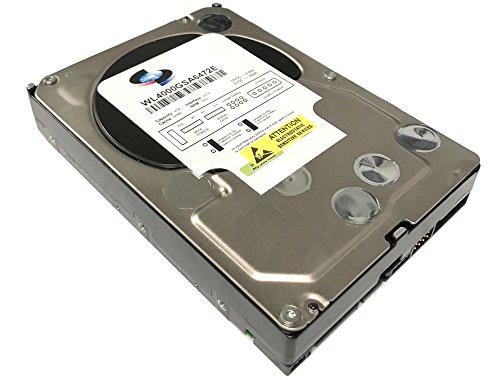
The White Label WL 4TB closes the set as the market’s budget argument: 7200RPM, 64MB cache, SATA 6.0Gb/s, enterprise grade, 3.5-inch, and a stated target list that runs server, RAID, NAS, DVR and desktop PC. The specification figures it prints are respectable and match the class’s mainstream; the phrase that does the persuading is enterprise grade, and the honest review must note what that phrase is — a grade claimed by the seller, on a drive sold under a white-label brand rather than under the name of the manufacturer that built the mechanism.
White-label drives occupy a real niche. The underlying mechanisms in this market commonly originate with the major makers, and for non-critical roles — a scratch volume, a backup target whose contents exist elsewhere, a lab server whose data is reproducible — a lower-cost drive with the right stated figures is a rational purchase. The buyer should simply be clear-eyed about what is thinner here: the brand accountability, the documentation trail and the support relationship that the named makers elsewhere in this guide provide as a matter of course.
For a first server holding a small business’s only copy of anything, this guide’s counsel is to spend the difference on a named drive; the savings are small against the value of the data and the years of service expected. For the second server, the test rig, the volume whose loss is an inconvenience rather than an event, the WL’s proposition is legitimate and its stated targets include the role. The White Label WL 4TB listing is where its full wording should be read before either decision is made.
One practice protects the white-label buyer disproportionately: burn-in. A drive of uncertain provenance should be exercised hard in its first days — filled, verified, put through the array’s own testing — while returns are painless and before any data depends on it. That discipline is good practice for every drive in this guide and essential for this one, converting an unknown quantity into a tested component before it joins the system.
The white-label route also has an honest use in learning. A builder assembling a first server as a skills project — whose data is a curriculum rather than a business — can accept provenance risk that a business cannot, and the WL’s stated figures make it a serviceable teaching drive. The guide’s objection is never to the drive’s existence; it is to the mismatch between an uncertain component and an unforgiving role, and the mismatch is the buyer’s to judge with both sides in view.
- Capacity: 4TB
- Form factor: 3.5 inch
- Interface: SATA 6.0Gb/s
- Cache: 64MB
- Spindle speed: 7200RPM
- Claimed grade: enterprise grade, per the seller’s title
- Stated targets: server, RAID, NAS, DVR, desktop PC
- Maker documentation: a white-label listing, so the trail is thinner than the named brands’
Strengths
- Mainstream enterprise-class figures at a budget position.
- Server and RAID named among its stated targets.
- A 7200RPM spindle where several rivals print none.
Trade-offs
- The enterprise grade is a seller’s claim, not a maker’s line.
- Documentation and support depth trail the named brands.
- Provenance argues for burn-in testing before trust.
Best for: lab servers, scratch volumes and backup targets whose contents live elsewhere too.
Not suited for: the only copy of a small business’s working data.
What Should the Backup Arrangement Be Before the Server Earns Trust?
A server without a backup is a bet, and the bet should be settled before the machine is allowed to become important. The minimum honest arrangement has three properties: the backup is automatic, because manual routines decay; it is separate, because a copy on the same machine shares the machine’s fate in fire, theft and ransomware alike; and it is tested, because an untested restore is a hypothesis. For most first servers the arrangement is a scheduled image or file backup to an external drive or a network target in another part of the building, with the most critical subset copied off-site or to cloud storage on the same schedule.
The drives in this guide interact with that arrangement in both directions: they hold the data being protected, and a spare volume in the server often serves as the backup’s first landing zone before it leaves the building. Either way, the sizing rule is the same — the backup target must hold several generations of the data, not merely its current size, because the backup you need is frequently not last night’s but last month’s, from before the corruption or the deletion anyone noticed. Retention, in backups as in the surveillance guide’s footage, is a calendar decision disguised as a capacity figure.
Head-to-Head: the Six First-Server Drives Compared
| Drive | Capacity | Class | Cache | Rating or term in title |
|---|---|---|---|---|
| Toshiba MG04 | 4TB | Enterprise | Not stated | 24/7 duty stated |
| Seagate Exos 7E2 | 2TB | Enterprise | 128MB | None printed |
| Seagate IronWolf 4TB | 4TB | NAS, CMR | 64MB | Rescue Services |
| Seagate IronWolf 8TB | 8TB | NAS, all-CMR | Not stated | 180TB/year, 3-year warranty |
| WD Red Plus 10TB | 10TB | NAS, CMR | 512MB | None printed |
| White Label WL 4TB | 4TB | Enterprise grade (claimed) | 64MB | None printed |
The table’s pattern is the guide in miniature: the further a title goes in printing its evidence — a workload rating, a warranty term, a recording technology — the more confidently a buyer can match the drive to a workload. Capacity, by contrast, is the column every listing completes, because capacity is the figure that sells. A first-server buyer should shop the table right-to-left: terms and ratings first, class second, capacity last.
Notice, too, what the class column does to the cache column. The enterprise drives print either a large cache or none at all in their titles, the NAS drives print theirs inconsistently, and the white-label prints the mainstream figure — a scatter that tells you cache is a datasheet conversation in this category, not a listing one. The buyer comparing two finalists should finish the comparison in the makers’ documents, where the missing figures live, rather than treating a title’s silence as a zero.
How Do You Commission a First Server’s Drives?
Commissioning begins before installation, with roles written down: which drives form the mirror, which hold bulk, which volume the backups land on. Label every drive with its bay and its installation date as it goes in — a server opened in two years’ time should explain itself to whoever opens it. Fit the drives, build the array, and let the initial synchronisation complete before any real data migrates; an array still building is an array not yet protecting anything, and patience at this step is the cheapest reliability in the whole project. Resist, too, the temptation to begin migrating data onto one volume while the mirror builds on another; order is a form of safety here.
Then test the protection before trusting it. Pull a drive from the mirror — with the system in a state where the experiment is safe — and watch the array report, degrade gracefully and rebuild onto a replacement. Restore one file from the backup. Confirm the monitoring and alerts reach a human: an email address that is read, an app that is installed. A first server whose failure modes have been rehearsed is a different machine from one whose failure modes are theoretical, and the rehearsal costs an afternoon at most.
Finally, set the calendar habits that keep the commissioning honest: a monthly glance at drive health and array status, a quarterly test restore, and a written note of each drive’s age so replacement can be planned rather than improvised. Servers fail their owners socially before they fail mechanically — through neglected alerts and untested backups — and the calendar is the countermeasure. Write the server’s own documentation as you go: what each volume holds, where the backups land, which drive sits in which bay, and the date each entered service. The document feels like overhead on day one and like salvation on the first bad day, which is the entire economics of the practice.
Which First-Server Drive Decisions Come Back to Haunt?
The first is the single drive. A server without redundancy converts every drive failure into a data event, and the drives in this guide are all priced such that the mirror is affordable at the capacities most first servers need. The second is the desktop drive substitution — a cheap desktop mechanism in a 24/7 bay — which fails the same way the recorder drives in the Samsung guide fail: slowly, then suddenly, and always after the data has come to matter. The third is buying renewed enterprise drives for critical roles on the strength of the badge, without the hours or history a listing cannot show.
The fourth haunting is subtler: filling the bays with the largest drives available and discovering that rebuild times, backup windows and the owner’s own patience all scale with capacity. A right-sized array that is fully protected beats an enormous one that is not, every day of the week. The fifth is neglecting the unglamorous companions — the backup that leaves the building and the power protection under the desk — without which the finest drives in this guide are guarding data against only the failures that happen to be convenient.
A sixth deserves its own sentence because it is so rarely recognised as a drive decision at all: leaving the server’s alerts unconfigured, so that the array can degrade, the backup can fail and the drives can age entirely in private. Every drive in this guide reports its condition to something; the haunting begins when nothing is listening. The commissioning rehearsal exists to close that gap, and the owner who skips it has bought excellent drives and declined their testimony.
Final Recommendation
Match the drive’s birth to the server’s work. If the first server is a real server — services, several users, data the business runs on — begin with the enterprise natives: the Toshiba MG04 for system volumes and mirrors, the Exos 7E2 where capacity needs are young. If the server is storage-first, as most first servers honestly are, the IronWolf pair divides the role by evidence: the 4TB for the standard array, the 8TB where a printed workload rating and three-year terms justify themselves. The WD Red Plus 10TB answers the few-bays, big-capacity problem outright. Keep the white-label drive for roles whose loss is an inconvenience.
And buy the drives in the configuration the server will actually run — the mirrored pair together, the backup target in the same order — rather than staging a single drive now and a promise later. First servers become important gradually and then suddenly, and the configuration that protects them has to be in the bays before the sudden part arrives.
Frequently Asked Questions
Can a NAS drive really serve as a server drive?
For the storage-first workloads most entry-level servers run — file sharing, media, backup targets, light services — yes, and the three NAS drives here were chosen because their titles state the credentials that matter: CMR recording, RAID orientation, and in one case a printed workload rating. The distinction to respect is one of degree: a host running heavy virtualisation or database work all day is asking enterprise questions, and the guide’s enterprise pair exists for that buyer. Most first servers, honestly audited after a year, turn out to have been storage appliances with a few services attached — which is why the NAS drives in this guide are recommendations rather than concessions.
Why did this guide exclude renewed enterprise drives?
Because a listing cannot show the things a buyer needs to know about them: the hours already worked, the environment they worked in, and the handling since removal. Renewed drives have legitimate uses, particularly where data is replicated elsewhere, but a first server’s foundation should be built from drives whose whole service life lies ahead and whose warranty runs to a maker. The six picks here are all sold as new for exactly that reason. The distinction is worth stating once more in its sharpest form: a renewed enterprise drive and a new NAS drive are not two prices for the same thing, and the buyer who treats them as such has compared the badge and ignored the biography.
Is one large drive or two smaller mirrored drives better?
Two mirrored drives, at almost any capacity, for anything that matters. The mirror converts a drive failure from a data emergency into a maintenance task, and it does so at the cost of the second drive alone. Capacity can be added later; the day a single drive fails without a mirror cannot be revised. Size the mirrored pair to the data you have plus a sane growth margin, and let bulk overflow live on separate volumes if it must. The one refinement worth adding is age: buy the pair together, from the same listing, so the mirror’s two halves share a birthday and a warranty horizon.
What does the 180TB-per-year figure actually limit?
It states the annual volume of reading and writing the drive is designed to absorb — the workload budget. A server that images several machines nightly, hosts busy virtual machines or serves a team’s active projects consumes that budget faster than a quiet file archive does. Staying within the rating is the difference between a drive living its intended life and one being spent early; buyers whose estimate exceeds it should step toward the enterprise class and its datasheet figures. The estimate itself is easier than it sounds: watch a normal week’s write volume in the server’s own monitoring, multiply by fifty-two, and compare — most small servers land far below the printed rating, which is exactly the reassurance the figure exists to provide.
Do I need a special controller for these SATA drives?
No special controller is required by anything in this guide: all six are SATA drives for ordinary SATA bays and backplanes, whether on a motherboard, a NAS enclosure or a host adapter. The prerequisite checks are physical and configurational — that the server’s bays are 3.5-inch, that its power supply feeds the drive count planned, and that its RAID is implemented in hardware or software the owner understands well enough to rebuild under pressure. That last clause is the one to take seriously: the time to learn the array software’s rebuild procedure is during commissioning, with the manual open and nothing at stake, not during the first degraded evening.
How many drives should a first server start with?
Two, mirrored, is the honest minimum for data that matters, with a third volume or an external target holding the backup. A single drive is a desktop’s arrangement wearing a server’s name. Beyond the foundation pair, growth should follow the data: add capacity when the existing volumes’ free space, not the catalogue, says so, and keep every addition inside the same discipline — labelled, monitored and covered by the backup routine. A server that grows by plan stays legible; a server that grows by impulse becomes the cupboard nobody wants to open.
Related Guides
Continuous-duty storage appears across the site in several forms: Best Hard Drives to Use for a Media Server covers the home server’s library problem, Best 3TB External Hard Drives handles the portable tier that often feeds a first server, and Best Hard Drives for Samsung NVR and DVR Systems examines the surveillance branch of the same 24/7 family.