What's inside
- Where to Buy
- Key Takeaways
- Quick Picks
- How We Chose These Picks
- Comparison
- How to Choose a Short-Throw LCD Projector
- Why Are Nearly All Short-Throw LCD Projectors Made by One Brand?
- Do You Need a Special Screen for an Ultra-Short-Throw Projector?
- How Large a Picture Can a Cabinet by the Wall Honestly Fill?
- What Changes When the Projector Becomes the Family Television?
- Common Mistakes When Buying a Short-Throw LCD Projector
- Final Recommendation
- Frequently Asked Questions
- Related Guides
As an Amazon Associate I earn from qualifying purchases. This post may contain affiliate links at no extra cost to you.
[SITE_DOMAIN] is reader-supported. When you buy through links on our site, we may earn an affiliate commission.
Where to Buy
Every machine below is sold through its own Amazon listing, and the short-throw category rewards slow reading of those pages because throw distance is measured in inches rather than feet. Begin with the Epson EpiqVision LS800 if maximum stated brightness is your starting point, and confirm the current figure on its page before anything else. The Epson EpiqVision Ultra LS650 sits one step down the same family ladder, so open its listing beside the flagship’s rather than after it. Readers curious about the earlier generation can turn to the Epson EpiqVision Ultra LS300, whose page carries the details its long title only sketches. The Epson EpiqVision Ultra LS500 asks for a different kind of attention, since its screen ambitions are the largest in this guide. Then come the two departures: the Epson Lifestudio Grand, where the sound story leads, and the Epson PowerLite 760W, a classroom machine whose listing should be read with a classroom in mind.
Anyone hunting for the best home theater short throw lcd projectors should understand one structural fact before meeting the picks: in the current market, short-throw LCD at home-theater scale effectively means one family — Epson’s 3LCD ultra-short-throw line. Most rival short-throw and ultra-short-throw machines are built on DLP engines, so a buyer who has settled on LCD for its color behavior and its freedom from rainbow artifacts is not choosing among six brands. That buyer is choosing among generations and brightness tiers inside a single manufacturer’s catalog, plus one education model that wandered into the category on the strength of its lens.
That narrowness is not a weakness of this guide; it is the honest shape of the shelf. The EpiqVision models below share a design language — a low cabinet that sits on a credenza inches from the wall, laser light, 3-chip 3LCD imaging, Yamaha-branded sound on most of them, and a smart platform doing television duty. The differences that remain are real ones: 4000 versus 3600 stated lumens, Android TV versus Google TV, a Yamaha 2.1-channel system versus Bose-branded sound, and the jump from streaming-era models to the screen-pairing LS500 generation.
One pick breaks the pattern on purpose. The PowerLite 760W is a WXGA education and meeting-room projector that happens to be an ultra-short-throw 3LCD machine, and it is included so readers can see the boundary of the category drawn in daylight. It is not a disguised home theater bargain, and its review below explains exactly why, in the vocabulary of resolution and intended room. A guide that hides the boundary helps nobody; a guide that walks up to it and points can save a school-budget shopper and a film lover from two different mistakes.
Key Takeaways
- Short-throw LCD home theater is an Epson 3LCD story: five of the six picks are EpiqVision or Lifestudio home models, and the sixth is an Epson education machine.
- Two models state 4000 lumens — the LS800 (color and white brightness) and the LS500 — while the LS650, LS300 and Lifestudio Grand state 3600.
- Five home models name a smart platform: Android TV on the LS800, LS650, LS300 and LS500, and Google TV with Gemini on the Lifestudio Grand.
- Sound is a headline feature in this family: Yamaha speakers on four models, a Yamaha 2.1-channel system on the LS800, and sound by Bose on the Lifestudio Grand.
- The PowerLite 760W is a 16:10 WXGA classroom projector, not a 4K home model, and it is framed that way throughout.
Quick Picks
| Pick | Badge | Why it earns a place |
|---|---|---|
| Epson EpiqVision LS800 | Flagship of the family | 4000 lumens of color and white brightness, Yamaha 2.1 sound, Android TV. |
| Epson EpiqVision Ultra LS650 | Mainstream laser TV | 3600 lumens, built-in Yamaha speakers, smart streaming for the living room. |
| Epson EpiqVision Ultra LS300 | Earlier-generation value | 3600 lumens with HDR, Android TV and Yamaha speakers from the line’s earlier wave. |
| Epson EpiqVision Ultra LS500 | Big-screen specialist | 4000 lumens and 4K PRO-UHD aimed at very large UST images. |
| Epson Lifestudio Grand | Sound-led newcomer | 3600 lumens, Google TV with Gemini and sound by Bose technology. |
| Epson PowerLite 760W | Classroom boundary case | Ultra-short-throw 3LCD at 16:10 for walls that teach rather than screen films. |
How We Chose These Picks
The category definition did the first sort. A pick had to be a short-throw or ultra-short-throw machine and an LCD machine, with both facts visible in its title — 3LCD wording for the Epson home models, and 3LCD plus ultra-short-throw for the PowerLite. That double requirement is what makes this guide short on brands and long on one family, and it was applied without apology, because a reader searching this exact phrase wants LCD short-throw, not a general UST roundup wearing the phrase as a costume.
Within the family, generations were spread deliberately. The LS500 and LS300 represent the earlier wave of Epson’s laser TV idea, the LS800 and LS650 the mature streaming generation, and the Lifestudio Grand the newest branch with Google TV and Bose sound. Reading across those generations shows where the category is traveling: toward television replacement, toward sound as a headline, and toward smart platforms that assume the projector is the room’s main screen rather than its occasional guest.
Brightness figures were recorded in Epson’s own dual vocabulary wherever the title offers it. The LS800 states 4000 lumens of color and white brightness; the LS500 states 4000 lumens without that pairing spelled out in the same way; the 3600-lumen models split the difference in phrasing again. Those small wording differences are preserved in the spec boxes instead of being flattened, because in a single-brand guide the wording is often the only honest signal separating model years and measurement habits.
The PowerLite 760W was admitted under a transparency rule: it qualifies mechanically — ultra-short-throw, 3LCD — and it is the machine a searcher will genuinely encounter while shopping this phrase, so the guide meets it head-on and explains its classroom nature instead of pretending it does not exist. Its presence is a service to readers who might otherwise buy it by accident, and its review is written as a boundary marker rather than a recommendation for film nights.

Epson EpiqVision LS800 — Flagship of the family
The LS800 is the fullest expression of Epson’s laser TV idea in this guide. Its title assembles the complete sentence: 4K PRO-UHD, ultra-short-throw, laser light, a 3-chip 3LCD engine, 4000 lumens stated as both color and white brightness, HDR, smart streaming on Android TV, Yamaha 2.1-channel speakers, HDMI and Bluetooth. No other pick here matches that combination of brightness and sound specification, and the LS800’s position at the top of the family is a matter of its own title rather than of this guide’s favoritism.
The 2.1-channel Yamaha system deserves emphasis because ultra-short-throw projectors live or die by their built-in sound more than any other projector class. A UST cabinet sits exactly where a soundbar would sit, under the picture, in the room’s natural audio seat — which means a serious speaker system inside the projector removes the category’s most common second purchase. A 2.1 arrangement with a dedicated low-frequency channel gives dialogue weight and film effects a foundation that the smaller speaker claims elsewhere in this guide cannot promise on paper, and for many living rooms it will be the only audio hardware the setup ever owns.
Brightness at 4000 lumens of color and white brightness addresses the laser TV’s defining challenge: it competes with the room’s lamps, windows and habits rather than with darkness. A UST screen in a family room at seven in the evening is a television, and televisions are watched with the lights on. The dual-figure statement matters here as it did in the long-throw guide — color brightness equal to white brightness means the football match and the nature documentary hold their punch, not just the news ticker. Paired with an ambient-light-rejecting screen, a combination worth budgeting for alongside any UST purchase, the LS800 is built for precisely that lit-room duty.
Who it suits is the household replacing a large television outright: one cabinet, one screen on the wall, no receiver rack, no speaker stands, and a picture far larger than any panel the same wall could hold. The Android TV platform means the evening’s apps live in the projector, Bluetooth covers the headphone nights, and HDMI waits for the console or disc player. Buyers building a dedicated dark theater should notice that much of this specification — the brightness, the sound, the platform — pays for living-room virtues a blacked-out room does not need, and the long-throw laser models exist for them.
- Resolution: 4K PRO-UHD
- Throw: Ultra short throw
- Light source: Laser
- Engine: 3-chip 3LCD
- Brightness: 4000 lumens color and white brightness
- HDR: HDR stated in the title
- Platform: Smart streaming Android TV
- Audio: Yamaha 2.1ch speakers
- Connections named: HDMI, Bluetooth
Strengths
- 4000 lumens stated as both color and white brightness.
- Yamaha 2.1-channel sound is the strongest audio claim here.
- Laser light and Android TV complete the television-replacement brief.
Trade-offs
- Its brightness and sound are wasted in a blacked-out theater.
- The title does not state a maximum image size.
- An ALR screen is a sensible extra the title does not mention.
Best for: a family room replacing a big television, where the cabinet sits inches from an ALR screen and its Yamaha 2.1 system is the room’s only audio hardware. Not suited for: a screen much beyond the sizes UST optics handle gracefully, since the title names no maximum image and very large walls belong to long-throw machines.
Setting up an LS800 is furniture work before it is electronics work. The credenza must sit at the exact distance and height the throw geometry demands, and a unit that wobbles or sits a half-inch off level will announce the error as a trapezoid on the wall. Measure the cabinet position twice, use the projector’s own adjustment tools sparingly rather than as a substitute for placement, and pair it with the flattest wall or, better, a fixed ALR screen, because UST optics magnify every ripple in a painted surface. Households that treat the installation as joinery for one afternoon tend to forget the projector exists afterward, which is the entire point of the laser TV idea.

Epson EpiqVision Ultra LS650 — Mainstream laser TV
The LS650 occupies the family’s sensible center. Its title offers 4K PRO-UHD, ultra-short-throw laser projection, a 3-chip 3LCD engine, 3600 lumens of color and white brightness, smart streaming on Android TV, HDR and built-in Yamaha speakers, and it aims all of that at the living room in its closing words. Compared with the LS800 above, the step down is measured and specific: 400 fewer stated lumens, and a Yamaha speaker claim without the 2.1-channel detail. Everything else in the family formula — laser, platform, engine, throw — survives intact.
That measured step is exactly why the LS650 will be the right answer for many readers. A 3600-lumen dual figure remains a serious brightness claim for a room with curtains and ordinary lamps, and the difference between 3600 and 4000 lumens is far smaller in a real room than the numerical gap suggests to a specification shopper, because perceived brightness moves logarithmically rather than linearly. Households whose screens sit at the moderate end of the UST size range, or whose evening light is dimmer than a showroom, will rarely catch the LS650 wishing it were its sibling.
The sound story is the more meaningful distinction. Built-in Yamaha speakers without the 2.1 designation promise respectable television audio — clear dialogue, present midrange, an honest account of a film’s quieter scenes — while leaving the low-frequency drama to households that add a soundbar or subwoofer later. Many living rooms will find the built-in system sufficient for news, sport and series television, which is most of what a laser TV actually shows across a year, and will reserve judgment on film bass until the first action picture makes the case for an upgrade.
Who it suits is the family that wants the laser TV life without buying the flagship tier to get it: streaming built in, laser light that asks nothing, 3LCD color, and a screen size that turns the main wall into the evening’s destination. It also suits the cautious first-time UST buyer, because its specification leaves the fewest regrets per compromise — the platform is current, the brightness is strong, and the sound can grow later. The LS800 is the better machine on paper; the LS650 is the one whose paper most households will actually use in full.
- Resolution: 4K PRO-UHD
- Throw: Ultra short throw
- Light source: Laser
- Engine: 3-chip 3LCD
- Brightness: 3600 lumens color and white brightness
- Platform: Smart streaming Android TV
- HDR: HDR stated in the title
- Audio: Built-in Yamaha speakers
- Maximum image size: Not stated in the listing title — verify with the manufacturer documentation
Strengths
- 3600 lumens of color and white brightness suits lit rooms.
- The full family formula survives: laser, 3LCD, Android TV.
- Built-in Yamaha speakers cover everyday television sound.
Trade-offs
- 400 fewer stated lumens than the LS800.
- Speakers lack the 2.1-channel specification of the flagship.
- Image-size limits are not printed in the listing title.
Best for: a mainstream living room at moderate UST screen sizes, where 3600 dual-stated lumens and built-in streaming cover films and series without extra boxes. Not suited for: a bass-led film habit with no plans to add a subwoofer, because the speaker claim here carries no 2.1-channel promise.
Practical ownership of the LS650 centers on the screen decision. A plain white wall will show this projector kindly in the evening and unkindly at noon; a fixed ambient-light-rejecting screen transforms its daytime manners and is the single upgrade that changes the machine’s character most. Position the cabinet on the most stable furniture the room owns, resist sliding it for cleaning without marking its feet, and teach the household that the projector’s home is a fixed coordinate rather than a suggestion. Laser TVs reward that small discipline with years of walk-in-and-watch simplicity.

Epson EpiqVision Ultra LS300 — Earlier-generation value
The LS300 represents the earlier wave of Epson’s ultra-short-throw line, and its title shows the family formula already complete in that generation: a 3LCD smart laser projector with 3600 lumens of color and white brightness, HDR, Android TV, Yamaha speakers and Bluetooth, aimed at sports, gaming, movies and streaming. That breadth of stated uses deserves a moment of attention — where later models refined the pitch, the LS300’s title still speaks like a machine that wants to be everything in the room, and for many households that generalist spirit is precisely the appeal.
Resolution language is where the generations separate. The LS300’s title does not print 4K PRO-UHD, unlike the LS800, LS650 and LS500, and this guide records that absence in the spec box rather than borrowing the family label. A shopper comparing across generations should therefore confirm the LS300’s resolution specification on its listing page and in Epson’s documentation, and weigh the answer against screen size: at moderate UST diagonals in a casual room, the practical gap may matter less than the price of admission, while at the largest sizes the newer models’ PRO-UHD claim earns its keep.
The rest of the title argues that the essentials were right early. Laser light means the same freedom from lamp errands as the flagships; 3600 dual-stated lumens match the LS650’s figure outright; Android TV and Bluetooth cover streaming and private listening; and Yamaha speakers were already the family’s audio answer. A buyer who finds the LS300’s generation acceptable on the resolution question is not buying a compromised machine — they are buying the same living-room idea at its earlier, often gentler point of entry, with the brightness figure to prove it.
Who it suits is the value-led household that watches sport and series more than reference-grade film, the renter who wants a big picture without a mount or a dark room, and the second-room buyer outfitting a den or a games space. It does not suit the buyer assembling a flagship theater one component at a time, for whom the LS800’s sound and brightness or the newer platform of the Lifestudio Grand will justify themselves quickly. Generational honesty cuts both ways: the LS300 is neither a secret bargain nor an obsolete remnant, and its title gives a careful reader everything needed to place it.
- Throw: Ultra short throw
- Light source: Laser (smart laser projector)
- Engine: 3LCD
- Brightness: 3600 lumens color and white brightness
- HDR: HDR stated in the title
- Platform: Android TV
- Audio: Yamaha speakers
- Connections named: Bluetooth
- Resolution: Not stated in the listing title — verify with the manufacturer documentation
Strengths
- 3600 lumens of color and white brightness matches the LS650.
- Laser light, Android TV and Yamaha sound are all present.
- The title names sports and gaming among its intended uses.
Trade-offs
- No 4K PRO-UHD claim appears in the listing title.
- It belongs to the line’s earlier generation.
- Speaker specification lacks the flagship’s 2.1-channel detail.
Best for: a casual big-screen room — sport, series and games at moderate sizes — where laser light and 3600 dual-stated lumens matter more than the newest resolution label. Not suited for: the largest UST screen sizes in a flagship build, because this title makes no 4K PRO-UHD claim to carry those diagonals.
Buyers choosing the LS300 should spend their diligence on the listing page rather than on accessories. Confirm the resolution specification in writing, check the throw distances against your credenza depth, and verify which streaming services the Android TV build supports in its current form. After that homework, ownership is the family’s usual easy pattern: fixed position, flat surface, occasional dusting of vents. An earlier-generation machine bought with open eyes ages gracefully, because nothing about it was oversold on the day it arrived.
Epson EpiqVision Ultra LS500 — Big-screen specialist
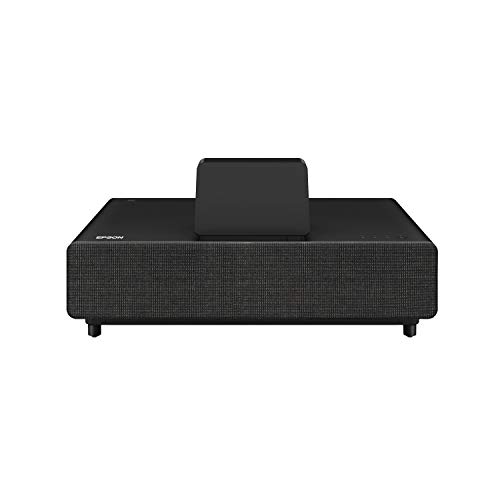
The LS500 comes from the generation that introduced many households to the laser TV concept, and its title still carries that founding ambition: a laser short-throw projector with 4000 lumens, 4K PRO-UHD, HDR, Android TV, Google Assistant, HDMI 2.0 and built-in speakers, aimed at sports, gaming, movies and streaming. Where the LS800 refines the formula with Yamaha 2.1 sound and dual-stated brightness, the LS500’s identity is scale — this is the model historically paired with very large ambient-light screens, the machine for the wall that wants to become a venue.
Its brightness is stated as a single 4000-lumens figure rather than the color-and-white pairing of its siblings, and the spec box preserves that difference. In practice the LS500’s home is the same lit living room as the rest of the family, and its lumen claim matches the flagship’s headline number; the wording difference is a reminder that titles across generations were written by different hands, and that cross-generation comparisons should lean on documentation for the final word. What the title does make plain is the intent: a bright, big, always-ready screen for rooms that gather crowds.
Google Assistant, named here where later models speak of platforms more generally, dates the design in an interesting way — voice control was the smart frontier when this generation launched, and its presence signals a machine built to be spoken to from the sofa. HDMI 2.0 is also printed outright, a specificity the newer titles oddly omit, and it tells the buyer exactly which connection standard the cabinet offers for consoles and players. Built-in speakers are claimed without a brand name, which places the LS500’s audio a rung below the Yamaha-specified models in documented terms, whatever the ears might say in a showroom.
Who it suits is the big-gathering household: the sports crowd, the extended family film night, the room where the screen is a social surface as much as a cinematic one. Its 4K PRO-UHD claim and 4000-lumen figure serve scale honestly, and its generation’s pricing position in the catalog often makes that scale attainable. Buyers who prize the newest platform or branded sound should look at the LS800 or the Lifestudio Grand; buyers who prize the largest credible picture in a lit room will understand the LS500 immediately.
- Resolution: 4K PRO-UHD
- Throw: Short throw (ultra-short-throw family)
- Brightness: 4000 lumens
- HDR: HDR stated in the title
- Platform: Android TV with Google Assistant
- Inputs: HDMI 2.0
- Audio: Built-in speakers
- Engine: Not stated in the listing title — verify with the manufacturer documentation
- Light source: Laser
Strengths
- 4000 lumens matches the flagship’s headline figure.
- 4K PRO-UHD is claimed for very large images.
- HDMI 2.0 is specified outright in the title.
Trade-offs
- Brightness is not split into color and white figures.
- Speakers carry no brand or channel specification.
- The 3LCD engine is not named in this listing title.
Best for: a crowd-pleasing living room chasing the largest UST picture its wall allows, where 4000 stated lumens and PRO-UHD resolution carry a screen built for gatherings. Not suited for: an audio-led setup that wants branded, channel-specified sound from the cabinet, because this title claims only built-in speakers without a maker or layout.
An LS500 installation should begin with the wall itself. At the image sizes this machine invites, wall texture, paint sheen and the slightest bow in the drywall all become visible, so a fixed-frame screen is less an accessory than a completion of the product. Set the cabinet distance with a tape measure rather than by eye, confirm the HDMI 2.0 path suits your sources, and give the built-in speakers an honest first hearing before shopping for a soundbar — in a reflective family room they may cover more of the week than expected. Scale is this projector’s gift; discipline in setup is how the gift survives contact with a real house.
Epson Lifestudio Grand — Sound-led newcomer
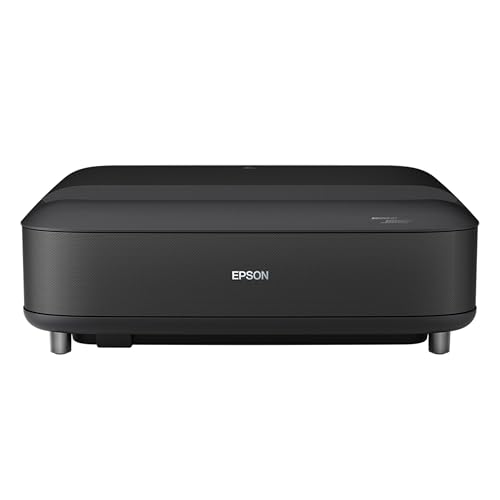
The Lifestudio Grand is the family’s new branch, and its title signals the shift in two phrases: sound by Bose technology, and Google TV with Gemini. Around those novelties the familiar structure holds — an ultra-short-throw 4K PRO-UHD laser projector with 3600 lumens of color and white brightness, 3-chip 3LCD technology and HDR, finished in black. Read the title as a statement of where Epson believes the category goes next: the platform becomes an assistant-led television interface, and the audio becomes a named-brand reason to choose this cabinet over its own siblings.
Bose sound in a projector cabinet is a different promise from the Yamaha systems elsewhere in this guide, not necessarily a greater one — the title gives no channel count or wattage for either family — but a distinct one, aimed at buyers for whom that name carries a household history of speakers that punched above their size. For a laser TV, where the cabinet is the sound system for most owners most nights, the audio brand is a legitimate headline, and Epson is right to print it in the position a brightness figure usually occupies. Dialogue clarity at low evening volumes, the unglamorous test that decides family satisfaction, is exactly what such collaborations are bought for.
Google TV with Gemini moves the smart layer from app grid to assistant. A platform that expects to be asked — for a film, a match, a child’s program — suits the UST living room better than a platform that expects to be browsed, because the projector’s audience is a sofa full of people with one remote between them. The 3600 dual-stated lumens match the LS650, so the Grand is not the brightness flagship; it is the experience flagship, betting that sound and interface are what owners will still be noticing in year three, long after the lumens have faded into the room’s normal.
Who it suits is the design-conscious household buying its first laser TV now rather than a generation ago: viewers who stream everything, who value a cabinet that sounds composed without extra hardware, and who prefer the newest platform the family offers. Traditionalists with a receiver and a disc library will find its talents aimed past them, and brightness-led shoppers have the LS800. The Grand’s wager is that the living room’s future is conversational and sound-led, and its title makes that wager in plain words.
- Resolution: 4K PRO-UHD
- Throw: Ultra short throw
- Light source: Laser
- Brightness: 3600 lumens color and white brightness
- Engine: 3-chip 3LCD technology
- HDR: HDR stated in the title
- Platform: Google TV with Gemini
- Audio: Sound by Bose technology
- Color: Black
Strengths
- Bose-branded sound leads the specification.
- Google TV with Gemini is the newest platform here.
- 3600 lumens are stated as both color and white brightness.
Trade-offs
- 3600 lumens trail the LS800’s stated 4000.
- No speaker channel count is given in the title.
- Assistant-led interfaces will not suit every household.
Best for: a streaming-first living room that wants its sound designed rather than merely included, with Bose audio and an assistant-led Google TV interface in one cabinet. Not suited for: a maximally bright, sun-facing room, because its 3600 stated lumens sit below the LS800’s 4000 for that fight.
To get the Grand’s worth, set up the platform as carefully as the picture. Sign the household’s services in once, arrange the home screen around the family’s real rotation rather than the preloaded suggestions, and test the assistant with the phrases your household actually uses, including the children’s. Position the cabinet so its sound fires into the room’s seating rather than into a corner, and resist placing ornaments on top of it — a sound-led cabinet earns a clear stage. Treated as the room’s entertainment center rather than as a projector that happens to stream, the Grand settles into the role its title describes.

Epson PowerLite 760W — Classroom boundary case
Now the boundary marker, stated without any varnish: the PowerLite 760W is an ultra-short-throw 3LCD projector built for classrooms and meeting rooms, with a 16:10 aspect ratio and wall-mountable or tabletop placement. Its title names no resolution standard beyond that aspect ratio — the model belongs to the WXGA class — and it claims no HDR, no streaming platform, no branded speakers and no home theater intent whatsoever. It appears in this guide because it mechanically matches the search phrase, and because a reader could plausibly buy it by mistake; everything in this review exists to prevent that mistake while respecting what the machine genuinely is.
Judged in its own world, the 760W’s design makes complete sense. An ultra-short-throw lens in a classroom lets a teacher stand at the board without shadowing the image or staring into the beam, 3LCD imaging keeps colors honest for charts and photographs, and a 16:10 canvas suits the documents and browser windows that fill a school day. Wall mounting above the board and tabletop flexibility cover the two ways education spaces actually install projectors. None of those virtues requires 4K, HDR or a cinema pedigree, and the title’s silence on home features is professional honesty, not a gap.
For film nights, the mismatches stack quickly. A WXGA-class image spread across a home theater screen shows its pixel structure where the PRO-UHD models stay smooth; a 16:10 frame letterboxes or crops the 16:9 and wider shapes of films and streaming series; and a machine tuned for legible slides in lit rooms is voiced differently from one tuned for the dynamic range of cinema. A buyer could watch movies on a 760W the way one can sleep on an office sofa — physically possible, and a misunderstanding of what the furniture was for.
Who it suits, then, is exactly who its title suits: a school, a training room, a small office that needs a big, close, shadow-free image for documents and video calls. It also suits the honest browser who arrived here from a search box and needed to hear that the cheapest ultra-short-throw 3LCD on the page is not a hidden home theater bargain. Everyone shopping for films should return to the five EpiqVision and Lifestudio models above, whose titles actually promise the thing this guide’s readers came to buy.
- Throw: Ultra short throw
- Engine: 3LCD
- Aspect ratio: 16:10
- Placement: Wall mountable, tabletop
- Intended setting: Classroom and meeting-room use (WXGA class)
- Brightness: Not stated in the listing title — verify with the manufacturer documentation
- HDR: Not stated in the listing title — verify with the manufacturer documentation
- Streaming platform: Not stated in the listing title — verify with the manufacturer documentation
- Home theater features: Not stated in the listing title — verify with the manufacturer documentation
Strengths
- Ultra-short-throw 3LCD suits board-side teaching without shadows.
- 16:10 canvas fits documents, browsers and lesson material.
- Wall-mount and tabletop options cover classroom installations.
Trade-offs
- WXGA-class resolution is far below the PRO-UHD home models.
- No HDR or streaming platform is claimed in the title.
- Its tuning serves lit-room legibility, not cinema dynamics.
Best for: a classroom or training room that needs a large, close image for lessons and calls, mounted above a board or set on a table. Not suited for: any home theater screen, because a 16:10 WXGA-class image cannot carry films the way the 4K PRO-UHD models in this guide are built to.
If the 760W is headed for a classroom, install it as classrooms reward: mount it rigidly, align it once with the board’s surface, and lock the settings against the semester’s worth of curious hands. If it arrived in a home by ordering error, the kindest advice is to return it unmounted and redirect the budget to the LS650, whose title promises the living-room life the 760W never claimed. Boundary cases like this one are why reading titles slowly is the cheapest skill in home theater shopping.
Comparison
| Pick | Resolution (title) | Brightness (title) | Platform | Audio from title |
|---|---|---|---|---|
| Epson EpiqVision LS800 | 4K PRO-UHD | 4000 lumens color and white | Android TV | Yamaha 2.1ch speakers |
| Epson EpiqVision Ultra LS650 | 4K PRO-UHD | 3600 lumens color and white | Android TV | Built-in Yamaha speakers |
| Epson EpiqVision Ultra LS300 | Not stated in the listing title | 3600 lumens color and white | Android TV | Yamaha speakers |
| Epson EpiqVision Ultra LS500 | 4K PRO-UHD | 4000 lumens | Android TV, Google Assistant | Built-in speakers |
| Epson Lifestudio Grand | 4K PRO-UHD | 3600 lumens color and white | Google TV with Gemini | Sound by Bose technology |
| Epson PowerLite 760W | 16:10 WXGA class | Not stated in the listing title | Not stated in the listing title | Not stated in the listing title |
The table makes the family’s internal logic visible at a glance. Brightness divides into a 4000 tier and a 3600 tier; audio divides into branded systems, branded speakers and one branded sound collaboration; platforms divide into Android TV generations and the Google TV newcomer. The 760W’s row of silences is not an insult to the machine — it is the signature of a product aimed at a different room, printed in the only language this guide trusts.
Notice, too, how much of the decision is generational rather than hierarchical. The LS500 and LS800 share a brightness headline yet belong to different waves of the idea; the LS300 matches the LS650’s lumens while trailing its resolution claim. A buyer who reads the table as a timeline will choose more wisely than one who reads it as a league table, because in a single-family category the real question is which year’s version of the idea fits the room.
How to Choose a Short-Throw LCD Projector
Measure the wall and the credenza before falling for any model. Ultra-short-throw geometry is unforgiving in a specific way: the projector’s distance from the wall, often a matter of inches, sets the image size, and the cabinet’s height relative to the screen’s bottom edge sets the picture’s position. Sketch the furniture you actually own into that geometry. A credenza that is too deep, too shallow or too tall will veto models more decisively than any specification, and discovering the veto on paper is free while discovering it on delivery day is not.
Budget for the screen as part of the projector. UST optics strike the surface at a steep angle, which makes ordinary walls show every texture and makes ambient-light-rejecting screens — designed to accept light from below and refuse it from above — disproportionately valuable. Several combinations in this guide only reach their intended character with such a screen in front of them. A household that prices the projector alone is budgeting for half a product.
Decide how much sound the cabinet must carry. In this family the audio ladder is explicit: the LS800’s Yamaha 2.1 system at the top, Yamaha speakers in the middle models, Bose sound on the Grand, and unspecified speakers on the LS500. A room that will never add a soundbar should climb that ladder deliberately, while a room with an existing receiver may find UST geometry itself awkward, since the cabinet sits where a center speaker wants to live. Let the room’s audio future, not its audio past, cast the deciding vote.
Sound checks deserve one practical ritual before purchase: read each title’s audio line aloud and ask what it actually commits to. A channel count is a commitment; a brand name is a collaboration claim; the bare words built-in speakers are an existence claim. Households replacing a television they already find too quiet should treat anything below a channel-specified system as a down payment on a soundbar, and price that soundbar into the comparison honestly rather than discovering the need during the first whispered film dialogue.
Finally, choose the generation consciously. Newer here buys platform and sound refinements more than raw picture leaps: Google TV with an assistant, a Bose collaboration, a 2.1 Yamaha system. Earlier buys brightness parity at a gentler entry, as the LS300 and LS500 demonstrate. Neither direction is the correct one in the abstract — the correct direction is the one whose improvements match the hours your household will actually spend with the machine.
Why Are Nearly All Short-Throw LCD Projectors Made by One Brand?
Because the two technologies sorted themselves by camp over the past decade. Most manufacturers chasing the living-room UST market built on DLP, whose single-chip design suits compact, high-brightness cabinets, while Epson — the company most associated with 3LCD — developed its own ultra-short-throw line around the three-chip architecture it champions everywhere else. The result is the shelf this guide describes: a category phrase that sounds brand-neutral and a product range that is, in practice, one family’s catalog.
For buyers, the practical consequence is that LCD-versus-DLP shopping happens between guides rather than inside this one. Readers sensitive to DLP rainbow artifacts, or loyal to 3LCD color behavior, land here and choose among Epsons; readers indifferent to engine architecture should compare this family’s best against the leading DLP laser TVs before deciding, because those machines compete fiercely on brightness and price. Engine loyalty is a legitimate preference, but it should be a chosen one.
The single-brand shape also simplifies ownership research. Mounting geometry, screen pairings, platform behavior and service networks rhyme across the family, so an evening spent reading owner experience for one EpiqVision model teaches lessons that transfer to its siblings. Few categories in home theater offer that economy of research, and it is worth using rather than lamenting.
Do You Need a Special Screen for an Ultra-Short-Throw Projector?
Need is a strong word, but the honest answer leans toward yes for most rooms. A UST projector throws its image upward at a shallow angle from inches away, so a wall’s texture, a slight bow in the drywall, or a paint finish with any sheen will print itself into the picture. A fixed, flat screen removes those variables, and an ambient-light-rejecting design goes further by accepting the projector’s steep light while refusing the room’s ceiling light — the exact bargain a laser TV in a lit family room is trying to strike.
Renters and minimalists do project onto walls successfully, especially in dim rooms at moderate sizes, and the laser brightness in this family forgives more than lamp-era machines could. The compromise shows at the edges of the day: noon sport, a lamp beside the sofa, a wall painted anything but flat white. If the projector is replacing a television rather than supplementing a theater, those are not edge cases; they are Tuesday. Price the screen into the comparison from the start and the category’s real cost becomes clear before the cabinet is ordered.
How Large a Picture Can a Cabinet by the Wall Honestly Fill?
Ultra-short-throw marketing loves a maximum diagonal, and the titles in this guide are admirably restrained about printing one — most state no maximum image size at all, which the spec boxes record as silence. The restraint is appropriate, because the honest limit is set less by the lens than by brightness spread across area. A 3600-lumen machine that looks commanding at a moderate diagonal becomes merely adequate when its light is stretched across the largest wall in the house, and the 4000-lumen pair buys headroom for exactly that stretch rather than a different kind of picture.
Seating distance disciplines the ambition further. A very large UST image watched from a close sofa reveals the screen’s texture and the source’s compression in ways a smaller image forgives, and streaming content — most of what these cabinets show — varies wildly in quality from service to service and hour to hour. The household that watches mostly sport and series television can stretch size happily, since that content rewards scale and forgives softness; the household that watches reference film discs should let the 4K PRO-UHD models work at sizes where their resolution advantage remains visible.
There is also a furniture truth: the bigger the image, the more precisely the cabinet’s position is dictated, and the less the credenza can double as a general surface for remotes, plants and holiday decorations. Families should decide whether the wall is becoming a cinema that happens to hold furniture, or a living room that happens to hold a very large screen, because the answer determines whether the maximum size is a goal or a warning. The projectors themselves are neutral; the room’s purpose is not.
A sensible method is to project onto the bare wall for the first week at two or three sizes before ordering a screen. Invite the household’s most honest viewer — usually the person who sits farthest from the center seat — to judge each size from their own chair, because off-axis seats reveal the limits of both brightness and screen surface long before the sweet spot admits to any problem at all. Live with each diagonal through a match, a film and a news broadcast, and notice which size the household stops commenting on — that disappearance is the signal. Screens can then be ordered for the size that proved itself, rather than for the largest number a product page once dangled in front of an optimistic buyer.
What Changes When the Projector Becomes the Family Television?
Habits change first. A television is switched on for twenty minutes of news and left glowing through dinner preparation; a lamp-era projector was saved for occasions. Laser light removes the economic and mechanical reasons for that saving, and every model in the EpiqVision family is built on the assumption that the big screen will be used casually, briefly and often. That assumption should influence the purchase: platform speed, remote simplicity and sound-at-low-volume matter more in a television’s life than in a theater’s, because they are exercised a dozen times a day.
Placement politics change next. A television negotiates with a room once; a UST cabinet negotiates daily, because it occupies the room’s most useful surface and its position is a geometry requirement rather than a preference. Households should settle the credenza question as a family decision — what else lives on that surface, who may move the cabinet (nobody), and where the screen’s centerline falls relative to the sofa’s true center, which is rarely where the room’s architecture suggests. Projectors that become televisions succeed or fail on these domestic treaties far more than on their lumens.
Finally, expectations change. A laser TV will not match a premium panel’s black levels in a lit room, and it will repay that concession with a size no panel in the house can approach. Families who accept the trade in advance describe the experience as liberation; families who expect panel behavior from projected light describe the same hardware as disappointment. The machines in this guide are consistent — it is the framing that decides satisfaction, which is why this guide has spent so many words on rooms and habits and comparatively few on celebrating specification victories.
Common Mistakes When Buying a Short-Throw LCD Projector
Shopping the phrase without checking the engine. Short-throw describes a lens, LCD describes an imaging system, and most machines that satisfy the first word fail the second; every pick here was filtered for both.
Buying the classroom model as a bargain. The PowerLite 760W is an honest education projector whose WXGA-class, 16:10 image cannot do a film’s work, whatever its price suggests.
Treating the credenza as an afterthought. UST placement is measured in inches and levels; furniture that cannot hold the geometry will defeat a flagship as surely as a budget model.
Skipping the screen to save money. A steep throw angle on a textured wall wastes the brightness and resolution the buyer just paid for; the screen is half the display.
Comparing lumens across generations by number alone. Some titles split color and white brightness and some print a single figure, and those vocabularies should be reconciled in documentation before a winner is declared.
Final Recommendation
Most living rooms should begin with the LS650, the family’s balanced center: 3600 dual-stated lumens, laser light, Android TV and Yamaha sound in a cabinet that asks almost nothing of its owners. Step up to the LS800 when the room is bright, the screen is large or the Yamaha 2.1 system will serve as the household’s only audio — its flagship specification is aimed squarely at those three conditions. Choose the Lifestudio Grand if sound design and the newest Google TV interface matter more than the last increment of brightness, the LS500 for the biggest gathering-room picture of the earlier generation, and the LS300 where value leads and the resolution homework checks out. The PowerLite 760W, finally, should be bought proudly — by a school.
A laser TV succeeds when the room forgets it is watching a projector at all, and the model that achieves that vanishing act in your home — at your light levels, on your wall, with your family’s habits — is the right one, even if a brighter sibling sits one row higher in the table.
Frequently Asked Questions
Are all short-throw LCD projectors made by Epson?
In the current home market, effectively yes: the home models in this guide are all Epson 3LCD machines, because most rival ultra-short-throw designs use DLP. That is why this guide compares generations and tiers within one family.
How close to the wall does an ultra-short-throw projector sit?
Typically within inches to a couple of feet, with the exact distance set by the target image size. Check the throw table in Epson’s documentation for your chosen screen size before arranging furniture, because small movements change the diagonal noticeably.
Can a laser TV replace a television in a bright room?
That is the use the LS800 and LS650 were designed for, with 4000 and 3600 stated lumens respectively. Pairing either with an ambient-light-rejecting screen completes the replacement; a bare wall in direct sun will still win against any projector.
Is the PowerLite 760W a good budget home theater option?
No. It is a WXGA-class, 16:10 classroom projector with no HDR or streaming claims in its title. It teaches well and screens films poorly, and the EpiqVision models are the correct direction for a living room.
Which model has the best built-in sound?
On title evidence, the LS800’s Yamaha 2.1-channel system is the most specified, while the Lifestudio Grand counters with sound by Bose technology and no channel count. Rooms that care deeply should hear both philosophies in person where possible.
Related Guides
The neighboring guides widen the lens again. Readers who want a television-style experience should continue to the best TV projectors for home theater, where the laser TV class is compared in full. And those whose rooms can stretch to a conventional throw will find the resolution-first argument in our guide to the best high-resolution projectors for home theater.


