What's inside
- Where to Buy
- Key Takeaways
- Quick Picks
- How We Chose These Picks
- Comparison
- How to Choose a Lightweight 17-Inch Gaming Laptop
- Has the 17-Inch Gaming Laptop Had Its Day?
- What Does 1080p Mean When Panels Differ?
- What Does a Slim Gaming Chassis Give Up?
- How Should You Test a Gaming Laptop in Its Return Window?
- Common Mistakes When Buying a Big Gaming Laptop
- Does the Big Screen Help Competitive Play or Hinder It?
- Final Recommendation
- Frequently Asked Questions
- Related Guides
As an Amazon Associate I earn from qualifying purchases. This post may contain affiliate links at no extra cost to you.
[SITE_DOMAIN] is reader-supported. When you buy through links on our site, we may earn an affiliate commission.
Where to Buy
Three machines carry links in this guide, and the three prose slots that follow them carry an explanation instead. The Razer Blade 17 RTX 3070 Ti is the flagship of the linked trio, so begin on its Amazon page if a QHD 240Hz panel is the shape of your ambition, and confirm the configuration matches the title’s 16GB and 1TB pairing. The ASUS TUF Gaming F17 is the elder, plainer route, and its listing states the full FX706LI-ES53 model code to match at checkout. The NIMO 17.3 Light Gaming Laptop is the current-generation curiosity of the set, and its page is where the memory and storage amounts its title leaves open must be pinned down. The current Razer Blade 16, the ASUS ROG Strix G16 and the MSI Stealth 16 class are discussed in prose without links, because they belong to the successor generation this guide uses for comparison rather than to the 17-inch class under review.
The search for the best lightweight gaming laptops 1080p 17 inch models opens onto a category that has been quietly shrinking for years. Makers discovered that a 16-inch panel with a taller aspect ratio could show nearly as much game as a 17.3-inch one, in a chassis that fits ordinary bags, and the industry’s centre of gravity moved. What remains at 17.3 inches is a short, interesting list: a flagship from the size’s last great generation, a durable budget-era design still circulating, and one current lightweight machine that uses the words light gaming with a modesty its specification supports. This guide reviews those three honestly, then spends its remaining three slots on the 16-inch successors, because any buyer in this category deserves to see the fork in the road drawn clearly.
A note on the 1080p in the search itself, since the titles complicate it. One linked pick, the ASUS TUF F17, states a Full HD panel outright. The Razer Blade 17 states QHD at 240Hz, a sharper and faster screen on which 1080p gaming happens as a rendering choice rather than as the panel’s native grid. The NIMO states FHD IPS without naming a graphics card at all. The reviews keep those three situations separate, because a guide that flattened them into one 1080p story would misdescribe every machine in it. Refresh rates, where titles state them, get the same literal treatment.
Lightweight, the other word in the search, is handled with equal care. No title in this guide states a weight figure, so no weight figure appears in it. Lightweight is therefore treated as the class’s design intent — slim 17-inch gaming chassis rather than the thick desktop-replacement kind — and each verdict names the concrete constraints a buyer can actually verify: the panel, the graphics, the memory, the ports the title names. A buyer who needs a number for the bag should take it from the listing page of the specific machine, where it belongs.
Key Takeaways
- Only three linked 17.3-inch lightweight gaming listings survived verification; the class has largely been succeeded by 16-inch models.
- The Razer Blade 17 states a QHD 240Hz panel, not a 1080p one — 1080p on that machine is a rendering setting, not its native resolution.
- The ASUS TUF F17 states a 144Hz FHD panel and Windows 10, marking it as the elder design of the trio.
- The NIMO title names no graphics card, no memory amount and no storage amount, so all three are recorded as unstated and must be checked on its listing page.
- Three prose slots cover the 16-inch successor class — Blade 16, ROG Strix G16 and the Stealth 16 class — with no links and no invented specifications.
Quick Picks
| Pick | Badge | Why it earns a place |
|---|---|---|
| Razer Blade 17 RTX 3070 Ti | Flagship of the class | RTX 3070 Ti, 14-core i7, QHD 240Hz panel, Thunderbolt 4 and an SD card reader. |
| ASUS TUF Gaming F17 | Elder FHD route | 144Hz FHD IPS panel with GTX 1650 Ti graphics and a full model code stated. |
| NIMO 17.3 Light Gaming Laptop | Current light option | Ryzen 7 7735HS, expandable DDR5, 100W fast charging and WiFi 6E in a 17.3-inch frame. |
| Razer Blade 16 current generation | Successor briefing | Prose-only: Razer’s line continued at 16 inches; discussed as the comparison point. |
| ASUS ROG Strix G16 | Successor briefing | Prose-only: the performance line’s current home, covered without a link. |
| MSI Stealth 16 class | Successor briefing | Prose-only: the slim gaming idea carried forward at 16 inches. |
How We Chose These Picks
The admission test had three gates, and most of the market failed one of them. A title had to state a 17.3-inch-class display, because this guide exists for that size. It had to describe a gaming machine in its own wording — a gaming line, a gaming graphics card, or an explicit light gaming claim — because a big screen alone does not make a gaming laptop. And it had to belong to the lighter, slimmer branch of the class rather than to the thick desktop-replacement tradition, judged by the line each machine comes from. Three listings passed all three gates with verifiable titles, and rather than pad the set with machines that failed a gate quietly, the guide gave the remaining slots to the successor class and labelled them as such.
Specification discipline followed the pattern of the whole batch. Graphics cards are claimed only where titles print them: an RTX 3070 Ti for the Razer, a GTX 1650 Ti for the ASUS, and silence for the NIMO, whose light gaming claim therefore rests on its processor and design rather than on any discrete graphics this guide can verify. Memory and storage are likewise reported at the precision offered, which for the NIMO means recording that its DDR5 is described as expandable while its amount goes unstated.
Operating systems were read as dating evidence. The Razer and the NIMO state Windows 11; the TUF F17 states Windows 10, consistent with its processor generation, and its review treats that line as a planning item rather than a footnote. Panels received the same respect: QHD is not rounded down to the search’s 1080p, and a 144Hz FHD panel is not rounded up to anything.
The prose successors were chosen because they are the machines a 17-inch shopper will actually be offered in a showroom conversation. Each is discussed at the level of its line’s known character — thin flagship, performance flagship, slim all-rounder — without specifications this guide has not verified, and each verdict explains when abandoning the 17-inch requirement for that successor is the right call. A reader who finishes the six slots will know both what the old class still offers and what the new one asks in exchange.

Razer Blade 17 RTX 3070 Ti — Flagship of the class
The Blade 17 is the machine that proved a 17-inch gaming laptop could be slim, machined and taken seriously in a meeting room, and this configuration states the full flagship sentence: an NVIDIA GeForce RTX 3070 Ti, a 12th Gen Intel processor described as 14-core i7, a 17.3-inch QHD panel at 240Hz, 16GB of DDR5 RAM, a 1TB PCIe SSD, Windows 11, Chroma RGB lighting, Thunderbolt 4 and an SD card reader. Every element of that list belongs to the same era and the same intent, and the coherence is what a buyer is paying for in a previous-generation flagship — a machine designed as one thought, not assembled as a compromise.
The panel needs the careful reading promised in the introduction. QHD at 240Hz is sharper and faster than the 1080p panel this search names, and in practice the machine plays in two modes: native QHD where a game’s demands allow, and 1080p rendering where frame rate matters more, with the panel’s refresh ceiling serving both. Buyers should therefore not read this pick as a mismatch with their search but as its ceiling — the screen exceeds the brief, and the honest cost of that excess is that the RTX 3070 Ti works harder at native resolution than it would on a Full HD grid. Players who value fluidity will render at 1080p and enjoy the headroom; players who value detail will stay native and accept the trade.
The supporting details describe a machine meant to live on a desk and travel occasionally. Thunderbolt 4 opens the docked life — one cable to a desk’s monitor and peripherals — while the SD card reader, a rarity in gaming laptops, serves creators who move footage and photographs as part of the same day’s work as the gaming. Chroma RGB is the line’s signature lighting, a matter of taste that costs nothing to subdue. Sixteen gigabytes of DDR5 and a terabyte of PCIe storage are the era’s correct flagship pairing, sized for a large game library with room to spare.
Who it suits is the buyer who wants the definitive slim 17-inch gaming machine and accepts previous-generation standing as the price of the size. Its generation should be weighed plainly: the processor and graphics are 12th Gen and RTX 30-series, and current 16-inch successors will outrun them in the newest titles while offering smaller screens. For the player whose library and desk fit this machine’s strengths, that exchange favours the Blade. On its Amazon page, confirm the QHD 240Hz line and the 3070 Ti together, since Blade 17 listings vary by graphics tier and the pairing is this pick’s whole identity.
- Display: 17.3-inch QHD, 240Hz
- Graphics: NVIDIA GeForce RTX 3070 Ti
- Processor: 12th Gen Intel 14-core i7
- Memory: 16GB DDR5 RAM
- Storage: 1TB PCIe SSD
- Connections: Thunderbolt 4, SD card reader
- Lighting: Chroma RGB
- Operating system: Windows 11
- Weight: Not stated in the listing title — verify with the manufacturer documentation
Strengths
- QHD 240Hz panel exceeds the 1080p brief in both directions.
- RTX 3070 Ti is the strongest graphics stated in this guide.
- Thunderbolt 4 and an SD reader suit a creator’s desk.
Trade-offs
- Previous-generation processor and graphics.
- Native QHD rendering asks more of the graphics card.
- Weight is not stated in the title.
Best for: a desk-based player who wants the flagship slim 17-inch experience with a QHD 240Hz screen and creator-friendly connections. Not suited for: a travel kit that needs a stated weight under a specific bag limit, because this title never prints one and the figure must come from the listing page.
Configure this Razer deliberately in its first week. Decide per game whether native QHD or 1080p rendering serves it, rather than letting defaults decide inconsistently, and set the lighting to a scheme you will still enjoy in a year. If the machine will share a desk with a monitor, establish the Thunderbolt dock routine early, while cables are being arranged anyway. A flagship of a finished generation rewards owners who set it up as a complete system once, then simply play.
ASUS TUF Gaming F17 — Elder FHD route
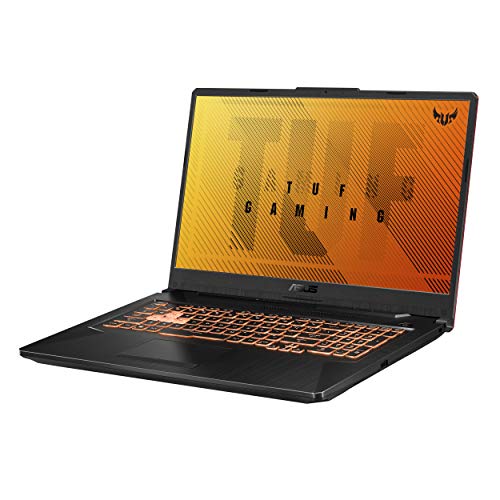
The TUF F17 is the honest workhorse of the trio, and its title is a model of complete statement: a 17.3-inch 144Hz FHD IPS-type display, an Intel Core i5-10300H, a GeForce GTX 1650 Ti, 8GB of DDR4 memory, a 512GB PCIe SSD, an RGB keyboard, Windows 10, in Bonfire Black, under the model code FX706LI-ES53. Nothing is hidden and nothing is inflated. This is a previous-generation budget gaming design still circulating in the market, and its review treats it as exactly that — a known quantity with known limits, rather than a discovery.
The panel is the one true native 1080p screen in the guide, and its 144Hz refresh rate gives the GTX 1650 Ti a target it can genuinely approach in the lighter and older titles where this machine belongs. That pairing defines the realistic library: esports titles, older releases, and modern games at moderated settings, played fluently on a big screen. Buyers whose ambitions run to the newest releases at high settings are outside this machine’s honest territory, and the Razer above, or the 16-inch successors below, are where that ambition should go.
Eight gigabytes of memory is the specification that will age first, and the title states it without disguise. For the machine’s intended library it functions, particularly with a browser closed during play, but a buyer planning years of use should treat memory discipline as part of the purchase. The 512GB SSD similarly asks for a curated library rather than an archive. Windows 10, stated in the title, has reached the end of its support, so the purchase should include an operating-system plan formed before the machine arrives, not after its first warning appears.
Who it suits is the player buying a first big-screen gaming laptop for a defined, lighter library, and the buyer who values a fully stated specification over a fresh one. The TUF line’s durable, repairable character is part of its reputation, and a machine whose every figure is printed in its title is a machine a buyer can own without surprises. Its Amazon page mainly needs the model code checked — FX706LI-ES53 — because TUF variants multiply and the code is the difference between this configuration and its near-namesakes.
- Display: 17.3-inch 144Hz FHD IPS-type
- Processor: Intel Core i5-10300H
- Graphics: GeForce GTX 1650 Ti
- Memory: 8GB DDR4
- Storage: 512GB PCIe SSD
- Keyboard: RGB keyboard
- Operating system: Windows 10, as stated in the title
- Model code: FX706LI-ES53
- Finish: Bonfire Black
Strengths
- The guide’s only native 1080p panel, at a real 144Hz.
- Every core specification is stated in the title.
- Full model code printed for exact matching.
Trade-offs
- 8GB memory is the figure that will age first.
- Windows 10 is out of support and needs a plan.
- GTX 1650 Ti suits lighter and older libraries.
Best for: a player with a defined esports and back-catalogue library who wants a native 1080p 144Hz big screen with no specification surprises. Not suited for: a buyer planning to play the newest releases at high settings for years, because the GTX 1650 Ti and 8GB of memory set this machine’s ceiling in its title.
Set this ASUS up as the specialist it is. Build its library deliberately — the titles it plays fluently are numerous and excellent — close background applications before sessions as a habit rather than a remedy, and settle the operating-system question in the first week while the machine is fresh. Owners who respect a workhorse’s defined territory get years of faithful service from it; owners who ask it to be a flagship get a lesson in reading titles, which this one, to its credit, never disguised.

NIMO 17.3 Light Gaming Laptop — Current light option
The NIMO is the current-generation machine of the trio and the most carefully worded. Its title calls it a light gaming laptop and states an AMD Ryzen 7 7735HS processor, expandable DDR5 RAM, Windows 11, an FHD IPS display with a 180-degree viewing description, a fingerprint reader, a backlit keyboard, 100W fast charging and WiFi 6E, for business and students as much as for play. Three things the title does not state matter as much as everything it does: no graphics card is named, no memory amount is given, and no storage amount appears. This review therefore describes the machine the title actually describes, and sends the buyer to the listing page for the three missing figures before any conclusion is drawn.
Read on those terms, the machine’s character is clear and coherent. The Ryzen 7 7735HS is a modern, capable processor, and a laptop built around it with an FHD screen will handle everyday work, study and light gaming — the undemanding titles, the older library, the casual session — in the pattern its own light gaming label promises. The word light is doing honest work in that label, and a buyer who respects it will be satisfied; a buyer who reads gaming and stops reading will be disappointed by a machine that never claimed a discrete graphics card in the first place.
The modern conveniences are stated with unusual completeness for this corner of the market. WiFi 6E matches current routers, 100W fast charging suits a machine that moves between desk and classroom, a fingerprint reader and backlit keyboard cover the daily security and evening-light frictions, and expandable DDR5 memory is a genuinely welcome phrase, suggesting the memory figure — whatever the listing page states it to be — is not necessarily the machine’s final one. For a student or a home worker who games lightly, that collection describes a sensible, current all-rounder wearing a 17.3-inch screen.
Who it suits is that all-rounder’s owner: coursework or office work by day, lighter games by evening, one machine for both, bought new with a current operating system. It does not suit the dedicated player, for whom the absence of a named graphics card is the whole story. Its Amazon page carries an unusual burden in this guide — the graphics situation, the memory amount and the storage amount all live there rather than in the title — so read it completely, and let those three answers, not the light gaming label, make the final decision.
- Display: 17.3-inch FHD IPS
- Processor: AMD Ryzen 7 7735HS
- Memory: DDR5, described as expandable; amount not stated in the title
- Charging: 100W fast charging
- Connectivity: WiFi 6E
- Security: fingerprint reader
- Keyboard: backlit keyboard
- Operating system: Windows 11
- Graphics card and storage amount: Not stated in the listing title — verify with the manufacturer documentation
Strengths
- Current Ryzen 7 processor and Windows 11.
- Expandable DDR5 memory is stated in the title.
- WiFi 6E and 100W fast charging are modern, stated details.
Trade-offs
- No graphics card is named in the title.
- Memory and storage amounts are not stated.
- Light gaming is the ceiling its own label sets.
Best for: a student or home worker who games lightly and wants one current 17.3-inch machine for work, study and casual play. Not suited for: a dedicated player choosing a machine for demanding modern titles, because this title names no discrete graphics card to carry them.
Before this machine arrives, do the reading its title postponed: note the graphics arrangement, the memory amount and the storage figure from the listing page, and set your game library’s expectations from those three facts. On arrival, the fingerprint reader and the charging routine are the two habits to establish in the first evening. An all-rounder bought with clear eyes is a satisfying machine; the NIMO’s title, read completely — including its silences — gives a buyer everything needed to buy it with exactly that clarity.
Razer Blade 16 current generation — Successor briefing
Razer’s own answer to the shrinking class was to continue the Blade idea at 16 inches, and the current Blade 16 is where a Blade 17 shopper will be steered in any showroom. This slot carries no link and no specification list, because this guide has not verified that machine’s listing titles and will not invent figures for it. What can be said honestly is the shape of the exchange it offers: the Blade line’s machined, slim flagship character, a current generation of processor and graphics, and a panel one size down, in a chassis that travels the way modern laptops are expected to travel.
The buyer for whom that exchange is right is easy to identify. If the 17-inch requirement was really a performance requirement in disguise — the strongest slim gaming laptop, whatever its exact size — the Blade 16 is not a compromise but the current form of the thing itself, and the linked Blade 17 above is the nostalgic route. If the requirement was genuinely the screen, the width of the canvas and the two-window gaming-desk life, then the successor’s smaller panel is a real loss that no processor generation repays, and the previous-generation flagship remains the rational purchase.
Practical diligence transfers unchanged. Whichever Blade 16 listing a buyer considers, its title deserves the same line-by-line reading this guide gives the 17: panel resolution and refresh stated, graphics tier named exactly, memory and storage as figures rather than adjectives. Blade listings vary by configuration as much as any premium line, and the discipline that protects a buyer in a discontinued market protects them identically in a current one.
Who this briefing suits is the shopper standing at the fork, unsure whether size or currency matters more to them. Decide by the desk and the library, not by the showroom’s framing. A machine carried daily earns its smaller size every morning; a machine that lives on a desk earns its larger screen every evening, and the two buyers should not let each other’s arguments confuse a decision that their own routine has already made.
- Guide status: prose-only successor briefing, no link
- Class position: the Blade line continued at 16 inches
- Specification figures: Not stated in the listing title — verify with the manufacturer documentation
Strengths
- Current-generation hardware in the Blade line’s slim form.
- A chassis sized for ordinary bags and daily carrying.
- The natural upgrade path for Blade loyalists.
Trade-offs
- The panel is a size down from this guide’s subject.
- No listing for it is verified or linked here.
- Premium lines carry premium listing figures.
Best for: a performance-first buyer whose 17-inch interest was really about the Blade flagship idea and who carries the machine daily. Not suited for: a desk-based player who measured their setup for a 17.3-inch canvas, because a 16-inch panel does not fill the space the desk was arranged around.
Treat any Blade 16 listing you pursue with the full ceremony of this guide: title first, configuration second, basket third, and the panel’s resolution and refresh confirmed as a pairing rather than as separate boasts. The successor generation’s marketing is no more immune to generous reading than the discontinued market’s, and the buyer who reads both markets with the same care will choose between them on facts rather than on framing.
ASUS ROG Strix G16 — Successor briefing
Where Razer carried the slim flagship idea down a size, ASUS carried the performance idea with it, and the ROG Strix G16 is the current home of the gaming line that sits above the TUF F17 in this guide’s linked trio. Like the Blade slot, this one is prose-only: no verified listing, no invented specification, no link. Its purpose is to mark, for the TUF shopper especially, where the road marked more performance now leads — to a 16-inch machine in a gaming line built around current processors and graphics, with the cooling and the keyboard theatre that line is known for.
The Strix proposition, at the level of character rather than figures, is performance without the flagship’s minimalism. Machines in this line tend to spend their size and weight budgets on cooling and power delivery rather than on thinness, which makes them the natural successor for a player whose F17 ambitions outgrew the GTX-class territory but whose desk still anchors the day. A buyer stepping from the TUF’s honest, fully stated specification to a Strix listing should expect a longer title and should read it more slowly, not less, because performance lines multiply configurations enthusiastically.
The 16-inch exchange applies here in its standard form. In return for the smaller panel, the buyer receives the current generation of everything else, a warranty relationship with the present rather than the past, and a machine whose software support will run for years forward instead of standing already complete. For a player whose library is defined by current releases, that exchange is usually correct, and this guide says so without pretending the 17-inch screen was not a genuine loss in the trade.
Who this briefing suits is the ambitious TUF shopper and the performance-first player generally — anyone whose honest answer to the size question is that frames matter more. It does not suit the buyer whose gaming life is a wide screen on a fixed desk and a library of titles the older machines already serve, because that buyer would be trading the thing they use hourly for headroom they will use rarely.
- Guide status: prose-only successor briefing, no link
- Class position: ASUS performance gaming line at 16 inches
- Specification figures: Not stated in the listing title — verify with the manufacturer documentation
Strengths
- Current-generation performance focus.
- The upgrade path for outgrowing the TUF class.
- A forward-running support and warranty position.
Trade-offs
- A size down from the 17.3-inch subject of this guide.
- Performance lines multiply configurations to untangle.
- No listing for it is verified or linked here.
Best for: a player whose library is current releases and whose priority is frame rate headroom over screen width. Not suited for: a desk-based player with a back-catalogue library the F17 already serves fluently, because the exchange trades an hourly-used screen size for rarely used performance headroom.
Shop a Strix listing the way this guide shopped the F17: find the model code, align the title with the configuration selector and the basket, and be especially careful with graphics tiers, where a single character can separate two very different machines wearing one name. The performance market rewards that care more than any other, because its configurations are numerous, its figures are large, and its adjectives are loud.
MSI Stealth 16 class — Successor briefing
The Stealth class is MSI’s version of the idea that started this guide: a gaming laptop slim and subdued enough to pass in a professional room. Continued at 16 inches, it completes the successor trio as the all-rounder’s option — the line a buyer considers when the Blade’s flagship minimalism feels austere and the Strix’s performance theatre feels loud. This slot, like its two companions, is prose-only, with no verified listing and no specifications claimed; it exists so the shopper hears the whole successor argument before deciding whether to leave the 17-inch class at all.
The Stealth character, described at the level this guide can honestly sustain, is balance: current gaming hardware in a chassis designed to be carried into mixed company, with the screen, keyboard and ports arranged for a working day as much as for a gaming evening. That balance is precisely what the lightweight half of this guide’s title always wanted, and a buyer who reads the linked trio and finds the Razer too flagship, the TUF too dated and the NIMO too light has, in the Stealth class, the current market’s most direct answer — one size down.
The recurring exchange should by now be familiar, and its repetition across three slots is deliberate rather than lazy: each successor asks the same price, a smaller panel, for the same currency, a current machine. A buyer who has read all three briefings and still prefers the 17-inch class has not failed to understand the successors; they have understood them and chosen the screen, which is a legitimate ending to the deliberation. A buyer who switches should switch for their own routine’s reasons — the daily carry, the current library — and not because three briefings wore them down.
Who this briefing suits is the mixed-life buyer: work and study in professional rooms by day, a real but not extreme gaming habit by night, one machine carried between them. It does not suit the committed desk player, for whom the linked Blade 17’s canvas and the F17’s honesty remain the live options, nor the pure performance buyer, whose slot is the Strix above.
- Guide status: prose-only successor briefing, no link
- Class position: MSI slim gaming line at 16 inches
- Specification figures: Not stated in the listing title — verify with the manufacturer documentation
Strengths
- The lightweight gaming idea in current form.
- A subdued design suited to professional rooms.
- Balance across work, study and play in one chassis.
Trade-offs
- A size down from this guide’s 17.3-inch subject.
- Balance means neither the flagship nor performance extreme.
- No listing for it is verified or linked here.
Best for: a commute between professional rooms and gaming evenings on one slim machine, accepting a 16-inch panel as the price of currency. Not suited for: a fixed-desk player whose two-window gaming setup was measured around a 17.3-inch screen, because the smaller canvas shrinks the arrangement the desk was built for.
Apply the guide’s full reading method to any Stealth listing you pursue, and add one class-specific check: confirm the exact graphics tier in the model code, because slim gaming lines offer wide ranges under one family name and the difference between tiers is the difference between the machine reviewed in your head and the machine in the box. Slim machines live and die by that single line of their titles.
Comparison
| Pick | Status | Panel from title | Graphics from title |
|---|---|---|---|
| Razer Blade 17 | Linked | 17.3-inch QHD 240Hz | RTX 3070 Ti |
| ASUS TUF Gaming F17 | Linked | 17.3-inch 144Hz FHD IPS-type | GTX 1650 Ti |
| NIMO 17.3 Light Gaming | Linked | 17.3-inch FHD IPS | Not stated in the listing title |
| Razer Blade 16 | Prose-only | 16-inch class successor | Verify per listing |
| ASUS ROG Strix G16 | Prose-only | 16-inch class successor | Verify per listing |
| MSI Stealth 16 class | Prose-only | 16-inch class successor | Verify per listing |
The table divides the guide at its honest fault line. Above it, three verifiable 17.3-inch machines with their panels and graphics stated or their silences recorded. Below it, three successors described as directions rather than destinations. A buyer’s first decision is which half of the table they are shopping in; every later decision is smaller than that one.
Within the linked half, the ladder is unusually clear. The NIMO serves the light end with a current processor and an unstated graphics position, the TUF serves the defined middle of older and lighter titles at native 1080p, and the Blade serves the flagship end with a panel and a graphics card that exceed the search that found them. Most buyers will recognise their library in one of those three descriptions within a minute of honest thought.
One further consideration separates careful buyers in this class: the charger. Slim gaming machines draw serious power under load, and their adapters are correspondingly substantial, which quietly revises the travel weight that the word lightweight invites a buyer to imagine. The machine in the bag is a system — chassis, adapter, perhaps a mouse — and the honest comparison with a 16-inch successor weighs that whole system rather than a bare chassis figure neither market states consistently. At a fixed desk the point evaporates, which is one more reason this guide keeps returning the decision to the routine the machine will actually live.
How to Choose a Lightweight 17-Inch Gaming Laptop
Begin by interrogating the word lightweight against your own routine, because no title here will give you a number. If the machine will live on a desk and travel monthly, the slim 17-inch class is light enough by design and the screen should lead the decision. If it will travel daily, the honest answer may live in the prose half of this guide, where 16-inch chassis were designed for exactly that life. The worst outcome in this category is a machine bought for a routine it never meets, admired in specifications and resented in the bag.
Next, match the graphics to the library with unusual honesty. Write down the ten games you actually play, not the ten you admire, and place them against the three stated positions in this guide: no named graphics card, a GTX 1650 Ti, an RTX 3070 Ti. Libraries cluster more honestly than aspirations do, and the clustering usually points at one pick so clearly that the rest of the comparison becomes a formality. Reserve the flagship for a library that reaches it, and the elder TUF for a library that fits it, without embarrassment in either direction.
Then read panels as pairings. Resolution and refresh belong together: the TUF’s 144Hz serves its FHD grid directly, the Blade’s 240Hz serves a QHD grid with 1080p rendering as its fluent mode, and the NIMO’s FHD panel carries no refresh figure in its title at all, which is itself information about where its priorities lie. A buyer who compares refresh numbers without their resolutions is comparing half a specification.
Finish with the operating system and the support horizon. Two linked picks state Windows 11 and one states Windows 10, whose support has ended; the successors, by definition, stand at the current end of that horizon. A machine bought for years of play should have its software future settled at purchase, by configuration or by plan, rather than discovered by notification.
Has the 17-Inch Gaming Laptop Had Its Day?
As the industry’s centre of gravity, yes, and pretending otherwise would make this guide a poorer shopping tool. The development money, the new panels and the current graphics generations now arrive at 16 inches first and often only. A buyer who wants the newest of anything in gaming laptops is shopping the successor class, and the three prose briefings exist to help them do it knowingly.
As a machine on a desk, the 17-inch class retains a real afterlife. The Blade 17’s canvas and the F17’s fluent 1080p panel did not become worse when the catalogue moved on, and a player whose library fits them can buy years of service from either. Categories end in catalogues before they end in usefulness, and the gap between those two endings is where informed buyers find their value — provided they shop the gap with inspections rather than with nostalgia.
What Does 1080p Mean When Panels Differ?
Three different things in this one guide, which is why the word deserves its own section. On the TUF F17 it is the panel itself: a native FHD grid at 144Hz, where every frame the graphics card renders lands on exactly the pixels provided. On the Blade 17 it is a rendering choice beneath a QHD panel, trading native sharpness for frame rate with the screen’s 240Hz ceiling above both. On the NIMO it is the stated FHD resolution of a machine whose gaming is light by design, where 1080p describes the display’s fit for media and everyday play rather than a performance target.
The practical lesson generalises beyond this guide. A resolution in a search box is a question, not an answer, and the answer lives in each title’s pairing of panel, refresh and graphics. Buyers who learn to read those three lines together will never be misled by a resolution headline again, in this category or any other where screens are sold.
What Does a Slim Gaming Chassis Give Up?
Physics collects its payment somewhere, and in slim gaming laptops it collects in heat and noise. A thin chassis has less room for cooling, so a flagship graphics card in a Blade-class body will run its fans harder under sustained load than the same card in a thick desktop replacement, and its surfaces will warm in the places hands rest. None of the titles in this guide quantifies noise or temperature, so this section offers the class-level truth rather than a per-machine figure: the slimness that makes these laptops carryable is bought with cooling headroom, and the exchange is structural, not a defect in any single model.
The practical consequences are manageable and worth planning. A stand or a pair of rear feet that lifts the back of the chassis improves airflow on almost any slim gaming machine. Headphones, already the desk player’s usual companion, retire the fan-noise question entirely. And per-game settings chosen with the machine’s thermal character in mind — a frame-rate cap in a menu-driven title, for instance — keep a slim chassis in its composed register rather than at its limit. Owners who make those small arrangements describe their machines as refined; owners who demand desktop-replacement thermals from a slim body describe disappointment that was encoded in the design from the start.
Upgrade paths narrow in slim designs as well, in ways a buyer should check per listing rather than assume. Memory and storage access varies across this class, and the NIMO’s expandable DDR5 wording is a reminder to read each title for exactly that promise. A machine bought as a finished object, with its memory and storage sized for its whole life, asks nothing of its upgrade path; a machine bought as a starting point should have that path confirmed in documentation before money moves.
How Should You Test a Gaming Laptop in Its Return Window?
Play your hardest game, not the prettiest demo. The title in your library that makes your current machine complain is the examination a new gaming laptop must sit, at the settings you actually intend to use, for a session of real length. Twenty minutes of a demanding game at your chosen resolution and refresh pairing will tell you more about a slim chassis — its noise, its warmth, its sustained behaviour — than a week of menus and benchmarks conducted at nobody’s real settings.
Then test the ordinary life around the gaming. Carry the machine through your actual routine, in your actual bag, up your actual stairs. Dock it and undock it if a desk setup is part of the plan, pair the peripherals you own, and sit in the second chair if the screen is ever watched from one. Gaming laptops fail their owners socially as often as technically, by being the wrong size for the bag or the wrong noise for the room, and every one of those failures is discoverable inside a return window and expensive outside it.
Finish by checking the machine against its title one last time: processor, graphics, memory, storage and panel, confirmed in the system settings while remedies are still easy. This guide’s whole method — read the title as a contract — completes itself in that ten-minute inspection, and a buyer who performs it owns their purchase in a way that a buyer who skips it never quite does.
Common Mistakes When Buying a Big Gaming Laptop
Assuming a gaming label guarantees a graphics card. One linked title here claims light gaming and names no graphics card at all. The label is a starting point; the graphics line, or its absence, is the fact.
Comparing refresh rates without resolutions. A 240Hz QHD panel and a 144Hz FHD panel are different instruments. Read the pairing, then judge which serves your library.
Buying the flagship for a library that never reaches it. Back catalogues and esports titles play beautifully on the elder TUF. Spend the difference on the games themselves.
Skipping the operating system line on an older design. The F17 states Windows 10, whose support has ended. That line deserves a plan formed before purchase, not a surprise after it.
Does the Big Screen Help Competitive Play or Hinder It?
Both, depending on the seat. At a desk, a 17.3-inch panel at reading distance fills more of the visual field than a 16-inch one, which flatters racing, flight and open-world play where the scene itself is the pleasure. Competitive players in fast shooters often prefer the opposite geometry — a smaller canvas whose edges stay inside one glance — and for them the successor class’s 16-inch panels, or even a desktop monitor, serve better than any machine in this guide. Neither preference is a misunderstanding; they are different sports sharing a word.
The deciding evidence is your own library again, counted rather than imagined. Titles where you track movement across a wide scene reward width; titles where you flick between focal points reward compactness. Most mixed libraries contain both, which is why so many players settle the question with the desk rather than the genre: the machine lives where it lives, the chair sits where it sits, and the screen that fits that geometry wins. Measure the distance from your eyes to where the panel will stand, and let that single number arbitrate what a hundred specifications cannot.
Final Recommendation
Choose the Razer Blade 17 if your library reaches for real graphics power and your desk is the machine’s home; it is the class’s flagship and its QHD 240Hz panel exceeds the search that found it. Choose the ASUS TUF F17 if your library is the honest middle of esports and older titles and you value a specification stated in full. Choose the NIMO if your gaming is genuinely light and your days are work and study, with its three unstated figures checked on the listing page first. And choose a 16-inch successor — Blade for flagship slimness, Strix for performance, Stealth for balance — if carrying the machine daily matters more than the extra width of screen.
The size at the heart of this guide is leaving the catalogues, but it is not leaving desks like yours on any schedule but your own — so buy the machine your routine describes, at the size your room rewards, and let the industry’s migration be background rather than instruction.
Frequently Asked Questions
Are there really only three linked picks?
Yes. The lightweight 17.3-inch gaming class has narrowed to a handful of verifiable listings, and this guide links the three whose titles state their specifications cleanly. The remaining slots brief the 16-inch successor class instead of padding the set.
Is the Razer Blade 17 a 1080p laptop?
Its title states a QHD 240Hz panel, which is sharper than 1080p. Games can be rendered at 1080p on it for higher frame rates, but the panel itself is QHD, and the guide describes it that way.
Can the NIMO play demanding games?
Its title names no graphics card and describes the machine as light gaming, so demanding modern titles are outside the promise its own label makes. Check the graphics arrangement on its listing page before assuming anything stronger.
Why does the TUF F17 ship with Windows 10?
Because it is a previous-generation design, and its title states Windows 10 accordingly. That system’s support has ended, so buyers should form an operating-system plan before purchasing.
Should I just buy a 16-inch successor instead?
If you carry the machine daily or your library is current releases, probably. If your desk is its home and your library fits the linked machines, the 17-inch class still serves. The three prose briefings spell out what each successor asks in exchange.
How long will the linked machines stay relevant?
Relevance follows the library rather than the calendar. The Blade 17’s RTX 3070 Ti will serve a wide range of current and older titles for years, particularly at 1080p rendering, while the TUF’s GTX-class graphics already define a lighter territory that nonetheless contains thousands of excellent games. A player whose habits are formed around a back catalogue owns relevance that no release schedule can revoke; a player who buys every major release on its first day should shop the successor class, where the current generations live.
What should I check first on the NIMO listing page?
The three figures its title leaves open, in this order: the graphics arrangement, because it decides what gaming means on that machine; the memory amount, because it decides multitasking headroom; and the storage amount, because it decides library size. The title’s stated virtues — the Ryzen 7 processor, expandable DDR5, WiFi 6E, fast charging — are already known, so the page’s job is to complete the picture rather than to repeat it.
Is an SD card reader worth caring about on a gaming laptop?
For players who also create — recording sessions, editing footage, moving photographs — the Blade 17’s stated SD reader removes a dongle from every working day, which is a larger cumulative convenience than its single line in a title suggests. For pure players it is inert. Judge it as you judge every feature in this guide: by whether your own routine touches it weekly, not by whether it lengthens a specification list.
What separates the Blade 17 from the TUF F17 most?
Intent, visible in every line of their titles. The Razer pairs a QHD 240Hz panel with an RTX 3070 Ti, DDR5 memory and Thunderbolt 4 — a flagship assembled to be the best slim 17-inch machine of its generation. The ASUS pairs a native FHD 144Hz panel with a GTX 1650 Ti and DDR4 — a workhorse assembled to be bought without hesitation and used without ceremony. A buyer choosing between them is not choosing better and worse but two different relationships with a library, a desk and a budget, and the titles, read plainly, describe both relationships exactly.
Related Guides
The full big-screen field beyond gaming is covered in our roundup of laptops with 17-inch screens for home and office life. Readers reconsidering Dell’s discontinued big machines will find the honest account in the best mid-range 17-inch Dell laptops, including why only three listings there carry links.


