What's inside
- Key Takeaways
- Quick Picks
- How did we choose these on-ear PC headsets?
- Why does on-ear fit suit computer work better than over-ear?
- USB, 3.5mm, or both — which plug should a desk headset have?
- What do in-line controls actually do all day?
- How many hours a day can an on-ear headset honestly serve?
- Six on-ear PC headsets, pick by pick
- Across the desk: the six on-ear headsets on connection, controls and fit
- How do you set up an on-ear USB headset for your first call?
- What should a small team standardise on?
- What mistakes do people make buying a PC headset?
- Final Recommendation
- Frequently Asked Questions
- Related Guides
As an Amazon Associate I earn from qualifying purchases. This post may contain affiliate links at no extra cost to you.
widgetverdict.com is reader-supported. When you buy through links on our site, we may earn an affiliate commission.
Where to buy: the six headsets below each link to a checked Amazon listing, and every one is a wired, lightweight, desk-priced design — two Logitechs, a Jabra, an Amazon Basics, a NUBWO and a JIAMQISHI — because this category is about equipping desks, not impressing audiophiles.
The best on ear pc headsets with mic occupy the most honest corner of the headphone world. They are not built for cathedrals of sound or for gaming arenas; they are built for the Tuesday of working life — the stand-up call, the training webinar, the customer who must be heard clearly and answered kindly, the online class that runs long. On-ear pads keep them light and cool, a boom or stalk microphone keeps the voice forward, and a USB plug keeps the whole arrangement simpler than the software it serves.
On-ear is a deliberate fit philosophy, and it suits computer work for reasons that only appear across a full day. Pads that rest on the ear rather than sealing around it let heat escape, let a colleague’s approach register, and let the wearer slip the headset off with one hand when the doorbell goes. The price is isolation: an on-ear headset in a loud room is a suggestion, not a barrier. For the quiet-to-average home office, that trade is not merely acceptable — it is the correct engineering answer to the actual problem.
The six picks below are all wired, and mostly USB, because desks reward reliability over romance. Two come from Logitech, the default name in this category for a generation; Jabra brings its call-centre heritage in the Evolve 20; Amazon Basics and two value specialists, NUBWO and JIAMQISHI, press the same brief at gentler tiers of the market. Choosing among them is mostly a matter of connector, controls and how many hours a day the thing will spend on your head.
Key Takeaways
- On-ear fit trades isolation for coolness and lightness — the right trade for ordinary offices, the wrong one for loud ones.
- Every pick here is wired, mostly USB, because a desk headset should never need charging before the first call.
- In-line controls with mute and volume are the feature you will touch most; judge them before any audio claim.
- Logitech’s H390 and H540 are the category defaults for a reason: known behaviour, noise-cancelling microphones, zero drama.
- The Jabra Evolve 20 adds USB-C alongside USB-A, future-proofing the same desk for the next laptop.
- Dual-connection designs like the JIAMQISHI and Amazon Basics, offering USB and 3.5mm, forgive older hardware and occupied ports.
Quick Picks
| Pick | Badge | Why it earns its place |
|---|---|---|
| Logitech H390 USB Headset | The category default | The wired USB-A headset with a noise cancelling microphone that a generation of offices standardised on — for video meetings and everything else. |
| Logitech H540 Wired Headset for Windows and Mac, USB-A, Black | The clear-call step-up | Logitech’s step up for Windows and Mac, with on-ear mute and volume controls and a clear-calls brief. |
| Amazon Basics On Ear Wired Computer Headset with Adjustable | The flexible value pick | Adjustable microphone, a choice of 3.5mm or USB-A connection through the in-line control, foldable, in a small/medium size. |
| NUBWO HW02 USB Headset | The call-centre value pick | A USB headset with noise cancelling, in-line control and an ultra comfort brief, aimed at office, call centre and webinar work. |
| Jabra Evolve 20 USB Headset | The heritage office pick | Jabra’s Evolve line in its 2025 edition: dual-ear comfort, USB-A and USB-C from one headset, and in-line call control. |
| JIAMQISHI USB Headset | The dual-plug budget pick | USB and 3.5mm in one headset, a noise cancelling microphone with in-line control, aimed at home office and online classes. |
How did we choose these on-ear PC headsets?
The requirements were plain: an on-ear fit, a microphone, and a design intended for a computer, verified from each listing title. Gaming headsets and over-ear models were excluded however capable, because this keyword describes a specific tool for a specific desk. Connection types, control arrangements and any noise-cancelling claims were taken only from the titles, and the sections below claim nothing beyond them. Readers equipping a whole team may also want Best Business USB Headsets for the procurement-minded view.
Balance across the six reflects how these headsets are really bought: a couple of safe institutional defaults, one heritage call-centre name, and value designs that equip a home office or a classroom without ceremony. Nobody sensible overspends here, but nobody sensible buys the absolute cheapest either, because a headset worn six hours a day repays small comforts out of all proportion to their cost.
Why does on-ear fit suit computer work better than over-ear?
Heat is the first reason, and it is unglamorous enough to be true. An over-ear cup seals a cushion of air around the ear and warms it steadily; across a two-hour training session that warmth becomes the session’s defining sensation. On-ear pads ventilate by design, because the ear itself remains partly open to the room. Workers who remove over-ear headsets between every call often keep on-ear headsets on through the gaps, which changes how reachable and present they are across a day.
Awareness is the second reason. Most computer work happens in spaces that still require a citizen: a door to answer, a child to hear, a colleague approaching with a question. On-ear designs leak enough of the room inward that the wearer remains a participant in it, while still placing the call’s voices clearly in front of the room’s murmur. In a quiet-to-average office that balance is not a compromise at all — it is the specification.
The third reason is pure mechanics. On-ear headsets are lighter, smaller on the desk, quicker to don one-handed and easier to wear with glasses perched for screen work. Their weakness is the mirror of their strengths: in a genuinely loud environment — a call floor at full cry, a kitchen at dinner time — no on-ear pad will save the call, and the honest advice is to change the room or change the category.
USB, 3.5mm, or both — which plug should a desk headset have?
USB is the modern desk default, and five of these six picks lead with it, because a USB headset arrives at the computer as its own audio device: the operating system names it, the meeting app finds it, and the in-line pod carries mute and volume that the computer respects. There is no dependence on a laptop’s ageing headphone jack or its microphone input quality. For a managed work machine, USB is not a preference but a policy.
The 3.5mm jack survives as the universal spare. It serves older machines, controllers, phones with the port and the emergency moment when every USB socket is occupied by drives and dongles. Two picks here — the Amazon Basics and the JIAMQISHI — offer both connections, and that duality is worth more than it costs: the headset simply cannot be orphaned by a hardware refresh or a port shortage.
USB-C is the arriving third answer, and the Jabra Evolve 20’s title names USB-A and USB-C together, which is the configuration to want in a decade of mixed laptops. Whatever you choose, choose it against an inventory of your actual machines, including the old laptop in the drawer that becomes the backup on the worst day of the year. The headsets in this list are inexpensive enough that the connector, not the budget, should make the decision. For microphone quality across all connection types, Best Headsets With Great Mic Quality — Broadcast, Streaming and Meeting Voices Compared widens the lens.
What do in-line controls actually do all day?
They end the mute panic, which is the defining micro-drama of remote work. A physical mute on a cable pod, found by touch while a dog announces a delivery, is worth more than any audio specification when a meeting is live. Volume on the same pod ends the second drama — the scramble through software sliders while a loud caller is mid-sentence. Every pick in this list offers in-line control of some form, and the titles say so because buyers who have lived without it refuse to live without it again.
Placement and tactility separate the good pods from the decorative ones. The control should hang where a seated hand falls, its buttons distinguishable by feel alone, its mute state knowable without looking down mid-presentation. When you read the pick sections, weigh these small ergonomics heavily; across a thousand calls a year, the pod is the product and the earpieces are its accessories.
There is also a privacy argument for hardware mute that software cannot match. A mute switch on the cable is a physical fact, upstream of every application, immune to the app that unmutes on join or the update that rearranges the interface. Professionals handling sensitive conversations standardise on hardware mute for the same reason studios use physical faders: when it matters, you want your hand, not a menu, to be the authority. Teams buying at scale should compare notes with Best Call Center Headsets Under $150 before committing a whole floor to one pod design.
How many hours a day can an on-ear headset honestly serve?
The honest answer is that the headset can serve more hours than the ears should be asked to. On-ear designs postpone the reckoning better than most — light weight, ventilated pads, modest clamp — but any object resting on the ear accumulates pressure, and any voice delivered at close range accumulates listening fatigue. Experienced call workers therefore treat the working day as a rhythm rather than a siege: headset on for calls, off or loosened between them, volume kept at the lowest level that stays effortless.
Employers equipping teams should hear that as a specification. A headset chosen for hour-six comfort, issued with permission to remove it between calls, will outperform a technically finer headset worn resentfully for nine unbroken hours. The picks in this list were chosen with that rhythm in mind — every one of them can be slipped off one-handed and parked without ceremony — because the best desk headset is not the one that can be worn forever, but the one whose wearer never needs to think about wearing it.
Individuals should apply the same realism to volume. On-ear openness tempts people to raise the level against the room, and the room, across a day, always wins that arms race. Lower the room first — a closed door, a quieter corner — and the headset can stay at the gentle level your ears will thank you for in a decade. The technology in this guide is inexpensive; the hearing it serves is not replaceable at any tier of the market.
Six on-ear PC headsets, pick by pick
Each headset below is judged as a desk tool: connection, controls, microphone and the hours it can comfortably serve. Specifications come only from the listing titles, and gaps are flagged where a title leaves a detail unstated.

Logitech H390 USB Headset — The category default
Some products become defaults so completely that they stop being reviewed and start being assumed, and the H390 is that product in this category. Its title is a plain statement of the formula: wired USB-A, a noise cancelling microphone, black, for PC. Behind that plainness sits the reason it is everywhere — it behaves identically on every machine, in every meeting app, on the first day and the five hundredth, which is the only virtue a desk headset cannot fake.
The noise cancelling microphone addresses the home office’s real acoustics: not studio silence but the washing machine, the neighbour’s renovation and the household passing the door. Suppression at the microphone keeps those sounds out of the call while the on-ear fit keeps the wearer connected to the house. Video meetings are named in the title, and music gets a mention as the second shift the headset works between calls.
Buy the H390 when the decision needs to be boring. It will not thrill anybody, and it will not strand anybody either, and across a working year the second quality outearns the first by a distance that spec sheets cannot express.
There is also an institutional memory argument for the H390 that individual buyers inherit free. Because so many workplaces have issued it, every meeting platform, help desk and colleague already knows its behaviour; the answer to any problem it presents is one search away, and a replacement can be found in any office supply channel on earth. Exotic headsets may beat it in a feature table, but they cannot beat it in the lived infrastructure that surrounds it — and infrastructure, across a working year, is most of what ownership feels like.
Its second shift deserves a line as well. The title mentions music, and between calls the H390 is a perfectly civilised way to listen at a desk: present, clear and undemanding, with the microphone parked and the room still audible when a colleague approaches. Workers who dislike swapping devices between call mode and thinking mode will find that one headset, worn all day in both roles, simplifies the desk more than a second, finer headphone complicates it.
- Connection: wired USB-A
- Microphone: noise cancelling microphone, per the listing title
- Use named in title: PC, video meetings, music
- Colour: black
- Fit: on-ear
Strengths
- Proven, predictable behaviour on any PC
- Noise cancelling mic suits real home offices
- Institutional availability and familiarity
Trade-offs
- USB-A only, so USB-C laptops need an adapter
- On-ear fit cannot isolate a loud room
- Utilitarian design and tuning
Best for: office workers and students wanting the standard wired USB headset for daily video meetings
Not suited for: workers on USB-C-only laptops unwilling to use an adapter

Logitech H540 Wired Headset for Windows and Mac, USB-A, Black — The clear-call step-up
The H540 is the H390’s more considered sibling, aimed at the buyer who takes calls seriously enough to want the controls on the ear rather than hunting a cable. Its title names on-ear mute and volume — the two controls this guide argues matter most — placed where a hand finds them without breaking eye contact with a screen. For presenters and support workers who mute dozens of times a day, that placement is not a luxury; it is the workflow.
Clear calls is the stated brief, and the platform naming is unusually explicit: Windows and Mac both, over USB-A. Mixed households and mixed workplaces, where the headset migrates between a Windows desktop and a Mac laptop, are exactly the audience for that even-handedness. Nothing about the H540 is exotic, and that is its design language — refinement of a formula rather than reinvention of it.
Choose it over the H390 when the call count is high and the mute count is higher. The two Logitechs divide the category’s centre between them: the default, and the default with its controls promoted to where a professional’s hand expects them.
The earcup controls also change meeting manners in a way worth noticing. A mute on the ear is performed with a small, visible gesture near the face, which colleagues on camera read as attentiveness rather than absence — the hand rises, the state changes, the conversation continues. Compare the cable-hunter, eyes down and fumbling at waist level, and the H540’s ergonomics become a small lesson in how equipment shapes professional presence. Nobody buys a headset for that reason, but many keep one because of it.
Windows and Mac parity, finally, is a household feature disguised as an office one. The family where one partner works on a Windows desktop and the other on a Mac laptop is now the ordinary family, and a headset that is equally at home on both ends the quiet competition for the good peripherals. The H540 can simply live on the shared desk, owned by the household rather than by a machine, which is where the most-used objects in any home eventually end up.
- Connection: wired USB-A
- Platforms named in title: Windows and Mac
- Controls: on-ear mute and volume, per the listing title
- Brief named in title: clear calls
- Colour: black
Strengths
- Mute and volume on the ear, found by touch
- Explicit Windows and Mac support
- Refined version of a proven formula
Trade-offs
- USB-A only
- On-ear isolation limits loud environments
- Premium over the H390 buys controls, not a new category
Best for: call-heavy professionals wanting mute and volume on the earcup across Windows and Mac machines
Not suited for: occasional callers who would never use the extra controls

Amazon Basics On Ear Wired Computer Headset with Adjustable — The flexible value pick
Amazon Basics approaches the desk headset as a logistics problem: one product that fits the most desks, the most machines and the most heads, at a tier where equipping a household or a classroom needs no approval meeting. The connection arrangement is its cleverest answer — a 3.5mm port or an in-line control with a USB-A port — so the same headset serves the old laptop, the new desktop and the device with no free sockets, without a second purchase hiding in a drawer.
Foldable is the second practical word in the title, and it matters for the hybrid reality this headset will live in: folded into a laptop bag for the office day, unfolded at the home desk, stored in a drawer between online classes. A fixed headset survives that life poorly; a folding one treats it as the design brief. Clear sound is the stated audio promise, pitched honestly at calls and classes rather than at concerts.
The size note deserves respect rather than a skim: small/medium is specified in the title, which makes this the rare headset that smaller heads — including younger students — can wear without the cups sliding toward the jaw. Buyers with larger heads should read that specification as a genuine boundary and look at the Logitech or Jabra sections instead. Fit honesty in a title is a courtesy more makers should copy.
The folding design invites a travel thought experiment. A headset that folds flat can ride in the same sleeve as the laptop, survive the bag, and turn a hotel desk or a relative’s kitchen table into a functioning office in ninety seconds. Hybrid workers increasingly live exactly that life, and their equipment choices are quietly reorganising around it. The Amazon Basics is the only pick here designed with the fold as a headline, and for the worker whose office is wherever the laptop opens, that headline may outrank every other line in this guide.
Its sizing honesty also makes it the thoughtful gift in the list. Buying a headset for a student usually founders on fit — adult headsets slide on smaller heads until the microphone points at a cheek — and a title that declares small/medium sizing removes the guesswork entirely. Grandparents equipping a grandchild for online classes, take note: the correct size, plainly labelled, is a rarer and kinder feature than any amount of advertised technology.
- Connection: 3.5mm port or in-line control with USB-A port
- Microphone: adjustable microphone
- Design: foldable
- Size: small/medium, per the listing title
- Sound brief: clear sound
- Colour: black
Strengths
- Two connection paths forgive any machine
- Folding design suits bags and drawers
- Explicit sizing helps smaller wearers
Trade-offs
- Small/medium sizing excludes larger heads
- Value tier materials ask for gentle handling
- On-ear fit limits isolation, as throughout
Best for: students and hybrid workers with smaller heads wanting one folding headset for several machines
Not suited for: larger-headed wearers needing a full-size fit
NUBWO HW02 USB Headset — The call-centre value pick
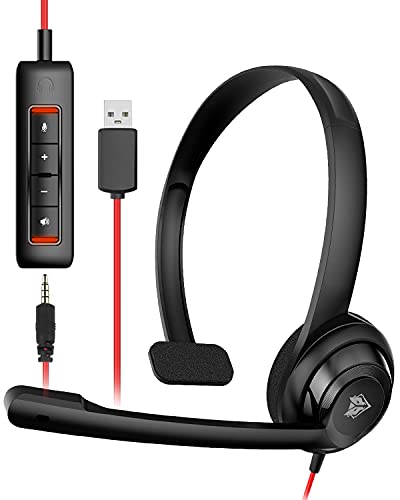
NUBWO’s HW02 wears its intentions in its title: office, call centre, webinars. This is the headset as issued equipment — a USB connection, a noise cancelling microphone, in-line control and an ultra comfort brief — assembled for the buyer equipping a desk, a team or a home classroom at a tier where the purchase must simply work. Value headsets live or die by whether their corners were cut in the right places, and the HW02’s title suggests the cuts were made in glamour rather than in the microphone or the fit.
The call-centre framing is the tell. Call work punishes headsets in ways occasional use never discovers: eight-hour wear, constant donning and removal, mute discipline under pressure. A product aimed at that world, even at a gentle tier, has at least asked the right questions about cushion comfort and control placement. Webinar and Skype-era naming in the title dates the design’s heritage, but the underlying brief — clear voice, light head, working mute — has not aged at all.
Set expectations with the same honesty the guide applies everywhere: this is equipment for being understood, not for being impressed. For a home office that needs a dependable second headset, a classroom set or a first work-from-home kit, the HW02’s priorities are correctly ordered, and its on-ear lightness will be kinder across a shift than heavier rivals bought for their looks.
Consider the HW02 from the perspective of the person equipping a room rather than a person. A trainer setting up a webinar suite, a parent assembling a homework station, a small business owner facing six new desks: all of them need the same thing, which is a headset whose virtues are uniformity and availability. Every HW02 behaves like every other, so training takes minutes and spares are interchangeable. That uniformity is a designed quality, and it is why call-centre thinking, applied at this tier, produces such sensible household equipment.
The ultra comfort claim should be tested the way call centres test it — by duration, not by first impression. A headset that feels merely fine for ten minutes and still feels fine at hour six has passed the only examination that matters in this category, and on-ear lightness is the strongest predictor of passing it. Buyers equipping themselves for long shifts should let one full working day with the HW02 cast the vote before multiplying the purchase across a team.
- Connection: USB wired
- Microphone: noise cancelling, per the listing title
- Controls: in-line control
- Brief named in title: ultra comfort, office and call centre use
- Platforms named in title: laptop and PC
- Colour: black
Strengths
- Call-centre brief prioritises comfort and mute discipline
- Noise cancelling mic at a value tier
- Lightweight on-ear wear for full shifts
Trade-offs
- Value materials reward careful handling
- Title heritage names older platforms
- Isolation limited by on-ear design
Best for: home offices, classrooms and small teams equipping several desks with a comfortable wired headset
Not suited for: buyers wanting premium materials and brand support networks

Jabra Evolve 20 USB Headset — The heritage office pick
Jabra’s Evolve name carries call-centre history into the home office, and the Evolve 20 in its 2025 edition is the line’s foundation model, refreshed. The detail that earns its place in 2026 is in the connection line: USB-A and USB-C from the same headset. That single specification retires the adapter question that haunts the Logitechs in this list, letting one issued headset serve the old desktop, the current laptop and the next laptop without a drawer of dongles mediating between them.
Dual-ear, comfortable and office-first is the stated brief, with in-line call control carrying the mute-and-volume discipline this guide keeps returning to. Jabra’s professional lineage shows in that prioritisation: the Evolve 20 is designed by people who know that a headset’s reputation is made in the five hundredth hour, in the comfort that remains and the control that still clicks, rather than in the unboxing.
For a work-from-home setup expected to last, this is the considered choice in the list — the one an IT department would issue and a freelancer would buy once. Its stereo, on-ear design keeps the wearer present in the home while keeping the call clear, which is the whole philosophy of this category expressed by its most experienced practitioner.
Jabra’s presence at this foundation tier also buys an ecosystem. A worker who starts with the Evolve 20 and later needs more — a wireless model for a roaming role, a speakerphone for a shared office — stays inside a family whose controls and habits rhyme. That continuity is worth real money to organisations and real calm to individuals, because every brand change re-teaches the hands. The 2025 refresh of the entry model suggests the family intends to be there for those later chapters.
There is a final, unfashionable virtue to record: repairability of routine. An in-line control pod, a standard USB connection and a dual-ear frame are all technologies any competent support channel understands instantly. When something misbehaves in year two, the Evolve 20’s owner will get answers in minutes, from documentation and help desks that have seen the question a thousand times. Novelty cannot offer that. In equipment worn daily for work, boring competence is a feature, and Jabra has built a decades-long reputation on exactly it.
- Connection: USB-A and USB-C wired, per the listing title
- Edition: 2025 edition
- Design: dual-ear office headset, comfortable per the title
- Controls: in-line call control
- Use named in title: office and work from home
- Colour: black
Strengths
- Both USB flavours end adapter worries
- Professional lineage in comfort and controls
- Dual-ear clarity with on-ear lightness
Trade-offs
- On-ear design cannot seal out a loud home
- Wired only, by design
- Foundation model of the line, without flagship extras
Best for: home workers wanting one durable office headset that fits current and future laptops alike
Not suited for: workers in loud shared spaces needing sealed isolation
JIAMQISHI USB Headset — The dual-plug budget pick
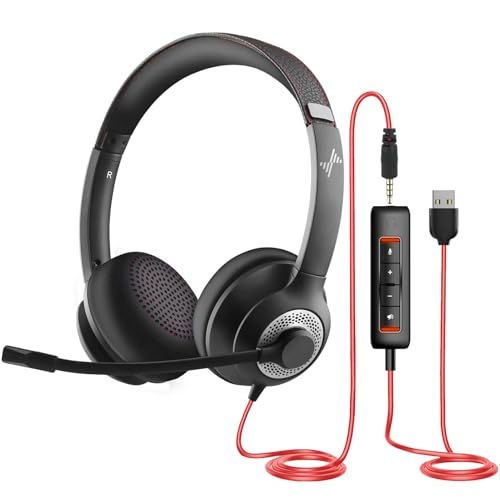
JIAMQISHI competes on the oldest value proposition in peripherals: the same brief, both plugs, no ceremony. USB plus 3.5mm is printed right in the title, which means this headset can serve the USB desktop in the study and the 3.5mm laptop in the kitchen, the work machine and the class machine, without its owner ever thinking about connection as a question. For households equipping several people at once, that thoughtlessness is the feature.
The rest of the title follows the category’s honest checklist: a noise cancelling microphone for the call, in-line control for the mute, and named habitats of home office and online class, with Skype and Zoom as the assumed venues. Nothing here pretends to be more than it is, and in a category where the job is being clearly heard at nine in the morning, that honesty is a perfectly respectable design philosophy.
Treat it as the household spare that becomes the main headset more often than expected, or as the classroom-and-coursework purchase where several units must be bought at once. Buyers wanting a single premium instrument for a decade of calls should look up-list to the Jabra; buyers wanting every desk and every child equipped by Friday will understand exactly what the JIAMQISHI is for.
The JIAMQISHI’s dual-plug design also makes it the natural emergency headset — the one kept in a drawer against the day the main headset’s cable finally surrenders to a chair caster. Because it speaks both USB and 3.5mm, it covers every machine that emergency might involve, and because its tier is gentle, keeping a spare is a decision nobody has to justify. Households that depend on calls for income should think of that spare the way they think of a spare phone charger: unglamorous, inexpensive and priceless exactly once a year.
Online classes give it a second natural home. A school-age student needs a headset that survives being stuffed into a bag, works with whatever device the school issued, and keeps a teacher’s voice clear while a microphone keeps the student’s answers clearer. The JIAMQISHI’s title reads like that brief written out in full. Equip the backpack with it, teach the mute button once, and the technology side of remote learning is, for once, the easy side.
- Connection: USB and 3.5mm, per the listing title
- Microphone: noise cancelling microphone
- Controls: in-line control
- Use named in title: home office, online class, Skype, Zoom
- Fit: on-ear
- Colour: black
Strengths
- Dual plugs serve any machine in the house
- Noise cancelling mic and in-line mute included
- Sensible tier for equipping several people
Trade-offs
- Value construction asks for gentle treatment
- Brand support is thinner than Logitech or Jabra
- On-ear isolation limits, as throughout the list
Best for: households and classes equipping multiple people with one dual-plug headset design
Not suited for: professionals wanting a single premium headset for years of daily calls
Across the desk: the six on-ear headsets on connection, controls and fit
Connection is the honest first column in this category, because it decides which of your machines the headset can serve on the day a port dies or a laptop is replaced. Controls come second — earcup versus in-line pod is a genuine daily preference — and fit third, with one explicit size boundary in the table that deserves attention.
| Pick | Connection | Microphone | Fit and form |
|---|---|---|---|
| Logitech H390 USB Headset | USB-A wired | Noise cancelling mic | On-ear, black |
| Logitech H540 Wired Headset for Windows and Mac, USB-A, Black | USB-A wired | Headset mic for clear calls | On-ear, earcup controls |
| Amazon Basics On Ear Wired Computer Headset with Adjustable | 3.5mm or USB-A wired | Adjustable mic | On-ear, foldable, small/medium |
| NUBWO HW02 USB Headset | USB wired | Noise cancelling boom mic | On-ear, call-centre brief |
| Jabra Evolve 20 USB Headset | USB-A / USB-C wired | Headset microphone | On-ear dual-ear office design |
| JIAMQISHI USB Headset | USB + 3.5mm wired | Noise cancelling mic, in-line control | On-ear, home office brief |
The six divide into three pairs. The Logitechs are the institutional centre, differing mainly in where the controls live. The Amazon Basics and JIAMQISHI are the connection diplomats, forgiving every machine. The NUBWO and Jabra are the work-brief pair, one pressing value for teams and the other pressing heritage and USB-C readiness for the long term.
Notice what the table does not contain: batteries, pairing or wireless anything. That absence is the category’s virtue. Every headset here will work on the morning you most need it, at the speed of plugging it in, and for desk work that reliability outranks every feature that requires a charge.
How do you set up an on-ear USB headset for your first call?
Plug it in before you open the meeting app, not after. Computers and call software both behave better when the headset exists at launch: the operating system can select it as the default device, and the app inherits that choice instead of offering you a menu at the worst moment. Then open the sound settings once, deliberately, and confirm the headset owns both the speaker and microphone roles — half of all bad first calls are a laptop playing the meeting through its speakers while listening through the headset.
Make the test recording nobody wants to make. Thirty seconds of your real speaking voice, with the household at its real volume, played back honestly, will teach you more about microphone position than any diagram. Bend or adjust the mic until your voice sits clearly above the room without breath blasts, then find the mute on the in-line pod or earcup by touch and press it ten times. Fluency with that button, acquired in private, is what professionalism looks like in public.
Finish with the desk itself. Route the cable so it cannot be run over by your chair casters — the number one killer of wired headsets — and give the headset a resting place that is not the floor or the keyboard. A hook, a stand or a dedicated corner of the desk extends the life of every model in this list more reliably than any warranty, because most headset deaths are domestic accidents rather than electronic failures.
What should a small team standardise on?
Standardising a small team on one of these six is less about the model than about the discipline it creates: one mute gesture to teach, one connection to support, one spare in the cupboard that fits every desk. The Logitechs are the usual treaty because their behaviour is the industry’s common language, while the Jabra argues for itself wherever USB-C laptops are arriving faster than adapters. The value designs earn consideration when the team is a classroom or a family, where the count of headsets matters as much as the pedigree of each.
Whichever standard is chosen, buy one first and let the loudest critic on the team wear it for a week. Headsets are intimate equipment, and a standard imposed without that trial will be quietly routed around — a personal headset appearing here, an earbud there — until the standard exists only in the purchasing record. A standard that survives a week on the critic’s head will survive anything the working year can schedule.
What mistakes do people make buying a PC headset?
The first is buying for the wrong room. An on-ear headset in a genuinely loud environment will disappoint no matter which logo it carries, because the design admits the room by intention. Match the category to the space honestly: quiet-to-average rooms are on-ear country; loud ones belong to sealed designs and closed doors.
The second is ignoring the connector census. Count the ports on every machine the headset must serve, including the backup laptop, before choosing between USB-A, USB-C and the dual-plug designs. An adapter-dependent headset works, but it works with a daily grain of friction that a correctly chosen plug would have deleted forever.
The third is judging by the first five minutes. On-ear comfort is an hours-long property: a pad that feels fine in a quick test can press by the third meeting, and a headset that feels oddly light at first can prove to be the only one still worn at six in the evening. Where possible, let the longest meeting of the week cast the deciding vote.
One more habit separates the headsets that survive from the ones that fray: never wrap the cable tightly around the headset for storage, however tidy it looks. Tight wrapping fatigues the conductors at the same bend points every time, and the failure, when it arrives months later, presents as a crackle that everyone blames on the computer. A loose coil, a Velcro tie and a drawer are all the cable management this category asks for — thirty seconds of gentleness that routinely doubles the working life of the equipment it protects.
And when the day finally comes to replace a headset that has served for years, replace it like for like if the model still exists. The hands remember the mute, the ears remember the fit, and the household’s whole routine survives the swap intact. That is the quiet reward of buying inside these established designs rather than chasing novelty: the replacement is not a new decision, merely a renewal, and working life is quite full enough of decisions already.
Finally, give the humble category its due when the workday ends. These are not the headsets that appear in advertisements or unboxing theatre; they are the ones that carried the meeting where the contract was saved, the class where the shy student finally spoke, the support call that ended in thanks. Equipment that serves those moments without once becoming the story has done everything technology is supposed to do, and the six designs in this list have been doing it, quietly and by the million, for longer than most of the software they serve has existed.
Final Recommendation
The Logitech H390 remains the safest single recommendation in this category — the default because it has earned it — with the H540 as its control-conscious upgrade and the Jabra Evolve 20 as the choice for buyers thinking about the next laptop as well as this one. The Amazon Basics owns the folding, dual-plug, smaller-head brief, the NUBWO equips teams at a sensible tier, and the JIAMQISHI equips households the same way.
Whichever name you land on, the best on ear pc headsets with mic succeed by disappearing into the working day — light on the head, clear in the call and ready at the speed of a plug — and a headset that disappears is, in this category, the highest praise there is.
Frequently Asked Questions
Are on-ear headsets comfortable for a full working day?
For most people, yes — they are the lightest and coolest-wearing wired designs, which is why call work standardised on them. Comfort is personal, though: on-ear pads press on the ear itself, and a minority of wearers prefer pressure distributed around the ear instead. If your longest day is the test, judge any candidate by that day rather than by a five-minute trial.
Will a USB headset work with my laptop’s only USB-C ports?
Only with an adapter, unless the headset offers USB-C itself. In this list the Jabra Evolve 20 names USB-A and USB-C connections, which is the clean answer for a modern laptop. The USB-A-only models remain excellent headsets; they simply ask for one small adapter to live on the cable permanently.
Is a noise cancelling microphone the same as noise cancelling headphones?
No, and the distinction decides what your callers hear. A noise cancelling microphone cleans the sound you send, suppressing the room behind your voice. Noise cancelling headphones clean the sound you receive. These desk headsets mostly offer the microphone kind, because being understood is the desk headset’s first job; your own listening stays pleasantly connected to the room through the on-ear fit.
Can I use one of these headsets for online classes and exams?
Yes — this is one of their home habitats, and several titles here name online classes explicitly. Wired USB designs are particularly suitable for proctored exams because there is no battery to die and no Bluetooth to drop. Check the exam rules for any headset restrictions first, and prefer a model whose mute and controls you have already made automatic through daily use.
Why do all six picks have cables?
Because desks reward the cable’s virtues: no charging, no pairing, no dropouts, and a physical mute path that software cannot override. Wireless desk headsets exist and suit some workers, but at this category’s tiers the wired designs deliver the same call quality with none of the battery management, which is why offices keep issuing them by the box.
How long should a headset like this last?
Years, if its two enemies are managed: cable damage from chair casters, and cushions crushed by careless storage. Route the cable once, store the headset on a hook or stand, and the electronics will outlast the laptop it was bought for. Value models reward the same care as premium ones — gentleness is the cheapest durability feature available.
Can I wear an on-ear headset with glasses all day?
Most wearers can, and on-ear designs are often kinder to glasses than sealing over-ear cups, because the pad rests on the ear rather than clamping the spectacle arm against the head inside a sealed cushion. The variables are pad softness and clamp force, and they differ by model, so glasses wearers should treat the first full day as a fitting. If pressure builds, a slight repositioning of the pad on the ear usually resolves it; persistent pain is a sign to try a different model rather than to endure.
Do these headsets work for gaming on a PC too?
They work, with expectations set correctly. Voices, dialogue and casual play are perfectly well served, and the microphones are genuinely good for chat. What they will not deliver is the sealed bass, isolation and spectacle of a gaming headset, because they were never aimed at it. Players who game socially after work on the same machine often keep the desk headset for calls and add a gaming model for play — two honest tools instead of one compromised one.
Desk hygiene is the last practical subject, and on-ear headsets reward a little of it more than most equipment. Pads that rest on ears collect the evidence of long days, so a weekly wipe and a full dry before the next session keep both the material and the wearer happier; headsets shared between people — the classroom set, the household spare — deserve the wipe as a rule rather than a courtesy. Store the headset where its cable cannot be crushed by a closing drawer, and the whole unglamorous routine takes less time than one software update.
There is a courtesy dimension for video calls as well. A clean, sober headset reads on camera as part of a professional’s equipment, while a battered one quietly argues the opposite, fairly or not. The black, unadorned designs that dominate this list were not styled by accident: they photograph like tools, they match every laptop ever made, and they never upstage the person wearing them. In a working life increasingly conducted on camera, that discretion is a genuine, if rarely advertised, specification.
Should I keep a spare headset at my desk?
If calls are your income, yes — and this category makes the decision easy, because a serviceable spare costs less than one missed client meeting. The dual-plug designs in this list are the natural spares, since they cover whichever machine the emergency involves, and a wired spare needs no charging rota to be ready. Keep it in the drawer, test it once a quarter, and let it be the most boring insurance policy you own.
What volume is safe for a full day of calls?
Use the conversation test: at a healthy level, you should be able to lower the headset’s volume slightly and still understand every word without effort, because understanding should never require strain or force. If you find the level creeping upward across the day, treat that as information about the room rather than about your ears — close the door, move the call corner, or accept a quieter hour — instead of letting the dial absorb the whole problem. Your future self, still hearing clearly in a decade, is the stakeholder in that small daily negotiation.
Is it worth repairing a wired desk headset, or should I replace it?
Replace the consumables and repair nothing else. Cushions and cables decide most of what feels like ageing in this category, and where they are replaceable or the cable is the failure, a modest intervention can return the headset to service. When the frame, the pod electronics or the microphone itself fails, replacement is the honest answer at these tiers — and the like-for-like argument made earlier applies: the same model, bought again, preserves every habit your hands have learned, which is worth more than a marginal improvement in a specification you will never consciously hear during any call, meeting, class or webinar of your entire working life, however long and however many headsets it eventually contains across however many desks, offices and kitchen tables it migrates between over the years ahead, one desk at a time, patiently and reliably, always.
Related Guides
- Best Business USB Headsets
- Best Headsets With Great Mic Quality — Broadcast, Streaming and Meeting Voices Compared
- Best Call Center Headsets Under $150


