What's inside
- Key Takeaways
- Quick Picks
- How We Chose These Picks
- What Is a DSL Modem Router, and Why Does the Combination Matter?
- ADSL2+, Bonded Lines and VDSL: Which DSL Do You Actually Have?
- How Do You Replace a Provider-Issued DSL Gateway With Your Own?
- What Do the Lights on a DSL Gateway Actually Tell You?
- When Fibre or Cable Finally Reaches Your Street, What Happens to This Purchase?
- How Should You Judge a New Gateway During Its First Week?
- Six DSL Gateways and One Honest Modem, Taken One at a Time
- How Do These Six DSL Gateways Compare, Generation by Generation?
- What Mistakes Do DSL Buyers Make Most Often?
- Final Recommendation
- Frequently Asked Questions
- Related Guides
As an Amazon Associate I earn from qualifying purchases. This post may contain affiliate links at no extra cost to you.
widgetverdict.com is reader-supported. When you buy through links on our site, we may earn an affiliate commission.
Where to buy: DSL hardware lives and dies by compatibility, so read this guide in a different order than most: find your provider’s name first, in the pick analyses below, and only then fall in love with a box. Every listing here was verified against our pool, and every compatibility statement in the pages that follow comes straight from a listing title — a Frontier gateway that warns it is not for AT&T, a CenturyLink bonded-line model, a modem-only NETGEAR that names the providers it suits. Titles are the contract; this guide simply reads them aloud.
The best dsl modem routers serve a readership the broadband headlines have forgotten: households whose internet still arrives over telephone copper, because that is what their street, their farm or their building offers. DSL is not fast by fibre standards and no box in this guide will pretend otherwise. What the right gateway does is extract everything a copper line honestly holds — stable sync, a wireless network sized to the line rather than to a showroom, and an end to renting a modem from the provider month after month.
Understand the generations before the picks, because this category spans two eras sharing one keyword. Most of the list is ADSL2+ equipment with Wireless-N radios: the mature, inexpensive technology of DSL’s long plateau, entirely adequate because the line itself is the bottleneck. One pick is a bonded-line CenturyLink gateway, built for the trick of combining two copper pairs into one faster connection. And one — the NETGEAR DM200 — is not a router at all but a modem only, included deliberately and labelled relentlessly, because some DSL households are better served by a modem feeding a modern router of their own choosing.
A companion warning belongs here: this guide deliberately does not repeat the newer VDSL2 gateway models covered in our separate VDSL coverage. If your provider has upgraded your line to VDSL2, those are your boxes; the ADSL-era gateways below would be a downgrade wearing a bargain’s clothes. Knowing which DSL you have is the first purchase decision, and your provider’s own account page will tell you in one visit.
Key Takeaways
- Provider compatibility is the first filter: titles here name Frontier, CenturyLink, and one explicit “Not for AT&T DSL” warning.
- Five picks are modem-router gateways; the DM200 is a modem only and needs a separate router — the guide never blurs that line.
- ADSL2+ with Wireless-N is the dominant generation here, and the line, not the radio, is the speed limit.
- The C4000BG is the bonded-line specialist, built for CenturyLink’s two-pair service.
- Owning replaces renting: the economics of DSL gateways are mostly about ending the provider’s monthly fee.
Quick Picks
| Pick | Badge | Why it earns its place |
|---|---|---|
| Netgear 7550 DSL Modem/router Combo Wireless Adsl2+ Frontier | Frontier’s gateway | An ADSL2+ modem-router combo titled for Frontier service — and explicitly not for AT&T DSL. |
| Netgear N300 Wireless ADSL2+ Modem Router (DGN2200) | The NETGEAR classic | The DGN2200, a long-serving N300 ADSL2+ gateway from DSL’s plateau years. |
| Actiontec 300 Mbps Wireless-N ADSL Modem Router (GT784WN) | Actiontec’s workhorse | A 300 Mbps Wireless-N ADSL gateway from the brand providers themselves issued for years. |
| C4000BG CenturyLink Bonded Line Wi Fi DSL Router | Bonded-line specialist | Built for CenturyLink bonded service, where two copper pairs carry one connection. |
| ASUS DSL-N10 150Mbps Adsl Wireless Modem Router | The modest ASUS | A 150Mbps ADSL modem router for the smallest DSL households and the lightest lines. |
| NETGEAR DSL (VDSL/ADSL) Modem (DM200-100NAS) Compatible with | Modem only — bring a router | A standalone DSL modem for CenturyLink, Frontier and more, feeding a router you choose. |
How We Chose These Picks
Compatibility evidence came first, and it had to be printed, not assumed. Each pick’s listing title names either a provider, a DSL generation, or both; where a title is spare — the DGN2200’s says little beyond its class — the analysis stays correspondingly modest and tells you what to confirm with your provider before ordering. In DSL, a gateway that syncs is worth ten that merely shine, and sync is a conversation between the box and your specific line, your provider’s equipment, and the settings they issue you.
The second filter was generational honesty. This list could have been padded with newer, faster-looking hardware that does not belong to the ADSL-era households searching this keyword; instead it represents the category as it is — ADSL2+ gateways, one bonded-line specialist, one modem-only bridge to a better router — and it says plainly, in each analysis, what that generation can and cannot do. Wireless-N radios look humble beside modern standards until you remember the line feeding them is humbler still.
We also read every title for what it refused to say. DSL listings that trumpet wireless figures while omitting the DSL generation, or that name no provider where the provider decides everything, were treated as homework assignments rather than recommendations. The six that remain either state their boundaries in print — a provider, an exclusion, a bonded service, a modem-only identity — or are classics whose boundaries a decade of ownership has mapped in public. In a category where the wrong box simply will not sync, a listing’s candour about its limits is the most technical specification of all.
Finally, we valued the escape routes. DSL households are increasingly transitional households: fibre is announced, cable is rumoured, a move is planned. Picks that can serve a second role — a modem-only unit feeding whatever router comes next, a gateway cheap enough to be a spare — earned credit for respecting that transition rather than pretending DSL is forever.
What Is a DSL Modem Router, and Why Does the Combination Matter?
Two jobs hide inside the phrase. The modem speaks to the provider’s equipment over the telephone line, negotiating the DSL signal out of copper that was laid for voices; the router then takes the connection that negotiation produces and shares it — assigning addresses, running the Wi-Fi, standing guard at the network’s edge. A modem router, or gateway, is both jobs in one box with one power supply and one setup, which is why providers issue them and why most DSL households buy them.
The combination’s virtue is simplicity at exactly the point where DSL is fussiest. Sync settings, line credentials and the quirks of a provider’s network live in one interface, and a single box either syncs or does not — there is no blame to divide between two devices when the light stays red. For the great majority of DSL homes, whose ambitions are a stable line and a household online, the gateway is the correct shape of purchase.
The rental alternative deserves its arithmetic stated plainly, because it is the gateway’s real competitor. A provider’s issued box arrives free and leaves monthly, forever, at a fee that buys the gateway outright within a span most households find startlingly short when they finally multiply it out. DSL households stay on their lines for years — often far longer than cable or fibre customers stay anywhere — which makes the rental the most expensive way to own nothing. Every pick in this guide should be read against that running total, not against each other alone.
The combination’s cost is coupling. When the router half ages — and router expectations age quickly — the modem half is discarded with it, even though the line it serves has not changed in a decade. That is the DM200’s argument later in this guide: separate the slow-changing job from the fast-changing one, and each can be replaced on its own clock. Neither shape is morally superior; they are answers to different expectations about how long the household will stay on DSL and how much it asks of its Wi-Fi. Readers whose lines are actually cable in disguise — a surprising number discover this mid-search — should detour to our guide to Best Cable Modem Routers That Work with Spectrum before buying anything on this page.
ADSL2+, Bonded Lines and VDSL: Which DSL Do You Actually Have?
ADSL2+ is the plateau technology: the generation that carried DSL through its long maturity, with real-world speeds that depend heavily on your distance from the provider’s equipment. Copper is honest physics — the longer the loop, the less it carries — which is why two neighbours on the same street can live in different broadband worlds, and why the gateways in this guide sensibly pair ADSL2+ with Wireless-N radios that the line will never embarrass. If your provider’s paperwork says ADSL or ADSL2+, five of these six picks speak your language.
Bonded service is the provider’s answer to the distance problem: two copper pairs, each carrying part of the load, combined by a gateway built for the trick. It is a specific product sold by specific providers — CenturyLink’s bonded offering is the one this guide’s C4000BG exists for — and it requires the bonded-capable gateway; an ordinary ADSL modem cannot improvise bonding. If your bill or your account page uses the word bonded, your shortlist has one name on it, and it is in this guide.
Distance deserves one more paragraph, because it explains the emotional landscape of DSL shopping. The same street can contain a household streaming happily and a household rationing bandwidth, separated only by a few hundred metres of copper. Gateway marketing cannot repeal that, and a buyer whose neighbour praises a model should ask the neighbour’s sync rate before envying the box — the praise may belong to the address, not the equipment. Your own current gateway’s status page holds your address’s truth; read it before this guide’s picks, and the picks will sort themselves by it.
VDSL is the newer, faster copper generation, and it is deliberately not this page’s subject beyond the DM200, whose title names VDSL alongside ADSL because a modem-only unit straddles both worlds. Households on VDSL2 gateway service should shop the VDSL-specific roundup instead — our guide to Best AC DSL Routers for Lines That Still Run on Copper is the neighbouring shelf — because a VDSL line deserves a gateway built for its rates, not an ADSL antique asked to improvise.
How Do You Replace a Provider-Issued DSL Gateway With Your Own?
Harvest before you swap. From the old gateway or your provider’s paperwork, collect the connection details your line uses — the username and password for the connection where your provider issues them, and any settings their help pages name for customer-owned equipment. Photograph the old box’s status pages while it still works; a new gateway’s setup is a transcription exercise when the answers are in your hand and a support call when they are not.
Then swap during the provider’s waking hours, not at midnight. Cable the new gateway to the line and a computer, run its setup with the harvested details, and watch for the two lights that matter: sync, meaning the modem half has negotiated with the line, and internet, meaning the credentials were accepted. If sync fails, the fault is physical or generational — filters on other phone sockets, a line that expects a different DSL flavour. If sync succeeds and internet fails, the fault is credentials, and the provider’s support line is the correct next tool, with the old gateway still on the shelf as your rollback.
While the new gateway settles, resist improving everything else at the same time. A household that changes the gateway, the network name, the passwords and the router’s position in one afternoon has made every later fault undiagnosable, because nothing can be compared against a known-good yesterday. One change per step, a day of ordinary use between steps, and the swap remains a procedure instead of becoming a saga the family retells.
Finish by retiring the rental properly: confirm the new gateway survives a full day’s ordinary use, then return the provider’s box through whatever receipted channel they offer, and watch the next bill for the rental line’s disappearance. That disappearing line is the purchase’s whole economic argument, and it deserves verification like any other specification in this guide.
What Do the Lights on a DSL Gateway Actually Tell You?
DSL gateways speak in a small vocabulary of lights, and learning it converts most support calls into self-diagnosis. The DSL or line light is the modem half reporting its negotiation with the provider’s equipment: blinking means negotiating, solid means synced, dark means the line, the cable or the filter arrangement needs attention before any setting matters. The internet light is the second conversation — the gateway presenting your account’s credentials and being accepted — so a solid DSL light with a dark internet light points at settings, not copper, and the fix lives in the setup page rather than the wall socket.
The wireless and LAN lights are the household’s side of the story, confirming that the router half is broadcasting and that wired devices are linked. A gateway whose line lights are healthy while the wireless light misbehaves is telling you the DSL is innocent — a distinction worth a great deal at 9 p.m., because it divides the world into “call the provider” and “restart or reconfigure the box,” and those are very different evenings.
There is one more light worth a sentence, because it causes disproportionate panic: the activity light that flickers with traffic. Flickering is health, not fever — it is the visible sign of data moving — and a household that learns this stops unplugging a working gateway for the crime of appearing busy. Stillness, in gateway lights, is the thing to interrogate; motion is the job being done.
Write down what the lights look like on a healthy day. It sounds precious until the unhealthy day arrives, when the comparison — this one used to be solid, that one is new — is the fastest diagnostic you own. DSL ownership rewards these small acts of record-keeping because the technology is old enough that its failures are patterned; the pattern is only visible to the household that noted the normal.
When Fibre or Cable Finally Reaches Your Street, What Happens to This Purchase?
It is the question hanging over every DSL purchase, and it deserves a planning answer rather than a shrug. If the announcement is a rumour with no date, buy for the line you have: a gateway matched to your provider and generation, at the modest end of this list, will pay for itself against rental fees long before any fibre van arrives. Rumours in rural broadband have a half-life measured in years, and a household should not rent a modem in deference to a press release.
If the date is real — trucks on the street, a letter with a month in it — the calculus inverts toward the DM200 pattern or toward spending as little as dignity allows. The two-box household keeps its router and loses only the modem; the gateway household retires the whole box, which argues for the lightest pick that serves the remaining DSL months honourably. Either way, the discipline is the same: match the purchase’s weight to the line’s remaining life, and never let an announced future bully you into enduring a broken present.
There is a third scenario nobody plans for: the DSL line becomes the backup. Households that work from home increasingly keep a modest DSL connection as the second path when the main one fails, and a gateway bought from this guide can retire into exactly that duty — unglamorous, rarely used, and priceless on the one afternoon a year it carries the house. Copper’s long goodbye has many chapters; a well-chosen gateway can appear in several of them.
How Should You Judge a New Gateway During Its First Week?
DSL performance is a diary, not a snapshot, because copper behaves differently at noon and at nine in the evening, in rain and in frost. Judge a new gateway across a week of the household’s real life: the morning’s mail and news, the evening’s streaming attempt, the video call to family on the weekend. The figure that matters is the sync rate the gateway reports in its status pages, and it should be recorded — a phone photo of the status screen on day one and day seven is the whole instrument panel this technology asks of you.
Stability outranks speed in that diary. A gateway that syncs slightly lower but holds the connection through weather and evenings is the better servant than one that posts a heroic rate and drops it twice a day, because every re-sync is an interruption the household feels in calls and streams. If the new box drops more than the old one did on the same line, the suspects in order are the filter arrangement, the internal wiring socket chosen, and only then the gateway itself — swap the gateway’s socket to the master socket for a day before condemning it.
Note, too, the weather in that diary if your line is overhead for any part of its journey. Wet weeks and windy weeks write their signatures into sync logs on rural copper, and a gateway blamed for a storm’s work is a gateway replaced in vain. The diary’s job is precisely to separate the box’s character from the line’s moods.
End the week with the administrative closing this guide keeps recommending: the rented box returned with a receipt, the new gateway’s settings noted somewhere durable, and the status-page photo filed with them. A DSL household that keeps those three artefacts can troubleshoot anything the line does for years, because it owns the evidence of what “working” looked like.
Six DSL Gateways and One Honest Modem, Taken One at a Time

Netgear 7550 DSL Modem/router Combo Wireless Adsl2+ Frontier — Frontier’s gateway
The Netgear 7550’s title does something this guide wishes every DSL listing did: it names its provider and its exclusion in the same breath. “Netgear 7550 DSL Modem/router Combo Wireless Adsl2+ Frontier B90-755044-15 (Not for AT&T DSL)” — a Frontier ADSL2+ gateway, model string included, with a parenthesis that will save AT&T households a return. DSL compatibility is local and specific, and this listing treats it that way.
For a Frontier DSL household, that specificity is the entire value proposition. This is the class of gateway Frontier service was built around: modem and router combined, wireless sized to an ADSL2+ line, and a model identity — B90-755044-15 — precise enough to match against the provider’s own documentation and your account’s equipment notes. Buying the gateway your provider’s network grew up with removes the compatibility lottery from the purchase; the remaining work is the settings transcription described earlier in this guide.
Ownership economics complete the case for the Frontier household. A rented gateway’s fee is small monthly and endless; a purchased 7550 ends it, and because the model is the network’s own familiar equipment, the provider’s support conversations remain simple — their scripts know this box. For a household that expects to stay on Frontier DSL for years, the combination of printed compatibility, model-string precision and rental arithmetic makes this the least adventurous purchase in the guide, which in DSL is a compliment of the highest order.
The mirror-image warning deserves equal weight. If your DSL comes from AT&T, this box is not a bargain at any price — the title excludes you, and DSL gateways do not negotiate across provider ecosystems the way routers do. The same discipline applies in reverse to every pick here: the provider named in a title is a boundary, not a suggestion, and the 7550 earns its place at the head of this list partly by modelling that honesty for the whole category.
- Type in listing title: DSL Modem/router Combo
- DSL generation in title: ADSL2+
- Provider in title: Frontier
- Exclusion stated in title: Not for AT&T DSL
- Model string in title: B90-755044-15
Strengths
- Provider and exclusion both printed in the title
- Full model string lets you match provider documentation exactly
- Gateway combination sized honestly to ADSL2+ service
Trade-offs
- Frontier households only — the title says so itself
- ADSL2+ generation, with Wireless-N era expectations
- Useless to a VDSL2 line despite the shared “DSL” word
Best for: a Frontier ADSL2+ household replacing a rented gateway.
Not suited for: AT&T DSL customers — the listing excludes them in parentheses.
If Frontier is printed on your bill, start with the 7550’s listing and match that model string against your account before anything else.

Netgear N300 Wireless ADSL2+ Modem Router (DGN2200) — The NETGEAR classic
The DGN2200 is one of those model numbers that functions as a generational landmark: an N300 wireless ADSL2+ modem router from the years when DSL was simply what home internet meant. Its title is the briefest in this guide — name, class, generation, model — and the analysis honours that brevity. What is being sold here is a known quantity: a gateway from NETGEAR’s long DSL line, at the N300 wireless class that matches ADSL2+ line speeds with room to spare.
The case for a classic is the case for the documented. A model with this one’s history has had its setup quirks catalogued by a decade of owners; the question forming in your head during installation has been asked and answered in public, probably with screenshots. For a rural household whose nearest technical help is a phone call, that ambient documentation is worth more than a newer radio the line cannot feed.
There is also a spare-parts logic to a model this common. Gateways live hard lives in hot corners, and when one fails on a rural line, the replacement that arrives fastest is the one the world still stocks and still knows. A household dependent on its connection — a farm office, a remote worker — can rationally buy the classic twice: one in service, one configured on the shelf. That strategy only works with models whose documentation and availability have this depth, and it is unavailable to buyers of fashionable hardware.
The cautions are the generation’s own. N300 is a single-band Wireless-N class — adequate for the line, unglamorous for local traffic like moving files between computers — and the title names no provider, so compatibility homework is yours: confirm with your provider that a customer-owned ADSL2+ gateway is accepted on your account and which settings it needs. Treat the DGN2200 as the default answer for a straightforward ADSL2+ line whose owner values the known over the new.
- Type in listing title: Wireless ADSL2+ Modem Router
- Wireless class in title: N300
- Model named in title: DGN2200
- Provider: the listing title names none — confirm acceptance with your provider first
Strengths
- A decade of owner documentation surrounds this model
- N300 wireless honestly matched to ADSL2+ speeds
- NETGEAR’s DSL lineage in a single, simple gateway
Trade-offs
- No provider named in the title — homework required
- Single-band Wireless-N era radio
- Local network transfers share the line-era ceiling
Best for: a straightforward ADSL2+ household that values a documented classic.
Not suited for: a bonded or VDSL line — different technology entirely.
The DGN2200 asks one thing of its buyer — a compatibility call to the provider — and repays it with the most-trodden setup path in this guide.
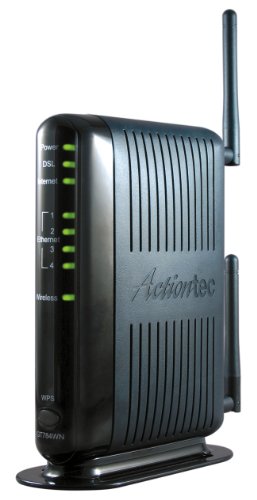
Actiontec 300 Mbps Wireless-N ADSL Modem Router (GT784WN) — Actiontec’s workhorse
Actiontec occupies a special place in DSL history: for years, the gateway a provider handed you at installation was very likely theirs. The GT784WN’s title describes a 300 Mbps Wireless-N ADSL modem router, and that plain description carries the brand’s whole argument — this is the workhorse pattern, built to be issued by the thousand, installed by whoever was home, and forgotten behind the desk for a decade.
There is a reason provider-issue design looks the way it does, and understanding it helps a buyer read this whole category. Equipment handed out by providers is engineered against support-call statistics: the setup must succeed in the hands of whoever answers the door, the lights must be interpretable by a call-centre script, and the box must survive being unplugged by cleaners and toddlers for years. Aesthetics and exotic features lose every one of those arguments. When you buy the GT784WN you are buying the survivor of that argument — a gateway whose highest design goal was never to be thought about again.
That heritage cuts in the buyer’s favour twice. First, the setup conventions of provider-issued gear are designed for non-specialists, because providers bore the support cost when they were not. Second, familiarity: a household that has lived with an Actiontec gateway already knows its lights, its interface logic and its habits, and replacing like with like is the least disruptive upgrade in this entire guide. In DSL country, where the person installing the gateway may be doing it for a relative over the phone, both virtues compound.
Hold the same generational honesty as with the DGN2200: 300 Mbps Wireless-N is the class the title claims for the radio, the line beneath it is slower, and no provider is named in the title, so the compatibility call remains part of the purchase. Within those terms the GT784WN is the institutional pick — the gateway whose design brief was reliability at scale, bought by households whose brief is identical.
- Type in listing title: Wireless-N ADSL Modem Router
- Wireless figure in title: 300 Mbps
- Model named in title: GT784WN
- Provider: the listing title names none — confirm acceptance with your provider first
Strengths
- Provider-issue heritage means setup designed for non-specialists
- Like-for-like replacement for households already on Actiontec gear
- Wireless class matched to ADSL line realities
Trade-offs
- Compatibility confirmation is the buyer’s job
- Wireless-N generation, single-era expectations
- No bonded or VDSL capability in this ADSL design
Best for: a household replacing an ageing provider Actiontec with its own.
Not suited for: any line that is not ADSL — check your generation first.
If the box you are replacing says Actiontec, the GT784WN’s listing is the shortest path to owning your gateway instead of renting its twin.

C4000BG CenturyLink Bonded Line Wi Fi DSL Router — Bonded-line specialist
The C4000BG exists for one specific service, and its title wastes no words pretending otherwise: “C4000BG CenturyLink Bonded Line Wi Fi DSL Router.” Bonded CenturyLink service, gateway to match. If your account is bonded — two copper pairs combined into a single faster connection — this is not one option among six; it is the only pick in this guide built for your line, and the others are not substitutes.
Bonding deserves a plain explanation, because it decides the purchase. A single DSL pair’s speed falls with distance; bonding lets the provider run two pairs in harness and add their capacity, which is how longer loops reach usable speeds. The gateway is where the harness joins — it must speak to both pairs and present one network to the house — so bonded service and bonded gateway are a matched pair, provisioned together by CenturyLink’s systems.
Bonded households should also understand what their gateway choice means for the future, because bonding is a provider strategy, not a stepping stone the household controls. If CenturyLink later upgrades your street to fibre, the bonded gateway retires with the copper; if they extend bonding’s life, the C4000BG remains the matched equipment. Either way the purchase is justified the way all DSL purchases are — against the rental it replaces, month by month — and bonded rentals make that arithmetic friendlier than most.
The corollary disciplines the rest of the readership: if your CenturyLink service is not bonded, this is not your box either, and the newer-looking design buys you nothing. Confirm the word on your bill or account page. For the household it fits, though, the C4000BG is the modern end of this guide — a current-generation CenturyLink gateway for the provider’s most demanding copper product, and the natural replacement for the bonded gateway CenturyLink itself issued.
- Type in listing title: Wi Fi DSL Router (gateway for bonded service)
- Service in title: CenturyLink Bonded Line
- Model named in title: C4000BG
- Defining requirement: your account must be bonded service
Strengths
- The only bonded-capable pick in the guide
- Purpose-built for CenturyLink’s two-pair product
- Current-generation design among ADSL-era rivals
Trade-offs
- One provider, one service tier — no transferability
- Pointless on a non-bonded line
- Bonded availability is the provider’s decision, not the buyer’s
Best for: a CenturyLink household whose bill says bonded.
Not suited for: every other DSL line on earth — the specialisation is total.
Bonded readers have the easiest decision in this guide: verify the word on your account, then the C4000BG’s listing is your destination.

ASUS DSL-N10 150Mbps Adsl Wireless Modem Router — The modest ASUS
The DSL-N10 is the smallest claim in this guide, made by the brand with the biggest name: ASUS describes a 150Mbps ADSL wireless modem router, and nothing in the title reaches further. That modesty is the pick’s identity. It serves the DSL household at the far end of the copper — the line whose speed is measured in patience — where a 150-class radio still outruns the connection feeding it, and where the correct gateway is the simple, inexpensive one.
There are more such households than the broadband map admits: the farmhouse, the grandparent’s cottage, the workshop at the end of a lane, where DSL is a lifeline for mail, browsing and the occasional video call rather than a streaming medium. For those desks, the DSL-N10’s virtues are proportion — one box, modem and router together, from a maker whose setup interfaces are a known quantity — and an honest fit between the radio’s class and the line’s reality.
Smallness has operational virtues on remote lines that urban buyers underestimate. A modest gateway sips power — relevant where a solar-backed or generator-backed home counts watts — and its simple radio has fewer ambitions to disappoint. It is also the pick most likely to be bought twice, once as the main gateway and once as the shelf spare, because on a line where a provider visit takes a week to schedule, the household that keeps a configured spare has insured its connection for the price of a modest box.
Do not ask it to be more. A household streaming to two televisions over a healthy ADSL2+ line should take the N300-class picks above it; a household that may graduate to a separate modern router should look at the modem-only DM200 instead. The DSL-N10 is the guide’s reminder that the right size is a virtue: bought for the line it matches, it will simply work, which on a remote copper loop is the entire ambition.
- Type in listing title: ADSL Wireless Modem Router
- Wireless figure in title: 150Mbps
- Model named in title: DSL-N10
- Provider: the listing title names none — confirm acceptance with your provider first
Strengths
- Proportionate to slow, remote copper lines
- ASUS setup conventions in a simple gateway
- The modest pick where modest is correct
Trade-offs
- 150-class radio is the guide’s lowest ceiling
- Outgrown quickly if the line or household grows
- No provider named in the title
Best for: a remote or light-use DSL household at the end of the line.
Not suited for: a streaming household on a healthy ADSL2+ connection.
Match the DSL-N10 to the line it was sized for and it disappears into service — the fate its buyers actually want for it.

NETGEAR DSL (VDSL/ADSL) Modem (DM200-100NAS) Compatible with — Modem only, bring a router
Read this pick’s badge again, because everything depends on it: the DM200 is a modem. Its title — “NETGEAR DSL (VDSL/ADSL) Modem (DM200-100NAS) Compatible with DSL Service Providers CenturyLink, Frontier and More” — promises a DSL modem compatible with the named providers, and contains no router, no Wi-Fi, no network to join. Plugged in alone, it gives one wired device a connection. Its purpose is to feed a router you choose separately, and this guide includes it for households who want exactly that division of labour.
The argument is the decoupling described earlier: modems age at the line’s pace, routers at the gadget industry’s. A DM200 paired with a modern router gives a DSL household current Wi-Fi, current security and a current interface today, and when the household eventually leaves DSL, the router travels to the new connection while the modem retires with the line. Its title’s dual citizenship — VDSL and ADSL both named — widens the lines it can serve beyond the ADSL-only gateways above, and its named providers, CenturyLink and Frontier “and more,” are the compatibility starting point, to be confirmed against your specific service as always.
Pairing advice belongs in this analysis, because the modem is only half a purchase. The router behind a DM200 should be chosen for the household’s wireless ambitions without any reference to DSL at all — it is simply the home’s router, fed by a copper line instead of a cable — and that freedom is the point. Households leaving DSL later unplug the modem and keep everything else: the network name, the passwords, the settings, the children’s devices none the wiser. No other pick in this guide offers an exit that graceful, and transitional households should weigh it heavily.
The costs are real and should be chosen knowingly: two boxes, two power supplies, a setup in two acts, and a household that must know which box does what when the lights misbehave. For a reader who found this guide hoping to modernise the Wi-Fi on a DSL line without surrendering the line’s stability, that is a fair trade and the DM200 is the guide’s bridge to it — readers comparing modem-router combinations on the cable side will find the same philosophy in our guide to Best AC Cable Modem Routers.
- Type in listing title: DSL Modem — modem only, no router or Wi-Fi in this box
- DSL generations in title: VDSL/ADSL
- Providers in title: CenturyLink, Frontier and More
- Model string in title: DM200-100NAS
- Required companion: a separate router of your choosing
Strengths
- Lets a DSL household run a fully modern router today
- Title names both VDSL and ADSL, widening line compatibility
- The router half survives the eventual move off DSL
Trade-offs
- No Wi-Fi or routing in the box — a second purchase is mandatory
- Two-box setup and troubleshooting
- Provider fit still needs confirming for your specific service
Best for: a DSL household that wants modern Wi-Fi without touching a stable line.
Not suited for: anyone expecting a network out of this box alone — it is a modem, full stop.
Choose the DM200 as a deliberate half of a two-box plan, pair it with a router you love, and the DSL line stops being the ceiling on your home network’s manners.
How Do These Six DSL Gateways Compare, Generation by Generation?
| Pick | Type | Line it serves per title | Provider evidence in title |
|---|---|---|---|
| Netgear 7550 DSL Modem/router Combo Wireless Adsl2+ Frontier | Modem-router gateway | ADSL2+ | Frontier; not for AT&T DSL |
| Netgear N300 Wireless ADSL2+ Modem Router (DGN2200) | Modem-router gateway | ADSL2+ | None named — confirm first |
| Actiontec 300 Mbps Wireless-N ADSL Modem Router (GT784WN) | Modem-router gateway | ADSL | None named — confirm first |
| C4000BG CenturyLink Bonded Line Wi Fi DSL Router | Bonded gateway | Bonded DSL | CenturyLink bonded |
| ASUS DSL-N10 150Mbps Adsl Wireless Modem Router | Modem-router gateway | ADSL | None named — confirm first |
| NETGEAR DSL (VDSL/ADSL) Modem (DM200-100NAS) Compatible with | Modem only | VDSL/ADSL | CenturyLink, Frontier and more |
What Mistakes Do DSL Buyers Make Most Often?
The expensive one is buying by the word DSL alone. ADSL, bonded and VDSL are different services wearing one acronym, and a gateway from the wrong generation will not sync, or will sync at a fraction of the line — the buyer’s first job is learning which DSL the bill describes. The second mistake is ignoring the provider boundary printed in a title: the 7550’s “Not for AT&T” parenthesis is not fine print to be brave about, and the unnamed-provider picks demand a confirmation call, not optimism.
A related error is stacking hope on the wireless class. Buyers raised on modern router marketing see N300 or a 150Mbps figure and brace for disappointment, then discover the line delivers a fraction of either and the radio was never the limit. On DSL the honest sequence is reversed: learn the line’s real rate from the current gateway’s status page, and let that number, not the box’s wireless figure, set expectations for every pick in this guide.
Third is expecting the gateway to fix the line. A new modem router cannot shorten copper, dry out a wet junction box or persuade a distant exchange closer; if the current gateway syncs at a poor rate because of distance, its replacement will sync at the same rate with newer Wi-Fi attached. Spend the first diagnostic effort on the line — filters on every phone socket, the master socket tested, the provider’s own line check — and let the gateway purchase follow the diagnosis. Fourth is buying the DM200 by accident, skimming past “modem” and discovering at installation that no Wi-Fi exists; its badge in this guide is large precisely because that skim is so common.
Final Recommendation
Let your bill decide. Frontier ADSL2+: the 7550, model string matched. CenturyLink bonded: the C4000BG, unopposed. A plain ADSL2+ line with no provider named on your paperwork: the DGN2200 or the GT784WN, after the confirmation call, choosing between NETGEAR’s classic and Actiontec’s workhorse by whichever your household already knows. The lightest line at the end of the lane: the DSL-N10, sized to its job. And the household that wants modern Wi-Fi on a DSL line, or suspects it will leave DSL within this router’s life: the DM200 plus a router of your choosing, the two-box answer. Copper rewards the buyer who reads titles and bills before boxes — on DSL, compatibility is not a feature of the gateway; it is the gateway.
One sentence of perspective to close: DSL households are not behind the times; they are at the end of a wire the times have not yet replaced, and the craft of serving them well — compatibility read carefully, generations kept straight, rentals ended, spares shelved — is a craft this guide respects. Buy the gateway your bill describes, set it up with your evidence in hand, and the old copper will do what it has always done: carry on, quietly, for the household that understands it.
Frequently Asked Questions
How do I know if my DSL is ADSL, bonded or VDSL?
Your bill and your provider’s account page are the authoritative sources — look for the product name of your service, or call and ask which technology your line uses and whether customer-owned gateways are accepted. The current gateway’s status page usually names the mode it has synced in as well. Buy nothing until that answer exists; the three technologies take different hardware.
Will a new gateway make my DSL faster?
It will not raise the line’s sync rate beyond what the copper and your distance allow — that ceiling belongs to physics and the provider. What a good gateway changes is everything after sync: Wi-Fi that covers the house, stability that survives the evening, and an end to rental fees. If your current gateway syncs poorly, have the provider check the line before spending on hardware.
Can I really stop renting the provider’s gateway?
On many DSL services, yes — providers commonly allow customer-owned gateways, and the rental line on the bill is the saving. Confirm acceptance for your specific account first, keep the rented box until the new one has survived ordinary use, and return it through a receipted channel so the fee’s removal can be verified on the next bill.
Why would anyone buy a modem with no Wi-Fi in it?
Because the DM200’s buyer is purchasing the split: a stable modem matched to the line, and a modern router — chosen freely, upgraded independently — behind it. It is the only route in this guide to current-generation Wi-Fi on a DSL line, and the router half of the pair remains useful if the household later moves to cable or fibre.
What are DSL filters, and do I still need them?
Filters separate the voice and DSL signals sharing your telephone wiring; every phone, fax or alarm sharing the line needs one, while the gateway’s socket uses the filtered arrangement your provider specifies. A missing or failed filter is a classic cause of sync drops when a phone rings. Before blaming a new gateway, walk the house and count the filters — it is the cheapest fix in DSL.
Do I need to tell my provider I bought my own gateway?
Usually the practical answer is that you need their settings, not their permission — but ask anyway during the compatibility call, because some accounts, particularly bonded ones, are provisioned against the issued gateway and need the provider’s systems updated when equipment changes. The C4000BG’s buyers should treat that call as mandatory; the ADSL gateway buyers will usually find it a five-minute formality that also harvests the connection details the setup needs.
Can I use one of these gateways as a Wi-Fi extender later?
Many gateways of this era can be repurposed as access points by disabling their modem-facing duties and cabling them to the main router, though the procedure varies by model and the Wireless-N ceiling travels with them. It is a legitimate second life for a spare room or workshop. The DM200, being a modem only, has no such second act — another honest asymmetry between the combined and separate philosophies.
My gateway syncs but the speed is far below what I pay for — is the box at fault?
Probably not, and the order of suspicion matters. DSL sync rates are set by the line’s length and condition as negotiated with the provider’s equipment; a plan’s headline figure is a maximum the copper rarely delivers at distance. Check the gateway’s status page for the actual sync rate, test at the master socket with other extensions unplugged, and then raise the gap with the provider, whose line records will show what your address can carry. A different gateway from this guide would negotiate the same copper to roughly the same answer.
Should I keep the provider’s gateway as a spare?
If returning it stops the rental fee, return it — a spare you pay monthly for is not a spare, it is a subscription. The rational spare is a purchased one: a modest ADSL gateway from this list, configured and shelved, costs once and waits silently. Households whose work depends on the line will find that the best-value safeguard in this entire category.
Where should a DSL gateway sit in the house?
DSL adds a constraint cable never imposes: the gateway wants to live near the master telephone socket, because every metre of internal extension wiring taxes the signal before the Wi-Fi even begins. Start there, test the wireless reach honestly, and solve any shortfall with placement compromises or an access point rather than by exiling the gateway to a distant room on a long extension lead — the line’s weakest link should not be the one inside your own walls.
Related Guides
Households discovering their line is cable after all should start over with Best Cable Modem Routers That Work with Spectrum; those comparing modem-router combinations more broadly will find Best AC Cable Modem Routers useful; and VDSL households belong with our neighbouring coverage in Best AC DSL Routers for Lines That Still Run on Copper.


