What's inside
- Key Takeaways
- Where to Buy
- Quick Picks
- How the Picks Were Chosen
- Side-by-Side Comparison
- How to Choose a Canon Compact for Phone Transfer
- The Transfer Ritual: Making Wireless a Habit
- Wi-Fi, NFC and Bluetooth: A Plain-Language Glossary
- Security and Sanity: Your Camera on the Airwaves
- Remote Control: The Second Gift of a Wireless Camera
- The Family Archive Problem, and How These Cameras Solve It
- Common Mistakes
- Frequently Asked Questions
- Final Recommendation
As an Amazon Associate I earn from qualifying purchases. This post may contain affiliate links at no extra cost to you.
[SITE_DOMAIN] is reader-supported. When you buy through links on our site, we may earn an affiliate commission at no extra cost to you. Prices and availability change; check the Amazon listing for the current details.
A photograph that stays on a memory card is a photograph half finished. The best canon compact cameras with wi fi treat the phone not as a rival but as the darkroom door: shoot with a real sensor and a real lens, then hand the file to the device that edits, shares and archives it. Every camera in this roundup is a Canon PowerShot, and every one was chosen because its own listing title talks about wireless transfer — Wi-Fi, NFC, Bluetooth, or the streaming brief that implies them — though, as the reviews will show, the titles speak with very different levels of precision, and one of them does not mention Wi-Fi at all.
That last point is worth pausing on, because it defines this guide’s method. Wireless claims in camera listings range from the explicit — model titles that print Wi-Fi and NFC side by side — to the merely suggestive. Where a title states the technology, the review builds on it. Where a title is silent, the spec box records the silence and the buyer is directed to Canon’s documentation, because a camera bought for its transfer workflow should have that workflow verified, not vibes-based.
The six PowerShots divide by intent: two G7 X generations for creators and stills shooters, the slim ELPH 360 for effortless everyday carry, two SX travel zooms spanning an older generation and a current 40x flagship of the line, and the V10, Canon’s streaming-first brick. Same badge, six different answers to the question of how a photograph gets from a camera to the world.
Key Takeaways
- Every pick is a Canon PowerShot; the variable is how explicitly each title states its wireless provision.
- The G7 X Mark III and Mark II both print Wi-Fi and NFC in their titles — the tap-to-pair generation of Canon compacts.
- The SX740 HS states Wi-Fi and Bluetooth alongside a 40x zoom and 4K video, the most complete travel-and-transfer package here.
- The SX610 HS is the older generation of the SX line — Wi-Fi is stated in its title, but its age should be priced into the decision.
- The PowerShot V10’s title never mentions Wi-Fi; its streaming brief is suggestive, and its wireless specification belongs to Canon’s documentation.
- The ELPH 360 appears here in silver; colour variants are one model, and the prose treats them that way.
Where to Buy
- Canon PowerShot G7 X Mark III — Check price on Amazon
- Canon PowerShot ELPH 360 (Silver) — Check price on Amazon
- Canon PowerShot SX740 HS — Check price on Amazon
- Canon PowerShot G7 X Mark II — Check price on Amazon
- Canon PowerShot SX610 HS — Check price on Amazon
- Canon PowerShot V10 — Check price on Amazon
Quick Picks
| Pick | Best for | Platform | Wireless (as titled) | Check |
|---|---|---|---|---|
| Canon PowerShot G7 X Mark III | Creators who shoot, transfer and post in one flow | PowerShot G, 4K video | Wi-Fi and NFC | Check price on Amazon |
| Canon PowerShot ELPH 360 (Silver) | Slim everyday carry with a 12x zoom | PowerShot ELPH, 12x zoom | Wi-Fi and NFC | Check price on Amazon |
| Canon PowerShot SX740 HS | Travel reach with modern transfer | PowerShot SX, 40x zoom, 20.3MP | Wi-Fi and Bluetooth | Check price on Amazon |
| Canon PowerShot G7 X Mark II | Stills-first shooting with easy phone handoff | PowerShot G, 1-inch sensor | Wi-Fi and NFC | Check price on Amazon |
| Canon PowerShot SX610 HS | Budget travel zoom from an older generation | PowerShot SX (older generation) | Wi-Fi | Check price on Amazon |
| Canon PowerShot V10 | Streaming and table-top presenting | PowerShot V, 1-inch CMOS | Not stated in the listing title | Check price on Amazon |
How the Picks Were Chosen
The brief was brand-pure by design: Canon PowerShot models whose relationship with a phone is part of their identity. Within that fence, selection favoured titles that state their wireless provision explicitly, because a Wi-Fi guide that cannot point to the word Wi-Fi in a listing is a guide built on fog. Five of the six titles name a wireless technology outright. The sixth, the V10, earns its place through its streaming brief — a camera designed to send video to an audience — with its title’s silence on Wi-Fi flagged in its review rather than smoothed over.
Generational spread was deliberate. The SX line appears twice, in its older SX610 HS form and its current SX740 HS form, so readers can see what years of refinement did to the travel-zoom formula and judge whether the older body, at its market position, still earns a place in a bag. The G7 X appears in two generations for the same reason. Colour was treated as trim, not identity: the ELPH 360 listed here is the silver variant, and it is reviewed as the ELPH 360, one model in two finishes.
One boundary was held firmly: wireless wording follows the titles exactly. Where a title says Wi-Fi and NFC, the review says Wi-Fi and NFC; where it says Wi-Fi and Bluetooth, the review follows; where it says nothing, the review says that. Readers who want the focusing side of Canon-adjacent compact culture can continue into our guide to autofocus rangefinder cameras, where several of these cameras’ Leica contemporaries are weighed on very different grounds.

Canon PowerShot G7 X Mark III
Best for: a creator filming a morning routine in 4K, transferring the stills to a phone over Wi-Fi before the coffee cools, and posting from the same chair.
Not suited for: long-lens work of any description — the G brief is a wide, social focal world, and distant subjects belong to the SX models further down this list.
- Connectivity stated in the title: Wi-Fi and NFC
- Video: 4K, as stated in the title
- Display: LCD screen, as stated in the title
- Colour stated in the title: Black
- Sensor and lens specification: Not stated in the listing title — verify with the manufacturer documentation
This listing’s title is a workflow compressed into a line: a PowerShot G7 X Mark III, Wi-Fi and NFC for the phone conversation, an LCD for framing, and 4K video for the moving half of a creator’s output. Canon built the Mark III generation of this line for the shoot-transfer-post loop, and the title’s priorities confess it — connectivity is named before any imaging figure, because for the camera’s intended owner the photograph’s journey matters as much as its capture. NFC deserves its footnote: on compatible phones it turns pairing into a tap, removing the password-and-menu ritual that makes casual users abandon camera Wi-Fi entirely and return to photographing everything with the phone itself.
The G series context supplies what the title omits, carefully labelled as context rather than specification: this is Canon’s premium compact line, the stills-and-video hybrid that creators adopted as the step up from a phone. Any decision hinging on sensor or lens figures should pull them from Canon’s documentation, since this title declines to print them — a recurring pattern in this roundup, and one this guide refuses to disguise.
For the transfer-focused buyer, the practical questions are about rhythm. Does the camera reconnect to a known phone gracefully? Does the owner transfer everything nightly, or pick frames in the field? The Mark III’s stated toolkit — Wi-Fi for the pipe, NFC for the handshake — is designed for the second, lighter rhythm: shoot the scene, tap, send the three frames that matter, and let the card hold the rest until the desk. Creators who work that way describe the camera as an extension of the phone; creators who expected a studio tool describe a small compact. Both are describing the same design brief, read at different altitudes.
The Mark III also marks the moment the G line stopped apologising for video. Earlier generations treated clips as a stills camera’s side talent; this generation’s title puts 4K beside the connectivity as a headline, acknowledging that its owner’s output is a braid of photographs and footage posted through the same phone, often within the same hour. That braid is the real product being sold across this entire roundup: not a camera, but a position in a publishing workflow, upstream of the phone, where image quality is made, and downstream of nothing. Photographers who still think of transfer as an afterthought will find the camera merely pleasant; creators who think of it as the point will find the Mark III designed by people who agree with them.
Strengths
- Wi-Fi and NFC are both title-stated — the full pairing toolkit, tap included.
- 4K video places the model in the creator generation of the G line.
- The black finish and LCD framing suit discreet, social shooting.
Trade-offs
- Sensor and lens figures are absent from the title and require a documentation check.
- NFC’s convenience depends on the phone supporting it; Wi-Fi alone is the fallback.
- The G brief’s focal world is wide and social — reach is the SX line’s department.
Creators can examine the Mark III’s current listing details on its product page — Check price on Amazon.
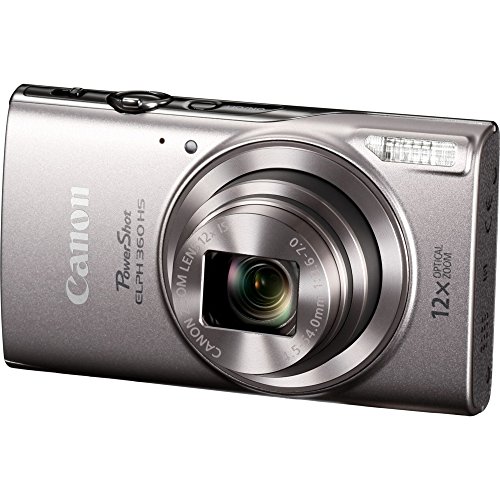
Canon PowerShot ELPH 360 (Silver)
Best for: slipping into a clutch or a blazer for a wedding, steadying the 12x zoom on the speeches, and sending the best frames to family phones before the first dance.
Not suited for: a buyer counting on low-light depth — the ELPH formula trades sensor ambition for slimness, and its evenings are lit by flash-friendly social light, not by candlelight heroics.
- Lens: 12x optical zoom
- Stabilization stated in the title: Image Stabilization
- Connectivity stated in the title: Wi-Fi and NFC enabled
- Colour stated in the title: Silver
- Sensor resolution: Not stated in the listing title — verify with the manufacturer documentation
The ELPH 360 in silver is the same ELPH 360 sold in black — one model, two finishes — and this review treats the colour as wardrobe rather than identity. What defines the model is in the title: a 12x optical zoom for reach across halls and gardens, image stabilization to keep that reach honest in indoor light, and Wi-Fi with NFC to move the results onto phones. In a Wi-Fi roundup, the ELPH is the purest expression of the casual promise: the camera that asks nothing, carries anywhere, and delivers its photographs to the group chat while the event is still warm.
Silver deserves one practical remark. A pale finish shows in a crowd; at weddings and parties that visibility is harmless, even charming, and the finish resists the fingerprint sheen that black bodies collect. For discreet street work the black variant of the same model exists, and since the two are one camera, the choice is purely about the owner’s rooms and clothes. Guides that review colour variants as separate products are padding; this one declines.
The transfer rhythm the ELPH encourages is the lightest in this set. Its owner is not building an archive; they are feeding a family’s shared present tense. NFC’s tap-to-pair suits that owner exactly, because the pairing happens in a kitchen, mid-conversation, with a relative’s phone — a setting where a six-step connection ritual would simply be abandoned. Canon understood the sociology: the best wireless system is the one that survives contact with a birthday party.
Gift-giving is the ELPH’s secret second market, and its wireless design shows an understanding of the recipient. A camera given to a parent or a teenager succeeds only if its best feature requires no manual: the tap, the automatic appearance of photographs on a familiar phone, the absence of cables with proprietary ends. The ELPH 360’s stated kit — stabilization for forgiving capture, NFC for forgiving pairing — is a specification written for people who will never read a specification. That is a rarer design intelligence than raw performance, and it is why models of this class outlive technically superior rivals in family service: they are judged, correctly, on photographs delivered rather than photographs possible.
Strengths
- Wi-Fi and NFC are title-stated, tuned for casual tap-and-send sharing.
- Image stabilization and a 12x zoom form a complete social-events toolkit.
- The silver finish is a legitimate style choice on a genuinely slim body.
Trade-offs
- Sensor resolution is unstated in the title; imaging depth trails the G-series bodies here.
- An older generation of compact, with connectivity standards of its era.
- The slim body that makes it carriable also makes it the least grippy in the set.
The silver ELPH 360’s listing can be reviewed in full on its page — Check price on Amazon.

Canon PowerShot SX740 HS
Best for: a three-week trip photographed at 40x by day and emptied onto a phone by night, the card cleared over hotel Wi-Fi before the next morning’s train.
Not suited for: pairing once and expecting the camera to behave like a phone’s second lens forever — travel zooms reward a deliberate nightly transfer ritual, not ambient syncing.
- Sensor: 20.3MP
- Lens: 40x optical zoom
- Video: 4K UHD, as stated in the title
- Connectivity stated in the title: Wi-Fi and Bluetooth
- Bundle contents stated in the title: 64GB card and bag
- Stabilization mechanism: Not stated in the listing title — verify with the manufacturer documentation
The SX740 HS is where Canon’s travel zoom and Canon’s transfer story fully merge. The title reads like a traveller’s packing list: a 20.3MP sensor, a 40x optical zoom for the far bank and the distant spire, 4K UHD video, Wi-Fi and Bluetooth for the evening offload, and a bundle carrying a 64GB card and a bag. Note the wireless pairing: where the G7 X models state Wi-Fi and NFC, this model states Wi-Fi and Bluetooth — a different handshake philosophy, in which a low-energy Bluetooth link keeps the camera and phone acquainted so the Wi-Fi pipe opens quickly when there is cargo to move. For a traveller transferring a day’s shooting nightly, that acquaintance model is arguably the better design.
The transfer stakes rise with the zoom. A 40x camera gathers photographs a phone simply cannot — the eagle, the far balcony, the performer’s face — and those are precisely the photographs a traveller aches to send home the same day. A travel zoom without credible wireless strands its best work on a card until the journey ends; the SX740 HS’s stated connectivity is therefore not a garnish on the zoom but the completion of it. The included 64GB card acknowledges the other half of the bargain: 4K video and a trigger-happy zoom fill storage at a holiday pace.
Two verifications remain the buyer’s homework, and this guide states them rather than assuming: the stabilization mechanism is not named in the title, though a 40x lens makes the question urgent, and the exact behaviour of the Canon phone app with a given handset should be confirmed for the owner’s specific phone. Neither caveat dents the package’s coherence; both are five-minute checks against Canon’s documentation that a considered purchase should include.
There is a discipline the SX740 HS quietly demands, and naming it helps its buyer: a 40x zoom produces photographs worth protecting, and protection means the nightly offload is also a nightly backup decision. The wise traveller treats the hotel transfer as step one and a second copy — a tablet, a laptop, a cloud upload when bandwidth allows — as step two, because a camera this capable concentrates a journey’s memories in a single small body and a single card. Canon’s bundle, with its bag, gestures at the same seriousness. Owners who adopt the ritual return home with the archive intact and the card’s contents already culled; owners who treat wireless as a toy return with a fuller card and a thinner safety net. The camera offers both futures with complete impartiality.
Strengths
- Wi-Fi and Bluetooth are title-stated — the modern always-acquainted pairing model.
- 40x zoom and 4K video make it the most complete travel instrument in this set.
- The bundle’s card and bag match the camera’s storage appetite and road role.
Trade-offs
- Stabilization is unnamed in the title despite the 40x lens making it a key question.
- No NFC, so the tap-to-pair shortcut of the G7 X models is not part of its ritual.
- Extreme zoom files deserve same-day backup discipline that casual shooters may skip.
Travellers can confirm the bundle’s present composition on the SX740 HS listing — Check price on Amazon.

Canon PowerShot G7 X Mark II
Best for: a stills photographer who shoots a dinner party on a 1-inch sensor and wants the frames on a phone, via a Wi-Fi tap, before the guests have found their coats.
Not suited for: video-led buying — this listing’s title speaks of Wi-Fi, NFC, screen and sensor, but never of video at all, so a clip-first purchase needs the Mark III’s stated 4K instead.
- Sensor: 1-inch, as stated in the title
- Connectivity stated in the title: Wi-Fi and NFC
- Display: LCD screen, as stated in the title
- Colour stated in the title: Black
- Lens range and aperture: Not stated in the listing title — verify with the manufacturer documentation
Read the Mark II’s title as a stills photographer’s manifesto: Wi-Fi and NFC for the handoff, an LCD for the framing, and a 1-inch sensor for the light. No video figure appears, and in a guide that follows titles literally, that absence defines the model’s pitch here — this is the G7 X for people whose output is photographs, whose evenings are restaurants and gatherings, and whose sharing happens in the same hour as the shooting. The 1-inch sensor is the quality anchor: it is what makes the transferred files worth transferring, with the shadow cleanliness and skin-tone grace that separate a camera photograph from a phone photograph at the same table.
Generational honesty applies. The Mark III further down this family’s line adds the stated 4K video and the newer creator positioning; the Mark II counters with maturity — a vast base of ownership knowledge, accessories that fit, and a market position that reflects its veteran status. For a stills-first buyer, the older model’s omissions are features’ absence, not quality’s absence, and its sensor-and-transfer core is identical in spirit to its successor’s.
The lens, once again, is the title’s silence: no range, no aperture is printed, and a buyer choosing between the two G generations on glass should settle the question in Canon’s documentation, where both models’ lenses are specified in full. What the listing does guarantee is the workflow — and for the social stills photographer, the workflow is the product. A camera whose photographs reach the phone reliably gets used; a marginally finer camera whose transfer ritual is a chore gets left, and its photographs are never taken at all.
Longevity is the Mark II’s closing argument. A model that has been in service for years accumulates something no launch can manufacture: a public record. Its transfer behaviour with successive phone generations is documented by its owners; its failure modes are known and mostly benign; its batteries, cases and chargers fill the world’s marketplaces. When the deepest requirement is that the camera and its phone ritual still work in five years, that record is evidence of a kind no specification sheet issues. The 1-inch sensor’s files, meanwhile, do not age at all — a good photograph of a family dinner is immune to generational change, and the Mark II’s sensor was always good enough to make them.
Strengths
- A 1-inch sensor is title-stated — the image-quality foundation is in writing.
- Wi-Fi and NFC together cover both deliberate and tap-casual transfer styles.
- Veteran status brings deep accessory and knowledge ecosystems at a mature market position.
Trade-offs
- No video specification appears in the title; clip-led buyers should look at the Mark III.
- Lens figures require a documentation detour before a glass-led decision.
- An earlier generation’s interface and processing, accepted as the price of maturity.
The black Mark II’s current listing terms are laid out on its product page — Check price on Amazon.

Canon PowerShot SX610 HS
Best for: a first travel zoom on a careful budget — a school trip, a family holiday — where Wi-Fi sharing matters and the newest generation’s premium does not.
Not suited for: a long-term primary camera bought at a near-modern price — this is an older generation of the SX line, and it should be bought at an older generation’s valuation, with an older generation’s expectations.
- Connectivity stated in the title: Wi-Fi enabled
- Colour stated in the title: White
- Line: PowerShot SX (older generation)
- Sensor, zoom range and video specification: Not stated in the listing title — verify with the manufacturer documentation
Age, stated plainly first: the SX610 HS belongs to an earlier generation of Canon’s SX travel-zoom line, separated from the SX740 HS by years of refinement in sensors, video and wireless behaviour. Its title is correspondingly terse — the model name, Wi-Fi enabled, and the white finish — and this review will not inflate it into a modern specification. What the camera offers is the SX idea in its simpler form: a pocket travel zoom that can send its photographs to a phone, at the market position that older, proven models settle into.
That position has real virtues for the right owner. A school trip or a first big family holiday is exactly the assignment where a camera will be borrowed, dropped, rained on and loved without ceremony — and where its Wi-Fi still performs the essential miracle of getting a child’s photographs of the trip onto the family phones each evening. The white finish, like the ELPH’s silver, is wardrobe: visible, cheerful, and irrelevant to the optics. Buyers should simply know that app support and connection behaviour for older models deserve a specific check against their current phone, since phone operating systems evolve faster than camera firmware does.
Judged against its younger sibling, the SX610 HS loses on nearly every printed figure — the SX740 HS’s title states resolution, zoom, video and two wireless systems where this one states a single word of connectivity. Judged against its actual rivals — the drawer of forgotten compacts and the second-hand market — it remains a coherent, honest tool. The condition of a wise purchase is price realism: this camera should cost what an older generation costs, and at that figure it is a rational buy.
The SX610 HS also serves as this roundup’s memento mori for wireless features generally. Every camera here will one day be the older generation: apps will move on, pairing standards will be renamed, and today’s effortless ritual will require tomorrow’s verification homework. The wise response is not to avoid older cameras — the SX610 HS at its proper price is a perfectly rational tool — but to buy wireless features with clear eyes, valuing the optics and the sensor as the permanent purchase and the connectivity as a long lease. Photographs outlive protocols. Internalising that ordering means judging every model in this set, new or old, by the right ledger: glass and sensor first, transfer second, and the whole weighed against the years of service realistically expected.
Strengths
- Wi-Fi is title-stated — the essential phone handoff survives the generational gap.
- The SX travel-zoom formula in a simpler, proven, budget-friendlier form.
- A white finish that suits family and gift contexts where visibility is welcome.
Trade-offs
- An older generation: verify current phone-app compatibility before relying on transfers.
- The title states no sensor, zoom or video figures at all — documentation is mandatory homework.
- Modern refinements in video and wireless behaviour belong to the SX740 HS, not here.
Budget-minded travellers can look over the white SX610 HS listing on its page — Check price on Amazon.

Canon PowerShot V10
Best for: a presenter who streams and records pieces to camera from a desk or cafe table, with a flip screen to self-frame and a stereo microphone to carry the voice.
Not suited for: a purchase whose deciding factor is a stated Wi-Fi specification — this title never mentions Wi-Fi, so the wireless details must come from Canon’s documentation, not from inference about streaming.
- Sensor: 1-inch CMOS
- Lens: built-in wide-angle zoom
- Video: 4K, with streaming named in the title
- Screen: flip LCD
- Audio: built-in stereo microphone
- Stabilization stated in the title: image stabilization
- Wireless technology: Not stated in the listing title — verify with the manufacturer documentation
The V10 is this roundup’s test of intellectual honesty. It is a camera built around sending video to an audience — its title names 4K streaming outright — and it would be effortless to write its review as if Wi-Fi were printed in the title. It is not. The title lists a 1-inch CMOS sensor, a built-in wide-angle zoom, a flip LCD, a stereo microphone and image stabilization, and stops. So this review treats the V10 as what its title proves: a streaming-shaped presenting camera whose exact wireless specification a buyer must confirm in Canon’s documentation. In a guide about Wi-Fi, that flagged silence is more useful than a confident guess.
What can be discussed on the evidence is the presenting machine itself. The flip LCD serves the person in front of the lens, letting a solo presenter frame a shot without a monitor or a second pair of eyes. The stereo microphone removes the accessory chain that turns other compacts into rigs. The wide-angle lens matches conversational distance, and the brick-like body stands on tables as if designed by furniture rather than by luggage. For talking-head video, seminars, product talks and streams, that is a complete sentence of a product.
The V10 also reframes what connectivity means in this category. For the other five cameras, wireless is a transfer ritual after capture; for a streaming camera, connectivity is the capture’s destination, live and immediate. Readers whose interest is the live end of that spectrum should verify the V10’s streaming requirements and wireless particulars from Canon’s own materials, then judge it against dedicated streaming hardware with the same scepticism applied here. And readers furnishing the desk at the other end of the stream may find our survey of 5K and 8K monitors a fitting companion — the presenter’s camera and the editor’s screen are two ends of one chain.
Presenters evaluating the V10 should think about the room as much as the camera. The flip screen’s promise — confident self-framing — pays out only where the presenter controls the frame’s background, lighting and distance, which is to say at a chosen desk, counter or corner. In that chosen place, small investments multiply the camera’s value: a lamp that flatters a face, a background that does not compete, a chair at a fixed distance from the lens so focus and framing become habits. The V10 was designed as the centre of such a small, deliberate set, and its wide lens and stereo microphone assume the set exists. Building that set makes the camera disappear into the routine of presenting; expecting it to improvise in arbitrary rooms is asking a furniture camera to be a travel camera, and the SX740 HS is waiting further up this page for exactly that job.
Strengths
- A complete presenting kit in one body: flip screen, stereo mic, wide lens, 4K streaming brief.
- Image stabilization is title-stated, serving walk-between-venues footage.
- A 1-inch CMOS sensor gives streamed and recorded faces real quality headroom.
Trade-offs
- Wi-Fi is not stated in the title — the wireless specification must be verified in documentation.
- The brick form factor serves tables, not pockets or travel zooms’ adventures.
- Presenting specialisation makes it the least versatile stills camera in this set.
Presenters can study the V10’s current listing and stated contents here — Check price on Amazon.
Side-by-Side Comparison
| Pick | Wireless (as titled) | Imaging headline (as titled) | Defining trait |
|---|---|---|---|
| Canon PowerShot G7 X Mark III | Wi-Fi and NFC | 4K video | Creator-generation G model |
| Canon PowerShot ELPH 360 (Silver) | Wi-Fi and NFC | 12x zoom, image stabilization | Slim social-events camera |
| Canon PowerShot SX740 HS | Wi-Fi and Bluetooth | 20.3MP, 40x zoom, 4K UHD | Travel flagship with card-and-bag bundle |
| Canon PowerShot G7 X Mark II | Wi-Fi and NFC | 1-inch sensor | Stills-first veteran |
| Canon PowerShot SX610 HS | Wi-Fi | Not stated in the listing title | Older-generation SX in white |
| Canon PowerShot V10 | Not stated in the listing title | 1-inch CMOS, 4K streaming | Flip LCD and stereo microphone |
One pattern in the comparison table deserves a final look before the verdict: the wireless column grows more explicit as the cameras grow newer, from the SX610 HS’s single stated word to the SX740 HS’s paired Wi-Fi and Bluetooth, while the G line’s NFC pairing persists across generations as a house style. That pattern is Canon’s recent history in miniature — connectivity graduating from a bullet point to a design philosophy — and it gives the used-market buyer a reliable heuristic: the newer the PowerShot, the more of its identity lives in its relationship with a phone, and the more of the purchase price should be justified by testing that relationship rather than the optics alone.
How to Choose a Canon Compact for Phone Transfer
NFC tap or Bluetooth acquaintance — which pairing style fits?
The titles in this set reveal two philosophies. The G7 X models and the ELPH state Wi-Fi and NFC: pairing begins with a physical tap, ideal for spontaneous, one-off sharing with whatever phone is at hand. The SX740 HS states Wi-Fi and Bluetooth: the camera and a known phone maintain a low-energy acquaintance, so transfers to the owner’s own device start faster and feel more ambient. A photographer who shares mostly to their own phone, nightly, will feel the Bluetooth model’s advantage; a photographer who shares to many phones, socially, will feel the NFC models’. Neither is superior in the abstract — they are optimised for different social geometries of sharing.
What will actually be transferred — stills, clips, or a live stream?
File type disciplines the choice. Stills are light cargo; every wireless system here moves them gracefully. 4K clips are heavy cargo, and a traveller offloading an evening of SX740 HS video should expect the transfer to be a sit-down ritual with the camera plugged into power, not a corridor tap. Live streaming is a different country altogether, governed by the V10’s brief and by Canon’s documented requirements for it. Buyers should match the camera to the heaviest cargo they will regularly move, because a workflow that fails at its heaviest load fails completely.
How old a generation is acceptable?
The SX610 HS poses the question honestly. Older models keep their optics forever but their wireless ecosystems age in public: phone apps are updated, operating systems drop legacy behaviours, and a transfer ritual that worked at launch can fray years later. The defence is verification — confirm that the manufacturer’s current app supports the specific older model on the specific phone in the household, before the purchase rather than at the airport. Where that support is confirmed, an older PowerShot at an older model’s price is a rational, even shrewd, buy. Where it is not, the SX740 HS’s modern pairing is worth its premium.
Is the camera’s other half — the phone — ready?
Every camera in this set is half of a system whose other half lives in a pocket. Storage space on the phone, the Canon app’s permissions, and a household routine for what happens to transferred files — cloud backup, family albums, deletion discipline — decide whether wireless photography feels magical or merely moves the mess. Set the phone side up on the day the camera arrives, test the full ritual with a dozen frames, and the system will serve for years; skip the setup, and the camera’s best feature becomes its most resented.
The Transfer Ritual: Making Wireless a Habit
Wireless cameras fail socially, not technically: the transfer that requires six steps and a password happens twice and is abandoned. Build the ritual to be shorter than the temptation to skip it. Pair the camera and phone once, carefully, at home. Decide a fixed moment — the hotel desk each evening, the kitchen counter after a party — and a fixed rule, such as transferring the day’s marked frames plus anything already promised to somebody. Keep the camera’s battery charged enough for the transfer, since wireless is power-hungry work. And close the loop: a transferred photograph should land in a backed-up album, not in a downloads folder where photographs go to be forgotten. Owners who ritualise the handoff describe their PowerShot as an extension of the phone; owners who improvise it describe a camera with a feature they never use. The hardware, in both reports, is identical.
One refinement separates serene workflows from anxious ones: transfer early, in small batches, rather than heroically at midnight before a flight. A day’s shooting moved in two short sessions never becomes a crisis, and a failed connection discovered at lunch can be solved by dinner. The cameras here reward that cadence — particularly the Bluetooth-acquainted SX740 HS, whose design assumption is frequent, light contact between camera and phone.
Wi-Fi, NFC and Bluetooth: A Plain-Language Glossary
Three wireless words circulate in these titles, and they do different jobs. Wi-Fi is the cargo ship: a high-bandwidth link that moves photographs and video from camera to phone, and the only one of the three that carries heavy files at civilised speed. NFC is the handshake: a near-field tap that tells the two devices about each other so the Wi-Fi link can form without passwords or menu archaeology — it carries introductions, not photographs. Bluetooth, in its low-energy camera form, is the acquaintance: a whisper of a link that stays alive cheaply, keeping camera and phone aware of each other, waking the Wi-Fi when there is cargo and sometimes carrying tiny preview files or location data. A title that lists Wi-Fi with NFC promises easy introductions; a title that lists Wi-Fi with Bluetooth promises a standing relationship. Both end at the same cargo ship, which is why the photographer’s sharing pattern, not the technology’s glamour, should decide between them.
Security and Sanity: Your Camera on the Airwaves
A wireless camera is a small radio station, and a few habits keep it a well-behaved one. Pair at home, not on public networks of opportunity; the camera-to-phone link is its own direct conversation and needs no cafe infrastructure. Keep the phone app updated, since connection reliability and security fixes alike arrive through it, and remove pairings for phones no longer owned. On trips, treat the camera’s card as the master copy until transfers are verified on the phone — a progress bar is a promise, not a proof. None of this requires expertise, only the same mild scepticism applied to any device that talks. The reward for the habits is the thing itself: photographs flowing from a real camera into a family’s shared life on the day they were taken, which remains, after all the protocols are forgotten, the entire point of a Wi-Fi compact.
Remote Control: The Second Gift of a Wireless Camera
Transfer monopolises the wireless conversation, but the same link that moves files can move instructions. Canon’s phone-app ecosystem has long included remote operation for its Wi-Fi compacts — framing from the phone’s screen, releasing the shutter from across the room — and for certain photographs that capability is transformative: the family portrait that finally includes the photographer, the group shot on a timer that nobody sprinted for, the low-angle frame composed without lying in the mud. Prospective buyers should confirm the specific model’s remote features in Canon’s documentation, since the titles here state connectivity without itemising its talents, but the possibility should be priced into the decision. A wireless compact is not merely a camera that shares; at its best it is a camera that can be in two places at once, its eye on the tripod and its photographer’s eye on the phone, and that doubleness opens photographs that no cable ever could.
The Family Archive Problem, and How These Cameras Solve It
Every family now owns a photographic archive scattered across a dozen phones, three clouds and one drawer of memory cards, and its history has holes exactly where the good camera was too much trouble. The PowerShots in this set attack the trouble directly: their wireless rituals exist to move photographs from the device that takes them well to the devices where a family’s memory actually lives, on the day of the event, before the moment cools. That is a modest-sounding revolution with long consequences. The birthday photographed on a 1-inch sensor and delivered to the family album the same evening will be found, printed and argued over in twenty years; the technically superior photograph that stayed on a card will be a rumour. When this roundup ranks transfer behaviour alongside sensors and zooms, it is ranking archival survival — the least glamorous and most consequential specification a family camera carries.
Common Mistakes
- Assuming a streaming camera’s title guarantees its Wi-Fi specification. The V10’s title names streaming but not Wi-Fi; verify the wireless particulars in Canon’s documentation.
- Treating colour variants as different cameras. The silver ELPH 360 and the black ELPH 360 are one model; buy the finish that suits the wardrobe, not a phantom specification difference.
- Paying a modern price for an older generation. The SX610 HS is a rational buy at an older model’s valuation and a poor one at anything near the SX740 HS’s territory.
- Testing wireless for the first time on the trip. Pairing, app permissions and transfer habits belong to the first evening at home, not the first night abroad.
- Transferring everything, always. Moving a whole card nightly builds a phone full of duplicates and a habit too heavy to keep; marked frames and promised frames are the sustainable cargo.
- Judging a wireless camera by a single pairing attempt. First connections involve permissions and updates on the phone side; a ritual that feels clumsy on day one often becomes invisible by day three, and abandoning it at the first friction wastes the feature the camera was bought for.
Frequently Asked Questions
What is the practical difference between NFC and Bluetooth pairing here?
As the titles divide them: the G7 X Mark III, G7 X Mark II and ELPH 360 state Wi-Fi with NFC, where a tap against a compatible phone initiates pairing — best for spontaneous sharing to varied phones. The SX740 HS states Wi-Fi with Bluetooth, where a persistent low-energy link keeps one known phone acquainted with the camera — best for an owner’s nightly offload ritual. Both use Wi-Fi itself for the heavy transfer work.
Are the silver and black ELPH 360 cameras different?
No. They are colour variants of one model, with the same 12x zoom, image stabilization and Wi-Fi with NFC stated in their titles. This guide lists the silver variant and reviews the model once, because a finish is a wardrobe decision, not a specification.
Is the SX610 HS too old to buy?
Not if two conditions hold: the price reflects its older-generation status, and the household’s current phone is confirmed to work with Canon’s app support for the model. Its title states Wi-Fi plainly, and for school trips and family holidays that essential function, verified, is enough. Buyers wanting modern video and pairing refinements should step up to the SX740 HS.
Does the PowerShot V10 have Wi-Fi?
Its listing title does not say. The title names 4K streaming, a flip LCD, a stereo microphone, image stabilization and a 1-inch CMOS sensor, but no wireless technology. Canon’s documentation is the authority for the V10’s wireless specification, and a buyer for whom Wi-Fi is decisive should confirm it there before ordering.
Which model suits a creator who posts daily?
The G7 X Mark III is the title-built answer: 4K video for the moving content, Wi-Fi and NFC for the fastest route to the phone, and the G line’s creator positioning. The SX740 HS serves creators whose content is travel and reach; the V10 serves presenters whose content is a fixed, streamed frame.
Can these cameras send photographs straight to social media?
The path runs through the phone: the camera transfers to the handset over its stated wireless link, and the phone’s own apps handle posting. That two-step design is a strength in disguise — the phone remains the single point of accounts, captions and connectivity — but it means the camera’s wireless quality should be judged as a camera-to-phone experience, which is exactly how the reviews above judge it.
Why do two generations of the G7 X both appear?
Because the generational step is itself information. The Mark III’s title adds stated 4K video to the shared Wi-Fi and NFC pairing, marking Canon’s creator turn; the Mark II’s title leads with its 1-inch sensor and the same pairing, marking its stills-first character. Seeing both titles side by side makes it possible to price the step precisely instead of assuming newer is a synonym for better in every dimension that matters.
Which PowerShot is the safest gift?
The ELPH 360, in whichever finish suits the recipient. Its stated kit — a forgiving 12x zoom with image stabilization, Wi-Fi and NFC for tap-simple sharing, and a body slim enough to be carried without negotiation — is designed for owners who will never open a manual. A gift camera’s success is measured in photographs received by the family, and no model in this set is engineered more directly toward that metric.
Hold the six titles side by side one last time and a quiet lesson emerges: Canon prints connectivity in its compact titles more faithfully than it prints sensors, lenses or video, which tells a buyer exactly where the company believes the modern compact is won and lost — not in the taking of the photograph, but in the photograph’s escape from the camera into the life it was taken to enrich.
Final Recommendation
Match the pairing philosophy to the sharing life. Daily creators should start with the G7 X Mark III — its title is a workflow, 4K and Wi-Fi with NFC in one line — while stills-first shooters can save with the Mark II, whose 1-inch sensor and identical transfer pairing serve photographs beautifully and whose video silence only matters to clip-led buyers. Travellers belong with the SX740 HS: 40x reach, Bluetooth-acquainted offload, and a bundle that packs the card and bag the journey needs. The ELPH 360 in silver is the social camera, carried without thought and forgiven everything. The SX610 HS remains a sensible, honestly-aged budget traveller at the right price, and the V10 is the presenter’s instrument — bought with its wireless particulars verified in Canon’s pages, as its review insists. Whichever PowerShot is chosen, set the ritual up on the first evening, because a Canon compact’s Wi-Fi is not a feature on a list; it is the bridge between a real camera’s photographs and the phone-centred life they were taken to enrich. Readers equipping the far end of that bridge — the desk where transferred footage is edited and reviewed — will find our guide to glossy gaming monitors an unexpectedly relevant detour, since a presenter’s screen is part of the same chain as the presenter’s camera.


