What's inside
- Where to Buy These Projectors
- Key Takeaways
- Quick Picks at a Glance
- How the Picks Were Chosen
- The Six Projectors With Lens Shift and Wi-Fi in Detail
- Side-by-Side Comparison
- Do You Need Lens Shift, Wi-Fi, or Honestly Both?
- Lens Shift Versus Keystone: the Optical Facts
- What Motorized Shift Changes on Installation Day
- Streaming Inside the Projector Versus a Source You Own
- Gaming Through a Shifted Lens
- Measuring Your Room for Shift Before You Spend
- Common Mistakes to Avoid
- Frequently Asked Questions
- Final Recommendation
As an Amazon Associate I earn from qualifying purchases. This post may contain affiliate links at no extra cost to you.
[SITE_DOMAIN] is reader-supported. When you buy through links on our site, we may earn an affiliate commission at no extra cost to you. Prices and availability change; check the Amazon listing for the current details.
Where to Buy These Projectors
XGIMI Horizon 20 4K Triple Laser — View on Amazon
XGIMI Horizon 20 Pro — See the listing
XGIMI Horizon 20 Max — Open the product page
JMGO N3 Ultimate — Check the Amazon page
Epson Home Cinema LS11000 — View this model
Epson Home Cinema 5050UB — See it on Amazon
The search for the best projectors with lens shift wifi runs into a truth this guide states before it recommends anything: lens shift and Wi-Fi rarely coincide. True optical lens shift belongs historically to installation projectors built for fixed rooms and wired sources, while Wi-Fi streaming belongs to smart projectors built for convenience, and the two families ignored each other for years. The six projectors below map the modern exceptions and the honest compromises, from smart machines with genuine shift to theater machines with superb shift and no Wi-Fi at all.
Three families meet here. The XGIMI Horizon 20 line and the JMGO N3 carry the smart, connected side, with lens shift designed into portable-living machines. The Epson LS11000 and 5050UB carry the true motorized lens-shift tradition of the dedicated theater, and neither title claims built-in Wi-Fi, a fact this guide repeats rather than softens, including the plain statement that the 5050UB has no built-in Wi-Fi and would need an external source for streaming. Every feature attributed to any model below is one its listing title supports; where a title is silent, the spec box says not stated.
Why insist on lens shift at all, when keystone correction sits in every menu? Because keystone is a digital rescue that discards pixels and softens the image, while lens shift moves the picture optically and keeps every pixel the panel produced. At 4K resolutions, on a screen you sit close to, that difference is visible every minute. Placement freedom without quality loss is the entire prize, and it is worth shopping for deliberately.
A last piece of vocabulary before the reviews, because it decides real purchases: optical zoom and lens shift are cousins, not synonyms. Zoom changes image size from a fixed position; shift changes image position at a fixed size. The strongest installations in this guide offer both, and a buyer who knows which of the two their room actually lacks will read every title that follows with completely different, and considerably better informed, eyes than a buyer who treats the two terms as interchangeable marketing for the same trick.
Key Takeaways
- Lens shift moves the image optically; keystone correction reshapes it digitally and costs sharpness.
- The Horizon 20 line states optical zoom, lens shift and Google TV with licensed Netflix in the same titles.
- The JMGO N3 publishes the highest figure here, 5,800 ISO lumens, with a 3-in-1 lens shift and AI gimbal.
- The Epson LS11000 offers motorized lens shift and focus, and its title claims no Wi-Fi.
- The 5050UB has no built-in Wi-Fi; its spec box records Wi-Fi and lens shift range as not stated in the title.
Quick Picks at a Glance
| Projector | Headline Specification | Short Verdict |
|---|---|---|
| XGIMI Horizon 20 4K Triple Laser | 4K RGB triple laser, 3,200 ISO lumens, lens shift | The balanced smart-and-shift entry to the Horizon 20 line |
| XGIMI Horizon 20 Pro | 4K RGB triple laser, 4,100 ISO lumens, lens shift | The contrast-and-brightness step up in the line |
| XGIMI Horizon 20 Max | 4K triple laser, 5,700 ISO lumens, lens shift | Maximum output for the biggest, brightest rooms |
| JMGO N3 Ultimate | 4K triple laser, 5,800 ISO lumens, 3-in-1 lens shift | The gimbal-mounted rival with the highest figure here |
| Epson Home Cinema LS11000 | 4K PRO-UHD laser, 2,500 lumens, motorized lens shift | The installation-precision pick, streaming not included |
| Epson Home Cinema 5050UB | 4K PRO-UHD, 2,600 lumens, advanced pixel-shift | Lens-shift-class theater machine; Wi-Fi absent, stated plainly |
How the Picks Were Chosen
The selection was built to expose the premise rather than hide it. Only machines with a genuine claim on at least one half of the lens-shift-and-Wi-Fi pairing, and excellence at it, were admitted: the smart shift generation represented by XGIMI and JMGO, and the installation shift tradition represented by Epson. Projectors offering only digital keystone were excluded entirely, however strong their streaming, because digital correction is the thing this search exists to avoid.
Within the smart group, the three Horizon models were kept as a family because their shared optics and platform make the brightness ladder between them the actual decision a buyer faces. The JMGO earned its place with the gimbal concept and the group highest output figure. The two Epson models earned theirs as the reference standard for motorized shift, included with their missing Wi-Fi stated in plain language rather than omitted in embarrassment.
Imaging technology interacts with placement in ways the companion guide to projectors Without a Color Wheel.
Every claim in the reviews was then audited against the six listing titles. Lens shift appears only where a title states it or, in the 5050UB case, is flagged as not stated in the title with a direction to the manufacturer documentation. Wi-Fi and platforms appear only where supported. The result is a comparison with a few honest gaps, and those gaps are the most trustworthy sentences in it.
The Six Projectors With Lens Shift and Wi-Fi in Detail

1. XGIMI Horizon 20 4K Triple Laser
Optical zoom and lens shift with Google TV and licensed Netflix
- Resolution: 4K
- Light source: RGB triple laser
- Brightness: 3200 ISO lumens
- Lens: Optical zoom and lens shift
- Smart platform: Google TV with licensed Netflix
- Picture and gaming: IMAX Enhanced, Dolby Vision, 300-inch display, 240Hz, 1ms input lag
The Horizon 20 is where this guide premise stops being a compromise and starts being a specification. Its title states optical zoom and lens shift in the same breath as Google TV with licensed Netflix, which means the two halves of the search, placement freedom and connected streaming, genuinely coexist in one chassis. Add an RGB triple laser engine at 3,200 ISO lumens, Dolby Vision, IMAX Enhanced certification and a 1ms input lag claim at up to 240Hz, and the base model of the Horizon 20 family already answers questions most projectors never get asked.
Lens shift on a smart projector changes where the machine can live. Without it, a connected all-in-one unit must sit exactly on axis, usually on a coffee table in the middle of the room it serves. With optical shift and zoom, the Horizon 20 can sit on a sideboard, a shelf or a ceiling mount and walk its image onto the screen without tilting, without keystone and without surrendering pixels to digital correction. That freedom is the difference between a projector that visits a room and one that belongs to it.
The Google TV platform with licensed Netflix deserves its adjective. Licensed matters in this category, because unlicensed implementations have historically lost application support or resolution privileges over time, while a licensed build carries the service blessing and its full quality tiers. Combined with the wireless connectivity a Google TV machine inherently runs on, the Horizon 20 streams without a stick, a cable box or a laptop, which keeps the lens-shift installation clean: power and position are the whole project.
Gaming figures in the title are unusually assertive: 240Hz and 1ms input lag frame this as a machine that expects fast sources. Real-world gaming will depend on the resolution and mode in use, as it always does, but the intent is printed plainly, and a projector that can shift its lens onto a permanent screen and then serve a console at speed collapses two purchases into one. For a media room that hosts films and games in equal measure, that collapse is the argument.
Brightness at 3,200 ISO lumens places the base Horizon 20 in the dim-to-dark room class for large images, with enough output for respectable daytime casual viewing at moderate sizes. It is the value point of its own family rather than the ceiling, and the two models below exist precisely for readers whose rooms demand more light or more contrast. As an entry to genuine lens shift with genuine streaming, though, it is remarkably complete.
If you mount this model, run the lens to the center of its shift range before final tightening of the mount, leaving adjustment in every direction for the last alignment pass. Installers who begin at the center finish faster and straighter, and the Horizon 20 gives you enough optical travel to make that discipline pay.
Strengths
- Optical zoom and lens shift stated directly in the title
- Google TV with licensed Netflix removes external streamers
- 240Hz and 1ms lag claims serve fast gaming sources
Trade-offs
- 3,200 ISO lumens is the family entry point for brightness
- Smart platform dependence means updates shape long-term app support
- Triple laser speckle can appear on some screen materials for sensitive viewers
Best for: a media room seeking real lens shift, licensed Netflix streaming and fast gaming figures in one machine
Not suited for: a very bright room seeking the family highest output, because the Pro and Max models publish substantially higher lumens
Media-room planners can compare the base Horizon 20 lens range and platform details on the listing, then Check price on Amazon.
2. XGIMI Horizon 20 Pro
Brighter Horizon with a published 20,000 to 1 contrast ratio
- Light source: RGB triple laser
- Brightness: 4100 ISO lumens
- Lens: Optical zoom and lens shift
- Contrast: 20,000:1 as printed in the title
- Smart platform: Google TV with licensed Netflix, IMAX Enhanced, Dolby Vision, 1ms input lag
- Resolution: 4K
The Horizon 20 Pro takes the base model formula and spends its upgrade budget on the two currencies large images consume fastest: light and contrast. Brightness rises to 4,100 ISO lumens in the title, and a 20,000 to 1 contrast ratio is published alongside it, a pairing that matters because brightness without contrast merely makes a bigger gray. In a room with some ambient light or a screen at the larger end of comfortable, the Pro is the version of this design that keeps HDR highlights and shadow detail in the same conversation.
Lens shift and optical zoom carry over unchanged, and their value grows with the brighter engine. A projector intended for a bigger screen in a less perfect room is exactly the projector that cannot always sit in the textbook position, and optical adjustment lets the Pro live on a rear shelf or an offset mount while still landing a geometrically honest image. The alternative, keystone correction, would tax the very resolution and contrast the upgrade purchased, which is why genuine shift is the enabling feature of the whole family.
Google TV with licensed Netflix again anchors the connected half of the premise, and at this level the integration starts to feel like a television replacement rather than a projector with applications attached. Voice remotes, per-user profiles and the full streaming catalog live inside the unit that is already ceiling- or shelf-placed correctly, so the installation ends at the mount: no streamer to hide, no extra HDMI run, no second remote competing for the coffee table.
Dolby Vision and IMAX Enhanced support give the Pro its film credentials, and the published contrast figure suggests the tone mapping has something to work with in dark scenes. A night sequence in a Dolby Vision title is where this class of machine either convinces or merely displays, and the Pro specification reads like an attempt to convince: laser color, real contrast, real brightness and a platform that can actually fetch the best version of the stream.
The 1ms input lag claim completes a specification with no obvious weak flank. Readers choosing between the Pro and the base model should decide on room light and screen size; readers choosing between the Pro and the Max below should decide whether the remaining brightness step and its price of commitment match a genuinely brighter or larger installation. The Pro is the family center of gravity, and centers of gravity earn that position by disappointing the fewest rooms.
Pair the Pro output with a screen material chosen for laser engines. Some high-gain and ambient-rejecting surfaces exaggerate triple-laser speckle for viewers seated close, while a smooth matte surface keeps the color purity the RGB engine was bought for. At this brightness, the screen decision is a picture-quality decision, not an accessory afterthought.
Strengths
- 4,100 ISO lumens extends the design to larger screens and lighter rooms
- Published 20,000:1 contrast supports the HDR claims
- Lens shift, zoom and licensed Google TV carry over in full
Trade-offs
- Contrast figure is a manufacturer rating, as across this class
- Higher output asks more of screen choice to avoid laser speckle
- Platform longevity depends on Google TV support over years
Best for: a larger screen in a mixed-light room seeking the Horizon balance of brightness, contrast and optical placement freedom
Not suited for: a small dark room seeking the family simplest entry, because the base Horizon 20 already covers that brief at lower commitment
Larger-room readers can verify the Pro contrast and output figures against their screen size on the product page, then Check price on Amazon.
3. XGIMI Horizon 20 Max
The 5,700-lumen flagship of the Horizon 20 family
- Brightness: 5700 ISO lumens
- Lens: Optical zoom and lens shift
- Contrast: 20000:1 as printed in the title
- Smart platform: Google TV with licensed Netflix, IMAX Enhanced, Dolby Vision, 1ms input lag
- Resolution: 4K
- Light source: Triple laser
The Horizon 20 Max is the family argument taken to its conclusion: 5,700 ISO lumens of triple laser output behind optical zoom and lens shift, with Google TV and licensed Netflix built in and a 20,000 to 1 contrast figure in the title. That combination, flagship brightness plus real placement optics plus a licensed platform, is vanishingly rare in one box, and it exists for the rooms that defeat ordinary projectors: very large screens, high ceilings, ambient light that cannot be fully evicted and audiences spread wide across the space.
Brightness at this level changes the installation conversation entirely. A 5,700-lumen engine can hold a genuinely large image in a room that hosts people rather than darkness, which makes the Max a social projector as much as a cinema one: match days, family gatherings and presentations of photographs from a trip all happen with lamps alive. Lens shift then does the diplomatic work, letting the machine sit where the architecture allows while the image lands where the room demands, square and uncorrected.
It is worth pausing on why the Max keeps the same contrast figure as the Pro while raising output so substantially. Preserving dark-scene credibility while adding light is the hard direction in projector design, because stray light and screen bounce punish blacks as brightness climbs. The matched 20,000 to 1 claim, read as manufacturer framing, at least states the intention plainly: this is not a torch with a lens, and its HDR support through Dolby Vision and IMAX Enhanced is meant to be watched, not merely listed.
The smart half remains the licensed Google TV implementation, and at flagship level its convenience compounds with the optics. A Max installed high in a large room is not a machine anyone wants to visit with a streaming stick and a ladder; the platform inside it, updated over its own connection, is the whole point. Voice control and the full application catalog turn a distant ceiling unit into the room main screen, as manageable as a television and considerably larger.
Restraint is the only honest caution. A Max in a small dark room is output without purpose, and its talents (and its commitment level) belong to spaces that can use them. Readers with a modest screen and blackout curtains will find the base Horizon 20 or the Pro a better-matched purchase, and this guide says so in the flagship own review because matching machine to room is the entire discipline the lens-shift premise exists to serve.
At this brightness, audit the room light bounce before blaming or praising the projector. Pale ceilings close to a huge screen return enough light to lift blacks visibly, and a darker paint band near the screen or a lower-gain surface often improves a Max installation more than any picture setting buried in its menus.
Strengths
- 5,700 ISO lumens leads this entire comparison for output
- Lens shift and optical zoom tame large, awkward installations
- Licensed Google TV platform suits a permanently placed flagship
Trade-offs
- Output is wasted in small, fully dark rooms
- Flagship positioning carries the family highest commitment
- Large-room brightness still cannot defeat direct sun on the screen
Best for: a very large or bright room seeking maximum published output with genuine lens shift and built-in licensed streaming
Not suited for: a compact blackout theater seeking only contrast finesse, because the Max output brief far exceeds that room
Big-room planners can study the Max installation figures and platform specification in full on the listing, then Check price on Amazon.

4. JMGO N3 Ultimate
Triple laser with 3-in-1 lens shift on an AI gimbal
- Lens: 3-in-1 lens shift, optical zoom
- Mounting: AI gimbal
- Gaming and picture: 20000:1 AI dynamic black level as printed, 1ms low latency, VRR and ALLM, Dolby Vision
- Resolution: 4K
- Light source: Triple laser
- Brightness: 5800 ISO lumens
The JMGO N3 Ultimate arrives with the highest brightness figure in this comparison, 5,800 ISO lumens from a triple laser engine, and a lens story with its own vocabulary: a 3-in-1 lens shift system with optical zoom, mounted on an AI gimbal. The gimbal is the distinguishing idea. Instead of demanding the projector body be aimed like a cannon, the N3 adjusts its own projection angle intelligently, which suits the rooms where a projector lives on furniture and migrates between walls, ceilings and screens across a week.
Lens shift and a gimbal solve adjacent problems and should not be confused. Shift moves the image optically while the projector stays put, preserving geometry without digital correction; the gimbal repositions the projection itself for setups where the surface changes. Together they describe a machine designed for placement anarchy, the real condition of most homes, rather than the fixed mount a theater assumes. A renter, a multi-room household or anyone projecting onto different surfaces will feel the difference in the first week.
The gaming specification is the most complete in this guide: 1ms low latency as printed, plus VRR and ALLM named outright. Variable refresh support matters for modern consoles whose frame rates wander, and automatic low-latency switching removes the menu ritual when a game replaces a film. Combined with Dolby Vision and a 20,000 to 1 AI dynamic black level claim, the N3 presents itself as the technically maximalist option here, a machine whose title reads like a checklist answered in full.
One careful note belongs in this review, in keeping with the discipline of the whole guide: the N3 title does not name its smart platform or Wi-Fi explicitly, even though the model sits on the connected side of this comparison by class and design. The listing and manufacturer documentation are the places to confirm the exact streaming arrangements before purchase, and the spec box in this review records the platform as not stated rather than borrowing a name from a sibling product. Precision here costs the N3 nothing and protects the buyer completely.
Against the Horizon family, the N3 trades a named licensed platform for the gimbal and the highest output figure in the room. Which trade is right depends on whether your installation is fixed or nomadic. A permanent mount rewards the XGIMI approach; a projector that performs in three rooms rewards the JMGO one. Both are legitimate answers to the lens-shift question, aimed at different domestic geographies.
The gimbal rewards a stable base more than any other design here. A wobbling sideboard defeats the intelligence entirely, so give the N3 the firmest surface in the room and let its adjustments work from solid ground; the machine handles angles, not furniture quality.
Strengths
- 5,800 ISO lumens is the highest figure published in this guide
- 3-in-1 lens shift with optical zoom plus an AI gimbal
- VRR and ALLM named outright for modern console gaming
Trade-offs
- Smart platform and Wi-Fi are not named in the listing title
- Gimbal design suits movers more than fixed ceiling installs
- AI dynamic black level is a manufacturer framing, not a native figure
Best for: a multi-room household seeking the highest published output, gimbal placement freedom and complete gaming support
Not suited for: a fixed ceiling theater seeking a named licensed streaming platform in the title, because this listing does not state one
Nomadic setups can examine the N3 gimbal and lens specifications closely on the product page before choosing, then Check price on Amazon.

5. Epson Home Cinema LS11000
Motorized lens shift flagship with laser consistency and HDR10+
- Contrast: 1.2 million to 1 dynamic contrast as printed in the title
- Wi-Fi: Not stated in the listing title – verify with the manufacturer documentation
- HDR and refresh: HDR10+, 120Hz
- Resolution: 4K PRO-UHD
- Light source: Laser
- Brightness: 2,500 lumens of color and white brightness
- Lens: Motorized lens shift and focus
The LS11000 represents the other civilization in this comparison: a fixed-installation laser theater projector whose title headlines motorized lens shift and focus, HDR10+ and a 1.2 million to 1 dynamic contrast figure, while saying nothing about Wi-Fi at all. That silence is the review most important sentence. The LS11000 expects its content from wired sources in a planned room, and its lens shift is not a convenience feature but an installation system, powered, precise and repeatable from the remote at the seating position.
Motorized shift operates at a different level from the manual or digital adjustment most projectors offer. The installer mounts the chassis where structure and throw demand, then walks the image into perfect registration electrically, storing positions with a precision that survives lens memories and format changes. For a ceiling-mounted flagship above the audience, there is no honest substitute, and the LS11000 ownership experience is built around that single afternoon of perfect alignment followed by years of never thinking about it again.
Brightness is the deliberate trade. At 2,500 lumens of equal color and white brightness, the LS11000 publishes the lowest output in this group, because its theater brief assumes controlled light and a sensibly sized screen, where contrast and color accuracy outrank lumens. The dynamic contrast figure in the title, read as the manufacturer framing it is, points at where the money went. In a bright family room this machine is out of its element; in a dark theater it is the most refined picture in this entire comparison.
Connectivity honesty completes the picture. No streaming platform is named, no Wi-Fi is claimed, and the correct mental model is a display at the end of an AV system: a receiver, a disc player, a console and a streamer you choose and can upgrade independently. Many theater owners prefer exactly that separation, because the projector outlives several generations of streaming hardware. The LS11000 is not missing a feature so much as declining a category, and buyers should choose it, or not, on that understanding.
Set against the smart lens-shift machines above, the LS11000 is the purist answer: less convenient on day one, more exacting every day after. If the room is permanent, dark and dedicated, its motorized optics and laser consistency make the strongest case in this guide. If the room is shared, bright or evolving, the Horizon family answers the same lens-shift question in a dialect that room will understand better.
Plan the LS11000 signal path before the mount, because a wired theater lives or dies by its cabling. Run the best HDMI the budget allows, leave a spare conduit or cable for the source you will want in three years, and the installation will age as gracefully as the laser engine driving it.
Strengths
- Motorized lens shift and focus deliver installation precision
- Laser engine with HDR10+ targets refined theater images
- 120Hz capability keeps gaming credible in a cinema machine
Trade-offs
- No Wi-Fi or streaming platform is stated in the title
- 2,500 lumens assumes a controlled-light theater
- Refinement is wasted in bright, casual rooms
Best for: a permanent dark theater seeking motorized lens precision and laser consistency, with sources supplied by an AV system
Not suited for: a streaming-first room seeking built-in Wi-Fi, because the LS11000 title claims none and the design expects wired sources
Theater installers can confirm the LS11000 motorized lens range and HDR10+ specification on the listing itself, then Check price on Amazon.
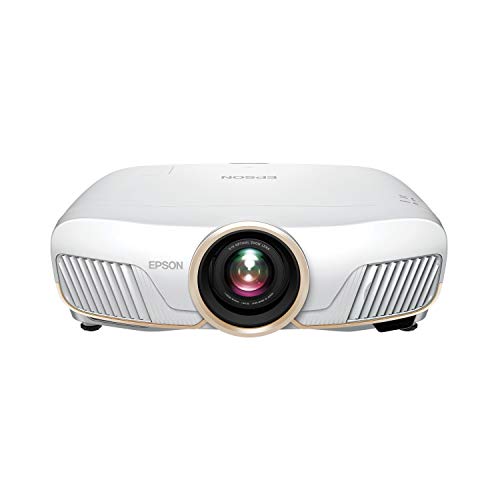
6. Epson Home Cinema 5050UB
Theater benchmark with pixel-shift processing and no built-in Wi-Fi
- Product focus: Home theater movie projection
- Resolution: 4K PRO-UHD with advanced pixel-shift processing
- Brightness: 2600 lumens color and white brightness
- HDR: HDR stated in the title
- Wi-Fi: Not stated in the listing title – verify with the manufacturer documentation
- Lens shift: Not stated in the listing title – verify with the manufacturer documentation
The 5050UB closes this guide with the honesty test the whole premise demands, so here it is in the first paragraph: this projector has no built-in Wi-Fi, and its listing title does not claim any. It is a lamp-era theater benchmark, 4K PRO-UHD with advanced pixel-shift processing, HDR support and 2,600 lumens of color and white brightness, that built its reputation on contrast and color in dedicated rooms. Readers who need streaming inside the projector should stop here and return to the Horizon models; readers building a real theater should keep reading, because the 5050UB remains formidable on its own terms.
Those terms begin with black levels. The 5050UB following rests on its ability to hold deep, graded shadow in dark film scenes, the quality that separates a cinema image from a large television image more than any resolution figure. In a light-controlled room on a sensible screen, its pictures have a density that brighter, smarter rivals in this comparison do not automatically match, and film enthusiasts have chosen it over newer machines for years on exactly that evidence.
Placement is the second term, and it needs the same precision as the Wi-Fi point. The 5050UB belongs to the theater class of Epson machines associated with generous lens adjustment, but its listing title does not enumerate lens shift, so this guide records the spec box accordingly and directs you to the manufacturer documentation for the exact shift range before designing a mount around it. That is not a weakness in the machine; it is a weakness in the title, and the distinction is exactly what careful buying looks like.
The ownership terms are lamp-era terms: a replaceable lamp that dims across long service, filter care on a schedule, and sources supplied externally, whether a disc player, a receiver or a streaming box you upgrade on its own cycle. For a weekend cinema room those terms are mild, and the purchase saving against laser and flagship smart machines is substantial. For a household projecting all day every day, the laser models above will quietly win the arithmetic, and the honest guide says so in the lamp machine own review.
As the final pick, the 5050UB clarifies the entire comparison. Lens shift and Wi-Fi coincide beautifully in the new smart generation, and they live entirely apart in the classic theater generation, where placement precision came from motorized optics and content came down a cable. Neither arrangement is a defect. They are two eras answering two different rooms, and the 5050UB is the classic era at its considerable best.
Give the 5050UB the darkest first week you can arrange: curtains sealed, screen masked properly and a familiar dark film as the test. Its reputation was built in exactly those conditions, and judging it in a bright room with the door open is the one evaluation method guaranteed to misunderstand it completely.
Strengths
- Published 2,600 lumens of equal color and white brightness
- Advanced pixel-shift processing with HDR for serious film viewing
- Theater-class contrast reputation in dedicated rooms
Trade-offs
- No built-in Wi-Fi, stated plainly: streaming requires an external source
- Lens shift range is not enumerated in the listing title
- Lamp-based ownership includes eventual lamp replacement
Best for: a dedicated theater seeking proven contrast and pixel-shift film performance, with streaming supplied by separate equipment
Not suited for: a one-box streaming setup seeking built-in Wi-Fi, because the 5050UB has none and this guide will not pretend otherwise
Theater traditionalists can read the complete 5050UB specification, including what it does not claim, on the product page, then Check price on Amazon.
Side-by-Side Comparison
| Projector | Imaging and Resolution | Brightness From the Title | Defining Extra |
|---|---|---|---|
| XGIMI Horizon 20 4K Triple Laser | 4K RGB triple laser | 3200 ISO lumens | Lens shift with Google TV |
| XGIMI Horizon 20 Pro | 4K RGB triple laser | 4100 ISO lumens | 20,000:1 contrast as printed |
| XGIMI Horizon 20 Max | 4K triple laser | 5700 ISO lumens | Flagship output with shift |
| JMGO N3 Ultimate | 4K triple laser | 5800 ISO lumens | AI gimbal, VRR and ALLM |
| Epson Home Cinema LS11000 | 4K PRO-UHD laser | 2,500 lumens | Motorized lens shift and focus |
| Epson Home Cinema 5050UB | 4K PRO-UHD pixel-shift | 2600 lumens | Theater contrast, no built-in Wi-Fi |
Do You Need Lens Shift, Wi-Fi, or Honestly Both?
Interrogate the room first. A projector that must sit off-center because of furniture, architecture or a ceiling beam needs lens shift in a way no feature can substitute for, while a projector that can live dead-center on a coffee table may never use shift at all. Rooms vote on this question before preferences do, and the honest measurement of where the machine can actually sit eliminates half the dilemma instantly.
Then interrogate the content path. A household that streams everything and owns no other sources needs the platform inside the projector, which points at the Horizon line and its licensed Google TV. A household with a receiver, a disc collection and a console already wired into a theater gains nothing from a smart projector duplicate services and should take the Epson optical excellence without a backward glance. Wi-Fi in a projector is a means to content, not a virtue in itself.
Consider who installs and who operates, because they are often different people with different needs. Motorized shift delights the installer once; a simple smart platform delights the operator nightly. A gimbal design delights the household that rearranges rooms. Match the delight to the person who will feel it most often, and the specification arguments usually settle themselves without further assistance.
Installation-class brightness for work spaces is treated in the guide to wUXGA Projectors With 4000 Lumens.
Finally, price the avoided compromises. Lens shift avoids keystone quality loss forever; built-in streaming avoids a streamer, a cable and a remote today. Both savings are real, they are simply paid in different currencies, and the six machines above let you choose which currency your household prefers to spend. There is no universal winner in this guide, and any source claiming one for this premise has not understood it.
One more filter separates satisfied owners in this niche: how often the setup changes. A room rearranged seasonally rewards the portable smart machines and their forgiving optics every single move, while a room built once rewards the motorized tradition for a decade. Count your rearrangements honestly, including the ones enthusiasm promises and habit cancels, and weight the answer toward the life the projector will actually live.
Lens Shift Versus Keystone: the Optical Facts
Lens shift physically repositions the lens relative to the imaging chip, projecting the same complete image in a new place. Every pixel survives, geometry stays true, and focus remains uniform because the light path was designed for the shifted position within its rated range. It is the projection equivalent of moving a picture frame rather than repainting the picture, and once a household has lived with it, digital alternatives feel like what they are: repairs.
Keystone correction works by pre-distorting the image so the wall receives a rectangle, and the cost is paid in resolution and artifacts. The panel throws away pixels on the compressed side, fine text and patterns can shimmer, and the unused portion of the panel still throws faint light as a gray halo around the corrected image. For a temporary setup none of this matters much; for a permanent 4K installation it is a nightly tax on the exact quality the projector was bought to deliver.
Vertical and horizontal shift are separate gifts, and titles do not always distinguish them. A machine with generous vertical shift solves the common ceiling-versus-screen height problem, while horizontal shift solves the off-center room. Check the direction and the range in the manufacturer documentation for any model here whose title simply says lens shift, because the phrase covers everything from a modest vertical nudge to the full motorized travel of the LS11000.
What Motorized Shift Changes on Installation Day
Manual shift is adjusted at the projector, usually with dials or a joystick, which means the installer works at the machine while watching a distant screen, iterating by feel. Motorized shift moves that work to the remote at the seating position, where the screen fills the installer view and adjustments land in fine, repeatable steps. The difference sounds like luxury and functions like accuracy, particularly for ceiling mounts where every manual adjustment involves a ladder and a stretch.
Lens memory extends the advantage across time. Different content formats and screen masking arrangements can each have a stored position, recalled exactly, which turns a flexible theater into a disciplined one. The LS11000 represents this tradition in the comparison, and its approach explains why dedicated theaters resist smart-projector convenience: the installation itself is a craft object, finished once and finished properly.
None of this diminishes the smart machines. Their shift ranges serve furniture-based rooms where the projector moves and the surfaces change, a problem motorized theater optics were never designed to solve. The gimbal on the JMGO pushes the same philosophy further, accepting a nomadic life as the design brief. Choose the tradition that matches your architecture, and the feature finally means something specific.
Streaming Inside the Projector Versus a Source You Own
A built-in platform collapses the system to its minimum: projector, power, network, screen. Updates arrive automatically, the interface is one remote deep, and guests can operate it without a briefing. The Horizon line licensed Netflix implementation shows the mature form of the idea, where the applications carry the services full blessing and quality tiers rather than a workaround that degrades quietly over time.
An external source inverts every term of that bargain. The projector becomes a stable, long-lived display while the cheap, fast-evolving streaming hardware rides its own upgrade cycle beside it. Theater owners have preferred this separation for decades, and the Epson pair in this guide embody it: no platform to age, no Wi-Fi to secure, just an image pipeline fed by whatever the current best source happens to be this year.
The wider Epson home range behind two of these picks is compared in the guide to epson Home Projectors.
Security and longevity deserve one plain paragraph. A connected projector is a network device with a microphone-adjacent remote ecosystem in some implementations, and it should be updated and passworded like one. An unconnected theater projector presents no such surface at all. Neither posture is wrong, but they are different, and a household should choose its exposure deliberately rather than discovering it in a settings menu.
Gaming Through a Shifted Lens
Several titles in this group publish serious gaming figures, 240Hz and 1ms claims on the Horizon base model, VRR and ALLM on the JMGO, 120Hz on the LS11000, and those figures interact with placement more than players expect. A permanent, shifted installation gives gaming a fixed, calibrated screen with no per-session setup, which is precisely what competitive and immersive players both want: the image identical every night, the latency mode negotiated automatically where ALLM is fitted.
Large shifted images also change game feel. A racing title at theater scale through the LS11000 or a fast shooter on a Horizon at its high-refresh mode stops resembling television entirely, and input lag discipline matters more as the image grows, because motion covers more of your visual field. The published figures in these titles, read as manufacturer claims, at least confirm the designers took that relationship seriously.
The practical advice is to decide the gaming share of the room honestly. A household where games are half the hours should weight the Horizon and JMGO specifications heavily; a household where games are a monthly guest appearance should buy for film and let gaming be pleasantly adequate. Specifications cannot make that judgment, and pretending otherwise wastes money in both directions.
Measuring Your Room for Shift Before You Spend
The pre-purchase ritual for this category is a tape measure and a notebook, and it outperforms every review including this one. Record the screen position and size, the exact spot the projector can occupy, and the vertical and horizontal offsets between the lens center and the screen center. Those three numbers, set against the documented shift range of a candidate, produce a yes or a no with no marketing in between, and they take less time than unboxing a return.
Pay particular attention to vertical offset, the silent killer of ceiling installations. A screen mounted for seated eye level and a projector mounted at ceiling height can disagree by more than a modest shift range offers, which is how owners end up tilting a shifted projector and keystoning anyway, paying for optics they then bypass. Solve the disagreement on paper, with a longer mount drop or a higher screen, while solutions are still free.
Horizontal offset hides in furniture. The sideboard that must stay, the beam that cannot move and the door swing that claims the center all push projectors sideways, and horizontal shift ranges are usually smaller than vertical ones. Measure the sideways truth of your room with the same care, and let the documented figures, not the title phrase, tell you whether a given model forgives it.
Common Mistakes to Avoid
The costliest mistake in this category is assuming a title phrase covers both halves of the premise. A projector can headline lens shift and offer no streaming, or headline a smart platform and offer only keystone, and both machines will disappoint a buyer who read the headline as a bundle. Read for each feature separately, in the title or the verified documentation, exactly as the spec boxes in this guide do.
Second, do not accept keystone as a quiet substitute after purchase. If the room needs shift and the chosen model lacks it, the correction tax is paid on every image for years. Returning a projector is a week of inconvenience; living with a softened, haloed picture is a much longer sentence, and the measurement that prevents it takes ten minutes before ordering.
Third, verify the shift direction and range, not just the phrase. A modest vertical-only range will not rescue a projector placed far off to the side, and a generous specification in the documentation is the only version of the promise worth designing a room around. The titles here use the phrase at several levels of generosity, and the documentation separates them.
Finally, do not let a smart platform excuse a weak installation. Streaming convenience has no effect on geometry, and a Horizon or JMGO thrown carelessly at a wall wastes the very optics that distinguish these models. Shift exists to be used carefully, with the image squared physically and the menus left alone.
A subtler error is overshifting to the edge of the range and judging the projector by the result. Optics are at their best near the center of their travel, and an installation planned to live at the extreme of its shift surrenders some uniformity to no purpose. Design the mount so the image lands near the middle of the range, keep the extremes as reserve, and the projector will show you the picture its designers intended.
Frequently Asked Questions
What exactly does lens shift do?
Lens shift moves the projected image up, down or sideways by repositioning the lens optically, so the projector can sit off-axis while the picture stays rectangular and fully sharp. It differs fundamentally from keystone correction, which distorts the image digitally and discards resolution to achieve a similar-looking rectangle.
Does the Epson 5050UB have Wi-Fi?
No. The 5050UB has no built-in Wi-Fi, and its listing title claims none. Streaming with a 5050UB means connecting an external source such as a streaming box, a disc player or a receiver, which is the arrangement its dedicated-theater design assumes throughout.
Which models here genuinely combine shift and streaming?
The XGIMI Horizon 20 line states optical zoom, lens shift and Google TV with licensed Netflix within the same titles, making it the clearest combined answer. The JMGO N3 states its 3-in-1 lens shift and sits on the connected side of the class, though its title does not name a platform, so confirm the streaming arrangement at the listing.
Is the LS11000 lens shift better than the Horizon shift?
It is different in kind: motorized, installation-grade and paired with powered focus and lens memory traditions, against the Horizon furniture-friendly optical adjustment. For a fixed ceiling theater the Epson approach is the reference; for a living room that rearranges, the smart machines answer the more relevant question.
Can lens shift replace careful placement entirely?
No. Shift has a rated range, and beyond it the image degrades or vignettes. It forgives the offsets real rooms impose, a shelf higher than ideal or a mount left of center, but the projector still belongs roughly where the lens mathematics expects it. Treat shift as precision adjustment, not as permission to aim from a corner.
Why do theater projectors omit Wi-Fi?
Because their design assumes an AV system supplies content, and omitting the platform keeps the projector a stable display while sources evolve around it. It is a philosophy of separation, not a missing part, and the Epson models here represent it deliberately.
What does licensed Netflix actually change?
A licensed implementation carries the service official support, including its full resolution and HDR tiers on compatible titles, and is far less likely to lose functionality through updates. In a category where unlicensed workarounds have degraded before, the adjective in the Horizon titles is a substantive claim worth valuing.
Do I still need a screen if the projector has lens shift?
Shift corrects position, not surface quality, so a flat screen remains as valuable here as anywhere. A shifted image on a wavy wall is a precisely positioned distorted image. Pair the optics with a surface worthy of them, and the combination delivers the full benefit the feature exists to provide.
Should a renter care about lens shift at all?
Renters may benefit most of anyone, because they cannot move walls, chase cables or install where they please. A projector that adapts optically to a landlord room, then adapts again to the next one, protects the purchase across addresses in a way a fixed-throw machine never can.
Final Recommendation
Notice, finally, how the two halves of the premise age differently, because it should influence the tier you choose. Optics do not expire: the shift range that fits your room today fits it in a decade, which argues for buying placement quality generously. Platforms evolve annually, which argues for treating the smart half as a convenience of the present rather than the foundation of the purchase. The households that fare best in this category buy the lens for the long term and enjoy the software while it is young.
The combined crown belongs to the Horizon 20 family, tiered by room: the base model for the sensible media room, the Pro for larger screens and mixed light, the Max for the biggest and brightest spaces, with the JMGO N3 as the nomadic, gimbal-mounted alternative carrying the highest published figure of all. The theater crown stays with Epson: the LS11000 for motorized laser precision, the 5050UB for lamp-era contrast, both chosen with the clear-eyed knowledge that streaming arrives by cable, not by air.
That split verdict is not indecision; it is the actual shape of the market this keyword describes. Decide whether your projector lives a fixed or a moving life, whether content arrives from a platform or a system, and the six resolve into a shortlist of one or two with remarkable speed.
Lens shift is a promise that the room will not win, and the right model here is simply the one that keeps that promise in the room you actually have, by optics if it can, and by honesty where it cannot.