What's inside
- Where to Buy
- Key Takeaways
- Quick Picks
- How We Chose These Picks
- Comparison
- How to Choose a 55-Inch TV for Sports
- What Does Variable Refresh Rate Do for a Sports Viewer?
- How Bright Does a Room Have to Be Before Glare Matters?
- Is 55 Inches the Right Size for Watching Sport?
- How Far Should You Sit From a 55-Inch Sports Screen?
- Common Mistakes
- Final Recommendation
- Frequently Asked Questions
- Related Guides
As an Amazon Associate I earn from qualifying purchases. This post may contain affiliate links at no extra cost to you.
[SITE_DOMAIN] is reader-supported. When you buy through links on our site, we may earn an affiliate commission.
Where to Buy
All six sets below are 55-inch panels, and each linked name opens its Amazon page. The TCL 55 Inch T7 Series states a native 120Hz panel in plain language, so its listing is the natural starting point for a motion-first shopper. Readers chasing the fastest stated native figure should open the TCL 55-Inch F8D Series next, where 144Hz leads the title. The TCL 55-inch QM64L brings Mini-LED dimming zones and a built-in subwoofer into the conversation, and its page details both. A glare free screen headlines the Panasonic W80 Series 55-inch bundle, which also folds in protection and cables. The Samsung R85H Series 55-Inch Micro RGB is the premium panel story of the six, worth opening for its picture technology alone. And the SYLVOX 55-inch Outdoor TV Bundle takes sport outside entirely, cart and weatherproofing included, as its listing explains.
Finding the best tvs for sports 55-inch buyers can trust starts with one discipline: read refresh rates like a sceptic. A television panel refreshes at a native rate — 60, 120 or 144 times a second in this class — and manufacturers also publish larger motion figures that describe processing, not the panel. This guide keeps the two strictly apart. Where a listing title states a native rate, that is the number the review uses. Where a title offers a motion rate instead, the review says so and treats it as the manufacturer’s processing index, because a processing label cannot be compared with a native panel figure and pretending otherwise misleads exactly the buyers who care most about fast sport.
With that rule set, the six picks sort themselves into honest groups. Two TCL sets state native rates outright — the T7 at a native 120Hz and the F8D at a native 144Hz — and both add variable refresh rate support aimed at sport and gaming. The TCL QM64L states 144Hz alongside a Motion Rate 480 figure and up to 500 dimming zones from its Mini-LED backlight, a combination aimed at contrast as much as motion. Panasonic’s W80 bundle leads with a glare free screen, which is a daylight-sport argument rather than a speed one. Samsung’s R85H brings Micro RGB panel technology as the premium picture entry, on Tizen. And SYLVOX moves the whole question outdoors, with a stated 120Hz, 1000 nits and an IP55 rating on a rolling cart.
Sport also makes demands beyond the panel. A built-in subwoofer and a named audio system matter when commentary competes with a room full of people; the QM64L states Onkyo 2.1 audio with a subwoofer in its title, and the SYLVOX bundle states Dolby Atmos. Screen finish matters for afternoon fixtures, which is the Panasonic’s whole pitch. Platform matters for how quickly you reach the match: Google TV, Fire TV and Tizen divide the six, and the right one is the one your household already navigates without thinking. The reviews below score each set on the sporting life it will actually lead — Saturday afternoons, evening fixtures under lights, and the gaming sessions that fill the gaps.
Key Takeaways
- Native refresh rate is the only speed figure compared directly: the TCL T7 states native 120Hz and the F8D states native 144Hz.
- The TCL QM64L’s Motion Rate 480 is a processing index, not a 480Hz panel; its sporting case rests on Mini-LED dimming zones and Onkyo audio.
- Panasonic’s W80 bundle is the glare free pick for afternoon sport in bright rooms, with protection and HDMI cables bundled.
- Samsung’s R85H is the premium picture entry, built on Micro RGB technology and the Tizen platform.
- SYLVOX’s bundle is a different category of answer: 120Hz, 1000 nits and IP55 weatherproofing on a rolling cart for outdoor viewing.
- Platforms divide between Google TV, Fire TV and Tizen, so household familiarity should break close ties.
Quick Picks
| Pick | Badge | Why it makes the cut |
|---|---|---|
| TCL 55 Inch T7 Series | Native 120Hz all-rounder | Native 120Hz QLED on Google TV with Dolby Vision, Atmos and Game Accelerator 240 with VRR. |
| TCL 55-Inch F8D Series | Fastest native panel | Native 144Hz QLED on Fire TV with Game Accelerator 288 and VRR for sport and gaming. |
| TCL 55-inch QM64L | Contrast and sound | QD-Mini-LED with up to 500 dimming zones, Onkyo 2.1 audio and a built-in subwoofer. |
| Panasonic W80 Series 55-inch Bundle | Daylight fixture pick | Glare Free Max QLED screen, Dolby Vision and Atmos, bundled with protection and two HDMI cables. |
| Samsung R85H Series 55-Inch | Premium panel | Micro RGB 4K UHD picture technology with Samsung Vision AI on the Tizen platform. |
| SYLVOX 55-inch Outdoor TV Bundle | Outdoor sport | 120Hz and 1000 nits with IP55 waterproofing, Dolby Atmos and a rolling cart stand included. |
How We Chose These Picks
The filter began with the size in the keyword: every pick is a 55-inch class set, because that is the screen the search promises and the size that fits the greatest number of living rooms without overwhelming them. Candidates then had to state a sporting credential in their listing title — a native refresh rate, a variable refresh rate provision, a motion system, a glare free finish for daylight fixtures, or an outdoor specification for the garden use case. Sets whose titles offered nothing a sports viewer could hold onto were excluded, however good their general reviews might be.
Refresh-rate honesty governed the write-ups. The pool’s titles were read word by word: where the word native appears beside a hertz figure, the review repeats it as a native rate; where a motion rate appears, the review labels it a processing index and declines to rank it against native figures. That rule most affects the QM64L, whose Motion Rate 480 would look like a category-crushing panel speed if quoted carelessly, and whose real strengths — Mini-LED contrast and a subwoofer — deserve the attention instead. The SYLVOX bundle was included deliberately as the outdoor answer, since a meaningful share of 55-inch sports buying is really about patios, decks and garden rooms, and its weatherproofing and brightness are stated in its title rather than implied.
Platforms and bundles were recorded as part of each pick’s identity. The Panasonic is a bundle in the literal sense, with protection cover and cables in the listing, and that completeness is part of its value story. The SYLVOX is likewise a bundle built around a cart. The remaining four are panel-led purchases on three different platforms, and their reviews weigh the match-day experience — finding the fixture, hearing the commentary, following a fast break without the picture dissolving — above specification bingo.

TCL 55 Inch T7 Series — Native 120Hz all-rounder
The T7 makes its case with unusual clarity for this category: a 4K QLED panel with a native 120Hz refresh rate, stated as native in the title, on Google TV. For sports viewing that native figure is the foundation everything else stands on. Broadcast sport arrives at lower frame rates, but a 120Hz panel handles motion processing, judder control and fast camera pans from a position of hardware strength rather than software hope, and the same panel serves gaming properly, which the listing acknowledges with its Game Accelerator 240 and VRR provisions for sports and gaming. Dolby Vision HDR and Atmos, plus HDR10+, cover the film nights between fixtures.
Google TV is the right platform for a household that wants its sport organised across services, since the home screen aggregates content rather than privileging one storefront, and Alexa+ support is noted for voice households even on a Google set — a diplomatic touch for mixed homes. The T7’s role in this guide is the balanced one: no single specification leads the class, but the combination of a stated native rate, a mainstream platform, both major HDR formats named in the title and gaming support makes it the set against which the specialists are measured. A shopper who cannot decide which sporting virtue matters most is usually describing this television.
Consider the match-day rhythm it supports. The panel’s native speed keeps a fast counterattack coherent; the QLED colour keeps pitches green rather than grey under evening floodlights; the platform finds the fixture without a remote-control expedition. Nothing in the title promises a subwoofer or a glare free finish, so a household whose room is bright at fixture time, or whose commentary needs audio reinforcement, should compare the Panasonic and QM64L below before settling. For the mainstream living room with mainstream light, the T7’s balance is the point. Sports fans who want the stated native rate without paying for specialisation in any one direction should study the T7 listing first.
There is a longevity argument specific to native panels that deserves plain statement. Processing labels change their meaning between brands and generations, but a native 120Hz panel is a physical fact that stays true for the set’s whole life, through every firmware update and platform redesign. A household keeping a television for a decade — the normal span for a main screen — is buying that physical fact, and the T7 states it in the clearest language any pick here uses. That clarity, as much as the number itself, earns it the opening place in this guide.
The T7 also illustrates how a sports television should handle the hours between fixtures. Most of a main screen’s life is news at breakfast, a series in the evening and a film at the weekend, and a set bought purely for motion can disappoint in those ordinary hours if its colour and formats are thin. The T7’s QLED panel, Dolby Vision and HDR10+ coverage mean the ordinary hours are properly served, which is precisely why it anchors the guide: it is the pick a household can buy for sport without apologising to its film nights. Balance is an unglamorous virtue in a specification table and the decisive one in a living room.
- Screen size: 55-inch
- Panel and resolution: QLED, 4K
- Refresh rate: Native 120Hz
- Gaming support: Game Accelerator 240 and VRR
- HDR and audio formats: Dolby Vision HDR, Atmos, HDR10+
- Platform: Google TV, Alexa+ noted
- Model: 55T7, latest model
Strengths
- Native 120Hz stated in plain language, the foundation spec for fast sport.
- Dolby Vision, Atmos and HDR10+ cover film nights as well as fixtures.
- Google TV aggregates sport across services without storefront bias.
Trade-offs
- No subwoofer or named audio system is stated in the title for commentary-heavy rooms.
- No glare free finish is claimed, so bright afternoon rooms should look at the Panasonic.
- Its balance means specialists beat it on their own ground — zones, glare, outdoor rating.
Best for: a mainstream living room wanting a stated native 120Hz panel that covers sport, gaming and film without specialisation.
Not suited for: sun-facing rooms at fixture time, since no anti-glare finish is stated in its listing title.

TCL 55-Inch F8D Series — Fastest native panel
The F8D takes the T7’s formula and turns the panel up: a native 144Hz refresh rate, again stated as native in the title, on a 4K UHD QLED panel running Fire TV. That 144Hz figure is the highest native rate among the indoor picks here, and it is the kind of specification that matters most to the viewer who also games — a fast panel with Game Accelerator 288 and VRR support is a gaming display that happens to be excellent for sport, rather than the other way round. Dolby Vision HDR and Atmos with HDR10+ repeat the T7’s format coverage, so the film library loses nothing in the exchange.
Fire TV is the platform swap, and it changes the household this set suits. Amazon’s ecosystem brings Alexa+ voice control, the Fire TV content bench and the interface an Alexa household already knows. Two TCLs in one guide might look like duplication until the platform and the panel are read together: the T7 is the Google TV set at native 120Hz, the F8D is the Fire TV set at native 144Hz, and those are genuinely different purchases for genuinely different homes. A buyer indifferent to platform should take the faster panel; a buyer embedded in Google services should take the T7 and lose no sleep.
On the sporting evidence itself, the extra native headroom shows in the fastest passages of play and in gaming frame rates that a 120Hz panel cannot display. For broadcast sport alone the difference between the two TCLs is smaller than the numbers suggest, because the source material rarely exploits either ceiling — honesty requires saying so. The F8D’s premium is really a gaming premium that sports viewers inherit, and households that split their screen time between fixtures and fast games will feel it was money aimed correctly. Households that never game should weigh whether the T7’s platform or the QM64L’s contrast serves them better. If a native 144Hz Fire TV panel is the exact overlap of your sport and gaming life, the F8D listing is the one to open.
One more consideration belongs to the F8D: headroom ages well. Consoles, streaming sticks and broadcast standards all drift upward across a television’s life, and a panel bought with native speed in reserve does not become the bottleneck when a faster source arrives in the house. The F8D’s specification reads like a set bought for the next decade’s sources as much as this season’s fixtures, and for a main living-room screen that is the correct horizon to buy on.
Fire TV households should also weigh the F8D’s place in a wider Amazon home. The same account, the same voice assistant and the same content library follow the viewer from the living-room stick or cube to this panel without a second learning curve, and Alexa+ show-finding shortens the distance between sitting down and kickoff. Platform continuity sounds like a soft benefit until a household is shouting at an unfamiliar interface while the match has already started; then it is the hardest benefit in the guide. The F8D sells speed on the panel and familiarity on the screen, and the combination is why it, rather than a faster-on-paper rival without a stated native figure, holds the guide’s speed title.
- Screen size: 55-inch
- Panel and resolution: QLED, 4K UHD
- Refresh rate: Native 144Hz
- Gaming support: Game Accelerator 288 and VRR
- HDR and audio formats: Dolby Vision HDR, Atmos, HDR10+
- Platform: Fire TV, Alexa+ noted
- Model: 55F8D, 2026
Strengths
- Native 144Hz is the fastest stated native panel among the indoor picks.
- Game Accelerator 288 and VRR make it a genuine gaming display as well.
- Fire TV with Alexa+ suits Amazon-ecosystem households.
Trade-offs
- Broadcast sport rarely exploits the extra headroom over a native 120Hz panel.
- No glare free finish or subwoofer is stated in the title.
- Fire TV’s Amazon-centred home screen will not charm Google households.
Best for: a Fire TV household splitting its screen time between fixtures and fast console or PC gaming.
Not suited for: broadcast-only sports rooms, where the native 144Hz headroom would rarely be reached by the source.

TCL 55-inch QM64L — Contrast and sound
The QM64L requires the most careful reading in this guide, so let us do it in the open. Its title states 144Hz, a Motion Rate 480, and a QD-Mini-LED panel with up to 500 dimming zones. The Motion Rate figure is TCL’s processing index — a measure of the set’s motion-handling system, not a panel refreshing 480 times a second — and this review does not rank it against the native figures of the two TCLs above. What deserves ranking is the hardware around it: Mini-LED local dimming across up to 500 zones is a contrast specification with real consequences for sport under floodlights, where a bright pitch and dark stands share the frame, and for every film night in between.
The audio specification is the other half of its sporting case. Onkyo 2.1 audio with a built-in subwoofer is stated in the title, and commentary clarity is a genuine sports feature: a match watched in a populated room is a contest between the television’s dialogue and the room’s conversation, and a subwoofer-backed system starts that contest with an advantage no processing menu can fully imitate. Dolby Vision and Atmos complete a set that reads as the entertainment-heavy pick — the one for households whose sports screen is also their cinema screen and who hear the difference.
Fire TV carries the platform duties with Alexa+ support, placing the QM64L in the same ecosystem conversation as the F8D. Between those two TCL Fire TV sets, the choice is a values question: the F8D spends its specification on native panel speed, the QM64L on backlight control and sound. A gaming household takes the F8D; a film-and-fixtures household that watches in a darkened room takes the zones and the subwoofer. Both readings of the same sport are defensible, and the guide’s job is to make the trade visible rather than to hide it behind a single ranking. If dimming zones and built-in bass are the specifications your room has been missing, examine the QM64L listing in full.
A note on the up-to wording in the zones figure, because precision matters in both directions: up to 500 dimming zones is the title’s own phrasing, and it is quoted here as stated rather than rounded into a flat promise. Even read conservatively, a Mini-LED array of that class is a different backlight species from the edge-lit panels most 55-inch sets ship with, and night fixtures — where stadium scenes swing between floodlit grass and shadowed crowds — are exactly the content that exposes the difference.
The QM64L’s dimming zones also change how night sport feels in a subtler way: crowd scenes. Floodlit stands are a mosaic of bright faces and dark coats, and a backlight that can only brighten in broad strokes turns that mosaic into soup, while hundreds of zones keep the stands textured and the pitch below them clean. Viewers who watch a lot of evening fixtures — winter leagues, night races, late kickoffs — are watching exactly the content local dimming was invented for. Pair that with the subwoofer’s help on a roaring crowd mix, where commentary must ride above atmosphere rather than compete with it, and the QM64L’s entertainment-first design coheres into a single argument rather than a list of parts.
- Screen size: 55-inch
- Panel and resolution: QD-Mini-LED, 4K
- Dimming: Up to 500 dimming zones
- Refresh figures as stated: 144Hz; Motion Rate 480 (manufacturer processing index)
- Audio: Onkyo 2.1 audio, built-in subwoofer
- Formats: Dolby Vision and Atmos
- Platform: Fire TV, Alexa+ noted
Strengths
- Up to 500 Mini-LED dimming zones give floodlit sport real contrast control.
- Onkyo 2.1 audio with a built-in subwoofer strengthens commentary in busy rooms.
- Dolby Vision and Atmos make it the cinema-leaning pick of the six.
Trade-offs
- Its Motion Rate 480 is a processing index and must not be read as a native panel rate.
- The title does not use the word native beside its 144Hz figure, unlike the two TCLs above.
- No glare free finish is stated for bright daytime rooms.
Best for: a darkened-room household whose sports screen doubles as its cinema, valuing contrast and built-in bass.
Not suited for: buyers comparing motion figures alone, since its headline motion number is a processing index rather than a native rate.

Panasonic W80 Series 55-inch Bundle — Daylight fixture pick
Panasonic’s W80 enters this guide through the window. Its title leads with a Glare Free Max screen on a QLED 4K panel, and glare is the silent spoiler of daytime sport: the early kickoff watched in a room full of sunlight, the summer tournament played out against a bright garden. A set can have every motion credential in the catalogue and still lose a Saturday afternoon to a reflected window. The W80’s proposition is that the picture you can actually see beats the picture a specification sheet describes, and for bright rooms that proposition is difficult to argue with.
The bundle framing is the second half of its identity. The listing packages the television with 26 months of CPS protection and two HDMI cables alongside a TV guide, which makes it the most ownership-complete purchase here: the set arrives with its cover arranged and its connections in the box. Households that dislike assembling the small print of a television purchase — the warranty decision, the cable errand — will recognise the appeal. HDR10+ and Dolby Vision with Dolby Atmos cover the format bases for evening viewing, when the glare argument hands over to the picture itself.
Fire TV is the platform, so the W80 joins the F8D and QM64L in Amazon’s ecosystem, with the usual Alexa household logic applying. What the title does not state is a refresh rate of any kind, native or otherwise, and this guide will not invent one: a buyer for whom a stated native figure is a condition of purchase should verify the panel specification in Panasonic’s documentation before choosing this set over the TCLs. That caveat is the honest price of its glare free headline. For the bright-room household, the trade is usually worth it — reflections are a certainty in their room, while the difference between unstated and stated refresh figures is a documentation check. If your fixtures are daytime fixtures and your room faces the sun, start with the W80 bundle listing and its glare free claim.
There is a broader lesson in the W80’s presence here. Sports guides habitually rank panels by speed because speed is easy to number, but the lived experience of watching sport is governed at least as much by light, sound and seating as by hertz. Panasonic, a brand with a long broadcast heritage, has built this bundle around the unglamorous truth that a visible picture in a bright room is the first sporting feature. Households nodding along to that sentence have found their pick.
The protection element of the bundle deserves a moment of its own, because a main television is a long-lived appliance and the years two to five are when faults stop being theoretical. Twenty-six months of CPS protection folded into the purchase removes a decision many buyers postpone until it is too late to make well, and the included HDMI cables remove the smaller, sillier failure mode of a new set waiting on a cable errand. None of that makes the picture better on day one; all of it makes ownership smoother across the set’s life, and a guide concerned with how televisions are actually lived with should say so plainly rather than treating the bundle as packaging.
- Screen size: 55-inch
- Panel and resolution: QLED, 4K
- Finish: Glare Free Max
- Formats: HDR10+, Dolby Vision, Dolby Atmos
- Bundle contents: 26 month CPS protection, 2 HDMI cables, TV guide
- Platform: Fire TV
- Refresh rate: Not stated in the listing title — verify with the manufacturer documentation
- Model: TV-55W80CPS, 2026 model
Strengths
- Glare Free Max finish answers the daylight-fixture problem directly.
- Protection cover and HDMI cables are bundled, completing the purchase.
- Dolby Vision, Atmos and HDR10+ cover the evening format bases.
Trade-offs
- No refresh rate is stated in the listing title for motion comparisons.
- Bundle value depends on the buyer wanting the included protection and cables.
- Fire TV platform, so Google and Tizen households face a switch.
Best for: a bright, sun-facing room where afternoon fixtures are the main event and reflections are the enemy.
Not suited for: purchases that hinge on a stated native refresh figure in the listing before purchasing.

Samsung R85H Series 55-Inch — Premium panel
Samsung’s R85H is the picture-technology pick: a 55-inch Micro RGB 4K UHD panel, a backlight approach built around individual red, green and blue light sources rather than a white light filtered into colour, running Samsung Vision AI on the Tizen platform. Micro RGB is the headline because colour purity is its promise — a panel technology aimed at the viewer who notices when a kit’s red is truly red and a pitch’s green carries depth under floodlights. In a sports guide that is not a frivolous virtue: team colours, skin tones and grass are the three things a sports picture is made of.
The R85H’s review must also be the guide’s most disciplined about silence. Its title states no refresh rate, no motion figure and no gaming provision, and this review claims none of them. What can be said is what the title supports: a premium panel technology, Samsung’s Vision AI processing layer, and the Tizen platform that Samsung households already know, with the support depth of the world’s largest television maker behind it. A buyer choosing the R85H is choosing picture technology and ecosystem over stated motion specifications, and should make that choice with eyes open — the TCLs above state their native rates in words, and this set does not.
Where does that leave it competitively? As the connoisseur’s option. A household that watches sport the way it watches film — attentively, in the main room, valuing colour fidelity over specification combat — will find the R85H’s panel story the most interesting in the guide. A household that games heavily, or that wants its motion numbers printed and comparable, is better served by the TCL pair. Samsung’s platform gravity also counts: a home already running Tizen in another room gets a second screen that behaves identically, and that consistency has a real daily value no panel figure captures. Picture-first buyers should read the R85H listing for its panel details and weigh them against the stated rates elsewhere.
One further pattern suits this set: the single-screen household. A home with one main television, bought carefully and kept long, asks that screen to be its best at everything rather than specialised at one thing. The R85H’s pitch — the most advanced panel technology in the guide, a mature platform, a major maker’s support — is aimed at that household, provided its buyers accept that the motion story must be verified in documentation rather than read off the title.
Colour science is worth one more paragraph, because Micro RGB’s promise is easy to undersell as a luxury. In sport, colour carries information: the difference between two similar kits in a crowded penalty area, the state of a pitch across a wet afternoon, the flush of a player who has run himself empty. A panel that renders colour with unusual purity is not decorating the match; it is clarifying it. Film viewers will recognise the same benefit in skin tones and sunsets, but the sports viewer meets it every fixture, in the one content type where colour accuracy is doing quiet informational work for ninety minutes at a time.
- Screen size: 55-inch
- Panel and resolution: Micro RGB, 4K UHD
- Processing: Samsung Vision AI
- Platform: Smart Tizen TV
- Refresh rate: Not stated in the listing title — verify with the manufacturer documentation
- Model reference: MRN55R85HAFXZA
Strengths
- Micro RGB panel technology is the most advanced picture story in the guide.
- Samsung Vision AI and Tizen give it a mature, deeply supported platform.
- Colour purity serves the kits, pitches and skin tones sport is made of.
Trade-offs
- No refresh or motion figure is stated in the title for comparison with the TCLs.
- Its premium is a picture premium, which motion-first buyers may not value.
- No bundle extras or audio system are named in the listing title.
Best for: a single-screen Samsung household that values colour fidelity and panel technology above printed motion figures.
Not suited for: gaming-led rooms, since no native refresh rate or VRR provision is stated in the listing itself.
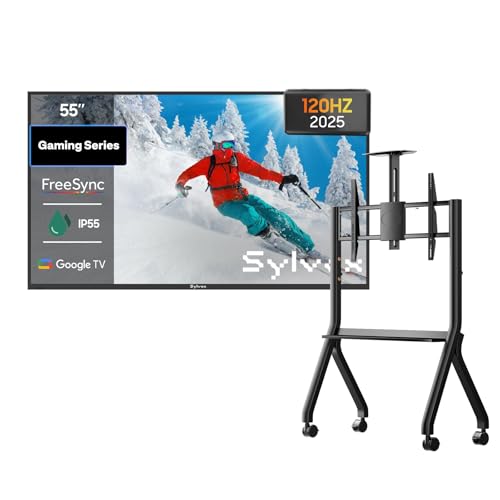
SYLVOX 55-inch Outdoor TV Bundle — Outdoor sport
Every guide to sports televisions eventually meets the household that wants the match in the garden, and SYLVOX is the only pick here built for that household rather than adapted to it. The bundle’s title states the outdoor specification plainly: a 55-inch 4K UHD panel at 120Hz with 1000 nits of brightness, an IP55 waterproof rating, Dolby Atmos sound and Google TV, supplied with a rolling TV cart stand. Each of those figures answers a specific outdoor problem — brightness against daylight, sealing against weather, a cart against the absence of a wall to mount on — and together they describe a set designed to live a different life from the five indoor televisions above it.
Judge it by outdoor rules, not living-room ones. The 1000 nits figure is the working heart of the set: outdoor screens fight the sky, not a lamp, and brightness is the currency that fight is conducted in. IP55 sealing covers the rain shower and the splashed drink that end an indoor set’s garden party. The rolling cart is the unglamorous genius of the bundle, letting the screen follow the shade, the seating and the season, and roll into storage when the weather turns for months rather than hours. Dolby Atmos on an outdoor set is about throwing commentary across a patio to listeners who are not arranged in a neat sofa row.
The comparisons cut both ways and should be made honestly. Against the indoor picks, the SYLVOX concedes the refinements of dark-room picture quality — nobody buys an outdoor panel for its black levels — and its brightness is specified for daylight survival rather than conservatory glare. A household whose viewing is mostly evening and indoor gains nothing from the IP55 rating and should spend on the TCLs or the Samsung instead. A household building a genuine outdoor viewing habit — summer tournaments, garden gatherings, a covered terrace that functions as a second living room — will find no substitute among the five indoor sets, because none of them may be left in the rain at all. Garden-first buyers should open the SYLVOX bundle listing and plan around its cart and rating.
Installation thinking differs here too. There is no wall to measure; there is a terrace to survey — where the shade falls at fixture time, where power can be reached safely, where the cart can roll and rest level. Buyers who plan that survey before ordering will use the set weekly; households that treat it as a living-room television with a hobby will use it twice. The bundle rewards the first household completely, and its specification is honest enough to tell the second household so in advance.
Google TV is a sensible platform for the outdoor role specifically, because outdoor viewing is spontaneous viewing. A set that lives on a terrace gets used for the match, the barbecue background, the children’s film on a warm evening and the news over morning coffee outside, and a content-aggregating home screen serves that grab-and-watch pattern better than a storefront-led one. The bundle’s completeness extends that spontaneity: there is no mount to order, no stand to improvise, no second purchase between the delivery and the first garden fixture. In a category where the gap between buying and using is usually measured in weekends, the SYLVOX closes it to an afternoon.
- Screen size: 55-inch
- Panel and resolution: 4K UHD
- Refresh rate: 120Hz as stated
- Brightness: 1000 nits as stated
- Weather rating: IP55 waterproof
- Audio: Dolby Atmos
- Platform: Google TV
- Included: Rolling TV cart stand
Strengths
- IP55 waterproofing makes it the only pick that can live outdoors.
- 1000 nits and a 120Hz panel give daylight sport a fighting picture.
- The rolling cart solves mounting, shade-chasing and storage in one inclusion.
Trade-offs
- Outdoor tuning concedes the dark-room refinement the indoor picks compete on.
- Its weatherproofing premium is wasted on a permanently indoor screen.
- A terrace needs a power and placement plan before the cart makes sense.
Best for: a terrace, deck or garden room where fixtures are watched outside through the season.
Not suited for: a main indoor living room, where its IP55 sealing and cart answer questions the room never asks.
Comparison
| Pick | Refresh as stated | Panel | Sporting headline | Platform |
|---|---|---|---|---|
| TCL T7 | Native 120Hz | QLED 4K | Game Accelerator 240, VRR | Google TV |
| TCL F8D | Native 144Hz | QLED 4K | Game Accelerator 288, VRR | Fire TV |
| TCL QM64L | 144Hz; Motion Rate 480 (processing index) | QD-Mini-LED 4K | Up to 500 dimming zones, Onkyo 2.1 subwoofer | Fire TV |
| Panasonic W80 | Not stated in the listing title | QLED 4K | Glare Free Max screen, bundled protection | Fire TV |
| Samsung R85H | Not stated in the listing title | Micro RGB 4K | Micro RGB colour technology, Vision AI | Tizen |
| SYLVOX Outdoor | 120Hz | 4K UHD outdoor | 1000 nits, IP55, rolling cart | Google TV |
How to Choose a 55-Inch TV for Sports
Begin by deciding which sporting problem your room actually has. If fixtures blur and the room is dim, the answer is a stated native refresh rate, and the two TCLs that print the word native are your shortlist. If the room is bright at kickoff, the answer is a finish, and the Panasonic’s glare free screen outranks any hertz figure. If the picture washes out at night and commentary drowns in conversation, the answer is backlight zones and a subwoofer, which is the QM64L’s whole design. If the match happens outside, only the SYLVOX is even eligible. Naming the problem first turns a six-way comparison into a one-or-two-way decision.
Then interrogate every speed figure with the same question: native, or processing? A native rate describes the panel; a motion rate describes the manufacturer’s processing system, and the two cannot be placed on one scale. This guide prints them separately wherever both appear, and buyers should do the same with any set they consider elsewhere. Finish with the platform and the room’s practicalities — where the set’s sound must reach, what the household’s other screens run, and whether a bundle’s inclusions match your needs — because those daily facts outlast any specification debate.
Sound placement closes the choosing process. Commentary is mixed forward in most broadcasts, but a television’s speakers still have to reach listeners spread across a room rather than arranged in a cinema row. The QM64L’s built-in subwoofer and the SYLVOX’s Atmos provision are the guide’s stated audio answers; the other sets assume either a quiet room or a soundbar the buyer supplies. Decide which of those your room is before the delivery, because a match-day audio shortfall discovered at kickoff has no good remedy.
What Does Variable Refresh Rate Do for a Sports Viewer?
Variable refresh rate lets a panel match its refresh timing to the source rather than forcing the source into a fixed rhythm, and its natural home is gaming, where frame rates fluctuate as scenes change. The T7 and F8D both state VRR support alongside their game accelerator figures, and for the viewer who games between fixtures it removes a class of judder and tearing that fixed timing cannot. For broadcast sport its role is quieter, since broadcast sources arrive at steady rates, but a set bought for a decade of mixed use — fixtures, films, consoles, and whatever streaming hardware arrives next — is better with the provision present. Treat VRR as a gaming credential that sports viewers inherit, valuable in proportion to how much of the screen’s life is played rather than watched.
How Bright Does a Room Have to Be Before Glare Matters?
Glare matters sooner than most buyers expect, because it is not only direct sun that reflects. A bright window anywhere in the screen’s reflection zone, a pale wall opposite, even a conservatory door left open on a summer afternoon can lay a visible wash across a glossy panel during a daytime fixture. The test is simple: sit where you watch, at fixture time, and look at the wall where the set will hang — if the room’s brightness makes you squint at anything, the screen needs a finish strategy. The Panasonic’s glare free screen is this guide’s stated answer indoors, while the SYLVOX answers the same problem outdoors with raw brightness at 1000 nits. Evening-only rooms can safely deprioritise both and spend on panel speed or contrast instead.
Is 55 Inches the Right Size for Watching Sport?
For most living rooms, 55 inches sits at the productive centre of sports viewing: large enough that a wide stadium shot resolves into readable players and a visible ball, small enough to fit the wall spans and seating distances of ordinary homes. The size also disciplines the other specifications — at 55 inches, a 4K panel’s detail is fully usable from a normal sofa distance, and the price steps between the guide’s tiers buy panel quality rather than sheer acreage. Rooms with very long seating distances can justify going larger, and small rooms may find 55 inches dominant, but the household that cannot decide is usually describing a 55-inch room. Sport’s wide, information-dense pictures reward the size more than most content does.
How Far Should You Sit From a 55-Inch Sports Screen?
Closer than most households instinctively place the sofa. A 4K 55-inch picture stays clean at distances where an older HD set would have dissolved into pixels, and sport rewards the closer seat: the ball stays trackable in a wide shot, shirt numbers resolve, and the tactical shape of a game — the whole reason many fans prefer television to the stadium’s far end — becomes legible. As a working rule, a seating distance in the region of one and a half to two and a half metres suits this size for mixed viewing, with sports fans happiest at the nearer end. If your room forces a longer distance, that is an argument for spending on the panel rather than the size, since the size is fixed by the search: a brighter, higher-contrast 55-inch picture carries across a long room better than a dimmer one.
Height matters as much as distance. The screen’s centre belongs near the eye line of a seated viewer, and the fashionable high mount above a fireplace fights both comfort and picture, since most panels lose contrast and colour at steep vertical angles. Two hours of a final watched with a raised chin is a memory of the bracket, not the match. All six sets here reward a sane, seated eye-level placement, and the SYLVOX’s cart makes that placement adjustable by the hour as the sun and the seating move.
Common Mistakes
Quoting a motion rate as a panel rate is the error this guide was written to prevent. A Motion Rate 480 is a processing index; it does not describe a panel refreshing 480 times per second, and anyone comparing it against a rival’s native 120Hz or 144Hz is comparing a recipe with a temperature. Always ask which kind of figure you are reading, and where a listing prints both, rank the native one.
Shopping for the evening and forgetting the afternoon is the second recurring error. A set chosen under showroom light for a dark room’s virtues — dimming zones, deep contrast — can spend every weekend fixture fighting the household’s own windows. Match the pick to the hours you actually watch: daylight fixtures want finishes and brightness, evening fixtures want contrast and sound, and the guide separates those cases precisely because one screen rarely leads both.
The third error is treating the television as the whole purchase. Bundles exist because ownership has small print: the Panasonic folds in protection and cables, the SYLVOX folds in the cart that makes it usable, and the panel-only picks assume a wall, a mount decision and a sound plan the buyer supplies. Price the whole installation, place the screen at the seating’s eye line rather than above a fireplace’s heat and height, and the sporting life of any of these six will match the promise of its review.
Tournament summers are the stress test that reveals a household’s true priorities, and they are worth simulating before you buy. Picture the room at the biggest fixture of the year: seats filled, light coming in from the garden, commentary competing with conversation, and a second match starting before the first has finished. The set that serves that afternoon — visible from the kitchen doorway, audible at the back of the room, quick to switch between fixtures — is the right set, and it may not be the one with the longest specification list. Run that afternoon in your imagination against each finalist before the money moves.
Final Recommendation
Most households should start with the TCL T7: a stated native 120Hz, both major HDR formats and Google TV make it the balanced centre of the guide. Fire TV households that game should step to the F8D’s native 144Hz, while dark-room film-and-fixtures households should take the QM64L’s dimming zones and subwoofer and read its motion figure for what it is. Bright rooms belong to the Panasonic W80, picture connoisseurs to the Samsung R85H, and the garden to the SYLVOX, which has no rival here because it answers a different question entirely.
Whichever set you choose, let the room cast the deciding vote. Hertz figures, zones and panel technologies all matter, but they matter in the service of a picture you can see, commentary you can hear and a fixture you can find in two remote presses. A 55-inch sports television bought on those terms will still be earning its wall when the next tournament cycle arrives — and the one after that.
One last habit separates a good sports installation from a frustrating one: set the picture up for the content you actually watch, on the day the set arrives. Choose the picture mode you will use for fixtures, walk through the motion settings with a fast passage of play rather than a menu demo, and save the result before the first big match rather than during it. Every platform here remembers per-input and per-mode choices, so an hour of calm setup buys years of kickoffs that simply look right. The households that skip that hour are the ones adjusting sliders at half-time, and no panel in this guide — however fast, however bright — can rescue a match watched through its own settings menu.
Frequently Asked Questions
Is a Motion Rate 480 the same as a 480Hz panel?
No. A motion rate is the manufacturer’s index for its motion-processing system. A native refresh rate describes how many times the panel itself refreshes each second. The QM64L’s Motion Rate 480 should never be ranked directly against a native 120Hz or 144Hz figure.
Which of these TVs has the fastest native panel?
The TCL F8D, whose title states a native 144Hz refresh rate. The TCL T7 states native 120Hz, and the SYLVOX bundle states 120Hz for its outdoor panel.
What should I buy for afternoon matches in a bright room?
The Panasonic W80, whose Glare Free Max screen is designed for exactly that problem. Outdoors, the SYLVOX answers brightness with a stated 1000 nits instead.
Do I need VRR if I only watch sport and never game?
It is primarily a gaming provision, synchronising the panel with fluctuating game frame rates. Broadcast sport arrives at steady rates, so pure viewers can weight other features — finish, contrast, sound — ahead of it.
Which pick is best for watching outside?
The SYLVOX bundle, and it is not close: an IP55 waterproof rating, 1000 nits and a rolling cart make it the only set here designed to live and play outdoors. The five indoor sets should not be left in the weather.
Why does the Samsung R85H list no refresh rate here?
Because its listing title does not state one, and this guide only credits figures a title prints. Verify its panel specification in Samsung’s documentation if a stated rate is a condition of your purchase.
Second screens have changed what a sports television must do, too. The modern fan watches the match with a phone in hand — statistics, replays from other angles, the group chat — and the television’s job narrows to being the room’s shared, authoritative picture. That narrowing actually raises the bar for the panel: it is the screen everyone glances up at for the decisive replay, so its motion clarity and its visibility from every seat in the room matter more, not less, than they did when it was the only screen. Keep that role in mind when weighing the guide’s tiers; the set is not competing with the phone, it is anchoring the room the phone is used in.
Related Guides
Platform loyalty cuts across size, and our guide to Roku TVs covers the sets built on that interface. If Amazon’s ecosystem is your household’s centre instead, the Fire TVs round-up compares the platform’s own range in depth.


