What's inside
- Key Takeaways
- Quick Picks
- How We Chose These Picks
- How Do the Six Compare When the Processing Is Stripped Away?
- What Is 3D Audio, Actually — and What Is It Not?
- How Do You Set Up Spatial Audio Without Making It Worse?
- Which Games and Habits Benefit Most From Spatial Audio?
- Why Does Fit Change the Spatial Picture?
- How Do the Major Spatial Systems Differ From Each Other?
- What Happens to Music and Film in a Spatial Headset?
- How Should Competitive Players Tune for Cues, Not Spectacle?
- What Should Streamers and Creators Know About This Group?
- How Long Will a Spatial Headset Stay Current?
- Does Latency Belong in a Conversation About Space?
- How Do You Test a Spatial Headset in the First Evening?
- What About Younger Players and Shared Family Setups?
- Why Do Reviewers Disagree About the Same Spatial Headset?
- How Does Room and Household Noise Change the Choice?
- What Is the Sensible Upgrade Path Into Spatial Audio?
- How Do You Keep a Spatial Setup Sounding Right Over Time?
- Should You Buy for the Games You Play or the Games Coming?
- What Mistakes Ruin 3D Audio for New Buyers?
- Final Recommendation
- Frequently Asked Questions
- Related Guides
As an Amazon Associate I earn from qualifying purchases. This post may contain affiliate links at no extra cost to you.
widgetverdict.com is reader-supported. When you buy through links on our site, we may earn an affiliate commission.
The best 3d audio headsets all sell the same promise — sound that arrives from places, not from speakers glued to your ears — and the first thing worth understanding is what that promise is actually made of. Three-dimensional game audio is processing, not hardware magic. Your games already mix sound in 3D space; a spatial system such as DTS Headphone:X, Dolby Atmos for Headphones, PlayStation’s Tempest 3D AudioTech, or Windows Sonic takes that mix and filters it through head-related transfer functions so your brain reads direction and distance from an ordinary stereo signal. The headset’s job is to be a clean, accurate window for that processing: drivers with honest separation, a fit that stays consistent, and software that does not double-process the signal into soup.
That framing decides this entire list. The six headsets below were chosen because each pairs well with at least one major spatial system and brings something distinct to the experience — a dedicated DAC with hi-res certification, a base station that switches a whole living room between consoles, graphene drivers built for low distortion, or, in one veteran’s case, a USB sound card that has been doing virtual surround since before it was fashionable. Two are prose-only because no listing could be confirmed through our verification pool, and they happen to be the two most exotic designs here, which tells you something about where exoticism and availability meet in 2026.
Buying advice for this category starts with your platform, because spatial audio is a platform feature before it is a headset feature. Check price on Amazon once you know which processing your machine offers: Tempest on PS5 is free and excellent, Atmos on PC and Xbox is a licence you may already own, and DTS Headphone:X ships inside several of these headsets’ software. Paying twice for the same processing — once in a headset bundle and once as a platform licence — is the category’s most common wasted expense, and it is entirely avoidable with five minutes of checking before checkout.
Key Takeaways
- Spatial quality comes mainly from the processing layer — DTS Headphone:X, Tempest, or Atmos — so the winning headsets are the ones that feed those systems clean, low-distortion stereo.
- The Logitech G Pro X 2 is the PC player’s spatial benchmark here, with graphene drivers and DTS Headphone:X 2.0 in its software stack.
- Astro’s A50 X is the living-room answer: its base station routes PS5, Xbox, and PC through one headset with HDMI-level switching.
- The SteelSeries Arctis Nova Pro Wired earns its premium with the GameDAC Gen 2, hi-res playback, and the most flexible EQ in this group.
- The HyperX Cloud II remains the budget doorway into virtual surround, while the prose-only Audeze Maxwell and Sony INZONE H9 serve planar-magnetic purists and PlayStation loyalists respectively.
Quick Picks
| Pick | Badge | Why it earns its place |
|---|---|---|
| Logitech G Pro X 2 LIGHTSPEED | Best for PC spatial play | Graphene drivers keep busy mixes clean while DTS Headphone:X 2.0 handles the spatial layer. |
| Astro A50 X | Best multi-platform hub | PLAYSYNC base station switches PS5, Xbox, and PC video and audio together at a button press. |
| SteelSeries Arctis Nova Pro Wired | Best sound quality | GameDAC Gen 2 with hi-res audio and deep EQ control for listeners who tune everything. |
| HyperX Cloud II | Best value doorway | The veteran USB surround card and a proven frame, at the friendliest tier in this guide. |
| Audeze Maxwell | Best planar sound | 90mm planar magnetic drivers deliver detail and stage that dynamic drivers here cannot match. |
| Sony INZONE H9 | Best for PS5 purists | Sony’s own spatial tuning, noise cancelling, and a design built around Tempest 3D on PlayStation. |
How We Chose These Picks
Selection began by discarding every headset whose spatial claim was only a logo. To stay, a pick needed either bundled processing with a real pedigree (DTS, Dolby, or a platform-native system), a DAC or sound card capable of feeding spatial software a clean signal, or drivers demonstrably suited to the detail work spatial audio demands. We then weighed the unglamorous criteria: whether the headset lets you disable its own processing so the platform’s can work alone — double processing is the silent killer of directionality — how its microphone serves the team games where spatial cues matter most, and whether its fit keeps the drivers at a consistent distance and angle, because spatial filters assume a stable geometry between driver and ear.
Price spread was deliberate. Spatial audio has a reputation for demanding flagship money, and the Cloud II’s presence here is the rebuttal: its bundled USB card has delivered convincing virtual surround for years at a fraction of flagship cost. At the other end, the A50 X and Nova Pro justify their tiers with infrastructure — switching, DAC quality, tuning depth — rather than with promises of extra dimension. Between those poles sits the G Pro X 2, the headset we would hand a PC player who asked for one recommendation and no homework.

Logitech G Pro X 2 LIGHTSPEED — Best for PC spatial play
Logitech’s second-generation Pro X is built around a single acoustic idea: keep the driver honest and let the software do the spatial work. Its 50mm graphene diaphragms are stiffer and lighter than the usual plastic or coated-paper designs, which in practice means transients start and stop cleanly — a footstep does not smear into the gunshot behind it. Feed that signal through the DTS Headphone:X 2.0 processing in Logitech’s G Hub and the result is the most convincing directional picture in this guide on PC: verticality you can act on, distance that reads as distance rather than volume, and a centre image stable enough for dialogue-heavy games.
Around that core sits a properly professional package. LIGHTSPEED wireless over the USB dongle is effectively lag-free, Bluetooth and 3.5mm cover the rest of your devices, and the detachable boom microphone — tuned with Blue VO!CE filters on PC — remains the broadcast-leaning voice of the Pro line. Battery endurance stretches across days of play. The aluminium-and-steel frame with memory foam cushions is not light, but it distributes its weight like it means it, and the rotating earcups lie flat for desk storage. For a PC-first player, this is the complete spatial instrument.
- Drivers: 50mm graphene dynamic drivers
- Spatial layer: DTS Headphone:X 2.0 via G Hub on PC
- Connections: LIGHTSPEED 2.4GHz, Bluetooth, and 3.5mm
- Microphone: detachable boom with Blue VO!CE software filters
- Frame: aluminium and steel with memory foam cushions
Strengths
- Driver clarity gives spatial processing the cleanest signal to work with
- Microphone quality suits streaming as well as squad play
- Three connection modes cover PC, console, and phone without adapters
Trade-offs
- DTS processing lives on PC; consoles get the platform’s own spatial instead
- Heavier than the esports-light designs in this guide
- Full feature set depends on G Hub software
Best for: PC players after one premium wireless headset with spatial performance and a microphone that both hold up under scrutiny.
Not suited for: players who refuse companion software on principle — the best of this headset lives inside it.

Astro A50 X — Best multi-platform hub
The A50 X is less a headset than a command post. Its base station accepts HDMI and USB from a PlayStation 5, an Xbox Series X, and a PC simultaneously, and the PLAYSYNC button moves the entire experience — 4K120-capable video passthrough and game audio together — from one machine to another. For the living room with two consoles glowing under the television, nothing else in this guide removes as much friction. The headset itself rides a 2.4GHz connection to the base, layers Bluetooth for a phone, and charges by dropping onto the dock, a ritual so easy it becomes invisible.
Sonically, the 40mm graphene drivers deliver the same low-distortion clarity as its Logitech sibling — the two brands share a parent company and a driver philosophy — and spatial duties fall to each platform’s native system: Tempest on PS5, Atmos or Sonic on Xbox and PC. That is the correct division of labour, and the A50 X’s transparency to it is a virtue. The broadcast-grade boom microphone flips to mute, the fit is plush and glasses-friendly, and the whole system assumes a permanent home on a media unit rather than a life in a backpack. It is infrastructure, priced like it, and worth it precisely for households drowning in HDMI cables.
- Drivers: 40mm graphene dynamic drivers
- Base station: HDMI 2.1 passthrough with PLAYSYNC platform switching
- Connections: 2.4GHz to base plus simultaneous Bluetooth
- Microphone: flip-to-mute broadcast-style boom
- Charging: drop-on dock with battery display
Strengths
- One headset genuinely serves two consoles and a PC in the same room
- Dock charging removes battery management from daily life
- Platform-native spatial audio passes through untouched
Trade-offs
- The base station demands a permanent, wired home near the TV
- Highest tier in this guide by a wide margin
- Overkill for a single-platform desk setup
Best for: two-console living rooms where switching machines currently means switching headsets, cables, and patience.
Not suited for: dorm rooms, LAN bags, and any setup that moves house more than once a year.
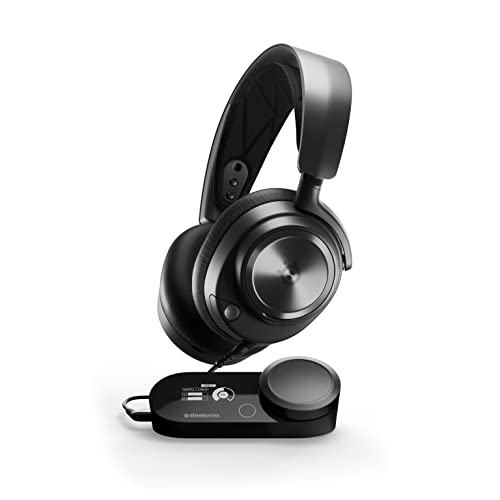
SteelSeries Arctis Nova Pro Wired — Best sound quality
The wired Nova Pro is the audiophile’s route into this category, and its centrepiece is the GameDAC Gen 2: a desktop DAC and control hub with a hi-res audio pedigree, an OLED display, and physical knobs for volume and game-to-chat mix. The DAC feeds SteelSeries’ premium drivers a cleaner signal than any console controller or motherboard output can, and the Sonar software suite adds a parametric EQ detailed enough to satisfy listeners who measure their headphones. SteelSeries markets its own 360 spatial layer within Sonar; used alone, without a platform processor stacked on top, it is detailed and convincing, particularly in shooters with busy vertical maps.
The headset itself matches the electronics. Aluminium yokes, a suspended comfort strap, and leatherette cushions give it the most luxurious fit in this guide, and the retractable ClearCast microphone disappears entirely when the DAC is serving music instead. Wired-only is the honest limitation: this is a desk instrument, tethered to its DAC, and its multi-platform skill comes from swapping the DAC’s input between PC and console rather than from wireless freedom. For the listener who sits in one place and cares most about what the signal sounds like when it arrives, no other pick here is playing the same sport.
- Drivers: premium dynamic drivers tuned for hi-res playback
- DAC: GameDAC Gen 2 with OLED screen and hardware controls
- Spatial layer: SteelSeries Sonar 360 spatial audio with parametric EQ
- Microphone: retractable ClearCast boom with noise handling
- Build: aluminium yokes, suspended strap, leatherette cushions
Strengths
- Cleanest source signal and deepest tuning control in this guide
- Hardware game/chat mix on the DAC is a daily convenience
- Fit and finish feel a class above the field
Trade-offs
- Wired to its DAC — the couch is out of reach
- Sonar’s full power is a PC experience
- Premium tier pricing for a single-desk role
Best for: desk-bound listeners who treat game audio with the seriousness hi-fi people reserve for music.
Not suited for: anyone whose gaming chair is a sofa, or whose setup spans two rooms.

HyperX Cloud II — Best value doorway
The Cloud II has been the entry ticket to virtual surround for so long that its USB sound card is practically a period artefact — and it still works. That in-line card carries the 7.1 virtual surround processing, a microphone mute, and volume controls, plugging into PC and PlayStation while the headset itself also runs happily from a plain 3.5mm jack on anything else. The surround effect is broader and less precise than the modern systems above it, but for a player upgrading from television speakers or bundled earbuds, the first evening with it is a small revelation: sound acquires sides.
The hardware underneath has aged gracefully because it was overbuilt to begin with: an aluminium frame, memory foam cushions in both leatherette and velour in the box, and 53mm drivers with a warm, forgiving tune. The detachable microphone is merely good rather than great, and the design’s vintage shows in its micro-USB-era cable and lack of software. None of that changes the arithmetic. As the least expensive route in this guide to a real spatial experience on a proven frame, the Cloud II remains the pick to beat for value — and the one to gift a new player without a second thought.
- Drivers: 53mm dynamic drivers with a warm house tuning
- Spatial layer: bundled USB sound card with 7.1 virtual surround
- Connections: USB via the card, or direct 3.5mm
- Microphone: detachable boom with in-line mute on the card
- Extras: both leatherette and velour cushion sets included
Strengths
- The friendliest price of admission to spatial gaming here
- Two cushion materials in the box let you choose seal or breathability
- Frame durability is proven across a decade of owners
Trade-offs
- Surround precision trails the modern DTS and Tempest systems
- No software EQ or updates — the card is what it is
- Microphone is serviceable rather than impressive
Best for: first-time spatial buyers and gift-givers after a proven, complete package short of flagship money.
Not suited for: competitive players chasing the sharpest vertical cues modern processing offers.
Audeze Maxwell — Best planar sound
The Maxwell is the headset hi-fi forums talk about when gaming headsets come up, and the reason is its 90mm planar magnetic drivers — a technology that moves the whole diaphragm surface at once rather than pistoning from a voice coil, yielding detail, speed, and a sense of stage that dynamic drivers strain to imitate. Spatial processing loves that clarity: positional cues survive busy mixes, and quiet ambient detail — rain, distant machinery, a room’s reverb tail — stays intact instead of dissolving into noise. It appears here without a link because no pool listing could be confirmed at writing time, but no honest guide to spatial sound can omit it.
The costs are literal and physical. The Maxwell is heavy, its price sits at the top of the gaming market, and its microphone, while detachable and respectable, is not the reason anyone buys it. Battery life is enormous, wireless is low-latency, and the build feels machined rather than moulded. Buy it as an audio instrument that happens to play games superbly, and its compromises read as character; buy it as a casual headset, and its weight will file a complaint by the second hour.
- Drivers: 90mm planar magnetic
- Connections: low-latency wireless dongle, Bluetooth, USB, 3.5mm
- Microphone: detachable boom
- Battery: exceptionally long, measured in days of play
- Build: machined, premium, and notably heavy
Strengths
- Detail and staging beyond every dynamic-driver pick here
- Battery endurance that makes charging a monthly event
- Serves music listening as seriously as gaming
Trade-offs
- Weight is a real commitment for smaller players
- Top-of-market pricing
- Microphone is good, not class-leading
Best for: listeners who hear the difference planar drivers make and have decided that difference is the point.
Not suited for: younger players, small heads, or anyone who treats a headset as an accessory rather than an instrument.
Sony INZONE H9 — Best for PS5 purists
Sony built the INZONE H9 as the PlayStation 5’s first-party-adjacent companion, and its spatial story is Tempest from end to end: the headset’s tuning was designed alongside the console’s 3D audio system, with a companion app that can photograph your ears to personalise the spatial profile. Add active noise cancelling adapted from Sony’s headphone line, a flip-up boom microphone, and simultaneous connections to console and phone, and the H9 becomes the most complete couch-gaming package in this guide. It is prose-only here because no confirmed pool listing was available, not because it lacks merit.
Its compromises are ecosystem-shaped. The deepest features lean PlayStation and PC; Xbox players get a fraction of the value. The noise cancelling, while genuinely useful against living-room noise, adds weight and a battery to manage, and the white finish is a lifestyle choice that shows its travels. For the PS5 household that wants Sony’s own answer to spatial audio with the silencing bonus, it is the natural pick — for everyone else, it is a reminder that platform loyalty has a price and, occasionally, a payoff.
- Drivers: 40mm dynamic, tuned with PlayStation’s spatial system in mind
- Spatial layer: Tempest 3D on PS5, 360 Spatial Sound on PC with personalisation
- Extras: active noise cancelling, simultaneous console and phone connection
- Microphone: flip-up boom
- Design: white finish matched to the PS5 aesthetic
Strengths
- Spatial tuning designed by the platform’s own maker
- Noise cancelling genuinely helps in shared living rooms
- Ear-scan personalisation is more than a gimmick for many listeners
Trade-offs
- Value collapses for Xbox-first players
- White finish marks and scuffs visibly
- ANC adds weight and charging to the routine
Best for: PlayStation 5 households that want the platform maker’s own spatial headset, noise cancelling included.
Not suited for: multi-console homes where the Xbox gets equal hours.
How Do the Six Compare When the Processing Is Stripped Away?
| Headset | Spatial route | Connection style | Driver type | Defining strength |
|---|---|---|---|---|
| Logitech G Pro X 2 | DTS Headphone:X 2.0 on PC | Wireless, BT, wired | 50mm graphene | Clean signal for processing |
| Astro A50 X | Platform-native via base | Wireless to dock | 40mm graphene | Whole-room switching |
| Arctis Nova Pro Wired | Sonar 360 spatial | Wired via DAC | Premium dynamic | Tuning depth and DAC quality |
| HyperX Cloud II | USB card virtual 7.1 | USB or 3.5mm | 53mm dynamic | Value and proven frame |
| Audeze Maxwell | Platform-native | Wireless, BT, wired | 90mm planar | Raw detail and stage |
| Sony INZONE H9 | Tempest / 360 Spatial | Wireless plus BT | 40mm dynamic | ANC and PS5 integration |
The spatial-route column is the one to study, because it predicts your experience more than any other. Headsets that bring their own processing (Pro X 2, Nova Pro, Cloud II) shine brightest on PC, where their software lives. Headsets that defer to the platform (A50 X, Maxwell, H9) shine wherever the platform’s spatial system is strongest, and they travel between machines without carrying settings. Neither philosophy is wrong; they simply place the intelligence in different boxes, and your setup already knows which box it prefers.
What Is 3D Audio, Actually — and What Is It Not?
Strip the marketing away and three technologies share the “3D audio” label. The first is object-based mixing: modern games and films place sounds as objects in a virtual space rather than baking them into fixed channels, so a helicopter is a position, not a left-speaker event. The second is binaural rendering: the spatial processor filters those objects through models of how ears and heads shadow sound, producing the stereo signal your headset plays. The third — and the only part the headset itself owns — is faithful reproduction: drivers accurate enough that the subtle level, timing, and tonal differences carrying the spatial illusion survive to your eardrum.
What 3D audio is not: it is not more speakers, and no headset contains a ring of tiny drivers recreating a cinema — the few historical attempts were worse than good stereo. It is not a competitive cheat code; it sharpens cues your ears already receive rather than inventing information. And it is not universal: a game mixed carelessly in stereo gives the processor little to work with, which is why the same headset can sound revelatory in one title and ordinary in the next. Judge spatial gear across several games before concluding anything, and be suspicious of any demo staged in exactly one.
How Do You Set Up Spatial Audio Without Making It Worse?
Rule one: exactly one processor in the chain. Choose the platform’s system or the headset’s software, then switch the other off completely — in Windows sound settings, in the console’s audio menu, and in the headset’s app. Stacked processing is the leading cause of the “underwater” sound that gives spatial audio a bad name. Rule two: tell the processor you are wearing headphones. Several systems default to a soundbar or television profile that spreads the image wrongly for ear-level drivers. Rule three: in the game itself, select the headphone or 3D audio output option when one exists, and disable any in-game surround toggle that would add a third layer.
Then calibrate with a scene you know. Pick a busy market square, a raining rooftop, a familiar multiplayer map, and rotate slowly in place. Sounds should travel around you smoothly, with no dead zone behind and no jump as sources cross the centre. If the rear image collapses, try the other processor — ears differ, and the system that models yours better wins regardless of brand. Finally, set chat and game balance after spatial is on, not before; spatial processing changes perceived loudness of off-centre sources, and a mix balanced in stereo will lean once the space opens up.
Which Games and Habits Benefit Most From Spatial Audio?
Competitive shooters are the obvious beneficiaries, and the benefit is real but specific: spatial audio excels at elevation and rear-arc information, the two directions plain stereo handles worst. A staircase footstep above you, a flank arriving from behind-left — these are the moments the processing earns its keep, and they are why the Pro X 2 and Nova Pro aim squarely at that audience. Horror and stealth games are the quiet second winner; their sound design is already positional storytelling, and a good spatial chain turns dread into geography. Open-world exploration sits third: ambience gains the most, moment-to-moment gameplay the least.
Habits matter as much as genres. Players who already listen actively — who play with chat volume disciplined and music off — extract the full value, because spatial cues are quiet information competing for attention. Players who game over a podcast will hear a nicer podcast. There is no shame in either style, but only one of them justifies spending on the top half of this list. The Cloud II exists for the honest middle: players curious about spatial audio who want to learn whether they are listeners before they pay for the revelation.
Why Does Fit Change the Spatial Picture?
Spatial filters are computed for an average ear at an average position, and your headset’s fit decides how closely reality matches the model. Cushions that seal consistently keep the driver at the intended distance; a broken seal on one side — a glasses arm, a cushion twisted after storage — tilts the whole image toward the better-sealed ear. This is why several picks here emphasise cushion depth and stable clamping, and why the first diagnostic for “my surround sounds wrong” should be reseating the headset, not reinstalling software. It is also why ear-personalisation, like the H9’s ear scans or similar HRTF customisation in software, genuinely helps some listeners: it adjusts the model toward your actual ears rather than the statistical pair.
Comfort compounds the effect over time. A headset that migrates as you play — sliding during head turns, loosening as cushions warm — smears the image in slow motion, and you unconsciously stop trusting directional cues. The suspended straps and memory foam in this guide are not luxury garnish; they are spatial stabilisers. When you audition a spatial headset, shake your head gently mid-demo. The one that stays planted is the one whose 3D will still be working in hour three.
How Do the Major Spatial Systems Differ From Each Other?
DTS Headphone:X, found in the Pro X 2’s stack, builds its image from a database of measured ears and leans toward precision: cues are tight, the centre is disciplined, and the effect favours competitive clarity over cinematic bloom. Dolby Atmos for Headphones renders object-based mixes with a slightly grander sense of scale, and its great practical virtue is ubiquity — the same licence serves games, films, and streaming apps across PC and Xbox. PlayStation’s Tempest takes a different route to personalisation, offering multiple HRTF profiles to choose by ear, and on PS5 it costs nothing and asks nothing. Windows Sonic is the built-in baseline: less refined than the paid systems, but present on every Windows PC and Xbox, and honest enough to reveal whether spatial audio suits you before money changes hands.
SteelSeries’ Sonar spatial and Sony’s 360 Spatial Sound occupy the manufacturer tier — capable, well-integrated with their own hardware, and bounded by it. The practical advice is boring and correct: use the system your platform gives you natively first, add a bundled system when it demonstrably sharpens your test scene, and never run two. The differences between the top systems are smaller than the difference between any of them switched on correctly and all of them stacked carelessly. Players who grasp that hierarchy stop shopping for logos and start listening for their own ears’ preference, which is the only shootout that matters.
What Happens to Music and Film in a Spatial Headset?
Films are spatial audio’s second home. Object-based movie mixes — the same Atmos streams services send to soundbars — render through these headsets with genuine height and rear placement, and a late-night film on the A50 X or Pro X 2 can feel indecently close to a private cinema. The catch is licensing and apps: the processing must be enabled in the streaming app or system settings, and some services reserve their best mixes for certain devices. When it works, dialogue stays nailed to the screen while weather and crowds move around you, an effect plain stereo cannot counterfeit.
Music is the sceptic’s genre, and rightly. Most recordings are mixed for stereo speakers, and forcing them through a spatial processor adds artificial space that flatters live recordings and punishes studio ones. The honest workflow is dual: spatial on for games and film, off for the record collection — one more reason the headsets here make disabling their processing a single click rather than an excavation. The Maxwell complicates the rule delightfully, since its drivers make plain stereo so spacious that many owners never miss processing at all. That is the planar argument in miniature: fidelity first, effects optional.
How Should Competitive Players Tune for Cues, Not Spectacle?
Ranked play rewards a narrower, drier image than cinematic settings provide. Start by choosing the processor with the tightest centre — for most PC players here, DTS in the Pro X 2 or Sonar on the Nova Pro — then resist the wide, reverberant presets, which smear exactly the transients you are listening for. In the EQ, a gentle reduction of deep bass cleans the floor under footsteps, and a modest lift in the presence region brings movement sounds forward; small moves, honestly evaluated in a replay or a quiet custom match, beat dramatic curves copied from a forum.
Volume discipline is the unglamorous half of competitive tuning. Cues compete with your own game’s loudest effects, and players who run overall volume lower — with chat balanced above the mix rather than inside it — consistently report hearing the step that mattered. Finally, lock your settings once they work. Spatial hearing is a learned skill, and your brain calibrates to a stable system over weeks; swapping processors or presets every few days resets that calibration and makes every system feel worse than it is. Consistency is a performance feature, and it is free.
What Should Streamers and Creators Know About This Group?
Creators live on both sides of the audio chain at once: they need to hear the game’s space accurately and be heard with broadcast polish, often while monitoring their own voice without delay. The Pro X 2 is the natural creator pick here — its microphone chain was designed with streaming filters from the start, and sidetone through the software keeps your own level honest. The Nova Pro’s DAC offers hardware game/chat mixing that maps beautifully onto a streaming workflow, letting you ride the balance physically instead of tabbing into software mid-broadcast.
The A50 X earns a mention for console creators, since its base station simplifies a capture setup considerably — one hub feeding the television, the capture chain, and your ears. Across all three, remember that your audience hears stereo, not your spatial mix; check recordings with processing both on and off to be sure the stream’s audio stays clean for viewers who will never wear your headset. The Maxwell and H9 serve creators mainly as listening tools — superb for reviewing a mix’s detail, less integrated for producing one.
How Long Will a Spatial Headset Stay Current?
Better than most gaming peripherals, because the fast-moving part of spatial audio is software, and software updates land on hardware you already own. The Pro X 2 and Nova Pro have both gained features through their platforms since launch, and platform systems like Tempest improve at the console’s pace, not the headset’s. The genuinely perishable parts are physical: cushions, batteries, and the dongles and docks that wireless systems depend on. Guard the A50 X’s base station and the Nova Pro’s DAC accordingly — they are the irreplaceable halves of their systems, while the headset halves could theoretically be swapped.
Format risk is low. Object-based audio has settled as the industry’s direction across games, film, and streaming, and every system named in this guide renders it or its channel-based ancestors gracefully. A buyer choosing among these six is not betting on a format war; they are choosing ergonomics, microphones, and ecosystems, which age at the pace of furniture rather than phones. Buy the fit and the fit-for-purpose, keep the firmware current, and a spatial headset bought today should still be rendering tomorrow’s games in full three dimensions years from now.
Does Latency Belong in a Conversation About Space?
Yes, because spatial hearing is partly timing. Your brain locates sound using microsecond differences between ears, and while the processor handles those, the delivery chain can still sabotage the experience at a larger scale: audio arriving noticeably after the picture breaks the illusion that sounds live in the world on screen. This is why every wireless pick in this guide uses a dedicated 2.4GHz link rather than standard Bluetooth for play — the dedicated radios keep delay low enough that a door slam and its animation stay married. Bluetooth remains fine for music and phone calls, where nothing on screen needs to agree with your ears.
Wired picks sidestep the question entirely, one of the Nova Pro’s and Cloud II’s quiet virtues. If you are sensitive to delay — rhythm-game players and fighting-game players usually are — the wired route removes a variable from your setup permanently. Everyone else can relax: modern gaming wireless has closed the gap to the point where the remaining difference is a specification-sheet argument rather than a felt one, and the freedom of the Pro X 2 or A50 X is worth more than the last few milliseconds to most players most evenings.
How Do You Test a Spatial Headset in the First Evening?
Resist the urge to judge it in the first game you load. Begin instead with a controlled scene: a single-player game you know well, an area with layered sound — water, machinery, voices at different distances — and spend five minutes simply rotating and walking toward sounds with your eyes on the screen, then repeat a short stretch watching a companion character speak from different positions. You are teaching your brain the system’s accent. Direction should feel consistent all the way around, and sounds behind you should feel behind rather than merely quieter.
Then test the failure modes. Break and remake the cushion seal deliberately to learn how much it matters on your head. Toggle the processing off mid-scene and notice what collapses — if nothing changes, the game may not be feeding the processor an object mix, or a setting upstream is wrong. Record a voice test in a noisy room. Finish with a film scene you have watched before in stereo; familiarity is the best measurement instrument you own. A headset that passes an evening of structured scepticism like this has earned its place; one that only impressed in a store demo has merely auditioned well.
What About Younger Players and Shared Family Setups?
Family living rooms impose requirements this category rarely advertises: volume that can be limited, frames that survive being borrowed, and spatial systems simple enough that a parent is not providing tech support between matches. The Cloud II is the family-proof pick here — its processing lives in a chunky in-line card with physical controls, its frame has a decade of abuse data behind it, and its price forgives accidents. The A50 X suits the shared media unit precisely because it stays there, docked and ready, rather than migrating around the house and returning with one cushion.
Hearing care deserves a plain sentence in a family context: spatial audio encourages longer, more immersive sessions, and volume discipline matters more than any feature in this guide. Use the platform’s volume limits for younger players, prefer the headsets whose maximum output is sane, and treat “just one more match” at high volume as the risk it is. The technology’s job is to place sound, not to multiply it, and the families who enjoy it longest are the ones who set the loudness rules on day one.
Why Do Reviewers Disagree About the Same Spatial Headset?
Because spatial audio is the most personal technology in gaming peripherals. The HRTF models inside every system are averages, and listeners whose ears sit far from the average genuinely hear a different — sometimes worse — effect from the identical headset that thrilled a reviewer. Add different test games, different rooms of experience, and different tolerances for software, and disagreement is not a scandal; it is the expected output of the physics. This is why this guide describes each system’s character and each headset’s role instead of crowning a single spatial champion for every reader.
The practical consequence is a shopping method, not despair: shortlist by role and platform using the picks above, then let your own ears arbitrate between the final two during a return window. Reviewers can rank drivers, microphones, and build with authority because those are shared experiences. Space is private. Anyone who tells you otherwise — about this category, in either direction — is selling certainty the technology does not contain.
How Does Room and Household Noise Change the Choice?
Spatial subtleties are quiet information, and quiet information drowns first. A headset rendering exquisite rear-arc detail into a room with a dishwasher running is writing poetry in a storm, which is why the INZONE H9’s noise cancelling — easy to dismiss as a lifestyle extra — is a genuine spatial feature for apartment and family-room players: it protects the cues the processing creates. Open, quiet rooms invert the logic, letting the Maxwell’s natural stage breathe without electronic help. Match the headset to the room’s noise floor before matching it to anything else; the finest processor in this guide cannot out-shout a tumble dryer, and pretending otherwise is how good headsets earn unfair reviews.
Household noise also flows the other direction. Sealed headsets keep your game’s audio from becoming the room’s soundtrack at midnight, and every pick here seals respectably — but volume habits matter more than seals. A player who compensates for a loud room by turning up is on a treadmill: the room wins, the ears lose. The better sequence is isolation first (fit, cushions, ANC where offered), then processing, then volume, in that order, and it is remarkable how rarely the third step is needed once the first two are done properly.
What Is the Sensible Upgrade Path Into Spatial Audio?
Start where curiosity is cheap. If you own any decent stereo headset already, enable your platform’s spatial system tonight — Sonic on Windows and Xbox, Tempest on PS5 — and live with it for a week in games you know. That free experiment tells you whether your ears take to spatial rendering at all, and it costs nothing but settings-menu time. Players who find the effect gimmicky have saved themselves a flagship; players who find it revelatory have earned the right to shop this list with intent.
From there, the path forks by need. The Cloud II is the low-risk hardware step, a complete package that improves everything at once for a new player. Owners of good wired headsets who lack only processing should look at the Nova Pro’s DAC-centred route or software licences before replacing a frame they love. The Pro X 2 and A50 X are destination purchases — the ends of the path for PC and living room respectively — and they make most sense bought once, deliberately, rather than approached through a staircase of almost-right headsets whose combined cost would have bought the destination outright.
How Do You Keep a Spatial Setup Sounding Right Over Time?
Spatial setups drift. Software updates reset audio settings with cheerful regularity, operating systems install new default devices, and a headset that sounded perfect in March can be quietly double-processing by May because a driver update re-enabled a toggle. Build a small ritual: after any major system or console update, replay your known test scene for two minutes and confirm the space still wraps correctly. Keep a note — an actual note — of your working settings: which processor is on, which are off, your EQ state, your chat mix. When something breaks, the note turns an evening of menu archaeology into a five-minute restoration.
Physical drift matters too. Cushions compress over months, slowly changing the seal and therefore the image; a spatial headset that seems to have lost its magic may simply need fresh cushions. Cables and dongles accumulate desk damage, and a crackling channel will always be mistaken for a processing fault first. Diagnose in order — seal, settings, signal chain, software — and most “my 3D stopped working” stories end at one of the first two steps. The systems in this guide are stable; it is everything around them that wanders, and a listener with a checklist wanders less.
Should You Buy for the Games You Play or the Games Coming?
Trailers promise spatial showcases; backlogs deliver last year’s mixes. Buy for the catalogue you actually play, because a spatial headset’s value is realised nightly or not at all. The encouraging truth is that the installed base of well-mixed games is now deep — major shooters, flagship adventures, and racing titles have treated positional audio as a first-class feature for years — so a buyer today is purchasing for a library that already exists, not a future that needs faith. The one forward-looking check worth making is platform direction: a player migrating from console to PC, or the reverse, within the headset’s lifespan should weight the picks that travel — the Pro X 2’s triple connection and the A50 X’s hub both forgive a change of allegiance.
Genre drift is the subtler version of the same question. A player deep in competitive shooters today may be deep in narrative adventures in two years, and the headsets that serve both — clean drivers, honest stereo under the processing, microphones that do not embarrass a story game’s quiet — age better than one-trick competitive instruments. It is another reason the G Pro X 2 tops this list: switch its processing off and a superb stereo headset remains, which cannot be said of every spatial-branded product the market has produced.
What Mistakes Ruin 3D Audio for New Buyers?
Double processing leads the list, and it has been covered above because it deserves the emphasis: it is free to fix and ruins more first impressions than any hardware flaw. Second is buying a headset for a spatial system your platform does not support — a DTS-bundled headset for an Xbox-only home, a Tempest-tuned design for a PC-only desk. Third is judging spatial audio in a menu screen or a quiet tutorial; these systems need a busy acoustic scene to demonstrate anything, and several fine headsets have been returned by players who never gave them one.
Fourth, buyers chase channel counts. “7.1” on a headset box describes virtual processing channels, not seven drivers, and a clean stereo implementation beats a muddy virtualised one every time. Fifth, they forget the microphone while shopping for their ears: spatial gaming is disproportionately team gaming, and the headset that places enemies beautifully while making you sound like a tunnel has solved the wrong half of the problem. Read the microphone lines in this guide with the same care as the driver lines.
Final Recommendation
For a PC player buying one spatial headset, the Logitech G Pro X 2 is the recommendation: its graphene drivers give DTS Headphone:X the cleanest material in this guide, and everything around that core — microphone, wireless, frame — is executed to the same standard. The A50 X is the answer when the question is a room rather than a desk, and the Nova Pro Wired is the answer when the question is how good a wired signal can get. The Cloud II remains the smart first step for the spatial-curious, while the Maxwell and INZONE H9 reward their specific devotees — planar listeners and PlayStation loyalists — as richly as any headsets in the category.
If this guide leaves one idea behind, let it be the division of labour: the platform creates the space, the headset reveals it. Spend accordingly — enough on the headset to keep the window clean, nothing on duplicated processing — and the third dimension stops being a box logo and becomes the way your games simply sound. Give any of these six a week of honest listening in games you know by heart, and going back to flat stereo will feel like playing with one eye closed: possible, familiar, and quietly wrong in a way you cannot unhear once the space has opened up around you.
Frequently Asked Questions
Is 3D audio the same as 7.1 surround on a headset?
They overlap but are not identical. Virtual 7.1 simulates a seven-speaker layout, while object-based 3D systems like Atmos and Tempest place sounds in a continuous space including height. In practice, a good 3D implementation gives more precise elevation cues; a good 7.1 implementation, like the Cloud II’s, still delivers convincing direction at lower cost.
Do I need a special headset for Tempest 3D on PS5?
No — Tempest works with any stereo headset connected to the PS5, including every pick in this guide. Designs like the INZONE H9 are tuned with Tempest in mind, but the processing itself is the console’s gift to all headsets equally.
Why does my spatial audio sound echoey or underwater?
Almost always because two processors are running at once — the console or Windows setting plus the headset’s own software. Disable one completely and the effect usually snaps into focus. A broken cushion seal can cause a milder version of the same smearing.
Does spatial audio help in single-player games?
Yes, differently: less as tactical information, more as presence. Exploration and horror titles use positional ambience as storytelling, and spatial rendering makes those worlds feel inhabited rather than illustrated. The benefit is atmosphere rather than advantage.
Can spatial audio work over Bluetooth?
The processing can, but Bluetooth’s latency can desynchronise it from the picture in fast games, which is why every wireless pick here uses a low-latency 2.4GHz link for play and reserves Bluetooth for phones and casual listening.
Is the Audeze Maxwell worth it for spatial gaming?
For listeners who value raw detail, yes — its planar drivers preserve the subtle cues spatial processing depends on better than anything else listed. The weight and price mean it is a deliberate purchase, not a casual upgrade.
How long does it take to get used to spatial audio?
Most listeners adapt within a few sessions, though the rear image is usually the last part to feel natural. Brains calibrate quickly to a consistent system, which is why sticking with one processor and one headset for the first weeks matters more than which combination you chose. If after a fortnight the effect still feels like a gimmick in well-mixed games, your ears may simply sit far from the average model — try a different system’s HRTF profiles before concluding spatial audio is not for you, because the right profile can change everything overnight, turning a vague wash of sound into a map you can navigate blindfolded and trust completely in the middle of a firefight, every single night of the week without fail, season after season.
Related Guides
Working to a tighter budget? The best $60 headsets guide shows what survives at a lower tier, our best affordable microphone headsets picks put voice first, and the best AM/FM radio headsets roundup covers hearing protection with a tuner for workshop hours.


