What's inside
- Key Takeaways
- Quick Picks
- How Did We Build a Ladder Out of One Brand’s Range?
- What Does PRO-UHD Pixel Shifting Actually Do to the Picture?
- How Do the Six Rungs Compare Side by Side?
- Which Epson Rung Should You Actually Buy?
- How Do You Set Up an Epson Home Cinema Properly?
- What Mistakes Do Epson Buyers Keep Making?
- How Does HDR Behave on a Projector, and Which Rung Handles It Best?
- What Will a Decade of Ownership Actually Cost You?
- How Large a Screen Can Each Rung Honestly Feed?
- Why Do Epson Owners Rarely Switch Technologies?
- What Should You Check in the First Week of Ownership?
- Final Recommendation
- Frequently Asked Questions
- Related Guides
As an Amazon Associate I earn from qualifying purchases. This post may contain affiliate links at no extra cost to you.
widgetverdict.com is reader-supported. When you buy through links on our site, we may earn an affiliate commission.
Where to buy: Every projector in this guide is an Epson sold through Amazon. Check which generation a listing describes before ordering — Epson reuses the Home Cinema name across many model years, and the number after it (2350, 3200, 3800, 5050UB) is the whole identity of the machine.
Shopping only inside one brand sounds like a limitation until you understand what the best 4k epson home cinema projectors actually are: a ladder. Epson builds its 4K range as a staircase of the same core technology — three-chip 3LCD panels, pixel-shifting PRO-UHD resolution, and colour brightness that matches white brightness — and each step up buys you something specific and nameable: more lens, more contrast, a laser instead of a lamp, or a cabinet that vanishes against the wall. That makes this the rare single-brand guide where the real question is not which projector is best, but which rung of the ladder your room, your screen size and your patience for lamp changes actually justify. Six rungs are worth standing on, and they spread wider than most buyers expect — from a streaming-friendly living-room box to a laser flagship that belongs in a dedicated theatre.
One clarification belongs at the top, because it shapes every pick below. Epson’s PRO-UHD is a pixel-shifting system: the panels are not natively 4K, and a precision glass element shifts them rapidly to put a full 4K image’s worth of pixels on screen. Purists argue about the label; viewers argue about the picture, and the picture is sharp, dense and free of the single-chip artefacts that bother a minority of DLP watchers. What Epson trades away in that bargain is a little ultimate edge acuity against the sharpest true-4K DLP machines — and what it gains is colour light output that cheaper rivals quietly do not match. Judge the ladder on that exchange and every rung below makes sense.
Key Takeaways
- Every pick here is 3LCD, so colour brightness equals white brightness on the spec sheet — saturated scenes hold up in dimmed living rooms, not just dark caves.
- The ladder divides cleanly: lamp models (2350, 3200, 3800, 5050UB) trade eventual lamp changes for lower entry cost; the LS11000 and LS800 are laser machines built to be installed and forgotten.
- Lens quality is the quiet divider — the 5050UB and LS11000 carry motorised zoom, focus and wide lens shift that make ceiling installation forgiving, while the smaller models demand more careful placement.
- The LS800 is the odd rung: an ultra-short-throw laser that sits against the wall and behaves like a television replacement rather than a theatre projector.
- Pixel-shift PRO-UHD is not native 4K, and at normal seating distances on screens up to about 120 inches, most viewers cannot spend the difference wisely — room darkness and screen quality matter more.
Quick Picks
| Pick | Badge | Why it is here |
|---|---|---|
| Epson Home Cinema 5050UB | Best for Dedicated Theatres | The contrast and motorised lens that defined enthusiast home cinema in its generation. |
| Epson Home Cinema 3800 | Best Bright-Room Epson | 3,000 lumens and generous lens shift for living rooms that refuse to go fully dark. |
| Epson Home Cinema 3200 | Best Value in the Ladder | Nearly the 3800’s picture with a little less brightness and shift, for meaningfully less commitment. |
| Epson Home Cinema 2350 | Best for Streaming and Games | Android TV built in, low-latency manners and a speaker, in the friendliest box Epson makes. |
| Epson Home Cinema LS11000 | Best Laser Flagship | Laser light, 120Hz support and HDR10+ in a motorised-lens theatre machine with no lamps to change. |
| Epson EpiqVision LS800 | Best Ultra Short Throw | 4,000 lumens from inches away from the wall, with Yamaha sound — a TV replacement, not a projector habit. |
How Did We Build a Ladder Out of One Brand’s Range?
We treated Epson’s catalogue the way Epson’s own engineers seem to: as variations on three decisions. The first decision is light source. Lamps are cheap to buy, dim slowly over thousands of hours and eventually need replacing; lasers cost more up front, hold their brightness far longer and switch on to full output almost instantly. Neither is morally superior — a lamp model watched three evenings a week may never trouble its owner — but the decision colours a decade of ownership, so it is the first fork in every recommendation below.
The second decision is the lens, and it is the one showroom comparisons always miss. A projector’s zoom range and lens shift decide where the machine can physically live: on a ceiling mount slightly off-centre, on a rear shelf, on a coffee table that also holds drinks. The flagship models here carry motorised lenses with memory-friendly range, which means installation becomes a measurement exercise instead of a compromise. The smaller models ask you to place them properly once and leave them alone. Both approaches work; only one forgives a room whose geometry was decided by a sofa rather than a screen.
The third decision is habitat. A dedicated theatre with controlled light rewards contrast above all, which is why the 5050UB still anchors this guide years into its run. A family room rewards brightness and sound. A rental rewards a machine that sits against a wall and pretends to be a television. We scored each model against the habitat its design clearly targets, and the picks below are ordered as a ladder rather than a podium — read them as rungs, and step onto the one that matches your room.
What Does PRO-UHD Pixel Shifting Actually Do to the Picture?
Start with the honest mechanics. Each 3LCD panel in these machines carries a Full HD pixel count. Between the panels and the lens sits an optical shifting element that moves the image by half a pixel diagonally at high speed, so successive sub-frames land on slightly different positions and the screen receives the full pixel count of a 4K frame, delivered in two rapid passes. Your eye integrates the passes into a single image whose resolution sits far closer to native 4K than to 1080p — fine detail in landscapes, fabric and faces resolves convincingly, and the pixel grid that betrays a plain 1080p projector at 120 inches is effectively gone.
What shifting cannot do is put every pixel on screen simultaneously with perfect separation, and on test patterns — alternating single-pixel lines, desktop text at small sizes — the best native-4K DLP machines draw a slightly cleaner edge. Films are not test patterns. On real content the Epson image’s strengths assert themselves instead: three separate panels, one per colour, means no colour wheel, no sequential colour, and no rainbow flashes for the viewers who see them on single-chip machines. Colour is produced at full brightness rather than traded against it, which is why a 2,600-lumen 5050UB can look richer on a saturated scene than a nominally brighter rival whose colour output is a fraction of its white figure.
The practical verdict is about seating distance and screen size. At three metres from a 100-to-120-inch screen — the geometry of most real theatres — the shifting penalty is below the threshold of what the evening’s film will reveal, and the colour and contrast advantages are above it. Push to 150 inches with front-row seating and the calculus tightens. Epson’s ladder, notably, does not ask you to solve this with money: the shifting system is the same idea on the 2350 as on the LS11000. What the money buys is everything around the pixels — light, lens and contrast — which is a more honest ladder than most brands offer.
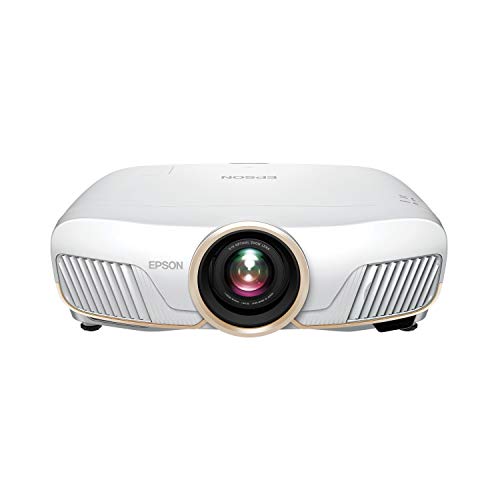
Epson Home Cinema 5050UB — Best for Dedicated Theatres
The 5050UB is the machine that made Epson the default answer in enthusiast theatres, and its case rests on the two things a dark room actually rewards: contrast and lens. Its dynamic contrast system — an auto iris working with the 3LCD panels — produces black levels that lamp-based rivals in its class chase and rarely catch, so a night scene in a light-controlled room reads as layered darkness rather than grey fog. At 2,600 lumens of equal colour and white brightness it is not the brightest rung here, deliberately: it was tuned for rooms where the lights go off, and in those rooms it does not need more.
The lens is the other half of the argument, and the half owners praise years later. A wide 2.1x motorised zoom with generous motorised shift in both axes, plus motorised focus, means the projector can sit on a ceiling mount or rear shelf that was placed for the room rather than for the screen, and still land a perfectly squared image. Ten lens-position memories suit owners who alternate between widescreen films and 16:9 sport by resizing the image. Installation stops being a negotiation. Add full-bandwidth HDMI for its generation, HDR10 and HLG support with genuinely useful HDR tone adjustment, and a colour gamut that covers the cinema reference space in its wide mode, and the 5050UB remains the rung where Epson’s theatre intent is most completely expressed.
Its age shows in the margins rather than the picture. The lamp will need replacing on a schedule the laser models laugh at, the smart features are an absence you fill with a streaming stick, and gamers chasing the newest consoles’ highest refresh modes will find its inputs belong to an earlier HDMI generation. None of that touches a film at 24 frames per second in a dark room, which is the appointment this machine was built to keep.
- Technology: 3-chip 3LCD, lamp light source, PRO-UHD pixel shifting
- Brightness: 2,600 lumens colour and white
- Lens: motorised 2.1x zoom, focus and wide two-axis shift, position memories
- HDR: HDR10 and HLG with adjustable tone mapping
- Character: contrast-first theatre tuning
Strengths
- Class-defining black levels for a lamp projector in a dark room.
- Motorised lens with memories makes installation and format changes effortless.
- Colour volume in wide-gamut mode flatters HDR film content.
Trade-offs
- Lamp replacements are a recurring cost the laser rungs avoid.
- No built-in streaming; a stick or player is required.
- Inputs predate the latest high-refresh gaming standards.
Best for: owners of light-controlled theatre rooms who watch films seriously and install once.
Not suited for: bright family rooms or gamers who need the newest console features.

Epson Home Cinema 3800 — Best Bright-Room Epson
If the 5050UB is tuned for darkness, the 3800 is its sibling raised in the light. Three thousand lumens of colour brightness — the full figure, not a white-only headline — gives it real authority in a living room with the curtains drawn but the lamps philosophy intact, and its contrast system, while a step behind the UB flagship, holds an image together in conditions that reduce lesser projectors to suggestions. Sports afternoons, family films at dusk, a screen that shares the room with life: this is the rung built for them.
What makes the 3800 more than a brightness bump is how much of the flagship’s placement kindness it keeps. Its lens shift range is unusually generous for its tier, vertical and horizontal, so a ceiling mount or a high shelf does not need to be perfectly centred on the screen — a freedom that matters enormously in real rooms, where the ideal mounting point is usually occupied by a light fitting or a beam. The zoom range is wide enough to offer genuine choice of mounting distance. Setup feels like adjusting a machine designed by people who have installed projectors in houses, not laboratories.
The concessions against the 5050UB are black depth in true darkness and the motorised-everything polish; the 3800’s lens adjustments are manual, and its HDR handling, though capable with 10-bit support, lacks the flagship’s finesse in the darkest scenes. In a room that never fully darkens, you will never see those concessions. In a room that does, you might — which is precisely the fork between these two rungs, and it is a fork about your curtains, not about quality.
- Technology: 3-chip 3LCD with lamp illumination and PRO-UHD shifting
- Brightness: 3,000 lumens of colour and white output
- Lens: wide manual zoom with generous vertical and horizontal shift
- HDR: HDR10 and HLG, 10-bit colour support
- Inputs: full-bandwidth HDMI for 4K sources of its generation
Strengths
- Full colour brightness keeps sport and daytime viewing saturated.
- Lens shift range embarrasses most projectors at its level.
- Confident, punchy image without a dedicated dark room.
Trade-offs
- Black levels step down from the 5050UB in dark scenes.
- Manual lens controls lack the flagship’s motorised ease.
- Lamp economics apply, as on all the lamp rungs.
Best for: living rooms and media rooms where lights stay low rather than off.
Not suited for: black-level purists building a fully light-controlled theatre.

Epson Home Cinema 3200 — Best Value in the Ladder
The 3200 exists because Epson understood that the 3800’s buyer and the 3200’s buyer want the same evening. It keeps the essential formula — 3LCD colour honesty, PRO-UHD shifting, HDR support with full-bandwidth HDMI — at 2,900 lumens, a figure close enough to its sibling’s that in a dimmed room the difference is a footnote. What it surrenders is placement freedom: its lens shift is a narrower, vertical-only affair, and its overall contrast performance sits a rung down. What it keeps is the picture’s character, and character is what you watch.
That trade defines its ideal home precisely. If your mounting position is straightforward — a ceiling mount you can place on the screen’s centre line, or a shelf at a cooperative height — the 3800’s extra shift is a feature you would pay for and never touch. The 3200 then becomes the intelligent rung: the same film nights, the same freedom from rainbow artefacts, the same honest colour, with the savings available for the screen and the soundbar that will improve your evenings more than lens shift would. This guide repeats that arithmetic across brands because it is the most reliable upgrade path in projection: the room and the screen outrank the model number.
Ownership is equally undemanding. The lamp is a standard Epson consumable with predictable pricing, the menus and remote are shared DNA with its siblings, and the machine’s behaviour in eco and normal lamp modes is well documented by a large owner base. It is the rung for the buyer who has measured their room, knows the mount point works, and would rather spend the difference on the rest of the system.
- Technology: 3LCD three-chip design, lamp-based, PRO-UHD shifting
- Brightness: 2,900 lumens, colour matched to white
- Lens: manual zoom with vertical lens shift
- HDR: HDR10 and HLG, 10-bit support, 18 Gbps HDMI
- Character: the 3800 formula with placement freedom trimmed
Strengths
- Nearly the 3800’s brightness and picture character for less.
- Full colour brightness, no rainbow artefacts, honest HDR.
- Savings fund the screen and audio that matter more.
Trade-offs
- Vertical-only shift demands a more precise mounting position.
- Contrast sits a clear step below the 5050UB.
- No built-in streaming platform.
Best for: buyers with a straightforward mount point who want Epson’s picture without the placement premium.
Not suited for: off-centre installations that need wide two-axis lens shift.

Epson Home Cinema 2350 — Best for Streaming and Games
The 2350 is where Epson’s ladder reaches the room the others only visit: the ordinary living room, in the evening, with a console under the television and a family that streams everything. It builds Android TV into the projector itself, so the major services run natively with one remote, and it pairs that convenience with 2,800 lumens of full colour brightness — enough to hold a film together with a lamp on in the corner. A built-in 10-watt speaker covers casual viewing without a soundbar, and Bluetooth lets it hand audio to a better speaker when the evening deserves one.
Its second talent is responsiveness. Epson positioned this model at players as well as streamers, with low-latency behaviour that keeps console gaming feeling connected rather than cushioned — rhythm games and shooters remain playable in a way they are not on projectors designed purely for cinema. That combination, streaming brain plus game manners plus genuine brightness, is rarer in one box than it should be, and it explains why the 2350 is the rung most often recommended to households buying their first projector: it asks the fewest behavioural changes of the people who will use it.
The theatre rungs above it will out-contrast it in the dark and out-shift it on the ceiling; its lens is a simpler manual arrangement with modest adjustment, and its black levels are living-room black levels — good, not abyssal. Judged as a theatre instrument it is the junior machine. Judged as the centre of a room that streams series on weekdays and plays games on weekends, it is the most complete Epson here, and the easiest to live with.
- Technology: three-chip 3LCD, lamp powered, pixel-shifted PRO-UHD
- Brightness: 2,800 lumens across colour and white alike
- Streaming: Android TV built in, Bluetooth audio output
- Audio: built-in 10 W speaker
- HDR: HDR10 and HLG
Strengths
- Native streaming removes the stick-and-second-remote ritual.
- Low-latency manners make console gaming genuinely enjoyable.
- Full colour brightness suits lamp-lit living rooms.
Trade-offs
- Black depth trails the theatre-tuned rungs in dark rooms.
- Simpler lens with limited adjustment range.
- Built-in speaker is honest, not cinematic; a soundbar still wins.
Best for: households that stream everything and game on the same big screen.
Not suited for: dedicated dark theatres chasing the deepest blacks.

Epson Home Cinema LS11000 — Best Laser Flagship
The LS11000 is Epson’s answer to the owner who loved the 5050UB’s idea but wanted it rebuilt around a laser. The light source is the headline: a laser phosphor array rated for a working life measured in tens of thousands of hours, reaching full brightness almost immediately and holding it with a consistency lamps cannot promise. Under it sits the flagship toolkit — motorised zoom, focus and wide lens shift with position memories — so the machine installs like the 5050UB and then simply never asks for a lamp again.
Two modernisations separate it from the older flagship as a viewing machine. It accepts and displays high-refresh signals up to 120Hz at 4K, which matters to the growing overlap between theatre owners and gamers, and its HDR support extends to HDR10+, whose scene-by-scene metadata flatters projectors — devices that need tone-mapping help far more than televisions do. Its 2,500 lumens are a touch below the 3800’s figure, but laser lumens hold their level across years rather than sliding from the day the lamp is new, and its dynamic contrast, driven by laser dimming, gives dark scenes a control that iris systems approximate.
What it does not do is stream — there is no smart platform worth the name, because Epson assumes a flagship theatre has a proper source — and its price of admission buys no forgiveness for a bright room; this is a darkness machine. For the buyer building a theatre to keep for a decade, though, the LS11000 is the ladder’s logical top: the lens, the light and the refresh support of a long-term installation, with the consumable era designed out of it.
- Technology: 3-chip 3LCD, laser light source, PRO-UHD pixel shifting
- Brightness: 2,500 lumens colour and white, held consistently over laser life
- Refresh: up to 120Hz at 4K for high-refresh sources
- Lens: motorised zoom, focus and wide shift with memories
- HDR: HDR10+ alongside HDR10 and HLG
Strengths
- Laser life removes lamp changes from a decade of ownership.
- 120Hz support bridges theatre and serious gaming.
- HDR10+ scene-by-scene mapping suits projector tone curves.
Trade-offs
- No meaningful built-in streaming; bring your own source.
- Brightness is theatre-calibrated, not living-room armour.
- Flagship pricing for gains a casual viewer may not use.
Best for: long-term theatre builds that mix reference film viewing with high-refresh gaming.
Not suited for: buyers wanting an all-in-one streaming box for a bright room.
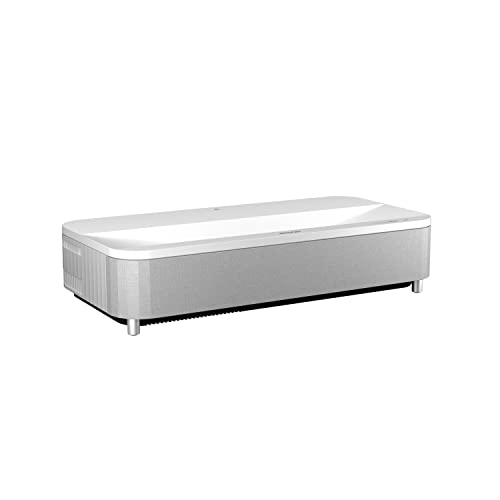
Epson EpiqVision LS800 — Best Ultra Short Throw
The LS800 breaks the ladder’s geometry entirely. Instead of a lens throwing across a room, its ultra-short-throw optics sit inches from the wall and paint a 100-inch image upward from a media console — no ceiling mount, no long HDMI run, no shadows when someone crosses the room for a drink. At 4,000 lumens of full 3LCD colour brightness it is the most powerful light source in this guide, specified that way because its natural habitat is the living room in daylight-adjacent conditions, ideally paired with an ambient-light-rejecting screen that completes the laser-TV illusion.
Epson understood that a television replacement must sound like one, so the LS800 carries a Yamaha-designed 2.1-channel speaker system that is startlingly competent for a projector — dialogue is clear, casual sport and series need nothing else, and film nights can hand over to a soundbar through its HDMI connections. Android TV is built in, so the box streams natively like a smart TV. The result is the only rung of this ladder that a television buyer, rather than a projector enthusiast, can purchase without adopting a new hobby.
The disciplines are placement and surface. Ultra-short throw magnifies every imperfection: the wall or screen must be genuinely flat, the console must sit at the exact distance and height the image size demands, and there is no lens shift to rescue a careless setup — geometry is fixed by furniture. Its contrast in a darkened room, while respectable, belongs to the living-room class rather than the 5050UB’s theatre class. Accept the furniture discipline and the LS800 is the most radical convenience in Epson’s range; fight it, and no rung will frustrate you faster.
- Technology: 3-chip 3LCD, laser light source, ultra-short-throw lens
- Brightness: 4,000 lumens colour and white
- Placement: inches from the wall for a 100-inch class image
- Audio: Yamaha 2.1-channel built-in speakers
- Streaming: Android TV built in
Strengths
- Television-style placement with projector-scale images.
- Highest brightness here, with full colour output behind it.
- Built-in Yamaha sound and streaming complete the TV illusion.
Trade-offs
- Demands a flat surface and precise console placement; no lens shift.
- Dark-room contrast belongs to the living-room class.
- Needs an ALR screen to show its best in lit rooms.
Best for: living rooms replacing a large TV with a 100-inch laser-TV setup.
Not suited for: ceiling-mounted theatres or uneven walls.
How Do the Six Rungs Compare Side by Side?
| Pick | Light source | Brightness | Placement character | Habitat |
|---|---|---|---|---|
| Epson Home Cinema 5050UB | Lamp | 2,600 lumens | Motorised wide-shift lens | Dark theatre |
| Epson Home Cinema 3800 | Lamp | 3,000 lumens | Generous manual shift | Dim living room |
| Epson Home Cinema 3200 | Lamp | 2,900 lumens | Vertical shift only | Dim living room, easy mount |
| Epson Home Cinema 2350 | Lamp | 2,800 lumens | Simple manual lens | Streaming and gaming room |
| Epson Home Cinema LS11000 | Laser | 2,500 lumens | Motorised wide-shift lens | Dark theatre, long-term |
| Epson EpiqVision LS800 | Laser | 4,000 lumens | Ultra short throw, fixed geometry | Bright living room |
Read the table as three pairings. The 5050UB and LS11000 are the theatre pair, split by lamp versus laser and by generation. The 3800 and 3200 are the living-room pair, split by placement freedom. The 2350 and LS800 are the convenience pair — one streams and games from across the room, the other abolishes the across-the-room part entirely. Every buyer’s answer is one of those pairings plus a decision inside it, which is a far simpler shopping problem than six strangers would have posed.
Which Epson Rung Should You Actually Buy?
Decide by room first and by light second, because Epson has already decided everything else for you — the panels, the shifting system and the colour philosophy are constant across the ladder. If your room goes properly dark and films are the main event, the theatre pair is your shortlist, and the choice between them is a choice about time: the 5050UB asks less money now and a lamp every few years; the LS11000 asks more now and nothing later, while adding high-refresh gaming to the bargain. If your room merely dims, the 3800-versus-3200 question is purely about where the projector must sit, and an honest measurement of your mount point answers it in an afternoon.
Screen size deserves a sentence of its own, because it taxes brightness harder than room light does. The same projector lighting a 150-inch screen is spreading its lumens across more than twice the area of a 100-inch image, and the living-room rungs feel that tax first. Buyers planning genuinely large screens in imperfect rooms should weight the 3800’s and LS800’s output figures accordingly, and everyone should remember that a good screen returns more visible quality per unit of money than the step between adjacent rungs ever will.
Finally, buy the light source for your actual habits. A lamp projector watched nightly will consume lamps on a schedule that should be priced into the decision, not discovered by it; a laser watched twice a month may never repay its premium in consumables, though its instant-on, brightness-stable behaviour pays a different dividend. Epson’s ladder is honest enough that each rung’s running costs are knowable in advance — take the hour to know them.
How Do You Set Up an Epson Home Cinema Properly?
Begin with the screen, not the projector. Fix the screen’s position and size, then place the projector to serve it: centre the lens on the screen’s horizontal midpoint wherever the model allows, use lens shift — never keystone — to walk the image into the frame, and let the zoom settle the size. Keystone correction is a geometry tax paid in resolution and sharpness; the shift ranges on the 3800, 5050UB and LS11000 exist precisely so you never pay it. The LS800 inverts the ritual: the screen still goes first, but the console position is then derived from the image size with a tape measure, and small shims under the projector’s feet perform the final alignment.
Then feed the machine properly. Use the picture mode that respects the source — the cinema-oriented modes on these Epsons are measurably the most accurate starting points — set the HDR tone controls against a scene you know well rather than a test card, and give the projector a clean full-bandwidth HDMI cable run, because long cheap cables are the silent cause of half the “4K problems” owners report. For the streaming rungs, connect over a wired network or a strong Wi-Fi signal; a 4K stream starved of bandwidth will look like a projector fault and is not one.
Finish with sound placement honesty. The 2350 and LS800 can carry a room alone; the theatre rungs assume a system, and even a modest soundbar placed at the screen transforms them. Whatever you choose, put the speakers where the picture is — dialogue that arrives from the projector behind you is the one immersion-breaker no amount of lumens repairs.
One more setup habit separates satisfied owners from frustrated ones: revisit the picture after the first week. Lamp output settles, your eyes adjust to the scale, and settings chosen in the excitement of installation day — an over-bright mode, an over-sharpened edge control — reveal themselves as habits rather than preferences. A short second pass through the menus, with a familiar film and the room in its normal evening state, locks in the calmer, more accurate picture that the machine will then hold for years. The ladder’s models all reward that patience; none of them needs more than it.
What Mistakes Do Epson Buyers Keep Making?
The classic error is buying the flagship for the wrong room: a 5050UB installed in a white-walled family room with afternoon sun will look ordinary, and its owner will blame the projector for a mismatch the ladder explicitly warns about — the 3800 or LS800 was the rung for that room. The reverse error is rarer but sadder: a 2350 asked to anchor a dedicated theatre, where its living-room black levels are exposed nightly by a room that deserved better.
Second, buyers under-measure. Throw distance, screen gain, mount height and the LS800’s console depth are all knowable before purchase, and every one of them has produced a return or a compromise installation. Third, lamp owners ignore the lamp: running a lamp model at full power for daytime sport and cinema alike shortens its life and raises fan noise, when the eco modes are visually indistinguishable for much content. Fourth, owners of the shifting models sometimes chase test-pattern sharpness, enlarging desktop text and fretting over a limitation that films will never reveal.
The last mistake is skipping the screen. Every rung here is reviewed on screens, and a painted wall with texture and off-white tint taxes colour and sharpness in ways buyers then attribute to the projector. Even a modest fixed-frame screen is the cheapest image upgrade in this entire guide.
How Does HDR Behave on a Projector, and Which Rung Handles It Best?
HDR on a projector is a negotiation, and understanding why will save you from judging these machines by television standards. A modern television can reach brightness peaks many times higher than any projector in this guide while also producing near-absolute black in the same frame; a projector spreads a few thousand lumens across a hundred inches of screen and bounces its blacks off a room. HDR content is mastered for the television’s abilities, so the projector’s job is tone mapping — deciding, scene by scene or frame by frame, how to compress that wide range into the narrower one it can actually draw. Do it badly and highlights clip to white slabs while shadows crush to black; do it well and the image keeps its drama at a scale no television offers.
Epson’s rungs differ here in ways the spec sheets understate. The 5050UB earned its reputation partly on HDR handling: its tone controls give the owner genuine adjustment over where the compression knee sits, so a dark film and a bright one can each be given a setting that suits them, and its wide colour mode reaches the cinema gamut that HDR content is graded in. The LS11000 goes further in kind rather than degree — HDR10+ carries per-scene metadata from the source itself, so the projector is told how each scene was meant to be compressed instead of guessing, and the laser’s instant dimming gives those instructions a faster, finer tool to work with. On HDR-heavy evenings — prestige series, modern blockbusters — the flagship pair visibly separate themselves from the living-room rungs, whose HDR is competent and colourful but works with blunter instruments.
The living-room models should not be undersold, though. HDR’s most common failure in real homes is not tone mapping but dimness: a washed, grey presentation in a room with light in it. There the 3800’s and LS800’s brightness is itself an HDR feature, preserving the contrast between a scene’s bright and dark regions that the format exists to create. The honest summary is that HDR rewards darkness with finesse and brightness with survival, and Epson’s ladder, unusually, lets you choose which reward you are buying.
What Will a Decade of Ownership Actually Cost You?
Projectors are the rare electronics purchase whose running costs deserve a paragraph in the buying guide, because the ladder’s lamp-versus-laser fork is really a question about money over time. A lamp model asks for a replacement lamp at intervals measured in thousands of hours; run nightly in its brighter modes, that interval arrives in a small number of years, and each replacement is a real, budgetable cost — plus a subtle one, since a lamp dims across its life, so the projector you own in year three is somewhat dimmer than the one you unboxed. Owners who plan for this are never disappointed by it; owners who discover it feel ambushed by a machine that was only behaving as designed.
The laser rungs invert the profile. The LS11000 and LS800 hold their output with far greater consistency and are rated for working lives that exceed any realistic decade of evening viewing, so their higher purchase price is partly a prepayment of the lamp budget — and partly a payment for never thinking about it again. The arithmetic depends entirely on your hours: a household projecting twenty hours a week will consume lamps at a pace that makes the laser premium easy to justify, while a film-on-Saturday household may never buy a second lamp and should keep its money. Neither profile is the sensible one in general; each is sensible for a specific sofa.
Two smaller ownership truths apply across the ladder. Fan noise scales with brightness mode, so a lamp model run in eco for evening films is a quieter and longer-lived machine than its spec-sheet maximum suggests — a free upgrade hiding in a menu. And every model here benefits from a dust-aware home: filters cleaned on schedule and vents unobstructed are the difference between a projector that ages gracefully and one that develops the faint blotches of a dusty light path. Epsons are built to be serviced and kept, which is part of why a ladder of this age still anchors a buying guide at all.
How Large a Screen Can Each Rung Honestly Feed?
Screen size is where lumens go to be divided. Every doubling of screen area halves the brightness per unit of it, so the jump from a 100-inch to a 150-inch screen is not a modest stretch but a demand for more than twice the light to hold the same image. In a fully dark theatre the 5050UB and LS11000 can feed genuinely large screens because darkness forgives division — their contrast, not their output, is the limiting pleasure. In a dim living room the 3800 at 120 inches is a happier machine than at 150, and buyers seduced by the biggest possible image in a lit room are the LS800’s natural constituency, since its output was specified for exactly that appetite, on a screen whose ALR surface returns the light to the viewers instead of the ceiling.
There is also a seating consequence that spec sheets never mention. A larger image pulls the front row closer in angular terms, and pixel-shifted 4K — superb at ordinary geometries — is the first thing a very close, very large installation interrogates. Theatre builders planning screens beyond 130 inches with seating inside three metres should weigh the LS11000’s combination of shifting, brightness stability and lens quality as the ladder’s best answer, and should budget for the screen with the same seriousness, because at that scale the screen is half the picture.
Why Do Epson Owners Rarely Switch Technologies?
Spend time in owner communities and a pattern emerges: people who buy into 3LCD tend to replace an Epson with a newer Epson, and the reasons are more practical than tribal. The first is the rainbow question. Single-chip DLP projectors produce colour sequentially, and a minority of viewers — estimates vary, but nobody who experiences it finds it subtle — see flashes of separated colour in high-contrast scenes, especially when their eyes move. If you or a regular viewer in your household is among them, no DLP bargain is a bargain, and Epson’s three-panel design removes the issue by construction rather than by mitigation. Owners who discovered their sensitivity on a rival machine describe the switch to 3LCD in the language of relief, not upgrade.
The second reason is the colour-brightness honesty already discussed, which owners experience as a projector that looks as bright on a football broadcast or an animated film as it does on a test pattern. The third is more mundane and more decisive over years: Epson’s lamp supply, documentation and service network are those of a manufacturer that treats projectors as a core business across education, business and home lines, so consumables and support for a five-year-old Home Cinema model remain easy to find. A projector is a decade-scale appliance in most homes, and the ladder’s depth — the fact that a 2350 owner can see their next machine in the same catalogue — is a ownership comfort that spec-sheet comparisons never capture.
None of this makes the alternatives foolish; the DLP machines elsewhere in this batch of guides are sharper-edged and often better for gaming, and the lifestyle laser models are more appliance-like still. It does mean the Epson ladder should be read as an ecosystem as much as a range. The buyer who values colour integrity, freedom from artefacts and long-term supportability over the last degree of test-pattern sharpness will find, as many owners have, that the ladder is not a compromise but a home.
What Should You Check in the First Week of Ownership?
New projectors deserve a short, deliberate shakedown, because the faults that matter are easiest to exchange early. Project a uniform grey field and a white field and look for dust blotches or panel discolouration; check convergence by displaying fine text and confirming the colour channels align without fringing beyond what the model’s panel-alignment controls can correct — Epson builds those controls in for a reason, and a few minutes with them pays off for years. Confirm the lens shift and zoom move through their ranges smoothly, and if the model has position memories, store your setting once the installation is final so an accidental nudge is a recall rather than a re-installation.
Then watch the material you actually bought the machine for, in the room as it will actually be used, before the return window closes. A projector that dazzles on a showroom reel and disappoints on your football broadcasts has failed the only test that matters. Check fan noise from your actual seat during a quiet scene, check that your longest HDMI run passes a full-bandwidth signal without dropouts, and check the streaming rungs on your own network at your own busiest hour. Every model in this guide will pass a fair version of those tests; the shakedown exists to catch the individual unit, the cable or the mount that will not.
There is also a resale and longevity footnote worth knowing. Epson’s Home Cinema models hold their value and their usefulness unusually well because the fundamentals — panels, lamps, lenses — age slowly and parts stay available. A 5050UB bought for a theatre today is a credible second-room or resale machine years from now, and the laser pair’s freedom from consumables makes them similarly durable propositions. Buying a rung of this ladder is rarely a one-season decision, and the catalogue’s stability means the machine you choose will still be understood, supported and comparable long after flashier categories have churned through two generations of buzzwords.
Final Recommendation
Most readers should land on one of two rungs. If your projector will live in a room that dims rather than darkens — the majority of real homes — the Home Cinema 3800 is the ladder’s centre of gravity: full colour brightness, placement forgiveness and a picture that flatters everything from sport to cinema. If your room is a true theatre, the LS11000 is the decade-long answer, and the 5050UB remains its honourable lamp-lit alternative. The 3200 rewards the well-measured room, the 2350 owns the streaming-and-gaming household, and the LS800 stands alone for anyone replacing a television. Epson’s unusual honesty as a ladder is that no rung is a trap; there is only the rung that matches your room, and the mild regret of choosing by spec sheet instead of by sofa.
Whichever rung you choose, spend the first evening with the remote’s picture-mode button rather than the settings menu’s depths. Cycle the modes on a scene you know, pick the one that looks like the film rather than like a showroom, and live with it for a week before touching anything else. Most owners discover that the ladder’s cinema modes were tuned by people who watch films, and that their own adjustments, made later and slowly, are refinements rather than rescues.
Frequently Asked Questions
Is PRO-UHD really 4K?
It is a pixel-shifted 4K image: the projector accepts full 4K signals and puts a 4K frame’s worth of pixels on screen in two rapid passes. On film content at normal distances it is effectively indistinguishable from native 4K for most viewers; on desktop text and test patterns, native machines draw slightly cleaner edges. Epson is transparent about the mechanism, and the picture earns the label in the contexts these projectors serve. Seating distance, as ever, decides how much of the theoretical difference survives contact with an actual film night at home.
Why do Epson brightness figures look lower than rivals’?
Because Epson publishes colour brightness equal to white brightness, while many rivals headline white-only figures that colour scenes never reach. A 2,800-lumen Epson can therefore look richer than a nominally brighter competitor on saturated content. Compare colour light output, not the biggest number on the box.
How long do the lamps in the 2350, 3200, 3800 and 5050UB last?
Thousands of hours, varying with lamp mode — eco modes stretch life considerably at a small brightness cost. Treat the lamp as a scheduled consumable with a known price, the way you would tyres on a car, and the laser models’ premium becomes a simple arithmetic question about how many lamps you expect to buy.
Can these projectors handle gaming?
Yes, at different levels. The 2350 was designed with low-latency play in mind, and the LS11000 goes furthest with 120Hz support at 4K for high-refresh sources. The theatre lamp models are fine for casual and single-player gaming. Competitive players should read our dedicated low-lag guide before choosing.
Does the LS800 need a special screen?
It needs a flat one, and it deserves an ambient-light-rejecting screen designed for ultra-short-throw geometry, which rejects ceiling light and deepens its daytime image dramatically. A plain white wall works after a fashion; the ALR screen is what completes the television replacement it is sold as.
Which model is best for a ceiling mount?
The 5050UB and LS11000, because their motorised lenses with wide shift forgive imperfect mount positions and remember settings. The 3800 is the best manual-lens alternative. The LS800 should never be ceiling mounted in ordinary use — its whole design is console-based.
Do I need a receiver, or can I keep things simple?
Both paths work, and the ladder supports each. A soundbar connected over HDMI with audio return — or fed from your source — covers most living rooms honestly, and the 2350 can even send sound onward over Bluetooth. A full receiver and speaker system earns its place in the theatre rungs’ rooms, where the 5050UB and LS11000 assume proper audio as part of the build. Start simple if the room is simple; the projector will not be the weak link.
How much ceiling height and throw distance do I need?
Less than folklore suggests for the standard-throw models: a 100-inch image typically needs a throw in the region of three metres, adjustable by each model’s zoom, and ordinary ceiling heights suit ceiling mounts comfortably. The LS800 inverts the requirement entirely, needing depth in the console rather than length in the room. Measure your specific space against the specific model’s throw range before ordering — the figures are published per model and the tape measure is the cheapest accessory in home cinema.
Will these projectors work with a motorised or pull-down screen?
Yes for the standard-throw rungs, with the usual advice that a tensioned or fixed surface gives the flattest, sharpest result. The LS800 is the exception in spirit: ultra-short-throw optics skim light across the screen at a shallow angle, so any wave or sag in a pull-down surface becomes visible distortion. Pair it with a fixed-frame screen whenever possible.
Related Guides
For the wider field beyond one brand, see our roundup of the best 4K home projectors across every technology, and if response time matters to your evenings, our guide to 4K projectors with low input lag measures the gaming specialists. Owners planning a wall-sized setup should also read our guide to the best 4K ultra short throw projectors before choosing a screen.



[…] this guide with our ultra-short-throw screen selection handbook, the 3D projector collector’s roundup, and our gaming projector setup […]