What's inside
- Key Takeaways
- Quick Picks
- How Did We Choose Six From a Crowded Field?
- What Separates a Theatre Projector From a Lifestyle Laser?
- How Do the Six Compare at a Glance?
- Which Species Fits Your Evenings?
- How Do You Get the Best From a 4K Home Projector?
- What Mistakes Do First-Time 4K Buyers Make?
- How Does HDR Actually Work on a Projector?
- What Screen Size Should You Actually Aim For?
- How Should You Handle Sound With a Big Picture?
- Ceiling Mount, Shelf or Coffee Table — Does Placement Change the Pick?
- Which of These Will You Still Be Happy With in Five Years?
- What Should Your First Weekend With the New Projector Look Like?
- Final Recommendation
- Frequently Asked Questions
- Related Guides
As an Amazon Associate I earn from qualifying purchases. This post may contain affiliate links at no extra cost to you.
widgetverdict.com is reader-supported. When you buy through links on our site, we may earn an affiliate commission.
Where to buy: All six projectors below are sold through Amazon as current, new models. Projector listings attract renewed stock more than most categories, so confirm the listing describes a new unit from the manufacturer before you order — the picks here were verified as the genuine articles.
The best 4k home projectors have quietly split into three different species that happen to share a resolution. There are the theatre machines — dark-room instruments from BenQ, Optoma and Epson that treat your wall the way a cinema treats its screen. There are the lifestyle lasers from XGIMI, Hisense and JMGO, which look like furniture, stream like televisions and can be carried from room to room. And between them sits a generation of bright all-rounders trying to serve both masters. Choosing well is therefore not a matter of finding the highest specification but of recognising which species your evenings belong to — film nights in the dark, family viewing with the lamps low, or a big screen that has to survive a bright, busy house. This guide picks six, two from each temperament, and explains the trade each one makes so you can match a machine to a life rather than to a leaderboard.
One technical honesty note before the picks. “4K” on a home projector almost always means a very fast pixel-shifting system rather than four native megapixels per colour channel — DLP chips shift a 1080p-class mirror array, Epson shifts its LCD panels — and the result on screen is a genuine 4K image’s worth of detail delivered in rapid sub-frames. The differences that actually separate these six machines are not resolution at all. They are light source, colour behaviour, lens flexibility, smart platform and sound. That is where this guide spends its attention, because that is where your money will be felt.
Key Takeaways
- Decide your species first: theatre projectors reward dark rooms with contrast; lifestyle lasers reward bright rooms with convenience; all-rounders split the difference.
- Laser and LED light sources have ended the lamp era for most buyers — instant-on, stable brightness and no consumables — though lamp flagships still compete on contrast per money spent.
- Dolby Vision appears on the lifestyle lasers here and is a real advantage for streamed HDR, which is most of what modern homes watch.
- Built-in sound divides the field: the lifestyle models can carry a room alone, while theatre machines assume a soundbar or receiver.
- Every pick shifts pixels to make its 4K; judge them on light, lens and colour, not on the resolution line of the spec sheet.
Quick Picks
| Pick | Badge | Why it is here |
|---|---|---|
| Epson Home Cinema 5050UB | Best for Film Nights | The dark-room benchmark: contrast, a motorised lens and colour depth that flatter serious cinema. |
| Hisense C2 Ultra | Best Lifestyle Laser | Triple laser, Dolby Vision, IMAX Enhanced and JBL sound in a portable gimbal design. |
| BenQ TK850i | Best Bright All-Rounder | 3,000 lumens of true-4K DLP punch with Android TV, tuned for sport and living rooms. |
| XGIMI Horizon Ultra | Best for Streamed HDR | Dolby Vision, dual-light engine and Harman Kardon sound in the prettiest box here. |
| Optoma UHD55 | Best for Big Screens and Games | High brightness, sharp DLP detail and gaming manners in a traditional theatre format. |
| JMGO N1S Ultra | Best Portable Flagship | Triple laser on a 360-degree gimbal with Google TV — a cinema that moves rooms. |
How Did We Choose Six From a Crowded Field?
We began by refusing to compare across habitats. A projector was judged against the room it was designed for, because the field’s most common reviewing error is marking a lifestyle laser down for dark-room contrast it never claimed, or marking a theatre machine down for lacking speakers it never wanted. Each candidate therefore faced its own species’ exam: theatre machines on contrast, lens and colour accuracy; lifestyle machines on brightness honesty, streaming completeness, sound and setup intelligence; all-rounders on how gracefully they compromise.
Brightness claims were read with the scepticism this category has earned. Manufacturers measure light differently — some quote figures their colour images never reach — so we weighted the technologies whose published numbers describe the picture you actually see, and treated every headline figure as a claim to be discounted by the room it must serve. A screen in a white-walled room with daylight in it can consume half a projector’s effective contrast before the film starts; the picks that survive bright habitats earned their place by output and by the screens they pair with, not by brochure arithmetic.
Finally we weighed the ownership layer that spec sheets omit: whether the smart platform carries the services a household actually uses without a dongle, whether the light source asks for consumables, how loud the fans run at the brightness a real room demands, and whether the machine’s setup aids — autofocus, auto-keystone, obstacle avoidance on the lifestyle models; lens shift and zoom on the theatre models — genuinely reduce the friction of a Tuesday-evening film. Six machines passed all three exams with distinct personalities. None of them is the best projector; each is the best answer to a different question.
What Separates a Theatre Projector From a Lifestyle Laser?
Stand the two species side by side and the differences are philosophical before they are technical. A theatre projector assumes a fixed installation: a mount or shelf, a dedicated screen, external sound, a room that can be darkened, and an owner who regards setup as a one-time craft project. In exchange it offers the deepest contrast, the most accurate colour and lenses that can be aimed with millimetric patience. It is an instrument, and like most instruments it is indifferent to convenience — no meaningful speakers, sometimes no smart platform at all, and a warm-up of the attention if not the lamp.
A lifestyle laser assumes the opposite life. It sits on a sideboard or a coffee table, focuses itself, squares its own picture, avoids the plant pot in the frame, streams from its own apps and sounds good enough that a soundbar becomes optional. Its gimbal or low cabinet exists to be looked at between films. What it surrenders is the last measure of black depth and the installation flexibility of a real lens — auto-keystone is a correction, not a substitute for placement, and its contrast in a bathtub of darkness will not match a tuned theatre machine. What it gains is the thing that decides whether a projector gets used: it asks almost nothing of its owner on any given evening.
The all-rounders — represented here by the BenQ and the Optoma — split the difference with varying grace: real lenses and real brightness, some streaming help, sound that covers casual viewing, and contrast that sits between the species. Most households, if they are honest about their rooms, belong to one of the three camps cleanly. The worst purchase in this category is a superb machine from the wrong species, and it is a more common purchase than any faulty projector.
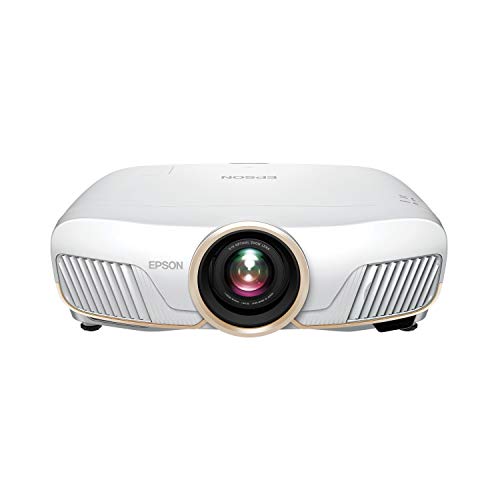
Epson Home Cinema 5050UB — Best for Film Nights
The 5050UB is the theatre species in its most complete form, and its argument is the one dark rooms always reward: black that reads as black. Its three LCD panels work with a dynamic iris to produce contrast that lamp-based rivals pursue and rarely reach, so a candlelit scene or a night exterior holds its layers instead of dissolving into grey. Colour is the second pillar — in its wide mode the machine covers the cinema colour space that HDR films are graded in, and because all three colours are produced simultaneously at full brightness, saturated scenes keep their weight in a way single-chip designs must work harder to match.
The lens completes the instrument. A motorised 2.1x zoom with wide motorised shift in both directions and stored position memories means the projector serves the room’s geometry instead of dictating it, and owners who alternate between widescreen films and 16:9 broadcasts can resize the image from the remote. At 2,600 lumens of equal colour and white brightness it is not a bright-room machine and does not pretend to be; feed it darkness and a decent screen and it produces the most cinematic evenings in this guide.
Its compromises are the species’ compromises, worn openly. The lamp is a consumable with a lifespan to budget for, there is no smart platform worth mentioning, and the built-in sound is an afterthought for rooms that will have real speakers anyway. Gamers with the newest consoles will also find its inputs belong to an earlier generation of refresh rates. None of these touch its purpose. As a fixed installation for film, it remains the reference the rest of this guide is quietly measured against.
- Technology: 3-chip 3LCD, lamp, pixel-shifted 4K
- Brightness: 2,600 lumens, colour equal to white
- Lens: motorised zoom, focus and wide two-axis shift with memories
- HDR: HDR10 and HLG with adjustable tone mapping
- Sound: minimal — plan on external audio
Strengths
- Deepest, most film-like contrast in this guide.
- Motorised lens makes a permanent installation forgiving.
- Wide colour gamut flatters HDR film grading.
Trade-offs
- Lamp replacements are an ongoing ownership cost.
- No built-in streaming; a source device is required.
- Brightness belongs to dark rooms only.
Best for: dedicated theatre rooms and film-first households with proper sound.
Not suited for: bright living rooms or buyers wanting an all-in-one box.

Hisense C2 Ultra — Best Lifestyle Laser
The C2 Ultra is what happens when a television company builds a projector without asking permission from projector tradition. Its triple-laser engine produces 4K images across a huge size range — from a television-like 65 inches to a wall-filling 300 — with Dolby Vision and IMAX Enhanced certification, two badges that matter because they describe how the machine handles the streamed HDR content that dominates modern viewing. An optical zoom, still rare in the lifestyle species, lets it set image size without moving furniture or sacrificing pixels to digital scaling, and the whole optical assembly rides on a gimbal base that tilts the image up a wall or onto a ceiling with a nudge.
Hisense’s television heritage shows in the parts projector brands treat as garnish. The sound, by JBL, is a genuine 2.1-channel system with a built-in subwoofer — the first projector audio in this guide that gives film scores actual low-end presence — and the smart platform is complete, with the major services native and Netflix officially on board. It is also designed with gaming in mind, carrying the low-latency, high-refresh manners console players need, which makes it the lifestyle pick that does not ask players to compromise.
The species’ limits apply: in a fully darkened theatre its black levels, while strong for a laser lifestyle machine, will not match the Epson’s iris-driven depths, and its auto-setup aids work best on clear, pale walls. But judged on the life it is built for — a large, bright, streamed image in a real living room, with sound that needs no accessories — the C2 Ultra is the most complete expression of the lifestyle idea here.
- Technology: triple-laser DLP, pixel-shifted 4K
- Brightness: 3,000 lumens class output
- Image size: roughly 65 to 300 inches, optical zoom
- HDR: Dolby Vision and IMAX Enhanced
- Sound: JBL 2.1-channel with built-in subwoofer
Strengths
- Dolby Vision and IMAX Enhanced suit streamed HDR perfectly.
- Real low-end in the built-in sound; no soundbar required.
- Optical zoom and gimbal make placement unusually flexible.
Trade-offs
- Dark-room blacks trail the dedicated theatre machines.
- Auto setup prefers clear, unobstructed walls.
- Laser speckle can appear on some screen materials.
Best for: living rooms wanting a huge streamed image with television-grade convenience.
Not suited for: black-level purists with dedicated dark theatres.

BenQ TK850i — Best Bright All-Rounder
BenQ built the TK850i for the room most people actually have: a living room that hosts sport on Saturday afternoon and films on Saturday night, with light leaking from somewhere at all times. Its true-4K DLP engine throws 3,000 lumens with the crisp single-chip sharpness that flatters both a football pitch and a nature documentary, and its colour tuning is aimed at Rec.709 accuracy rather than showroom saturation — the image looks correct before it looks dramatic, which is the right priority for a machine that will show more broadcasts than blockbusters.
The “i” in its name is the streaming layer: an Android TV dongle integrated into the design, so the major services run from one remote and the machine behaves like a smart television when nobody wants to think about sources. Practical placement aids — a modest lens shift and a useful zoom — put it ahead of most all-rounders for ceiling or shelf mounting, and its sport-friendly motion handling and punchy highlights make it the pick in this guide we’d choose for a World Cup wall. Its built-in speaker covers commentary and casual viewing; films deserve the soundbar it will happily feed.
As an all-rounder it accepts the middle of every road. Its contrast is good DLP contrast, a clear step behind the Epson’s theatre tuning in the dark; its lamp will eventually need replacing where the lasers will not; and a minority of viewers sensitive to DLP rainbow artefacts should audition any single-chip machine before committing. Within those honest borders, it is the most balanced traditional projector here — the one to buy when the room refuses to specialise.
- Technology: single-chip DLP, lamp, true 4K pixel shifting
- Brightness: 3,000 lumens
- Colour: tuned for Rec.709 broadcast accuracy
- Streaming: Android TV integrated
- Lens: zoom with modest vertical shift
Strengths
- Brightness and sharpness suit sport and lit rooms.
- Accurate, natural colour out of the box.
- Integrated streaming and friendly placement aids.
Trade-offs
- Lamp consumable, unlike the laser picks.
- Dark-room contrast behind the theatre flagship.
- Rainbow artefacts possible for sensitive viewers.
Best for: mixed sport, broadcast and film viewing in ordinary living rooms.
Not suited for: dedicated dark theatres or rainbow-sensitive households.

XGIMI Horizon Ultra — Best for Streamed HDR
The Horizon Ultra’s headline is a format rather than a figure: it was among the first long-throw projectors to carry Dolby Vision, and for households whose viewing is overwhelmingly streamed, that matters more than another few hundred lumens. Dolby Vision’s scene-by-scene instructions tell the projector how each sequence should be tone-mapped, and projectors — which must compress HDR into a fraction of a television’s range — benefit from those instructions more than any other display type. Streamed films on the Horizon Ultra hold highlight detail and shadow shape that HDR10-only rivals approximate with blunter tools.
Its light engine is its second distinction: a dual-light design combining laser and LED, which widens colour while avoiding much of the speckle that pure triple-laser machines can show on some screens, at a rated 2,300 ISO lumens — a measurement standard that tends to flatter less than the alternatives, so treat the figure as honest rather than small. The industrial design is the lifestyle species at its most considered: a fabric-wrapped cabinet that looks like a speaker, a motorised lens cover, and Harman Kardon speakers of genuine quality flanking the experience. Setup is fully automatic — focus, keystone, screen alignment and obstacle avoidance happen while you find the remote.
The trade-offs are the species’ usual ones, plus one of its own. Its contrast in darkness is lifestyle-class rather than theatre-class, its brightness asks for a dimmed rather than sunlit room, and purists who want manual lens control will find automation where a lens shift should be. For the streaming household that wants the projector to disappear into the furniture and the evening to begin with one button, it is the most polished machine in this guide.
- Technology: DLP with dual laser-LED light, pixel-shifted 4K
- Brightness: 2,300 ISO lumens
- HDR: Dolby Vision alongside HDR10 and HLG
- Sound: twin Harman Kardon speakers
- Setup: fully automatic focus, alignment and obstacle avoidance
Strengths
- Dolby Vision tone mapping suits streamed film libraries.
- Dual-light engine gives wide colour with low speckle.
- Furniture-grade design and genuinely good speakers.
Trade-offs
- Brightness needs a dimmed room to shine.
- No manual lens shift; automation does the aiming.
- Dark-room contrast is lifestyle class.
Best for: streaming-first households wanting polish, sound and Dolby Vision.
Not suited for: bright rooms or manual-installation theatre builds.

Optoma UHD55 — Best for Big Screens and Games
Optoma’s UHD55 is the traditionalist’s answer in a guide full of lifestyle experiments: a bright, sharp, lamp-based DLP theatre projector that concentrates on the image and leaves the lifestyle to others. Its high brightness gives it authority on genuinely large screens — the 130-to-150-inch installations where dimmer machines spread themselves too thin — and the DLP engine’s native crispness keeps fine detail legible at those sizes. For the buyer whose plan is a big fixed screen in a room that can be darkened, it offers the most screen per unit of money in this guide.
Its second constituency is players. Optoma has courted gamers across its range, and the UHD55 carries an enhanced gaming approach with low input lag at high-refresh Full HD alongside its 4K60 presentation, so a console evening does not require apologising to the shooter fans in the room. Colour covers the wide gamut modern content expects, HDR support is present and configurable, and the lens offers enough zoom and shift to mount the machine where the room allows rather than where a fixed throw demands.
The traditional format brings traditional homework. Streaming is your responsibility — a stick or console fills the gap the lifestyle machines close natively — the built-in speaker is a courtesy rather than a system, and the lamp joins the consumables list. Buyers who accept those terms get a focused instrument: the biggest, sharpest picture here for the money, in the format home cinema grew up with.
- Technology: single-chip DLP, lamp, pixel-shifted 4K
- Brightness: high-output class for large screens
- Gaming: enhanced low-lag mode at high-refresh Full HD
- Colour: wide-gamut support for HDR content
- Lens: zoom with modest shift for flexible mounting
Strengths
- Brightness holds up on 130-inch-plus screens.
- Sharp DLP detail flatters film and games alike.
- Gaming mode respects console players.
Trade-offs
- No built-in smart platform of consequence.
- Lamp replacement is part of ownership.
- Built-in speaker is for casual use only.
Best for: big fixed screens in darkened rooms, with gaming on the side.
Not suited for: buyers wanting native streaming and strong built-in sound.

JMGO N1S Ultra — Best Portable Flagship
The N1S Ultra takes the lifestyle idea to its logical extreme: a flagship triple-laser projector mounted on a gimbal that rotates a full circle and tilts through a huge arc, so the same machine can throw a film onto the living-room wall tonight, the bedroom ceiling tomorrow and a garden screen at the weekend — refocusing and re-squaring itself each time without a human touching a menu. At a rated 2,800 ISO lumens from its triple-laser engine, it is bright enough for those adventures to be real rather than theoretical, and its Google TV platform travels with it, so the cinema is genuinely one box and one cable.
JMGO’s design intelligence is in the details of movement. The gimbal remembers that projectors get knocked, so its automatic alignment treats repositioning as a routine event rather than a setup ceremony; the handle-friendly form and modest footprint treat shelves and side tables as legitimate homes. Sound is a 20-watt system with Dolby processing that fills a room creditably, and the triple-laser colour reaches well beyond broadcast standards, giving animated films and games a saturation that suits its playful brief.
Portability’s price is paid in the theatre metrics. Contrast in a dedicated dark room will not trouble the Epson, the gimbal’s convenience is wasted in a fixed ceiling installation — where it should not be used at all — and triple-laser speckle can appear on certain screen surfaces, though on the plain walls this machine usually serves it is rarely an issue. Buy it as a moving cinema and it is the most joyful machine in this guide; buy it as a fixed theatre and you have purchased the wrong species again.
- Technology: triple-laser DLP on a 360-degree gimbal, pixel-shifted 4K
- Brightness: 2,800 ISO lumens
- Platform: Google TV built in
- Sound: 20 W system with Dolby processing
- Setup: automatic alignment after every move
Strengths
- Gimbal freedom: wall, ceiling or garden, self-aligned each time.
- Bright triple-laser colour with a complete smart platform.
- One-box cinema that genuinely moves between rooms.
Trade-offs
- Not designed for fixed ceiling installation.
- Dark-room contrast is lifestyle class.
- Possible laser speckle on some screen materials.
Best for: renters, movers and households wanting cinema in several rooms.
Not suited for: permanent theatre installations.
How Do the Six Compare at a Glance?
| Pick | Species | Light source | Streaming | Sound |
|---|---|---|---|---|
| Epson Home Cinema 5050UB | Theatre | Lamp | Bring your own | External assumed |
| Hisense C2 Ultra | Lifestyle | Triple laser | Full platform, Netflix native | JBL 2.1 with subwoofer |
| BenQ TK850i | All-rounder | Lamp | Android TV integrated | Casual built-in speaker |
| XGIMI Horizon Ultra | Lifestyle | Laser-LED dual light | Full platform with Dolby Vision | Harman Kardon pair |
| Optoma UHD55 | Theatre | Lamp | Bring your own | Courtesy speaker |
| JMGO N1S Ultra | Lifestyle portable | Triple laser | Google TV | 20 W Dolby system |
The table’s pattern is the guide’s argument in miniature: the theatre pair trade convenience for image depth, the lifestyle trio trade image depth for convenience, and the BenQ stands between them declining to fully join either camp. Your room and your habits pick the column; the rows then pick themselves.
Which Species Fits Your Evenings?
Run three evenings through your mind. If your ideal is a Friday film with the lights off, curtains drawn and a sound system doing its work, you are a theatre household: the Epson for contrast and colour, the Optoma if the screen is very large or games share the room. If your ideal is a Tuesday series on a 120-inch wall with the kitchen light on and nobody fetching a second remote, you are a lifestyle household: the Hisense for sound and scale, the XGIMI for streamed HDR polish, the JMGO if the screen changes rooms. If your evenings genuinely alternate — sport in daylight-adjacent rooms, films after dark, a console underneath — the BenQ’s all-round balance is not a compromise but a description of your life.
Budget the system, not the box. Theatre machines need a screen and sound that lifestyle machines bundle or forgive; a lifestyle machine on a proper screen still beats a theatre machine on a wrinkled wall. Decide the total spend first, then let the species divide it. And whatever you choose, measure the throw: the distance from lens to screen against the image size you want is the one specification that cannot be negotiated after delivery, and every machine here publishes its geometry for the checking.
One more filter deserves applying before any order: the audience. A household where one viewer is sensitive to DLP rainbow artefacts should lean toward the Epson’s three-panel design regardless of species arguments, because an artefact one person sees on every film is not a preference but a veto. A household with a competitive gamer should let our low-lag shortlist arbitrate. A household with toddlers and a coffee-table machine should think honestly about little hands and hot lenses, and perhaps promote the projector to a shelf. The best projector is a social decision disguised as a technical one, and the households that argue it out in advance are the ones still delighted in year three.
How Do You Get the Best From a 4K Home Projector?
Feed it like a 4K device. That means a source outputting a genuine 4K signal — a current streaming box, console or player — connected with a cable rated for the full bandwidth, because a long bargain cable silently negotiating the picture down is the most common cause of “4K looks soft” complaints. Set the source to output HDR where the projector supports it, and let the projector’s cinema-oriented picture mode do the tone work before reaching for brightness sliders.
Place it like a lens, not a lamp. Centre the image on the screen with position and lens shift where available; use keystone only when geometry leaves no choice, since every degree of digital correction spends resolution. On the lifestyle models, give the auto-setup a fighting chance: a clear wall area, a stable surface, and a few seconds of stillness while it focuses. Then calibrate your expectations to the room — dim what can be dimmed, and remember that a modest grey or ALR screen returns more picture quality than any menu setting.
Maintain it like an appliance. Keep vents clear, clean filters on schedule, and run lamp models in their eco modes for casual viewing to stretch lamp life and quieten fans. Laser owners should still dust the lens gently and keep the gimbal or cabinet free of obstructions. Projectors reward this minimal housekeeping with years of consistency, which is the unglamorous truth behind most “still looks amazing” owner reports.
What Mistakes Do First-Time 4K Buyers Make?
The expensive mistake is species confusion: a theatre projector bought for a bright open-plan room, or a lifestyle laser installed in a bat cave and judged by theatre standards. The second is screen neglect — projecting onto a textured, off-white wall and blaming the machine for colour and sharpness the wall consumed. The third is brightness literalism: comparing headline lumens across brands and measurement standards as if they were the same currency, when colour output and room conditions decide what you will actually see.
Fourth, buyers under-plan sound. A 120-inch image with television-speaker audio is a broken promise the brain notices within minutes; if your pick assumes external sound, budget for at least a competent soundbar from day one. Fifth, they ignore throw distance until the box arrives, discovering that the dream screen size needs a room a metre longer than the one they own. Every one of these mistakes is preventable with a tape measure, an honest description of the room, and the species question this guide opened with.
How Does HDR Actually Work on a Projector?
High dynamic range asks a display to show a wider span between its darkest and brightest elements than standard content, with finer steps in between. Televisions answer with raw peak brightness; projectors, spreading their light across a hundred inches, cannot — so projector HDR is fundamentally an exercise in intelligent compression. The projector reads the HDR signal, decides which parts of each scene deserve its limited range, and maps the rest gracefully. This is why two projectors with identical paper specifications can produce HDR evenings of completely different quality: the difference lives in the tone-mapping decisions, made thousands of times per film.
The formats divide the field in this guide. HDR10, the universal baseline, gives the projector one set of instructions for an entire film, and the machine’s own processing does the rest — the Epson, BenQ and Optoma handle this with adjustable controls that reward an owner willing to set them per source. Dolby Vision, carried by the Hisense and the XGIMI, sends fresh instructions scene by scene, which is why streamed Dolby Vision content on those machines holds both a bright sky’s gradations and a dark coat’s texture in the same shot more convincingly. HDR10+ offers a similar per-scene idea on supported content. None of this makes HDR10 machines obsolete — a well-set theatre projector remains a magnificent film device — but for streaming-led households the per-scene formats are a genuine, visible advantage rather than a badge.
Two practical corollaries follow. First, the room is part of the HDR system: ambient light lifts the black floor and quietly deletes the bottom of the range the projector is working to preserve, which is why the same machine’s HDR impresses at midnight and merely satisfies at dusk. Second, screen gain is a tone-mapping decision too — a higher-gain screen returns brightness that flatters HDR highlights in a dim room, while an ALR screen protects the black floor in a lit one. Buyers who treat HDR as a projector feature alone will always be faintly disappointed; buyers who treat it as a room system get the format they paid for.
What Screen Size Should You Actually Aim For?
The instinct is maximal — the largest image the wall accepts — and the physics argue for restraint. Brightness per unit area falls as the image grows, so a projector that is thrilling at 100 inches can be merely adequate at 150, and the lifestyle models’ convenience features cannot repeal that arithmetic. The useful question is not how big the wall is but how far away the seats are: the classic guidance fills roughly thirty to forty degrees of your field of view, which for a sofa three metres from the screen lands between about 100 and 120 inches — large enough for cinema, small enough for every pick here to stay bright and sharp.
Resolution interacts with size in the viewer’s favour. At those geometries, pixel-shifted 4K resolves beyond what the eye can interrogate from the seat, which is why this guide spends so little time on the native-versus-shifted argument: at honest sizes and distances, it is settled by your sofa’s position. Push the front row closer or the screen past 140 inches and the theatre machines’ lens quality and the Optoma’s brightness become the deciding factors, in that order.
Renters and multi-use rooms should also weigh the disappearing act. A fixed screen is a commitment a landlord may not share; the lifestyle projectors exist partly for households that project onto a wall by night and reclaim the room by day. In those homes the “screen” decision is really a paint decision — the smoothest, most neutral wall finish available — and the JMGO and XGIMI auto-setup features earn their keep every single evening. Size, in other words, is a lifestyle decision wearing a technical costume, and it should be made by the room’s life first and the projector’s brochure second.
How Should You Handle Sound With a Big Picture?
A 120-inch image with small sound is the most common self-inflicted wound in home projection, because the brain reads scale from both senses and punishes the mismatch. The picks divide honestly on this. The lifestyle machines — Hisense with its subwoofer-equipped JBL system, XGIMI with its Harman Kardon pair, JMGO with its 20-watt Dolby setup — can carry a room alone for series, sport and most films, and their owners may never buy another speaker. The theatre machines assume you will: the Epson and Optoma effectively require a soundbar or receiver, and the BenQ’s built-in speaker is a courtesy for casual viewing.
For external sound, placement matters more than expenditure. Dialogue must come from the screen’s direction, so a soundbar under the image beats a better speaker behind the sofa every time. Projector owners with ceiling installations should plan the audio run with the video run — an HDMI connection with audio return from the projector’s position, or a source that feeds the sound system before the picture travels. Wireless options exist on some models for rear speakers or a Bluetooth speaker in a pinch, with the caveat that lip-sync deserves a check on the first evening, not the fifth.
The budget truth is that sound is where a modest sum does the most visible — audible — work. A household choosing between the next projector tier up and a competent soundbar to accompany this tier should choose the soundbar almost every time. The picture will be ninety-five percent as good; the evening will be twice as convincing.
There is a hierarchy worth memorising: dialogue clarity first, because every genre depends on it; then low-frequency support, which gives scale to action and warmth to music; then surround effects, which are delightful and genuinely last. The Hisense’s built-in subwoofer is notable precisely because lifestyle projectors usually stop at the first tier. Owners of the theatre picks who start with a good two-channel or soundbar setup and add a subwoofer later are following the hierarchy in the right order, and will hear each step land.
Ceiling Mount, Shelf or Coffee Table — Does Placement Change the Pick?
More than any other decision, because placement is where the species’ philosophies become physical. A ceiling mount is a declaration of permanence: it suits the theatre machines, whose lens shift and zoom exist to be dialled in once and left for years, and it frees the room’s furniture from the projector’s geometry entirely. Its costs are installation effort, a long cable run planned properly, and a machine that will be judged purely as an image engine — which is precisely the judgement the Epson and Optoma welcome.
The shelf or media-console position is the middle path the BenQ was built for: close enough to the screen wall to keep cables civilised, high enough to clear the audience, and served by just enough lens adjustment to square the picture without digital correction. It is also the position from which a projector can be taken down for a garden evening or a holiday rental, a flexibility ceiling owners quietly envy twice a year.
The coffee table and sideboard belong to the lifestyle species, and they invert the priorities: the machine must focus itself after every nudge, square itself after every cleaning day, and look acceptable while doing nothing at all. That is why the Hisense rides a gimbal, the XGIMI wears fabric, and the JMGO treats repositioning as its core feature. Buyers should choose the placement before the projector, because each position has a right answer in this guide and three wrong ones — and the wrong ones fail not on picture quality but on the daily friction of living with them.
Which of These Will You Still Be Happy With in Five Years?
Longevity in this category is decided by light source and by software, in that order. The laser and dual-light machines — Hisense, XGIMI, JMGO — will produce essentially the same brightness in year five as in year one, with no consumable decision ever arriving; their risk is the slower one of smart platforms ageing, mitigated by the fact that a streaming stick can renew any of them for the price of a pizza night. The lamp machines will ask for a lamp or two across five years and will reward the owner who budgets for them with undiminished theatre performance; the Epson’s contrast advantage, notably, does not expire.
The second longevity factor is the room you will live in, not the one you have. Households expecting to move, rent or reconfigure should weight the portable and console-friendly picks heavily — a ceiling-installed theatre is a treasure in a forever home and a complication in a two-year lease. Households settled for the long term can amortise installation effort across a decade and should let the theatre species’ image quality win. The most future-proof purchase is not the most advanced machine; it is the machine whose assumptions about your life remain true the longest.
Finally, buy the ecosystem you can support. Every pick here comes from a maker with a real service network and a continuing projector business — a criterion that quietly eliminated a tail of spectacularly specified newcomers from this guide. A projector is a long-lived appliance with a lens, a light source and fans; the company behind it is part of the product.
What Should Your First Weekend With the New Projector Look Like?
Resist the urge to premiere it with the biggest film in your library. The first session should be a calibration disguised as a normal evening: a series episode you have seen before, a quarter of a match, ten minutes of a game if games matter to you. Familiar content is a measuring instrument — you know what the presenter’s skin should look like, how dark that drama’s night scenes run, how the pitch’s green behaves — and deviations announce themselves immediately against memory. Run through the picture modes on that material and settle on the cinema-leaning one; showroom modes exist to win comparisons under shop lights and will make your living room look like a shop.
Then do the boring checks while the return window is wide open. Display a plain white field and a plain grey one: look for dust shadows in the light path, colour shading across the frame, or a corner that refuses to focus with the rest — lens and panel faults declare themselves on flat fields and hide in films. Walk the image’s edges for straightness and confirm your keystone is at zero or your auto-alignment has finished its work; a picture squared by geometry stays sharp, a picture squared by processing quietly spends resolution. Listen, from your actual seat, during a whispered scene: fan noise that is inaudible in a showroom can be a presence at midnight, and eco modes that halve it usually cost less picture than you fear.
Check the chain, not just the machine. Confirm your streaming source is truly outputting 4K and HDR — buried menus default to safety on many devices — and that the cable between source and projector sustains it without dropouts, sparkles or handshake sulks when you switch inputs. If a receiver or soundbar sits in the path, switch everything off and on twice; HDMI handshakes that work once and fail on Tuesdays are a cable or a setting, and both are cheaper to fix in week one than month six.
Finish by writing down what you set. Picture mode, HDR setting, lamp or laser mode, keystone state, throw distance — a note on your phone turns a future accident (a firmware reset, a curious guest with the remote) from a re-calibration project into a two-minute restoration. Owners who do this weekend’s work describe their projectors years later as “just always right”; owners who skip it describe the same machines as temperamental. The difference is rarely the projector.
Final Recommendation
If one machine must be named for the median household — mixed content, a living room that dims, streaming at the centre — the Hisense C2 Ultra earns it: triple-laser brightness, Dolby Vision for the content people actually watch, sound that needs no accessories and an optical zoom that respects furniture. Film devotees with a dark room should step sideways to the Epson 5050UB and never look back; sport-and-everything households to the BenQ TK850i; the very large screen to the Optoma; the design-conscious streamer to the XGIMI; and anyone whose cinema must move house or room to the JMGO. The best 4k home projectors are no longer a single ladder but three good answers — and the right one is the one that matches the evenings you already live.
Buy it, set it up on a weekend afternoon rather than a Friday night, and give it a week of ordinary evenings before judging. Projectors reveal themselves across content, not in a premiere, and every machine in this guide has earned its place across exactly that span of ordinary evenings.
Frequently Asked Questions
Is pixel-shifted 4K noticeably worse than native 4K?
On film content at normal seating distances, no — the shifted image carries the full 4K frame’s information and resolves detail far beyond 1080p. Native 4K projection exists at far higher prices and shows its edge mainly on test patterns and desktop text. Spend the difference on the screen and the room first.
Lamp, laser or LED — which light source should I choose?
Laser and LED sources last for tens of thousands of hours, switch on instantly and hold brightness, which is why the lifestyle models and newer flagships use them. Lamps cost less up front and remain competitive in theatre machines, but they dim over time and need periodic replacement. Heavy users benefit most from laser; occasional film-night households can happily own a lamp.
Do I need a screen, or is a wall enough?
A smooth, pale wall is a workable start, and the lifestyle models are designed to forgive one. A proper screen — fixed-frame for theatre machines, ALR for bright rooms — improves contrast, colour and sharpness more than stepping up a model would. Treat the screen as part of the projector purchase, not an accessory for later.
Can these projectors replace a television entirely?
The lifestyle picks come close: native streaming, real speakers and instant-on lasers make them television-like, especially the Hisense and XGIMI. Theatre machines cannot and should not — they assume darkness and external sound. Even the lifestyle models prefer dimmed light for films; for all-day news and sport in a sunlit room, a large television remains the pragmatic tool.
How important is Dolby Vision on a projector?
More than on a television, counterintuitively. Projectors must compress HDR aggressively, and Dolby Vision’s scene-by-scene instructions make that compression smarter. If your viewing is mostly streamed films and series, the Dolby Vision picks here — Hisense and XGIMI — hold a genuine advantage. Disc-based and broadcast viewers will care less.
What about gaming on these machines?
All six handle casual gaming well. Players who care about response should look hardest at the Hisense C2 Ultra, which was designed with console play in mind, and the Optoma UHD55’s enhanced gaming mode. Our dedicated low-input-lag guide covers the specialist machines built purely for response time. For most households the honest dividing line is genre: story games and racers forgive almost anything here, while fighting games and competitive shooters deserve the specialists.
How loud are home projectors, really?
Brightness is bought partly with fan noise, and every model here is quieter in its eco or cinema modes than at full output — typically the difference between a sound you notice in silent scenes and one you forget entirely. Theatre machines in dark rooms run their gentler modes by default; bright-room use at maximum output is where noise lives. If your seat is within a couple of metres of the machine, weight the laser models’ efficient modes and the eco settings in your decision.
Can I use a 4K projector for work presentations or documents?
You can, and the bright all-rounders handle slides and spreadsheets creditably, but fine text at 100 inches is where pixel-shifted 4K shows its working — readable, not razor sharp. For occasional documents it is fine; for a daily home-office display, a large monitor remains the better tool and the projector should stay an entertainment purchase.
What is the one accessory worth buying on day one?
The screen, if your room allows one — it returns more visible quality than any other single spend. If a screen is impossible, a full-bandwidth HDMI cable of the right length is the unglamorous winner: a surprising share of “projector problems” are a bargain cable quietly throttling the signal between a 4K source and a 4K machine.
Related Guides
Brand loyalists should read our guide to the best 4K Epson home cinema projectors, where one maker’s whole ladder is compared rung by rung. If your room fights daylight, our roundup of 4K projectors for bright rooms goes deeper on lumens and screens, and console players will find their shortlist in our guide to 4K projectors with low input lag.



[…] the wider field beyond one brand, see our roundup of the best 4K home projectors across every technology, and if response time matters to your evenings, our guide to 4K projectors with low input lag […]