What's inside
- Key Takeaways
- Quick Picks
- How Did We Choose These Short-Throw Lasers?
- What Does Short Throw Actually Change About Ownership?
- How Do the Six Compare Where They Sit?
- Which Screen Makes a Short-Throw Laser Honest?
- How Do You Install a UST Projector Without Losing an Afternoon?
- What Mistakes Do Short-Throw Buyers Keep Making?
- Single Laser, Triple Laser or 3LCD Laser — Which Engine Suits You?
- Can a Laser TV Actually Game?
- What Is Daily Life With a Laser TV Actually Like?
- How Much Brightness Does a Laser TV Need at 100 to 150 Inches?
- Laser TV or an Actual Large Television — Which Should You Buy?
- How Do You Solve the Centre-Channel Problem in a UST Setup?
- How Do These Machines Handle Sport and Everyday Broadcasts?
- Final Recommendation
- Frequently Asked Questions
- Related Guides
As an Amazon Associate I earn from qualifying purchases. This post may contain affiliate links at no extra cost to you.
widgetverdict.com is reader-supported. When you buy through links on our site, we may earn an affiliate commission.
Where to buy: Each of the six projectors below is a current model sold new through Amazon. With ultra-short-throw machines, check the listing’s throw figures against your console depth before ordering — these projectors are placed in inches, not metres, and the wrong cabinet depth is the most common failed installation in the category.
The best 4k laser projectors short throw designs exist to solve a single grudge: the room-length tax that ordinary projectors charge. A conventional machine needs metres of throw, a mount or a shelf, cables crossing the room and a clear corridor of air that people keep walking through. A laser short-throw machine — five of the six here are ultra-short-throw models that sit on a media console inches from the wall — abolishes the corridor entirely, and replaces the lamp with a laser that switches on like a television and holds its brightness for years. The sixth pick, BenQ’s TK710STi, makes the same argument from a coffee table: a true short-throw lens, a laser heart, and a metre or so of air between it and a very large picture.
Laser light is the other half of the proposition, and it is not merely about longevity. Lasers reach full brightness almost instantly, dim with precision for contrast work, and — in the triple-laser designs that dominate this guide — produce colour gamuts wider than broadcast standards ever contemplated. Paired with the ambient-light-rejecting screens designed for their geometry, these machines are the closest projection has come to being a television you buy by the hundred inches. This guide compares the five UST flagships that define the category and the one tabletop rebel, on the things that separate them in a real room: placement geometry, screen pairing, built-in sound, smart platforms and dark-room manners.
Key Takeaways
- Five picks are ultra-short-throw laser TVs that live on a console inches from the wall; the BenQ TK710STi is a short-throw laser for coffee-table placement instead.
- Triple-laser models (Formovie, Hisense, AWOL-class designs) deliver the widest colour; the Epson’s 3LCD laser counters with the highest brightness and zero rainbow artefacts.
- An ALR screen made for UST geometry is not an accessory in a lit room — it is half the product, rejecting ceiling light and restoring contrast.
- Placement is measured in inches: console depth, screen height and the gap behind the unit decide your image size before any setting does.
- Built-in sound is a genuine differentiator here, from the Formovie’s Bowers & Wilkins system to Samsung’s television-grade audio.
Quick Picks
| Pick | Badge | Why it is here |
|---|---|---|
| Formovie Theater | Best Picture Quality | Triple-laser colour and Dolby Vision that keep winning laser-TV comparisons, with Bowers & Wilkins sound. |
| Epson EpiqVision LS800 | Best for Bright Rooms | 4,000 lumens of 3LCD laser light — the output champion for living rooms that refuse to dim. |
| Hisense PX3-PRO | Best for Gaming | Triple laser, Dolby Vision and a 240Hz high-refresh path designed with Xbox play in mind. |
| BenQ TK710STi | Best Tabletop Short Throw | A laser short-throw lens for coffee tables, with 4ms-class gaming response and Android TV. |
| Samsung The Premiere LSP7T | Best Television Manners | Samsung’s Tizen platform and 2.2-channel sound make it the most TV-like ownership experience. |
| Samsung The Premiere LPU7D | Best Samsung Flagship | The newer Premiere: brighter laser, Gaming Hub and AI-assisted picture in the same elegant cabinet. |
How Did We Choose These Short-Throw Lasers?
We started with geometry, because in this category geometry is destiny. Each candidate had to produce at least a 100-inch image from a genuinely short distance — under half a metre for the UST models — and had to do it with a fixed lens whose placement tolerances a normal media console can satisfy. Machines that call themselves short throw while demanding a metre and a half were judged as what they are: standard projectors with marketing. The BenQ is the honest exception that proves the rule, a true short-throw lens for the tabletop niche, included because some rooms have a coffee table but no suitable console wall.
Light came second. Every pick uses a laser source — that was the keyword’s demand and the category’s direction — but the lasers differ in kind. Single-laser designs use a blue laser with a phosphor or colour wheel; triple-laser designs fire separate red, green and blue lasers and reach far wider colour. We weighed colour gamut against brightness honesty and against laser speckle, the faint shimmer triple-laser machines can show on some screen surfaces, because the right choice depends on whether your room rewards saturation or raw output.
Third came the television test. A UST projector replaces a TV, so it was judged as one: does it stream natively, sound complete, switch on fast, and behave itself with a games console and a soundbar? The picks that passed are the ones whose owners stop saying “projector” within a month. Dark-room contrast was measured too — it decides film nights — but it was not allowed to veto a machine whose bright-room and convenience credentials were the point of its existence.
What Does Short Throw Actually Change About Ownership?
Almost everything except the picture’s size. The projector leaves the ceiling and the rear shelf and joins the furniture at the front of the room, which means the HDMI runs shrink to the length of a soundbar cable, the source devices sit beside it in the console, and nobody’s head ever crosses the beam again. Installation becomes furniture arrangement: the screen’s height and the console’s depth set the image size, because the lens is fixed and the throw ratio is extreme — moving a UST projector a few centimetres changes the picture by many inches, which is why owners measure twice and then leave the unit precisely alone.
The trade is surface discipline. Light leaving the lens at such a shallow angle skims across the screen, and every wave, seam or texture in that surface is magnified into visible distortion. A fixed-frame screen — ideally an ALR design whose lenticular surface accepts light from below and rejects it from above — is effectively mandatory for the best results, and a wavy pull-down screen is this category’s one unforgivable pairing. Walls can serve if they are genuinely flat and smooth; most are flatter in the owner’s imagination than in the projector’s opinion.
Sound changes too, in the owner’s favour. A television-position projector sits exactly where a soundbar or its own speakers want to be — at the screen, facing the audience — so the built-in audio systems on these machines, several of which are serious, project dialogue from the picture’s location. The classic projector problem of voices arriving from a box behind the sofa simply evaporates, and with it goes one of the oldest compromises in home cinema.

Formovie Theater — Best Picture Quality
The Formovie Theater built its reputation in the most public way a projector can: by repeatedly winning the laser-TV shootouts where the category’s flagships are compared blind on the same screens. The reason is colour. Its triple-laser engine — separate lasers for red, green and blue, using ALPD laser-phosphor hybrid technology — covers a colour gamut far beyond broadcast standards, and it pairs that width with Dolby Vision, so streamed HDR arrives with scene-by-scene instructions the machine is unusually able to honour. Skin tones stay human while neon goes electric; that combination is the whole art of projector colour, and the Theater performs it better than anything else in this guide.
Brightness is specified at a level suited to dimmed and moderately lit rooms rather than sunlit ones, and its contrast — deep for the UST class, aided by the laser’s dimming control — makes it the film-night choice among the console machines. The sound system, designed with Bowers & Wilkins, is the other half of its flagship claim: a genuine two-channel system with the clarity and low-end support to make a soundbar optional for most content, which in this category is a sentence rarely written. Android TV provides the streaming layer.
Its disciplines are the category’s disciplines, plus one of temperament. The fixed lens demands the precise console placement all UST machines require, an ALR screen is effectively part of the purchase in any room with light in it, and triple-laser speckle can appear on certain screen materials — a pairing question to settle with the screen choice, where the right surface makes it a non-issue. Buyers whose priority is the finest picture a console can produce, in a room that can be dimmed for films, have their answer here.
- Technology: triple-laser DLP with an ultra-short lens
- Colour: very wide gamut beyond broadcast standards
- HDR: Dolby Vision with HDR10 and HLG
- Sound: Bowers & Wilkins designed system
- Platform: Android TV built in
Strengths
- The most accomplished colour and HDR picture in the UST class.
- Built-in sound good enough to retire the soundbar question.
- Dolby Vision flatters the streamed content most owners watch.
Trade-offs
- Brightness suits dimmed rooms more than bright ones.
- Needs an ALR screen to star in lit spaces.
- Possible laser speckle on unsuitable screen surfaces.
Best for: film-first living rooms that dim for movies and value colour above all.
Not suited for: sunlit rooms or buyers who skip the ALR screen.
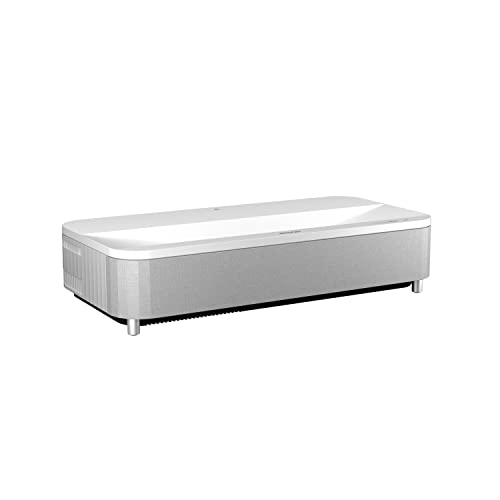
Epson EpiqVision LS800 — Best for Bright Rooms
The LS800 is the output extremist of the UST world, and its specification explains its existence in one number: 4,000 lumens, delivered by three LCD panels so that the colour brightness equals the white — the full figure survives contact with a saturated football pitch or an animated film, which is where lesser UST machines quietly thin out. In a living room with daylight ambitions, paired with an ALR screen, it produces the most television-like bright-room image in this guide, at sizes up to well beyond what any comparably priced television attempts.
Epson’s 3LCD design brings two further gifts. There are no rainbow artefacts for sensitive viewers, ever, because colour is never sequential; and there is no laser speckle, because there is no coherent laser light striking the screen directly in the DLP manner — the LS800’s laser feeds a phosphor system, so its image has the calm surface that triple-laser owners occasionally envy. Its Yamaha-designed 2.1-channel speakers are the strongest built-in sound in this guide alongside the Formovie’s, and Android TV completes the television impersonation.
The counterweights are contrast and colour width. In a darkened room its black levels belong to the bright-living-room class rather than the Formovie’s film class, and its colour gamut, while accurate, does not chase the triple-laser machines’ extremes. It is also, like every UST here, a fixed-geometry device whose console placement must be exact. For the room it was designed for — bright, social, television-replacing — those are the right trades, made openly.
- Technology: 3-chip 3LCD laser, ultra-short-throw lens
- Brightness: 4,000 lumens, colour equal to white
- Sound: Yamaha 2.1-channel built-in system
- Platform: Android TV built in
- Image: up to 150-inch class from inches away
Strengths
- Highest usable brightness in the UST category.
- No rainbows, no speckle — a calm, solid image for everyone.
- Excellent built-in sound and complete streaming.
Trade-offs
- Dark-room contrast trails the triple-laser film picks.
- Colour gamut is accurate rather than extreme.
- Fixed geometry demands precise console placement.
Best for: bright living rooms replacing a big TV with a 100-inch-plus image.
Not suited for: dedicated dark theatres chasing ultimate blacks.

Hisense PX3-PRO — Best for Gaming
Hisense designed the PX3-PRO as the UST for households where a console lives in the console, and it shows in the specification that matters: a high-refresh path up to 240Hz at Full HD alongside its 4K presentation, with the low input lag that makes a projector a gaming display rather than a gaming compromise. It carries an explicit designed-for-Xbox brief, Dolby Vision and IMAX Enhanced for its film duties, and a triple-laser engine rated at 3,000 lumens that covers the wide colour gamut the technology is known for — across image sizes from 80 to 150 inches.
As a laser TV it is complete in the modern Hisense manner: Google TV with the major services native, Dolby Atmos support for its sound story, and a design that sits handsomely on a console. Its contrast figure and laser dimming give film nights real depth for the class, and its brightness is honestly matched to ALR-screen living rooms. Among the UST flagships it is the one that treats gaming as a headline rather than a footnote, which in households where the projector doubles as the biggest gaming screen in the house is the correct hierarchy of features.
The cautions are shared with its triple-laser siblings: choose the screen surface with speckle in mind, expect to place the unit with millimetric patience, and understand that its gaming brilliance is delivered at Full HD high-refresh — the 4K path is for films and 60Hz play. None of that dents its position. If the console under your screen contains a games console, this is your UST.
- Technology: triple-laser DLP, ultra-short-throw lens
- Brightness: 3,000 lumens class
- Gaming: up to 240Hz at Full HD, designed for Xbox
- HDR: Dolby Vision and IMAX Enhanced
- Platform: Google TV built in
Strengths
- The gaming UST: high refresh and low lag by design.
- Triple-laser colour with Dolby Vision for films.
- Complete Google TV platform and Atmos support.
Trade-offs
- High-refresh gaming is a Full HD path, not 4K.
- Screen choice must respect triple-laser speckle.
- Precise placement, as with all fixed UST lenses.
Best for: households where the big screen is also the gaming screen.
Not suited for: buyers indifferent to gaming who’d trade it for film contrast.

BenQ TK710STi — Best Tabletop Short Throw
The TK710STi is the dissenting pick, included because “short throw” has a second legitimate meaning: a lens that fills a screen from a coffee table roughly a metre away, in rooms where no console wall exists or where the projector must be put away after the match. Its laser light source — 3,200 lumens of it — makes it a true member of this guide rather than a guest, and its throw ratio turns small rooms, rented flats and gaming dens into big-screen spaces without any furniture being built around the machine.
BenQ’s gaming DNA is the second reason it earns its place. The published input lag reaches the 4ms class at high-refresh Full HD, with a proper low-lag 4K60 path for console play, so the same machine that projects the film can host the tournament. Android TV with licensed Netflix streaming is built in, the speakers are honest for a portable-format box, and HDR10 and HLG support covers the broadcast and streamed bases. As a single purchase for a room that must stay a room, it has no real rival in this guide.
Its compromises are positional rather than optical. A tabletop projector lives where life happens — it will be nudged, its cable will be tripped towards, and its keystone will be tempted into service when the table is not square to the wall; disciplined owners align it properly and enjoy the sharpness that digital correction spends. Its contrast and colour are living-room grade rather than UST-flagship grade. Accept the tabletop terms and it is the most flexible laser short throw here; demand console permanence and the five machines around it are your shortlist.
- Technology: DLP with laser light source, short-throw lens
- Brightness: 3,200 lumens
- Gaming: 4ms-class input lag at high-refresh Full HD
- Streaming: Android TV with Netflix built in
- Placement: roughly 100 inches from about a metre
Strengths
- Big laser picture from a coffee table; packs away after.
- Genuinely low input lag for console gaming.
- Complete streaming with no extra hardware.
Trade-offs
- Tabletop placement invites nudges and keystone temptation.
- Contrast is living-room grade, not flagship UST grade.
- Built-in sound covers casual viewing only.
Best for: small rooms, renters and gaming dens without a console wall.
Not suited for: permanent laser-TV installations.

Samsung The Premiere LSP7T — Best Television Manners
Samsung’s first Premiere makes a different flagship argument: that a laser TV should behave exactly like a television, and that the world’s largest TV maker knows how. Its Tizen platform is the same one Samsung’s televisions run — the same apps, the same interface, the same voice assistants — so the learning curve for a household arriving from a Samsung TV is zero. Its 2.2-channel built-in sound, with the drivers arranged to throw audio at the audience from the screen’s position, is television-grade in a way projector audio rarely attempts, and the cabinet’s fabric-fronted design is furniture first and electronics second.
The picture is a single-laser design — a blue laser with colour produced through a wheel — which places it a step behind the triple-laser machines in colour width, and its brightness suits dimmed living rooms and ALR pairings rather than daylight combat. In exchange it offers the calm, speckle-free image that single-laser designs deliver, HDR10+ support in Samsung’s preferred format, and image sizes up to 120 inches from the console position all Premiere models share. For film nights in a dimmed room it remains a deeply civilised machine.
Its position in this guide is the connoisseur’s convenience pick: buyers who value platform polish, sound and design over the last degree of colour gamut will find it the easiest UST to live with, while picture maximalists should look at the Formovie or its own newer sibling below. Samsung’s service network and television-grade fit and finish are part of the product in a category where some rivals are startups wearing flagship clothes.
- Technology: single-laser DLP behind an ultra-short-throw optic
- Image: up to 120 inches from the console
- Sound: built-in 2.2-channel system
- Platform: Samsung Tizen with voice assistants
- HDR: HDR10+ support
Strengths
- Television-identical platform and behaviour.
- Strong built-in sound from the screen’s position.
- Furniture-grade design and Samsung support.
Trade-offs
- Single laser: colour width behind triple-laser rivals.
- Brightness prefers dimmed rooms and ALR screens.
- Newer sibling offers more light for similar money logic.
Best for: Samsung households wanting a laser TV that behaves like their TV.
Not suited for: colour-gamut maximalists or bright-room buyers.

Samsung The Premiere LPU7D — Best Samsung Flagship
The LPU7D is the Premiere line grown up: a newer laser engine with more output than the LSP7T, the same elegant low cabinet, and Samsung’s current smart-TV arsenal — including its Gaming Hub, which gathers cloud gaming and console inputs into one screen, and AI-assisted picture processing that adjusts the image to content and room with a television’s confidence. For the household that wants the Samsung experience at its current best, this is the Premiere to buy.
The gains over its sibling are practical rather than revolutionary, which suits the product. More brightness widens the range of rooms and hours it can serve, the gaming layer acknowledges where big screens actually spend their evenings, and the platform is the newest Tizen with the longest support runway. Its sound continues the line’s television-grade approach, and its HDR support follows Samsung’s HDR10+ allegiance — buyers whose libraries are Dolby Vision-centric should note the absence, the one spec-sheet line where the Formovie and Hisense clearly counter.
As with the LSP7T, colour width from its laser design sits behind the triple-laser flagships, and the UST placement disciplines apply in full. What the LPU7D sells is the most complete television replacement in this guide from the company that defines television replacement — a machine whose picture is very good, whose behaviour is flawless, and whose ownership involves the least projector-thinking of any pick here.
- Technology: laser-driven DLP, ultra-short throw, 2024 design
- Image: up to 120-inch class
- Platform: Tizen with Samsung Gaming Hub
- Picture: AI-assisted processing and room adaptation
- Sound: television-grade built-in system
Strengths
- The most polished, current Samsung laser TV experience.
- Brighter than the LSP7T; serves more rooms and hours.
- Gaming Hub treats consoles and cloud play as first-class.
Trade-offs
- No Dolby Vision; HDR10+ is Samsung’s chosen path.
- Colour width behind the triple-laser flagships.
- Premium pricing for polish as much as picture.
Best for: buyers wanting the definitive Samsung laser TV with gaming on board.
Not suited for: Dolby Vision library owners or gamut-first film fans.
How Do the Six Compare Where They Sit?
| Pick | Throw type | Laser type | Headline strength | Watch-out |
|---|---|---|---|---|
| Formovie Theater | Ultra short | Triple laser | Colour and Dolby Vision | Wants a dimmed room |
| Epson LS800 | Ultra short | 3LCD laser | 4,000-lumen brightness | Living-room contrast class |
| Hisense PX3-PRO | Ultra short | Triple laser | 240Hz gaming path | Screen speckle pairing |
| BenQ TK710STi | Short (tabletop) | Laser | 4ms-class lag, packs away | Placement discipline |
| Samsung LSP7T | Ultra short | Single laser | Tizen manners, 2.2ch sound | Colour width |
| Samsung LPU7D | Ultra short | Laser | Gaming Hub, newest platform | No Dolby Vision |
The table reduces to three questions. How bright is your room — the Epson answers the bright ones. What do you watch — Dolby Vision libraries point to the Formovie or Hisense, Samsung households to the Premieres. And where will it live — a console for five of them, a coffee table for the BenQ. Answer those and the shortlist builds itself.
Which Screen Makes a Short-Throw Laser Honest?
For UST machines the screen is not an upgrade but a component. The lenticular ALR screens built for this geometry carry a sawtooth surface that accepts light arriving from below — the projector’s angle — and rejects light arriving from above and the sides, which is where ceiling lights and windows live. The effect in a lit room is not subtle: blacks that were grey become plausible, colours regain their saturation, and the laser-TV illusion completes itself. In a room you can truly darken, a good matte white fixed screen returns a slightly brighter, more uniform image and costs less — the honest choice depends on your ceiling lights, not on fashion.
Two pairing cautions deserve emphasis. Triple-laser projectors can shimmer — speckle — on some ALR surfaces, an interaction between coherent laser light and screen texture; the screen makers publish compatibility guidance, and matching a Formovie or Hisense to a screen intended for triple-laser use removes the issue. And size is fixed by furniture: a UST projector’s distance from the wall sets the image diagonal, so the screen size must be chosen with the console’s depth in the same measurement session. Buy the screen and the console position as one decision, because physically they are one.
The BenQ plays by different rules — a standard matte screen or a smooth wall at its metre of distance, with the usual warning that short-throw lenses magnify surface flaws more than long-throw ones. Even there, a modest fixed screen outperforms the wall it replaces by a margin owners consistently describe as the cheapest upgrade they ever made.
How Do You Install a UST Projector Without Losing an Afternoon?
Work backwards from the screen. Mount or place the screen first, at the height your seating wants — the centre of the image around seated eye level is the comfortable target — and only then position the projector, because the machine’s placement is derived from the screen, never the reverse. The manufacturer’s placement chart gives the two numbers that matter: the gap between the projector’s rear and the wall, and the height difference between the projector’s base and the screen’s bottom edge. Set the console to satisfy the second number before you obsess over the first; shims and the unit’s adjustable feet exist for the final millimetres.
Align with geometry, not with the keystone menu. Slide the unit until the image’s sides are parallel, raise or lower feet until the top edge is level, and rotate the whole cabinet by degrees too small to feel until the rectangle is true. Digital keystone on a UST is a last resort that costs sharpness across a very wide image; the patience of physical alignment is repaid every evening. Then connect sound with the same care — if a soundbar joins the setup, it belongs below the screen and must not block the projector’s upward throw, a spacing detail that has ruined more first evenings than any setting.
For the BenQ, the ritual is shorter but stricter in one respect: the table must be stable and the alignment done with the lens’s own adjustments before keystone is touched, and the cable should be routed where feet will never find it. In both geometries, finish by saving a photograph of the final placement measurements on your phone. Consoles get moved for cleaning; the photograph turns restoration into minutes.
Leave slack in the plan for the screen’s own installation. A fixed-frame ALR screen arrives as a frame and a tensioned membrane, and assembling it is a two-person, clean-hands, unhurried hour — the membrane’s surface is the product, and a fingerprint or a crease at this stage is forever. Hang it, check it against a plain white image from the projector for uniformity, and only then fine-tune the projector’s position to its final home. Owners who reverse that order — projector first, screen improvised later — spend their first month watching a marvellous engine project onto a compromise.
What Mistakes Do Short-Throw Buyers Keep Making?
The first is console depth: ordering a cabinet too shallow for the image size they want, then discovering the projector must hang off its front edge to reach 120 inches. The second is screen optimism — pairing a flagship UST with a wavy pull-down screen and blaming the projector for geometry the surface invented. The third is skipping the ALR screen in a lit room and concluding that laser TVs are washed out, when the room, not the laser, did the washing.
Fourth, buyers place a soundbar where it eclipses the upward throw, or crowd the projector against the wall so its cooling and connections suffer. Fifth, tabletop short-throw owners lean on keystone as a lifestyle, quietly spending the sharpness they paid for. Every one of these is a measurement or a placement decision made once, carelessly, and paid for nightly — which is why this guide keeps returning to the tape measure as the category’s most important accessory.
Single Laser, Triple Laser or 3LCD Laser — Which Engine Suits You?
The six picks run three different laser architectures, and the differences are visible from the sofa. Triple-laser designs — the Formovie and the Hisense — fire separate red, green and blue lasers, and their reward is colour volume: the deepest reds, the most electric greens, a gamut that exceeds the cinema reference and gives HDR content a saturation headroom the other engines cannot reach. Their tax is speckle management and, usually, a brightness ceiling below the Epson’s, because each laser’s output must be balanced against the others.
Single-laser designs — the Samsungs — send blue laser light through a phosphor or colour system. Colour width narrows to something closer to broadcast standards, which most content never exceeds anyway, and in exchange the image gains a calm, uniform surface with no speckle conversation at all, plus the manufacturing maturity of a simpler light path. For series, sport and streamed films graded inside broadcast gamuts, the single-laser picture is not a compromise viewers can identify blind; it is the triple-laser machines’ extra width that only certain content — wide-gamut HDR films, vivid animation — actually spends.
The Epson’s 3LCD laser is the third philosophy: laser light feeding three LCD panels, colour produced in parallel rather than sequence. It delivers the guide’s highest brightness with colour output equal to its white figure, immunity to rainbow artefacts, and no speckle, at the cost of the contrast depth the best DLP UST machines achieve in darkness. Read the three engines as three honest answers — saturation, calm, or brightness — and the shortlist usually resolves itself by whichever word describes your room’s evenings.
Can a Laser TV Actually Game?
Yes, and the category has stopped treating the question as an insult. The Hisense PX3-PRO was designed for it outright, with a high-refresh Full HD path and lag figures in the class competitive players accept, because Hisense understands the laser TV often replaces the household’s largest gaming display. The BenQ, from the tabletop side, brings its maker’s gaming pedigree to the same conclusion by a different road. Even the film-first models handle 4K60 console play with lag that story games, racers and sports titles never expose; it is the fighting-game and ranked-shooter minority who should shop by the lag figures first.
Two UST-specific gaming notes deserve attention. The projector’s position at the screen is a gift for wired controllers and console placement — everything lives in the same console, with cable runs measured in centimetres. And the screen matters here too: an ALR surface’s viewing angles are narrower than a matte screen’s, so a gaming setup with players spread wide across a room should check that the far seats still see full brightness. Within those notes, the laser TV is a legitimate gaming display, and for many households the best one they own.
What Is Daily Life With a Laser TV Actually Like?
The owners’ reports converge on a theme: the projector disappears. It switches on in seconds like a television, presents the same streaming home screen as one, and asks for no warm-up, no cool-down etiquette and no lamp anxiety. Children and grandparents operate it without a briefing, which no ceiling projector with a receiver ever achieved. The image is simply the room’s big screen, used for the morning news and the evening film with equal casualness — a usage pattern that quietly justifies the category, because a display used daily earns its price differently from one reserved for occasions.
The frictions are domestic rather than technical. The console becomes sacred ground: objects placed in front of the lens cast hundred-inch shadows, and cleaning staff must be inducted into the projector’s religion of not moving it. Pets discover the warm cabinet. Guests ask where the television is while looking at its picture. None of these survive as complaints; they become the household’s new normal within a month, which is the strongest evidence that the laser TV is a finished idea rather than a novelty.
Maintenance reduces to dusting, filter care where fitted, and the occasional gentle lens cloth — with the standing warning that a UST lens should be cleaned rarely, softly and never with household sprays. There is no lamp door to open, no colour wheel to fade, no calibration drift worth the name across the laser’s life. For buyers whose previous projector relationship involved a ladder and a spare lamp in a drawer, the change in domestic texture is the product.
One habit is worth forming in the first month: photograph the settings screens once the picture is dialled in, and note the console measurements alongside them. Firmware updates, curious guests and well-meaning cleaners are the three forces that disturb a laser TV’s alignment across a year, and the household that can restore its setup from a photograph in five minutes will never understand the forum threads written by households that cannot. Small disciplines, in this category, are the difference between an appliance and a project — and the entire point of these machines is that they are appliances.
How Much Brightness Does a Laser TV Need at 100 to 150 Inches?
More than the same projector would need at 85 inches, because the image area grows faster than intuition suggests: a 120-inch screen has roughly twice the area of an 85-inch one, and a 150-inch screen more than three times. Every lumen is divided across that area, and the room’s ambient light does not divide at all — it adds its wash uniformly, which is why large images in lit rooms fail at the black floor before they fail at the highlights. The practical consequence is a matching exercise: the Epson’s 4,000 lumens and an ALR screen make 120 inches in a bright room a confident proposition; a 2,200-lumen-class single-laser machine at the same size is a dimmed-room proposition, and honesty about which room you have is worth more than any specification.
Screen gain participates in the arithmetic. ALR surfaces concentrate the returned light toward the viewers, effectively multiplying the projector’s output within their viewing cone — one reason the laser-TV pairing works at sizes that raw lumens say should not. The cone is the caveat: seats far off-axis see a dimmer image, so wide seating arrangements should be planned with the screen’s published viewing angles in hand. Theatre-style rows forgive everything; wraparound sofas forgive less.
There is also a ceiling on useful size set by the room’s viewing distance rather than by the projector. Beyond the size where the image fills roughly forty degrees of vision, additional inches buy immersion at the price of brightness and of having to move your eyes to follow a match. Most living rooms land happily between 100 and 120 inches, which is convenient, because that is precisely the range where every pick in this guide performs at its best.
Laser TV or an Actual Large Television — Which Should You Buy?
The honest comparison deserves a section, because at 98 inches and above the television becomes a logistics event: a panel that may not fit through the door, a wall mount that becomes structural engineering, and a price that climbs steeply with size. The UST laser system inverts every term — the projector arrives in a box one person can carry, the screen is a frame and a membrane, and the step from 100 to 120 inches is a placement decision rather than a new purchase. For renters, for rooms above the ground floor, and for anyone whose doorway has opinions, the laser TV is not the alternative to a big television; it is the only version of one that fits their life.
The television counters with absolutes. Its blacks in a lit room are true blacks, its HDR peaks are multiples of any projector’s, and it neither knows nor cares about screen flatness, console depth or a cat crossing its light path, having no light path. If your viewing is dominated by daytime sport in a glass-walled room and the size you want is one televisions reasonably sell, the television remains the rational instrument. The laser TV wins when size passes the television’s practical ceiling, when the room can be dimmed for films, and when the screen must vanish — as a pale, unobtrusive surface — rather than hang as a black mirror all day.
Owners who switch rarely describe the change as a compromise accepted; they describe the first evening a film filled the wall and the room’s sense of scale changed. That experience is the category’s reason to exist, and the six machines above are its current best expressions at the console and the coffee table alike.
How Do You Solve the Centre-Channel Problem in a UST Setup?
Every UST owner meets the same geometry puzzle: the projector occupies the exact spot where a centre speaker or soundbar wants to live — directly below the screen, centred on it. The category has evolved three answers. The first is to use the projector’s own audio, which on the Formovie, Epson and Samsungs is good enough that the problem dissolves for most households. The second is a low-profile soundbar placed in front of the projector, lower than its upward throw — a measurement to verify with the specific pair, since millimetres decide it. The third, offered by some UST ecosystems, is to let the projector itself serve as the centre channel of a larger system, its speakers voicing dialogue from the screen while external speakers handle the rest — the most elegant solution where supported, because the voice then literally comes from the picture.
Whichever route you choose, the principle is the one this guide has repeated in other geometries: dialogue belongs at the screen. A UST setup makes that easier than any ceiling projector ever did, because the sound source and the image finally share an address. Budget the audio decision into the same measurement session as the console and the screen, and the laser TV’s last installation puzzle becomes a choice rather than a surprise.
How Do These Machines Handle Sport and Everyday Broadcasts?
Films get the glory in projector guides, but laser TVs earn their keep on Saturday afternoons. Sport is a brightness and motion examination: the pitch must stay saturated under room light, and the ball must cross the screen without smearing into a rumour. The laser engines here hold their output indefinitely without the lamp-era anxiety about burning hours on a daytime match, and their motion processing — from makers who mostly also build televisions — is tuned by people who understand broadcasts. The Epson’s colour-equal brightness is a particular asset on grass and kits, while the triple-laser machines make floodlit night matches look almost theatrical.
Broadcast television also exposes the platform layer. A laser TV whose streaming and tuner apps behave like a television’s — fast channel changes, sane menus, voice search that finds the match — will be used as a television; one that boots like a computer will be reserved for films and resented in between. This is the Samsungs’ home turf and a quiet strength of the Hisense’s Google TV, and it is worth weighing as heavily as any picture specification if the machine is to be the household’s main screen. The projector that only excels at premieres is a luxury; the one that excels at the news, the match and the premiere is an appliance, and appliances get their money’s worth used daily.
Viewing angles deserve a final word for social sport. ALR screens narrow the cone of full brightness, so a room where eight people spread across sofas and floor cushions should either choose a wider-angle screen material or accept that the extreme seats trade some pop for their sociability. It is the one respect in which a big television still hosts a crowd more democratically — and the one most buyers forget until the first full-house match day.
Final Recommendation
For picture quality above all, the Formovie Theater remains the UST to beat — its colour and Dolby Vision handling are the class reference, and its sound completes the flagship claim. For bright rooms, the Epson LS800’s 4,000 honest lumens make it the only choice that needs no apology to daylight. Gaming households should take the Hisense PX3-PRO; Samsung households the LPU7D, with the LSP7T as its gentler sibling; and rooms without a console wall should take the BenQ TK710STi and enjoy the laser life from the coffee table. Short throw began as a placement trick; with lasers behind the lens it has become the most complete way to put a hundred inches into an ordinary room — provided the screen, the console and the tape measure are treated as part of the purchase.
Order the screen in the same week as the projector, measure the console twice, and plan the first evening around a familiar film rather than a premiere. Every machine in this guide rewards that modest ceremony with years of evenings that begin in seconds and end whenever you say so.
Frequently Asked Questions
What is the difference between short throw and ultra short throw?
Ultra-short-throw projectors sit inches from the wall — typically well under half a metre — and throw upward at a steep angle from a console. Short-throw projectors like the BenQ sit roughly a metre away, usually on a coffee table. Both eliminate the room-length throw of conventional machines; they differ in furniture, not in spirit.
Do I really need an ALR screen for a UST projector?
In a room with ceiling light or daylight, effectively yes — the ALR surface is what preserves contrast against ambient light, and the projector was designed assuming it. In a dedicated dark room a matte white fixed screen can be brighter and cheaper. A wrinkled or pull-down surface is the one pairing to avoid in either case.
What is laser speckle, and should I worry about it?
Speckle is a faint shimmering texture that coherent laser light can produce on some screen surfaces, most associated with triple-laser engines. It depends heavily on the screen material; screens designed or approved for triple-laser use minimise it to invisibility for most viewers. The Epson’s phosphor-based design and the single-laser Samsung do not exhibit it in the same way.
Can a UST projector work with a soundbar?
Yes — most owners either use the built-in systems, several of which are excellent, or place a soundbar below the screen with care that it does not intrude into the upward light path. HDMI connections with audio return keep the wiring to television standards of simplicity. Check the clearance geometry before ordering the bar.
How long do these laser light sources last?
Laser sources are rated in the tens of thousands of hours — beyond any realistic decade of evening use — and they hold brightness far more consistently than lamps while switching on almost instantly. There is no consumable to budget for, which is a central part of the laser-TV proposition. It also changes how owners use the machine: nobody rations a laser the way lamp owners ration a lamp, so the projector gets used for the match, the news and the film alike.
Is the BenQ TK710STi a real alternative to a UST model?
For rooms without a suitable console wall, yes — it delivers laser brightness, low lag and a big image from a table, and it can be stored away. For a permanent laser-TV installation, the UST models’ placement, sound and screen ecosystem make them the more complete answer. The choice is furniture first, projector second. Measure the console you have, not the one in the brochure photograph, and the decision usually makes itself before the order is placed.
Can I use a UST projector without a screen, on a plain wall?
You can, if the wall is smooth, flat and pale — and many owners start there. Expect to surrender some contrast and colour accuracy, and to discover any undulation in the plaster as a visible bend in straight lines, because the shallow throw angle is merciless about surface flaws. Most wall-first owners buy the fixed screen within a year and describe it as the upgrade the projector was waiting for.
What happens if someone walks between a UST projector and the screen?
Almost nothing, which is the point. A person would have to lean over the console itself to interrupt the beam, and the machines include eye-protection sensors that dim the laser instantly if someone peers into the lens at close range — a safety feature worth having in homes with small children, and a reason to keep faces and fingers away from the lens window during operation.
Related Guides
For the broader UST field beyond the laser requirement, see our guide to the best 4K ultra short throw projectors, which goes deeper on screens and console setups. Players should compare the gaming claims here against our dedicated guide to 4K projectors with low input lag, and anyone still deciding on format should start with our roundup of the best 4K home projectors.



[…] loyalists should read our guide to the best 4K Epson home cinema projectors, where one maker’s whole ladder is compared rung by rung. If your room fights daylight, our […]