What's inside
- Key Takeaways
- Quick Picks
- How We Chose These Picks
- How Do the Six Upgrade Paths Compare?
- What Do SO-DIMM, Soldered and Swappable Actually Mean for You?
- Where Do Parts and Manuals Actually Come From?
- How Do You Perform the Classic Mid-Life Upgrades Safely?
- How Does the Money Work Over Five Years?
- Which Upgradeability Mistakes Cost Owners the Most?
- Final Recommendation
- Frequently Asked Questions
- Related Guides
As an Amazon Associate I earn from qualifying purchases. This post may contain affiliate links at no extra cost to you.
widgetverdict.com is reader-supported. When you buy through links on our site, we may earn an affiliate commission.
Looking for the best 13 laptops that you can upgrade easily means swimming against the current of the entire laptop industry, and this guide begins by admitting how strong that current runs. The defining design trend of the last decade — thinner chassis, soldered memory, glued batteries — hit small laptops first and hardest, so the true 13-inch upgradeable laptop has narrowed to a single famous name, covered below without a link, plus a borderland of business machines at 14 and 15.6 inches whose serviceable designs keep the tradition alive. Three linked picks come from that business borderland; three prose-only entries include the one genuine 13-inch answer.
Why fight for upgradeability at all? Because it changes the economics of ownership more than any other property a laptop can have. A machine whose memory can double when workloads grow, whose storage can be swapped in an afternoon, and whose battery can be replaced at home does not become obsolete on the manufacturer’s schedule — it becomes obsolete when its owner decides so. For buyers tired of replacing sealed laptops whose only fault is a full drive or a tired battery, that control is the entire point, and it is worth accepting a thicker chassis and a business aesthetic to get it.
Each linked name below leads to Amazon, where you can check price on Amazon and confirm the exact configuration. With upgradeable machines one extra check matters: confirm the memory arrangement of the specific unit — whether its slots are populated in a way that leaves you a sensible upgrade path — because two units wearing the same model name can arrive with different slot occupancy.
Key Takeaways
- Soldered memory is the dividing line of this category: a machine with SO-DIMM slots can grow, a machine without them is frozen at its purchase specification forever.
- The Framework Laptop 13 is the only true 13-inch answer, and it is covered without a link because it is sold direct in configurable builds rather than through a verifiable retail listing.
- The linked picks are business machines at 14 and 15.6 inches — the sizes where serviceable design survives — and each section states its size plainly.
- Storage upgrades are nearly universal in this field; memory and battery access are the rarer virtues to verify model by model.
- Buy the upgrade path, not just the specification: a modest configuration with open slots can outlive a generous one that is sealed.
Quick Picks
| Pick | Badge | Why it earns a place |
|---|---|---|
| Lenovo ThinkPad T14 Gen 6 | The serviceable standard | The business line that still treats memory and storage as owner-serviceable parts. |
| Dell Latitude 5540 | The fleet mechanic’s friend | A 15.6-inch Latitude built for IT departments to open, repair and upgrade at scale. |
| Dell Latitude 5550 | The newer fleet chassis | The next Latitude generation with the same service-first design philosophy. |
| Framework Laptop 13 | The upgrade manifesto | Every major component replaceable by design — the true 13-inch answer, sold direct. |
| Lenovo ThinkPad E14 | The attainable ThinkPad | Lenovo’s value business line keeps owner upgrades within easier financial reach. |
| HP EliteBook 840 | The managed all-rounder | HP’s fleet flagship pairs corporate polish with a serviceable interior. |
How We Chose These Picks
Our method for this guide differed from a normal roundup, because upgradeability is a property listings almost never advertise honestly. We started from design lineages: the business families — ThinkPad T, Latitude, EliteBook — whose service manuals, parts catalogues and fleet reputations establish which components an owner can realistically reach. Within those families we favoured machines whose verified listings gave us solid ground to stand on, and we treated the three questions of this category in strict order: can the memory be upgraded, can the storage be swapped, can the battery be replaced without a workshop? A pick had to answer the storage question with a clear yes and at least one of the other two, with the text stating exactly where each machine stands rather than letting the word “upgradeable” blur distinctions.
One more methodological note is owed to readers: we did not count a machine as upgradeable for having a removable bottom panel alone. Plenty of sealed machines can be opened; what matters is what the opening reveals — slots or solder, a battery on a connector or a battery under adhesive, a drive in a bay or chips on the board. Several attractive consumer models were excluded from this guide on exactly that inspection, and readers applying our method to machines beyond this list should perform the same inspection in the maker’s service documentation rather than trusting any review’s adjective, including ours.
We also policed the size honesty that this keyword demands. Only the Framework is a genuine 13-inch machine; the T14 is a 14-inch laptop, and the two Latitudes are 15.6-inch models, included because the upgradeable tradition now lives at those sizes and a guide that pretended otherwise would have almost nothing verified left to recommend. Each pick’s section names its size in its opening lines. Buyers for whom 13 inches is a hard physical limit — a specific bag, a specific tray table — should read the Framework section as the guide’s centre of gravity and the linked picks as the serviceable alternatives.
Finally, a note on claims: where a component’s serviceability rests on the design of the model line rather than on the listing text, we write at the level of the line’s established design — the T series’ SO-DIMM tradition, Latitude’s service-first construction — and we flag configurations that buyers must confirm on the individual unit, particularly slot occupancy and battery fixing methods, which can vary inside a model family.

Lenovo ThinkPad T14 Gen 6 — The serviceable standard
The ThinkPad T14 is where the upgradeable tradition reports for duty in the current market, and its size should be registered first: this is a 14-inch machine, with the verified listing describing an FHD+ touchscreen, an Intel Core Ultra 5 225U processor, 32GB of DDR5 memory and a 1TB SSD, plus a fingerprint reader, an IR webcam, twin Thunderbolt 4 ports and fast charging under Windows 11 Pro. That specification is already generous — and the T series’ point is that generosity is not the ceiling. The line is engineered for organisational service lives, which means panels secured by screws rather than glue, components laid out to be reached, and documentation written for the people who will open the machine.
Memory is the headline act. The T14 line’s design centres on SO-DIMM slots — removable memory modules rather than chips soldered to the board — which transforms the machine’s future. An owner can start with the fitted memory and add capacity when a workload demands it, or replace a failed module for the price of the part instead of the price of a motherboard. Buyers should confirm the slot arrangement of the exact unit they order, since a configuration with both slots filled asks for a different upgrade arithmetic than one with a slot open, but the architectural fact stands: this memory can be changed by its owner, and almost no consumer laptop at any size still offers that.
Storage follows the same philosophy. The fitted 1TB SSD lives in a standard slot, swappable in a short session with a screwdriver and a cloning tool, which makes the classic mid-life upgrade — the drive that filled up in year three — a Saturday task rather than a replacement purchase. The battery, while internal in the modern manner, sits within the same serviceable design culture: accessible once the base is opened, with parts available through the line’s mature supply chain. Add the T series’ keyboard reputation and its port selection — the twin Thunderbolt 4 connectors in this listing give it docking manners the consumer class has abandoned — and the T14 becomes the guide’s benchmark: not the smallest machine here, but the one whose relationship with its owner is longest by design.
Its compromises are the tradition’s compromises. The chassis is thicker and more businesslike than a sealed ultraportable, the aesthetics say “issued equipment,” and the touchscreen configuration in this listing serves presentation and markup rather than pen artistry. Buyers choosing with their eyes alone will wander toward sleeker machines; buyers choosing with a five-year calendar will come back to this one.
There is a longer game available to the T14’s owner that sealed machines foreclose entirely: the cascading hand-me-down. A T14 refreshed with memory and storage in year four does not become e-waste or a drawer resident; it becomes a family member’s machine, a home server, a workshop computer, still receiving its owner’s care because its owner can still care for it. Fleet managers have always understood that serviceable machines hold residual value; individual owners who buy into the same designs inherit the same economics, and the second life of a well-kept T14 is frequently longer than the first life of a sealed rival bought the same year.
Even its keyboard participates in the philosophy — the T series treats the keyboard as a replaceable assembly rather than a chassis-destroying failure, so the most-touched component of the machine is also one of the most renewable. When a laptop’s wear items are all renewable, ownership stops being a countdown.
- Panel: 14-inch FHD+ touchscreen
- Processor: Intel Core Ultra 5 225U
- Memory: 32GB DDR5, SO-DIMM design — confirm slot occupancy on the unit
- Storage: 1TB SSD in a standard swappable slot
- Ports and extras: twin Thunderbolt 4, fingerprint reader, IR webcam, Windows 11 Pro
Strengths
- Removable memory keeps the machine’s future in its owner’s hands
- Service-first construction with a deep parts and documentation culture
- Already generous specification — upgrades are options, not necessities
Trade-offs
- 14-inch chassis, above the 13-inch class in the title
- Business styling and thickness trail sealed ultraportables
- Slot occupancy varies by configuration and must be checked
Best for: owners planning a five-year run, with memory, storage and battery decisions kept firmly in their own hands.
Not suited for: the thinness-first buyer, the one who ranks minimal weight above every other virtue.

Dell Latitude 5540 — The fleet mechanic’s friend
Dell’s Latitude 5540 approaches upgradeability from the direction of the IT department, and that perspective is a compliment: machines bought by the thousand must be openable by the hundred. The verified listing describes a 15.6-inch Full HD anti-glare machine with an Intel Core i7-1370P vPro processor, 16GB of DDR5 memory and a 512GB SSD, a 1080p webcam and Thunderbolt 4 under Windows 11 Pro, supplied as a renewed unit. Its size is the first honesty item — at 15.6 inches this is no one’s idea of a 13-inch laptop — and its presence in this guide rests entirely on the strength of its serviceable design tradition, which smaller machines have largely abandoned.
The Latitude design language is legible to anyone who has ever opened one: a base panel that comes away with screws, memory in slots, storage in a standard bay, a battery that can be exchanged without destroying anything, and fans and filters arranged to be cleaned rather than contemplated. For an individual owner this translates into a machine whose mid-life refresh — more memory, a larger drive, a fresh battery in year four — is a realistic home project with a video for company, and whose failures are component events rather than terminal diagnoses. The renewed status of this listing adds a second layer to the same story: a machine designed to be serviced is exactly the machine that refurbishment serves best, because wear items can be renewed rather than merely disclosed.
Performance needs no apology. The i7-1370P is a genuinely strong processor with vPro manageability, the memory figure is a sensible starting point with room above it, and the anti-glare Full HD panel suits the offices and site cabins where Latitudes earn their living. What the buyer trades away is portability theatre: this is a machine for a desk that sometimes travels, not a companion for a daily cross-town carry, and its renewed condition asks the usual questions about grading and battery state — questions that, on this design, at least have affordable answers if the answers disappoint.
For a small business equipping a handful of staff, or a technically confident home user who enjoys maintaining their own tools, the 5540 represents the category’s value pole: professional serviceability, strong internals, and a design that assumes its owner — or their technician — will be back inside it someday, and welcomes them.
Workshop reality deserves a paragraph in this machine’s favour. The Latitude’s documentation is written for technicians who may service hundreds of units, which means torque sequences, connector diagrams and part numbers are published rather than whispered — and the independent repair trade has stocked its common parts for years. An owner in a small town, far from any brand’s service centre, can still find someone willing and able to work on a Latitude, or can order the part and do the work at the kitchen table. That ecosystem is an invisible specification, and it is one of the strongest in this guide.
The numeric practicalities align too: a machine of this size carries a battery with genuine all-day ambitions for office work, a keyboard with room to breathe, and cooling that does not need to be exotic because the chassis gives it air. Serviceability and size are cousins — another reason the tradition migrated to larger machines, and another honest entry in the ledger against the 13-inch sealed designs.
- Panel: 15.6-inch Full HD anti-glare
- Processor: Intel Core i7-1370P vPro
- Memory: 16GB DDR5 in a serviceable, slot-based design
- Storage: 512GB SSD, standard swappable format
- Details: Thunderbolt 4, 1080p webcam, Windows 11 Pro, renewed unit
Strengths
- Designed to be opened — memory, storage and battery all serviceable
- Strong i7 performance with business manageability
- Renewed examples suit the design’s wear-items-can-be-replaced logic
Trade-offs
- 15.6-inch size is far from the 13-inch class in the title
- Renewed grading and battery state vary by seller
- Heavier, plainer chassis than consumer ultraportables
Best for: confident owners and small teams who maintain their own machines and value repairability over portability.
Not suited for: daily travellers who carry their laptop across town.
Dell Latitude 5550 — The newer fleet chassis
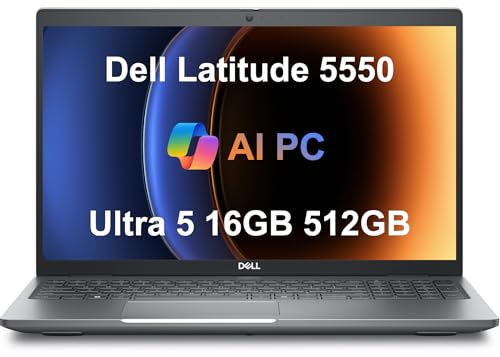
The Latitude 5550 is the 5540’s generational successor, and comparing the two is a short course in how the serviceable tradition modernises itself. The verified listing describes a 15.6-inch Full HD IPS anti-glare machine built on an Intel Core Ultra 5 125U with 16GB of DDR5 memory and a 512GB SSD, adding Thunderbolt 4, an RJ-45 network port and a numeric keypad under Windows 11 Pro. Again the size is stated without varnish: 15.6 inches, a desktop-anchored machine, present in this guide because its design philosophy — not its dimensions — answers the keyword.
What the newer generation buys is efficiency and modernity inside the same serviceable culture. The Ultra 5 platform sips power compared with the older i7, runs cooler and quieter through ordinary work, and carries the current generation’s AI-era hardware, while the chassis keeps the Latitude habits that matter here: screwed panels, slotted memory, swappable storage, a battery an owner or technician can exchange. Dell positions the model within its business AI PC push, but for this guide’s purposes the durable fact is simpler — the company did not use the generational change as an excuse to seal the machine, and that restraint is rarer than it should be.
The two Latitudes divide buyers by temperament. The 5540’s i7 offers the stronger raw performance and a renewed route into the category; the 5550 offers the newer platform, the calmer thermals and the longer runway of support and parts that follows a later model. Both ask the owner to accept the fleet aesthetic and the 15.6-inch footprint. Both repay that acceptance with the same essential gift: a laptop whose specification on the day it feels inadequate is a starting point for an upgrade conversation, not an obituary.
Practical buyers should confirm the same unit-level details on either machine — slot occupancy for memory, battery condition on renewed examples — and should also note the 5550’s wired network port, a small specification with outsized value in offices, schools and workshops where the reliable connection is the one on the wall.
Choosing between this and its older sibling can also be framed by support calendars. Parts and firmware attention flow to the newer platform for longer, and a buyer intending a six-or-seven-year ownership — the natural horizon for this category — should weight that flow heavily. The 5550 is the Latitude to buy when the plan is to still be upgrading it in the next decade’s first years; the 5540 is the one to buy when the budget is fixed today and the work is demanding now. Both decisions are respectable; confusing them is the only error.
- Panel: 15.6-inch Full HD IPS anti-glare
- Processor: Intel Core Ultra 5 125U
- Memory: 16GB DDR5, slot-based serviceable design
- Storage: 512GB SSD in a standard slot
- Details: Thunderbolt 4, RJ-45 ethernet, numeric keypad, Windows 11 Pro
Strengths
- Current-generation efficiency inside a still-serviceable chassis
- Wired ethernet and full port selection suit fixed workplaces
- Longer parts and support runway than the older Latitude
Trade-offs
- 15.6-inch footprint, like its sibling, is desk-first
- Ultra 5 trails the 5540’s i7 in raw performance
- Business design language will not win beauty contests
Best for: desk-anchored owners after the serviceable tradition in its current generation.
Not suited for: anyone shopping by the kilogram or by the centimetre.
Framework Laptop 13 — The upgrade manifesto
Every guide to upgradeable laptops eventually arrives at the Framework, and this one places it first among the prose-only entries with the reason for its status stated plainly: the Framework Laptop 13 is sold directly by its maker in configurable builds, with parts and upgrades sold the same way, and it has no single verifiable Amazon listing to which a responsible guide could attach a link. That absence is not a weakness of the machine — arguably it is the business model working as intended — but our rules are our rules, so the most upgradeable 13-inch laptop in the world is covered here in words alone.
And it is, by a distance, the most upgradeable. The Framework was designed from a blank sheet around a single proposition: every major component — mainboard, memory, storage, battery, screen, keyboard, ports themselves — should be replaceable by the owner with ordinary tools, guided by printed instructions and a parts store that keeps selling the pieces. Its expansion cards let the owner choose which ports the machine carries and change that choice later. Even the processor, the component every other laptop in this guide treats as destiny, can be upgraded by swapping the mainboard when a new generation arrives, with the old board living on in other projects the company encourages. This is not serviceability as a fleet convenience; it is upgradeability as the product’s entire identity.
The honest costs are those of a young, focused manufacturer. Buyers order direct and wait for configured builds; the machine’s fit and finish, while much improved across generations, compete against trillion-dollar polish; and the total cost of a generously specified unit reaches toward premium ultraportable territory, where sealed rivals offer sleeker shells for similar money. The Framework’s counter-argument is arithmetic over time: the battery you replace yourself in year four, the mainboard you swap in year six, the screen you repair instead of writing off — each is a purchase the sealed-laptop owner makes as a whole new machine.
For the reader whose keyword brought them here with a true 13-inch requirement, this is the guide’s real answer, and the linked business machines are the alternatives for those who need conventional retail purchasing or corporate procurement. Judge it as a platform decision — you are buying into an ecosystem of parts and documentation — and it has no rival in its size class.
The company’s marketplace for parts deserves emphasis because it answers the sceptic’s best question: what happens to a modular laptop when its maker is small? Framework’s response has been to publish guides freely, sell parts to anyone, design successive mainboards to fit the original chassis, and encourage a secondary ecosystem of cases and uses for retired boards. Owners are not merely permitted to keep the machine alive; they are supplied for it. That supply relationship — closer to a classic car’s parts culture than to consumer electronics — is the deepest reason the Framework appears in every serious conversation about this category, and the standard against which the fleet brands’ more guarded ecosystems should be measured.
Its ports complete the philosophy in miniature. Because the expansion cards are chosen by the owner, the machine on a desk can carry exactly the connectors that desk requires — and the machine that travels can swap a card rather than a dongle. It is a small daily pleasure that owners mention out of proportion to its size, perhaps because it is the one upgrade that takes four seconds.
- Panel: 13.5-inch class display, replaceable by design
- Memory and storage: socketed and swappable, configured at order
- Ports: modular expansion cards chosen by the owner
- Battery and mainboard: owner-replaceable — the mainboard swap is the generational upgrade
- Sold: direct from the maker in configurable builds; parts sold the same way
Strengths
- The deepest upgradeability offered by any laptop at any size
- A parts store and documentation culture built around the owner
- The only genuine 13-inch machine in this guide
Trade-offs
- Direct ordering means no retail immediacy or marketplace pricing
- Generous configurations cost premium ultraportable money
- A smaller maker’s ecosystem is a younger bet than the fleet brands
Best for: owners who intend to keep one laptop through several generations of its components.
Not suited for: the retail-shelf buyer with a this-week deadline.
Lenovo ThinkPad E14 — The attainable ThinkPad
The ThinkPad E series exists to bring the business formula within reach of smaller budgets, and the E14 carries that mission into this guide as the attainable member of Lenovo’s serviceable family. We cover it without a link because E14 configurations vary widely across processors, memory arrangements and regional line-ups, and the upgradeability question — the only question this guide asks — depends on the exact generation and build in front of the buyer. In particular, memory architecture has differed across E-series generations, so the disciplined advice is to verify the specific unit’s design before assuming the T series’ socketed generosity descends intact.
Where the E14 earns its place is in bringing the surrounding virtues down in price: the ThinkPad keyboard tradition, a business chassis that expects to be opened for storage service, ports that assume offices rather than cafés, and a parts ecosystem that independent repairers know. For a small business or a student of technology who wants to learn maintenance on a machine that forgives it, the E14 is the natural training ground of this category — its storage upgrade path alone teaches the essential ritual of this guide: open, swap, clone, close, continue.
Its size, like its sibling’s, is 14 inches rather than 13, and its build materials and panel options sit a tier below the T series, which is the honest price of its attainability. Buyers should approach it with a checklist rather than a logo: confirm memory type and slots for the exact generation, confirm the storage format, and confirm battery fixing. An E14 bought with those answers in hand is a rational, serviceable machine; an E14 bought on the family name alone might be a partially sealed one wearing a serviceable family’s badge.
There is a pedagogical case for the E14 that this guide makes without embarrassment: it is the machine on which to become the kind of owner this category rewards. Its price forgives the learning curve, its design tradition provides the manuals, and its components teach the transferable rituals — cloning a drive, seating memory, renewing a battery — that will serve on every serviceable machine afterwards. Households that buy one often end up maintaining all their machines differently, because the first successful upgrade rearranges what a laptop is understood to be: not a sealed appliance with a lifespan, but a tool with a maintenance schedule.
- Panel: 14-inch class, options vary by configuration
- Memory: design varies by generation — verify slots on the exact unit
- Storage: swappable in the line’s serviceable tradition
- Positioning: value tier of the ThinkPad business family
- Key check: generation-specific service manual before purchase
Strengths
- ThinkPad service culture at the family’s gentlest prices
- A forgiving machine on which to learn upgrades and maintenance
- Business ports and keyboard tradition intact
Trade-offs
- Upgradeability varies by generation — verification is essential
- Materials and panels sit below the T series
- 14-inch size, not a true 13-inch machine
Best for: budget-conscious owners and learners who will verify the exact unit’s design before buying.
Not suited for: badge-led buyers expecting the T series’ guarantees without checking anything.
HP EliteBook 840 — The managed all-rounder
HP’s EliteBook 840 represents the third great fleet tradition in this guide, and its inclusion without a link follows the same discipline as the others: the line spans generations whose internal designs differ in the details this category cares about, and retail listings rarely document slot layouts and battery fixings well enough to certify a unit from the outside. What can be certified is the line’s character — a 14-inch business flagship built for managed fleets, with serviceability treated as a procurement requirement rather than a favour, sold through channels that will answer configuration questions in writing.
The EliteBook’s particular flavour of serviceability is the polished kind. These machines are designed so that an organisation’s technicians can perform memory, storage and battery work quickly and repeatedly across hundreds of units, which for an individual owner translates into clear documentation, available parts and a chassis that does not punish the person opening it. Around that interior sits the most corporate-elegant exterior in this guide — the EliteBook is the serviceable laptop least likely to look out of place in a boardroom — and the security and manageability tooling that explains its fleet popularity.
Buyers considering the ex-fleet route for an 840 should apply this guide’s standing interrogation with extra care on one point: memory configuration has varied across the line’s generations and builds, including configurations designed around soldered memory in some thin variants of the broader family. The generation and the exact build decide the answer, and a seller who cannot state the memory arrangement does not get the benefit of the doubt. Confirmed properly, an EliteBook 840 is the all-rounder of the serviceable class: corporate manners outside, owner’s workshop inside.
One more constituency should consider the 840 seriously: the consultant or contractor whose laptop is both a business asset and a personal tool. The EliteBook’s presentation survives any client meeting, its serviceability keeps a one-person business from depending on a distant service centre’s calendar, and its security tooling satisfies the questionnaires that corporate clients increasingly send their suppliers. For that reader, the verification homework this entry demands is simply due diligence of the kind they already practise — and the reward is the guide’s most balanced machine.
- Panel: 14-inch class business display
- Memory: configuration-dependent across generations — confirm in writing
- Storage: serviceable in the line’s fleet tradition
- Ordering route: HP business channel, resellers, or verified ex-fleet units
- Character: the most polished exterior among the serviceable picks
Strengths
- Fleet-grade serviceability with boardroom presentation
- Deep documentation and parts culture
- Security and manageability tooling for organisational buyers
Trade-offs
- Internal design varies across generations — homework required
- No single retail listing represents the line fairly
- 14-inch size, above the nominal class
Best for: professionals after a serviceable machine that also presents as a flagship.
Not suited for: buyers unwilling to confirm a specific unit’s internal layout.
How Do the Six Upgrade Paths Compare?
| Pick | Size | Memory path | Defining virtue |
|---|---|---|---|
| ThinkPad T14 Gen 6 | 14-inch | SO-DIMM slots | Complete serviceable standard |
| Latitude 5540 | 15.6-inch | Slotted, fleet design | Repairability at renewed value |
| Latitude 5550 | 15.6-inch | Slotted, fleet design | Current generation, same philosophy |
| Framework Laptop 13 | 13.5-inch class | Socketed, plus mainboard swaps | Total modularity |
| ThinkPad E14 | 14-inch | Varies by generation | Attainable entry to the tradition |
| HP EliteBook 840 | 14-inch | Configuration-dependent | Polish with a serviceable core |
Buyers should also register what the table’s size column is quietly confessing: serviceability and smallness have become opposing forces in the modern market, and every row is a negotiated settlement between them. The Framework’s settlement is the most interesting because it refused the premise — accepting a slightly thicker 13-inch chassis as the price of total modularity — while the fleet machines settled by growing. Your own settlement should be chosen by where the laptop will live: a bag that crosses a city daily argues for the Framework’s end of the table, a desk with occasional travel argues for the fleet end, and neither answer shames the other.
The memory column is the one to read twice. It separates machines that can grow from machines that can merely be repaired, and the Framework’s extra phrase — mainboard swaps — marks the distance between the industry’s best effort and a company founded on the idea itself. Everything else in the table is a variation on the fleet theme, which is another way of saying that organisations, not consumers, kept this category alive.
What Do SO-DIMM, Soldered and Swappable Actually Mean for You?
The vocabulary of this category decides real money, so it deserves plain definitions. Soldered memory is fused to the mainboard at the factory: the figure in the listing is the figure for the machine’s entire life, and when applications outgrow it, the laptop is replaced. SO-DIMM memory sits in slots as small removable sticks: an owner can add a second stick, replace both with larger ones, or rescue a failed module for the cost of the part. Storage divides similarly between drives soldered or integrated into the board — rare but growing — and drives in standard slots, which swap with a screwdriver and a cloning utility. Batteries divide between units secured with screws or clips, which an owner can exchange, and units glued into the chassis, where replacement becomes a workshop procedure with heat and patience involved.
Wi-Fi cards and WWAN modules occupy a middle tier of this vocabulary worth one clarification: on many business machines the wireless card sits in its own small slot and can be replaced when standards move on, quietly extending the machine’s useful connectivity life by years. It is rarely the reason to choose a model, but on a machine intended to serve seven years it converts a future obsolescence into a minor part swap — the same philosophy as the headline components, operating at a smaller scale.
Second slots deserve a sentence of their own, because they hide in specification sheets. Some machines carry a second storage bay or an empty memory slot from the factory, turning the first upgrade into pure addition with nothing removed and nothing wasted. Others require replacing what is fitted, which changes the arithmetic and the resale story of the removed part. When you read a listing for any machine in this category, the questions are always the same four: memory type, slot count and occupancy, storage format and bays, battery fixing. A seller or manufacturer who answers all four clearly is selling a genuinely upgradeable laptop; vagueness on any of them is information too.
Where Do Parts and Manuals Actually Come From?
A serviceable design is only as real as its supply chain, so this guide’s picks were filtered by an unglamorous question: can an ordinary owner actually obtain the parts and instructions? For the fleet brands the answer runs through several channels. Manufacturers publish service manuals and parts lists for business lines as a matter of procurement policy; authorised parts stores sell the genuine articles by part number; and a deep secondary market — fed by the same fleets that bought the machines — supplies everything from keyboards to hinges at prices that make repairs rational. The Framework compresses all of that into its own store, with the guides written for owners rather than technicians. In every case the discipline for the buyer is the same: identify your exact model and part numbers from the machine’s own labels and manual before ordering, because near-identical models use near-identical parts that differ in one connector.
Before the first upgrade, one preparatory habit separates smooth afternoons from long ones: read the service guide’s relevant chapter completely before touching a screw, and stage the parts, the tools and a backup of the machine’s data in advance. Data backup deserves its capital letters — every storage or battery job should begin with the machine’s contents safely copied elsewhere, not because the procedures are dangerous, but because the one time in twenty that something unexpected happens is always the time the backup was skipped. Owners who treat backup as step zero find that upgrades stay in the pleasant category of household maintenance, somewhere between changing a bicycle tyre and bleeding a radiator.
Local repair shops form the final layer of the ecosystem, and their willingness is itself a signal. A shop that lights up at a ThinkPad or a Latitude — machines they know, with parts they can source — is telling you something about the next seven years of ownership. A shop that sighs at a sealed ultraportable is telling you the same thing from the other side. Asking a local technician which laptops they would buy is an old trick, and in this category it remains the most reliable shortcut past every marketing claim in this guide.
How Do You Perform the Classic Mid-Life Upgrades Safely?
Storage first, because it is the upgrade nearly everyone eventually needs. Clone the existing drive to the new one with the drive maker’s utility while the new drive sits in an inexpensive USB enclosure, then swap the physical drives, boot, and confirm everything arrived; keep the old drive untouched for a fortnight as your insurance before wiping it for backup duty. Memory second: match the specification of the existing module — type, speed and voltage — power the machine fully down, disconnect the battery where the design allows, ground yourself against static, and seat the module until its clips speak. A machine that fails to boot afterwards is almost always a module not fully seated, not a catastrophe.
Set a maintenance rhythm once the machine is yours, because upgradeable design rewards calendar habits. Twice a year: clear the fan intakes with compressed air, review storage headroom before it becomes an emergency, and check the battery’s reported health against its original capacity so its replacement can be planned rather than suffered. Once a year: confirm your backups restore correctly, not merely that they run. Owners who keep that rhythm find their machines age in a straight, predictable line — and predictability, more than any specification, is what a seven-year laptop actually feels like from the inside.
Battery replacement follows the maker’s service guide in order, with the connector treated gently and the old battery routed to proper recycling rather than a drawer. Throughout all three jobs the disciplines are identical: work on a clear surface, keep screws in a tray in the order they left the machine, photograph each stage before disturbing it, and never force a connector that seems reluctant — reluctance is information. Owners who adopt those habits discover what fleet technicians have always known: these machines were designed to survive exactly this attention, and the first successful upgrade converts most people permanently to the serviceable side of the market.
How Does the Money Work Over Five Years?
Run the two ownership stories side by side and the category’s argument stops being philosophical. The sealed ultraportable is bought generously — because its specification is permanent, the prudent buyer pays for headroom on day one — and then, in year three or four, meets its single unfixable inadequacy: a full drive with no slot, memory the new workload laughs at, a battery at half health sealed behind adhesive. The remedy is a second generous purchase, and the first machine, otherwise sound, retires early. The serviceable machine is bought moderately, meets the same year-three inadequacy, and answers it with a component that costs a small fraction of a laptop and an hour of its owner’s evening. Repeat the comparison across two cycles and the serviceable route is not merely cheaper — it produces half the e-waste and keeps a machine in service that its owner has long since arranged exactly to their liking.
There is an environmental ledger running beneath the financial one, and this category’s buyers are entitled to hear it stated without sermon. A laptop’s manufacturing footprint dwarfs the footprint of its years of electricity, so every year of extended service — every battery renewed instead of a machine replaced — is the single largest environmental decision its owner makes about it. Upgradeable design is what makes those years available to ordinary owners rather than only to refurbishing companies. Buyers who care about that ledger do not need to buy the most extreme machine in this guide; they need to buy any machine whose life they can extend, and then actually extend it.
The arithmetic has honest exceptions, and this guide will state them. Owners who genuinely replace laptops for the newest platform every two years gain nothing from upgrade paths they never walk. Owners whose time is worth more than any component will rationally pay for sealed convenience and courier repairs. And the serviceable machines ask an aesthetic and portability tax every single day, not merely on upgrade day. The five-year case persuades the owner who keeps machines, maintains things and dislikes waste — a description that fits this keyword’s searchers closely enough that the category exists at all.
Which Upgradeability Mistakes Cost Owners the Most?
Believing the family name instead of the specific model leads the regrets. Within every line in this guide there exist configurations — thinner variants, particular generations, regional builds — that depart from the family’s serviceable norm, and the buyer who assumes rather than verifies can end up holding a soldered machine with a fleet badge. The second mistake is buying a sealed-feeling configuration of a serviceable machine: both memory slots filled with small modules, the single storage bay occupied by a tiny drive, so that the first upgrade throws away parts instead of adding to them. Configuration is destiny even in upgradeable laptops; buy the open slots, not just the open design.
A fourth mistake is more subtle: upgrading on impulse rather than on evidence. Memory added to a machine whose bottleneck was actually its nearly full drive changes nothing but the owner’s bank balance, and the diagnostic habit — check which resource the workload is truly exhausting before buying the part — separates this category’s satisfied owners from its disappointed ones. The serviceable machine rewards method in maintenance exactly as it does in purchase.
Third comes neglecting the unglamorous components. Owners upgrade memory and storage and forget that the battery is a consumable with a calendar, that fans clog, that thermal paste ages — then blame the platform when a five-year-old machine throttles. And finally, some buyers pay the serviceability premium for a machine they will never open, which is not a moral failing but is a waste this guide is obliged to name: if the honest plan is to replace the laptop in three years untouched, a sealed machine’s thinness and polish will serve you better, and the Framework’s manifesto is wasted on a drawer.
Final Recommendation
Keep the original memory modules and drive after any upgrade, labelled and stored safely: they are your rollback if a new part misbehaves, your diagnostic spares when a fault needs isolating, and a small restoration of the machine’s originality if it is ever sold on.
One practical closing note: whichever machine you choose, spend its first week learning where its manual lives, what its part numbers are, and which screws guard its base. That hour of orientation — taken while nothing is wrong — is what converts the upgrade path from a marketing property into a personal capability, and it is the hour that separates this category’s owners from everyone who merely bought a laptop with slots.
Start with the Framework Laptop 13 if its direct-order model fits your life: it is the only machine that answers this keyword at its stated size, and its modularity is total rather than partial. Among conventional purchases, the ThinkPad T14 Gen 6 is the complete serviceable standard — current, generous and built to be opened — while the two Latitudes serve desk-anchored owners who prize repairability and value, and the E14 and EliteBook 840 reward buyers willing to verify a specific unit’s internals. Whichever route you take, buy the open slots and the published service manual along with the machine, and your next laptop purchase can be a component instead of a computer.
Frequently Asked Questions
Does upgrading my laptop’s memory or storage void the warranty?
Generally, no — on machines designed with user-serviceable parts, the manufacturers’ own service documentation describes these procedures, and consumer law in many regions protects owners who perform them without damaging anything. Damage caused during an upgrade is a different matter from the upgrade itself, so follow the official guide, keep the original parts, and check the specific maker’s policy for your region before the first screw turns.
How much memory should an upgradeable laptop start with?
Enough for today’s work, in a configuration that leaves a path upward. The common trap is a machine whose slots are both filled with small modules, forcing you to discard parts at upgrade time. A single larger module with a slot open, or a generous fitted figure in a two-slot design, keeps the future cheap. For most owners, starting at a comfortable mainstream figure and doubling later beats paying flagship memory prices on day one.
Can I upgrade the processor in a normal laptop?
Almost never. In modern laptops the processor is soldered to the mainboard, so a processor upgrade means a mainboard replacement — a workshop-scale job that rarely makes economic sense. The Framework is the designed exception, treating the mainboard itself as the replaceable unit. For every other machine in this guide, choose the processor tier at purchase as a permanent decision, and let memory, storage and battery be the moving parts.
Should I upgrade immediately or wait until the machine feels slow?
Wait for evidence, with one exception. Memory and storage upgrades answer specific bottlenecks, and buying them against a bottleneck you have not yet met wastes the option’s value — parts generally grow cheaper and larger with time. The exception is configuration at purchase: if a machine is offered with both slots filled by small modules, paying slightly more at order time for an open-slot arrangement is cheaper than discarding parts later. After purchase, let the workload make the case, then upgrade decisively.
Is a refurbished business laptop a good upgradeable buy?
Often the best one. Fleet machines were designed for service, their parts and documentation are plentiful, and refurbishment economics favour models whose wear items can be renewed. The conditions are the ones this guide repeats: confirm the exact model’s internal design, interrogate battery health, and buy from a seller whose grading and returns terms are stated plainly. A verified ex-fleet ThinkPad or Latitude can deliver this category’s virtues at its gentlest prices.
What tools do I need to upgrade one of these laptops?
Remarkably few. A small precision screwdriver set with the common Phillips and Torx sizes used by business machines, a plastic spudger or old loyalty card for easing panels and connectors, a tray for screws, and an anti-static precaution — touching a grounded metal object and working away from carpet — cover the classic jobs. Framework packages the needed tool with its machines. The expensive ingredient is never the tools; it is the half hour of patience and the maker’s guide open beside you.
Why have consumer laptops become so hard to upgrade?
Thinness sells, and soldering serves thinness: chips on the board take less vertical space than sockets, weigh less, and can be cheaper to assemble at scale. Manufacturers also learned that sealed machines return to them for service and replacement. The business lines resisted because their customers — organisations with technicians and total-cost spreadsheets — demanded serviceability in procurement. The consumer market is now borrowing that demand back, which is why companies like Framework exist.
Related Guides
For the creative ceiling of this size class, read best 13 laptops video editing alongside this guide, and for the lightest possible daily carry see best 13 portable laptops. Readers stepping up in size for a convertible should continue to best 14 2-1 laptops, where the folding category continues at 14 inches.


