What's inside
- Key Takeaways
- Quick Picks
- How We Chose These Picks
- Why Does Latency Rule This Category Above Everything Else?
- What Does Spatial Processing Actually Do With Two Satellites?
- How Do the RGB Ecosystems Differ When the Game Ends?
- How Do the Six Systems Compare for a Player?
- What Should You Check on Your PC Before Blaming the Speakers?
- How Do You Balance Game Sound and Voice Chat Properly?
- How Do You Place a Gaming 2.1 System for Positional Accuracy?
- How Does Genre Change Which System Wins?
- How Do You Run the First-Evening Test That Tells You the Truth?
- What Mistakes Do Gaming Speaker Buyers Make?
- How Long Does a Gaming Speaker System Stay Current?
- What About Ultrawide Monitors, Dual Screens and Stream Desks?
- Final Recommendation
- Why Does a Subwoofer Feel Different From a Headset’s Bass?
- How Should a Gaming System Behave After Midnight?
- What Is the Sensible Upgrade Path From Laptop Speakers or a Headset-Only Desk?
- Frequently Asked Questions
- Related Guides
As an Amazon Associate I earn from qualifying purchases. This post may contain affiliate links at no extra cost to you.
widgetverdict.com is reader-supported. When you buy through links on our site, we may earn an affiliate commission.
Where to buy: the four linked systems below were checked against live listings while this guide was prepared, and their names lead to those listings. The two prose-only entries are discussed without links because their listings could not be verified to the same standard; the makers’ own stores are the reliable route for those. Gaming hardware sells through quickly around major releases, so a short delivery estimate is worth acting on.
The best 2 1 gaming speakers are judged by a stopwatch before they are judged by an ear. A film forgives a delay you can measure; a firefight does not. When a speaker system adds even a fraction of a second between the muzzle flash on screen and the report in your ears, the whole illusion of presence collapses — and when a teammate’s callout arrives late under a wall of explosion, the round is already gone. That is why this guide leads with latency, wired paths and game-and-chat balance, and treats the light shows and the bass as what they are: the reward for getting the timing right first.
The format itself suits gaming desks beautifully. Two satellites flank the monitor where directional cues belong, and a subwoofer under the desk supplies the physical low end that makes engines, weather and artillery feel like events rather than descriptions. The six systems below divide by philosophy: two wrap the sound in reactive RGB ecosystems, one is a surround-minded flagship from a gaming audio specialist, one is a THX-certified bruiser that predates the light-show era and still out-punches most of it, and two prose-only entries mark the class’s conscience — proof that gaming sound existed before it learned to glow, and a reminder of what the money buys when none of it is spent on light.
Key Takeaways
- Latency is the first specification in gaming audio: play over the wired USB or analogue input, and treat Bluetooth as a music feature, not a match feature.
- Game-and-chat balance — hearing teammates clearly over effects — is the feature competitive players actually use daily, and the picks differ sharply on it.
- Reactive RGB such as Logitech’s LIGHTSYNC can sample the screen and extend the game’s colours onto your desk; it is atmosphere, not advantage, and every pick here lets you turn it off.
- The SteelSeries Arena 7 and Razer Nommo V2 build their sound around spatial processing; the Logitech Z623 answers with certified output and no software at all.
- A subwoofer under a gaming desk is a physical instrument — felt through the floor and chair — and its level control is a neighbour-relations control after dark.
- Two picks are prose-only for listing reasons, not quality reasons; both are named so you can hunt them through the makers’ stores.
Quick Picks
| Pick | Badge | Why it earns its place |
|---|---|---|
| SteelSeries Arena 7 | Best complete gaming system | Two-way satellites, a serious subwoofer and spatial audio inside a mature software suite. |
| Logitech G560 | Best reactive lighting | LIGHTSYNC RGB samples your screen while DTS:X processing widens the stage. |
| Razer Nommo V2 | Best soundstage and control | THX spatial audio, a down-firing subwoofer and a wireless pod on the desk. |
| Logitech Z623 | Best no-nonsense power | THX-certified output, wired only, nothing to update and nothing to glow. |
| Klipsch ProMedia 2.1 | Best hi-fi crossover (prose-only) | Horn-loaded satellites from a loudspeaker company, beloved by music-first gamers. |
| Edifier Hecate G1500 MAX | Best soundbar-style alternative (prose-only) | A gaming soundbar with a wired subwoofer for desks that cannot flank a monitor. |
How We Chose These Picks
We started with the connections, because a gaming speaker lives or dies by its wired path. Every linked pick here takes a direct USB or analogue feed from the PC with no wireless hop in the chain, which keeps the delay between screen and ear where it belongs — effectively nowhere. Systems that were Bluetooth-only were excluded outright, however good their music manners, because a gaming guide that recommends a radio link for match audio has failed its readers before the first review begins.
Next we weighed the gaming-specific layer: spatial processing that helps a two-satellite system suggest direction and depth, software that lets a player shape the balance between game audio and voice chat, and lighting that reacts to the game rather than merely cycling colours for its own amusement. Then the fundamentals reasserted themselves — driver quality, subwoofer control, satellite placement, build — because a system that wins the feature list and loses the soundtrack has the priorities exactly backwards. The Z623’s presence in this guide is the standing proof: it has no software, no spatial processing and no light, and it stays because its certified output and decade-long reputation answer the oldest gaming question of all, which is whether the thing will still be working, loudly, in five years.
Finally, we kept two prose-only places for systems whose listings we could not verify cleanly. One is a hi-fi classic that gaming readers ask about constantly; the other is a soundbar-format alternative for desks where satellites cannot flank the screen. A guide that pretended those questions do not exist would be tidier and less honest.
Why Does Latency Rule This Category Above Everything Else?
Because games are the only listening where the sound is evidence. In music, a delayed start is invisible; in film, the picture and the track drift together through the same pipe and nobody notices a small offset; in a game, the image arrives by wire at monitor speed while the sound, if it travels by Bluetooth, arrives a beat later through a radio codec — and your brain, which evolved to localise threats by exactly that timing difference, registers the wrongness instantly even when you cannot name it. Footsteps smear. Gunshots detach from their flashes. Rhythm games become unplayable in the literal sense.
The fix is boring and total: a wire. USB audio from the PC to the Arena 7, G560 or Nommo V2 carries the game’s sound with delays too small to matter, and the analogue path into the Z623 is faster still, being nothing but electricity in copper. This is why every serious gaming speaker keeps a wired input as its primary and treats Bluetooth as the music-and-phone convenience it is. Any guide — or any product page — that suggests otherwise is selling you the feature list instead of the experience.
There is a second timing question, subtler than latency: synchronised lighting. Reactive RGB samples the screen or the audio and answers with colour; done well, as Logitech’s system does it, the desk becomes part of the game’s weather. Done badly, with a visible lag, it becomes a distraction wearing a party hat. We note the quality of the implementation in each review below, because in this category the light show is half the purchase for many buyers, and it deserves the same scepticism as the sound.

SteelSeries Arena 7 — Best complete gaming system
The Arena 7 is the system in this guide that a hi-fi engineer and a game designer could have specified together. Its satellites are genuine two-way designs — a woofer and a silk dome tweeter in each cabinet, where most gaming speakers make do with a single full-range driver — and the difference is a midrange with real separation: dialogue stays intelligible inside a busy mix, and the crack of a rifle does not swallow the callout that follows it. The subwoofer is a serious eight-inch unit that gives explosions their floor-shaking due without turning every footstep into weather.
SteelSeries’ Sonar software is the other half of the argument, and for competitive players it may be the larger half. Sonar lets you route game, chat and media through separate virtual channels and balance them on the fly — the game-and-chat mix that decides whether you hear your team through a firefight is a slider, not a prayer. Spatial audio processing widens the two satellites’ stage convincingly, RGB lighting rings the satellites for those who want the desk involved, and Bluetooth rides along for the phone. The wired USB path keeps match audio honest, which is the entire point.
The costs are footprint and commitment. The satellites are proper speakers and need proper space beside the monitor; the software, while powerful, is one more suite to learn and keep updated; and the system asks a flagship price for its completeness. For the player whose desk is also their arena, it is the most complete answer this category currently gives.
- Layout: two-way satellites plus 8-inch subwoofer
- Software: Sonar suite with separate game, chat and media channels
- Audio features: spatial audio processing, RGB satellite lighting
- Inputs: USB for PC, Bluetooth for mobile, analogue auxiliary
Strengths
- Two-way satellites give the clearest dialogue-in-mix in this guide.
- Game-and-chat balancing is a slider away, exactly where competitors need it.
- Subwoofer has genuine authority without losing control.
Trade-offs
- Largest satellites here; small desks need measuring.
- The software suite is powerful but adds a learning curve.
- Flagship pricing for the full package.
Best for: competitive and story-driven players alike who want one complete system. Not suited for: minimal desks, or buyers who refuse audio software on principle.
There is a ownership rhythm to the Arena 7 worth naming: it rewards the player who sets it up properly once. An evening spent arranging Sonar’s channels, saving a profile per game type and placing the subwoofer by stealth scene rather than by trailer pays out for years, because the system’s intelligence is front-loaded into its configuration. Players who want their hardware to disappear immediately will find the Z623’s empty settings page more relaxing. Neither temperament is wrong; the guide’s badge simply records that, fully configured, this is the most capable gaming instrument of the six.

Logitech G560 — Best reactive lighting
The G560 is the system that turned desk lighting from decoration into theatre. Its LIGHTSYNC technology divides each satellite’s glow into zones and can sample the colours at the edges of your screen, so the light behind your monitor extends the game’s palette into the room — a jungle’s green breathing at the edge of vision, a muzzle flash answered by the desk itself. Screen sampling is the implementation that matters: unlike audio-reactive pulsing, it ties the light to what the game shows, and the effect, in a darkened room, is genuinely transporting.
Under the light sits a capable 2.1 system with DTS:X Ultra processing that persuades two satellites and a down-firing subwoofer to suggest a wider, taller stage than the hardware should manage. Explosions land with weight, positional cues in shooters read clearly, and the Logitech software gives equaliser control and per-game lighting profiles for players who enjoy the tuning as part of the hobby. Bluetooth is present for music from the phone, and the wired USB path keeps the match feed immediate.
Judged coldly, the G560’s sound-per-feature balance tilts further toward atmosphere than the Arena 7’s; its satellites are single-driver designs and the midrange separation is a step behind. But atmosphere is a legitimate purchase — gaming is an entertainment, and the room feeling like part of the game is worth money to the players this system was built for. It remains the lighting benchmark against which every reactive rival is compared.
- Layout: two satellites plus down-firing subwoofer
- Lighting: LIGHTSYNC RGB with screen-sampling and per-game profiles
- Audio features: DTS:X Ultra spatial processing
- Inputs: USB for PC, Bluetooth, analogue
Strengths
- Screen-sampling light is the most immersive implementation in the class.
- Spatial processing gives shooters a wide, readable stage.
- Mature software with profiles players actually share and trade.
Trade-offs
- Single-driver satellites trail the Arena 7 for midrange clarity.
- The full effect wants a dark room and a wall behind the desk.
- Lighting-first design will not suit a desk that appears on work calls.
Best for: immersion-first players and streamers whose desks are part of the show. Not suited for: buyers who want maximum audio purity per unit of money, lights be damned.
Streamers should read the G560’s entry twice, because its value compounds on camera: the screen-sampled glow reads as production design in a broadcast, reacting to the game your audience is watching, and viewers notice it the way they notice a good backdrop. The same quality makes it the worst pick in this guide for a desk that must moonlight as a sober workstation on video calls — a consideration its rivals the Z623 and ProMedia never raise. Buy it as the theatre it is, and it will not disappoint; buy it hoping to hide it, and it will not hide.

Razer Nommo V2 — Best soundstage and control
Razer’s answer to the gaming 2.1 question begins with a refusal: no reaching for the speakers mid-session. The Nommo V2’s wireless control pod sits wherever your hand lives and runs volume and source from there, which in the middle of a match is worth more than any equaliser preset. Behind that convenience sits the widest soundstage in this guide — THX spatial audio driving full-range satellites whose rear-projection lighting throws colour onto the wall rather than into your eyes, a small mercy during long night sessions.
The subwoofer fires downward through a five-and-a-half-inch driver, loading the floor so that engines and impacts arrive through the chair as much as through the air. In single-player games — racers, flight, anything with a world to inhabit — the combination of width and physicality is the most cinematic experience here. Chat balance is handled at the system level through Razer’s software, competently if less elegantly than SteelSeries’ channel approach, and the USB path keeps the timing honest while Bluetooth covers the phone between matches.
The caveats are ecosystem and scale. The lighting and spatial features assume a PC running Razer’s software world; the satellites’ sculpted housings are large personalities for a small desk; and the subwoofer’s enthusiasm needs its level respected in a flat after dark. Players already living in Razer’s ecosystem will find this the most natural flagship here; everyone else should weigh it against the Arena 7’s software discipline.
- Layout: full-range satellites plus down-firing subwoofer
- Audio features: THX spatial audio, rear-projection Chroma lighting
- Control: wireless pod for volume and source
- Inputs: USB for PC, Bluetooth for mobile
Strengths
- Widest, most cinematic soundstage of the six.
- Wireless pod keeps control off the cabinets and in your hand.
- Rear-projection light flatters night play without glaring.
Trade-offs
- Full value assumes life inside the maker’s software ecosystem.
- Large, assertive satellite design dominates smaller desks.
- Subwoofer enthusiasm needs taming in flats at night.
Best for: single-player immersion and Razer-ecosystem players. Not suited for: chat-balance obsessives, or desks that must look professional at nine the next morning.
A detail the specification lists bury: the Nommo V2’s satellites aim their drivers at the listener from angled housings that assume a seated player at a standard desk, and they reward that assumption with an unusually stable centre image — the dashboard, the character, the narrator all lock to the screen rather than wandering with your head movements. It is the kind of refinement that never appears in an advertisement and appears in every session. Combined with the pod, it makes the Razer the system here that feels most designed around an actual human posture, rather than around a product photograph.
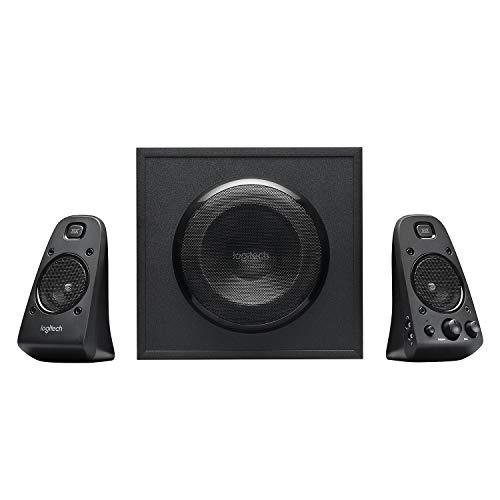
Logitech Z623 — Best no-nonsense power
The Z623 is the control group of this experiment: a THX-certified 2.1 system with no software, no spatial processing, no lighting and no wireless — a pair of satellites, a large subwoofer with the controls on its face, and a wired connection. It has been on sale, essentially unchanged, for well over a decade, which in gaming hardware is not a criticism but a coronation. What it offers is certified output: enough clean power to fill a room, bass with genuine depth from its seven-inch driver, and a sound that was tuned once, properly, by people who then left it alone.
In games that translates to authority. Explosions do not distort at the volumes bedrooms actually use; dialogue is clear because the satellites are honest two-way designs; and there is no processing layer between the game’s mix and your ears to second-guess either. The absence of game-and-chat software is handled the way players handled it for years — the game’s own settings and the chat application’s own volume — which is less elegant than Sonar’s sliders and entirely workable. Multiple inputs let a console share the system without unplugging the PC, a practical grace many flashier rivals forget.
The compromises are the mirror of its virtues: no Bluetooth for the phone, no pod or remote, no light, and a subwoofer large enough to need a floor plan. Buyers who want their desk to react, glow and route will look elsewhere in this guide and should. Buyers who want to buy a gaming speaker system once and think about it never again have found the oldest answer here, and it is old because it kept being right.
- Layout: two-way satellites plus large subwoofer with on-face controls
- Certification: THX-certified output
- Inputs: multiple wired inputs for PC and console sharing
- Software: none — and that is the point
Strengths
- Certified, room-filling output with deep, controlled bass.
- Nothing to update, configure or light up — it simply works for years.
- Multiple inputs let a console and PC share it peacefully.
Trade-offs
- No Bluetooth, no spatial processing, no game-chat software.
- Large subwoofer demands real floor space.
- Controls live on the subwoofer, which usually lives on the floor.
Best for: players who value output and longevity over features. Not suited for: anyone who wants wireless music or a reactive desk.
Klipsch ProMedia 2.1 — Best hi-fi crossover (prose-only)
Gaming readers ask about the ProMedia in every generation, and the question is always the same: can a hi-fi company’s desktop classic hold its own against systems designed for games? On sound, unambiguously yes. The horn-loaded satellites project detail and dialogue with a clarity that flatters competitive play more than their music-first reputation suggests, and the subwoofer’s authority is the equal of anything in this guide. Where it concedes ground is the gaming layer itself — no spatial processing, no chat-balancing software, no lighting, and controls that assume a listener seated calmly rather than a player mid-match.
We discuss it in prose because its listing could not be verified cleanly at the time of writing; the maker’s store is the dependable route. For the player whose library leans to story games and whose desk doubles as a listening post, it remains a genuinely persuasive alternative — the system that treats the game’s score with the same respect as its explosions. Competitive players should take the Arena 7’s software instead and not look back.
- Layout: horn-loaded satellites plus side-firing subwoofer
- Certification: THX-certified desktop system
- Inputs: wired analogue, Bluetooth in the current generation
- Character: hi-fi projection, no gaming software layer
Strengths
- Satellite clarity that serves dialogue and detail in any genre.
- Subwoofer authority equal to the best here.
- A music-first tuning that flatters scores and soundtracks.
Trade-offs
- No spatial audio or chat-balance tools for competitive play.
- Traditional controls assume a seated, unhurried listener.
- Listing could not be verified — buy through the maker.
Best for: story-game players who listen to music at the same desk. Not suited for: ranked players who need every software edge.
There is also a generational point in the ProMedia’s favour that gaming marketing never makes: its sound was tuned by a company whose reputation rests on loudspeakers for rooms, not peripherals for desks, and it shows in the one place games are most exposed — the human voice. Cut-scene dialogue through the horn-loaded satellites has a projection and ease that players raised on gaming brands often describe, accurately, as sounding like a film rather than a feed. If your library is heavy with narrative and light on ranked ladders, that quality is not a consolation prize; it is the main event, and the absence of a light show will not be missed once.
Edifier Hecate G1500 MAX — Best soundbar-style alternative (prose-only)
Not every gaming desk can flank its monitor. Ultrawide screens, monitor arms and small surfaces all conspire against satellites, and the G1500 MAX answers with the other geometry: a soundbar that sits under the screen, paired with a wired subwoofer that restores the low end a bar alone cannot reach. Edifier’s Hecate line voices it for games — effects forward, dialogue protected — with RGB accents and the input set a modern desk expects, USB and Bluetooth among them.
The honest trade is stereo width. A bar’s drivers are close together, so the left-right stage that satellites give for free must be suggested by processing, and directional cues in competitive shooters are a step less precise than on the Arena 7 or G560. For the far larger number of players whose games are stories, racers and strategies, that step is small and the space saving is decisive. We list it in prose for the usual verification reason; if your desk geometry has already vetoed satellites, it is the alternative to hunt down through the maker’s channels.
- Layout: soundbar plus wired subwoofer
- Voicing: gaming-tuned presets with RGB accents
- Inputs: USB, Bluetooth and analogue
- Geometry: fits under ultrawide monitors where satellites cannot
Strengths
- Solves the no-room-for-satellites problem without surrendering bass.
- Single-unit front stage keeps the desk visually clean.
- Gaming voicing protects dialogue inside busy mixes.
Trade-offs
- Stereo separation cannot match true spaced satellites.
- Competitive positional cues are a step behind the best here.
- Listing unverified at writing — source it from the maker.
Best for: ultrawide and small-surface desks that still want 2.1 weight. Not suited for: competitive shooter players who live by directional cues.
The Z623 also carries a quiet lesson about wattage honesty. Its figures have been published, certified and argued about for over a decade, and the system simply plays as loudly and cleanly as its reputation says. In a category where newer rivals quote numbers measured by methods nobody will explain, there is something restful about a product whose claims were audited before some of its buyers were born. If the flashier systems in this guide are the present tense of gaming audio, the Z623 is its longest-running evidence that the fundamentals were solved a while ago.
What Does Spatial Processing Actually Do With Two Satellites?
Two speakers can only emit sound from two places, so every claim of surround from a 2.1 system is a claim about perception, not physics — and the honest implementations are worth understanding rather than dismissing. Your ears locate sounds using timing and tonal differences between them; a spatial processor manipulates exactly those cues in the signal, delaying and shading frequencies so that a sound mixed for the rear feels as though it leans behind you. DTS:X Ultra on the G560, THX spatial audio on the Nommo V2 and Sonar’s processing on the Arena 7 are three dialects of that one idea.
The results divide by content. In games mixed with spatial awareness, the effect can be startling — weather wraps, engines pass, a corridor feels longer than the desk in front of you. In plain stereo music the same processing often sounds like a veil, which is why every system here lets you switch it off, and why our advice is to treat spatial as a per-game feature rather than a global setting. It also interacts with the game’s own audio engine: a title already rendering binaural or object-based audio may double-process if the speaker adds its own layer. The rule from the mistakes section bears repeating — one spatial layer at a time, chosen deliberately, and the systems above are at their best when you obey it.
How Do the RGB Ecosystems Differ When the Game Ends?
Lighting is the feature buyers see in the shop and live with in the study, so its behaviour outside games matters as much as its theatre inside them. Logitech’s LIGHTSYNC is the most programmable of the three ecosystems here: per-game profiles, screen regions you define yourself, and a path into a wider desk of Logitech devices that can share one colour story. Razer’s Chroma is the broadest ecosystem in gaming, period — if your keyboard, mouse and headset already speak it, the Nommo V2 joins a choir rather than starting one. SteelSeries treats light as the junior partner, present on the Arena 7 but clearly subordinate to Sonar’s audio routing, which tells you where that company’s heart is.
All three share the virtue that matters most at midnight: they can be dimmed to a whisper or switched off entirely, from software, without a walk to the hardware. The systems to avoid in this category — none of them in this guide — are those whose light cannot be killed, because a gaming desk that cannot go dark will eventually share a room with someone asleep. Judge the light show in the demo, by all means; judge the off switch before you pay.
Desk-space refugees should also note what the bar format returns besides width: the centre of the desk stays clear for a keyboard tray or a drawing tablet, the single unit is trivially aimed, and cable dressing collapses to one run. Against that, the subwoofer still needs its floor position and its level ritual, so the format saves desk rather than effort. It is included here as a pressure valve for real rooms, and its presence in a satellite guide is a deliberate editorial choice — the best system for a given desk is the one that fits it, and a guide that ignores geometry serves only the readers whose desks resemble the photographs.
How Do the Six Systems Compare for a Player?
| System | Spatial processing | Chat balance | Lighting | Listing |
|---|---|---|---|---|
| SteelSeries Arena 7 | Yes, with Sonar channels | Dedicated sliders | Satellite RGB | Linked |
| Logitech G560 | DTS:X Ultra | Via software mixer | Screen-sampling RGB | Linked |
| Razer Nommo V2 | THX spatial audio | Via software mixer | Rear-projection Chroma | Linked |
| Logitech Z623 | None | Game and app settings | None | Linked |
| Klipsch ProMedia 2.1 | None | Game and app settings | None | Prose-only |
| Edifier Hecate G1500 MAX | Processing-assisted | Via software mixer | RGB accents | Prose-only |
The pattern to notice: the gaming layer — spatial processing, chat balance, light — is software, and software is where these systems truly differ. The hardware fundamentals underneath are closer than the marketing suggests, which is why the Z623, with no layer at all, still earns its chair.
What Should You Check on Your PC Before Blaming the Speakers?
A gaming speaker system is the last link in a chain that begins inside the game, and most faults blamed on the last link live higher up it. Start with the game’s own audio menu: many titles ship with a dynamic-range setting meant for television speakers that flattens exactly the effects you bought a subwoofer to feel, and switching it to its full-range or home-theatre option transforms a system without spending anything. Check, too, that the game is outputting the channel layout your processing expects — a title sending a surround mix to a stereo path will misplace cues no speaker can unscramble.
Then audit the layers. Windows spatial sound, the motherboard suite, the GPU’s audio options and the speaker’s own processing can all be active at once, each reinterpreting the last one’s work; the result is a sound that is somehow both boomy and thin, and a player shopping for new hardware to fix a settings page. Disable everything, establish the clean wired stereo feed, and add exactly one enhancement back at a time. Finally, confirm the USB path is the one in use — more than one player has reviewed a system’s Bluetooth latency at length before noticing the cable was never selected as the output. The stopwatch rule cuts both ways: it indicts lazy wireless play, and it acquits good hardware accused by a misconfigured chain.
How Do You Balance Game Sound and Voice Chat Properly?
The mix that decides matches is not game volume — it is the ratio between the game and your teammates. Human speech sits in a band that explosions and engines love to bury, and a system that plays both at one fixed ratio forces a choice between hearing the world and hearing the plan. The Arena 7’s channel approach solves it structurally: game and chat become separate feeds with separate levels, so a callout can ride above a firefight without the firefight shrinking. Software mixers on the G560 and Nommo V2 approximate the same result; the Z623 and ProMedia leave it to the game’s audio settings and the chat app’s output level, which works when both applications expose honest controls and frustrates when one of them does not.
Set the balance once, deliberately, in a quiet moment rather than mid-match. Start a familiar game scene with heavy effects, have a teammate — or a recorded voice — speak over it, and adjust until the voice is intelligible without effort at your normal volume. Then leave it alone for a week; the urge to ride the mix constantly is a sign the baseline is wrong, not that the match is special. Players who do this once report the same discovery: they were losing information, not rounds, and the fix cost them ten minutes in a menu rather than money on new hardware.
How Do You Place a Gaming 2.1 System for Positional Accuracy?
Directional sound is geometry before it is electronics. The satellites belong at equal distances from your head, angled inward so their axes cross just behind your listening position, at ear height or tilted to aim there. Symmetry is the whole game: a satellite pushed back by a monitor bezel or exiled behind a second screen smears the very cues you bought the system to clarify. If your desk cannot offer symmetry, fix the desk arrangement before blaming the speakers — moving a plant is cheaper than replacing a sound system.
The subwoofer’s placement serves the opposite goal: you want its output present but unlocatable. Under the desk near its centre is the reliable default; a corner will multiply the bass and localise it, which flatters explosions and ruins footsteps. Set its level with a stealth game or a quiet scene rather than a trailer — if you can tell where the subwoofer is during dialogue, it is too loud or crossed too high. Finally, give the satellites a few centimetres of air behind them if they are ported, and keep the desk surface between you and them as clear as the hobby allows; a battlefield of cans and controllers is also an acoustic obstacle course.
How Does Genre Change Which System Wins?
Competitive shooters reward the Arena 7’s clarity and chat discipline, because their information lives in the midrange and in your teammates’ voices; the subwoofer is almost a bystander, and should be set like one. Racing and flight games invert the hierarchy — engine note and weather are low-frequency events, and the Nommo V2’s floor-loaded bass and wide stage turn a desk into a cockpit more convincingly than any rival here. Horror games, the connoisseur’s test, want dynamic range above all: silence that is truly silent and a scare that arrives at full scale. The Z623’s unprocessed honesty serves them beautifully, because no spatial layer is sanding the edges off the sound design.
Strategy and simulation titles, with their long sessions and quiet soundtracks, reward comfort and restraint — the G560 with its lighting dimmed to embers, or the ProMedia’s music-first calm. The lesson generalises beyond this guide: name your dominant genre before you name your budget, because the system that wins your genre wins your desk, and the all-rounder’s crown — which we gave to the Arena 7 — is only valuable if your library is genuinely all-round.
How Do You Run the First-Evening Test That Tells You the Truth?
Four scenes, played in order, will tell you more about a new gaming system than a week of specifications. Begin with a dialogue scene in a quiet game — a conversation in an inn, a briefing — and listen only for whether every word is effortless at your normal volume; this is the midrange examination, and the Arena 7 and ProMedia pass it most easily. Follow with a stealth or horror sequence at low volume, which examines the noise floor and the subwoofer’s manners: hiss, rumble or a bass note that will not sit down all announce themselves here. Third, a loud set piece — artillery, a crash, a boss — at the top of your sane range, which examines headroom and whether the satellites stay composed when the subwoofer is working hardest.
Finish with ten minutes of your most-played competitive title, wired, with a teammate talking. That last test is the category in miniature: timing, clarity, chat balance and comfort, all at once, in the conditions the system was bought for. A system that passes all four scenes has earned the desk; a system that fails one has told you exactly which compromise you would be living with, while the return window is still open and the information is still free.
What Mistakes Do Gaming Speaker Buyers Make?
The first is playing ranked matches over Bluetooth because pairing was easier than finding the cable — a self-inflicted latency wound that no satellite can heal. The second is buying the light show and starving the sound: RGB generations come and go, but the drivers are the product, and this guide’s ordering reflects that. Third, players set the subwoofer by trailer and play by stealth, wondering why every quiet scene rumbles; set levels with the quietest game you own. Fourth, buyers stack every audio suite their peripherals offer — motherboard processing, GPU output, speaker spatial, game spatial — until the signal has been reinterpreted three times and sounds like none of them. Choose one spatial layer, preferably the game’s or the speaker’s, and switch the rest off.
How Long Does a Gaming Speaker System Stay Current?
Longer than almost anything else in a gaming setup, and the reason is the same one that governs the wider speaker world: the physics at the end of the chain does not obsolete. A GPU is a countdown; a good satellite is a fixture. What ages in a gaming system is the garnish — lighting ecosystems consolidate, software suites are replaced, spatial standards drift — and that asymmetry should shape the purchase. Spend on the parts that cannot age: drivers, cabinets, subwoofer, certified output. Treat the parts that can age — the app, the light show, the processing brand — as a bonus with a half-life, delightful now and unmissed later.
Judged by that rule, the Z623 is the safest decade in this guide and the Arena 7 the best-balanced bet, because its money is visibly in the two-way satellites and the subwoofer, with Sonar as the bonus rather than the product. The G560 and Nommo V2 ask you to value the present-tense experience more highly, which is a legitimate choice for an entertainment purchase — nobody keeps a fireworks display for its resale value either. Just make the choice knowingly, and the system will age the way you expected it to.
What About Ultrawide Monitors, Dual Screens and Stream Desks?
Modern gaming desks complicate the satellite geometry this format assumes, and the picks divide by how gracefully they cope. An ultrawide monitor pushes satellites wide apart, which stretches the stereo stage pleasantly for immersion and dangerously for the centre image; the Arena 7’s two-way satellites hold the centre best at wide spacing, while the G1500 MAX exists precisely for the desks where even that fails. Dual-screen players should place the satellites flanking the primary display only — the screen you aim at is the one the sound should frame — and accept that the second monitor lives outside the stage.
Stream desks add a microphone to the geometry, and with it a rule: speakers and a live mic are negotiating partners, not friends. Keep the satellites behind the microphone’s rejection zone where the pattern allows, run levels lower than solo play, and lean on the chat-balance tools to keep your voice the loudest thing in your own mix. Many streamers solve it by keeping speakers for the audience-facing ambience and a headset for their own ears during broadcasts — one more case where the honest answer is a division of labour rather than a single heroic product.
Final Recommendation
Take the SteelSeries Arena 7 if you want the complete competitive instrument: the clearest satellites, the smartest chat balancing and a subwoofer with real authority, all on a wired path that respects the stopwatch. Take the Logitech G560 when the room itself is part of the game and the light show will be used nightly, and the Razer Nommo V2 when cinematic width matters most and your desk already speaks Razer. And never apologise for the Z623: a decade of players cannot all be wrong, and certified power with zero fuss remains a complete answer. Whatever you choose, plug in the cable for the match — the best gaming speaker is the one whose sound arrives when the picture does.
Why Does a Subwoofer Feel Different From a Headset’s Bass?
Because it moves the room, not just the eardrum. A headset delivers low frequencies as pressure in a sealed cup — accurate, private and abstract. A subwoofer delivers them as air in motion and vibration through the floor, the desk and the chair, and the body reads that as presence: the artillery is not depicted, it is nearby. That physicality is the entire reason the 2.1 format survives in a world of excellent headsets, and it is why racing players describe a good subwoofer in the vocabulary of machinery rather than music.
It is also why placement and level discipline, covered earlier in this guide, matter more for gaming subwoofers than for any other kind. The same coupling that sells the illusion in a dogfight will, set carelessly, turn a stealth sequence into a weather report and a flat into a grievance. Treat the subwoofer as the system’s engine: powerful, central to the experience, and happiest when its work is felt as the game’s world rather than noticed as the speaker’s effort. When you cannot tell where the bass comes from but the room has acquired weather, the setup is finished.
How Should a Gaming System Behave After Midnight?
Half the gaming in the world happens in shared homes at hours when a subwoofer is a social instrument, and the systems here divide honestly on the point. The down-firing designs — G560 and Nommo V2 — couple their bass into the floor structure, which thrills the player and notifies the downstairs neighbour; their levels need a night setting and the discipline to use it. The Arena 7’s conventional subwoofer is easier to keep local, and the Z623, for all its power, has its bass control on the cabinet where a hand can civilise it in one motion.
The deeper answer is that night gaming is where speakers and headsets divide the week between them, and no purchase in this guide should pretend otherwise. Buy the speaker system for the hours when the house is awake and the room is yours; keep a headset for the small hours; and judge any system that promises subwoofer cinema at midnight in a flat as a system that has not met your neighbours. The best gaming setups are the ones still welcome in the home a year later, and welcome is a specification too.
What Is the Sensible Upgrade Path From Laptop Speakers or a Headset-Only Desk?
Buy the format once and buy it at the level your library justifies. The player arriving from laptop speakers will find even the Z623 a revelation, and the honest advice is to start where the fundamentals are strongest rather than where the features are longest, because fundamentals are what the second year feels like. The player arriving from a good headset should expect a trade, not a triumph: less isolation and no microphone, in exchange for comfort, a natural stage and bass with a body. Most who make the move keep both, and the desk becomes a two-instrument setup — which is why this guide never claims speakers replace headsets, only that a gaming life conducted entirely inside a headset is missing half its weather.
Frequently Asked Questions
Do gaming speakers need a break-in period?
Drivers loosen marginally with use, but the dramatic change new owners report in the first fortnight is mostly their own ears learning the system and their placement experiments settling. Give a new setup two weeks of honest listening and the four-scene test before judging it — and be suspicious of any fault that conveniently resolves the day the return window closes.
Are speakers or headsets better for competitive gaming?
Headsets isolate better and carry a microphone to your mouth; speakers give a natural stage, physical bass and hours of comfort with nothing on your head. Many players own both — speakers for solo and casual play, a headset for ranked voice. This guide covers the speaker half of that arrangement.
Does RGB lighting improve gaming performance?
No — and any product implying otherwise is flattering you. Reactive lighting improves atmosphere and, in screen-sampling form, can widen your peripheral sense of the game’s world. It is a legitimate pleasure and an illegitimate advantage; buy it as the former.
What does THX certification on the Z623 and ProMedia actually mean?
That the system was measured against a set of performance standards for output, distortion and frequency response and passed them. It is a floor of verified competence, not a guarantee of taste — but in a category full of invented wattage figures, a verified floor is worth having.
Can I use these systems with a console as well as a PC?
Yes, with the right input. The Z623’s multiple wired inputs make console sharing easiest; the USB-first systems can take a console through analogue or optical-to-analogue conversion depending on the model. Spatial features are usually PC-side, so expect the console feed to be honest stereo-plus-sub.
How much desk space does a 2.1 gaming setup really need?
Budget for the satellites first: each wants roughly the footprint of a paperback book, at ear height or angled up, with a few centimetres of clear air behind it. The subwoofer takes a floor square about the size of a small wastebasket, ideally not in a corner. If that inventory does not fit your desk, the soundbar-format prose pick exists for you — measure before ordering, because gaming satellites returned for geometry are this category’s most preventable waste.
Why is a soundbar listed in a 2.1 satellite guide?
Because some desks physically cannot host satellites, and those players still deserve the subwoofer’s half of the experience. The G1500 MAX is included, clearly labelled as the alternative geometry, for exactly that reader.
Related Guides
Companion reading: our guides to Bluetooth 2.1 systems for mixed-device desks, 2.1 computer speakers judged on overall value, stereo speakers without subwoofers and 5.1 systems for PC surround.


