What's inside
- Key Takeaways
- Quick Picks
- How Did We Choose Monitors for This Budget?
- What Does This Budget Actually Buy — and What Does It Refuse?
- Per Speaker or Per Pair: How Should You Read the Budget?
- How Do Room Size and Desk Shape Narrow the Choice?
- How Should You Judge a Monitor Before Buying One?
- What About Hiss, Hum and Other Budget-Monitor Noises?
- The Picks in Detail
- How Do the Six Compare on Paper and in Practice?
- How Long Before a New Pair Starts Telling You the Truth?
- What Mistakes Do First-Time Monitor Buyers Make?
- What Does a Sensible First-Year Setup Look Like?
- Final Recommendation
- What Should You Spend On Before Upgrading the Speakers?
- Frequently Asked Questions
- Related Guides
As an Amazon Associate I earn from qualifying purchases. This post may contain affiliate links at no extra cost to you.
widgetverdict.com is reader-supported. When you buy through links on our site, we may earn an affiliate commission.
Where to buy: every speaker below is a current Amazon listing from its maker’s own range; studio monitors are usually sold one at a time, so read each listing’s quantity line before assuming the basket holds a pair.
The best 200 dollar studio monitors live in the most contested price territory in home recording, and the phrase hides an ambiguity worth clearing up in the first paragraph. Around this budget, some speakers are priced per pair and most are priced each, which means the same headline figure describes two quite different shopping trips: a complete stereo setup for roughly the keyword’s number, or one speaker at that level with its twin still to fund. This guide covers the neighbourhood honestly — five respected nearfield monitors that sit around the $200 mark per speaker, plus one genuine pair, the Edifier MR4, that lands under it complete.
What unites the six is intent. A studio monitor is not a small hi-fi speaker with a professional paint job; it is a measuring instrument that happens to play music, tuned to show a mix its flaws rather than flatter it. At this budget that honesty is achievable — every pick here is a powered two-way nearfield with balanced inputs or a credible path to them, room-compensation switches of some kind, and a frequency response even enough that a mix finished on it survives the car, the phone and the club PA. What the budget will not buy is deep bass, enormous volume or a big room’s worth of coverage, and the sections below are frank about those walls.
Key Takeaways
- Most monitors at this level are priced per speaker; only the Edifier MR4 here is a true pair inside the budget.
- A flat, honest midrange matters more than bass depth — you cannot fix in a mix what the speaker hid from you.
- Five-inch woofers suit small rooms; the Kali’s 6.5-inch driver is the low-end ceiling of this list.
- Room-compensation switches are not garnish — in an untreated bedroom they do real corrective work.
- Balanced XLR or TRS inputs keep interface noise out of the chain; plan cables as part of the budget.
- Placement and a little treatment improve any of these more than stepping up a model would.
Quick Picks
| Pick | Badge | Why it earns its place |
|---|---|---|
| JBL 305P MkII | The imaging benchmark | A waveguide design borrowed from far costlier JBLs gives it an unusually wide, stable sweet spot. |
| Kali Audio LP-6 V2 | The low-end authority | The biggest woofer here, a front port and detailed boundary settings make it the bass-credible choice. |
| Yamaha HS5 | The unforgiving translator | A mid-forward honesty in the HS tradition exposes sloppy mixes like nothing else at the price. |
| PreSonus Eris E5 | The tuner’s friend | The most complete set of acoustic controls here, including a low-cut for pairing with a subwoofer later. |
| ADAM Audio T5V | The treble specialist | Its folded-ribbon tweeter resolves reverb tails and vocal detail the domes cannot quite reach. |
| Edifier MR4 | The complete pair | A whole stereo setup inside the budget, with a monitor mode that flattens its hi-fi instincts. |
How Did We Choose Monitors for This Budget?
The first filter was purpose: a speaker only qualifies here if its maker designed and voices it for nearfield monitoring, with published response figures and the connections a small studio actually uses. That excluded the long tail of powered bookshelf speakers wearing studio clothes, however pleasant they sound. The second filter was evidence — each survivor is a model with years of measurements, teardown familiarity and working-studio history behind it, because at this budget the difference between a good monitor and a lucky one only shows up over time.
We also insisted on some means of adapting the speaker to a real room: boundary EQ, room control, high-frequency trim or a documented set of placement switches. A perfectly flat speaker on anechoic paper becomes a boomy or brittle one against a bedroom wall, and the ability to pull back the bass shelf or tame the top end is worth more at $200 than an extra few hertz of claimed extension. Finally, we spread the list across genuine philosophies — waveguide imaging, mid-forward translation, ribbon treble, maximum tunability — so the choice becomes about how you work, not about which badge is fashionable this year.
What Does This Budget Actually Buy — and What Does It Refuse?
It buys the midrange. Between roughly 200Hz and 8kHz, where voices, guitars, snares and most mixing decisions live, a good $200-class monitor is startlingly truthful — good enough that professional engineers keep speakers from this tier as second references. It buys usable stereo imaging, enough clean volume for a small room at a metre’s distance, and inputs that connect properly to an audio interface. A pair of any of the five singles here, on stands or isolation pads at ear height, is a legitimate mixing tool and not a starter toy.
It refuses the bottom octave and a half. A five-inch woofer in a small cabinet cannot reproduce 40Hz with authority, and no equaliser changes the physics; kick drums and bass synths will be judged by their harmonics and guessed at below that. It refuses cinema volume in a large room, refuses the fit and finish of the premium tiers, and refuses to fix an untreated room — first reflections off bare walls will smear the imaging of every speaker in this guide equally. Spend the money in that order: monitors first, placement second, a few panels third, and only then consider whether a subwoofer belongs in the plan.
Per Speaker or Per Pair: How Should You Read the Budget?
Professional monitors grew up sold singly because studios buy odd numbers — a centre speaker, a replacement, a surround array — so the convention stuck. JBL, Kali, Yamaha, PreSonus and ADAM all price the picks here as individuals. That makes the honest arithmetic of this guide: a stereo pair of any of them sits above the keyword’s figure, while one speaker sits around it. Buyers genuinely capped at the number for a complete setup have two respectable routes — the Edifier MR4 pair, which is voiced for monitoring in its dedicated mode, or a single better monitor bought now with its twin following later, mixing in mono meanwhile, which generations of engineers have survived.
Do not let the arithmetic push you into the category’s trap: an unknown pair priced suspiciously low, with no published response data and a grille hiding whatever is behind it. The six here were chosen so that every route — pair now, singles now, single now and twin later — lands on a speaker with a measurable, defensible sound. Cables deserve a line in the same budget conversation: two balanced TRS or XLR leads from your interface, plus isolation pads or stands, are part of the true cost of any single-speaker route.
How Do Room Size and Desk Shape Narrow the Choice?
Room volume decides how much speaker is useful before it becomes a problem. In a small bedroom or box room, a five-inch monitor at a metre produces all the level and most of the bass the space can honestly support; the Kali’s larger driver still works there, but its extra low end will find every boomy corner the room owns, and its boundary switches will earn their keep weekly. In a larger, open-plan space the equation flips — the five-inch picks run out of clean volume before they run out of accuracy, and the LP-6 V2’s headroom becomes the safer long-term buy. Measure your listening distance honestly: nearfield means roughly arm’s length to a metre and a half, and every speaker here is voiced for exactly that bubble.
Desk shape matters almost as much. A shallow desk against a wall is front-port territory — the Kali and the PreSonus tolerate it, the rear-ported JBL, Yamaha and ADAM ask for whatever gap you can give them. A desk floating in the room flatters everyone. Corner desks break stereo symmetry, and no boundary switch fully repairs a left speaker in a corner and a right speaker in open air; if that is your floor plan, centre the setup on one wall before spending anything, because geometry is the one upgrade that is free.
How Should You Judge a Monitor Before Buying One?
You cannot audition your way through this list in most towns anymore, so judge on evidence you can gather at home. First, decide the woofer size from the room and the music, not from ambition: five inches for small rooms and general work, the Kali’s 6.5 if bass decisions dominate and the desk can hold it. Second, read the maker’s published response and the placement controls as a pair — a speaker honest about its curve and equipped to adapt to your wall is a safer buy than a speaker claiming ruler-flatness with no tools to achieve it in your space. Third, check the unglamorous logistics: balanced inputs that match your interface, a single-speaker listing you have actually understood, and a product line old enough to promise a matching twin later.
Once a pair is home, audition with references, not with your own unfinished mix. Play three recordings you know intimately — one vocal-led, one bass-led, one sparse — at matched, moderate levels, and listen for whether the centre image holds, whether the bass notes have distinct pitches rather than one shared thump, and whether quiet details survive at low volume. Every pick in this guide passes those tests credibly; the one that passes them in your room, at your desk, with your references is the right one, whatever any ranking says.
What About Hiss, Hum and Other Budget-Monitor Noises?
Powered speakers amplify everything, including the flaws of the chain feeding them, so learn to assign blame correctly. A hiss that stays constant when the interface volume changes lives in the speaker’s own amplifiers — mild tweeter hiss at very close range is normal in this class, with the second-generation Kali notably quiet and the JBL faintly audible in silent rooms. A hum or buzz that rises with the volume knob is arriving from upstream: unbalanced cables, a ground loop through a computer’s USB power, or a monitor sharing a circuit with a dimmer. Balanced connections, one power strip for the whole setup, and sensible gain staging — interface up, speaker volume moderate — cure most of it.
Radio-frequency chirps and phone interference point at cable shielding and routing; keep audio leads away from power bricks and display cables. None of these noises should be accepted as “just how monitors are” beyond the faint idle hiss — work through the chain methodically and the system should fall quiet, because every pick here is capable of a clean nearfield silence when fed properly.
The Picks in Detail

JBL Professional 305P MkII — The imaging benchmark
The 305P MkII’s party trick is printed on its face: the flared Image Control Waveguide around the tweeter, a design JBL developed for its flagship mastering monitors and trickled down to this unlikely price. What it buys you is stereo imaging with unusual width and stability — the phantom centre stays put as you lean across the desk, mix elements hold their positions, and the sweet spot is a sofa rather than a tightrope. For producers who nudge pans and reverbs by feel, that stability is not a luxury; it is the difference between decisions that translate and decisions that were only true for one posture.
The rest of the speaker is a well-judged five-inch formula: a long-throw woofer and a one-inch soft dome in separate amplifier channels totalling 82 watts, a rear port, and response that reaches usefully into the upper 40s of hertz before rolling away. JBL adds a Boundary EQ switch that trims the low shelf for desk or wall-adjacent placement, plus a high-frequency trim — a small control set, but aimed at the two problems small rooms actually have. The cabinet is moulded and light rather than luxurious, which is where the money was visibly not spent.
Character-wise, the JBL is the diplomat of this list. It presents a mix honestly but without the Yamaha’s prosecutorial edge, which makes it the easiest speaker here to work on for long sessions and the one we would hand a first-time monitor buyer without a speech. Its limits are the tier’s limits — no deep bass, modest maximum volume — plus a faint hiss at idle that most nearfield listeners never notice past a metre but light sleepers in silent rooms occasionally do.
If your mixes involve wide electronic arrangements, layered vocals or anything where placement inside the stereo field is half the art, the 305P MkII argues for itself every session. Buy it as a pair when funds allow; a single one still teaches imaging better than a cheap pair teaches anything.
A word on living with the waveguide’s generosity: because the sweet spot is wide, the 305P MkII is the most shareable monitor here — a collaborator perched beside you hears roughly the mix you hear, which makes it a natural fit for teaching, co-writing and client playback in small rooms. The same generosity means it forgives the slightly-off seating position of a desk that also holds a keyboard, a control surface and a life. Purists chasing the last degree of pinpoint imaging at one exact head position may prefer a narrower design; everyone working in the real geometry of a bedroom studio benefits from JBL’s choice daily.
- Woofer: 5-inch long-throw, rear-ported cabinet
- Tweeter: 1-inch soft dome behind the Image Control Waveguide
- Amplification: 82W Class-D, bi-amplified
- Response: rated from the upper 40Hz region to 20kHz
- Controls: Boundary EQ low-shelf and HF trim switches
- Inputs: balanced XLR and TRS; sold singly
Strengths
- Stereo image is wide, stable and forgiving of posture
- Balanced presentation suits long sessions without fatigue tricks
- Boundary EQ genuinely helps on desks and against walls
Trade-offs
- Idle hiss is audible in very quiet rooms at close distance
- Cabinet finish is functional rather than handsome
- Bass extension is honest but shallow, like every 5-inch rival
Best for: producers and mixers in small rooms who make placement-heavy music and want the most forgiving learning tool at the budget.
Not suited for: anyone needing to judge sub-bass, fill a large room, or run a speaker in a silent bedroom studio where idle hiss will bother them.

Kali Audio LP-6 V2 — The low-end authority
Kali Audio was founded by engineers from a much larger monitor brand, and the LP-6 V2 shows the confidence of people who knew exactly which compromises to refuse. Start with the driver: at 6.5 inches it is the largest woofer in this guide, and in the small rooms these speakers serve, that extra cone area is the difference between bass you judge and bass you infer. The LP-6 does not conjure sub-bass — physics still applies — but its reach into the low 40s of hertz and its unusually low distortion at level make kick-and-bass relationships more legible than any five-inch rival here manages.
The second-generation details are practical rather than cosmetic. The amplifier runs quieter than the original LP series, answering the hiss complaint that follows budget monitors around. The front-firing port lets the speaker sit closer to a wall without choking or booming unpredictably. Most distinctive is the boundary EQ system: a set of rear switches with diagrams printed beside them for specific placements — on a desk, on stands, against a wall, on a meter bridge — so the compensation matches a described reality instead of a vague more-or-less knob-twiddle.
That thoroughness has a personality: the LP-6 V2 is the engineer’s speaker of the six, measured, documented and slightly clinical in the best sense. Its size is the one domestic caveat — a 6.5-inch cabinet on a small desk is a presence, and in a truly tiny room a five-inch pick may integrate better. For everyone with the desk depth to hold it, this is the monitor in the guide we would choose to judge low-end decisions on, and the one whose owners most often report forgetting about the speakers entirely, which is the highest praise a monitor can earn.
Kali’s documentation habit deserves mention because it changes ownership. The company publishes its measurements and explains its boundary settings in plain language, so an owner can set the switches for a described placement and trust the result instead of tuning by folklore. That transparency extends to the speaker’s behaviour at level: the LP-6 V2 stays composed when a chorus lands in a way that exposes the compression in lesser budget boxes. If you mix loud in a small room — a habit worth examining, but a common one — this composure, plus the low distortion in the bass, is the practical reason the Kali anchors so many budget studios.
- Woofer: 6.5-inch, front-ported cabinet for wall-friendly placement
- Tweeter: 1-inch soft dome with optimised waveguide
- Amplification: 80W Class-D, bi-amplified, low-noise second-generation design
- Response: rated from the low 40Hz region to 21kHz
- Controls: boundary EQ switch bank with placement diagrams
- Inputs: balanced XLR and TRS plus unbalanced RCA; sold singly
Strengths
- Most credible low end in this guide without a subwoofer
- Front port and diagrammed boundary settings suit awkward rooms
- Quiet electronics answer the usual budget-monitor hiss complaint
Trade-offs
- Largest cabinet here — small desks will feel it
- Clinical honesty can feel unflattering on casual listening
- Sold singly, so the pair price leaves the keyword budget behind
Best for: hip-hop, electronic and pop producers whose mixes live or die on kick-and-bass balance in a small room.
Not suited for: buyers with very shallow desks, or anyone wanting the smallest possible footprint on a crowded workstation.

Yamaha HS5 — The unforgiving translator
The HS5 descends from the NS-10, the grey-coned Yamaha that became the studio world’s lie detector, and it inherits the family philosophy in modern, powered form: a midrange that refuses to flatter. Vocals sit under a spotlight, harshness announces itself early, and a mix that sounds balanced on the HS5 has passed an examination that kinder speakers wave through. Engineers keep HS-series speakers as second references precisely because they are slightly unpleasant — if the snare is poking out or the vocal is buried, the Yamaha says so in the first chorus.
Hardware follows the same no-nonsense brief. A five-inch cone and one-inch dome share 70 watts of bi-amplification, the cabinet is dense MDF with a rear port, and the rear panel carries the two controls that matter in small rooms: Room Control, which shelves the bass down for wall-adjacent placement, and High Trim for taming or opening the top end. Inputs are balanced XLR and TRS. Everything about the HS5 assumes it will be bolted into a working setup and ignored for a decade, and its long production run and ubiquity in small studios say the assumption was safe.
Be honest with yourself about temperament before buying. The HS5 makes casual listening a diagnostic exercise, and beginners sometimes mistake its mid-forward push for thinness, then compensate by mixing bass-heavy on it until their ears recalibrate — a rite of passage, but a real one. Paired with a headphone check for the low end, though, it remains the translation benchmark of this budget: mixes finished on HS5s have a habit of surviving every playback system they meet afterwards, which is the entire job description of a studio monitor written in one sentence.
There is a social dimension to the HS5 that listings never mention: it is the speaker other engineers recognise. Send a mix to a collaborator and mention it was balanced on HS5s and they know the dialect it was balanced in — mid-forward, bass-conservative, translatable. That shared reference has practical value in remote collaboration, and it is reinforced by the speaker’s sheer availability; a damaged HS5 can be replaced singly in almost any market, years later, and the replacement will match. Longevity of the product line is a specification too, and on that measure the Yamaha quietly leads this entire guide.
- Woofer: 5-inch cone, rear-ported MDF cabinet
- Tweeter: 1-inch dome
- Amplification: 70W bi-amplified (45W low, 25W high)
- Response: rated 54Hz to 30kHz
- Controls: Room Control bass shelving and High Trim switches
- Inputs: balanced XLR and TRS; sold singly
Strengths
- Midrange honesty exposes mix problems earlier than any rival here
- Superb translation record — balances checked on it travel well
- Dense cabinet and long production history promise a long working life
Trade-offs
- Deliberately unflattering; casual listening is a diagnostic, not a pleasure
- Five-inch bass reach means low-end decisions need a headphone cross-check
- Rear port dislikes being shoved hard against a wall
Best for: mix engineers and students who want the strictest teacher at the budget and already check bass on headphones.
Not suited for: producers of bass-led music working without any sub or headphone check, or anyone buying monitors mainly for enjoyment.

PreSonus Eris E5 — The tuner’s friend
The Eris E5’s rear panel tells its story: where rivals offer a switch or two, PreSonus fits a small acoustic workshop. There is a midrange control and a high-frequency control, each adjustable rather than stepped, a low-cut filter with selectable frequencies for handing the bottom end to a subwoofer, and an acoustic space switch that shelves the bass for wall or corner placement. In a real bedroom studio — untreated, oddly shaped, with the speakers wherever the desk allows — that adjustability is not spec-sheet padding. It is the difference between compensating for your room and just enduring it.
The front of the speaker is equally considered. A 5.25-inch woven composite woofer works through a front-firing port, so the E5 tolerates the against-the-wall placement most home desks impose, and a one-inch silk-dome tweeter with a proper waveguide keeps the top end even as you move. Amplification is 80 watts of Class AB power — an older, warmer-running topology than the Class D in most rivals — split 45 to the woofer and 35 to the tweeter, generous headroom for the size. The resulting sound is balanced and slightly relaxed up top, a presentation many owners describe as the easiest in this guide to listen to for a full working day.
Growth is the E5’s quiet advantage. The low-cut filter means a subwoofer can join later and integrate properly instead of overlapping messily, and PreSonus sells a matching sub designed for exactly that pairing. Buy the E5 pair for a small room now, tune them to the space with the rear controls, and the system has a documented future. Buyers who know their room is the problem — and at this budget, the room is always part of the problem — will find no pick here that takes their side more completely.
One caution belongs with all that adjustability: change one control at a time, and live with each change for a day. The E5’s mid and high controls interact with the room and with each other, and an afternoon of enthusiastic knob-turning can tune a speaker into a corner it takes a week to escape. PreSonus prints suggested starting points for common placements; begin there, play reference tracks you know intimately, and adjust only for problems you can name. Owners who follow that discipline end up with a speaker fitted to their room like a tailored jacket. Owners who don’t, blame the tailor.
- Woofer: 5.25-inch woven composite, front-ported cabinet
- Tweeter: 1-inch silk dome with waveguide
- Amplification: 80W Class AB, bi-amplified
- Response: rated 53Hz to 22kHz
- Controls: adjustable mid and high tuning, selectable low-cut filter, acoustic space switch
- Inputs: balanced XLR and TRS plus unbalanced RCA; sold singly
Strengths
- Most complete room-tuning controls at this budget, by a distance
- Front port suits the against-the-wall reality of home desks
- Low-cut filter makes a future subwoofer a clean upgrade, not a bodge
Trade-offs
- Class AB amplifiers run warmer and the cabinets need breathing room
- Slightly gentle top end may understate harshness next to the Yamaha
- Control flexibility invites endless fiddling if you let it
Best for: home recordists in untreated, awkward rooms who need the speaker to adapt to the space they actually have.
Not suited for: buyers who want set-and-forget simplicity, or who will never add treatment or a sub and resent paying for the options.

ADAM Audio T5V — The treble specialist
Everything about the T5V is organised around the folded ribbon where a dome tweeter would normally sit. ADAM’s U-ART tweeter pleats its diaphragm like an accordion, moving air with a larger surface and faster response than a dome of the same footprint, and the audible result is high-frequency detail with a particular kind of ease: reverb tails decay into audibility instead of vanishing, vocal sibilance shows its exact edges, and cymbals have texture rather than splash. On acoustic, classical, jazz and vocal-led material, the T5V resolves a layer the other five speakers politely summarise.
The supporting cast is conventional in the best way — a five-inch woofer, 70 watts of bi-amplification split toward the low end, a rear-firing port, and response rated from 45Hz, which is optimistic at the very bottom but reflects a speaker voiced to sound complete at nearfield distances. Rear switches trim the high and low shelves for placement, and the tall, narrow cabinet with its bevelled corners was designed to reduce edge diffraction, one of those details that costs little and quietly cleans up imaging. Build and finish are a step above the price’s norm, as ADAM’s Berlin engineering tends to be.
Choose the T5V with its one structural warning in mind: the rear port needs air. Given a hand’s breadth behind it, the speaker breathes and the bass stays articulate; pushed flush to a wall, the low end clouds and the tweeter’s clarity ends up spotlighting a muddle. Desks deep enough to grant that space get the most refined top end at this budget. Everyone else should admire the ribbon from the safer distance of a front-ported rival.
The ribbon tweeter also changes how the T5V ages with its owner. Dome tweeters at this price can harden a mix’s top end in a way you only notice after hours; the U-ART’s presentation stays relaxed at low and moderate levels, which suits the editing, podcast and post-production work where one voice occupies the speakers all day. Editors cutting dialogue often find sibilance and mouth clicks easier to locate on the ADAM than on any rival here — a niche virtue until the day it is your job, at which point it becomes the whole purchasing argument in a single sentence.
- Woofer: 5-inch polypropylene, rear-ported cabinet
- Tweeter: U-ART folded-ribbon design
- Amplification: 70W bi-amplified (50W low, 20W high)
- Response: rated 45Hz to 25kHz
- Controls: high and low shelf switches for placement tuning
- Inputs: balanced XLR and unbalanced RCA; sold singly
Strengths
- Ribbon tweeter resolves fine detail the dome rivals cannot match
- Refined, fatigue-free top end flatters long editing sessions
- Cabinet design and finish punch above the price tier
Trade-offs
- Rear port demands space behind the speaker to stay articulate
- Bass weight is the lightest here despite the optimistic rating
- Ribbon magic is wasted on heavily compressed, lo-fi source material
Best for: vocal, acoustic and detail-led producers, podcast editors and anyone whose work lives in the top octaves.
Not suited for: buyers whose desks force speakers flush against a wall, or bass-led producers needing low-end weight first.
Edifier MR4 — The complete pair
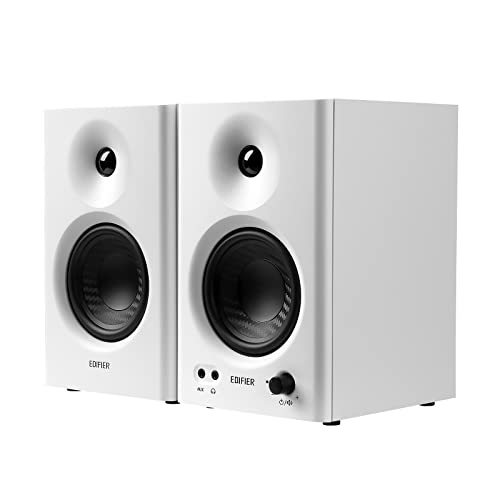
The MR4 is the answer to the question the other five picks keep dodging: what if the budget is the budget, for two speakers, cables notwithstanding? Edifier sells the MR4 as a pair — one powered speaker, one passive partner — at a complete-system price inside the keyword’s figure, and equips it with a switchable monitor mode that flattens the voicing from the company’s hi-fi warmth toward studio neutrality. That mode is the honest heart of the product. In music mode the MR4 is a pleasant desktop speaker; in monitor mode it becomes a legitimate, if modest, mixing tool.
Modest is the operative word, stated without apology. The woofers are four inches, the total system power is a fraction of the singles’ per-speaker figures, and the low end rolls away where the Kali is still working. Within a small desk’s nearfield, though, the MR4 presents a balanced midrange, a clear if not ribbon-detailed top, and imaging stable enough to learn on — which describes the first year of most home producers better than any specification war. Front-panel volume, a headphone socket and an auxiliary input acknowledge the real desk it will live on, where it may also be the computer’s only speakers.
Judge the MR4 as a system purchase rather than a speaker purchase. It removes every follow-up cost and decision — no second speaker to fund, no quantity trap at checkout — and it is the only pick a beginner can unbox, connect to an interface or even a headphone output, and mix on the same evening within the stated budget. Its ceiling is lower than the singles’, and growing past it means replacing rather than extending. As a first honest pair, or a second-room and video-editing setup, that is a trade many buyers will make happily and knowingly.
Consider also where the MR4 pair ends up in two years, because that is part of its value story. Owners who outgrow it as main monitors rarely sell it; it migrates to the video-editing desk, the family computer, the second room, still doing honest work with its monitor mode engaged. A product that remains useful after promotion is a better purchase than one that becomes e-waste, and the MR4’s build and connections support that long tail. Buy it as the complete answer to today’s budget, and it will likely still be answering smaller questions around the house long after a bigger pair takes over the studio desk.
- Configuration: powered pair — one active speaker driving a passive partner
- Woofers: 4-inch composite drivers in compact cabinets
- Tweeter: 1-inch silk dome
- Voicing: switchable monitor mode for a flatter response, music mode for listening
- Controls: front volume knob, headphone output, auxiliary input
- Inputs: balanced TRS and unbalanced RCA; sold as a complete pair
Strengths
- A genuine stereo pair inside the budget, with no quantity trap
- Monitor mode gives it a credible claim to the studio label
- Front controls and headphone socket suit a real multi-use desk
Trade-offs
- Four-inch woofers give up the low end earliest in this guide
- Lowest power and volume ceiling here
- Upgrading later means replacing the pair, not extending it
Best for: beginners, video editors and podcasters who need a complete, honest pair now for the stated money and nothing more.
Not suited for: producers of bass-led music, or anyone planning a long-term system they intend to grow piece by piece.
How Do the Six Compare on Paper and in Practice?
| Speaker | Woofer | Sold as | Room tools | Character in one line |
|---|---|---|---|---|
| JBL 305P MkII | 5-inch | Single | Boundary EQ, HF trim | Wide, stable imaging for placement-led work |
| Kali LP-6 V2 | 6.5-inch | Single | Diagrammed boundary switch bank | The low-end authority of the budget |
| Yamaha HS5 | 5-inch | Single | Room Control, High Trim | Mid-forward lie detector |
| PreSonus Eris E5 | 5.25-inch | Single | Full tuning set plus low-cut | Adapts to the room you have |
| ADAM T5V | 5-inch | Single | High and low shelf switches | Ribbon-treble detail specialist |
| Edifier MR4 | 4-inch pair | Pair | Monitor/music voicing switch | The complete system in one box |
Notice what the table does not contain: a winner’s podium. These six split by woofer size, port direction, tweeter technology and sales format because rooms and music split the same way. A ranking that ignored those axes would be simpler to read and useless to own, so use the rows as a diagnostic — find the row whose constraints match your desk, then read its full section above.
The sold-as column is the one to read twice. Five of these are instruments bought one at a time, and the pair arithmetic reshapes the budget conversation for each; the MR4 row is the only one where the shopping ends at checkout. The character column is the tiebreaker once logistics are settled — these speakers genuinely do sound like their descriptions, and matching the description to your music matters more than any ranking.
How Long Before a New Pair Starts Telling You the Truth?
Speakers do not meaningfully break in over weeks — the moving parts settle within hours — but ears absolutely do, and the recalibration period decides whether a good purchase survives its first month. Coming from hi-fi or gaming speakers, a flat monitor initially sounds thin and exposed, and the temptation is to push the bass and treble until the excitement returns, which recreates the old lie in a new cabinet. Resist for a fortnight. Mix and listen at moderate levels, check work on systems you already know, and notice how the judgements you make on the monitors start predicting what you hear everywhere else. That predictive feeling — not any single listening session — is the product you actually bought.
Keep a small ritual during those weeks: the same three reference tracks, at the same marked volume, before each session. References anchor your ears against mood, tiredness and the slow drift of familiarity, and they turn the abstract promise of “translation” into something you can watch improving. Owners who build that habit get more from a $200 pair than owners with costlier speakers and no anchor ever will, which is the most encouraging sentence in this entire guide.
What Mistakes Do First-Time Monitor Buyers Make?
The expensive mistake is ordering one speaker — or a pair — and nothing to connect them with, then running studio monitors from a headphone splitter with unbalanced cables draped over a power supply, and blaming the speakers for the buzz. Budget the balanced leads and, if your interface lacks monitor outputs, solve that first. The placement mistake runs a close second: monitors plonked on the desk at chest height, tweeters aimed at the owner’s sternum, hard against the wall, spaced by furniture rather than by the equilateral triangle every maker draws in the manual. An hour with a tape measure and a stack of books as temporary stands teaches more than a week of forum reading.
The comparison mistake is subtler: judging monitors in a shop or a friend’s treated room and expecting the same sound at home. You are always hearing speaker plus room, and your room is half the product. That is why this guide weights placement controls and honest documentation so heavily — they are the features that survive the journey to your desk.
Expectation mistakes finish the list. A flat monitor will make favourite records sound less exciting, which is the point of it and not a defect to return it for. Bass will seem missing until you learn that what vanished was the hi-fi hump, not the music. And no speaker in this guide fixes a square, bare room: if the first reflection points stay naked plaster, even the ribbon ADAM will smear. Buy the speakers, place them properly, give your ears a fortnight to recalibrate, and only then judge what you own.
What Does a Sensible First-Year Setup Look Like?
Assemble the year as a sequence rather than a splurge. Month one: the speakers, balanced cables, and whatever puts the tweeters at ear height, even if that is a neat stack of hardback books while stands wait. Month two: the reference-track habit and a notebook — genuinely, a notebook — of what each mix did wrong on other systems, because that log is how a monitor teaches. Somewhere in the first season: the first reflection points treated with the best panels the remaining budget allows, placed by the mirror trick — a friend slides a mirror along the wall while you sit in the chair, and wherever you can see a speaker in the glass is a point worth covering.
By the end of that year, one of two things has happened. Either the mixes translate and the setup disappears from your attention, which is success in its purest form — or a specific, nameable limitation remains, such as low-end reach in a bigger room, and the next purchase solves a diagnosed problem instead of a vague dissatisfaction. Every speaker in this guide can carry a first year structured like that. The ones that cannot are the anonymous pairs this guide exists to steer you away from.
Final Recommendation
And if the decision still feels stuck between two finalists, decide by the room you have rather than the room you want: the speaker whose ports, controls and size fit today’s desk will make better music this year than the theoretically superior speaker waiting for a renovation. Studios grow one honest compromise at a time.
One last piece of arithmetic honesty: whichever single-speaker route you take, the pair, two balanced cables and a set of isolation pads together form the true project cost, and planning for all of it at once beats discovering it in stages. The MR4 exists for buyers who would rather skip that arithmetic entirely.
Match the speaker to the work and the room, in that order. Low-end-led producers with the desk depth should take the Kali LP-6 V2 and its honest bottom octave of the list. Mixers who want their balances to travel should endure the Yamaha HS5’s strictness and be repaid on every other system. The JBL 305P MkII is the safest first monitor here — the one we would give a talented beginner with no further questions asked — while the Eris E5 serves difficult rooms best and the ADAM T5V serves detail-led music best. And if the budget is a wall rather than a neighbourhood, the Edifier MR4 pair is a respectable complete answer, not a consolation prize. If we could keep only one pair on our own desk from this list, it would be the Kalis — but the speaker you will mix best on is the one whose description sounded like your music.
What Should You Spend On Before Upgrading the Speakers?
Almost every owner of a $200-class pair reaches a moment of wondering whether the next tier of monitor is the answer to mixes that still do not translate. Usually it is not, and the honest upgrade order at this level is unglamorous. First comes placement hardware — real stands or at least isolation pads, and the tape-measure hour that puts tweeters at ear height in a proper triangle. Second comes basic treatment at the first reflection points, which sharpens imaging on any speaker more than a model change does. Third comes measurement: a free room-analysis app and a borrowed measurement microphone will show you the two or three room problems actually worth money.
Only after those does a subwoofer or a speaker upgrade enter the conversation, and by then many owners discover the pair they already own was never the bottleneck. The six speakers in this guide were chosen partly for this reason — each is good enough that its owner can spend the next two upgrades on the room and the craft, and still have a monitoring chain worth trusting at the end of it.
Frequently Asked Questions
Do I need an audio interface to use studio monitors?
Effectively, yes, for the five singles. They expect a line-level, ideally balanced feed, and an interface provides that along with a proper volume knob within reach. A computer’s headphone output can drive them through an adapter cable as a stopgap, but it invites noise and level mismatches. The Edifier MR4 is the most forgiving pick for a direct computer connection while an interface waits its turn in the budget.
Can one monitor be enough to start with?
Yes, and it is a historically respectable way to start. Mixing in mono on one good speaker teaches balance and EQ faster than stereo on poor ones, because nowhere in the field is there to hide. Buy the single best monitor the budget stretches to, learn it, and add its twin when funds return — the JBL, Kali and Yamaha will all still be in production, which is part of why they are on this list.
Where exactly should nearfield monitors sit?
Form an equilateral triangle between the two tweeters and your head, with the tweeters at ear height and the speakers angled inward to point at your ears. Keep them off the desk surface on stands or isolation pads where possible, give rear-ported models breathing room from the wall, and use each speaker’s boundary controls to correct whatever distance remains. Symmetry matters: a setup centred in the room images far better than one shoved into a corner.
Will these speakers make my room sound bad?
They will reveal it, which is different. A monitor’s flat response shows up flutter echo, boomy corners and desk reflections that a flattering speaker concealed. Start with placement, then treat the first reflection points on the side walls and ceiling with whatever panels or soft furnishings the room allows. Even modest treatment improves every pick here more than swapping between them does.
Is a subwoofer a better upgrade than bigger monitors?
For bass-led music in a small room, usually yes — with conditions. A sub extends the system downward without disturbing a midrange you already trust, and the Eris E5’s low-cut filter makes the handover cleanest. But a sub in an untreated room excites every boom the room owns, so treat placement and levels as part of the purchase. If your mixes already translate except below the kick, the sub is the honest next step.
How loud do monitors at this level actually play?
Louder than a small room needs and quieter than a party wants, which is the correct answer for a tool. At a metre’s distance every pick here reaches levels well past comfortable conversation and into territory your ears should only visit briefly; the differences show up as composure rather than volume, with the Kali staying cleanest when pushed. If your reference point is filling a living room for a film night, judge these as the nearfield instruments they are and you will not be disappointed by the wrong yardstick.
Are studio monitors good for everyday listening and films?
They are honest for it, which most people enjoy once they adjust — dialogue is exceptionally clear, and well-made recordings sound superb. What they will not do is add the bass weight and sparkle that make poor recordings and action films feel larger than life. Many owners keep the monitors for work and add nothing at all, finding flat becomes a taste. The Edifier MR4’s music mode exists for households that want one pair to lean warmer after hours.
Why do my favourite songs sound dull on studio monitors?
Because commercial speakers add excitement — lifted bass, sparkled treble, a smile curve — and monitors decline to. The dullness is the sound of the actual recording, which is precisely what you need to hear when making one. Give it two weeks of regular listening and the flat presentation becomes the reference; afterwards, hi-fi speakers are the ones that sound exaggerated.
Related Guides
Building out the rest of the desk? For the screen that will sit between your speakers, compare the picks in our guides to the best 21:9 gaming monitors, the best 2.1 HDMI monitors and the best 2 HDMI gaming monitors.


