What's inside
- Quick picks: best compact stereo speakers for computer
- Quick Comparison
- The Products in Detail
- Stereo Imaging at a Desk
- Monitor Versus Hi-Fi: Which Character Suits a Computer
- The Triangle, the Wall, and the Desk
- Bluetooth, USB, and Analogue: Choosing a Connection
- Buying Guide
- Frequently Asked Questions
- Conclusion
As an Amazon Associate I earn from qualifying purchases. This post may contain affiliate links at no extra cost to you.
Compact stereo speakers for a computer are the ones that fit on a desk and still sound like proper speakers, and this guide is about finding them. A desk is a difficult place for a speaker: the listener sits close, the desk reflects sound, and the space is small, so a speaker must be clear, compact and well behaved. The pairs here range from a tiny portable monitor to a precise DSP-corrected pair, and they share a single quality: they make a desk sound like a listening room, not like a workstation.
Every pair here is a real, widely sold product, chosen because it sounds good at close range and because it is simple to live with at a computer, and the guide is organised from the most balanced to the most accurate, so you can stop at the point where the pair meets your desk. None of them needs a separate amplifier, and none of them asks you to learn a new system. What they share is a simple promise: two small boxes, a stable stereo image, and music that sounds like music.
Quick picks: best compact stereo speakers for computer
| # | Product | Where to buy |
|---|---|---|
| 1 | Edifier MR4 | Check on Amazon |
| 2 | IK Multimedia iLoud Micro Monitor | Check on Amazon |
| 3 | Mackie CR3-X | Check on Amazon |
| 4 | PreSonus Eris 3.5 | Check on Amazon |
| 5 | JBL 104-BT | Check on Amazon |
Quick Comparison
The table below gives a fast overview of the models in this guide, so you can shortlist two or three before reading the detail. Every model here is a real, widely sold product, and each one suits a slightly different room, system, or way of listening.
| Speaker | Type | Best For |
|---|---|---|
| Edifier MR4 | Powered studio monitors, 4-inch | Best compact stereo computer speakers |
| IK Multimedia iLoud Micro Monitor | Powered micro monitors, 3-inch | Best tiny stereo monitors |
| Mackie CR3-X | Powered monitors, 3-inch woofer | Best compact monitors for creators |
| PreSonus Eris 3.5 | Powered studio monitors, 3.5-inch | Best compact studio monitors |
| JBL 104-BT | Powered monitors, Bluetooth, 4.5-inch | Best compact speakers with Bluetooth |
| Vanatoo Transparent Zero | Powered monitors, 4-inch, DSP | Best compact speakers for accuracy |
The Products in Detail
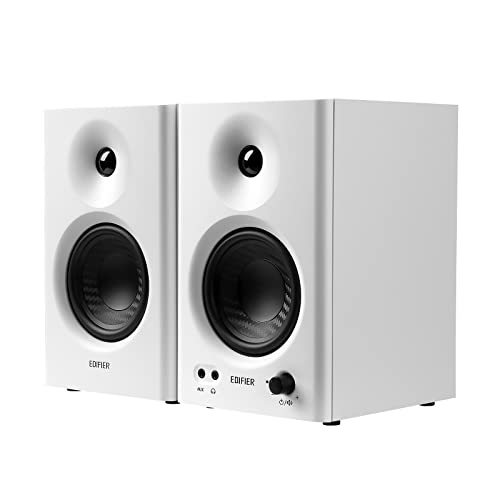
Edifier MR4
The Edifier MR4 is a compact pair of powered studio monitors, and it is the natural starting point for this guide. It has a 4-inch woofer and a 1-inch silk dome tweeter in each small cabinet, with a built-in amplifier, balanced and unbalanced inputs, a front headphone output and an auxiliary input, and a sound that is clear, balanced and honest. The speakers are designed for a desk, where the listener sits close, and they deliver a stereo image that is stable and wide, with a midrange that keeps voices natural and a treble that is detailed without harshness.
What makes the MR4 work so well at a desk is the combination of a proper 4-inch woofer and a well-designed cabinet, because the larger woofer gives the sound a fullness that the tiny 3-inch monitors in this guide cannot match, while the cabinet stays small enough for a crowded workspace. The balanced input is a genuine advantage in a desk full of electronics, because it rejects the hum and interference that an unbalanced cable picks up, and the front headphone output and auxiliary input make the speakers easy to use for practice and for casual listening. The build is solid, with a finish that looks professional.
Strengths: A clear, balanced sound from a proper 4-inch woofer, with balanced inputs that reject interference, a front headphone output, and a compact cabinet that fits a desk. The stereo image is stable and wide, the build is solid, and the value is strong for a genuine studio monitor.
Trade-offs: The bass is solid for the size but will not shake a room, and there is no Bluetooth, so a phone needs a cable. The sound is honest rather than flattering, so a listener who wants warmth may prefer a hi-fi pair. The rear controls are fiddly to reach on a desk.
Who it fits: Desk workers, home recordists and anyone who wants a compact, honest stereo pair for a computer. It suits a home office, a bedroom studio, and listeners who value clarity and a stable stereo image over bass weight.
Play a track with a wide stereo mix and notice how stable the image is, because that is what a good monitor does. Then play a vocal track and listen for whether the voice sits in the centre, clear and natural, because a monitor that cannot place a voice cannot do its job.
IK Multimedia iLoud Micro Monitor
The IK Multimedia iLoud Micro Monitor is a pair of powered micro monitors, and it is the pick here for buyers whose desk has almost no space but who still want a proper stereo sound. Each speaker is barely larger than a paperback, with a 3-inch woofer and a 0.75-inch tweeter, a built-in amplifier, Bluetooth, and a sound that is remarkably full for the size, thanks to digital signal processing that extends the bass far beyond what a 3-inch driver should manage. The speakers are designed for a desk, a hotel room, or a portable setup, and they deliver a stereo image that is surprisingly wide and stable.
The iLoud Micro Monitor sounds bigger than it looks, because the DSP corrects the frequency response and extends the low end, so the sound is full and balanced rather than thin. The Bluetooth connection is stable and sounds good, the speakers are quiet when idle, and the pair can be used with a laptop on battery, which makes them genuinely portable. The stereo image is wide for the size, and the speakers suit a listener who sits close, because the sound is designed for near-field listening rather than for filling a room.
Strengths: A remarkably full sound from a tiny cabinet, with Bluetooth, DSP-corrected bass, and a wide stereo image. The speakers are portable, quiet when idle, and easy to set up. They are the smallest proper stereo monitors in this guide.
Trade-offs: The 3-inch woofer limits the maximum volume and the deepest bass, so the sound is thin in a large room and a subwoofer is not an option. The price is higher than the budget desk speakers, and the DSP sound can feel processed to a purist’s ear. The speakers need to be close to the listener to sound their best.
Who it fits: Anyone with a tiny desk, a portable setup, or a laptop that travels, who still wants a proper stereo sound. It suits a hotel room, a small office, and anyone who values footprint and portability over bass and volume.
Play a bass-heavy track and notice how much low end comes from such a small cabinet, because the DSP is doing real work. Then play a vocal track and listen for whether the voice sounds natural, because a processed speaker must not make people sound artificial.
Check price on Amazon: Edifier MR4

Mackie CR3-X
The Mackie CR3-X is a compact pair of powered monitors built for creators, and it is the pick here for buyers who want a small, good-looking speaker for a desk studio. It has a 3-inch woofer and a silk dome tweeter in each cabinet, with a front-panel volume knob, a headphone output and an auxiliary input, and a choice of finishes that suit a modern workspace. The amplifier is built in, the connections are straightforward, and the speakers are designed to sit on a desk and sound good at close range, which is how most creators listen.
The CR3-X sounds clear and balanced, with a midrange that keeps voices natural and a treble that is smooth, and the bass is tight for the size, although it does not go deep. The front-panel controls are the best in this guide for daily use, because the volume knob, the headphone socket and the auxiliary input are all within reach, and the speakers switch between the front input and the rear inputs without fuss. The build is solid for the price, with a cabinet that feels substantial and a finish that looks good on a desk.
Strengths: A compact, good-looking pair with front-panel controls that make daily use easy, and a clear, balanced sound that suits voice work, video editing and casual listening. The headphone output and auxiliary input are convenient, the price is low, and the speakers are small enough for a crowded desk.
Trade-offs: The 3-inch woofer limits the bass, so the sound is thinner than a larger monitor and a subwoofer helps for music. There is no Bluetooth and no digital input, so a phone needs a cable. The sound is pleasant rather than revealing, so it is less suited to critical mixing than the Edifier MR4.
Who it fits: Creators, video editors and podcasters who want a small, attractive monitor pair for a desk, and anyone who values front-panel controls over rear-panel tuning. It suits a home office, a bedroom studio, and listeners who want a simple speaker that looks good and sounds clear.
Play a spoken-word recording and notice how clear and natural the voices sound, because voice work is where this speaker earns its keep. Then play music with bass and listen for where the low end runs out, because the 3-inch woofer has a limit and it is worth knowing.
Check price on Amazon: IK Multimedia iLoud Micro Monitor

PreSonus Eris 3.5
The PreSonus Eris 3.5 is a pair of powered studio monitors, and it is the pick here for buyers who want a flat, honest sound rather than a warm, flattering one. Studio monitors are designed to tell the truth about a recording, so the Eris 3.5 has a balanced frequency response, a 3.5-inch woofer and a 1-inch silk dome tweeter in each cabinet, with acoustic tuning controls on the back that let you adjust the high and low frequencies to suit the room. The amplifier is built in, the connections are simple, and the whole pair is designed for a desk, which is where most home recording happens.
The Eris 3.5 sounds clean and detailed, with a treble that is open and a midrange that is clear, and the bass is tight and controlled for the size, although it does not go deep. The acoustic tuning controls are genuinely useful, because a desk against a wall boosts the bass, and the low-frequency control can tame it. A headphone output on the front and an auxiliary input make the speakers easy to use for practice and for casual listening, and the build is solid, with a cabinet that does not colour the sound.
Strengths: A flat, honest sound that suits recording, mixing and critical listening, with acoustic tuning controls that adapt the speakers to the room. The front headphone output and auxiliary input are convenient, the build is solid, and the price is low for a genuine studio monitor. It is the most truthful speaker in this guide.
Trade-offs: The honest sound can feel plain compared with a warmer hi-fi speaker, because studio monitors are designed to reveal flaws rather than to flatter them. The bass is limited by the small woofer, so a subwoofer is a sensible addition for full-range music. There is no Bluetooth, and the rear controls are fiddly to reach on a desk.
Who it fits: Home recordists, podcasters and musicians who need to hear what a recording actually sounds like, and anyone who prefers an honest sound to a warm one. It suits a desk studio, a bedroom recording setup, and listeners who value detail and clarity over bass weight.
Play a well-recorded track you know well and notice how much detail you can hear, because a studio monitor reveals things a hi-fi speaker smooths over. Then play a poor recording and listen for whether the speaker exposes it, because that honesty is the point of a monitor.
Check price on Amazon: Mackie CR3-X

JBL 104-BT
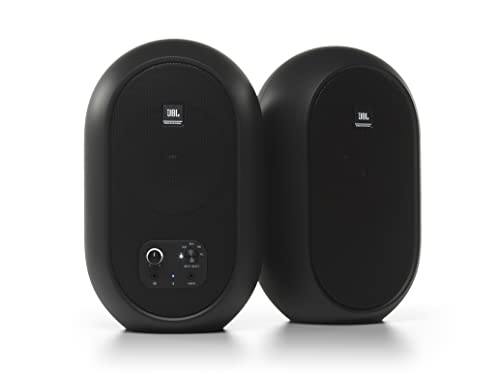
The JBL 104-BT is a compact pair of powered monitors with Bluetooth, and it is the pick here for buyers who want a stereo pair that plays from a phone wirelessly. It has a 4.5-inch woofer and a 0.75-inch tweeter in each cabinet, with a built-in amplifier, Bluetooth, and analogue inputs, and a sound that is clear, balanced and lively, with a bass response that is solid for the size. The speakers are designed for a desk, a bedroom studio, or a small media setup, and they deliver a stereo image that is wide and stable, with a JBL tuning that favours an engaging, musical presentation.
The 104-BT sounds full and lively, with a midrange that keeps voices natural and a treble that is clear, and the 4.5-inch woofer gives the bass a weight that the smaller monitors here cannot match. Bluetooth pairing is quick and stable, the speakers switch between Bluetooth and the analogue inputs easily, and the front headphone output is convenient. The build is solid, with a cabinet that feels substantial, and the speakers are quiet when idle, with no hiss to distract from work.
Strengths: A full, lively sound from a 4.5-inch woofer, with Bluetooth that makes a phone a first-class source. The stereo image is wide, the front headphone output is convenient, and the price is low for a powered pair of this size. It is the most versatile speaker in this guide.
Trade-offs: The Bluetooth connection is standard quality rather than high-resolution, so a wired connection sounds slightly better. The sound is lively rather than neutral, so a critical listener may prefer the Edifier MR4 or the PreSonus Eris 3.5. There is no digital input, and the rear controls are basic.
Who it fits: Anyone who wants a compact stereo pair that plays from a phone by Bluetooth and from a computer by cable, especially a desk that doubles as a media corner. It suits a home office, a bedroom, and anyone who values wireless convenience over absolute neutrality.
Pair a phone by Bluetooth and play a favourite track, then switch to the analogue input from a computer and play the same track, listening for whether the wired connection sounds cleaner. The comparison shows what Bluetooth costs, and whether it matters to you.
Check price on Amazon: PreSonus Eris 3.5
Vanatoo Transparent Zero
The Vanatoo Transparent Zero is a compact pair of powered monitors with digital signal processing, and it is the pick here for buyers who want accuracy in a small package. It has a 4-inch woofer and a 1-inch tweeter in each cabinet, with a built-in amplifier, DSP that corrects the response, and a sound that is clean, detailed and neutral, with a bass response that is surprising for the size. The speakers are designed for a desk, where the listener sits close, and they deliver a stereo image that is precise and stable, with a clarity that suits critical listening as well as everyday music.
The Transparent Zero sounds precise, because the DSP flattens the response and extends the bass, so the sound is balanced from the lowest note the woofer can manage to the highest the tweeter can reach. The midrange is clear and natural, the treble is detailed without harshness, and the speakers image well, placing instruments in a stable stereo picture. The connections are simple, with analogue and digital inputs, and the build is solid, with a cabinet that is well braced and a finish that looks professional.
Strengths: A precise, neutral sound with DSP correction, in a compact pair that fits a desk. The bass is surprising for the size, the stereo image is stable, and the build is excellent. It is the most accurate small speaker in this guide.
Trade-offs: It costs more than the budget desk speakers, and the DSP sound can feel clinical to a listener who prefers warmth. There is no Bluetooth, the speakers are best heard at close range, and the brand is less familiar than Edifier or JBL, which can matter for a buyer choosing on reputation.
Who it fits: Listeners who value accuracy above all, especially anyone who mixes, edits, or listens critically at a desk. It suits a home studio, a small office, and anyone who wants a small speaker that tells the truth.
Play a track with a complex mix and notice how each part stays separate, because that separation is what an accurate speaker does. Then play a vocal track and listen for whether the voice sounds natural, because a neutral speaker must not make people sound thin.
Check price on Amazon: JBL 104-BT
Stereo Imaging at a Desk
A stereo pair at a desk lives or dies by its imaging, because the listener sits close, and the two speakers must create a single, stable picture rather than two separate sounds. The image depends on the speakers being the same distance from the listener, at the same height, angled slightly inward, so the tweeters point at the ears and the sound arrives at both ears at the same time. Get that right and the music has a centre, a width and a depth; get it wrong and the sound collapses to one side, or splits into two boxes, and no amount of money will fix it.
The practical rule is the triangle: the speakers and the listener form an equilateral triangle, with the speakers as far apart as they are from the listener, and the tweeters at ear height. A desk rarely allows a perfect triangle, but getting close matters more than getting it exact, and a small adjustment, moving a speaker an inch or angling it a degree, is audible. Take the time to set the triangle, and the speakers will reward you with a sound that is bigger than the desk.
Monitor Versus Hi-Fi: Which Character Suits a Computer
A computer speaker is either a monitor or a hi-fi speaker, and the difference is character, not quality. A monitor is designed to tell the truth, with a flat response that reveals what a recording actually sounds like, including its flaws, while a hi-fi speaker is designed to please, with a warm, flattering sound that makes everything enjoyable. Neither is better in general; they suit different listeners, and the right choice depends on what the computer is for.
The practical point is to match the character to the use: a recordist, a podcaster or a video editor needs a monitor, because they must hear the truth, while a listener who plays music for pleasure will enjoy a hi-fi speaker more, because it flatters the music. The speakers in this guide are mostly monitors, because a desk is a working place, but the JBL and the Mackie lean toward pleasure, and the choice between them is a matter of taste. Listen to a speaker you already own, decide what you would change about it, and choose the character that fixes it.
The Triangle, the Wall, and the Desk
A stereo pair at a desk is governed by three things, and the first is the triangle: the speakers and the listener form an equilateral triangle, with the speakers as far apart as they are from the listener, and the tweeters at ear height. A desk rarely allows a perfect triangle, because the monitor sits between the speakers and the keyboard sits between the listener and the desk, but getting close matters more than getting it exact, and a small adjustment, moving a speaker an inch or angling it a degree, is audible in the stability of the image.
The second is the wall, because a speaker near a wall gets a bass boost, and a desk against a wall puts both speakers near one. A few inches of space behind the speakers cleans up the bass noticeably, and a speaker with a rear port needs more space than one with a front port. If the desk cannot move, a foam bung in the port, or the speaker’s own bass control, can tame the boom, and the result is a sound that is tighter and clearer, even though the speaker has not moved.
The third is the desk itself, because a hollow desktop vibrates with the speakers and adds a boxy colouration to the sound. Foam isolation pads, or a pair of small stands, decouple the cabinets from the surface and let the speakers sound as they were designed to, and the difference is audible within seconds. It is the cheapest upgrade in desktop audio, and it is worth doing on day one, before judging any speaker, because a speaker heard through a desk is not the speaker at all.
Bluetooth, USB, and Analogue: Choosing a Connection
A computer speaker offers three ways in, and each has a character worth understanding before you buy. Bluetooth is the most convenient, because a phone pairs in seconds and the cable disappears, but it compresses the audio, so the sound is slightly less detailed than a wired connection, and the connection can drop if the phone walks away. It is the right choice for casual listening, and the wrong one for critical work.
USB is the cleanest, because it carries a digital signal straight from the computer, bypassing the analogue output that is often the noisiest part of a desktop. A speaker with a USB input, such as the Audioengine A2+ or the Kanto YU2, will sound noticeably cleaner than the same speaker fed by a 3.5 mm cable from a cheap sound chip, and the difference is worth the price of the input. If your computer’s headphone output hisses, USB is the cure.
Analogue is the simplest, because a 3.5 mm cable works with everything, and it is the fallback that every speaker in this guide has. Its quality depends on the source: a good headphone output sounds fine, a poor one sounds noisy, and a long cable picks up hum from the desk’s electronics. Keep the cable short, keep it away from power cables, and analogue will serve well, but if the choice is available, USB is the better connection for a computer, and Bluetooth is the better one for a phone.
Buying Guide
Start by measuring the desk, because a compact stereo pair must fit, and a speaker that does not fit is a speaker you will not use. The iLoud Micro Monitor fits anywhere, the Edifier MR4 and the Vanatoo need a little more room, and the JBL 104-BT needs the most. Measure the space, leave room for the speakers to breathe, and choose the pair that fits the desk you have, not the one you wish you had.
Think about the inputs, because a computer speaker’s connections decide what it can play from. A pair with Bluetooth covers a phone, a pair with a USB or digital input gives a clean signal from a computer, and a pair with only analogue inputs needs a cable for every source. Count your sources, then count the inputs, and make sure the second number is at least as large as the first.
Consider the sound you prefer, because the speakers here have distinct characters. The PreSonus and the Vanatoo are honest and flat, the Edifier is balanced, the JBL is lively, and the Mackie is pleasant. There is no right answer, only a preference, and the best way to find yours is to listen to a speaker you already own and decide what you would change about it.
Check the bass honestly, because a compact speaker’s woofer has a limit, and a speaker that sounds thin will stay thin. The 4-inch and 4.5-inch woofers here give a fuller sound than the 3-inch ones, and a subwoofer output is worth having if you think you will want more bass later. Try the speakers on their own first, and add a subwoofer only if the low end feels thin.
Think about the controls, because a powered speaker’s volume and tone controls are part of daily use, and a pair with fiddly rear controls will frustrate you. Front-panel controls and a headphone output are worth paying for on a desk, while rear controls are fine if the speakers sit on a shelf. Think about where your hands will be when you want to turn the volume down, and buy accordingly.
Finally, remember that a compact stereo pair is a complete system, not a stepping stone. It needs no amplifier, no receiver and no extra boxes, and it will play music, films and games well for years. Buy the pair that suits your desk and your ears, set the triangle properly, and enjoy it, rather than worrying about what you might upgrade next.
Frequently Asked Questions
What are the best compact stereo speakers for a computer?
The Edifier MR4 is the best all-round compact stereo pair for a computer, with a clear, balanced sound from a proper 4-inch woofer. The iLoud Micro Monitor is the best tiny pair, the PreSonus Eris 3.5 is the best for honest monitoring, and the JBL 104-BT is the best with Bluetooth. The right answer depends on your desk, your budget, and whether you value accuracy, portability or wireless convenience most.
How far apart should computer speakers be?
As far apart as they are from you, forming an equilateral triangle with the listener, with the tweeters at ear height and angled slightly inward. On a typical desk that means the speakers sit at the sides of the monitor, about an arm’s length away. A triangle that is close to equilateral gives a stable stereo image; a pair pushed together sounds narrow, and a pair spread too wide sounds split.
Do I need a subwoofer with compact computer speakers?
Not necessarily, because the larger pairs here, such as the JBL 104-BT and the Edifier MR4, have enough bass for a desk on their own. The smaller pairs, such as the Mackie CR3-X and the iLoud Micro Monitor, have limited bass, so a subwoofer helps for music and films. Try the speakers on their own first, and add a subwoofer only if the low end feels thin.
Are studio monitors good for listening to music?
Yes, if you like an honest sound, because a studio monitor tells the truth about a recording, with a flat response and a clear stereo image. Some listeners find that honesty plain compared with a warm hi-fi speaker, because a monitor reveals flaws rather than flattering them. If you listen for pleasure and prefer warmth, a hi-fi-leaning pair such as the JBL 104-BT will suit you better.
What is the difference between the Edifier MR4 and the PreSonus Eris 3.5?
Size and character: the MR4 has a 4-inch woofer and balanced inputs, so it sounds fuller and rejects interference, while the Eris 3.5 has a 3.5-inch woofer and acoustic tuning controls, so it is a little smaller and more adjustable. Both are honest studio monitors, and the choice is about the desk and the room: the MR4 suits a larger desk and a noisier environment, the Eris 3.5 suits a smaller one.
Can I use compact speakers with a laptop?
Yes, and they are ideal for it, because a laptop’s built-in speakers are small and thin, and even a compact pair transforms the sound. Connect by USB, Bluetooth or a 3.5 mm cable, depending on the speaker, and the laptop becomes a proper music system. The iLoud Micro Monitor is the most portable choice, because it can run from a laptop’s USB power, while the others need mains power.
Why do my computer speakers sound better with headphones?
Because headphones remove the room, and a desk speaker has to fight the desk, the wall and the room itself. A speaker placed against a wall, on a hollow desk, or too low will sound worse than it should, while headphones have none of those problems. Fix the placement first: raise the speakers to ear height, pull them away from the wall, put them on foam pads, and set the triangle, and the gap will close noticeably.
Should I buy a subwoofer for my desk speakers?
Only if the bass feels thin after the speakers are set up properly, because a subwoofer adds depth that no small speaker can match, but a badly set one muddies the sound. The larger pairs in this guide, such as the JBL 104-BT and the Edifier MR4, have enough bass for a desk on their own, while the smaller ones benefit from a subwoofer for music and films. Choose a speaker with a subwoofer output if you think you will want one later, because it keeps the upgrade simple.
Can I use studio monitors for gaming?
Yes, and they are a good choice, because a monitor’s clear stereo image helps with positional audio, and its flat response keeps effects distinct. The PreSonus Eris 3.5 and the Edifier MR4 both suit gaming, although neither has the bass of a 2.1 system, so a subwoofer helps for the lowest effects. A monitor will not give the surround of a 5.1 set, but for stereo gaming at a desk, it is accurate, clear, and easy to live with.
Conclusion
The best compact stereo speakers for a computer are the ones that fit your desk and match your ears, and for most buyers that is the Edifier MR4, because its balance and its 4-inch woofer make it the most complete desk pair here. Set the triangle, raise the tweeters to ear height, and enjoy a desk that sounds like a listening room.