Our Top Picks


What's inside
- Best Monitor Stands for 4 Monitors: Quad Mounts That Keep Four Screens Stable, Aligned, and Usable
- Four-Monitor Layouts: 2×2, 3+1, and the Long Row
- How to Choose a Quad Monitor Stand
- The Eight Quad Monitor Stands Compared
- Installation: Building a Four-Screen Setup Without Regret
- Ergonomics for Four Screens
- Frequently Asked Questions
- Check prices on Amazon
- Conclusion: Match the Mount to Your Screens, Desk, and Habits
As an Amazon Associate I earn from qualifying purchases. This post may contain affiliate links at no extra cost to you.
Best Monitor Stands for 4 Monitors: Quad Mounts That Keep Four Screens Stable, Aligned, and Usable
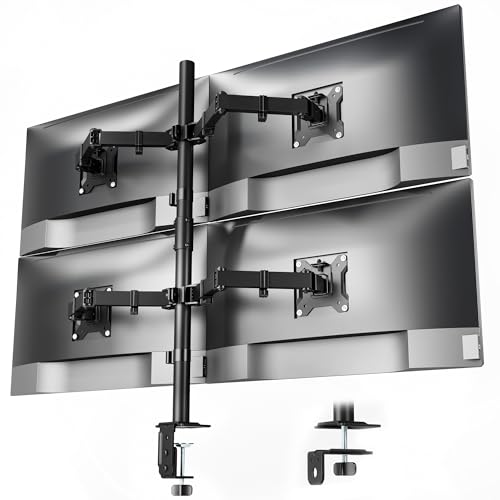
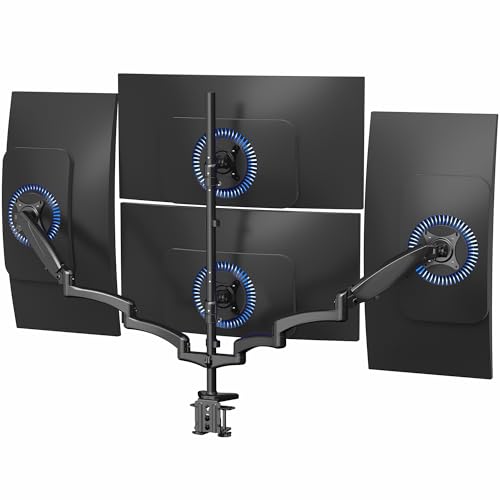
Running four monitors changes how a desk feels. One screen becomes the main workspace, another holds communication, a third keeps reference material open, and the fourth can carry monitoring tools, timelines, code output, market data, media controls, or a second project that would otherwise be buried under windows. The benefit is obvious, but so is the problem: four separate factory stands eat depth, force awkward angles, and make a desk look crowded even when the screens themselves are not especially large. A quad monitor stand solves that by lifting all four displays onto one shared structure, freeing the surface underneath and letting you position each screen as part of a single, deliberate layout.
Choosing the right quad mount is not just a matter of finding something that holds four screens. The stand has to match your screen sizes, the weight of each display, your VESA pattern, your desk thickness and edge access, and the way you actually sit and move through the day. A mount that works beautifully for four light 24-inch office monitors may be the wrong answer for four heavier 32-inch panels. A freestanding base may be ideal if you cannot clamp to your desk, while a clamp or grommet mount will usually feel more secure and leave more usable space. Pneumatic arms, fixed arms, stacked poles, and articulating arms all behave differently once four screens are hanging from them.
This guide compares eight quad monitor stands that cover the main approaches to a four-screen desk. Our research focused on the details stated in each product title and on widely understood principles for this category: supported screen size ranges, capacity per arm, VESA compatibility where stated, mounting style, and adjustment types such as tilt, swivel, and rotation. We compared listings side by side, checked how each design would suit common layouts, and paid close attention to the differences between models that look similar at first glance. Two WALI models appear here, for example, and they are separate models with different stated screen ranges, not duplicates. One VIVO model is built specifically for ultrawide and very large screen combinations, and it should be judged in that context rather than as a standard quad mount.
Four-Monitor Layouts: 2×2, 3+1, and the Long Row
The 2×2 grid
The classic four-monitor layout is a two-by-two grid: two screens on the bottom row and two stacked directly above them. This is the layout most stacked quad mounts are designed around. It keeps the total width manageable, which is a major advantage on a standard desk. Instead of stretching four screens across an enormous arc, you build upward and keep everything within a comfortable head-turn range. The bottom-center seam becomes the natural dividing line, so most people offset themselves slightly or angle the lower pair inward and treat one lower screen as the primary display.
A 2×2 grid works especially well for dashboards, surveillance-style monitoring, trading, coding with multiple reference panes, and any job where all four screens deserve roughly equal attention. The ergonomic key is height. The top row should not force you to crane your neck. Tilt the upper screens down toward your eyes, keep the bottom row at a natural viewing height, and remember that your main screen should still sit directly in front of you rather than forcing a permanent twist. If you spend most of the day in one application, do not let the symmetry of the grid dictate a posture that hurts by mid-afternoon.
The 3+1 layout
In a 3+1 layout, three screens form the main row and the fourth sits above the center screen. This is popular with gamers, streamers, editors, and anyone whose work has a clear central focus. The middle display stays directly ahead, flanked by a screen on each side, while the overhead display handles chat, music, a preview, system monitoring, or reference material that you glance at rather than read for hours. Several stacked quad mounts can approximate this arrangement depending on pole height and arm positioning, although you should check the stated screen range carefully because three wider screens side by side need more horizontal clearance than a compact 2×2 grid.
The advantage of 3+1 is psychological as much as physical. Your primary task gets an unmistakable home. The disadvantage is width: three screens in a row, even angled inward, can dominate a desk and push speakers or other gear off the surface. It can also place the side screens at a distance where small text becomes tiring. This layout shines most when the side screens carry larger, glanceable content rather than dense documents you read line by line.
How to Choose a Quad Monitor Stand
Mounting style: clamp, grommet, or freestanding base
The mounting method is the first decision because it determines whether the stand will work with your desk at all. A C-clamp grips the back edge of the desktop. It is popular because it does not require drilling and it keeps the footprint small. To use one, you need a solid desk edge with enough clearance behind and below, and the desktop material must be strong enough to handle concentrated pressure. Hollow or fragile desktops deserve caution, and a reinforcing plate or a different mounting style may be safer.
A grommet mount passes a bolt through a hole in the desk, either an existing cable grommet hole or one you drill. This can feel extremely secure and can work when the back edge is obstructed by a wall, a modesty panel, or a cable tray. The trade-off is permanence: you are committing to that position. Several models in this guide include both clamp and grommet bases, which gives you flexibility if you change desks later.
A freestanding base sits on top of the desk and supports the pole through its own footprint. This is the easiest option to install and move, and it avoids clamping pressure entirely. It is a sensible choice for glass desks, desks with unusual edges, rented spaces where drilling is not allowed, or temporary setups. The cost is desk space and, potentially, stability: a wide, heavy base takes room, and a tall four-screen arrangement on a freestanding base should be positioned carefully so the combined weight stays balanced over the footprint. The VIVO freestanding model in this guide is the clearest example of that approach.
Capacity per arm matters more than total capacity
Always read capacity as a per-arm figure. A stand that holds a stated weight per arm must support your heaviest single monitor on one arm, with some headroom to spare. Do not average the weight of four screens and assume a lighter average makes a heavy outlier safe. Weigh each monitor without its factory stand if you can, or check the manufacturer’s specifications for the panel weight that will actually hang from the VESA plate. Leave margin: a monitor near the limit may hold, but adjustment can feel stiff and the arm may drift or sag over time. Headroom makes setup easier and gives the mount a longer, more stable working life.
In this group, stated capacities range from 17.6 pounds per arm on some models to 22 pounds per arm on others, with one ultrawide-focused VIVO model stating a much higher 44 pounds per arm. Those numbers should be matched to your actual screens, not treated as a score where higher is automatically better. If your monitors are light, a 17.6-pound arm may be entirely sufficient and easier to position. If you run heavier 32-inch displays, the extra margin of a 22-pound arm is worth prioritizing.
VESA 75 and VESA 100 compatibility
Most monitors in this class use a VESA mounting pattern of either 75 x 75 mm or 100 x 100 mm, measured between the screw holes on the back of the display. Most of the stands here state VESA 75/100 compatibility, which covers the majority of 13-inch to 32-inch monitors people use in quad setups. Before buying, confirm your monitor actually has a VESA pattern. Some slim monitors hide it under a removable panel, some need a manufacturer adapter, and some consumer models have no VESA holes at all. No stand can mount a screen that lacks a compatible pattern without the correct adapter.
If color accuracy matters for your central screen, our overview of best 10 bit monitors can help you decide which display deserves that position. Also check recessed mounting areas. If the VESA holes sit inside a deep recess on the back of the monitor, the plate or screws may need spacers. Keep the monitor’s own manual handy during installation, use the correct screw length, and never force longer screws into a panel, because an overly long screw can damage internal components.
Screen size ranges are guidance, not a suggestion to mix extremes
Each product here states a screen size range, such as 13 to 27 inches, 13 to 32 inches, or 17 to 32 inches. Stay inside it. Size affects more than whether the VESA plate fits: larger screens need more clearance to tilt and rotate without striking a neighboring display, the wall, or the pole. Four screens at the top of a stated range will be a tight fit in a 2×2 grid, and rotating an upper 32-inch screen to portrait may not be practical once the other three are in place. Plan your layout around the screens you have, and think about whether you truly need portrait rotation on all four or only on one.
Fixed arms, articulating arms, and pneumatic arms
Fixed or simple bracket arms hold screens in position on a pole and usually allow tilt, swivel, and rotation at the mounting head. They are straightforward, sturdy, and often easier to keep aligned in a grid. Articulating arms add joints that let a screen move forward, back, and sideways, which helps when you need to stagger depths or pull one display closer. Pneumatic arms use a gas spring to counterbalance the monitor’s weight, so height adjustment feels lighter and smoother. That matters most for screens you reposition often, and it is a defining feature of the two VIVO pneumatic models in this guide.
Desk depth, thickness, and what sits behind your desk
Measure before you buy. Note your desktop thickness for the clamp, the distance from the desk edge to any wall or cable tray, and the depth available for a freestanding base if you choose one. Consider where the pole will land relative to your keyboard and where you sit. A mount centered on the desk is not always a mount centered on you, especially with corner desks or setups offset by a PC tower. If you are also shopping for a new work surface, our roundup of best affordable desks is a useful companion, because desk material and edge construction matter as much to a quad mount as the mount itself.
The Eight Quad Monitor Stands Compared
1. MOUNTUP Quad Monitor Stand for 17 to 32 Inch Screens
The MOUNTUP Quad Monitor Stand is built around a straightforward promise: four monitors from 17 to 32 inches, fully adjustable stacked mounting, and a stated capacity of up to 17.6 pounds per arm. That combination suits the most common quad setup, where the screens are mainstream office or home displays rather than unusually heavy panels. The stacked design points it toward a 2×2 grid, keeping the footprint centered and the overall width under control.
Tilt and swivel adjustment are stated for this mount, and those two movements do much of the daily work in a stacked arrangement. Tilt lets the upper row angle down and the lower row sit at a natural viewing angle, while swivel helps you angle the left and right screens inward so the grid wraps slightly around your seating position instead of presenting four flat panels in a straight wall. Small swivel adjustments also help compensate when your chair position is not perfectly centered on the pole.
Who should choose it: buyers building a conventional 2×2 workstation with four light-to-midweight screens who want a heavy-duty stacked mount without stepping up to pneumatic arms or ultrawide hardware. Who should skip it: anyone with screens smaller than 17 inches, heavier panels that need more per-arm margin, or a desk that cannot accept its mounting arrangement. As with every model here, confirm your VESA pattern and desk fit before ordering.
2. WALI Stacked 4 Monitor Mount M004S for 13 to 27 Inch Screens
The WALI M004S is the compact specialist in this group. It is a stacked four-monitor mount for 13-inch to 27-inch screens, with a stated capacity of up to 22 pounds per arm, full motion including tilt, swivel, and rotation, both C-clamp and grommet bases, and VESA 75/100 mm compatibility. That is a generous specification for smaller screens: the per-arm capacity is high relative to the weight of most displays in this size band, which makes adjustment easier and leaves plenty of headroom.
The 13-to-27-inch range is the key difference between this model and the WALI M004 described next. If your four screens are 24 inches or smaller, or a mix that tops out at 27 inches, the M004S is sized for your setup and its stacked layout will feel proportionate. Smaller screens also make rotation more practical: turning a 24-inch display to portrait for documents, code, or chat is far easier within a grid than rotating a maximum-size panel, and the stated rotation support lets you build a mixed landscape-and-portrait arrangement if your work benefits from it.
Having both clamp and grommet bases in the box is a practical advantage. You can clamp the mount today and move to a grommet installation if you change desks or find the back edge obstructed. Full motion at the heads helps fine-tune a 2×2 grid, where tiny differences in tilt between the upper pair are noticeable once you sit down.
Who should choose it: anyone running four screens of 27 inches or smaller who wants strong per-arm capacity, rotation, and flexible mounting in a compact stacked design. Who should skip it: buyers with 28-inch to 32-inch monitors, who should look at the M004 or another model whose stated range covers their screens. Treating the M004S and M004 as interchangeable would be a mistake; they serve different size classes.
3. WALI Quad Monitor Desk Mount M004 for 13 to 32 Inch Screens
The WALI M004 is the broader-range WALI model: a quad monitor desk mount for 13-inch to 32-inch computer screens, with a stated 22 pounds per arm, adjustable full motion including tilt, swivel, and rotation, a C-clamp and grommet base, and VESA 75/100 mm compatibility. Compared with the M004S, the defining difference in the stated specifications is the wider screen range, extending to 32 inches while keeping the same starting point of 13 inches.
Full motion matters more as screens grow. Tilt keeps a large upper display angled toward your eyes, swivel brings the side screens into a comfortable arc, and rotation remains available for a portrait document screen if clearance allows. In a full 2×2 grid of 32-inch displays, expect adjustments to be a careful, two-handed process and allow extra time during setup to align bezels patiently.
Who should choose it: buyers who want one mount spanning small through 32-inch screens, with both clamp and grommet options and strong per-arm capacity. Who should skip it: buyers who specifically want a freestanding base, pneumatic lift assistance, or an ultrawide-focused design. Within the WALI pair, choose the M004S for a dedicated smaller-screen setup and the M004 when your screens are larger or likely to grow.
4. PUTORSEN Quad Monitor Stand for 17 to 32 Inch Screens
The PUTORSEN Quad Monitor Stand covers four screens from 17 to 32 inches, with a stated capacity of 19.8 pounds each, a stacked four-screen desk mount design, full-motion arms, VESA 75/100 compatibility, and tilt, swivel, and rotation. It sits in the middle of this group on capacity, above the 17.6-pound models and just below the 22-pound models, which makes it a sensible match for mainstream 27-inch and 32-inch monitors that fall comfortably under its limit.
Two details in its stated description set it apart. The first is the larger base with a phone slot. A phone slot sounds minor until your desk carries four screens, a keyboard, and everything else a workday brings; having a defined place where the phone stands visible keeps it off a pile of papers and within glance range for calls, authentication prompts, and timers. The second is the emphasis on full-motion arms in a stacked layout, which should help when you want the upper and lower rows at slightly different depths or angles rather than locked into one flat plane.
As with other stacked designs, plan for a 2×2 grid as the primary layout. Check how the larger base interacts with your desk: a bigger base can add confidence and stability, but you should confirm it does not collide with a keyboard tray, desk grommet, or the edge profile of your work surface, and confirm the mounting arrangement suits your desktop thickness.
Who should choose it: buyers with four 17-inch to 32-inch screens who like the stacked format, want full-motion adjustment and midrange capacity, and will actually use the phone slot in the base. Who should skip it: anyone whose heaviest monitor needs the full margin of a 22-pound arm, or anyone with screens under 17 inches. It is a practical, desk-friendly take on the standard quad formula.
5. VIVO Quad Monitor Desk Stand STAND-V004F, Freestanding
The VIVO STAND-V004F takes a different approach from the clamp models: it is a quad monitor desk stand for 13-inch to 30-inch screens, holding a stated 17.6 pounds each, with articulating, adjustable arms and a freestanding mount with a base. Instead of gripping or bolting through the desk, it stands on the surface. For the right desk, that is not a compromise; it is the whole point.
Freestanding installation is the fastest to set up and the easiest to reverse. There is no clamp to tighten under the desk, no hole to drill, and no concern about whether a thin or hollow desktop can handle clamping pressure. If you have a glass desk, a desk with a decorative edge that a clamp cannot grip, or a workspace you rearrange often, this design removes several obstacles at once. It is also a friendly option for standing desks where under-desk clearance is already occupied by cable trays and crossbars, although you should still route display cables with enough slack for height changes.
The trade-offs are footprint and balance. The base occupies real desk space in front of the pole, and four screens up to 30 inches on a freestanding stand deserve a level, stable surface and careful positioning so the assembly feels planted. Articulating arms help you bring screens forward or tuck them back, but resist the urge to pull all four displays far forward of the base. Keep the center of gravity over the footprint, tighten everything as instructed, and re-check stability after your final adjustments.
The stated 13-to-30-inch range covers most mainstream monitors, stopping just short of the 32-inch class. Who should choose it: buyers who cannot or do not want to clamp or drill, and who have the surface space for a base. Who should skip it: buyers with 32-inch screens, very small desks where the base footprint crowds the keyboard area, or anyone who wants the locked-down feel of a through-desk or clamp installation.
6. VIVO Quad Ultrawide Desk Mount STAND-V400D for Very Large Screens
The VIVO STAND-V400D is not a standard quad mount, and it should not be compared as one. It is a quad ultrawide desk mount stating a capacity of 44 pounds per arm, pneumatic arms, and an extra tall pole, with stated combinations of one 49-inch screen, three 22-inch screens, or four 38-inch screens. Those figures describe a different class of setup: very large and ultrawide displays that would overwhelm the size ranges and capacities of the other mounts in this guide.
If your four-screen plan involves large-format or ultrawide monitors, this is the model designed with you in mind. Pneumatic arms matter at this scale because moving a heavy, wide display by hand against a fixed bracket is awkward; gas-spring assistance helps you raise and position large screens with more control. The extra tall pole supports stacked arrangements where a big screen needs clearance above or below companions. The stated per-arm capacity, far beyond the mainstream models here, reflects the weight that large panels can carry.
With that capability comes responsibility in planning. Measure your wall clearance, desk depth, and viewing distance carefully, because four very large screens create an immersive but demanding field of view. Confirm your desk can support the combined weight of mount and displays concentrated at the mounting point, and think honestly about whether your work benefits from this much glass. For a conventional set of 24-inch or 27-inch office monitors, this mount is more hardware than you need, and a standard model will be easier to live with.
Who should choose it: buyers building around ultrawide or very large displays, including the stated 49-inch, 38-inch, and mixed combinations, who need pneumatic assistance and tall-pole clearance. Who should skip it: mainstream quad users with standard screens, small desks, or shallow rooms. It earns its place in this guide as the specialist option, not as the default recommendation.
7. monTEK Quad Monitor Stand for Four 17 to 32 Inch Screens
The monTEK Quad Monitor Stand covers four 17-inch to 32-inch screens at a stated 22 pounds each, in a four-screen desk mount with height adjustment, tilt, swivel, rotation, clamp and grommet bases, and VESA 75/100 compatibility. On stated specifications, it is one of the most complete mainstream packages in this group: the joint-highest per-arm capacity among the standard models, both major desk-attachment methods, and a full set of adjustments.
Height adjustment deserves emphasis in a quad setup. Getting the lower row to the right height for your seated eye level, and the upper row positioned so its tilt meets your gaze without neck strain, is the difference between a grid you enjoy and one you tolerate. Combined with tilt, swivel, and rotation at the screens, the monTEK gives you the main tools needed to build either a tidy 2×2 grid or a more personalized arrangement with one portrait display.
Clamp and grommet bases together make it adaptable across desk changes, in the same way as the WALI models. If you clamp it now, leave enough slack in your cables for the mount’s position; if you use the grommet method, choose the hole location carefully because it anchors your whole layout. The 17-inch minimum screen size keeps it focused on standard desktop monitors rather than small portable displays.
Who should choose it: buyers with four mainstream screens up to 32 inches who want strong capacity, both mounting bases, and a full adjustment set in one package. Who should skip it: anyone needing a freestanding base, pneumatic arms, support for screens under 17 inches, or ultrawide-class hardware. For a conventional high-capacity quad desk, it is a well-rounded candidate.
8. VIVO Quad Pneumatic Monitor Mount STAND-V400G
The VIVO STAND-V400G blends two arm types in one heavy-duty desk stand: it is a quad pneumatic monitor mount for four 17-inch to 32-inch screens, with two pneumatic arms and two fixed arms, swivel and rotation, a C-clamp, and a maximum VESA of 100 x 100. That split design is a thoughtful answer to how people actually use four screens. Typically, some displays move often and others are set once; this mount puts assisted movement where it is most useful while keeping the remaining screens on fixed arms.
In a stacked arrangement, pneumatic arms are especially welcome on the screens you adjust for different tasks or users, because the gas spring helps support the display as you raise or lower it. Fixed arms, meanwhile, tend to hold a chosen position with simple, predictable firmness, which suits reference screens that stay put for weeks. Swivel and rotation are stated for the mount, supporting the fine angling and portrait orientation that quad users commonly want on at least part of the grid.
The C-clamp attachment keeps the footprint compact compared with a freestanding base. Confirm your desk edge and thickness suit a clamp, and note the stated maximum VESA of 100 x 100 when checking your monitors; screens requiring a larger pattern are outside this mount’s stated fit. Also plan which of your screens will go on the pneumatic arms before you start building, because swapping positions after four displays are mounted is a job nobody enjoys.
Who should choose it: buyers with four 17-inch to 32-inch screens who reposition part of their setup regularly and want pneumatic assistance without going to the ultrawide class. Who should skip it: buyers who need a grommet or freestanding option based on the stated design, screens outside the size range, or a VESA pattern beyond the stated maximum. It is the movement-focused pick among the mainstream models here.
Installation: Building a Four-Screen Setup Without Regret
Prepare the desk and the screens
Start with an empty, clean desk. Remove the factory stands from your monitors following each manufacturer’s instructions, and lay each screen face down on a soft, flat surface while you attach its VESA plate. Keep screws for each monitor separate and labeled; mixing screw lengths between models is a common and avoidable mistake. Confirm each screen’s weight and VESA pattern one final time before anything goes onto the pole.
Install the clamp, grommet bolt, or freestanding base first and make sure it is fully secure before adding arms or screens. A quad mount becomes heavy and unwieldy as you build it, and tightening a base after four displays are attached is far harder than doing it at the start. If you are working alone, consider attaching screens one at a time from the bottom row upward, and ask for a second pair of hands for the upper row, especially with 30-inch or larger displays. There is no prize for mounting a heavy screen one-handed.
Order of assembly and alignment
Mount the lower screens first, set them at your intended seated height, and align their top edges. Then add the upper screens and align the grid as a whole. Expect to loosen, nudge, and re-tighten several times; bezel alignment on a 2×2 grid rewards patience. Step back and sit in your chair between adjustments rather than judging everything from a standing position inches away. Small gaps and slight angle differences that look trivial up close become obvious from your actual seat, and the reverse is also true.
If one screen will run in portrait, rotate it before final cable routing and check clearance through its full swing. Portrait displays are popular for reading, code, and chat; if your portrait screen will mainly show fast-moving content, pairing it thoughtfully with one of the displays covered in our guide to best 1080p 144hz monitors can keep motion feeling smooth while the other screens handle static work.
Cable management for four displays
Four monitors mean at least four display cables and four power cables, plus whatever your dock, PC, speakers, and peripherals add. Route cables after the screens are positioned, not before. Leave a service loop behind each monitor so tilt and swivel do not pull connectors tight, and bundle the drops down the pole or behind the desk with reusable ties rather than cinching them permanently. Keep power cables and display cables in loose parallel runs where practical, and label both ends of each display cable. When one screen out of four goes dark at 9 a.m. on a workday, labels turn a twenty-minute tracing exercise into a two-minute fix.
Ergonomics for Four Screens
The ergonomic rule for a quad setup is to protect your neck first and chase symmetry second. Your primary screen belongs directly in front of you, with its top roughly at or slightly below eye level. Secondary screens should sit close enough that you turn your head rather than lean or twist your torso. The upper row should tilt down toward you, and content you read for long stretches should not live exclusively up there. Put glanceable information, dashboards, and previews on top; keep documents and detailed work in the lower, natural sight line.
Pairing the mount with one of the options in our guide to best adjustable standing desks can also help, because raising the whole desk keeps screens, keyboard, and chair in a better relationship. Viewing distance matters more as screens multiply. If you find yourself moving your whole chair side to side, the outer screens are too far apart or too far away. Angle the side displays inward, accept a little overlap in the grid’s footprint, and keep text sizes honest: scaling a display up slightly is better than leaning in for eight hours. Take brief visual breaks, and if you wear glasses with a specific focal range, position the main screen inside it rather than at the edge.
Frequently Asked Questions
Can one stand really hold four monitors safely?
Yes, when the stand is designed for four screens and each monitor falls within the stated size range and per-arm weight capacity. Safety comes from matching those limits, securing the base or clamp properly, and keeping the assembly balanced. Recheck fasteners after the first few days of use, because initial settling is normal on any multi-arm mount.
Which layout is best for most people, 2×2 or 3+1?
For most desks, the 2×2 grid is the practical default because it controls total width and suits stacked mounts. Choose 3+1 if your work has one clear central screen and the fourth display is mainly for glanceable content, and if your desk is wide enough for three screens in a row without crowding.
Do I need pneumatic arms on a quad mount?
Only if you reposition screens often or your displays are heavy enough that assisted movement helps. The VIVO V400G applies pneumatic arms to part of the setup, and the V400D uses them for very large screens. For a grid you set once and leave, fixed or articulating arms are usually sufficient.
What if my desk cannot take a clamp?
Look at the freestanding VIVO STAND-V004F, which sits on the desk surface, or choose a model with a grommet base if a through-desk bolt is possible. If neither works, a different desk or a pair of smaller mounts may be safer than forcing a clamp onto an unsuitable edge.
How do I know if my monitor is VESA compatible?
Look for four screw holes in a square pattern on the back of the monitor, and measure the distance between them: 75 mm or 100 mm covers most models here. Check under any removable rear panel, and consult the monitor manual. If there is no pattern, you need the manufacturer’s adapter or a different screen for that position.
Check prices on Amazon
Live listings for the shortlist in this guide are pulled from Amazon below, so prices and availability are always current at the moment you look.
Conclusion: Match the Mount to Your Screens, Desk, and Habits
The best monitor stand for four monitors is the one whose stated limits match your actual screens, whose base suits your actual desk, and whose adjustments match how often you really move your displays. For a mainstream 2×2 workstation, the MOUNTUP quad stand, the PUTORSEN with its larger base and phone slot, and the monTEK with its strong capacity and dual bases all serve the standard formula well, each with its own emphasis. The two WALI models split the mainstream range by size: the M004S for four screens up to 27 inches, and the M004 for the broader run up to 32 inches, and choosing correctly between them is simply a matter of reading your own monitors’ sizes. The VIVO STAND-V004F frees you from clamps entirely with its freestanding base. The VIVO STAND-V400G adds pneumatic assistance where movement matters most. And the VIVO STAND-V400D stands apart, correctly, as the ultrawide and large-format specialist.
Affiliate disclosure: This article contains affiliate links to products discussed above. If you buy through those links, this site may earn a commission from qualifying purchases made with the retailer, at no additional cost to you. That support helps fund the research and comparison work behind guides like this one. Product selection in this guide was based on stated specifications and category research, and a commission does not change which screen sizes, capacities, or mounting limits we report; always verify fit for your own monitors and desk before purchasing.