What's inside
- Key Takeaways
- Quick Picks
- How We Chose These Picks
- Comparison
- What Actually Decides a Pocket Projector Picture?
- How Do You Set Up a Pocket Projector in a New Room?
- Which Connections Will You Actually Use?
- How Should You Pack and Carry a Projector This Small?
- What About Children, Ceilings and Other Real Rooms?
- How Long Will a Pocket Projector Actually Last?
- Common Mistakes
- Which Pick Fits Which Traveller?
- Final Recommendation
- Frequently Asked Questions
- Related Guides
As an Amazon Associate I earn from qualifying purchases. This post may contain affiliate links at no extra cost to you.
widgetverdict.com is reader-supported. When you buy through links on our site, we may earn an affiliate commission.
A projector that fits in a coat pocket rewrites what a movie night can be, and anyone hunting the best pocket projectors is really asking a travel question: how much cinema can honestly survive being shrunk to the size of a drinks can? The six machines below answer that question six different ways. Two are Nebula Capsules with certified Netflix and Google TV inside, two are Kodak Lumas built around simplicity and legacy connections, one is an XGIMI with a swivelling stand and Harman Kardon sound, and one is an AKASO DLP unit that leans on its Android system and battery. All six can be bought on Amazon; follow any linked name to its listing and check price on Amazon there, because pocket projectors are discounted in waves and a figure printed here would be stale within the month.
Honesty has to come first with this class, because the physics are unforgiving. A pocket projector throws its picture with a small light engine, and brightness in this category is modest by any fair measure. None of these machines will fight afternoon sun through open curtains, and none pretends to in the sections that follow. What they do instead is turn a darkened hotel room, a tent wall, a campervan ceiling or a bedroom into a screen of genuinely surprising size — up to 120 inches on the Nebula models, per their listings — at the moment you happen to want one. Judge them as darkness tools and they delight. Judge them as television replacements for a bright living room and every one of them will disappoint you, which is why this guide keeps returning to the room as much as to the machine.
A second honesty note concerns resolution language. Where a listing in this category talks about 4K, it means the projector can accept and decode a 4K signal, then show it at its own native resolution — it does not mean the projected image is native 4K. The picks below state 1080p in their titles where they state a resolution at all, and this guide treats 1080p as the honest ceiling of the pocket class today. That is no hardship: at the screen sizes and viewing distances these machines serve, a clean 1080p picture with decent contrast looks far better than the spec-sheet anxiety suggests, and a dim native-4K claim would be worth less than the bright, stable 1080p these units actually deliver.
Key Takeaways
- The Nebula Capsule 3 is the most complete pocket package here: certified Netflix, Google TV, 1080p and a 2.5-hour battery in a can-sized body.
- The Capsule 3 Laser swaps the standard model’s light source for laser and keeps the same streaming brain, making it the pick for owners who project often.
- Kodak’s Luma 350 adds onboard Android and broad device compatibility at a friendlier commitment, while the smaller Luma 150 is the true shirt-pocket option with Miracast, AirPlay and microSD playback.
- XGIMI’s MoGo 4 stands apart — literally — with a 360-degree adjustable stand, twin Harman Kardon speakers and a sunset filter in the box.
- AKASO’s WT50 is the DLP traditionalist of the group, with a built-in battery, Android and Wi-Fi in a mini body aimed at phone-first viewers.
- Every machine here is a dark-room instrument; plan the room, the surface and the seating before you plan the playlist.
Quick Picks
| Pick | Badge | Why it made the cut |
|---|---|---|
| Nebula Capsule 3 Portable Projector | The complete pocket cinema | Netflix-certified Google TV, 1080p and battery power in the class’s most polished package. |
| Nebula Capsule 3 Laser Portable Projector | Laser light for frequent travellers | The Capsule formula with a laser engine, outdoor positioning and the same certified streaming. |
| Kodak Luma 350 Portable Smart Projector | The easygoing all-rounder | Onboard Android, Wi-Fi and Bluetooth, a tripod mount and keystone correction in a pocket body. |
| Kodak Luma 150 Portable Mini Projector | The smallest honest option | A pico body with Miracast, AirPlay, HDMI, USB-A and microSD for media that lives everywhere. |
| XGIMI MoGo 4 Portable Projector | Best sound and stand design | A 360-degree stand, dual Harman Kardon speakers and certified Google TV with Netflix. |
| AKASO WT50 Mini DLP Projector | The DLP value route | DLP projection, Android onboard and a built-in battery for phone-centred viewing. |
How We Chose These Picks
Pocket projectors fail in predictable ways, so the selection hunted for the failures first. A tiny projector with a weak streaming platform becomes a mirroring accessory within a month, so certified, licensed streaming — Netflix named in the listing, Google TV named in the listing — carried heavy weight. Battery claims were read as session lengths rather than bragging rights: a stated 2.5 hours covers a feature film with room to spare, and anything vaguer was treated as a warning to plan around mains power. Sound mattered more than it does for living-room projectors, because nobody packs a separate speaker for a machine bought for its size; listings naming Dolby Digital or a recognised speaker partner earned their place partly on that evidence.
Connection honesty formed the second filter. Hotel televisions, older laptops, phones, game handhelds and memory cards all show up in real travel kits, so a pick that only speaks one wireless dialect scored below one that also takes HDMI or a card. The Kodaks earn their slots largely here. Third came the shape of the thing itself: a pocket projector is carried against keys, cables and chargers, so a sealed can, a swivelling stand or a tripod thread is a practical feature, not styling. Finally, every claim in the reviews below is drawn from the listing titles supplied for this guide; where a title stays silent — on lumens, for most of this class — the spec boxes say so instead of borrowing a number from a sibling model.
Samsung’s The Freestyle, second generation, deserves a paragraph even though it carries no link here. Its Amazon listing is a Renewed listing, so under this site’s verification rules it appears in prose only: if you consider that route, treat it as you would any renewed electronics purchase — check the stated condition grade, confirm the return window in writing, inspect the lens and fan on arrival, run the battery through a full charge cycle in the first days, and keep the packaging until the unit has survived a week of evenings. The design itself, a gimbal-style body that tilts its picture onto walls and ceilings, remains the most theatrical idea in portable projection, and it frames what the six linked picks below are competing against.

Nebula Capsule 3 Portable Projector — The complete pocket cinema
The original Capsule defined this category by asking what a soda can would need to become a cinema, and the Capsule 3 is the mature answer. Its listing leads with Netflix certification, and that single phrase does more work than any other in this guide. A certified Netflix app means the projector runs the real service at its proper resolution with a remote, rather than forcing you into a phone-mirroring workaround that collapses the moment a rights-managed stream refuses to cast. Layer Google TV over that and the machine becomes a self-contained streaming box: your services, your watchlists and your recommendations live inside the can, and the phone in your pocket stays a phone.
The picture specification is stated plainly — 1080p, up to a 120-inch display — and both halves deserve respect. Native 1080p at pocket scale is the sensible summit: fed a good stream in a properly dark room, the image holds together at sizes that feel faintly absurd given the hardware producing them. The 120-inch figure should be read as a ceiling rather than a target, because brightness spreads thinner as the picture grows; most owners will settle between 60 and 90 inches, where the image keeps its punch and the geometry stays forgiving. Dolby Digital sound from a body this small will not trouble a soundbar, yet it carries dialogue cleanly across a hotel bed or a garden fence gathering, which is the actual job.
Battery life is stated at 2.5 hours, and the honest reading is that this is one long film, or two episodes and a generous margin, or a football match that does not go to extra time. Owners quickly learn the class’s gentle rhythm: battery for the spontaneous sessions, mains or a power bank for the planned ones. Wi-Fi is in the title, so the unit joins home and hotel networks directly, and the whole package travels in a jacket pocket or the side pouch of a carry-on without negotiating for space. In a category full of compromises, the Capsule 3’s distinction is that none of its compromises feel accidental — each one is the visible price of the size, and the size is the point.
- Streaming: Google TV with Netflix certification, per the listing title
- Resolution: 1080p, as stated in the listing title
- Maximum picture: 120-inch display, as stated in the listing title
- Battery: 2.5 hours stated playtime
- Sound: Dolby Digital, as stated in the listing title
- Brightness: Not stated in the listing title — verify with the manufacturer documentation
Strengths
- Certified Netflix removes the mirroring lottery that undermines cheaper rivals.
- Google TV makes the unit a complete streaming device with no phone tethered to it.
- The can format packs, stands and stores with zero ceremony.
Trade-offs
- Brightness is pocket-class: dark rooms only, whatever the screen size ambition.
- A 2.5-hour battery ends double bills unless mains power joins the evening.
- Built-in sound serves a small circle of listeners, not a crowd.
Best for: travellers and bedroom viewers who want a certified streaming cinema that disappears into a bag. Not suited for: a sunlit family room expected to replace a television at midday.
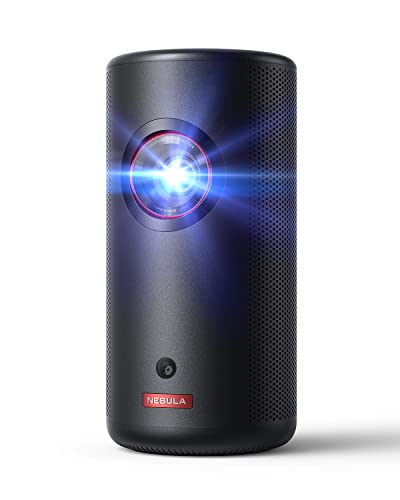
Nebula Capsule 3 Laser Portable Projector — Laser light for frequent travellers
Take the Capsule 3 formula and change the light source, and the character of the machine shifts in ways that matter most to people who project weekly rather than monthly. Laser light engines hold their output steadily across years of use, switch on without the warm-up patience lamp designs demand, and shrug off the knocks of travel that shorten other light sources’ lives. Nebula’s listing positions this model explicitly as an outdoor portable, which is a meaningful claim about intent: this is the Capsule meant to live in a grab-bag, work on a fence or a campervan side, and come home ready to do it again next weekend.
The streaming story mirrors its sibling — Google TV, Netflix certification, Dolby Digital sound — and that parity is the point. You are not choosing between a smart projector and a laser projector; you are choosing how much durability and consistency to buy inside the same smart projector. The stated battery matches the standard model at 2.5 hours built in, and the stated maximum picture matches too at 120 inches, with the same honest caveat that the sweet spot sits well inside that ceiling. Wi-Fi is listed, so the machine joins networks without a phone acting as intermediary.
Where the laser earns its premium is in the accumulation of small evenings. An LED unit’s output drifts almost imperceptibly across hundreds of hours; a laser’s steadiness means the garden screening in year three looks like the one in year one, and for owners who project as a habit rather than an event, that consistency is the feature they actually feel. The outdoor billing also implies a design expectation — a unit meant for gardens and campsites should tolerate being set down on grass, a coolbox or a tailgate — though like every pick here it remains an electronics product that wants a dry evening and a stable perch. Between the two Capsules, this is the one to buy when the diary says the projector will earn its keep.
- Light source: laser, per the listing title
- Streaming: Google TV with Netflix certification, per the listing title
- Maximum picture: 120-inch display, as stated in the listing title
- Battery: 2.5 hours built-in, as stated in the listing title
- Sound: Dolby Digital, as stated in the listing title
- Native resolution: Not stated in the listing title — verify with the manufacturer documentation
Strengths
- Laser output stays consistent across years of regular use.
- Outdoor positioning suits gardens, campsites and van life.
- Full certified streaming matches the standard Capsule 3.
Trade-offs
- The laser step-up asks more of the budget than the standard model.
- Battery length is unchanged, so long evenings still need mains nearby.
- Darkness remains non-negotiable; laser does not repeal the class’s physics.
Best for: frequent travellers and garden hosts who project often enough to feel a laser’s consistency. Not suited for: occasional users who would never notice the difference the light source makes.
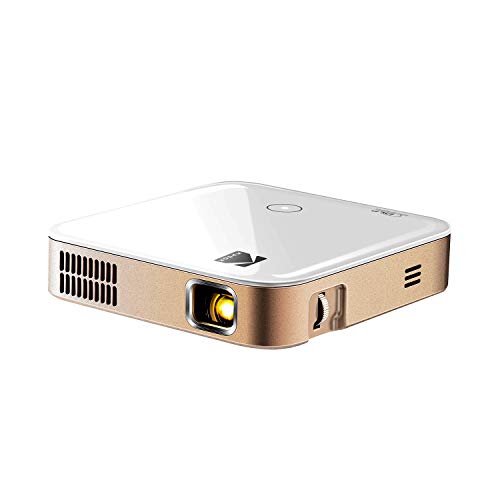
Kodak Luma 350 Portable Smart Projector — The easygoing all-rounder
Kodak’s Luma 350 takes the opposite route to the Nebulas: instead of a sealed streaming appliance, it offers onboard Android, Wi-Fi and Bluetooth, a rechargeable battery, a tripod mount and keystone correction, and lets the owner assemble the experience. That openness suits a particular kind of household — one where the projector serves a child’s bedroom on Friday, a photo slideshow at a family lunch on Sunday, and a work presentation borrowed in a pinch on Monday. The listing names iPhone compatibility directly, and the Bluetooth opens the door to an external speaker for evenings when the built-in sound reaches its natural limit.
The tripod mount deserves more attention than it usually gets. Pocket projectors live or die by placement: a few centimetres of height decide whether the picture clears the coffee table and lands square on the wall. A standard tripod thread turns any cheap mini-tripod or gorilla-style grip into a projector stand, which solves ceiling projection, garden fences and headboard shelves with the same small accessory. Keystone correction, also named in the title, squares the picture when the unit cannot sit dead-centre — with the standing caveat that heavy correction crops and softens, so it is a remedy, not a plan.
Kodak’s heritage in this line is simplicity of operation, and the Luma 350 reads as the model for buyers who find app-store projectors faintly exhausting. There is no certification headline here, so streaming services arrive through the Android system and connected devices rather than through a licensed Netflix badge; owners who live inside one or two services should confirm their route to those services before buying, whether that is the onboard system, a phone or a streaming stick in the HDMI path. Judged as a flexible household tool rather than a streaming appliance, the Luma 350 is the pick that adapts to the family instead of asking the family to adapt to it.
- System: onboard Android, per the listing title
- Connections: Wi-Fi and Bluetooth, per the listing title
- Mounting: tripod mount, per the listing title
- Geometry: keystone correction, per the listing title
- Battery: rechargeable, duration not stated in the listing title — verify with the manufacturer documentation
- Native resolution: Not stated in the listing title — verify with the manufacturer documentation
Strengths
- Tripod thread unlocks ceiling, shelf and garden placements.
- Bluetooth lets a separate speaker take over for bigger evenings.
- Open Android suits households with mixed devices and habits.
Trade-offs
- No Netflix certification is claimed, so check your streaming route first.
- Battery duration is not stated in the title and needs confirming.
- Keystone correction softens the picture when leaned on heavily.
Best for: families wanting one flexible pocket unit for films, photos and borrowed presentations. Not suited for: viewers whose evenings begin and end inside a certified Netflix app.

Kodak Luma 150 Portable Mini Projector — The smallest honest option
The Luma 150 is the pick for people who hear “pocket projector” and check the words literally. Kodak calls it a pico projector, and the listing’s emphasis falls on connection breadth rather than streaming polish: Miracast and AirPlay for wireless casting from phones, HDMI for the devices that still speak cable, USB-A and microSD for media carried on physical media. That combination makes it the natural companion of the offline traveller — the camper with films on a card, the grandparent with photos on a stick, the field worker whose presentation cannot depend on venue Wi-Fi.
A built-in speaker is named in the title, modest by necessity in a body this size, and the LED light source carries a stated 30,000-hour life, which in pico terms means the light will outlast the battery, the remote and probably the owner’s interest in upgrading. Battery power is stated without a duration in the title, so plan as the class demands: battery for the spontaneous showing, mains for the scheduled one. The black finish and the sheer smallness make this the unit most likely to be in the bag on the day an opportunity appears — a blank wall at a holiday rental, a tent ceiling on a wet evening, a dorm room wall during a power cut.
Expectations must scale with the body. A pico projector’s picture is a small-room, close-wall, lights-out picture, happiest at sizes a television owner would call modest — and at those sizes, with the audience a metre or two away, it produces the specific delight this category exists for: a shared screen appearing where no screen should fit. Buyers wanting the 100-inch garden experience should step up to the Capsules; buyers wanting a projector that is simply always there will understand the Luma 150 immediately. It is the least powerful pick in this guide and, for the right owner, the most used one.
- Class: pico projector, per the listing title
- Casting: Miracast and AirPlay, per the listing title
- Inputs: HDMI, USB-A and microSD, per the listing title
- Light life: 30,000-hour LED life, as stated in the listing title
- Battery: battery powered, duration not stated in the listing title — verify with the manufacturer documentation
- Native resolution: Not stated in the listing title — verify with the manufacturer documentation
Strengths
- The broadest physical-media support in this guide: card, stick and cable.
- AirPlay and Miracast cover both phone ecosystems without extra hardware.
- Genuinely pocketable, so it is present when chances to use it appear.
Trade-offs
- The smallest body sets the lowest brightness ceiling here.
- No onboard streaming platform is claimed in the title.
- The built-in speaker serves a huddle, not a room.
Best for: campers, travellers and grandparents whose media lives on cards, sticks and phones. Not suited for: garden parties expecting a big, bright shared picture.

XGIMI MoGo 4 Portable Projector — Best sound and stand design
Most pocket projectors are designed as objects to point; the MoGo 4 is designed as an object to place. Its 360-degree adjustable stand, named in the listing, lets the body tilt from wall to ceiling without a stack of books or a borrowed tripod, and that single mechanical idea changes the machine’s daily life. Ceiling projection above a bed — the pocket class’s signature pleasure — becomes a ten-second arrangement instead of a construction project. XGIMI also includes a sunset filter in the box, a warm-toned accessory that tints the light for ambient, mood-first projection: less cinema, more campfire, and a genuinely different use for the same hardware.
The streaming credentials match the Nebulas head-on: certified Google TV and Netflix, per the title, with 2.5 hours of stated playtime for cordless sessions. Sound is where the MoGo 4 pulls ahead of the field — twin 6W Harman Kardon speakers are specified in the listing, and in a class where audio usually survives as an afterthought, a named speaker partner with stated wattage signals intent. Dialogue stays intelligible at the far side of a double bed, a podcast projected as a ceiling slideshow has body, and the external Bluetooth speaker can stay in the drawer for most evenings. Wi-Fi and Bluetooth are both listed for connections.
Owners should still respect the class rules: the picture wants darkness, the battery wants a plan for long films, and the stand’s freedom tempts angles that keystone correction must then repay in sharpness. Within those rules, the MoGo 4 feels like the pick designed by people who watched how pocket projectors are actually used — on ceilings, at odd angles, as ambient light with a picture in it — rather than how they are photographed for listings. If your mental image of portable projection is a film floating above the bed while the machine sits forgotten on the nightstand, this is the one built for that image.
- Stand: 360-degree adjustable stand, per the listing title
- Streaming: certified Google TV and Netflix, per the listing title
- Sound: 2 x 6W Harman Kardon speakers, as stated in the listing title
- Battery: 2.5 hours of playtime, as stated in the listing title
- Accessory: sunset filter included, per the listing title
- Native resolution: Not stated in the listing title — verify with the manufacturer documentation
Strengths
- The tilting stand makes ceiling projection effortless.
- Harman Kardon speakers give the class’s most serious sound claim.
- The sunset filter adds an ambient mode no rival here offers.
Trade-offs
- Resolution is not stated in the title, so confirm it before buying.
- Playtime matches the class at 2.5 hours rather than extending it.
- Steep projection angles still cost sharpness through correction.
Best for: bedroom and ceiling viewers who care about sound as much as picture. Not suited for: buyers who need a stated native resolution in writing before they commit.
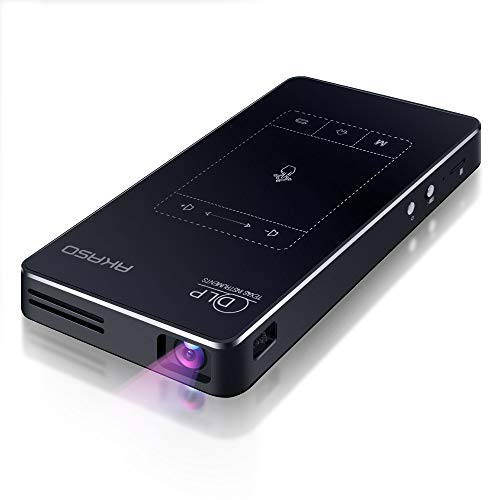
AKASO WT50 Mini DLP Projector — The DLP value route
The WT50 is the traditionalist in this company: a mini DLP projector with Wi-Fi and Bluetooth, a built-in battery and an Android system, aimed squarely at the phone-first viewer. DLP projection brings its own character — crisp edges and a picture that holds together well for video — and AKASO’s listing pitches the unit at home and outdoor use, for iPhone and phone viewing generally. The “cookie projector” nickname in its title is a fair summary of the intent: a small, round, grabbable object that turns a phone’s library into a shared screen.
The title states 1080P in its description of the DLP picture, and the careful reader should treat that as the listing’s own framing while confirming the native specification on the listing page before purchase, since mini-projector titles in this class have historically blurred the line between supported input and native output. What is unambiguous is the package shape: battery inside, Android inside, wireless connections for both casting and audio. For a teenager’s bedroom, a student room or a first experiment with projection, that shape answers the real question — can I watch my stuff, bigger, tonight, without a manual? — with a yes.
Set against the certified-streaming picks, the WT50 asks its owner to be the platform: your phone, your accounts, your casting. Many households prefer exactly that arrangement, because the phone is already signed into everything and the projector stays simple. The outdoor billing should be read with the class’s usual translation — a dark garden, a still evening, a modest picture — and the built-in battery frees the placement from extension leads within its session length. As the value route into DLP pocket projection, the WT50’s job is to be the machine that starts someone’s projection habit, and its specification is shaped precisely for that job.
- Technology: DLP, per the listing title
- System: Android system built in, per the listing title
- Connections: Wi-Fi and Bluetooth, per the listing title
- Battery: built-in battery, duration not stated in the listing title — verify with the manufacturer documentation
- Picture claim: 1080P as framed in the listing title — confirm native resolution on the listing
- Brightness: Not stated in the listing title — verify with the manufacturer documentation
Strengths
- DLP picture character in a genuinely mini body.
- Phone-centred design suits casting households.
- Battery and Android onboard keep the kit list at one item.
Trade-offs
- No certified streaming badge is claimed in the title.
- Battery duration is unstated in the title and needs checking.
- Resolution wording in the title deserves a careful listing read.
Best for: students and first-time buyers who cast everything from a phone. Not suited for: households that want the projector itself to hold their streaming accounts.
Comparison
| Pick | Streaming | Battery | Signature feature |
|---|---|---|---|
| Nebula Capsule 3 | Google TV, Netflix-certified | 2.5 hours stated | 120-inch maximum picture, Dolby Digital |
| Nebula Capsule 3 Laser | Google TV, Netflix-certified | 2.5 hours stated | Laser light source, outdoor positioning |
| Kodak Luma 350 | Onboard Android | Rechargeable, duration unstated | Tripod mount and keystone correction |
| Kodak Luma 150 | Casting via Miracast and AirPlay | Battery powered, duration unstated | HDMI, USB-A and microSD inputs |
| XGIMI MoGo 4 | Google TV, Netflix-certified | 2.5 hours stated | 360-degree stand, Harman Kardon sound |
| AKASO WT50 | Android system onboard | Built-in, duration unstated | DLP engine in a mini body |
What Actually Decides a Pocket Projector Picture?
Darkness decides more than any specification. A pocket projector’s modest light output competes against every lumen leaking into the room, so the difference between a washed-out disappointment and a rich, watchable picture is usually a blackout blind, a turned-off hallway light or simply waiting an hour after sunset. Owners who internalise this stop asking why the picture looks weak at 6 p.m. and start planning sessions the way photographers plan around light. Screen size is the second lever: the same light spread over 60 inches looks vivid, while at 120 inches it looks thin, so choosing a size is choosing a brightness. Throw a smaller picture than your ambition suggests and pocket projection suddenly seems underrated.
The surface matters third. A smooth, pale wall is a fine screen; a textured, tinted or glossy one taxes the image in ways no setting repairs. Travellers learn to scout the room on arrival — the blank wall, the ceiling above the bed, the side of the van — and to carry a plain white sheet or a folding screen for the places that offer nothing suitable. Viewing distance completes the equation: at two metres from a 70-inch picture, 1080p looks clean and cinematic; at one metre, every pixel announces itself. Sit at the distance the size implies and the class’s resolution stops being a topic.
Contrast is the quiet fourth factor, and it explains why two rooms with identical darkness can produce different pictures. A projector’s black level is set by the room, not the machine: any ambient light lifts the blacks to grey, and the picture’s depth drains away even while faces remain visible. This is why a modest projector in a truly dark tent outperforms a brighter one in a lamplit lounge, and why experienced owners spend their effort on curtains, door gaps and standby lights rather than on settings menus. The machines in this guide differ in many ways, but none of them can manufacture contrast a bright room has already spent — a truth that, once accepted, turns room preparation from a chore into the main skill of the hobby, and the skill transfers to every projector the owner will ever buy afterwards.
How Do You Set Up a Pocket Projector in a New Room?
Start with the picture’s home, not the projector’s. Choose the wall or ceiling first, then work backwards to where the machine must sit to fill it, checking that a shelf, table or tripod exists at roughly the right height and distance. Centre the unit as squarely as the furniture allows before reaching for keystone correction, because every degree of digital correction is paid for in resolution. Focus after the picture is placed, not before — most of these units focus at the lens or through the remote — and refocus once the machine has warmed for a few minutes, since small optics drift slightly as temperatures settle.
Sound and power come next. Decide whether the built-in speakers serve the audience size or whether a Bluetooth speaker takes over, pairing it before the film starts rather than during the opening scene. Then settle the power question honestly: battery for a single feature, mains for anything longer, and a power bank as the traveller’s insurance. Finally, load the content before the audience assembles — sign-ins, downloads and updates all move slower on hotel Wi-Fi, and a projector evening that begins with a progress bar rarely recovers its mood. The whole ritual takes five unhurried minutes and separates owners who love these machines from owners who list them for resale.
Which Connections Will You Actually Use?
Streaming built into the projector is the connection most owners use most, which is why the certified Google TV models simplify life so thoroughly. Casting from a phone — AirPlay on the Luma 150, Miracast beside it — serves the spontaneous share: a video someone just took, a clip everyone must see. HDMI remains the diplomat, speaking to laptops, consoles, handhelds and streaming sticks without negotiation, and its presence on the smallest pick here is a reminder that cables outlast protocols. Physical media, through the Luma 150’s USB-A and microSD, sounds old-fashioned until the venue is a campsite, a cabin or a grandparent’s house with no network worth joining.
Bluetooth plays a quieter role: it is the audio escape hatch. Every pick here with Bluetooth can hand sound to a speaker with real drivers, and that single upgrade transforms a garden screening more than any picture setting. The practical advice is to decide your primary route before buying — onboard streaming, casting, cable or card — and choose the pick whose title names that route explicitly. Compatibility promised vaguely is compatibility tested personally, at your expense, on the first evening.
How Should You Pack and Carry a Projector This Small?
The paradox of pocket projection is that the machine is the smallest part of the kit. The projector itself slides into a coat pocket, but the evening it enables needs a cable, perhaps a power bank, a remote and somewhere for the unit to stand, and owners who think in kits rather than objects have reliably better nights. A small pouch — the kind sold for cables — swallows a Capsule or a Luma, its charging lead and a mini-tripod, and turns “shall we watch something?” into a one-handed decision. Keep the remote in the same pouch; remotes are the part of this category most often left in a drawer in another city, and several of these machines are only half themselves without one.
Lens protection deserves a thought, because the front element of a pocket projector sits exposed to the world of pockets: keys, coins, grit. A soft case or even a clean microfibre wrap keeps the lens from collecting the fine scratches that soften a picture in ways owners misdiagnose as failing focus. Batteries reward the same foresight. A lithium battery stored fully charged in a hot car ages quickly, and one stored empty for a season may refuse the next charge; the traveller’s habit is to leave the unit around half charged between trips and top it up the night before departure. Heat is the other travelling enemy — a projector that has baked on a dashboard needs to cool before its fan and optics behave, so shade it, and let it reach room temperature before the screening.
At the destination, the kit assembles in a fixed order that becomes invisible with practice: surface chosen, machine placed, picture focused, sound paired, power decided, content loaded. Owners who run that order in strange rooms stop experiencing portable projection as a fiddle and start experiencing it as a ritual, the way lighting a fire is a ritual — a few known steps between the decision and the warmth. It is also worth keeping one offline film downloaded on the machine or a card at all times. Networks fail at cabins, trains and grandparents’ houses with comic reliability, and the owner with a downloaded favourite becomes the evening’s quiet hero.
What About Children, Ceilings and Other Real Rooms?
A large share of these machines are bought, whatever the stated reason, for children — and the use is honourable. A story film on a bedroom ceiling turns bedtime into an event; a cartoon thrown on a playroom wall gathers cousins who would never share a tablet peaceably. The practicalities are simple and worth stating plainly. The projector is a bright light and should sit where small hands cannot pull it down or stare into it; a high shelf or the MoGo 4’s tilt from a nightstand keeps the beam above reach. Cables crossing a bedroom floor are a trip hazard in the dark, which is one more argument for battery sessions in children’s rooms. Content, of course, remains the parents’ department — the machine simply makes the shared version of it easy.
Ceilings deserve their own paragraph because they are this category’s home turf. A ceiling is the largest blank surface in most homes, it is usually white, and it asks nothing of the furniture. Viewing from a bed or a floor cushion at a gentle angle is comfortable for a film’s length in a way that surprises first-timers, and the slight keystone geometry of an angled throw is a small price that correction handles at these sizes. The stand designs diverge here: the MoGo 4 tilts natively, the Luma 350 asks its tripod, the Capsules sit happily on any flat surface aimed by whatever is at hand. None of this is possible with a television, and it explains why owners of pocket projectors so often describe them with affection out of proportion to their specifications.
Other real rooms follow the same logic of found surfaces. A kitchen’s blank wall hosts a recipe video at counter height. A garage door, closed and pale, becomes a drive-in screen for a summer evening. A whiteboard in a borrowed office turns a Luma into a presentation tool that fits the same bag as the laptop. The category’s real specification is not lumens or resolution; it is the number of rooms in a life that contain a pale surface and an hour of darkness, and for most lives that number is high enough to justify the coat pocket the machine occupies.
How Long Will a Pocket Projector Actually Last?
Longevity in this class is decided less by the light source than by the battery and the software. The Luma 150’s title states a 30,000-hour LED life, and figures of that order mean the light will still be working when the machine is a decade old; laser engines carry the same expectation. Batteries are the honest wear item. A lithium pack cycled weekly will hold noticeably less after a few hundred evenings, and since most pocket projectors treat the battery as internal, the mature way to view the purchase is as a machine whose cordless years are its prime and whose corded years remain useful afterwards — a Capsule on mains power in a bedroom is still a fine projector long after its battery has faded to an hour.
Software ages on its own clock. A certified Google TV platform receives updates through the platform’s normal life, which is the quiet advantage the Nebula and XGIMI picks hold over a bare Android build: the apps that matter are maintained by an ecosystem with a reputation attached. The Kodak and AKASO route ages differently — the onboard system may freeze in time, yet the HDMI port and the casting standards keep the machine useful because the intelligence can move to a phone or a stick. Neither path is wrong; they are different bets on where the smarts should live, and buyers who know which bet they are placing rarely feel betrayed by time.
Physical care is the third factor, and the cheapest. Fans in tiny bodies move little air through small vents, so a projector used on bedding or carpet suffocates slowly; hard, clear surfaces keep it breathing. Dust on the lens should be blown or brushed, never wiped dry with a shirt, which grinds grit across the coating. Stored in its pouch, charged halfway, kept from heat, a pocket projector’s realistic life is measured in years of evenings — long enough that the cost per film becomes a rounding error, which is the quiet arithmetic that makes this category so easy to love.
Common Mistakes
Buying for the maximum screen size is the founding error of this category. A listing’s 120 inches describes geometry, not wisdom; owners who chase it sit in dim rooms squinting at a thin picture and blame the machine. The second mistake is testing the projector at midday and returning it by evening — the class is built for darkness, and a fair trial happens after sunset with the curtains closed. Third comes ignoring the audio plan: a film’s dialogue carried by a tiny speaker across a garden full of guests fails quietly and completely, and a Bluetooth speaker costs less than the disappointment.
Placement improvisation causes the fourth mistake. A projector balanced on cushions drifts, overheats against fabric and loses focus; a cheap mini-tripod or the MoGo 4’s stand exists precisely to end that story. Fifth, buyers forget the return journey of light: a white ceiling above the wall bounces ambient brightness back into the room, and darkening the space includes the surfaces around the picture. The last mistake is treating battery figures as all-evening promises. A stated 2.5 hours is a film, not a festival, and the owners who thrive with these machines keep a cable within reach as a matter of habit.
Which Pick Fits Which Traveller?
Patterns emerge after a season with these machines, and they map cleanly onto the six names above. The frequent flyer who watches in hotel rooms lives inside streaming apps and values the door-to-picture time above all: the Capsule 3’s certified platform, quick setup and honest battery make it the road machine, and its laser sibling suits the same traveller once the trips become weekly and the years accumulate. The camper’s needs invert the priorities — networks vanish, media lives on cards and phones, surfaces are tent walls — and the Luma 150’s inputs and pico size answer that life directly, with the Luma 350 stepping in when the group grows and a tripod-mounted picture must serve six people instead of two.
The homebody traveller, whose projector rarely leaves the house but moves room to room nightly, is the MoGo 4’s natural owner: the stand and the speakers matter more than grams, and the ceiling above the bed becomes the household’s second screen. The student or first-time buyer testing whether projection fits their life at all should start where the WT50 stands — phone-centred, DLP, undemanding — because the habit matters more than the hardware at that stage, and an affordable doorway that gets used beats a flagship that gets admired. Notice that none of these matches turns on resolution or maximum inches; they turn on where the machine will sleep, what it will play and whose hands will set it up. Answer those three questions in the shop and the category stops being confusing.
Final Recommendation
For most buyers, the Nebula Capsule 3 is the pocket projector to beat: certified Netflix, Google TV, 1080p and a battery that covers a film, in the format that defined the category. Step to the Capsule 3 Laser when projection is a weekly habit and consistent light across years is worth paying for. Choose the MoGo 4 when the ceiling is your screen and sound quality rides alongside picture in your priorities. Take the Luma 350 for a flexible household tool with a tripod thread, the Luma 150 when smallness and physical media rule, and the WT50 as the DLP doorway for phone-first viewers. Whichever name lands in your bag, the purchase that succeeds is the one matched to a dark room, a modest screen size and an honest plan for power — the projector a traveller actually carries, charged and ready on the night a blank wall presents itself, is worth more than any specification left at home. Buy it for the evenings you can already picture — the rental’s blank wall, the tent’s pale ceiling, the bedroom that becomes a cinema on Fridays — and let those evenings, rather than a specification sheet, cast the deciding vote.
Frequently Asked Questions
Can a pocket projector replace a television?
For a bedroom, a student room or a second screen used after dark, yes — several owners in this class’s audience do exactly that. For a family’s main living-room screen in a bright room, no: the light output cannot compete with daylight, and a television’s brightness and always-ready nature win that contest honestly. The fruitful question is which screen the projector replaces: the laptop on a hotel bed, the tablet passed around a tent, the phone held up in a kitchen. Against those rivals, every pick here wins by a distance.
What does 4K support mean on a small projector?
It means the projector accepts a 4K signal and decodes it, then displays the picture at its native resolution — 1080p on the picks here that state a resolution. The benefit is compatibility and sometimes cleaner downscaling of a high-quality source; it is not a native 4K image, and no purchase in this class should be made expecting one. Read titles for the word “native” before a resolution, and where a title is silent, the spec boxes in this guide say so rather than guessing.
How big a picture should you actually throw?
Start at 60 to 80 inches in a properly dark room and grow only while the picture keeps its richness. Each step up in size spreads the same light thinner, so the largest watchable picture depends on your room’s darkness more than on the projector’s maximum. Audiences also sit closer to small pictures comfortably, which flatters perceived sharpness. Treat the stated maximums — 120 inches on the Nebulas — as headroom for a very dark space and a forgiving film, not as the default setting for a Saturday night.
Do these projectors work outdoors?
After dark, beautifully — that is the use the Capsule 3 Laser’s own listing names. The conditions are a dry evening, a stable surface, a pale wall, sheet or screen, and an audience seated close enough for the modest sound or a Bluetooth speaker to reach. Wind moves hanging sheets and the picture with them, so a wall or a weighted screen serves better. Garden projection also inherits the battery rule: one film per charge is the plan, with mains as the encore’s price.
Is a laser pocket projector worth the extra?
If the projector will work weekly for years, the laser’s steady output and instant readiness repay the difference in accumulated evenings. If it will travel twice a year, the standard model’s identical streaming and battery make the laser’s virtues theoretical. The decision is a diary question disguised as a technology question: count your projected evenings honestly, and the right light source chooses itself.
Can you game on a pocket projector?
Casual gaming travels well: a handheld console or a phone game thrown large in a dark room is a holiday pleasure, and party titles forgive the input characteristics of small projectors entirely. Competitive play is a different demand — listings in this class do not publish latency figures, so a player whose ranking depends on milliseconds should treat the pocket machine as the social screen and keep a monitor for the serious sessions. The honest split is audience: friends on a sofa, yes; a tournament bracket, no. A wired HDMI connection, where the pick offers one, also keeps the picture steadier than a cast for fast-moving games, and it frees the phone for the group chat instead of chaining it to the wall for the whole session.
What should you download before a trip?
Two films, a few episodes and something for children if children are travelling — downloaded inside the apps you will use, tested once at home with the Wi-Fi off. Hotel and campsite networks throttle, captive portals fight with projector browsers, and a download is the only streaming guarantee that fits in a pocket. Owners who build the habit treat the night before a trip as load-out: charge the unit, load the content, coil the cable, and the projector becomes luggage instead of a project. That small routine, repeated before every journey, is what separates the machine that gets used weekly from the one rediscovered in a drawer years later.
Related Guides
Artists who trade the cinema wall for a drawing wall should read our art projectors for tracing, drawing and murals, where opaque and digital models split the field. When the room becomes permanent and the budget grows, the home theater projectors in the three-figure band show what a fixed installation buys. And for the biggest shared screens of all, our projectors chosen for sports games weigh brightness and speed for match day.


