What's inside
- Key Takeaways
- Quick Picks
- How Did We Choose These Wireless Chargers?
- What Is the Difference Between Qi, Qi2 and MagSafe Charging?
- Where Should a Wireless Charger Live in Your Home?
- How Does Heat Affect Wireless Charging Over Time?
- Which Wireless Charger Fits Your Routine? The Six Picks in Detail
- How Do You Choose Between a 10W, 15W and 25W Charger?
- Which Rooms Suit Which Kind of Wireless Charger?
- What Is the Polite Way to Share Wireless Chargers?
- How Do the Six Wireless Chargers Compare Side by Side?
- How Should You Set Up a Wireless Charger for the Best Results?
- What Mistakes Do People Make With Wireless Charging?
- How Do Wireless Chargers Behave With Two Phones in the House?
- What Should You Do When a Wireless Charger Seems to Stop Working?
- How Should You Care for Chargers and Cables So They Last?
- How Should You Introduce a Wireless Charger to a Sceptical Household?
- Final Recommendation
- Can Wireless Charging Replace Your Cables Entirely?
- Frequently Asked Questions
- Related Guides
As an Amazon Associate I earn from qualifying purchases. This post may contain affiliate links at no extra cost to you.
widgetverdict.com is reader-supported. When you buy through links on our site, we may earn an affiliate commission.
Where to buy: Amazon carries all six of these chargers, and the quick picks table below links each name to the listing we verified. Wireless charging gear is frequently cloned under near-identical names, so check that the brand and the wattage in the listing title are the ones you meant to buy.
People go looking for the best wireless chargers for a simple reason: the last cable of the day is the annoying one. A pad on the nightstand or a stand on the desk turns charging into a gesture — set the phone down, pick it up, no hunting for a lead, no worn-out connector. The catch is that wireless charging is a family of related technologies rather than one speed. An older Qi pad, a Qi2 magnetic pad and a 25W magnetic pad can all look like the same black disc while delivering very different results to the same phone, and a three-in-one stand is solving a different problem altogether: it is furniture for an iPhone, a watch and earbuds that all sleep in the same place.
This guide keeps the categories separate. Anker appears twice with deliberately different tools: the 313 stand, a Qi-certified 10W design that props the phone up for viewing, and the Zolo, a Qi2 15W magnetic pad for recent iPhones. Yootech’s pad is the plain, honest disc for mixed households. The 3-in-1 stand is the nightstand consolidator for Apple households, complete with an ambient light. TOZO’s W1 Max is an aluminium 15W pad that thinks about sleep and grip, and the final pick is a 25W magnetic pad aimed at the newest iPhones that can use the extra pace. Read the sections on alignment and heat before the reviews; with wireless charging, placement is half the product.
Key Takeaways
- Magnetic alignment is the real upgrade in modern wireless charging: a pad that snaps into place wastes less power than one you nudge into position.
- The Anker Zolo’s Qi2 15W charging suits recent iPhones; the Anker 313 stand trades speed for a viewing angle and Qi certification.
- The 3-in-1 stand is the nightstand pick for an iPhone, Apple Watch and AirPods household — one footprint instead of three cables.
- TOZO’s W1 Max pairs 15W charging with an anti-slip, sleep-friendly aluminium body.
- The 25W magnetic pad only shows its pace with phones built to accept it; older phones will charge at their own lower ceiling.
- Yootech’s pad ships with no AC adapter, so its final speed depends on the wall adapter you pair with it.
Quick Picks
| Pick | Badge | Why it earns its place |
|---|---|---|
| Anker 313 Wireless Charger Stand | Best Stand for Desks | Qi-certified 10W charging with the phone propped up for calls and notifications. |
| Anker Zolo MagSafe Wireless Charger | Best Qi2 Pad for iPhone | Qi2-certified 15W magnetic charging that snaps into alignment every time. |
| Yootech Wireless Charging Pad | Best Plain Pad | A simple 10W disc for mixed iPhone and Galaxy households, case-friendly and unshowy. |
| 3 in 1 MagSafe Wireless Charger Stand | Best Nightstand Consolidator | Charges iPhone, Apple Watch and AirPods in one footprint, with an adjustable ambient light. |
| TOZO W1 Max Wireless Charger | Best Aluminium Pad | 15W charging in an aircraft-aluminium body with an anti-slip, sleep-friendly design. |
| MagSafe 25W Wireless Charger Pad | Fastest Magnetic Pad | 25W magnetic charging aimed at the newest iPhones that can accept the higher rate. |
How Did We Choose These Wireless Chargers?
Wireless charging rewards scepticism, so our filters were about honesty and fit rather than raw numbers. First, each pick had to state its ceiling plainly in its own listing — 10W, 15W or 25W — because a pad that hides its wattage is telling you something. Second, certification counted: Qi certification on the Anker 313 and Qi2 certification on the Zolo mean the designs were tested against the standard they claim, which matters for heat and for how the charger behaves with a phone it does not recognise.
Third, we chose across the real shapes of the category instead of picking six near-identical discs: two stands, three pads and one three-in-one station, because the right answer depends on where the charger will live. Fourth, we looked for the small domestic details that decide whether a pad is still used in six months — grip so the phone does not slide off, an indicator that will not glare across a bedroom, a body material that sheds heat. Anything with an unclear listing identity, and anything promising speeds no phone can accept without saying so, stayed out.
What Is the Difference Between Qi, Qi2 and MagSafe Charging?
Qi is the original open standard: a coil in the pad, a coil in the phone, and power passed across the gap when the two are aligned. It works across brands, which is why the Yootech pad can serve iPhones and Galaxy phones from the same disc, but alignment is manual and efficiency depends on how carefully you set the phone down. Qi2 keeps the Qi foundation and adds a ring of magnets modelled on Apple’s MagSafe, so the phone snaps into the efficient position by itself. The Zolo in this guide is Qi2-certified, which is why its 15W figure is realistic in daily use rather than theoretical.
MagSafe is Apple’s own magnetic system for iPhone, and “MagSafe-compatible” pads use the same snap-fit idea. The practical lesson is that the magnet is not a gimmick: a misaligned coil wastes energy as heat and can leave a phone barely charged after a night of supposedly charging. The second lesson is that ceilings stack. A 25W pad, a phone that accepts 25W wirelessly and a wall adapter that can feed the pad must all agree before the headline speed happens; the slowest link in that chain is your actual charger.
Where Should a Wireless Charger Live in Your Home?
Match the shape to the room. A stand belongs where you look at the phone while it charges: a desk, where the propped-up screen handles video calls and notifications, or a kitchen counter where a recipe stays visible. That is the Anker 313’s natural habitat. A pad belongs where the phone is simply parked — a nightstand, a hallway console, the arm of a sofa — and where a flat disc that disappears under the phone is better than a stand competing for space. The three-in-one stand earns its larger footprint only where three devices genuinely sleep together; put one on a desk used by a single phone and it is mostly sculpture.
Bedrooms deserve one extra thought: light. Some pads carry indicator LEDs bright enough to read by, and some stands add deliberate ambient light, like the adjustable glow on the 3-in-1 pick here. Decide whether you want a nightlight or darkness before choosing, because you will live with the answer every night. Kitchens and bathrooms, finally, are hard on electronics and full of steam; wireless charging’s lack of an exposed connector is a genuine advantage there, provided the pad itself stays dry and out of splash range.
How Does Heat Affect Wireless Charging Over Time?
Wireless charging moves energy across a gap, and the toll for crossing that gap is heat. Some of the power leaving the pad never arrives at the battery; it warms the phone, the pad and the air between them instead. That is why a phone on a wireless pad feels warmer than the same phone on a cable, and why the details of the picks in this guide — an aluminium body that sheds heat, magnetic alignment that keeps the coils coupled efficiently — are engineering answers to a thermal problem rather than decoration.
Alignment is the biggest variable you control. Two coils coupled squarely waste little; two coils offset by a careless placement waste much more, and the waste announces itself as a hot phone and a disappointing battery percentage. This is the unglamorous reason magnetic systems have taken over the category: the snap is not about convenience theatre, it is about keeping the transfer efficient every single night without asking a tired person to aim. On a plain pad like the Yootech, the discipline is manual — set the phone down, confirm the charge indicator, and resist sliding it while it charges.
Environment is the second variable. A pad on a sunny windowsill, a phone already hot from navigation, a case that insulates like a winter coat — each adds warmth the system must then manage by slowing down, because phones protect their batteries by easing the charge rate when they run hot. If your phone charges slowly on a pad in summer, the pad is rarely the culprit; move the setup out of the sun, let a hot phone cool before setting it down, and the pace returns. Wireless charging rewards a cool, aligned, unhurried arrangement, which is another way of saying it rewards exactly the nightstand and desk situations it was invented for.
Over years, the honest summary is that ordinary wireless charging at the rates in this guide is a normal way to treat a battery, not an abuse of one. Heat ages batteries, and wireless charging makes somewhat more of it, so a user determined to maximise a phone’s lifespan across four or five years might favour a cable for the nightly charge and keep the pad for the desk. Most owners, who replace phones sooner and value the convenience daily, will never measure the difference. Choose with your own horizon in mind, and do not let either camp’s certainty choose for you.
Which Wireless Charger Fits Your Routine? The Six Picks in Detail

Anker 313 Wireless Charger Stand — Best Stand for Desks
The 313 is the charger for people who use their phone while it charges. Its listing describes a Qi-certified stand with 10W maximum output, built for iPhones and Galaxy phones alike, and the stand format is the point: the phone sits upright at a reading angle, so a video call, a glance at notifications or a desk clock display all work while the battery fills. A pad makes you pick the phone up to check it; a stand makes checking it free, which changes how often the phone actually spends on the charger — and time on the charger is what wireless charging is made of.
Ten watts will not win a race against a cable, and this pick does not pretend otherwise. Overnight and at a desk, where the phone sits for hours, the rate is simply sufficient, and Qi certification means the behaviour is tested rather than hoped for. The stand shape has one more quiet virtue: alignment is built into the cradle, so the phone lands on the coil the same way every time instead of depending on your aim at midnight. Where it falls short is the nightstand of a light sleeper who wants the phone face-down and invisible, and any household hoping one charger will also handle a watch and earbuds — this is a one-device tool, honestly scoped.
- Output: 10W maximum (per listing title)
- Certification: Qi-certified
- Form: stand, phone held upright
- Named fit: iPhone and Galaxy models in the listing title
Strengths
- Upright angle suits video calls, desk clocks and glanceable notifications.
- Qi certification means tested behaviour with the phones it names.
- The cradle aligns the phone with the coil without any aiming.
Trade-offs
- 10W is a steady pace, not a fast one, next to the 15W and 25W pads here.
- One device at a time; watch and earbuds need their own arrangements.
- The upright phone is visible all night, which not every bedroom wants.
Best for: a desk where the phone works while it charges.
Not suited for: a household hoping one device will charge a phone, watch and earbuds together.

Anker Zolo MagSafe Wireless Charger — Best Qi2 Pad for iPhone
The Zolo is what the plain Qi pad grew up into. Its listing describes a MagSafe-compatible charging pad with Qi2 certification and 15W fast charging for recent iPhones, and each part of that description earns its place. Qi2 certification means the magnetic alignment system meets the standard rather than imitating it; 15W is the rate a magnetically aligned iPhone can actually sustain wirelessly; and the pad format keeps the whole thing pocketable enough to travel with.
The daily experience is the snap. The phone finds its position, holds it against the small knocks a nightstand delivers, and charges at the rate the standard promises instead of the rate your half-asleep placement allowed. That reliability is worth more than a higher theoretical ceiling, because wireless charging failures are almost never about the ceiling — they are about the phone that slid two centimetres at 2 a.m. The Zolo’s limits are its focus: it is an iPhone-first pad, it charges one device, and like every pad it needs a wall adapter capable of feeding it. As the single charger for a recent iPhone, though, it is the most complete answer in this guide.
- Output: Qi2 15W fast charging (per listing title)
- Certification: Qi2-certified
- Form: magnetic charging pad
- Named fit: MagSafe-compatible, for iPhone models in the listing title
Strengths
- Magnetic snap alignment removes the main cause of failed overnight charges.
- Qi2 certification backs the 15W claim with a tested standard.
- Flat pad travels easily and disappears on a nightstand.
Trade-offs
- Built around the iPhone; Android households get less from the magnets.
- One device per pad, with no watch or earbud provision.
- Needs a capable wall adapter to reach its stated rate.
Best for: a recent iPhone that charges in the same spot every night.
Not suited for: a mixed-brand household wanting one pad to serve every phone equally.
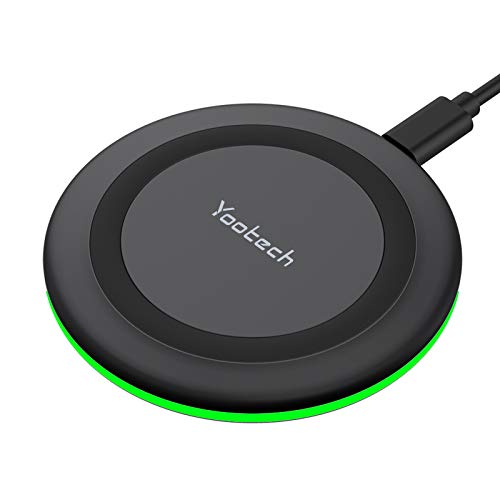
Yootech Wireless Charging Pad — Best Plain Pad
Yootech’s pad is the unglamorous workhorse of this guide: a 10W maximum wireless charging pad whose listing names a long run of iPhone and Galaxy models, and states plainly that no AC adapter is included. That last detail, which some brands bury, is printed in the title — and it matters, because a pad is only as fast as the wall adapter feeding it. Pair this disc with a weak old adapter and you have built a slow charger; pair it with a decent one and it does its quiet job for years.
The case for a plain pad in a magnetic age is sharing. Magnets serve one ecosystem; a flat Qi disc serves whoever sets a phone on it — a partner’s Galaxy, a guest’s older iPhone, the work phone and the personal phone in turn. It is also the shape least likely to fight with a thick case or a phone whose coil sits in an unexpected place, since you can nudge the handset until the charge light agrees. What you give up is the snap and the speed: 10W, manually aligned, is yesterday’s pace. For a hallway console or a spare room, yesterday’s pace at a sensible cost is often exactly right.
- Output: 10W maximum (per listing title)
- Form: flat charging pad
- Included adapter: none — stated in the listing title
- Named fit: iPhone and Galaxy models across several generations
Strengths
- Brand-agnostic Qi charging suits mixed and guest-heavy households.
- The missing adapter is declared honestly in the title, not hidden.
- Flat disc works in spots where a stand would crowd the surface.
Trade-offs
- No magnetic alignment, so placement is your responsibility.
- 10W ceiling trails the magnetic picks in this guide.
- You must supply a wall adapter strong enough to feed it.
Best for: a shared spot where different phones take turns charging.
Not suited for: a recent iPhone owner who wants magnetic snap and 15W pace.

3 in 1 MagSafe Wireless Charger Stand — Best Nightstand Consolidator
This stand exists to delete two cables from a nightstand. Its listing describes a three-in-one MagSafe wireless charger stand for iPhone, Apple Watch and AirPods, with 15W magnetic charging for the phone and an adjustable blue ambient light built in. For the fully Apple household, that is the whole bedtime kit in one footprint: phone on the magnetic face, watch on its perch, earbuds on the base, and one wall socket doing the work of three.
The ambient light is the detail that divides opinion, so think about it before ordering: adjustable means it can be dimmed or used as a deliberate nightlight, which some sleepers love and others will switch off forever. The deeper consideration is commitment. A three-in-one station is a bet that your household stays with these three device types; swap the watch for another brand and one perch becomes decoration. It is also a fixed installation in a way a pad is not — this lives on the nightstand permanently. For the household it describes, though, nothing else here tidies the bedtime routine as completely, and waking to three full devices from one plug never stops feeling like a small magic trick.
- Devices: iPhone, Apple Watch and AirPods (per listing title)
- Phone charging: 15W magnetic charging
- Extra: adjustable blue ambient light
- Form: three-in-one stand
Strengths
- One footprint and one socket replace three separate chargers.
- Magnetic phone face aligns the iPhone without aiming.
- The ambient light adjusts, so it can serve as a nightlight or stay subdued.
Trade-offs
- Only makes sense for an iPhone, Watch and AirPods household.
- The largest footprint of any pick in this guide.
- A fixed nightstand installation rather than a charger that travels.
Best for: an all-Apple nightstand that currently hosts three separate cables.
Not suited for: a household whose watch or earbuds come from outside the Apple ecosystem.

TOZO W1 Max Wireless Charger — Best Aluminium Pad
Most pads are plastic discs; the W1 Max is a piece of metal. Its listing describes a 15W fast wireless charger in an aircraft-aluminium body, anti-slip and sleep-friendly, and those three adjectives form a considered answer to the pad’s usual failings. Aluminium sheds heat better than plastic, which helps a 15W pad sustain its pace; anti-slip surfacing addresses the phone that vibrates itself off the coil during the night; sleep-friendly design means the indicator behaviour was thought about by someone who has actually slept next to a charger.
The result is the pad for a permanent spot rather than a travel kit — metal has a reassuring heft that stays where it is put, and a finish that looks deliberate on a desk instead of apologetic. Fifteen watts puts it level with the Qi2 pad on pace for the phones that accept it, though without the Qi2 badge the alignment is the pad’s own magnetic or positional arrangement, so check the listing’s compatibility notes against your handset. The trade-offs are the usual pad ones: one device, an adapter to feed it, and a flat surface it cannot leave. Within those, it is the most grown-up disc in this guide.
- Output: 15W fast wireless charging (per listing title)
- Body: aircraft-aluminium
- Surface: anti-slip design
- Design notes: sleep-friendly, portable pad format
Strengths
- Aluminium body sheds heat and feels permanent rather than disposable.
- Anti-slip surface keeps the phone on the coil through the night.
- Sleep-friendly detailing suits the nightstand it will probably live on.
Trade-offs
- No Qi2 certification is claimed in the title, unlike the Anker Zolo.
- Metal build is heavier than the plastic pads if you plan to travel with it.
- One device at a time, like every pad here.
Best for: a permanent desk or nightstand spot that deserves better than a plastic disc.
Not suited for: a light travel kit where every gram of the bag is argued over.

MagSafe 25W Wireless Charger Pad — Fastest Magnetic Pad
Twenty-five watts is the new frontier for magnetic charging, and this pad’s listing aims squarely at it: a MagSafe 25W wireless charger for Apple’s magnetic fast charging, compatible with a run of iPhone generations from the 13 through the newest models named in the title. The honest reading of that claim is layered. The pad can offer 25W; a phone accepts what it was built to accept; the newest iPhones can use the full rate, and older ones will take their own ceiling and be none the worse for it.
That makes this the future-proofing pick. Buy it with a current phone that caps lower and the pad simply waits, ready for the next handset; buy it with the newest iPhone and it is the fastest wireless charging in this guide. Two cautions keep expectations honest. First, the wall adapter behind the pad must be able to feed 25W with headroom, or the pad cannot offer it. Second, this is an unbranded listing beside Anker and TOZO, so read the seller details with care. If pace is your priority and your phone can use it, this is the only pick here playing at that speed.
- Output: 25W magnetic fast charging (per listing title)
- System: MagSafe-compatible magnetic pad
- Named fit: iPhone generations listed from 13 through the newest in the title
- Form: flat charging pad
Strengths
- The highest wireless ceiling in this guide, ready for the newest iPhones.
- Magnetic attachment keeps alignment where the power is.
- Older iPhones still charge at their own rate, so nothing is wasted today.
Trade-offs
- Full 25W pace needs a phone built for it and a strong wall adapter.
- An unbranded listing — seller and warranty details need a careful read.
- Higher-rate wireless charging warms the phone more than a 10W pad does.
Best for: the newest iPhone, or the next one, charged as fast as wireless allows.
Not suited for: an older phone whose owner expects the 25W figure to apply to it.
How Do You Choose Between a 10W, 15W and 25W Charger?
Start from the phone’s own ceiling, because it outranks every number on a box. A handset built for 10W-class wireless charging gains nothing from a 25W pad except future readiness; a handset built for 15W magnetic charging is genuinely short-changed by a 10W pad it will use every night for years; and the newest phones that accept the highest magnetic rates are the only ones that can cash the 25W pad’s cheque today. The listings in this guide state their ceilings plainly, and your phone’s specification states its own — the pairing of those two numbers is the whole decision, and it takes less time than choosing the pad’s colour.
Then weigh the hours the phone will spend charging. Overnight, the difference between the tiers mostly evaporates: eight hours forgives any ceiling in this guide, and the phone’s own tapering means even the fastest pad spends much of the night sipping. The tiers matter in the short sessions — the hour at the desk, the evening top-up before going out — and they matter cumulatively to the impatient. A buyer whose charging is all overnight can honestly choose on shape, light and build, which is why the 10W stand and pad in this guide are recommendations rather than apologies.
Finally, price the future honestly. A pad bought for today’s phone will likely serve the next one, and the household that buys the 15W magnetic tier now rarely regrets it when the next handset arrives speaking the same language. The 25W tier is the forward-looking purchase only for buyers already committed to the newest iPhones; for everyone else it is a ceiling in search of a phone. Choose the tier your next two phones can both use, and the charger stops being a per-phone accessory and becomes household infrastructure.
Which Rooms Suit Which Kind of Wireless Charger?
The bedroom is the strictest room. Its charger must be silent in behaviour if not in fact: no beacon-bright indicator, no phone screen flaring at every notification, no stand holding the handset upright like a tiny television. That is why flat pads dominate bedrooms and why the sleep-friendly detailing on the TOZO W1 Max matters more there than anywhere else. The exception is the all-Apple household that turns the nightstand into a charging station on purpose — the three-in-one stand earns its footprint in that one room, provided its ambient light is set to something a sleeper can forgive.
The desk rewards the opposite choice. A worker’s phone is consulted all day, and a stand like the Anker 313 turns each consultation into a glance rather than a pick-up, while the battery quietly refills between glances. Desks also forgive a brighter indicator and a larger footprint, and they offer the one thing pads need and bedrooms lack: an owner awake to notice if a phone was set down crooked. If only one wireless charger enters the house, the desk is often the better first home for it, because the desk is where the set-it-down habit forms.
The kitchen is the underrated charging room. Recipes live on phones, timers live on phones, and the phone that dies mid-recipe dies at the worst moment — yet kitchen sockets are busy and counters are wet. A pad suits the kitchen precisely because there is no connector to corrode and no cable trailing toward the sink; park it on the dry end of the counter, away from the kettle’s steam, and it becomes the household’s most-used charger within a month. The hallway console plays a similar role for arrivals: keys down, phone down, and the handset that came home empty is recovering before its owner has taken off a coat.
Travel splits the category cleanly. A flat pad — the Zolo, the TOZO, the 25W pad — slips into a bag and turns any hotel nightstand into a known quantity, sparing you the archaeological dig for the room’s one reachable socket. A stand travels badly and a three-in-one station barely travels at all; they are furniture, and furniture stays home. The seasoned arrangement is therefore a stand or station where the phone sleeps, a pad where it works, and one travelling pad that never fully unpacks. Wireless charging’s promise was never speed; it was a charger in every place the phone rests, and rooms, chosen well, are how that promise gets kept.
What Is the Polite Way to Share Wireless Chargers?
Shared chargers — in offices, in family kitchens, in the guest room — run on etiquette as much as electricity. The first rule is that a pad belongs to its spot: the colleague who borrows the desk pad for an afternoon and returns it to a different desk has not borrowed a charger but relocated an institution. The second rule concerns the queue. A phone at a sliver of charge outranks a phone topping up from three-quarters, in shared spaces as in cars, and stating that rule once prevents the small daily friction of the mysteriously unplugged handset.
Hosts can make sharing effortless by choosing the right hardware for the shared spot. A plain Qi pad, like the Yootech in this guide, is the diplomat: it asks nothing about brands, snaps to nothing, and serves a guest’s phone as readily as the household’s. Magnetic pads are better chargers and worse hosts, because a guest whose phone lacks the magnets gets the alignment lottery instead of the snap. Put the magnetic gear where its owner’s phone sleeps, and the plain pad where the world’s phones visit, and both kinds do the job they were shaped for.
Offices add one more consideration: the meeting room. A pad in the middle of a meeting table is a genuinely civilising object — phones charge face-down, attention stays in the room, and nobody performs the socket hunt under the table. It works because the meeting’s length matches the pad’s pace; nobody needs a full battery from a one-hour meeting, only a healthier one. Workplaces that adopt the habit tend to standardise on one pad per table, the same plain, brand-agnostic logic as the guest room, and the chargers repay the standardisation by simply never being discussed again.
How Do the Six Wireless Chargers Compare Side by Side?
| Pick | Ceiling (per title) | Form | Alignment | Character |
|---|---|---|---|---|
| Anker 313 Stand | 10W max | Stand | Cradle-guided Qi | Watch the phone while it charges |
| Anker Zolo | Qi2 15W | Pad | Magnetic, Qi2-certified | The complete iPhone pad |
| Yootech Pad | 10W max | Pad | Manual placement | Shared, brand-agnostic disc |
| 3 in 1 Stand | 15W magnetic (phone) | Stand station | Magnetic phone face | Phone, watch and earbuds together |
| TOZO W1 Max | 15W | Pad | Anti-slip surface | Aluminium, sleep-friendly |
| 25W Magnetic Pad | 25W | Pad | Magnetic | Fastest, for the newest iPhones |
How Should You Set Up a Wireless Charger for the Best Results?
Feed it properly first. Behind every pad in this guide stands a wall adapter, and the pad cannot offer what the adapter cannot supply. Use an adapter with output comfortably above the pad’s ceiling, pair it with the cable the pad came with or a sound equivalent, and treat the adapter as part of the purchase rather than an afterthought from a drawer. A remarkable share of disappointing wireless setups are, on inspection, excellent pads being starved by elderly adapters.
Place it deliberately second. The right spot is the spot the phone already rests — the same corner of the nightstand, the same side of the desk — because wireless charging works by habit, and habits form around geography, not intentions. Give the pad a surface it cannot slide on and cannot be slid off; the TOZO’s anti-slip design helps, but a pad placed where bags and books land will spend its life buried. Keep metal objects — keys, coins, the other phone’s magnetic case — off the pad, since foreign metal between the coils is the one placement error that can make a charger work hard and heat up for nothing.
Sort the case question third. Charge the phone in its everyday case for a night and check two things in the morning: that it reached full, and that it is not unusually warm. Most ordinary cases pass both tests and can be forgotten about. Wallet cases with cards, cases with metal kickstands or plates, and the thickest rugged shells are the usual failures; for those, the honest options are a case change, a magnetic-compatible case for the magnetic picks, or accepting the cable for that particular phone. Do not fight the physics nightly — change the one variable that is cheap to change.
Finally, set the phone down like you mean it. On magnetic pads, let the snap find its seat and give the phone a second to settle before walking away. On plain pads, centre the handset and confirm the indicator before you leave — a two-second habit that prevents the only truly bad wireless outcome, the phone that spent the night beside the coil instead of on it. Wireless charging fails socially more than technically: it fails when the ritual is rushed. Build the ritual once, in the right room, on the right adapter, and the technology disappears into the furniture, which was always the point.
What Mistakes Do People Make With Wireless Charging?
The classic mistake is blaming the pad for the adapter. A pad fed by a weak wall adapter cannot reach its ceiling, and several picks here — the Yootech most openly — ship without an adapter at all. Check what feeds your pad before judging what it delivers. The second mistake is the thick case: chunky wallet cases, metal plates and pop sockets all widen the gap or block the coil entirely. If a phone charges slowly or intermittently, take the case off for one night before returning anything.
Third, people buy a 25W pad for a phone that accepts half of that, then feel cheated by arithmetic they were told about in the listing. The pad offers; the phone decides. Fourth, alignment gets ignored on plain pads — a phone set down carelessly can sit half off the coil, warm up, and gain almost nothing by morning. Magnetic picks exist precisely to delete that failure mode. Finally, there is the bedside light problem: an indicator that seems trivial in a shop can be a beacon at 3 a.m., so favour sleep-friendly designs, like the TOZO, for bedrooms.
How Do Wireless Chargers Behave With Two Phones in the House?
A second phone is the event that turns a wireless charger from a personal appliance into household infrastructure, and households handle it in two ways. The first is duplication: a charger per person, in each person’s place, with no negotiation ever required. This is the arrangement the modest pads in this guide make painless, and it suits couples whose phones sleep in different rooms or on different sides of the same bed. The second is the shared station — one good charger in the common territory, kitchen or hallway, where both phones take their turns across the evening. It suits households whose phones come home together and leave together.
What does not work is the hybrid nobody chose: one charger, two owners, and a nightly auction conducted in percentages. The symptoms are familiar — a phone moved off the pad by its owner and moved back by the other, a handset discovered uncharged because it was charging in the wrong room’s queue. The cure costs one pad. Wireless charging’s entire economy is that the chargers are simple and the habit is everything; a household that buys the second pad is not buying hardware, it is abolishing an argument, and abolished arguments are the best value in this entire guide.
What Should You Do When a Wireless Charger Seems to Stop Working?
Work from the wall outward, because the pad is the least likely culprit in its own setup. Check the adapter first: a pad swapped onto a weaker adapter during a tidy-up will charge slowly or intermittently, and restoring the proper adapter restores the pad. Check the cable second, especially if it is the one that came in a drawer rather than the one that came in the box. Only then suspect placement — a phone that charged happily for months and now misses is often a phone in a new case, and the case, not the pad, is what changed.
Heat is the other silent explanation. A pad that has migrated into a sun patch, onto a radiator-adjacent shelf, or under a pile of papers will moderate itself in ways that look exactly like failure. Move it somewhere cool and clear, let the phone cool too, and repeat the night. If the charger still misbehaves on a proper adapter, with a bare phone, in a cool room, then it has earned replacement — and the picks in this guide are priced and shaped to make that replacement a small decision rather than a research project.
How Should You Care for Chargers and Cables So They Last?
Chargers ask for almost nothing, which is why the little they ask for is so often refused. Keep a block out of the bathroom’s steam and the kitchen’s splash zone where you can; a charger that lives in a dry room ages in years rather than seasons. Do not wrap a cable tightly around its block for storage — the tight coil stresses exactly the points where cables eventually split — and do not pull a lead out of a socket by the cable itself, a habit whose cost arrives all at once, months later, as an intermittent connection nobody can reproduce on demand.
Cables deserve a retirement policy. A lead that charges only at an angle, that shows its inner layers near either end, or that connects and disconnects as it moves has finished its service, and keeping it as the spare merely stores a future frustration. The households in this guide’s imagination keep one known-good spare per important station and let the rest go. That small discipline — spares that are genuinely good, failures that actually leave — is what separates a charging setup that works for years from one that works until it mysteriously does not.
How Should You Introduce a Wireless Charger to a Sceptical Household?
Start where the scepticism is weakest: not the bedroom, with its strong opinions about light and ritual, but the kitchen counter or the hallway, where a pad is a pure convenience and threatens nobody’s habits. Let the household discover the gesture — phone down, charge begins — in a room where charging was previously an errand involving a drawer and a cable that fit nothing. Scepticism about wireless charging is rarely about the technology; it is about the suspicion that it solves a problem the household does not have. One week of the hallway pad demonstrates the problem’s existence by solving it.
Then let the converts choose their own second charger, because the shape question — stand or pad, magnetic or plain, the three-in-one station or the aluminium disc — is personal in a way the first pad never was. The guide’s six picks were arranged as a map of those choices deliberately: the desk worker will gravitate to the stand, the new-iPhone owner to the Qi2 pad, the all-Apple household to the station. A household that arrives at its own map keeps the chargers; a household issued a uniform solution quietly returns to cables, and the pads become the expensive coasters of legend. Introduce the idea once, communally, and let the geography spread on its own.
Final Recommendation
Match the charger to the spot, not the spec sheet. A desk wants the Anker 313’s upright face; a recent iPhone’s nightstand wants the Zolo’s Qi2 snap; a household of many brands wants the Yootech’s indifference; an all-Apple bedside wants the three-in-one stand; a permanent perch deserves the TOZO’s aluminium; and the newest iPhone, or the one arriving next year, justifies the 25W pad. Choose by where the phone sleeps, and the morning battery becomes the least interesting part of your day — which is exactly what good charging should be.
Can Wireless Charging Replace Your Cables Entirely?
For the nightly and desk charges that make up most of a phone’s life, yes — and the households that manage it share a pattern: a charger in each resting place, chosen for that room, and no expectation that any of them will perform a rescue. The rescue is where cables keep their citizenship. A phone at a sliver of battery twenty minutes before leaving the house wants a wire and a fast block, because wired charging’s pace in the first minutes is something no pad in this guide attempts to match. The mature setup is not wireless instead of cables; it is wireless for the routine and a cable for the exception, each doing the job it is good at.
Travel tests the replacement idea hardest. One pad in the bag covers the phone, but the watch, the earbuds and the partner’s phone all queue behind it, and hotel sockets turn out to be exactly as scarce as home ones. Travellers who go fully wireless usually end up carrying a multi-device travel charger or quietly re-admitting one cable for the small devices. There is no failure in that verdict. The pads and stands in this guide were chosen to make the everyday charge effortless, and effortlessness, honestly scoped, is a better promise than total replacement.
Frequently Asked Questions
Is wireless charging bad for a phone battery?
It generates more heat than a cable, and heat is what batteries dislike, but modern phones manage their own charging and taper as they fill. For overnight and desk charging at the rates in this guide, the practical effect is small. If you want to be gentle, avoid charging a hot phone in a hot room, and let pads with metal bodies, like the TOZO, do their heat-shedding work.
Why is my wireless charger slower than advertised?
Usually one of three links is weak: the wall adapter feeding the pad cannot supply the pad’s ceiling, the phone’s own wireless ceiling is lower than the pad’s, or the phone is misaligned or in a thick case. Work through them in that order. The advertised figure is the pad’s offer, and every other part of the chain gets a vote.
Can a wireless charger work through a phone case?
Most ordinary cases, yes — the coil gap tolerates a few millimetres of plastic or silicone. Metal plates, magnetic wallet attachments not designed for the system, and very thick rugged cases can block or weaken charging. Magnetic pads need the case to be magnetic-compatible to snap properly; a plain case on a MagSafe pad will charge but may not hold alignment.
What is Qi2 and do I need it?
Qi2 is the current version of the Qi standard with magnetic alignment built in, so the phone snaps to the efficient spot. You need it only in the sense that it removes the main failure mode of older pads. If your phone supports it, a Qi2 pad like the Anker Zolo is the most reliable route to the stated 15W; if your phone predates it, a plain Qi pad still charges it fine.
Should I buy a stand or a pad?
Buy the stand if you look at the phone while it charges — desks, video calls, kitchen recipes. Buy the pad if the phone is simply parked — nightstands, hall consoles, charging while you do other things. The three-in-one stand is the exception: buy it when three Apple devices share one sleeping place and you want one socket to serve them all.
Should I remove my phone from its stand or pad at 100%?
You may, but the night will not punish you for sleeping through it. Phones manage their full state themselves, easing to a maintenance trickle rather than force-feeding a full battery, and the chargers in this guide cooperate with that management. Owners who unplug everything on principle lose nothing; owners who leave the phone on its pad until morning lose nothing measurable either. Choose the habit you will actually keep, because a charging routine survives on consistency, not on ceremony.
Can I charge a tablet on these wireless chargers?
Generally no, and the listings here do not claim otherwise — these are phone-sized coils for phone-sized devices, with stands and pads shaped around handsets. A tablet is both too large to align reliably and too hungry for the rates on offer. Tablets belong on cables, ideally from the higher-wattage wall chargers in our fast charging guide, while the wireless gear serves the phones it was designed around.
Do wireless chargers work when the phone is face down?
The coil lives in the back of the phone, so face-down charging puts the screen against the pad and the coil at the greatest distance — some phones will still charge slowly, many will not charge at all, and alignment becomes guesswork. Charge face up, as every pick in this guide intends. If the lit screen disturbs the room, the answer is a sleep-friendly pad and the phone’s own night settings, not flipping the handset.
Related Guides
Wireless is one room of the charging house; the others are worth a look. Best Fast Chargers covers wall adapters when pure speed matters more than convenience, Best Chargers For Macbook Air handles the laptop that shares your outlets, and Best Gan Laptop Chargers looks at the compact high-power blocks that now charge phones and laptops from a single unit.


