What's inside
- Key Takeaways
- Quick Picks
- How We Chose These Picks
- Why Is So Much of This Category Renewed, and Does It Matter?
- What Separates Enterprise Drives From NAS and Desktop Drives?
- Side by Side: the Six Enterprise Drives Compared
- How Should a Small Organisation Actually Deploy These?
- What Mistakes Do Buyers Make in This Category?
- How Do You Read an Enterprise Listing Like a Fleet Buyer?
- What Engineering Notes Hide Behind the Enterprise Label?
- How Do Warranty and Retirement Work at This Tier?
- Who Actually Needs Enterprise Grade? Three Buyers, Three Answers
- What Do Power, Cooling and Noise Demand in a Dense Chassis?
- What Should You Buy Around the Drives?
- Final Recommendation
- Frequently Asked Questions
- Related Guides
As an Amazon Associate I earn from qualifying purchases. This post may contain affiliate links at no extra cost to you.
widgetverdict.com is reader-supported. When you buy through links on our site, we may earn an affiliate commission.
Where to buy: each drive below links to a new-condition Amazon listing under the exact model code quoted in its review; read the honesty note in the next paragraph before comparing anything, because this category’s shelf is not what it first appears.
Here is the thing nobody warns you about when you shop for the best enterprise grade hard drives: most enterprise drives offered on Amazon in the United States are sold renewed. The famous datacenter lines — Seagate Exos, WD Ultrastar and their kin — pour out of decommissioned server fleets in enormous volume, and the marketplace listings that dominate search results are refurbished units with unknown hours behind them. Renewed drives have legitimate uses in forgiving setups, but they are not new enterprise drives, and this guide refuses to blur that line. Every one of the six picks below is a verified new listing, checked as such, because an enterprise drive’s entire value proposition rests on its warranty, its rated lifespan starting at zero hours, and a provenance you do not have to take on faith.
What enterprise grade actually buys, beyond the badge, is endurance engineering: spindles and actuators rated for continuous operation, workload ceilings far above desktop or NAS tiers, vibration tolerance for densely packed chassis, and firmware written for arrays of dozens of drives rather than a lonely desktop bay. The six drives here span 10TB to 24TB from Seagate’s Exos line, Western Digital’s Gold line and Toshiba’s MG series — the three families that genuinely serve servers and serious storage systems — and each review states plainly which kind of buyer it fits.
Key Takeaways
- Most enterprise drives on Amazon US are renewed; all six picks here are new listings, deliberately.
- Enterprise grade means workload endurance and 24/7 design, not benchmark speed.
- WD Gold spans this guide’s range from 12TB to 24TB with a consistent 7200 RPM, 512MB cache formula.
- Seagate’s Exos picks cover 10TB and 12TB for cost-sensitive server bays.
- Toshiba’s 22TB MG series drive is the capacity alternative outside the big two.
- Check the model code, not the headline: enterprise lines reuse names across generations and conditions.
Quick Picks
| Pick | Badge | Why it earns its place |
|---|---|---|
| Seagate Exos 12TB Enterprise HDD | The Exos value anchor | Datacenter-class 12TB storage in frustration-free packaging for straightforward server bays. |
| Seagate Exos X10 10TB Enterprise HDD | The ten-terabyte workbay | A 7200 RPM Exos with 512e formatting and 256MB cache for arrays sized in tens. |
| WD Gold 16TB Enterprise HDD | The Gold midpoint | Sixteen terabytes of WD’s enterprise class with a 512MB cache for growing storage servers. |
| WD Gold 12TB Enterprise HDD | The fleet standard | The 12TB Gold for uniform server fleets that value identical spares over maximum density. |
| WD Gold 24TB Enterprise HDD | The density ceiling | Twenty-four terabytes per bay for backup targets and archives that count bays like rent. |
| Toshiba MG 22TB Enterprise HDD | The third-maker option | Toshiba’s MG series at 22TB, built for hyperscale and cloud duty around the clock. |
How We Chose These Picks
The first filter was condition, and it eliminated most of the category. We required new listings from the manufacturers’ genuine enterprise lines and set aside the renewed flood entirely, however attractive its pricing, because a guide that recommends a datacenter drive with an unknown past is recommending a lottery ticket. Readers who knowingly choose renewed for a thrice-backed-up scratch array are making a rational gamble; readers who buy renewed believing it is new are being misled, and the listings do not always work hard to prevent that confusion.
We also sanity-checked each listing the way a careful buyer should: the model code in the title had to correspond to a real member of the named enterprise family, the capacity in the headline had to match the code’s meaning, and the interface had to be the SATA variant a small buyer can install. Listings that failed any of those correspondences — and in this category, some do — were set aside regardless of how attractive their positioning looked.
The second filter was lineage. Exos, Gold and MG are the lines these makers sell into datacenters with published workload and reliability engineering behind them, distinct from NAS tiers that borrow enterprise adjectives for marketing warmth. Within those lines we spread capacities so that a buyer can standardise on one family across a fleet — two Seagate sizes, three WD Gold sizes, and Toshiba’s large MG entry — because real server rooms prize uniform spares and predictable firmware behaviour over a patchwork of individually optimal drives.
Finally, we favoured SATA models in the standard 3.5-inch form, the interface a small business or home-lab buyer can actually install without a SAS backplane and controller card entering the story. SAS variants of these families exist and serve their own world well, but a guide for readers buying individual drives on Amazon should meet them at the connector their hardware already speaks.
A word about what this guide deliberately leaves out, because the exclusions define the category as much as the picks. Desktop drives wearing enterprise adjectives in their headlines are absent, however the search results rank them. Surveillance lines are absent too, despite sharing shelf space and sometimes spindle speeds, because their firmware is tuned for camera streams rather than server queues. And the renewed flood, as established, is absent by policy rather than by oversight. What remains — three manufacturers’ genuine datacenter families, bought new, in SATA form — is a shorter shelf than the marketplace pretends exists, and a far more honest one.
Why Is So Much of This Category Renewed, and Does It Matter?
Datacenters retire drives on schedules driven by warranty expiry, capacity upgrades and fleet standardisation, not by failure. A hyperscale operator replacing ten thousand 12TB drives with 24TB units releases a river of healthy, mid-life enterprise hardware into the refurbishment channel, where it is wiped, tested to varying depths, and resold at prices new drives cannot approach. That is why the renewed listings outnumber new ones so heavily here: the supply is industrial in scale, and the demand from hobbyists and small labs is real.
It matters for three concrete reasons. Hours are the currency of a spinning drive’s life, and a renewed unit’s odometer is rarely disclosed in a way you can verify. Warranty cover shrinks from the manufacturer’s full enterprise term to whatever the refurbisher offers, which shifts the failure risk from Seagate, WD or Toshiba onto you. And batch consistency — the fleet buyer’s quiet obsession — evaporates when each unit may come from a different datacenter, a different year and a different workload history.
None of that makes renewed drives contraband. It makes them a different product, to be bought knowingly for roles that tolerate surprise: scratch space, third copies, experimental arrays with strong backups. The picks below are for the opposite roles — the primary array, the backup target of record, the server whose failure would be an event — where new condition and full manufacturer backing are the entire point of paying enterprise prices.
What Separates Enterprise Drives From NAS and Desktop Drives?
The hierarchy is about assumed workload. A desktop drive expects an eight-hour day, long idle stretches and a solitary bay. A NAS drive expects continuous operation and a handful of vibrating neighbours. An enterprise drive expects to be one of dozens in a chassis, written and read around the clock by workloads that never observe weekends, and it is engineered — bearings, actuators, firmware error handling, vibration sensing — for that assumption. Its published workload ceiling sits far above the NAS tier’s, and its reliability targets are set for fleets where a percentage point of annual failure translates into hundreds of real drives.
Firmware philosophy differs too. Enterprise drives assume a sophisticated controller is in charge: they report trouble quickly, let the array reconstruct from redundancy, and optimise for consistent latency under queue depth rather than heroic single-threaded bursts. Put one in a desktop and it behaves perfectly well, merely overqualified, like a delivery truck commuting. Put desktop drives in a dense server chassis and the mismatch runs the other way, with vibration and error-recovery behaviour becoming the story of your first rebuild.
There is also a formality to the enterprise shelf that buyers should exploit: model codes are precise and stable. The codes quoted in each review below — ST12000NM0007, WD161KRYZ, MG10AFA22TE and their siblings — identify exact capacities, interfaces and generations. Datacenter buyers order by code, never by headline, and individual buyers should copy the habit, because enterprise families reuse friendly names across years while the codes keep the truth.

Seagate Exos 12TB Enterprise HDD — The Exos value anchor
The Exos name is the one datacenter fleets actually standardise on, and this 12TB member, model ST12000NM0007, arrives in the listing’s frustration-free packaging with a 3.5-inch frame, SATA 6Gb/s interface and 128MB cache. Twelve terabytes has been the fleet workhorse size for years precisely because it balances density against rebuild exposure, and an Exos at this capacity is the natural unit for a small business building its first real storage server or a home lab graduating from NAS-tier drives to hardware with datacenter manners.
Ownership of an Exos is deliberately unromantic. The drive assumes a controller or a NAS platform is managing the array, reports its health through standard SMART channels, and is built to spin beside many identical neighbours without the vibration drama that afflicts lesser drives in dense chassis. Its cache figure is smaller than the WD Golds below, a difference that matters far less in parity arrays and sequential backup duty — this drive’s natural work — than spec-sheet comparisons suggest. What you are buying is the fleet-proven platform and the workload headroom, and at 12TB those come in their most affordable Exos form here.
One buying note specific to this model: because ST12000NM0007 has circulated through enterprise channels for years, the renewed versions are everywhere, which is exactly why this guide links only the new listing and quotes the model code for your own verification. Check the condition field on the listing page with your own eyes before checkout; in this category that ten-second habit is worth more than any review, including this one.
- Size: 12TB
- Family: Seagate Exos enterprise
- Interface: 6Gb/s class per listing
- Cache: 128MB
- Model code in listing: ST12000NM0007
- Packaging noted in listing: frustration-free
Strengths
- Genuine datacenter lineage at the fleet’s favourite capacity.
- New condition with the manufacturer’s backing, in a category flooded with renewed stock.
- Behaviour tuned for dense chassis and controller-managed arrays.
Trade-offs
- Smaller cache than the Gold entries below, visible mainly in synthetic comparisons.
- Enterprise firmware assumes an array or server habitat, not a USB dock lifestyle.
- Its popularity means renewed lookalikes crowd the same search results.
Think of this drive as the unit of account for a Seagate fleet. Once a chassis is standardised on it, every later decision simplifies: spare counts, rebuild expectations, capacity forecasts and warranty paperwork all repeat one known pattern. Small organisations underestimate how much operational calm that repetition buys, because storage anxiety rarely comes from a single failure — it comes from variety, from the one odd drive whose behaviour nobody remembers. A fleet of identical Exos units is boring in the way payroll is boring: foundational, and missed only when it stops working.
Verdict: the Exos to buy when a server build needs proven fleet hardware at a sane per-bay cost; skip it only if your chassis count pushes you toward the higher-density picks further down.

Seagate Exos X10 10TB Enterprise HDD — The ten-terabyte workbay
The Exos X10 designation marks a specific Exos generation, and this ST10000NM0126 pairs 10TB with a 7200 RPM spindle, SATA 6Gb/s connection, 512e sector formatting and a 256MB cache. Ten terabytes is a deliberate size in enterprise planning: large enough that a modest chassis reaches serious totals, small enough that rebuilds complete inside a maintenance window a small team can actually schedule. Arrays of these suit branch-office servers, backup appliances and virtualisation hosts whose bulk storage tier needs enterprise endurance without the density race.
The 512e detail in the listing deserves a sentence, because it is the kind of specification enterprise buyers check and home buyers never meet. It describes how the drive presents its physical sectors to the host — 512-byte emulation over advanced-format media — and it matters for compatibility with older controllers and some backup software. Its presence in the title tells you this listing was written for the professional shelf, and matching it against your controller’s expectations is a two-minute check worth doing before a fleet order.
In daily service the X10’s character is pure Exos: consistent latency under queue, no theatrics, and firmware that treats the array controller as the boss. Homelab readers building a first true server from retired enterprise chassis will find this drive the natural citizen of those bays, speaking the environment’s language natively and at a capacity that keeps a many-bay box useful for years.
- Size: 10TB
- Spindle: 7200 RPM
- Interface: SATA 6Gb/s
- Sector format in listing: 512e
- Cache: 256MB
- Model code in listing: ST10000NM0126
Strengths
- Generation-identified Exos with professional specifications stated openly.
- Capacity keeps rebuild windows manageable for small teams.
- Cache doubles the 12TB Exos above for mixed workloads.
Trade-offs
- Ten terabytes per bay loses the density contest to the 22TB and 24TB picks.
- 512e formatting deserves a compatibility glance with very old controllers.
- Less ubiquitous than the 12TB fleet size when sourcing matching spares later.
Branch offices are where this drive’s size earns its keep in a second way. A remote site without resident IT needs storage that a visiting technician can service inside one appointment, and a failed 10TB member rebuilds within a visit’s patience in a way a 24TB member does not. Pair that with remote monitoring back to headquarters and the X10 becomes the storage equivalent of a appliance: installed, watched from afar, and touched rarely. Fleets with many small sites often standardise on exactly this capacity class for exactly that reason, accepting lower density as the price of serviceability.
Verdict: choose the X10 for branch servers and lab chassis where a ten-terabyte unit size fits the maintenance rhythm; density chasers should keep reading toward the bottom of this list.

WD Gold 16TB Enterprise HDD — The Gold midpoint
Western Digital’s Gold line is its enterprise class in the plainest sense: drives built for datacenter and enterprise server duty, sold new through retail channels with the company’s name fully behind them. The 16TB model, WD161KRYZ, runs at 7200 RPM with SATA 6 Gb/s and a 512MB cache, and it occupies the sensible middle of this guide — twice the X10’s practical density class without the 24TB model’s price or its marathon rebuilds. For a growing storage server, a set of these is the configuration most likely to be described, five years later, as having been exactly right.
Gold’s appeal over Exos for many buyers is retail clarity. The line is marketed to businesses buying through ordinary channels, its listings state their specifications in full sentences, and the new-condition supply is steadier than on the Exos side, where the renewed river runs wider. Sixteen terabytes also interacts kindly with RAID 6 arithmetic: an eight-bay chassis of these drives yields a protected volume near a hundred terabytes, a figure that moves a small organisation’s storage conversation from scarcity to policy.
Under load, the drive’s large cache and enterprise tuning suit the mixed diet of a real server — virtual machine images, file shares, backup streams landing simultaneously — better than a NAS-tier drive asked to improvise the same job. It is not a subtle product and does not try to be: it is WD’s enterprise answer, at the capacity where most serious buyers currently land.
- Size: 16TB
- Family: WD Gold enterprise class
- Spindle class in listing: 7200 RPM
- Interface: SATA 6 Gb/s
- Cache: 512MB
- Model code in listing: WD161KRYZ
Strengths
- Full enterprise specification with the largest cache class in this guide.
- Retail-channel clarity makes new-condition buying straightforward.
- Capacity hits the current sweet spot for storage servers.
Trade-offs
- Costs meaningfully more per bay than the Exos picks above.
- Sixteen-terabyte rebuilds still demand RAID 6 discipline.
- Over-specified for a two-bay life; NAS tiers serve small enclosures cheaper.
There is a virtualisation footnote worth adding. Bulk tiers beneath hypervisors ask drives for a punishing mix — snapshot consolidations, template clones and backup streams arriving together — and the Gold’s enterprise queue handling is built for that simultaneity in a way NAS-tier firmware is not asked to be. Readers consolidating a home lab or a small office onto one honest storage server will feel the difference not in any single transfer but in how rarely the storage becomes the explanation for a slow afternoon. That absence, repeated daily, is the return on the enterprise premium.
Verdict: the Gold to standardise on for a storage server expected to grow into its chassis; buyers outfitting one small enclosure should price the Exos pair first.

WD Gold 12TB Enterprise HDD — The fleet standard
If the 16TB Gold is the growth pick, the 12TB Gold, model WD122KRYZ, is the standardisation pick. Its formula mirrors its sibling — 7200 RPM class, SATA 6 Gb/s, 512MB cache, enterprise class engineering — at the capacity where fleet managers have made their stand for years. Uniformity is an underrated specification: a shelf of identical 12TB spares serves every chassis in a small fleet, rebuild behaviour is known to the hour, and capacity planning becomes arithmetic rather than prophecy.
Twelve terabytes also keeps the failure mathematics gentle. Rebuilds finish inside a day even under load, which means a RAID 5 conversation remains defensible at this size in a way it no longer is at 20TB and beyond, though RAID 6 remains the grown-up default. For backup servers — the role where Golds quietly accumulate in real businesses — that balance of density, rebuild time and per-unit cost is exactly the product brief, and this drive fulfils it without asking the buyer to think about Toshiba or Seagate ecosystems at all.
Choose between this and the Exos 12TB above on ecosystem, not on merit anxiety: both are genuine enterprise hardware bought new. The Gold’s larger stated cache and retail polish suit buyers who order a few at a time through normal channels; the Exos suits those already living in Seagate’s fleet world. Either way, the 12TB tier is where enterprise storage stops being an aspiration and becomes a line item a small organisation can approve without a meeting.
- Size: 12TB
- Family: WD Gold enterprise class
- Spindle class in listing: 7200 RPM
- Interface: SATA 6 Gb/s
- Cache: 512MB
- Model code in listing: WD122KRYZ
Strengths
- The standard fleet size with full Gold specifications.
- Rebuild windows stay inside a working day under load.
- Uniform spares across a small fleet simplify every future failure.
Trade-offs
- Density-focused builds will prefer its 16TB and 24TB siblings.
- Per-terabyte cost trails the largest drives in the line.
- Duplicates the Exos 12TB’s role for buyers without a WD preference.
Procurement officers should notice what this drive does to a budget conversation. Because 12TB is the fleet’s settled size, its pricing through ordinary business channels is the most competitive in the Gold line relative to capacity, and approving a set rarely requires the justification theatre that frontier capacities attract. The savings against the 16TB tier, multiplied across a chassis and its spares, often fund the UPS and the monitoring software the same purchase order should include. Sensible fleets are built out of exactly these unglamorous trade-offs, and this drive is where the Gold line makes them easiest.
Verdict: pick the 12TB Gold when the plan is a uniform fleet and a stocked spares shelf; it is the enterprise drive as routine procurement, which is a compliment.
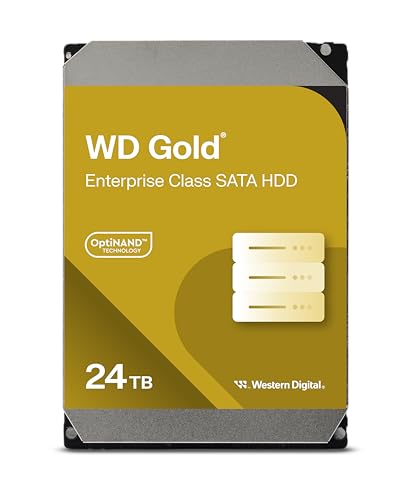
WD Gold 24TB Enterprise HDD — The density ceiling
Twenty-four terabytes on one spindle is the current shape of the density frontier in this guide, and the WD242KRYZ brings the full Gold formula to it: 7200 RPM, SATA 6 Gb/s, 512MB cache, enterprise class design. The buyers for this drive think in bays the way landlords think in square metres. A backup target that needed two chassis of 12TB drives becomes one chassis; a video archive’s expansion shelf gets postponed by years; a colocation customer paying per rack unit watches the maths change entirely.
Density at this level rewrites the operating rules, and the review would be dishonest not to say so. A 24TB rebuild is a multi-day, full-surface event under real workloads, so RAID 6 is not a preference but a prerequisite, scrubs must be scheduled religiously, and the enclosure’s cooling and power protection need to be as serious as the drives. The organisations this drive suits already operate that way. For them, fewer, larger drives also mean fewer failure domains to monitor, fewer spares variants to stock, and a storage ceiling that stops dominating every planning conversation.
There is a patience argument as well as a capacity one. Storage demand in most organisations compounds quietly, and the cheapest terabyte is the one already installed when the need arrives. Buying the 24TB class today, at the top of a line whose 12TB and 16TB members fill the tiers below, is how a fleet standardises on Gold across every role from branch server to archive — one family, one spares language, three sizes.
- Size: 24TB
- Family: WD Gold enterprise class
- Spindle: 7200 RPM
- Interface: SATA 6 Gb/s
- Cache: 512MB
- Model code in listing: WD242KRYZ
Strengths
- Maximum terabytes per bay in this guide, full stop.
- Same Gold formula as its siblings, so fleets stay uniform.
- Collapses multi-chassis backup targets into single enclosures.
Trade-offs
- Rebuild exposure at 24TB makes RAID 6 and scrub discipline mandatory.
- The per-drive price concentrates budget and risk in single units.
- Wasted on any workload that will not grow into the capacity.
Colocation and rented-rack buyers feel this drive’s argument first, because their storage ceiling is set by someone else’s pricing per unit of rack space. When every bay carries a monthly cost beyond the hardware itself, density stops being a specification and becomes rent control. The same logic reaches home users in miniature: a two-bay enclosure in a small flat has exactly two chances to be large, and a 24TB member makes each chance count for years longer than a mid-size drive can. Scarcity of bays, at any scale, is the condition this product exists to answer.
Verdict: the drive for bay-constrained, growth-certain storage — backup targets and archives first; small fleets should let the 12TB and 16TB Golds carry them until the bays truly run out.

Toshiba MG 22TB Enterprise HDD — The third-maker option
Toshiba’s MG series is the enterprise line that datacenter buyers know and retail shoppers overlook, which is a pity, because the MG10AFA22TE in this listing is specified exactly where the market is heading: 22TB, 3.5-inch SATA, designed for server, storage, hyperscale and cloud duty with 24/7 operation stated outright. Fleets diversify suppliers for sound reasons — a firmware issue or a supply crunch at one maker should never idle another maker’s customers — and this drive is how an Amazon buyer joins that grown-up practice.
Twenty-two terabytes sits a step below the Gold 24TB’s ceiling while keeping the same operational doctrine: RAID 6, scheduled scrubs, serious cooling, and rebuild windows measured in days rather than hours. Within those rules the MG’s appeal is its pedigree in exactly the hyperscale environments its listing names. These are drives designed to be deployed by the pallet into cloud infrastructure, and the engineering assumptions — dense chassis, relentless duty cycles, controller-led error handling — match that origin on every line of the specification.
For the home-lab reader, the Toshiba offers something else: a route into genuine enterprise hardware that does not pass through the Seagate-versus-WD argument at all, at a capacity neither of this guide’s Exos picks attempts. Check your platform’s compatibility list for the model code as you would with any enterprise drive, and expect the ownership experience to be defined by absence — no drama, no surprises, just a very large drive reporting for duty every day.
- Size: 22TB
- Family: Toshiba MG series enterprise
- Form: 3.5-inch SATA
- Duty stated in listing: 24/7 operation, hyperscale and cloud
- Model code in listing: MG10AFA22TE
Strengths
- Hyperscale-bred engineering at near-frontier capacity.
- Supplier diversity for fleets avoiding single-maker dependence.
- Explicit 24/7 positioning for server and storage systems.
Trade-offs
- Retail familiarity and accessory ecosystem trail the big two.
- Compatibility-list checking matters, as with any less common model code.
- Same long-rebuild obligations as every drive above 20TB.
One more consideration favours keeping Toshiba in the conversation: negotiating reality. Organisations buying drives repeatedly learn that a credible second supplier disciplines the first one’s pricing and availability, and a fleet that can pivot between Gold and MG stock rides out the shortages that periodically grip this industry. An individual buyer ordering a single set gains less leverage, admittedly, but gains the same resilience in miniature — a spare MG can be sourced in a week when the whole market’s Gold shelf is empty, provided the array plan allowed for mixed fleets from the start.
Verdict: choose the MG when a build wants hyperscale lineage and supplier diversity at 22TB; it earns its place on engineering, not novelty.
Side by Side: the Six Enterprise Drives Compared
| Drive | Capacity | Cache | Interface | Natural habitat |
|---|---|---|---|---|
| Seagate Exos 12TB | 12TB | 128MB | 6Gb/s class | Fleet server bays on a budget |
| Seagate Exos X10 10TB | 10TB | 256MB | SATA 6Gb/s | Branch servers, backup appliances |
| WD Gold 16TB | 16TB | 512MB | SATA 6 Gb/s | Growing storage servers |
| WD Gold 12TB | 12TB | 512MB | SATA 6 Gb/s | Uniform small fleets |
| WD Gold 24TB | 24TB | 512MB | SATA 6 Gb/s | Backup targets, dense archives |
| Toshiba MG 22TB | 22TB | Not headlined | SATA | Hyperscale-style dense storage |
How Should a Small Organisation Actually Deploy These?
Start by assigning roles before assigning drives. The primary server wants the tier your growth supports — 12TB or 16TB Golds, or the Exos pair — arranged in RAID 6 once individual capacities pass the low teens. The backup target wants density and patience, which is the 24TB Gold’s or the Toshiba’s job description. Mixing roles on one set of drives is how small organisations end up with a backup that shares a failure domain with the data it protects, an arrangement that looks economical until the day it is examined by events.
Buy spares with the fleet, not after the first failure. One cold spare per model code, on the shelf, converts a drive failure from a procurement emergency into a maintenance ticket, and at enterprise capacities the shipping delay you avoid is measured against a rebuild that cannot start without the part. Label everything, record serials, and keep the purchase paperwork where the warranty claim will one day need it; enterprise warranties are genuinely honoured, but they are honoured through process, and process runs on documentation.
Finally, monitor like an operator. Enterprise drives report rich health telemetry precisely because fleets act on it: trend the reallocated sectors, schedule the scrubs, test the alerts, and rehearse a restore from the backup target at least once before you need it. The hardware in this guide is the strongest link in a small organisation’s storage chain; the procedures around it decide whether that strength ever gets used.
What Mistakes Do Buyers Make in This Category?
The defining mistake is buying renewed while believing it is new — or half-knowing and not checking — then discovering the shortened warranty during the first failure. The second is shopping by headline name inside enterprise families, where an Exos of one generation and interface is a different product from its near-namesake; order by model code. Third comes habitat mismatch: enterprise drives installed in a lone USB dock disappoint their owners with array-minded firmware behaviour, while desktop drives installed in a dense server chassis disappoint theirs more permanently.
Buyers also stumble over sector formats and interface variants that the enterprise shelf treats as ordinary and the retail shelf rarely explains. A drive ordered in the wrong sector emulation can underperform or misbehave with an older controller; a SAS unit ordered for a SATA backplane simply does not connect. Both errors are prevented by the same five-minute datasheet check this guide keeps recommending, which is less a tip than the entry fee for shopping in a professional category with a consumer’s checkout.
A fourth mistake is treating capacity as the only axis and pairing 24TB drives with RAID 5 habits carried over from smaller eras. And a fifth, quieter one: forgetting that enterprise drives assume enterprise surroundings — a UPS, airflow, and a controller or NAS platform on the compatibility list. The drives will forgive improvisation for a while. Their design brief never promised to forgive it forever.
How Do You Read an Enterprise Listing Like a Fleet Buyer?
Fleet buyers read listings backwards: condition first, model code second, capacity third, and the headline last, if at all. Condition deserves its own paragraph of suspicion in this category because the word “new” does the heavy lifting of the entire purchase. A listing that buries its condition, or a marketplace page where third-party sellers rotate under one product entry, deserves the extra minute it takes to confirm which seller and which condition your money is actually buying. The six listings linked in this guide were checked as new; your checkout is the last verification step, and it is yours.
The model code then tells you what the marketing cannot blur. Within Exos, Gold and MG, the code encodes the generation, the capacity, the interface and the sector format, and two drives sharing a friendly name may share nothing else. Cross-check the code against the manufacturer’s own datasheet — a five-minute exercise that fleet buyers treat as non-negotiable — and you will know the workload rating, the warranty term and the physical specifications from the source rather than from a retailer’s paraphrase. Retail listings compress; datasheets testify.
Capacity comes third because it is the one decision the earlier sections cannot make for you: it follows from your chassis count, your growth rate and your rebuild tolerance, in that order. Buyers who reverse the sequence — capacity first, because a large number was on promotion — end up with density their RAID level cannot protect or bays their budget cannot fill. The fleet habit of deciding the fleet’s shape before the drive’s size is available to any buyer willing to spend one page of notebook paper on the plan.
What Engineering Notes Hide Behind the Enterprise Label?
Helium is the famous one. The largest drives in this category seal their platters in helium rather than air, because the lighter gas reduces turbulence and drag, letting makers stack more platters and spin them with less power and heat. You will never see the helium, and that is the point: its presence is announced by the capacities it enables — the 22TB and 24TB class in this guide lives in that sealed world — and by the enterprise positioning that accompanies it. What matters to a buyer is the consequence, not the chemistry: frontier density with datacenter reliability assumptions attached.
Recording technology matters here as it does in arrays. The enterprise lines in this guide are CMR designs, because datacenter workloads — random writes, rebuilds, mixed queues — punish shingled recording exactly where fleets can least afford it. When a listing in this category does not state its recording method, the datasheet check described above settles the question; enterprise buyers never leave it to inference.
Rotational vibration sensing, workload-rated components and error-recovery firmware tuned for controllers complete the picture, and together they explain a fact that surprises newcomers: enterprise drives are not primarily faster than the tiers below them. Sequential speeds across modern 7200 RPM drives cluster closely. The enterprise premium buys behaviour under adversity — density, neighbours, queue depth, years — which is why the correct comparison between a Gold and a desktop drive is not a benchmark chart but a five-year ownership story.
How Do Warranty and Retirement Work at This Tier?
Enterprise warranties are written for organisations: longer terms than consumer drives carry, claims handled by model and serial rather than by receipt archaeology, and an assumption on both sides that the drive lived in a managed environment. Keep your serial records from the day the fleet lands, because the claim you file in year four will ask for exactly the list you made in week one. New-condition purchase is what makes this machinery fully yours — one more concrete reason the renewed market, whatever its bargains, sells a lesser version of the enterprise promise.
Retirement deserves the same professionalism as purchase. Drives leaving a fleet hold data, and enterprise practice treats sanitisation as a documented step, not a hope: cryptographic erase where supported, verified overwrite where required, and physical destruction for the failures that cannot be wiped. Small organisations and home labs inherit this obligation the moment they adopt enterprise hardware, and it is worth stating in a buying guide because the drives in this list will one day be the old drives in someone else’s listing photos. How yours are retired decides whether they arrive there honestly wiped or carrying your archive as a bonus.
Plan the replacement cadence while the fleet is young. Enterprise drives in continuous service are commonly rotated on multi-year cycles aligned to warranty horizons, and a staggered rotation — a fraction of the fleet each year — smooths both budget and risk. The buyer who adopts that rhythm discovers the enterprise tier’s least advertised benefit: storage stops being a sequence of emergencies and becomes a calendar.
Who Actually Needs Enterprise Grade? Three Buyers, Three Answers
The home-lab enthusiast is the easiest to advise, because their motive is partly education. Running genuine fleet hardware — the same Exos and Gold units a sysadmin meets at work — teaches the habits this guide keeps describing: compatibility lists, serial records, scrub schedules, spare discipline. For that reader, a modest set of 12TB drives in a retired server chassis is not overkill but curriculum, and the enterprise premium buys the authentic environment. The caution is only about scope: a lab that exists to be experimented on should keep its irreplaceable data somewhere duller, because experiments and archives are natural enemies.
The small business is the tier’s centre of gravity. A design studio, a legal practice, a regional distributor — organisations with real data, real downtime costs and no storage team — gain the most from enterprise drives precisely because the hardware absorbs the expertise they do not employ. Predictable behaviour, honoured warranties and uniform spares convert storage from a specialist worry into an appliance with a service rhythm. For this buyer the Gold family’s retail clarity usually wins the argument, with the Exos pair as the value alternative and Toshiba as the resilience option.
The actual datacenter buyer, finally, is mostly not reading this guide — fleets at scale buy through contracts, not retail listings — and that fact usefully frames the whole category. The drives here are the retail doorway into that professional world, sold one chassis at a time to buyers who want its engineering without its procurement department. Judged that way, the premium over NAS tiers is not a tax on paranoia; it is the price of importing datacenter assumptions into a server closet, and for data that earns money or cannot be remade, it is usually the cheapest insurance on the purchase order.
What Do Power, Cooling and Noise Demand in a Dense Chassis?
Enterprise drives are specified for enterprise rooms, and a small buyer inherits the assumptions along with the hardware. A chassis packed with 7200 RPM drives of this class draws real power at spin-up — the moment all motors start together is the electrical peak of the system’s life — and a power supply sized by optimism will announce itself at exactly that moment. Staggered spin-up, where the controller supports it, and a PSU with honest headroom are not refinements at this tier; they are the admission ticket, and they belong in the same budget conversation as the drives themselves.
Cooling follows the same logic. Datacenter chassis move air across drive bays with intent, front to back, and a tower case improvising that airflow around a stack of enterprise drives will run them warmer than their design brief assumes. Warm drives are not instantly doomed drives, but sustained heat is the one environmental factor that field data consistently ties to shortened life, so the buyer who pays enterprise prices and then bakes the purchase in a sealed cupboard has bought the badge and declined the benefit. Give the chassis a room with moving air, watch the temperature telemetry the drives report, and treat a rising trend as a maintenance item.
Noise, finally, is the specification nobody lists and every small office discovers. A dense set of enterprise drives seeking in chorus is audible through a meeting-room wall in a way a NAS of mainstream drives is not, which is why these drives belong in server closets, utility rooms and racks — habitats their designers assumed. The home-lab reader should take the hint kindly: put the chassis where its voice is welcome, and the enterprise experience remains the calm, procedural pleasure it is supposed to be.
What Should You Buy Around the Drives?
An enterprise drive purchase that ends at the drives is half a purchase. The backplane or cabling must match the SATA choice made here, with caddies that seat 3.5-inch units firmly enough that vibration engineering is not undone by a rattling tray. The controller or NAS platform should name your model codes on its compatibility list, and its alerting should reach a human by email or message — a fleet that cannot announce a failure is a fleet waiting to surprise you. Budget lines for a UPS sized to close the array down cleanly, and for the monitoring habit itself: a monthly calendar appointment with the SMART reports costs nothing and is the difference between operating storage and merely owning it.
Spares deserve a rule of thumb: one cold spare per model code in service, stored in its antistatic bag with its purchase date written on the label. When a member fails, the spare’s presence converts the event’s timeline from days of degraded operation — waiting on a delivery while the array runs unprotected — to the length of the rebuild alone. At the capacities in this guide, that difference is the whole ballgame, because a 16TB or 24TB rebuild started three days late is three extra days spent one failure away from loss. The spare is not an extra drive; it is the second half of the redundancy you thought you bought.
Documentation closes the kit. A single page — physical, taped inside the chassis door if necessary — listing each bay’s model code, serial number, install date and warranty expiry will be read with gratitude by whoever services the machine in year three, including future you. Enterprise practice looks like bureaucracy from outside and like kindness from inside the incident. Adopt it at purchase time, when it costs five minutes, rather than during a failure, when it costs the evening.
Final Recommendation
Standardise, if you can, on the WD Gold family: the 12TB for uniform fleets, the 16TB for growing servers, the 24TB when bays run short. Choose the Exos 12TB or the X10 10TB where Seagate’s fleet economics fit better, and give Toshiba’s 22TB MG a serious look when supplier diversity or hyperscale lineage appeals. Above every model decision sits the condition decision, and it is the one this guide will not soften: in a category where renewed stock floods the shelf, buy your enterprise drives new, verify the model code at checkout, and let the warranty start at zero hours — because the archive a small organisation builds on these six drives deserves a foundation whose past is a blank page rather than a redacted one.
Frequently Asked Questions
Are renewed enterprise drives ever a sensible buy?
Knowingly, for forgiving roles: scratch arrays, experimental labs, third copies of data that already exists twice elsewhere. The error is not buying renewed; it is buying renewed unknowingly, at near-new expectations, for a primary role. Check the condition field on every enterprise listing as a reflex.
What workload rating should I expect at this tier?
Enterprise lines are engineered for annual workloads far beyond NAS-tier figures, and the exact number belongs to each model’s datasheet rather than its retail headline. The practical translation: a backup server or file host in a small organisation will not approach the ceiling, which is precisely the headroom you are paying for.
Do these drives work in a desktop NAS?
Generally yes, provided the model code appears on the NAS maker’s compatibility list — enterprise drives speak standard SATA and behave in enclosures that can cool and power them. Confirm the list first, because some consumer bays cap drive capacity or object to enterprise power draw at spin-up.
SATA or SAS: which should a small buyer choose?
SATA, unless your chassis already provides a SAS backplane and controller. The enterprise families here sell in both interfaces; SAS brings dual-port and ecosystem advantages inside true server hardware, while SATA keeps an individual purchase installable in the widest range of systems.
Why do three of the picks come from one maker?
Because fleets standardise. The Gold line’s spread across 12TB, 16TB and 24TB lets one organisation hold a single spares language across roles, and that operational fact is worth more in a server room than a perfectly diversified list. Seagate and Toshiba each hold roles here where their lineages fit best.
How long should an enterprise drive stay in service?
Plan around the warranty horizon and the drive’s own telemetry rather than a folk number. In continuous fleet service, drives are commonly rotated on multi-year cycles, retired when their error trends turn, their warranty expires in a critical role, or capacity growth makes their bays more valuable than their remaining life. A drive retired from a primary array on schedule often serves honourably afterwards in a backup or lab role — demotion, managed deliberately, extracts the full value the enterprise price paid for.
Is the enterprise premium worth it over a NAS drive for a home server?
It depends on which home server. A media NAS serving a household sits squarely in NAS-tier design briefs, and the mainstream array drives in our RAID guide serve it honestly for less. A home server that runs the family’s business, hosts virtual machines for paying work, or holds the only copy of an archive argues the other way: the enterprise tier’s workload headroom and warranty posture are priced for exactly that consequence level. Match the drive class to the cost of the bad day, not to the size of the hobby.
Can I mix Exos, Gold and MG drives in one array?
Technically, arrays accept mixed members of equal or greater capacity, and controllers care about size and sector format more than badges. Operationally, fleets avoid mixing because rebuild behaviour, firmware quirks and spares all become per-drive questions. A small buyer replacing one failed member with a different maker’s drive of the same capacity is making a reasonable expedient; a buyer designing a mixed fleet from day one is volunteering for complexity that uniform sets exist to prevent.
Related Guides
Enterprise hardware is one shelf of a larger storage wall, and its neighbours repay a visit in their own right: the connector-first portable shelf is covered by best usb c hard drives, the lab angle on bulk spinning storage appears in best hard drives for virtual machines, and the drives that leave the building altogether are rounded up in best hard drives for travel.
Related guide: Best Seagate Hard Drives
Related guide: Best Western Digital Hard Drives


