What's inside
- Key Takeaways
- Quick Picks
- How did we choose these picks?
- Comparison table
- What separates the best studio monitors for mixing at this tier from nice speakers?
- How should you set up a first pair in an untreated room?
- Which woofer size suits your room and your music?
- How do you connect a pair and set levels without introducing noise?
- What should you listen for during the first week with a new pair?
- How do the six picks divide by genre and workflow?
- How does placement change what each of these speakers sounds like?
- What else should the budget cover besides the speakers themselves?
- Can measurement apps or correction software rescue a bad room?
- When does it make sense to move up from this tier?
- What are the most common mistakes buyers make here?
- Final Recommendation
- Frequently Asked Questions
- Related Guides
As an Amazon Associate I earn from qualifying purchases. This post may contain affiliate links at no extra cost to you.
widgetverdict.com is reader-supported. When you buy through links on our site, we may earn an affiliate commission.
Where to buy: five of the six picks below link to verified Amazon listings; the sixth, a coloured character speaker, is covered in prose only. Every price comment in this guide refers to the around-$150 tier as a whole, never to a fixed ticket on any single model, because street prices in this bracket move constantly.
Mixing on headphones alone teaches you what a track sounds like inside your skull, not in a room. The best 150 monitors studio mixing searches lead to are the first rung of nearfield speakers that fix that problem: a pair of powered boxes, or two singles, sitting at ear height either side of your screen, honest enough that a vocal level you set at midnight still makes sense the next morning. Around $150 per speaker is where the serious entry point now sits, and this guide compares six ways to spend that tier of money, from flat-measuring workhorses to one famous pair that flatters everything it plays.
One warning before the picks, because it decides half the disappointment in this category: the $150 figure means different things depending on how a speaker is sold. Some models in this roundup are priced and boxed as a stereo pair, so the tier buys you both channels at once. Others are sold as single speakers, and a stereo setup needs two, which doubles the real spend. Every pick below states plainly which it is, in its heading notes and its spec list, because a mixing setup with one speaker is a mono setup, and nobody should discover that at checkout.
Key Takeaways
- Around $150 per speaker is the tier; pairs sold as a box cost less overall, singles cost more but scale better.
- Flat response matters more than bass weight for mixing — a small honest woofer beats a big flattering one.
- Boundary and room controls on the back panel are worth real money in untreated bedrooms.
- Balanced inputs (XLR or TRS) keep interface noise out of your monitors; RCA-only pairs demand tidy cabling.
- Buy the pair you can place correctly: stands or isolation pads at ear height change more than the badge does.
- Every pick here is powered, so no amplifier is needed — the budget goes to speakers and placement, not electronics.
Quick Picks
| Pick | Badge | Why it earns its place |
|---|---|---|
| JBL 305P MkII | The mixing benchmark (sold singly) | The reference against which this whole tier is judged. |
| Kali Audio LP-6 V2 | The low-noise favourite (sold singly) | A bigger woofer and boundary tuning that suits small rooms. |
| Yamaha HS5 | The unforgiving truth-teller (sold singly) | Midrange honesty descended from the NS-10 mixing tradition. |
| PreSonus Eris 3.5 | The true-budget pair (sold as a pair) | A complete stereo setup in one box for tight desks. |
| Edifier MR4 | The balanced-input pair (sold as a pair) | TRS inputs and a measured, unhyped voicing at pair pricing. |
| KRK Rokit 5 G5 | The character speaker (prose only) | Loved for playback, risky as a sole mixing reference. |
How did we choose these picks?
Mixing monitors are not chosen the way hi-fi speakers are. A lounge speaker is allowed a personality; a mixing speaker’s job is to have as little personality as possible, so that decisions about vocal level, reverb tails and low-end weight transfer to cars, earbuds and club systems without surprises. Our first filter was therefore measured behaviour: models with a reputation, backed by independent measurements, for reasonably flat on-axis response and controlled directivity earned the linked spots, while anything famous mainly for excitement had to argue its way in.
The second filter was the room reality of the buyer this keyword describes. Almost nobody mixing at this budget has acoustic treatment, a big desk or the option to pull speakers a metre off the wall. So we favoured models with boundary compensation switches, front bass ports or waveguides designed for close placement, and we marked down designs that need space behind them to behave. Inputs mattered too: a pair that accepts balanced TRS or XLR from an audio interface will stay quiet in a nest of USB cables, and that practical virtue shows up in the rankings.
Finally, we kept the arithmetic honest. A pair-boxed pick and a sold-singly pick cannot be compared as if the numbers on their listings meant the same thing, so each detailed section below opens by stating the selling format before any sonic discussion. If your total ceiling is firm, the pair-boxed picks are the ones that respect it; if you can stretch, the singles are where the measurable performance per speaker jumps.
One more methodological note, because readers deserve to know what a roundup like this cannot do: we did not rank these speakers by a single measurement graph. Published measurements informed the shortlist, but placement flexibility, input sets, self-noise and control layouts — the things that decide whether a speaker works in your room rather than in a laboratory — carried equal weight. A monitor that measures beautifully and hisses at idle, or booms against every wall you own, is not the better tool, and the rankings reflect that working definition of better.

JBL 305P MkII — The mixing benchmark (sold singly)
Sold individually, so budget for two. That is the only awkward thing about the 305P MkII, a speaker that has quietly become the default answer at this tier. Its waveguide, adapted from JBL’s much more expensive mastering monitors, spreads a wide, even soundstage across the desk, which in practice means the stereo image does not collapse the moment you lean sideways to reach a fader or a coffee. Mixes done on it tend to survive translation because the midrange is presented plainly, without the scooped dip that makes home speakers sound impressive and mixes sound hollow elsewhere.
The rear port is the placement caveat. Against a wall, the low end swells; the boundary switch on the back trims that, and using it is not optional in a small room, it is part of the setup. Amplification is bi-amped Class D, one amp for the woofer and one for the tweeter, and the speaker accepts balanced XLR and TRS, so it pairs cleanly with any interface. Low-frequency extension from a five-inch woofer is honest rather than deep: kick and bass fundamentals are audible and level-able, sub-bass is inferred, and most owners at this tier check the bottom octave on headphones, which is a sane division of labour rather than a failure.
- Format: one speaker per box — stereo needs two boxes
- Woofer: 5-inch long-throw
- Amplification: bi-amped Class D, 82W total per speaker
- Inputs: balanced XLR and TRS
- Controls: boundary EQ switch and HF trim
- Port: rear-firing — needs the boundary switch near walls
Strengths
- Waveguide gives a wide, forgiving sweet spot for one listener moving around a desk.
- Midrange plainness makes vocal and reverb decisions transfer reliably.
- Balanced inputs keep it silent in electrically noisy desktop setups.
Trade-offs
- Rear port makes untreated corners boomy until the boundary switch is set.
- Two singles cost more in total than the pair-boxed picks in this guide.
- No front-panel volume control, so level lives on your interface.
Day to day, the detail that owners mention most is how the image holds together at low volume. Many budget monitors need waking up before the balance settles; the JBL sounds like itself at conversation level, which suits late-night mixing in shared housing. Its cabinet is unglamorous moulded plastic at the front and the controls sit around the back where you will set them once and forget them, but nothing about the working experience feels cut-price once the music starts, and resale demand stays strong because every home studio recognises the model.
Best for: the home producer who wants one defensible reference and will place it carefully. Not suited for: buyers whose firm ceiling covers the whole pair, not each speaker.

Kali Audio LP-6 V2 — The low-noise favourite (sold singly)
Also sold individually — again, two for stereo. Kali built its name by attacking the unglamorous flaws of budget monitors rather than chasing a house sound, and the LP-6 V2 shows it. The self-noise that plagues cheap powered speakers, the faint hiss audible at idle in a quiet room, is notably low here, which matters more than it sounds: at the low listening levels of a bedroom studio, hiss sits right where reverb tails and fades live. The 6.5-inch woofer moves the bass story a step on from the five-inch class too, reaching a little lower with less strain at moderate volume.
Its boundary EQ deserves specific praise because it is graduated rather than a single blunt switch: settings account for placement on stands, on a desk, or against a wall, and the differences are audible in the low mids where small rooms smear detail. The front port helps as well, letting the speaker sit closer to a wall without chuffing into it. Voicing is neutral with a slightly relaxed top end, which some mixers find less fatiguing across long sessions; the counterpoint is that an aggressive, harsh mix may sound marginally more polite here than it should, so check brightness decisions on a second source.
- Sold singly: order a pair for stereo work
- Woofer: 6.5-inch
- Amplification: bi-amped Class D, 80W total per speaker
- Inputs: XLR, TRS and RCA
- Controls: multi-position boundary EQ and HF/LF trims
- Port: front-firing — friendlier to wall placement
Strengths
- Very low idle hiss suits quiet rooms and nearfield distances.
- Graduated boundary settings genuinely fix desk and wall placement problems.
- Bigger woofer gives calmer, less strained low mids than the five-inch class.
Trade-offs
- Slightly gentle treble can flatter harsh material if it is your only reference.
- The cabinet is larger than five-inch rivals and eats desk depth.
- RCA input is unbalanced, so use XLR or TRS from an interface where possible.
There is also a workflow point in the LP-6 V2’s favour: because the boundary settings are printed as a proper diagram on the rear panel, you can re-tune the pair in minutes when the desk moves or the room changes, instead of guessing with generic bass cut. Owners upgrading from smaller pairs usually report the same surprise — not more bass, exactly, but bass that stays in proportion when the volume rises, so a level set quietly still reads correctly during a loud chorus check. That composure is what the extra woofer diameter buys.
Best for: small untreated rooms and quiet, close listening over long sessions. Not suited for: desks too shallow for a 6.5-inch cabinet, or mixers who want maximum treble aggression.

Yamaha HS5 — The unforgiving truth-teller (sold singly)
One more single-speaker listing: the HS5 is priced per box, and stereo means two boxes. Yamaha’s HS line trades openly on the legacy of the NS-10, the white-coned studio staple that engineers trusted precisely because it was not pleasant. The HS5 continues that philosophy in powered form. Its midrange is forward and exposed; if a vocal is nasal, if a snare is boxy, if a reverb is muddying the two-to-four kilohertz region, this speaker tells you immediately and without diplomacy. Mixes that survive it have a habit of sounding balanced almost everywhere else.
The price of that honesty is bass. A five-inch woofer in a rear-ported cabinet gives you the shape of the low end rather than its weight, and dance or hip-hop producers will find level decisions below the kick’s fundamental genuinely hard to make here without a headphone cross-check. Yamaha’s Room Control and High Trim switches help tame placement, and build quality is the most sober in this roundup — the cabinet feels like equipment rather than furniture. Choose it as a microscope, not as a party speaker, and it rewards you; choose it hoping for enjoyable playback first and mixing second, and it will feel stern.
- Sold as: single speaker — buy two for stereo
- Woofer: 5-inch, signature white cone
- Amplification: bi-amped, 70W total per speaker
- Inputs: balanced XLR and TRS
- Controls: Room Control and High Trim switches
- Port: rear-firing
Strengths
- Exposed midrange exposes mix flaws earlier than any rival here.
- Translation record is excellent; balanced mixes stay balanced elsewhere.
- Solid, workmanlike build with proper balanced connections.
Trade-offs
- Low end is a sketch, not a picture — bass decisions need a second check.
- Forward character is fatiguing for casual listening.
- Per-speaker pricing makes the stereo total the joint-highest here.
Think of the HS5 as a second opinion you consult before printing a mix, even if you compose on something friendlier. Engineers who grew up on its NS-10 ancestor describe the same ritual: balance the vocal, the snare and the reverb tails here, where nothing can hide, then confirm the low end elsewhere. Its stereo imaging is precise rather than wide, suiting a fixed listening chair more than a sprawling desk, and the white cone is more than branding — it makes cone movement easy to see, a small but real aid when judging whether a woofer is working too hard.
Best for: mixers who want flaws found early and mix mostly midrange-led music. Not suited for: bass-led genres as a sole reference, or relaxed everyday listening.

PreSonus Eris 3.5 — The true-budget pair (sold as a pair)
Here the format flips: this listing is a stereo pair in one box, both speakers included, which makes it the cheapest complete route into nearfield mixing in this guide. Only the left speaker is powered — it houses the amplifier and feeds its partner over speaker wire — and the 3.5-inch woofers set clear physical limits. There is no meaningful output at the bottom of a kick drum, and pretending otherwise would be dishonest. What the Eris 3.5 offers instead is a coherent, nearfield picture of the midrange and stereo placement at a distance of about a metre, which is where its owners actually sit.
Front-panel controls are its quiet triumph at this level: volume, headphone output and an aux input on the front face, plus acoustic tuning knobs on the back to trim highs and lows to the room. For a first pair in a student room, that convenience shapes daily use more than any measurement. The honest framing is that this is a starter reference — excellent for learning what monitors reveal that headphones hide, for podcast and video work, and for arrangement decisions — with an upgrade path assumed. Owners who outgrow it usually keep it as a second, small-speaker check, which is a genuinely useful role in a mixing workflow.
- Sold as: stereo pair in one box (left speaker powered)
- Woofers: 3.5-inch woven composite
- Amplification: 25W per side, housed in the left speaker
- Inputs: balanced TRS, RCA, front aux
- Controls: front volume and headphone out; rear HF/LF tuning
- Port: rear-firing on each cabinet
Strengths
- Complete stereo pair at the lowest total outlay in this roundup.
- Front controls and headphone socket suit shared rooms and late sessions.
- Compact cabinets fit desks where five-inch singles simply cannot.
Trade-offs
- Bass is largely absent; low-end decisions must happen on headphones.
- Passive partner speaker and thin wire are built to a price.
- Volume ceiling is modest before the small woofers strain.
Context matters for fairness here: judged as a desktop speaker for editing dialogue, arranging tracks and learning stereo placement, the Eris 3.5 does its job cleanly and its front-facing controls make it the pair beginners actually use correctly from day one. The acoustic tuning knobs, coarse as they are, teach an early lesson too — that the room is part of the speaker. Many owners later step up to one of the five-inch singles above and keep these as the small-speaker reality check that radio and phone playback demand, which extends their useful life well beyond the starter phase.
Best for: first-monitor buyers, small desks, spoken-word and video editing. Not suited for: bass-led mixing as a main reference, or larger rooms.
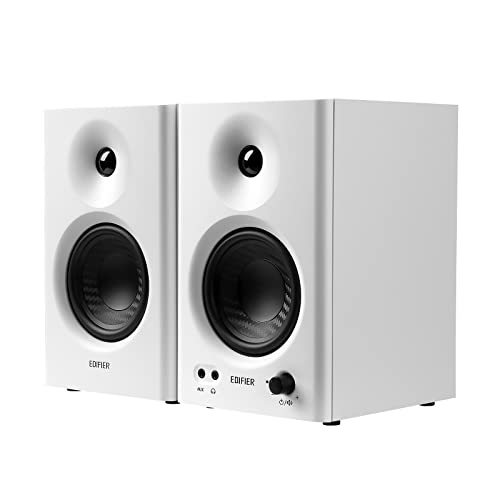
Edifier MR4 — The balanced-input pair (sold as a pair)
Another pair in a single box, both channels included in the listing. The MR4 is the pair-boxed pick for people who read spec sheets: it offers balanced TRS inputs, a feature the singles above treat as standard but pair-priced rivals usually drop, and its voicing was clearly tuned toward measurement rather than showroom excitement. The four-inch woofer and silk dome tweeter produce a calm, even presentation that owners consistently describe as boring in the best sense — nothing leaps out, nothing hides, and long editing sessions pass without the treble fatigue that fizzy budget tweeters cause.
Two listening modes, labelled monitor and music, give a slightly softened playback character at a button press; do your mixing in monitor mode and treat the other as a break. The front panel carries volume and a headphone output, and the cabinets are compact enough for genuinely small desks while still sounding fuller than 3.5-inch pairs. Its ceiling is output and depth: it will not fill a big room or reproduce the bottom octave, and at high levels the small woofer works audibly hard. Within a metre, at sensible levels, it is arguably the most grown-up pair-boxed option here.
- Sold as: stereo pair in one box
- Woofer: 4-inch composite
- Tweeter: 1-inch silk dome
- Inputs: balanced TRS, RCA, front aux
- Controls: front volume and headphone out; monitor/music modes
- Placement: compact cabinet for small desks
Strengths
- Balanced TRS inputs are rare at pair pricing and keep noise down.
- Even, unfatiguing voicing suits long editing and mixing sessions.
- Fuller low mids than 3.5-inch pairs while staying desk-friendly.
Trade-offs
- Modest maximum volume; not a room-filling speaker.
- Bottom octave still absent, as with every small pair here.
- Music mode is a temptation to leave on — mixing belongs in monitor mode.
What lifts the MR4 above the usual pair-boxed crowd is that its compromises were chosen by someone thinking about studios rather than dorm rooms. The balanced input, the restrained treble, the absence of gimmicky Bluetooth in a monitoring context — each decision trades a bullet point for working quietness. It will not impress a visitor with a bass drop, and it is not meant to. Play a dense acoustic recording and the instruments stay separated and located, which is the skill a developing mixer is actually trying to buy at this level.
Best for: interface owners wanting a quiet, honest pair without single-speaker pricing. Not suited for: loud playback, big rooms, or sub-bass decision-making.
KRK Rokit 5 G5 — The character speaker (prose only)
Covered without a link, deliberately, because this is the pick where we part company with popularity. The Rokit line, yellow cones and all, is the best-selling studio monitor family in home studios, and the G5 generation added DSP room tuning and switchable voicing modes that genuinely improve it. As a playback speaker for making beats it is enjoyable: low end with presence, a presentation that flatters loops into sounding finished. That flattery is exactly the problem when the same speaker is your only mixing judge — bass that already sounds generous encourages you to mix it thin, and the mix then arrives weak on neutral systems.
There is a legitimate case for it. Producers who work in bass-led genres and cross-check on headphones and a car system sometimes prefer a monitor that represents the club end of the spectrum, and the G5’s DSP modes let you store a flatter setting for mixdown and a fuller one for writing. If that discipline sounds like you, it earns consideration. If you are buying one pair to learn mixing on, the linked picks above will teach you faster, which is why this one stays prose-only in our ranking rather than linked as a recommendation.
- Sold as: single speaker — a stereo setup needs two
- Woofer: 5-inch Kevlar
- Voicing: DSP modes with LCD-assisted room tuning
- Inputs: XLR, TRS and RCA combo connectivity
- Character: low-end forward, playback-flattering
- Role in this guide: second-reference candidate, not a first pair
Strengths
- Enjoyable, bass-present playback that suits beat-writing sessions.
- DSP voicing modes include a flatter mix setting.
- Huge user community means placement and settings advice is everywhere.
Trade-offs
- Flattering low end misleads bass decisions when used alone.
- Voicing modes invite fiddling instead of learning one reference.
- As a single-speaker purchase, the stereo total matches the flat picks.
To be fair to the design brief KRK set itself, the G5’s three voicing modes are a real attempt to serve two masters: a mix mode that reins the low end in, a default that suits writing, and the ability to store room corrections as presets. Disciplined users do switch, and their mixes do not suffer the way first-generation Rokit mixes did. The reservation in this guide is about habit, not hardware — most home producers will not switch modes religiously, and the mode they will live in is the flattering one.
Best for: beatmakers who cross-check elsewhere and want a club-leaning voice. Not suited for: a first and only mixing reference on a learning curve.
Comparison table
| Pick | Sold as | Woofer | Inputs | Character |
|---|---|---|---|---|
| JBL 305P MkII | Single | 5-inch | XLR, TRS | Neutral, wide sweet spot |
| Kali LP-6 V2 | Single | 6.5-inch | XLR, TRS, RCA | Neutral, low hiss, calm top |
| Yamaha HS5 | Single | 5-inch | XLR, TRS | Forward midrange, lean bass |
| PreSonus Eris 3.5 | Pair | 3.5-inch | TRS, RCA, aux | Small, clear, bass-light |
| Edifier MR4 | Pair | 4-inch | TRS, RCA, aux | Even, unfatiguing |
| KRK Rokit 5 G5 | Single | 5-inch | Combo XLR/TRS, RCA | Bass-forward, flattering |
What separates the best studio monitors for mixing at this tier from nice speakers?
Three things, and none of them is volume. The first is flatness: a mixing monitor aims to reproduce every frequency region at the level it was recorded, so your decisions are about the music rather than about compensating for the speaker. The second is consistency off-axis — the waveguide designs in the JBL and the careful tweeter integration in the Kali keep the tonal balance stable as you move, which is how you actually work at a desk. The third is honesty about flaws: distortion, compression and resonances in a cheap speaker are not just playback defects, they are false information fed into every mix decision.
None of this makes a mixing monitor better for enjoying music, and several picks here are deliberately less fun than a good bookshelf speaker. The exchange is deliberate. You are buying a measuring instrument that happens to play music, and the right question at purchase is not “which sounds best in the demo” but “which one’s judgements will I still trust in six months, on material I have never heard before.”
How should you set up a first pair in an untreated room?
Form an equilateral triangle: speakers and your head at the three corners, tweeters at ear height, cabinets angled inward so their axes cross just behind your head. Isolation pads or short stands matter more than any cable — a speaker sitting directly on a desk excites the desktop, which adds a boxy resonance no EQ switch fully removes. Start with the speakers as far from the rear wall as the desk allows, then use each model’s boundary controls rather than your mix EQ to deal with the bass lift that remains.
Set a reference level and mark it. Mixing quietly is not a compromise, it is a technique: at low levels your ears judge midrange balance most reliably and room problems intrude least, while occasional loud checks confirm the low end has not run away. Keep one familiar commercial track as a calibration reference and play it at the start of every session for a month; your brain learns a new monitor by comparison, and skipping that apprenticeship is why new owners often declare a good speaker “wrong” in week one.
Which woofer size suits your room and your music?
Woofer diameter is the most misread number in this category because bigger reads as better. What diameter actually controls is how much air the speaker can move before strain, and how low it can reach while doing it. A 3.5-inch pair like the Eris gives up the bottom octave entirely and stays composed in the range it does cover. A five-inch design reaches into the upper bass, enough to judge kick weight against a bass guitar’s fundamental in most pop and rock. The 6.5-inch Kali extends that confidence a little further and plays louder in bigger rooms before compressing. None of them reproduces true sub-bass; that requires an eight-inch woofer or a subwoofer, and in a small untreated room both usually cause more confusion than clarity.
Match the size to the music honestly. Singer-songwriter, podcast, folk, jazz and most rock mixing lives in the midrange, where all six picks can see clearly and the smallest pair is a legitimate tool. Electronic and hip-hop production puts musical information in the region these speakers only imply, so the working method there is hybrid by necessity: balances on the monitors, bottom-octave decisions on good headphones, final check on any larger system you can access. Buying the 6.5-inch model narrows that blind spot; it does not close it, and a buyer who understands that will make better records on the Eris than a buyer who expects miracles from the Kali.
Room size cuts the other way. In a box room or a dorm, a larger woofer energises the room’s resonances more strongly, and the result can be less clarity, not more. Several experienced home producers deliberately run small monitors in small rooms and accept the missing octave as the price of hearing everything else plainly. The tier rewards honesty about your space: measure your desk, note the wall distance, and let those two numbers veto oversized cabinets before taste gets a vote.
How do you connect a pair and set levels without introducing noise?
The chain is simpler than forum threads suggest. An audio interface’s main outputs feed the monitors’ inputs; balanced cables — XLR or TRS — reject the interference that a nest of USB and power cables radiates, which is why the linked singles and the MR4 all offer balanced sockets. Keep the interface’s output as your master volume, set each speaker’s own level control to a sensible midpoint, and match the pair by playing pink noise or a mono recording and centring the image by ear. A mono source that seems to float exactly between the cabinets means levels and placement agree; an image that leans means something, somewhere, is a decibel or two proud.
If hiss or whine appears, diagnose in order. Whine that changes as the mouse moves or the GPU works is almost always an unbalanced connection picking up computer noise — swap RCA for balanced leads before blaming the speakers. Constant gentle hiss at idle is amplifier self-noise, a known weakness of the cheapest powered designs and one the Kali was specifically engineered to minimise. Hum on one side only usually means one cable in the chain differs from the other. None of these faults needs new speakers; all of them have ruined first impressions of good ones.
Gain staging finishes the job. Run the interface output reasonably hot and the speaker trims lower rather than the reverse, and the system stays quiet at working levels. Then fix one listening level for mixing and mark the knob position with tape. It sounds fussy until you realise that every balance judgement you make is relative to how loud you were listening — the marked level is what turns a pair of speakers into a consistent measuring tool instead of a mood.
What should you listen for during the first week with a new pair?
Give any of these monitors a structured week before judging them. Day one, play three commercial tracks you know intimately and write down what surprises you; surprises are the speaker showing you its character and your old habits at the same time. Midweek, mix something simple and check it in a car and on earbuds, noting which decisions travelled and which did not — that gap is your personal translation map for this speaker, and no review can draw it for you. By the end of the week, revisit the boundary and trim switches with the manual open; small placement corrections made after your ears have settled are worth more than any setting chosen in the first excited hour.
Two signals tell you a speaker is wrong for you rather than merely new. The first is fatigue: if an hour of ordinary listening leaves your ears tired at modest levels, the treble presentation does not suit you, and no amount of reputation should overrule that. The second is distrust — if, after the settling week, you still reach for headphones to check every decision the monitors were bought to make, the pairing of speaker, room and your hearing is not working. Every pick in this guide has a return window; using it is not failure, it is the last stage of choosing properly.
How do the six picks divide by genre and workflow?
Strip away the badges and the six picks form three honest pairs of alternatives. For the mixer whose music is built from voices, guitars and real drums, the contest is JBL against Yamaha: the 305P MkII gives the wider, calmer picture and asks less of your placement, while the HS5 gives the sharper midrange interrogation and asks more of your low-end workflow. Engineers who print mixes for other people often end up owning the Yamaha’s viewpoint somewhere in their chain, even when a friendlier speaker handles the composing hours, because a mix that is balanced on the HS5 rarely embarrasses itself downstream.
For the producer working in a small, untreated room at modest levels — statistically the most common reader of a guide like this — the contest is the Kali against the field. Its low self-noise, front port and graduated boundary settings are not marketing garnish; they are answers to the three specific problems that room creates, and no other pick here answers all three at once. The counterweight is size and the per-speaker total: two LP-6 V2 cabinets claim desk depth that a laptop, a controller and a notebook also want, and in a truly tiny setup the five-inch JBL may be the physically wiser buy even where the Kali measures better.
The third pairing serves the buyer whose ceiling is a total, not a per-speaker figure. Between the two pair-boxed options, the Eris 3.5 is the convenience play — smallest cabinets, friendliest front panel, lowest commitment — while the MR4 is the fidelity play, trading a little of that convenience for balanced inputs and a calmer, more even voice. Podcasters and video editors who occasionally mix music lean Eris; interface-owning musicians who occasionally edit video lean MR4. The KRK stands outside the pairings as the taste option: defensible for writers who live in bass-led genres and cross-check relentlessly, hard to defend as a sole teacher. Naming which of these three contests is yours settles most of the decision before any spec sheet is opened.
How does placement change what each of these speakers sounds like?
Every speaker in this guide has two sounds: the one its designer measured, and the one your room lets it have. The desk itself is the first modifier. A cabinet coupled to a desktop adds a chesty emphasis in the low midrange, which is why the same speaker sounds clearer the day isolation pads arrive. The Eris and MR4 pairs, light as they are, benefit most visibly; the heavier singles benefit too, and the improvement costs less than any cable ever sold. Height is the second modifier — a tweeter firing at your chest rather than your ears dulls the top end and shifts vocal placement, and a pair of cheap stands or even stacked books corrects it instantly.
Distance to the wall behind the speakers writes the bass story. Rear-ported models — the JBL, the Yamaha, both PreSonus designs — breathe through that gap, and squeezing it shut swells the low end and muddies the low mids where mud already lives. Their boundary switches exist precisely to compensate, and the correct setting is the one that makes a familiar bass line sound even, note to note, rather than the one that makes it sound biggest. The Kali’s front port relaxes the constraint but does not repeal physics; its graduated boundary EQ still expects to be used, and the difference between its desk and stand settings is plainly audible on kick drums.
Symmetry is the quiet third factor, and the one most often skipped. A pair where the left speaker sits near a side wall and the right sits in open space will never image properly, because the two channels are playing in different rooms. Centre the setup on the wall where you can, keep distances to side walls matched, and accept a slightly smaller triangle in exchange for a balanced one. Mixers blame speakers for vague stereo images that a tape measure would have fixed in ten minutes.
What else should the budget cover besides the speakers themselves?
A pair of monitors is a system purchase wearing a single-item disguise, and the buyers who plan for the accessories enjoy their speakers more from the first evening. Isolation pads or short desktop stands come first, for the desk-resonance reasons already covered; they are unglamorous foam or metal, and they outperform every other accessory combined. Cables come second: two balanced leads of the right length, bought once, end the noise experiments that plague RCA chains in computer-dense rooms. If your source is a laptop headphone socket rather than an interface, a short, decent-quality stereo breakout lead is the difference between a clean start and a weekend of hum hunting.
Third, and most often forgotten, is a way to control volume within arm’s reach. Reaching for a software slider mid-session breaks concentration and invites accidents at full scale; an interface knob, a passive monitor controller, or even a keyboard shortcut you trust will be used a hundred times a week. None of this needs to arrive on day one, and none of it should displace the speakers themselves in a tight budget — the correct order is speakers first, placement accessories immediately after, and electronics when a specific annoyance names them. But a buyer who reserves a small slice of the total for these items avoids the common sequel to a monitor purchase: a great pair of speakers, badly fed, blamed for faults that a foam pad and a balanced cable would have prevented.
It is also worth deciding now where the second reference will come from, because mixing culture assumes one exists. For most readers it already does: the earbuds used on trains, the car stereo, a Bluetooth speaker in the kitchen. Naming those as your official cross-checks, and building a habit of bouncing a near-finished mix through all three, costs nothing and catches the errors that any single pair of monitors — at this tier or ten times it — will eventually let through.
Can measurement apps or correction software rescue a bad room?
Partly, and the honest answer matters because software is the most oversold accessory in home recording. A measurement microphone and room-correction software can genuinely flatten the response at your listening position, particularly the broad low-frequency humps that wall placement creates, and several interfaces and monitor controllers now build the feature in. Used that way — measuring after placement is already sensible, correcting gently, and checking the result at a couple of nearby positions — correction is a legitimate final polish, and mixers at this tier who adopt it usually keep it.
What software cannot do is repeal time. Reflections arriving a few milliseconds after the direct sound smear transients and stereo imaging in ways no equaliser can unscramble, because the microphone hears the same mixture your ears do and a filter cannot separate the copies. Deep nulls, where a reflection cancels the direct sound almost completely, cannot be filled by boosting either; the energy simply cancels again, louder. This is why the order of operations in every serious setup guide is placement first, boundary controls second, physical treatment third where possible, and correction last. The picks in this roundup were chosen partly for how well they support that order: speakers with real boundary EQ and predictable off-axis behaviour respond to correction gracefully, while speakers with ragged dispersion give the software an impossible moving target.
There is a budget version of the same discipline that costs nothing. Play a sine sweep or familiar bass-heavy material and walk the room; the spots where bass booms and vanishes are your room modes announcing themselves, and moving the listening position even half a metre can shift you out of the worst of them. Note where a vocal sounds clearest and set the desk there rather than where the furniture first landed. Mixers romanticise gear because gear can be bought, but at this tier the room is the largest component in the system, and it is the one component that attention alone improves.
When does it make sense to move up from this tier?
Not when a forum says so — when a specific limitation starts costing you work. The honest triggers are three. You mix bass-led music professionally and the headphone cross-check has become the tail wagging the dog; that argues for larger woofers or a properly integrated sub in a treated space. Clients or collaborators hear flaws on their systems that your room hides from you; that argues for measurement, treatment and then speakers, in that order. Or your sessions have grown long and loud enough that your current pair strains audibly before you do, which argues for the output headroom of the next class up.
What the next tier buys, when you go, is mostly refinement rather than revelation: lower distortion at level, smoother off-axis behaviour, deeper controlled bass, and construction that survives a decade of daily power cycles. The skills transfer completely — a mixer who learned placement, level discipline and translation on a 305P MkII will exploit an expensive monitor immediately, while an expensive monitor bought instead of those skills mostly reveals the room more accurately. That is why this guide treats the around-$150 tier as a foundation rather than a compromise: it is the level at which the limiting factor stops being the speaker and starts being the engineer, which is exactly where a developing mixer wants to be.
What are the most common mistakes buyers make here?
The costliest is the single-versus-pair trap: ordering one sold-singly speaker, or two, without ever checking which format the listing uses, then blowing the budget or sitting in mono. Second is placing rear-ported cabinets flat against a wall and blaming the speaker for the boom. Third is mixing loudly in a small room, where reflections dominate and every decision chases the room rather than the track. Fourth is judging a monitor with one favourite song in the first hour — new references need days of varied material. Fifth, and most common of all, is buying the flattering speaker because the demo sounded impressive, then wondering why mixes emerge thin and dull everywhere else.
Final Recommendation
If the budget truly covers one speaker at a time at this tier, the JBL 305P MkII bought as a pair remains the safest education in mixing: neutral, forgiving of movement, and honest where it counts. The Kali LP-6 V2 runs it close and passes it for quiet rooms and wall-adjacent desks. If the ceiling is for the whole setup, the Edifier MR4 pair is the grown-up answer and the Eris 3.5 the starter. The HS5 is the specialist’s microscope, the Rokit the playback treat to add later, not first. For a first mixing rig at this money, spend on the flat pair and the pads to place them properly — placement is the cheapest upgrade in audio, and it is the one this tier of speaker rewards most.
Whichever route you take, buy from a seller with a real return window and use the first week the way the guide above describes: reference tracks, a test mix, checks on the systems your listeners actually own. A monitor is a relationship as much as a product, and the pair that teaches you your own habits fastest is worth more than the pair with the prettiest graph. Around this money, every pick here can be that teacher for someone — the work of this guide has been matching the teacher to the room, the genre and the way the money is counted.
Frequently Asked Questions
Does the around-$150 budget mean per speaker or per pair?
Both exist in this tier, which is why every pick above states its format. Pair-boxed models like the Eris 3.5 and MR4 include both speakers in one listing. The JBL, Kali, Yamaha and KRK models are priced per single speaker, so a stereo setup needs two units and roughly double the listing figure.
Can I mix on 3.5-inch monitors, or is that a waste of money?
You can mix midrange, stereo placement and arrangement on them effectively at close distance, and they teach monitor skills headphones cannot. What they cannot do is reproduce low bass, so kick and sub decisions must be cross-checked on headphones. Treat them as a first reference with a known blind spot, not as a complete one.
Do I need an audio interface, or can I plug monitors into my computer?
You can run most of these from a headphone output with the right cable, and pair-boxed models accept that happily. An interface earns its place through balanced outputs, which keep computer noise out of powered speakers, plus a proper volume knob within reach. If you hear whine that tracks your mouse movements, that is the unbalanced connection, not the speaker.
Should I add a subwoofer later instead of buying bigger monitors now?
For most small rooms, no — a sub excites exactly the room modes you cannot treat, and integrating it smoothly is a skill of its own. Bigger main monitors with boundary controls, like the 6.5-inch Kali here, are the simpler upgrade. A sub makes sense in a larger, treated space or for film work with an LFE channel.
How loud do these monitors actually go in a bedroom studio?
All six picks exceed comfortable nearfield levels at a metre; the differences appear in how cleanly they hold together near their ceilings, where the larger-woofer Kali stays calm longest and the 3.5-inch Eris strains first. If you regularly want high levels, that strain ceiling, not the spec sheet, is your deciding figure.
Why is the KRK Rokit covered without a purchase link?
Because our judgement is that it is a second speaker, not a first one. Its flattering low end is enjoyable for writing and playback but misleads balance decisions when it is the only reference. It is discussed fully so buyers who love its sound understand the trade they are making.
Related Guides
Keep building the studio with our companion reading: best studio monitors under $100 for tighter budgets, best $1,000–1,500 studio monitors when you outgrow this tier, and best 10-bit monitors for the desk these speakers flank.


