What's inside
- Key Takeaways
- Quick Picks
- How We Chose These Picks
- Barrel Tips or USB-C: Which Family Does Your Laptop Belong To?
- The Six Adapters, Pick by Pick
- How Do the Six Compare Side by Side?
- How Do You Read a Laptop Rating Label Like a Charger Buyer?
- What Should You Check Before a Universal Adapter Touches Your Laptop?
- How Do You Set Up a Universal Charger Safely the First Time?
- When Should a Replacement Adapter Be Retired?
- What Mistakes Do Universal Charger Buyers Keep Making?
- Final Recommendation
- Frequently Asked Questions
- Related Guides
As an Amazon Associate I earn from qualifying purchases. This post may contain affiliate links at no extra cost to you.
[widgetverdict.com] is reader-supported. When you buy through links on our site, we may earn an affiliate commission.
Where to buy: every adapter in this guide is a third-party replacement sold through the listings linked below — none of them is the charger that shipped in the box with your laptop, and this guide will not pretend otherwise.
The best laptop universal chargers exist for one unglamorous reason: original power bricks get lost, fray, stay in hotel rooms, and die at the exact moment a deadline arrives. A universal adapter answers that emergency by carrying a pocketful of interchangeable tips and a range of voltages, so one brick can feed a Dell on Monday, an ageing Toshiba on Tuesday, and a borrowed Acer on Wednesday. That flexibility is genuinely useful. It is also genuinely risky when bought carelessly, because a universal charger asks you to do the matching work that a factory adapter does automatically — and the matching is where laptops get hurt.
So let us say the honest thing first, in the open: all six picks here are replacement adapters from third-party brands. Belker, ZOZO, ELECBRAIN, SLRIOYS, VJYUIJAY and INEXEWOC are not Dell, HP or Lenovo, and their bricks are not built in the factories that made your machine. That does not make them junk — it makes them a different purchase with different rules. You trade the certainty of an original adapter for breadth, availability and a second charger you can leave at the office. This guide is written for people who understand that trade and want to make it with their eyes open.
The six picks split into two clear families, and choosing your family matters more than choosing within it. The first family is the barrel-tip brigade: the Belker, the ZOZO and the ELECBRAIN, all rated at 90 watts, all feeding laptops through round DC plugs with swappable tips, all aimed at the enormous installed base of pre-USB-C notebooks. The second family speaks USB-C Power Delivery: the VJYUIJAY and INEXEWOC at 65 watts, pure and simple, for modern machines that charge through a USB-C port. Between the families sits the SLRIOYS, a 100-watt USB-C unit that ships with 15 tips, trying to bridge both worlds. Which family your laptop belongs to is decided by the port on its side, not by preference — and the sections below will help you read that port correctly before any money moves.
Key Takeaways
- Every pick is a third-party replacement adapter, not an original manufacturer charger — judge them as spares and travel bricks, not as factory equipment.
- Three picks are 90W barrel-tip adapters with swappable tips (Belker with 20 tips, ELECBRAIN with 16 connectors, ZOZO with six selectable voltages); three are USB-C Power Delivery units.
- The SLRIOYS is the bridge pick: 100W over USB-C with 15 tips in the box, for households split between old barrel laptops and new USB-C ones.
- Voltage and tip fit decide safety, not wattage headlines — a 90W adapter set to the wrong voltage is worse than a correct 45W one.
- The VJYUIJAY and INEXEWOC are the simplest picks here: fixed 65W USB-C output, no tips to lose, no dial to mis-set.
- Check your laptop’s required voltage and connector against the listing before ordering; the two-minute check in this guide prevents the classic universal-charger mistake.
Quick Picks
| Pick | Badge | Why it earns its place |
|---|---|---|
| Belker 90W Universal Laptop Charger (20 Tips) | The deepest tip drawer | 90W barrel adapter with 20 tips covering the widest brand list here, from Dell and HP to Fujitsu and older MacBook-era machines. |
| ZOZO 90W Universal Laptop Charger | The voltage selector | 90W adapter with six stated output voltages from 12V to 20V, for owners who know their machine’s exact requirement. |
| ELECBRAIN 90W Universal AC Adapter | The 16-connector all-rounder | 90W barrel adapter with 16 connectors and a compatibility list spanning HP, Dell, Acer, Asus, Toshiba, Sony, Fujitsu and Gateway. |
| SLRIOYS 100W USB-C Universal Laptop Charger (15 Tips) | The bridge between eras | 100W USB-C output plus 15 tips, built for homes where a USB-C ultrabook and a barrel-fed veteran share one desk. |
| VJYUIJAY 65W USB-C Universal Laptop Charger | The no-fuss Chromebook friend | Straightforward 65W USB-C adapter whose listing names HP Chromebooks first — a school-and-office spare with nothing to configure. |
| INEXEWOC 65W USB-C Universal Laptop Charger | The household spare | 65W USB-C adapter pitched at office, school and family use across Lenovo, HP, Dell, Acer, Asus, Samsung and Google machines. |
How We Chose These Picks
We started from the two questions a universal charger must answer honestly: what does it plug into, and what does it deliver? A pick had to state its wattage plainly in its listing title, name the laptop brands it claims to feed, and — for the barrel family — say how many tips or connectors ride in the box, because tip count is the whole product in that family. Adapters that hid their output behind vague “fast charging” language did not make the cut; a replacement brick is a specification purchase, and the specification has to be visible before checkout.
We also insisted on balance across the connector divide. A guide that listed six barrel adapters would abandon every reader whose laptop charges over USB-C, and a guide of six USB-C bricks would abandon the far larger crowd keeping older machines alive. Three and three, with the SLRIOYS straddling the line, mirrors how households actually look in 2026: one new ultrabook, one inherited workhorse, one Chromebook the kids use, all hungry at the same kitchen table.
We also weighted how each pick behaves in the hands of a non-expert, because universal chargers are bought by households, not laboratories. A pick whose safe use depends on a dial earned extra scrutiny; a pick whose safety is delegated to the USB-C negotiation earned credit for removing the human from the loop. Neither approach is automatically better — the dial serves machines the standard cannot — but a guide that ignored the human factor would mislead the very readers most likely to buy these products: people replacing a lost brick under time pressure, with a laptop at nine percent and no patience for fine print. The fine print is in this guide so that it does not have to be on their kitchen table.
Finally, we read each listing for what it does not promise. None of these six claims to be an original adapter, and we treated that restraint as a good sign. The dishonest corner of this market is full of bricks dressed up to look factory-made; the six below sell themselves as what they are — universal replacements — and are judged here on exactly that basis.
Barrel Tips or USB-C: Which Family Does Your Laptop Belong To?
Walk to your laptop and look at the hole the charger plugs into. If it is a round socket, sized somewhere between a pencil and a drinking straw, your machine belongs to the barrel family, and its original adapter carries a small round plug whose exact diameter — outer and inner — is one of dozens of near-identical sizes the industry never standardised. This is why barrel universal chargers exist as tip kits: the adapter body is generic, and the intelligence lives in a bag of metal tips, one of which matches your socket. The Belker brings twenty of them, the ELECBRAIN sixteen, and the ZOZO takes a different route with selectable voltage and tips aimed at the common sizes.
If the charging hole is a small flat oval — the same shape as a modern phone cable’s end, only on your laptop — your machine charges over USB-C, and the conversation changes completely. USB-C Power Delivery is a negotiation: the laptop and charger exchange information and agree on a voltage, which is why a 65W USB-C brick can safely feed a wide range of machines without a voltage dial for you to mis-set. The VJYUIJAY and INEXEWOC live entirely in this world. There are no tips to lose because the standard is the tip.
The SLRIOYS sits between the worlds, and it is worth understanding what that means mechanically. Its native language is USB-C at up to 100 watts, and the 15 tips in its box adapt that output to barrel sockets on older machines. That makes it the natural pick for a two-laptop household, but it also means the barrel side of its personality inherits every barrel warning in this guide: the tip must fit snugly, and the machine’s voltage requirement must be respected, because an adapter tip cannot negotiate the way a true USB-C connection does.
There is also a quiet economic story underneath this category. Laptop manufacturers price original replacement bricks as accessories, and accessories carry accessory margins; a lost factory adapter can cost a startling fraction of an old laptop’s remaining value, which is why so many owners of five- and six-year-old machines end up shopping universal in the first place. The universal market exists in the gap between what a manufacturer charges for certainty and what an ageing laptop is worth. That framing helps set expectations correctly: you are not buying the same product more cheaply, you are buying a different balance of breadth, certainty and price, and the picks below are ranked by how honestly and competently they strike that balance.
Tip geometry deserves one more moment of attention, because it is the barrel family’s original sin. Two tips can share an outer diameter and differ inside; two can look identical and differ by half a millimetre; and manufacturers reused similar sockets across model years while quietly changing the pin in the middle. This is why tip counts are a real specification rather than marketing garnish — every additional tip is another handful of sockets the kit can honestly claim — and why the fit test in this guide insists on a seated, wobble-free connection rather than mere electrical contact. A tip that lights the charging LED but rocks in the socket has passed the wrong test.
One more distinction matters before the detailed picks. Wattage is a ceiling, not a dose. A laptop draws what it needs, up to what the adapter can supply, so a 90W adapter feeding a machine that wants 65W is fine and will simply run cooler than a strained 65W unit. The dangerous mismatch is never wattage — it is voltage on barrel machines, and polarity and tip fit alongside it. Keep that hierarchy in mind through every pick below: watts are comfort, volts are law.
The Six Adapters, Pick by Pick

Belker 90W Universal Laptop Charger (20 Tips) — The deepest tip drawer
The Belker is the pick for the drawer-of-old-laptops problem: the household or small office where machines accumulate, brands blur together, and nobody kept the original bricks. Twenty tips is the largest count in this guide, and the listing’s brand roll — Dell, HP, Acer, Asus, Lenovo, IBM, Toshiba, Samsung, Google, Fujitsu, and MacBook Pro machines of the barrel era — reads like a census of the last two decades of portable computing. The title also carries a 65W figure alongside the 90W headline, a reminder that output depends on the voltage setting in use; treat 90W as the ceiling, not a promise at every setting.
Working with a twenty-tip kit is a small ritual worth doing properly. Lay the tips out, find your laptop’s required voltage printed on its underside label or its original brick, set the adapter accordingly, then test tips with the machine off until one seats with a firm, wobble-free fit. The Belker rewards that patience with genuine breadth: this is the adapter most likely in this guide to feed the forgotten Fujitsu in the cupboard or the hand-me-down Dell that became the kids’ homework machine. Its natural home is a fixed spot — a desk drawer, a workshop bench, a family charging corner — rather than a travel bag, because twenty loose tips and travel are natural enemies.
One practical note on living with the Belker: dedicate the first evening to identification, not charging. Test each laptop in the house against the tip set while everything is calm, label the winning tip for each machine with a small tag or a dab of coloured tape, and write the voltage setting beside it. That half hour converts the Belker from a bag of possibilities into a documented household system, and it is the difference between a universal adapter that feels like a librarian and one that feels like a gamble. Owners who skip the labelling ritual are the ones who, six months later, hold a tip up to the light and guess — and guessing is the one thing this category punishes.
- Output: 90W maximum (65W figure also stated in the listing title, varying by setting)
- Tips included: 20 interchangeable barrel tips
- Connector family: barrel DC, with USB-C also named in the listing title
- Stated compatibility: Dell, HP, Acer, Asus, Lenovo, IBM, Toshiba, Samsung, Google, MacBook Pro, Fujitsu notebooks
- Original-equipment status: third-party replacement — the listing does not state otherwise, and neither do we
Strengths
- Twenty tips give it the best odds in this guide of fitting an obscure or elderly laptop.
- The brand list reaches genuinely old machines — IBM and Fujitsu included — that USB-C picks cannot touch.
- At 90W it covers the power appetite of most full-size notebooks of the barrel era.
Trade-offs
- Twenty loose tips will scatter unless you impose a labelled bag or box from day one.
- Voltage selection is your responsibility; the listing title does not state an automatic voltage-sensing feature, so confirm the setting yourself before connecting.
- It is a desk-bound kit, not a travel companion — the tip bag alone argues against the carry-on.
Best for: a household or bench with several older barrel-charging laptops from mixed brands, where one adapter must cover them all. Not suited for: a laptop that charges only over USB-C with no barrel socket, or a traveller who needs a single cable and nothing to lose.
If the cupboard of retired laptops sounds familiar, check the current listing for the Belker and count your machines against its tip set before ordering.
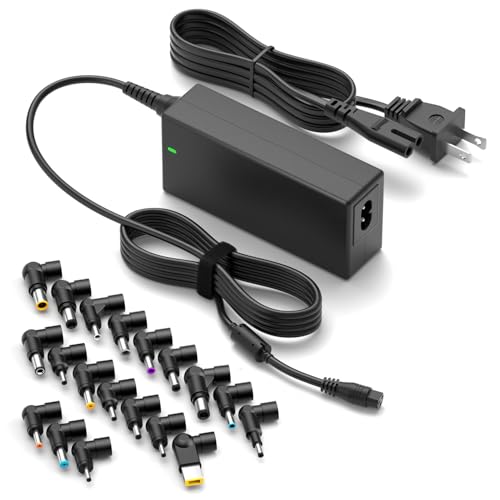
ZOZO 90W Universal Laptop Charger — The voltage selector
The ZOZO takes the most literal approach to “universal” in this guide: instead of hiding its range, the listing prints it — DC output at 12V, 16V, 18.5V, 19V, 19.5V and 20V. That list is a fingerprint of the barrel era, when each manufacturer settled on a favourite voltage and the differences between 18.5 and 19.5 volts were the difference between charging and not charging. If you own a machine whose label demands one of the less common figures — an older HP at 18.5V is the classic case — the ZOZO’s stated range is exactly what you came for.
That explicitness cuts both ways, and the pick deserves an honest paragraph about it. A selectable-voltage adapter is a tool, and like a tool it assumes the user reads the markings. The ZOZO suits the owner who will flip their laptop over, read the input line on the rating label, and set the adapter to match before the tip goes anywhere near the socket. For that owner it is arguably the most capable barrel pick here, covering notebooks, ultrabooks and Chromebooks across HP, Dell, Gateway, Toshiba, Lenovo, Acer, Asus, Samsung, Sony and Fujitsu. For the owner who wants to plug in blind, it is the wrong pick, and the USB-C pair further down this guide exists for them.
Consider who benefits most from that printed voltage ladder. The owner of a single modern laptop gains nothing; the owner of a small fleet of donated, inherited or refurbished machines gains a great deal, because refurbished laptops arrive with their chargers missing more often than not, and their labels span the whole ladder — a 16V Fujitsu-era machine here, a 19.5V Dell there. The ZOZO reads like it was specified by someone who runs exactly that kind of fleet: a school technician, a charity refurbisher, a grandparent who has become the family’s unofficial IT department. If that portrait resembles you, the dial is not a risk to be managed but the entire reason to buy.
- Output: 90W
- Stated output voltages: 12V, 16V, 18.5V, 19V, 19.5V, 20V DC
- Connector family: barrel DC tips
- Stated compatibility: HP, Dell, Gateway, Toshiba, Lenovo, Acer, Asus, Samsung, Sony, Fujitsu notebooks, ultrabooks and Chromebooks
- Voltage behaviour: selectable by the user — the correct setting is not stated as automatic in the listing title
Strengths
- Six named voltages, including the awkward 18.5V and 16V settings many universal adapters skip.
- The listing states its range openly, so you can verify your machine’s requirement against it before buying.
- Gateway and Sony appear on its brand list — two names the other barrel picks here do not claim.
Trade-offs
- A manual voltage choice is a manual opportunity to choose wrong; this pick demands the label-checking ritual every time it moves to a different laptop.
- The listing title does not state a tip count, so the exact connector assortment is not stated in the listing title — check the full listing contents against your socket before ordering.
- Barrel only: a USB-C-only laptop gains nothing from its voltage range.
Best for: the methodical owner of an older HP, Sony or Gateway machine whose required voltage sits at 18.5V, 16V or another less common figure the ZOZO names. Not suited for: anyone who will not read the rating label and set the voltage deliberately, or owners of USB-C-only laptops.
Read your laptop’s input line first; if its voltage appears in the ZOZO’s stated range, look at the listing and confirm the tip assortment covers your socket.

ELECBRAIN 90W Universal AC Adapter — The 16-connector all-rounder
The ELECBRAIN occupies the sensible middle of the barrel family: 90 watts, sixteen connectors, and a compatibility list — HP, Dell, Acer, Asus, Toshiba, IBM, Sony, Fujitsu, Gateway — that covers the mainstream of the barrel era without chasing the Belker’s twenty-tip extreme. Sixteen connectors is a considered number. It is enough to span the common socket sizes from the big manufacturers, few enough that the kit stays pocketable in a laptop bag’s side compartment, and honest about the fact that the twentieth-most-obscure tip is one most owners will never meet.
Where the Belker suits a fixed bench and the ZOZO suits a voltage specialist, the ELECBRAIN suits the roving spare: the adapter that lives in a work bag and rescues whichever machine the day presents. Its listing speaks the plain language of the category — “power supply cord” — and that plainness is the point. Nothing about this pick pretends to be clever. It is a 90W brick, a cord, and sixteen chances that one of the ends fits the laptop in front of you. For a field technician, a school IT cupboard, or a family with three brands of ageing notebook under one roof, that plain competence is the entire requirement.
There is a temperament question hidden in the ELECBRAIN’s middle position. The Belker buyer wants maximum coverage and accepts a drawer of tips; the ZOZO buyer wants voltage precision and accepts a dial. The ELECBRAIN buyer wants the problem to go away — one brick, a modest roll of connectors, and a high probability that the laptop on the desk is fed within two minutes of opening the bag. That is a legitimate engineering priority, and in practice it describes most real purchases in this category: not collectors, not specialists, just people whose second laptop or work-issued veteran needs power from a source that is not fussy. Judge the ELECBRAIN by how rarely its owners think about it after the first week.
- Output: 90W
- Connectors included: 16
- Connector family: barrel DC
- Stated compatibility: HP, Dell, Acer, Asus, Toshiba, IBM, Sony, Fujitsu, Gateway notebooks, ultrabooks and Chromebooks
- Cord and tip storage details: not described in the listing title — look at the full listing if a carry case matters to you
Strengths
- Sixteen connectors hit the mainstream socket sizes without the Belker’s drawer-filling excess.
- Its brand list includes IBM and Gateway, keeping genuinely old hardware in scope.
- The kit is small enough to live in a laptop bag as a permanent spare rather than a bench fixture.
Trade-offs
- Four fewer tips than the Belker means a slightly lower chance of fitting a truly obscure socket.
- As with every barrel pick here, voltage and fit verification before first connection is on you.
- No USB-C output is claimed, so the newest machine in the house is outside its reach.
Best for: a roving spare for mixed-brand older laptops — the school cupboard, the technician’s bag, the three-brand household. Not suited for: the owner of a single obscure laptop who needs the Belker’s maximum tip count, or any USB-C-only machine.
If your household’s older laptops wear the brands on its list, the ELECBRAIN’s listing is worth a close read for its connector chart before you commit.

SLRIOYS 100W USB-C Universal Laptop Charger (15 Tips) — The bridge between eras
The SLRIOYS is the most powerful pick in this guide and the most conceptually interesting. Its headline is 100 watts delivered over USB-C — enough headroom for large, hungry notebooks that would leave a 65W brick warm and slow — and its box holds 15 tips that adapt the unit to barrel-fed machines from HP, Dell, Lenovo, Acer, Asus, Toshiba, Samsung, LG, Fujitsu, MSI and others, with MacBook and Chromebook machines named on the USB-C side. One adapter, two generations of laptop, and a stated ceiling higher than anything else here.
Read it, though, as two products sharing a housing, because the two halves behave differently. Plugged into a USB-C laptop, it is a modern Power Delivery brick: the machine and charger negotiate, and the 100W ceiling simply gives demanding notebooks room to charge at full pace while under load. Pushed through a tip into a barrel socket, it becomes a member of the barrel family with that family’s rules — physical fit matters, the machine cannot negotiate, and the two-minute label check in this guide applies in full. Owners who understand which personality they are using on a given day will get real value from the bridge. Owners who treat the tips as magic may not.
The 100W ceiling deserves a concrete illustration. A large notebook running a video call, an external display and a compile at once can draw hard enough that a 65W adapter merely slows the battery’s decline — the machine is, in effect, charging negatively. Owners in that position often blame the laptop, when the real story is an undersized brick. The SLRIOYS’s extra headroom removes that failure mode for USB-C machines, and it is why, despite its tip-kit complexity, it is the pick we would hand to someone whose main laptop is a big one. Power you never use costs nothing in daily operation; power you need and do not have costs you every working day.
- Output: 100W over USB-C
- Tips included: 15, adapting output to barrel sockets
- Connector family: USB-C native, barrel via included tips
- Stated compatibility: HP, Dell, Lenovo, Acer, Asus, Toshiba, Samsung, MacBook, IBM, LG, Fujitsu, MSI, Google Chromebook and tablets
- Per-tip voltage behaviour on barrel machines: not spelled out in the listing title — read the full listing and your laptop label before first use
Strengths
- The only 100W ceiling here — full-size USB-C notebooks can charge at pace instead of merely keeping up.
- Fifteen tips make it a genuine second adapter for the older barrel laptop still in service.
- MSI and LG appear on its list, extending its reach to gaming and Gram-style machines the other picks omit.
Trade-offs
- The barrel side inherits every barrel caveat: fit and voltage discipline are manual, not negotiated.
- Fifteen tips are fifteen things to keep track of; the bridge only works if the right tip is findable.
- If you own no barrel laptop, you are paying for a tip kit you will never open — the simpler 65W picks below cost less complexity.
Best for: a two-generation household — a demanding USB-C notebook plus an older barrel laptop — that wants one high-ceiling adapter to cover both. Not suited for: a single-laptop owner with no second machine, who is buying tips as decoration.
Count the laptops in your house across both connector eras; if the answer is two or more, the SLRIOYS listing deserves your attention first.

VJYUIJAY 65W USB-C Universal Laptop Charger — The no-fuss Chromebook friend
After three picks built around tips, dials and judgement calls, the VJYUIJAY is a relief: a 65W USB-C adapter, full stop. Its listing names HP Chromebooks first among its machines, followed by Lenovo, Dell, Acer, Asus, Samsung and Google computers, and that ordering hints at its natural habitat — classrooms, school bags, office hot-desks and kitchen counters, the places where a charger is shared infrastructure rather than a prized possession. There is nothing to set and nothing to fit. If the laptop has a USB-C charging port, the negotiation happens between the machines, and the human’s job is reduced to plugging in.
Sixty-five watts is the settled standard size for this class: it matches the appetite of Chromebooks and thin-and-light Windows laptops, which is precisely the fleet the listing names. It will also maintain larger USB-C notebooks under light use, though a big machine working hard deserves the SLRIOYS headroom instead. The VJYUIJAY’s virtue is not range but absence — absence of tips to lose before an exam, absence of a voltage dial for a younger student to experiment with, absence of any decision at the moment of plugging in. In shared environments, that absence is the feature.
Think about where Chromebooks actually live: classroom carts charged overnight in rows, school bags dropped on hall floors, kitchen tables shared with homework and dinner. In those environments a charger is consumed like a pencil — used hard, borrowed constantly, replaced without ceremony. The VJYUIJAY fits that reality because there is nothing about it to configure wrongly and nothing small to lose in a cart of thirty machines. A school or a family buying two or three spares is not shopping for the ultimate adapter; it is shopping for the absence of incidents, and a fixed-output USB-C brick from a listing that names its machines plainly is precisely an incident-absence device.
- Output: 65W over USB-C
- Tips included: none — native USB-C connection only
- Connector family: USB-C Power Delivery
- Stated compatibility: HP Chromebook, Lenovo, Dell, Acer, Asus, Samsung and Google computers
- Cable arrangement: not described in the listing title — confirm on the full listing whether the cable is fixed or separate if that matters to you
Strengths
- Nothing to configure: USB-C negotiation replaces the voltage-and-tip ritual entirely.
- Chromebook-first listing makes it the natural spare for school fleets and homework machines.
- No loose parts — the whole adapter can live in a school bag without shedding tips.
Trade-offs
- Useless to any laptop without a USB-C charging port; the barrel generation is invisible to it.
- 65W is a ceiling that large performance notebooks will bump against under heavy load.
- One port, one machine: it will not split its attention across a laptop and a phone the way multiport desktop chargers elsewhere in this batch can.
Best for: Chromebook and thin-and-light owners who want a second 65W adapter for a school bag, office drawer or kitchen counter. Not suited for: any barrel-port laptop, or a large notebook that needs more than 65W to charge at full speed.
If your machine charges through USB-C and simplicity is the whole point, start with the VJYUIJAY’s listing and confirm your model appears in its compatibility notes.

INEXEWOC 65W USB-C Universal Laptop Charger — The household spare
The INEXEWOC makes the same technical offer as the VJYUIJAY — 65 watts over USB-C, compatibility across Lenovo, HP, Dell, Acer, Asus, Samsung and Google machines — and then says the quiet part in its listing title: “for Office, School, and Family.” That phrasing earns it a separate place in this guide rather than a merged entry, because it names the actual job of a second adapter. The first charger lives with the laptop. The spare lives where life happens: the office drawer for the day the main brick stays home, the classroom corner, the family kitchen where three brands of laptop rotate through one socket.
Judged as a household spare, the relevant questions change. Peak wattage matters less than the breadth of the compatibility list, and the INEXEWOC’s list spans the seven brands a mixed family is most likely to own. Behaviour matters more than benchmarks: a USB-C spare either negotiates correctly with every machine in the house or it is a paperweight with a plug, and the standardised nature of Power Delivery is what makes a one-adapter-per-household strategy sane at all. Keep the original brick as the reference standard for your most expensive machine, and let the INEXEWOC be the adapter that is simply always there.
A spare adapter also changes household behaviour in a way worth naming. When the only charger lives wherever the laptop last slept, every low battery becomes a small logistics exercise — find the brick, find the owner of the brick, negotiate. A fixed spare at a fixed socket ends the negotiation permanently, and laptops start getting topped up casually instead of rescued dramatically, which is kinder to batteries and tempers alike. That is the real product the INEXEWOC sells: not watts, but a charging spot that is always ready. Place it once, coil its cable neatly, and let the original bricks stay with their machines as they roam.
- Output: 65W over USB-C
- Tips included: none — native USB-C connection only
- Connector family: USB-C Power Delivery
- Stated compatibility: Lenovo, HP, Dell, Acer, Asus, Samsung, Google and more
- Intended settings, per the listing title: office, school and family use
Strengths
- Seven named brands cover the realistic spread of a mixed-brand household’s laptops.
- USB-C negotiation means any family member can use it without a briefing on voltages or tips.
- Its stated office-school-family framing matches how a spare adapter is actually used day to day.
Trade-offs
- Identical 65W ceiling to the VJYUIJAY — choosing between them comes down to listing details and compatibility notes, not power.
- Barrel-port machines in the same household remain unserved; this spare covers only the USB-C generation.
- As the shared adapter, it will wander — a labelled cable tie or fixed home socket is worth more than a second spare.
Best for: a mixed-brand household or small office that wants one always-available 65W USB-C spare for its modern laptops. Not suited for: homes whose laptops still charge through barrel ports, which need the tip-kit picks at the top of this guide.
If the spare-adapter job description matches your need, read the INEXEWOC listing’s compatibility section against the laptops actually in your house.
A word about the machines these adapters will mostly serve. The barrel generation is not disappearing on any schedule the charger market can ignore: schools run Chromebooks’ older Windows cousins for a decade, small businesses nurse invoicing laptops long past their warranty birthdays, and families hand machines down through three children. Every one of those laptops is one lost brick away from the universal-charger question, and its owner is rarely a hobbyist — just someone who needs the machine working by Monday. That is the reader this guide was written for, and it is why the picks privilege stated specifications and honest labelling over novelty: on a Sunday evening with a dead laptop, clarity is the feature that matters.
How Do the Six Compare Side by Side?
| Pick | Output | Connector family | Tips in box | Defining trait |
|---|---|---|---|---|
| Belker 90W (20 Tips) | 90W max | Barrel DC | 20 | Widest tip and brand coverage for old machines |
| ZOZO 90W | 90W | Barrel DC | Not stated in title | Six stated voltages, 12V–20V |
| ELECBRAIN 90W | 90W | Barrel DC | 16 | Mainstream all-rounder, bag-sized kit |
| SLRIOYS 100W | 100W | USB-C + barrel tips | 15 | Highest ceiling; bridges both connector eras |
| VJYUIJAY 65W | 65W | USB-C | None | Chromebook-first simplicity |
| INEXEWOC 65W | 65W | USB-C | None | Household and office spare |
How Do You Read a Laptop Rating Label Like a Charger Buyer?
Flip the laptop over. Somewhere on the base — or, on machines with removable batteries, inside the battery bay — sits a label crowded with regulatory marks and small print. The line you want gives the machine’s electrical input: a voltage figure, then a current figure, sometimes multiplied into a wattage. That single line is the most trustworthy document in this entire category, more trustworthy than the seller’s compatibility list, the box the adapter came in, or the advice of anyone who has not seen your specific machine. Photograph it with your phone before you shop; shopping with the label in your pocket converts every claim in every listing into something you can verify on the spot.
The label also teaches a useful humility about compatibility lists. A listing that names your laptop’s brand has told you something general; the label tells you something exact. Brands shipped the same model family with different adapters across regions and years, and a “compatible with HP” claim spans machines wanting several different voltages. When the listing and the label disagree, the label wins, always. If the label has worn illegible — it happens on much-travelled machines — the original adapter’s own label carries the same figures, and failing both, the manufacturer’s support documentation for your exact model is the fallback. What you must not do is guess from a similar-looking machine; the whole architecture of this category rests on numbers that are cheap to read and expensive to assume.
What Should You Check Before a Universal Adapter Touches Your Laptop?
Three checks, in this order, every time a barrel adapter meets a new machine. First, voltage: find the input line on the laptop’s rating label — it reads as a voltage and a current, something like nineteen volts and a few amps — and set or confirm the adapter to the same voltage. Close is not a setting; the number must match. Second, tip fit: with the laptop off, seat the candidate tip. It should slide in fully, sit snugly, and resist a gentle wiggle. A tip that rocks is the wrong tip even if it makes electrical contact, because a rocking connection arcs, heats and wears the socket. Third, polarity: barrel plugs carry a polarity — centre positive on the overwhelming majority of laptops — and the tip or adapter must match the diagram printed beside the laptop’s socket. Modern tip kits are overwhelmingly centre-positive, but “overwhelmingly” is a word to verify, not to trust.
USB-C owners skip the ritual but not the thinking. Confirm the port on your laptop actually accepts charging — some machines carry USB-C ports that handle data and displays only, a trap on older transitional models — and confirm the wattage your machine expects. A 65W adapter under a laptop that wants 90W will usually still charge it slowly at rest and merely hold the line under load, which is acceptable for a spare and annoying as a main. The laptop’s own documentation settles both questions; two minutes there is the whole cost of certainty.
How Do You Set Up a Universal Charger Safely the First Time?
Work on a table, with the laptop off and its battery partly charged if possible, so a mistake costs you nothing but time. For a barrel kit: read the rating label, set the adapter’s voltage if it has a selector, choose the tip by fit alone — never by forcing — then connect the adapter to the wall first and the laptop second. Power the machine on and watch the first minutes like a hawk: the charging indicator should behave exactly as it does with the original brick, the plug should stay cool to the touch, and the laptop should report charging rather than cycling. Warm is normal for the adapter body under load; a hot tip or a flickering charge state is a stop signal — disconnect, re-check the voltage figure, and try the neighbouring tip size.
Keep a notebook habit for the first week, literal or mental. Note which tip each machine took, the voltage you set, and any oddity — a charge light behaving differently, a percentage that climbs more slowly than the original brick managed. Most oddities resolve into explanations: a lower ceiling, a tired battery, a background update drinking the incoming power. But the habit means that if something is genuinely wrong, you notice it in days rather than discovering it months later as a swollen battery or a scorched socket. Replacement adapters ask for a modest amount of attention at the start of the relationship; in exchange they ask for almost none afterwards, and that is a fair trade that this guide is happy to recommend.
For a USB-C adapter the sequence is shorter but the observation matters just as much. Connect, wake the laptop, and confirm the reported state: charging, with a plausible time estimate, rather than “plugged in, not charging.” Leave it ten minutes and confirm the percentage climbs. That first supervised session is your acceptance test for any replacement adapter, whatever its connector, and it is worth doing at a desk rather than discovering a problem at nine percent battery in an airport.
When Should a Replacement Adapter Be Retired?
Adapters rarely die dramatically; they fray, loosen and drift. Retire a barrel brick when its cord shows copper at a bend, when a once-snug tip begins to rock in the socket, or when the charging indicator starts cycling on and off as the cable moves — that flicker is a connection failing in slow motion, and it will not heal. Retire any adapter, barrel or USB-C, whose body becomes too hot to hold comfortably during an ordinary charge, whose plug prongs sit loose in the wall socket, or which whines audibly under load when it was silent when new. These are not cosmetic judgements; heat and intermittency are the two honest languages a failing adapter speaks.
There is also a scheduled kind of retirement: the day the household’s last barrel laptop leaves. Tip kits earn their keep only while a barrel machine remains in service, and passing the kit along with the laptop — tips labelled, voltage noted — is a small kindness to the next owner. The USB-C spares, by contrast, simply stay in the drawer and wait for the next machine, because the standard they speak is the one the industry has settled on. Expect a good replacement adapter to serve for years of ordinary use, and expect to judge it, at the end, by the state of its cord and connectors rather than by its age on a calendar.
What Mistakes Do Universal Charger Buyers Keep Making?
The classic mistake is buying by wattage alone — grabbing the biggest number on the shelf and assuming power is compatibility. Wattage is the least specific fact about a charger. The ZOZO’s six voltages exist precisely because two 90W adapters can be entirely different products once the dial is read, and a barrel machine fed the wrong voltage does not care that the watts were generous.
The second mistake is trusting a tip because it fits “well enough.” Barrel sockets punish optimism: a slightly loose tip works on the desk, fails on the sofa, and worries the socket’s contacts a little more each time it shifts. The third mistake is treating a universal adapter as a permanent, invisible replacement for the original and throwing the factory brick away. Keep the original whenever it still works; it is the reference standard for fit, voltage and behaviour, and it is the adapter to use when the machine does anything mission-critical. The fourth is forgetting the second machine: buyers check their own laptop, then lend the adapter to a different one without repeating the voltage check, and the dial that was right on Monday is wrong on Friday. The ritual is per-machine, not per-adapter.
Final Recommendation
Choose by connector first and by household second. Owners of several older barrel laptops should start with the Belker for maximum tip coverage, or the ZOZO if a specific awkward voltage is the whole problem; the ELECBRAIN is the barrel pick to carry around. USB-C households should default to the 65W pair — VJYUIJAY for school and Chromebook duty, INEXEWOC as the shared spare — and step up to the SLRIOYS only when a demanding notebook or a genuinely mixed two-generation fleet justifies the bridge. Whichever you choose, do the label check once, supervise the first charge, and keep the original brick somewhere findable. A universal charger bought with open eyes about what it is — a capable third-party replacement, never a factory original — will quietly serve for years; the adapter that causes trouble is almost always the one whose buyer skipped the two minutes of reading that this entire category runs on.
Frequently Asked Questions
Will a universal charger damage my laptop?
A correctly matched one should not: match the voltage exactly on barrel machines, use a tip that seats snugly, and respect polarity, and the adapter is delivering what the machine was designed to receive. Damage enters through mismatches — wrong voltage above all — which is why this guide repeats the label check so insistently. When in doubt, the original adapter remains the reference.
Is a 90W adapter safe for a laptop that came with a 65W charger?
Yes, provided the voltage matches. Wattage is a ceiling the laptop draws against, not a dose the adapter forces in; the machine takes what it needs and the adapter runs with headroom to spare. The reverse — a lower-wattage adapter under a hungrier laptop — is the limiting direction, causing slow charging under load rather than harm.
Why does my laptop charge slowly on a universal USB-C adapter?
Usually because the adapter’s ceiling sits below the machine’s appetite: a 65W brick under a notebook that wants more will charge it gently at rest and merely hold the percentage while you work. Confirm in your laptop’s documentation what wattage it expects; if the figure is above 65W, a 100W-class pick such as the SLRIOYS is the appropriate step up.
Can one universal charger really cover laptops from different brands?
Within its connector family, yes — that is the product. Barrel kits cover brands by carrying their tip sizes and voltages; USB-C adapters cover brands because Power Delivery is a shared standard. What no single pick here does is cross the connector divide without help, which is why the SLRIOYS ships tips and why the first question in this guide is the shape of the hole in your laptop.
Should a universal adapter replace my original charger permanently?
It can serve as the everyday charger for many owners, but we would keep a working original in reserve regardless. The factory brick is the known-good standard for troubleshooting — if the laptop ever behaves oddly on power, swapping back to it isolates the problem in seconds — and it is the safest choice for firmware updates and other moments when you want zero variables.
Can I travel with a universal charger instead of the original?
Yes, and many owners prefer it — one adapter covering the laptop and serving as the household spare at home. Two cautions apply. Keep loose tips in a sealed pouch inside the same bag compartment every trip, because a tip lost in a hotel room converts a universal adapter into a paperweight for that machine. And repeat the first-charge observation if the adapter has been paired with a different laptop since you last used it on yours; travel is exactly when the per-machine voltage check gets skipped.


