What's inside
- Key Takeaways
- Quick Picks
- How We Chose These Picks
- Why Does Monitoring Matter More Than Spec Sheets Suggest?
- What Does a Voiceover Chain Actually Need?
- How Should Editors Think About Latency on the Timeline?
- What Changes When the Edit Station Is a Laptop?
- How Do You Judge Dialogue Recordings Honestly?
- When Does an Editor Outgrow a Single Input?
- How Do the Six Editing Picks Compare Side by Side?
- How Should You Set Up a Voiceover Corner in an Editing Room?
- What Mistakes Do Editors Make With Audio Gear?
- Final Recommendation
- Frequently Asked Questions
- Related Guides
As an Amazon Associate I earn from qualifying purchases. This post may contain affiliate links at no extra cost to you.
widgetverdict.com is reader-supported. When you buy through links on our site, we may earn an affiliate commission.
Where to buy: Amazon lists all six devices in this guide, from the established voiceover interfaces to the small monitoring DAC that rides along in a laptop bag.
The best sound cards for video editing solve two different problems that editing forces into one purchase, and this guide will keep them separate from the first paragraph. Problem one is listening: hours of timeline work through headphones or nearfield monitors, where a noisy, weak output stage fatigues you and, worse, lies to you about the mix you are shipping. Problem two is recording: the voiceover, the narration, the quick ADR line, captured through a microphone in a room that was never built as a studio. An audio interface is the answer to the second problem and a good answer to the first. A DAC is the answer to the first problem only — it records nothing. Five picks below are interfaces; one, the Sound BlasterX G6, is a DAC and amplifier included deliberately for editors whose editing never involves a microphone.
That distinction is the spine of this guide because the editing market blurs it constantly. A creator who buys a fine DAC and then reaches for a USB microphone has bought two separate signal paths that never meet. An editor who buys an interface gets both directions handled by one box, one driver, one volume knob. Decide which editor you are — voiceover or no voiceover — before you decide anything else, and the six picks sort themselves.
What editing specifically demands, beyond music recording’s needs, is monitoring honesty at low volume, painless switching between speakers and headphones, and voice capture that tolerates an untreated room. Dialogue intelligibility is the product in most video; the interface’s job is to get a voice into the timeline cleanly and to play the timeline back without editorialising. The picks below are judged on exactly that brief.
Key Takeaways
- Interfaces record and play back; a DAC only plays back. Voiceover editors need an interface; silent editors may prefer the DAC.
- The Focusrite Scarlett Solo 3rd Gen is the classic single-voice voiceover tool, with a stated 56dB gain range and Air mode.
- The MAONO PS22 Lite targets creators directly, with a low-noise preamp, loopback, an ASIO driver and routing software for DAW and OBS work.
- The Cubilux CB5 is the monitoring-and-line-in utility pick, built around 3.5mm connections for editors with simple chains.
- The Sound BlasterX G6 returns from our gaming guide in a new role: a 130dB SNR monitoring DAC for editors who never record.
- The USB-C interface with 48V phantom power is the budget voiceover route — note its stated 48kHz ceiling.
Quick Picks
| Pick | Badge | Why it is here |
|---|---|---|
| Focusrite Scarlett Solo 3rd Gen USB Audio Interface | Best voiceover standard | One XLR preamp with 56dB gain range and Air mode, plus one Hi-Z input, across Mac, Windows and iPadOS. |
| M-Audio M-Track Solo USB Audio Interface | Best value voiceover route | XLR, line and DI inputs with a software suite covering recording and streaming from one small box. |
| MAONO PS22 Lite USB Audio Interface | Best creator routing | Low-noise preamp, 24-bit/192kHz, loopback, ASIO driver and routing software aimed at DAW and OBS workflows. |
| Cubilux CB5 USB Audio Interface | Best simple monitoring utility | USB to 3.5mm with stereo mic input, line-in, line-out and a headphone jack for monitors. |
| Creative Sound BlasterX G6 USB DAC Amp | Best monitoring-only DAC | A hi-res DAC and headphone amp with 130dB SNR for editors whose timelines never need a microphone. |
| USB-C Audio Interface with 48V Phantom Power | Best budget condenser route | XLR/TRS inputs, stated 48V phantom power and direct monitoring at a stated 48kHz, for PC, Mac and iOS. |
How We Chose These Picks
Editing’s weighting differs from music’s, so the judging did too. Monitoring came first: the output stage an editor trusts for eight hours a day is the product, and conversion figures were read with that job in mind. Voiceover capture came second — one clean preamp beats four mediocre ones for narration — followed by the workflow layer editors actually touch: routing software, loopback for recording system audio or remote guests, driver quality for stable timeline playback, and platform support across the Mac and Windows machines editing suites live on. We included one pure DAC because a meaningful share of editors never record anything, and forcing an interface on them wastes money and desk space. Budget picks are included with their ceilings stated, because a 48kHz limit is a fact an editor deserves before purchase, not after.
Why Does Monitoring Matter More Than Spec Sheets Suggest?
Because every audio decision in an edit is made through the monitoring chain. If the output stage adds hiss, you will cut breaths and room tone that were never a problem. If it exaggerates bass, your mixes will ship thin on every other system. If it tires your ears by early afternoon, your judgement degrades with your comfort, and the last hour of the timeline gets the worst decisions of the day. Editors speak of picture colour accuracy endlessly and of audio monitoring rarely, though the logic is identical: you cannot correct what your reference misrepresents.
This is also where the DAC-versus-interface line sharpens. An interface’s playback stage is designed for monitoring as a primary job — feeding powered speakers and headphones at controlled levels. A gaming DAC such as the G6 brings a different heritage: very low noise, strong headphone drive, processing you can engage or bypass. For an editor who only listens, either can serve; the interface simply adds a recording path the DAC lacks, and the DAC often adds portability the interface does not attempt. Neither is the professional choice in the abstract. The professional choice is the one matching the work.
What Does a Voiceover Chain Actually Need?
Less than music does, and better. One microphone, one preamp with enough clean gain, and a room that behaves. Dialogue recording is a single-source task: the Scarlett Solo format — one XLR preamp, one instrument input standing by for the day a guitar appears in a vlog — covers the overwhelming majority of narration work. The stated gain range on the 3rd Gen Solo, 56dB, matters because popular dynamic broadcast microphones are gain-hungry, and a preamp running at its ragged edge adds the noise you will then spend plug-in time removing.
Room behaviour outranks gear, as it does in music, but editing adds a twist: the voice must match across sessions recorded weeks apart. A consistent chain — same interface, same gain habit, same microphone position — is what makes episode twelve’s narration sit invisibly beside episode one’s. That is an argument for buying a stable, well-supported interface early and keeping it, rather than rotating budget boxes whose gain staging and tone differ each time.

Focusrite Scarlett Solo 3rd Gen USB Audio Interface — Best voiceover standard
The third-generation Scarlett Solo is the interface a generation of editors learned voiceover on, and its listing states the configuration plainly: one XLR mic preamp, one Hi-Z instrument input, 24-bit/192kHz conversion, a 56dB gain range, Air mode, and compatibility across macOS, Windows and iPadOS. For narration work that specification is not a compromise cut from a bigger product — it is the exact shape of the job. One voice, one microphone, captured cleanly, monitored honestly, in whichever operating system the edit suite already lives.
The 56dB gain range is the figure editors should linger on. The dynamic microphones favoured for voice work — chosen because they reject untreated-room noise — output low levels and ask a lot of a preamp. A stated gain range lets you check the pairing before money moves: enough gain, delivered quietly, means the narration sits at a healthy level without the preamp straining audibly behind every sentence. Air mode, Focusrite’s presence lift, can add intelligibility to a dull voice in a soft room; use it as seasoning, and remember it prints into the recording.
Third generation rather than fourth is worth a sentence of honesty. This is the earlier design, and the newer Solo in our music guide adds figures this one does not claim. What the 3rd Gen offers instead is an enormous installed base in editing suites, mature drivers on both major platforms, and a workflow every tutorial on the internet can describe from memory. For an editor, boring reliability in the audio chain is a feature that outranks spec-sheet novelty, because the interface’s best day is the day you forget it exists.
Its boundaries are the single-input boundaries: one microphone at a time, so a two-person interview in the room needs a different tool, and podcasters recording pairs should look at two-preamp models. Within the voiceover brief, those boundaries rarely bite. This remains the standard against which single-voice editing setups are measured, and its listing earns that position with stated numbers rather than adjectives.
One editing-specific habit suits this unit particularly well: template sessions. Save your editing software’s voice track with the Solo’s input, your usual gain, and your processing chain, and every narration session starts from the same sonic place. Consistency across a series is an editorial asset, and a stable single-input interface is the easiest hardware foundation for it.
- Inputs: 1 XLR mic preamp and 1 Hi-Z instrument input, per the listing
- Conversion: 24-bit/192kHz
- Gain range: 56dB, as stated in the listing title
- Preamp colour: Air mode
- Compatibility named in the listing: macOS, Windows and iPadOS
- Connection: USB-C
- Phantom power: not spelled out in the listing title — condenser users should confirm the provision on the product page
Strengths
- The exact single-voice shape most narration work actually needs.
- A published 56dB gain range lets you verify dynamic-microphone pairings in advance.
- Deep editing-community familiarity and mature cross-platform drivers.
Trade-offs
- One microphone only — in-room interviews with two voices exceed it.
- An earlier generation than the 4th Gen Solo in our music guide.
- Phantom power provision needs confirming on the full listing.
Best for: narration, voiceover and tutorial recording on a Mac or Windows edit station, one voice at a time.
Not suited for: two-person in-room recording, or an editor who wants the newest generation’s published dynamic range.
Check the Scarlett Solo 3rd Gen on Amazon if your timeline’s most important track is a single human voice.
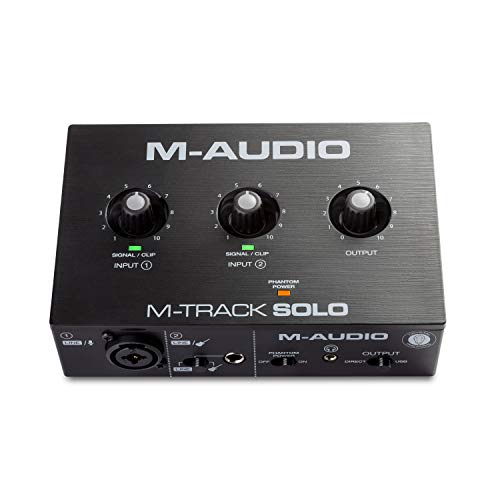
M-Audio M-Track Solo USB Audio Interface — Best value voiceover route
The M-Track Solo compresses M-Audio’s home-studio formula to a single channel and aims it at the same trio of jobs its bigger sibling names: recording, streaming and podcasting, with a professional software suite bundled. Its listing promises XLR, line and DI inputs — three source types through a compact unit — which for an editor means the microphone lives on the XLR input, a phone or music player can arrive on line in for reference or reaction formats, and an instrument can be captured directly when a project needs a quick musical element.
For video work specifically, that input flexibility solves small daily problems. Recording a voiceover is the headline task, but editors constantly capture incidental audio: a product’s actual sound for a review, a keyboard’s clack for a tech video, a guitar phrase for a transition. A single flexible input that accepts microphone, line and instrument levels without a mixer in between keeps those captures spontaneous, and spontaneity is the difference between b-roll audio that exists and b-roll audio that was too much trouble.
The bundled software suite extends the value argument in an editing direction: a beginning creator often has no audio editor they trust, and the suite provides a starting environment for cleaning narration before it reaches the timeline. Treat it as a bonus rather than the reason — editing suites handle most audio duties — but a buyer assembling a first voiceover corner gets hardware and software in one decision.
Against the Focusrite above, the M-Track Solo’s listing publishes less: no gain range, no conversion figures in the title. The editor who records demanding dynamic microphones should pull the full specification before choosing between them. What the M-Audio offers in return is its input trio and the suite, at the value end of the established brands — a sensible trade for the many editors whose microphones are undemanding and whose budgets are not.
It is also the natural spare. Edit stations accumulate a second machine, a laptop for location work, a partner who starts a channel. A compact single-input interface from a known maker covers those satellite duties without drama, which is how value gear earns a permanent place in a working editor’s drawer.
- Inputs: XLR, line and DI, per the listing title
- Software: a professional software suite is bundled, per the listing
- Stated uses in the listing: recording, streaming and podcasting
- Gain range: the listing title gives no figure — dynamic-microphone users should read the full specification
- Conversion figures: not published in the listing title — the product page holds the detail
- Form: compact desktop USB interface
Strengths
- Three input types capture voice, line sources and instruments through one small box.
- The bundled suite gives a first voiceover corner its software start.
- An established maker’s value route into single-channel recording.
Trade-offs
- No gain range or conversion figures are stated in the listing title.
- Single channel — paired voices in one room are beyond it.
- Gain-hungry broadcast dynamics deserve a spec check before pairing.
Best for: a first voiceover setup that also captures incidental audio for reviews and tutorials.
Not suited for: an editor pairing a demanding dynamic microphone without checking the gain specification first.
Look at the M-Track Solo on Amazon when one flexible input has to cover a whole creator desk.

MAONO PS22 Lite USB Audio Interface — Best creator routing
MAONO built the PS22 Lite for the creator desk rather than the traditional studio, and its listing reads accordingly: a low-noise preamp, 24-bit/192kHz conversion, loopback, an ASIO driver, routing software, and an audience named outright — home studio, DAW recording, OBS, creators. Each element answers an editing-life problem. The low-noise preamp addresses the untreated room’s quiet enemy. The ASIO driver addresses Windows stability and low-latency monitoring for narration recorded against playback. The routing software and loopback address the modern creator’s defining tangle: getting the right audio — voice, timeline playback, a remote guest, a clip — to the right destination at the right time.
Loopback deserves its paragraph because editors increasingly publish live or record with remote participants. A guest on a call, a game’s audio, a reaction video’s source material — loopback folds the computer’s output back into the recording path under your control, without the virtual-cable improvisation that breaks at the worst moment. Paired with routing software, it turns the interface into a small traffic controller for a desk where the editing suite, the streaming program and the call software all want the microphone at once.
The stated conversion figures put the PS22 Lite in the guide’s modern bracket on paper, and the low-noise preamp claim is aimed squarely at voice work, where the noise floor sits nakedly audible between sentences. As with any maker’s noise claim unaccompanied by a figure in the title, treat it as positioning to verify rather than a measurement to quote; the product page and manual carry the numbers, if any are published.
MAONO’s creator focus also means the unit expects to be learned through its software, which cuts both ways: editors who live in routing panels will feel at home, while editors who want two knobs and silence may find the Focusrite’s austerity more congenial. Choose by temperament as much as by specification.
For the hybrid editor-streamer — cutting videos all week, broadcasting them at the weekend — this is the pick whose feature list was written by someone who had watched that exact working life. The recording path is present and modern; the routing is the headline; the audience is named on the box.
- Preamp: described as low-noise in the listing title
- Conversion: 24-bit/192kHz, per the listing
- Loopback: stated in the listing title
- Driver: ASIO driver named in the listing — relevant to Windows editing stations
- Routing: routing software included, per the listing
- Stated habitats in the listing: home studio, DAW recording, OBS, creators
- Input count: the listing title does not enumerate the channels — confirm the layout on the product page for your microphone plan
Strengths
- Loopback plus routing software untangles the creator desk’s audio traffic.
- An ASIO driver speaks directly to Windows editors’ stability concerns.
- Published 24-bit/192kHz figures match the modern bracket.
Trade-offs
- The low-noise claim arrives without a figure in the listing title.
- Channel layout needs confirming on the product page.
- Software-led control suits tinkerers better than two-knob minimalists.
Best for: an editor who also streams or records remote guests, and needs routing more than a second preamp.
Not suited for: a pure timeline editor who never touches OBS or a call recording, and prefers hardware simplicity.
Check the PS22 Lite on Amazon if your microphone serves an edit suite, a stream and a call in the same day.

Cubilux CB5 USB Audio Interface — Best simple monitoring utility
The Cubilux CB5 is the humblest device in this guide and, for a certain editing desk, the most honest. Its listing describes a USB to 3.5mm sound card with a stereo microphone input, line-in, line-out and a headphone jack for monitors, supporting Windows and Mac. No XLR, no preamp theatre — a utility bridge between a computer and the analogue world of small jacks. Editors whose audio life is built from 3.5mm sources will recognise their desk in that description immediately.
Consider what that covers in practice. A lavalier or headset microphone with a small plug records straight in. A phone, a camera’s output or a handheld recorder arrives through line-in for syncing or archiving. Line-out feeds a pair of desktop speakers, and the headphone jack — described in the listing as being for monitors — covers the late-night pass. For talking-head creators whose microphones are small-plug devices and whose monitoring is headphones plus modest speakers, the CB5 handles the entire chain without a single adapter, and its simplicity is the feature: there is almost nothing to configure, and nothing to misconfigure at deadline.
The limits are structural and should be faced squarely. A studio condenser or a broadcast dynamic on an XLR cable has no home here; this is not a microphone preamp in the studio sense, and voiceover ambitions beyond small-plug microphones belong to the Focusrite or M-Audio rows above. Nor does the listing publish conversion figures to compare — the CB5’s case is connectivity and convenience, not specification.
Where it shines is the second-desk and travel roles: the laptop edit kit, the quick ingest station, the machine whose internal audio jack has failed or hisses. Editors keep a drawer of such bridges because productions generate small analogue emergencies weekly, and a known, simple device that adds clean-enough ins and outs over USB is the difference between solving one in a minute and losing an afternoon to it.
Buy it as infrastructure, not as a studio centrepiece, and it will repay the modest expectation many times over. Buy it as a voiceover interface for an XLR microphone and it cannot help you — the guide’s upper rows exist for that reader.
- Form: USB to 3.5mm external sound card, per the listing
- Inputs named in the listing: stereo microphone input and line-in
- Outputs named in the listing: line-out and a headphone jack for monitors
- Compatibility stated in the listing: Windows and Mac OS
- XLR input: none — small-plug microphones only
- Conversion figures: the listing title publishes none — judge this pick on connectivity, and read the product page for detail
Strengths
- Every small-jack connection an editing desk uses, in one simple bridge.
- Almost nothing to configure — it survives deadline pressure gracefully.
- Ideal travel and second-station utility for laptop editors.
Trade-offs
- No XLR input and no studio preamp — serious voiceover lives elsewhere in this guide.
- The listing title publishes no conversion figures for this unit.
- Small-plug microphone quality depends entirely on the microphone you bring.
Best for: a talking-head desk built on 3.5mm microphones, line sources and headphone monitoring.
Not suited for: XLR voiceover work, or an editor needing a published preamp specification.
See the Cubilux CB5 on Amazon if your analogue world already speaks in small jacks and just needs a tidy doorway.

Creative Sound BlasterX G6 USB DAC Amp — Best monitoring-only DAC
Readers of our gaming guide will recognise the G6, and it returns here wearing a different hat — which is precisely the point of including it. In that guide it was the console gamer’s external converter. Here it is the editor’s monitoring DAC: a hi-res USB DAC and headphone amplifier with a stated 130dB SNR, 7.1 surround and Dolby Digital support, for the substantial class of editors who never record a microphone into their timelines. Their audio work is listening work — mixing stock music under picture, checking dialogue recorded elsewhere, mastering levels for delivery — and for listening work, a DAC is not the lesser tool. It is the correct one.
Why does it suit the edit bay? Start with the noise figure: 130dB SNR is the strongest number in this guide, and monitoring is where noise floors are most exposed, because editors listen at low levels for long stretches, hunting small problems in quiet material. Add a proper headphone amplifier — the stage that decides whether your reference headphones are being driven honestly — and conversion performed outside the case, away from the graphics hardware whose fans and power draw share your working day. The result is a monitoring path that stays out of the mix’s way.
The surround and Dolby features need editing-context honesty. They serve the editor checking a surround-encoded deliverable or previewing how a film’s audio folds down, and the gamer-editor after hours; they are not mixing tools, and no one should cut a stereo timeline through virtual surround processing and trust the result. Bypass the processing for work, engage it for pleasure — the same discipline as our gaming guide, applied to a different desk.
The boundary is absolute and must not be blurred: the G6 records nothing. There is no microphone input, no voiceover path, no narration rescue at deadline. An editor whose work might grow a voice — a tutorial channel, a narration habit — should buy an interface instead and accept its monitoring as entirely sufficient. The G6 is for the editor who knows the microphone question is settled, and wants the listening half done properly.
Its portability quietly serves the editing life too. Suites change rooms, laptops travel to clients, and a monitoring reference that fits in the same bag as the headphones means your ears’ calibration travels with you — an underrated professional asset when a mix must sound right in two places at once.
- Form: external USB DAC and headphone amplifier — playback only, no recording input
- Signal-to-noise ratio: 130dB, as stated in the listing title
- Surround: 7.1 with Dolby Digital, per the listing — bypass for stereo timeline work
- Console support: stated in the listing, for the editor’s after-hours life
- Installation: USB, no slot or internal fitting required
- Microphone input: none — voiceover requires an interface from the rows above
Strengths
- The guide’s strongest stated noise figure, aimed at long, quiet monitoring sessions.
- A real headphone amplifier stage for reference headphones.
- Portable between edit stations, laptops and the living room.
Trade-offs
- Records nothing — no voiceover path exists on this device.
- Surround processing must be bypassed for trustworthy stereo editing.
- Editors who might start narrating should buy an interface instead.
Best for: a listening-only editor mixing music, effects and others’ recordings through good headphones, across more than one machine.
Not suited for: any workflow with a microphone in it, now or plausibly later.
Check the G6 on Amazon if your timelines are all ears and no voice — and you want the ears served properly.

USB-C Audio Interface with 48V Phantom Power — Best budget condenser route
This unbranded USB-C interface makes its pitch with the one feature budget voiceover buyers most need confirmed: its listing states 48V phantom power outright, alongside XLR/TRS inputs, direct monitoring with echo control, and compatibility across PC, Mac and iOS. Phantom power is the gatekeeper for condenser microphones — the large-diaphragm models that dominate narration wishlists — and a listing that states it removes the single most common budget-buying mistake in this category. For an editor assembling a first condenser voiceover corner, that clarity is the product.
The same listing states the ceiling just as plainly: this is a 48kHz interface. For video work, that number deserves context rather than alarm. Video’s own audio standard is 48kHz — timelines, delivery specifications and broadcast chains all live there — so a voiceover recorded at 48kHz lands in the edit with no conversion and no apology. Music production covets higher rates for its own reasons; narration for video does not. The honest limitation is flexibility: a buyer who later records music at higher rates will outgrow the ceiling, and should know it now.
Direct monitoring is the second feature that matters daily, letting the narrator hear themselves without the computer’s delay. The echo control named in the listing is a double-edged inclusion: as a creative effect for certain content it may amuse, but for clean narration it should sit firmly off, and its presence is a reminder that this unit courts the live-streaming crowd as much as the editing one. Judge it by the features you will use — phantom power, direct monitoring, XLR/TRS flexibility — and let the echo knob be furniture.
Unbranded hardware carries the usual caveats, and they belong in the open: driver longevity and support rest on a maker without the majors’ track record, and the listing publishes no preamp gain or noise figures for pairing demanding microphones. Dynamic-microphone users and condenser beginners on a budget are its natural audience; broadcast-dynamic owners should verify gain on the product page or step up to the Solo’s published 56dB.
As the doorway into condenser narration for video, though, the proposition is coherent: the stated feature narration cannot live without, the sample rate video actually uses, and monitoring that keeps a performance honest — bought with open eyes about the brand behind it.
- Phantom power: 48V, stated in the listing title — condenser microphones are supported
- Inputs: XLR/TRS, per the listing
- Sample rate: 48kHz, as stated in the listing title — video’s own standard rate
- Monitoring: direct monitor, with echo control also named in the listing
- Compatibility stated in the listing: PC, Mac and iOS
- Preamp figures: no gain range or noise figure is published in the listing title — the product page is the place to check a demanding microphone pairing
Strengths
- 48V phantom power is stated outright — the budget condenser gate is open.
- 48kHz matches video delivery exactly, with no conversion in the timeline.
- Direct monitoring keeps narration performances free of delay.
Trade-offs
- The 48kHz ceiling closes the door on higher-rate music recording later.
- An unbranded maker’s driver and support horizon is unproven.
- No preamp gain figure is published in the listing title.
Best for: a first condenser-microphone voiceover corner for video, on PC, Mac or iOS.
Not suited for: higher-rate music work, or a gain-hungry dynamic microphone bought without checking the specification.
Look at this USB-C interface on Amazon if phantom power on a budget is the exact door you need opened.
How Should Editors Think About Latency on the Timeline?
Latency wears two hats in an edit suite, and only one of them matters daily. When you record narration against playback — hearing the picture’s audio while your voice joins it — the round trip through the computer must be small enough that your performance does not drag against an echo of itself. Direct monitoring inside the interface removes the problem entirely by letting you hear your voice before the computer touches it, which is why every recording pick in this guide is built around that path, and why the MAONO’s ASIO driver matters to Windows editors: a solid low-latency driver keeps the software side of the chain from becoming the bottleneck when direct monitoring is not in use.
Playback latency, by contrast, is a convenience rather than a quality. A timeline that starts a fraction late after you press play offends nobody’s deliverable. Where editors do feel latency is in scrubbing and in lip-sync judgement — nudging a clip frame by frame while the audio trails behind makes sync decisions mushy. Keeping the buffer sensible in your editing software, and using the interface the software expects rather than a chain of virtual devices, keeps that judgement crisp. The practical rule: record through direct monitoring, edit at a comfortable buffer, and do not let a specification number for a problem you do not have steer the purchase.
What Changes When the Edit Station Is a Laptop?
Portability rearranges the priorities. A laptop editor works in kitchens, trains and client offices, and the audio chain must survive being packed daily. Bus-powered USB interfaces earn their keep here — no power brick, one cable, the same chain in every location — and the G6’s DAC-only portability serves the listening-only traveller the same way. The Cubilux CB5 belongs in the laptop bag almost by default: it weighs nearly nothing and rescues the small-jack emergencies that location work generates.
Consistency is the traveller’s real challenge. A mix judged on a train through the same interface and headphones you use at the desk translates; a mix judged through whatever output the day’s machine offers does not. Editors who deliver from the road learn to treat the interface-plus-headphones pair as a calibrated instrument that travels as a unit. That is another reason the established brands anchor this guide: a driver that behaves identically on the studio desktop and the travel laptop is worth more than a specification edge that exists in only one place.
How Do You Judge Dialogue Recordings Honestly?
By listening for the things picture editors are trained to ignore. Solo the voice track and play it at low volume: hiss that hides under music announces itself, room echo reveals its true length, and mouth clicks and plosives stop being subliminal. Then play it loud once, because clients will. The interface’s contribution to all of this is mostly negative space — a clean preamp adds nothing to judge, a quiet monitoring path hides nothing from you — and that is the deepest reason the voiceover standard in this guide is a mature, unglamorous product. Excitement in a recording chain is usually a defect with good marketing.
Keep a reference narration file — a minute of your own voice, recorded well, through the current chain — and compare new sessions against it before recording anything that matters. Drift in microphone position, gain or room arrangement shows up instantly against a reference, while memory alone will swear nothing changed. It takes one minute per session and saves the matching work that otherwise eats an afternoon in post.
When Does an Editor Outgrow a Single Input?
The triggers are specific, and naming them prevents both premature and overdue upgrades. A second voice in the room — an interview format, a co-host, a client recording their own testimonial beside you — is the hard trigger: no workflow trick gives one preamp two microphones’ worth of independent control. A softer trigger is stereo capture: a product’s mechanical sounds, an instrument recorded in stereo for a music-led piece, ambience gathered deliberately rather than from a library. When those sessions move from imagined to scheduled, the two-preamp class in our music guide is the destination, and the single-input interface retires honourably to travel duty.
Until then, resist the upgrade itch with the evidence of your own timelines. Count the tracks in your last ten projects that a second simultaneous input would have improved. For most editors the honest count is zero, and the money the bigger interface would have consumed belongs in acoustic treatment, a better microphone, or the headphones the monitoring actually happens through. Gear should follow the work’s shape; the work rarely follows the gear’s.
One more form of outgrowing deserves mention because it arrives quietly: the room improves. An editor who treats their corner, hangs the blankets, tames the echo, suddenly hears their chain’s remaining flaws — a preamp’s hiss at high gain, a monitoring path’s roughness — because the room stopped masking them. That is the pleasant kind of outgrowing, and it is the moment the standard picks in this guide justify themselves against the budget ones.
How Do the Six Editing Picks Compare Side by Side?
| Pick | Records? | Headline from the listing | Stands out for |
|---|---|---|---|
| Scarlett Solo 3rd Gen | Yes — 1 XLR preamp | 56dB gain range, 24-bit/192kHz | The voiceover standard |
| M-Track Solo | Yes — XLR/line/DI | Software suite bundled | Incidental audio capture |
| MAONO PS22 Lite | Yes | Loopback, ASIO, routing software | Creator traffic control |
| Cubilux CB5 | Yes — 3.5mm sources | Line-in, line-out, headphone jack | Small-jack utility |
| Sound BlasterX G6 | No — DAC only | 130dB SNR | Monitoring for non-recording editors |
| USB-C 48V Interface | Yes — XLR/TRS | 48V phantom, 48kHz | Budget condenser narration |
The Records column is the whole argument of this guide in miniature. Five rows can capture a voice; one cannot, and that one compensates with the finest listening figure here. Choose your row by answering the microphone question truthfully, then by the secondary trait — gain for dynamics, routing for streamers, small jacks for simple desks, phantom power for condensers.
How Should You Set Up a Voiceover Corner in an Editing Room?
Place the microphone before you place anything else. A corner with soft furnishings nearby, the microphone a hand’s span from the narrator, slightly off-axis to tame plosives, and the interface within reach of the chair — that arrangement beats any equipment upgrade. Connect the microphone by XLR, set the interface as the editing software’s input and output, and record a test paragraph at the loudest energy the script will reach, setting gain so peaks sit comfortably below the ceiling. Save that session as your template, with the track named and the input remembered, so episode twelve starts where episode one did.
Monitoring discipline comes next. Narrate on headphones with direct monitoring engaged, so the voice in your ears is the voice at the microphone, undelayed. When you switch to speakers for the mix pass, mute or move the microphone’s live path — an open mic near speakers is feedback waiting for its moment. Keep speaker and headphone levels calibrated by habit: pick a reference clip you trust and set your usual working volume against it weekly, because drift in monitoring level becomes drift in delivered loudness.
Finally, record room tone. Thirty seconds of the room’s silence, captured at the start of every session through the same chain, is the editor’s quiet superpower — it fills edits invisibly and rescues cuts that would otherwise click. It costs nothing, it lives or dies by chain consistency, and it is the clearest example of this guide’s thesis: in editing audio, boring stability outperforms exciting specifications.
What Mistakes Do Editors Make With Audio Gear?
The founding mistake is buying a DAC for a job that includes recording — or an interface for a job that never will — because the two categories were blurred at the search page. The second is monitoring through processing: surround modes, enhancers and loudness features left engaged while cutting, so the mix is judged through a funhouse mirror. Third, narration recorded at whatever gain the interface happened to sit at, session after session, producing a series whose episodes cannot be matched. Fourth, chasing sample rates past the delivery specification while the room echo prints onto every line. And fifth, treating the microphone’s placement as an afterthought while researching interfaces for a month — the six inches between mouth and microphone outweigh every device in this guide.
Final Recommendation
If you narrate, start with the Scarlett Solo 3rd Gen: its published gain range, cross-platform maturity and single-voice focus make it the editing desk’s default for good reason. The M-Track Solo covers the flexible, incidental captures; the MAONO PS22 Lite untangles the streamer-editor’s routing; the Cubilux CB5 keeps the small-jack world connected; and the budget USB-C unit opens the condenser door with its phantom power stated. If you never narrate, skip all five and monitor through the G6, whose 130dB figure serves the listening half of editing better than any interface here. The microphone question is the whole decision — answer it honestly and the right row of this guide lights up.
Delivery is the last place the chain earns its keep, and it is worth walking once with fresh eyes. Modern platforms normalise loudness, which means the editor’s monitoring honesty decides whether a mix arrives at the platform’s target or gets dragged there by an algorithm that does not care about your intentions. A voice recorded cleanly, monitored without processing, and checked against a reference level will survive that normalisation with its dynamics and intelligibility intact. A voice recorded hot, judged through an enhancer, and exported by hope will be re-levelled into something nobody chose. The devices in this guide cannot make that decision for you — but the clean ones stop actively helping you make it wrong.
Archive the project audio with the same care as the picture. The interface you record through today will not be the interface you own in six years, and a narration session saved only as a processed export cannot be re-matched when a client returns for a sequel. Keep the raw takes, note the chain that made them — interface, gain, microphone, distance — and future-you will be able to rebuild the sound of a series long after the hardware has moved on. It is the least glamorous advice in this guide and, across a career of edits, among the most valuable.
Speakers deserve one honest paragraph, since so many edit desks judge mixes through them. A pair of small powered monitors at ear height, either side of the screen, will reveal balance problems headphones forgive — and will excite every untreated wall in the room while doing it. Feed them from the interface’s line outputs where a pick provides them, keep their volume modest and consistent, and treat them as a second opinion rather than a court of appeal. The editor with one trustworthy headphone chain and one modest speaker pair, both fed by a clean output stage, is better equipped than the editor with exotic speakers fed by a noisy motherboard jack.
And a word for the timeline’s unsung track: sound effects and music libraries arrive pre-mixed, often loudly, and the monitoring chain’s job with them is restraint. An honest output stage lets you hear how hot a library track really is against your dialogue, so the balance you strike survives the platform’s normalisation. Editors who monitor through enhancers routinely ship dialogue buried a few decibels deeper than they believed — the enhancer was flattering the music at the dialogue’s expense, quietly, on every pass.
Keep the chain documented the way you keep a project’s edit notes. A single line in the project file — interface, input, gain habit, microphone, monitoring path — reads like bureaucracy on the day you write it and like a rescue rope on the day a revision arrives nine months later. Editors pride themselves on remembering picture decisions across a long project; audio chains deserve the same respect, because the audience hears a mismatch they cannot name and simply trusts the video a little less.
Finally, let the gear disappear on a schedule. Once a quarter, run the reference checks: the known narration file through the current chain, a quiet passage soloed, a level check against your delivery target. Ten minutes of verification keeps a working chain working, and turns the slow drifts — a driver update’s side effect, a knob knocked in cleaning — into small corrections instead of mysteries discovered at export.
There is a temptation, once the chain is clean, to keep upgrading it — a finer preamp, a costlier converter — while the timeline waits. Resist it with arithmetic: the audience for almost all edited video hears the work on phone speakers, earbuds and televisions, in rooms with traffic outside. What survives that journey is intelligibility, consistency and the absence of distraction, and every pick in this guide already delivers those when used with care. Spend the next increment of money and attention on the microphone’s position and the room’s behaviour, where the audience can still hear the difference.
One habit ties the whole philosophy together: finish the audio pass at the volume your audience will use, not the volume that flatters you. Export a short section, play it through a phone speaker and a television, and listen for the dialogue first. If the words survive those honest little speakers, the mix is done in every way that matters — and the clean, boring, consistent chain that produced it has earned its place on the desk for another year of timelines.
Keep a printed or pinned note of your delivery settings beside the monitor — target loudness, true-peak ceiling, the sample rate your platform expects — and glance at it during the final pass. The chain you have built through this guide exists to make those numbers achievable without heroics: a clean capture, an honest monitor, a consistent level. When the note and the meters agree, export with confidence and let the video go.
And when a session goes wrong despite everything — a guest’s microphone misbehaves, a room defeats you — note what happened in the project file while it is fresh. The next editor of that footage, who is usually you in six months, will thank the note far more than any piece of equipment.
Frequently Asked Questions
Do I need an interface if I never record voiceover?
No. A monitoring DAC such as the G6 serves listening-only editing completely, with a strong headphone stage and a low noise floor. Buy recording capability only when a microphone genuinely enters your workflow.
Is 48kHz enough for video work?
Yes — 48kHz is video’s own standard rate, used across timelines and delivery specifications. The budget interface’s ceiling only becomes a limitation if you later record music at higher rates.
Why does my narration sound different in every episode?
Chain inconsistency: gain changed, microphone distance drifted, a different device crept in. Fix the chain, save a template session, record room tone each time, and the series will match itself.
Can I record a remote guest through these interfaces?
Loopback is the feature built for folding a call’s audio into your recording. The MAONO PS22 Lite lists it directly; for other picks, check the product page or use your call software’s own recording as the source.
Should I monitor on speakers or headphones?
Both, in sequence: headphones for detail and noise, speakers for balance and translation. Whichever you use, bypass surround and enhancement processing while judging a mix, and keep your working volume consistent.
What microphone pairs with the budget USB-C interface?
Its stated 48V phantom power opens the condenser catalogue, which suits narration in a treated corner. In an untreated room, a dynamic microphone may behave better — but confirm the preamp gain on the product page, since the listing title publishes no figure.
Related Guides
- Best Sound Cards Under 20
- Best Sound Cards for Electronic Drums
- Best Sound Cards to Get Rid of White Noise


