What's inside
- Key Takeaways
- Quick Picks
- How did we sort electric desks by mechanism instead of by photograph?
- What actually happens when you press the button?
- How do you match a desk size to a room and a body?
- Is standing all day actually the goal?
- Which of the six deserves your floor space?
- How do the six compare on the numbers their listings actually state?
- How should you set up an electric desk in its first week?
- What separates a good controller from a frustrating one?
- How do you keep an electric desk quiet, level, and lifting for years?
- What mistakes do electric desk buyers keep making?
- Final Recommendation
- Frequently Asked Questions
- Related Guides
As an Amazon Associate I earn from qualifying purchases. This post may contain affiliate links at no extra cost to you.
widgetverdict.com is reader-supported. When you buy through links on our site, we may earn an affiliate commission.
Where to buy: each of the six desks below is sold through its checked Amazon listing; before you order, measure the doorway, the stair turn, and the wall the desk will live against, because a 79-inch top that cannot reach the room is not a bargain at any specification.
Shopping for the best electric desks means shopping for a mechanism first and a tabletop second. The desktop is the part you see in photographs, but the part you live with is underneath it: a lifting column or two, a motor driving them, a controller deciding how smoothly the whole surface rises, and a frame deciding whether your monitor trembles every time you lean on an elbow. Two desks with identical dimensions on the listing can feel like entirely different furniture once a keyboard, a pair of screens, and a working day are loaded onto them.
This guide therefore reads the category the way an engineer would, starting from the drive system. A single-motor desk uses one motor, usually linked to the second leg by a driveshaft, and it suits lighter loads and smaller tops. Dual-motor designs put a motor in each leg, which generally lifts more, moves a touch faster, and stays level under asymmetric loads — a tower PC parked at one end, say. Here is the honest complication: most listings in this price band do not state their motor count in the title at all. Of the six desks below, only the VIVO names its arrangement outright, calling itself single motor. For the rest, the motor layout is a question to put to the manufacturer’s own documentation rather than a fact to invent, and the spec boxes below say exactly that where the title stays silent.
The second mechanism question is the controller. Memory presets sound like a luxury until two people share a desk, or until you discover that your perfect standing height is a number you cannot reproduce by holding a button and guessing. Preset counts in this group run from two to four where stated. Anti-collision sensing — the system that stops the desk when it meets a chair arm, a shelf, or a wandering pet — is the third mechanism worth interrogating, and it is the one these titles mention least, so treat its presence as something to confirm on the product documentation before purchase rather than assume.
Finally, capacity figures. Every load number quoted in this guide is a manufacturer-stated figure from the listing title, measured under the maker’s own conditions with the load spread the way the maker chose to spread it. A desk rated well above your actual equipment gives you margin; a desk rated close to it gives you a surface that works harder, rises slower, and wobbles sooner. Add up your monitors, their arms, your computer, and the books you pretend you do not stack on the corner, then compare honestly.
Key Takeaways
- Motor layout drives everything: single-motor desks suit smaller tops and lighter loads, while dual-motor frames handle wide, heavy setups more calmly — but most titles here do not state the count, so verify before buying.
- Memory presets range from two to four across these six picks where the listing states them; shared desks benefit most from the higher counts.
- Every capacity figure in this guide is manufacturer-stated: 220 lbs for the VIVO, 176 lbs for the Claiks and the TIQLAB.
- Top size is the real dividing line, running from the Claiks at 40 x 24 inches up to the SANODESK at 79 x 32 inches.
- The COMHOMA breaks the pattern by building drawers and a monitor stand into an electric frame, trading a clean under-desk void for storage.
- Anti-collision behaviour is not confirmed by any of these listing titles; treat it as a documentation check, not an assumption.
Quick Picks
| Pick | Badge | Why it earns its place |
|---|---|---|
| VIVO Electric Standing Desk 60 x 24 in | The one-piece top | A solid single-piece 60-inch surface, a stated single motor, four memory presets, and the highest stated capacity in this group. |
| ErGear Electric Standing Desk 63 x 28 in | The deep work surface | The extra depth of a 63 x 28 top puts monitors at a healthier distance without pushing the desk into splice-board territory. |
| Claiks Electric Standing Desk 40 x 24 in | The small-room fit | A 40-inch footprint with three presets and a cable hub and hook, aimed at bedrooms and box rooms rather than open offices. |
| TIQLAB Electric Standing Desk 48 x 24 in | The uncomplicated middle size | A maple 48-inch top, two presets, and one-touch control for a single user who sets two heights and stops thinking about it. |
| COMHOMA Electric Standing Desk with Drawers 48 x 24 in | The storage exception | Drawers, a monitor stand, and a laptop stand built into a 48-inch electric desk for rooms with nowhere else to put anything. |
| SANODESK Electric Standing Desk 79 x 32 in | The splice-board giant | A 79 x 32 inch surface for multi-monitor command centres, accepting a joined top as the price of that span. |
How did we sort electric desks by mechanism instead of by photograph?
We started with the drive system because it predicts the ownership experience better than any finish option. Where a listing title states a motor arrangement, we recorded it; where it does not, we refused to guess, and the pick is judged on what is actually documented — top construction, preset count, stated capacity, and frame material. That discipline changes the ranking. A desk cannot win points for a dual-motor smoothness its own listing never claims.
Top construction came next. A solid one-piece desktop, like the VIVO’s, has no seam to catch a mouse pad edge or telegraph a join through a desk mat. A splice board, like the SANODESK’s, is how very wide tops ship flat and stay affordable to deliver, but the join line exists and its alignment depends on your assembly patience. Neither is a defect; they are different bargains, and each pick below is judged against the bargain it actually offers.
We also weighed the unglamorous question of what arrives in the box. A desk whose title names its cable provision, like the Claiks, or its included stands, like the COMHOMA, is telling you the maker’s idea of a finished setup; a desk whose title stops at dimensions is leaving the finishing to you and your accessories budget. Neither approach is dishonest, but the totals differ once a tray, a monitor stand, and a cable spine are added to the bare frames, and readers comparing across this list should compare finished setups rather than bare ones.
Controllers were scored on stated preset counts and on the small hardware around them — the Claiks, for instance, lists a cable management hub and hook, which matters more in daily use than a fourth preset for most solo workers. Stated capacity was treated as a ceiling to stay well under rather than a target to approach. And size was mapped against room reality: a 40-inch desk and a 79-inch desk are not rivals, they are answers to different floor plans, so each pick is assessed inside its own size class before being compared across the group.
What actually happens when you press the button?
An electric desk’s lift is a small chain of events. The controller sends power to the motor, the motor turns a spindle or drives a shaft, the lifting columns extend in segments, and the frame carries the desktop up while trying to keep both sides level. Every weakness in the category lives somewhere in that chain. A single motor driving two legs through a shaft can let one side lag a fraction behind under uneven load, which is why single-motor desks feel happiest with the heavy equipment centred. Controllers with memory hold stored heights and drive to them directly; controllers without it ask you to hold the button and eyeball the stop, which sounds trivial until you do it six times a day.
Height range is the specification these titles discuss least, and it matters more than top colour. A desk that does not drop low enough leaves shorter users with shoulders hunched toward their ears; one that does not rise high enough leaves taller users stooping at standing height. Because none of the six listing titles in this guide states a height range, we have not printed one anywhere below — check the manufacturer’s documentation against your own seated and standing elbow heights before committing. That single check prevents more returns than any other in this category.
Wobble deserves its own paragraph because it is so often misattributed. Side-to-side sway at standing height comes from frame geometry, foot length, floor level, and how the columns are braced — not from the motor. A steel frame, which the Claiks and TIQLAB titles both state, is a good starting point, but the honest test is your own floor: a desk assembled on uneven boards will rock on any frame. Level the feet first, tighten every bolt after a week of settling, and only then judge the desk.
How do you match a desk size to a room and a body?
Start with the wall, not the website. Measure the run of wall the desk will occupy, then subtract the realities: skirting boards, radiators, the door’s swing arc, the socket you need to reach. A desk that fits the tape measure but blocks a cupboard door has not actually fit. The six sizes in this guide form a ladder. Forty inches serves a laptop and one screen. Forty-eight serves one generous screen or two modest ones. Sixty and sixty-three serve two screens with breathing room. Seventy-nine serves a workstation that has become a small studio. Buying one rung above your real need costs floor space forever; buying one rung below costs comfort every day.
Depth deserves the same honesty. Twenty-four inches is the standard because it fits standard rooms, but it places a large monitor closer than most eyes prefer when the screen sits on its factory stand. The fixes are a monitor arm, which reclaims the depth the stand was eating, or a deeper top like the ErGear’s 28 inches or the SANODESK’s 32. If you write on paper at your desk — annotating prints, sketching, marking up — depth stops being a monitor question and becomes a paper question, and 24 inches will feel shallow within a week.
Then measure yourself. Sit in your actual chair with your feet flat and your shoulders down, and have someone measure from the floor to the underside of your forearm held level. That is your seated desk height. Stand in the shoes you work in and repeat it. Those two numbers, compared against a desk’s documented height range, decide whether the desk fits your body — and since none of these six titles publishes the range, this is the check to run in the manufacturer documentation before any of them is ordered. A desk that cannot reach your standing elbow height will teach you to hunch, and no preset count compensates for a range that ends two inches too low.
Renters should run one more measurement: the lift path. Stand the desk where it will live and mark its highest position on the wall with tape. Anything mounted within that band — shelves, frames, a thermostat, the bottom of a blind — is a future collision story. Moving a shelf six inches upward during setup week costs nothing; discovering the conflict with a rising desktop costs a shelf, and possibly a monitor’s composure.
Leave room behind the desk, too. Cables need a service loop, monitor arms swing backward beyond the desktop’s rear edge, and a desk pushed hard against a wall transfers every bump straight into the wall. Five centimetres of breathing space solves all three. It also lets the rising desktop clear picture frames and shelves that overhang the workspace — the collision that anti-collision sensors, where fitted, exist to forgive.
Is standing all day actually the goal?
No, and a good electric desk guide should say so plainly. The health case for these desks is not that standing is virtuous and sitting is wicked; it is that a body held in any single posture for eight hours complains, and the desk that moves lets you answer the complaint. The pattern experienced users settle into is unglamorous: sit for focused work, stand for calls and email, perch or lean between, and change position before discomfort rather than after it. The desk’s job is to make the change cost one button press, because a change that costs effort stops happening by Wednesday.
This is also where expectations about the category should be set straight. An electric desk will not fix a bad chair, a screen at the wrong height, or a keyboard that forces your wrists upward. It is one moving part in an ergonomic system, and the picks above are judged as furniture and machinery — lift quality, surface, storage, control — not as medical devices. If your back troubles you, the desk gives you options; what you do with the options is the part that matters. Buyers who understand that tend to love these desks. Buyers promised a transformation tend to blame the furniture for a promise it never made.
Which of the six deserves your floor space?

VIVO Electric Standing Desk 60 x 24 in — The one-piece top
VIVO sells this desk as a kit — the listing carries the model code DESK-KIT-1B6B — and the kit framing explains its character: a frame and a solid one-piece 60 x 24 inch black top, engineered to be assembled once and then forgotten about. The absence of a seam across that five-foot span is the feature you will feel every day. Desk mats lie flat, monitor arms clamp wherever you want them rather than wherever the join allows, and a keyboard never straddles a ridge.
The stated single motor pairs with the group’s highest manufacturer-stated capacity, 220 lbs, which tells a coherent story: this drive is geared for dependable lifting of a realistic two-monitor setup rather than for speed records. Four memory presets is the joint-highest count here, and it suits the desk’s natural home — a workstation shared between partners, or one user who keeps distinct sitting, standing, and perch heights. What the single-motor layout asks in return is sensible load placement: keep the tower near the centre or over a leg, and the lift stays composed. Readers who want the current figure for this kit can check its price on the Amazon listing, where the frame colour options are also confirmed.
- Top: 60 x 24 inches, solid one-piece construction
- Drive: single motor, as stated in the listing title
- Capacity: 220 lbs, manufacturer-stated
- Controller: 4 memory presets
- Finish: black top with black frame
- Model: DESK-KIT-1B6B
Strengths
- Seamless one-piece top across the full 60 inches — no join under your wrists or mouse mat.
- Four memory presets cover shared use or several working postures without button-holding guesswork.
- The 220 lb stated capacity leaves genuine headroom above a two-monitor setup with arms.
Trade-offs
- Single-motor drive prefers centred loads; a heavy tower parked at the far corner is not its favourite arrangement.
- At 24 inches deep, large monitors on their factory stands sit closer than ideal — a monitor arm is a sensible companion purchase.
- The one-piece top that feels so good in use is also the bulkiest panel to carry up stairs.
Ownership details worth knowing: the kit format means the frame and top arrive as one coordinated package, so bolt patterns and control-box mounting are designed for each other rather than adapted. Owners of earlier VIVO frames will find the logic familiar. The black-on-black scheme also hides the cable tray you will inevitably add, and the top’s finish tolerates mug rings and arm clamps without complaint. If a part ever needs replacing, a kit from a large maker is the easiest kind to source spares for — a dull advantage that matters in year four.
Best for: a dedicated home office with a 60-inch wall run and two monitors on arms, where the desk will serve one or two regular users daily.
Not suited for: a corner installation or an L-shaped layout — this is a straight rectangular top with no return.

ErGear Electric Standing Desk 63 x 28 in — The deep work surface
Depth is the ErGear’s argument. At 63 x 28 inches, its top gives back the four inches of depth that 24-inch desks steal, and those inches change how a workstation breathes: monitors on their own stands can sit at a proper viewing distance, a keyboard can live in front of them without hanging off the edge, and there is still a strip of desk behind the screens for a lamp base or a notebook. Anyone who has worked at a shallow desk with a 27-inch monitor looming over the keyboard will recognise the problem this solves.
The listing describes a memory computer desk without stating how many presets the controller holds, and it stays silent on motor arrangement and capacity as well. That silence shapes the honest verdict: the ErGear is a bet on geometry. If the dimensions fit your room and your working style, the documented offer — a big, deep, black sit-stand surface with memory control — is coherent. The undocumented parts need a trip through the manufacturer’s documentation before you rely on them, particularly the lifting capacity if your setup runs heavy. Pricing and the exact controller layout are set out on its Amazon page for anyone comparing it against the VIVO above.
- Top: 63 x 28 inches
- Controller: memory presets included; the title does not publish a count, so confirm it in ErGear’s documentation
- Motor arrangement: the product title stays silent here — the maker’s own documentation is the place to verify it
- Capacity: no figure appears in the title; look to the manufacturer’s published documentation before loading the desk
- Finish: black
Strengths
- The 28-inch depth is the most usable in this group for monitors on factory stands.
- Sixty-three inches of width swallows a laptop docked beside a main screen without elbow wars.
- Memory control is included, sparing you the hold-and-guess routine at every change of posture.
Trade-offs
- Capacity is not stated in the title, so heavy multi-monitor rigs must be verified against the documentation first.
- The deeper top pushes the whole footprint further into the room — tight box rooms should measure twice.
- Preset count is unspecified in the title, which matters if three or more heights need storing.
Think of the ErGear as the answer to a specific discomfort: the screen that sits too close. Writers who annotate on paper will also feel the depth, since a notebook can lie open between keyboard and monitor without either being pushed aside. The black finish keeps it visually quiet in a living room, though like the Claiks it will show dust under side light. Because the title leaves the mechanical details undocumented, this is the pick where reading the manufacturer’s documentation is not a formality but the actual decision step.
Best for: a single-monitor or laptop-plus-screen worker whose current desk feels like the screen is sitting in their lap.
Not suited for: a setup whose total weight you cannot verify against the maker’s documentation, since the title publishes no capacity figure.

Claiks Electric Standing Desk 40 x 24 in — The small-room fit
Forty inches is not a compromise size; it is a deliberate one. The Claiks is built for the bedroom corner, the alcove under the stairs, the spare room that also stores the ironing board — the places where a real job has to happen inside furniture dimensions meant for a console table. Its listing is unusually forthcoming for this class: three memory presets, a stable steel frame, a manufacturer-stated 176 lb capacity, and a cable management hub and hook bundled into the package.
That cable provision deserves emphasis because small desks suffer worst from cable sprawl — there is no spare width for a trailing socket strip and a charger brick colony. Routing the mess through a hub point keeps the 40-inch surface looking like a desk rather than a charging station with a keyboard attached. The deep black finish will show dust more readily than a pale top, a small but real maintenance note for sunlit rooms. Assembly is described as easy in the listing, which for a desk this size mostly means the frame arrives in few pieces. You can confirm the present asking price through the Amazon listing before deciding whether the small footprint earns it.
- Top: 40 x 24 inches, deep black
- Controller: 3 memory presets
- Frame: steel, as the Claiks title states
- Capacity: 176 lbs, manufacturer-stated
- Extras: cable management hub and hook included per the title
- Motor arrangement: Claiks does not state this in the title — verify it against the product documentation
Strengths
- The footprint fits rooms where a 48-inch desk would block a door swing or a wardrobe.
- Three presets is generous at this size — most small desks offer fewer.
- Included cable hub and hook tackle the small-desk sprawl problem out of the box.
Trade-offs
- Forty inches means one monitor comfortably; a second screen crowds the surface quickly.
- The 176 lb stated ceiling is the joint-lowest here, so keep the load to laptop-and-screen territory.
- Deep black surfaces advertise dust and fingerprints under raking light.
There is a secondary use worth naming: a 40-inch electric desk makes an excellent adjustable craft or study station for a teenager, rising as they grow in a way fixed furniture cannot. The stated steel frame and the hub for cables suit homework chaos as well as remote work. Just respect the modest stated capacity — this is a desk for light equipment, and loading it with a desktop tower, two screens, and a printer asks more of it than its design promises.
Best for: a bedroom or studio-flat workstation running a laptop and one external screen, where the desk must share the room with a bed.
Not suited for: a dual-monitor battlestation with a desktop tower — both the width and the stated capacity argue against it.

TIQLAB Electric Standing Desk 48 x 24 in — The uncomplicated middle size
The TIQLAB occupies the category’s centre of gravity: 48 x 24 inches, a steel frame, a manufacturer-stated 176 lb capacity, and a controller with two memory presets and one-touch control. The maple finish is its distinguishing flourish in a group dominated by black tops — it warms up a room and hides dust far better than dark surfaces do. Two presets sounds sparse beside the VIVO’s four until you consider how most solo workers actually use these desks: one sitting height, one standing height, alternated all day. For that rhythm, two well-chosen presets are not a limitation but a simplification.
One-touch control matters to that rhythm. A desk that glides to its stored height after a single press gets used standing up; a desk that demands a held button and a visual estimate quietly becomes a fixed-height desk with an expensive party trick. The TIQLAB’s pitch is precisely that it removes friction from the habit. Its title does not state a motor arrangement, so judge it as a mid-size, mid-capacity desk with an honest control scheme rather than speculating about the drivetrain. The listing page carries the current price if the maple finish has already won you over.
- Top: 48 x 24 inches, maple finish
- Controller: 2 memory presets, one-touch control
- Frame: steel construction, per the product title
- Capacity: 176 lbs, manufacturer-stated
- Motor arrangement: absent from the TIQLAB title; the manufacturer’s documentation holds the answer
Strengths
- Maple top brightens small rooms and conceals the dust that black finishes broadcast.
- One-touch travel to stored heights encourages actually alternating posture through the day.
- The 48-inch width is the easiest size here to resell or re-home later — it fits almost anywhere.
Trade-offs
- Two presets serve one user well but frustrate two users of different heights sharing the desk.
- Stated capacity matches the Claiks at 176 lbs despite the larger top, so load discipline still applies.
- No cable management extras are named in the title; budget a tray or clips separately.
The maple top also photographs kindly, which matters more than it should for people whose desk appears on video calls all day — pale wood reads as a room, where black can read as a void. Practically, the TIQLAB’s simplicity is its durability story: fewer controller features means fewer behaviours to go strange after a power cut, and the two-preset routine is learned in a morning. Pair it with a simple cable tray, since none is named in the box, and the setup is complete.
Best for: a solo worker with a set sitting height and a set standing height who wants the routine reduced to one press.
Not suited for: a desk shared daily by two people of markedly different heights — the two-preset controller becomes the bottleneck.

COMHOMA Electric Standing Desk with Drawers 48 x 24 in — The storage exception
Every other desk in this guide treats the space under the top as sacred emptiness for your knees. The COMHOMA disagrees. Its 48 x 24 inch electric desk builds in drawers, adds a monitor stand that raises the screen while creating a shelf beneath it, and includes a laptop stand as well. For a renter whose room has no filing cabinet, no sideboard, and no patience for a separate storage purchase, this is a genuinely different proposition: the desk is the storage.
The trade is written into the physics. Drawers occupy the under-desk volume, so knee room and the option of a rolling CPU stand or an under-desk treadmill shrink accordingly — measure your seated knee clearance against the drawer bank before ordering. The raised monitor stand sets your screen height by its own fixed shelf rather than by an arm, which suits a single screen at a standard height and suits a pair of mismatched monitors less well. The controller offers memory presets, with the count unstated in the title. In exchange for those constraints, a small room gains a self-contained workstation that swallows notebooks, chargers, and the general sediment of a working week. Its Amazon page shows the drawer layout in detail, which is worth a look before you commit.
- Top: 48 x 24 inches
- Storage: drawers built into the desk, per the listing title
- Extras: monitor stand and laptop stand included per the title
- Controller: memory preset controller fitted; COMHOMA’s title omits the preset count, so check the product documentation
- Capacity: the title publishes no load figure — the manufacturer’s documentation is where to confirm it
- Motor arrangement: unstated in the title; verify through the maker’s documentation if your load is heavy
Strengths
- Integrated drawers remove the need for a separate pedestal in rooms that cannot fit one.
- The included monitor stand lifts a single screen and frees the surface beneath it.
- A laptop stand in the box makes a docked-laptop setup workable from day one.
Trade-offs
- Drawer volume eats knee room; taller users should verify seated clearance carefully.
- A fixed-height monitor shelf cannot match an arm for multi-screen alignment.
- Capacity is not stated in the title, and drawers invite loading the desk with stored weight as well as equipment.
Judge the COMHOMA against pedestals and side tables, not against the other five desks. A separate drawer unit costs floor space, delivery hassle, and visual clutter; here the storage rides inside a footprint you were already giving the desk. The monitor stand’s shelf also gives a laptop a home off the main surface, which keeps the 48 inches feeling larger than they are. The compromise is permanence — drawers full of paperwork make this the heaviest 48-inch desk here to move, and the least suited to frequent rearrangement.
Best for: a one-room living-working space where the desk must also be the filing cabinet, running a single screen on the supplied stand.
Not suited for: an under-desk treadmill or walking-pad setup — the drawer bank and stands leave neither the clearance nor the open floor plan those need.
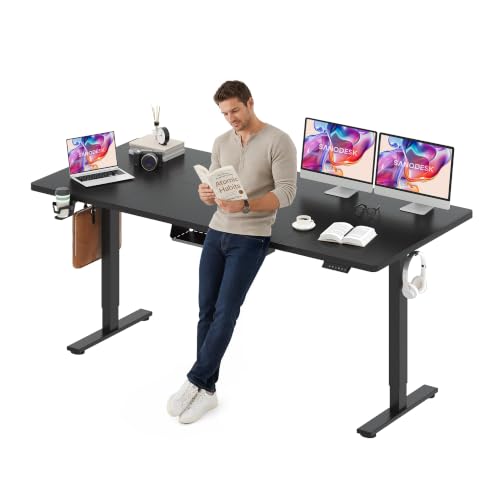
SANODESK Electric Standing Desk 79 x 32 in — The splice-board giant
Seventy-nine inches wide and thirty-two deep: the SANODESK is less a desk than a workbench with a lift. That span exists for the setups the other five picks cannot hold — three monitors across, a monitor plus a drawing tablet plus a reference screen, a streaming rig with a mixer parked at one end. The listing is transparent about how such a top ships: it is a splice board, joined from sections, rather than a single slab. On a desk this wide, that is the pragmatic choice — a one-piece 79-inch panel would be a delivery ordeal — but it does mean the surface’s flatness at the seam is partly your workmanship.
Assemble the top on a flat floor, not on carpet, and check the join with a straightedge before the frame goes on; a seam corrected at that stage disappears under a desk mat, while a seam discovered afterward is a permanent irritation. Memory presets are included, count unstated in the title, and the black frame and black top keep the visual mass coherent. Neither motor arrangement nor capacity appears in the title, which for a desk destined to carry three screens is the one verification you must not skip — confirm the stated capacity in the manufacturer documentation against your full equipment list. The Amazon listing carries the current price and the board configuration details.
- Top: 79 x 32 inches, splice board construction
- Controller: memory presets fitted, with the count left out of the title — SANODESK’s documentation states it
- Finish: black frame with black top
- Capacity: no figure in the title; for a desk this size, confirming the maker’s stated limit is essential
- Motor arrangement: the title does not say — check the manufacturer’s documentation before assuming a layout
Strengths
- The only surface here that genuinely holds a three-screen command centre with elbow room to spare.
- Thirty-two inches of depth keeps large monitors at a comfortable distance even on their own stands.
- Splice construction keeps a very large desk deliverable through ordinary doorways in sections.
Trade-offs
- The board join needs careful assembly; a rushed build leaves a ridge you will feel daily.
- It demands a room that can give up a 79-inch wall — most bedrooms cannot.
- With capacity unstated in the title, the documentation check is mandatory before loading it with three monitors and a tower.
Consider also what 79 inches does to a room’s acoustics and light: it is a major piece of furniture, closer to a workbench installation than to a desk purchase, and it will dominate the wall it stands against. Streamers and bench technicians will call that a feature. For everyone else, the discipline is to list the equipment that genuinely needs the span before ordering — if the list ends at two monitors and a laptop, the VIVO above serves the same setup in nineteen fewer inches of wall.
Best for: a dedicated office or studio with a long free wall and a three-display setup that has outgrown 60-inch desks.
Not suited for: a room where the desk must occasionally be moved — at this size, relocation is a two-person project, not an afternoon whim.
How do the six compare on the numbers their listings actually state?
| Desk | Top size | Memory presets | Stated capacity | Defining feature |
|---|---|---|---|---|
| VIVO one-piece 60 in | 60 x 24 in, one-piece | 4 | 220 lbs | Solid seamless top |
| ErGear deep-top 63 in | 63 x 28 in | Memory fitted, count unpublished | No figure published | Deepest work surface |
| Claiks compact 40 in | 40 x 24 in | 3 | 176 lbs | Cable hub and hook included |
| TIQLAB maple 48 in | 48 x 24 in | 2 | 176 lbs | Maple finish, one-touch control |
| COMHOMA drawer model 48 in | 48 x 24 in | Memory fitted, count unlisted | Figure not published | Built-in drawers and stands |
| SANODESK splice-board 79 in | 79 x 32 in, splice board | Memory fitted, count not given | Not published in the title | Widest top in the group |
Read the gaps in that table as information, not as scoring. A title that publishes its capacity and preset count is making verification easy; a title that does not is asking you to do the work in the documentation. Neither approach changes what the desk is — but the first group lets you confirm the fit before the box arrives, and the second group demands that you do.
How should you set up an electric desk in its first week?
Begin with the floor, not the frame. Choose the desk’s final position before assembly, because a built 60-inch desk is an awkward thing to rotate through a doorway, and check the floor there for level. Assemble the frame loosely, set it in place, then tighten the bolts in a cross pattern once the desk stands where it will live. Route the control box and motor cables with the desk at its highest position — cables dressed neatly at sitting height can pull taut at standing height, and a cable that goes tight mid-lift is the commonest cause of strange noises and strained connectors.
While the desk is still empty, label the presets. A strip of tape under the desktop edge marked with each stored height and whose it is sounds fussy for exactly one day, after which everyone in the house simply knows that the second preset is the tall one. Shared desks fail socially before they fail mechanically, and most of the social failure is two people overwriting each other’s heights in the first fortnight.
Set your two working heights by measurement rather than feel. Seated, your elbows should rest at roughly desk height with shoulders relaxed; standing, the same elbow rule applies with the screen’s top third near eye level. Save those heights to presets on the first day, before habit sets them by guesswork. Then run the desk through its full travel empty, then loaded, listening for the column that complains. After a week of use, go around every bolt again — new frames settle, and the second tightening is the difference between a desk that stays silent for years and one that develops a creak by spring. Keep the controller’s manual somewhere reachable; the reset procedure for a desk that loses its place after a power cut is always in there and never where you left it.
What separates a good controller from a frustrating one?
The controller is the part of an electric desk you touch most, and its quality is measured in small behaviours. A good one responds the moment a button is pressed, moves the desk at an even pace, and stops without a shudder that sends a coffee ripple. A frustrating one lags, creeps, or overshoots the stored height and then hunts for it. Memory presets, where fitted, should recall a height exactly; if you find yourself nudging the desk up or down after every recall, the preset system is decoration rather than function.
Displays divide opinion. A controller that shows the current height as a number helps two users share a desk, because heights become shareable facts — my sitting height is this number, yours is that one — instead of private guesses. A simple up-down paddle without a display is not worse for a solo user who works by feel; it is only worse for the shared case. Child locks and sit-stand reminder timers exist in this category, though none of the six titles here names them, so treat both as documentation checks if your household needs them. A lock matters in a home with small children who find buttons fascinating; it matters not at all in a spare-room office.
Anti-collision deserves a final word here, because it is the feature most often assumed and least often confirmed in listings at this level. Systems vary: some sense motor resistance, some use a gyroscope in the controller, and their sensitivity differs. None of the six titles in this guide claims it, which is why this guide keeps returning to the same advice — arrange the desk’s travel path so nothing needs forgiving, and verify the feature in the manufacturer’s documentation if a shelf or a pet makes the question urgent. A desk bought with clear eyes on this point will not disappoint; a desk bought on an assumption might.
How do you keep an electric desk quiet, level, and lifting for years?
These desks ask for little, but not nothing. The weekly habit is a glance at the cable run: check that nothing has slipped into the path of the columns and that the service loop still hangs free at full height. The monthly habit is the bolt round — frame feet, column mounts, desktop fixings — tightened by hand with the supplied key, because vibration from daily travel works fixings loose in a predictable order and the first symptom is always a sound you cannot place.
Level matters more than owners expect. A desk standing on an uneven floor racks its frame slightly every time it lifts, and over a year that racking becomes the wobble people blame on build quality. Shim a foot rather than forcing a bolt. Keep the desktop load roughly balanced left to right; a tower, a printer, and a stack of reference books all on one end is a permanent lean written into the lift. And treat the stated capacity as a ceiling with air beneath it — a desk that cruises at two-thirds of its maker-stated limit will still be cruising in year six.
When a desk does misbehave — stopping mid-travel, forgetting its position after a power cut, tilting a fraction — the controller reset described in the manual resolves most of it, because the system usually needs to re-learn its lowest point rather than be repaired. Keep the manual, note which preset holds which height, and photograph the underside cable routing on assembly day. Future you, crouched under the desk with a torch, will be grateful for all three.
What mistakes do electric desk buyers keep making?
The first is buying the top and ignoring the mechanism — choosing by finish photograph, then discovering the preset count, the capacity, or the height range does not fit the household. The second is treating the stated capacity as a working load: a desk rated at 176 lbs that carries 170 lbs of equipment every day is a desk living at its limit, and motors age fastest at their limits. Leave margin.
The third mistake is dressing cables at sitting height, covered above, and the fourth is placing the desk so its rising top meets a wall shelf, a low window sill, or a monitor arm swung behind the surface line. Walk the desk’s full travel path with your eyes before the first real lift. A fifth, quieter mistake is skipping the one-week bolt check, then blaming the frame for wobble that a two-minute tightening would have cured. Finally, buyers of very wide splice-board tops sometimes assemble them on carpet and inherit a seam step that no amount of later adjustment fully hides — flat floor first, always.
One more deserves naming because it is a buying mistake rather than a setup one: assuming the biggest desk is the safest purchase. Oversizing has real costs — a 79-inch top in a room that needed 48 inches eats the space a bookshelf, a plant, or a second chair would have used, and its wider span is harder on its lift than a smaller top carrying the same equipment. Size is a fit question, not a status question, and the right answer is the smallest desk your equipment and elbows genuinely fill.
Final Recommendation
For most home offices, the VIVO is the desk this guide would put its own monitors on: the one-piece 60-inch top, four presets, and the strongest stated capacity form the most completely documented package here. Small rooms should go straight to the Claiks, whose cable provision shows a maker who understands its use case, while the TIQLAB serves the solo worker who wants the sit-stand habit reduced to a single button press. Choose the ErGear when depth is your real problem, the COMHOMA when storage is, and the SANODESK when the setup itself has outgrown ordinary furniture. An electric desk earns its keep in the fifth year, not the first week — buy the mechanism you can verify, keep the load honest, and the surface will take care of itself.
Frequently Asked Questions
Is a single motor enough, or do I need dual motors?
For tops up to about 60 inches carrying a normal two-monitor load, a well-geared single motor — the arrangement the VIVO states — lifts reliably for years. Dual motors earn their keep on very wide tops and heavy, uneven loads. Since most listings here do not state the arrangement, weigh the documented capacity and top size more heavily than motor speculation.
Why do the listings state such different capacities?
Capacity is measured by each manufacturer under its own conditions, with its own load distribution and safety margin, so the figures are not perfectly comparable across brands. Treat them as ceilings published by the maker: the VIVO states 220 lbs, the Claiks and TIQLAB state 176 lbs, and the remaining three do not publish the figure in their titles at all.
How many memory presets do I actually need?
One per regular user per posture is the honest arithmetic. A solo worker needs two — sitting and standing. Two people sharing a desk need four, which is why the VIVO’s four presets suit shared workstations and the TIQLAB’s two suit a single owner.
Does a splice board top feel different from a one-piece top?
At the seam, slightly — if it is assembled carefully on a flat surface, the join sits flush enough to disappear under a desk mat. Assembled carelessly, it leaves a step you will notice every time your wrist crosses it. The SANODESK’s 79-inch span makes the splice a reasonable engineering compromise.
How long should an electric desk last?
The frame and motor of a desk in this class should outlast several desktops that sit on it, provided the load stays within the maker-stated capacity and the bolts get their periodic tightening. Controllers and control boxes are the components most likely to need attention first, which is another quiet argument for established makers whose spare parts remain findable years later.
Can I put a desktop PC tower on an electric desk?
Yes, with placement discipline. A tower belongs over or near a leg, or on a CPU holder clamped beneath the top, so its weight travels down the frame rather than levering the desktop’s middle. Add the tower’s weight to your running total before comparing against the maker-stated capacity, and remember the drawers of the COMHOMA compete for exactly the under-desk space a tower would want.
What should I check before ordering any of these?
Three things the titles do not always give you: the height range against your seated and standing elbow heights, the motor arrangement if your load is heavy or uneven, and the anti-collision behaviour. All three live in the manufacturer’s documentation, and five minutes there is cheaper than a return.
Related Guides
Desks are one branch of the furniture question; the neighbouring guides in this series cover the making, the preening, and the sewing corners of the house: Best Craft Desks, Best Makeup Desks With Storage, and Best Sewing Desks.


