What's inside
- Where to Buy
- Key Takeaways
- Quick Picks
- How We Chose These Picks
- Comparison
- How to Choose an Edible Ink Printer
- Does the Printer or the Ink Matter More for Food Safety?
- How Do You Keep Edible Ink Flowing Between Cakes?
- Wafer Paper or Icing Sheets: Which Should You Stock?
- How Should Printed Sheets Be Stored and Handled?
- What Does a Bakery’s Edible Workflow Look Like on a Busy Saturday?
- What Are the Common Mistakes With Edible Printing?
- Final Recommendation
- Frequently Asked Questions
- Related Guides
As an Amazon Associate I earn from qualifying purchases. This post may contain affiliate links at no extra cost to you.
widgetverdict.com is reader-supported. When you buy through links on our site, we may earn an affiliate commission.
Where to Buy
Three bundles and three Canon machines make up this guide, and each name below opens its own Amazon listing. Start with the Ediblethingz Cake Topper Image Printer Bundle if you want printer, wafer paper, icing sheets and a cleaning kit in a single order. The Cake Birthday Printer Bundle leans toward consumables — cartridges, frosting paper, markers and a printhead kit — while the Cake Topper Image Printer Bundle KIT 007 is the sparsest listing of the three and deserves a careful read before ordering. Bakers converting a standard machine should open the Canon MegaTank G3270, the Canon MAXIFY GX2020 MegaTank and the Canon PIXMA TR7120 side by side, then confirm the current bundle details on whichever page matches their kitchen.
The best edible ink printers come with a rule that outranks every feature in this guide, and it needs stating before any model names: a printer that will ever touch food must be brand new and dedicated to edible work from its first page. Edible ink is food colouring delivered through a printhead. A machine that has already run ordinary dye or pigment ink carries residues of non-food ink in its lines, its sponge pads and its printhead, and no amount of flushing turns that history into a food-safe past. So the honest search for an edible printer is really two searches at once — a search for hardware, and a search for a clean, single-purpose life for that hardware. Buy new, fill only with edible ink, print only on food sheets, and keep the machine away from the household’s ordinary printing forever.
That rule shapes the six picks below into two families. The first three are bundles assembled for cake work: printers or printer kits sold alongside wafer paper, icing sheets, edible markers or cleaning supplies, so a baker can start with matched consumables instead of improvising. The last three are ordinary Canon printers — a MegaTank G3270, a MAXIFY GX2020 and a PIXMA TR7120 — included because refillable and cartridge Canons are the machines bakers most commonly dedicate to edible ink. Read their reviews with the dedication rule held firmly in mind: each one earns its place only as a new machine that has never printed anything except edible output, and each review says so in its own words.
Why do people print food at all? Because a photograph on a birthday cake, a company logo on a tray of cupcakes, a child’s drawing reproduced on icing — these are things no piping bag can do. The image is printed onto an icing sheet or wafer sheet with edible inks, then laid onto the cake, where the sheet softens into the frosting and the picture becomes part of the dessert. The printer’s job is ordinary colour printing; the discipline around it is not ordinary at all. Everything that touches the image — ink, sheet, printhead, the hands that move it — is part of a food process, and this guide treats it that way from the first pick to the last.
Key Takeaways
- Food safety governs everything here: an edible-ink printer must start life new, run edible ink only, and never print an ordinary document.
- The Ediblethingz bundle is the most complete starter route in the guide — printer, 50 wafer sheets, 12 icing sheets and a cleaning kit per its title.
- The Cake Birthday bundle’s title centres on consumables: a five-pack of ink cartridges, frosting paper, ten markers and a printhead kit.
- The three Canon picks are standard printers that suit edible work only when bought new and dedicated from the first fill.
- Tank machines (G3270, GX2020) suit bakers who print sheets regularly; the cartridge-fed TR7120 suits occasional celebration printing.
- No listing title in this guide states an edible certification, so hygiene discipline — not a badge on a box — is what keeps the output food-safe.
Quick Picks
| Pick | Badge | Why it earns a place |
|---|---|---|
| Ediblethingz Cake Topper Image Printer Bundle | Complete Starter Bundle | Printer with 50 premium wafer sheets, 12 icing sheets, a cleaning kit and wireless all-in-one functions. |
| Cake Birthday Printer Bundle | Consumables-Heavy Bundle | Five-pack of ink cartridges, frosting paper, ten markers and a printhead kit in one order. |
| Cake Topper Image Printer Bundle KIT 007 | Minimal-Listing Bundle | A cake topper image printer bundle whose short title leaves most details to the listing page itself. |
| Canon MegaTank G3270 | Tank Machine to Dedicate | A refillable-tank wireless all-in-one that bakers dedicate to edible ink from new. |
| Canon MAXIFY GX2020 MegaTank | Duplex Tank Machine | A MegaTank all-in-one with duplex printing for busier edible sheet production. |
| Canon PIXMA TR7120 | Cartridge Machine to Dedicate | A white cartridge inkjet with duplex and a document feeder, for occasional edible printing from new. |
How We Chose These Picks
Selection began with the food-safety rule, because it eliminates most of the second-hand and general-purpose market at a stroke. What remained fell into the two families described above, and within each family the deciding evidence was what a listing title actually states. Bundle contents counted heavily: a kit that names its wafer sheets, icing sheets, cartridges or cleaning supplies lets a baker plan the first month of work, while a bundle that names almost nothing asks the buyer to do the verification on the listing page — and this guide marks that difference rather than smoothing it over.
For the standard Canon machines, the traits that matter to edible work are the ones their titles do state: a refillable tank system on the two MegaTank models, which suits edible ink bought in bottles and filled by hand; wireless connection, because cake designs live on phones and tablets; and all-in-one scanning on all three, which matters more than outsiders expect — the drawing, photograph or logo being printed often starts as a physical object that must be scanned before it can become a cake topper. Duplex printing, named for the GX2020 and the TR7120, is irrelevant to icing sheets themselves but tells you these are full household machines, which is precisely why the dedication rule needs repeating: a full household machine dedicated to food is a machine the household may no longer use for homework and boarding passes.
One more filter deserves naming. Nothing in this guide is a used or refurbished route, and no pick is presented as certified food equipment, because no title here claims such certification. Edible printing at home and small-bakery scale is a practice built on new hardware, food-grade consumables from reputable sellers, and scrupulous cleaning. The picks are the hardware half of that practice; the reviews keep pointing at the other half, because that is where safety actually lives.

Ediblethingz Cake Topper Image Printer Bundle — Complete Starter Bundle
A bundle built for somebody’s first printed cake, and structured like it. The title promises a printer supplied with 50 premium wafer paper sheets, 12 supreme icing sheets, a cleaning kit, and wireless all-in-one operation. That combination answers the beginner’s real problem, which is rarely the printer itself — it is the mismatch between printer, ink and sheet that ruins first attempts. Starting with the seller’s own matched paper stock removes the two most common early failures: sheets the feed path dislikes, and sheets whose coating the ink was never going to sit on properly.
The two sheet types deserve separating, because they behave differently on a cake. Wafer paper is thin, potato-starch based, slightly translucent and best for lighter designs, cupcake toppers and shapes that get cut out and stood upright. Icing sheets — the frosting sheets — are thicker, whiter and carry photographic images with the richness a birthday portrait needs; they peel from a backing sheet and lay onto buttercream or fondant. Fifty wafer sheets against twelve icing sheets is a sensible training ratio: practise cuts, tests and cupcake work on the plentiful stock, save the frosting sheets for the cakes that matter, and learn the difference with your hands rather than from a disappointed customer.
The cleaning kit is the quiet headline. Edible ink is sugar-bearing food colouring, and a printhead that sits idle between weekend cakes will clog in ways ordinary ink rarely does. A bundle that ships cleaning supplies from day one is teaching the right religion: flush and maintain on a schedule, print a small test sheet regularly even in quiet weeks, and treat the printhead as food equipment that gets washed, not office equipment that gets ignored. Wireless all-in-one functions round out the listing — scan the child’s drawing, send it from the tablet, print the topper — a workflow the bundle’s parts were plainly chosen to support.
- Bundle contents: Printer, 50 premium wafer paper sheets, 12 supreme icing sheets, cleaning kit
- Functions: Wireless all-in-One, per the listing title
- Sheet types included: Wafer paper and icing (frosting) sheets
- Edible ink cartridges included: Not stated in the listing title — verify with the manufacturer documentation
- Maximum sheet size: Not stated in the listing title — verify with the manufacturer documentation
Strengths
- Matched printer-and-paper start removes the beginner’s worst compatibility guesses.
- Both sheet families included, so wafer and frosting work can be learned side by side.
- A cleaning kit in the box builds the maintenance habit edible ink demands.
Trade-offs
- The title does not name the printer model, so research the base machine on the listing page.
- Twelve icing sheets disappear quickly once portrait cakes become regular work.
- Whether edible cartridges are included is unstated — confirm before the first bake day.
Best for: a baker printing a first photo cake who wants printer, papers and cleaning supplies chosen to work together. Not suited for: high-volume sheet production — 12 icing sheets and an unnamed base printer mark this as a starter kit, not a production line.
New bakers can open the Ediblethingz listing to check the current price on Amazon and confirm exactly which consumables the present bundle carries.
One working habit multiplies this bundle’s value: keep a print log beside the machine. Note the sheet type, the design, the setting chosen and how the colours landed on the finished cake. Edible inks render differently once a sheet meets buttercream moisture, reds and skin tones especially, and a month of small notes teaches calibration faster than any tutorial. The bundle gives you enough wafer stock to make those experiments cheap — spend some of it on purpose, printing colour-test sheets you would never serve, so the cakes you do serve come out right the first time.
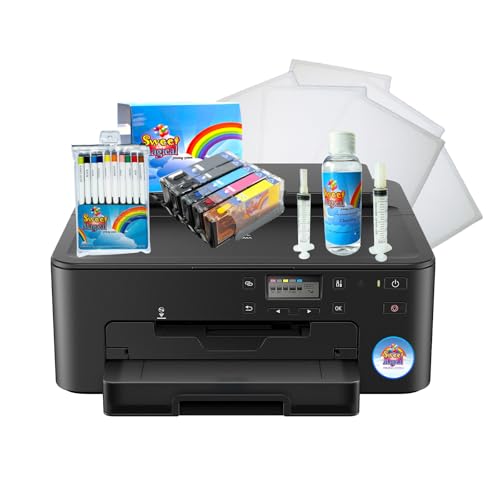
Cake Birthday Printer Bundle — Consumables-Heavy Bundle
Read this title closely, because it describes a different animal from the bundle above. What it names is a five-pack of ink cartridges, frosting paper, ten markers and a printhead kit — a bundle weighted toward the consumables and service parts of edible printing rather than toward a headline printer. That weighting suits a particular buyer very well: the baker who already owns, or is separately choosing, a compatible machine and wants the food-side supplies gathered in one order. It suits nobody who assumes a complete printer must be inside because the word printer is on the box, so check the listing’s full contents list with care.
The markers are the component outsiders overlook. Edible markers let a baker draw, outline, write names and repair small imperfections directly on icing or fondant by hand — the freehand half of cake decoration that printing cannot do. Ten of them suggests a colour range broad enough for real lettering work. Paired with printed frosting sheets, they support the hybrid style most celebration cakes actually use: a printed photograph or background image, finished with hand-drawn borders, names and dates. The printhead kit speaks to maintenance and longevity — printheads are the wear part of edible printing, the component sugar-rich ink stresses hardest, and a bundle that includes printhead provisions is planning for the machine’s second year, not just its first party.
Frosting paper as the named sheet tells its own story about intended output: full-image cake tops rather than cut-out wafer shapes. Frosting sheets carry photographs best, and a birthday-focused bundle built around them is aimed at the portrait-cake trade — children’s birthdays, milestone parties, photo cakes for family events. If that is your order book, the emphasis is right. If your work leans toward standing wafer decorations and cupcake toppers, the wafer-heavy bundle above matches your stock drawer better.
- Bundle contents per title: 5-pack of ink cartridges, frosting paper, 10 markers, printhead kit
- Sheet type named: Frosting paper
- Hand-finishing tools: 10 edible markers
- Printer model included: Not stated in the listing title — verify with the manufacturer documentation
- Cartridge compatibility list: Not stated in the listing title — verify with the manufacturer documentation
Strengths
- Cartridges, sheets, markers and printhead provisions gathered in a single order.
- Ten markers support the hand-lettering that finishes most printed cakes.
- Frosting paper focus matches photo-cake and birthday work directly.
Trade-offs
- The title never names a printer, so compatibility homework falls on the buyer.
- No wafer paper is named — cut-out topper work needs a separate stock order.
- Sheet count for the frosting paper is not given in the title.
Best for: a baker with a compatible machine already chosen who wants cartridges, frosting sheets, markers and printhead supplies in one delivery. Not suited for: a first-time buyer expecting a complete printer in the box — the title lists consumables and a printhead kit, not a named machine.
Owners restocking for birthday season can visit the Cake Birthday bundle’s Amazon page to see today’s price and the full contents list before ordering.
Treat the markers as the bundle’s daily drivers and the printed sheets as its event pieces. Names piped in gel go wrong at the worst moments; a steady hand with an edible marker on a smooth icing sheet produces lettering that looks deliberate instead of rescued. Practise on offcuts of frosting sheet — every printed sheet yields trimmings — and the markers will have paid for themselves by the second birthday of the season. Store them capped and cool, as you would any food colouring, and log which colours your regular designs consume so the next cartridge-and-supplies order matches your real usage rather than a guess.

Cake Topper Image Printer Bundle KIT 007 — Minimal-Listing Bundle
Six words of product name and a kit number are nearly all this listing’s title offers: a cake topper image printer bundle, designated KIT 007. This guide will not decorate that silence with invented contents. What can be said honestly is what the name itself establishes — the product is presented as a bundle, for cake topper image printing, sold under a numbered kit designation, which usually signals one configuration among several from the same seller. Everything a buyer actually needs — printer model, ink provision, sheet types and counts, cleaning supplies — must be verified on the listing page and in the seller’s answers before money moves.
That makes this pick a test of buying discipline rather than of hardware, and it earns its place for a reason: experienced edible printers often shop exactly this way. A baker who already knows which base printer a seller builds kits around, which sheet brands their customers prefer and which ink system their kitchen runs can read a sparse listing fluently, checking the configuration table against an established workflow. For that reader, a numbered kit can be the fastest reorder route in the guide — the same combination, ordered by its number, with no re-selection of parts.
For everyone else, the guidance is blunt. Do not let a low headline figure or a familiar bundle format substitute for a contents list. Confirm the printer is new — the food-safety rule that opens this guide admits no exceptions for kit purchases — confirm the ink supplied is edible ink, confirm which sheets and how many, and confirm what happens if the printhead clogs in month two. A seller who answers those four questions clearly is a seller whose sparse title is merely brevity. A seller who cannot answer them has told you something important too.
- Product form: Cake topper image printer bundle, kit designation 007
- Printer model: Not stated in the listing title — verify with the manufacturer documentation
- Included sheets and counts: Not stated in the listing title — verify with the manufacturer documentation
- Ink provision: Not stated in the listing title — verify with the manufacturer documentation
- Cleaning supplies: Not stated in the listing title — verify with the manufacturer documentation
Strengths
- A numbered kit configuration can make reordering a proven combination simple.
- Purpose-labelled for cake topper image work rather than general printing.
- Bundle format suggests matched components from a single seller.
Trade-offs
- The shortest title in this guide — nearly every material fact needs verifying.
- No sheet type or count can be promised from the information given.
- New-buyer suitability depends entirely on the seller’s listing detail.
Best for: an experienced edible printer reordering a known kit configuration from a familiar seller. Not suited for: a first purchase made on the title alone — with no printer model, sheet count or ink detail stated, the listing page must do all the informing.
Experienced bakers who recognise this kit can pull up its Amazon listing to confirm the current configuration and check the price before reordering.
There is a broader lesson in this pick that applies across edible printing: the category’s listings vary wildly in how much they tell you, and the discipline of verifying contents, newness and ink type before ordering is the same discipline that keeps a kitchen’s output safe. Keep a written checklist from your first kit purchase — printer identity, ink type, sheet stock, cleaning provision, seller contact — and run every future order through it, however familiar the seller. Kitchens that professionalise their cake printing almost always point to paperwork like that, not to a particular machine, as the moment the work became reliable.

Canon MegaTank G3270 — Tank Machine to Dedicate
Now the dedication picks, and the rule gets its fullest statement here. The Canon MegaTank G3270 is a standard wireless colour all-in-one — print, copy and scan, a refillable tank system, a compact desktop body, sold for home and office use. Nothing about it is edible out of the box, and this guide does not pretend otherwise. It becomes an edible printer under exactly one arrangement: bought brand new, filled from its very first tank with edible ink instead of the supplied standard ink, and used for food sheets only, for its entire working life. A G3270 that has printed one school worksheet with ordinary ink is a household printer forever, and no cleaning ritual requalifies it for food.
Why do bakers choose this machine for that arrangement? The refillable tank is the heart of it. Edible ink is commonly bought in bottles, and a tank printer accepts hand-filled ink gracefully — no cartridge surgery, no sponges, no compatible-cartridge roulette. Tanks also make the economics of regular sheet printing sane: a bakery printing toppers weekly consumes ink steadily, and tank refills answer that consumption without a cartridge subscription’s worth of plastic. Wireless connection and scanning complete the cake workflow described earlier — artwork arrives from the tablet, drawings get scanned at the same desk, and sheets come out of a compact body that fits a bakery corner better than an office machine would.
The discipline list for a dedicated G3270 is short and absolute. Label the machine, physically, as food-only — a sticker on the lid has saved more than one kitchen from a helpful relative printing a boarding pass. Keep its ink bottles in the food area, not the office drawer. Run the cleaning routine on the maker’s schedule, print a small test image in quiet weeks so edible ink never sits still long enough to crust, and store printed sheets flat, sealed and dry until they meet the cake. Do those things and the G3270 is a sound, economical edible engine. Skip them and no printer choice would have rescued the practice.
- Functions: Print, copy, scan — wireless all-in-one
- Ink system: Refillable tank system (MegaTank)
- Form: Compact desktop design, home and office positioning
- Duplex printing: Not stated in the listing title — verify with the manufacturer documentation
- Edible ink included: None — edible ink must be sourced separately and filled from new
Strengths
- Refillable tanks accept bottled edible ink without cartridge workarounds.
- Scan and copy handle artwork and drawings at the same desk.
- Compact body fits a bakery worktop rather than demanding an office.
Trade-offs
- Ships as a standard printer — edible conversion is entirely the buyer’s discipline.
- Dedication removes a full all-in-one from household document duty permanently.
- Duplex is not claimed in the title, so plan on single-sided document work.
Best for: a home baker printing edible sheets weekly who wants bottled-ink economics from a compact tank machine. Not suited for: any desk that also needs ordinary document printing — dedication to food is permanent and one-way, so a shared household printer must be a different machine.
Bakers ready to dedicate a tank machine can look over the G3270’s Amazon page for the present price and the current included-ink arrangement.
A note on the supplied standard ink, because it confuses buyers every season: a new MegaTank typically arrives with ordinary ink bottles for its first fill. The edible arrangement means those bottles never enter the machine — set them aside for a different printer or pass them to someone with a non-food unit, and fill the tanks with edible ink from the start. The printhead’s first taste of liquid decides the machine’s category for life. Kitchens that grasp that single moment clearly tend to run clean edible operations for years; kitchens that treat it casually end up replacing machines, which is the expensive way to learn the same lesson.

Canon MAXIFY GX2020 MegaTank — Duplex Tank Machine
The GX2020 is the G3270’s more businesslike sibling in this guide: a Canon MegaTank MAXIFY all-in-one with print, copy and scan, duplex printing stated in the title, a refillable tank system and wireless connection, positioned for home and office work. The dedication terms are identical and non-negotiable — brand new, edible ink from the first fill, food sheets only, forever — and they are worth repeating in this review rather than assuming, because the MAXIFY line’s office manners make it the pick most likely to be borrowed for ordinary documents by a colleague who did not get the message. Label it. Say it in the staff meeting. The machine’s respectability is the risk.
Within edible work itself, the GX2020’s appeal is throughput temperament. MAXIFY machines are built for small offices that print all day, and a bakery whose edible output has grown from weekend cakes to a standing order book — cupcake toppers for a café, logo sheets for a corporate client, a wedding season of portrait cakes — feels that build quality as reliability: trays and feed paths that treat thick icing sheets as routine stock, and a machine that does not regard a forty-sheet morning as an event. Duplex, useless for the sheets themselves, still signals the general engineering tier you are buying.
The tank system carries the same edible-ink advantages described for the G3270 — bottled refills, steady economics, no cartridge handling — with the same obligations attached. Edible ink left standing will clog any printhead; a busier machine paradoxically suffers less, because ink that moves does not crust. If your order book genuinely keeps a printer working most days, the GX2020’s office bones and tank supply suit the rhythm. If your cakes are monthly, the smaller Canon above asks less of your bench and your budget, and honesty about volume is the cheapest specification in this entire guide.
- Functions: Print, copy, scan — wireless all-in-one
- Ink system: Refillable tank system (MegaTank)
- Duplex: Duplex printing stated in the title
- Form: Compact desktop design, home and office positioning
- Edible ink included: None — edible ink must be sourced separately and filled from new
Strengths
- Office-grade build suits bakeries whose sheet output has become daily work.
- Tank refills keep bottled edible ink handling simple at volume.
- Duplex and full all-in-one functions signal a higher engineering tier.
Trade-offs
- Its office respectability invites borrowing — the dedication rule needs defending.
- More machine than a monthly cake habit can justify or keep exercised.
- Standard printer as shipped; food safety is created by the buyer’s regime.
Best for: a small bakery printing edible sheets most days, wanting tank economics in an office-built body. Not suited for: a shared office desk — the MAXIFY’s duplex document talents must stay unused, because one ordinary print job ends its food career.
Bakery owners stepping up volume can examine the GX2020 listing on Amazon to weigh the current price against their weekly sheet count.
Schedule maintenance the way a café schedules machine cleaning and this printer rewards you. Edible inks vary in sugar load between brands, and a head that prints daily still benefits from the maker’s cleaning cycle run on time rather than in crisis. Keep one spare set of edible ink bottles sealed in stock — a dried-up supply discovered on the morning of a wedding-cake deadline is a supply failure, not a printer failure, yet it feels identical at nine in the morning. The GX2020 gives a growing bakery mechanical headroom; the surrounding habits decide whether that headroom turns into a reputation.

Canon PIXMA TR7120 — Cartridge Machine to Dedicate
The third Canon takes the cartridge road. The PIXMA TR7120 is a wireless colour inkjet with duplex printing, a copier and scanner, an auto document feeder, a compact design and an intuitive control panel, finished in white — a kitchen-friendly colour that shows flour dust and cocoa honestly, which bakers may count as a feature. Dedication terms, stated for the third and final time because each review must stand alone: edible work only if this machine is bought new, fitted with edible-ink cartridges from its first page, and never allowed to print anything else. A TR7120 that has run standard cartridges has ordinary ink in its printhead path, and it is out of the food business permanently.
Cartridges change the edible routine in both directions. The advantage is containment: edible ink arrives sealed in cartridges made for the purpose, swapping is clean and quick, and a baker who prints a cake a month avoids the standing-ink problems that haunt tank machines between jobs — a fresh cartridge fitted for a celebration weekend, then removed and stored as its maker directs. The cost is the mirror image: cartridge ink is the expensive way to print, sheet after sheet, and a bakery whose topper output climbs will feel per-sheet costs that the tank picks above simply do not impose. Occasional printers gain; regular producers pay.
The document feeder is the surprise talent. Scanning a stack of order forms, children’s party drawings or a client’s printed logos runs through the feeder while the baker pipes borders, and the scan function generally is how physical artwork enters the edible workflow. Judge the TR7120 as the occasional-printing Canon: a household or hobby baker whose edible output is birthdays and holidays, whose machine must look at home in a kitchen, and whose low volume makes cartridge economics painless. That reader is real, numerous, and worse served by an oversized tank machine quietly clogging in the corner.
- Functions: Print, copy, scan with auto document feeder
- Ink system: Cartridge inkjet (no tank system named in the title)
- Duplex: Duplex printing stated in the title
- Colour and form: White, compact design, intuitive control panel
- Edible cartridges included: Not stated in the listing title — verify with the manufacturer documentation
Strengths
- Sealed edible cartridges suit occasional printing without standing-ink worries.
- The document feeder speeds scanning of artwork, orders and logos.
- White compact body sits naturally in a kitchen rather than an office.
Trade-offs
- Cartridge ink costs mount quickly if sheet output becomes weekly.
- Edible cartridges are a separate purchase the title does not bundle.
- Dedication still applies in full — its household talents must go unused.
Best for: a hobby baker printing celebration cakes a few times a month who prefers sealed cartridges and easy storage between jobs. Not suited for: steady commercial sheet volume — per-sheet cartridge costs and a compact home build both argue for the tank machines above.
Occasional bakers can check the TR7120’s Amazon page for today’s price and confirm which starter cartridges the current package includes.
Storage is where cartridge edible printing is won or lost. Between celebrations, cartridges out of the machine should be stored exactly as their maker instructs — sealed, upright, cool — and the printer itself given a plain-paper-free existence: resist the temptation to run a quick document “just to keep it exercised,” because that single ordinary page is precisely what dedication forbids. Exercise it with an edible test sheet instead, on the cheapest wafer stock you keep for the purpose. A cartridge machine kept this way can serve a family’s birthdays for years, waking up for each party as reliably as the oven does.
Comparison
| Pick | Form | Ink route | Edible character |
|---|---|---|---|
| Ediblethingz Cake Topper Bundle | Printer bundle | Not stated in the listing title | Wafer and icing sheets plus cleaning kit included |
| Cake Birthday Printer Bundle | Consumables bundle | Five-pack of cartridges | Frosting paper, 10 markers, printhead kit |
| Cake Topper Bundle KIT 007 | Numbered kit bundle | Not stated in the listing title | Contents to verify on the listing page |
| Canon MegaTank G3270 | Wireless all-in-one | Refillable tank | Dedicate from new with bottled edible ink |
| Canon MAXIFY GX2020 | Wireless all-in-one, duplex | Refillable tank | Dedicate from new for daily bakery output |
| Canon PIXMA TR7120 | Wireless inkjet, feeder, duplex | Cartridges | Dedicate from new for occasional cakes |
The table’s sharpest divide is not brand or body shape; it is where the edible system comes from. The bundles assemble food-side parts for you, at the cost of varying transparency about the base hardware. The Canons hand you known hardware and leave the entire food discipline — ink sourcing, dedication, labelling, cleaning — in your hands. Neither route is automatically safer. A bundle assembled carelessly and a Canon dedicated carelessly fail the same way, while either route run with discipline produces cakes that are safe to serve and lovely to look at.
How to Choose an Edible Ink Printer
Begin with volume, because volume chooses the ink system. A handful of celebration cakes a year points to cartridges or a starter bundle: sealed ink, low standing stock, little maintenance between events. Weekly sheet production points to tanks and bottled ink, where per-sheet costs fall and the machine stays exercised enough to resist clogging. Daily commercial output points to the sturdiest body your bench can hold and a cleaning rota written down where staff can see it. Buyers who skip this arithmetic usually buy twice — once for the bakery they imagined, once for the one they actually run.
Budget honestly across the whole system while you are at it. The printer is the visible purchase; the recurring costs are edible ink, sheets in two families, markers, cleaning supplies and the occasional printhead. A bundle that looks expensive beside a bare printer may simply have prepaid the first season of those consumables, while a cheap bare machine can cost more by its third cake once sheets and cartridges are counted. Price the first ten cakes, not the first box, and the comparison between the bundle route and the dedicate-a-Canon route becomes a fair one.
Next, decide what you print onto. Photographic cake tops need frosting sheets and the colour fidelity to do faces justice; cut-out decorations and cupcake work live on wafer paper; hand-finished cakes need markers within reach. Let the sheet decide the bundle, or the bundle’s sheet stock will decide your menu for you. Finally, plan the machine’s whole life before it arrives: where it sits (food area, not office), who may touch it (trained hands), how it is labelled, and what happens in its quiet weeks. An edible printer is a small food-production system wearing a printer’s clothes, and choosing it well means choosing the system, not the silhouette.
Does the Printer or the Ink Matter More for Food Safety?
Buyers ask this as if one answer must win, but the two failures look different. Wrong ink — ordinary ink in a food machine — is a contamination failure: invisible, undetectable on the finished cake, and the reason the dedication rule exists. Wrong printer condition — a clogged, neglected printhead running proper edible ink — is a quality failure: streaks, banding, colours that wander. The first failure is about what the ink is; the second is about how the machine has been kept. Safety comes from ink discipline, results come from machine discipline, and a serious bakery refuses to trade either away.
Supplier choice sits underneath both. Edible ink, sheets and markers should come from sellers who specialise in food decoration, label ingredients properly and can answer questions about storage and shelf life. A listing that cannot say what is in its cartridges has no place in a kitchen, however attractive its bundle arithmetic looks. Keep purchase records with your food paperwork; if a client ever asks what went into their cake — and clients celebrating children ask exactly that — the bakery that can answer in one minute is the bakery that gets recommended.
How Do You Keep Edible Ink Flowing Between Cakes?
Edible ink’s enemy is stillness. Sugar-bearing colour sitting in a printhead between monthly cakes thickens, crusts and eventually blocks nozzles that ordinary ink would have survived. The countermeasures are humble: print a small test image on cheap wafer stock every week or so, run the maker’s cleaning cycle on schedule rather than in anger, and store the machine in the kitchen’s normal climate — not beside the oven’s heat, not in a cold store room. Bundles that include a cleaning kit are quietly instructing you in this rhythm from day one.
When a clog does arrive, patience beats force. Repeated aggressive cleaning cycles waste ink and can stress a printhead; the maker’s staged routine, a rest, then one more attempt resolves most blockages that are going to resolve. Bakers who print commercially keep the nuclear option in perspective: a replaceable printhead or a service visit is a business cost, budgeted like oven repairs. What never helps is switching the machine to ordinary ink “to flush it through” — that single act ends the printer’s food career, which is why this guide has repeated the dedication rule in every Canon review rather than trusting readers to carry it across the page.
Wafer Paper or Icing Sheets: Which Should You Stock?
Stock both if your menu allows, because they serve different cakes. Wafer paper is inexpensive, cuts cleanly, stands upright in buttercream and forgives beginners; its limits are translucency and a surface that drinks moisture, so dark or wet icings can ghost through it. Icing sheets are the photographic medium — opaque white, smooth, printed richly and laid flat onto the cake top — at a higher cost per sheet and with a backing film to peel. Most bakeries evolve a house rule within a season: wafer for decorations and cupcakes, frosting sheets for portraits and logos, markers for the lettering that ties them together.
Storage decides how much of either to keep. Both stocks dislike humidity; sheets stored in a steamy kitchen curl, stick and feed badly, and their printed quality falls before their appearance admits anything is wrong. Sealed bags, a dry cupboard, first-in-first-out rotation — the same stock discipline a kitchen applies to flour applies here with equal force. Order against your real order book, keep a small buffer for the surprise weekend cake, and let the Ediblethingz bundle’s ratio — plentiful wafer, precious frosting sheets — stand as a reasonable first approximation of a working stock drawer.
How Should Printed Sheets Be Stored and Handled?
A printed icing sheet is food in a fragile mood. Keep it sealed in its bag, flat, away from sunlight and steam, until the cake is ready to receive it — colours fade under kitchen lighting left careless, and a sheet that absorbs steam from a nearby kettle will soften, stick and tear at the exact moment of placement. Hands matter too: dry hands, clean hands, and as little contact with the printed face as the manoeuvre allows. The sheet is laid once, smoothed from the centre outward, and then left alone; every adjustment after placement risks a wrinkle that no piping border fully hides.
Timing is a handling decision bakers learn by season. Apply a frosting sheet too early to a moist buttercream and the image can bleed as the sheet drinks; apply it to a crusted, set surface and it sits crisp for hours. Wafer decorations go on last of all, ideally close to serving, because standing wafer softens in humid rooms and wilts with theatrical timing — usually as the cake is being carried to the table. Build the decoration schedule backwards from the serving time, and write it on the order ticket, so the printer’s work and the cake’s assembly meet at the right hour rather than colliding.
What Does a Bakery’s Edible Workflow Look Like on a Busy Saturday?
It starts on Friday, in every well-run version. Orders are checked against sheet stock, artwork files are opened and sized, colours are proofed on a wafer offcut, and the printer gets its cleaning cycle while the ovens warm — not during Saturday’s rush, when a clogged nozzle becomes a queue of waiting cakes. Sheets for the morning’s cakes print first and rest sealed and flat; the machine then idles in readiness rather than being switched off and forgotten, because a second urgent order always exists in a bakery’s Saturday, usually arriving by phone at noon.
Assembly owns the middle of the day, and the printer recedes to a supporting role — a name reprinted here, a corrected date there, the small rescues that make a bakery look unflappable. The discipline that carries the day is separation: food sheets move only between the printer, their sealed bags and the cakes; ordinary paperwork lives at the other end of the bench, far from the dedicated machine, so no helpful hand feeds the wrong stock or prints the wrong job on the wrong device. By evening the log is updated — sheets used, colours consumed, one nozzle check noted — and next Saturday inherits a stocked drawer instead of a surprise.
What Are the Common Mistakes With Edible Printing?
Converting a printer that has already lived an ordinary life leads the list, and it is a safety mistake rather than a quality one: previous ink in the system means the output is not food printing, whatever ink goes in next. Close behind comes the shared-machine compromise — one printer for invoices on weekdays and cakes on Saturdays — which is the same mistake wearing a rota. Both errors share a root: treating dedication as a preference instead of the definition of the process.
Neglect between cakes ruins more machines than overuse ever has. A printhead abandoned for six weeks of silence, then expected to produce a wedding portrait, will produce a cleaning bill instead. Sheet mistakes follow: printing a flagship image on wafer paper that ghosts against dark icing, or discovering at assembly time that nobody stocked frosting sheets in the right size. And underneath them all sits the paperwork mistake — no record of inks, sheets or suppliers — which turns a client’s simple ingredient question into an afternoon of archaeology. Every one of these is cheap to prevent and expensive to meet for the first time on a deadline.
Final Recommendation
Choose by the bakery you actually run. First-time cake printers should start where the parts are matched for them: the Ediblethingz bundle, with its two sheet families and cleaning kit, or the Cake Birthday bundle if a compatible machine is already chosen and consumables are the gap. KIT 007 belongs to experienced buyers reordering a configuration they know. Bakers building a dedicated station should take the G3270 for weekly work, the GX2020 when output becomes a daily order book, and the TR7120 when celebrations are occasional and sealed cartridges fit the rhythm. Whichever name you land on, write the dedication rule on the machine itself the day it arrives — and may your first printed portrait survive the journey from screen to buttercream without a single streak.
Frequently Asked Questions
Can I convert my current printer to edible ink?
No — not if it has ever printed with ordinary ink. Residues remain in the ink path and printhead, and cleaning cannot certify them away. Edible printing starts with a new machine that runs edible ink from its first page and nothing else for its whole life.
What is the difference between wafer paper and icing sheets?
Wafer paper is a thin starch sheet suited to cut-out decorations, cupcake toppers and standing shapes. Icing sheets are thicker frosting layers on a backing film, made for full photographic cake tops. The Ediblethingz bundle includes both — 50 wafer sheets and 12 icing sheets — so a beginner can learn each medium on suitable work.
How often should an edible printer be used?
Regularly enough that ink never sits still for long. A small test print every week or two, plus the maker’s cleaning cycle on schedule, prevents most clogging. Occasional bakers often prefer cartridge machines like the TR7120 partly because sealed cartridges tolerate a quieter calendar better than standing tank ink.
Are the Canon printers in this guide sold as edible printers?
They are standard Canon all-in-ones, and their titles say so. They serve edible work only under the dedication arrangement: bought new, filled with edible ink from the first use, labelled food-only and never used for documents. The bundles are the picks assembled specifically for cake work.
Can edible markers really be eaten?
Edible markers use food colouring and are made to draw directly on icing, fondant and wafer paper, as the ten markers in the Cake Birthday bundle are intended to do. Buy them from food-decoration sellers, keep them capped and stored like other food colourings, and check each product’s own labelling for ingredients.
Do I need a separate computer for edible printing?
No. The dedication rule binds the printer, not the computer sending the file. Designs can come from any phone, tablet or laptop on the kitchen network — all six picks are wireless or bundle machines used that way. What must stay separate is the hardware path the ink travels: one printer, one ink type, one job. Keep design files in a clearly named food-printing folder so artwork sizes and colour settings stay consistent from cake to cake.
What should I verify before ordering a bundle with a short listing?
Printer model and newness, whether edible ink is included, sheet types and counts, and cleaning provision. KIT 007’s title states none of these, which is why this guide directs its buyers to the listing page and the seller’s answers before ordering — the four checks take minutes and decide whether the kit fits your kitchen.
Related Guides
Neighbouring speciality print topics continue in the best tattoo transfer printers for studio stencil work, in the best dot matrix printers for multipart forms that refuse to retire, and in the best heat transfer craft printers for paper-based transfers onto fabric and gifts.


