What's inside
- Where to Buy
- Introduction
- Key Takeaways
- Quick Picks
- How We Chose These Picks
- Comparison Table
- How to Choose a Pocket Photo Printer
- Dye-Sublimation or ZINK: Which Print Technology Suits Your Photographs?
- What Does a Year of Pocket Printing Actually Cost?
- Why Do Printed Photographs Outlast Their Welcome on a Phone?
- Which of These Printers Makes the Best Gift?
- Common Mistakes When Buying a Pocket Photo Printer
- Final Recommendation
- Frequently Asked Questions
- Related Guides
As an Amazon Associate I earn from qualifying purchases. This post may contain affiliate links at no extra cost to you.
[SITE_DOMAIN] is reader-supported. When you buy through links on our site, we may earn an affiliate commission.
Where to Buy
Pocket photo printers are bought in bundles as often as bare, and the listings below mix the two, so read what is actually in each box. Liene’s M100 arrives with 100 sheets and three cartridges in its title — a printing season in one purchase. HP’s Sprocket Studio Plus goes further, stating 118 sheets and three cartridges. Kodak’s Step and Nelko’s PP01 sell the printer itself in the small sticky-back format, and HP’s Sprocket Portable 2nd Edition does the same in Luna Pearl. Canon’s SELPHY CP1500 bundle pairs the printer with a 108-sheet ink and paper set. The sheet counts in those titles are the most useful numbers on this page, because pocket printing is a consumables habit — compare them before comparing anything else.
Introduction
The best pocket photo printers solve a problem the phone created: thousands of photographs that exist everywhere and are printed nowhere. These six machines turn a camera roll back into objects — prints for the fridge door, stickers for a journal, a 4×6 for a grandmother’s frame — and they divide into two honest families. The larger family prints true 4×6 photographs by thermal dye-sublimation: Liene’s M100, HP’s Sprocket Studio Plus and Canon’s SELPHY CP1500. The smaller family prints 2×3 sticky-back mini prints, by ZINK in the Kodak Step and HP Sprocket, and in Nelko’s PP01’s instant sticker format. Neither family is better in the abstract; they answer different intentions, and the first job of this guide is to keep a buyer from purchasing one while dreaming of the other.
Dye-sublimation deserves its sentence early, because it explains the 4×6 family’s quality. The process lays colour down in continuous tones through heat, layer by layer, producing prints that behave like lab photographs — smooth gradients, no visible dot pattern — and in these bundles the paper and colour cartridges arrive as matched sets with a stated sheet count, which makes the cost of a printing season unusually predictable. The 2×3 family’s charm runs the other way: the print is a sticker the moment it emerges, sized for journals, laptops, lockers and the backs of phones, and its pleasure is immediacy and placement rather than fidelity to a framed photograph.
Evidence in this category is refreshingly concrete. Sheet counts, cartridge counts, print sizes and technologies are printed in the titles themselves, and the reviews hold each machine to its own statement. Where a title stays silent — battery arrangements, print speed, app details — the spec boxes record the silence rather than borrowing a sibling’s specification, because pocket printers are bought as gifts and household fixtures, and a gift specified wrongly is a drawer ornament by February.
Key Takeaways
- The guide splits into 4×6 dye-sublimation printers — Liene M100, HP Sprocket Studio Plus, Canon SELPHY CP1500 — and 2×3 sticky-back mini printers — Kodak Step, Nelko PP01, HP Sprocket.
- Bundle contents are stated in three titles: 100 sheets and 3 cartridges with the Liene, 118 sheets and 3 cartridges with the Sprocket Studio Plus, 108 sheets in the SELPHY bundle.
- All three 4×6 machines use dye-sublimation, the continuous-tone process behind lab-style photographic prints.
- The Kodak Step’s title names ZINK 2×3 sticky-back photos and Bluetooth for iOS and Android; the HP Sprocket prints the same 2×3 sticky-backed size.
- Nelko’s PP01 adds AI app editing to the 2×3 sticker format, per its title.
- Print size is the first decision: a 2×3 sticker cannot do a 4×6 frame’s job, and a 4×6 printer cannot live in a jacket pocket the way the minis can.
Quick Picks
| Pick | Badge | Why it earns a place |
|---|---|---|
| Liene M100 4×6 Photo Printer | The bundled 4×6 starter | Thermal dye-sublimation 4×6 printing over Wi-Fi with 100 sheets and 3 cartridges included. |
| HP Sprocket Studio Plus | The biggest stated bundle | 4×6 wireless dye-sublimation printing with 118 sheets and 3 cartridges, plus an editing app. |
| KODAK Step Instant Printer | The ZINK mini in white | Portable mini colour printing on ZINK 2×3 sticky-back photos over Bluetooth for iOS and Android. |
| Nelko PP01 Photo Printer | The AI-edited sticker mini | 2×3 portable sticker printing over Bluetooth with AI app editing, in white. |
| HP Sprocket Portable 2nd Edition | The established pocket name | Instant 2×3 sticky-backed photos from a phone, in the Luna Pearl finish. |
| Canon SELPHY CP1500 Black Bundle | The 4×6 compact with 108 sheets | Wireless compact photo printer bundled with a high-capacity colour ink and paper set for 108 4×6 prints. |
How We Chose These Picks
The shortlist was balanced deliberately across the format divide, three machines to a side, because a guide that crowned only 4×6 printers would fail the journal keepers and a guide of only minis would fail the grandparents. Within the 4×6 family, the selection favoured bundles whose contents are stated in the title, since a stated sheet count is the closest thing this category has to an honest running-cost figure. Within the 2×3 family, the picks span the technology’s established names — Kodak’s ZINK Step and HP’s Sprocket line — plus Nelko’s newer entrant with its app-editing pitch, so a buyer can weigh ecosystem maturity against features without leaving the page.
Connectivity was read as a lifestyle trait rather than a specification. The 4×6 machines speak Wi-Fi, suiting a home hub that the whole household prints to from wherever they sit. The minis speak Bluetooth, suiting a printer that travels with one phone to parties, trips and school gates. Neither is superior; each matches the physical life its format implies, and the reviews keep that matching explicit so a buyer does not end up with a pocket printer that expects a home network or a home printer that cannot leave the shelf gracefully.
One exclusion principle deserves stating: instant cameras, which expose their own prints, were left out entirely, because this category is about printing the photographs a phone already holds. Every pick here takes the camera roll as its source, which is the behaviour the search behind this guide is actually shopping for.

Liene M100 4×6 Photo Printer — The bundled 4×6 starter
The M100’s title does a buyer’s arithmetic for them: a 4×6 photo printer using thermal dye-sublimation, printing over Wi-Fi for iPhone and Android, sold with 100 sheets and three cartridges. That bundle is the review’s centre, because it converts an abstract purchase into a season of printing. A hundred 4×6 prints is a real quantity — a holiday’s worth of family photographs, a year of school events, the fridge door and the grandparents’ frames and the album all supplied — and knowing the count at purchase lets a household judge the machine by the prints it will actually produce rather than by its shelf appeal. Dye-sublimation supplies the quality half of the argument: continuous-tone colour of the kind photo labs built their reputations on, emerging dry and finished from a machine that sits on a sideboard.
Wi-Fi rather than Bluetooth shapes the M100’s domestic role. It is a household appliance in the best sense — every phone in the home can reach it, prints are sent from the sofa rather than negotiated beside the machine, and the printer becomes part of the furniture of family life instead of one person’s gadget. Portable appears in its title and should be read relatively: this is a machine that moves between rooms and houses happily, not one that rides in a coat pocket printing at the bus stop. Households wanting the pocket experience should be reading the 2×3 reviews below; households wanting proper photographs at home are in the right paragraph.
The questions a buyer should take to the listing are the consumables questions. The bundle’s cartridges and paper are a matched dye-sub set, so the ongoing cost of the habit is the price of refill sets against the prints they yield — a figure a household can compute exactly from its own printing appetite. App behaviour and print speed are unstated in the title and worth a look on the listing, though at 4×6 dye-sub pace no machine in this family is built for haste. For a family that wants to start printing photographs again and wants the first season in the box, the M100 is the most self-contained offer in this guide. Open its listing, check the current price on Amazon for the bundle, and count your own camera roll’s last hundred favourites as the test of whether the bundle matches your appetite.
There is a household ritual argument for a machine like this that specifications miss. Photographs printed at home get printed at the moment they matter — the evening of the trip, the birthday itself, the visit while the visitors are still in the house to receive a print of it. A lab’s turnaround, however good the quality, surrenders that moment, and a home dye-sub machine exists precisely to keep it. Families who entertain, who host grandparents, who send children home from parties with a photograph in hand, will use an M100 in bursts of delight that no monthly average predicts, and the hundred-sheet bundle is sized for exactly those bursts.
Storage and readiness shape whether a home photo printer gets used or merely owned. A dye-sub machine that lives loaded — paper in, cartridge in, sitting where the family gathers — prints on impulse, and impulse is where most of its value hides. The same machine stored in a cupboard between uses becomes a project, and projects get postponed until the photographs stay on the phone after all. The M100’s sideboard scale suits the loaded-and-ready life, and households should choose its permanent spot with the same care they would give a coffee machine: visible, reachable, and stocked. Buy a second paper set before the first runs out and the ritual never breaks for want of a delivery.
- Print size per listing title: 4×6 in
- Technology per title: thermal dye-sublimation
- Bundle per title: 100 sheets and 3 cartridges included
- Connectivity per title: Wi-Fi, for iPhone and Android
- Battery operation: Not stated in the listing title — verify with the manufacturer documentation
- Print speed: Not stated in the listing title — verify with the manufacturer documentation
Strengths
- A stated 100-sheet, 3-cartridge bundle makes the first printing season predictable.
- Dye-sublimation delivers continuous-tone, lab-style 4×6 photographs.
- Wi-Fi suits a whole household printing from its own phones and seats.
Trade-offs
- Portable here means movable between rooms, not pocketable like the 2×3 minis.
- Refill sets are a matched consumable; ongoing cost must be priced from the listing.
- Dye-sub pace is deliberate, unsuited to printing a hundred photos in a hurry.
Best for: families who want a season of proper 4×6 photographs from a home Wi-Fi printer, bundle included.
Not suited for: anyone wanting prints made away from home in a jacket pocket, where the 2×3 Bluetooth minis belong.

HP Sprocket Studio Plus — The biggest stated bundle
HP’s entry in the 4×6 family out-bundles the Liene on paper: 118 sheets and three cartridges stated in the title, wireless dye-sublimation printing, a compact home-use design, and an editing app for shaping photos before they print. The sheet count is the headline a comparison shopper should seize, because in this category the bundle is the running cost made visible — eighteen more prints than the M100’s stated hundred before the first refill decision arrives. Premium dye sublimation is the title’s own phrasing for the process, and the prints it promises are the family’s standard: vibrant colour pictures, as the title puts it, at the 4×6 size that frames, albums and noticeboards are built around.
The editing app deserves its paragraph, because it marks where these machines are heading. A pocket or home photo printer is increasingly a software product with a printer attached: the app is where photos are chosen, cropped, filtered and decorated, and its quality decides whether printing feels like a pleasure or a chore. HP’s title names an editing app for fun photos, which positions the Studio Plus toward the playful end of 4×6 printing — family pictures with borders and stickers, party prints, the household’s lighter photographic life — while the dye-sub engine underneath keeps the output itself photograph-grade. A buyer whose printing is solemn and archival should note the tone; a buyer whose printing is a family’s social life will find it exactly pitched.
Compact home use, the title’s positioning, should be read as this machine’s honest address: it is a home printer, happiest on a shelf with its paper loaded, serving the household over Wi-Fi. Battery and travel arrangements are not claimed in the title, and a buyer dreaming of printing at the campsite should verify the power story on the listing rather than assume the Sprocket name implies the pocket models’ habits — this is the Sprocket family’s studio member, and its virtues are bundle size and home convenience rather than portability. For a household choosing inside the 4×6 family on value-in-the-box, the Studio Plus makes the strongest numerical case in the guide. Go to its listing, check the current price on Amazon against the Liene bundle’s, and let the cost per stated sheet arbitrate.
One more household consideration: shared machines accumulate shared rituals, and an editing app that younger family members enjoy will be used by them without prompting. A Studio Plus in a family home is likely to become the children’s route into printed photographs as much as the parents’, and there is real value in a generation that otherwise lives entirely on screens learning that a photograph can be an object. Buyers choosing between this and its 4×6 rivals on near-equal bundles might let that app — the household’s likely favourite toy — cast the deciding vote.
- Print size per listing title: 4×6 in
- Technology per title: dye sublimation, described as premium
- Bundle per title: 118 sheets and 3 cartridges included
- Connectivity per title: Wi-Fi wireless
- App per title: editing app included
- Battery operation: Not stated in the listing title — verify with the manufacturer documentation
Strengths
- The largest stated bundle here: 118 sheets before the first refill decision.
- An editing app pitches printing as a family pleasure, not a utility task.
- Dye-sublimation output at true 4×6 photographic size.
Trade-offs
- Compact home use is its stated role; travel power arrangements are unclaimed in the title.
- The playful app tone suits family printing more than solemn archival work.
- Refill economics after the bundle must be priced from the listing.
Best for: households comparing 4×6 bundles on stated sheets and wanting an editing app the family will enjoy.
Not suited for: a traveller needing a battery pocket printer, since this model’s stated role is compact home use.

KODAK Step Instant Printer — The ZINK mini in white
The Kodak Step is the 2×3 family’s reference design, and its title states the format’s whole proposition in one breath: a portable mini colour wireless printer printing ZINK 2×3 sticky-back photos, Bluetooth-compatible with iOS and Android, with an editing app, in white. ZINK is the technology that defines this class — the colour lives in the paper itself, activated by heat, so the printer carries no ink cartridges at all and the consumable is simply the paper pack. That simplicity is the mini format’s soul: a small box, a phone, a pack of sticky-back sheets, and photographs become stickers anywhere — on a journal page, a locker door, a laptop lid, the back of a friend’s phone case, mid-party.
Kodak’s name on a photo printer carries a particular weight for buyers of a certain age, and the Step trades fairly on it: this is the snapshot tradition miniaturised, instant gratification in the lineage of the prints that used to shake dry. The honest limits are the format’s, not the brand’s. A 2×3 print is small — credit-card territory — and its pleasures are charm and placement rather than detail; a landscape’s grandeur and a face’s fine print both shrink toward the impressionistic. Sticky-back media commits the print to being stuck, which journal keepers and scrapbookers count as the entire point and framers count as a disqualification. Buyers should choose this family with their eyes open about size, ideally by holding a credit card against the photographs they hope to print.
Bluetooth pairing to both major phone platforms, as stated, makes the Step a universal guest: it works with whoever’s phone holds the photograph, which at a gathering is rarely the host’s alone. The editing app named in the title supplies the borders and decorations this format loves. What the title does not state — battery life, sheets in the box, print speed — belongs to the listing, and a gift buyer in particular should confirm the starter media count there, since a printer gifted without paper is a promise rather than a present. For the journal keeper, the party host, the teenager’s entire social economy, the Step is the format’s safest name. Open its listing, check the current price on Amazon, and price a spare pack of ZINK paper into the same order.
The Step also earns a word as a travel instrument. In a jacket or daypack it weighs a trip almost nothing, asks for no ink, and turns the day’s photographs into a travel journal the same evening — printed, stuck, captioned while the memory is warm. Travellers who keep paper journals are this machine’s most devoted constituency, and their testimony is consistent: the prints are small, the pleasure is not. A buyer torn between the two families might ask where their photographs will live — in frames on a wall, or in a book on a shelf — and let the answer choose the format before the brand is even considered.
Gifting logic deserves a direct word, because a large share of these minis are bought for someone else. The Step is the safest gift in its family for three reasons that compound: it pairs with both phone platforms, so the recipient’s phone is not a gamble; its ZINK system asks the recipient to learn nothing about ink; and its maker is a name the recipient already trusts with photographs. The remaining gift duty is media — confirm the box’s starter count on the listing and add a paper pack regardless, because the difference between a gadget and a hobby is whether the second week of printing is already in the house. Wrapped with paper, the Step is a present that survives its own unboxing.
- Print size per listing title: 2×3 in sticky-back photos
- Technology per title: ZINK
- Connectivity per title: Bluetooth, iOS and Android compatible
- Colour of unit per title: white
- App per title: editing app included
- Sheets included in box: Not stated in the listing title — verify with the manufacturer documentation
Strengths
- ZINK paper carries the colour, so there are no ink cartridges to buy or dry out.
- Sticky-back 2×3 prints are made for journals, lockers and laptops.
- Bluetooth pairing with both phone platforms suits gatherings and shared use.
Trade-offs
- Two-by-three inches is charm-sized; fine detail and grandeur shrink away.
- Sticky-back media cannot be framed or album-mounted like a plain print.
- Starter paper count is unstated in the title, so gift buyers must check the listing.
Best for: journal keepers, travellers and party hosts printing small sticky-back photos from any phone at hand.
Not suited for: frames and albums needing 4×6 prints, a size this 2×3 sticky-back format physically cannot produce.
Nelko PP01 Photo Printer — The AI-edited sticker mini
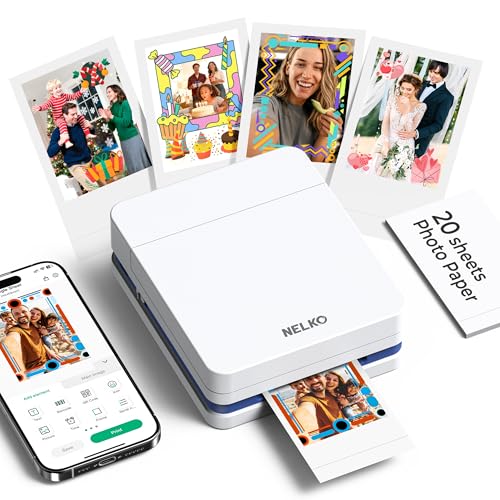
Nelko’s PP01 enters the 2×3 family with a software flourish: a portable photo printer and mini printer in white, an instant colour sticker printer for smartphones with sticky-back photos, Bluetooth for iOS and Android, and AI app editing. That last phrase is its distinguishing claim, and it should be read for what it plausibly is — an editing app that automates the enhancements, cut-outs and decorations that sticker printers live on — rather than as a promise about print quality, which in this format is governed by the media and the engine, not by the intelligence of the editor. Judged that way, the PP01’s pitch is coherent: in the mini sticker market, the app is half the product, and a maker leading with its app is telling you where it spent its effort.
The machine’s context is worth placing honestly. Nelko’s name in labelling is built on small printers for organisation, and the PP01 extends that sensibility into photographs: a household gadget, priced and pitched for everyday delight rather than for a photographer’s shelf. Its natural owner overlaps the Kodak Step’s — the journal keeper, the sticker trader, the parent printing for children — with an added lean toward buyers who want the app to do the creative heavy lifting: backgrounds swapped, subjects cut out, stickers composed without a designer’s patience. For that owner, the editing intelligence is not a gimmick but the feature that decides whether prints happen weekly or twice.
The cautions are the family’s plus one. Format limits apply exactly as on the Step: 2×3 sticky-back prints are charms, not documents, and a buyer should hold the credit-card test against their intentions before ordering. The additional caution is ecosystem depth — a newer entrant’s app will be updated, or not, on a schedule the established names’ track records predict better — so a buyer should glance at the app’s presence on their phone’s store from the listing before committing. Media type and starter counts are unstated in the title and belong to the listing check as well. For the buyer who wants the sticker printer whose software does the playing, the PP01 is the interesting gamble in this guide. Visit its listing, check the current price on Amazon, and confirm which paper it eats before the first pack is needed.
There is a generational honesty to add. The PP01’s constituency — younger printers, raised on edited-everything photography — experiences an unedited print as unfinished, and a printer whose app finishes photographs automatically meets that constituency where it lives. Older buyers sometimes read AI editing as a intrusion between them and their picture; younger buyers read its absence as a defect. Neither is wrong, and the PP01 simply declares its side. A household buying across generations might treat that declaration as the deciding datum, because the printer that gets used is the one whose software speaks its owner’s dialect.
Sticker culture gives the PP01 one more context worth understanding. Trading, journalling and decorating with stickers is a living social economy among its users, conducted in school corridors and online communities alike, and a printer that produces stickers at home plugs its owner into the making side of that economy rather than the buying side. Designs become currency, and the AI-assisted app lowers the skill threshold for minting it. Parents evaluating the PP01 for a teenager should recognise that economy as the actual product being bought; the printer is merely its mint. Judged on those terms — cost per design tried, speed from idea to sticker — the machine’s proposition is stronger than its specification sheet suggests.
- Print size per listing title: 2×3 in sticky-back photos
- Class per title: portable photo printer and instant colour sticker printer
- Connectivity per title: Bluetooth, iOS and Android compatible
- App per title: AI app editing
- Colour of unit per title: white
- Print technology: Not stated in the listing title — verify with the manufacturer documentation
Strengths
- AI app editing automates the decorations and cut-outs sticker printing lives on.
- Full 2×3 sticky-back format with Bluetooth for both phone platforms.
- Pitch and positioning suit everyday household and younger users.
Trade-offs
- The print technology itself is not named in the title, unlike the Kodak’s ZINK.
- A newer ecosystem’s app support horizon is less predictable than the established names’.
- Format limits are the family’s: small, sticky, charm-first prints.
Best for: sticker printers who want the editing app to compose and decorate their 2×3 prints for them.
Not suited for: households that require a named print technology and a long-established app ecosystem before buying, since this title states neither.

HP Sprocket Portable 2nd Edition — The established pocket name
The Sprocket is the machine that taught the market this format, and the 2nd Edition’s title is the plainest here: instantly print 2×3 sticky-backed photos from your phone, in Luna Pearl, with a model reference in brackets. No technology name is printed — the Sprocket line’s paper system is its own ecosystem, bought in Sprocket paper packs — and no app features are boasted, because the Sprocket’s argument has never been specification. It is the argument of the established default: the mini printer a buyer can purchase knowing the paper will be on shelves, the app will be maintained, and every teenager in the family already knows what it does. In gift-driven categories, that default status is a feature no specification can outrank.
Luna Pearl, the stated finish, signals the machine’s social placement with unusual honesty. This is a designed object, bought partly as an accessory — the printer as a handbag-and-desk item whose looks are part of its use, produced at parties without apology. Buyers embarrassed by that reasoning should not be: objects that live visibly get used, and a pocket printer’s value is entirely in its use. The 2×3 sticky-backed output is the family’s standard charm, with the family’s standard limits — small, adhesive, impressionistic at distance — and the Sprocket asks no one to pretend otherwise.
What a buyer should verify on the listing is the practical tail: starter paper in the box, current app compatibility with their phone, and the price of the paper packs that constitute the machine’s real cost over a year. The 2nd Edition’s maturity cuts both ways in that check — its ecosystem is proven, and its generation is established enough that a buyer should confirm it remains the current proposition against newer siblings on the same listing page. For the gift buyer, the godparent, the parent equipping a teenager, the Sprocket remains the name with the least explaining attached. Open its listing in Luna Pearl, check the current price on Amazon, and add paper to the order so the first evening is spent printing rather than shopping.
Second-edition maturity brings one more quiet benefit: an enormous informal knowledge base. Every question a new owner might ask — the journal layouts, the party games built on instant prints, the paper storage tricks — has been asked and answered publicly by years of owners, and that crowd-sourced manual is worth real money to a first-time buyer. Newer machines may out-feature it; none out-document it. In a category bought for fun, the machine with the most fun already mapped by its owners is a rational choice, and the Sprocket’s longevity in this guide’s company is earned on exactly those grounds.
- Print size per listing title: 2×3 in sticky-backed photos
- Source per title: prints from your phone
- Finish per title: Luna Pearl
- Model reference per title: 1AS85A
- Edition per title: 2nd Edition
- Print technology: Not stated in the listing title — verify with the manufacturer documentation
Strengths
- The established default of the format, with a proven paper ecosystem.
- A designed finish that suits its social, gift-led life.
- Years of owner knowledge publicly answer every beginner question.
Trade-offs
- The title names no print technology or app features to compare on paper.
- An established generation requires a check against newer siblings on the listing.
- Paper packs are the real annual cost and must be priced in.
Best for: gift buyers and families wanting the proven 2×3 sticky-back ecosystem with no surprises.
Not suited for: households whose priority is the newest AI editing features, which the Nelko PP01 in this guide is built around instead.

Canon SELPHY CP1500 Black Bundle — The 4×6 compact with 108 sheets
Canon’s SELPHY line is the elder statesman of compact photo printing, and this CP1500 bundle pairs the wireless compact printer in black with the RP-108 high-capacity colour ink and paper set — 108 sheets of 4×6 printing in the box. The SELPHY proposition has always been the photograph itself: dye-sublimation output with the finish and manners of a lab print, from a machine sized for a shelf and built, across generations, for households that print photographs as a permanent habit rather than a novelty. The bundle’s 108-sheet set places it numerically between the Liene’s hundred and the HP’s 118, close enough that the decision among the three 4×6 machines will be made on ecosystem and character rather than on the count.
Character, in the SELPHY’s case, means Canon’s photographic lineage. This is the printer photographers buy when the pocket printer is for the family’s photographs rather than the family’s fun — the machine whose prints go into frames and albums with the expectation of being looked at in ten years. Wireless compact printing keeps it domestic: the household prints from its phones, the machine lives where the albums live, and the RP-series consumable sets make the season’s cost a known figure bought in a single box. High-capacity in the set’s name is relative to smaller SELPHY packs, and the honest reading is the stated one: 108 prints before the next set.
A buyer comparing the three dye-sub machines should interrogate the listings on the points the titles leave open: app character, print speed, and the ongoing price of each maker’s refill sets, because over years the refills are the purchase and the printer is the down payment. Canon’s ecosystem depth — a line with a long history and wide retail presence — is the SELPHY’s quiet advantage in that long view. For the household that wants its 4×6 printing to feel like photography rather than gadgetry, the CP1500 bundle is the connoisseur’s choice in this family. Read its listing fully, check the current price on Amazon for the bundle, and weigh the RP-108 set’s cost against the rival bundles’ refills before deciding.
Longevity of the prints themselves is the SELPHY buyer’s traditional closing argument, and it deserves a careful form: dye-sublimation prints from this class are made to be kept — handled, framed, albumed — and Canon’s line has been bought for that keeping across many years of family archives. No title here prints an archival figure, and this guide invents none; the claim is about the class’s character and the line’s history, which a buyer can weigh alongside the documented facts. A household printing for the archive as much as for the fridge will find that character decisive, and will forgive the bundle a few sheets against a rival for it.
Album culture is the SELPHY’s home ground, and it is worth describing for households deciding whether they still live there. An album household prints in sittings: the season reviewed, the keepers chosen, an afternoon given to producing the physical record while the stories are told again over the prints. That ritual needs a machine that behaves like a darkroom’s polite descendant — consistent, unhurried, quality-first — and it is poorly served by gadgets optimised for party tricks. The CP1500’s bundle, sized past a hundred prints, is scaled for sittings rather than moments. A household that recognises its own Sundays in that description has found its machine, and a household that does not should save its money for a mini and its charms.
- Print size per listing title: 4×6 in prints
- Class per title: wireless compact photo printer
- Bundle per title: RP-108 high-capacity colour ink and paper set, 108 sheets
- Colour of unit per title: black
- Print technology: Not stated in the listing title — verify with the manufacturer documentation
- Battery operation: Not stated in the listing title — verify with the manufacturer documentation
Strengths
- A photographic lineage aimed at prints families keep, frame and album.
- The 108-sheet high-capacity set makes the first season’s cost a single known box.
- Wireless compact design fits the shelf where the household’s albums live.
Trade-offs
- Its stated bundle sits between the Liene and HP counts, so value must be finished on refill prices.
- The title does not name its print technology, though the line’s class is dye-sublimation territory to verify.
- A connoisseur’s machine is wasted on a household that prints twice a year.
Best for: households printing 4×6 photographs as a keeping habit, with frames and albums as the destination.
Not suited for: events and travel needing prints away from home power and Wi-Fi, since this is a wireless home compact.
Comparison Table
| Pick | Print size | Technology stated in title | Stated sheets in bundle |
|---|---|---|---|
| Liene M100 | 4×6 in | Thermal dye-sublimation | 100 sheets, 3 cartridges |
| HP Sprocket Studio Plus | 4×6 in | Dye sublimation | 118 sheets, 3 cartridges |
| KODAK Step | 2×3 in sticky-back | ZINK | Not stated in the listing title |
| Nelko PP01 | 2×3 in sticky-back | Not stated in the listing title | Not stated in the listing title |
| HP Sprocket Portable 2nd Ed | 2×3 in sticky-backed | Not stated in the listing title | Not stated in the listing title |
| Canon SELPHY CP1500 Bundle | 4×6 in | Not stated in the listing title | 108 sheets, RP-108 set |
How to Choose a Pocket Photo Printer
Choose the size first and let it eliminate half the page. Hold a credit card beside the photographs you intend to print: if that scale delights you — journal, sticker, keepsake charm — the 2×3 family is yours, and the choice narrows to ecosystem and app, Kodak’s ZINK simplicity against HP’s established Sprocket world against Nelko’s editing-led pitch. If the card looks like a postage stamp where a photograph should be, you belong to the 4×6 family, and the choice narrows to bundles and character: the stated sheet counts of the Liene, HP Studio Plus and Canon SELPHY, and the household tone each maker strikes — starter completeness, playful app, photographic lineage.
Then price the habit, not the machine. Pocket printing is a consumables subscription in disguise: paper packs and dye-sub sets, bought forever, in quantities set by your family’s enthusiasm. Compute a year of your realistic printing — the parties, the trips, the journal pages — for each finalist, using the listing’s refill prices, and compare those annual figures beside the purchase prices. The machine that wins that comparison is usually not the machine that won the headline comparison, and discovering so before purchase is the entire value of the exercise. Finally, if the printer is a gift, buy the media with it: a spare paper pack or the stated bundle turns a gadget gift into an evening of printing, which is the memory the gift was meant to make.
Print permanence is worth one calm paragraph, because households mix the two families’ output in the same albums and boxes. Dye-sublimation prints are made as keepable photographs and behave accordingly in frames and albums. The sticky-back minis are made as ephemera-plus — longer-lived than a party favour, intended for journals and surfaces rather than archives — and their adhesive is part of their design, not a flaw to apologise for. A family archive should therefore be routed to the 4×6 family by default, with the minis’ prints treated as the joyful duplicates: the sticker in the journal, the copy on the laptop, the spare in a friend’s keeping. Each family doing its own job is the whole system working.
Dye-Sublimation or ZINK: Which Print Technology Suits Your Photographs?
Dye-sublimation, the 4×6 family’s process, builds colour in continuous tones and produces prints that stand comparison with lab photographs — the choice when the print is the product. ZINK, named in the Kodak Step’s title, puts the colour chemistry inside the paper and needs no ink at all, trading a measure of tonal subtlety for total simplicity — the choice when the print is a sticker, a moment, a page in a journal. Neither technology is a compromise version of the other; they optimise for different destinations. A buyer who understands that sentence will never be disappointed by either, and a buyer who expects ZINK to frame like dye-sub, or dye-sub to ride in a pocket like ZINK, has been failed by whoever sold them the dream.
What Does a Year of Pocket Printing Actually Cost?
More than the printer, in any household that uses it — which is the point of owning one. The bundles in this guide make the first season unusually legible: a hundred-odd stated prints before refills begin. Beyond the bundle, the annual cost is your print count multiplied by the per-sheet cost of your machine’s media, a figure the listing gives you honestly if you divide the refill pack’s price by its sheet count. Households printing at parties and on trips should count generously; the families who abandon these machines rarely abandon them over quality — they abandon them in the month the media bill first surprises them, which is a failure of arithmetic at purchase, not of the printer.
Why Do Printed Photographs Outlast Their Welcome on a Phone?
Because an object asks to be kept and a file asks to be scrolled past. The print on the fridge is seen four hundred times a year by accident; the same photograph on a phone is seen when an algorithm resurfaces it, which is to say almost never and never on purpose. Pocket printers exist because households discovered that imbalance and wanted the accident back — the grandmother studying a 4×6 at the table, the teenager’s locker accumulating a year in stickers, the journal that holds a trip in the order it was lived. Any machine in this guide restores that accident; the format choice merely decides its size and its stickiness, which is why this guide spends its energy there rather than on marginal quality differences the eye forgives instantly.
Party use is the stress test that reveals each family’s character most honestly, so plan for it explicitly if your household entertains. A 4×6 machine at a family gathering becomes a portrait station: a queue forms, prints are admired at full size, and the pace of dye-sub printing sets a rhythm guests gather around rather than resent. A mini at the same gathering becomes a roaming delight, printing stickers at the speed of conversation for journals and phone cases. Households that host often sometimes end up owning one of each, bought in that order — the family machine first, the party machine when the first proves the habit — and this guide’s three-and-three balance exists partly to make that two-machine household easy to assemble without a duplicated mistake.
Which of These Printers Makes the Best Gift?
The one whose first month is already in the box. For a photograph-minded adult, the bundled 4×6 machines — the SELPHY with its 108-sheet set, the Sprocket Studio Plus with 118, the Liene with 100 — arrive as complete gifts whose recipient can print the same evening and for weeks after. For a teenager or journal keeper, the minis are the joyful gift, with the Kodak Step the safest pairing across phone platforms and the Sprocket the prettiest object. In every case the gift is completed by media: check the starter count on the listing, add a pack, and the present becomes a hobby instead of a demonstration. A printer without paper is a card that says the real gift is coming later, and it rarely arrives with the same delight.
Common Mistakes When Buying a Pocket Photo Printer
Buying the wrong size family is the founding error: the 2×3 charm purchased for a grandmother who wanted frameable photographs, or the 4×6 home machine bought for a teenager who wanted stickers at a party. A close second is ignoring the media tail — admiring the printer’s price while never dividing a refill pack’s price by its sheets, so the habit’s real cost arrives as a surprise. Gift buyers strand more machines than anyone by omitting spare paper, leaving a delighted recipient with a printer and three prints’ worth of media. Others assume every small printer is battery-powered and pocketable, though several picks here are home machines by their own titles. And some buyers judge mini prints by photographic standards the format never claimed, then blame a charming machine for not being a lab — a mismatch of expectation that the credit-card test, honestly performed, prevents in ten seconds.
Final Recommendation
Let the destination of your prints decide. Photographs destined for frames, albums and grandparents belong to the 4×6 dye-sub family: the HP Sprocket Studio Plus on the strength of its 118-sheet bundle and family app, the Liene M100 as the self-contained hundred-sheet starter, the Canon SELPHY CP1500 where the household prints to keep and values a photographic lineage. Photographs destined for journals, lockers and laptops belong to the minis: the Kodak Step for ZINK simplicity across both phone platforms, the HP Sprocket for the proven ecosystem, the Nelko PP01 where the app should do the creative work. A pocket printer is a small machine that restores a large pleasure; buy the one whose prints will be looked at in a year, in the place you actually intend to put them.
One habit multiplies the value of every machine in this guide, and it costs nothing: a weekly cull. Households that print well do not print everything; they spend ten minutes with the week’s photographs, choose the handful that carry the week’s story, and print those while the story is fresh. The cull is what turns a camera roll’s thousands into an album’s hundreds and a journal’s dozens, and it protects the media budget from the entropy of printing indiscriminately. Every printer here rewards the habit equally, because the habit is not about the machine at all — it is about treating photographs as things being made, on purpose, rather than as files being escaped from a phone before the storage warning arrives.
Travel packing draws the same line in miniature. The minis earn their luggage space on any trip where a journal or a child’s holiday book is being kept, because their output is consumed on the road, in the evening, as part of the day being recorded. The 4×6 machines earn a place in a car-based holiday cottage rather than a suitcase: set up on arrival, printing the week’s photographs before the drive home, so the holiday returns as objects rather than as a promise to sort the photos later. Choosing by the trips you actually take, rather than the trips in the brochure, keeps either machine working instead of waiting.
Frequently Asked Questions
What is the difference between the 4×6 and 2×3 printers here?
Destination. The 4×6 machines print true photographs for frames, albums and walls, using dye-sublimation. The 2×3 machines print small sticky-back prints for journals, stickers and keepsakes. A credit card held beside your intended print settles which family you belong to faster than any specification.
Do these printers need ink cartridges?
The dye-sublimation machines use matched colour cartridges with their paper sets, and the bundles here state cartridge counts alongside sheets. ZINK printing, named in the Kodak Step’s title, carries its colour in the paper itself and uses no ink cartridges at all. Check each listing for its exact consumable system before pricing refills.
Can I print straight from an iPhone or Android phone?
Yes — every title here is built around phone printing. The 4×6 machines connect over Wi-Fi for household use, while the minis pair over Bluetooth, and the Kodak, Nelko and Liene titles name iOS and Android compatibility explicitly.
Are the prints from these machines proper photographs?
The 4×6 dye-sublimation prints are photograph-grade objects, continuous in tone and made to be framed and kept. The 2×3 sticky-back prints are charms — vivid, immediate and small — and should be bought for journals and stickers rather than judged as framed photographs.
What should I buy alongside the printer?
Media, always: a spare paper pack for the minis or confidence that the bundle’s stated sheets cover your first season for the 4×6 machines. A printer gifted or bought without its consumables stops being a pleasure at exactly the moment it becomes one.
Can these printers print from a computer as well as a phone?
These machines are designed around phones, and their titles describe phone printing, apps and home wireless use rather than computer workflows. A buyer whose photographs live mainly on a computer should check the specific listing for any desktop route, and should otherwise consider a conventional photo printer, which is built for that source.
Related Guides
The prints these machines make often begin as artwork for walls, and the professional end of that journey is mapped in our guide to large format printers for giclee and gallery work. Sellers printing product photographs and inserts alongside labels will also want our small business colour label guide, which opens by correcting the thermal colour myth.