Our Top Picks
 Kastar 4 Pack Battery and LCD Triple USB1 Charger + 4 Batteries3 x 2 x 4 inches0.4 poundsCheck on Amazon


What's inside
- Lithium batteries for the Fujifilm FinePix XP80: start with the battery code, not the camera name alone
- How to read NP-45, NP-45A, NP-45B, and NP-45S without guessing
- Single pack, multi-pack, or charger kit: which format solves your problem
- FirstPower NP-45S NP-45A Battery Charger Kit for Fujifilm INSTAX Mini 90 (B08F7XC4L6)
- Kastar Battery Replacement for Fujifilm NP-45 NP-45A NP-45B NP-45S (B00QJOB7QC)
- Kastar Battery (3-Pack) and Charger Kit for Fujifilm NP-45 NP-45A NP-45B NP-45S (B00QJOBWD0)
- Kastar Battery (4-Pack) and Charger Kit for Fujifilm NP-45 NP-45A NP-45B NP-45S (B00UPVK2B6)
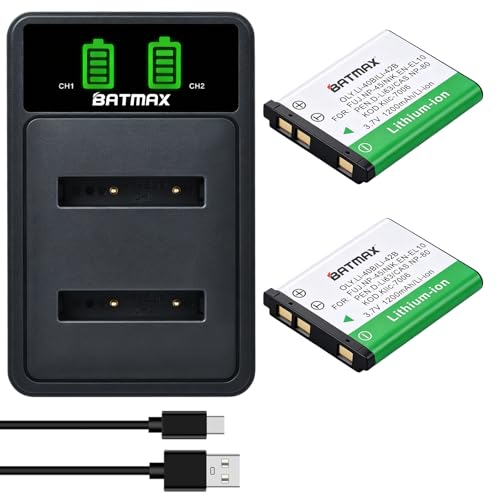
- Batmax 2Pcs EN-EL10 NP-45 Li-40B Battery + Quick LED Dual Charger (B0CY2PTM6J)
- Kastar 4 Pack Battery and LCD Triple USB Charger (B08L7L8HGG)
- Charging away from home: USB, dual bays, and the overnight bottleneck
- Waterproof camera, ordinary lithium care: beach, pool, and snorkeling habits
- Signs a lithium pack is worn, and what to do next
- How to choose: a buying guide for XP80 owners
- Storage and long-term care for NP-45 lithium packs
- Check prices on Amazon
- Disclosure
As an Amazon Associate I earn from qualifying purchases. This post may contain affiliate links at no extra cost to you.
Lithium batteries for the Fujifilm FinePix XP80: start with the battery code, not the camera name alone
The Fujifilm FinePix XP80 belongs to a family of rugged, waterproof compact cameras that were built for beaches, pools, ski trips, and family travel where a phone is not always the camera you want to risk. What keeps an XP80 useful years after launch is not only the sealed body. It is whether you can still find a fresh, correctly shaped lithium battery that fits the compartment, makes clean contact, and holds a charge through a full day away from a wall outlet. For this camera, the code that matters most is NP-45, along with its close variants NP-45A and NP-45S. Every product in this guide is built around that code or around a charger system that lists NP-45 among its supported types, and the published specifications in each product title are the starting point for checking fit.
That focus matters because compact camera batteries look deceptively similar in photographs. Two packs can share a similar outline and voltage class yet differ in contact placement, locking notch, or thickness enough that one slides in smoothly and the other does not. Our research for this guide therefore stays anchored to what the titles themselves state: the battery code, the camera families named, and whether the listing is a single replacement pack, a multi-pack, or a kit that also includes a charger. Where a title names additional cameras, that breadth is useful context, but it does not change the first question an XP80 owner should ask, which is whether NP-45, NP-45A, or NP-45S appears clearly for the pack itself.
There is also a practical difference between reviving a camera that has sat in a drawer and maintaining a camera you already use every weekend. A drawer revival usually needs both a fresh battery and a reliable way to charge it, because the original charger may be missing and the original pack may no longer accept a full charge. A camera in regular use, by contrast, often needs only a spare that can rotate through the bag while the first pack charges overnight. This guide separates those two jobs throughout, so a single-pack replacement is not judged as if it were a travel kit, and a multi-pack kit is not treated as wasteful when a household shares one camera among several people on a trip.
Battery age shows up in ordinary ways before it becomes dramatic. The camera may power on normally, take a short burst of photographs, and then show a low indicator far sooner than expected. Video clips may end earlier than the memory card would allow. A pack that once lasted through an afternoon at the water park may now need swapping before lunch. None of those signs automatically mean the camera has failed. On an older compact, the most replaceable part of the system is the battery, and replacing a tired pack is the logical first step before drawing conclusions about the camera body itself.
How to read NP-45, NP-45A, NP-45B, and NP-45S without guessing
Fujifilm used the NP-45 family across a long run of FinePix models, and third-party makers list the variants together because the packs serve the same compartment in many of those cameras. You will see NP-45, NP-45A, NP-45B, and NP-45S grouped in several titles in this guide. That grouping is a compatibility claim made by the maker, and the safest way to use it is to match the exact code printed on your existing pack first, then confirm that the same code appears in the replacement title. If your old pack reads NP-45S, look for NP-45S in the listing. If it reads NP-45A, look for that code. A listing that names the whole family gives you more confidence than a listing that mentions only a camera model with no battery code at all.
Remove the pack from your XP80 and read the label under good light before ordering. Photograph the label with your phone so the code, orientation arrows, and contact end are recorded even if the print is small. Compare the contact end of the old pack with product photographs, paying attention to which side carries the contacts and how the corners are shaped. Avoid relying on memory of a code from another Fujifilm camera you owned earlier, because the FinePix line used several different battery families across its history, and a pack from a different family will not become compatible simply because the brand on the camera is the same.
The XP series itself spans many models named in these titles, including XP10, XP20, XP30, XP50, XP60, XP70, XP80, XP90, and later models such as XP140 and XP150 in one kit listing. That long list reflects how widely the NP-45 shape was used in rugged and everyday FinePix cameras. It also includes T-series models such as the T350 and T360 in some listings. For an XP80 owner, those extra models are secondary. They confirm the family, but your decision should still rest on the battery code and on whether you need a charger included. best 18650 battery chargers That linked guide is useful background if you also maintain flashlights or other gear with cylindrical lithium cells, though those cells are a completely different format and must never be confused with the flat NP-45 camera pack.
- Write down the exact code from your current pack before shopping.
- Match the contact end and locking shape in photographs, not just the code.
- Treat camera model lists as supporting evidence and the battery code as the primary check.
- Keep the old pack until the replacement has charged and powered the camera, so you can compare shape side by side.
- Store the code in your camera bag notes so a future spare can be ordered without removing the pack again.
Single pack, multi-pack, or charger kit: which format solves your problem
A single replacement pack is the cleanest answer when your charger still works, your original pack has faded, and you simply want the camera back to a dependable runtime. It adds the least clutter and lets you confirm that a fresh pack restores the camera before investing in spares. A multi-pack changes the equation for travel. With two, three, or four packs, you can keep shooting while one charges, leave one in a dry bag as an emergency reserve, and rotate packs so no single pack is deep-cycled every day of a holiday. Rotation also spreads wear, provided you label packs and use them in turn rather than always reaching for the same one.
A charger kit solves a different problem. Many XP cameras have changed hands, been inherited, or been bought used without the full original accessories. In that situation a battery alone may arrive with no practical way to charge it outside the camera, or no way at all if in-camera charging is not available for your setup. Kits in this guide include wall or USB-style chargers as described in their titles, and one option adds a dual charger with an LED indicator style described as quick. Another adds an LCD triple USB charger format. Those descriptions matter for travel planning: USB charging can draw from a laptop, a vehicle adapter, or a power bank, while a dedicated charger at home keeps a simple routine on a shelf or desk.
FirstPower NP-45S NP-45A Battery Charger Kit for Fujifilm INSTAX Mini 90 (B08F7XC4L6)
The FirstPower listing is presented as a battery and charger kit for NP-45S and NP-45A, and its title also names the Fujifilm INSTAX Mini 90 alongside a wide set of FinePix models including XP140, XP150, XP10, and XP20. For an XP80 owner, the relevant thread is the NP-45S and NP-45A code pairing and the fact that this is a kit rather than a bare pack. If your camera came to you without a charger, or if the charger has been lost during a house move, a kit of this type addresses both missing pieces in one purchase instead of requiring two separate compatibility checks.
Consider this format when you are setting up a complete spare station. One pack can live in the camera while the kit charger handles the next pack, and the whole set can travel in a small pouch. Because the title names INSTAX Mini 90 as well as FinePix models, households that own more than one Fujifilm product using this battery family may find the shared code especially convenient, but you should still confirm the code on each device rather than assuming every Fujifilm product in the house uses the same pack. The kit framing also suits a used XP80 purchase, where the seller included the camera and little else. Starting fresh with a new pack and its matching charger removes doubt about whether a tired original pack or an unknown charger caused the first disappointing outing.
In daily handling, treat any NP-45 pack with the same basic care. Keep contacts clean and dry, insert the pack in the orientation the compartment indicates without forcing it, and close the XP80 battery door fully so the waterproof seal seats as designed. If a pack feels swollen, resists sliding in, or shows damage to its casing, remove it from service rather than pressing it into the compartment. A correct pack should fit with the same ease as the original, and any change in fit is information worth acting on promptly.
Charging routine matters as much as the pack itself. Charge before a planned outing rather than relying on a brief top-up in the car, allow a freshly charged pack a moment to settle before loading it, and avoid leaving packs on a charger for many days at a time as a permanent habit. For travel, pack the charger in the same pouch as the spare batteries so the system stays together, and keep a simple note of which packs are charged. Those small habits, repeated across a season, do more for reliability than any single purchase decision in this list.
Kastar Battery Replacement for Fujifilm NP-45 NP-45A NP-45B NP-45S (B00QJOB7QC)
This Kastar listing is a battery replacement covering NP-45, NP-45A, NP-45B, and NP-45S, with a long FinePix compatibility list that explicitly includes XP80 along with XP20, XP22, XP30, XP50, XP60, XP70, and XP90, plus T350 and T360 models. That explicit naming of XP80 makes the relevance direct: this is the straightforward replacement route for an owner whose charger is present and working and whose need is a fresh pack that matches the family codes. It is the kind of listing to shortlist when the camera powers on with the old pack but fades quickly, suggesting the pack rather than the camera is the limiting factor.
A single replacement also works well as a diagnostic step. Fit the new pack, charge it fully with your existing charger, and use the camera through a normal day of stills and short clips. If runtime returns to a level that covers your outings, you have confirmed the diagnosis with minimal extra gear. If you later decide you need travel spares, you can add a multi-pack or a kit knowing the code is correct. Keep the packaging and note the date you put the pack into service, a small habit that later helps you judge how long a pack lasted in your pattern of use, whether that is weekly swimming lessons or only summer holidays.
In daily handling, treat any NP-45 pack with the same basic care. Keep contacts clean and dry, insert the pack in the orientation the compartment indicates without forcing it, and close the XP80 battery door fully so the waterproof seal seats as designed. If a pack feels swollen, resists sliding in, or shows damage to its casing, remove it from service rather than pressing it into the compartment. A correct pack should fit with the same ease as the original, and any change in fit is information worth acting on promptly.
Charging routine matters as much as the pack itself. Charge before a planned outing rather than relying on a brief top-up in the car, allow a freshly charged pack a moment to settle before loading it, and avoid leaving packs on a charger for many days at a time as a permanent habit. For travel, pack the charger in the same pouch as the spare batteries so the system stays together, and keep a simple note of which packs are charged. Those small habits, repeated across a season, do more for reliability than any single purchase decision in this list.
Kastar Battery (3-Pack) and Charger Kit for Fujifilm NP-45 NP-45A NP-45B NP-45S (B00QJOBWD0)
The three-pack Kastar kit pairs multiple NP-45 family batteries with a charger, and its title lists FinePix models from XP20 through the XP range including XP70 and neighboring models. For XP80 use, the appeal is rotation. Three packs allow a simple system: one in the camera, one charged and ready in the bag, and one on the charger or resting after use. That system is well matched to full-day excursions where the camera is passed around a group and nobody wants to monitor a single pack anxiously or cut video short to preserve stills capacity.
Multi-pack ownership rewards a little organization. Mark each pack with a small number on a piece of tape, then rotate in order. When a pack is spent, it goes to the charger; when it is full, it goes to the back of the queue. This prevents one pack from doing all the work while the others sit unused for months, which is not ideal for lithium packs either. Three is also a practical number for a family camera: enough to cover a beach day, a birthday, and a school event in the same weekend without nightly urgency, yet few enough that each pack gets regular use across a season. If your XP80 is the camera children take to the pool while adults keep phones dry, that depth of spares is often the difference between a camera that is always ready and one that is always nearly empty.
In daily handling, treat any NP-45 pack with the same basic care. Keep contacts clean and dry, insert the pack in the orientation the compartment indicates without forcing it, and close the XP80 battery door fully so the waterproof seal seats as designed. If a pack feels swollen, resists sliding in, or shows damage to its casing, remove it from service rather than pressing it into the compartment. A correct pack should fit with the same ease as the original, and any change in fit is information worth acting on promptly.
Charging routine matters as much as the pack itself. Charge before a planned outing rather than relying on a brief top-up in the car, allow a freshly charged pack a moment to settle before loading it, and avoid leaving packs on a charger for many days at a time as a permanent habit. For travel, pack the charger in the same pouch as the spare batteries so the system stays together, and keep a simple note of which packs are charged. Those small habits, repeated across a season, do more for reliability than any single purchase decision in this list.
Kastar Battery (4-Pack) and Charger Kit for Fujifilm NP-45 NP-45A NP-45B NP-45S (B00UPVK2B6)
This Kastar option extends the same NP-45, NP-45A, NP-45B, and NP-45S family coverage to a four-pack kit with charger, again naming the FinePix XP line from XP20 and XP22 through XP60 and XP70 in its title. Four packs suit heavier use: multi-day trips without reliable nightly charging time, group tours where the XP80 is the shared waterproof camera, or a rental, club, or school setting where the camera must be ready each morning regardless of who forgot to charge it the night before. The included charger keeps the set self-contained, so the kit can live together in one case.
With four packs, labeling and rotation become essential rather than optional. Number the packs, keep charged and spent packs in separate pockets or small bags, and never mix them loose in a single compartment where a spent pack can be mistaken for a fresh one at the water edge. Four packs also give you a graceful way to retire a fading pack later: remove the weakest pack from rotation and continue with three while you decide on a replacement, instead of losing use of the camera entirely. For occasional users, four may be more depth than needed, and a smaller pack count that cycles regularly can be the healthier choice. Match the count to real shooting days, not to a fear of running out that your actual outings never create.
In daily handling, treat any NP-45 pack with the same basic care. Keep contacts clean and dry, insert the pack in the orientation the compartment indicates without forcing it, and close the XP80 battery door fully so the waterproof seal seats as designed. If a pack feels swollen, resists sliding in, or shows damage to its casing, remove it from service rather than pressing it into the compartment. A correct pack should fit with the same ease as the original, and any change in fit is information worth acting on promptly.
Charging routine matters as much as the pack itself. Charge before a planned outing rather than relying on a brief top-up in the car, allow a freshly charged pack a moment to settle before loading it, and avoid leaving packs on a charger for many days at a time as a permanent habit. For travel, pack the charger in the same pouch as the spare batteries so the system stays together, and keep a simple note of which packs are charged. Those small habits, repeated across a season, do more for reliability than any single purchase decision in this list.
Batmax 2Pcs EN-EL10 NP-45 Li-40B Battery + Quick LED Dual Charger (B0CY2PTM6J)
The Batmax listing is distinctive in two ways stated in its title: it includes two pieces and a quick LED dual charger, and it spans several battery codes, namely NP-45 for Fujifilm, EN-EL10 for Nikon, and Li-40B and related Olympus codes including LI-42B, plus Kodak KLIC-7006. For an XP80 owner, the NP-45 mention is the entry point, and the dual charger is the headline feature. Charging two packs at once, with LED indication as described, shortens the overnight turnaround when both packs were used during the day, which is common on snorkeling, kayaking, or water park outings where the camera rarely rests.
The cross-brand code list can be a genuine advantage in a household with more than one older compact camera from different makers, provided each camera code is checked individually. It can also be a source of confusion if packs for different codes are stored together, because a pack that belongs to another camera may look similar at a glance. If you choose a multi-code set, store each code group separately and label the storage, not just the packs. The dual charger format pairs naturally with a two-pack rotation: both packs charge together in the evening, both travel together in the morning, and there is no decision about which single pack gets the charger first. For XP80 use alone, confirm NP-45 on the specific packs you will use in the Fujifilm, and keep any other-code packs clearly apart.
In daily handling, treat any NP-45 pack with the same basic care. Keep contacts clean and dry, insert the pack in the orientation the compartment indicates without forcing it, and close the XP80 battery door fully so the waterproof seal seats as designed. If a pack feels swollen, resists sliding in, or shows damage to its casing, remove it from service rather than pressing it into the compartment. A correct pack should fit with the same ease as the original, and any change in fit is information worth acting on promptly.
Charging routine matters as much as the pack itself. Charge before a planned outing rather than relying on a brief top-up in the car, allow a freshly charged pack a moment to settle before loading it, and avoid leaving packs on a charger for many days at a time as a permanent habit. For travel, pack the charger in the same pouch as the spare batteries so the system stays together, and keep a simple note of which packs are charged. Those small habits, repeated across a season, do more for reliability than any single purchase decision in this list.
Kastar 4 Pack Battery and LCD Triple USB Charger (B08L7L8HGG)
This Kastar set combines four packs with an LCD triple USB charger, and its title names FinePix T350, T360, T400, T410, T500, and T560 models along with XP10 and XP11 and further models in the family. The charger description is the differentiator here: an LCD format suggests at-a-glance charge status on the charger itself, and a triple USB arrangement points to charging more than one pack through a USB-powered setup. For travelers who already carry USB power for phones, that style can consolidate cables and adapters into one system for the camera kit as well.
A USB-centered charging routine is especially handy in vehicles, boats, and cabins where wall outlets are scarce but USB ports or power banks are available. It also suits a desk drawer setup where a laptop or hub is the constant power source. With four packs and multi-bay charging, you can return from a trip, place the spent packs on charge together, and restore the whole rotation without queuing packs through a single slot across two evenings. As with the other NP-45 listings, verify the code against your XP80 pack, and remember that the T-series models named prominently in the title do not change the XP check: the battery family is the shared element, and your pack label remains the authority.
In daily handling, treat any NP-45 pack with the same basic care. Keep contacts clean and dry, insert the pack in the orientation the compartment indicates without forcing it, and close the XP80 battery door fully so the waterproof seal seats as designed. If a pack feels swollen, resists sliding in, or shows damage to its casing, remove it from service rather than pressing it into the compartment. A correct pack should fit with the same ease as the original, and any change in fit is information worth acting on promptly.
Charging routine matters as much as the pack itself. Charge before a planned outing rather than relying on a brief top-up in the car, allow a freshly charged pack a moment to settle before loading it, and avoid leaving packs on a charger for many days at a time as a permanent habit. For travel, pack the charger in the same pouch as the spare batteries so the system stays together, and keep a simple note of which packs are charged. Those small habits, repeated across a season, do more for reliability than any single purchase decision in this list.
Charging away from home: USB, dual bays, and the overnight bottleneck
Most disappointing camera days are not caused by a pack that holds nothing. They are caused by a charging queue that never cleared. You return late, place one pack on a single charger, fall asleep, and wake with one full pack and one still empty. The second pack then limits the day or stays home and is forgotten. Dual and triple charging formats, as described in the Batmax and Kastar LCD listings, exist to break that queue. Even a kit charger used with discipline, charging the most depleted pack first while you prepare the bag, can prevent the bottleneck if you start the routine when you walk in rather than at bedtime.
USB charging adds flexibility because USB power is now present in cars, boats, airport seating, and laptop bags. If you lean on USB, carry a cable that belongs to the camera kit and stays with it, rather than borrowing a phone cable that will migrate away. A power bank that travels for phones can also serve the camera charger, but plan its capacity across all devices instead of assuming it will cover everything on a long day. Readers who maintain other rechargeable gear may also find best automatic battery chargers helpful for understanding how automatic charging stages work in larger battery systems, even though those chargers serve different battery types and are not substitutes for the NP-45 chargers in the kits above.
Waterproof camera, ordinary lithium care: beach, pool, and snorkeling habits
The XP line was made for water, and that shapes battery care in specific ways. Always change batteries on dry land or in a dry area of the boat, with dry hands, and check that no sand or water droplets are around the battery door seal before closing it. A single grain of sand on a seal can compromise the closure, and opening the compartment while the camera is wet invites moisture toward the pack and contacts. After a swim, rinse and dry the exterior as the camera maker directs, then wait until the camera is fully dry before opening any door. The battery routine and the waterproof routine are the same routine: patience at the door protects everything inside.
Cold water and cold air both shorten apparent runtime. A pack that seems weak on a ski slope or in a cold lake may recover some capacity when warmed, which is why a spare kept close to the body or in an inside pocket can rescue a session. Conversely, a hot car in summer is a poor storage place for spares. Keep travel spares in the shaded bag you carry, not in a glove compartment that bakes between stops. For photographers comparing rugged compacts with larger travel cameras, best 1 inch sensor travel zoom cameras covers a different class of camera altogether, but the battery lesson transfers: spares, warmth, and a charging plan decide how long any travel camera keeps working.
- Change packs only when the camera exterior and your hands are dry.
- Inspect the door seal area for sand or hair before every closure.
- Carry at least one charged spare in a dry pouch separate from wet gear.
- Warm a cold spare in an inside pocket before swapping it in.
- Never charge a damp pack; let everything dry fully first.
- Rinse salt from the camera exterior promptly after ocean use, following the maker guidance for the body.
Signs a lithium pack is worn, and what to do next
A worn lithium pack usually announces itself gradually. Runtime shrinks across weeks rather than vanishing overnight. The camera indicator drops quickly through the first portion of charge, or the pack charges to full suspiciously fast because there is less capacity left to fill. In more advanced wear, a pack may swell slightly, making it fit more tightly than it once did. Swelling is a stop signal: do not force a swollen pack into a waterproof compartment, do not charge it again to see if it improves, and replace it through appropriate local recycling or disposal routes for lithium batteries rather than household trash where rules direct otherwise.
Before retiring a pack, rule out simpler causes. Clean the contacts gently with a dry cloth, confirm the charger completes a full cycle, and check that the camera clock and settings are not resetting in a way that suggests a contact problem rather than a capacity problem. If a fresh replacement restores normal runtime, the diagnosis is confirmed and the old pack can leave rotation. Label packs by purchase period so the oldest pack is the first suspect next time runtime falls. That record-keeping is part of best 10 bit cameras level planning in a different context too: knowing your gear state, in writing, prevents guesswork when a shoot day matters.
How to choose: a buying guide for XP80 owners
Start with an inventory, not a shopping list. Lay out what you have: the camera, every pack you own with its code and condition, and every charger. Note which pieces are missing and which are merely tired. If the charger is missing, a kit from this guide is the natural category, with the FirstPower kit, the Kastar three-pack and four-pack kits, and the Kastar LCD triple USB set as the kit-framed options. If the charger works and only the pack has faded, the single Kastar replacement keeps the purchase focused. If runtime on trips is the problem, count your shooting days honestly and choose the pack count that covers the longest typical day plus one reserve.
Next, decide how you will charge on your busiest trip. A dual charger, as in the Batmax set, suits two-pack days. A triple USB LCD charger suits a USB-centered travel kit. A standard kit charger suits home-based use with occasional travel. Then check the code one final time against your pack label, confirm the XP80 or the NP-45 family appears in the listing you chose, and plan labels and rotation before the packs arrive. Buying the system, not just the cells, is what turns a purchase into reliability.
- Missing charger: choose a kit so battery and charging arrive together.
- Working charger, faded pack: choose a single replacement first.
- Full-day water excursions: choose two or more packs with a rotation plan.
- Multi-day trips: favor multi-bay or USB charging to clear the overnight queue.
- Shared household camera: label packs and keep charged and spent packs physically separate.
- Cross-brand household: separate packs by code so NP-45 never mixes with other codes in storage.
Avoid the common mistakes that follow. Do not order by camera brand alone without reading the battery code. Do not assume a pack from another FinePix family fits because the camera looks similar. Do not buy the largest bundle when your real gap was only a charger, and do not buy a single pack when your real pattern is dawn-to-dusk travel. Do not store packs loose with coins or keys, do not charge on soft bedding, and do not open the battery door while the camera is wet. Each of those errors is avoidable with the checks in this guide, and none of them requires special equipment to prevent.
Storage and long-term care for NP-45 lithium packs
For storage between seasons, lithium packs generally prefer a partial charge rather than being stored completely full or completely empty for long periods, kept in a cool, dry place away from direct sun. If your XP80 will sit for months, remove the pack, store it separately in a small case or bag that protects its contacts, and check it every few months, topping it up and giving the camera a short session so the whole system stays familiar. Before the next major trip, run a full charge and a practice outing. Packs that have been stored deserve a proving run before they are trusted with a once-a-year event.
Keep a simple log with each pack number, when it entered service, and any outing where it seemed weak. Over time that log tells you which pack to suspect first and when a replacement cycle is approaching. Stagger replacements when you can, so packs do not all age together and fail together on the same holiday.
Check prices on Amazon
Live listings for the shortlist in this guide are pulled from Amazon below, so prices and availability are always current at the moment you look.

Disclosure
This guide was prepared from published product titles, battery codes, and general care knowledge for lithium camera packs, using our research into the NP-45 family and the FinePix models named by each maker. Product names and compatibility lists are those stated by the makers in their listings, and readers should confirm the code on their own pack before ordering. As an Amazon Associate we earn from qualifying purchases. Links in this article are affiliate links, and using them may support the site at no additional cost to the reader, while the choice of which pack count or charger format to buy remains a decision each owner should match to their own camera, charger inventory, and travel pattern described above.